 Red Hat Summit
このコンテンツは選択した言語では利用できません。
Chapter 3. Create and Download the GCS Credentials File
The Block Storage service needs your Google credentials in order to access and use Google Cloud for backups. You can provide these credentials to Block Storage by creating a service account key:
- Log in to the Google developer console (http://console.developers.google.com) using your Google account.
Click the
Credentialstab. From there, selectService account keyfrom theCreate credentialsdropdown.
In the next screen (
Create service account key), select the service account that the Block Storage service should use from theService accountdropdown: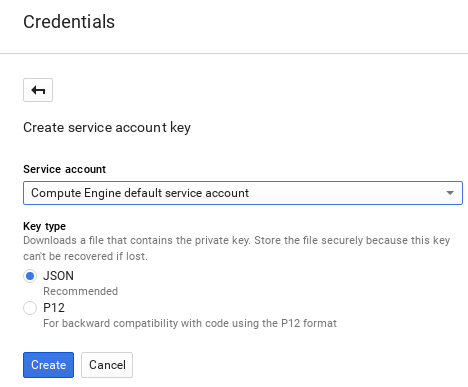
In the same screen, select
JSONfrom theKey typesection and clickCreate.The browser will then download the key to its default download location:

Open the file, and note the value of the
project_idparameter:{ "type": "service_account", "project_id": "cloud-backup-1370", ...{ "type": "service_account", "project_id": "cloud-backup-1370", ...Copy to Clipboard Copied! Toggle word wrap Toggle overflow The /etc/cinder/Cloud-Backup.json key will be used later in Chapter 4, Create the Environment File (in particular, the value of
project_idand the absolute path to the file).Copy the key file to /etc/cinder/ on any Controller node. From there, change the user, group, and permissions of the key file to match that of /etc/cinder/cinder.conf. This will ensure that the Block Storage service can use it:
cp Cloud-Backup.json /etc/cinder/
chown cinder:cinder /etc/cinder/Cloud-Backup.json
chmod 0600 /etc/cinder/Cloud-Backup.json
# cp Cloud-Backup.json /etc/cinder/
# chown cinder:cinder /etc/cinder/Cloud-Backup.json
# chmod 0600 /etc/cinder/Cloud-Backup.json
Copy to Clipboard Copied! Toggle word wrap Toggle overflow Copy the key file to the same location on each Controller node (namely, to /etc/cinder/Cloud-Backup.json). Use
rsync -ato ensure that the permissions and ownership settings are preserved:rsync -a /etc/cinder/Cloud-Backup.json root@CONTROLLERHOST:/etc/cinder/
# rsync -a /etc/cinder/Cloud-Backup.json root@CONTROLLERHOST:/etc/cinder/Copy to Clipboard Copied! Toggle word wrap Toggle overflow Replace CONTROLLERHOST with the hostname of a target Controller.

'%20d='M201.5%20305.5c-13.8%200-24.9-11.1-24.9-24.6%200-13.8%2011.1-24.9%2024.9-24.9%2013.6%200%2024.6%2011.1%2024.6%2024.9%200%2013.6-11.1%2024.6-24.6%2024.6zM504%20256c0%20137-111%20248-248%20248S8%20393%208%20256%20119%208%20256%208s248%20111%20248%20248zm-132.3-41.2c-9.4%200-17.7%203.9-23.8%2010-22.4-15.5-52.6-25.5-86.1-26.6l17.4-78.3%2055.4%2012.5c0%2013.6%2011.1%2024.6%2024.6%2024.6%2013.8%200%2024.9-11.3%2024.9-24.9s-11.1-24.9-24.9-24.9c-9.7%200-18%205.8-22.1%2013.8l-61.2-13.6c-3-.8-6.1%201.4-6.9%204.4l-19.1%2086.4c-33.2%201.4-63.1%2011.3-85.5%2026.8-6.1-6.4-14.7-10.2-24.1-10.2-34.9%200-46.3%2046.9-14.4%2062.8-1.1%205-1.7%2010.2-1.7%2015.5%200%2052.6%2059.2%2095.2%20132%2095.2%2073.1%200%20132.3-42.6%20132.3-95.2%200-5.3-.6-10.8-1.9-15.8%2031.3-16%2019.8-62.5-14.9-62.5zM302.8%20331c-18.2%2018.2-76.1%2017.9-93.6%200-2.2-2.2-6.1-2.2-8.3%200-2.5%202.5-2.5%206.4%200%208.6%2022.8%2022.8%2087.3%2022.8%20110.2%200%202.5-2.2%202.5-6.1%200-8.6-2.2-2.2-6.1-2.2-8.3%200zm7.7-75c-13.6%200-24.6%2011.1-24.6%2024.9%200%2013.6%2011.1%2024.6%2024.6%2024.6%2013.8%200%2024.9-11.1%2024.9-24.6%200-13.8-11-24.9-24.9-24.9z'/%3e%3c/svg%3e)