 Red Hat Summit
このコンテンツは選択した言語では利用できません。
Chapter 4. Viewing the Mortgage_Process data objects
Data objects are the building blocks for the rule assets that you create. Data objects are custom data types implemented as Java classes in specified packages of your project. These custom data types determine what data your assets and your decision services are based on.
This tutorial uses the following data objects:
-
Applicant -
Application -
Property -
ValidationErrorDO
4.1. Viewing the Applicant data object
Follow these steps to familiarize yourself with the predefined Applicant data object, which contains information about the applicant. This is the basic information required to apply for the loan in this tutorial.
Procedure
-
In Business Central, click Menu
Design Projects, and click Mortgage_Process. -
Enter
Applicant.javain the project’s asset search box, press Enter, and click the Applicant data object. Review the Applicant data object values.

4.2. Viewing the Application data object
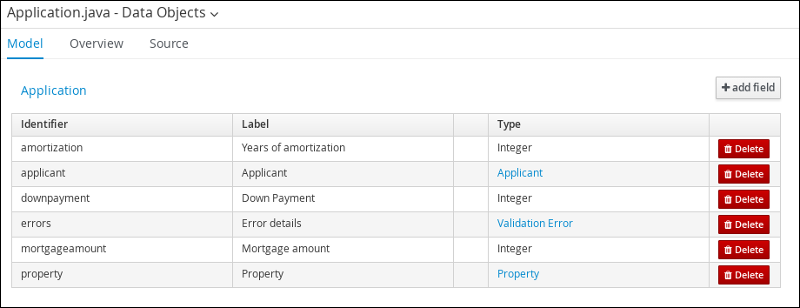
Follow these steps to familiarize yourself with the predefined Application data object, which contains information about the mortgage details, such as the down payment and the mortgage amount.
Procedure
-
In Business Central, click Menu
Design Projects, and click Mortgage_Process. -
Enter
Application.javain the project’s asset search box, press Enter, and click the Application data object. Review the Application data object values.
4.3. Viewing the Property data object
Follow these steps to familiarize yourself with the predefined Property data object, which contains information about the property details, such as the property age and price.
Procedure
-
In Business Central, click Menu
Design Projects, and click Mortgage_Process. -
Enter
Property.javain the project’s asset search box, press Enter, and click the Property data object. Review the Property data object values.

4.4. Viewing the ValidationErrorDO data object
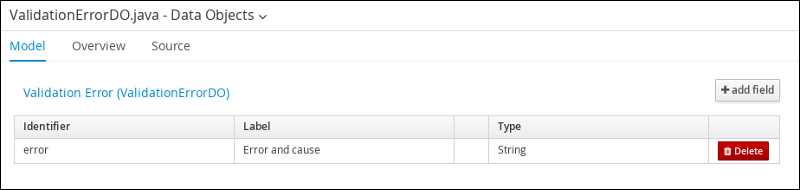
Follow these steps to familiarize yourself with the predefined ValidationErrorDO data object, which specifies the cause of an application error.
Procedure
-
In Business Central, click Menu
Design Projects, and click Mortgage_Process. -
Enter
ValidationErrorDO.javain the project’s asset search box, press Enter, and click the ValidationErrorDO data object. Review the ValidationErrorDO data object values.

'%20d='M201.5%20305.5c-13.8%200-24.9-11.1-24.9-24.6%200-13.8%2011.1-24.9%2024.9-24.9%2013.6%200%2024.6%2011.1%2024.6%2024.9%200%2013.6-11.1%2024.6-24.6%2024.6zM504%20256c0%20137-111%20248-248%20248S8%20393%208%20256%20119%208%20256%208s248%20111%20248%20248zm-132.3-41.2c-9.4%200-17.7%203.9-23.8%2010-22.4-15.5-52.6-25.5-86.1-26.6l17.4-78.3%2055.4%2012.5c0%2013.6%2011.1%2024.6%2024.6%2024.6%2013.8%200%2024.9-11.3%2024.9-24.9s-11.1-24.9-24.9-24.9c-9.7%200-18%205.8-22.1%2013.8l-61.2-13.6c-3-.8-6.1%201.4-6.9%204.4l-19.1%2086.4c-33.2%201.4-63.1%2011.3-85.5%2026.8-6.1-6.4-14.7-10.2-24.1-10.2-34.9%200-46.3%2046.9-14.4%2062.8-1.1%205-1.7%2010.2-1.7%2015.5%200%2052.6%2059.2%2095.2%20132%2095.2%2073.1%200%20132.3-42.6%20132.3-95.2%200-5.3-.6-10.8-1.9-15.8%2031.3-16%2019.8-62.5-14.9-62.5zM302.8%20331c-18.2%2018.2-76.1%2017.9-93.6%200-2.2-2.2-6.1-2.2-8.3%200-2.5%202.5-2.5%206.4%200%208.6%2022.8%2022.8%2087.3%2022.8%20110.2%200%202.5-2.2%202.5-6.1%200-8.6-2.2-2.2-6.1-2.2-8.3%200zm7.7-75c-13.6%200-24.6%2011.1-24.6%2024.9%200%2013.6%2011.1%2024.6%2024.6%2024.6%2013.8%200%2024.9-11.1%2024.9-24.6%200-13.8-11-24.9-24.9-24.9z'/%3e%3c/svg%3e)