 Red Hat Summit
このコンテンツは選択した言語では利用できません。
Chapter 8. Organizations
Red Hat Network RHN Satellite enables administrators to divide their deployments into organized containers. These containers (or organizations) assist in maintaining clear separation of purpose and ownership of systems and the content deployed to those systems.
RHN Satellite supports the creation and management of multiple organizations within one installation, allowing for the division of systems, content, and subscriptions across different groups. This chapter summarizes the basic concepts and tasks for multiple organization creation and management.
The Organizations Web interface allows administrators to view, create, and manage multiple Satellite organizations. Satellite administrators can allocate software and system entitlements across various organizations, as well as control an organization's access to system management tasks.
Satellite Administrators can create new organizations and assign administrators and entitlements for those organizations. Organization Administrators can assign groups, systems, and users for their organization. This division allows organizations to perform administrative tasks on their own without affecting other organizations.

Figure 8.1. Admin
The Organizations page contains a listing of organizations across the Satellite, with both User and System counts assigned to each organization. The Organizations page also features a Trusts page for any organizational trusts established.
8.1. Creating Organizations
リンクのコピーリンクがクリップボードにコピーされました!
Procedure 8.1. Creating an Organization
- To create a new organization, open the menu, and select , .
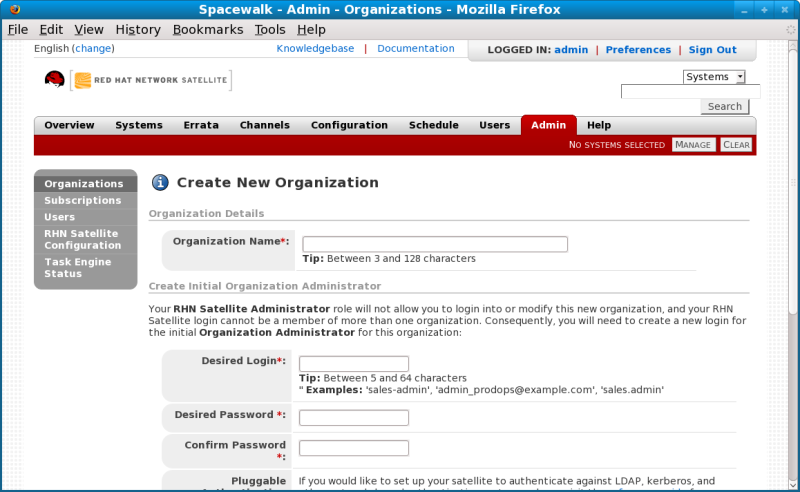
Figure 8.2. Create New Organization
- Type the organization name into the appropriate text box. The name should be between 3 and 128 characters.
- Create an administrator for the organization, by providing the following information:
- Enter a Desired Login for the organization administrator, which should be between 3 and 128 characters long. Consider creating a descriptive login name for the Organization Administrator account that matches administrative login names with the organization.
- Create a Desired Password and Confirm the password.
- Type in the Email address for the organization administrator.
- Enter the First Name and Last Name of the organization administrator.
- Click the button to complete the process.
Once the new organization is created, the Organizations page will display with the new organization listed.
Satellite Administrators should consider reserving the
organization 1 Organization Administrator account for themselves. This will give them the ability to log in to the organization if required.
Important
If RHN Satellite is configured for PAM authentication, avoid using PAM accounts for the one Satellite administrative organization administrator account in new organizations. Instead, create a Satellite-local account for organization administrators and reserve PAM-authenticated accounts for Satellite logins with less elevated privileges. This will discourage users from logging in to the RHN Satellite with elevated privileges, as the potential for making mistakes is higher using these accounts.

'%20d='M201.5%20305.5c-13.8%200-24.9-11.1-24.9-24.6%200-13.8%2011.1-24.9%2024.9-24.9%2013.6%200%2024.6%2011.1%2024.6%2024.9%200%2013.6-11.1%2024.6-24.6%2024.6zM504%20256c0%20137-111%20248-248%20248S8%20393%208%20256%20119%208%20256%208s248%20111%20248%20248zm-132.3-41.2c-9.4%200-17.7%203.9-23.8%2010-22.4-15.5-52.6-25.5-86.1-26.6l17.4-78.3%2055.4%2012.5c0%2013.6%2011.1%2024.6%2024.6%2024.6%2013.8%200%2024.9-11.3%2024.9-24.9s-11.1-24.9-24.9-24.9c-9.7%200-18%205.8-22.1%2013.8l-61.2-13.6c-3-.8-6.1%201.4-6.9%204.4l-19.1%2086.4c-33.2%201.4-63.1%2011.3-85.5%2026.8-6.1-6.4-14.7-10.2-24.1-10.2-34.9%200-46.3%2046.9-14.4%2062.8-1.1%205-1.7%2010.2-1.7%2015.5%200%2052.6%2059.2%2095.2%20132%2095.2%2073.1%200%20132.3-42.6%20132.3-95.2%200-5.3-.6-10.8-1.9-15.8%2031.3-16%2019.8-62.5-14.9-62.5zM302.8%20331c-18.2%2018.2-76.1%2017.9-93.6%200-2.2-2.2-6.1-2.2-8.3%200-2.5%202.5-2.5%206.4%200%208.6%2022.8%2022.8%2087.3%2022.8%20110.2%200%202.5-2.2%202.5-6.1%200-8.6-2.2-2.2-6.1-2.2-8.3%200zm7.7-75c-13.6%200-24.6%2011.1-24.6%2024.9%200%2013.6%2011.1%2024.6%2024.6%2024.6%2013.8%200%2024.9-11.1%2024.9-24.6%200-13.8-11-24.9-24.9-24.9z'/%3e%3c/svg%3e)