 Red Hat Summit
7.5. Content Life Cycle
Satellite provides features for precise management of the content life cycle. A life cycle environment represents a stage in the content life cycle, a Content View is a filtered set of content, and can be considered as a defined subset of content. By associating Content Views with life cycle environments, you make content available to hosts in a defined way (see 図1.2「Content Life Cycle in Red Hat Satellite」 for visualization of the process). For a detailed overview of the content management process see Importing Custom Content in the Content Management Guide. The following section provides general scenarios for deploying content views as well as life cycle environments.
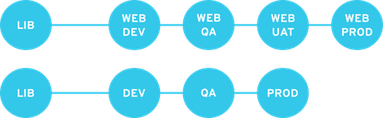
The default life cycle environment called Library gathers content from all connected sources. It is not recommended to associate hosts directly with the Library as it prevents any testing of content before making it available to hosts. Instead, create a life cycle environment path that suits your content workflow. The following scenarios are common:
A single life cycle environment – content from Library is promoted directly to the production stage. This approach limits the complexity but still allows for testing the content within the Library before making it available to hosts.

A single life cycle environment path – both operating system and applications content is promoted through the same path. The path can consist of several stages (for example Development, QA, Production), which enables thorough testing but requires additional effort.

Application specific life cycle environment paths – each application has a separate path, which allows for individual application release cycles. You can associate specific compute resources with application life cycle stages to facilitate testing. On the other hand, this scenario increases the maintenance complexity.
The following content view scenarios are common:
- All in one content view – a content view that contains all necessary content for the majority of your hosts. Reducing the number of content views is an advantage in deployments with constrained resources (time, storage space) or with uniform host types. However, this scenario limits the content view capabilities such as time based snapshots or intelligent filtering. Any change in content sources affects a proportion of hosts.
- Host specific content view – a dedicated content view for each host type. This approach can be useful in deployments with a small number of host types (up to 30). However, it prevents sharing content across host types as well as separation based on criteria other than the host type (for example between operating system and applications). With critical updates every content view has to be updated, which increases maintenance efforts.
- Host specific composite content view – a dedicated combination of content views for each host type. This approach enables separating host specific and shared content, for example you can have a dedicated content view for Puppet configuration. By including this content view into composite content views for several host types, you can update Puppet configuration with higher frequency than other host content.
- Component based content view – a dedicated content view for a specific application. For example a database content view can be included into several composite content views. This approach allows for greater standardization but it leads to an increased number of content views.
The optimal solution depends on the nature of your host environment. Avoid creating a large number of content views, but keep in mind that the size of a content view affects the speed of related operations (publishing, promoting). Also make sure that when creating a subset of packages for the content view, all dependencies are included as well. Note that kickstart repositories should not be added to content views, as they are used for host provisioning only.

'%20d='M201.5%20305.5c-13.8%200-24.9-11.1-24.9-24.6%200-13.8%2011.1-24.9%2024.9-24.9%2013.6%200%2024.6%2011.1%2024.6%2024.9%200%2013.6-11.1%2024.6-24.6%2024.6zM504%20256c0%20137-111%20248-248%20248S8%20393%208%20256%20119%208%20256%208s248%20111%20248%20248zm-132.3-41.2c-9.4%200-17.7%203.9-23.8%2010-22.4-15.5-52.6-25.5-86.1-26.6l17.4-78.3%2055.4%2012.5c0%2013.6%2011.1%2024.6%2024.6%2024.6%2013.8%200%2024.9-11.3%2024.9-24.9s-11.1-24.9-24.9-24.9c-9.7%200-18%205.8-22.1%2013.8l-61.2-13.6c-3-.8-6.1%201.4-6.9%204.4l-19.1%2086.4c-33.2%201.4-63.1%2011.3-85.5%2026.8-6.1-6.4-14.7-10.2-24.1-10.2-34.9%200-46.3%2046.9-14.4%2062.8-1.1%205-1.7%2010.2-1.7%2015.5%200%2052.6%2059.2%2095.2%20132%2095.2%2073.1%200%20132.3-42.6%20132.3-95.2%200-5.3-.6-10.8-1.9-15.8%2031.3-16%2019.8-62.5-14.9-62.5zM302.8%20331c-18.2%2018.2-76.1%2017.9-93.6%200-2.2-2.2-6.1-2.2-8.3%200-2.5%202.5-2.5%206.4%200%208.6%2022.8%2022.8%2087.3%2022.8%20110.2%200%202.5-2.2%202.5-6.1%200-8.6-2.2-2.2-6.1-2.2-8.3%200zm7.7-75c-13.6%200-24.6%2011.1-24.6%2024.9%200%2013.6%2011.1%2024.6%2024.6%2024.6%2013.8%200%2024.9-11.1%2024.9-24.6%200-13.8-11-24.9-24.9-24.9z'/%3e%3c/svg%3e)