 Red Hat Summit
第7章 Configuring the Discovery Service
Red Hat Satellite can detect hosts on a network that are not in your Satellite inventory. These hosts boot the discovery image that performs hardware detection and relays this information back to Satellite Server. This method creates a list of ready-to-provision hosts in Satellite Server without needing to enter the MAC address of each host.
When you boot a blank bare-metal host, the boot menu has two options: local and discovery. If you select discovery to boot the Discovery image, after a few minutes, the Discovery image completes booting and a status screen is displayed.
The Discovery service is enabled by default on Satellite Server. However, the default setting of the global templates is to boot from the local hard drive. To change the default setting, in the Satellite web UI, navigate to Administer > Settings, and click the Provisioning tab. Locate the Default PXE global template entry row, and in the Value column, enter discovery.
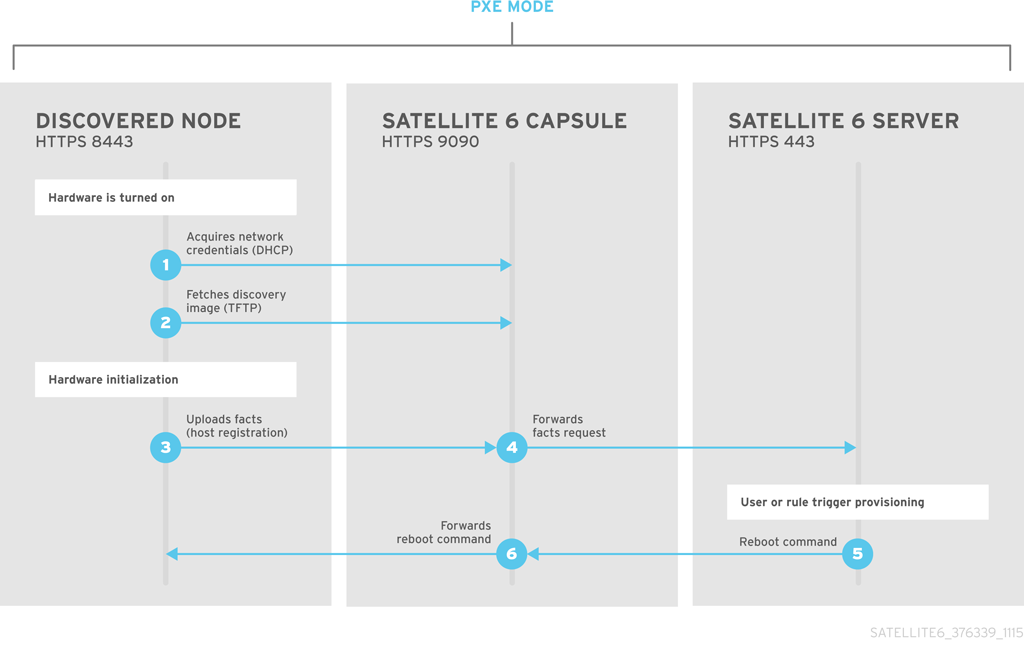
To use Satellite Server to provide the Discovery image, install the following RPM packages:
-
tfm-rubygem-foreman_discovery -
foreman-discovery-image -
tfm-rubygem-smart_proxy_discovery
The tfm-rubygem-foreman_discovery package contains the Satellite plug-in to handle discovered nodes, connections, and necessary database structures, and API.
The foreman-discovery-image package installs the Discovery ISO to the /usr/share/foreman-discovery-image/ directory. You can build a PXE boot image from this ISO using the livecd-iso-to-pxeboot tool. The tool saves this PXE boot image in the /var/lib/tftpboot/boot directory. For more information, see 「Building a Discovery Image」.
The tfm-rubygem-smart_proxy_discovery package configures Capsule Server, such as the integrated Capsule of Satellite Server, to act as a proxy for the Discovery service.
When the installation completes, you can view the new menu option by navigating to Hosts > Discovered Hosts.
7.1. Installing the Discovery Service
Complete the following procedure to enable the Discovery service on Capsule Server.
Procedure
Enter the following commands on Capsule Server:
# satellite-maintain packages install foreman-discovery-image tfm-rubygem-smart_proxy_discoveryRestart the satellite-maintain services:
# satellite-maintain service restart- In the Satellite web UI, navigate to Infrastructure > Capsule.
- Click the Capsule Server and select Refresh from the Actions list. Locate Discovery in the list of features to confirm the Discovery service is now running.
Subnets
All subnets with discoverable hosts require an appropriate Capsule Server selected to provide the Discovery service.
To check this, navigate to Infrastructure > Capsules and verify if the Capsule Server that you want to use lists the Discovery feature. If not, click Refresh features.
In the Satellite web UI, navigate to Infrastructure > Subnets, select a subnet, click the Capsules tab, and select the Discovery Proxy that you want to use. Perform this for each subnet that you want to use.

'%20d='M201.5%20305.5c-13.8%200-24.9-11.1-24.9-24.6%200-13.8%2011.1-24.9%2024.9-24.9%2013.6%200%2024.6%2011.1%2024.6%2024.9%200%2013.6-11.1%2024.6-24.6%2024.6zM504%20256c0%20137-111%20248-248%20248S8%20393%208%20256%20119%208%20256%208s248%20111%20248%20248zm-132.3-41.2c-9.4%200-17.7%203.9-23.8%2010-22.4-15.5-52.6-25.5-86.1-26.6l17.4-78.3%2055.4%2012.5c0%2013.6%2011.1%2024.6%2024.6%2024.6%2013.8%200%2024.9-11.3%2024.9-24.9s-11.1-24.9-24.9-24.9c-9.7%200-18%205.8-22.1%2013.8l-61.2-13.6c-3-.8-6.1%201.4-6.9%204.4l-19.1%2086.4c-33.2%201.4-63.1%2011.3-85.5%2026.8-6.1-6.4-14.7-10.2-24.1-10.2-34.9%200-46.3%2046.9-14.4%2062.8-1.1%205-1.7%2010.2-1.7%2015.5%200%2052.6%2059.2%2095.2%20132%2095.2%2073.1%200%20132.3-42.6%20132.3-95.2%200-5.3-.6-10.8-1.9-15.8%2031.3-16%2019.8-62.5-14.9-62.5zM302.8%20331c-18.2%2018.2-76.1%2017.9-93.6%200-2.2-2.2-6.1-2.2-8.3%200-2.5%202.5-2.5%206.4%200%208.6%2022.8%2022.8%2087.3%2022.8%20110.2%200%202.5-2.2%202.5-6.1%200-8.6-2.2-2.2-6.1-2.2-8.3%200zm7.7-75c-13.6%200-24.6%2011.1-24.6%2024.9%200%2013.6%2011.1%2024.6%2024.6%2024.6%2013.8%200%2024.9-11.1%2024.9-24.6%200-13.8-11-24.9-24.9-24.9z'/%3e%3c/svg%3e)