 Red Hat Summit
8.4. Protection API
The Protection API provides a UMA-compliant set of endpoints providing:
Resource Management
With this endpoint, resource servers can manage their resources remotely and enable policy enforcers to query the server for the resources that need protection.
Permission Management
In the UMA protocol, resource servers access this endpoint to create permission tickets. Red Hat Single Sign-On also provides endpoints to manage the state of permissions and query permissions.
Policy API
Red Hat Single Sign-On leverages the UMA Protection API to allow resource servers to manage permissions for their users. In addition to the Resource and Permission APIs, Red Hat Single Sign-On provides a Policy API from where permissions can be set to resources by resource servers on behalf of their users.
An important requirement for this API is that only resource servers are allowed to access its endpoints using a special OAuth2 access token called a protection API token (PAT). In UMA, a PAT is a token with the scope uma_protection.
8.4.1. What is a PAT and How to Obtain It
A protection API token (PAT) is a special OAuth2 access token with a scope defined as uma_protection. When you create a resource server, Red Hat Single Sign-On automatically creates a role, uma_protection, for the corresponding client application and associates it with the client’s service account.
Service Account granted with uma_protection role
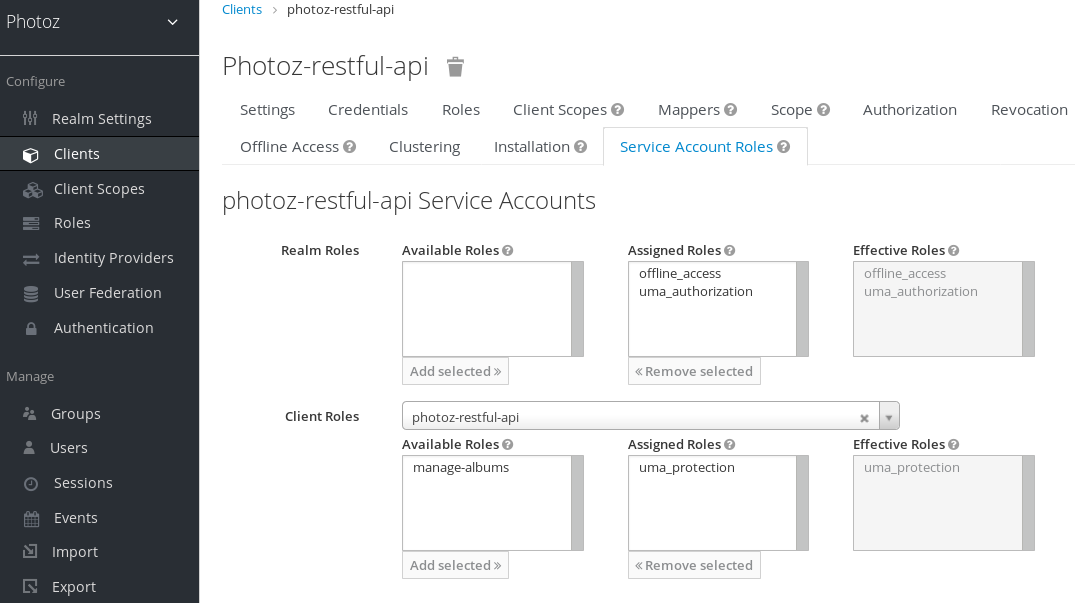
Resource servers can obtain a PAT from Red Hat Single Sign-On like any other OAuth2 access token. For example, using curl:
curl -X POST \
    -H "Content-Type: application/x-www-form-urlencoded" \
    -d 'grant_type=client_credentials&client_id=${client_id}&client_secret=${client_secret}' \
    "http://localhost:8080/auth/realms/${realm_name}/protocol/openid-connect/token"
The example above is using the client_credentials grant type to obtain a PAT from the server. As a result, the server returns a response similar to the following:
{
  "access_token": ${PAT},
  "expires_in": 300,
  "refresh_expires_in": 1800,
  "refresh_token": ${refresh_token},
  "token_type": "bearer",
  "id_token": ${id_token},
  "not-before-policy": 0,
  "session_state": "ccea4a55-9aec-4024-b11c-44f6f168439e"
}Red Hat Single Sign-On can authenticate your client application in different ways. For simplicity, the client_credentials grant type is used here, which requires a client_id and a client_secret. You can choose to use any supported authentication method.

'%20d='M201.5%20305.5c-13.8%200-24.9-11.1-24.9-24.6%200-13.8%2011.1-24.9%2024.9-24.9%2013.6%200%2024.6%2011.1%2024.6%2024.9%200%2013.6-11.1%2024.6-24.6%2024.6zM504%20256c0%20137-111%20248-248%20248S8%20393%208%20256%20119%208%20256%208s248%20111%20248%20248zm-132.3-41.2c-9.4%200-17.7%203.9-23.8%2010-22.4-15.5-52.6-25.5-86.1-26.6l17.4-78.3%2055.4%2012.5c0%2013.6%2011.1%2024.6%2024.6%2024.6%2013.8%200%2024.9-11.3%2024.9-24.9s-11.1-24.9-24.9-24.9c-9.7%200-18%205.8-22.1%2013.8l-61.2-13.6c-3-.8-6.1%201.4-6.9%204.4l-19.1%2086.4c-33.2%201.4-63.1%2011.3-85.5%2026.8-6.1-6.4-14.7-10.2-24.1-10.2-34.9%200-46.3%2046.9-14.4%2062.8-1.1%205-1.7%2010.2-1.7%2015.5%200%2052.6%2059.2%2095.2%20132%2095.2%2073.1%200%20132.3-42.6%20132.3-95.2%200-5.3-.6-10.8-1.9-15.8%2031.3-16%2019.8-62.5-14.9-62.5zM302.8%20331c-18.2%2018.2-76.1%2017.9-93.6%200-2.2-2.2-6.1-2.2-8.3%200-2.5%202.5-2.5%206.4%200%208.6%2022.8%2022.8%2087.3%2022.8%20110.2%200%202.5-2.2%202.5-6.1%200-8.6-2.2-2.2-6.1-2.2-8.3%200zm7.7-75c-13.6%200-24.6%2011.1-24.6%2024.9%200%2013.6%2011.1%2024.6%2024.6%2024.6%2013.8%200%2024.9-11.1%2024.9-24.6%200-13.8-11-24.9-24.9-24.9z'/%3e%3c/svg%3e)