 Red Hat Summit
이 콘텐츠는 선택한 언어로 제공되지 않습니다.
35.3. Integration testing Seam application user interactions
It is more difficult to emulate user interactions, and to place assertions appropriately. Some test frameworks let us test the whole application by reproducing user interactions with the web browser. These are useful, but not appropriate during development.
SeamTest lets you write scripted tests in a simulated JSF environment. A scripted test reproduces the interaction between the view and the Seam components, so you play the role of the JSF implementation during testing. You can test everything but the view with this approach.
Consider a JSP view for the component we unit tested above:
We want to test the registration functionality of our application (that is, what happens when a user clicks the Register button). We will reproduce the JSF request life cycle in an automated TestNG test:
Here, we extend
SeamTest to provide a Seam environment for our components, and our test script is written as an anonymous class that extends SeamTest.FacesRequest, which provides an emulated JSF request life cycle. (There is also a SeamTest.NonFacesRequest for testing GET requests.) Our code includes methods named for various JSF phases, to emulate the calls that JSF would make to our components. We have then included various assertions.
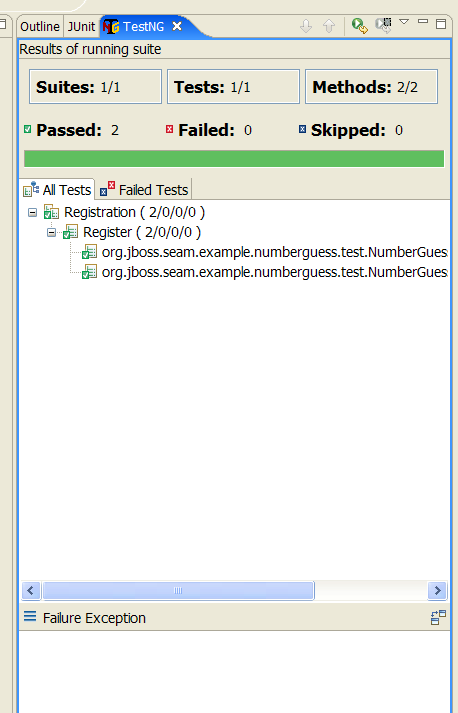
The Seam example applications include integration tests demonstrating more complex cases. You can run these tests with Ant, or with the TestNG plug-in for Eclipse:
35.3.1. Configuration
링크 복사링크가 클립보드에 복사되었습니다!
If you created your project with seam-gen, you can start writing tests immediately. Otherwise, you must first set up a testing environment in a build tool such as Ant, Maven, or Eclipse.
You will require at least the following dependencies:
| Group ID | Artifact ID | Location in Seam |
|---|---|---|
org.jboss.seam.embedded | hibernate-all | lib/test/hibernate-all.jar |
org.jboss.seam.embedded | jboss-embedded-all | lib/test/jboss-embedded-all.jar |
org.jboss.seam.embedded | thirdparty-all | lib/test/thirdparty-all.jar |
org.jboss.seam.embedded | jboss-embedded-api | lib/jboss-embedded-api.jar |
org.jboss.seam | jboss-seam | lib/jboss-seam.jar |
org.jboss.el | jboss-el | lib/jboss-el.jar |
javax.faces | jsf-api | lib/jsf-api.jar |
javax.el | el-api | lib/el-api.jar |
javax.activation | javax.activation | lib/activation.jar |
Do not put the compile-time JBoss Enterprise Application Platform dependencies from
lib/ (such as jboss-system.jar) on the classpath, as this will prevent Embedded JBoss from booting. Add dependencies such as Drools and jBPM as you require them.
You must include the
bootstrap/ directory on the classpath, since it contains the configuration for Embedded JBoss.
You must also include your built project, tests, and the
jar for your test framework on the classpath, as well as configuration files for JPA and Seam. Seam asks Embedded JBoss to deploy any resource (JAR or directory) with seam.properties in its root. If the structure of the directory containing your built project does not resemble that of a deployable archive, you must include seam.properties in each resource.
By default, a generated project uses the
java:/DefaultDS (a built in HSQL datasource in Embedded JBoss) for testing. To use another datasource, place the foo-ds.xml into bootstrap/deploy directory.

'%20d='M201.5%20305.5c-13.8%200-24.9-11.1-24.9-24.6%200-13.8%2011.1-24.9%2024.9-24.9%2013.6%200%2024.6%2011.1%2024.6%2024.9%200%2013.6-11.1%2024.6-24.6%2024.6zM504%20256c0%20137-111%20248-248%20248S8%20393%208%20256%20119%208%20256%208s248%20111%20248%20248zm-132.3-41.2c-9.4%200-17.7%203.9-23.8%2010-22.4-15.5-52.6-25.5-86.1-26.6l17.4-78.3%2055.4%2012.5c0%2013.6%2011.1%2024.6%2024.6%2024.6%2013.8%200%2024.9-11.3%2024.9-24.9s-11.1-24.9-24.9-24.9c-9.7%200-18%205.8-22.1%2013.8l-61.2-13.6c-3-.8-6.1%201.4-6.9%204.4l-19.1%2086.4c-33.2%201.4-63.1%2011.3-85.5%2026.8-6.1-6.4-14.7-10.2-24.1-10.2-34.9%200-46.3%2046.9-14.4%2062.8-1.1%205-1.7%2010.2-1.7%2015.5%200%2052.6%2059.2%2095.2%20132%2095.2%2073.1%200%20132.3-42.6%20132.3-95.2%200-5.3-.6-10.8-1.9-15.8%2031.3-16%2019.8-62.5-14.9-62.5zM302.8%20331c-18.2%2018.2-76.1%2017.9-93.6%200-2.2-2.2-6.1-2.2-8.3%200-2.5%202.5-2.5%206.4%200%208.6%2022.8%2022.8%2087.3%2022.8%20110.2%200%202.5-2.2%202.5-6.1%200-8.6-2.2-2.2-6.1-2.2-8.3%200zm7.7-75c-13.6%200-24.6%2011.1-24.6%2024.9%200%2013.6%2011.1%2024.6%2024.6%2024.6%2013.8%200%2024.9-11.1%2024.9-24.6%200-13.8-11-24.9-24.9-24.9z'/%3e%3c/svg%3e)