 Red Hat Summit
이 콘텐츠는 선택한 언어로 제공되지 않습니다.
Chapter 3. Manage your Plan
3.1. Manage Your OpenShift Online Plan
3.1.1. Customize Your Plan with Add-ons
You can customize your plan with add-ons.
In the Active Subscriptions page, click the Manage Subscription link.
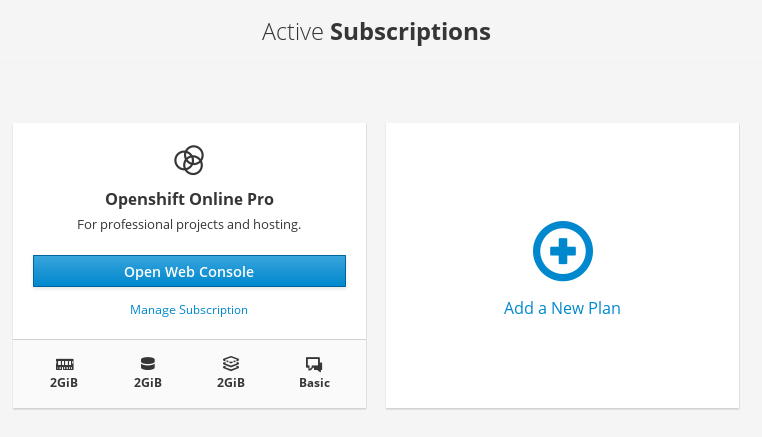
- Click Change by the Current Plan heading
From the Current Plan page, manage memory, storage, terminating memory, and support options. Add on resources for an additional cost.
Click Manage Memory, Manage Storage, Manage Terminating Memory, or Manage Support and follow the workflow for each.

3.1.2. Upgrading Your Plan
To upgrade your plan from OpenShift Online Starter to OpenShift Online Pro, visit manage.openshift.com.
See Creating a Template from Existing Objects for guidance on exporting all of your existing objects.
OpenShift Online Starter users, if you violate the Terms of Service Agreement, then your account will be terminated and you will be banned from creating subscriptions.
3.1.3. Apply Coupons
You can redeem valid, one-time-use promotional coupons, if applicable.
You can also redeem coupons after the registration process:
- From the Active Subscriptions page, click Manage Subscriptions.
- On the next Subscriptions page, click Manage next to the Coupons heading.
- On the next Subscription Coupons page, you will see (if applicable) coupons that are already in use. To apply a new coupon, click Apply New Coupon and complete the workflow.

'%20d='M201.5%20305.5c-13.8%200-24.9-11.1-24.9-24.6%200-13.8%2011.1-24.9%2024.9-24.9%2013.6%200%2024.6%2011.1%2024.6%2024.9%200%2013.6-11.1%2024.6-24.6%2024.6zM504%20256c0%20137-111%20248-248%20248S8%20393%208%20256%20119%208%20256%208s248%20111%20248%20248zm-132.3-41.2c-9.4%200-17.7%203.9-23.8%2010-22.4-15.5-52.6-25.5-86.1-26.6l17.4-78.3%2055.4%2012.5c0%2013.6%2011.1%2024.6%2024.6%2024.6%2013.8%200%2024.9-11.3%2024.9-24.9s-11.1-24.9-24.9-24.9c-9.7%200-18%205.8-22.1%2013.8l-61.2-13.6c-3-.8-6.1%201.4-6.9%204.4l-19.1%2086.4c-33.2%201.4-63.1%2011.3-85.5%2026.8-6.1-6.4-14.7-10.2-24.1-10.2-34.9%200-46.3%2046.9-14.4%2062.8-1.1%205-1.7%2010.2-1.7%2015.5%200%2052.6%2059.2%2095.2%20132%2095.2%2073.1%200%20132.3-42.6%20132.3-95.2%200-5.3-.6-10.8-1.9-15.8%2031.3-16%2019.8-62.5-14.9-62.5zM302.8%20331c-18.2%2018.2-76.1%2017.9-93.6%200-2.2-2.2-6.1-2.2-8.3%200-2.5%202.5-2.5%206.4%200%208.6%2022.8%2022.8%2087.3%2022.8%20110.2%200%202.5-2.2%202.5-6.1%200-8.6-2.2-2.2-6.1-2.2-8.3%200zm7.7-75c-13.6%200-24.6%2011.1-24.6%2024.9%200%2013.6%2011.1%2024.6%2024.6%2024.6%2013.8%200%2024.9-11.1%2024.9-24.6%200-13.8-11-24.9-24.9-24.9z'/%3e%3c/svg%3e)