 Red Hat Summit
5.3. Anaconda user interface
The Anaconda user interface (UI) has a non-linear structure, also known as hub and spoke model.
The advantages of Anaconda hub and spoke model are:
- Flexibility to follow the installer screens.
- Flexibility to retain the default settings.
- Provides an overview of the configured values.
- Supports extensibility. You can add hubs without the need to reorder anything and can resolve some complex ordering dependencies.
- Supports installation in graphical and text mode.
The following diagram shows the installer layout and the possible interactions between hubs and spokes (screens):
그림 5.1. Hub and spoke model
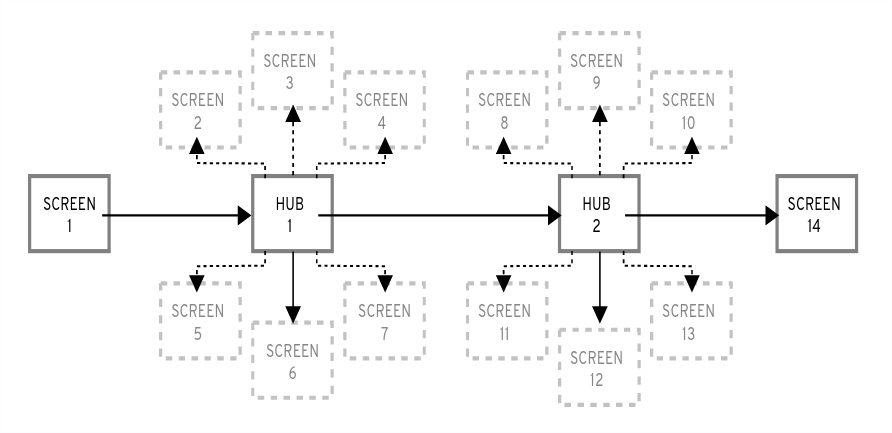
In the diagram, screens 2-13 are called normal spokes, and screens 1 and 14 are standalone spokes. Standalone spokes are the screens that can be used before or after the standalone spoke or hub. For example, the Welcome screen at the beginning of the installation which prompts you to choose your language for the rest of the installation.
-
The
Installation Summaryis the only hub in Anaconda. It shows a summary of configured options before the installation begins
Each spoke has the following predefined properties that reflect the hub.
-
ready- states whether or not you can visit a spoke. For example, when the installer is configuring a package source, the spoke is colored in gray, and you cannot access it until the configuration is complete. -
completed- marks whether or not the spoke is complete (all required values are set). -
mandatory- determines whether you must visit the spoke before continuing the installation; for example, you must visit theInstallation Destinationspoke, even if you want to use automatic disk partitioning -
status- provides a short summary of values configured within the spoke (displayed under the spoke name in the hub)
To make the user interface clearer, spokes are grouped together into categories. For example, the Localization category groups together spokes for keyboard layout selection, language support and time zone settings.
Each spoke contains UI controls that display and allow modification of values from one or more modules. This behavior also applies to spokes provided by add-ons. During a Kickstart installation, some spokes may remain hidden while still processing their data automatically without requiring them to be opened.

'%20d='M201.5%20305.5c-13.8%200-24.9-11.1-24.9-24.6%200-13.8%2011.1-24.9%2024.9-24.9%2013.6%200%2024.6%2011.1%2024.6%2024.9%200%2013.6-11.1%2024.6-24.6%2024.6zM504%20256c0%20137-111%20248-248%20248S8%20393%208%20256%20119%208%20256%208s248%20111%20248%20248zm-132.3-41.2c-9.4%200-17.7%203.9-23.8%2010-22.4-15.5-52.6-25.5-86.1-26.6l17.4-78.3%2055.4%2012.5c0%2013.6%2011.1%2024.6%2024.6%2024.6%2013.8%200%2024.9-11.3%2024.9-24.9s-11.1-24.9-24.9-24.9c-9.7%200-18%205.8-22.1%2013.8l-61.2-13.6c-3-.8-6.1%201.4-6.9%204.4l-19.1%2086.4c-33.2%201.4-63.1%2011.3-85.5%2026.8-6.1-6.4-14.7-10.2-24.1-10.2-34.9%200-46.3%2046.9-14.4%2062.8-1.1%205-1.7%2010.2-1.7%2015.5%200%2052.6%2059.2%2095.2%20132%2095.2%2073.1%200%20132.3-42.6%20132.3-95.2%200-5.3-.6-10.8-1.9-15.8%2031.3-16%2019.8-62.5-14.9-62.5zM302.8%20331c-18.2%2018.2-76.1%2017.9-93.6%200-2.2-2.2-6.1-2.2-8.3%200-2.5%202.5-2.5%206.4%200%208.6%2022.8%2022.8%2087.3%2022.8%20110.2%200%202.5-2.2%202.5-6.1%200-8.6-2.2-2.2-6.1-2.2-8.3%200zm7.7-75c-13.6%200-24.6%2011.1-24.6%2024.9%200%2013.6%2011.1%2024.6%2024.6%2024.6%2013.8%200%2024.9-11.1%2024.9-24.6%200-13.8-11-24.9-24.9-24.9z'/%3e%3c/svg%3e)