 Red Hat Summit
이 콘텐츠는 선택한 언어로 제공되지 않습니다.
8.4. Snapshot Previews
To select which snapshot a virtual machine disk image will be reverted to, the administrator can preview all previously created snapshots.
From the available snapshots per guest, the administrator can select a snapshot volume to preview its contents. As depicted in Figure 8.3, “Preview Snapshot”, each snapshot is saved as a COW volume, and when it is previewed, a new preview layer is copied from the snapshot being previewed. The guest interacts with the preview instead of the actual snapshot volume.
After the administrator previews the selected snapshot, the preview can be committed to restore the guest data to the state captured in the snapshot. If the administrator commits the preview, the guest is attached to the preview layer.
After a snapshot is previewed, the administrator can select to discard the preview layer of the viewed snapshot. The layer that contains the snapshot itself is preserved despite the preview layer being discarded.
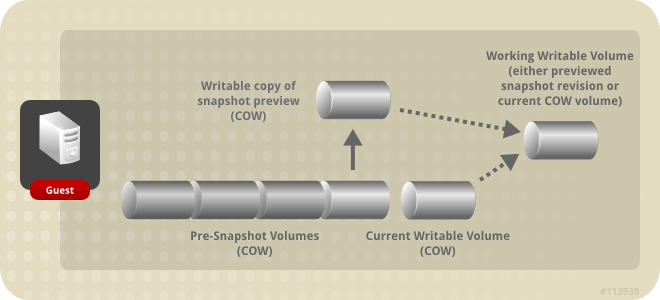
Figure 8.3. Preview Snapshot

'%20d='M201.5%20305.5c-13.8%200-24.9-11.1-24.9-24.6%200-13.8%2011.1-24.9%2024.9-24.9%2013.6%200%2024.6%2011.1%2024.6%2024.9%200%2013.6-11.1%2024.6-24.6%2024.6zM504%20256c0%20137-111%20248-248%20248S8%20393%208%20256%20119%208%20256%208s248%20111%20248%20248zm-132.3-41.2c-9.4%200-17.7%203.9-23.8%2010-22.4-15.5-52.6-25.5-86.1-26.6l17.4-78.3%2055.4%2012.5c0%2013.6%2011.1%2024.6%2024.6%2024.6%2013.8%200%2024.9-11.3%2024.9-24.9s-11.1-24.9-24.9-24.9c-9.7%200-18%205.8-22.1%2013.8l-61.2-13.6c-3-.8-6.1%201.4-6.9%204.4l-19.1%2086.4c-33.2%201.4-63.1%2011.3-85.5%2026.8-6.1-6.4-14.7-10.2-24.1-10.2-34.9%200-46.3%2046.9-14.4%2062.8-1.1%205-1.7%2010.2-1.7%2015.5%200%2052.6%2059.2%2095.2%20132%2095.2%2073.1%200%20132.3-42.6%20132.3-95.2%200-5.3-.6-10.8-1.9-15.8%2031.3-16%2019.8-62.5-14.9-62.5zM302.8%20331c-18.2%2018.2-76.1%2017.9-93.6%200-2.2-2.2-6.1-2.2-8.3%200-2.5%202.5-2.5%206.4%200%208.6%2022.8%2022.8%2087.3%2022.8%20110.2%200%202.5-2.2%202.5-6.1%200-8.6-2.2-2.2-6.1-2.2-8.3%200zm7.7-75c-13.6%200-24.6%2011.1-24.6%2024.9%200%2013.6%2011.1%2024.6%2024.6%2024.6%2013.8%200%2024.9-11.1%2024.9-24.6%200-13.8-11-24.9-24.9-24.9z'/%3e%3c/svg%3e)