 Red Hat Summit
이 콘텐츠는 선택한 언어로 제공되지 않습니다.
19.3. Profiles Page
Abstract
You can view and manage assigned profiles in a fabric in the Services > Profiles page. You can drill down to profile and container details and create containers for the profiles. You can also define profile requirements for the fabric.
Overview
링크 복사링크가 클립보드에 복사되었습니다!
You access the Profiles page from the Fabric perspective. If the Fabric perspective is not available, make sure that your fabric is available or create a new fabric.
The following image shows an example of the Profiles page:
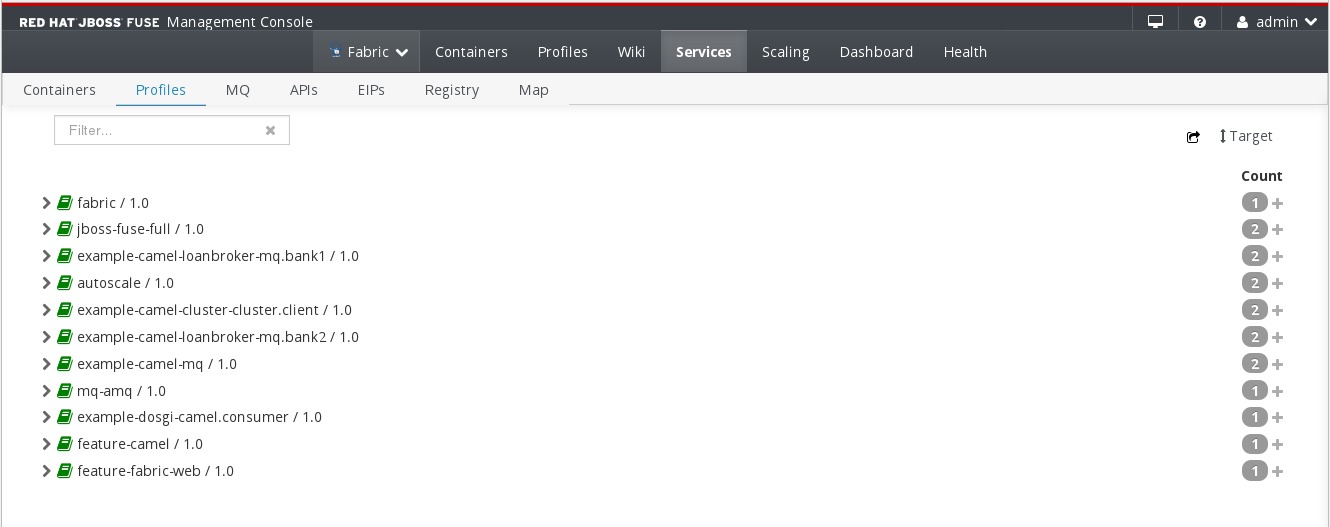
The Profiles page contains the following sections:
- Action Bar
- Options to filter the container list, add the view to the dashboard, or define profile usage targets.
- Container List
- List of assigned profiles. You can click the name of the profile to drill down to the profile details page where you can manage profile settings.
Action Bar
링크 복사링크가 클립보드에 복사되었습니다!
The Action Bar contains the following options:
- Filter
- Filters the profile list to show only profiles that match a string that you enter in the text box. The profile list refreshes as you type. To clear the filter, click the X in the filter box.
- Add to Dashboard
- Adds the current view to the dashboard. The view appears in the fabric dashboard.
- Target
- Configure the mininum number of required instances for each profile. Click Target to open a pop-up window in which you can configure the maximum and mininum number of instances for each profile. You can also add or remove dependent profiles for each profile.
- Count
- Shows the number of running containers for each profile. Click on the number to add more containers.
Profile List
링크 복사링크가 클립보드에 복사되었습니다!
The profile list contains the following elements:
- Show / Hide
- Arrow icon to show or hide containers for each profile. Each container shows the same information as the container list on the Containers page.
- Profile
- Name and version of the profile. Click on the profile name to drill down to the profile details page.
- Instances
- Icon that shows the number of profile instances. You can click the icon to create additional containers for the profile.

'%20d='M201.5%20305.5c-13.8%200-24.9-11.1-24.9-24.6%200-13.8%2011.1-24.9%2024.9-24.9%2013.6%200%2024.6%2011.1%2024.6%2024.9%200%2013.6-11.1%2024.6-24.6%2024.6zM504%20256c0%20137-111%20248-248%20248S8%20393%208%20256%20119%208%20256%208s248%20111%20248%20248zm-132.3-41.2c-9.4%200-17.7%203.9-23.8%2010-22.4-15.5-52.6-25.5-86.1-26.6l17.4-78.3%2055.4%2012.5c0%2013.6%2011.1%2024.6%2024.6%2024.6%2013.8%200%2024.9-11.3%2024.9-24.9s-11.1-24.9-24.9-24.9c-9.7%200-18%205.8-22.1%2013.8l-61.2-13.6c-3-.8-6.1%201.4-6.9%204.4l-19.1%2086.4c-33.2%201.4-63.1%2011.3-85.5%2026.8-6.1-6.4-14.7-10.2-24.1-10.2-34.9%200-46.3%2046.9-14.4%2062.8-1.1%205-1.7%2010.2-1.7%2015.5%200%2052.6%2059.2%2095.2%20132%2095.2%2073.1%200%20132.3-42.6%20132.3-95.2%200-5.3-.6-10.8-1.9-15.8%2031.3-16%2019.8-62.5-14.9-62.5zM302.8%20331c-18.2%2018.2-76.1%2017.9-93.6%200-2.2-2.2-6.1-2.2-8.3%200-2.5%202.5-2.5%206.4%200%208.6%2022.8%2022.8%2087.3%2022.8%20110.2%200%202.5-2.2%202.5-6.1%200-8.6-2.2-2.2-6.1-2.2-8.3%200zm7.7-75c-13.6%200-24.6%2011.1-24.6%2024.9%200%2013.6%2011.1%2024.6%2024.6%2024.6%2013.8%200%2024.9-11.1%2024.9-24.6%200-13.8-11-24.9-24.9-24.9z'/%3e%3c/svg%3e)