 Red Hat Summit
이 콘텐츠는 선택한 언어로 제공되지 않습니다.
Chapter 2. Application Plans
Application Plans define the different sets of access rights you might want to allow for consumers of your API. These can determine anything from rate limits, which methods or resources are accessible and which features are enabled.
2.1. How to create an application plan
By default, when your 3scale account is created, you are given two plans: Basic and Unlimited. You can keep and edit these or create your own. You can create as many plans as you need.
To create a new application plan, follow these steps:
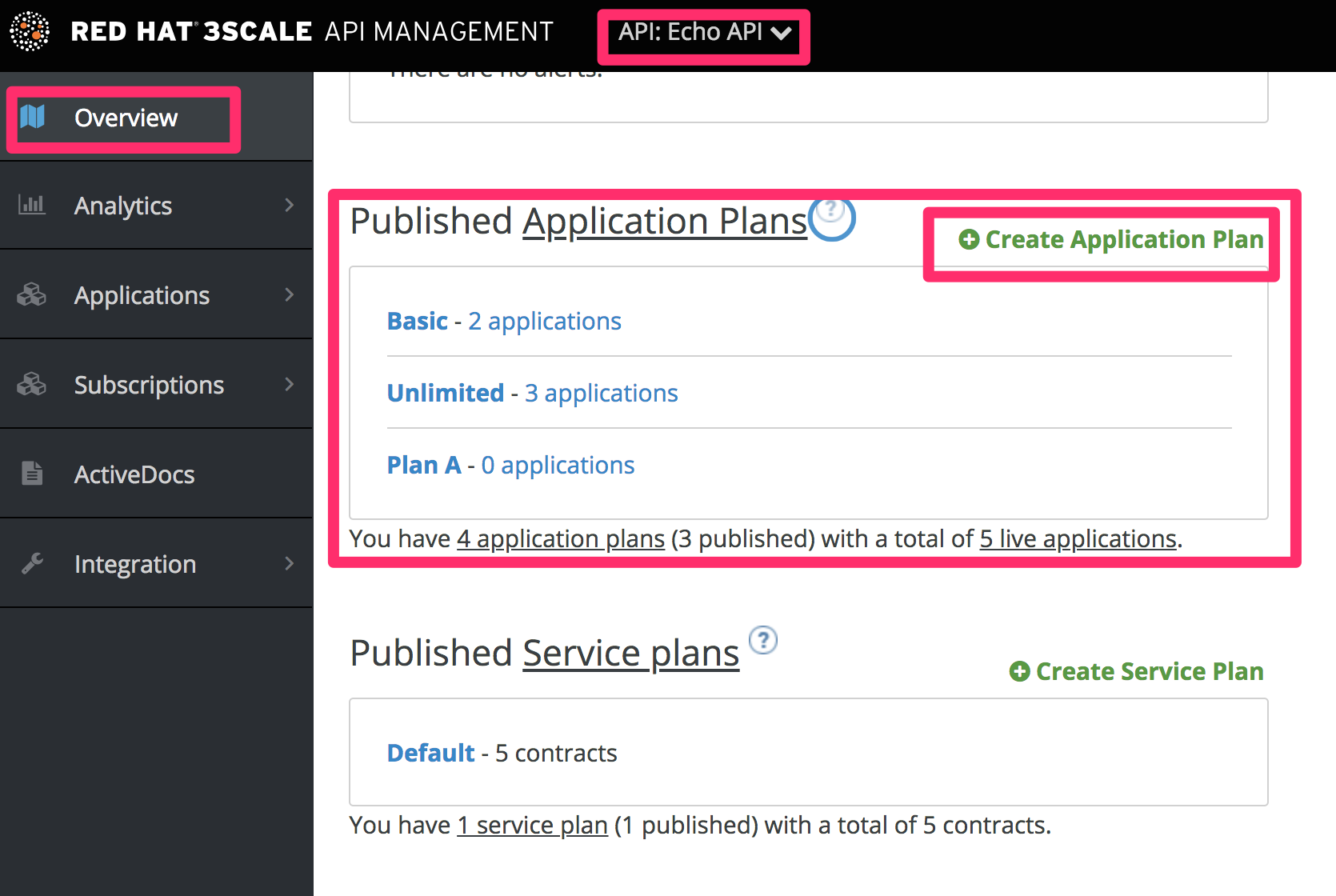
- Navigate to [Your_API_service] > Applications > Application Plans.
- Click ‘Create Application Plan’.
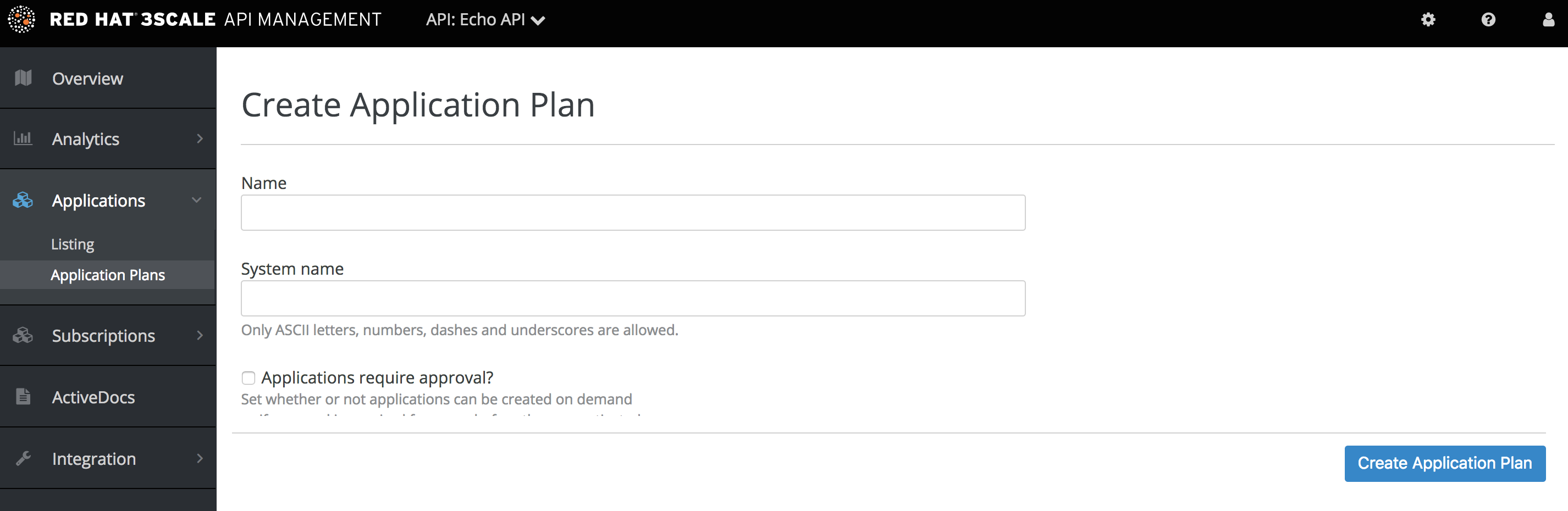
In the next screen, pick a name and a system name (system names must be unique) for your new plan. If the Applications require approval? checkbox is selected, no applications will be able to access your API without approval.
Once you have created a plan, you can provision rate limits and set up paid plans.
2.2. Setting up a default application plan
After you have created all your plans, you can select a default plan for when people sign up to register their applications. To do so, navigate to [Your_API_service] > Applications > Application Plans, and select the default plan:
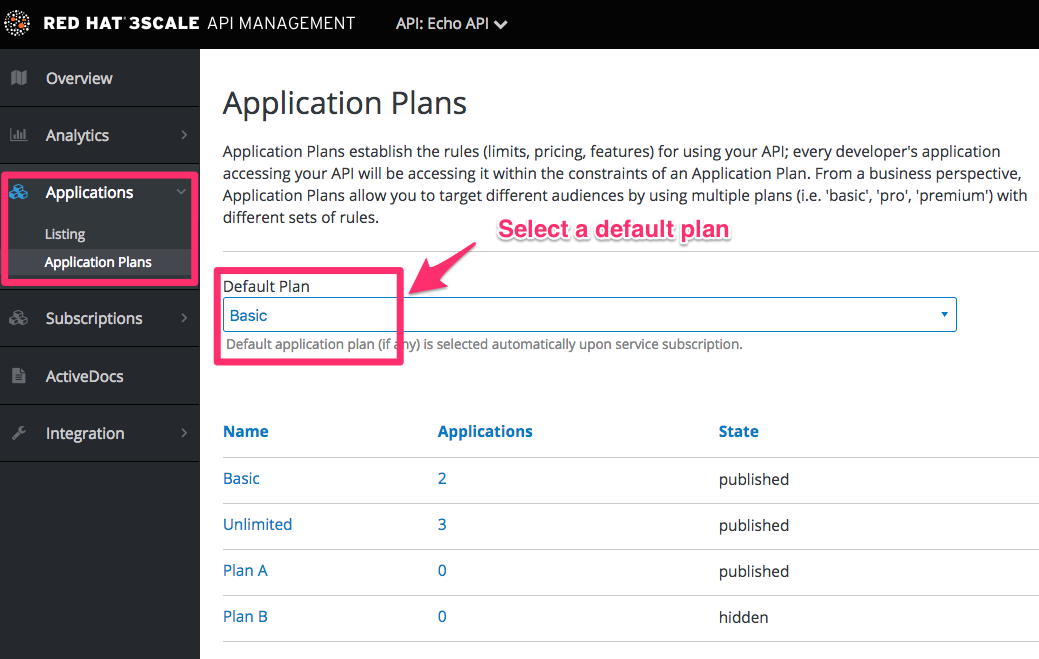
If you don’t indicate a default application plan, when a new user signs up to get access to your API, they won’t be created an application by default (meaning they won’t really get access to your API).

'%20d='M201.5%20305.5c-13.8%200-24.9-11.1-24.9-24.6%200-13.8%2011.1-24.9%2024.9-24.9%2013.6%200%2024.6%2011.1%2024.6%2024.9%200%2013.6-11.1%2024.6-24.6%2024.6zM504%20256c0%20137-111%20248-248%20248S8%20393%208%20256%20119%208%20256%208s248%20111%20248%20248zm-132.3-41.2c-9.4%200-17.7%203.9-23.8%2010-22.4-15.5-52.6-25.5-86.1-26.6l17.4-78.3%2055.4%2012.5c0%2013.6%2011.1%2024.6%2024.6%2024.6%2013.8%200%2024.9-11.3%2024.9-24.9s-11.1-24.9-24.9-24.9c-9.7%200-18%205.8-22.1%2013.8l-61.2-13.6c-3-.8-6.1%201.4-6.9%204.4l-19.1%2086.4c-33.2%201.4-63.1%2011.3-85.5%2026.8-6.1-6.4-14.7-10.2-24.1-10.2-34.9%200-46.3%2046.9-14.4%2062.8-1.1%205-1.7%2010.2-1.7%2015.5%200%2052.6%2059.2%2095.2%20132%2095.2%2073.1%200%20132.3-42.6%20132.3-95.2%200-5.3-.6-10.8-1.9-15.8%2031.3-16%2019.8-62.5-14.9-62.5zM302.8%20331c-18.2%2018.2-76.1%2017.9-93.6%200-2.2-2.2-6.1-2.2-8.3%200-2.5%202.5-2.5%206.4%200%208.6%2022.8%2022.8%2087.3%2022.8%20110.2%200%202.5-2.2%202.5-6.1%200-8.6-2.2-2.2-6.1-2.2-8.3%200zm7.7-75c-13.6%200-24.6%2011.1-24.6%2024.9%200%2013.6%2011.1%2024.6%2024.6%2024.6%2013.8%200%2024.9-11.1%2024.9-24.6%200-13.8-11-24.9-24.9-24.9z'/%3e%3c/svg%3e)