 Red Hat Summit
이 콘텐츠는 선택한 언어로 제공되지 않습니다.
Chapter 5. Known issues
Sometimes a Cryostat release might contain an issue or issues that Red Hat acknowledges and might fix at a later stage during the product’s development. Review each known issue for its description and its resolution.
Cryostat Operator upgrade
- Description
When updating your Cryostat Operator subscription from Cryostat 2.0 to Cryostat 2.1, you must change the update channel from
stable-2.0tostable.After this upgrade process, some Red Hat OpenShift objects that were created by the OpenShift Operator from Cryostat 2.0 will contain some outdated definitions. These definitions can result in connection issues among Cryostat components when you interact with your Cryostat 2.1 instance.
- Workaround
Remove Cryostat 2.0 services and deployments that exist in your Cryostat 2.1 instance.
Example that shows removal of Cryostat 2.0 services and deployments from a Cryostat 2.1 instance
oc project <cryostat_project>
cryostats=$(oc get cryostat --template \
  '{{range .items}}{{.metadata.name}}{{"\n"}}{{end}}')
for cryostat in ${cryostats}; do
  oc delete svc,deploy -lapp="${cryostat}"
done
After you remove these definitions, your Cryostat Operator creates services and deployments by using the Cryostat 2.1 object definitions. This restores connectivity among Cryostat components, and preserves JFR recordings that were created by Cryostat 2.0 in Cryostat 2.1.
Deleted entries in the Archived Recordings table
- Description
- The Archived Recordings table on the Recordings menu item does not immediately remove any archived recordings that you have deleted.
- Workaround
- Select any menu item, except Recordings, and then select the Recordings menu item. The Archived Recordings table now displays all the available archived recordings.
Cryostat's API handling behavior
- Description
Cryostat 2.1 does not concurrently handle API requests, which can lead to performance issues for your Cryostat instance.
In the following diagrams, the following symbols indicate actions:
- A parallel line (|): Cryostat is processing an API request.
- A dotted line (.): Cryostat has not yet processed a request.
An "x": Cryostat has processed a request.
Figure 5.1. Example of the current behavior of how Cryostat handles API requests
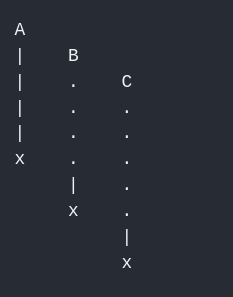
API request A, a slow request, is running while a client issues API request B and then API request C, fast requests. Cryostat cannot process API request B until it has finished processing API request A. This activity is similar for how Cryostat handles API requests B and C.
Figure 5.2. Example of the expected behavior of how Cryostat handles API requests

The client sent each request at different time intervals. Cryostat processes API requests B and C before API request A, because Cryostat can process fast requests before any slow requests. This behavior reduces any performance issues with Cryostat, because Cryostat can concurrently handle API requests and send responses back to the client.
- Workaround
- Currently no workaround exists for this issue.
Duplicate file name displays under the Archived Recordings table
- Description
An issue occurs under the Archived Recordings table on the Recordings menu item, when you re-upload a file with an identical file name to a file that already exists on the table.
If you attempt to delete or edit your re-uploaded file with this known issue, Cryostat applies the changes to both files. These changes can impact how you interact with the files, because you might be using Cryostat to analyze the incorrect file.
NoteThis issue does not occur under the following scenarios:
- If you immediately archive two active recordings that relate to the same target JVM.
- If you re-upload an identical file more than once to Cryostat. Cryostat stores each re-uploaded file in a storage location that does not relate to a specific target JVM.
For both these scenarios, Cryostat appends a number to the second file to distinguish it from the first file.
The following directory structure example shows the
20220401T212052Z.jfrarchive recording file in a storage location that corresponds to the selected target JVM,archive. When you re-upload an identically named file from your local system to Cryostat’s archives location, Cryostat stores the file in a storage location that does not correspond to any target JVM,unlabelled.archive/ ├── file-uploads ├── ONSXE5TJMNSTU2TNPA5HE3LJHIXS6L3KNZSGSL3SNVUTULZPMNZHS33TORQXIORZGA4TGL3KNV4HE3LJ │ └── es-andrewazor-demo-Main_foo_20220401T212052Z.jfr └── unlabelled └── es-andrewazor-demo-Main_50mb_20211224T172734Z.2.jfr └── es-andrewazor-demo-Main_50mb_20211224T172734Z.jfr └── es-andrewazor-demo-Main_foo_20220401T212052Z.jfrBased on the previous example, the current behavior of the re-upload operation on the Archived Recordings table shows two files with the same name. Cryostat applies the same name to both files, because Cryostat identifies each file as having different storage locations.
The expected behavior of the re-upload operation on Cryostat would append a subsequent number to the re-uploaded file. This means that this file does not share the same name as the file that exists before it in the table.
- Workaround
- Currently no workaround exists for this issue.

'%20d='M201.5%20305.5c-13.8%200-24.9-11.1-24.9-24.6%200-13.8%2011.1-24.9%2024.9-24.9%2013.6%200%2024.6%2011.1%2024.6%2024.9%200%2013.6-11.1%2024.6-24.6%2024.6zM504%20256c0%20137-111%20248-248%20248S8%20393%208%20256%20119%208%20256%208s248%20111%20248%20248zm-132.3-41.2c-9.4%200-17.7%203.9-23.8%2010-22.4-15.5-52.6-25.5-86.1-26.6l17.4-78.3%2055.4%2012.5c0%2013.6%2011.1%2024.6%2024.6%2024.6%2013.8%200%2024.9-11.3%2024.9-24.9s-11.1-24.9-24.9-24.9c-9.7%200-18%205.8-22.1%2013.8l-61.2-13.6c-3-.8-6.1%201.4-6.9%204.4l-19.1%2086.4c-33.2%201.4-63.1%2011.3-85.5%2026.8-6.1-6.4-14.7-10.2-24.1-10.2-34.9%200-46.3%2046.9-14.4%2062.8-1.1%205-1.7%2010.2-1.7%2015.5%200%2052.6%2059.2%2095.2%20132%2095.2%2073.1%200%20132.3-42.6%20132.3-95.2%200-5.3-.6-10.8-1.9-15.8%2031.3-16%2019.8-62.5-14.9-62.5zM302.8%20331c-18.2%2018.2-76.1%2017.9-93.6%200-2.2-2.2-6.1-2.2-8.3%200-2.5%202.5-2.5%206.4%200%208.6%2022.8%2022.8%2087.3%2022.8%20110.2%200%202.5-2.2%202.5-6.1%200-8.6-2.2-2.2-6.1-2.2-8.3%200zm7.7-75c-13.6%200-24.6%2011.1-24.6%2024.9%200%2013.6%2011.1%2024.6%2024.6%2024.6%2013.8%200%2024.9-11.1%2024.9-24.6%200-13.8-11-24.9-24.9-24.9z'/%3e%3c/svg%3e)