 Red Hat Summit
이 콘텐츠는 선택한 언어로 제공되지 않습니다.
2.3. Creating the Cluster
Use the following procedure to create a cluster.
- To access the High Availability management web interface, point your browser to the link provided by the luci service and log in using the root account on the node hosting luci. Logging in to luci displays the luci page.
- To create a cluster, click on from the menu on the left navigation pane of the page. This displays the page.
- From the page, click the button. This displays the screen.
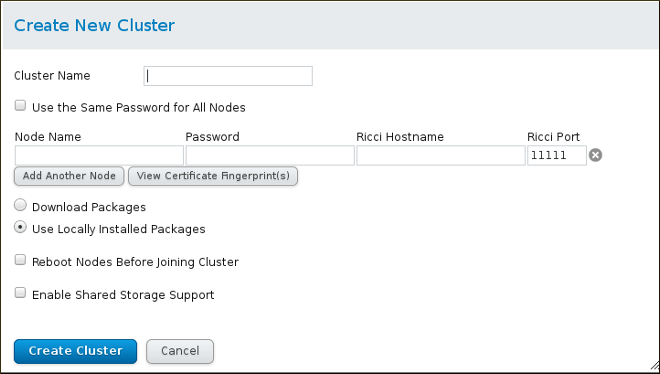
Figure 2.1. Clusters menu
- On the screen, enter the parameters for the cluster you are creating. The field will be the
riccipassword you defined for the indicated node. For more detailed information about the parameters on this screen and information about verifying the certificate fingerprint of thericciserver, see Section 4.4, “Creating a Cluster”.
Figure 2.2. Create New Cluster screen
- After you have completed entering the parameters for the cluster, click the button. A progress bar is displayed with the cluster is formed. Once cluster creation has completed, luci displays the cluster general properties.
- Verify the cluster status by running the
clustatcommand on either node of the cluster.# clustat Cluster Status for exampleHA @ Thu Sep 29 12:17:39 2011 Member Status: Quorate Member Name ID Status ------ ---- ---- ------ node1.example.com 1 Online, Local node2.example.com 2 OnlineIf you cannot create the cluster, double check the firewall settings, as described in Section 3.3.3, “Configuring the iptables Firewall to Allow Cluster Components”.If you can create the cluster (there is an/etc/cluster/cluster.confon each node) but the cluster will not form, you may have multicast issues. To test this, change the transport mode from UDP multicast to UDP unicast, as described in Section 3.12, “UDP Unicast Traffic”. Note, however, that in unicast mode there is a traffic increase compared to multicast mode, which adds to the processing load of the node.

'%20d='M201.5%20305.5c-13.8%200-24.9-11.1-24.9-24.6%200-13.8%2011.1-24.9%2024.9-24.9%2013.6%200%2024.6%2011.1%2024.6%2024.9%200%2013.6-11.1%2024.6-24.6%2024.6zM504%20256c0%20137-111%20248-248%20248S8%20393%208%20256%20119%208%20256%208s248%20111%20248%20248zm-132.3-41.2c-9.4%200-17.7%203.9-23.8%2010-22.4-15.5-52.6-25.5-86.1-26.6l17.4-78.3%2055.4%2012.5c0%2013.6%2011.1%2024.6%2024.6%2024.6%2013.8%200%2024.9-11.3%2024.9-24.9s-11.1-24.9-24.9-24.9c-9.7%200-18%205.8-22.1%2013.8l-61.2-13.6c-3-.8-6.1%201.4-6.9%204.4l-19.1%2086.4c-33.2%201.4-63.1%2011.3-85.5%2026.8-6.1-6.4-14.7-10.2-24.1-10.2-34.9%200-46.3%2046.9-14.4%2062.8-1.1%205-1.7%2010.2-1.7%2015.5%200%2052.6%2059.2%2095.2%20132%2095.2%2073.1%200%20132.3-42.6%20132.3-95.2%200-5.3-.6-10.8-1.9-15.8%2031.3-16%2019.8-62.5-14.9-62.5zM302.8%20331c-18.2%2018.2-76.1%2017.9-93.6%200-2.2-2.2-6.1-2.2-8.3%200-2.5%202.5-2.5%206.4%200%208.6%2022.8%2022.8%2087.3%2022.8%20110.2%200%202.5-2.2%202.5-6.1%200-8.6-2.2-2.2-6.1-2.2-8.3%200zm7.7-75c-13.6%200-24.6%2011.1-24.6%2024.9%200%2013.6%2011.1%2024.6%2024.6%2024.6%2013.8%200%2024.9-11.1%2024.9-24.6%200-13.8-11-24.9-24.9-24.9z'/%3e%3c/svg%3e)