 Red Hat Summit
이 콘텐츠는 선택한 언어로 제공되지 않습니다.
Chapter 18. Monitoring Red Hat Gluster Storage
Red Hat Gluster Storage 3.3.1 delivers Red Hat Gluster Storage Web Administration. This intuitive GUI delivers monitoring and metrics capabilities with data that is derived from the Grafana platform. Red Hat Gluster Storage Web Administration allows you to view and customize metrics information related to cluster health, status, and performance. Event and alert notification through email is also available. Red Hat recommends using Gluster Storage Web Administration to monitor your Red Hat Gluster Storage environment. The existing Red Hat Gluster Storage Console management infrastructure is supported through the current Red Hat Gluster Storage 3.x life cycle, which ends on October 31, 2019.
To view metrics data and monitor Red Hat Gluster Storage servers with Red Hat Gluster Storage Web Administration, see the following publications:
- Red Hat Gluster Storage Web Administration Monitoring Guide
- Red Hat Gluster Storage Web Administration Quick Start Guide
You can also monitor Red Hat Gluster Storage servers on Nagios platform to monitor Red Hat Gluster Storage trusted storage pool, hosts, volumes, and services. You can monitor utilization, status, alerts and notifications for status and utilization changes.
For more information on Nagios software, refer Nagios Documentation.
Using Nagios, the physical resources, logical resources, and processes (CPU, Memory, Disk, Network, Swap, cluster, volume, brick, Host, Volumes, Brick, nfs, shd, quotad, ctdb, smb, glusterd, quota, geo-replication, self-heal,and server quorum) can be monitored. You can view the utilization and status through Nagios Server GUI.
Red Hat Gluster Storage trusted storage pool monitoring can be setup in one of the three deployment scenarios listed below:
- Nagios deployed on Red Hat Gluster Storage node.
- Nagios deployed on Red Hat Gluster Storage Console node.
- Nagios deployed on Red Hat Enterprise Linux node.
This chapter describes the procedures for deploying Nagios on Red Hat Gluster Storage node and Red Hat Enterprise Linux node. For information on deploying Nagios on Red Hat Gluster Storage Console node, see Red Hat Gluster Storage Console Administration Guide.
The following diagram illustrates deployment of Nagios on Red Hat Gluster Storage node.
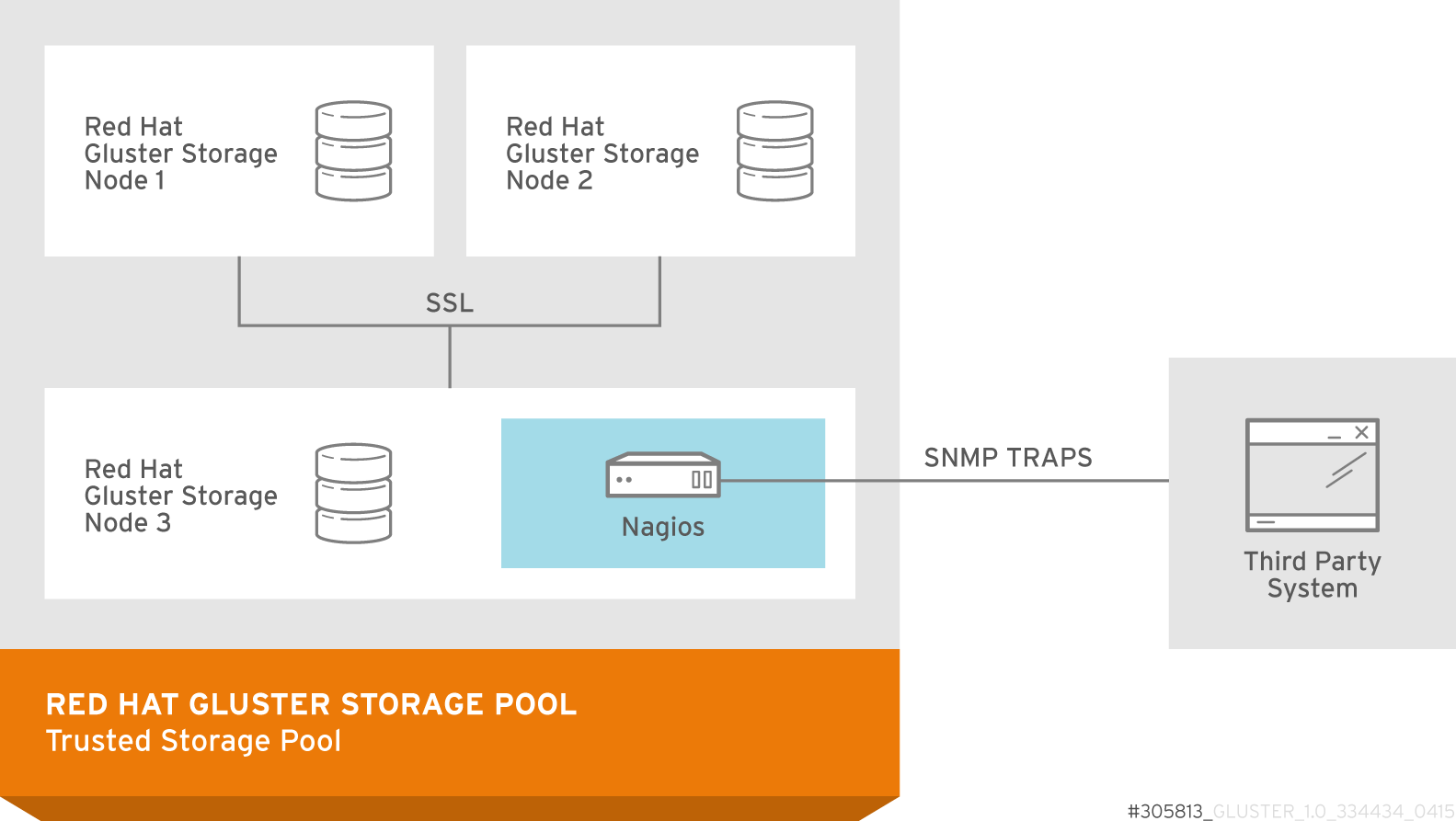
Figure 18.1. Nagios deployed on Red Hat Gluster Storage node
The following diagram illustrates deployment of Nagios on Red Hat Enterprise Linux node.
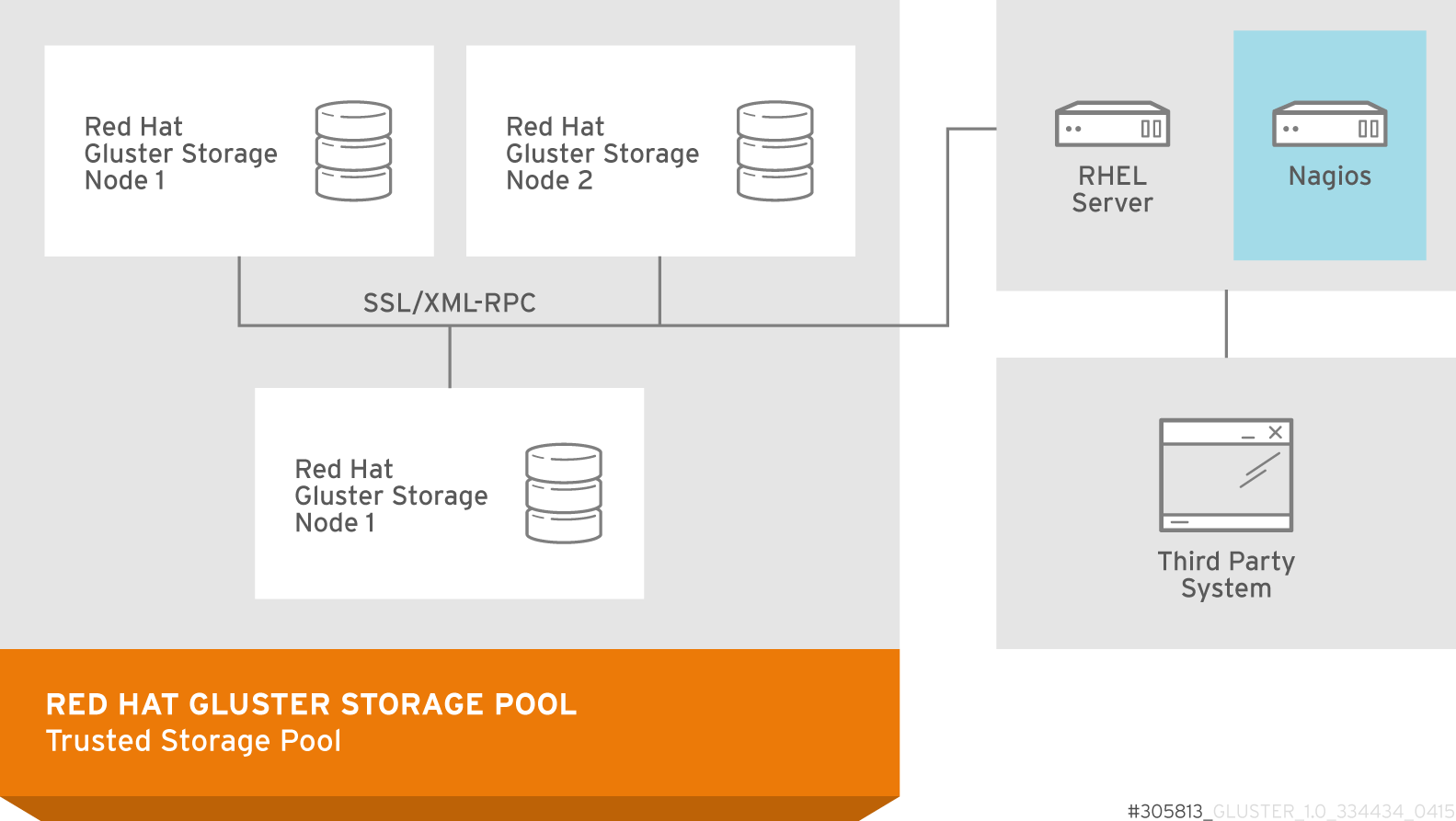
Figure 18.2. Nagios deployed on Red Hat Enterprise Linux node
18.1. Prerequisites
링크 복사링크가 클립보드에 복사되었습니다!
Ensure that you register using Subscription Manager or Red Hat Network Classic (RHN) and enable the Nagios repositories before installing the Nagios Server.
Note
Register using Red Hat Network (RHN) Classic only if you are a Red Hat Satellite user.
- Registering using Subscription Manager and enabling Nagios repositories
- To install Nagios on Red Hat Gluster Storage node, subscribe to
rhs-nagios-3-for-rhel-6-server-rpmsrepository. - To install Nagios on Red Hat Enterprise Linux node, subscribe to
rhel-6-server-rpms,rhs-nagios-3-for-rhel-6-server-rpmsrepositories. - To install Nagios on Red Hat Gluster Storage node based on RHEL7, subscribe to
rh-gluster-3-nagios-for-rhel-7-server-rpmsrepository. - To install Nagios on Red Hat Enterprise Linux node, subscribe to
rhel-7-server-rpms,rh-gluster-3-nagios-for-rhel-7-server-rpmsrepositories.
- Registering using Red Hat Network (RHN) Classic and subscribing to Nagios channels
- To install Nagios on Red Hat Gluster Storage node, subscribe to
rhel-x86_64-server-6-rhs-nagios-3channel. - To install Nagios on Red Hat Gluster Storage node, subscribe to
rhel-x86_64-server-7-rh-gluster-3-nagioschannel. - To install Nagios on Red Hat Enterprise Linux node, subscribe to
rhel-x86_64-server-6,rhel-x86_64-server-6-rhs-nagios-3channels. - To install Nagios on Red Hat Enterprise Linux node, subscribe to
rhel-x86_64-server-7,rhel-x86_64-server-7-rh-gluster-3-nagioschannels.
Note
Once nagios is installed on Red Hat Gluster Storage or RHEL node, verify that the following booleans are ON by running the
getsebool -a | grep nagios command:
nagios_run_sudo --> onnagios_run_pnp4nagios --> on

'%20d='M201.5%20305.5c-13.8%200-24.9-11.1-24.9-24.6%200-13.8%2011.1-24.9%2024.9-24.9%2013.6%200%2024.6%2011.1%2024.6%2024.9%200%2013.6-11.1%2024.6-24.6%2024.6zM504%20256c0%20137-111%20248-248%20248S8%20393%208%20256%20119%208%20256%208s248%20111%20248%20248zm-132.3-41.2c-9.4%200-17.7%203.9-23.8%2010-22.4-15.5-52.6-25.5-86.1-26.6l17.4-78.3%2055.4%2012.5c0%2013.6%2011.1%2024.6%2024.6%2024.6%2013.8%200%2024.9-11.3%2024.9-24.9s-11.1-24.9-24.9-24.9c-9.7%200-18%205.8-22.1%2013.8l-61.2-13.6c-3-.8-6.1%201.4-6.9%204.4l-19.1%2086.4c-33.2%201.4-63.1%2011.3-85.5%2026.8-6.1-6.4-14.7-10.2-24.1-10.2-34.9%200-46.3%2046.9-14.4%2062.8-1.1%205-1.7%2010.2-1.7%2015.5%200%2052.6%2059.2%2095.2%20132%2095.2%2073.1%200%20132.3-42.6%20132.3-95.2%200-5.3-.6-10.8-1.9-15.8%2031.3-16%2019.8-62.5-14.9-62.5zM302.8%20331c-18.2%2018.2-76.1%2017.9-93.6%200-2.2-2.2-6.1-2.2-8.3%200-2.5%202.5-2.5%206.4%200%208.6%2022.8%2022.8%2087.3%2022.8%20110.2%200%202.5-2.2%202.5-6.1%200-8.6-2.2-2.2-6.1-2.2-8.3%200zm7.7-75c-13.6%200-24.6%2011.1-24.6%2024.9%200%2013.6%2011.1%2024.6%2024.6%2024.6%2013.8%200%2024.9-11.1%2024.9-24.6%200-13.8-11-24.9-24.9-24.9z'/%3e%3c/svg%3e)