 Red Hat Summit
이 콘텐츠는 선택한 언어로 제공되지 않습니다.
Chapter 5. Camel Components
This chapter details information about supported camel components
5.1. camel-activemq
Camel ActiveMQ integration is provided by the activemq component.
The component can be configured to work with an embedded or external broker. For Wildfly / EAP container managed connection pools and XA-Transaction support, the ActiveMQ Resource Adapter can be configured into the container configuration file.
5.1.1. JBoss EAP ActiveMQ resource adapter configuration
Download the ActiveMQ resource adapter rar file. The following steps outline how to configure the ActiveMQ resource adapter.
1) Make sure your JBoss EAP instance is stopped.
2) Copy the downloaded resource adapter to the relevant JBoss EAP deployment directory. For standalone mode:
cp activemq-rar-5.11.1.rar ${JBOSS_HOME}/standalone/deployments/activemq-rar.rar3) Configure the JBoss EAP resource adapters subsystem for the ActiveMQ adapter.
<subsystem xmlns="urn:jboss:domain:resource-adapters:2.0">
     <resource-adapters>
         <resource-adapter id="activemq-rar.rar">
             <archive>
                 activemq-rar.rar
             </archive>
             <transaction-support>XATransaction</transaction-support>
             <config-property name="UseInboundSession">
                 false
             </config-property>
             <config-property name="Password">
                 defaultPassword
             </config-property>
             <config-property name="UserName">
                 defaultUser
             </config-property>
             <config-property name="ServerUrl">
                 tcp://localhost:61616?jms.rmIdFromConnectionId=true
             </config-property>
             <connection-definitions>
                 <connection-definition class-name="org.apache.activemq.ra.ActiveMQManagedConnectionFactory" jndi-name="java:/ActiveMQConnectionFactory" enabled="true" pool-name="ConnectionFactory">
                     <xa-pool>
                         <min-pool-size>1</min-pool-size>
                         <max-pool-size>20</max-pool-size>
                         <prefill>false</prefill>
                         <is-same-rm-override>false</is-same-rm-override>
                     </xa-pool>
                 </connection-definition>
             </connection-definitions>
             <admin-objects>
                 <admin-object class-name="org.apache.activemq.command.ActiveMQQueue" jndi-name="java:/queue/HELLOWORLDMDBQueue" use-java-context="true" pool-name="HELLOWORLDMDBQueue">
                     <config-property name="PhysicalName">
                         HELLOWORLDMDBQueue
                     </config-property>
                 </admin-object>
                 <admin-object class-name="org.apache.activemq.command.ActiveMQTopic" jndi-name="java:/topic/HELLOWORLDMDBTopic" use-java-context="true" pool-name="HELLOWORLDMDBTopic">
                     <config-property name="PhysicalName">
                         HELLOWORLDMDBTopic
                     </config-property>
                 </admin-object>
             </admin-objects>
         </resource-adapter>
     </resource-adapters>
 </subsystem>
If your resource adapter archive filename differs from activemq-rar.rar, you must change the content of the archive element in the preceding configuration to match the name of your archive file.
The values of the UserName and Password configuration properties must be chosen to match the credentials of a valid user in the external broker.
You might need to change the value of the ServerUrl configuration property to match the actual hostname and port exposed by the external broker.
4) Start JBoss EAP. If everything is configured correctly, you should see a message within the JBoss EAP server.log like.
13:16:08,412 INFO [org.jboss.as.connector.deployment] (MSC service thread 1-5) JBAS010406: Registered connection factory java:/AMQConnectionFactory`5.1.2. Camel route configuration
The following ActiveMQ producer and consumer examples make use of the ActiveMQ embedded broker and the 'vm' transport (thus avoiding the need for an external ActiveMQ broker).
The examples use CDI in conjunction with the camel-cdi component. JMS ConnectionFactory instances are injected into the Camel RouteBuilder through JNDI lookups.
5.1.2.1. ActiveMQ Producer
@Startup
@ApplicationScoped
@ContextName("activemq-camel-context")
public class ActiveMQRouteBuilder extends RouteBuilder {

  @Override
  public void configure() throws Exception {
    from("timer://sendJMSMessage?fixedRate=true&period=10000")
    .transform(constant("<?xml version='1.0><message><greeting>hello world</greeting></message>"))
    .to("activemq:queue:WildFlyCamelQueue?brokerURL=vm://localhost")
    .log("JMS Message sent");
  }
}
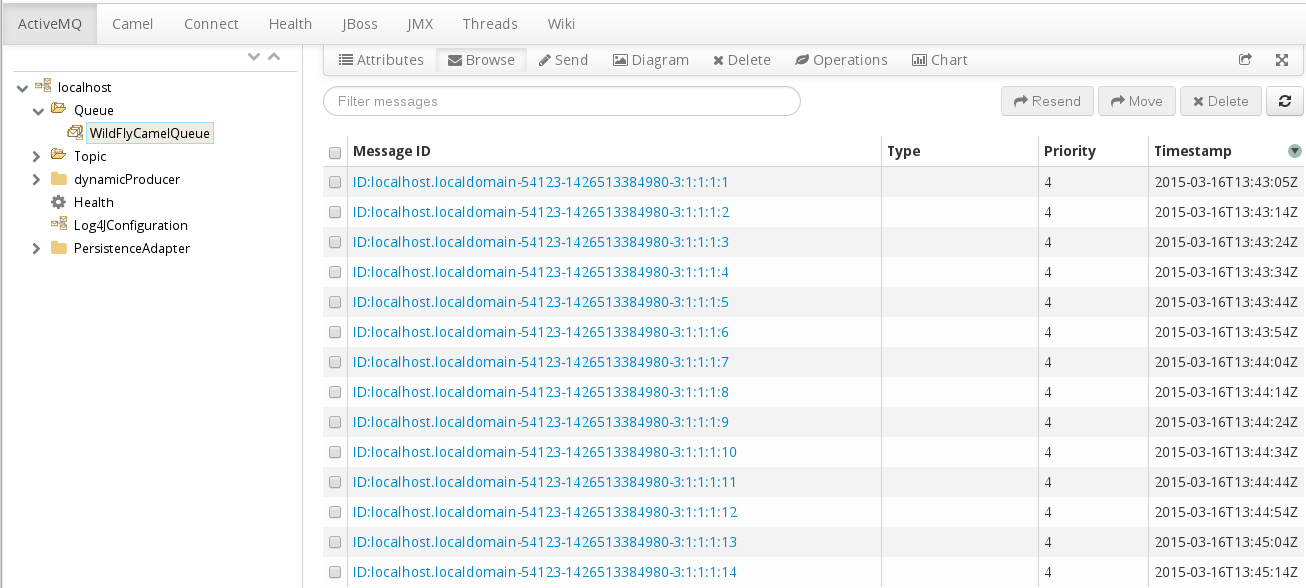
A log message will be output to the console each time a message is added to the WildFlyCamelQueue destination. To verify that the messages really are being placed onto the queue, you can use the ../features/hawtio.md[Hawtio console,window=_blank] provided by the Camel on EAP subsystem.
5.1.2.2. ActiveMQ Consumer
To consume ActiveMQ messages the Camel RouteBuilder implementation is similar to the producer example.
When the ActiveMQ endpoint consumes messages from the WildFlyCamelQueue destination, the content is logged to the console.
@Override
public void configure() throws Exception {
  from("activemq:queue:WildFlyCamelQueue?brokerURL=vm://localhost")
  .to("log:jms?showAll=true");
}
5.1.2.3. ActiveMQ Transactions
5.1.2.3.1. ActiveMQ Resource Adapter Configuration
The ActiveMQ resource adapter is required to leverage XA transaction support, connection pooling etc.
The XML snippet below shows how the resource adapter is configured within the JBoss EAP server XML configuration. Notice that the ServerURL is set to use an embedded broker. The connection factory is bound to the JNDI name java:/ActiveMQConnectionFactory. This will be looked up in the RouteBuilder example that follows.
Finally, two queues are configured named 'queue1' and 'queue2'.
<subsystem xmlns="urn:jboss:domain:resource-adapters:2.0">
  <resource-adapters>
    <resource-adapter id="activemq-rar.rar">
      ...
      <admin-objects>
        <admin-object class-name="org.apache.activemq.command.ActiveMQQueue" jndi-name="java:/queue/queue1" use-java-context="true" pool-name="queue1pool">
          <config-property name="PhysicalName">queue1</config-property>
        </admin-object>
        <admin-object class-name="org.apache.activemq.command.ActiveMQQueue" jndi-name="java:/queue/queue2" use-java-context="true" pool-name="queue2pool">
          <config-property name="PhysicalName">queue2</config-property>
        </admin-object>
      </admin-objects>
    </resource-adapter>
  </resource-adapters>
</subsystem>
5.1.2.4. Transaction Manager
The camel-activemq component requires a transaction manager of type org.springframework.transaction.PlatformTransactionManager. Therefore, you can start by creating a bean extending JtaTransactionManager which fulfills this requirement. Note that the bean is annotated with @Named to allow the bean to be registered within the Camel bean registry. Also note that the JBoss EAP transaction manager and user transaction instances are injected using CDI.
@Named("transactionManager")
public class CdiTransactionManager extends JtaTransactionManager {

  @Resource(mappedName = "java:/TransactionManager")
  private TransactionManager transactionManager;

  @Resource
  private UserTransaction userTransaction;

  @PostConstruct
  public void initTransactionManager() {
    setTransactionManager(transactionManager);
    setUserTransaction(userTransaction);
  }
}
5.1.2.5. Transaction Policy
Next you need to declare the transaction policy that you want to use. Again, use the @Named annotation to make the bean available to Camel. The transaction manager is also injected so that a TransactionTemplate can be created with the desired transaction policy. PROPAGATION_REQUIRED in this instance.
@Named("PROPAGATION_REQUIRED")
public class CdiRequiredPolicy extends SpringTransactionPolicy {
  @Inject
  public CdiRequiredPolicy(CdiTransactionManager cdiTransactionManager) {
    super(new TransactionTemplate(cdiTransactionManager,
      new DefaultTransactionDefinition(TransactionDefinition.PROPAGATION_REQUIRED)));
  }
}
5.1.2.6. Route Builder
Now you can configure our Camel RouteBuilder class and inject the dependencies needed for the Camel ActiveMQ component. The ActiveMQ connection factory that you configured on the resource adapter configuration is injected together with the transaction manager you configured earlier.
In this example RouteBuilder, whenever any messages are consumed from queue1, they are routed to another JMS queue named queue2. Messages consumed from queue2 result in JMS transaction being rolled back using the rollback() DSL method. This results in the original message being placed onto the dead letter queue(DLQ).
@Startup
@ApplicationScoped
@ContextName("activemq-camel-context")
public class ActiveMQRouteBuilder extends RouteBuilder {

  @Resource(mappedName = "java:/ActiveMQConnectionFactory")
  private ConnectionFactory connectionFactory;

  @Inject
  private CdiTransactionManager transactionManager;

  @Override
  public void configure() throws Exception {
    ActiveMQComponent activeMQComponent = ActiveMQComponent.activeMQComponent();
    activeMQComponent.setTransacted(false);
    activeMQComponent.setConnectionFactory(connectionFactory);
    activeMQComponent.setTransactionManager(transactionManager);

    getContext().addComponent("activemq", activeMQComponent);

      errorHandler(deadLetterChannel("activemq:queue:ActiveMQ.DLQ")
      .useOriginalMessage()
      .maximumRedeliveries(0)
      .redeliveryDelay(1000));

    from("activemq:queue:queue1F
      .transacted("PROPAGATION_REQUIRED")
      .to("activemq:queue:queue2");

    from("activemq:queue:queue2")
      .to("log:end")
      .rollback();
  }
}
5.1.3. Security
Refer to the JMS security section.
5.1.4. Code examples on GitHub
An example camel-activemq application is available on GitHub.
5.2. camel-mail
Interaction with email is provided by the mail component.
By default, Camel will create its own mail session and use this to interact with your mail server. Since JBoss EAP already provides a mail subsystem with all of the relevant support for secure connections, username / password encryption etc, it is recommended to configure your mail sessions within the JBoss EAP configuration and use JNDI to wire them into your Camel endpoints.
5.2.1. JBoss EAP configuration
First you configure the JBoss EAP mail subsystem for our Mail server. This example adds configuration for Google Mail IMAP and SMTP .
An additional mail-session is configured after the 'default' session.
<subsystem xmlns="urn:jboss:domain:mail:2.0">
    <mail-session name="default" jndi-name="java:jboss/mail/Default">
      <smtp-server outbound-socket-binding-ref="mail-smtp"/>
    </mail-session>
<mail-session debug="true" name="gmail" jndi-name="java:jboss/mail/gmail">
<smtp-server outbound-socket-binding-ref="mail-gmail-smtp" ssl="true" username="your-username-here" password="your-password-here"/>
<imap-server outbound-socket-binding-ref="mail-gmail-imap" ssl="true" username="your-username-here" password="your-password-here"/>
</mail-session>
</subsystem>
Note that we configured `outbound-socket-binding-ref` values of 'mail-gmail-smtp' and 'mail-gmail-imap'. The next step is to configure these socket bindings. Add additional bindings to the `socket-binding-group` configuration like the following.<outbound-socket-binding name="mail-gmail-smtp">
<remote-destination host="smtp.gmail.com" port="465"/>
</outbound-socket-binding>
<outbound-socket-binding name="mail-gmail-imap">
<remote-destination host="imap.gmail.com" port="993"/>
</outbound-socket-binding>This configures our mail session to connect to host smtp.gmail.com on port 465 and imap.gmail.com on port 993. If you’re using a different mail host, then this detail will be different.
5.2.2. POP3 Configuration
If you need to configure POP3 sessions, the principals are the same as defined in the examples above.
<!-- Server configuration -->
<pop3-server outbound-socket-binding-ref="mail-pop3" ssl="true" username="your-username-here" password="your-password-here"/>

<!-- Socket binding configuration -->
<outbound-socket-binding name="mail-gmail-imap">
  <remote-destination host="pop3.gmail.com" port="993"/>
</outbound-socket-binding>
5.2.3. Camel route configuration
5.2.3.1. Mail producer
This example uses the SMTPS protocol, together with CDI in conjunction with the camel-cdi component. The Java mail session that you configured within the JBoss EAP configuration is injected into a Camel RouteBuilder through JNDI.
5.2.3.1.1. Route builder SMTPS example
The GMail mail session is injected into a Producer class using the @Resource annotation with a reference to the jndi-name attribute that you previously configured. This allows us to reference the mail session on the camel-mail endpoint configuration.
public class MailSessionProducer {
    @Resource(lookup = "java:jboss/mail/greenmail")
    private Session mailSession;

    @Produces
    @Named
    public Session getMailSession() {
        return mailSession;
    }
}
public class MailRouteBuilder extends RouteBuilder {
@Override
public void configure() throws Exception {
from("direct:start")
.to("smtps://smtp.gmail.com?session=#mailSession");
}
}To send an email, you can create a ProducerTemplate and send an appropriate body together with the necessary email headers.
Map<String, Object> headers = new HashMap<String, Object>();
headers.put("To", "destination@test.com");
headers.put("From", "sender@example.com");
headers.put("Subject", "Camel on Wildfly rocks");

String body = "Hi,\n\nCamel on Wildfly rocks!.";

ProducerTemplate template = camelContext.createProducerTemplate();
template.sendBodyAndHeaders("direct:start", body, headers);
5.2.3.2. Mail consumer
To receive email you can use an IMAP MailEndpoint. The Camel route configuration looks like the following.
public void configure() throws Exception {
   from("imaps://imap.gmail.com?session=#mailSession")
   .to("log:email");
}
5.2.4. Security
5.2.4.1. SSL configuration
JBoss EAP can be configured to manage Java mail sessions and their associated transports using SSL / TLS. When configuring mail sessions you can configure SSL or TLS on server types:
- smtp-server
- imap-server
- pop-server
By setting attributes ssl="true" or tls="true".
5.2.4.2. Securing passwords
Writing passwords in clear text within configuration files is never a good idea for obvious reasons. The WildFly Vault provides tooling to mask sensitive data.
5.2.4.3. Camel security
Camel endpoint security documentation can be found on the mail component guide. Camel also has a security summary page.
5.2.5. Code examples on GitHub
An example camel-mail application is available on GitHub for you to try out sending / receiving email.
5.3. camel-rest
The rest component allows you to define REST endpoints using the Rest DSL and plugin to other Camel components as the REST transport.
The Camel on EAP Subsystem only supports the camel-servlet and camel-undertow components for use with the REST DSL. Attempts to configure other components will not work.
CamelContext camelctx = new DefaultCamelContext();
camelctx.addRoutes(new RouteBuilder() {
    @Override
    public void configure() throws Exception {
        restConfiguration().component("servlet").contextPath("camel/rest").port(8080);
        rest("/hello").get("/{name}").to("direct:hello");
        from("direct:hello").transform(simple("Hello ${header.name}"));
    }
});
5.4. camel-rest-swagger
The rest-swagger component can configure REST producers from a Swagger document and delegate to a component implementing the RestProducerFactory interface such as:
5.5. camel-sql
The sql component allows you to work with databases using JDBC queries. The difference between this component and JDBC component is that in case of SQL the query is a property of the endpoint and it uses message payload as parameters passed to the query.
CamelContext camelctx = new DefaultCamelContext();
camelctx.addRoutes(new RouteBuilder() {
    @Override
    public void configure() throws Exception {
        from("sql:select name from information_schema.users?dataSource=java:jboss/datasources/ExampleDS")
        .to("direct:end");
    }
});
The JNDI datasource lookup shown above works only when configuring a DefaultCamelContext. See below for CdiCamelContext and SpringCamelContext examples.
When used in conjunction with the camel-cdi component, Java EE annotations can make a datasource available to Camel. This example uses the @Named annotation so that Camel can discover the desired datasource.
public class DatasourceProducer {
    @Resource(name = "java:jboss/datasources/ExampleDS")
    DataSource dataSource;

    @Produces
    @Named("wildFlyExampleDS")
    public DataSource getDataSource() {
        return dataSource;
    }
}
Now the datasource can be referenced through the dataSource parameter on the camel-sql endpoint configuration.
@ApplicationScoped
@ContextName("camel-sql-cdi-context")
@Startup
public class CdiRouteBuilder extends RouteBuilder {
    @Override
    public void configure() throws Exception {
        from("sql:select name from information_schema.users?dataSource=wildFlyExampleDS")
        .to("direct:end");
    }
}
When using camel-spring the route configuration would look like:
<beans xmlns="http://www.springframework.org/schema/beans"
       xmlns:xsi="http://www.w3.org/2001/XMLSchema-instance"
       xmlns:jee="http://www.springframework.org/schema/jee"
       xsi:schemaLocation="
       http://www.springframework.org/schema/beans http://www.springframework.org/schema/beans/spring-beans.xsd
       http://camel.apache.org/schema/spring http://camel.apache.org/schema/spring/camel-spring.xsd
       http://www.springframework.org/schema/jee http://www.springframework.org/schema/jee/spring-jee.xsd">

    <jee:jndi-lookup id="wildFlyExampleDS" jndi-name="java:jboss/datasources/ExampleDS"/>

    <camelContext id="sql-spring-context" xmlns="http://camel.apache.org/schema/spring">
        <route>
            <from uri="sql:select name from information_schema.users?dataSource=#wildFlyExampleDS" />
            <to uri="direct:end" />
        </route>
    </camelContext>

</beans>
5.5.1. Spring JDBC XML namespace support
Support for the following Spring JDBC XML configurations is supported
jdbc:embedded-database
<jdbc:embedded-database id="datasource" type="H2">
  <jdbc:script location="db-schema.sql"/>
</jdbc:embedded-database>Only H2 databases are supported by default as JBoss EAP has native support for this. If you want to use other embedded database providers, you will need to install the appropriate database driver.
jdbc:initialize-database
<jdbc:initialize-database data-source="datasource">
  <jdbc:script location="classpath:db-init.sql"/>
</jdbc:initialize-database>
5.6. Adding Components
Adding support for additional Camel Components is easy
Add your modules.xml definition
A modules.xml descriptor defines the class loading behavior for your component. It should be placed together with the component’s jar in modules/system/layers/fuse/org/apache/camel/component. Module dependencies should be setup for direct compile time dependencies.
Here is an example for the camel-ftp component
<module xmlns="urn:jboss:module:1.1" name="org.apache.camel.component.ftp">
  <resources>
    <resource-root path="camel-ftp-2.14.0.jar" />
  </resources>
  <dependencies>
    <module name="com.jcraft.jsch" />
    <module name="javax.xml.bind.api" />
    <module name="org.apache.camel.core" />
    <module name="org.apache.commons.net" />
  </dependencies>
</module>
Please make sure you don’t duplicate modules that are already available in WildFly and can be reused.
Add a reference to the component
To make this module visible by default to arbitrary JavaEE deployments add a reference to modules/system/layers/fuse/org/apache/camel/component/main/module.xml
<module xmlns="urn:jboss:module:1.3" name="org.apache.camel.component">
  <dependencies>
    ...
    <module name="org.apache.camel.component.ftp" export="true" services="export"/>
  </dependencies>
</module>
'%20d='M201.5%20305.5c-13.8%200-24.9-11.1-24.9-24.6%200-13.8%2011.1-24.9%2024.9-24.9%2013.6%200%2024.6%2011.1%2024.6%2024.9%200%2013.6-11.1%2024.6-24.6%2024.6zM504%20256c0%20137-111%20248-248%20248S8%20393%208%20256%20119%208%20256%208s248%20111%20248%20248zm-132.3-41.2c-9.4%200-17.7%203.9-23.8%2010-22.4-15.5-52.6-25.5-86.1-26.6l17.4-78.3%2055.4%2012.5c0%2013.6%2011.1%2024.6%2024.6%2024.6%2013.8%200%2024.9-11.3%2024.9-24.9s-11.1-24.9-24.9-24.9c-9.7%200-18%205.8-22.1%2013.8l-61.2-13.6c-3-.8-6.1%201.4-6.9%204.4l-19.1%2086.4c-33.2%201.4-63.1%2011.3-85.5%2026.8-6.1-6.4-14.7-10.2-24.1-10.2-34.9%200-46.3%2046.9-14.4%2062.8-1.1%205-1.7%2010.2-1.7%2015.5%200%2052.6%2059.2%2095.2%20132%2095.2%2073.1%200%20132.3-42.6%20132.3-95.2%200-5.3-.6-10.8-1.9-15.8%2031.3-16%2019.8-62.5-14.9-62.5zM302.8%20331c-18.2%2018.2-76.1%2017.9-93.6%200-2.2-2.2-6.1-2.2-8.3%200-2.5%202.5-2.5%206.4%200%208.6%2022.8%2022.8%2087.3%2022.8%20110.2%200%202.5-2.2%202.5-6.1%200-8.6-2.2-2.2-6.1-2.2-8.3%200zm7.7-75c-13.6%200-24.6%2011.1-24.6%2024.9%200%2013.6%2011.1%2024.6%2024.6%2024.6%2013.8%200%2024.9-11.1%2024.9-24.6%200-13.8-11-24.9-24.9-24.9z'/%3e%3c/svg%3e)