 Red Hat Summit
이 콘텐츠는 선택한 언어로 제공되지 않습니다.
5.4. Importing New Resources Manually
Discovery scans are run on a defined schedule. There may be an instance where you add a new server or service on a platform and want to add it immediately to the JBoss ON inventory, before the next scheduled discovery run. It is possible to add that new child resource manually by importing it into the inventory of the parent resource — without waiting for the next discovery scan.
Note
The parent resource must be in an available state in order to import a child resource.
- Click the Inventory tab in the top menu.
- Search for the parent resource of the new resource.Chapter 2, Dynamic Searches for Resources and Groups has information on searching for resources using dynamic searches.
- Click the Inventory tab of the parent resource.
- Click the Import button in the bottom of the Inventory tab, and select the type of child resource. The selection menu lists the possible types of child resources for that parent.

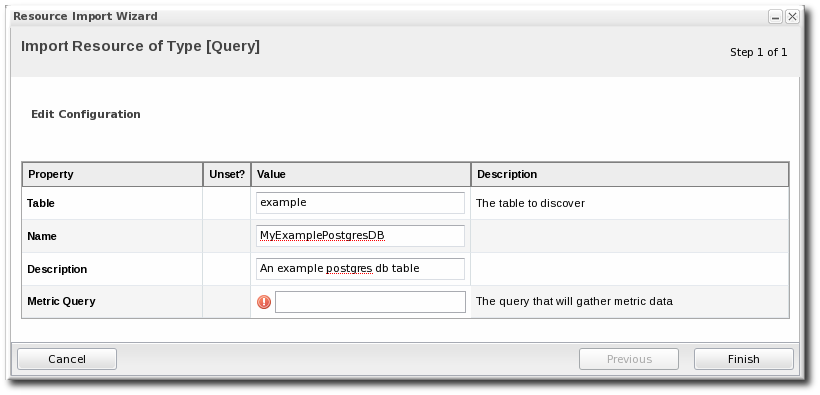
- Fill in the properties to identify and connect to the new resource. Each resource type in the system has a different set of required properties.

'%20d='M201.5%20305.5c-13.8%200-24.9-11.1-24.9-24.6%200-13.8%2011.1-24.9%2024.9-24.9%2013.6%200%2024.6%2011.1%2024.6%2024.9%200%2013.6-11.1%2024.6-24.6%2024.6zM504%20256c0%20137-111%20248-248%20248S8%20393%208%20256%20119%208%20256%208s248%20111%20248%20248zm-132.3-41.2c-9.4%200-17.7%203.9-23.8%2010-22.4-15.5-52.6-25.5-86.1-26.6l17.4-78.3%2055.4%2012.5c0%2013.6%2011.1%2024.6%2024.6%2024.6%2013.8%200%2024.9-11.3%2024.9-24.9s-11.1-24.9-24.9-24.9c-9.7%200-18%205.8-22.1%2013.8l-61.2-13.6c-3-.8-6.1%201.4-6.9%204.4l-19.1%2086.4c-33.2%201.4-63.1%2011.3-85.5%2026.8-6.1-6.4-14.7-10.2-24.1-10.2-34.9%200-46.3%2046.9-14.4%2062.8-1.1%205-1.7%2010.2-1.7%2015.5%200%2052.6%2059.2%2095.2%20132%2095.2%2073.1%200%20132.3-42.6%20132.3-95.2%200-5.3-.6-10.8-1.9-15.8%2031.3-16%2019.8-62.5-14.9-62.5zM302.8%20331c-18.2%2018.2-76.1%2017.9-93.6%200-2.2-2.2-6.1-2.2-8.3%200-2.5%202.5-2.5%206.4%200%208.6%2022.8%2022.8%2087.3%2022.8%20110.2%200%202.5-2.2%202.5-6.1%200-8.6-2.2-2.2-6.1-2.2-8.3%200zm7.7-75c-13.6%200-24.6%2011.1-24.6%2024.9%200%2013.6%2011.1%2024.6%2024.6%2024.6%2013.8%200%2024.9-11.1%2024.9-24.6%200-13.8-11-24.9-24.9-24.9z'/%3e%3c/svg%3e)