Skip to navigationSkip to content

Featured links

  • 지원
  • 콘솔
  • 개발자
  • 평가판 시작
    • 고객용
      • 고객 지원
      • 서브스크립션 관리
      • 기술문의 관리
      • Red Hat 에코시스템 카탈로그
      • 파트너 검색
    • 파트너용
      • 파트너 포털
      • 파트너 지원
      • 파트너 되기
    • 평가판, 구매 및 판매
      • Red Hat 스토어
      • 영업팀에 문의
      • 평가판 시작
    • Learning resources
      • 교육 및 자격증
      • 하이브리드 클라우드 학습 허브
      • 인터렉티브 랩
      • 학습 커뮤니티
      • Red Hat TV
      • 아키텍처 센터
    • 오픈 소스 커뮤니티
      • 글로벌 지원
      • Red Hat 기여 방식
Red Hat Documentation
  • AI
  • 학습
  • 설명서
  • 리소스
지원콘솔개발자평가판 시작연락처

Red Hat OpenShift Dev Spaces

이 문서는 모든 버전에서 사용 가능하지 않을 수 있습니다.

모든 버전의 제품 페이지 보기

목차

What's new
  • Red Hat OpenShift Dev Spaces release notes
    • Differences between Red Hat OpenShift Dev Spaces and Eclipse Che
    • New features and enhancements
    • Deprecated features
    • Removed features
    • Changed features
    • CVEs
    • Known issues
    • Bug fixes
    • Frequently asked questions
    • Patch releases
      • Dev Spaces 3.31 patch release October 28, 2026 (3.31.1)
      • Dev Spaces 3.31 patch release November 4, 2026 (3.31.2)
      • Dev Spaces 3.31 patch release November 20, 2026 (3.31.4)
  • Technology Preview
Discover
  • What is OpenShift Dev Spaces?
  • What problems does OpenShift Dev Spaces solve?
  • Who is OpenShift Dev Spaces for?
  • When to use OpenShift Dev Spaces
  • How OpenShift Dev Spaces works
    • OpenShift Dev Spaces architecture
    • What runs on your cluster
    • Operator and lifecycle management
    • Dev Workspace Operator and workspace pods
    • Gateway and request routing
    • Dashboard and workspace management
    • Server and namespace provisioning
    • Plug-in registry
    • What developers get in a workspace
  • Common user roles and tasks
Get Started
  • Prepare the platform for developers
    • Your first week as a platform administrator
    • Verify the platform works end-to-end
    • Configure GitHub OAuth for your team
    • What to configure next
  • Create your first cloud workspace
    • Your first-day experience
    • Open your project in a cloud development environment
    • Manage your cloud development environments
  • Connect to your Git repositories
    • How Git authentication works in cloud development environments
    • Access private repositories with a personal access token
Plan
  • Plan deployment resources
    • Supported platforms and architectures
    • Size your cluster for OpenShift Dev Spaces
    • Tested maximums that constrain workspace scaling
    • etcd pressure that limits cluster scale
    • Disable the workspace CA bundle mount
    • Configure automatic cleanup of inactive workspaces
    • Disable Copied CSVs to reduce etcd usage
    • Multi-cluster architectures for large deployments
    • Set up the dsc command-line tool
Install
  • How the installation works
    • Permissions required for CLI installation
    • Permissions required for web console installation
  • Install Red Hat OpenShift Dev Spaces
    • Deploy using GitOps and Argo CD
    • Deploy using the CLI
    • Deploy using the web console
    • Deploy with GitOps in an air-gapped environment
    • Deploy in an air-gapped environment
    • Enable the Ansible sample in a restricted environment
    • Deploy using an external identity provider
    • Customize settings during deployment
  • Confirm OpenShift Dev Spaces is running
  • Get the dashboard URL to share with your team
  • Prepare OpenShift Dev Spaces for your team
  • Remove OpenShift Dev Spaces from your cluster
Upgrade
  • Plan your upgrade
    • How the upgrade works
    • Choose how updates are applied
    • Pre-upgrade checklist
  • Approve a pending update in the web console
  • Upgrade from the command line
    • Upgrade by using the dsc management tool
    • Upgrade in an air-gapped environment
  • Verify the upgrade completed successfully
  • Fix a duplicate Dev Workspace Operator after a cluster upgrade
Configure
  • Customize the central configuration
    • How the central configuration works
    • Edit the central configuration from the command line
  • CheCluster Custom Resource fields reference
  • Dev Workspace Operator custom resources
  • Connect server components to enterprise systems
    • Inject files from Secrets and ConfigMaps into containers
    • Add individual files without replacing directories
    • Inject environment variables from Secrets and ConfigMaps
    • Fine-tune the server
  • Customize the developer dashboard
    • Customize the dashboard samples for your team
    • Apply your organization’s branding to the dashboard
  • Use the server API
  • Organize workspace namespaces
    • How workspace namespaces are organized
    • Set the workspace namespace naming convention
    • Provision projects in advance
    • Synchronize resources across user namespaces
    • Use Kubernetes namespaces instead of OpenShift projects
  • Set workspace policies for all users
    • Limit the number of workspaces that a user can keep
    • Limit the number of workspaces that all users can run simultaneously
    • Enable users to run multiple workspaces simultaneously
    • Trust self-signed Git server certificates
    • Control which nodes run workspaces
    • Restrict which URLs can create workspaces
    • Run nested containers in workspaces
  • Set up network access for workspaces
    • Restrict network traffic between workspaces
    • Enable operator-managed network policies
    • Use a custom hostname for the dashboard
    • Deploy with a self-signed TLS certificate
    • Trust custom TLS certificates for external services
    • Route workspace traffic through a shared ingress controller
    • Set a custom domain for workspace URLs
    • Route traffic through a proxy
  • Control where workspace data is stored
    • What storage your workspaces need
    • Use a custom storage provisioner
    • Choose how workspace data is persisted
    • Adjust workspace storage capacity
    • How workspace files persist across restarts
  • Configure fuse-overlayfs
    • When to enable fuse-overlayfs
    • Enable /dev/fuse access on OpenShift 4.14 and earlier
    • Enable fuse-overlayfs for all workspaces
  • Back up workspaces
    • Configure backup with the integrated OpenShift registry
    • Configure backup with a regular OCI-compatible registry
Secure
  • Protect your deployment
  • Control who can access OpenShift Dev Spaces
    • Grant additional permissions to users
    • Restrict access to specific users and groups
    • Remove user data for GDPR compliance
Optimize
  • What you can optimize in OpenShift Dev Spaces
  • Speed up workspace starts with image caching
    • How image caching speeds up workspace starts
    • Deploy Image Puller from the command line
    • Deploy Image Puller from the web console
    • Cache default OpenShift Dev Spaces images on all nodes
    • Cache your organization’s custom images
    • Cache additional images for faster starts
    • Review the default images cached by Image Puller
  • Scale the platform automatically
    • Scale OpenShift Dev Spaces for high availability
    • Prevent workspace failures during node scaling
  • Configure automatic cleanup of inactive workspaces
  • Disable the workspace CA bundle mount
  • Disable Copied CSVs to reduce etcd usage
  • Verify workspace performance after optimization
    • Check replica counts, image cache, and workspace startup
Develop
  • What development tools you can configure
  • Choose and configure your IDE
    • IDEs in Cloud Development Environments
    • Connect JetBrains IntelliJ IDEA Ultimate Edition to a new Dev Spaces workspace
    • Connect JetBrains IntelliJ IDEA Ultimate Edition to an existing Dev Spaces workspace
    • Connect JetBrains Toolbox to an OpenShift Dev Spaces workspace
    • JetBrains Gateway plugin compatibility matrix
    • Automate installation of VS Code extensions at workspace startup
    • Define a common IDE
    • Parameters for che-editor.yaml
  • Use AI coding assistants
    • AI assistants in Cloud Development Environments
    • Configure an AI provider API key
    • Change the AI tool on a workspace
    • Set up GitHub Copilot Chat
  • Persist AI assistant configuration
    • Persist Claude Code configuration across workspaces
    • Share Claude Code configuration with PVC direct mount
    • Share Claude Code configuration with PVC tmp copy
    • Share Claude Code configuration across workspaces with GitOps
    • Distribute AI assistant skills and commands across workspaces with Lola
    • Troubleshoot Claude Code configuration persistence
  • What you can do in a Cloud Development Environment
  • Standardize workspace environments
    • Devfile in OpenShift Dev Spaces
    • What you can customize in a Cloud Development Environment
  • Manage credentials and configurations in workspaces
    • How credentials and configurations work in workspaces
    • Mount Secrets
    • Create an image pull Secret with oc
    • Create an image pull Secret from a .dockercfg file
    • Create an image pull Secret from a config.json file
    • Mount ConfigMaps
    • Mount Git configuration
    • Mount SSH configuration
  • Build and run containers in workspaces
    • How fuse-overlayfs works in Cloud Development Environments
    • Access /dev/fuse in workspace containers
    • Enable fuse-overlayfs with a ConfigMap
    • How kubedock works
    • Enable kubedock in a workspace
    • Use Kubedock in a workspace
  • Collaborate with your team
    • Add a factory badge for first-time contributors
    • Review pull and merge requests
    • Try in Web IDE GitHub action
    • Add the action to a GitHub repository workflow
  • Persist and restore workspace data
    • Persistent storage for workspaces
    • Request persistent storage in a devfile
    • Request persistent storage in a PVC
    • View backups in the dashboard
    • Restore a workspace from a backup
  • Share preconfigured workspace links with your team
    • URL parameter concatenation
    • URL parameter for the IDE
    • URL parameter for the IDE image
    • URL parameter for starting duplicate workspaces
    • URL parameter for the existing workspace name
    • URL parameter for the devfile file name
    • URL parameter for the devfile file path
    • URL parameter for the workspace storage
    • URL parameter for additional remotes
    • URL parameter for a container image
    • URL parameter for a memory limit
    • URL parameter for a CPU limit
    • URL parameter for the AI provider
    • Start a cloud development environment from a raw devfile URL
    • Prevent workspace idling for long-running commands
Observe
  • What you can observe about OpenShift Dev Spaces
  • Monitor platform health
    • What OpenShift Dev Spaces server metrics reveal
    • Enable OpenShift Dev Spaces server metrics
    • Verify OpenShift Dev Spaces Server metrics collection with Prometheus
    • View OpenShift Dev Spaces Server from an OpenShift web console dashboard
    • What Dev Workspace Operator metrics reveal
    • Verify Dev Workspace Operator metrics collection with Prometheus
    • View Dev Workspace Operator metrics from an OpenShift web console dashboard
  • Configure the Woopra telemetry plugin
  • Configure logging to isolate issues
    • How server logging works
    • Configure log levels
    • Log HTTP traffic
    • Collect logs with dsc
Integrate
  • Connect Git providers with OAuth
    • Create a GitHub OAuth application for OpenShift Dev Spaces
    • Create a GitHub App for OpenShift Dev Spaces
    • Connect OpenShift Dev Spaces to your GitHub OAuth application
    • Connect to GitHub with device authorization
    • Reconnect to GitHub with device authorization
    • Delete a device auth token
    • Create a GitLab OAuth application for OpenShift Dev Spaces
    • Connect OpenShift Dev Spaces to your GitLab OAuth application
    • Create a Bitbucket Server OAuth 2.0 application for OpenShift Dev Spaces
    • Connect OpenShift Dev Spaces to your Bitbucket Server OAuth 2.0 application
    • Create a Bitbucket Cloud OAuth client for OpenShift Dev Spaces
    • Connect OpenShift Dev Spaces to your Bitbucket Cloud OAuth client
    • Create a Bitbucket Server OAuth 1.0 application for OpenShift Dev Spaces
    • Connect OpenShift Dev Spaces to your Bitbucket Server OAuth 1.0 application
    • Create a Microsoft Entra ID application for OpenShift Dev Spaces
    • Connect OpenShift Dev Spaces to your Microsoft Entra ID application
    • Refresh an expired access token automatically
  • Manage workspaces with OpenShift tools
    • How workspaces connect to OpenShift
    • Use automatic OpenShift token injection
    • List workspaces from the command line
    • Create a workspace from the command line
    • Stop a workspace from the command line
    • Start a stopped workspace from the command line
    • Remove a workspace from the command line
    • How OpenShift Dev Spaces appears in the OpenShift console
    • Edit application code from the OpenShift Developer Perspective
    • Access OpenShift Dev Spaces from Red Hat Applications menu
    • Open the OpenShift web console from OpenShift Dev Spaces
  • Resolve dependencies in restricted environments
    • Set up Maven to use your internal registry
    • Set up Gradle to use your internal registry
    • Set up npm to use your internal registry
    • Set up Python to use your internal registry
    • Set up Go to use your internal registry
    • Set up NuGet to use your internal registry
Extend
  • What you can customize in workspace tooling
  • Choose which editors are available
    • Add custom editors to the dashboard
    • Set the default IDE for new workspaces
    • Hide editors from the dashboard
    • Restore access to deprecated editors
    • Host editor binaries internally for air-gapped clusters
  • Customize the default IDE
    • Work with multiple projects in one workspace
    • Grant extensions access to OAuth tokens
    • Pre-install extensions in every workspace
    • IDE configuration options you can customize
    • Apply IDE settings to all workspaces
    • Control which extensions users can install
  • Add or remove IDE extensions
    • How IDE extensions work in workspaces
    • Use an alternative extension registry
    • Add or remove extensions in a workspace
    • Add or remove extensions from the Linux command line
  • Deploy a private extension registry
    • Deploy from a prebuilt image
    • Build a custom extension registry from source
    • Build the extension registry inside a workspace
    • Restrict the extension registry to internal traffic
    • Remove an extension through the registry API
    • Remove an extension directly from the database
  • Enable the managed Open VSX registry
    • Configure custom credentials for the managed Open VSX registry
    • Customize the Open VSX server configuration
    • Delete extensions from the managed Open VSX registry
    • Disable the managed Open VSX registry
  • What you can add to your platform
  • Register AI coding assistants for developers
    • Register an AI provider
    • AI provider API key secret reference
    • Disable AI coding assistants
  • Build a custom telemetry plugin
    • How telemetry plugins work
    • Create a telemetry server
    • Create a telemetry backend
    • Implement and test telemetry backend event handlers
    • Deploy a telemetry plugin
    • Configure workspaces to load a telemetry plugin
Troubleshoot
  • When something goes wrong with your workspace
  • View Cloud Development Environment logs
    • Cloud Development Environment logs
    • View workspace logs in CLI
    • View workspace logs in OpenShift console
  • Debug a failing workspace
  • Diagnose slow workspaces
  • Fix webview loading errors in private browsing
  • Fix devfile errors
  • When something goes wrong with the platform
  • Diagnose workspace startup failures
  • Diagnose slow Cloud Development Environments
  • Troubleshoot network problems
  • Fix OAuth configuration errors
Download PDF
  • Red Hat Dev Spaces 3.31 PDF Reference
  1. 홈
  2. 제품
  3. Red Hat OpenShift Dev Spaces
  4. 3.31
  5. How OpenShift Dev Spaces works
  6. What runs on your cluster

What runs on your cluster

Open 목차

이 콘텐츠는 선택한 언어로 제공되지 않습니다.

What runs on your cluster

Your cluster runs four OpenShift Dev Spaces server deployments that manage multi-tenancy and workspace lifecycle.
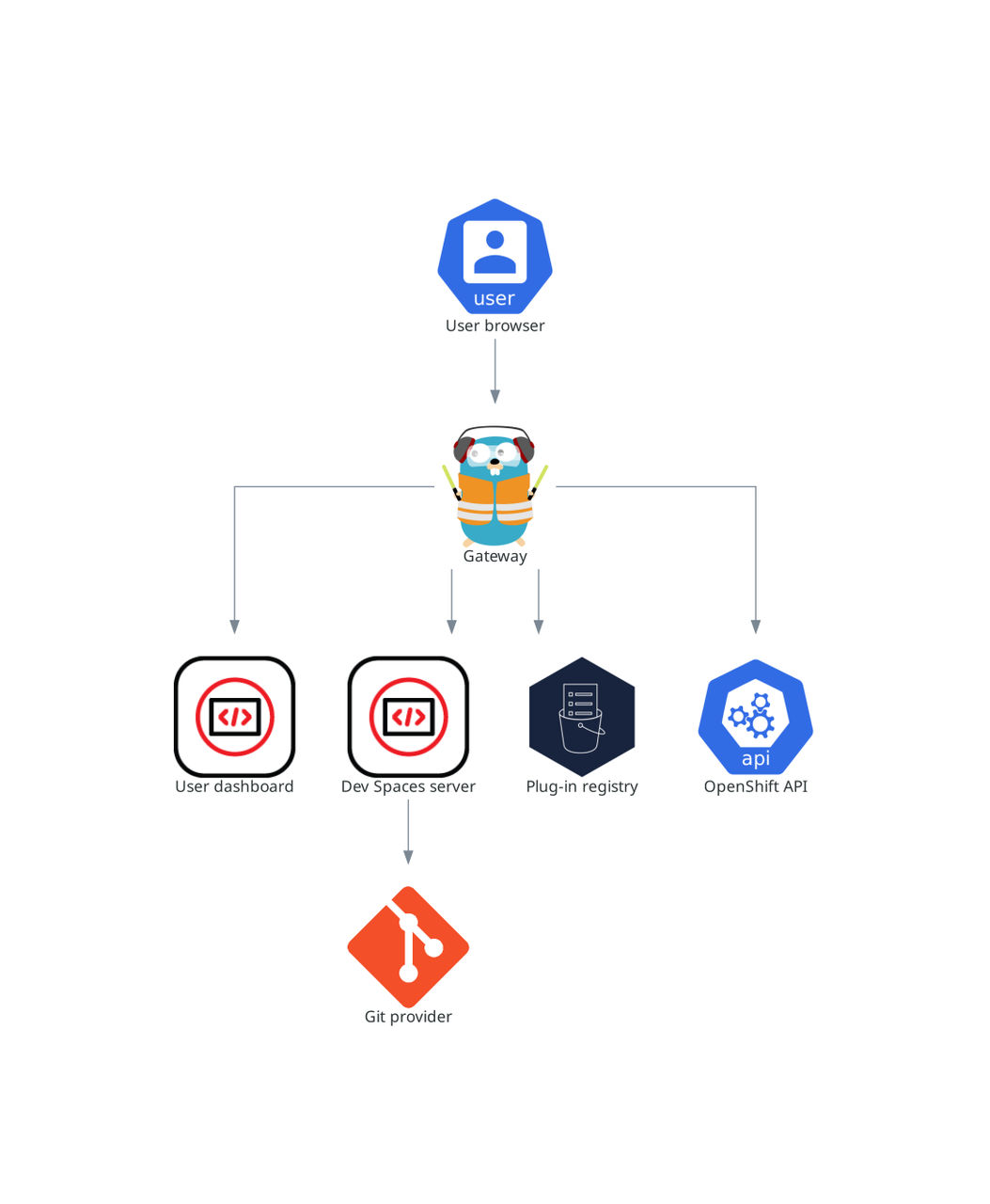
Figure 1. OpenShift Dev Spaces server components interacting with the Dev Workspace operator

Diagram showing OpenShift Dev Spaces server component deployments interacting with the Dev Workspace operator

Related concepts
  • Operator and lifecycle management
  • Gateway and request routing
  • Dashboard and workspace management
  • Server and namespace provisioning
  • Plug-in registry
OpenShift Dev Spaces architecture
Operator and lifecycle management
맨 위로 이동
Red Hat logoGithubRedditYoutubeTwitter

자세한 정보

  • 개발자 리소스
  • 클라우드 학습 허브
  • 인터렉티브 랩
  • 교육 및 자격증
  • 고객 지원
  • 모든 문서 보기

평가판, 구매 및 판매

  • 제품 평가판 센터
  • Red Hat 에코시스템 카탈로그
  • Red Hat 스토어
  • 온라인 구매(일본)

커뮤니티

  • 고객 포털 커뮤니티
  • 이벤트
  • 기여 방법

Red Hat 소개

Red Hat은 기업이 핵심 데이터 센터에서 네트워크 에지에 이르기까지 플랫폼과 환경 전반에서 더 쉽게 작업할 수 있도록 강화된 솔루션을 제공합니다.

보다 포괄적 수용을 위한 오픈 소스 용어 교체

Red Hat은 코드, 문서, 웹 속성에서 문제가 있는 언어를 교체하기 위해 최선을 다하고 있습니다. 자세한 내용은 다음을 참조하세요.Red Hat 블로그.

Red Hat 문서 정보

Red Hat을 사용하는 고객은 신뢰할 수 있는 콘텐츠가 포함된 제품과 서비스를 통해 혁신하고 목표를 달성할 수 있습니다. 최신 업데이트를 확인하세요.

Legal Notice

Theme

Red Hat legal and privacy links

  • Red Hat 소개
  • 채용 정보
  • 이벤트
  • 위치
  • Red Hat에 문의
  • Red Hat 블로그
  • 다양성, 평등, 포용성
  • Cool Stuff Store
  • Red Hat Summit
© 2026 Red Hat

Red Hat legal and privacy links

  • 개인 정보 취급 방침
  • 이용 약관
  • 제반 정책 및 지침
  • 디지털 접근성
맨 위로 이동