 Red Hat Summit
이 콘텐츠는 선택한 언어로 제공되지 않습니다.
Chapter 9. Viewing and exporting logs
Activity logs are gathered for all repositories and namespace in Red Hat Quay.
Viewing usage logs of Red Hat Quay. can provide valuable insights and benefits for both operational and security purposes. Usage logs might reveal the following information:
- Resource Planning: Usage logs can provide data on the number of image pulls, pushes, and overall traffic to your registry.
- User Activity: Logs can help you track user activity, showing which users are accessing and interacting with images in the registry. This can be useful for auditing, understanding user behavior, and managing access controls.
- Usage Patterns: By studying usage patterns, you can gain insights into which images are popular, which versions are frequently used, and which images are rarely accessed. This information can help prioritize image maintenance and cleanup efforts.
- Security Auditing: Usage logs enable you to track who is accessing images and when. This is crucial for security auditing, compliance, and investigating any unauthorized or suspicious activity.
- Image Lifecycle Management: Logs can reveal which images are being pulled, pushed, and deleted. This information is essential for managing image lifecycles, including deprecating old images and ensuring that only authorized images are used.
- Compliance and Regulatory Requirements: Many industries have compliance requirements that mandate tracking and auditing of access to sensitive resources. Usage logs can help you demonstrate compliance with such regulations.
- Identifying Abnormal Behavior: Unusual or abnormal patterns in usage logs can indicate potential security breaches or malicious activity. Monitoring these logs can help you detect and respond to security incidents more effectively.
- Trend Analysis: Over time, usage logs can provide trends and insights into how your registry is being used. This can help you make informed decisions about resource allocation, access controls, and image management strategies.
There are multiple ways of accessing log files:
- Viewing logs through the web UI.
- Exporting logs so that they can be saved externally.
- Accessing log entries using the API.
To access logs, you must have administrative privileges for the selected repository or namespace.
A maximum of 100 log results are available at a time via the API. To gather more results that that, you must use the log exporter feature described in this chapter.
9.1. Viewing usage logs
Logs can provide valuable information about the way that your registry is being used. Logs can be viewed by Organization, repository, or namespace on the v2 UI by using the following procedure.
Procedure
- Log in to your Red Hat Quay registry.
- Navigate to an Organization, repository, or namespace for which you are an administrator of.
Click Logs.
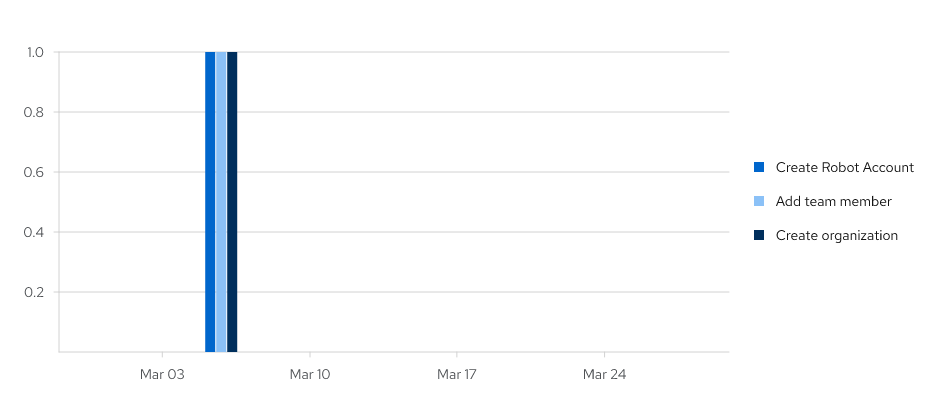
- Optional. Set the date range for viewing log entries by adding dates to the From and To boxes.
-
Optional. Export the logs by clicking Export. You must enter an email address or a valid callback URL that starts with
http://orhttps://. This process can take an hour depending on how many logs there are.
9.2. Viewing usage logs by using the API
Logs can be viewed by Organization or repository by using the API. They can also be aggregated (grouped), or listed with more detailed. Logs can also be viewed by user, a specific date range, or by page.
9.2.1. Viewing aggregated logs
Aggregated logs can be viewed by Organization, repository, a specific user, or the current user. You can also pass in optional commands like performer, starttime/endtime, and next_page to filter results.
Prerequisites
- You have Created an OAuth access token.
Procedure
Use the
GET /api/v1/user/aggregatelogsAPI endpoint to return the aggregated (or grouped) logs for the current user:$ curl -X GET \ -H "Authorization: Bearer <bearer_token>" \ -H "Accept: application/json" \ "https://<quay-server.example.com>/api/v1/user/aggregatelogs"Example output
{"aggregated": [{"kind": "create_tag", "count": 1, "datetime": "Tue, 18 Jun 2024 00:00:00 -0000"}, {"kind": "manifest_label_add", "count": 1, "datetime": "Tue, 18 Jun 2024 00:00:00 -0000"}, {"kind": "push_repo", "count": 2, "datetime": "Tue, 18 Jun 2024 00:00:00 -0000"}, {"kind": "revert_tag", "count": 1, "datetime": "Tue, 18 Jun 2024 00:00:00 -0000"}]}You can also pass in the
performerandstarttime/endtimequeries to obtain aggregated logs for a specific user between a specific time period. For example:$ curl -X GET \ -H "Authorization: Bearer <bearer_token>" \ -H "Accept: application/json" \ "<quay-server.example.com>/api/v1/user/aggregatelogs?performer=<username>&starttime=<MM/DD/YYYY>&endtime=<MM/DD/YYYY>"Aggregated logs can also be viewed by Organization by using the
GET /api/v1/organization/{orgname}/aggregatelogs. For example:$ curl -X GET \ -H "Authorization: Bearer <bearer_token>" \ -H "Accept: application/json" \ "<quay-server.example.com>/api/v1/organization/{orgname}/aggregatelogs"Aggregated logs can also be viewed by repository by using the
GET /api/v1/repository/{repository}/aggregatelogscommand. The following example includes thestarttime/endtimefields:$ curl -X GET \ -H "Authorization: Bearer <bearer_token>" \ -H "Accept: application/json" \ "<quay-server.example.com>/api/v1/repository/<repository_name>/<namespace>/aggregatelogs?starttime=2024-01-01&endtime=2024-06-18""
9.2.2. Viewing detailed logs
Detailed logs can be viewed by Organization, repository, a specific user, or the current user. You can also pass in optional fields like performer, starttime/endtime, and next_page to filter results.
Procedure
Use the
GET /api/v1/user/logsAPI endpoint to return a list of log entries for a user. For example:$ curl -X GET -H "Authorization: Bearer <bearer_token>" -H "Accept: application/json" "<quay-server.example.com>/api/v1/user/logs"You can also pass in the
performerandstartime/endtimequeries to obtain logs for a specific user between a specific time period. For example:$ curl -X GET -H "Authorization: Bearer <bearer_token>" -H "Accept: application/json" "http://quay-server.example.com/api/v1/user/logs?performer=quayuser&starttime=01/01/2024&endtime=06/18/2024"Example output
---
{"start_time": "Mon, 01 Jan 2024 00:00:00 -0000", "end_time": "Wed, 19 Jun 2024 00:00:00 -0000", "logs": [{"kind": "revert_tag", "metadata": {"username": "quayuser", "repo": "busybox", "tag": "test-two", "manifest_digest": "sha256:57583a1b9c0a7509d3417387b4f43acf80d08cdcf5266ac87987be3f8f919d5d"}, "ip": "192.168.1.131", "datetime": "Tue, 18 Jun 2024 18:59:13 -0000", "performer": {"kind": "user", "name": "quayuser", "is_robot": false, "avatar": {"name": "quayuser", "hash": "b28d563a6dc76b4431fc7b0524bbff6b810387dac86d9303874871839859c7cc", "color": "#17becf", "kind": "user"}}}, {"kind": "push_repo", "metadata": {"repo": "busybox", "namespace": "quayuser", "user-agent": "containers/5.30.1 (github.com/containers/image)", "tag": "test-two", "username": "quayuser", }
---
Use the
GET /api/v1/organization/{orgname}/logsendpoint to return logs for a specified organization:$ curl -X GET \ -H "Authorization: Bearer <bearer_token>" \ -H "Accept: application/json" \ "http://<quay-server.example.com>/api/v1/organization/{orgname}/logs"Use the
GET /api/v1/repository/{repository}/logsendpoint to return logs for a specified repository:$ curl -X GET \ -H "Authorization: Bearer <bearer_token>" \ -H "Accept: application/json" \ "http://<quay-server.example.com>/api/v1/repository/{repository}/logs"
9.3. Exporting repository logs by using the UI
You can obtain a larger number of log files and save them outside of the Red Hat Quay database by using the Export Logs feature. This feature has the following benefits and constraints:
- You can choose a range of dates for the logs you want to gather from a repository.
- You can request that the logs be sent to you by an email attachment or directed to a callback URL.
- To export logs, you must be an administrator of the repository or namespace.
- 30 days worth of logs are retained for all users.
- Export logs only gathers log data that was previously produced. It does not stream logging data.
- Your Red Hat Quay instance must be configured for external storage for this feature. Local storage does not work for exporting logs.
- When logs are gathered and made available to you, you should immediately copy that data if you want to save it. By default, the data expires after one hour.
Use the following procedure to export logs.
Procedure
- Select a repository for which you have administrator privileges.
- Click the Logs tab.
- Optional. If you want to specify specific dates, enter the range in the From and to boxes.
Click the Export Logs button. An Export Usage Logs pop-up appears, as shown
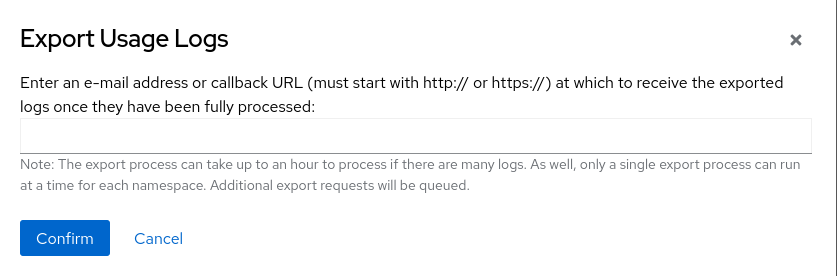
- Enter an email address or callback URL to receive the exported log. For the callback URL, you can use a URL to a specified domain, for example, <webhook.site>.
- Select Confirm to start the process for gather the selected log entries. Depending on the amount of logging data being gathered, this can take anywhere from a few minutes to several hours to complete.
When the log export is completed, the one of following two events happens:
- An email is received, alerting you to the available of your requested exported log entries.
- A successful status of your log export request from the webhook URL is returned. Additionally, a link to the exported data is made available for you to delete to download the logs.
The URL points to a location in your Red Hat Quay external storage and is set to expire within one hour. Make sure that you copy the exported logs before the expiration time if you intend to keep your logs.
9.4. Exporting logs by using the API
Detailed logs can be exported to a callback URL or to an email address.
Prerequisites
- You have Created an OAuth access token.
Procedure
Use the
POST /api/v1/user/exportlogsendpoint to export logs for the current user:$ curl -X POST \ -H "Authorization: Bearer <bearer_token>" \ -H "Content-Type: application/json" \ -H "Accept: application/json" \ -d '{ "starttime": "<MM/DD/YYYY>", "endtime": "<MM/DD/YYYY>", "callback_email": "your.email@example.com" }' \ "http://<quay-server.example.com>/api/v1/user/exportlogs"Example output
{"export_id": "6a0b9ea9-444c-4a19-9db8-113201c38cd4"}Use the
POST /api/v1/organization/{orgname}/exportlogsendpoint to export logs for an Organization:$ curl -X POST \ -H "Authorization: Bearer <bearer_token>" \ -H "Content-Type: application/json" \ -H "Accept: application/json" \ -d '{ "starttime": "<MM/DD/YYYY>", "endtime": "<MM/DD/YYYY>", "callback_email": "org.logs@example.com" }' \ "http://<quay-server.example.com>/api/v1/organization/{orgname}/exportlogs"Use the
POST /api/v1/repository/{repository}/exportlogsendpoint to export logs for a repository:$ curl -X POST \ -H "Authorization: Bearer <bearer_token>" \ -H "Content-Type: application/json" \ -H "Accept: application/json" \ -d '{ "starttime": "2024-01-01", "endtime": "2024-06-18", "callback_url": "http://your-callback-url.example.com" }' \ "http://<quay-server.example.com>/api/v1/repository/{repository}/exportlogs"

'%20d='M201.5%20305.5c-13.8%200-24.9-11.1-24.9-24.6%200-13.8%2011.1-24.9%2024.9-24.9%2013.6%200%2024.6%2011.1%2024.6%2024.9%200%2013.6-11.1%2024.6-24.6%2024.6zM504%20256c0%20137-111%20248-248%20248S8%20393%208%20256%20119%208%20256%208s248%20111%20248%20248zm-132.3-41.2c-9.4%200-17.7%203.9-23.8%2010-22.4-15.5-52.6-25.5-86.1-26.6l17.4-78.3%2055.4%2012.5c0%2013.6%2011.1%2024.6%2024.6%2024.6%2013.8%200%2024.9-11.3%2024.9-24.9s-11.1-24.9-24.9-24.9c-9.7%200-18%205.8-22.1%2013.8l-61.2-13.6c-3-.8-6.1%201.4-6.9%204.4l-19.1%2086.4c-33.2%201.4-63.1%2011.3-85.5%2026.8-6.1-6.4-14.7-10.2-24.1-10.2-34.9%200-46.3%2046.9-14.4%2062.8-1.1%205-1.7%2010.2-1.7%2015.5%200%2052.6%2059.2%2095.2%20132%2095.2%2073.1%200%20132.3-42.6%20132.3-95.2%200-5.3-.6-10.8-1.9-15.8%2031.3-16%2019.8-62.5-14.9-62.5zM302.8%20331c-18.2%2018.2-76.1%2017.9-93.6%200-2.2-2.2-6.1-2.2-8.3%200-2.5%202.5-2.5%206.4%200%208.6%2022.8%2022.8%2087.3%2022.8%20110.2%200%202.5-2.2%202.5-6.1%200-8.6-2.2-2.2-6.1-2.2-8.3%200zm7.7-75c-13.6%200-24.6%2011.1-24.6%2024.9%200%2013.6%2011.1%2024.6%2024.6%2024.6%2013.8%200%2024.9-11.1%2024.9-24.6%200-13.8-11-24.9-24.9-24.9z'/%3e%3c/svg%3e)