 Red Hat Summit
Red Hat OpenShift on Amazon Web Services at Red Hat Summit 2023
View a selection of deep-dive discussions, presentations, and demonstrations from Red Hat Summit detailing the different implementations of Red Hat OpenShift Service on Amazon Web Services.
Using GitLab Runners on Red Hat OpenShift Service on Amazon Web Services (ROSA)
When using GitLab CI/CD, users are already experiencing high processing speeds on a given cloud instance. GitLab Runners might be able to help with this problem by further optimizing your Red Hat OpenShift Service on AWS (ROSA) pipelines.
What is GitLab CI/CD?
GitLab CI/CD is a powerful continuous integration and deployment tool built directly into GitLab. This helps organizations automate our development process by building, testing, and deploying code automatically after a push and commit action. GitLab Runner is an application that works with CI/CD to run jobs in pipelines.
Why use GitLab CI/CD?
There are a variety of benefits that are available for users once they apply GitLab CI/CD to their OpenShift instances.
- Speed: Users that employ AWS code pipelines can still suffer high processing times. CI/CD can reduce down these times significantly and reduce overall load to the services.
- Standardization: Having multiple environments for deployment can mean that your technology can fit all use cases (and those yet to come!). Using CI/CD also allows for consolidation of multiple toolsets into a singular option for developers. This cuts down on the time needed to get developers up to speed on new building and deployment tools.
- GitOps process: GitLab CI/CD has multiple triggers and variables within the tool UI for ease of use. This can reduce any conflicts in deployment or requests made, as they can be called using the same options across the board.
Architecture
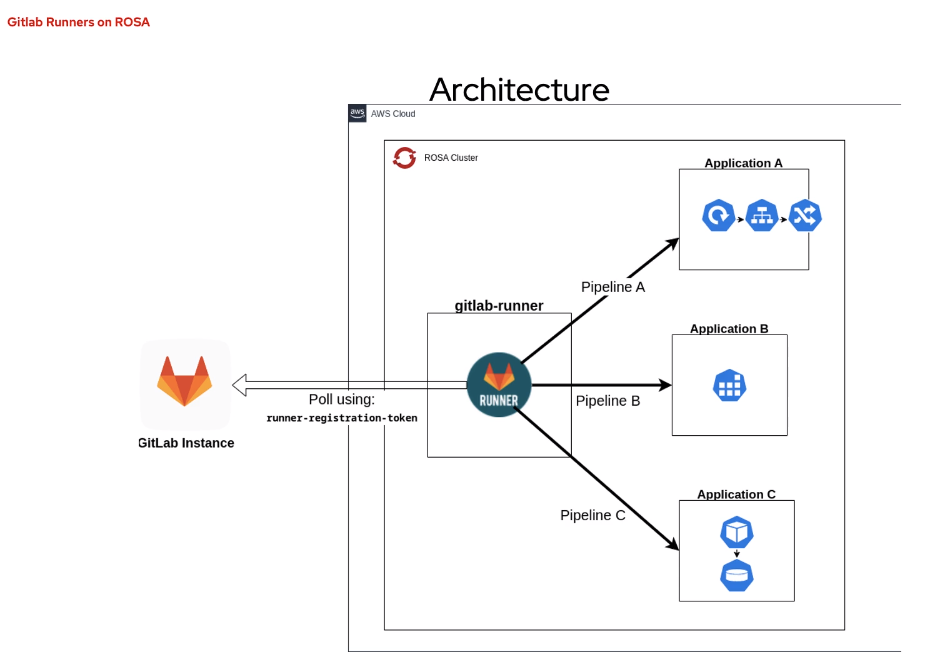
In a given environment like the example above, the GitLab runner could live on a ROSA cluster (or any OpenShift instance) in order to facilitate pipelines to multiple applications. The runner also pulls from an external GitLab instance and cluster via a single registration token.
Multiple runners can be associated with each namespace as well. This can come in handy if your configuration uses tags to specify which runner per environment/cluster you wish to reference for specific actions.
GitLab runners are highly customizable as they can be assigned to separate projects or shared across multiple.
Pipelines
When configuring your repository, be sure that you include a GitLab YAML file, where specific metadata will be stored about your pipelines. This includes tags, workflow rules, stages and other necessary data for the processes to run after merge or commit requests are received.
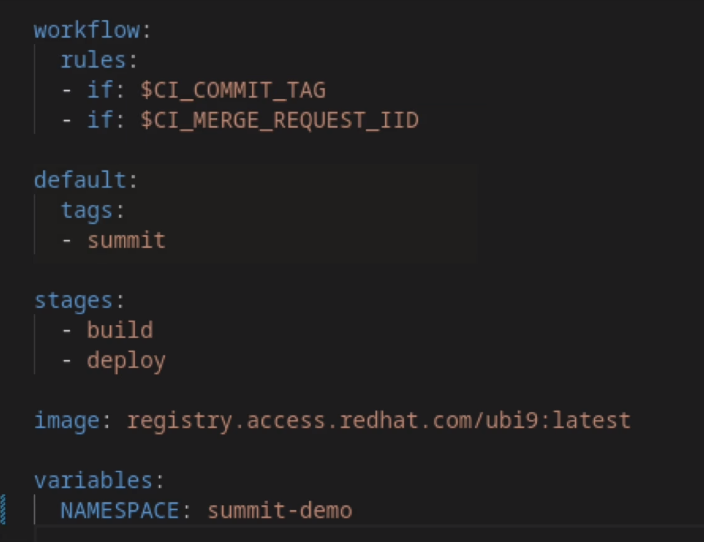
- Workflow: Defines when pipelines should specifically enact these jobs. In the example above, the GitLab runner is enacting the job whenever a merge or commit request is submitted.
- Tags: Applies when there are multiple pipelines available. Tags can tell which pipeline to run and when.
- Stages: Further defines when a pipeline should be run according to which stage a job is at.
- Variables: Applies when multiple namespaces/applications are nested within the cluster or environment.
Additional rules can be defined in the code for each stage of the job. These settings can be changed as your work processes grow or scale down, providing greater flexibility.
To view a demo of how GitLab Runners can be applied to a given job for faster performance, watch our live demo here. Note: you will need a Red Hat account to view the video.

'%20d='M201.5%20305.5c-13.8%200-24.9-11.1-24.9-24.6%200-13.8%2011.1-24.9%2024.9-24.9%2013.6%200%2024.6%2011.1%2024.6%2024.9%200%2013.6-11.1%2024.6-24.6%2024.6zM504%20256c0%20137-111%20248-248%20248S8%20393%208%20256%20119%208%20256%208s248%20111%20248%20248zm-132.3-41.2c-9.4%200-17.7%203.9-23.8%2010-22.4-15.5-52.6-25.5-86.1-26.6l17.4-78.3%2055.4%2012.5c0%2013.6%2011.1%2024.6%2024.6%2024.6%2013.8%200%2024.9-11.3%2024.9-24.9s-11.1-24.9-24.9-24.9c-9.7%200-18%205.8-22.1%2013.8l-61.2-13.6c-3-.8-6.1%201.4-6.9%204.4l-19.1%2086.4c-33.2%201.4-63.1%2011.3-85.5%2026.8-6.1-6.4-14.7-10.2-24.1-10.2-34.9%200-46.3%2046.9-14.4%2062.8-1.1%205-1.7%2010.2-1.7%2015.5%200%2052.6%2059.2%2095.2%20132%2095.2%2073.1%200%20132.3-42.6%20132.3-95.2%200-5.3-.6-10.8-1.9-15.8%2031.3-16%2019.8-62.5-14.9-62.5zM302.8%20331c-18.2%2018.2-76.1%2017.9-93.6%200-2.2-2.2-6.1-2.2-8.3%200-2.5%202.5-2.5%206.4%200%208.6%2022.8%2022.8%2087.3%2022.8%20110.2%200%202.5-2.2%202.5-6.1%200-8.6-2.2-2.2-6.1-2.2-8.3%200zm7.7-75c-13.6%200-24.6%2011.1-24.6%2024.9%200%2013.6%2011.1%2024.6%2024.6%2024.6%2013.8%200%2024.9-11.1%2024.9-24.6%200-13.8-11-24.9-24.9-24.9z'/%3e%3c/svg%3e)