 Red Hat Summit
Este conteúdo não está disponível no idioma selecionado.
13.11. Changing Behavior when Pressing the Power Button in Graphical Target Mode
When the machine is booted to a graphical login screen or user session, hitting the button makes the machine suspend by default. This happens both in cases when the user presses the button physically or when pressing a virtual button from a remote console. To achieve a different behavior when pressing the button, set the function of this button with dconf.
For example, if you want the system to shutdown after pressing the button, use the following procedure:
Procedure 13.11. Using dconf to configure the system to shutdown after pressing the button
- Create a
localdatabase for system-wide settings in the/etc/dconf/db/local.d/01-powerfile:[org/gnome/settings-daemon/plugins/power] power-button-action='interactive' - Override the user's setting and prevent the user from changing it in the
/etc/dconf/db/local.d/locks/01-powerfile:/org/gnome/settings-daemon/plugins/power/power-button-action - Update the system databases:
# dconf update - Log out and back in again before the system-wide settings take effect.
This configuration initiates a system shutdown after pressing the button. To configure the system differently, you can set the behavior of particular buttons.
Options for particular buttons
nothing- does nothing
suspend- suspends the system
hibernate- hibernates the system
interactive- shows a pop-up query asking the user what to doWith interactive mode, the system powers off automatically after 60 seconds when hitting the power button.However, you can choose a different behavior from the pop-up query as shown in the figure below.
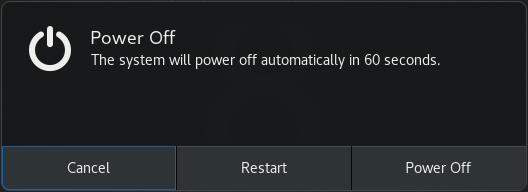
Figure 13.2. Pop-up query for interactive mode

'%20d='M201.5%20305.5c-13.8%200-24.9-11.1-24.9-24.6%200-13.8%2011.1-24.9%2024.9-24.9%2013.6%200%2024.6%2011.1%2024.6%2024.9%200%2013.6-11.1%2024.6-24.6%2024.6zM504%20256c0%20137-111%20248-248%20248S8%20393%208%20256%20119%208%20256%208s248%20111%20248%20248zm-132.3-41.2c-9.4%200-17.7%203.9-23.8%2010-22.4-15.5-52.6-25.5-86.1-26.6l17.4-78.3%2055.4%2012.5c0%2013.6%2011.1%2024.6%2024.6%2024.6%2013.8%200%2024.9-11.3%2024.9-24.9s-11.1-24.9-24.9-24.9c-9.7%200-18%205.8-22.1%2013.8l-61.2-13.6c-3-.8-6.1%201.4-6.9%204.4l-19.1%2086.4c-33.2%201.4-63.1%2011.3-85.5%2026.8-6.1-6.4-14.7-10.2-24.1-10.2-34.9%200-46.3%2046.9-14.4%2062.8-1.1%205-1.7%2010.2-1.7%2015.5%200%2052.6%2059.2%2095.2%20132%2095.2%2073.1%200%20132.3-42.6%20132.3-95.2%200-5.3-.6-10.8-1.9-15.8%2031.3-16%2019.8-62.5-14.9-62.5zM302.8%20331c-18.2%2018.2-76.1%2017.9-93.6%200-2.2-2.2-6.1-2.2-8.3%200-2.5%202.5-2.5%206.4%200%208.6%2022.8%2022.8%2087.3%2022.8%20110.2%200%202.5-2.2%202.5-6.1%200-8.6-2.2-2.2-6.1-2.2-8.3%200zm7.7-75c-13.6%200-24.6%2011.1-24.6%2024.9%200%2013.6%2011.1%2024.6%2024.6%2024.6%2013.8%200%2024.9-11.1%2024.9-24.6%200-13.8-11-24.9-24.9-24.9z'/%3e%3c/svg%3e)