 Red Hat Summit
Este conteúdo não está disponível no idioma selecionado.
4.3. Configuring Kerberos (with LDAP or NIS) Using authconfig
Both LDAP and NIS authentication stores support Kerberos authentication methods. Using Kerberos has a couple of benefits:
- It uses a security layer for communication while still allowing connections over standard ports.
- It automatically uses credentials caching with SSSD, which allows offline logins.
Note
Using Kerberos authentication requires the
krb5-libs and krb5-workstation packages.
4.3.1. Configuring Kerberos Authentication from the UI
Copiar o linkLink copiado para a área de transferência!
The option from the Authentication Method drop-down menu automatically opens the fields required to connect to the Kerberos realm.
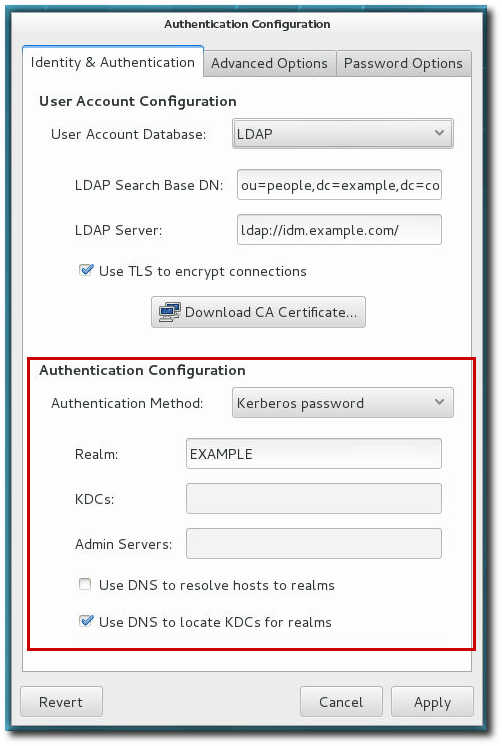
Figure 4.2. Kerberos Fields
- Realm gives the name for the realm for the Kerberos server. The realm is the network that uses Kerberos, composed of one or more key distribution centers (KDC) and a potentially large number of clients.
- KDCs gives a comma-separated list of servers that issue Kerberos tickets.
- Admin Servers gives a list of administration servers running the
kadmindprocess in the realm. - Optionally, use DNS to resolve server host name and to find additional KDCs within the realm.
4.3.2. Configuring Kerberos Authentication from the Command Line
Copiar o linkLink copiado para a área de transferência!
Both LDAP and NIS allow Kerberos authentication to be used in place of their native authentication mechanisms. At a minimum, using Kerberos authentication requires specifying the realm, the KDC, and the administrative server. There are also options to use DNS to resolve client names and to find additional admin servers.
[root@server ~]# authconfig NIS or LDAP options --enablekrb5 --krb5realm EXAMPLE --krb5kdc kdc.example.com:88,server.example.com:88 --krb5adminserver server.example.com:749 --enablekrb5kdcdns --enablekrb5realmdns --update
'%20d='M201.5%20305.5c-13.8%200-24.9-11.1-24.9-24.6%200-13.8%2011.1-24.9%2024.9-24.9%2013.6%200%2024.6%2011.1%2024.6%2024.9%200%2013.6-11.1%2024.6-24.6%2024.6zM504%20256c0%20137-111%20248-248%20248S8%20393%208%20256%20119%208%20256%208s248%20111%20248%20248zm-132.3-41.2c-9.4%200-17.7%203.9-23.8%2010-22.4-15.5-52.6-25.5-86.1-26.6l17.4-78.3%2055.4%2012.5c0%2013.6%2011.1%2024.6%2024.6%2024.6%2013.8%200%2024.9-11.3%2024.9-24.9s-11.1-24.9-24.9-24.9c-9.7%200-18%205.8-22.1%2013.8l-61.2-13.6c-3-.8-6.1%201.4-6.9%204.4l-19.1%2086.4c-33.2%201.4-63.1%2011.3-85.5%2026.8-6.1-6.4-14.7-10.2-24.1-10.2-34.9%200-46.3%2046.9-14.4%2062.8-1.1%205-1.7%2010.2-1.7%2015.5%200%2052.6%2059.2%2095.2%20132%2095.2%2073.1%200%20132.3-42.6%20132.3-95.2%200-5.3-.6-10.8-1.9-15.8%2031.3-16%2019.8-62.5-14.9-62.5zM302.8%20331c-18.2%2018.2-76.1%2017.9-93.6%200-2.2-2.2-6.1-2.2-8.3%200-2.5%202.5-2.5%206.4%200%208.6%2022.8%2022.8%2087.3%2022.8%20110.2%200%202.5-2.2%202.5-6.1%200-8.6-2.2-2.2-6.1-2.2-8.3%200zm7.7-75c-13.6%200-24.6%2011.1-24.6%2024.9%200%2013.6%2011.1%2024.6%2024.6%2024.6%2013.8%200%2024.9-11.1%2024.9-24.6%200-13.8-11-24.9-24.9-24.9z'/%3e%3c/svg%3e)