 Red Hat Summit
Este conteúdo não está disponível no idioma selecionado.
1.2. Your first Seam application: the registration example
The registration example is a simple application that lets a new user store their username, real name, and password in the database. This example uses only basic functions to demonstrate the use of an EJB3 session bean as a JSF action listener, and the basic configuration of Seam.
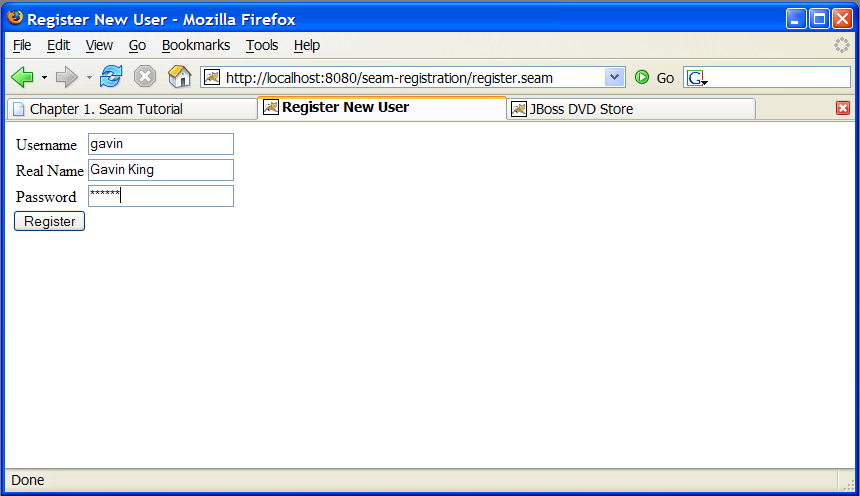
The start page displays a basic form with three input fields. Filling them in and submitting the form will save a user object in the database.
1.2.1. Understanding the code
Copiar o linkLink copiado para a área de transferência!
The example is implemented with two Facelets templates: one entity bean, and one stateless session bean. This section will take you through the code in detail, starting from the base level.
1.2.1.1. The entity bean: User.java
Copiar o linkLink copiado para a área de transferência!
We need an EJB entity bean for user data. This class defines persistence and validation declaratively, via annotations. It also requires some extra annotations to define the class as a Seam component.
Example 1.1. User.java
@Entity
@Name("user")
@Scope(SESSION)
@Table(name="users")
public class User implements Serializable
{
    private static final long serialVersionUID =
        1881413500711441951L;

    private String username;
    private String password;
    private String name;

    public User(String name,
                String password,
                String username)
    {
        this.name = name;
        this.password = password;
        this.username = username;
    }

    public User() {}

    @NotNull @Length(min=5, max=15)
    public String getPassword()
    {
        return password;
    }

    public void setPassword(String password)
    {
        this.password = password;
    }

    @NotNull
    public String getName()
    {
        return name;
    }

    public void setName(String name)
    {
        this.name = name;
    }

    @Id @NotNull @Length(min=5, max=15)
    public String getUsername()
    {
        return username;
    }

    public void setUsername(String username)
    {
        this.username = username;
    }

}
|
The EJB3 standard @Entity annotation indicates that the User class is an entity bean.
|
|
A Seam component needs a component name specified by the @Name annotation. This name must be unique within the Seam application. When JSF asks Seam to resolve a context variable with a name that is the same as a Seam component name, and the context variable is currently undefined (null), Seam will instantiate that component, and bind the new instance to the context variable. In this case, Seam will instantiate a User the first time JSF encounters a variable named user.
|
|
Whenever Seam instantiates a component, it binds the new instance to a context variable in the component's default context. The default context is specified using the @Scope annotation. The User bean is a session scoped component.
|
|
The EJB standard @Table annotation indicates that the User class is mapped to the users table.
|
| name, password and username are the persistent attributes of the entity bean. All of our persistent attributes define accessor methods. These are needed when this component is used by JSF in the render response and update model values phases.
|
|
An empty constructor is required by both the EJB specification and Seam.
|
|
The @NotNull and @Length annotations are part of the Hibernate Validator framework. Seam integrates Hibernate Validator and lets you use it for data validation (even if you are not using Hibernate for persistence).
|
|
The EJB standard @Id annotation indicates the primary key attribute of the entity bean.
|


The most important things to notice in this example are the
@Name and @Scope annotations. These annotations establish that this class is a Seam component.
In the next section, you will see that the properties of the
User class are bound directly to JSF components and populated by JSF during the update model values phase. There is no glue code to copy data back and forth between the JSP pages and the entity bean domain model.
However, entity beans should not perform transaction management or database access, so this component should not be used as a JSF action listener. In this situation, a session bean is a better choice.
1.2.1.2. The stateless session bean class: RegisterAction.java
Copiar o linkLink copiado para a área de transferência!
Most Seam applications use session beans as JSF action listeners, though you may also use JavaBeans.
We have exactly one JSF action in this application, and one session bean method attached to it. In this case, we will use a stateless session bean, since all the state associated with our action is held by the
User bean.
The relevant code is shown below:
Example 1.2. RegisterAction.java
@Stateless
@Name("register")
public class RegisterAction implements Register
{
    @In
    private User user;

    @PersistenceContext
    private EntityManager em;

    @Logger
    private Log log;

    public String register()
    {
        List existing = em.createQuery("select username " +
                                       "from User " +
                                       "where username = #{user.username}")
            .getResultList();

        if (existing.size()==0)
            {
                em.persist(user);
                log.info("Registered new user #{user.username}");
                return "/registered.xhtml";
            }
        else
            {
                FacesMessages.instance().add("User #{user.username} already exists");
                return null;
            }
    }

}
|
The EJB @Stateless annotation marks this class as a stateless session bean.
|
|
The @In annotation marks an attribute of the bean as injected by Seam. In this case, the attribute is injected from a context variable named user (the instance variable name).
|
|
The EJB standard @PersistenceContext annotation is used to inject the EJB3 entity manager.
|
|
The Seam @Logger annotation is used to inject the component's Log instance.
|
|
The action listener method uses the standard EJB3 EntityManager API to interact with the database, and returns the JSF outcome. Note that, since this is a session bean, a transaction is automatically begun when the register() method is called, and committed when it completes.
|
|
Notice that Seam lets you use a JSF EL expression inside EJB-QL. Under the covers, this results in an ordinary JPA setParameter() call on the standard JPA Query object.
|
|
The Log API lets us easily display templated log messages which can also make use of JSF EL expressions.
|
|
JSF action listener methods return a string-valued outcome that determines what page will be displayed next. A null outcome (or a void action listener method) redisplays the previous page. In plain JSF, it is normal to always use a JSF navigation rule to determine the JSF view id from the outcome. For complex applications this indirection is useful and a good practice. However, for very simple examples like this one, Seam lets you use the JSF view id as the outcome, eliminating the requirement for a navigation rule. Note that when you use a view id as an outcome, Seam always performs a browser redirect.
|
|
Seam provides a number of built-in components to help solve common problems. The FacesMessages component makes it easy to display templated error or success messages. (As of Seam 2.1, you can use StatusMessages instead to remove the semantic dependency on JSF). Built-in Seam components may be obtained by injection, or by calling the instance() method on the class of the built-in component.
|

Note that we did not explicitly specify a
@Scope this time. Each Seam component type has a default scope, which will be used if scope is not explicitly specified. For stateless session beans, the default scope is the stateless context.
The session bean action listener performs the business and persistence logic for our mini-application. In a more complex application, a separate service layer might be necessary, but Seam allows you to implement your own strategies for application layering. You can make any application as simple, or as complex, as you want.
Note
This application is more complex than necessary for the sake of clear example code. All of the application code could have been eliminated by using Seam's application framework controllers.
1.2.1.3. The session bean local interface: Register.java
Copiar o linkLink copiado para a área de transferência!
The session bean requires a local interface.
Example 1.3. Register.java
@Local
public interface Register
{
     public String register();
}
That's the end of the Java code. The next level to examine is the view.
1.2.1.4. The view: register.xhtml and registered.xhtml
Copiar o linkLink copiado para a área de transferência!
The view pages for a Seam application can be implemented using any technology that supports JSF. This example was written with Facelets.
Example 1.4. register.xhtml
<?xml version="1.0" encoding="utf-8"?>
<!DOCTYPE html PUBLIC "-//W3C//DTD XHTML 1.0 Transitional//EN"
"http://www.w3.org/TR/xhtml1/DTD/xhtml1-transitional.dtd">
<html xmlns="http://www.w3.org/1999/xhtml"
      xmlns:s="http://jboss.com/products/seam/taglib"
      xmlns:h="http://java.sun.com/jsf/html"
      xmlns:f="http://java.sun.com/jsf/core">

  <head>
    <title>Register New User</title>
  </head>
  <body>
    <f:view>
      <h:form>
        <s:validateAll>
          <h:panelGrid columns="2">
            Username: <h:inputText value="#{user.username}"
            required="true"/>
            Real Name: <h:inputText value="#{user.name}"
            required="true"/>
            Password: <h:inputSecret value="#{user.password}"
            required="true"/>
          </h:panelGrid>
        </s:validateAll>
        <h:messages/>
        <h:commandButton value="Register" action="#{register.register}"/>
      </h:form>
    </f:view>
  </body>

</html>
The only Seam-specific tag here is
<s:validateAll>. This JSF component tells JSF to validate all the contained input fields against the Hibernate Validator annotations specified on the entity bean.
Example 1.5. registered.xhtml
<?xml version="1.0" encoding="utf-8"?>
<!DOCTYPE html PUBLIC "-//W3C//DTD XHTML 1.0 Transitional//EN"
"http://www.w3.org/TR/xhtml1/DTD/xhtml1-transitional.dtd">
<html xmlns="http://www.w3.org/1999/xhtml"
      xmlns:f="http://java.sun.com/jsf/core">

  <head>
    <title>Successfully Registered New User</title>
  </head>
  <body>
    <f:view>
      Welcome, #{user.name}, you are successfully
      registered as #{user.username}.
    </f:view>
  </body>

</html>
The above is a simple Facelets page, created with inline EL — it contains nothing specific to Seam.
1.2.1.5. The Seam component deployment descriptor: components.xml
Copiar o linkLink copiado para a área de transferência!
Before looking at deployment descriptors, it is worth noting that Seam strongly values minimal configuration. These configuration files will be created for you when you create a Seam application, and there will rarely be any need to alter them. They are presented here solely to assist you in understanding the purpose and function of all of the example code.
If you have used Java frameworks previously, you will be used to declaring your component classes in an XML file. You have probably also noticed that as a project matures, these XML files tend to become unmanageable. Fortunately, Seam does not require application components to be accompanied by XML. Most Seam applications require only a small amount of XML, which does not tend to increase in size as projects expand.
However, it is often useful to be able to provide for some external configuration of some components, particularly the components that are built into Seam. The most flexible option, here, is to provide this configuration in a file called
components.xml, located in the WEB-INF directory. The components.xml file can be used to tell Seam how to find our EJB components in JNDI:
Example 1.6. components.xml example
<?xml version="1.0" encoding="UTF-8"?>
<components xmlns="http://jboss.com/products/seam/components"
            xmlns:core="http://jboss.com/products/seam/core"
            xmlns:xsi="http://www.w3.org/2001/XMLSchema-instance"
            xsi:schemaLocation=
            "http://jboss.com/products/seam/core
             http://jboss.com/products/seam/core-2.2.xsd
             http://jboss.com/products/seam/components
             http://jboss.com/products/seam/components-2.2.xsd">

  <core:init jndi-pattern="@jndiPattern@"/>

</components>
The above code configures a property named
jndiPattern, which belongs to a built-in Seam component named org.jboss.seam.core.init. The @ symbols are used to direct the Ant build script to insert the correct JNDI pattern from the components.properties file when the application is deployed. You will learn more about this process in Section 6.2, “Configuring components via components.xml”.
1.2.1.6. The web deployment description: web.xml
Copiar o linkLink copiado para a área de transferência!
The presentation layer for our mini-application will be deployed in a WAR, so a web deployment descriptor is required:
Example 1.7. web.xml
<?xml version="1.0" encoding="UTF-8"?>
<web-app xmlns="http://java.sun.com/xml/ns/javaee"
         xmlns:xsi="http://www.w3.org/2001/XMLSchema-instance"
         xsi:schemaLocation=
         "http://java.sun.com/xml/ns/javaee
          http://java.sun.com/xml/ns/javaee/web-app_2_5.xsd"
         version="2.5">

  <listener>
    <listener-class>org.jboss.seam.servlet.SeamListener</listener-class>
  </listener>

  <context-param>
    <param-name>javax.faces.DEFAULT_SUFFIX</param-name>
    <param-value>.xhtml</param-value>
  </context-param>

  <servlet>
    <servlet-name>Faces Servlet</servlet-name>
    <servlet-class>javax.faces.webapp.FacesServlet</servlet-class>
    <load-on-startup>1</load-on-startup>
  </servlet>

  <servlet-mapping>
    <servlet-name>Faces Servlet</servlet-name>
    <url-pattern>*.seam</url-pattern>
  </servlet-mapping>

  <session-config>
    <session-timeout>10</session-timeout>
  </session-config>

</web-app>
The above
web.xml file configures both Seam and JSF. The configuration you see here changes very little between Seam applications.
1.2.1.7. The JSF configration: faces-config.xml
Copiar o linkLink copiado para a área de transferência!
Most Seam applications use JSF views as the presentation layer, so
faces-config.xml is usually a requirement. In this case, Facelets is used to define our views, so we need to tell JSF to use Facelets as its templating engine.
Example 1.8. faces-config.xml
<?xml version="1.0" encoding="UTF-8"?>
<faces-config xmlns="http://java.sun.com/xml/ns/javaee"
              xmlns:xsi="http://www.w3.org/2001/XMLSchema-instance"
              xsi:schemaLocation=
              "http://java.sun.com/xml/ns/javaee
               http://java.sun.com/xml/ns/javaee/web-facesconfig_1_2.xsd"
              version="1.2">

  <application>
    <view-handler>com.sun.facelets.FaceletViewHandler</view-handler>
  </application>

</faces-config>
Note that JSF managed bean declarations are unnecessary because the managed beans are annotated Seam components. In Seam applications,
faces-config.xml is used much less often than in plain JSF. Here, we use it simply to enable Facelets (and not JSP) as the view handler.
Once you have set up all the basic descriptors, the only XML you need write to add functionality to a Seam application will be for orchestration: navigation rules or jBPM process definitions. Seam operates on the principle that process flow and configuration data are all that truly belongs in XML.
The above example does not require a navigation rule, since the view ID was embedded in our action code.
1.2.1.8. The EJB deployment descriptor: ejb-jar.xml
Copiar o linkLink copiado para a área de transferência!
The
ejb-jar.xml file integrates Seam with EJB3 by attaching the SeamInterceptor to all session beans in the archive.
Example 1.9. ejb-jar.xml
<?xml version="1.0" encoding="UTF-8"?>
<ejb-jar xmlns="http://java.sun.com/xml/ns/javaee"
         xmlns:xsi="http://www.w3.org/2001/XMLSchema-instance"
         xsi:schemaLocation=
         "http://java.sun.com/xml/ns/javaee
          http://java.sun.com/xml/ns/javaee/ejb-jar_3_0.xsd"
         version="3.0">

  <interceptors>
    <interceptor>
      <interceptor-class>
        org.jboss.seam.ejb.SeamInterceptor
      </interceptor-class>
    </interceptor>
  </interceptors>

  <assembly-descriptor>
    <interceptor-binding>
      <ejb-name>*</ejb-name>
      <interceptor-class>
        org.jboss.seam.ejb.SeamInterceptor
      </interceptor-class>
    </interceptor-binding>
  </assembly-descriptor>

</ejb-jar>
1.2.1.9. The EJB persistence deployment descriptor: persistence.xml
Copiar o linkLink copiado para a área de transferência!
The
persistence.xml file directs the EJB persistence provider to the appropriate datasource, and contains some vendor-specific settings. In this case, it enables automatic schema export at startup time.
Example 1.10. persistence.xml
<?xml version="1.0" encoding="UTF-8"?>
<persistence xmlns="http://java.sun.com/xml/ns/persistence"
             xmlns:xsi="http://www.w3.org/2001/XMLSchema-instance"
             xsi:schemaLocation=
             "http://java.sun.com/xml/ns/persistence
              http://java.sun.com/xml/ns/persistence/persistence_1_0.xsd"
             version="1.0">

  <persistence-unit name="userDatabase">
    <provider>org.hibernate.ejb.HibernatePersistence</provider>
    <jta-data-source>java:/DefaultDS</jta-data-source>
    <properties>
      <property name="hibernate.hbm2ddl.auto" value="create-drop"/>
    </properties>
  </persistence-unit>

</persistence>
1.2.1.10. The EAR deployment descriptor: application.xml
Copiar o linkLink copiado para a área de transferência!
Finally, since our application is deployed as an EAR, we also require a deployment descriptor.
Example 1.11. registration application
<?xml version="1.0" encoding="UTF-8"?>
<application xmlns="http://java.sun.com/xml/ns/javaee"
             xmlns:xsi="http://www.w3.org/2001/XMLSchema-instance"
             xsi:schemaLocation=
             "http://java.sun.com/xml/ns/javaee
              http://java.sun.com/xml/ns/javaee/application_5.xsd"
             version="5">

  <display-name>Seam Registration</display-name>

  <module>
    <web>
      <web-uri>jboss-seam-registration.war</web-uri>
      <context-root>/seam-registration</context-root>
    </web>
  </module>
  <module>
    <ejb>jboss-seam-registration.jar</ejb>
  </module>
  <module>
    <ejb>jboss-seam.jar</ejb>
  </module>
  <module>
    <java>jboss-el.jar</java>
  </module>

</application>
This deployment descriptor links modules in the enterprise archive and binds the web application to the context root
/seam-registration.
You have now seen all of the files in the application.

'%20d='M201.5%20305.5c-13.8%200-24.9-11.1-24.9-24.6%200-13.8%2011.1-24.9%2024.9-24.9%2013.6%200%2024.6%2011.1%2024.6%2024.9%200%2013.6-11.1%2024.6-24.6%2024.6zM504%20256c0%20137-111%20248-248%20248S8%20393%208%20256%20119%208%20256%208s248%20111%20248%20248zm-132.3-41.2c-9.4%200-17.7%203.9-23.8%2010-22.4-15.5-52.6-25.5-86.1-26.6l17.4-78.3%2055.4%2012.5c0%2013.6%2011.1%2024.6%2024.6%2024.6%2013.8%200%2024.9-11.3%2024.9-24.9s-11.1-24.9-24.9-24.9c-9.7%200-18%205.8-22.1%2013.8l-61.2-13.6c-3-.8-6.1%201.4-6.9%204.4l-19.1%2086.4c-33.2%201.4-63.1%2011.3-85.5%2026.8-6.1-6.4-14.7-10.2-24.1-10.2-34.9%200-46.3%2046.9-14.4%2062.8-1.1%205-1.7%2010.2-1.7%2015.5%200%2052.6%2059.2%2095.2%20132%2095.2%2073.1%200%20132.3-42.6%20132.3-95.2%200-5.3-.6-10.8-1.9-15.8%2031.3-16%2019.8-62.5-14.9-62.5zM302.8%20331c-18.2%2018.2-76.1%2017.9-93.6%200-2.2-2.2-6.1-2.2-8.3%200-2.5%202.5-2.5%206.4%200%208.6%2022.8%2022.8%2087.3%2022.8%20110.2%200%202.5-2.2%202.5-6.1%200-8.6-2.2-2.2-6.1-2.2-8.3%200zm7.7-75c-13.6%200-24.6%2011.1-24.6%2024.9%200%2013.6%2011.1%2024.6%2024.6%2024.6%2013.8%200%2024.9-11.1%2024.9-24.6%200-13.8-11-24.9-24.9-24.9z'/%3e%3c/svg%3e)