 Red Hat Summit
Este conteúdo não está disponível no idioma selecionado.
Chapter 27. Load balancing with MetalLB
27.1. Configuring MetalLB address pools
As a cluster administrator, you can add, modify, and delete address pools. The MetalLB Operator uses the address pool custom resources to set the IP addresses that MetalLB can assign to services. The namespace used in the examples assume the namespace is metallb-system.
For more information about how to install the MetalLB Operator, see About MetalLB and the MetalLB Operator.
27.1.1. About the IPAddressPool custom resource
The fields for the IPAddressPool custom resource are described in the following tables.
| Field | Type | Description |
|---|---|---|
|
|
|
Specifies the name for the address pool. When you add a service, you can specify this pool name in the |
|
|
| Specifies the namespace for the address pool. Specify the same namespace that the MetalLB Operator uses. |
|
|
|
Optional: Specifies the key value pair assigned to the |
|
|
| Specifies a list of IP addresses for MetalLB Operator to assign to services. You can specify multiple ranges in a single pool; they will all share the same settings. Specify each range in CIDR notation or as starting and ending IP addresses separated with a hyphen. |
|
|
|
Optional: Specifies whether MetalLB automatically assigns IP addresses from this pool. Specify Note
For IP address pool configurations, ensure the addresses field specifies only IPs that are available and not in use by other network devices, especially gateway addresses, to prevent conflicts when |
|
|
|
Optional: This ensures when enabled that IP addresses ending |
You can assign IP addresses from an IPAddressPool to services and namespaces by configuring the spec.serviceAllocation specification.
| Field | Type | Description |
|---|---|---|
|
|
| Optional: Defines the priority between IP address pools when more than one IP address pool matches a service or namespace. A lower number indicates a higher priority. |
|
|
| Optional: Specifies a list of namespaces that you can assign to IP addresses in an IP address pool. |
|
|
| Optional: Specifies namespace labels that you can assign to IP addresses from an IP address pool by using label selectors in a list format. |
|
|
| Optional: Specifies service labels that you can assign to IP addresses from an address pool by using label selectors in a list format. |
27.1.2. Configuring an address pool
As a cluster administrator, you can add address pools to your cluster to control the IP addresses that MetalLB can assign to load-balancer services.
Prerequisites
-
Install the OpenShift CLI (
oc). -
Log in as a user with
cluster-adminprivileges.
Procedure
Create a file, such as
ipaddresspool.yaml, with content like the following example:apiVersion: metallb.io/v1beta1 kind: IPAddressPool metadata: namespace: metallb-system name: doc-example labels:1 zone: east spec: addresses: - 203.0.113.1-203.0.113.10 - 203.0.113.65-203.0.113.75 # ...Apply the configuration for the IP address pool:
$ oc apply -f ipaddresspool.yaml
Verification
View the address pool by entering the following command:
$ oc describe -n metallb-system IPAddressPool doc-exampleExample output
Name: doc-example Namespace: metallb-system Labels: zone=east Annotations: <none> API Version: metallb.io/v1beta1 Kind: IPAddressPool Metadata: ... Spec: Addresses: 203.0.113.1-203.0.113.10 203.0.113.65-203.0.113.75 Auto Assign: true Events: <none>-
Confirm that the address pool name, such as
doc-example, and the IP address ranges exist in the output.
27.1.3. Configure MetalLB address pool for VLAN
As a cluster administrator, you can add address pools to your cluster to control the IP addresses on a created VLAN that MetalLB can assign to load-balancer services
Prerequisites
-
Install the OpenShift CLI (
oc). - Configure a separate VLAN.
-
Log in as a user with
cluster-adminprivileges.
Procedure
Create a file, such as
ipaddresspool-vlan.yaml, that is similar to the following example:apiVersion: metallb.io/v1beta1 kind: IPAddressPool metadata: namespace: metallb-system name: doc-example-vlan labels: zone: east1 spec: addresses: - 192.168.100.1-192.168.100.2542 - 1
- This label assigned to the
IPAddressPoolcan be referenced by theipAddressPoolSelectorsin theBGPAdvertisementCRD to associate theIPAddressPoolwith the advertisement. - 2
- This IP range must match the subnet assigned to the VLAN on your network. To support layer 2 (L2) mode, the IP address range must be within the same subnet as the cluster nodes.
Apply the configuration for the IP address pool:
$ oc apply -f ipaddresspool-vlan.yamlTo ensure this configuration applies to the VLAN you need to set the
specgatewayConfig.ipForwardingtoGlobal.Run the following command to edit the network configuration custom resource (CR):
$ oc edit network.operator.openshift/clusterUpdate the
spec.defaultNetwork.ovnKubernetesConfigsection to include thegatewayConfig.ipForwardingset toGlobal. It should look something like this:Example
...
spec:
  clusterNetwork:
    - cidr: 10.128.0.0/14
      hostPrefix: 23
  defaultNetwork:
    type: OVNKubernetes
    ovnKubernetesConfig:
      gatewayConfig:
        ipForwarding: Global
...
27.1.4. Example address pool configurations
The following examples show address pool configurations for specific scenarios.
27.1.4.1. Example: IPv4 and CIDR ranges
You can specify a range of IP addresses in classless inter-domain routing (CIDR) notation. You can combine CIDR notation with the notation that uses a hyphen to separate lower and upper bounds.
apiVersion: metallb.io/v1beta1
kind: IPAddressPool
metadata:
  name: doc-example-cidr
  namespace: metallb-system
spec:
  addresses:
  - 192.168.100.0/24
  - 192.168.200.0/24
  - 192.168.255.1-192.168.255.5
# ...
27.1.4.2. Example: Assign IP addresses
You can set the autoAssign field to false to prevent MetalLB from automatically assigning IP addresses from the address pool. You can then assign a single IP address or multiple IP addresses from an IP address pool. To assign an IP address, append the /32 CIDR notation to the target IP address in the spec.addresses parameter. This setting ensures that only the specific IP address is avilable for assignment, leaving non-reserved IP addresses for application use.
Example IPAddressPool CR that assigns multiple IP addresses
apiVersion: metallb.io/v1beta1
kind: IPAddressPool
metadata:
  name: doc-example-reserved
  namespace: metallb-system
spec:
  addresses:
  - 192.168.100.1/32
  - 192.168.200.1/32
  autoAssign: false
# ...When you add a service, you can request a specific IP address from the address pool or you can specify the pool name in an annotation to request any IP address from the pool.
27.1.4.3. Example: IPv4 and IPv6 addresses
You can add address pools that use IPv4 and IPv6. You can specify multiple ranges in the addresses list, just like several IPv4 examples.
Whether the service is assigned a single IPv4 address, a single IPv6 address, or both is determined by how you add the service. The spec.ipFamilies and spec.ipFamilyPolicy fields control how IP addresses are assigned to the service.
apiVersion: metallb.io/v1beta1
kind: IPAddressPool
metadata:
  name: doc-example-combined
  namespace: metallb-system
spec:
  addresses:
  - 10.0.100.0/28
  - 2002:2:2::1-2002:2:2::100
# ...- 1
- Where
10.0.100.0/28is the local network IP address followed by the/28network prefix.
27.1.4.4. Example: Assign IP address pools to services or namespaces
You can assign IP addresses from an IPAddressPool to services and namespaces that you specify.
If you assign a service or namespace to more than one IP address pool, MetalLB uses an available IP address from the higher-priority IP address pool. If no IP addresses are available from the assigned IP address pools with a high priority, MetalLB uses available IP addresses from an IP address pool with lower priority or no priority.
You can use the matchLabels label selector, the matchExpressions label selector, or both, for the namespaceSelectors and serviceSelectors specifications. This example demonstrates one label selector for each specification.
apiVersion: metallb.io/v1beta1
kind: IPAddressPool
metadata:
  name: doc-example-service-allocation
  namespace: metallb-system
spec:
  addresses:
    - 192.168.20.0/24
  serviceAllocation:
    priority: 50
namespaces:
      - namespace-a
      - namespace-b
    namespaceSelectors:
      - matchLabels:
          zone: east
    serviceSelectors:
      - matchExpressions:
        - key: security
          operator: In
          values:
          - S1
# ...- 1
- Assign a priority to the address pool. A lower number indicates a higher priority.
- 2
- Assign one or more namespaces to the IP address pool in a list format.
- 3
- Assign one or more namespace labels to the IP address pool by using label selectors in a list format.
- 4
- Assign one or more service labels to the IP address pool by using label selectors in a list format.
27.1.5. Next steps
27.2. About advertising for the IP address pools
You can configure MetalLB so that the IP address is advertised with layer 2 protocols, the BGP protocol, or both. With layer 2, MetalLB provides a fault-tolerant external IP address. With BGP, MetalLB provides fault-tolerance for the external IP address and load balancing.
MetalLB supports advertising using L2 and BGP for the same set of IP addresses.
MetalLB provides the flexibility to assign address pools to specific BGP peers effectively to a subset of nodes on the network. This allows for more complex configurations, for example facilitating the isolation of nodes or the segmentation of the network.
27.2.1. About the BGPAdvertisement custom resource
The fields for the BGPAdvertisements object are defined in the following table:
| Field | Type | Description |
|---|---|---|
|
|
| Specifies the name for the BGP advertisement. |
|
|
| Specifies the namespace for the BGP advertisement. Specify the same namespace that the MetalLB Operator uses. |
|
|
|
Optional: Specifies the number of bits to include in a 32-bit CIDR mask. To aggregate the routes that the speaker advertises to BGP peers, the mask is applied to the routes for several service IP addresses and the speaker advertises the aggregated route. For example, with an aggregation length of |
|
|
|
Optional: Specifies the number of bits to include in a 128-bit CIDR mask. For example, with an aggregation length of |
|
|
| Optional: Specifies one or more BGP communities. Each community is specified as two 16-bit values separated by the colon character. Well-known communities must be specified as 16-bit values:
|
|
|
| Optional: Specifies the local preference for this advertisement. This BGP attribute applies to BGP sessions within the Autonomous System. |
|
|
|
Optional: The list of |
|
|
|
Optional: A selector for the |
|
|
|
Optional: |
|
|
|
Optional: Use a list to specify the |
27.2.2. Configuring MetalLB with a BGP advertisement and a basic use case
Configure MetalLB as follows so that the peer BGP routers receive one 203.0.113.200/32 route and one fc00:f853:ccd:e799::1/128 route for each load-balancer IP address that MetalLB assigns to a service. Because the localPref and communities fields are not specified, the routes are advertised with localPref set to zero and no BGP communities.
27.2.2.1. Example: Advertise a basic address pool configuration with BGP
Configure MetalLB as follows so that the IPAddressPool is advertised with the BGP protocol.
Prerequisites
-
Install the OpenShift CLI (
oc). -
Log in as a user with
cluster-adminprivileges.
Procedure
Create an IP address pool.
Create a file, such as
ipaddresspool.yaml, with content like the following example:apiVersion: metallb.io/v1beta1 kind: IPAddressPool metadata: namespace: metallb-system name: doc-example-bgp-basic spec: addresses: - 203.0.113.200/30 - fc00:f853:ccd:e799::/124Apply the configuration for the IP address pool:
$ oc apply -f ipaddresspool.yaml
Create a BGP advertisement.
Create a file, such as
bgpadvertisement.yaml, with content like the following example:apiVersion: metallb.io/v1beta1 kind: BGPAdvertisement metadata: name: bgpadvertisement-basic namespace: metallb-system spec: ipAddressPools: - doc-example-bgp-basicApply the configuration:
$ oc apply -f bgpadvertisement.yaml
27.2.3. Configuring MetalLB with a BGP advertisement and an advanced use case
Configure MetalLB as follows so that MetalLB assigns IP addresses to load-balancer services in the ranges between 203.0.113.200 and 203.0.113.203 and between fc00:f853:ccd:e799::0 and fc00:f853:ccd:e799::f.
To explain the two BGP advertisements, consider an instance when MetalLB assigns the IP address of 203.0.113.200 to a service. With that IP address as an example, the speaker advertises two routes to BGP peers:
-
203.0.113.200/32, withlocalPrefset to100and the community set to the numeric value of theNO_ADVERTISEcommunity. This specification indicates to the peer routers that they can use this route but they should not propagate information about this route to BGP peers. -
203.0.113.200/30, aggregates the load-balancer IP addresses assigned by MetalLB into a single route. MetalLB advertises the aggregated route to BGP peers with the community attribute set to8000:800. BGP peers propagate the203.0.113.200/30route to other BGP peers. When traffic is routed to a node with a speaker, the203.0.113.200/32route is used to forward the traffic into the cluster and to a pod that is associated with the service.
As you add more services and MetalLB assigns more load-balancer IP addresses from the pool, peer routers receive one local route, 203.0.113.20x/32, for each service, as well as the 203.0.113.200/30 aggregate route. Each service that you add generates the /30 route, but MetalLB deduplicates the routes to one BGP advertisement before communicating with peer routers.
27.2.3.1. Example: Advertise an advanced address pool configuration with BGP
Configure MetalLB as follows so that the IPAddressPool is advertised with the BGP protocol.
Prerequisites
-
Install the OpenShift CLI (
oc). -
Log in as a user with
cluster-adminprivileges.
Procedure
Create an IP address pool.
Create a file, such as
ipaddresspool.yaml, with content like the following example:apiVersion: metallb.io/v1beta1 kind: IPAddressPool metadata: namespace: metallb-system name: doc-example-bgp-adv labels: zone: east spec: addresses: - 203.0.113.200/30 - fc00:f853:ccd:e799::/124 autoAssign: falseApply the configuration for the IP address pool:
$ oc apply -f ipaddresspool.yaml
Create a BGP advertisement.
Create a file, such as
bgpadvertisement1.yaml, with content like the following example:apiVersion: metallb.io/v1beta1 kind: BGPAdvertisement metadata: name: bgpadvertisement-adv-1 namespace: metallb-system spec: ipAddressPools: - doc-example-bgp-adv communities: - 65535:65282 aggregationLength: 32 localPref: 100Apply the configuration:
$ oc apply -f bgpadvertisement1.yamlCreate a file, such as
bgpadvertisement2.yaml, with content like the following example:apiVersion: metallb.io/v1beta1 kind: BGPAdvertisement metadata: name: bgpadvertisement-adv-2 namespace: metallb-system spec: ipAddressPools: - doc-example-bgp-adv communities: - 8000:800 aggregationLength: 30 aggregationLengthV6: 124Apply the configuration:
$ oc apply -f bgpadvertisement2.yaml
27.2.4. Advertising an IP address pool from a subset of nodes
To advertise an IP address from an IP addresses pool, from a specific set of nodes only, use the .spec.nodeSelector specification in the BGPAdvertisement custom resource. This specification associates a pool of IP addresses with a set of nodes in the cluster. This is useful when you have nodes on different subnets in a cluster and you want to advertise an IP addresses from an address pool from a specific subnet, for example a public-facing subnet only.
Prerequisites
-
Install the OpenShift CLI (
oc). -
Log in as a user with
cluster-adminprivileges.
Procedure
Create an IP address pool by using a custom resource:
apiVersion: metallb.io/v1beta1
kind: IPAddressPool
metadata:
  namespace: metallb-system
  name: pool1
spec:
  addresses:
    - 4.4.4.100-4.4.4.200
    - 2001:100:4::200-2001:100:4::400
Control which nodes in the cluster the IP address from
pool1advertises from by defining the.spec.nodeSelectorvalue in the BGPAdvertisement custom resource:apiVersion: metallb.io/v1beta1 kind: BGPAdvertisement metadata: name: example spec: ipAddressPools: - pool1 nodeSelector: - matchLabels: kubernetes.io/hostname: NodeA - matchLabels: kubernetes.io/hostname: NodeB
In this example, the IP address from pool1 advertises from NodeA and NodeB only.
27.2.5. About the L2Advertisement custom resource
The fields for the l2Advertisements object are defined in the following table:
| Field | Type | Description |
|---|---|---|
|
|
| Specifies the name for the L2 advertisement. |
|
|
| Specifies the namespace for the L2 advertisement. Specify the same namespace that the MetalLB Operator uses. |
|
|
|
Optional: The list of |
|
|
|
Optional: A selector for the |
|
|
|
Optional: Important Limiting the nodes to announce as next hops is a Technology Preview feature only. Technology Preview features are not supported with Red Hat production service level agreements (SLAs) and might not be functionally complete. Red Hat does not recommend using them in production. These features provide early access to upcoming product features, enabling customers to test functionality and provide feedback during the development process. For more information about the support scope of Red Hat Technology Preview features, see Technology Preview Features Support Scope. |
|
|
|
Optional: The list of |
27.2.6. Configuring MetalLB with an L2 advertisement
Configure MetalLB as follows so that the IPAddressPool is advertised with the L2 protocol.
Prerequisites
-
Install the OpenShift CLI (
oc). -
Log in as a user with
cluster-adminprivileges.
Procedure
Create an IP address pool.
Create a file, such as
ipaddresspool.yaml, with content like the following example:apiVersion: metallb.io/v1beta1 kind: IPAddressPool metadata: namespace: metallb-system name: doc-example-l2 spec: addresses: - 4.4.4.0/24 autoAssign: falseApply the configuration for the IP address pool:
$ oc apply -f ipaddresspool.yaml
Create a L2 advertisement.
Create a file, such as
l2advertisement.yaml, with content like the following example:apiVersion: metallb.io/v1beta1 kind: L2Advertisement metadata: name: l2advertisement namespace: metallb-system spec: ipAddressPools: - doc-example-l2Apply the configuration:
$ oc apply -f l2advertisement.yaml
27.2.7. Configuring MetalLB with a L2 advertisement and label
The ipAddressPoolSelectors field in the BGPAdvertisement and L2Advertisement custom resource definitions is used to associate the IPAddressPool to the advertisement based on the label assigned to the IPAddressPool instead of the name itself.
This example shows how to configure MetalLB so that the IPAddressPool is advertised with the L2 protocol by configuring the ipAddressPoolSelectors field.
Prerequisites
-
Install the OpenShift CLI (
oc). -
Log in as a user with
cluster-adminprivileges.
Procedure
Create an IP address pool.
Create a file, such as
ipaddresspool.yaml, with content like the following example:apiVersion: metallb.io/v1beta1 kind: IPAddressPool metadata: namespace: metallb-system name: doc-example-l2-label labels: zone: east spec: addresses: - 172.31.249.87/32Apply the configuration for the IP address pool:
$ oc apply -f ipaddresspool.yaml
Create a L2 advertisement advertising the IP using
ipAddressPoolSelectors.Create a file, such as
l2advertisement.yaml, with content like the following example:apiVersion: metallb.io/v1beta1 kind: L2Advertisement metadata: name: l2advertisement-label namespace: metallb-system spec: ipAddressPoolSelectors: - matchExpressions: - key: zone operator: In values: - eastApply the configuration:
$ oc apply -f l2advertisement.yaml
27.2.8. Configuring MetalLB with an L2 advertisement for selected interfaces
By default, the IP addresses from IP address pool that has been assigned to the service, is advertised from all the network interfaces. The interfaces field in the L2Advertisement custom resource definition is used to restrict those network interfaces that advertise the IP address pool.
This example shows how to configure MetalLB so that the IP address pool is advertised only from the network interfaces listed in the interfaces field of all nodes.
Prerequisites
-
You have installed the OpenShift CLI (
oc). -
You are logged in as a user with
cluster-adminprivileges.
Procedure
Create an IP address pool.
Create a file, such as
ipaddresspool.yaml, and enter the configuration details like the following example:apiVersion: metallb.io/v1beta1 kind: IPAddressPool metadata: namespace: metallb-system name: doc-example-l2 spec: addresses: - 4.4.4.0/24 autoAssign: falseApply the configuration for the IP address pool like the following example:
$ oc apply -f ipaddresspool.yaml
Create a L2 advertisement advertising the IP with
interfacesselector.Create a YAML file, such as
l2advertisement.yaml, and enter the configuration details like the following example:apiVersion: metallb.io/v1beta1 kind: L2Advertisement metadata: name: l2advertisement namespace: metallb-system spec: ipAddressPools: - doc-example-l2 interfaces: - interfaceA - interfaceBApply the configuration for the advertisement like the following example:
$ oc apply -f l2advertisement.yaml
The interface selector does not affect how MetalLB chooses the node to announce a given IP by using L2. The chosen node does not announce the service if the node does not have the selected interface.
27.2.9. Configuring MetalLB with secondary networks
From OpenShift Container Platform 4.14 the default network behavior is to not allow forwarding of IP packets between network interfaces. Therefore, when MetalLB is configured on a secondary interface, you need to add a machine configuration to enable IP forwarding for only the required interfaces.
OpenShift Container Platform clusters upgraded from 4.13 are not affected because a global parameter is set during upgrade to enable global IP forwarding.
To enable IP forwarding for the secondary interface, you have two options:
- Enable IP forwarding for all interfaces.
Enable IP forwarding for a specific interface.
NoteEnabling IP forwarding for a specific interface provides more granular control, while enabling it for all interfaces applies a global setting.
Procedure
Enable forwarding for a specific secondary interface, such as
bridge-netby creating and applying aMachineConfigCR.-
Create the
MachineConfigCR to enable IP forwarding for the specified secondary interface namedbridge-net. Save the following YAML in the
enable-ip-forward.yamlfile:apiVersion: machineconfiguration.openshift.io/v1 kind: MachineConfig metadata: labels: machineconfiguration.openshift.io/role: <node_role>1 name: 81-enable-global-forwarding spec: config: ignition: version: 3.2.0 storage: files: - contents: source: data:text/plain;charset=utf-8;base64,`echo -e "net.ipv4.conf.bridge-net.forwarding = 1\nnet.ipv6.conf.bridge-net.forwarding = 1\nnet.ipv4.conf.bridge-net.rp_filter = 0\nnet.ipv6.conf.bridge-net.rp_filter = 0" | base64 -w0` verification: {} filesystem: root mode: 644 path: /etc/sysctl.d/enable-global-forwarding.conf osImageURL: ""- 1
- Node role where you want to enable IP forwarding, for example,
worker
Apply the configuration by running the following command:
$ oc apply -f enable-ip-forward.yaml
-
Create the
Alternatively, you can enable IP forwarding globally by running the following command:
$ oc patch network.operator cluster -p '{"spec":{"defaultNetwork":{"ovnKubernetesConfig":{"gatewayConfig":{"ipForwarding": "Global"}}}}}' --type=merge
27.3. Configuring MetalLB BGP peers
As a cluster administrator, you can add, modify, and delete Border Gateway Protocol (BGP) peers. The MetalLB Operator uses the BGP peer custom resources to identify which peers that MetalLB speaker pods contact to start BGP sessions. The peers receive the route advertisements for the load-balancer IP addresses that MetalLB assigns to services.
27.3.1. About the BGP peer custom resource
The fields for the BGP peer custom resource are described in the following table.
| Field | Type | Description |
|---|---|---|
|
|
| Specifies the name for the BGP peer custom resource. |
|
|
| Specifies the namespace for the BGP peer custom resource. |
|
|
|
Specifies the Autonomous System Number (ASN) for the local end of the BGP session. In all BGP peer custom resources that you add, specify the same value. The range is |
|
|
|
Specifies the ASN for the remote end of the BGP session. The range is |
|
|
|
Detects the ASN to use for the remote end of the session without explicitly setting it. Specify |
|
|
| Specifies the IP address of the peer to contact for establishing the BGP session. |
|
|
| Optional: Specifies the IP address to use when establishing the BGP session. The value must be an IPv4 address. |
|
|
|
Optional: Specifies the network port of the peer to contact for establishing the BGP session. The range is |
|
|
|
Optional: Specifies the duration for the hold time to propose to the BGP peer. The minimum value is 3 seconds ( |
|
|
|
Optional: Specifies the maximum interval between sending keep-alive messages to the BGP peer. If you specify this field, you must also specify a value for the |
|
|
| Optional: Specifies the router ID to advertise to the BGP peer. If you specify this field, you must specify the same value in every BGP peer custom resource that you add. |
|
|
| Optional: Specifies the MD5 password to send to the peer for routers that enforce TCP MD5 authenticated BGP sessions. |
|
|
|
Optional: Specifies name of the authentication secret for the BGP Peer. The secret must live in the |
|
|
| Optional: Specifies the name of a BFD profile. |
|
|
| Optional: Specifies a selector, using match expressions and match labels, to control which nodes can connect to the BGP peer. |
|
|
|
Optional: Specifies that the BGP peer is multiple network hops away. If the BGP peer is not directly connected to the same network, the speaker cannot establish a BGP session unless this field is set to |
The passwordSecret field is mutually exclusive with the password field, and contains a reference to a secret containing the password to use. Setting both fields results in a failure of the parsing.
27.3.2. Configuring a BGP peer
As a cluster administrator, you can add a BGP peer custom resource to exchange routing information with network routers and advertise the IP addresses for services.
Prerequisites
-
Install the OpenShift CLI (
oc). -
Log in as a user with
cluster-adminprivileges. - Configure MetalLB with a BGP advertisement.
Procedure
Create a file, such as
bgppeer.yaml, with content like the following example:apiVersion: metallb.io/v1beta2 kind: BGPPeer metadata: namespace: metallb-system name: doc-example-peer spec: peerAddress: 10.0.0.1 peerASN: 64501 myASN: 64500 routerID: 10.10.10.10Apply the configuration for the BGP peer:
$ oc apply -f bgppeer.yaml
27.3.3. Configure a specific set of BGP peers for a given address pool
This procedure illustrates how to:
-
Configure a set of address pools (
pool1andpool2). -
Configure a set of BGP peers (
peer1andpeer2). -
Configure BGP advertisement to assign
pool1topeer1andpool2topeer2.
Prerequisites
-
Install the OpenShift CLI (
oc). -
Log in as a user with
cluster-adminprivileges.
Procedure
Create address pool
pool1.Create a file, such as
ipaddresspool1.yaml, with content like the following example:apiVersion: metallb.io/v1beta1 kind: IPAddressPool metadata: namespace: metallb-system name: pool1 spec: addresses: - 4.4.4.100-4.4.4.200 - 2001:100:4::200-2001:100:4::400Apply the configuration for the IP address pool
pool1:$ oc apply -f ipaddresspool1.yaml
Create address pool
pool2.Create a file, such as
ipaddresspool2.yaml, with content like the following example:apiVersion: metallb.io/v1beta1 kind: IPAddressPool metadata: namespace: metallb-system name: pool2 spec: addresses: - 5.5.5.100-5.5.5.200 - 2001:100:5::200-2001:100:5::400Apply the configuration for the IP address pool
pool2:$ oc apply -f ipaddresspool2.yaml
Create BGP
peer1.Create a file, such as
bgppeer1.yaml, with content like the following example:apiVersion: metallb.io/v1beta2 kind: BGPPeer metadata: namespace: metallb-system name: peer1 spec: peerAddress: 10.0.0.1 peerASN: 64501 myASN: 64500 routerID: 10.10.10.10Apply the configuration for the BGP peer:
$ oc apply -f bgppeer1.yaml
Create BGP
peer2.Create a file, such as
bgppeer2.yaml, with content like the following example:apiVersion: metallb.io/v1beta2 kind: BGPPeer metadata: namespace: metallb-system name: peer2 spec: peerAddress: 10.0.0.2 peerASN: 64501 myASN: 64500 routerID: 10.10.10.10Apply the configuration for the BGP peer2:
$ oc apply -f bgppeer2.yaml
Create BGP advertisement 1.
Create a file, such as
bgpadvertisement1.yaml, with content like the following example:apiVersion: metallb.io/v1beta1 kind: BGPAdvertisement metadata: name: bgpadvertisement-1 namespace: metallb-system spec: ipAddressPools: - pool1 peers: - peer1 communities: - 65535:65282 aggregationLength: 32 aggregationLengthV6: 128 localPref: 100Apply the configuration:
$ oc apply -f bgpadvertisement1.yaml
Create BGP advertisement 2.
Create a file, such as
bgpadvertisement2.yaml, with content like the following example:apiVersion: metallb.io/v1beta1 kind: BGPAdvertisement metadata: name: bgpadvertisement-2 namespace: metallb-system spec: ipAddressPools: - pool2 peers: - peer2 communities: - 65535:65282 aggregationLength: 32 aggregationLengthV6: 128 localPref: 100Apply the configuration:
$ oc apply -f bgpadvertisement2.yaml
27.3.4. Exposing a service through a network VRF
You can expose a service through a virtual routing and forwarding (VRF) instance by associating a VRF on a network interface with a BGP peer.
Exposing a service through a VRF on a BGP peer is a Technology Preview feature only. Technology Preview features are not supported with Red Hat production service level agreements (SLAs) and might not be functionally complete. Red Hat does not recommend using them in production. These features provide early access to upcoming product features, enabling customers to test functionality and provide feedback during the development process.
For more information about the support scope of Red Hat Technology Preview features, see Technology Preview Features Support Scope.
By using a VRF on a network interface to expose a service through a BGP peer, you can segregate traffic to the service, configure independent routing decisions, and enable multi-tenancy support on a network interface.
By establishing a BGP session through an interface belonging to a network VRF, MetalLB can advertise services through that interface and enable external traffic to reach the service through this interface. However, the network VRF routing table is different from the default VRF routing table used by OVN-Kubernetes. Therefore, the traffic cannot reach the OVN-Kubernetes network infrastructure.
To enable the traffic directed to the service to reach the OVN-Kubernetes network infrastructure, you must configure routing rules to define the next hops for network traffic. See the NodeNetworkConfigurationPolicy resource in "Managing symmetric routing with MetalLB" in the Additional resources section for more information.
These are the high-level steps to expose a service through a network VRF with a BGP peer:
- Define a BGP peer and add a network VRF instance.
- Specify an IP address pool for MetalLB.
- Configure a BGP route advertisement for MetalLB to advertise a route using the specified IP address pool and the BGP peer associated with the VRF instance.
- Deploy a service to test the configuration.
Prerequisites
-
You installed the OpenShift CLI (
oc). -
You logged in as a user with
cluster-adminprivileges. -
You defined a
NodeNetworkConfigurationPolicyto associate a Virtual Routing and Forwarding (VRF) instance with a network interface. For more information about completing this prerequisite, see the Additional resources section. - You installed MetalLB on your cluster.
Procedure
Create a
BGPPeercustom resources (CR):Create a file, such as
frrviavrf.yaml, with content like the following example:apiVersion: metallb.io/v1beta2 kind: BGPPeer metadata: name: frrviavrf namespace: metallb-system spec: myASN: 100 peerASN: 200 peerAddress: 192.168.130.1 vrf: ens4vrf1 - 1
- Specifies the network VRF instance to associate with the BGP peer. MetalLB can advertise services and make routing decisions based on the routing information in the VRF.
NoteYou must configure this network VRF instance in a
NodeNetworkConfigurationPolicyCR. See the Additional resources for more information.Apply the configuration for the BGP peer by running the following command:
$ oc apply -f frrviavrf.yaml
Create an
IPAddressPoolCR:Create a file, such as
first-pool.yaml, with content like the following example:apiVersion: metallb.io/v1beta1 kind: IPAddressPool metadata: name: first-pool namespace: metallb-system spec: addresses: - 192.169.10.0/32Apply the configuration for the IP address pool by running the following command:
$ oc apply -f first-pool.yaml
Create a
BGPAdvertisementCR:Create a file, such as
first-adv.yaml, with content like the following example:apiVersion: metallb.io/v1beta1 kind: BGPAdvertisement metadata: name: first-adv namespace: metallb-system spec: ipAddressPools: - first-pool peers: - frrviavrf1 - 1
- In this example, MetalLB advertises a range of IP addresses from the
first-poolIP address pool to thefrrviavrfBGP peer.
Apply the configuration for the BGP advertisement by running the following command:
$ oc apply -f first-adv.yaml
Create a
Namespace,Deployment, andServiceCR:Create a file, such as
deploy-service.yaml, with content like the following example:apiVersion: v1 kind: Namespace metadata: name: test --- apiVersion: apps/v1 kind: Deployment metadata: name: server namespace: test spec: selector: matchLabels: app: server template: metadata: labels: app: server spec: containers: - name: server image: nginx ports: - name: http containerPort: 80 --- apiVersion: v1 kind: Service metadata: name: server1 namespace: test spec: ports: - name: http port: 80 protocol: TCP targetPort: 80 selector: app: server type: LoadBalancerApply the configuration for the namespace, deployment, and service by running the following command:
$ oc apply -f deploy-service.yaml
Verification
Identify a MetalLB speaker pod by running the following command:
$ oc get -n metallb-system pods -l component=speakerExample output
NAME            READY   STATUS    RESTARTS   AGE
speaker-c6c5f   6/6     Running   0          69m
Verify that the state of the BGP session is
Establishedin the speaker pod by running the following command, replacing the variables to match your configuration:$ oc exec -n metallb-system <speaker_pod> -c frr -- vtysh -c "show bgp vrf <vrf_name> neigh"Example output
BGP neighbor is 192.168.30.1, remote AS 200, local AS 100, external link
  BGP version 4, remote router ID 192.168.30.1, local router ID 192.168.30.71
  BGP state = Established, up for 04:20:09

...
Verify that the service is advertised correctly by running the following command:
$ oc exec -n metallb-system <speaker_pod> -c frr -- vtysh -c "show bgp vrf <vrf_name> ipv4"
27.3.5. Example BGP peer configurations
27.3.5.1. Example: Limit which nodes connect to a BGP peer
You can specify the node selectors field to control which nodes can connect to a BGP peer.
apiVersion: metallb.io/v1beta2
kind: BGPPeer
metadata:
  name: doc-example-nodesel
  namespace: metallb-system
spec:
  peerAddress: 10.0.20.1
  peerASN: 64501
  myASN: 64500
  nodeSelectors:
  - matchExpressions:
    - key: kubernetes.io/hostname
      operator: In
      values: [compute-1.example.com, compute-2.example.com]
27.3.5.2. Example: Specify a BFD profile for a BGP peer
You can specify a BFD profile to associate with BGP peers. BFD compliments BGP by providing more rapid detection of communication failures between peers than BGP alone.
apiVersion: metallb.io/v1beta2
kind: BGPPeer
metadata:
  name: doc-example-peer-bfd
  namespace: metallb-system
spec:
  peerAddress: 10.0.20.1
  peerASN: 64501
  myASN: 64500
  holdTime: "10s"
  bfdProfile: doc-example-bfd-profile-full
Deleting the bidirectional forwarding detection (BFD) profile and removing the bfdProfile added to the border gateway protocol (BGP) peer resource does not disable the BFD. Instead, the BGP peer starts using the default BFD profile. To disable BFD from a BGP peer resource, delete the BGP peer configuration and recreate it without a BFD profile. For more information, see BZ#2050824.
27.3.5.3. Example: Specify BGP peers for dual-stack networking
To support dual-stack networking, add one BGP peer custom resource for IPv4 and one BGP peer custom resource for IPv6.
apiVersion: metallb.io/v1beta2
kind: BGPPeer
metadata:
  name: doc-example-dual-stack-ipv4
  namespace: metallb-system
spec:
  peerAddress: 10.0.20.1
  peerASN: 64500
  myASN: 64500
---
apiVersion: metallb.io/v1beta2
kind: BGPPeer
metadata:
  name: doc-example-dual-stack-ipv6
  namespace: metallb-system
spec:
  peerAddress: 2620:52:0:88::104
  peerASN: 64500
  myASN: 64500
27.3.6. Next steps
27.4. Configuring community alias
As a cluster administrator, you can configure a community alias and use it across different advertisements.
27.4.1. About the community custom resource
The community custom resource is a collection of aliases for communities. Users can define named aliases to be used when advertising ipAddressPools using the BGPAdvertisement. The fields for the community custom resource are described in the following table.
The community CRD applies only to BGPAdvertisement.
| Field | Type | Description |
|---|---|---|
|
|
|
Specifies the name for the |
|
|
|
Specifies the namespace for the |
|
|
|
Specifies a list of BGP community aliases that can be used in BGPAdvertisements. A community alias consists of a pair of name (alias) and value (number:number). Link the BGPAdvertisement to a community alias by referring to the alias name in its |
| Field | Type | Description |
|---|---|---|
|
|
|
The name of the alias for the |
|
|
|
The BGP |
27.4.2. Configuring MetalLB with a BGP advertisement and community alias
Configure MetalLB as follows so that the IPAddressPool is advertised with the BGP protocol and the community alias set to the numeric value of the NO_ADVERTISE community.
In the following example, the peer BGP router doc-example-peer-community receives one 203.0.113.200/32 route and one fc00:f853:ccd:e799::1/128 route for each load-balancer IP address that MetalLB assigns to a service. A community alias is configured with the NO_ADVERTISE community.
Prerequisites
-
Install the OpenShift CLI (
oc). -
Log in as a user with
cluster-adminprivileges.
Procedure
Create an IP address pool.
Create a file, such as
ipaddresspool.yaml, with content like the following example:apiVersion: metallb.io/v1beta1 kind: IPAddressPool metadata: namespace: metallb-system name: doc-example-bgp-community spec: addresses: - 203.0.113.200/30 - fc00:f853:ccd:e799::/124Apply the configuration for the IP address pool:
$ oc apply -f ipaddresspool.yaml
Create a community alias named
community1.apiVersion: metallb.io/v1beta1 kind: Community metadata: name: community1 namespace: metallb-system spec: communities: - name: NO_ADVERTISE value: '65535:65282'Create a BGP peer named
doc-example-bgp-peer.Create a file, such as
bgppeer.yaml, with content like the following example:apiVersion: metallb.io/v1beta2 kind: BGPPeer metadata: namespace: metallb-system name: doc-example-bgp-peer spec: peerAddress: 10.0.0.1 peerASN: 64501 myASN: 64500 routerID: 10.10.10.10Apply the configuration for the BGP peer:
$ oc apply -f bgppeer.yaml
Create a BGP advertisement with the community alias.
Create a file, such as
bgpadvertisement.yaml, with content like the following example:apiVersion: metallb.io/v1beta1 kind: BGPAdvertisement metadata: name: bgp-community-sample namespace: metallb-system spec: aggregationLength: 32 aggregationLengthV6: 128 communities: - NO_ADVERTISE1 ipAddressPools: - doc-example-bgp-community peers: - doc-example-peer- 1
- Specify the
CommunityAlias.namehere and not the community custom resource (CR) name.
Apply the configuration:
$ oc apply -f bgpadvertisement.yaml
27.5. Configuring MetalLB BFD profiles
As a cluster administrator, you can add, modify, and delete Bidirectional Forwarding Detection (BFD) profiles. The MetalLB Operator uses the BFD profile custom resources to identify which BGP sessions use BFD to provide faster path failure detection than BGP alone provides.
27.5.1. About the BFD profile custom resource
The fields for the BFD profile custom resource are described in the following table.
| Field | Type | Description |
|---|---|---|
|
|
| Specifies the name for the BFD profile custom resource. |
|
|
| Specifies the namespace for the BFD profile custom resource. |
|
|
| Specifies the detection multiplier to determine packet loss. The remote transmission interval is multiplied by this value to determine the connection loss detection timer.
For example, when the local system has the detect multiplier set to
The range is |
|
|
|
Specifies the echo transmission mode. If you are not using distributed BFD, echo transmission mode works only when the peer is also FRR. The default value is
When echo transmission mode is enabled, consider increasing the transmission interval of control packets to reduce bandwidth usage. For example, consider increasing the transmit interval to |
|
|
|
Specifies the minimum transmission interval, less jitter, that this system uses to send and receive echo packets. The range is |
|
|
| Specifies the minimum expected TTL for an incoming control packet. This field applies to multi-hop sessions only. The purpose of setting a minimum TTL is to make the packet validation requirements more stringent and avoid receiving control packets from other sessions.
The default value is |
|
|
| Specifies whether a session is marked as active or passive. A passive session does not attempt to start the connection. Instead, a passive session waits for control packets from a peer before it begins to reply. Marking a session as passive is useful when you have a router that acts as the central node of a star network and you want to avoid sending control packets that you do not need the system to send.
The default value is |
|
|
|
Specifies the minimum interval that this system is capable of receiving control packets. The range is |
|
|
|
Specifies the minimum transmission interval, less jitter, that this system uses to send control packets. The range is |
27.5.2. Configuring a BFD profile
As a cluster administrator, you can add a BFD profile and configure a BGP peer to use the profile. BFD provides faster path failure detection than BGP alone.
Prerequisites
-
Install the OpenShift CLI (
oc). -
Log in as a user with
cluster-adminprivileges.
Procedure
Create a file, such as
bfdprofile.yaml, with content like the following example:apiVersion: metallb.io/v1beta1 kind: BFDProfile metadata: name: doc-example-bfd-profile-full namespace: metallb-system spec: receiveInterval: 300 transmitInterval: 300 detectMultiplier: 3 echoMode: false passiveMode: true minimumTtl: 254Apply the configuration for the BFD profile:
$ oc apply -f bfdprofile.yaml
27.5.3. Next steps
- Configure a BGP peer to use the BFD profile.
27.6. Configuring services to use MetalLB
As a cluster administrator, when you add a service of type LoadBalancer, you can control how MetalLB assigns an IP address.
27.6.1. Request a specific IP address
Like some other load-balancer implementations, MetalLB accepts the spec.loadBalancerIP field in the service specification.
If the requested IP address is within a range from any address pool, MetalLB assigns the requested IP address. If the requested IP address is not within any range, MetalLB reports a warning.
Example service YAML for a specific IP address
apiVersion: v1
kind: Service
metadata:
  name: <service_name>
  annotations:
    metallb.universe.tf/address-pool: <address_pool_name>
spec:
  selector:
    <label_key>: <label_value>
  ports:
    - port: 8080
      targetPort: 8080
      protocol: TCP
  type: LoadBalancer
  loadBalancerIP: <ip_address>
If MetalLB cannot assign the requested IP address, the EXTERNAL-IP for the service reports <pending> and running oc describe service <service_name> includes an event like the following example.
Example event when MetalLB cannot assign a requested IP address
  ...
Events:
  Type     Reason            Age    From                Message
  ----     ------            ----   ----                -------
  Warning  AllocationFailed  3m16s  metallb-controller  Failed to allocate IP for "default/invalid-request": "4.3.2.1" is not allowed in config
27.6.2. Request an IP address from a specific pool
To assign an IP address from a specific range, but you are not concerned with the specific IP address, then you can use the metallb.universe.tf/address-pool annotation to request an IP address from the specified address pool.
Example service YAML for an IP address from a specific pool
apiVersion: v1
kind: Service
metadata:
  name: <service_name>
  annotations:
    metallb.universe.tf/address-pool: <address_pool_name>
spec:
  selector:
    <label_key>: <label_value>
  ports:
    - port: 8080
      targetPort: 8080
      protocol: TCP
  type: LoadBalancer
If the address pool that you specify for <address_pool_name> does not exist, MetalLB attempts to assign an IP address from any pool that permits automatic assignment.
27.6.3. Accept any IP address
By default, address pools are configured to permit automatic assignment. MetalLB assigns an IP address from these address pools.
To accept any IP address from any pool that is configured for automatic assignment, no special annotation or configuration is required.
Example service YAML for accepting any IP address
apiVersion: v1
kind: Service
metadata:
  name: <service_name>
spec:
  selector:
    <label_key>: <label_value>
  ports:
    - port: 8080
      targetPort: 8080
      protocol: TCP
type: LoadBalancer27.6.5. Configuring a service with MetalLB
You can configure a load-balancing service to use an external IP address from an address pool.
Prerequisites
-
Install the OpenShift CLI (
oc). - Install the MetalLB Operator and start MetalLB.
- Configure at least one address pool.
- Configure your network to route traffic from the clients to the host network for the cluster.
Procedure
Create a
<service_name>.yamlfile. In the file, ensure that thespec.typefield is set toLoadBalancer.Refer to the examples for information about how to request the external IP address that MetalLB assigns to the service.
Create the service:
$ oc apply -f <service_name>.yamlExample output
service/<service_name> created
Verification
Describe the service:
$ oc describe service <service_name>Example output
Name:                     <service_name>
Namespace:                default
Labels:                   <none>
Annotations:              metallb.universe.tf/address-pool: doc-example
1 Selector: app=service_name Type: LoadBalancer2 IP Family Policy: SingleStack IP Families: IPv4 IP: 10.105.237.254 IPs: 10.105.237.254 LoadBalancer Ingress: 192.168.100.53 Port: <unset> 80/TCP TargetPort: 8080/TCP NodePort: <unset> 30550/TCP Endpoints: 10.244.0.50:8080 Session Affinity: None External Traffic Policy: Cluster Events:4 Type Reason Age From Message ---- ------ ---- ---- ------- Normal nodeAssigned 32m (x2 over 32m) metallb-speaker announcing from node "<node_name>"- 1
- The annotation is present if you request an IP address from a specific pool.
- 2
- The service type must indicate
LoadBalancer. - 3
- The load-balancer ingress field indicates the external IP address if the service is assigned correctly.
- 4
- The events field indicates the node name that is assigned to announce the external IP address. If you experience an error, the events field indicates the reason for the error.
27.7. Managing symmetric routing with MetalLB
As a cluster administrator, you can effectively manage traffic for pods behind a MetalLB load-balancer service with multiple host interfaces by implementing features from MetalLB, NMState, and OVN-Kubernetes. By combining these features in this context, you can provide symmetric routing, traffic segregation, and support clients on different networks with overlapping CIDR addresses.
To achieve this functionality, learn how to implement virtual routing and forwarding (VRF) instances with MetalLB, and configure egress services.
Configuring symmetric traffic by using a VRF instance with MetalLB and an egress service is a Technology Preview feature only. Technology Preview features are not supported with Red Hat production service level agreements (SLAs) and might not be functionally complete. Red Hat does not recommend using them in production. These features provide early access to upcoming product features, enabling customers to test functionality and provide feedback during the development process.
For more information about the support scope of Red Hat Technology Preview features, see Technology Preview Features Support Scope.
27.7.1. Challenges of managing symmetric routing with MetalLB
When you use MetalLB with multiple host interfaces, MetalLB exposes and announces a service through all available interfaces on the host. This can present challenges relating to network isolation, asymmetric return traffic and overlapping CIDR addresses.
One option to ensure that return traffic reaches the correct client is to use static routes. However, with this solution, MetalLB cannot isolate the services and then announce each service through a different interface. Additionally, static routing requires manual configuration and requires maintenance if remote sites are added.
A further challenge of symmetric routing when implementing a MetalLB service is scenarios where external systems expect the source and destination IP address for an application to be the same. The default behavior for OpenShift Container Platform is to assign the IP address of the host network interface as the source IP address for traffic originating from pods. This is problematic with multiple host interfaces.
You can overcome these challenges by implementing a configuration that combines features from MetalLB, NMState, and OVN-Kubernetes.
27.7.2. Overview of managing symmetric routing by using VRFs with MetalLB
You can overcome the challenges of implementing symmetric routing by using NMState to configure a VRF instance on a host, associating the VRF instance with a MetalLB BGPPeer resource, and configuring an egress service for egress traffic with OVN-Kubernetes.
Figure 27.1. Network overview of managing symmetric routing by using VRFs with MetalLB
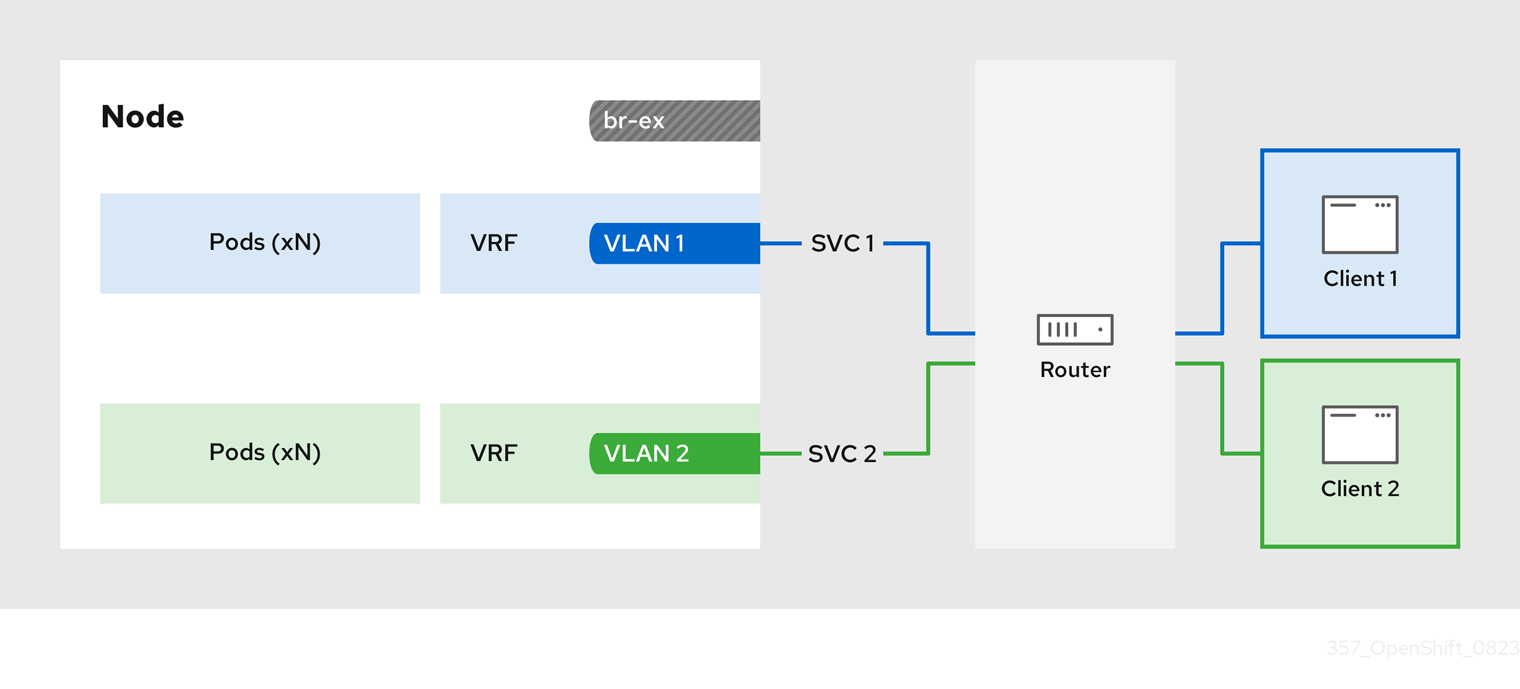
The configuration process involves three stages:
1. Define a VRF and routing rules
-
Configure a
NodeNetworkConfigurationPolicycustom resource (CR) to associate a VRF instance with a network interface. - Use the VRF routing table to direct ingress and egress traffic.
2. Link the VRF to a MetalLB BGPPeer
-
Configure a MetalLB
BGPPeerresource to use the VRF instance on a network interface. -
By associating the
BGPPeerresource with the VRF instance, the designated network interface becomes the primary interface for the BGP session, and MetalLB advertises the services through this interface.
3. Configure an egress service
- Configure an egress service to choose the network associated with the VRF instance for egress traffic.
- Optional: Configure an egress service to use the IP address of the MetalLB load-balancer service as the source IP for egress traffic.
27.7.3. Configuring symmetric routing by using VRFs with MetalLB
You can configure symmetric network routing for applications behind a MetalLB service that require the same ingress and egress network paths.
This example associates a VRF routing table with MetalLB and an egress service to enable symmetric routing for ingress and egress traffic for pods behind a LoadBalancer service.
-
If you use the
sourceIPBy: "LoadBalancerIP"setting in theEgressServiceCR, you must specify the load-balancer node in theBGPAdvertisementcustom resource (CR). -
You can use the
sourceIPBy: "Network"setting on clusters that use OVN-Kubernetes configured with thegatewayConfig.routingViaHostspecification set totrueonly. Additionally, if you use thesourceIPBy: "Network"setting, you must schedule the application workload on nodes configured with the network VRF instance.
Prerequisites
-
Install the OpenShift CLI (
oc). -
Log in as a user with
cluster-adminprivileges. - Install the Kubernetes NMState Operator.
- Install the MetalLB Operator.
Procedure
Create a
NodeNetworkConfigurationPolicyCR to define the VRF instance:Create a file, such as
node-network-vrf.yaml, with content like the following example:apiVersion: nmstate.io/v1 kind: NodeNetworkConfigurationPolicy metadata: name: vrfpolicy1 spec: nodeSelector: vrf: "true"2 maxUnavailable: 3 desiredState: interfaces: - name: ens4vrf3 type: vrf4 state: up vrf: port: - ens45 route-table-id: 26 - name: ens47 type: ethernet state: up ipv4: address: - ip: 192.168.130.130 prefix-length: 24 dhcp: false enabled: true routes:8 config: - destination: 0.0.0.0/0 metric: 150 next-hop-address: 192.168.130.1 next-hop-interface: ens4 table-id: 2 route-rules:9 config: - ip-to: 172.30.0.0/16 priority: 998 route-table: 25410 - ip-to: 10.132.0.0/14 priority: 998 route-table: 254 - ip-to: 169.254.169.0/29 priority: 998 route-table: 254- 1
- The name of the policy.
- 2
- This example applies the policy to all nodes with the label
vrf:true. - 3
- The name of the interface.
- 4
- The type of interface. This example creates a VRF instance.
- 5
- The node interface that the VRF attaches to.
- 6
- The name of the route table ID for the VRF.
- 7
- The IPv4 address of the interface associated with the VRF.
- 8
- Defines the configuration for network routes. The
next-hop-addressfield defines the IP address of the next hop for the route. Thenext-hop-interfacefield defines the outgoing interface for the route. In this example, the VRF routing table is2, which references the ID that you define in theEgressServiceCR. - 9
- Defines additional route rules. The
ip-tofields must match theCluster NetworkCIDR,Service NetworkCIDR, andInternal Masqueradesubnet CIDR. You can view the values for these CIDR address specifications by running the following command:oc describe network.operator/cluster. - 10
- The main routing table that the Linux kernel uses when calculating routes has the ID
254.
Apply the policy by running the following command:
$ oc apply -f node-network-vrf.yaml
Create a
BGPPeercustom resource (CR):Create a file, such as
frr-via-vrf.yaml, with content like the following example:apiVersion: metallb.io/v1beta2 kind: BGPPeer metadata: name: frrviavrf namespace: metallb-system spec: myASN: 100 peerASN: 200 peerAddress: 192.168.130.1 vrf: ens4vrf1 - 1
- Specifies the VRF instance to associate with the BGP peer. MetalLB can advertise services and make routing decisions based on the routing information in the VRF.
Apply the configuration for the BGP peer by running the following command:
$ oc apply -f frr-via-vrf.yaml
Create an
IPAddressPoolCR:Create a file, such as
first-pool.yaml, with content like the following example:apiVersion: metallb.io/v1beta1 kind: IPAddressPool metadata: name: first-pool namespace: metallb-system spec: addresses: - 192.169.10.0/32Apply the configuration for the IP address pool by running the following command:
$ oc apply -f first-pool.yaml
Create a
BGPAdvertisementCR:Create a file, such as
first-adv.yaml, with content like the following example:apiVersion: metallb.io/v1beta1 kind: BGPAdvertisement metadata: name: first-adv namespace: metallb-system spec: ipAddressPools: - first-pool peers: - frrviavrf1 nodeSelectors: - matchLabels: egress-service.k8s.ovn.org/test-server1: ""2 - 1
- In this example, MetalLB advertises a range of IP addresses from the
first-poolIP address pool to thefrrviavrfBGP peer. - 2
- In this example, the
EgressServiceCR configures the source IP address for egress traffic to use the load-balancer service IP address. Therefore, you must specify the load-balancer node for return traffic to use the same return path for the traffic originating from the pod.
Apply the configuration for the BGP advertisement by running the following command:
$ oc apply -f first-adv.yaml
Create an
EgressServiceCR:Create a file, such as
egress-service.yaml, with content like the following example:apiVersion: k8s.ovn.org/v1 kind: EgressService metadata: name: server11 namespace: test2 spec: sourceIPBy: "LoadBalancerIP"3 nodeSelector: matchLabels: vrf: "true"4 network: "2"5 - 1
- Specify the name for the egress service. The name of the
EgressServiceresource must match the name of the load-balancer service that you want to modify. - 2
- Specify the namespace for the egress service. The namespace for the
EgressServicemust match the namespace of the load-balancer service that you want to modify. The egress service is namespace-scoped. - 3
- This example assigns the
LoadBalancerservice ingress IP address as the source IP address for egress traffic. - 4
- If you specify
LoadBalancerfor thesourceIPByspecification, a single node handles theLoadBalancerservice traffic. In this example, only a node with the labelvrf: "true"can handle the service traffic. If you do not specify a node, OVN-Kubernetes selects a worker node to handle the service traffic. When a node is selected, OVN-Kubernetes labels the node in the following format:egress-service.k8s.ovn.org/<svc_namespace>-<svc_name>: "". - 5
- Specify the routing table ID for egress traffic. Ensure that the value matches the
route-table-idID defined in theNodeNetworkConfigurationPolicyresource, for example,route-table-id: 2.
Apply the configuration for the egress service by running the following command:
$ oc apply -f egress-service.yaml
Verification
Verify that you can access the application endpoint of the pods running behind the MetalLB service by running the following command:
$ curl <external_ip_address>:<port_number>1 - 1
- Update the external IP address and port number to suit your application endpoint.
-
Optional: If you assigned the
LoadBalancerservice ingress IP address as the source IP address for egress traffic, verify this configuration by using tools such astcpdumpto analyze packets received at the external client.
27.8. Configuring the integration of MetalLB and FRR-K8s
The FRRConfiguration custom resource is a Technology Preview feature only. Technology Preview features are not supported with Red Hat production service level agreements (SLAs) and might not be functionally complete. Red Hat does not recommend using them in production. These features provide early access to upcoming product features, enabling customers to test functionality and provide feedback during the development process.
For more information about the support scope of Red Hat Technology Preview features, see Technology Preview Features Support Scope.
FRRouting (FRR) is a free, open source internet routing protocol suite for Linux and UNIX platforms. FRR-K8s is a Kubernetes based DaemonSet that exposes a subset of the FRR API in a Kubernetes-compliant manner. As a cluster administrator, you can use the FRRConfiguration custom resource (CR) to configure MetalLB to use FRR-K8s as the backend. You can use this to avail of FRR services, for example, receiving routes. If you run MetalLB with FRR-K8s as a backend, MetalLB generates the FRR-K8s configuration corresponding to the MetalLB configuration applied.

27.8.1. Activating the integration of MetalLB and FRR-K8s
The following procedure shows you how to activate FRR-K8s as the backend for MetalLB.
Prerequisites
- You have a cluster installed on bare-metal hardware.
-
You have installed the OpenShift CLI (
oc). -
You have logged in as a user with
cluster-adminprivileges.
Procedure
Set the
bgpBackendfield of theMetalLBCR tofrr-k8sas in the following example:apiVersion: metallb.io/v1beta1 kind: MetalLB metadata: name: metallb namespace: metallb-system spec: bgpBackend: frr-k8s
27.8.2. FRR configurations
You can create multiple FRRConfiguration CRs to use FRR services in MetalLB. MetalLB generates an FRRConfiguration object which FRR-K8s merges with all other configurations that all users have created.
MetalLB generates an FRRConfiguration object which FRR-K8s merges with all other configurations that all users have created. For example, you can configure FRR-K8s to receive all of the prefixes advertised by a given neighbor. The following example configures FRR-K8s to receive all of the prefixes advertised by a BGPPeer with host 172.18.0.5:
Example FRRConfiguration CR
apiVersion: frrk8s.metallb.io/v1beta1
kind: FRRConfiguration
metadata:
 name: test
 namespace: metallb-system
spec:
 bgp:
   routers:
   - asn: 64512
     neighbors:
     - address: 172.18.0.5
       asn: 64512
       toReceive:
        allowed:
            mode: all
You can also configure FRR-K8s to always block a set of prefixes, regardless of the configuration applied. This is useful to prevent routes to pod or ClusterIPs CIDRs that might cause cluster malfunctions. For example, you might block the clusterNetwork and serviceNetwork CIDRs. Run oc describe network.config/cluster to find these values.
The following example blocks the prefix 192.168.1.0/24:
Example MetalLB CR
apiVersion: metallb.io/v1beta1
kind: MetalLB
metadata:
  name: metallb
  namespace: metallb-system
spec:
  frrk8sConfig:
    alwaysBlock:
    - 192.168.1.0/24
27.8.3. Configuring the FRRConfiguration CRD
The following section provides reference examples that use the FRRConfiguration custom resource (CR).
27.8.3.1. The routers field
You can use the routers field to configure multiple routers, one for each Virtual Routing and Forwarding (VRF) resource. For each router, you must define the Autonomous System Number (ASN).
You can also define a list of Border Gateway Protocol (BGP) neighbors to connect to, as in the following example:
Example FRRConfiguration CR
apiVersion: frrk8s.metallb.io/v1beta1
kind: FRRConfiguration
metadata:
  name: test
  namespace: frr-k8s-system
spec:
  bgp:
    routers:
    - asn: 64512
      neighbors:
      - address: 172.30.0.3
        asn: 4200000000
        ebgpMultiHop: true
        port: 180
      - address: 172.18.0.6
        asn: 4200000000
        port: 179
27.8.3.2. The toAdvertise field
By default, FRR-K8s does not advertise the prefixes configured as part of a router configuration. In order to advertise them, you use the toAdvertise field.
You can advertise a subset of the prefixes, as in the following example:
Example FRRConfiguration CR
apiVersion: frrk8s.metallb.io/v1beta1
kind: FRRConfiguration
metadata:
  name: test
  namespace: frr-k8s-system
spec:
  bgp:
    routers:
    - asn: 64512
      neighbors:
      - address: 172.30.0.3
        asn: 4200000000
        ebgpMultiHop: true
        port: 180
        toAdvertise:
          allowed:
            prefixes:
            - 192.168.2.0/24
      prefixes:
        - 192.168.2.0/24
- 192.169.2.0/24- 1
- Advertises a subset of prefixes.
The following example shows you how to advertise all of the prefixes:
Example FRRConfiguration CR
apiVersion: frrk8s.metallb.io/v1beta1
kind: FRRConfiguration
metadata:
  name: test
  namespace: frr-k8s-system
spec:
  bgp:
    routers:
    - asn: 64512
      neighbors:
      - address: 172.30.0.3
        asn: 4200000000
        ebgpMultiHop: true
        port: 180
        toAdvertise:
          allowed:
            mode: all
      prefixes:
        - 192.168.2.0/24
- 192.169.2.0/24- 1
- Advertises all prefixes.
27.8.3.3. The toReceive field
By default, FRR-K8s does not process any prefixes advertised by a neighbor. You can use the toReceive field to process such addresses.
You can configure for a subset of the prefixes, as in this example:
Example FRRConfiguration CR
apiVersion: frrk8s.metallb.io/v1beta1
kind: FRRConfiguration
metadata:
  name: test
  namespace: frr-k8s-system
spec:
  bgp:
    routers:
    - asn: 64512
      neighbors:
      - address: 172.18.0.5
          asn: 64512
          port: 179
          toReceive:
            allowed:
              prefixes:
              - prefix: 192.168.1.0/24
              - prefix: 192.169.2.0/24
                ge: 25
le: 28 The following example configures FRR to handle all the prefixes announced:
Example FRRConfiguration CR
apiVersion: frrk8s.metallb.io/v1beta1
kind: FRRConfiguration
metadata:
  name: test
  namespace: frr-k8s-system
spec:
  bgp:
    routers:
    - asn: 64512
      neighbors:
      - address: 172.18.0.5
          asn: 64512
          port: 179
          toReceive:
            allowed:
              mode: all
27.8.3.4. The bgp field
You can use the bgp field to define various BFD profiles and associate them with a neighbor. In the following example, BFD backs up the BGP session and FRR can detect link failures:
Example FRRConfiguration CR
apiVersion: frrk8s.metallb.io/v1beta1
kind: FRRConfiguration
metadata:
  name: test
  namespace: frr-k8s-system
spec:
  bgp:
    routers:
    - asn: 64512
      neighbors:
      - address: 172.30.0.3
        asn: 64512
        port: 180
        bfdProfile: defaultprofile
    bfdProfiles:
      - name: defaultprofile
27.8.3.5. The nodeSelector field
By default, FRR-K8s applies the configuration to all nodes where the daemon is running. You can use the nodeSelector field to specify the nodes to which you want to apply the configuration. For example:
Example FRRConfiguration CR
apiVersion: frrk8s.metallb.io/v1beta1
kind: FRRConfiguration
metadata:
  name: test
  namespace: frr-k8s-system
spec:
  bgp:
    routers:
    - asn: 64512
  nodeSelector:
    labelSelector:
    foo: "bar"
The fields for the FRRConfiguration custom resource are described in the following table:
| Field | Type | Description |
|---|---|---|
|
|
| Specifies the routers that FRR is to configure (one per VRF). |
|
|
| The Autonomous System Number (ASN) to use for the local end of the session. |
|
|
|
Specifies the ID of the |
|
|
| Specifies the host vrf used to establish sessions from this router. |
|
|
| Specifies the neighbors to establish BGP sessions with. |
|
|
| Specifies the ASN to use for the remote end of the session. |
|
|
| Specifies the IP address to establish the session with. |
|
|
| Specifies the port to dial when establishing the session. Defaults to 179. |
|
|
|
Specifies the password to use for establishing the BGP session. |
|
|
|
Specifies the name of the authentication secret for the neighbor. The secret must be of type "kubernetes.io/basic-auth", and in the same namespace as the FRR-K8s daemon. The key "password" stores the password in the secret. |
|
|
| Specifies the requested BGP hold time, per RFC4271. Defaults to 180s. |
|
|
|
Specifies the requested BGP keepalive time, per RFC4271. Defaults to |
|
|
| Specifies how long BGP waits between connection attempts to a neighbor. |
|
|
| Indicates if the BGPPeer is multi-hops away. |
|
|
| Specifies the name of the BFD Profile to use for the BFD session associated with the BGP session. If not set, the BFD session is not set up. |
|
|
| Represents the list of prefixes to advertise to a neighbor, and the associated properties. |
|
|
| Specifies the list of prefixes to advertise to a neighbor. This list must match the prefixes that you define in the router. |
|
|
|
Specifies the mode to use when handling the prefixes. You can set to |
|
|
| Specifies the prefixes associated with an advertised local preference. You must specify the prefixes associated with a local preference in the prefixes allowed to be advertised. |
|
|
| Specifies the prefixes associated with the local preference. |
|
|
| Specifies the local preference associated with the prefixes. |
|
|
| Specifies the prefixes associated with an advertised BGP community. You must include the prefixes associated with a local preference in the list of prefixes that you want to advertise. |
|
|
| Specifies the prefixes associated with the community. |
|
|
| Specifies the community associated with the prefixes. |
|
|
| Specifies the prefixes to receive from a neighbor. |
|
|
| Specifies the information that you want to receive from a neighbor. |
|
|
| Specifies the prefixes allowed from a neighbor. |
|
|
|
Specifies the mode to use when handling the prefixes. When set to |
|
|
| Disables MP BGP to prevent it from separating IPv4 and IPv6 route exchanges into distinct BGP sessions. |
|
|
| Specifies all prefixes to advertise from this router instance. |
|
|
| Specifies the list of bfd profiles to use when configuring the neighbors. |
|
|
| The name of the BFD Profile to be referenced in other parts of the configuration. |
|
|
|
Specifies the minimum interval at which this system can receive control packets, in milliseconds. Defaults to |
|
|
|
Specifies the minimum transmission interval, excluding jitter, that this system wants to use to send BFD control packets, in milliseconds. Defaults to |
|
|
| Configures the detection multiplier to determine packet loss. To determine the connection loss-detection timer, multiply the remote transmission interval by this value. |
|
|
|
Configures the minimal echo receive transmission-interval that this system can handle, in milliseconds. Defaults to |
|
|
| Enables or disables the echo transmission mode. This mode is disabled by default, and not supported on multihop setups. |
|
|
| Mark session as passive. A passive session does not attempt to start the connection and waits for control packets from peers before it begins replying. |
|
|
| For multihop sessions only. Configures the minimum expected TTL for an incoming BFD control packet. |
|
|
| Limits the nodes that attempt to apply this configuration. If specified, only those nodes whose labels match the specified selectors attempt to apply the configuration. If it is not specified, all nodes attempt to apply this configuration. |
|
|
| Defines the observed state of FRRConfiguration. |
27.8.4. How FRR-K8s merges multiple configurations
In a case where multiple users add configurations that select the same node, FRR-K8s merges the configurations. Each configuration can only extend others. This means that it is possible to add a new neighbor to a router, or to advertise an additional prefix to a neighbor, but not possible to remove a component added by another configuration.
27.8.4.1. Configuration conflicts
Certain configurations can cause conflicts, leading to errors, for example:
- different ASN for the same router (in the same VRF)
- different ASN for the same neighbor (with the same IP / port)
- multiple BFD profiles with the same name but different values
When the daemon finds an invalid configuration for a node, it reports the configuration as invalid and reverts to the previous valid FRR configuration.
27.8.4.2. Merging
When merging, you can complete the following actions:
- Extend the set of IPs that you want to advertise to a neighbor.
- Add an extra neighbor with its set of IPs.
- Extend the set of IPs to which you want to associate a community.
- Allow incoming routes for a neighbor.
Each configuration must be self contained. This means, for example, that it is not possible to allow prefixes that are not defined in the router section by leveraging prefixes coming from another configuration.
If the configurations to be applied are compatible, merging works as follows:
-
FRR-K8scombines all the routers. -
FRR-K8smerges all prefixes and neighbors for each router. -
FRR-K8smerges all filters for each neighbor.
A less restrictive filter has precedence over a stricter one. For example, a filter accepting some prefixes has precedence over a filter not accepting any, and a filter accepting all prefixes has precedence over one that accepts some.
27.9. MetalLB logging, troubleshooting, and support
If you need to troubleshoot MetalLB configuration, see the following sections for commonly used commands.
27.9.1. Setting the MetalLB logging levels
MetalLB uses FRRouting (FRR) in a container with the default setting of info generates a lot of logging. You can control the verbosity of the logs generated by setting the logLevel as illustrated in this example.
Gain a deeper insight into MetalLB by setting the logLevel to debug as follows:
Prerequisites
-
You have access to the cluster as a user with the
cluster-adminrole. -
You have installed the OpenShift CLI (
oc).
Procedure
Create a file, such as
setdebugloglevel.yaml, with content like the following example:apiVersion: metallb.io/v1beta1 kind: MetalLB metadata: name: metallb namespace: metallb-system spec: logLevel: debug nodeSelector: node-role.kubernetes.io/worker: ""NoteWhile other fields like
speakerConfigcan be configured here, thebgpBackendfield must be omitted. It is reserved for internal use by MetalLB to manage the active BGP implementation.Apply the configuration:
$ oc replace -f setdebugloglevel.yamlNoteUse
oc replaceas the understanding is themetallbCR is already created and here you are changing the log level.Display the names of the
speakerpods:$ oc get -n metallb-system pods -l component=speakerExample output
NAME READY STATUS RESTARTS AGE speaker-2m9pm 4/4 Running 0 9m19s speaker-7m4qw 3/4 Running 0 19s speaker-szlmx 4/4 Running 0 9m19sNoteSpeaker and controller pods are recreated to ensure the updated logging level is applied. The logging level is modified for all the components of MetalLB.
View the
speakerlogs:$ oc logs -n metallb-system speaker-7m4qw -c speakerExample output
{"branch":"main","caller":"main.go:92","commit":"3d052535","goversion":"gc / go1.17.1 / amd64","level":"info","msg":"MetalLB speaker starting (commit 3d052535, branch main)","ts":"2022-05-17T09:55:05Z","version":""}
{"caller":"announcer.go:110","event":"createARPResponder","interface":"ens4","level":"info","msg":"created ARP responder for interface","ts":"2022-05-17T09:55:05Z"}
{"caller":"announcer.go:119","event":"createNDPResponder","interface":"ens4","level":"info","msg":"created NDP responder for interface","ts":"2022-05-17T09:55:05Z"}
{"caller":"announcer.go:110","event":"createARPResponder","interface":"tun0","level":"info","msg":"created ARP responder for interface","ts":"2022-05-17T09:55:05Z"}
{"caller":"announcer.go:119","event":"createNDPResponder","interface":"tun0","level":"info","msg":"created NDP responder for interface","ts":"2022-05-17T09:55:05Z"}
I0517 09:55:06.515686      95 request.go:665] Waited for 1.026500832s due to client-side throttling, not priority and fairness, request: GET:https://172.30.0.1:443/apis/operators.coreos.com/v1alpha1?timeout=32s
{"Starting Manager":"(MISSING)","caller":"k8s.go:389","level":"info","ts":"2022-05-17T09:55:08Z"}
{"caller":"speakerlist.go:310","level":"info","msg":"node event - forcing sync","node addr":"10.0.128.4","node event":"NodeJoin","node name":"ci-ln-qb8t3mb-72292-7s7rh-worker-a-vvznj","ts":"2022-05-17T09:55:08Z"}
{"caller":"service_controller.go:113","controller":"ServiceReconciler","enqueueing":"openshift-kube-controller-manager-operator/metrics","epslice":"{\"metadata\":{\"name\":\"metrics-xtsxr\",\"generateName\":\"metrics-\",\"namespace\":\"openshift-kube-controller-manager-operator\",\"uid\":\"ac6766d7-8504-492c-9d1e-4ae8897990ad\",\"resourceVersion\":\"9041\",\"generation\":4,\"creationTimestamp\":\"2022-05-17T07:16:53Z\",\"labels\":{\"app\":\"kube-controller-manager-operator\",\"endpointslice.kubernetes.io/managed-by\":\"endpointslice-controller.k8s.io\",\"kubernetes.io/service-name\":\"metrics\"},\"annotations\":{\"endpoints.kubernetes.io/last-change-trigger-time\":\"2022-05-17T07:21:34Z\"},\"ownerReferences\":[{\"apiVersion\":\"v1\",\"kind\":\"Service\",\"name\":\"metrics\",\"uid\":\"0518eed3-6152-42be-b566-0bd00a60faf8\",\"controller\":true,\"blockOwnerDeletion\":true}],\"managedFields\":[{\"manager\":\"kube-controller-manager\",\"operation\":\"Update\",\"apiVersion\":\"discovery.k8s.io/v1\",\"time\":\"2022-05-17T07:20:02Z\",\"fieldsType\":\"FieldsV1\",\"fieldsV1\":{\"f:addressType\":{},\"f:endpoints\":{},\"f:metadata\":{\"f:annotations\":{\".\":{},\"f:endpoints.kubernetes.io/last-change-trigger-time\":{}},\"f:generateName\":{},\"f:labels\":{\".\":{},\"f:app\":{},\"f:endpointslice.kubernetes.io/managed-by\":{},\"f:kubernetes.io/service-name\":{}},\"f:ownerReferences\":{\".\":{},\"k:{\\\"uid\\\":\\\"0518eed3-6152-42be-b566-0bd00a60faf8\\\"}\":{}}},\"f:ports\":{}}}]},\"addressType\":\"IPv4\",\"endpoints\":[{\"addresses\":[\"10.129.0.7\"],\"conditions\":{\"ready\":true,\"serving\":true,\"terminating\":false},\"targetRef\":{\"kind\":\"Pod\",\"namespace\":\"openshift-kube-controller-manager-operator\",\"name\":\"kube-controller-manager-operator-6b98b89ddd-8d4nf\",\"uid\":\"dd5139b8-e41c-4946-a31b-1a629314e844\",\"resourceVersion\":\"9038\"},\"nodeName\":\"ci-ln-qb8t3mb-72292-7s7rh-master-0\",\"zone\":\"us-central1-a\"}],\"ports\":[{\"name\":\"https\",\"protocol\":\"TCP\",\"port\":8443}]}","level":"debug","ts":"2022-05-17T09:55:08Z"}
View the FRR logs:
$ oc logs -n metallb-system speaker-7m4qw -c frrExample output
Started watchfrr
2022/05/17 09:55:05 ZEBRA: client 16 says hello and bids fair to announce only bgp routes vrf=0
2022/05/17 09:55:05 ZEBRA: client 31 says hello and bids fair to announce only vnc routes vrf=0
2022/05/17 09:55:05 ZEBRA: client 38 says hello and bids fair to announce only static routes vrf=0
2022/05/17 09:55:05 ZEBRA: client 43 says hello and bids fair to announce only bfd routes vrf=0
2022/05/17 09:57:25.089 BGP: Creating Default VRF, AS 64500
2022/05/17 09:57:25.090 BGP: dup addr detect enable max_moves 5 time 180 freeze disable freeze_time 0
2022/05/17 09:57:25.090 BGP: bgp_get: Registering BGP instance (null) to zebra
2022/05/17 09:57:25.090 BGP: Registering VRF 0
2022/05/17 09:57:25.091 BGP: Rx Router Id update VRF 0 Id 10.131.0.1/32
2022/05/17 09:57:25.091 BGP: RID change : vrf VRF default(0), RTR ID 10.131.0.1
2022/05/17 09:57:25.091 BGP: Rx Intf add VRF 0 IF br0
2022/05/17 09:57:25.091 BGP: Rx Intf add VRF 0 IF ens4
2022/05/17 09:57:25.091 BGP: Rx Intf address add VRF 0 IF ens4 addr 10.0.128.4/32
2022/05/17 09:57:25.091 BGP: Rx Intf address add VRF 0 IF ens4 addr fe80::c9d:84da:4d86:5618/64
2022/05/17 09:57:25.091 BGP: Rx Intf add VRF 0 IF lo
2022/05/17 09:57:25.091 BGP: Rx Intf add VRF 0 IF ovs-system
2022/05/17 09:57:25.091 BGP: Rx Intf add VRF 0 IF tun0
2022/05/17 09:57:25.091 BGP: Rx Intf address add VRF 0 IF tun0 addr 10.131.0.1/23
2022/05/17 09:57:25.091 BGP: Rx Intf address add VRF 0 IF tun0 addr fe80::40f1:d1ff:feb6:5322/64
2022/05/17 09:57:25.091 BGP: Rx Intf add VRF 0 IF veth2da49fed
2022/05/17 09:57:25.091 BGP: Rx Intf address add VRF 0 IF veth2da49fed addr fe80::24bd:d1ff:fec1:d88/64
2022/05/17 09:57:25.091 BGP: Rx Intf add VRF 0 IF veth2fa08c8c
2022/05/17 09:57:25.091 BGP: Rx Intf address add VRF 0 IF veth2fa08c8c addr fe80::6870:ff:fe96:efc8/64
2022/05/17 09:57:25.091 BGP: Rx Intf add VRF 0 IF veth41e356b7
2022/05/17 09:57:25.091 BGP: Rx Intf address add VRF 0 IF veth41e356b7 addr fe80::48ff:37ff:fede:eb4b/64
2022/05/17 09:57:25.092 BGP: Rx Intf add VRF 0 IF veth1295c6e2
2022/05/17 09:57:25.092 BGP: Rx Intf address add VRF 0 IF veth1295c6e2 addr fe80::b827:a2ff:feed:637/64
2022/05/17 09:57:25.092 BGP: Rx Intf add VRF 0 IF veth9733c6dc
2022/05/17 09:57:25.092 BGP: Rx Intf address add VRF 0 IF veth9733c6dc addr fe80::3cf4:15ff:fe11:e541/64
2022/05/17 09:57:25.092 BGP: Rx Intf add VRF 0 IF veth336680ea
2022/05/17 09:57:25.092 BGP: Rx Intf address add VRF 0 IF veth336680ea addr fe80::94b1:8bff:fe7e:488c/64
2022/05/17 09:57:25.092 BGP: Rx Intf add VRF 0 IF vetha0a907b7
2022/05/17 09:57:25.092 BGP: Rx Intf address add VRF 0 IF vetha0a907b7 addr fe80::3855:a6ff:fe73:46c3/64
2022/05/17 09:57:25.092 BGP: Rx Intf add VRF 0 IF vethf35a4398
2022/05/17 09:57:25.092 BGP: Rx Intf address add VRF 0 IF vethf35a4398 addr fe80::40ef:2fff:fe57:4c4d/64
2022/05/17 09:57:25.092 BGP: Rx Intf add VRF 0 IF vethf831b7f4
2022/05/17 09:57:25.092 BGP: Rx Intf address add VRF 0 IF vethf831b7f4 addr fe80::f0d9:89ff:fe7c:1d32/64
2022/05/17 09:57:25.092 BGP: Rx Intf add VRF 0 IF vxlan_sys_4789
2022/05/17 09:57:25.092 BGP: Rx Intf address add VRF 0 IF vxlan_sys_4789 addr fe80::80c1:82ff:fe4b:f078/64
2022/05/17 09:57:26.094 BGP: 10.0.0.1 [FSM] Timer (start timer expire).
2022/05/17 09:57:26.094 BGP: 10.0.0.1 [FSM] BGP_Start (Idle->Connect), fd -1
2022/05/17 09:57:26.094 BGP: Allocated bnc 10.0.0.1/32(0)(VRF default) peer 0x7f807f7631a0
2022/05/17 09:57:26.094 BGP: sendmsg_zebra_rnh: sending cmd ZEBRA_NEXTHOP_REGISTER for 10.0.0.1/32 (vrf VRF default)
2022/05/17 09:57:26.094 BGP: 10.0.0.1 [FSM] Waiting for NHT
2022/05/17 09:57:26.094 BGP: bgp_fsm_change_status : vrf default(0), Status: Connect established_peers 0
2022/05/17 09:57:26.094 BGP: 10.0.0.1 went from Idle to Connect
2022/05/17 09:57:26.094 BGP: 10.0.0.1 [FSM] TCP_connection_open_failed (Connect->Active), fd -1
2022/05/17 09:57:26.094 BGP: bgp_fsm_change_status : vrf default(0), Status: Active established_peers 0
2022/05/17 09:57:26.094 BGP: 10.0.0.1 went from Connect to Active
2022/05/17 09:57:26.094 ZEBRA: rnh_register msg from client bgp: hdr->length=8, type=nexthop vrf=0
2022/05/17 09:57:26.094 ZEBRA: 0: Add RNH 10.0.0.1/32 type Nexthop
2022/05/17 09:57:26.094 ZEBRA: 0:10.0.0.1/32: Evaluate RNH, type Nexthop (force)
2022/05/17 09:57:26.094 ZEBRA: 0:10.0.0.1/32: NH has become unresolved
2022/05/17 09:57:26.094 ZEBRA: 0: Client bgp registers for RNH 10.0.0.1/32 type Nexthop
2022/05/17 09:57:26.094 BGP: VRF default(0): Rcvd NH update 10.0.0.1/32(0) - metric 0/0 #nhops 0/0 flags 0x6
2022/05/17 09:57:26.094 BGP: NH update for 10.0.0.1/32(0)(VRF default) - flags 0x6 chgflags 0x0 - evaluate paths
2022/05/17 09:57:26.094 BGP: evaluate_paths: Updating peer (10.0.0.1(VRF default)) status with NHT
2022/05/17 09:57:30.081 ZEBRA: Event driven route-map update triggered
2022/05/17 09:57:30.081 ZEBRA: Event handler for route-map: 10.0.0.1-out
2022/05/17 09:57:30.081 ZEBRA: Event handler for route-map: 10.0.0.1-in
2022/05/17 09:57:31.104 ZEBRA: netlink_parse_info: netlink-listen (NS 0) type RTM_NEWNEIGH(28), len=76, seq=0, pid=0
2022/05/17 09:57:31.104 ZEBRA: 	Neighbor Entry received is not on a VLAN or a BRIDGE, ignoring
2022/05/17 09:57:31.105 ZEBRA: netlink_parse_info: netlink-listen (NS 0) type RTM_NEWNEIGH(28), len=76, seq=0, pid=0
2022/05/17 09:57:31.105 ZEBRA: 	Neighbor Entry received is not on a VLAN or a BRIDGE, ignoring
27.9.1.1. FRRouting (FRR) log levels
The following table describes the FRR logging levels.
| Log level | Description |
|---|---|
|
| Supplies all logging information for all logging levels. |
|
|
Information that is diagnostically helpful to people. Set to |
|
| Provides information that always should be logged but under normal circumstances does not require user intervention. This is the default logging level. |
|
|
Anything that can potentially cause inconsistent |
|
|
Any error that is fatal to the functioning of |
|
| Turn off all logging. |
27.9.2. Troubleshooting BGP issues
The BGP implementation that Red Hat supports uses FRRouting (FRR) in a container in the speaker pods. As a cluster administrator, if you need to troubleshoot BGP configuration issues, you need to run commands in the FRR container.
Prerequisites
-
You have access to the cluster as a user with the
cluster-adminrole. -
You have installed the OpenShift CLI (
oc).
Procedure
Display the names of the
speakerpods:$ oc get -n metallb-system pods -l component=speakerExample output
NAME            READY   STATUS    RESTARTS   AGE
speaker-66bth   4/4     Running   0          56m
speaker-gvfnf   4/4     Running   0          56m
...
Display the running configuration for FRR:
$ oc exec -n metallb-system speaker-66bth -c frr -- vtysh -c "show running-config"Example output
Building configuration...

Current configuration:
!
frr version 7.5.1_git
frr defaults traditional
hostname some-hostname
log file /etc/frr/frr.log informational
log timestamp precision 3
service integrated-vtysh-config
!
router bgp 64500
1 bgp router-id 10.0.1.2 no bgp ebgp-requires-policy no bgp default ipv4-unicast no bgp network import-check neighbor 10.0.2.3 remote-as 645002 neighbor 10.0.2.3 bfd profile doc-example-bfd-profile-full3 neighbor 10.0.2.3 timers 5 15 neighbor 10.0.2.4 remote-as 64500 neighbor 10.0.2.4 bfd profile doc-example-bfd-profile-full neighbor 10.0.2.4 timers 5 15 ! address-family ipv4 unicast network 203.0.113.200/304 neighbor 10.0.2.3 activate neighbor 10.0.2.3 route-map 10.0.2.3-in in neighbor 10.0.2.4 activate neighbor 10.0.2.4 route-map 10.0.2.4-in in exit-address-family ! address-family ipv6 unicast network fc00:f853:ccd:e799::/124 neighbor 10.0.2.3 activate neighbor 10.0.2.3 route-map 10.0.2.3-in in neighbor 10.0.2.4 activate neighbor 10.0.2.4 route-map 10.0.2.4-in in exit-address-family ! route-map 10.0.2.3-in deny 20 ! route-map 10.0.2.4-in deny 20 ! ip nht resolve-via-default ! ipv6 nht resolve-via-default ! line vty ! bfd profile doc-example-bfd-profile-full transmit-interval 35 receive-interval 35 passive-mode echo-mode echo-interval 35 minimum-ttl 10 ! ! end- 1
- The
router bgpsection indicates the ASN for MetalLB. - 2
- Confirm that a
neighbor <ip-address> remote-as <peer-ASN>line exists for each BGP peer custom resource that you added. - 3
- If you configured BFD, confirm that the BFD profile is associated with the correct BGP peer and that the BFD profile appears in the command output.
- 4
- Confirm that the
network <ip-address-range>lines match the IP address ranges that you specified in address pool custom resources that you added.
Display the BGP summary:
$ oc exec -n metallb-system speaker-66bth -c frr -- vtysh -c "show bgp summary"Example output
IPv4 Unicast Summary:
BGP router identifier 10.0.1.2, local AS number 64500 vrf-id 0
BGP table version 1
RIB entries 1, using 192 bytes of memory
Peers 2, using 29 KiB of memory

Neighbor        V         AS   MsgRcvd   MsgSent   TblVer  InQ OutQ  Up/Down State/PfxRcd   PfxSnt
10.0.2.3        4      64500       387       389        0    0    0 00:32:02            0        1
1 10.0.2.4 4 64500 0 0 0 0 0 never Active 02 Total number of neighbors 2 IPv6 Unicast Summary: BGP router identifier 10.0.1.2, local AS number 64500 vrf-id 0 BGP table version 1 RIB entries 1, using 192 bytes of memory Peers 2, using 29 KiB of memory Neighbor V AS MsgRcvd MsgSent TblVer InQ OutQ Up/Down State/PfxRcd PfxSnt 10.0.2.3 4 64500 387 389 0 0 0 00:32:02 NoNeg 10.0.2.4 4 64500 0 0 0 0 0 never Active 0 Total number of neighbors 2Display the BGP peers that received an address pool:
$ oc exec -n metallb-system speaker-66bth -c frr -- vtysh -c "show bgp ipv4 unicast 203.0.113.200/30"Replace
ipv4withipv6to display the BGP peers that received an IPv6 address pool. Replace203.0.113.200/30with an IPv4 or IPv6 IP address range from an address pool.Example output
BGP routing table entry for 203.0.113.200/30
Paths: (1 available, best #1, table default)
  Advertised to non peer-group peers:
  10.0.2.3
1 Local 0.0.0.0 from 0.0.0.0 (10.0.1.2) Origin IGP, metric 0, weight 32768, valid, sourced, local, best (First path received) Last update: Mon Jan 10 19:49:07 2022- 1
- Confirm that the output includes an IP address for a BGP peer.
27.9.3. Troubleshooting BFD issues
The Bidirectional Forwarding Detection (BFD) implementation that Red Hat supports uses FRRouting (FRR) in a container in the speaker pods. The BFD implementation relies on BFD peers also being configured as BGP peers with an established BGP session. As a cluster administrator, if you need to troubleshoot BFD configuration issues, you need to run commands in the FRR container.
Prerequisites
-
You have access to the cluster as a user with the
cluster-adminrole. -
You have installed the OpenShift CLI (
oc).
Procedure
Display the names of the
speakerpods:$ oc get -n metallb-system pods -l component=speakerExample output
NAME            READY   STATUS    RESTARTS   AGE
speaker-66bth   4/4     Running   0          26m
speaker-gvfnf   4/4     Running   0          26m
...
Display the BFD peers:
$ oc exec -n metallb-system speaker-66bth -c frr -- vtysh -c "show bfd peers brief"Example output
Session count: 2
SessionId  LocalAddress              PeerAddress              Status
=========  ============              ===========              ======
3909139637 10.0.1.2                  10.0.2.3                 up  <.>
<.> Confirm that the
PeerAddresscolumn includes each BFD peer. If the output does not list a BFD peer IP address that you expected the output to include, troubleshoot BGP connectivity with the peer. If the status field indicatesdown, check for connectivity on the links and equipment between the node and the peer. You can determine the node name for the speaker pod with a command likeoc get pods -n metallb-system speaker-66bth -o jsonpath='{.spec.nodeName}'.
27.9.4. MetalLB metrics for BGP and BFD
OpenShift Container Platform captures the following Prometheus metrics for MetalLB that relate to BGP peers and BFD profiles.
| Name | Description |
|---|---|
|
| Counts the number of BFD control packets received from each BFD peer. |
|
| Counts the number of BFD control packets sent to each BFD peer. |
|
| Counts the number of BFD echo packets received from each BFD peer. |
|
| Counts the number of BFD echo packets sent to each BFD. |
|
|
Counts the number of times the BFD session with a peer entered the |
|
|
Indicates the connection state with a BFD peer. |
|
|
Counts the number of times the BFD session with a peer entered the |
|
| Counts the number of BFD Zebra notifications for each BFD peer. |
| Name | Description |
|---|---|
|
| Counts the number of load balancer IP address prefixes that are advertised to BGP peers. The terms prefix and aggregated route have the same meaning. |
|
|
Indicates the connection state with a BGP peer. |
|
| Counts the number of BGP update messages sent to each BGP peer. |
|
| Counts the number of BGP open messages sent to each BGP peer. |
|
| Counts the number of BGP open messages received from each BGP peer. |
|
| Counts the number of BGP notification messages sent to each BGP peer. |
|
| Counts the number of BGP update messages received from each BGP peer. |
|
| Counts the number of BGP keepalive messages sent to each BGP peer. |
|
| Counts the number of BGP keepalive messages received from each BGP peer. |
|
| Counts the number of BGP route refresh messages sent to each BGP peer. |
|
| Counts the number of total BGP messages sent to each BGP peer. |
|
| Counts the number of total BGP messages received from each BGP peer. |
Additional resources
- See Querying metrics for all projects with the monitoring dashboard for information about using the monitoring dashboard.
27.9.5. About collecting MetalLB data
You can use the oc adm must-gather CLI command to collect information about your cluster, your MetalLB configuration, and the MetalLB Operator. The following features and objects are associated with MetalLB and the MetalLB Operator:
- The namespace and child objects that the MetalLB Operator is deployed in
- All MetalLB Operator custom resource definitions (CRDs)
The oc adm must-gather CLI command collects the following information from FRRouting (FRR) that Red Hat uses to implement BGP and BFD:
-
/etc/frr/frr.conf -
/etc/frr/frr.log -
/etc/frr/daemonsconfiguration file -
/etc/frr/vtysh.conf
The log and configuration files in the preceding list are collected from the frr container in each speaker pod.
In addition to the log and configuration files, the oc adm must-gather CLI command collects the output from the following vtysh commands:
-
show running-config -
show bgp ipv4 -
show bgp ipv6 -
show bgp neighbor -
show bfd peer
No additional configuration is required when you run the oc adm must-gather CLI command.
Additional resources

'%20d='M201.5%20305.5c-13.8%200-24.9-11.1-24.9-24.6%200-13.8%2011.1-24.9%2024.9-24.9%2013.6%200%2024.6%2011.1%2024.6%2024.9%200%2013.6-11.1%2024.6-24.6%2024.6zM504%20256c0%20137-111%20248-248%20248S8%20393%208%20256%20119%208%20256%208s248%20111%20248%20248zm-132.3-41.2c-9.4%200-17.7%203.9-23.8%2010-22.4-15.5-52.6-25.5-86.1-26.6l17.4-78.3%2055.4%2012.5c0%2013.6%2011.1%2024.6%2024.6%2024.6%2013.8%200%2024.9-11.3%2024.9-24.9s-11.1-24.9-24.9-24.9c-9.7%200-18%205.8-22.1%2013.8l-61.2-13.6c-3-.8-6.1%201.4-6.9%204.4l-19.1%2086.4c-33.2%201.4-63.1%2011.3-85.5%2026.8-6.1-6.4-14.7-10.2-24.1-10.2-34.9%200-46.3%2046.9-14.4%2062.8-1.1%205-1.7%2010.2-1.7%2015.5%200%2052.6%2059.2%2095.2%20132%2095.2%2073.1%200%20132.3-42.6%20132.3-95.2%200-5.3-.6-10.8-1.9-15.8%2031.3-16%2019.8-62.5-14.9-62.5zM302.8%20331c-18.2%2018.2-76.1%2017.9-93.6%200-2.2-2.2-6.1-2.2-8.3%200-2.5%202.5-2.5%206.4%200%208.6%2022.8%2022.8%2087.3%2022.8%20110.2%200%202.5-2.2%202.5-6.1%200-8.6-2.2-2.2-6.1-2.2-8.3%200zm7.7-75c-13.6%200-24.6%2011.1-24.6%2024.9%200%2013.6%2011.1%2024.6%2024.6%2024.6%2013.8%200%2024.9-11.1%2024.9-24.6%200-13.8-11-24.9-24.9-24.9z'/%3e%3c/svg%3e)