 Red Hat Summit
Este conteúdo não está disponível no idioma selecionado.
Chapter 2. Installing automation content navigator on RHEL
As a content creator, you can install automation content navigator on Red Hat Enterprise Linux (RHEL) 8.6 or later.
2.1. Installing automation content navigator on RHEL from an RPM
Copiar o linkLink copiado para a área de transferência!
You can install automation content navigator on Red Hat Enterprise Linux (RHEL) from an RPM.
Prerequisites
- You have installed Python 3.10 or later.
- You have installed RHEL 8.6 or later.
- You registered your system with Red Hat Subscription Manager.
Note
Ensure that you only install the navigator matching your current Red Hat Ansible Automation Platform environment.
Procedure
Attach the Red Hat Ansible Automation Platform SKU:
$ subscription-manager attach --pool=<sku-pool-id>Install automation content navigator with the following command:
v.2.4 for RHEL 8 for x86_64
$ sudo dnf install --enablerepo=ansible-automation-platform-2.4-for-rhel-8-x86_64-rpms ansible-navigatorv.2.4 for RHEL 9 for x86-64
$ sudo dnf install --enablerepo=ansible-automation-platform-2.4-for-rhel-9-x86_64-rpms ansible-navigator
Verification
Verify your automation content navigator installation:
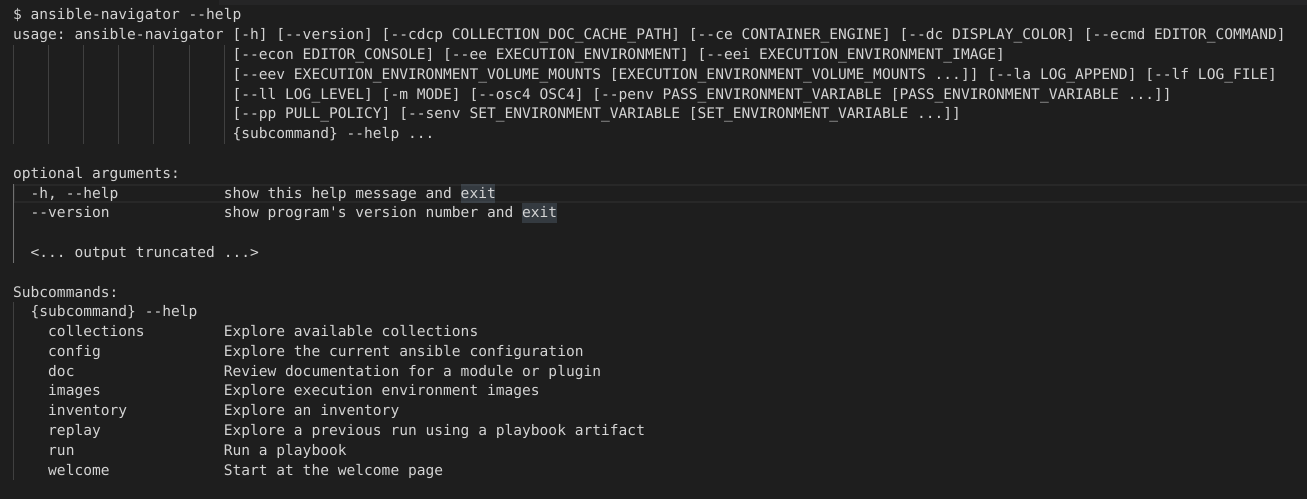
$ ansible-navigator --help
The following example demonstrates a successful installation:

'%20d='M201.5%20305.5c-13.8%200-24.9-11.1-24.9-24.6%200-13.8%2011.1-24.9%2024.9-24.9%2013.6%200%2024.6%2011.1%2024.6%2024.9%200%2013.6-11.1%2024.6-24.6%2024.6zM504%20256c0%20137-111%20248-248%20248S8%20393%208%20256%20119%208%20256%208s248%20111%20248%20248zm-132.3-41.2c-9.4%200-17.7%203.9-23.8%2010-22.4-15.5-52.6-25.5-86.1-26.6l17.4-78.3%2055.4%2012.5c0%2013.6%2011.1%2024.6%2024.6%2024.6%2013.8%200%2024.9-11.3%2024.9-24.9s-11.1-24.9-24.9-24.9c-9.7%200-18%205.8-22.1%2013.8l-61.2-13.6c-3-.8-6.1%201.4-6.9%204.4l-19.1%2086.4c-33.2%201.4-63.1%2011.3-85.5%2026.8-6.1-6.4-14.7-10.2-24.1-10.2-34.9%200-46.3%2046.9-14.4%2062.8-1.1%205-1.7%2010.2-1.7%2015.5%200%2052.6%2059.2%2095.2%20132%2095.2%2073.1%200%20132.3-42.6%20132.3-95.2%200-5.3-.6-10.8-1.9-15.8%2031.3-16%2019.8-62.5-14.9-62.5zM302.8%20331c-18.2%2018.2-76.1%2017.9-93.6%200-2.2-2.2-6.1-2.2-8.3%200-2.5%202.5-2.5%206.4%200%208.6%2022.8%2022.8%2087.3%2022.8%20110.2%200%202.5-2.2%202.5-6.1%200-8.6-2.2-2.2-6.1-2.2-8.3%200zm7.7-75c-13.6%200-24.6%2011.1-24.6%2024.9%200%2013.6%2011.1%2024.6%2024.6%2024.6%2013.8%200%2024.9-11.1%2024.9-24.6%200-13.8-11-24.9-24.9-24.9z'/%3e%3c/svg%3e)