 Red Hat Summit
Fuse 6 is no longer supported
As of February 2025, Red Hat Fuse 6 is no longer supported. If you are using Fuse 6, please upgrade to Red Hat build of Apache Camel.Este conteúdo não está disponível no idioma selecionado.
Getting Started
Red Hat JBoss Fuse
Learn to solve problems with Red Hat JBoss Fuse
Version 6.1
Copyright © 2011-2014 Red Hat, Inc. and/or its affiliates.
12 Oct 2017
Abstract
This guide provide an introduction to developing applications with Red Hat JBoss Fuse.
Chapter 1. Basic Concepts for Developers
Copiar o linkLink copiado para a área de transferência!
Abstract
A typical Red Hat JBoss Fuse application is based on a specific development model, which is based around the Java language, Spring or Blueprint dependency injection frameworks, and the Apache Maven build system.
1.1. Development Environment
Copiar o linkLink copiado para a área de transferência!
JDK 1.6
Copiar o linkLink copiado para a área de transferência!
The basic requirement for development with Red Hat JBoss Fuse is the Java Development Kit (JDK) from Oracle. Generally, the recommended version is J2SE 1.6—for more platform-specific details, see the Red Hat JBoss Fuse Supported Configurations page.
Apache Maven
Copiar o linkLink copiado para a área de transferência!
The recommended build system for developing JBoss Fuse applications is Apache Maven version 3.0.x. See the Installation Guide for more details.
Maven is more than a build system, however. Just as importantly, Maven also provides an infrastructure for distributing application components (typically JAR files; formally called artifacts). When you build an application, Maven automatically searches repositories on the Internet to find the JAR dependencies needed by your application, and then downloads the needed dependencies. See Section 1.3, “Maven Essentials” for more details.
Red Hat JBoss Fuse Tooling
Copiar o linkLink copiado para a área de transferência!
The JBoss Fuse Tooling provides a set of developer tools for developing Red Hat JBoss Fuse applications within Red Hat JBoss Development Studio. Using JBoss Fuse Tooling, you can connect and configure Enterprise Integration Patterns to build routes, browse endpoints and routes, drag and drop messages onto running routes, trace message flows, edit running routes, browse and visualize runtime processes via JMX, and deploy your project's code to Red Hat JBoss Fuse and Fabric8 containers, to Apache ServiceMix, and to Apache Karaf. You can download the Red Hat JBoss Fuse Tooling from within Red Hat JBoss Development Studio. For details, see the Red Hat JBoss Fuse Tooling Installation Guide.
1.2. Development Model
Copiar o linkLink copiado para a área de transferência!
Overview
Copiar o linkLink copiado para a área de transferência!
Figure 1.1, “Developing a Red Hat JBoss Fuse Project” shows an overview of the development model for building an OSGi bundle or a Fuse Application Bundle that will be deployed into the Red Hat JBoss Fuse container.
Figure 1.1. Developing a Red Hat JBoss Fuse Project

Maven
Copiar o linkLink copiado para a área de transferência!
Apache Maven, which is the recommended build system for JBoss Fuse, affects the development model in the following important ways:
- Maven directory layout—Maven has a standard directory layout that determines where you put your Java code, associated resources, XML configuration files, unit test code, and so on.
- Accessing dependencies through the Internet—Maven has the ability to download dependencies automatically through the Internet, by searching through known Maven repositories. This implies that you must have either access to the Internet or local copies of the required Maven repositories, when building with Maven. See the section called “Maven repositories”.
Maven archetypes
Copiar o linkLink copiado para a área de transferência!
An easy way to get started with development is by using a Maven archetype, which is analogous to using the new project wizard (except that it must be invoked from the command line). A Maven archetype typically creates a completely new Maven project, with the correct directory layout and some sample code. For example, see Section 2.1, “Create a Web Services Project” and Section 2.2, “Create a Router Project”.
Maven POM files
Copiar o linkLink copiado para a área de transferência!
The Maven Project Object Model (POM) file,
pom.xml, provides the description of how to build your project. The initial version of a POM is typically generated by a Maven archetype. You can then customise the POM as needed.
For larger Maven projects, there are two special kinds of POM files that you might also need:
- Aggregator POM—a complete application is typically composed of multiple Maven projects, which must be built in a certain order. To simplify building multi-project applications, Maven enables you to define an aggregator POM, which can build all of the sub-projects in a single step. For more details, see Section 2.3, “Create an Aggregate Maven Project”.
- Parent POM—in a multi-project application, the POMs for the sub-projects typically contain a lot of the same information. Over the long term, maintaining this information, which is spread across multiple POM files, would time-consuming and error-prone. To make the POMs more manageable, you can define a parent POM, which encapsulates all of the shared information.
Java code and resources
Copiar o linkLink copiado para a área de transferência!
Maven reserves a standard location,
src/main/java, for your Java code, and for the associated resource files, src/main/resources. When Maven builds a JAR file, it automatically compiles all of the Java code and adds it to the JAR package. Likewise, all of the resource files found under src/main/resources are copied into the JAR package.
Dependency injection frameworks
Copiar o linkLink copiado para a área de transferência!
JBoss Fuse has built-in support for two dependency injection frameworks: Spring XML and Blueprint XML. You can use one or the other, or both at the same time. The projects underlying JBoss Fuse (Apache Camel, Apache CXF, Apache ActiveMQ, and Apache ServiceMix) all strongly support XML configuration. In fact, in many cases, it is possible to develop a complete application written in XML, without any Java code whatsoever.
For more details, see Section 1.4, “Dependency Injection Frameworks”.
Deployment metadata
Copiar o linkLink copiado para a área de transferência!
Depending on how a project is packaged and deployed (as an OSGi bundle, a Fuse Application Bundle(FAB), or a WAR), there are a few different files embedded in the JAR package that can be interpreted as deployment metadata, for example:
META-INF/MANIFEST.MF- The JAR manifest can be used to provide deployment metadata either for an OSGi bundle (in bundle headers) or for a FAB.
META-INF/maven/groupId/artifactId/pom.xml- The POM file—which is normally embedded in any Maven-built JAR file—is the main source of deployment metadata for a FAB.
WEB-INF/web.xml- The
web.xmlfile is the standard descriptor for an application packaged as a Web ARchive (WAR).
Administrative metadata
Copiar o linkLink copiado para a área de transferência!
The following kinds of metadata are accessible to administrators, who can use them to customize or change the behavior of bundles at run time:
- Apache Karaf features—a feature specifies a related collection of packages that can be deployed together. By selecting which features to install (or uninstall), an administrator can easily control which blocks of functionality are deployed in the container.
- OSGi Config Admin properties—the OSGi Config Admin service exposes configuration properties to the administrator at run time, making it easy to customize application behavior (for example, by customizing the IP port numbers on a server).
1.3. Maven Essentials
Copiar o linkLink copiado para a área de transferência!
Overview
Copiar o linkLink copiado para a área de transferência!
This section provides a quick introduction to some essential Maven concepts, enabling you to understand the fundamental ideas of the Maven build system.
Build lifecycle phases
Copiar o linkLink copiado para a área de transferência!
Maven defines a standard set of phases in the build lifecycle, where the precise sequence of phases depends on what type of package you are building. For example, a JAR package includes the phases (amongst others):
compile, test, package, and install.
When running Maven, you normally specify the phase as an argument to the
mvn command, in order to indicate how far you want the build to proceed. To get started, the following are the most commonly used Maven commands:
- Build the project, run the unit tests, and install the resulting package in the local Maven repository:
mvn install
mvn installCopy to Clipboard Copied! Toggle word wrap Toggle overflow - Clean the project (deleting temporary and intermediate files):
mvn clean
mvn cleanCopy to Clipboard Copied! Toggle word wrap Toggle overflow - Build the project and run the unit tests:
mvn test
mvn testCopy to Clipboard Copied! Toggle word wrap Toggle overflow - Build and install the project, skipping the unit tests:
mvn install -Dmaven.test.skip=true
mvn install -Dmaven.test.skip=trueCopy to Clipboard Copied! Toggle word wrap Toggle overflow - Build the project in offline mode:
mvn -o install
mvn -o installCopy to Clipboard Copied! Toggle word wrap Toggle overflow Offline mode (selected by the-ooption) is useful in cases where you know that you already have all of the required dependencies in your local repository. It prevents Maven from (unnecessarily) checking for updates to SNAPSHOT dependencies, enabling the build to proceed more quickly.
Maven directory structure
Copiar o linkLink copiado para a área de transferência!
Example 1.1, “Standard Maven Directory Layout” shows the standard Maven directory layout. Most important is the Maven POM file,
pom.xml, which configures the build for this Maven project.
Example 1.1. Standard Maven Directory Layout
The project's Java source files must be stored under
ProjectDir/src/main/java/ and any resource files should be stored under ProjectDir/src/main/resources/. In particular, Spring XML files (matching the pattern *.xml) should be stored under the following directory:
ProjectDir/src/main/resources/META-INF/spring/
ProjectDir/src/main/resources/META-INF/spring/
Blueprint XML files (matching the pattern
*.xml) should be stored under the following directory:
ProjectDir/src/main/resources/OSGI-INF/blueprint/
ProjectDir/src/main/resources/OSGI-INF/blueprint/Convention over configuration
Copiar o linkLink copiado para a área de transferência!
An important principle of Maven is that of convention over configuration. What this means is that Maven's features and plug-ins are initialized with sensible default conventions, so that the basic functionality of Maven requires little or no configuration.
In particular, the location of the files within Maven's standard directory layout effectively determines how they are processed. For example, if you have a Maven project for building a JAR, all of the Java files under the
src/main/java directory are automatically compiled and added to the JAR. All of the resource files under the src/main/resources directory are also added to the JAR.
Note
Although it is possible to alter the default Maven conventions, this practice is strongly discouraged. Using non-standard Maven conventions makes your projects more difficult to configure and more difficult to understand.
Maven packaging type
Copiar o linkLink copiado para a área de transferência!
Maven defines a variety of packaging types, which determine the basic build behavior. The most common packaging types are as follows:
jar- (Default) This packaging type is used for Fuse Application Bundles (FABs).
bundle- This packaging type is used for OSGi bundles. To use this packaging type, you must also configure the
maven-bundle-pluginin the POM file. war- This packaging type is used for WAR files. To use this packaging type, you must also configure the
maven-war-pluginin the POM file. pom- When you build with this packaging type, the POM file itself gets installed into the local Maven repository. This packaging type is typically used for parent POM files.
Maven artifacts
Copiar o linkLink copiado para a área de transferência!
The end product of a Maven build is a Maven artifact (for example, a JAR file). Maven artifacts are normally installed into a Maven repository, from where they can be accessed and used as building blocks for other Maven projects (by declaring them as dependencies).
Maven coordinates
Copiar o linkLink copiado para a área de transferência!
Artifacts are uniquely identified by a tuple of Maven coordinates, usually consisting of
groupId:artifactId:version. For example, when deploying a Maven artifact into the Red Hat JBoss Fuse container, you can reference it using a Maven URI of the form, mvn:groupId/artifactId/version.
For more details about Maven coordinates, see Deploying into the Container.
Maven dependencies
Copiar o linkLink copiado para a área de transferência!
The most common modification you will need to make to your project's POM file is adding or removing Maven dependencies. A dependency is simply a reference to a Maven artifact (typically a JAR file) that is needed to build and run your project. In fact, in the context of a Maven build, managing the collection of dependencies in the POM effectively takes the place of managing the collection of JAR files in a Classpath.
The following snippet from a POM file shows how to specify a dependency on the
camel-blueprint artifact:
dependency element
Copiar o linkLink copiado para a área de transferência!
The
dependency element declares a dependency on the Maven artifact with coordinates (for example, onorg.apache.camel:camel-blueprint:6.1.0.redhat-379). You can add as many dependency elements as you like inside the dependencies element.
dependency/scope element
Copiar o linkLink copiado para a área de transferência!
The
scope element is optional and provides some additional information about when this dependency is needed. By default (with the scope element omitted), it is assumed that the dependency is needed at build time, at unit test time, and at run time. With scope set to the value, provided, the effect depends on what kind of artifact you are building:
- OSGi bundle—(when the POM's
packagingelement is specified asbundle) theprovidedscope setting has no effect. - Fuse Application Bundle (FAB)—(when the POM's
packagingelement is specified asjar) theprovidedscope setting implies that this dependency is deployed as a separate bundle in the container and is thus shared with other applications at run time.
Transitive dependencies
Copiar o linkLink copiado para a área de transferência!
To simplify the list of dependencies in your POM and to avoid having to list every single dependency explicitly, Maven employs a recursive algorithm to figure out the dependencies needed for your project.
For example, if your project, A, depends on B1 and B2; B1 depends on C1, C2, and C3; and B2 depends on D1 and D2; Maven will automatically pull in all of the explicitly and implicitly required dependencies at build time, constructing a classpath that includes the dependencies, B1, B2, C1, C2, C3, D1, and D2. Of these dependencies, only B1 and B2 appear explicitly in A's POM file. The rest of the dependencies—which are figured out by Maven—are known as transitive dependencies.
Maven repositories
Copiar o linkLink copiado para a área de transferência!
A Maven repository is a place where Maven can go to search for artifacts. Because Maven repositories can be anywhere—and that includes anywhere on the Internet—the Maven build system is inherently distributed. The following are the main categories of Maven repository:
- Local repository—the local repository (by default, located at
~/.m2/repositoryon *NIX orC:\Documents and Settings\UserName\.m2\repositoryon Windows) is used by Maven as follows:- First search location—the local repository is the first place that Maven looks when searching for a dependency.
- Cache of downloaded dependencies—any artifacts that have ever been downloaded from a remote repository are stored permanently in the local repository, so that they can be retrieved quickly next time they are needed.
- Store of locally-built artifacts—any time that you build a local project (using
mvn install), the resulting artifact gets stored in your local repository.
- Remote repository—Maven can also search for and download artifacts from remote repositories. By default, Maven automatically tries to download an artifact from remote repositories, if it cannot find the artifact in the local repository (you can suppress this behavior by specifying the
-oflag—for example,mvn -o install). - System repository—(Red Hat JBoss Fuse container only; not used by the
mvncommand-line tool) at run time, the Red Hat JBoss Fuse container can access artifacts from the JBoss Fuse system repository, which is located atInstallDir/system/.
For more details about Maven repositories, see Deploying into the Container.
Specifying remote repositories
Copiar o linkLink copiado para a área de transferência!
If you need to customise the remote repositories accessible to Maven, you must separately configure the build-time and runtime repository locations, as follows:
- Build time—to customize the remote repositories accessible at build time (when running the
mvncommand), edit the Mavensettings.xmlfile, at the following location:- *Nix: default location is
~/.m2/settings.xml. - Windows: default location is
C:\Documents and Settings\UserName\.m2\settings.xml.
- Run time—to customize the remote repositories accessible at run time (from within Red Hat JBoss Fuse container), edit the relevant property settings in the
InstallDir/etc/org.ops4j.pax.url.mvn.cfg.
1.4. Dependency Injection Frameworks
Copiar o linkLink copiado para a área de transferência!
Overview
Copiar o linkLink copiado para a área de transferência!
Red Hat JBoss Fuse offers a choice between the following built-in dependency injection frameworks:
Blueprint or Spring?
Copiar o linkLink copiado para a área de transferência!
When trying to decide between the Blueprint and Spring dependency injection frameworks, bear in mind that Blueprint offers one major advantage over Spring: when new dependencies are introduced in Blueprint through XML schema namespaces, Blueprint has the capability to resolve these dependencies automatically at run time. In contrast, when packaging your project as an OSGi bundle, Spring requires you to add new dependencies explicitly to the
maven-bundle-plugin configuration.
Bean registries
Copiar o linkLink copiado para a área de transferência!
A fundamental capability of the dependency injection frameworks is the ability to create Java bean instances. Every Java bean created in a dependency injection framework is added to a bean registry by default. The bean registry is a map that enables you to look up a bean's object reference using the bean ID. This makes it possible to reference bean instances within the framework's XML configuration file and to reference bean instances from your Java code.
For example, when defining Apache Camel routes, you can use the
bean() and beanRef() DSL commands to access the bean registry of the underlying dependency injection framework (or frameworks).
Spring XML
Copiar o linkLink copiado para a área de transferência!
Spring is fundamentally a dependency injection framework, but it also includes a suite of services and APIs that enable it to act as a fully-fledged container. A Spring XML configuration file can be used in the following ways:
- An injection framework—Spring is a classic injection framework, enabling you to instantiate Java objects using the
beanelement and to wire beans together, either explicitly or automatically. For details, see The IoC Container from the Spring Reference Manual. - A generic XML configuration file—Spring has an extensibility mechanism that makes it possible to use third-party XML configuration schemas in a Spring XML file. Spring uses the schema namespace as a hook for finding an extension: it searches the classpath for a JAR file that implements that particular namespace extension. In this way, it is possible to embed the following XML configurations inside a Spring XML file:
- Apache Camel configuration—usually introduced by the
camelContextelement in the schema namespace,http://camel.apache.org/schema/spring. - Apache CXF configuration—uses several different schema namespaces, depending on whether you are configuring the Bus,
http://cxf.apache.org/core, a JAX-WS binding,http://cxf.apache.org/jaxws, a JAX-RS binding,http://cxf.apache.org/jaxrs, or a Simple binding,http://cxf.apache.org/simple. - Apache ActiveMQ configuration—usually introduced by the
brokerelement in the schema namespace,http://activemq.apache.org/schema/core.
NoteWhen packaging your project as an OSGi bundle, the Spring XML extensibility mechanism can introduce additional dependencies. Because the Maven bundle plug-in does not have the ability to scan the Spring XML file and automatically discover the dependencies introduced by schema namespaces, it is generally necessary to add the additional dependencies explicitly to themaven-bundle-pluginconfiguration (by specifying the required Java packages). - An OSGi toolkit—Spring also has features (provided by Spring Dynamic Modules) to simplify integrating your application with the OSGi container. In particular, Spring DM provides XML elements that make it easy to export and consume OSGi services. For details, see The Service Registry from the Spring DM Reference Manual.
- A provider of container services—Spring also supports typical container services, such as security, persistence, and transactions. Before using such services, however, you should compare what is available from the JBoss Fuse container itself. In some cases, the JBoss Fuse container already layers a service on top of Spring (as with the transaction service, for example). In other cases, the JBoss Fuse container might provide an alternative implementation of the same service.
Spring XML file location
Copiar o linkLink copiado para a área de transferência!
In your Maven project, Spring XML files must be placed in the following location:
InstallDir/src/main/resources/META-INF/spring/*.xml
InstallDir/src/main/resources/META-INF/spring/*.xmlSpring XML sample
Copiar o linkLink copiado para a área de transferência!
The following example shows the bare outline of a Spring XML file:
You can use a Spring XML file like this to configure Apache ActiveMQ, Apache CXF, and Apache Camel applications. For example, the preceding example includes a
camelContext element, which could be used to define Apache Camel routes. For a more detailed example of Spring XML, see the section called “Blueprint XML configuration”.
Blueprint XML
Copiar o linkLink copiado para a área de transferência!
Blueprint is a dependency injection framework defined in the OSGi specification. Historically, Blueprint was originally sponsored by Spring and was based loosely on Spring DM. Consequently, the functionality offered by Blueprint is quite similar to Spring XML, but Blueprint is a more lightweight framework and it has been specially tailored for the OSGi container.
- An injection framework—Blueprint is a classic injection framework, enabling you to instantiate Java objects using the
beanelement and to wire beans together, either explicitly or automatically. For details, see Deploying into the Container. - A generic XML configuration file—Blueprint has an extensibility mechanism that makes it possible to use third-party XML configuration schemas in a Blueprint XML file. Blueprint uses the schema namespace as a hook for finding an extension: it searches the classpath for a JAR file that implements that particular namespace extension. In this way, it is possible to embed the following XML configurations inside a Blueprint XML file:
- Apache Camel configuration—usually introduced by the
camelContextelement in the schema namespace,http://camel.apache.org/schema/blueprint. - Apache CXF configuration—uses several different schema namespaces, depending on whether you are configuring the Bus,
http://cxf.apache.org/blueprint/core, a JAX-WS binding,http://cxf.apache.org/blueprint/jaxws, a JAX-RS binding,http://cxf.apache.org/blueprint/jaxrs, or a Simple binding,http://cxf.apache.org/blueprint/simple. - Apache ActiveMQ configuration—usually introduced by the
brokerelement in the schema namespace,http://activemq.apache.org/schema/core.
NoteWhen packaging your project as an OSGi bundle, the Blueprint XML extensibility mechanism can introduce additional dependencies, through the schema namespaces. Blueprint automatically resolves the dependencies implied by the schema namespaces at run time. - An OSGi toolkit—Blueprint also has features to simplify integrating your application with the OSGi container. In particular, Blueprint provides XML elements that make it easy to export and consume OSGi services. For details, see Deploying into the Container.
Blueprint XML file location
Copiar o linkLink copiado para a área de transferência!
In your Maven project, Blueprint XML files must be placed in the following location:
InstallDir/src/main/resources/OSGI-INF/blueprint/*.xml
InstallDir/src/main/resources/OSGI-INF/blueprint/*.xmlBlueprint XML sample
Copiar o linkLink copiado para a área de transferência!
The following example shows the bare outline of a Blueprint XML file:
You can use a Blueprint XML file like this to configure Apache ActiveMQ, Apache CXF, and Apache Camel applications. For example, the preceding example includes a
camelContext element, which could be used to define Apache Camel routes. For a more detailed example of Blueprint XML, see Example 2.2, “Configuring the Port Number in Blueprint XML”.
Note
The schema namespace used for Apache Camel in Blueprint,
http://camel.apache.org/schema/blueprint, is different from the namespace used for Apache Camel in Spring XML. The two schemas are almost identical, however.
Chapter 2. Getting Started with Developing
Copiar o linkLink copiado para a área de transferência!
Abstract
This chapter explains how to get started with Maven-based development, with a two-part project that illustrates how to develop applications using Apache CXF and Apache Camel.
2.1. Create a Web Services Project
Copiar o linkLink copiado para a área de transferência!
Overview
Copiar o linkLink copiado para a área de transferência!
This section describes how to generate a simple Web services project, which includes complete demonstration code for a server and a test client. The starting point for this project is the
servicemix-cxf-code-first-osgi-bundle Maven archetype, which is a command-line wizard that creates the entire project from scratch. Instructions are then given to build the project, deploy the server to the Red Hat JBoss Fuse container, and run the test client.
Prerequisites
Copiar o linkLink copiado para a área de transferência!
In order to access artifacts from the Maven repository, you need to add the
fusesource repository to Maven's settings.xml file. Maven looks for your settings.xml file in the following standard location:
- UNIX:
home/User/.m2/settings.xml - Windows:
Documents and Settings\User\.m2\settings.xml
If there is currently no
settings.xml file at this location, you need to create a new settings.xml file. Modify the settings.xml file by adding the repository element for fusesource, as highlighted in the following example:
Create project from the command line
Copiar o linkLink copiado para a área de transferência!
You can create a Maven project directly from the command line, by invoking the
archetype:generate goal. First of all, create a directory to hold your getting started projects. Open a command prompt, navigate to a convenient location in your file system, and create the get-started directory, as follows:
mkdir get-started
cd get-started
mkdir get-started
cd get-started
You can now use the
archetype:generate goal to invoke the servicemix-cxf-code-first-osgi-bundle archetype, which generates a simple Apache CXF demonstration, as follows:
Note
The arguments of the preceding command are shown on separate lines for readability, but when you are actually entering the command, the entire command must be entered on a single line.
You will be prompted to confirm the project settings, with a message similar to this one:
Press the Return key to accept the settings and generate the project. When the command finishes, you should find a new Maven project in the
get-started/cxf-basic directory.
Customize the POM file
Copiar o linkLink copiado para a área de transferência!
Because this project will be configured using Blueprint XML, it is necessary to edit the project's
pom.xml file, to declare the Blueprint dependency. Edit the cxf-basic/pom.xml file and modify the Import-Package element of the maven-bundle-plugin by adding the lines highlighted in the following extract:
Blueprint XML configuration
Copiar o linkLink copiado para a área de transferência!
We are going to use Blueprint XML to configure this project (Spring XML is not ideal in the context of OSGi, because it relies on the deprecated Spring-DM component to access OSGi services). Create the Blueprint XML file, as follows:
- Delete the redundant Spring XML file and its parent directories:
cd cxf-basic
rm -rf src/main/resources/META-INF
cd cxf-basic
rm -rf src/main/resources/META-INF
Copy to Clipboard Copied! Toggle word wrap Toggle overflow - Create a new directory to hold the Blueprint configuration files:
mkdir -p src/main/resources/OSGI-INF/blueprint
mkdir -p src/main/resources/OSGI-INF/blueprintCopy to Clipboard Copied! Toggle word wrap Toggle overflow - Create a new Blueprint XML file. Using your favourite text editor, create the file,
cxf-basic/src/main/resources/OSGI-INF/blueprint/beans.xml, and add the following content to it:Example 2.1. Blueprint XML for Web Services Endpoint
Copy to Clipboard Copied! Toggle word wrap Toggle overflow The purpose of this Blueprint XML file is to create a WS endpoint (that is, an instance of a Web service). Thejaxws:endpointelement creates the WS endpoint and, in this example, it requires two attributes, as follows:-
implementor - Specifies the class that implements the Service Endpoint Interface (SEI).
-
address - Specifies the WS endpoint address. In this example, instead of a HTTP URL, the address is specified as a relative path. In the context of JBoss Fuse, this is taken to mean that the Web service should be installed into the JBoss Fuse container's default Jetty container. By default, the specified path gets prefixed by
http://localhost:8181/cxf/, so the actual address of the Web service becomes:http://localhost:8181/cxf/PersonServiceCF
http://localhost:8181/cxf/PersonServiceCFCopy to Clipboard Copied! Toggle word wrap Toggle overflow
-
Build the Web services project
Copiar o linkLink copiado para a área de transferência!
Build the Web services project and install the generated JAR file into your local Maven repository. From a command prompt, enter the following commands:
cd cxf-basic
mvn install
cd cxf-basic
mvn installInitialize container security
Copiar o linkLink copiado para a área de transferência!
If you have not already done so, create one (or more users) by adding a line of the following form to the
InstallDir/etc/users.properties file:
Username=Password[,RoleA][,RoleB]...
Username=Password[,RoleA][,RoleB]...
At least one of the users must have the
admin role, to enable administration of the fabric. For example:
admin=secretpassword,admin
admin=secretpassword,adminStart up the container
Copiar o linkLink copiado para a área de transferência!
Start up the JBoss Fuse container. Open a new command prompt and enter the following commands:
cd InstallDir/bin
fuse
cd InstallDir/bin
fuse
You will see a welcome screen similar to this:
Install prerequisite features
Copiar o linkLink copiado para a área de transferência!
If you are using the Red Hat JBoss Fuse 6.1.0 Medium Install package or the Red Hat JBoss Fuse 6.1.0 Minimal Install package, you need to install additional Karaf features, as follows:
JBossFuse:karaf@root> features:install cxf
JBossFuse:karaf@root> features:install cxf-http-jetty
JBossFuse:karaf@root> features:install cxf-jaxws
JBossFuse:karaf@root> features:install cxf
JBossFuse:karaf@root> features:install cxf-http-jetty
JBossFuse:karaf@root> features:install cxf-jaxwsNote
These features are pre-installed in the Red Hat JBoss Fuse 6.1.0 Full Install package.
Deploy and start the WS server
Copiar o linkLink copiado para a área de transferência!
To install the
cxf-basic Web service as an OSGi bundle, enter the following console command:
JBossFuse:karaf@root> install mvn:org.fusesource.example/cxf-basic/1.0-SNAPSHOT
JBossFuse:karaf@root> install mvn:org.fusesource.example/cxf-basic/1.0-SNAPSHOTNote
If your local Maven repository is stored in a non-standard location, you might need to customize the value of the
org.ops4j.pax.url.mvn.localRepository property in the InstallDir/etc/org.ops4j.pax.url.mvn.cfg file, before you can use the mvn: scheme to access Maven artifacts.
If the bundle is successfully resolved and installed, the container responds by giving you the ID of the newly created bundle—for example:
Bundle ID: 229
Bundle ID: 229
You can now start up the Web service using the
start console command, specifying the bundle ID, as follows:
JBossFuse:karaf@root> start 229
JBossFuse:karaf@root> start 229Check that the bundle has started
Copiar o linkLink copiado para a área de transferência!
To check that the bundle has started, enter the
list console command, which gives the status of all the bundles installed in the container:
JBossFuse:karaf@root> list
JBossFuse:karaf@root> list
Near the end of the listing, you should see a status line like the following:
[ 229] [Active     ] [            ] [Started] [   60]
Apache ServiceMix :: CXF Code First OSGi Bundle (1.0.0.SNAPSHOT)
[ 229] [Active     ] [            ] [Started] [   60]
Apache ServiceMix :: CXF Code First OSGi Bundle (1.0.0.SNAPSHOT)Note
Actually, to avoid clutter, the
list command only shows the bundles with a start level of 50 or greater (which excludes most of the system bundles).
Run the WS client
Copiar o linkLink copiado para a área de transferência!
The
cxf-basic project also includes a simple WS client, which you can use to test the deployed Web service. In a command prompt, navigate to the cxf-basic directory and run the simple WS client as follows:
cd get-started/cxf-basic
mvn -Pclient
cd get-started/cxf-basic
mvn -Pclient
If the client runs successfully, you should see output like the following:
INFO: Creating Service {http://example.fusesource.org/}PersonService from class org.fusesource.example.Person
Invoking getPerson...
getPerson._getPerson_personId=Guillaume
getPerson._getPerson_ssn=000-000-0000
getPerson._getPerson_name=Guillaume
INFO: Creating Service {http://example.fusesource.org/}PersonService from class org.fusesource.example.Person
Invoking getPerson...
getPerson._getPerson_personId=Guillaume
getPerson._getPerson_ssn=000-000-0000
getPerson._getPerson_name=GuillaumeTroubleshooting
Copiar o linkLink copiado para a área de transferência!
If you have trouble running the client, there is an even simpler way to connect to the Web serivice. Open your favorite Web browser and navigate to the following URL to contact the JBoss Fuse Jetty container:
http://localhost:8181/cxf?wsdl
http://localhost:8181/cxf?wsdl
To query the WSDL directly from the PersonService Web service, navigate to the following URL:
http://localhost:8181/cxf/PersonServiceCF?wsdl
http://localhost:8181/cxf/PersonServiceCF?wsdl2.2. Create a Router Project
Copiar o linkLink copiado para a área de transferência!
Overview
Copiar o linkLink copiado para a área de transferência!
This section describes how to generate a router project, which acts as a proxy for the WS server described in Section 2.1, “Create a Web Services Project”. The starting point for this project is the
camel-archetype-blueprint Maven archetype.
Prerequisites
Copiar o linkLink copiado para a área de transferência!
This project depends on the
cxf-basic project and requires that you have already generated and built the cxf-basic project, as described in Section 2.1, “Create a Web Services Project”.
Create project from the command line
Copiar o linkLink copiado para a área de transferência!
Open a command prompt and change directory to the
get-started directory. You can now use the archetype:generate goal to invoke the camel-archetype-blueprint archetype, which generates a simple Apache Camel demonstration, as follows:
Note
The arguments of the preceding command are shown on separate lines for readability, but when you are actually entering the command, the entire command must be entered on a single line.
You will be prompted to confirm the project settings, with a message similar to this one:
Type Return to accept the settings and generate the project. When the command finishes, you should find a new Maven project in the
get-started/camel-basic directory.
Modify the route
Copiar o linkLink copiado para a área de transferência!
You are going to modify the default route generated by the archetype and change it into a route that implements a HTTP bridge. This bridge will be interposed between the WS client and Web service, enabling us to apply some routing logic to the WSDL messages that pass through the route.
Using your favorite text editor, open
camel-basic/src/main/resources/OSGI-INF/blueprint/blueprint.xml. Remove the existing bean element and the camelContext element and replace them with the camelContext element highlighted in the following example:
The
from element defines a new HTTP server port, which listens on IP port 8282. The to element defines a HTTP client endpoint that attempts to connect to the real Web service, which is listening on IP port 8181. To make the route a little more interesting, we add a delay element, which imposes a five second (5000 millisecond) delay on all requests passing through the route.
For a detailed discussion and explanation of the HTTP bridge, see Proxying with HTTP.
Disable the test
Copiar o linkLink copiado para a área de transferência!
The generated project includes a built-in unit test, which employs the
camel-test testing toolkit. The Apache Camel testing toolkit is a useful and powerful testing library, but it will not be used in this example.
To disable the test, open the
RouteTest.java file from the src/test/java/org/fusesource/example directory using a text editor and look for the @Test annotation, as shown in the following snippet:
Now comment out the
@Test annotation, as shown in the following snippet, and save the modified RouteTest.java file.
Add the required Maven dependency
Copiar o linkLink copiado para a área de transferência!
Because the route uses the Apache Camel Jetty component, you must add a Maven dependency on the
camel-jetty artifact, so that the requisite JAR files are added to the classpath. To add the dependency, edit the camel-basic/pom.xml file and add the following highlighted dependency as a child of the dependencies element:
Build the router project
Copiar o linkLink copiado para a área de transferência!
Build the router project and install the generated JAR file into your local Maven repository. From a command prompt, enter the following commands:
cd camel-basic
mvn install
cd camel-basic
mvn installDeploy and start the route
Copiar o linkLink copiado para a área de transferência!
If you have not already started the Red Hat JBoss Fuse container and deployed the Web services bundle, you should do so now—see the section called “Deploy and start the WS server”.
To install the
camel-basic route as an OSGi bundle, enter the following console command:
JBossFuse:karaf@root> install mvn:org.fusesource.example/camel-basic/1.0-SNAPSHOT
JBossFuse:karaf@root> install mvn:org.fusesource.example/camel-basic/1.0-SNAPSHOT
If the bundle is successfully resolved and installed, the container responds by giving you the ID of the newly created bundle—for example:
Bundle ID: 230
Bundle ID: 230
You can now start up the Web service using the
start console command, specifying the bundle ID, as follows:
JBossFuse:karaf@root> start 230
JBossFuse:karaf@root> start 230Test the route with the WS client
Copiar o linkLink copiado para a área de transferência!
The
cxf-basic project includes a simple WS client, which you can use to test the deployed route and Web service. In a command prompt, navigate to the cxf-basic directory and run the simple WS client as follows:
cd ../cxf-basic
mvn -Pclient -Dexec.args="http://localhost:8282/cxf/PersonServiceCF"
cd ../cxf-basic
mvn -Pclient -Dexec.args="http://localhost:8282/cxf/PersonServiceCF"
If the client runs successfully, you should see output like the following:
INFO: Creating Service {http://example.fusesource.org/}PersonService from class org.fusesource.example.Person
Invoking getPerson...
INFO: Creating Service {http://example.fusesource.org/}PersonService from class org.fusesource.example.Person
Invoking getPerson...
After a five second delay, you will see the following response:
getPerson._getPerson_personId=Guillaume
getPerson._getPerson_ssn=000-000-0000
getPerson._getPerson_name=Guillaume
getPerson._getPerson_personId=Guillaume
getPerson._getPerson_ssn=000-000-0000
getPerson._getPerson_name=Guillaume2.3. Create an Aggregate Maven Project
Copiar o linkLink copiado para a área de transferência!
Aggregate POM
Copiar o linkLink copiado para a área de transferência!
A complete application typically consists of multiple Maven projects. As the number of projects grows larger, however, it becomes a nuisance to build each project separately. Moreover, it is usually necessary to build the projects in a certain order and the developer must remember to observe the correct build order.
To simplify building multiple projects, you can optionally create an aggregate Maven project. This consists of a single POM file (the aggregate POM), usually in the parent directory of the individual projects. The POM file specifies which sub-projects (or modules) to build and builds them in the specified order.
Parent POM
Copiar o linkLink copiado para a área de transferência!
Maven also supports the notion of a parent POM. A parent POM enables you to define an inheritance style relationship between POMs. POM files at the bottom of the hierarchy declare that they inherit from a specific parent POM. The parent POM can then be used to share certain properties and details of configuration.
Important
The details of how to define and use a parent POM are beyond the scope of this guide, but it is important to be aware that a parent POM and an aggregate POM are not the same thing.
Best practice
Copiar o linkLink copiado para a área de transferência!
Quite often, you will see examples where a POM is used both as a parent POM and an aggregate POM. This is acceptable for small, relatively simple applications, but is not recommended as best practice. Best practice is to define separate POM files for the parent POM and the aggregate POM.
Create an aggregate POM
Copiar o linkLink copiado para a área de transferência!
To create an aggregate POM for your getting started application, use a text editor to create a
pom.xml file in the get-started directory and add the following contents to the file:
As with any other POM, the
groupId, artifactId, and version must be defined, in order to identify this artifact uniquely. But the packaging must be set to pom. The key portion of the aggregate POM is the modules element, which defines the list of Maven sub-projects to build and defines the order in which the projects are built. The content of each module element is the relative path of a directory containing a Maven project.
Building with the aggregate POM
Copiar o linkLink copiado para a área de transferência!
Using the aggregate POM you can build all of sub-projects in one go, by entering the following at a command prompt:
cd get-started
mvn install
cd get-started
mvn install2.4. Define a Feature for the Application
Copiar o linkLink copiado para a área de transferência!
Why do you need a feature?
Copiar o linkLink copiado para a área de transferência!
An OSGi bundle is not a convenient unit of deployment to use with the Red Hat JBoss Fuse container. Applications typically consist of multiple OSGi bundles and complex applications may consist of a very large number of bundles. Usually, you want to deploy or undeploy multiple OSGi bundles at the same time and you need a deployment mechanism that supports this.
Apache Karaf features are designed to address this problem. A feature is essentially a way of aggregating multiple OSGi bundles into a single unit of deployment. When defined as a feature, you can simultaneously deploy or undeploy a whole collection of bundles.
What to put in a feature
Copiar o linkLink copiado para a área de transferência!
At a minimum, a feature should contain the basic collection of OSGi bundles that make up the core of your application. In addition, you might need to specify some of the dependencies of your application bundles, in case those bundles are not predeployed in the container.
Ultimately, the decision about what to include in your custom feature depends on what bundles and features are predeployed in your container. Using a standardised container like Red Hat JBoss Fuse makes it easier to decide what to include in your custom feature.
Note
If you decide to use Fuse Application Bundles (FABs) instead of OSGi bundles, your feature definitions can typically be much simpler. FABs are capable of finding and installing most of the dependencies that they need.
Deployment options
Copiar o linkLink copiado para a área de transferência!
You have a few different options for deploying features, as follows:
- Hot deploy—the simplest deployment option; just drop the XML features file straight into the hot deploy directory,
InstallDir/deploy. - Add a repository URL—you can tell the Red Hat JBoss Fuse container where to find your features repository file using the
features:addUrlconsole command (see Add the local repository URL to the features service). You can then install the feature at any time using thefeatures:installconsole command. - Through a Fuse Fabric profile—you can use the management console to deploy a feature inside a Fuse Fabric profile.
For more details about the feature deployment options, see Deploying a Feature.
Features and Fuse Fabric
Copiar o linkLink copiado para a área de transferência!
It turns out that a feature is a particularly convenient unit of deployment to use with Fuse Fabric. A Fuse Fabric profile typically consists of a list of features and a collection of related configuration settings. Hence, a Fuse Fabric profile makes it possible to deploy a completely configured application to any container in a single atomic operation.
Create a custom features repository
Copiar o linkLink copiado para a área de transferência!
Create a sub-directory to hold the features repository. Under the
get-started project directory, create all of the directories in the following path:
get-started/features/src/main/resources/
get-started/features/src/main/resources/
Under the
get-started/features/src/main/resources directory, use a text editor to create the get-started.xml file and add the following contents:
Under the
get-started/features/ directory, use a text editor to create the Maven POM file, pom.xml, and add the following contents to it:
Install the features repository
Copiar o linkLink copiado para a área de transferência!
You need to install the features repository into your local Maven repository, so that it can be located by the Red Hat JBoss Fuse container. To install the features repository, open a command prompt, change directory to
get-started/features, and enter the following command:
cd features
mvn install
cd features
mvn installDeploy the custom feature
Copiar o linkLink copiado para a área de transferência!
To deploy the
get-started-basic feature into the container, perform the following steps:
- If the
cxf-basicandcamel-basicbundles are already installed in the JBoss Fuse container, you must first uninstall them. At the console prompt, use thelistcommand to discover the bundle IDs for thecxf-basicandcamel-basicbundles, and then uninstall them both using the console command,uninstall BundleID. - Before you can access features from a features repository, you must tell the container where to find the features repository. Add the features repository URL to the container, by entering the following console command:
JBossFuse:karaf@root> features:addurl mvn:org.fusesource.example/get-started/1.0-SNAPSHOT/xml/features
JBossFuse:karaf@root> features:addurl mvn:org.fusesource.example/get-started/1.0-SNAPSHOT/xml/featuresCopy to Clipboard Copied! Toggle word wrap Toggle overflow You can check whether the container knows about the new features by entering the console commandfeatures:list. If necessary, you can use thefeatures:refreshurlconsole command, which forces the container to re-read its features repositories. - To install the
get-started-basicfeature, enter the following console command:JBossFuse:karaf@root> features:install get-started-basic
JBossFuse:karaf@root> features:install get-started-basicCopy to Clipboard Copied! Toggle word wrap Toggle overflow - After waiting a few seconds for the bundles to start up, you can test the application as described in the section called “Test the route with the WS client”.
- To uninstall the feature, enter the following console command:
JBossFuse:karaf@root> features:uninstall get-started-basic
JBossFuse:karaf@root> features:uninstall get-started-basicCopy to Clipboard Copied! Toggle word wrap Toggle overflow
2.5. Configure the Application
Copiar o linkLink copiado para a área de transferência!
OSGi Config Admin service
Copiar o linkLink copiado para a área de transferência!
The OSGi Config Admin service is a standard OSGi configuration mechanism that enables administrators to modify application configuration at deployment time and at run time. This contrasts the with settings made directly in a Blueprint XML file, because these XML files are accessible only to the developer.
The OSGi Config Admin service relies on the following basic concepts:
- Persistent ID
- A persistent ID (PID) identifies a group of related properties. Conventionally, a PID is normally written in the same format as a Java package name. For example, the
org.ops4j.pax.webPID configures the Red Hat JBoss Fuse container's default Jetty Web server. - Properties
- A property is a name-value pair, which always belongs to a specific PID.
Setting configuration properties
Copiar o linkLink copiado para a área de transferência!
There are two main ways to customise the properties in the OSGi Config Admin service, as follows:
- For a given a PID, PersistentID, you can create a text file under the
InstallDir/etcdirectory, which obeys the following naming convention:InstallDir/etc/PersistentID.cfg
InstallDir/etc/PersistentID.cfgCopy to Clipboard Copied! Toggle word wrap Toggle overflow You can then set the properties belonging to this PID by editing this file and adding entries of the form:Property=Value
Property=ValueCopy to Clipboard Copied! Toggle word wrap Toggle overflow - Fuse Fabric supports another mechanism for customising OSGi Config Admin properties. In Fuse Fabric, you set OSGi Config Admin properties in a fabric profile (where a profile encapsulates the data required to deploy an application). There are two alternative ways of modifying configuration settings in a profile:
- Using the management console
- Using the
fabric:profile-editcommand in a container console (see Section 3.2.2, “Create Fabric Profiles”).
Replace IP port with a property placeholder
Copiar o linkLink copiado para a área de transferência!
As an example of how the OSGi Config Admin service might be used in practice, consider the IP port used by the
PersonService Web service from the cxf-basic project. By modifying the Spring XML file that defines this Web service, you can make the Web service's IP port customisable through the OSGi Config Admin service.
The IP port number in the Spring XML file is replaced by a property placeholder, which resolves the port number at run time by looking up the property in the OSGi Config Admin service.
Blueprint XML example
Copiar o linkLink copiado para a área de transferência!
In the
cxf-basic project, any XML files from the following location are treated as Blueprint XML files (the standard Maven location for Blueprint XML files):
cxf-basic/src/main/resources/OSGI-INF/blueprint/*.xml
cxf-basic/src/main/resources/OSGI-INF/blueprint/*.xml
Edit the
beans.xml file from the preceding directory and add the XML contents shown in Example 2.2, “Configuring the Port Number in Blueprint XML”.
Example 2.2. Configuring the Port Number in Blueprint XML
The highlighted text shows the parts of the Blueprint configuration that are relevant to the OSGi Config Admin service. Apart from defining the
cm namespace, the main changes are as follows:
- The
cm:property-placeholderbean contacts the OSGi Config Admin service and retrieves all of the property settings from theorg.fusesource.example.get.startedPID. The key-value pairs in thecm:default-properties/cm:propertyelements specify default values for the properties (which are overridden, if corresponding settings can be retrieved from the OSGi Config Admin service). - The
${portNumber}placeholder is used to specify the IP port number used by thePersonServiceWeb service.
Note
For the Blueprint XML configuration, you must ensure that the instructions for the
maven-bundle-plugin in the project's pom.xml file include the wildcard, *, in the packages listed in the Import-Package element (if the Import-Package element is not present, the wildcard is implied by default). Otherwise, you will get the error: Unresolved references to [org.osgi.service.blueprint] by class(es) on the Bundle-Classpath[Jar:dot]: [].
Deploying the configurable application
Copiar o linkLink copiado para a área de transferência!
To deploy the configurable Web service from the
cxf-basic project, perform the following steps:
- Edit the Blueprint XML file,
beans.xml, to integrate the OSGi Config Admin service, as described in Example 2.2, “Configuring the Port Number in Blueprint XML”. - Rebuild the
cxf-basicproject with Maven. Open a command prompt, change directory to theget-started/cxf-basicdirectory, and enter the following Maven command:mvn clean install
mvn clean installCopy to Clipboard Copied! Toggle word wrap Toggle overflow - Create the following configuration file in the
etc/directory of your Red Hat JBoss Fuse installation:InstallDir/etc/org.fusesource.example.get.started.cfg
InstallDir/etc/org.fusesource.example.get.started.cfgCopy to Clipboard Copied! Toggle word wrap Toggle overflow Edit theorg.fusesource.example.get.started.cfgfile with a text editor and add the following contents:portNumber=8182
portNumber=8182Copy to Clipboard Copied! Toggle word wrap Toggle overflow - If you have previously deployed the
get-started-basicfeature (as described in Section 2.4, “Define a Feature for the Application”), uninstall it now:JBossFuse:karaf@root> features:uninstall get-started-basic
JBossFuse:karaf@root> features:uninstall get-started-basicCopy to Clipboard Copied! Toggle word wrap Toggle overflow - Deploy the
get-started-cxffeature, by entering the following console command:JBossFuse:karaf@root> features:install get-started-cxf
JBossFuse:karaf@root> features:install get-started-cxfCopy to Clipboard Copied! Toggle word wrap Toggle overflow - After waiting a few seconds for the bundles to start up, you can test the application by opening a command prompt, changing directory to
get-started/cxf-basic, and entering the following command:mvn -Pclient -Dexec.args="http://localhost:8182/PersonServiceCF"
mvn -Pclient -Dexec.args="http://localhost:8182/PersonServiceCF"Copy to Clipboard Copied! Toggle word wrap Toggle overflow ImportantThe URL in this command has a slightly different format from the URLs used in the previous client commands: the path part of the URL is/PersonServiceCF, instead of/cxf/PersonServiceCF. - To uninstall the feature, enter the following console command:
features:uninstall get-started-cxf
features:uninstall get-started-cxfCopy to Clipboard Copied! Toggle word wrap Toggle overflow
2.6. Troubleshooting
Copiar o linkLink copiado para a área de transferência!
Check the status of a deployed bundle
Copiar o linkLink copiado para a área de transferência!
After deploying an OSGi bundle, you can check its status using the
osgi:list console command. For example:
JBossFuse:karaf@root> osgi:list
JBossFuse:karaf@root> osgi:list
The most recently deployed bundles appear at the bottom of the listing. For example, a successfully deployed
cxf-basic bundle has a status line like the following:
[ 232] [Active     ] [            ] [Started] [   60]
    Apache ServiceMix :: CXF Code First OSGi Bundle (1.0.0.SNAPSHOT)
[ 232] [Active     ] [            ] [Started] [   60]
    Apache ServiceMix :: CXF Code First OSGi Bundle (1.0.0.SNAPSHOT)
The second column indicates the status of the OSGi bundle lifecycle (usually
Installed, Resolved, or Active). A bundle that is successfully installed and started has the status Active. If the bundle contains a Blueprint XML file, the third column indicates whether the Blueprint context has been successfully Created or not. If the bundle contains a Spring XML file, the fourth column indicates whether the Spring context has been successfully Started or not.
Logging
Copiar o linkLink copiado para a área de transferência!
If a bundle fails to start up properly, an error message is usually sent to the log. To view the most recent messages from the log, enter the
log:display console command. Usually, you will be able to find a stack trace for the failed bundle in the log.
You can easily change the logging level using the
log:set console command. For example:
JBossFuse:karaf@root> log:set DEBUG
JBossFuse:karaf@root> log:set DEBUGRedeploying bundles with dev:watch
Copiar o linkLink copiado para a área de transferência!
If there is an error in one of your bundles and you need to redeploy it, the best approach is to use the
dev:watch command. For example, given that you have already deployed the cxf-basic bundle and it has the bundle ID, 232, you can tell the runtime to watch the bundle by entering the following console command:
JBossFuse:karaf@root> dev:watch 232
Watched URLs/IDs:
232
JBossFuse:karaf@root> dev:watch 232
Watched URLs/IDs:
232
Now, whenever you rebuild the bundle using Maven:
cd cxf-basic
mvn clean install
cd cxf-basic
mvn clean install
The runtime automatically redeploys the bundle, as soon as it notices that the corresponding JAR in the local Maven repository has been updated. In the console window, the following message appears:
[Watch] Updating watched bundle: cxf-basic (1.0.0.SNAPSHOT)
[Watch] Updating watched bundle: cxf-basic (1.0.0.SNAPSHOT)Chapter 3. Getting Started with Deploying
Copiar o linkLink copiado para a área de transferência!
Abstract
This chapter introduces the Fuse Fabric technology layer and provides a detailed example of how to deploy an application in a fabric, based on the application developed in Chapter 2, Getting Started with Developing.
3.1. Scalable Deployment with Fuse Fabric
Copiar o linkLink copiado para a área de transferência!
Why Fuse Fabric?
Copiar o linkLink copiado para a área de transferência!
A single Red Hat JBoss Fuse container deployed on one host provides a flexible and sophisticated environment for deploying your applications, with support for versioning, deployment of various package types (OSGi bundle, FAB, WAR), container services and so on. But when you start to roll out a large-scale deployment of a product based on JBoss Fuse, where multiple containers are deployed on multiple hosts across a network, you are faced with an entire new set of challenges. Some of the capabilities typically needed for managing a large-scale deployment are:
- Monitoring the state of all the containers in the network
- Starting and stopping remote containers
- Provisioning remote containers to run particular applications
- Upgrading applications and rolling out patches in a live system
- Starting up and provisioning new containers quickly—for example, to cope with an increased load on the system
The Fuse Fabric technology layer handles these kinds of challenges in a large-scale production system.
A sample fabric
Copiar o linkLink copiado para a área de transferência!
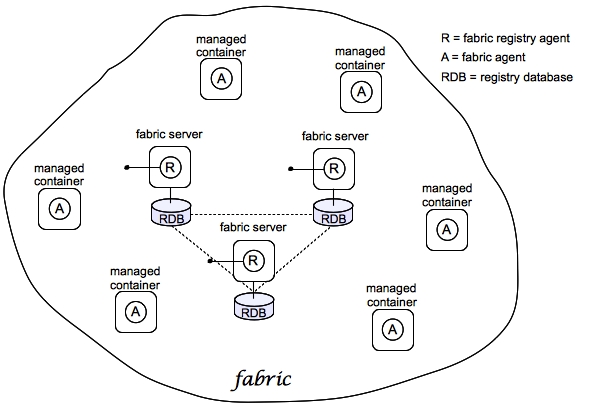
Figure 3.1, “Containers in a Fabric” shows an example of a distributed collection of containers that belong to a single fabric.
Figure 3.1. Containers in a Fabric
Fabric
Copiar o linkLink copiado para a área de transferência!
The Fuse Fabric technology layer supports the scalable deployment of JBoss Fuse containers across a network. It enables a variety of advanced features, such as remote installation and provisioning of containers; phased rollout of new versions of libraries and applications; load-balancing and failover of deployed endpoints.
A fabric is a collection of containers that share a fabric registry, where the fabric registry is a replicated database that stores all information related to provisioning and managing the containers. A fabric is intended to manage a distributed network of containers, where the containers are deployed across multiple hosts.
Fabric Ensemble
Copiar o linkLink copiado para a área de transferência!
A Fabric Ensemble is a collection of Fabric Servers that collectively maintain the state of the fabric registry. The Fabric Ensemble implements a replicated database and uses a quorum-based voting system to ensure that data in the fabric registry remains consistent across all of the fabric's containers. To guard against network splits in a quorum-based system, it is a requirement that the number of Fabric Servers in a Fabric Ensemble is always an odd number.
The number of Fabric Servers in a fabric is typically 1, 3, or 5. A fabric with just one Fabric Server is suitable for experimentation only. A live production system should have at least 3 or 5 Fabric Servers, installed on separate hosts, to provide fault tolerance.
Fabric Server
Copiar o linkLink copiado para a área de transferência!
A Fabric Server has a special status in the fabric, because it is responsible for maintaining a replica of the fabric registry. In each Fabric Server, a registry service is installed (labeled R in Figure 3.1, “Containers in a Fabric”). The registry service (based on Apache ZooKeeper) maintains a replica of the registry database and provides a ZooKeeper server, which ordinary agents can connect to in order to retrieve registry data.
Fabric Container
Copiar o linkLink copiado para a área de transferência!
A Fabric Container is aware of the locations of all of the Fabric Servers, and it can retrieve registry data from any Fabric Server in the Fabric Ensemble. A Fabric Agent (labeled A in Figure 3.1, “Containers in a Fabric”) is installed in each Fabric Container. The Fabric Agent actively monitors the fabric registry, and whenever a relevant modification is made to the registry, it immediately updates its container to keep the container consistent with the registry settings.
Profile
Copiar o linkLink copiado para a área de transferência!
A Fabric profile is an abstract unit of deployment, which is capable of holding all of the data required for deploying an application into a Fabric Container. Profiles are used exclusively in the context of fabrics. Features or bundles deployed directly to Fabric Containers are short lived.
Important
The presence of a Fabric Agent in a container completely changes the deployment model, requiring you to use profiles exclusively as the unit of deployment. Although it is still possible to deploy an individual bundle or feature (using
osgi:install or features:install, respectively), these modifications are impermanent. As soon as you restart the container or refresh its contents, the Fabric Agent replaces the container's existing contents with whatever is specified by the deployed profiles.
3.2. Deploying to a Fabric
Copiar o linkLink copiado para a área de transferência!
3.2.1. Create a Fabric
Copiar o linkLink copiado para a área de transferência!
Overview
Copiar o linkLink copiado para a área de transferência!
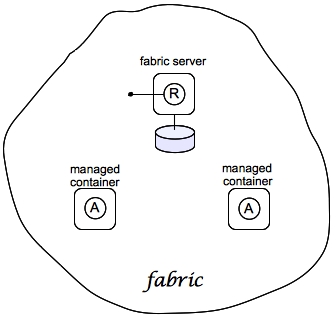
Figure 3.2 shows an overview of a sample fabric that you will create. The Fabric Ensemble consists of just one Fabric Server (making this fabric suitable only for experimental use) and two managed child containers.
Figure 3.2. A Sample Fabric with Child Containers
Fabric server
Copiar o linkLink copiado para a área de transferência!
A Fabric Server (or servers) forms the backbone of a fabric. It hosts a registry service, which maintains a replicable database of information about the state of the fabric. Initially, when you create the fabric, there is just a single Fabric Server.
Child containers
Copiar o linkLink copiado para a área de transferência!
Creating one or more child containers is the simplest way to extend a fabric. As shown in Figure 3.2, “A Sample Fabric with Child Containers”, the first container in the fabric is a root container, and both child containers are descended from it.
Each child container is an independent Red Hat JBoss Fuse container instance, which runs in its own JVM instance. The data files for the child containers are stored under the
InstallDir/instances directory.
Steps to create the fabric
Copiar o linkLink copiado para a área de transferência!
To create the simple fabric shown in Figure 3.2, “A Sample Fabric with Child Containers”, follow these steps:
- (Optional) Customise the name of the root container by editing the
InstallDir/etc/system.propertiesfile and specifying a different name for this property:karaf.name=root
karaf.name=rootCopy to Clipboard Copied! Toggle word wrap Toggle overflow NoteFor the first container in your fabric, this step is optional. But at some later stage, if you want to join a root container to the fabric, you must customise the new container's name to prevent it from clashing with any existing root containers in the fabric. - To create the first fabric container, which acts as the seed for the new fabric, enter this console command:
JBossFuse:karaf@root> fabric:create --new-user AdminUser --new-user-password AdminPass
  --zookeeper-password ZooPass --wait-for-provisioning
JBossFuse:karaf@root> fabric:create --new-user AdminUser --new-user-password AdminPass
  --zookeeper-password ZooPass --wait-for-provisioning
Copy to Clipboard Copied! Toggle word wrap Toggle overflow The current container, namedrootby default, becomes a Fabric Server with a registry service installed. Initially, this is the only container in the fabric. The--new-userand--new-user-passwordoptions specify the credentials for a new administrator user. The Zookeeper password is used to protect sensitive data in the Fabric registry service (all of the nodes under/fabric).NoteMost of the time, you are not prompted to enter the Zookeeper password when accessing the registry service, because it is cached in the current session. When you join a container to a fabric, however, you must provide the fabric's Zookeeper password.NoteIf you use a VPN (virtual private network) on your local machine, it is advisable to log off VPN before you create the fabric and to stay logged off while you are using the local container. A local Fabric Server is permanently associated with a fixed IP address or hostname. If VPN is enabled when you create the fabric, the underlying Java runtime is liable to detect and use the VPN hostname instead of your permanent local hostname. This can also be an issue with multi-homed machines. To be absolutely sure about the hostname, you could specify the IP address explicitly—see chapter "Creating a New Fabric" in "Fabric Guide". - Create two child containers. Assuming that your root container is named
root, enter this console command:Copy to Clipboard Copied! Toggle word wrap Toggle overflow You are prompted to enter a JMX username and password (the JMX port is integrated with the JAAS authentication service). Enter one of the username/password combinations that you defined in step 2. - Invoke the
fabric:container-listcommand to see a list of all containers in your new fabric. You should see a listing something like this:JBossFuse:karaf@root> fabric:container-list [id] [version] [alive] [profiles] [provision status] root 1.0 true fabric, fabric-ensemble-0000-1, fuse-esb-full success child1 1.0 true default success child2 1.0 true default success
JBossFuse:karaf@root> fabric:container-list [id] [version] [alive] [profiles] [provision status] root 1.0 true fabric, fabric-ensemble-0000-1, fuse-esb-full success child1 1.0 true default success child2 1.0 true default successCopy to Clipboard Copied! Toggle word wrap Toggle overflow
Shutting down the containers
Copiar o linkLink copiado para a área de transferência!
Because the child containers run in their own JVMs, they do not automatically stop when you shut down the root container. To shut down a container and its children, first stop its children using the
fabric:container-stop command. For example, to shut down the current fabric completely, enter these console commands:
JBossFuse:karaf@root> fabric:container-stop child1
JBossFuse:karaf@root> fabric:container-stop child2
JBossFuse:karaf@root> shutdown -f
JBossFuse:karaf@root> fabric:container-stop child1
JBossFuse:karaf@root> fabric:container-stop child2
JBossFuse:karaf@root> shutdown -f
After you restart the root container, you must explicitly restart the children using the
fabric:container-start console command.
3.2.2. Create Fabric Profiles
Copiar o linkLink copiado para a área de transferência!
Overview
Copiar o linkLink copiado para a área de transferência!
A profile is the basic unit of deployment in a fabric. You can deploy one or more profiles to a container, and the content of those deployed profiles determines what is installed in the container.
Contents of a profile
Copiar o linkLink copiado para a área de transferência!
A profile encapsulates the following kinds of information:
- The URL locations of features repositories
- A list of features to install
- A list of bundles to install (or, more generally, any suitable JAR package—including OSGi bundles, Fuse Application Bundles, and WAR files)
- A collection of configuration settings for the OSGi Config Admin service
- Java system properties that affect the Apache Karaf container (analogous to editing
etc/config.properties) - Java system properties that affect installed bundles (analogous to editing
etc/system.properties)
Base profile
Copiar o linkLink copiado para a área de transferência!
Profiles support inheritance. This can be useful in cases where you want to deploy a cluster of similar servers—for example, where the servers differ only in the choice of IP port number. For this, you would typically define a base profile, which includes all of the deployment data that the servers have in common. Each individual server profile would inherit from the common base profile, but add configuration settings specific to its server instance.
Create a base profile
Copiar o linkLink copiado para a área de transferência!
To create the
gs-cxf-base profile, follow these steps:
- Create the
gs-cxf-baseprofile by entering this console command:JBossFuse:karaf@root> fabric:profile-create --parents feature-cxf gs-cxf-base
JBossFuse:karaf@root> fabric:profile-create --parents feature-cxf gs-cxf-baseCopy to Clipboard Copied! Toggle word wrap Toggle overflow - Add the
get-startedfeatures repository (see Define a Feature for the Application) to thegs-cxf-baseprofile by entering this console command:JBossFuse:karaf@root> profile-edit -r mvn:org.fusesource.example/get-started/1.0-SNAPSHOT/xml/features gs-cxf-base
JBossFuse:karaf@root> profile-edit -r mvn:org.fusesource.example/get-started/1.0-SNAPSHOT/xml/features gs-cxf-baseCopy to Clipboard Copied! Toggle word wrap Toggle overflow - Now add the get-started-cxf feature (which provides the Web service example server) to the
gs-cxf-baseprofile. Enter the following console command:JBossFuse:karaf@root> profile-edit --features get-started-cxf gs-cxf-base
JBossFuse:karaf@root> profile-edit --features get-started-cxf gs-cxf-baseCopy to Clipboard Copied! Toggle word wrap Toggle overflow
Create the derived profiles
Copiar o linkLink copiado para a área de transferência!
You create two derived profiles,
gs-cxf-01 and gs-cxf-02, which configure different IP ports for the Web service. To do so, follow these steps:
- Create the
gs-cxf-01profile—which derives fromgs-cxf-base—by entering this console command:JBossFuse:karaf@root> profile-create --parents gs-cxf-base gs-cxf-01
JBossFuse:karaf@root> profile-create --parents gs-cxf-base gs-cxf-01Copy to Clipboard Copied! Toggle word wrap Toggle overflow - Create the
gs-cxf-02profile—which derives fromgs-cxf-base—by entering this console command:JBossFuse:karaf@root> profile-create --parents gs-cxf-base gs-cxf-02
JBossFuse:karaf@root> profile-create --parents gs-cxf-base gs-cxf-02Copy to Clipboard Copied! Toggle word wrap Toggle overflow - In the
gs-cxf-01profile, set theportNumberconfiguration property to 8185, by entering this console command:JBossFuse:karaf@root> profile-edit -p org.fusesource.example.get.started/portNumber=8185 gs-cxf-01
JBossFuse:karaf@root> profile-edit -p org.fusesource.example.get.started/portNumber=8185 gs-cxf-01Copy to Clipboard Copied! Toggle word wrap Toggle overflow - In the
gs-cxf-02profile, set theportNumberconfiguration property to 8186, by entering this console command:JBossFuse:karaf@root> profile-edit -p org.fusesource.example.get.started/portNumber=8186 gs-cxf-02
JBossFuse:karaf@root> profile-edit -p org.fusesource.example.get.started/portNumber=8186 gs-cxf-02Copy to Clipboard Copied! Toggle word wrap Toggle overflow
3.2.3. Deploy the Profiles
Copiar o linkLink copiado para a área de transferência!
Deploy profiles to the child containers
Copiar o linkLink copiado para a área de transferência!
Having created the child containers, as described in Section 3.2.1, “Create a Fabric”, and the profiles, as described in Section 3.2.2, “Create Fabric Profiles”, you can now deploy the profiles. To do so, follow these steps:
- Deploy the
gs-cxf-01profile into thechild1container by entering this console command:JBossFuse:karaf@root> fabric:container-change-profile child1 gs-cxf-01
JBossFuse:karaf@root> fabric:container-change-profile child1 gs-cxf-01Copy to Clipboard Copied! Toggle word wrap Toggle overflow - Deploy the
gs-cxf-02profile into thechild2container by entering this console command:JBossFuse:karaf@root> fabric:container-change-profile child2 gs-cxf-02
JBossFuse:karaf@root> fabric:container-change-profile child2 gs-cxf-02Copy to Clipboard Copied! Toggle word wrap Toggle overflow
Test the deployed profiles
Copiar o linkLink copiado para a área de transferência!
You can test the deployed profiles using the WS client from the
cxf-basic Maven project described in Create a Web Services Project. To do so, follow these steps:
- Open a new command prompt and
cdtoget-started/cxf-basic. - Test the
gs-cxf-01profile (which deploys a Web service listening on port 8185) by entering this command:mvn -Pclient -Dexec.args="http://localhost:8185/PersonServiceCF"
mvn -Pclient -Dexec.args="http://localhost:8185/PersonServiceCF"Copy to Clipboard Copied! Toggle word wrap Toggle overflow - Test the
gs-cxf-02profile (which deploys a Web service listening on port 8186) by entering this command:mvn -Pclient -Dexec.args="http://localhost:8186/PersonServiceCF"
mvn -Pclient -Dexec.args="http://localhost:8186/PersonServiceCF"Copy to Clipboard Copied! Toggle word wrap Toggle overflow
3.2.4. Update a Profile
Copiar o linkLink copiado para a área de transferência!
Atomic container upgrades
Copiar o linkLink copiado para a área de transferência!
Normally, when you edit a profile that is already deployed in a container, the modification takes effect immediately. This is so because the Fabric Agent in the affected container (or containers) actively monitors the fabric registry in real time.
In practice, however, immediate propagation of profile modifications is often undesirable. In a production system, you typically want to roll out changes incrementally: for example, initially trying out the change on just one container to check for problems, before you make changes globally to all containers. Moreover, sometimes several edits must be made together to reconfigure an application in a consistent way.
Profile versioning
Copiar o linkLink copiado para a área de transferência!
For quality assurance and consistency, it is typically best to modify profiles atomically, where several modifications are applied simultaneously. To support atomic updates, fabric implements profile versioning. Initially, the container points at version 1.0 of a profile. When you create a new profile version (for example, version 1.1), the changes are invisible to the container until you upgrade it. After you are finished editing the new profile, you can apply all of the modifications simultaneously by upgrading the container to use the new version 1.1 of the profile.
Upgrade to a new profile
Copiar o linkLink copiado para a área de transferência!
For example, to modify the
gs-cxf-01 profile, when it is deployed and running in a container, follow the recommended procedure:
- Create a new version, 1.1, to hold the pending changes by entering this console command:
JBossFuse:karaf@root> fabric:version-create
Created version: 1.1 as copy of: 1.0
JBossFuse:karaf@root> fabric:version-create
Created version: 1.1 as copy of: 1.0
Copy to Clipboard Copied! Toggle word wrap Toggle overflow The new version is initialised with a copy of all of the profiles from version 1.0. - Use the
fabric:profile-editcommand to change theportNumberofgs-cxf-01to the value 8187 by entering this console command:JBossFuse:karaf@root> fabric:profile-edit -p org.fusesource.example.get.started/portNumber=8187 gs-cxf-01 1.1
JBossFuse:karaf@root> fabric:profile-edit -p org.fusesource.example.get.started/portNumber=8187 gs-cxf-01 1.1Copy to Clipboard Copied! Toggle word wrap Toggle overflow Remember to specify version1.1to thefabric:profile-editcommand, so that the modifications are applied to version 1.1 of thegs-cxf-01profile. - Upgrade the
child1container to version 1.1 by entering this console command:JBossFuse:karaf@root> fabric:container-upgrade 1.1 child1
JBossFuse:karaf@root> fabric:container-upgrade 1.1 child1Copy to Clipboard Copied! Toggle word wrap Toggle overflow
Roll back to an old profile
Copiar o linkLink copiado para a área de transferência!
You can easily roll back to the old version of the
gs-cxf-01 profile, using the fabric:container-rollback command like this:
JBossFuse:karaf@root> fabric:container-rollback 1.0 child1
JBossFuse:karaf@root> fabric:container-rollback 1.0 child1Appendix A. Editing Profiles with the Built-In Text Editor
Copiar o linkLink copiado para a área de transferência!
Abstract
When you have a lot of changes and additions to make to a profile's configuration, it is usually more convenient to do this interactively, using the built-in text editor for profiles. The editor can be accessed by entering the
profile-edit command with no arguments except for the profile's name (and optionally, version); or adding the --pid option for editing OSGi PID properties; or adding the --resource option for editing general resources.
A.1. Editing Agent Properties
Copiar o linkLink copiado para a área de transferência!
Overview
Copiar o linkLink copiado para a área de transferência!
This section explains how to use the built-in text editor to modify a profile's agent properties, which are mainly used to define what bundles and features are deployed by the profile.
Open the agent properties resource
Copiar o linkLink copiado para a área de transferência!
To start editing a profile's agent properties using the built-in text editor, enter the following console command:
JBossFuse:karaf@root> profile-edit Profile [Version]
JBossFuse:karaf@root> profile-edit Profile [Version]
Where
Profile is the name of the profile to edit and you can optionally specify the profile version, Version, as well. The text editor opens in the console window, showing the current profile name and version in the top-left corner of the Window. The bottom row of the editor screen summarizes the available editing commands and you can use the arrow keys to move about the screen.
Specifying feature repository locations
Copiar o linkLink copiado para a área de transferência!
To specify the location of a feature repository, add a line in the following format:
repository.ID=URL
repository.ID=URL
Where
ID is an arbitrary unique identifier and URL gives the location of a single feature repository (only one repository URL can be specified on a line).
Specifying deployed features
Copiar o linkLink copiado para a área de transferência!
To specify a feature to deploy (which must be available from one of the specified feature repositories), add a line in the following format:
feature.ID=FeatureName
feature.ID=FeatureName
Where
ID is an arbitrary unique identifier and FeatureName is the name of a feature.
Specifying deployed bundles
Copiar o linkLink copiado para a área de transferência!
To specify a bundle to deploy, add a line in the following format:
bundle.ID=URL
bundle.ID=URL
Where
ID is an arbitrary unique identifier and URL specifies the bundle's location.
Note
A bundle entry can be used in combination with a
blueprint: (or spring:) URL handler to deploy a Blueprint XML resource (or a Spring XML resource) as an OSGi bundle.
Specifying bundle overrides
Copiar o linkLink copiado para a área de transferência!
To specify a bundle override, add a line in the following format:
override.ID=URL
override.ID=URL
Where
ID is an arbitrary unique identifier and URL specifies the bundle's location.
Note
A bundle override is used to override a bundle installed by a feature, replacing it with a different version of the bundle. For example, this functionality is used by the patching system to install a patched bundle in a container.
Specifying deployed FABs
Copiar o linkLink copiado para a área de transferência!
To specify a Fuse Application Bundle (FAB) to deploy, add a line in the following format:
fab.ID=URL
fab.ID=URL
Where
ID is an arbitrary unique identifier and URL specifies the FAB's location.
Specifying etc/config.properties properties
Copiar o linkLink copiado para a área de transferência!
To specify Java system properties that affect the Apache Karaf container (analogous to editing
etc/config.properties in a standalone container), add a line in the following format:
config.Property=Value
config.Property=ValueSpecifying etc/system.properties properties
Copiar o linkLink copiado para a área de transferência!
To specify Java system properties that affect the bundles deployed in the container (analogous to editing
etc/system.properties in a standalone container), add a line in the following format:
system.Property=Value
system.Property=Value
If the system property,
Property, is already set at the JVM level (for example, through the --jvm-opts option to the fabric:container-create command), the preceding fabric:profile-edit command will not override the JVM level setting. To override a JVM level setting, set the system property as follows:
system.karaf.override.Property=Value
system.karaf.override.Property=ValueSpecifying libraries to add to Java runtime lib/
Copiar o linkLink copiado para a área de transferência!
To specify a Java library to deploy (equivalent to adding a library to the
lib/ directory of the underlying Java runtime), add a line in the following format:
lib.ID=URL
lib.ID=URL
Where
ID is an arbitrary unique identifier and URL specifies the library's location.
Specifying libraries to add to Java runtime lib/ext/
Copiar o linkLink copiado para a área de transferência!
To specify a Java extension library to deploy (equivalent to adding a library to the
lib/ext/ directory of the underlying Java runtime), add a line in the following format:
ext.ID=URL
ext.ID=URL
Where
ID is an arbitrary unique identifier and URL specifies the extension library's location.
Specifying libraries to add to Java runtime lib/endorsed/
Copiar o linkLink copiado para a área de transferência!
To specify a Java endorsed library to deploy (equivalent to adding a library to the
lib/endorsed/ directory of the underlying Java runtime), add a line in the following format:
endorsed.ID=URL
endorsed.ID=URL
Where
ID is an arbitrary unique identifier and URL specifies the endorsed library's location.
Example
Copiar o linkLink copiado para a área de transferência!
To open the
mq-client profile's agent properties for editing, enter the following console command:
JBossFuse:karaf@root> profile-edit mq-client
JBossFuse:karaf@root> profile-edit mq-client
The text editor starts up, and you should see the following screen in the console window:
Type
^X to quit the text editor and get back to the console prompt.
A.2. Editing OSGi Config Admin Properties
Copiar o linkLink copiado para a área de transferência!
Overview
Copiar o linkLink copiado para a área de transferência!
This section explains how to use the built-in text editor to edit the property settings associated with a specific persistent ID.
Persistent ID
Copiar o linkLink copiado para a área de transferência!
In the context of the OSGi Config Admin service, a persistent ID (PID) refers to and identifies a set of related properties. In particular, when defining PID property settings in a profile, the properties associated with the
PID persistent ID are defined in the PID.properties resource.
Open the Config Admin properties resource
Copiar o linkLink copiado para a área de transferência!
To start editing the properties associated with the
PID persistent ID, enter the following console command:
JBossFuse:karaf@root> profile-edit --pid PID Profile [Version]
JBossFuse:karaf@root> profile-edit --pid PID Profile [Version]Note
It is also possible to edit PID properties by specifying
--resource PID.properties in the profile-edit command, instead of using the --pid PID option.
Specifying OSGi config admin properties
Copiar o linkLink copiado para a área de transferência!
The text editor opens, showing the contents of the specified profile's
PID.properties resource (which is actually stored in the ZooKeeper registry). To edit the properties, add, modify, or delete lines of the following form:
Property=Value
Property=ValueExample
Copiar o linkLink copiado para a área de transferência!
To edit the properties for the
io.fabric8.hadoop PID in the hadoop-base profile, enter the following console command:
JBossFuse:karaf@root> profile-edit --resource io.fabric8.hadoop.properties hadoop-base 1.0
JBossFuse:karaf@root> profile-edit --resource io.fabric8.hadoop.properties hadoop-base 1.0
The text editor starts up, and you should see the following screen in the console window:
You might notice that colon characters are escaped in this example (as in
\:). Strictly speaking, it is only necessary to escape a colon if it appears as part of a property name (left hand side of the equals sign), but the profile-edit command automatically escapes all colons when it writes to a resource. When manually editing resources using the text editor, however, you do not need to escape colons in URLs appearing on the right hand side of the equals sign.
Type
^X to quit the text editor and get back to the console prompt.
A.3. Editing Other Resources
Copiar o linkLink copiado para a área de transferência!
Overview
Copiar o linkLink copiado para a área de transferência!
In addition to agent properties and PID properties, the built-in text editor makes it possible for you edit any resource associated with a profile. This is particularly useful, if you need to store additional configuration files in a profile. The extra configuration files can be stored as profile resources (which actually correspond to ZooKeeper nodes) and then can be accessed by your applications at run time.
Note
The ZooKeeper registry is designed to work with small nodes only. If you try to store a massive configuration file as a profile resource, it will severely degrade the performance of the Fuse Fabric registry.
Creating and editing an arbitrary resource
Copiar o linkLink copiado para a área de transferência!
You can create and edit arbitrary profile resources using the following command syntax:
JBossFuse:karaf@root> profile-edit --resource Resource Profile [Version]
JBossFuse:karaf@root> profile-edit --resource Resource Profile [Version]
Where
Resource is the name of the profile resource you want to edit. If Resource does not already exist, it will be created.
broker.xml example
Copiar o linkLink copiado para a área de transferência!
For example, the
mq-base profile has the broker.xml resource, which stores the contents of an Apache ActiveMQ broker configuration file. To edit the broker.xml resource, enter the following console command:
JBossFuse:karaf@root> profile-edit --resource broker.xml mq-base 1.0
JBossFuse:karaf@root> profile-edit --resource broker.xml mq-base 1.0
The text editor starts up, and you should see the following screen in the console window:
Any changes you make to this file will take effect whenever the broker restarts.
Type
^X to quit the text editor and get back to the console prompt.
Referencing a profile resource
Copiar o linkLink copiado para a área de transferência!
In order to use an arbitrary profile resource, you must be able to reference it. Because a profile resource is ultimately stored as a ZooKeeper node, you must reference it using a ZooKeeper URL. For example, the
broker.xml resource from the previous example is stored under the following ZooKeeper location:
zk:/fabric/configs/versions/1.0/profiles/mq-base/broker.xml
zk:/fabric/configs/versions/1.0/profiles/mq-base/broker.xml
In general, you can find version,
Version, of the Profile profile's Resource resource at the following location:
zk:/fabric/configs/versions/Version/profiles/Profile/Resource
zk:/fabric/configs/versions/Version/profiles/Profile/Resource
For example, the
mq profile's org.fusesource.mq.fabric.server-broker PID defines the following properties, where the config property references the broker.xml resource:
connectors=openwire
config=zk\:/fabric/configs/versions/1.0/profiles/mq-base/broker.xml
group=default
standby.pool=default
connectors=openwire
config=zk\:/fabric/configs/versions/1.0/profiles/mq-base/broker.xml
group=default
standby.pool=defaultA.4. Profile Attributes
Copiar o linkLink copiado para a área de transferência!
Overview
Copiar o linkLink copiado para a área de transferência!
In addition to the resources described in the other sections, a profile also has certain attributes that affect its behavior. You cannot edit profile attributes directly using the text editor.
For completeness, this section describes what the profile attributes are and what console commands you can use to modify them.
parents attribute
Copiar o linkLink copiado para a área de transferência!
The
parents attribute is a list of one or more parent profiles. This attribute can be set using the profile-change-parents console command. For example, to assign the parent profiles camel and cxf to the my-camel-cxf-profile profile, you would enter the following console command:
JBossFuse:karaf@root> profile-change-parents --version 1.0 my-camel-cxf-profile camel cxf
JBossFuse:karaf@root> profile-change-parents --version 1.0 my-camel-cxf-profile camel cxfabstract attribute
Copiar o linkLink copiado para a área de transferência!
When a profile's
abstract attribute is set to true, the profile cannot be directly deployed to a container. This is useful for profiles that are only intended to be the parents of other profiles—for example, mq-base. You can set the abstract attribute from the Management Console.
locked attribute
Copiar o linkLink copiado para a área de transferência!
A locked profile cannot be changed or edited until it is unlocked. You can lock or unlock a profile from the Management Console.
hidden attribute
Copiar o linkLink copiado para a área de transferência!
The
hidden attribute is a flag that is typically set on profiles that Fuse Fabric creates automatically (for example, to customize the setup of a registry server). By default, hidden profiles are not shown when you run the profile-list command, but you can see them when you add the --hidden flag, as follows:
Legal Notice
Copiar o linkLink copiado para a área de transferência!
Trademark Disclaimer
The text of and illustrations in this document are licensed by Red Hat under a Creative Commons Attribution–Share Alike 3.0 Unported license ("CC-BY-SA"). An explanation of CC-BY-SA is available at http://creativecommons.org/licenses/by-sa/3.0/. In accordance with CC-BY-SA, if you distribute this document or an adaptation of it, you must provide the URL for the original version.
Red Hat, as the licensor of this document, waives the right to enforce, and agrees not to assert, Section 4d of CC-BY-SA to the fullest extent permitted by applicable law.
Red Hat, Red Hat Enterprise Linux, the Shadowman logo, JBoss, MetaMatrix, Fedora, the Infinity Logo, and RHCE are trademarks of Red Hat, Inc., registered in the United States and other countries.
Apache, ServiceMix, Camel, CXF, and ActiveMQ are trademarks of Apache Software Foundation. Any other names contained herein may be trademarks of their respective owners.
Legal Notice
Copiar o linkLink copiado para a área de transferência!
Third Party Acknowledgements
One or more products in the Red Hat JBoss Fuse release includes third party components covered by licenses that require that the following documentation notices be provided:
- JLine (http://jline.sourceforge.net) jline:jline:jar:1.0License: BSD (LICENSE.txt) - Copyright (c) 2002-2006, Marc Prud'hommeaux
mwp1@cornell.eduAll rights reserved.Redistribution and use in source and binary forms, with or without modification, are permitted provided that the following conditions are met:- Redistributions of source code must retain the above copyright notice, this list of conditions and the following disclaimer.
- Redistributions in binary form must reproduce the above copyright notice, this list of conditions and the following disclaimer in the documentation and/or other materials provided with the distribution.
- Neither the name of JLine nor the names of its contributors may be used to endorse or promote products derived from this software without specific prior written permission.
THIS SOFTWARE IS PROVIDED BY THE COPYRIGHT HOLDERS AND CONTRIBUTORS "AS IS" AND ANY EXPRESS OR IMPLIED WARRANTIES, INCLUDING, BUT NOT LIMITED TO, THE IMPLIED WARRANTIES OF MERCHANTABILITY AND FITNESS FOR A PARTICULAR PURPOSE ARE DISCLAIMED. IN NO EVENT SHALL THE COPYRIGHT OWNER OR CONTRIBUTORS BE LIABLE FOR ANY DIRECT, INDIRECT, INCIDENTAL, SPECIAL, EXEMPLARY, OR CONSEQUENTIAL DAMAGES (INCLUDING, BUT NOT LIMITED TO, PROCUREMENT OF SUBSTITUTE GOODS OR SERVICES; LOSS OF USE, DATA, OR PROFITS; OR BUSINESS INTERRUPTION) HOWEVER CAUSED AND ON ANY THEORY OF LIABILITY, WHETHER IN CONTRACT, STRICT LIABILITY, OR TORT (INCLUDING NEGLIGENCE OR OTHERWISE) ARISING IN ANY WAY OUT OF THE USE OF THIS SOFTWARE, EVEN IF ADVISED OF THE POSSIBILITY OF SUCH DAMAGE. - Stax2 API (http://woodstox.codehaus.org/StAX2) org.codehaus.woodstox:stax2-api:jar:3.1.1License: The BSD License (http://www.opensource.org/licenses/bsd-license.php)Copyright (c) <YEAR>, <OWNER> All rights reserved.Redistribution and use in source and binary forms, with or without modification, are permitted provided that the following conditions are met:
- Redistributions of source code must retain the above copyright notice, this list of conditions and the following disclaimer.
- Redistributions in binary form must reproduce the above copyright notice, this list of conditions and the following disclaimer in the documentation and/or other materials provided with the distribution.
THIS SOFTWARE IS PROVIDED BY THE COPYRIGHT HOLDERS AND CONTRIBUTORS "AS IS" AND ANY EXPRESS OR IMPLIED WARRANTIES, INCLUDING, BUT NOT LIMITED TO, THE IMPLIED WARRANTIES OF MERCHANTABILITY AND FITNESS FOR A PARTICULAR PURPOSE ARE DISCLAIMED. IN NO EVENT SHALL THE COPYRIGHT HOLDER OR CONTRIBUTORS BE LIABLE FOR ANY DIRECT, INDIRECT, INCIDENTAL, SPECIAL, EXEMPLARY, OR CONSEQUENTIAL DAMAGES (INCLUDING, BUT NOT LIMITED TO, PROCUREMENT OF SUBSTITUTE GOODS OR SERVICES; LOSS OF USE, DATA, OR PROFITS; OR BUSINESS INTERRUPTION) HOWEVER CAUSED AND ON ANY THEORY OF LIABILITY, WHETHER IN CONTRACT, STRICT LIABILITY, OR TORT (INCLUDING NEGLIGENCE OR OTHERWISE) ARISING IN ANY WAY OUT OF THE USE OF THIS SOFTWARE, EVEN IF ADVISED OF THE POSSIBILITY OF SUCH DAMAGE. - jibx-run - JiBX runtime (http://www.jibx.org/main-reactor/jibx-run) org.jibx:jibx-run:bundle:1.2.3License: BSD (http://jibx.sourceforge.net/jibx-license.html) Copyright (c) 2003-2010, Dennis M. Sosnoski.All rights reserved.Redistribution and use in source and binary forms, with or without modification, are permitted provided that the following conditions are met:
- Redistributions of source code must retain the above copyright notice, this list of conditions and the following disclaimer.
- Redistributions in binary form must reproduce the above copyright notice, this list of conditions and the following disclaimer in the documentation and/or other materials provided with the distribution.
- Neither the name of JiBX nor the names of its contributors may be used to endorse or promote products derived from this software without specific prior written permission.
THIS SOFTWARE IS PROVIDED BY THE COPYRIGHT HOLDERS AND CONTRIBUTORS "AS IS" AND ANY EXPRESS OR IMPLIED WARRANTIES, INCLUDING, BUT NOT LIMITED TO, THE IMPLIED WARRANTIES OF MERCHANTABILITY AND FITNESS FOR A PARTICULAR PURPOSE ARE DISCLAIMED. IN NO EVENT SHALL THE COPYRIGHT OWNER OR CONTRIBUTORS BE LIABLE FOR ANY DIRECT, INDIRECT, INCIDENTAL, SPECIAL, EXEMPLARY, OR CONSEQUENTIAL DAMAGES (INCLUDING, BUT NOT LIMITED TO, PROCUREMENT OF SUBSTITUTE GOODS OR SERVICES; LOSS OF USE, DATA, OR PROFITS; OR BUSINESS INTERRUPTION) HOWEVER CAUSED AND ON ANY THEORY OF LIABILITY, WHETHER IN CONTRACT, STRICT LIABILITY, OR TORT (INCLUDING NEGLIGENCE OR OTHERWISE) ARISING IN ANY WAY OUT OF THE USE OF THIS SOFTWARE, EVEN IF ADVISED OF THE POSSIBILITY OF SUCH DAMAGE. - JavaAssist (http://www.jboss.org/javassist) org.jboss.javassist:com.springsource.javassist:jar:3.9.0.GA:compileLicense: MPL (http://www.mozilla.org/MPL/MPL-1.1.html)
- HAPI-OSGI-Base Module (http://hl7api.sourceforge.net/hapi-osgi-base/) ca.uhn.hapi:hapi-osgi-base:bundle:1.2License: Mozilla Public License 1.1 (http://www.mozilla.org/MPL/MPL-1.1.txt)

'%20d='M201.5%20305.5c-13.8%200-24.9-11.1-24.9-24.6%200-13.8%2011.1-24.9%2024.9-24.9%2013.6%200%2024.6%2011.1%2024.6%2024.9%200%2013.6-11.1%2024.6-24.6%2024.6zM504%20256c0%20137-111%20248-248%20248S8%20393%208%20256%20119%208%20256%208s248%20111%20248%20248zm-132.3-41.2c-9.4%200-17.7%203.9-23.8%2010-22.4-15.5-52.6-25.5-86.1-26.6l17.4-78.3%2055.4%2012.5c0%2013.6%2011.1%2024.6%2024.6%2024.6%2013.8%200%2024.9-11.3%2024.9-24.9s-11.1-24.9-24.9-24.9c-9.7%200-18%205.8-22.1%2013.8l-61.2-13.6c-3-.8-6.1%201.4-6.9%204.4l-19.1%2086.4c-33.2%201.4-63.1%2011.3-85.5%2026.8-6.1-6.4-14.7-10.2-24.1-10.2-34.9%200-46.3%2046.9-14.4%2062.8-1.1%205-1.7%2010.2-1.7%2015.5%200%2052.6%2059.2%2095.2%20132%2095.2%2073.1%200%20132.3-42.6%20132.3-95.2%200-5.3-.6-10.8-1.9-15.8%2031.3-16%2019.8-62.5-14.9-62.5zM302.8%20331c-18.2%2018.2-76.1%2017.9-93.6%200-2.2-2.2-6.1-2.2-8.3%200-2.5%202.5-2.5%206.4%200%208.6%2022.8%2022.8%2087.3%2022.8%20110.2%200%202.5-2.2%202.5-6.1%200-8.6-2.2-2.2-6.1-2.2-8.3%200zm7.7-75c-13.6%200-24.6%2011.1-24.6%2024.9%200%2013.6%2011.1%2024.6%2024.6%2024.6%2013.8%200%2024.9-11.1%2024.9-24.6%200-13.8-11-24.9-24.9-24.9z'/%3e%3c/svg%3e)