 Red Hat Summit
Este conteúdo não está disponível no idioma selecionado.
17.2. Verifying that Red Hat Storage Instance is Running
You can verify that Red Hat Storage instance is running by performing a remote login to the Red Hat Storage instance and issuing a command.
To verify that Red Hat Storage instance is running
- On the Amazon Web Services home page, click the Amazon EC2 tab. The Amazon EC2 Console Dashboard is displayed.
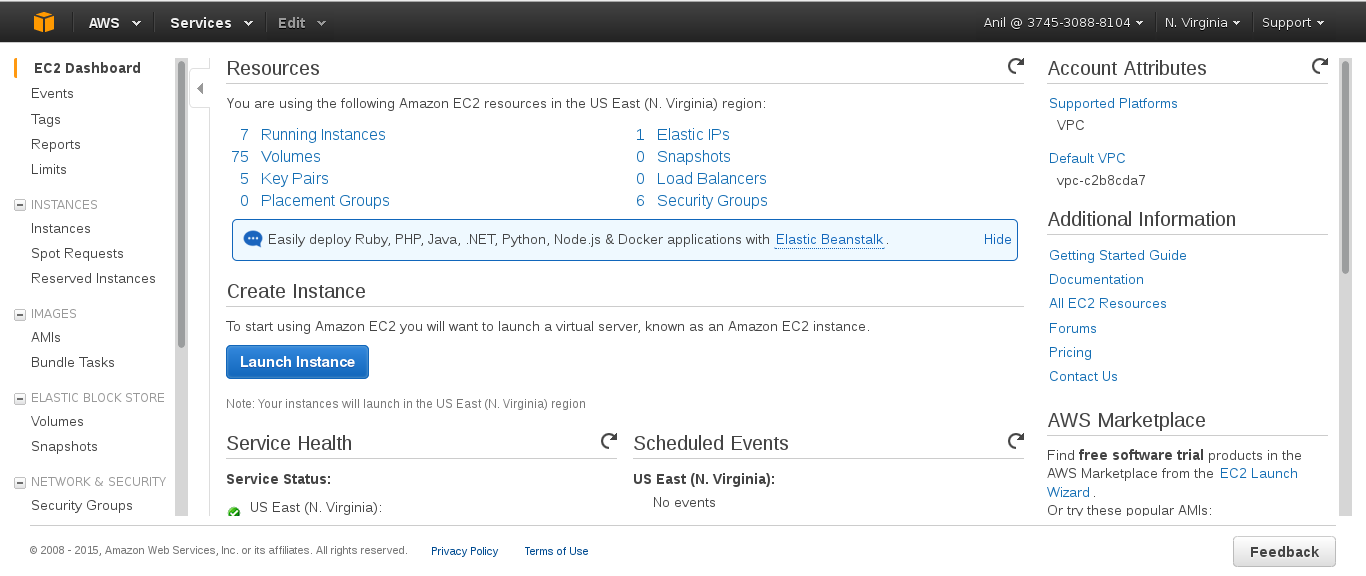
- Click the Instances link in the Instances section on the left. The screen displays your current instances.
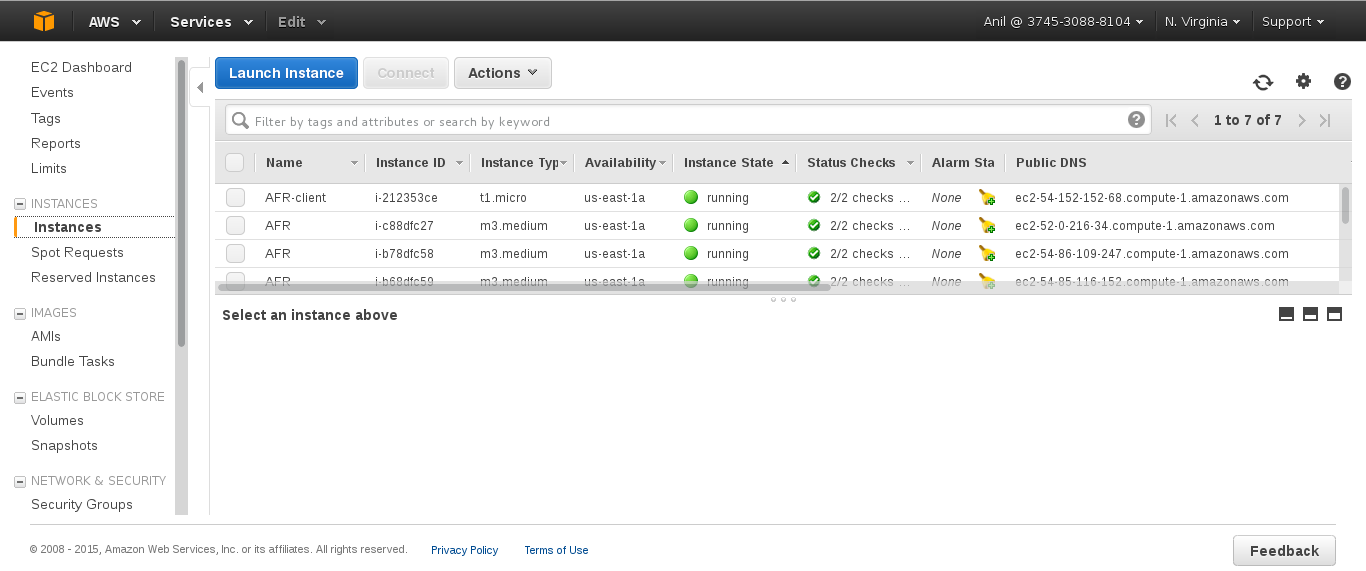
- Check the Status column and verify that the instance is running. A yellow circle indicates a status of pending while a green circle indicates that the instance is running.Click the instance and verify the details displayed in the Description tab.

- Note the domain name in the Public DNS field. You can use this domain to perform a remote login to the instance.
- Using SSH and the domain from the previous step, login to the Red Hat Amazon Machine Image instance. You must use the key pair that was selected or created when launching the instance.Example:Enter the following in command line:
# ssh -i rhs-aws.pem ec2-user@ec2-23-20-52-123.compute-1.amazonaws.com # sudo su - At the command line, enter the following command:
# service glusterd statusVerify that the command indicates that the glusterd daemon is running on the instance.

'%20d='M201.5%20305.5c-13.8%200-24.9-11.1-24.9-24.6%200-13.8%2011.1-24.9%2024.9-24.9%2013.6%200%2024.6%2011.1%2024.6%2024.9%200%2013.6-11.1%2024.6-24.6%2024.6zM504%20256c0%20137-111%20248-248%20248S8%20393%208%20256%20119%208%20256%208s248%20111%20248%20248zm-132.3-41.2c-9.4%200-17.7%203.9-23.8%2010-22.4-15.5-52.6-25.5-86.1-26.6l17.4-78.3%2055.4%2012.5c0%2013.6%2011.1%2024.6%2024.6%2024.6%2013.8%200%2024.9-11.3%2024.9-24.9s-11.1-24.9-24.9-24.9c-9.7%200-18%205.8-22.1%2013.8l-61.2-13.6c-3-.8-6.1%201.4-6.9%204.4l-19.1%2086.4c-33.2%201.4-63.1%2011.3-85.5%2026.8-6.1-6.4-14.7-10.2-24.1-10.2-34.9%200-46.3%2046.9-14.4%2062.8-1.1%205-1.7%2010.2-1.7%2015.5%200%2052.6%2059.2%2095.2%20132%2095.2%2073.1%200%20132.3-42.6%20132.3-95.2%200-5.3-.6-10.8-1.9-15.8%2031.3-16%2019.8-62.5-14.9-62.5zM302.8%20331c-18.2%2018.2-76.1%2017.9-93.6%200-2.2-2.2-6.1-2.2-8.3%200-2.5%202.5-2.5%206.4%200%208.6%2022.8%2022.8%2087.3%2022.8%20110.2%200%202.5-2.2%202.5-6.1%200-8.6-2.2-2.2-6.1-2.2-8.3%200zm7.7-75c-13.6%200-24.6%2011.1-24.6%2024.9%200%2013.6%2011.1%2024.6%2024.6%2024.6%2013.8%200%2024.9-11.1%2024.9-24.6%200-13.8-11-24.9-24.9-24.9z'/%3e%3c/svg%3e)