 Red Hat Summit
Este conteúdo não está disponível no idioma selecionado.
5. Install JBoss Developer Studio Stand-alone
An installer is provided for JBoss Developer Studio stand-alone. This installer is available from a variety of sources, including the Red Hat Customer Portal.
To install JBoss Developer Studio stand-alone, complete the following steps:
- Locate and download Red Hat JBoss Developer Studio <version> Stand-alone Installer.
- Start the installerAlternatively, you may be able to start the installer by double-clicking the
$ cd /path/to/.jar $ java -jar jboss-devstudio-version-installer-standalone.jar.jarfile. On OS X systems, hold control and click the.jarfile, click , review the.jarfile details and if satisfied click . - Follow the on-screen instructions to complete the installation process.
When working through the installer you may find the following additional information useful:
- Installer step 4
- You must specify a Java developer kit with a 32-bit JRE to install a 32-bit version of JBoss Developer Studio and a 64-bit JRE to install a 64-bit version of JBoss Developer Studio. To change the bit version of the Java developer kit to be used for installing JBoss Developer Studio, in the text field type the path to the appropriate bit version of the Java developer kit.

Figure 3. Default Java VM Selected for Running the IDE
- Installer step 5
- To make use of automatic runtime detection for finding already installed application servers, click Add. In the Location field, type the path from which recursive scanning for application servers is to commence or click to navigate to the location:
- To detect a specific application server, select the install directory for that application server.
- To detect multiple application servers, select a directory higher up the directory tree. Alternatively, this can be achieved by adding multiple locations for scanning.
This task can also be completed after JBoss Developer Studio is installed using the JBoss Runtime Detection wizard, accessed through the IDE Preferences window.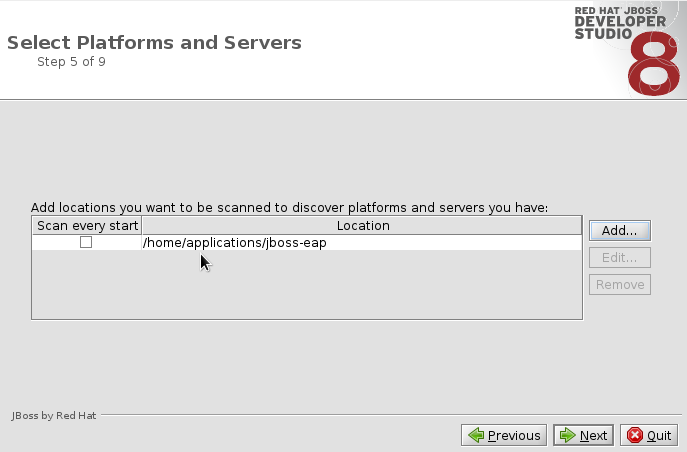
Figure 4. Path Selected for Recursive Scanning for Application Servers

'%20d='M201.5%20305.5c-13.8%200-24.9-11.1-24.9-24.6%200-13.8%2011.1-24.9%2024.9-24.9%2013.6%200%2024.6%2011.1%2024.6%2024.9%200%2013.6-11.1%2024.6-24.6%2024.6zM504%20256c0%20137-111%20248-248%20248S8%20393%208%20256%20119%208%20256%208s248%20111%20248%20248zm-132.3-41.2c-9.4%200-17.7%203.9-23.8%2010-22.4-15.5-52.6-25.5-86.1-26.6l17.4-78.3%2055.4%2012.5c0%2013.6%2011.1%2024.6%2024.6%2024.6%2013.8%200%2024.9-11.3%2024.9-24.9s-11.1-24.9-24.9-24.9c-9.7%200-18%205.8-22.1%2013.8l-61.2-13.6c-3-.8-6.1%201.4-6.9%204.4l-19.1%2086.4c-33.2%201.4-63.1%2011.3-85.5%2026.8-6.1-6.4-14.7-10.2-24.1-10.2-34.9%200-46.3%2046.9-14.4%2062.8-1.1%205-1.7%2010.2-1.7%2015.5%200%2052.6%2059.2%2095.2%20132%2095.2%2073.1%200%20132.3-42.6%20132.3-95.2%200-5.3-.6-10.8-1.9-15.8%2031.3-16%2019.8-62.5-14.9-62.5zM302.8%20331c-18.2%2018.2-76.1%2017.9-93.6%200-2.2-2.2-6.1-2.2-8.3%200-2.5%202.5-2.5%206.4%200%208.6%2022.8%2022.8%2087.3%2022.8%20110.2%200%202.5-2.2%202.5-6.1%200-8.6-2.2-2.2-6.1-2.2-8.3%200zm7.7-75c-13.6%200-24.6%2011.1-24.6%2024.9%200%2013.6%2011.1%2024.6%2024.6%2024.6%2013.8%200%2024.9-11.1%2024.9-24.6%200-13.8-11-24.9-24.9-24.9z'/%3e%3c/svg%3e)