 Red Hat Summit
Este conteúdo não está disponível no idioma selecionado.
Chapter 8. Red Hat build of OptaPlanner on Red Hat build of Quarkus: a school timetable quick start guide
This guide walks you through the process of creating a Red Hat build of Quarkus application with Red Hat build of OptaPlanner’s constraint solving artificial intelligence (AI). You will build a REST application that optimizes a school timetable for students and teachers
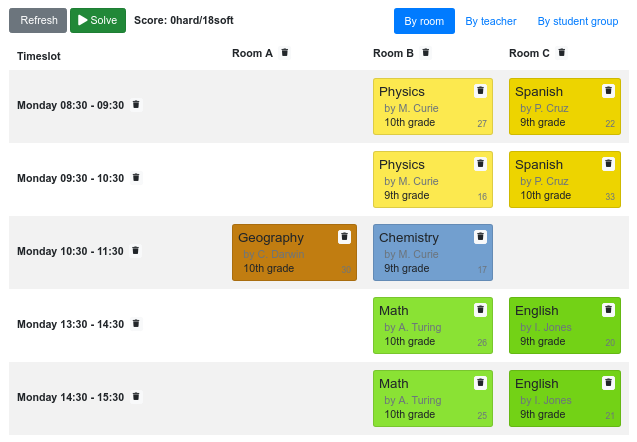
Your service will assign Lesson instances to Timeslot and Room instances automatically by using AI to adhere to the following hard and soft scheduling constraints:
- A room can have at most one lesson at the same time.
- A teacher can teach at most one lesson at the same time.
- A student can attend at most one lesson at the same time.
- A teacher prefers to teach in a single room.
- A teacher prefers to teach sequential lessons and dislikes gaps between lessons.
Mathematically speaking, school timetabling is an NP-hard problem. That means it is difficult to scale. Simply iterating through all possible combinations with brute force would take millions of years for a non-trivial dataset, even on a supercomputer. Fortunately, AI constraint solvers such as Red Hat build of OptaPlanner have advanced algorithms that deliver a near-optimal solution in a reasonable amount of time. What is considered to be a reasonable amount of time is subjective and depends on the goals of your problem.
Prerequisites
- OpenJDK 11 or later is installed. Red Hat build of Open JDK is available from the Software Downloads page in the Red Hat Customer Portal (login required).
- Apache Maven 3.6 or higher is installed. Maven is available from the Apache Maven Project website.
- An IDE, such as IntelliJ IDEA, VSCode, Eclipse, or NetBeans is available.
8.1. Creating the school timetable project
The school timetable project lets you get up and running with a Red Hat build of OptaPlanner and Quarkus application using Apache Maven and the Quarkus Maven plug-in.
If you prefer, you can create a Quakus OptaPlanner project as described in Chapter 7, Getting Started with OptaPlanner and Quarkus.
Procedure
In a command terminal, enter the following command to verify that Maven is using JDK 11 and that the Maven version is 3.6 or higher:
mvn --version- If the preceding command does not return JDK 11, add the path to JDK 11 to the PATH environment variable and enter the preceding command again.
To generate the project, enter one of the following commands:
NoteApple macOS and Microsoft Windows are not supported production environments.
If you are using Linux or Apple macOS, enter the following command:
mvn io.quarkus:quarkus-maven-plugin:1.11.6.Final-redhat-00001:create \
    -DprojectGroupId=com.example \
    -DprojectArtifactId=optaplanner-quickstart  \
    -Dextensions="resteasy,resteasy-jackson,optaplanner-quarkus,optaplanner-quarkus-jackson" \
    -DplatformGroupId=com.redhat.quarkus \
    -DplatformVersion=1.11.6.Final-redhat-00001 \
    -DnoExamples
This command create the following elements in the
./optaplanner-quickstartdirectory:- The Maven structure
-
Example
Dockerfilefile insrc/main/docker The application configuration file
Expand Table 8.1. Properties used in the mvn io.quarkus:quarkus-maven-plugin:1.11.6.Final-redhat-00001:create command Property Description projectGroupIdThe group ID of the project.
projectArtifactIdThe artifact ID of the project.
extensionsA comma-separated list of Quarkus extensions to use with this project. For a full list of Quarkus extensions, enter
mvn quarkus:list-extensionson the command line.platformGroupIdThe Group ID of the target platform.
platformVersionThe version of the platform that you want the project to use.
noExamplesCreates a project with the project structure but without tests or classes.
The values of the
projectGroupIDand theprojectArtifactIDproperties are used to generate the project version. The default project version is1.0.0-SNAPSHOT. The values of theplatformGroupIdandplatformVersionproperties are used byquarkus-universe-bomto manage project dependencies.
After the directory structure is created, open the
optaplanner-quickstart/pom.xmlfile in a text editor and examine the contents of the file to ensure it contains the following elements:<properties> ... <quarkus-plugin.version>1.11.6.Final-redhat-00001</quarkus-plugin.version> <quarkus.platform.artifact-id>quarkus-universe-bom</quarkus.platform.artifact-id> <quarkus.platform.group-id>com.redhat.quarkus</quarkus.platform.group-id> <quarkus.platform.version>1.11.6.Final-redhat-00001.Final-redhat-00001</quarkus.platform.version> </properties> <dependencyManagement> <dependencies> <dependency> <groupId>${quarkus.platform.group-id}</groupId> <artifactId>${quarkus.platform.artifact-id}</artifactId> <version>${quarkus.platform.version}</version> <type>pom</type> <scope>import</scope> </dependency> </dependencies> </dependencyManagement> <dependencies> <dependency> <groupId>org.optaplanner</groupId> <artifactId>optaplanner-quarkus</artifactId> </dependency> <dependency> <groupId>org.optaplanner</groupId> <artifactId>optaplanner-quarkus-jackson</artifactId> </dependency> <dependency> <groupId>io.quarkus</groupId> <artifactId>quarkus-resteasy-jackson</artifactId> </dependency> <dependency> <groupId>io.quarkus</groupId> <artifactId>quarkus-resteasy</artifactId> </dependency> <dependency> <groupId>io.quarkus</groupId> <artifactId>quarkus-arc</artifactId> </dependency> <dependency> <groupId>io.quarkus</groupId> <artifactId>quarkus-junit5</artifactId> <scope>test</scope> </dependency>The Quarkus BOM is imported into the
pom.xmlfile. Therefore, you do not need to list the versions of individual Quarkus dependencies in thepom.xmlfile.Review the
quarkus-resteasydependency in thepom.xmlfile. This dependency enables you to develop REST applications:<dependency> <groupId>io.quarkus</groupId> <artifactId>quarkus-resteasy</artifactId> </dependency>
8.2. Model the domain objects
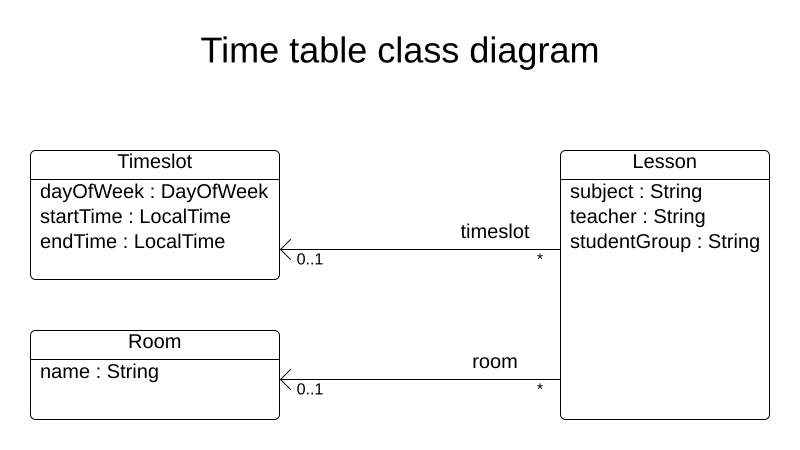
The goal of the Red Hat build of OptaPlanner timetable project is to assign each lesson to a time slot and a room. To do this, add three classes, Timeslot, Lesson, and Room, as shown in the following diagram:
Timeslot
The Timeslot class represents a time interval when lessons are taught, for example, Monday 10:30 - 11:30 or Tuesday 13:30 - 14:30. In this example, all time slots have the same duration and there are no time slots during lunch or other breaks.
A time slot has no date because a high school schedule just repeats every week. There is no need for continuous planning. A timeslot is called a problem fact because no Timeslot instances change during solving. Such classes do not require any OptaPlanner-specific annotations.
Room
The Room class represents a location where lessons are taught, for example, Room A or Room B. In this example, all rooms are without capacity limits and they can accommodate all lessons.
Room instances do not change during solving so Room is also a problem fact.
Lesson
During a lesson, represented by the Lesson class, a teacher teaches a subject to a group of students, for example, Math by A.Turing for 9th grade or Chemistry by M.Curie for 10th grade. If a subject is taught multiple times each week by the same teacher to the same student group, there are multiple Lesson instances that are only distinguishable by id. For example, the 9th grade has six math lessons a week.
During solving, OptaPlanner changes the timeslot and room fields of the Lesson class to assign each lesson to a time slot and a room. Because OptaPlanner changes these fields, Lesson is a planning entity:
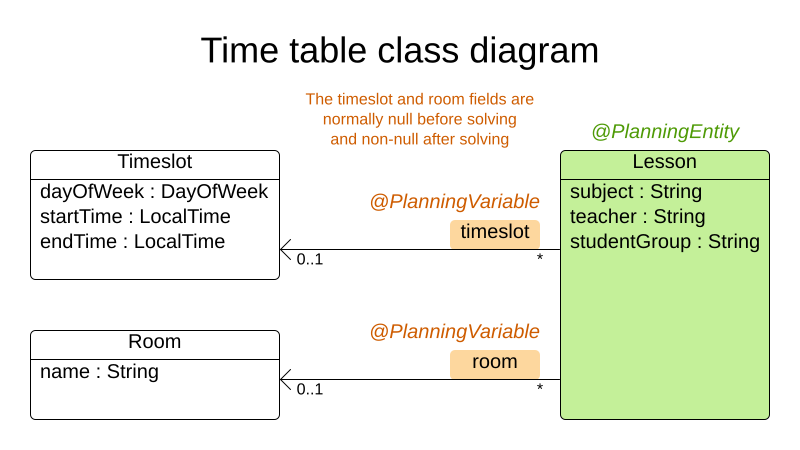
Most of the fields in the previous diagram contain input data, except for the orange fields. A lesson’s timeslot and room fields are unassigned (null) in the input data and assigned (not null) in the output data. OptaPlanner changes these fields during solving. Such fields are called planning variables. In order for OptaPlanner to recognize them, both the timeslot and room fields require an @PlanningVariable annotation. Their containing class, Lesson, requires an @PlanningEntity annotation.
Procedure
Create the
src/main/java/com/example/domain/Timeslot.javaclass:package com.example.domain; import java.time.DayOfWeek; import java.time.LocalTime; public class Timeslot { private DayOfWeek dayOfWeek; private LocalTime startTime; private LocalTime endTime; private Timeslot() { } public Timeslot(DayOfWeek dayOfWeek, LocalTime startTime, LocalTime endTime) { this.dayOfWeek = dayOfWeek; this.startTime = startTime; this.endTime = endTime; } @Override public String toString() { return dayOfWeek + " " + startTime.toString(); } // ******************************** // Getters and setters // ******************************** public DayOfWeek getDayOfWeek() { return dayOfWeek; } public LocalTime getStartTime() { return startTime; } public LocalTime getEndTime() { return endTime; } }Notice the
toString()method keeps the output short so it is easier to read OptaPlanner’sDEBUGorTRACElog, as shown later.Create the
src/main/java/com/example/domain/Room.javaclass:package com.example.domain; public class Room { private String name; private Room() { } public Room(String name) { this.name = name; } @Override public String toString() { return name; } // ******************************** // Getters and setters // ******************************** public String getName() { return name; } }Create the
src/main/java/com/example/domain/Lesson.javaclass:package com.example.domain; import org.optaplanner.core.api.domain.entity.PlanningEntity; import org.optaplanner.core.api.domain.variable.PlanningVariable; @PlanningEntity public class Lesson { private Long id; private String subject; private String teacher; private String studentGroup; @PlanningVariable(valueRangeProviderRefs = "timeslotRange") private Timeslot timeslot; @PlanningVariable(valueRangeProviderRefs = "roomRange") private Room room; private Lesson() { } public Lesson(Long id, String subject, String teacher, String studentGroup) { this.id = id; this.subject = subject; this.teacher = teacher; this.studentGroup = studentGroup; } @Override public String toString() { return subject + "(" + id + ")"; } // ******************************** // Getters and setters // ******************************** public Long getId() { return id; } public String getSubject() { return subject; } public String getTeacher() { return teacher; } public String getStudentGroup() { return studentGroup; } public Timeslot getTimeslot() { return timeslot; } public void setTimeslot(Timeslot timeslot) { this.timeslot = timeslot; } public Room getRoom() { return room; } public void setRoom(Room room) { this.room = room; } }The
Lessonclass has an@PlanningEntityannotation, so OptaPlanner knows that this class changes during solving because it contains one or more planning variables.The
timeslotfield has an@PlanningVariableannotation, so OptaPlanner knows that it can change its value. In order to find potentialTimeslotinstances to assign to this field, OptaPlanner uses thevalueRangeProviderRefsproperty to connect to a value range provider that provides aList<Timeslot>to pick from. See Section 8.4, “Gather the domain objects in a planning solution” for information about value range providers.The
roomfield also has an@PlanningVariableannotation for the same reasons.
8.3. Define the constraints and calculate the score
When solving a problem, a score represents the quality of a specific solution. The higher the score the better. Red Hat build of OptaPlanner looks for the best solution, which is the solution with the highest score found in the available time. It might be the optimal solution.
Because the timetable example use case has hard and soft constraints, use the HardSoftScore class to represent the score:
- Hard constraints must not be broken. For example: A room can have at most one lesson at the same time.
- Soft constraints should not be broken. For example: A teacher prefers to teach in a single room.
Hard constraints are weighted against other hard constraints. Soft constraints are weighted against other soft constraints. Hard constraints always outweigh soft constraints, regardless of their respective weights.
To calculate the score, you could implement an EasyScoreCalculator class:
public class TimeTableEasyScoreCalculator implements EasyScoreCalculator<TimeTable> {

    @Override
    public HardSoftScore calculateScore(TimeTable timeTable) {
        List<Lesson> lessonList = timeTable.getLessonList();
        int hardScore = 0;
        for (Lesson a : lessonList) {
            for (Lesson b : lessonList) {
                if (a.getTimeslot() != null && a.getTimeslot().equals(b.getTimeslot())
                        && a.getId() < b.getId()) {
                    // A room can accommodate at most one lesson at the same time.
                    if (a.getRoom() != null && a.getRoom().equals(b.getRoom())) {
                        hardScore--;
                    }
                    // A teacher can teach at most one lesson at the same time.
                    if (a.getTeacher().equals(b.getTeacher())) {
                        hardScore--;
                    }
                    // A student can attend at most one lesson at the same time.
                    if (a.getStudentGroup().equals(b.getStudentGroup())) {
                        hardScore--;
                    }
                }
            }
        }
        int softScore = 0;
        // Soft constraints are only implemented in the "complete" implementation
        return HardSoftScore.of(hardScore, softScore);
    }

}
Unfortunately, this solution does not scale well because it is non-incremental: every time a lesson is assigned to a different time slot or room, all lessons are re-evaluated to calculate the new score.
A better solution is to create a src/main/java/com/example/solver/TimeTableConstraintProvider.java class to perform incremental score calculation. This class uses OptaPlanner’s ConstraintStream API which is inspired by Java 8 Streams and SQL. The ConstraintProvider scales an order of magnitude better than the EasyScoreCalculator: O(n) instead of O(n²).
Procedure
Create the following src/main/java/com/example/solver/TimeTableConstraintProvider.java class:
package com.example.solver;

import com.example.domain.Lesson;
import org.optaplanner.core.api.score.buildin.hardsoft.HardSoftScore;
import org.optaplanner.core.api.score.stream.Constraint;
import org.optaplanner.core.api.score.stream.ConstraintFactory;
import org.optaplanner.core.api.score.stream.ConstraintProvider;
import org.optaplanner.core.api.score.stream.Joiners;

public class TimeTableConstraintProvider implements ConstraintProvider {

    @Override
    public Constraint[] defineConstraints(ConstraintFactory constraintFactory) {
        return new Constraint[] {
                // Hard constraints
                roomConflict(constraintFactory),
                teacherConflict(constraintFactory),
                studentGroupConflict(constraintFactory),
                // Soft constraints are only implemented in the "complete" implementation
        };
    }

    private Constraint roomConflict(ConstraintFactory constraintFactory) {
        // A room can accommodate at most one lesson at the same time.

        // Select a lesson ...
        return constraintFactory.from(Lesson.class)
                // ... and pair it with another lesson ...
                .join(Lesson.class,
                        // ... in the same timeslot ...
                        Joiners.equal(Lesson::getTimeslot),
                        // ... in the same room ...
                        Joiners.equal(Lesson::getRoom),
                        // ... and the pair is unique (different id, no reverse pairs)
                        Joiners.lessThan(Lesson::getId))
                // then penalize each pair with a hard weight.
                .penalize("Room conflict", HardSoftScore.ONE_HARD);
    }

    private Constraint teacherConflict(ConstraintFactory constraintFactory) {
        // A teacher can teach at most one lesson at the same time.
        return constraintFactory.from(Lesson.class)
                .join(Lesson.class,
                        Joiners.equal(Lesson::getTimeslot),
                        Joiners.equal(Lesson::getTeacher),
                        Joiners.lessThan(Lesson::getId))
                .penalize("Teacher conflict", HardSoftScore.ONE_HARD);
    }

    private Constraint studentGroupConflict(ConstraintFactory constraintFactory) {
        // A student can attend at most one lesson at the same time.
        return constraintFactory.from(Lesson.class)
                .join(Lesson.class,
                        Joiners.equal(Lesson::getTimeslot),
                        Joiners.equal(Lesson::getStudentGroup),
                        Joiners.lessThan(Lesson::getId))
                .penalize("Student group conflict", HardSoftScore.ONE_HARD);
    }

}
8.4. Gather the domain objects in a planning solution
A TimeTable instance wraps all Timeslot, Room, and Lesson instances of a single dataset. Furthermore, because it contains all lessons, each with a specific planning variable state, it is a planning solution and it has a score:
-
If lessons are still unassigned, then it is an uninitialized solution, for example, a solution with the score
-4init/0hard/0soft. -
If it breaks hard constraints, then it is an infeasible solution, for example, a solution with the score
-2hard/-3soft. -
If it adheres to all hard constraints, then it is a feasible solution, for example, a solution with the score
0hard/-7soft.
The TimeTable class has an @PlanningSolution annotation, so Red Hat build of OptaPlanner knows that this class contains all of the input and output data.
Specifically, this class is the input of the problem:
A
timeslotListfield with all time slots- This is a list of problem facts, because they do not change during solving.
A
roomListfield with all rooms- This is a list of problem facts, because they do not change during solving.
A
lessonListfield with all lessons- This is a list of planning entities because they change during solving.
Of each
Lesson:-
The values of the
timeslotandroomfields are typically stillnull, so unassigned. They are planning variables. -
The other fields, such as
subject,teacherandstudentGroup, are filled in. These fields are problem properties.
-
The values of the
However, this class is also the output of the solution:
-
A
lessonListfield for which eachLessoninstance has non-nulltimeslotandroomfields after solving -
A
scorefield that represents the quality of the output solution, for example,0hard/-5soft
Procedure
Create the src/main/java/com/example/domain/TimeTable.java class:
package com.example.domain;

import java.util.List;

import org.optaplanner.core.api.domain.solution.PlanningEntityCollectionProperty;
import org.optaplanner.core.api.domain.solution.PlanningScore;
import org.optaplanner.core.api.domain.solution.PlanningSolution;
import org.optaplanner.core.api.domain.solution.ProblemFactCollectionProperty;
import org.optaplanner.core.api.domain.valuerange.ValueRangeProvider;
import org.optaplanner.core.api.score.buildin.hardsoft.HardSoftScore;

@PlanningSolution
public class TimeTable {

    @ValueRangeProvider(id = "timeslotRange")
    @ProblemFactCollectionProperty
    private List<Timeslot> timeslotList;

    @ValueRangeProvider(id = "roomRange")
    @ProblemFactCollectionProperty
    private List<Room> roomList;

    @PlanningEntityCollectionProperty
    private List<Lesson> lessonList;

    @PlanningScore
    private HardSoftScore score;

    private TimeTable() {
    }

    public TimeTable(List<Timeslot> timeslotList, List<Room> roomList,
            List<Lesson> lessonList) {
        this.timeslotList = timeslotList;
        this.roomList = roomList;
        this.lessonList = lessonList;
    }

    // ********************************
    // Getters and setters
    // ********************************

    public List<Timeslot> getTimeslotList() {
        return timeslotList;
    }

    public List<Room> getRoomList() {
        return roomList;
    }

    public List<Lesson> getLessonList() {
        return lessonList;
    }

    public HardSoftScore getScore() {
        return score;
    }

}
The value range providers
The timeslotList field is a value range provider. It holds the Timeslot instances which OptaPlanner can pick from to assign to the timeslot field of Lesson instances. The timeslotList field has an @ValueRangeProvider annotation to connect those two, by matching the id with the valueRangeProviderRefs of the @PlanningVariable in the Lesson.
Following the same logic, the roomList field also has an @ValueRangeProvider annotation.
The problem fact and planning entity properties
Furthermore, OptaPlanner needs to know which Lesson instances it can change as well as how to retrieve the Timeslot and Room instances used for score calculation by your TimeTableConstraintProvider.
The timeslotList and roomList fields have an @ProblemFactCollectionProperty annotation, so your TimeTableConstraintProvider can select from those instances.
The lessonList has an @PlanningEntityCollectionProperty annotation, so OptaPlanner can change them during solving and your TimeTableConstraintProvider can select from those too.
8.5. Create the solver service
Solving planning problems on REST threads causes HTTP timeout issues. Therefore, the Quarkus extension injects a SolverManager, which runs solvers in a separate thread pool and can solve multiple data sets in parallel.
Procedure
Create the src/main/java/org/acme/optaplanner/rest/TimeTableResource.java class:
package org.acme.optaplanner.rest;

import java.util.UUID;
import java.util.concurrent.ExecutionException;
import javax.inject.Inject;
import javax.ws.rs.POST;
import javax.ws.rs.Path;

import org.acme.optaplanner.domain.TimeTable;
import org.optaplanner.core.api.solver.SolverJob;
import org.optaplanner.core.api.solver.SolverManager;

@Path("/timeTable")
public class TimeTableResource {

    @Inject
    SolverManager<TimeTable, UUID> solverManager;

    @POST
    @Path("/solve")
    public TimeTable solve(TimeTable problem) {
        UUID problemId = UUID.randomUUID();
        // Submit the problem to start solving
        SolverJob<TimeTable, UUID> solverJob = solverManager.solve(problemId, problem);
        TimeTable solution;
        try {
            // Wait until the solving ends
            solution = solverJob.getFinalBestSolution();
        } catch (InterruptedException | ExecutionException e) {
            throw new IllegalStateException("Solving failed.", e);
        }
        return solution;
    }

}
This initial implementation waits for the solver to finish, which can still cause an HTTP timeout. The complete implementation avoids HTTP timeouts much more elegantly.
8.6. Set the solver termination time
If your planning application does not have a termination setting or a termination event, it theoretically runs forever and in reality eventually causes an HTTP timeout error. To prevent this from occurring, use the optaplanner.solver.termination.spent-limit parameter to specify the length of time after which the application terminates. In most applications, set the time to at least five minutes (5m). However, in the Timetable example, limit the solving time to five second, which is short enough to avoid the HTTP timeout.
Procedure
Create the src/main/resources/application.properties file with the following content:
quarkus.optaplanner.solver.termination.spent-limit=5s8.7. Running the school timetable application
After you have created the school timetable project, run it in development mode. In development mode, you can update the application sources and configurations while your application is running. Your changes will appear in the running application.
Prerequisites
- You have created the school timetable project.
Procedure
To compile the application in development mode, enter the following command from the project directory:
./mvnw compile quarkus:devTest the REST service. You can use any REST client. The following example uses the Linux command
curlto send a POST request:$ curl -i -X POST http://localhost:8080/timeTable/solve -H "Content-Type:application/json" -d '{"timeslotList":[{"dayOfWeek":"MONDAY","startTime":"08:30:00","endTime":"09:30:00"},{"dayOfWeek":"MONDAY","startTime":"09:30:00","endTime":"10:30:00"}],"roomList":[{"name":"Room A"},{"name":"Room B"}],"lessonList":[{"id":1,"subject":"Math","teacher":"A. Turing","studentGroup":"9th grade"},{"id":2,"subject":"Chemistry","teacher":"M. Curie","studentGroup":"9th grade"},{"id":3,"subject":"French","teacher":"M. Curie","studentGroup":"10th grade"},{"id":4,"subject":"History","teacher":"I. Jones","studentGroup":"10th grade"}]}'After the time period specified in
termination spent timedefined in yourapplication.propertiesfile, the service returns output similar to the following example:HTTP/1.1 200 Content-Type: application/json ... {"timeslotList":...,"roomList":...,"lessonList":[{"id":1,"subject":"Math","teacher":"A. Turing","studentGroup":"9th grade","timeslot":{"dayOfWeek":"MONDAY","startTime":"08:30:00","endTime":"09:30:00"},"room":{"name":"Room A"}},{"id":2,"subject":"Chemistry","teacher":"M. Curie","studentGroup":"9th grade","timeslot":{"dayOfWeek":"MONDAY","startTime":"09:30:00","endTime":"10:30:00"},"room":{"name":"Room A"}},{"id":3,"subject":"French","teacher":"M. Curie","studentGroup":"10th grade","timeslot":{"dayOfWeek":"MONDAY","startTime":"08:30:00","endTime":"09:30:00"},"room":{"name":"Room B"}},{"id":4,"subject":"History","teacher":"I. Jones","studentGroup":"10th grade","timeslot":{"dayOfWeek":"MONDAY","startTime":"09:30:00","endTime":"10:30:00"},"room":{"name":"Room B"}}],"score":"0hard/0soft"}Notice that your application assigned all four lessons to one of the two time slots and one of the two rooms. Also notice that it conforms to all hard constraints. For example, M. Curie’s two lessons are in different time slots.
To review what OptaPlanner did during the solving time, review the info log on the server side. The following is sample info log output:
... Solving started: time spent (33), best score (-8init/0hard/0soft), environment mode (REPRODUCIBLE), random (JDK with seed 0).
... Construction Heuristic phase (0) ended: time spent (73), best score (0hard/0soft), score calculation speed (459/sec), step total (4).
... Local Search phase (1) ended: time spent (5000), best score (0hard/0soft), score calculation speed (28949/sec), step total (28398).
... Solving ended: time spent (5000), best score (0hard/0soft), score calculation speed (28524/sec), phase total (2), environment mode (REPRODUCIBLE).
8.7.1. Test the application
A good application includes test coverage. This example tests the Red Hat build of OptaPlanner school timetable project on Red Hat build of Quarkus. It uses a JUnit test to generate a test dataset and send it to the TimeTableController to solve.
Procedure
Create the
src/test/java/com/example/rest/TimeTableResourceTest.javaclass with the following content:package com.exmaple.optaplanner.rest; import java.time.DayOfWeek; import java.time.LocalTime; import java.util.ArrayList; import java.util.List; import javax.inject.Inject; import io.quarkus.test.junit.QuarkusTest; import com.exmaple.optaplanner.domain.Room; import com.exmaple.optaplanner.domain.Timeslot; import com.exmaple.optaplanner.domain.Lesson; import com.exmaple.optaplanner.domain.TimeTable; import com.exmaple.optaplanner.rest.TimeTableResource; import org.junit.jupiter.api.Test; import org.junit.jupiter.api.Timeout; import static org.junit.jupiter.api.Assertions.assertFalse; import static org.junit.jupiter.api.Assertions.assertNotNull; import static org.junit.jupiter.api.Assertions.assertTrue; @QuarkusTest public class TimeTableResourceTest { @Inject TimeTableResource timeTableResource; @Test @Timeout(600_000) public void solve() { TimeTable problem = generateProblem(); TimeTable solution = timeTableResource.solve(problem); assertFalse(solution.getLessonList().isEmpty()); for (Lesson lesson : solution.getLessonList()) { assertNotNull(lesson.getTimeslot()); assertNotNull(lesson.getRoom()); } assertTrue(solution.getScore().isFeasible()); } private TimeTable generateProblem() { List<Timeslot> timeslotList = new ArrayList<>(); timeslotList.add(new Timeslot(DayOfWeek.MONDAY, LocalTime.of(8, 30), LocalTime.of(9, 30))); timeslotList.add(new Timeslot(DayOfWeek.MONDAY, LocalTime.of(9, 30), LocalTime.of(10, 30))); timeslotList.add(new Timeslot(DayOfWeek.MONDAY, LocalTime.of(10, 30), LocalTime.of(11, 30))); timeslotList.add(new Timeslot(DayOfWeek.MONDAY, LocalTime.of(13, 30), LocalTime.of(14, 30))); timeslotList.add(new Timeslot(DayOfWeek.MONDAY, LocalTime.of(14, 30), LocalTime.of(15, 30))); List<Room> roomList = new ArrayList<>(); roomList.add(new Room("Room A")); roomList.add(new Room("Room B")); roomList.add(new Room("Room C")); List<Lesson> lessonList = new ArrayList<>(); lessonList.add(new Lesson(101L, "Math", "B. May", "9th grade")); lessonList.add(new Lesson(102L, "Physics", "M. Curie", "9th grade")); lessonList.add(new Lesson(103L, "Geography", "M. Polo", "9th grade")); lessonList.add(new Lesson(104L, "English", "I. Jones", "9th grade")); lessonList.add(new Lesson(105L, "Spanish", "P. Cruz", "9th grade")); lessonList.add(new Lesson(201L, "Math", "B. May", "10th grade")); lessonList.add(new Lesson(202L, "Chemistry", "M. Curie", "10th grade")); lessonList.add(new Lesson(203L, "History", "I. Jones", "10th grade")); lessonList.add(new Lesson(204L, "English", "P. Cruz", "10th grade")); lessonList.add(new Lesson(205L, "French", "M. Curie", "10th grade")); return new TimeTable(timeslotList, roomList, lessonList); } }This test verifies that after solving, all lessons are assigned to a time slot and a room. It also verifies that it found a feasible solution (no hard constraints broken).
Add test properties to the
src/main/resources/application.propertiesfile:# The solver runs only for 5 seconds to avoid a HTTP timeout in this simple implementation. # It's recommended to run for at least 5 minutes ("5m") otherwise. quarkus.optaplanner.solver.termination.spent-limit=5s # Effectively disable this termination in favor of the best-score-limit %test.quarkus.optaplanner.solver.termination.spent-limit=1h %test.quarkus.optaplanner.solver.termination.best-score-limit=0hard/*soft
Normally, the solver finds a feasible solution in less than 200 milliseconds. Notice how the application.properties file overwrites the solver termination during tests to terminate as soon as a feasible solution (0hard/*soft) is found. This avoids hard coding a solver time, because the unit test might run on arbitrary hardware. This approach ensures that the test runs long enough to find a feasible solution, even on slow systems. But it does not run a millisecond longer than it strictly must, even on fast systems.
8.7.2. Logging
After you complete the Red Hat build of OptaPlanner school timetable project, you can use logging information to help you fine-tune the constraints in the ConstraintProvider. Review the score calculation speed in the info log file to assess the impact of changes to your constraints. Run the application in debug mode to show every step that your application takes or use trace logging to log every step and every move.
Procedure
- Run the school timetable application for a fixed amount of time, for example, five minutes.
Review the score calculation speed in the
logfile as shown in the following example:... Solving ended: ..., score calculation speed (29455/sec), ...-
Change a constraint, run the planning application again for the same amount of time, and review the score calculation speed recorded in the
logfile. Run the application in debug mode to log every step that the application makes:
-
To run debug mode from the command line, use the
-Dsystem property. To permanently enable debug mode, add the following line to the
application.propertiesfile:quarkus.log.category."org.optaplanner".level=debugThe following example shows output in the
logfile in debug mode:... Solving started: time spent (67), best score (-20init/0hard/0soft), environment mode (REPRODUCIBLE), random (JDK with seed 0). ... CH step (0), time spent (128), score (-18init/0hard/0soft), selected move count (15), picked move ([Math(101) {null -> Room A}, Math(101) {null -> MONDAY 08:30}]). ... CH step (1), time spent (145), score (-16init/0hard/0soft), selected move count (15), picked move ([Physics(102) {null -> Room A}, Physics(102) {null -> MONDAY 09:30}]). ...
-
To run debug mode from the command line, use the
-
Use
tracelogging to show every step and every move for each step.

'%20d='M201.5%20305.5c-13.8%200-24.9-11.1-24.9-24.6%200-13.8%2011.1-24.9%2024.9-24.9%2013.6%200%2024.6%2011.1%2024.6%2024.9%200%2013.6-11.1%2024.6-24.6%2024.6zM504%20256c0%20137-111%20248-248%20248S8%20393%208%20256%20119%208%20256%208s248%20111%20248%20248zm-132.3-41.2c-9.4%200-17.7%203.9-23.8%2010-22.4-15.5-52.6-25.5-86.1-26.6l17.4-78.3%2055.4%2012.5c0%2013.6%2011.1%2024.6%2024.6%2024.6%2013.8%200%2024.9-11.3%2024.9-24.9s-11.1-24.9-24.9-24.9c-9.7%200-18%205.8-22.1%2013.8l-61.2-13.6c-3-.8-6.1%201.4-6.9%204.4l-19.1%2086.4c-33.2%201.4-63.1%2011.3-85.5%2026.8-6.1-6.4-14.7-10.2-24.1-10.2-34.9%200-46.3%2046.9-14.4%2062.8-1.1%205-1.7%2010.2-1.7%2015.5%200%2052.6%2059.2%2095.2%20132%2095.2%2073.1%200%20132.3-42.6%20132.3-95.2%200-5.3-.6-10.8-1.9-15.8%2031.3-16%2019.8-62.5-14.9-62.5zM302.8%20331c-18.2%2018.2-76.1%2017.9-93.6%200-2.2-2.2-6.1-2.2-8.3%200-2.5%202.5-2.5%206.4%200%208.6%2022.8%2022.8%2087.3%2022.8%20110.2%200%202.5-2.2%202.5-6.1%200-8.6-2.2-2.2-6.1-2.2-8.3%200zm7.7-75c-13.6%200-24.6%2011.1-24.6%2024.9%200%2013.6%2011.1%2024.6%2024.6%2024.6%2013.8%200%2024.9-11.1%2024.9-24.6%200-13.8-11-24.9-24.9-24.9z'/%3e%3c/svg%3e)