 Red Hat Summit
Este conteúdo não está disponível no idioma selecionado.
Chapter 2. The rhn_register Client
Red Hat Enterprise Linux 5 features an application called
rhn_register. This application works with the yum-based RHN Hosted and RHN Satellite client called Package Updater (or pup)that replaces up2date. For more information about pup, refer to Chapter 3, Package Updater.
The
rhn_register application normally runs as part of the firstboot configuration process just after installation. The first time a newly-installed Red Hat Enterprise Linux 5 system is booted, firstboot uses rhn_register to register your system with RHN.
2.1. Using rhn_register
Copiar o linkLink copiado para a área de transferência!
If you should ever need to re-register your system at a later time (or you chose not to register during
firstboot), you can use rhn_register to do so. You can execute the command rhn_register from the command line as root. If you have never registered, you can start rhn_register by selecting (the main menu on the panel) ⇒ System Tools ⇒ Package Updater. (You will be asked to enter the root password.) The Package Updater, when run on a system that has not yet been registered, triggers rhn_register if there is no /etc/sysconfig/rhn/systemid file on the system.
If you have already registered before and  ” for more information.
/etc/sysconfig/rhn/systemid exists on the system, rhn_register first asks if you are sure that you would like to register again. Doing so may create a duplicate system profile in RHN Satellite. Consider using rhnreg_ks and activation keys to re-register a system without creating a duplicate entry. Refer to Section 7.4.2.9.1.4, “System Details ⇒ Details ⇒ Reactivation —
” for more information.
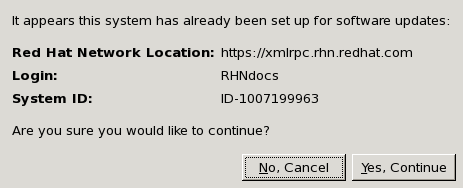
Figure 2.1. Verifying Registration
If you are certain you would like to re-register this way, select the button.
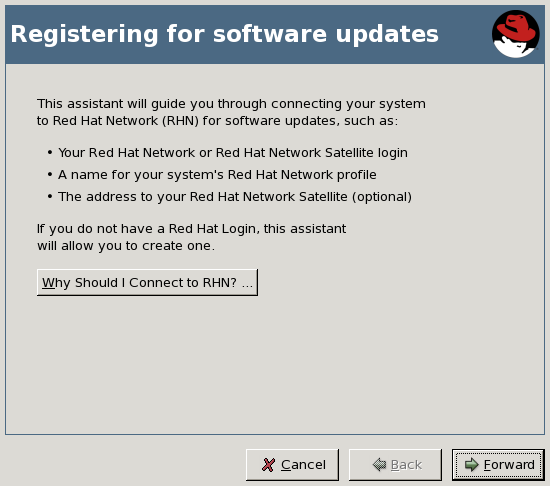
Figure 2.2. Registering for Software Updates
The Registering for Software Updates page summarizes the steps involved in the registration process. To learn more about the benefits of Hosted and Satellite, press the button. Otherwise, press the Forward button to continue.
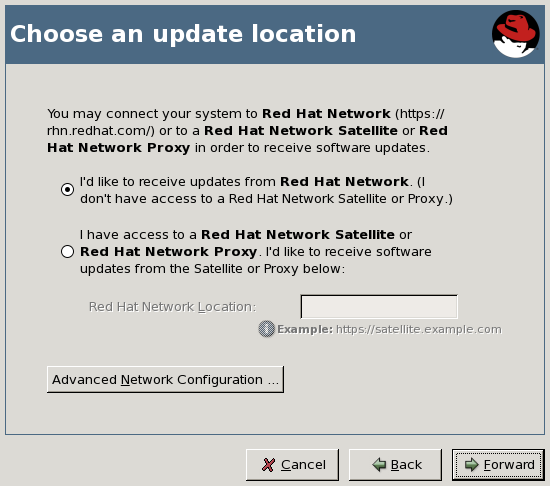
Figure 2.3. Choose an Update Location
The Choose an Update Location page allows you to select the source of your software updates - either from RHN Hosted or from RHN Satellite Server or Proxy Server. For Satellite or Proxy, the associated radio button and enter the URL of your Satellite or Proxy into the Red Hat Network Location field.
If you connect to the internet through an HTTP Proxy, press the button. In the subsequent pop-up window, use the appropriate fields for your HTTP proxy; if your proxy requires authentication, enter the username and password here. When finished, press the button to continue. You are returned to the Choose an Update Location page. Press to continue.
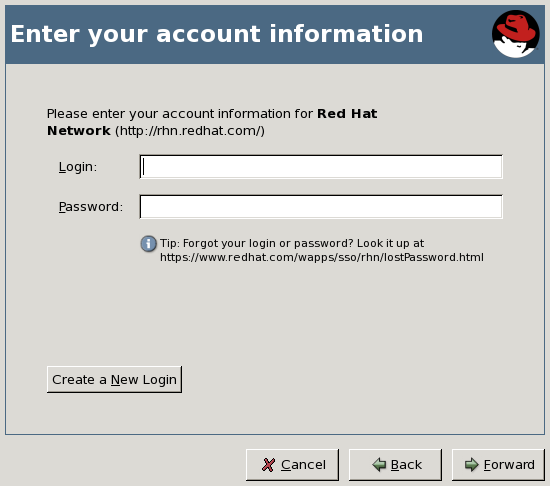
Figure 2.4. Enter Your Account Information
The Enter Your Account Information page requires you to enter your RHN login information (if you already have one), or to create a new account if you do not. To create a new RHN account, press the Create a New Account button. Fill in the fields that are marked with an asterisk and any other information you wish to enter. Press the Create New Login button to create your new login.
Note
If you are registering to RHN Hosted as part of an organization, please do not create a new account through this screen. Contact your Organization Administrator and request that they create an account for you, then provide that information in the Enter Your Account Information page. Otherwise, you may not be correctly associated with your organization or its resources.
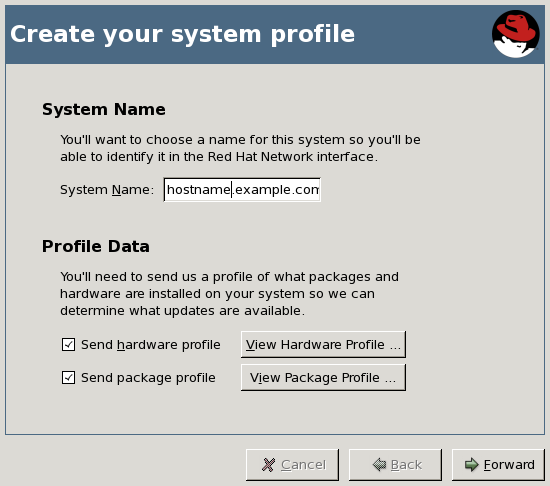
Figure 2.5. Create Your System Profile
The Create Your System Profile page allows you to select a profile name for the system you are registering. The default name for any system is that system's hostname, although you may change it as you like. You can also select whether to report hardware and package information to RHN. It is recommended that you choose to report this information; doing so allows RHN to automatically subscribe your system to the base and child channels most appropriate to your system. If you wish, you may press either the or button to view the information that
rhn_register uploads to RHN or Satellite in this step.
Note
This automatic registration does not automatically subscribe your system to optional child channels, such as the RHN Tools channel. If you wish to register a system and have them automatically subscribed to a set of channels of your choice, consider using a kickstart profile or
rhnreg_ks and activation keys to do so.
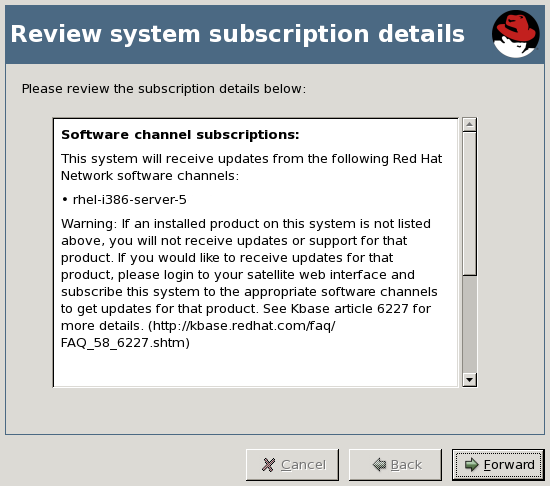
Figure 2.6. Review System Subscription Details
The Review System Subscription Details page displays the base and child channel information to which your system has been subscribed. Take a moment to review the channels, and then press to continue.
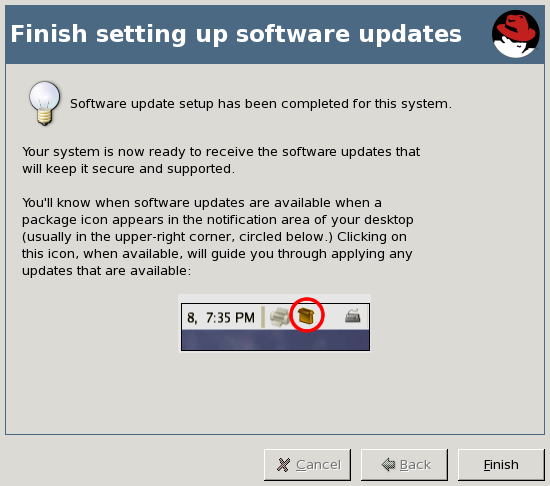
Figure 2.7. Finish Setting Up Software Updates
The Finish Setting Up Software Updates page indicates that you have successfully registered a Red Hat Enterprise Linux 5 system with RHN. From this point, you do not have to do anything to receive software updates. A package icon will appear in the upper right corner of your desktop when updates are available. Click on the icon to apply available updates. Click to exit the wizard.
Note
If you do not have any entitlements available for this system, this final page indicates that the registration has failed. This does not mean that the system profile has not been stored with RHN, only that you will not receive automatic updates without manual intervention. You can always login to the RHN or Satellite Web interface and either purchase additional entitlements or get an entitlement from your Satellite administrator. Click the button to exit the wizard.
2.1.1. Command-line version of rhn_register
Copiar o linkLink copiado para a área de transferência!
There is also a command-line version of
rhn_register that allows you to register your system for access to RHN or Satellite without a graphical desktop environment.
Type
rhn_register at a shell prompt. If you are on shell terminal window and want to run the non-graphical version, you must type rhn_register --nox to prevent opening the graphical client.

Figure 2.8. rhn_register Command-line version
The interface of the command-line version of
rhn_register has the same configuration screens as the graphical desktop version. However, to navigate the screen, use the directional keys on the keyboard to move left or right and highlight the selections. Press the Space Bar to select an action. Press Tab to move through different navigational elements such as text boxes, checkboxes (which are marked with an x when selected), and radio buttons (which when selected will be marked with an asterisk).

'%20d='M201.5%20305.5c-13.8%200-24.9-11.1-24.9-24.6%200-13.8%2011.1-24.9%2024.9-24.9%2013.6%200%2024.6%2011.1%2024.6%2024.9%200%2013.6-11.1%2024.6-24.6%2024.6zM504%20256c0%20137-111%20248-248%20248S8%20393%208%20256%20119%208%20256%208s248%20111%20248%20248zm-132.3-41.2c-9.4%200-17.7%203.9-23.8%2010-22.4-15.5-52.6-25.5-86.1-26.6l17.4-78.3%2055.4%2012.5c0%2013.6%2011.1%2024.6%2024.6%2024.6%2013.8%200%2024.9-11.3%2024.9-24.9s-11.1-24.9-24.9-24.9c-9.7%200-18%205.8-22.1%2013.8l-61.2-13.6c-3-.8-6.1%201.4-6.9%204.4l-19.1%2086.4c-33.2%201.4-63.1%2011.3-85.5%2026.8-6.1-6.4-14.7-10.2-24.1-10.2-34.9%200-46.3%2046.9-14.4%2062.8-1.1%205-1.7%2010.2-1.7%2015.5%200%2052.6%2059.2%2095.2%20132%2095.2%2073.1%200%20132.3-42.6%20132.3-95.2%200-5.3-.6-10.8-1.9-15.8%2031.3-16%2019.8-62.5-14.9-62.5zM302.8%20331c-18.2%2018.2-76.1%2017.9-93.6%200-2.2-2.2-6.1-2.2-8.3%200-2.5%202.5-2.5%206.4%200%208.6%2022.8%2022.8%2087.3%2022.8%20110.2%200%202.5-2.2%202.5-6.1%200-8.6-2.2-2.2-6.1-2.2-8.3%200zm7.7-75c-13.6%200-24.6%2011.1-24.6%2024.9%200%2013.6%2011.1%2024.6%2024.6%2024.6%2013.8%200%2024.9-11.1%2024.9-24.6%200-13.8-11-24.9-24.9-24.9z'/%3e%3c/svg%3e)