 Red Hat Summit
How to create a cluster in Red Hat OpenShift Service on AWS with STS
Learn how to set up accounts and clusters with Red Hat® OpenShift® Service on AWS (ROSA) using AWS Security Token Service (STS) to help build container-based applications faster.
Please note, this is the deployment method that Red Hat recommends. For non-STS ROSA deployment, visit this page.
This learning path is for operations teams or system administrators
Developers may want to check out Foundations of OpenShift on developers.redhat.com.
Accessing a cluster using Red Hat OpenShift Service on AWS (ROSA) with STS
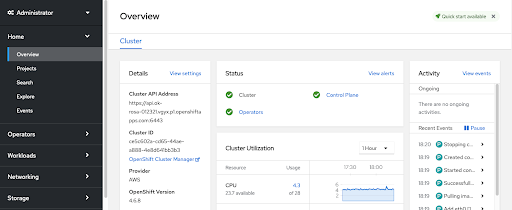
Once a cluster is successfully created within your ROSA environment, there are a few ways to access it. The preferred method is accessing your cluster using an identity provider (IDP) account.
What will you learn?
- Accessing your new cluster through Web Console
- Granting administrator roles to specific user groups for cluster access
- Best practice through IDP access
What do you need before starting?
- Created ROSA cluster
- GitHub account (if using IDP access option)
- ROSA Command Line Interface (CLI)
Cluster access options
Once you know how to access your cluster in your preferred way, you are officially finished with standing up your cluster within a ROSA environment. Now you may use your new cluster or create more as needed.
Deleting a cluster
If you need to delete your cluster for any reason from your environment, it can be easily done from the ROSA CLI.
- To delete a cluster, enter in the appropriate commands within the interface and perform any additional stack cleanup as necessary.
- Please note that this action will not delete any STS roles or policies. Should you wish to delete those as well, follow these instructions.

'%20d='M201.5%20305.5c-13.8%200-24.9-11.1-24.9-24.6%200-13.8%2011.1-24.9%2024.9-24.9%2013.6%200%2024.6%2011.1%2024.6%2024.9%200%2013.6-11.1%2024.6-24.6%2024.6zM504%20256c0%20137-111%20248-248%20248S8%20393%208%20256%20119%208%20256%208s248%20111%20248%20248zm-132.3-41.2c-9.4%200-17.7%203.9-23.8%2010-22.4-15.5-52.6-25.5-86.1-26.6l17.4-78.3%2055.4%2012.5c0%2013.6%2011.1%2024.6%2024.6%2024.6%2013.8%200%2024.9-11.3%2024.9-24.9s-11.1-24.9-24.9-24.9c-9.7%200-18%205.8-22.1%2013.8l-61.2-13.6c-3-.8-6.1%201.4-6.9%204.4l-19.1%2086.4c-33.2%201.4-63.1%2011.3-85.5%2026.8-6.1-6.4-14.7-10.2-24.1-10.2-34.9%200-46.3%2046.9-14.4%2062.8-1.1%205-1.7%2010.2-1.7%2015.5%200%2052.6%2059.2%2095.2%20132%2095.2%2073.1%200%20132.3-42.6%20132.3-95.2%200-5.3-.6-10.8-1.9-15.8%2031.3-16%2019.8-62.5-14.9-62.5zM302.8%20331c-18.2%2018.2-76.1%2017.9-93.6%200-2.2-2.2-6.1-2.2-8.3%200-2.5%202.5-2.5%206.4%200%208.6%2022.8%2022.8%2087.3%2022.8%20110.2%200%202.5-2.2%202.5-6.1%200-8.6-2.2-2.2-6.1-2.2-8.3%200zm7.7-75c-13.6%200-24.6%2011.1-24.6%2024.9%200%2013.6%2011.1%2024.6%2024.6%2024.6%2013.8%200%2024.9-11.1%2024.9-24.6%200-13.8-11-24.9-24.9-24.9z'/%3e%3c/svg%3e)