 红帽全球峰会
此内容没有您所选择的语言版本。
3.2. Getting Local Copies of Guvnor Files
- To get local copies of Guvnor repository resources, you can drag-and-drop them from the Guvnor Repositories View. You can also perform this action in the Guvnor Wizard.
- Local copies of Guvnor repository files will be created. The EGT will set an association between the local copy and the master file in the repository. You should not alter this information. The association allows for operations such as update and commit in synchronization with the master copy held in the Guvnor repository.
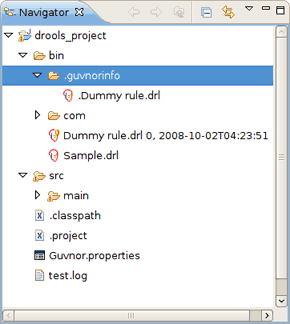
Figure 3.1. Diagram
The EGT decorates local resources associated with Guvnor repository master copies. This decoration appears in Eclipse views conforming to the Eclipse Common Navigator framework, such as the Eclipse Resource Navigator and the Java Package Explorer. TheDummy rule.drlfile with the decoration in the Resource Navigator. The Guvnor icon decorator is on the top right of the file image, and the Guvnor revision details are appended to the file name. You can change the location of these in the Local Guvnor Repository Resource Decoration Preferences. - You can see that the
Dummy rule.drlfile is associated with a Guvnor repository resource, and the local copy is based on revision 0, with a02-10-2008, 4:21:53date/time stamp. However, the fileSample.drlis not associated with a Guvnor repository file. - The EGT adds a property page to the standard Eclipse properties dialog. Use it to view the specific Guvnor repository, the location within the repository, the version (date/time stamp) and the revision number.

Figure 3.2. Properties

'%20d='M201.5%20305.5c-13.8%200-24.9-11.1-24.9-24.6%200-13.8%2011.1-24.9%2024.9-24.9%2013.6%200%2024.6%2011.1%2024.6%2024.9%200%2013.6-11.1%2024.6-24.6%2024.6zM504%20256c0%20137-111%20248-248%20248S8%20393%208%20256%20119%208%20256%208s248%20111%20248%20248zm-132.3-41.2c-9.4%200-17.7%203.9-23.8%2010-22.4-15.5-52.6-25.5-86.1-26.6l17.4-78.3%2055.4%2012.5c0%2013.6%2011.1%2024.6%2024.6%2024.6%2013.8%200%2024.9-11.3%2024.9-24.9s-11.1-24.9-24.9-24.9c-9.7%200-18%205.8-22.1%2013.8l-61.2-13.6c-3-.8-6.1%201.4-6.9%204.4l-19.1%2086.4c-33.2%201.4-63.1%2011.3-85.5%2026.8-6.1-6.4-14.7-10.2-24.1-10.2-34.9%200-46.3%2046.9-14.4%2062.8-1.1%205-1.7%2010.2-1.7%2015.5%200%2052.6%2059.2%2095.2%20132%2095.2%2073.1%200%20132.3-42.6%20132.3-95.2%200-5.3-.6-10.8-1.9-15.8%2031.3-16%2019.8-62.5-14.9-62.5zM302.8%20331c-18.2%2018.2-76.1%2017.9-93.6%200-2.2-2.2-6.1-2.2-8.3%200-2.5%202.5-2.5%206.4%200%208.6%2022.8%2022.8%2087.3%2022.8%20110.2%200%202.5-2.2%202.5-6.1%200-8.6-2.2-2.2-6.1-2.2-8.3%200zm7.7-75c-13.6%200-24.6%2011.1-24.6%2024.9%200%2013.6%2011.1%2024.6%2024.6%2024.6%2013.8%200%2024.9-11.1%2024.9-24.6%200-13.8-11-24.9-24.9-24.9z'/%3e%3c/svg%3e)