 红帽全球峰会
此内容没有您所选择的语言版本。
Chapter 2. Adding VAT rate on billing
API providers who charge their customers for using their API service often need to charge the tax as well. This article will explain how 3scale billing system supports VAT.
If you have Billing feature enabled, the steps to add VAT rates are as follows:
- From the Admin Portal, go to Audience > Accounts > Fields Definitions
- Then in the "Account" object click "Create" on the right hand side to add a field
- From the "new field" drop down select "vat_rate"
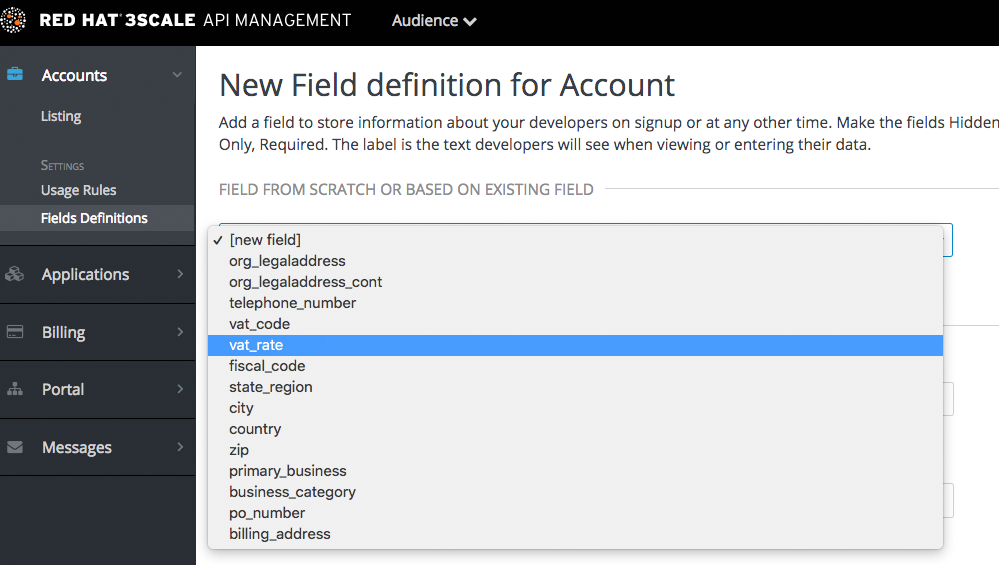
Either you can allow developers to set their own VAT rate, or alternatively you can set the VAT rate for them. If you choose the latter you have the following options:
From your admin portal, going to a given account and editing the VAT field
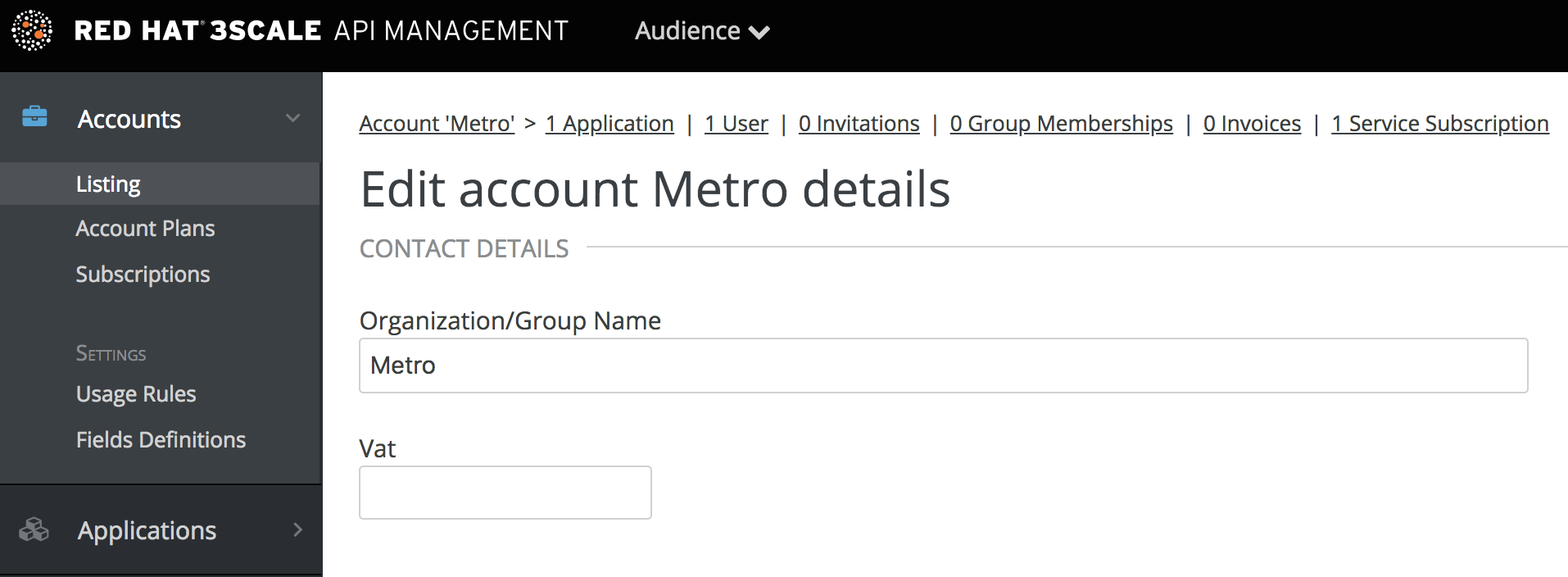
- From the Account Management API, using the Account Update endpoint. If you want to update several accounts you will have to get them first using the Account List endpoint and then iterate over them updating the field. This could be combined into an automated flow using Webhooks to trigger your update requests when the Account is created or modified.
VAT rate will be calculated and reflected in invoices.

'%20d='M201.5%20305.5c-13.8%200-24.9-11.1-24.9-24.6%200-13.8%2011.1-24.9%2024.9-24.9%2013.6%200%2024.6%2011.1%2024.6%2024.9%200%2013.6-11.1%2024.6-24.6%2024.6zM504%20256c0%20137-111%20248-248%20248S8%20393%208%20256%20119%208%20256%208s248%20111%20248%20248zm-132.3-41.2c-9.4%200-17.7%203.9-23.8%2010-22.4-15.5-52.6-25.5-86.1-26.6l17.4-78.3%2055.4%2012.5c0%2013.6%2011.1%2024.6%2024.6%2024.6%2013.8%200%2024.9-11.3%2024.9-24.9s-11.1-24.9-24.9-24.9c-9.7%200-18%205.8-22.1%2013.8l-61.2-13.6c-3-.8-6.1%201.4-6.9%204.4l-19.1%2086.4c-33.2%201.4-63.1%2011.3-85.5%2026.8-6.1-6.4-14.7-10.2-24.1-10.2-34.9%200-46.3%2046.9-14.4%2062.8-1.1%205-1.7%2010.2-1.7%2015.5%200%2052.6%2059.2%2095.2%20132%2095.2%2073.1%200%20132.3-42.6%20132.3-95.2%200-5.3-.6-10.8-1.9-15.8%2031.3-16%2019.8-62.5-14.9-62.5zM302.8%20331c-18.2%2018.2-76.1%2017.9-93.6%200-2.2-2.2-6.1-2.2-8.3%200-2.5%202.5-2.5%206.4%200%208.6%2022.8%2022.8%2087.3%2022.8%20110.2%200%202.5-2.2%202.5-6.1%200-8.6-2.2-2.2-6.1-2.2-8.3%200zm7.7-75c-13.6%200-24.6%2011.1-24.6%2024.9%200%2013.6%2011.1%2024.6%2024.6%2024.6%2013.8%200%2024.9-11.1%2024.9-24.6%200-13.8-11-24.9-24.9-24.9z'/%3e%3c/svg%3e)