 红帽全球峰会
第 1 章 Welcome to Red Hat Advanced Cluster Management for Kubernetes
Kubernetes provides a platform for deploying and managing containers in a standard, consistent control plane. However, as application workloads move from development to production, they often require multiple fit-for-purpose Kubernetes clusters to support DevOps pipelines.
Note: Use of this Red Hat product requires licensing and subscription agreement.
Users, such as administrators and site reliability engineers, face challenges as they work across a range of environments, including multiple data centers, private clouds, and public clouds that run Kubernetes clusters. Red Hat Advanced Cluster Management for Kubernetes provides the tools and capabilities to address these common challenges.
Red Hat Advanced Cluster Management for Kubernetes provides end-to-end management visibility and control to manage your Kubernetes environment. Take control of your application modernization program with management capabilities for cluster creation, application lifecycle, and provide security and compliance for all of them across data centers and hybrid cloud environments. Clusters and applications are all visible and managed from a single console, with built-in security policies. Run your operations from anywhere that Red Hat OpenShift runs, and manage any Kubernetes cluster in your fleet.
See the following image of the Welcome page from the Red Hat Advanced Cluster Management for Kubernetes console. The header displays the Applications icon to return to OpenShift Container Platform, access to the Visual Web Terminal, and more. The tiles describe the main fuctions of the product and link to important console pages.
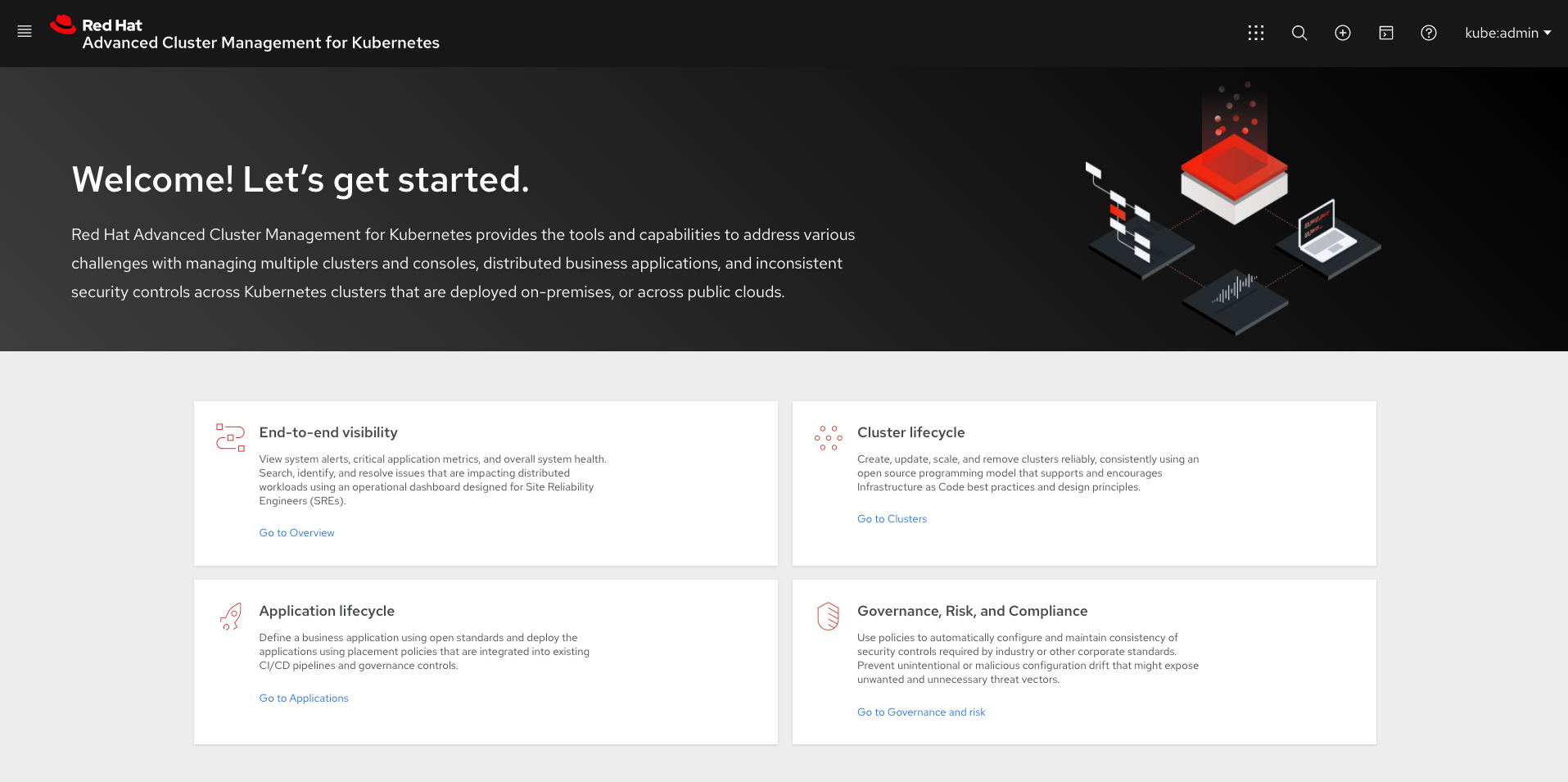
With Red Hat Advanced Cluster Management for Kubernetes:
- Work across a range of environments, including multiple data centers, private clouds and public clouds that run Kubernetes clusters.
- Easily create Kubernetes clusters and offer cluster lifecycle management in a single console.
- Enforce policies at the target clusters using Kubernetes-supported custom resource definitions.
- Deploy and maintain day-two operations of business applications distributed across your cluster landscape.
This guide assumes that users are familiar with Kubernetes concepts and terminology. For more information about Kubernetes concepts, see Kubernetes Documentation.
See the following documentation for information about the product:
1.1. Multicluster architecture
Red Hat Advanced Cluster Management for Kubernetes consists of several multicluster components, which are used to access and manage your clusters. Learn more about the architecture in the following sections, then follow the links to more detailed documentation.
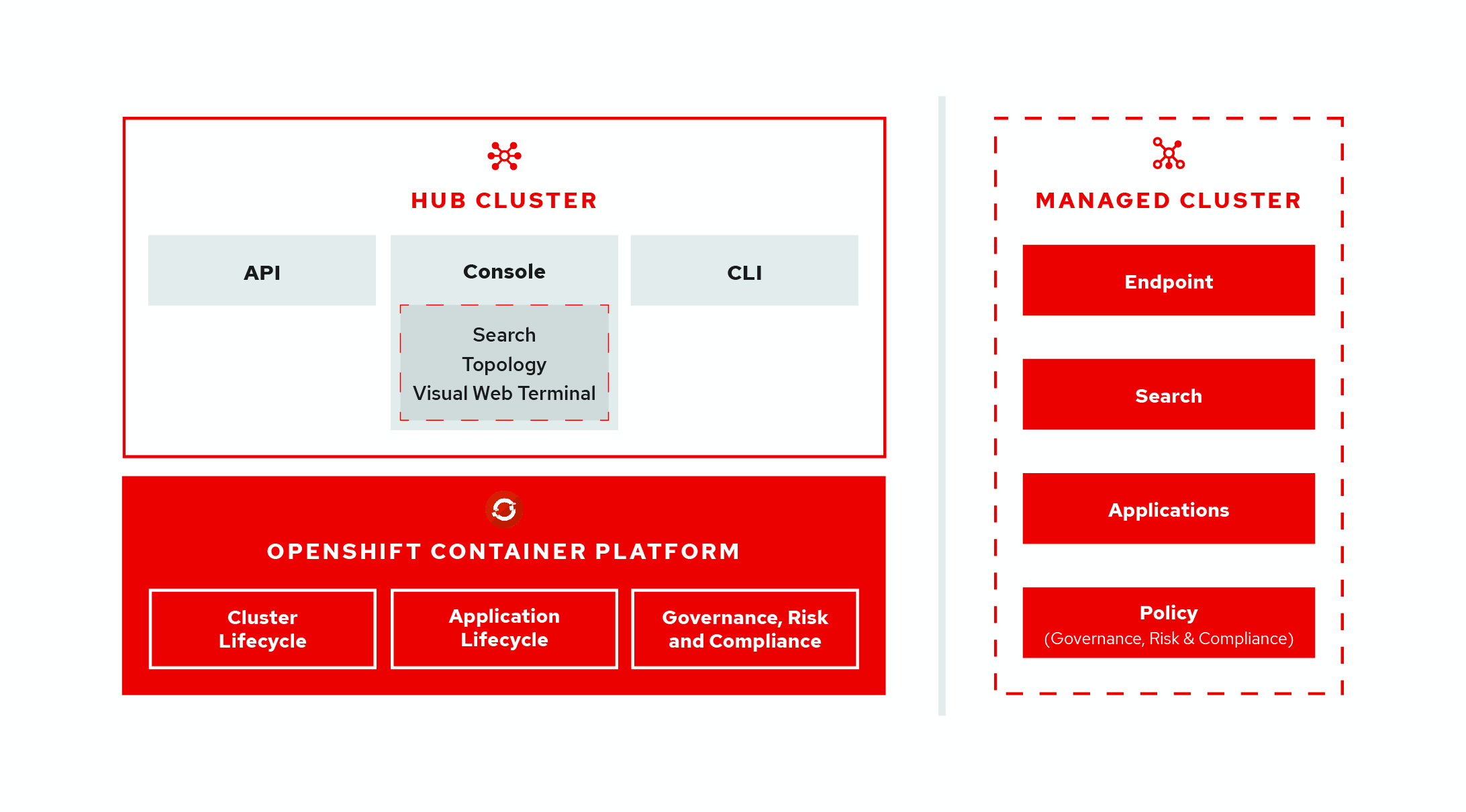
Learn more about the following components for Red Hat Advanced Cluster Management for Kubernetes:
- Hub cluster
- Managed cluster
- Cluster lifecycle
- Application lifecycle
- Governance and risk
1.1.1. Hub cluster
The hub cluster is the common term that is used to define the central controller that runs in a Red Hat Advanced Cluster Management for Kubernetes cluster. From the hub cluster, you can access the console and product components, as well as APIs such as the rcm-api, which handles API requests related to cluster lifecycle management, which is defined later in this topic.
The hub cluster aggregates information from multiple clusters by using an asynchronous work request model. With a graph database, the hub cluster maintains the state of clusters and applications that run on it. The hub cluster also uses etcd, a distributed key value store, to store the state of work requests and results from multiple clusters, and provides a set of REST APIs for the various functions that it supports.
1.1.2. Managed cluster
The managed cluster is the term that is used to define additional clusters with the Klusterlet, which is the agent that initiates a connection to the Red Hat Advanced Cluster Management for Kubernetes hub cluster. The managed cluster receives and applies requests, then returns the results. See Managing your clusters to learn about managing clusters, which is part of Cluster lifecycle.
1.1.3. Cluster lifecycle
Red Hat Advanced Cluster Management for Kubernetes cluster lifecycle defines the process of creating, importing, and managing clusters across public and private clouds. From the hub cluster console, you can view an aggregation of all cluster health statuses, or view individual health metrics. You can upgrade managed Red Hat Openshift clusters individually or in bulk, as well as destroy any Red Hat Openshift clusters that you created from your hub cluster.
1.1.4. Application lifecycle
Red Hat Advanced Cluster Management for Kubernetes application lifecycle defines the processes that are used to manage application resources on your managed clusters. A multi-cluster application uses a Kubernetes specification, but with additional automation of the deployment and lifecycle management of resources to individual clusters. A multi-cluster application allows you to deploy resources on multiple clusters, while maintaining easy-to-reconcile service routes, as well as full control of Kubernetes resource updates for all aspects of the application. See Managing applications for more application topics.
1.1.5. Governance and risk
Governance and risk is the term used to define the processes that are used to manage security and compliance from a central interface page. After you configure a Red Hat Advanced Cluster Management for Kubernetes hub cluster and a managed cluster, you can view and create policies with the Red Hat Advanced Cluster Management policy framework.
For more information about Governance and risk, see the Security introduction. Additionally, learn about access requirements from the Role-based access control documentation.
See the product Installing section to prepare your cluster and get configuration information.
See the Components topic to learn more about what is installed with the product.

'%20d='M201.5%20305.5c-13.8%200-24.9-11.1-24.9-24.6%200-13.8%2011.1-24.9%2024.9-24.9%2013.6%200%2024.6%2011.1%2024.6%2024.9%200%2013.6-11.1%2024.6-24.6%2024.6zM504%20256c0%20137-111%20248-248%20248S8%20393%208%20256%20119%208%20256%208s248%20111%20248%20248zm-132.3-41.2c-9.4%200-17.7%203.9-23.8%2010-22.4-15.5-52.6-25.5-86.1-26.6l17.4-78.3%2055.4%2012.5c0%2013.6%2011.1%2024.6%2024.6%2024.6%2013.8%200%2024.9-11.3%2024.9-24.9s-11.1-24.9-24.9-24.9c-9.7%200-18%205.8-22.1%2013.8l-61.2-13.6c-3-.8-6.1%201.4-6.9%204.4l-19.1%2086.4c-33.2%201.4-63.1%2011.3-85.5%2026.8-6.1-6.4-14.7-10.2-24.1-10.2-34.9%200-46.3%2046.9-14.4%2062.8-1.1%205-1.7%2010.2-1.7%2015.5%200%2052.6%2059.2%2095.2%20132%2095.2%2073.1%200%20132.3-42.6%20132.3-95.2%200-5.3-.6-10.8-1.9-15.8%2031.3-16%2019.8-62.5-14.9-62.5zM302.8%20331c-18.2%2018.2-76.1%2017.9-93.6%200-2.2-2.2-6.1-2.2-8.3%200-2.5%202.5-2.5%206.4%200%208.6%2022.8%2022.8%2087.3%2022.8%20110.2%200%202.5-2.2%202.5-6.1%200-8.6-2.2-2.2-6.1-2.2-8.3%200zm7.7-75c-13.6%200-24.6%2011.1-24.6%2024.9%200%2013.6%2011.1%2024.6%2024.6%2024.6%2013.8%200%2024.9-11.1%2024.9-24.6%200-13.8-11-24.9-24.9-24.9z'/%3e%3c/svg%3e)