 红帽全球峰会
此内容没有您所选择的语言版本。
Chapter 3. Installing CodeReady Workspaces on OpenShift 4 from OperatorHub
CodeReady Workspaces is now compatible with OpenShift 4.1 and has a dedicated operator compatible with the Operator Lifecycle Manager (OLM), which allows for easy installation and automated updates.
OLM is a management framework for extending Kubernetes with Operators. The OLM project is a component of the Operator Framework, which is an open-source toolkit to manage Kubernetes-native applications, called operators, in an effective, automated, and scalable way.
When using CodeReady Workspaces on OpenShift 4, updates are performed explicitly via OperatorHub. This is different from CodeReady Workspaces on OpenShift 3.11, where updates are performed using the migrate*.sh script or manual steps.
Procedure
To install CodeReady Workspaces 1.2 from OperatorHub:
- Launch the OpenShift Web Console.
In the console, click CodeReady Workspaces in the OperatorHub tab. The CodeReady Workspaces 1.2 window is shown.
Figure 3.1. CodeReady Workspaces 1.2 listed on OperatorHub

Click Install.
Figure 3.2. Install button on the CodeReady Workspaces 1.2 window

In the Create Operator Subscription window:
- From the A specific namespace in the cluster drop-down list, select the openshift-codeready-workspaces namespace to install the Operator to.
- Choose the appropriate approval strategy in the Approval Strategy field.
Click Subscribe.
Figure 3.3. Selections in the Create Operator Subscription window

A subscription is created in the Operator Lifecycle Manager (OLM), and the operator is installed in the chosen namespace. Successful installation implies that the following requirements in the Cluster Service Version (CSV) are created:
- Service account (SA)
- Role-based access control (RBAC)
Deployment
By default, a deployment creates only one instance of an application, scaled to 1. After the operator installation completes, the operator is marked as installed in the OperatorHub window.
Navigate to Catalog > Installed Operators. The CodeReady Workspaces operator with an InstallSucceded message is displayed.
Figure 3.4. Installed Operators on OperatorHub

To deploy CodeReady Workspaces 1.2 on the operator:
- In the selected namespace, create a custom resource Che Cluster that the operator will watch. To do so, click Operator > CodeReady Workspaces Cluster.
Click Create Che Cluster.
Figure 3.5. Clicking Create Che Cluster

A template for creating a Che-cluster type custom resource is available. When using OpenShift OAuth or a self-signed certificate, grant cluster administrator privileges to the codeready-operator service account. For instructions, see the operator description when you initially install the operator.
Click Create.
Figure 3.6. Clicking Create to create the Che cluster
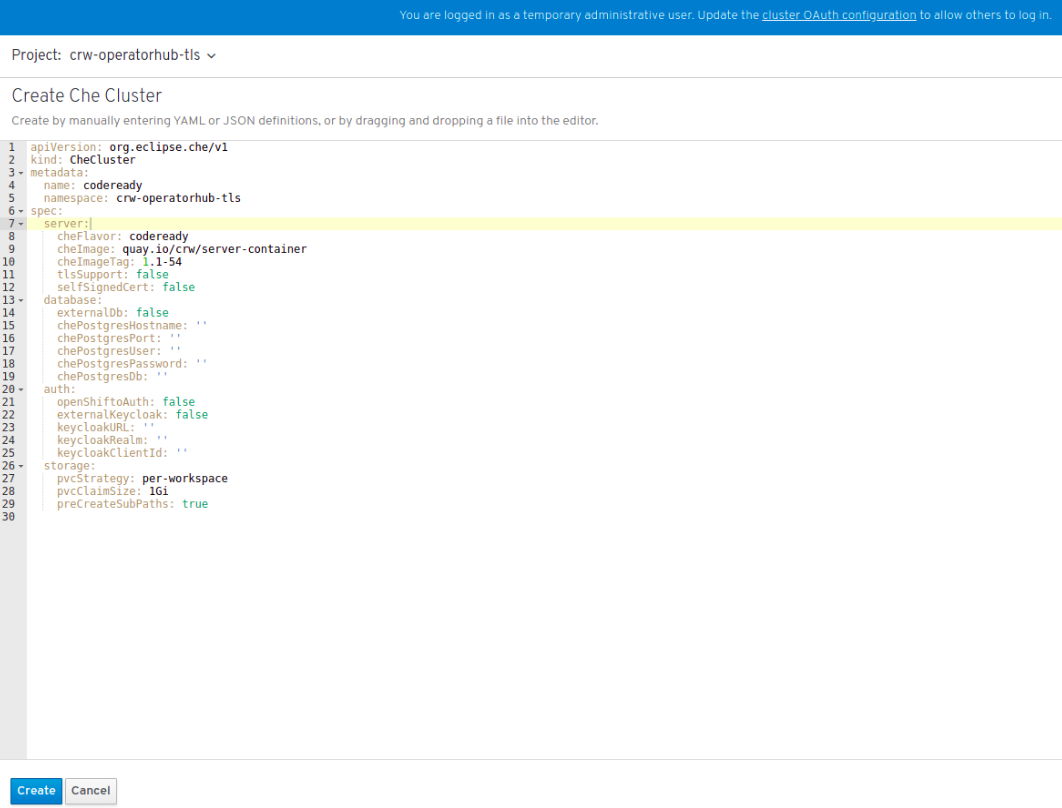
After the custom resource is created, the operator starts executing the following controller business logic:
- Creates the Kubernetes and OpenShift resources
- Provisions the database and Red Hat SSO resources
- Updates the resource status while the installation is in progress
To track the progress in the OLM UI, navigate to the resource details window.
Figure 3.7. Display of route for CodeReady Workspaces

- Wait for the status to become Available. The CodeReady Workspaces route is displayed.
To track the installation progress, follow the operator logs.
Notice that the coderedy-operator pod is the same namespace. Follow the logs and wait until the operator updates the resource status to Available and sets the URLs.
Figure 3.8. CodeReady Operator pod shown running

Additional resources

'%20d='M201.5%20305.5c-13.8%200-24.9-11.1-24.9-24.6%200-13.8%2011.1-24.9%2024.9-24.9%2013.6%200%2024.6%2011.1%2024.6%2024.9%200%2013.6-11.1%2024.6-24.6%2024.6zM504%20256c0%20137-111%20248-248%20248S8%20393%208%20256%20119%208%20256%208s248%20111%20248%20248zm-132.3-41.2c-9.4%200-17.7%203.9-23.8%2010-22.4-15.5-52.6-25.5-86.1-26.6l17.4-78.3%2055.4%2012.5c0%2013.6%2011.1%2024.6%2024.6%2024.6%2013.8%200%2024.9-11.3%2024.9-24.9s-11.1-24.9-24.9-24.9c-9.7%200-18%205.8-22.1%2013.8l-61.2-13.6c-3-.8-6.1%201.4-6.9%204.4l-19.1%2086.4c-33.2%201.4-63.1%2011.3-85.5%2026.8-6.1-6.4-14.7-10.2-24.1-10.2-34.9%200-46.3%2046.9-14.4%2062.8-1.1%205-1.7%2010.2-1.7%2015.5%200%2052.6%2059.2%2095.2%20132%2095.2%2073.1%200%20132.3-42.6%20132.3-95.2%200-5.3-.6-10.8-1.9-15.8%2031.3-16%2019.8-62.5-14.9-62.5zM302.8%20331c-18.2%2018.2-76.1%2017.9-93.6%200-2.2-2.2-6.1-2.2-8.3%200-2.5%202.5-2.5%206.4%200%208.6%2022.8%2022.8%2087.3%2022.8%20110.2%200%202.5-2.2%202.5-6.1%200-8.6-2.2-2.2-6.1-2.2-8.3%200zm7.7-75c-13.6%200-24.6%2011.1-24.6%2024.9%200%2013.6%2011.1%2024.6%2024.6%2024.6%2013.8%200%2024.9-11.1%2024.9-24.6%200-13.8-11-24.9-24.9-24.9z'/%3e%3c/svg%3e)