 红帽全球峰会
此内容没有您所选择的语言版本。
Chapter 5. Upgrading CodeReady Workspaces
This chapter describes how to upgrade a CodeReady Workspaces instance from version 2.13 to CodeReady Workspaces 2.14.
The method used to install the CodeReady Workspaces instance determines the method to proceed with for the upgrade:
5.1. Upgrading CodeReady Workspaces using OperatorHub
This section describes how to upgrade from an earlier minor version using the Operator from OperatorHub in the OpenShift web console.
OperatorHub supports Automatic and Manual upgrade strategies: Automatic:: The upgrade process starts when a new version of the Operator is published. Manual:: The update must be manually approved every time the new version of the Operator is published.
Prerequisites
- An administrator account on an instance of OpenShift.
- An instance of CodeReady Workspaces 2.13 or earlier that was installed by using OperatorHub.
Procedure
- Open the OpenShift web console.
-
Navigate to the Operators
Installed Operators page. - Click Red Hat CodeReady Workspaces in the list of installed Operators.
- Navigate to the Subscription tab.
Configure the approval strategy to
AutomaticorManual.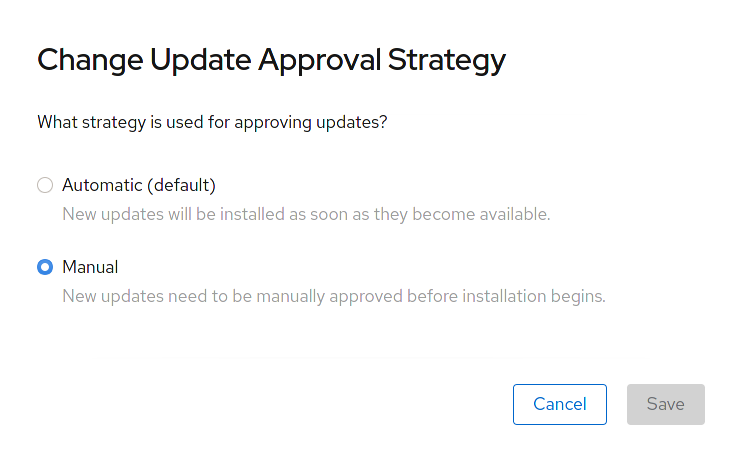
OperatorHub is an assembly point for sharing Operators. The OperatorHub helps you deploy and update applications. The following section describes the process of upgrading CodeReady Workspaces by using OperatorHub and the Manual approval strategy approach. Use the Manual approval strategy to prevent automatic updates of the Operator with every release.
Prerequisites
- An administrator account on an instance of OpenShift.
- An instance of CodeReady Workspaces 2.13 or earlier that was installed by using OperatorHub.
-
The approval strategy in the subscription is
Manual.
Procedure
- Open the OpenShift web console.
-
Navigate to the Operators
Installed Operators page. - In the list of the installed Operators, click Red Hat CodeReady Workspaces.
- Navigate to the Subscription tab.
- Next to the Upgrade Status, inspect the upgrades that require approval. The expected message is 1 requires approval.
- Click 1 requires approval.
- Click Preview Install Plan.
- Review the resources that are available for upgrade and click Approve.
Verification steps
-
Navigate to the Operators
Installed Operators page. - Monitor the upgrade progress. When complete, the status changes to Succeeded and Up to date. The 2.14 version number is visible at the end of the page.
Additional resources
- Upgrading installed Operators section in the OpenShift documentation.
This section describes how to upgrade from the previous minor version using the CLI management tool.
Prerequisites
- An administrative account on OpenShift.
-
A running instance of a previous minor version of Red Hat CodeReady Workspaces, installed using the CLI management tool on the same instance of OpenShift, in the
<openshift-workspaces>project. -
crwctlis available and updated. See Section 3.3.1, “Installing the crwctl CLI management tool”.
Procedure
- Save and push changes back to the Git repositories for all running CodeReady Workspaces 2.13 workspaces.
- Shut down all workspaces in the CodeReady Workspaces 2.13 instance.
Upgrade CodeReady Workspaces:
$ crwctl server:update -n openshift-workspaces
For slow systems or internet connections, add the --k8spodwaittimeout=1800000 flag option to the crwctl server:update command to extend the Pod timeout period to 1800000 ms or longer.
Verification steps
- Navigate to the CodeReady Workspaces instance.
- The 2.14 version number is visible at the bottom of the page.
This section describes how to upgrade Red Hat CodeReady Workspaces using the CLI management tool in restricted environment. The upgrade path supports minor version update, from CodeReady Workspaces version 2.13 to version 2.14.
Prerequisites
- An administrative account on an instance of OpenShift.
-
A running instance version 2.13 of Red Hat CodeReady Workspaces, installed using the CLI management tool on the same instance of OpenShift, with the crwctl
--installer operatormethod, in the<openshift-workspaces>project. See Section 3.4, “Installing CodeReady Workspaces in a restricted environment”. -
The
crwctl2.14 management tool is available. See Section 3.3.1, “Installing the crwctl CLI management tool”.
CodeReady Workspaces requires that each OpenShift Route created for CodeReady Workspaces is accessible from inside the OpenShift cluster. These CodeReady Workspaces components have a OpenShift Route: codeready-workspaces-server, keycloak, devfile-registry, plugin-registry.
Consider the network topology of the environment to determine how best to accomplish this.
Example 5.1. Network owned by a company or an organization, disconnected from the public Internet
The network administrators must ensure that it is possible to route traffic bound from the cluster to OpenShift Route host names.
Example 5.2. Private subnetwork in a cloud provider
Create a proxy configuration allowing the traffic to leave the node to reach an external-facing Load Balancer.
5.3.2. Building offline registry images
5.3.2.1. Building an offline devfile registry image
This section describes how to build an offline devfile registry image. Starting workspaces without relying on resources from the outside Internet requires building this image. The image contains all sample projects referenced in devfiles as zip files.
Procedure
Clone the devfile registry repository and check out the version to deploy:
$ git clone git@github.com:redhat-developer/codeready-workspaces.git
$ cd codeready-workspaces
$ git checkout crw-2.14-rhel-8
Build an offline devfile registry image:
$ cd dependencies/che-devfile-registry $ ./build.sh --organization <my-org> \ --registry <my-registry> \ --tag <my-tag> \ --offlineNoteTo display full options for the
build.shscript, use the--helpparameter.
5.3.2.2. Building an offline plug-in registry image
This section describes how to build an offline plug-in registry image. Starting workspaces without relying on resources from the outside Internet requires building this image. The image contains plug-in metadata and all plug-in or extension artifacts.
Prerequisites
- Node.js 12.x
- A running version of yarn. See Installing Yarn.
-
./node_modules/.binis in thePATHenvironment variable. - A running installation of podman or docker.
Procedure
Clone the plug-in registry repository and check out the version to deploy:
$ git clone git@github.com:redhat-developer/codeready-workspaces.git
$ cd codeready-workspaces
$ git checkout crw-2.14-rhel-8
Build offline plug-in registry image:
$ cd dependencies/che-plugin-registry $ ./build.sh --organization <my-org> \ --registry <my-registry> \ --tag <my-tag> \ --offline \ --skip-digest-generationNoteTo display full options for the
build.shscript, use the--helpparameter.
5.3.3. Preparing an private registry
Prerequisites
-
The
octool is available. -
The
skopeotool, version 0.1.40 or later, is available. -
The
podmantool is available. - An image registry accessible from the OpenShift cluster and supporting the format of the V2 image manifest, schema version 2. Ensure you can push to it from a location having, at least temporarily, access to the internet.
|
| Full coordinates of the source image, including registry, organization, and digest. |
|
| Host name and port of the target container-image registry. |
|
| Organization in the target container-image registry |
|
| Image name and digest in the target container-image registry. |
|
| User name in the target container-image registry. |
|
| User password in the target container-image registry. |
Procedure
Log into the internal image registry:
$ podman login --username <user> --password <password> <target-registry>NoteIf you encounter an error, like
x509: certificate signed by unknown authority, when attempting to push to the internal registry, try one of these workarounds:-
add the OpenShift cluster’s certificate to
/etc/containers/certs.d/<target-registry> -
add the registry as an insecure registry by adding the following lines to the Podman configuration file located at
/etc/containers/registries.conf:
[registries.insecure] registries = ['<target-registry>']-
add the OpenShift cluster’s certificate to
Copy images without changing their digest. Repeat this step for every image in the following table:
$ skopeo copy --all docker://<source-image> docker://<target-registry>/<target-organization>/<target-image>NoteExpand Table 5.2. Understanding the usage of the container-images from the prefix or keyword they include in their name Usage Prefix or keyword Essential
not
stacks-,plugin-, or-openj9-Workspaces
stacks-,plugin-IBM Z and IBM Power Systems
-openj9-NoteImages suffixed with
openj9are theEclipse OpenJ9image equivalents of the OpenJDK images used on x86_64. IBM Power Systems and IBM Z use Eclipse OpenJ9 from IBM Semeru for better performance on those systems. See IBM Semeru Runtimes.Expand Table 5.3. Images to copy in the private registry <source-image> <target-image> registry.redhat.io/codeready-workspaces/backup-rhel8@sha256:ea8b95650e7597bb406d0608835a4adb7464353cdd02e24a974f9008e842f154backup-rhel8@sha256:ea8b95650e7597bb406d0608835a4adb7464353cdd02e24a974f9008e842f154registry.redhat.io/codeready-workspaces/configbump-rhel8@sha256:6f920f581cd54575ae032a95a5b7c06a280a44cfb698659b8e5c89adcf60ff6econfigbump-rhel8@sha256:6f920f581cd54575ae032a95a5b7c06a280a44cfb698659b8e5c89adcf60ff6eregistry.redhat.io/codeready-workspaces/crw-2-rhel8-operator@sha256:d9484d6981f247aadd6d248b509d1016d590a3e63cc70db05c80688d40fb0d00crw-2-rhel8-operator@sha256:d9484d6981f247aadd6d248b509d1016d590a3e63cc70db05c80688d40fb0d00registry.redhat.io/codeready-workspaces/dashboard-rhel8@sha256:e28e5d2e903d1bf43245b73ee4f430fa4ba870ed09749ef5490e3c38da83271edashboard-rhel8@sha256:e28e5d2e903d1bf43245b73ee4f430fa4ba870ed09749ef5490e3c38da83271eregistry.redhat.io/codeready-workspaces/devfileregistry-rhel8@sha256:a837e71e12904d5016d1abb28b3adae26e06b72caa25b7919a41e1c2a00e5c3adevfileregistry-rhel8@sha256:a837e71e12904d5016d1abb28b3adae26e06b72caa25b7919a41e1c2a00e5c3aregistry.redhat.io/codeready-workspaces/idea-rhel8@sha256:073d1a803faac261bae15642e66213a54cf2cb96429254c1138b0eda3f182105idea-rhel8@sha256:073d1a803faac261bae15642e66213a54cf2cb96429254c1138b0eda3f182105registry.redhat.io/codeready-workspaces/jwtproxy-rhel8@sha256:0ecfe3a467683d0a28f7b0736e884a3710438798ded46470451de63ec209380fjwtproxy-rhel8@sha256:0ecfe3a467683d0a28f7b0736e884a3710438798ded46470451de63ec209380fregistry.redhat.io/codeready-workspaces/machineexec-rhel8@sha256:1e25377fe0538ef380030a898fcfcff9493ff0bdbaa4db77d648cdcb0036816bmachineexec-rhel8@sha256:1e25377fe0538ef380030a898fcfcff9493ff0bdbaa4db77d648cdcb0036816bregistry.redhat.io/codeready-workspaces/plugin-java11-openj9-rhel8@sha256:fc5e110243a8e30d23705897a1766de20ec637db4442d419ba05ace3b874c27fplugin-java11-openj9-rhel8@sha256:fc5e110243a8e30d23705897a1766de20ec637db4442d419ba05ace3b874c27fregistry.redhat.io/codeready-workspaces/plugin-java11-rhel8@sha256:2036cbb70aae5f5d507657bd4b820e340ee0bacf3d4b520d80dbd21aad85e13aplugin-java11-rhel8@sha256:2036cbb70aae5f5d507657bd4b820e340ee0bacf3d4b520d80dbd21aad85e13aregistry.redhat.io/codeready-workspaces/plugin-java8-openj9-rhel8@sha256:27fe438df6cfccdfb5d1e927cfa2f360b3bed3fbc409e923e68714a1ef586461plugin-java8-openj9-rhel8@sha256:27fe438df6cfccdfb5d1e927cfa2f360b3bed3fbc409e923e68714a1ef586461registry.redhat.io/codeready-workspaces/plugin-java8-rhel8@sha256:f0ecc1812888611407c23ede1d3952dfb7b9bd597c336f22995cc4d8d9c23eddplugin-java8-rhel8@sha256:f0ecc1812888611407c23ede1d3952dfb7b9bd597c336f22995cc4d8d9c23eddregistry.redhat.io/codeready-workspaces/plugin-kubernetes-rhel8@sha256:5f40400fb032b419e90bb334c8748470eb50e9dc4662b487364e494ccf8a3f05plugin-kubernetes-rhel8@sha256:5f40400fb032b419e90bb334c8748470eb50e9dc4662b487364e494ccf8a3f05registry.redhat.io/codeready-workspaces/plugin-openshift-rhel8@sha256:c4be840840349bb647e6ace19b519b8b3e9676da42bb094512be1fafd411ae37plugin-openshift-rhel8@sha256:c4be840840349bb647e6ace19b519b8b3e9676da42bb094512be1fafd411ae37registry.redhat.io/codeready-workspaces/pluginbroker-artifacts-rhel8@sha256:bde2f4c7c21d7cd7d826d4f4bbd2ee9f31b2119e2d2aa10253592099598cf5bapluginbroker-artifacts-rhel8@sha256:bde2f4c7c21d7cd7d826d4f4bbd2ee9f31b2119e2d2aa10253592099598cf5baregistry.redhat.io/codeready-workspaces/pluginbroker-metadata-rhel8@sha256:457dd2db3d72cc1d823e1219d657ae32e3a9da26f7dd420e0185d1cbe872a792pluginbroker-metadata-rhel8@sha256:457dd2db3d72cc1d823e1219d657ae32e3a9da26f7dd420e0185d1cbe872a792registry.redhat.io/codeready-workspaces/pluginregistry-rhel8@sha256:650a715a08927b11d78d8f520d0d9b623a3f9193eb98e1aed6eeebcaf4517b15pluginregistry-rhel8@sha256:650a715a08927b11d78d8f520d0d9b623a3f9193eb98e1aed6eeebcaf4517b15registry.redhat.io/codeready-workspaces/server-rhel8@sha256:3843f4e3271d927cb1955bfa54b144729676988219dc21849a30a06c9aaab215server-rhel8@sha256:3843f4e3271d927cb1955bfa54b144729676988219dc21849a30a06c9aaab215registry.redhat.io/codeready-workspaces/stacks-cpp-rhel8@sha256:fc621b59be72465ab82cfa293b5b190521eecfed9c353051a7e72592837891c1stacks-cpp-rhel8@sha256:fc621b59be72465ab82cfa293b5b190521eecfed9c353051a7e72592837891c1registry.redhat.io/codeready-workspaces/stacks-dotnet-rhel8@sha256:88134d9fd6b7c81e237e6295183d59cfe3e546762315e93f4d6fb547ecdfaebastacks-dotnet-rhel8@sha256:88134d9fd6b7c81e237e6295183d59cfe3e546762315e93f4d6fb547ecdfaebaregistry.redhat.io/codeready-workspaces/stacks-golang-rhel8@sha256:ef135a05399a4d5f58bcb059b6634498bee5adbbcf8ddb2956abf25819e82462stacks-golang-rhel8@sha256:ef135a05399a4d5f58bcb059b6634498bee5adbbcf8ddb2956abf25819e82462registry.redhat.io/codeready-workspaces/stacks-php-rhel8@sha256:f2ee2cf24f649092568f932977193f585caac19ef23892968d0fe4dbc90f4a35stacks-php-rhel8@sha256:f2ee2cf24f649092568f932977193f585caac19ef23892968d0fe4dbc90f4a35registry.redhat.io/codeready-workspaces/theia-endpoint-rhel8@sha256:128e281bceaccfcb3f9c3aebdd218b6bb6381f9c41cff2259eba47dd49d95c4dtheia-endpoint-rhel8@sha256:128e281bceaccfcb3f9c3aebdd218b6bb6381f9c41cff2259eba47dd49d95c4dregistry.redhat.io/codeready-workspaces/theia-rhel8@sha256:928f5792cc39e6b7785f4f92ec0d6a5b9cd36fb285c1f72d12239beb05d8696etheia-rhel8@sha256:928f5792cc39e6b7785f4f92ec0d6a5b9cd36fb285c1f72d12239beb05d8696eregistry.redhat.io/codeready-workspaces/traefik-rhel8@sha256:93e8f8eed5b1c723213ab4bc538c04fe0d6e25fd66d26de1f8c632b701fe2eb8traefik-rhel8@sha256:93e8f8eed5b1c723213ab4bc538c04fe0d6e25fd66d26de1f8c632b701fe2eb8registry.redhat.io/devworkspace/devworkspace-rhel8-operator@sha256:e68ec2fe7ac27e59641bdfc7794ae99fdfaa60e5b6d0cc0e3f20ab3f7a31bc11devworkspacedevworkspace-rhel8-operator@sha256:e68ec2fe7ac27e59641bdfc7794ae99fdfaa60e5b6d0cc0e3f20ab3f7a31bc11registry.redhat.io/jboss-eap-7/eap-xp3-openj9-11-openshift-rhel8@sha256:44f82c43a730acbfb4ce2be81ca32197099c370eeb85cedbee3d1e89e9ac7684eap-xp3-openj9-11-openshift-rhel8@sha256:44f82c43a730acbfb4ce2be81ca32197099c370eeb85cedbee3d1e89e9ac7684registry.redhat.io/jboss-eap-7/eap-xp3-openjdk11-openshift-rhel8@sha256:3875b2ee2826a6d8134aa3b80ac0c8b5ebc4a7f718335d76dfc3461b79f93d19eap-xp3-openjdk11-openshift-rhel8@sha256:3875b2ee2826a6d8134aa3b80ac0c8b5ebc4a7f718335d76dfc3461b79f93d19registry.redhat.io/jboss-eap-7/eap74-openjdk8-openshift-rhel7@sha256:b4a113c4d4972d142a3c350e2006a2b297dc883f8ddb29a88db19c892358632deap74-openjdk8-openshift-rhel7@sha256:b4a113c4d4972d142a3c350e2006a2b297dc883f8ddb29a88db19c892358632dregistry.redhat.io/openshift4/ose-kube-rbac-proxy@sha256:86e5fa1fa294987114be200890c2e516501e424aee0fb98ece25c95e7716295bopenshift4ose-kube-rbac-proxy@sha256:86e5fa1fa294987114be200890c2e516501e424aee0fb98ece25c95e7716295bregistry.redhat.io/openshift4/ose-oauth-proxy@sha256:30692aed2508e0576f9769fedb87333ab027babda774a870edfbdf2b3ecabed0openshift4ose-oauth-proxy@sha256:30692aed2508e0576f9769fedb87333ab027babda774a870edfbdf2b3ecabed0registry.redhat.io/rh-sso-7/sso74-openj9-openshift-rhel8@sha256:046d86f43fe0d22531505f3a7cf3050baa5967e6443ac226d5a8402d589fab13sso74-openj9-openshift-rhel8@sha256:046d86f43fe0d22531505f3a7cf3050baa5967e6443ac226d5a8402d589fab13registry.redhat.io/rh-sso-7/sso74-openshift-rhel8@sha256:90a68849d9f739087cb045b62036cf4adcb4b63e7f1b1cabb12a6d6e3cc76cffsso74-openshift-rhel8@sha256:90a68849d9f739087cb045b62036cf4adcb4b63e7f1b1cabb12a6d6e3cc76cffregistry.redhat.io/rhel8/postgresql-13@sha256:487183263b25ff4a0d68e97f17756aa9600ca640b20804ca34f19718e471f647postgresql-13@sha256:487183263b25ff4a0d68e97f17756aa9600ca640b20804ca34f19718e471f647registry.redhat.io/rhel8/postgresql-96@sha256:314747a4a64ac16c33ead6a34479dccf16b9a07abf440ea7eeef7cda4cd19e32postgresql-96@sha256:314747a4a64ac16c33ead6a34479dccf16b9a07abf440ea7eeef7cda4cd19e32registry.redhat.io/rhscl/mongodb-36-rhel7@sha256:9f799d356d7d2e442bde9d401b720600fd9059a3d8eefea6f3b2ffa721c0dc73mongodb-36-rhel7@sha256:9f799d356d7d2e442bde9d401b720600fd9059a3d8eefea6f3b2ffa721c0dc73registry.redhat.io/ubi8/ubi-minimal@sha256:c536d4c63253318fdfc1db499f8f4bb0881db7fbd6f3d1554b4d54c812f85cc7ubi8ubi-minimal@sha256:c536d4c63253318fdfc1db499f8f4bb0881db7fbd6f3d1554b4d54c812f85cc7
Verification steps
Verify the images have the same digests:
$ skopeo inspect docker://<source-image>
$ skopeo inspect docker://<target-registry>/<target-organization>/<target-image>
Additional resources
-
To find the sources of the images list, see the values of the
relatedImagesattribute in the link: - CodeReady Workspaces Operator ClusterServiceVersion sources.
This section describes how to upgrade Red Hat CodeReady Workspaces using the CLI management tool in restricted environment.
Prerequisites
- An administrative account on an OpenShift instance.
-
A running instance version 2.13 of Red Hat CodeReady Workspaces, installed using the CLI management tool on the same instance of OpenShift, with the crwctl
--installer operatormethod, in the<openshift-workspaces>project. See Section 3.4, “Installing CodeReady Workspaces in a restricted environment”. - Essential container images are available to the CodeReady Workspaces server running in the cluster. See Section 5.3.3, “Preparing an private registry”.
-
The
crwctl2.14 management tool is available. See Section 3.3.1, “Installing the crwctl CLI management tool”.
Procedure
- In all running workspaces in the CodeReady Workspaces 2.13 instance, save and push changes back to the Git repositories.
- Stop all workspaces in the CodeReady Workspaces 2.13 instance.
Run the following command:
$ crwctl server:update --che-operator-image=<image-registry>/<organization>/crw-2-rhel8-operator:2.14 -n openshift-workspaces- <image-registry>: A host name and a port of the container-image registry accessible in the restricted environment.
- <organization>: An organization of the container-image registry. See: Section 5.3.3, “Preparing an private registry”.
Verification steps
- Navigate to the CodeReady Workspaces instance.
- The 2.14 version number is visible at the bottom of the page.
For slow systems or internet connections, add the --k8spodwaittimeout=1800000 flag option to the crwctl server:update command to extend the Pod timeout period to 1800000 ms or longer.
This section describes how to upgrade CodeReady Workspaces that uses project strategies other than 'per user'.
CodeReady Workspaces intends to use Kubernetes secrets as a storage for all sensitive user data. One project per user simplifies the design of the workspaces. This is the reason why project strategies other than per user become deprecated. The deprecation process happens in two steps. In the First Step project strategies other than per user are allowed but not recommended. In the Second Step support for project strategies other than per user is going to be removed.
No automated upgrade support exists between First Step and Second Step for the installations where project strategies other than per user are used without losing data.
Prerequisites
-
CodeReady Workspaces configured with the project strategies other than
per user. -
Intention to use CodeReady Workspaces configured with the
per usernamespace strategiesper user.
Procedure
Notify all CodeReady Workspaces users about the upcoming data wipe.
NoteTo back up the data, you can commit workspace configuration to an SCM server and use factories to restore it later.
-
Re-install CodeReady Workspaces with
per usernamespace strategy.
When CodeReady Workspaces is upgraded and user data is not backed up, workspace configuration and user preferences are going to be preserved but all runtime data will be wiped out.
Procedure
- Notify all CodeReady Workspaces users about the upcoming data wipe.
-
Change project strategy to
per user.
Upgrading without backing up user data has disadvantage. Original PVs with runtime data are going to be preserved and will no longer be used. This may lead to the waste of resources.
Additional resources
- Section 4.2, “Configuring workspace target project”
- Chapter 3, Installing CodeReady Workspaces
- https://access.redhat.com/documentation/en-us/red_hat_codeready_workspaces/2.14/html-single/end-user_guide/index#workspaces-overview.adoc
- https://access.redhat.com/documentation/en-us/red_hat_codeready_workspaces/2.14/html-single/end-user_guide/index#importing-the-source-code-of-a-project-into-a-workspace.adoc

'%20d='M201.5%20305.5c-13.8%200-24.9-11.1-24.9-24.6%200-13.8%2011.1-24.9%2024.9-24.9%2013.6%200%2024.6%2011.1%2024.6%2024.9%200%2013.6-11.1%2024.6-24.6%2024.6zM504%20256c0%20137-111%20248-248%20248S8%20393%208%20256%20119%208%20256%208s248%20111%20248%20248zm-132.3-41.2c-9.4%200-17.7%203.9-23.8%2010-22.4-15.5-52.6-25.5-86.1-26.6l17.4-78.3%2055.4%2012.5c0%2013.6%2011.1%2024.6%2024.6%2024.6%2013.8%200%2024.9-11.3%2024.9-24.9s-11.1-24.9-24.9-24.9c-9.7%200-18%205.8-22.1%2013.8l-61.2-13.6c-3-.8-6.1%201.4-6.9%204.4l-19.1%2086.4c-33.2%201.4-63.1%2011.3-85.5%2026.8-6.1-6.4-14.7-10.2-24.1-10.2-34.9%200-46.3%2046.9-14.4%2062.8-1.1%205-1.7%2010.2-1.7%2015.5%200%2052.6%2059.2%2095.2%20132%2095.2%2073.1%200%20132.3-42.6%20132.3-95.2%200-5.3-.6-10.8-1.9-15.8%2031.3-16%2019.8-62.5-14.9-62.5zM302.8%20331c-18.2%2018.2-76.1%2017.9-93.6%200-2.2-2.2-6.1-2.2-8.3%200-2.5%202.5-2.5%206.4%200%208.6%2022.8%2022.8%2087.3%2022.8%20110.2%200%202.5-2.2%202.5-6.1%200-8.6-2.2-2.2-6.1-2.2-8.3%200zm7.7-75c-13.6%200-24.6%2011.1-24.6%2024.9%200%2013.6%2011.1%2024.6%2024.6%2024.6%2013.8%200%2024.9-11.1%2024.9-24.6%200-13.8-11-24.9-24.9-24.9z'/%3e%3c/svg%3e)