 红帽全球峰会
此内容没有您所选择的语言版本。
5.8. Generate Process and Task Forms
Designer allows users to generate process and task ftl forms. These forms are fully usable in the jBPM console. To start using this feature, locate the "Generate Task Form Templates" button in the designer toolbar:

Designer will iterate through your process BPMN2 and create forms for your process and each of the human tasks in your process. It uses the defined process variables and human task data input/output parameters and associations to create form fields. The generated forms are stored in Guvnor, and the user is presented with a page which shows each of the forms created as well as a link to their sources in Guvnor:
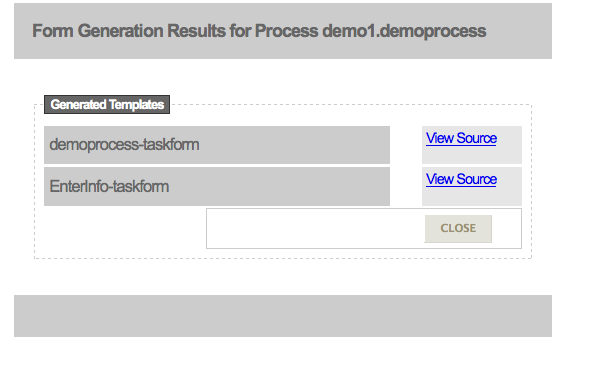
All forms are fully usable inside the jBPM console. In addition, each form includes basic JavaScript form validation which is determined based on the type of process variables and/or human task data input/output association definitions. Here is an example generated human task form.
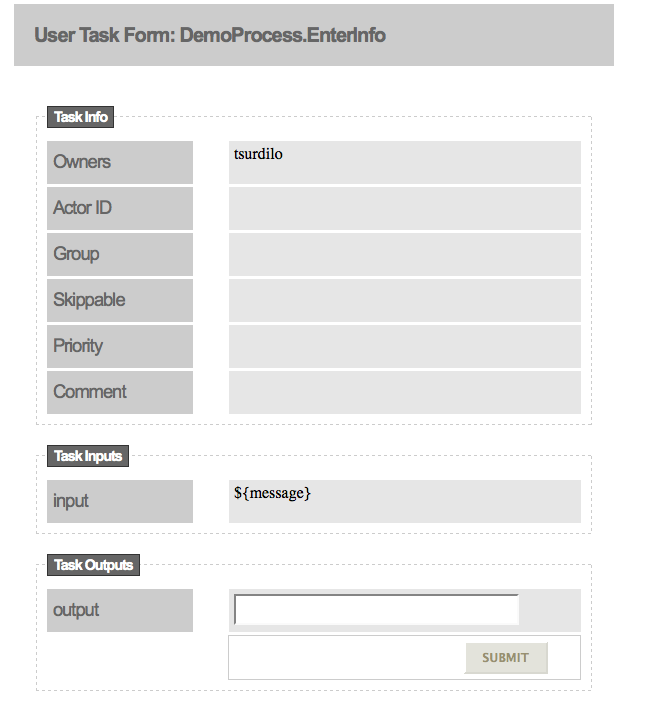
In order for process and task forms to be generated, you have to make sure that your process has it's ID parameter set and that each of the human tasks have the TaskName parameter set. Task forms contain pure HTML, CSS, and JavaScript, so they are easily editable in any HTML editor. Please note that there is no edit feature available in Designer, so each time a form is generated, existing forms (of the same name) will be overwritten.

'%20d='M201.5%20305.5c-13.8%200-24.9-11.1-24.9-24.6%200-13.8%2011.1-24.9%2024.9-24.9%2013.6%200%2024.6%2011.1%2024.6%2024.9%200%2013.6-11.1%2024.6-24.6%2024.6zM504%20256c0%20137-111%20248-248%20248S8%20393%208%20256%20119%208%20256%208s248%20111%20248%20248zm-132.3-41.2c-9.4%200-17.7%203.9-23.8%2010-22.4-15.5-52.6-25.5-86.1-26.6l17.4-78.3%2055.4%2012.5c0%2013.6%2011.1%2024.6%2024.6%2024.6%2013.8%200%2024.9-11.3%2024.9-24.9s-11.1-24.9-24.9-24.9c-9.7%200-18%205.8-22.1%2013.8l-61.2-13.6c-3-.8-6.1%201.4-6.9%204.4l-19.1%2086.4c-33.2%201.4-63.1%2011.3-85.5%2026.8-6.1-6.4-14.7-10.2-24.1-10.2-34.9%200-46.3%2046.9-14.4%2062.8-1.1%205-1.7%2010.2-1.7%2015.5%200%2052.6%2059.2%2095.2%20132%2095.2%2073.1%200%20132.3-42.6%20132.3-95.2%200-5.3-.6-10.8-1.9-15.8%2031.3-16%2019.8-62.5-14.9-62.5zM302.8%20331c-18.2%2018.2-76.1%2017.9-93.6%200-2.2-2.2-6.1-2.2-8.3%200-2.5%202.5-2.5%206.4%200%208.6%2022.8%2022.8%2087.3%2022.8%20110.2%200%202.5-2.2%202.5-6.1%200-8.6-2.2-2.2-6.1-2.2-8.3%200zm7.7-75c-13.6%200-24.6%2011.1-24.6%2024.9%200%2013.6%2011.1%2024.6%2024.6%2024.6%2013.8%200%2024.9-11.1%2024.9-24.6%200-13.8-11-24.9-24.9-24.9z'/%3e%3c/svg%3e)