 红帽全球峰会
第 25 章 图形平板
要管理连接到您的系统的 Wacom 平板电脑,请使用以下工具:
-
gnome-settings-daemon服务 GNOME 环境中的
Wacom Tablet设置面板平板电脑的 Wacom Tablet 设置面板
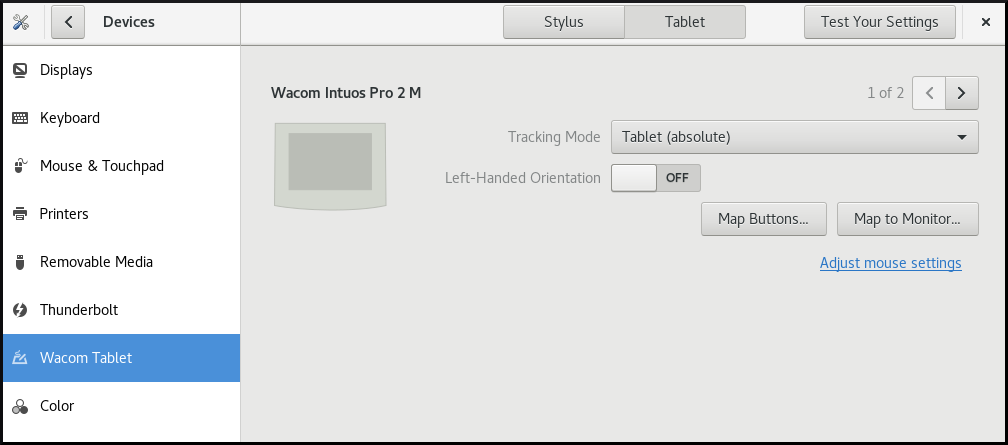
握笔的 Wacom Tablet 设置面板

这些工具以及 libinput 堆栈都使用 libwacom 平板电脑客户端库,它存储了有关 Wacom 平板电脑的数据。
如果要在 libwacom 库中添加对新平板电脑的支持,您必须确保此新平板电脑的定义文件存在。
25.1. 准备平板电脑定义文件
您必须为要添加的平板电脑准备定义文件。
先决条件
列出
libwacom可识别的所有本地设备:$ libwacom-list-local-devices确保您的设备在输出中被识别。
如果您的设备没有列出,则
libwacom数据库中没有该设备。但是,如果您使用 X.Org 显示服务器,设备仍然可以作为/proc/bus/input/devices下内核中的事件设备,在xinput列表上的 X11 会话中可见。
流程
安装提供平板电脑定义文件的软件包:
# yum install libwacom-data包会将平板电脑定义文件安装在
/usr/share/libwacom/目录中。检查定义文件是否在
/usr/share/libwacom/目录中存在。要正确使用屏幕映射,必须在
libwacom数据库和udev规则文件中包含对您的平板电脑的支持。重要libwacom不支持设备的一个常见指示是它在 GNOME 会话中正常工作,但设备没有正确映射到屏幕。如果您设备的定义文件不在
/usr/share/libwacom/中,则有以下选项:- 所需的定义文件可能已在 linuxwacom/libwacom 上游存储库中。您可以尝试在其中查找定义文件。如果您在列表中找到了您的平板电脑型号,请将文件复制到本地计算机中。
您可以创建新的平板电脑定义文件。使用以下
data/wacom.example文件,并根据您设备的特征编辑特定的行。例 25.1. 平板电脑的型号文件描述示例
[Device]

# The product is the product name announced by the kernel
Product=Intuos 4 WL 6x9

# Vendor name of this tablet
Vendor=Wacom

# DeviceMatch includes the bus (usb, serial), the vendor ID and the actual
# product ID
DeviceMatch=usb:056a:00bc

# Class of the tablet. Valid classes include Intuos3, Intuos4, Graphire, Bamboo, Cintiq
Class=Intuos4

# Exact model of the tablet, not including the size.
Model=Intuos 4 Wireless

# Width in inches, as advertised by the manufacturer
Width=9

# Height in inches, as advertised by the manufacturer
Height=6

# Optional features that this tablet supports
# Some features are dependent on the actual tool used, e.g. not all styli
# have an eraser and some styli have additional custom axes (e.g. the
# airbrush pen). These features describe those available on the tablet.
#
# Features not set in a file default to false/0

[Features]
# This tablet supports styli (and erasers, if present on the actual stylus)
Stylus=true

# This tablet supports touch.
Touch=false

# This tablet has a touch ring (Intuos4 and Cintiq 24HD)
Ring=true
# This tablet has a second touch ring (Cintiq 24HD)
Ring2=false

# This tablet has a vertical/horizontal scroll strip
VStrip=false
HStrip=false

# Number of buttons on the tablet
Buttons=9

# This tablet is built-in (most serial tablets, Cintiqs)
BuiltIn=false

'%20d='M201.5%20305.5c-13.8%200-24.9-11.1-24.9-24.6%200-13.8%2011.1-24.9%2024.9-24.9%2013.6%200%2024.6%2011.1%2024.6%2024.9%200%2013.6-11.1%2024.6-24.6%2024.6zM504%20256c0%20137-111%20248-248%20248S8%20393%208%20256%20119%208%20256%208s248%20111%20248%20248zm-132.3-41.2c-9.4%200-17.7%203.9-23.8%2010-22.4-15.5-52.6-25.5-86.1-26.6l17.4-78.3%2055.4%2012.5c0%2013.6%2011.1%2024.6%2024.6%2024.6%2013.8%200%2024.9-11.3%2024.9-24.9s-11.1-24.9-24.9-24.9c-9.7%200-18%205.8-22.1%2013.8l-61.2-13.6c-3-.8-6.1%201.4-6.9%204.4l-19.1%2086.4c-33.2%201.4-63.1%2011.3-85.5%2026.8-6.1-6.4-14.7-10.2-24.1-10.2-34.9%200-46.3%2046.9-14.4%2062.8-1.1%205-1.7%2010.2-1.7%2015.5%200%2052.6%2059.2%2095.2%20132%2095.2%2073.1%200%20132.3-42.6%20132.3-95.2%200-5.3-.6-10.8-1.9-15.8%2031.3-16%2019.8-62.5-14.9-62.5zM302.8%20331c-18.2%2018.2-76.1%2017.9-93.6%200-2.2-2.2-6.1-2.2-8.3%200-2.5%202.5-2.5%206.4%200%208.6%2022.8%2022.8%2087.3%2022.8%20110.2%200%202.5-2.2%202.5-6.1%200-8.6-2.2-2.2-6.1-2.2-8.3%200zm7.7-75c-13.6%200-24.6%2011.1-24.6%2024.9%200%2013.6%2011.1%2024.6%2024.6%2024.6%2013.8%200%2024.9-11.1%2024.9-24.6%200-13.8-11-24.9-24.9-24.9z'/%3e%3c/svg%3e)