 红帽全球峰会
此内容没有您所选择的语言版本。
Apache Camel Component Reference
Red Hat JBoss Fuse
Quickly find the settings for all of the components
Version 6.1
Copyright © 2011-2014 Red Hat, Inc. and/or its affiliates.
12 Oct 2017
Abstract
Apache Camel has over 100 components and each component is highly configurable. This guide describes the settings for each of the components.
Chapter 1. Components Overview
复制链接链接已复制到粘贴板!
Abstract
This chapter provides a summary of all the components available for Apache Camel.
1.1. List of Components
复制链接链接已复制到粘贴板!
Table of components
复制链接链接已复制到粘贴板!
The following components are available for use with Apache Camel.
| Component | Endpoint URI | Artifact ID | Description |
|---|---|---|---|
| ActiveMQ | activemq:[queue:|topic:]DestinationName | activemq-core | For JMS Messaging with Apache ActiveMQ. |
| AHC | ahc:http[s]://Hostname[:Port][/ResourceUri] | camel-ahc | To call external HTTP services using Async Http Client |
| AMQP | amqp:[queue:|topic:]DestinationName[?Options]] | camel-amqp | For messaging with the AMQP protocol. |
| APNS |
apns:notify[?Options] apns:consumer[?Options] | camel-apns | For sending notifications to Apple iOS devices. |
| Atom | atom://AtomUri[?Options] | camel-atom | Working with Apache Abdera for atom integration, such as consuming an atom feed. |
| Avro | avro:http://Hostname[:Port][?Options] | camel-avro | Working with Apache Avro for data serialization. |
| AWS-CW | aws-cw://Namespace[?Options] | camel-aws | For sending metrics to Amazon CloudWatch. |
| AWS-DDB | aws-ddb://TableName[?Options] | camel-aws | For working with Amazon's DynamoDB (DDB). |
| AWS-SDB | aws-sdb://DomainName[?Options] | camel-aws | For working with Amazon's SimpleDB (SDB). |
| AWS-SES | aws-ses://From[?Options] | camel-aws | For working with Amazon's Simple Email Service (SES). |
| AWS-S3 | aws-s3://BucketName[?Options] | camel-aws | For working with Amazon's Simple Storage Service (S3). |
| AWS-SNS | aws-sns://TopicName[?Options] | camel-aws | For Messaging with Amazon's Simple Notification Service (SNS). |
| AWS-SQS | aws-sqs://QueueName[?Options] | camel-aws | For Messaging with Amazon's Simple Queue Service (SQS). |
| Bean | bean:BeanID[?methodName=Method] | camel-core | Uses the Bean Binding to bind message exchanges to beans in the Registry. Is also used for exposing and invoking POJO (Plain Old Java Objects). |
| Bean Validation |
bean-validator:Something[?Options] | camel-bean-validator | Validates the payload of a message using the Java Validation API (JSR 303 and JAXP Validation) and its reference implementation Hibernate Validator. |
| Browse | browse: Name | camel-core | Provdes a simple BrowsableEndpoint which can be useful for testing, visualisation tools or debugging. The exchanges sent to the endpoint are all available to be browsed. |
| Cache | cache://CacheName[?Options] | camel-cache | The cache component enables you to perform caching operations using EHCache as the Cache Implementation. |
| Class | class:ClassName[?method=MethodName] | camel-core | Uses the Bean binding to bind message exchanges to beans in the registry. Is also used for exposing and invoking POJOs (Plain Old Java Objects). |
| Cometd | cometd://Hostname[:Port]/ChannelName[?Options] | camel-cometd | A transport for working with the jetty implementation of the cometd/bayeux protocol. |
| Context | context:CamelContextId:LocalEndpointName | camel-context | Refers to an endpoint in a different CamelContext. |
| Crypto |
crypto:sign:Name[?Options] crypto:verify:Name[?Options] | camel-crypto | Sign and verify exchanges using the Signature Service of the Java Cryptographic Extension. |
| CXF | cxf://Address[?Options] | camel-cxf | Working with Apache CXF for web services integration. |
| CXF Bean | cxf:BeanName | camel-cxf | Proceess the exchange using a JAX WS or JAX RS annotated bean from the registry. |
| CXFRS | cxfrs:bean:RsEndpoint[?Options] | camel-cxf | Provides integration with Apache CXF for connecting to JAX-RS services hosted in CXF. |
| DataFormat | dataformat:Name:(marshal|unmarshal)[?Options] | camel-core | Enables you to marshal or unmarshal a message in one of the standard Camel data formats, by sending it to an endpoint. |
| DataSet | dataset:Name[?Options] | camel-core | For load & soak testing the DataSet provides a way to create huge numbers of messages for sending to Components or asserting that they are consumed correctly. |
| Direct | direct:EndpointID[?Options] | camel-core | Synchronous call (single-threaded) to another endpoint from same CamelContext. |
| Direct-VM | direct-vm:EndpointID[?Options] | camel-core | Synchronous call (single-threaded) to another endpoint in another CamelContext running in the same JVM. |
| Disruptor |
disruptor:Name[?Options] disruptor-vm:Name[?Options] | camel-disruptor | Similar to a SEDA endpoint, but uses a Disruptor instead of a blocking queue. |
| DNS | dns:Operation | camel-dns | Look up domain information and run DNS queries using DNSJava |
| EJB | ejb:EjbName[?method=MethodName] | camel-ejb | Uses the Bean binding to bind message exchanges to EJBs. It works like the Bean component, but just for accessing EJBs. Supports EJB 3.0 onwards. |
| EventAdmin | eventadmin:topic | camel-eventadmin | |
| Exec | exec://Executable[?Options] | camel-exec | Execute system command. |
| Fabric | fabric:ClusterID[:PublishedURI][?Options] | fabric-camel | Look up or publish a fabric endpoint. |
facebook://[Endpoint][?Options] | camel-facebook | Provides access to all of the Facebook APIs accessible using Facebook4J. | |
| File2 | file://DirectoryName[?Options] | camel-core | Sending messages to a file or polling a file or directory. |
| Flatpack | flatpack:[fixed|delim]: ConfigFile | camel-flatpack | Processing fixed width or delimited files or messages using the FlatPack library |
| FOP | fop:OutputFormat | camel-fop | Renders the message into different output formats using Apache FOP. |
| Freemarker | freemarker: TemplateResource | camel-freemarker | Generates a response using a Freemarker template. |
| FTP2 | ftp://[Username@]Hostname[:Port]/Directoryname[?Options] | camel-ftp | Sending and receiving files over FTP. |
| GAuth | gauth://Name[?Options] | camel-gae | Used by web applications to implement a Google-specific OAuth consumer |
| GHTTP |
ghttp:///Path[?Options] ghttp://Hostname[:Port]/Path[?Options] ghttps://Hostname[:Port]/Path[?Options] | camel-gae | Provides connectivity to the GAE URL fetch service and can also be used to receive messages from servlets. |
| GLogin | glogin://Hostname[:Port][?Options] | camel-gae | Used by Camel applications outside Google App Engine (GAE) for programmatic login to GAE applications. |
| GMail |
gmail://Username@gmail.com[?Options] gmail://Username@googlemail.com[?Options] | camel-gae | Supports sending of emails via the GAE mail service. |
| GTask | gtask://QueueName | camel-gae | Supports asynchronous message processing on GAE using the task queueing service as a message queue. |
| Geocoder |
geocoder:Address:Name[?Options] geocoder:latlng:Latitude,Longitude[?Options] | camel-geocoder | Looks up geocodes (latitude and longitude) for a given address, or performs reverse look-up. |
| Guava EventBus | guava-eventbus:BusName[?EventClass=ClassName] | camel-guava-eventbus | The Google Guava EventBus allows publish-subscribe-style communication between components without requiring the components to explicitly register with one another (and thus be aware of each other). This component provides integration bridge between Camel and Google Guava EventBus infrastructure. |
| Hazelcast | hazelcast://StoreType:CacheName[?Options] | camel-hazelcast | Hazelcast is a data grid entirely implemented in Java (single JAR). This component supports map, multimap, seda, queue, set, atomic number and simple cluster. |
| HBase | hbase://Table[?Options] | camel-hbase | For reading/writing from/to an HBase store (Hadoop database). |
| HDFS | hdfs://Path[?Options] | camel-hdfs | For reading/writing from/to an HDFS filesystem. |
| HL7 | mina:tcp://Host[:Port] | camel-hl7 | For working with the HL7 MLLP protocol and the HL7 model using the HAPI library. |
| HTTP | http://Hostname[:Port][/ResourceUri] | camel-http | For calling out to external HTTP servers, using Apache HTTP Client 3.x. |
| HTTP4 | http://Hostname[:Port][/ResourceUri] | camel-http4 | For calling out to external HTTP servers, using Apache HTTP Client 4.x. |
| iBATIS | ibatis:OperationName[?Options] | camel-ibatis | Performs a query, poll, insert, update or delete in a relational database using Apache iBATIS. |
| IMap | imap://[UserName@]Host[:Port][?Options] | camel-mail | Receiving email using IMap. |
| IRC | irc:Host[:Port]/#Room | camel-irc | For IRC communication. |
| JavaSpace | javaspace:jini://Host[?Options] | camel-javaspace | Sending and receiving messages through JavaSpace. |
| JBI |
jbi:service:serviceNamespace[sep]serviceName jbi:endpoint:serviceNamespace[sep]serviceName[sep]endpointName jbi:name:endpointName | camel-jbi | For JBI integration such as working with Apache ServiceMix. |
| JClouds | jclouds:[Blobstore|ComputService]:Provider | camel-jclouds | For interacting with cloud compute & blobstore service via JClouds. |
| JCR | jcr://UserName:Password@Repository/path/to/node | camel-jcr | Storing a message in a JCR (JSR-170) compliant repository like Apache Jackrabbit. |
| JDBC | jdbc:DataSourceName[?Options] | camel-jdbc | For performing JDBC queries and operations. |
| Jetty | jetty:http://Host[:Port][/ResourceUri] | camel-jetty | For exposing services over HTTP. |
| Jing |
rng:LocalOrRemoteResource rnc:LocalOrRemoteResource | camel-jing | Validates the payload of a message using RelaxNG or RelaxNG compact syntax. |
| JMS | jms:[temp:][queue:|topic:]DestinationName[?Options] | camel-jms | Working with JMS providers. |
| JMX | jmx://Platform[?Options] | camel-jmx | For working with JMX notification listeners. |
| JPA | jpa:[EntityClassName][?Options] | camel-jpa | For using a database as a queue via the JPA specification for working with OpenJPA, Hibernate or TopLink. |
| Jsch | scp://Hostname/Destination | camel-jsch | Support for the scp protocol. |
| JT400 | jt400://User:Pwd@System/PathToDTAQ | camel-jt400 | For integrating with data queues on an AS/400 (aka System i, IBM i, i5, ...) system. |
| Kestrel | kestrel://[AddressList/]Queuename[?Options] | camel-kestrel | For producing to or consuming from Kestrel queues. |
| Krati | krati://[PathToDatastore/][?Options] | camel-krati | For producing to or consuming to Krati datastores. |
| Language | language://LanguageName[:Script][?Options] | camel-core | Executes language scripts. |
| LDAP | ldap:Host[:Port]?base=...[&scope=Scope] | camel-ldap | Performing searches on LDAP servers (Scope must be one of object|onelevel|subtree). |
| LevelDB | N/A | camel-leveldb | A very lightweight and embeddable key-value database. |
| List | list:ListID | camel-core | Provides a simple BrowsableEndpoint which can be useful for testing, visualisation tools or debugging. The exchanges sent to the endpoint are all available to be browsed. |
| Log | log:LoggingCategory[?level=LoggingLevel] | camel-core | Uses Jakarta Commons Logging to log the message exchange to some underlying logging system like log4j. |
| Lucene |
lucene:SearcherName:insert[?analyzer=Analyzer] lucene:SearcherName:query[?analyzer=Analyzer] | camel-lucene | Uses Apache Lucene to perform Java-based indexing and full text based searches using advanced analysis/tokenization capabilities. |
| Master | REVISIT | ||
| MINA |
mina:tcp://Hostname[:Port][?Options] mina:udp://Hostname[:Port][?Options] mina:multicast://Hostname[:Port][?Options] mina:vm://Hostname[:Port][?Options] | camel-mina | Working with Apache MINA. |
| MINA2 |
mina2:tcp://Hostname[:Port][?Options] mina2:udp://Hostname[:Port][?Options] mina2:vm://Hostname[:Port][?Options] | camel-mina2 | Working with Apache MINA 2.x. |
| Mock | mock:EndpointID | camel-core | For testing routes and mediation rules using mocks. |
| MongoDB | mongodb:Connection[?Options] | camel-mongodb | Interacts with MongoDB databases and collections. Offers producer endpoints to perform CRUD-style operations and more against databases and collections, as well as consumer endpoints to listen on collections and dispatch objects to Camel routes. |
| MQTT | mqtt:Name | camel-mqtt | Component for communicating with MQTT M2M message brokers |
| MSV | msv:LocalOrRemoteResource | camel-msv | Validates the payload of a message using the MSV Library. |
| Mustache | mustache:TemplateName[?Options] | camel-mustache | Enables you to process a message using a Mustache template. |
| MVEL | mvel:TemplateName[?Options] | camel-mvel | Enables you to process a message using an MVEL template. |
| MyBatis | mybatis:StatementName | camel-mybatis | Performs a query, poll, insert, update or delete in a relational database using MyBatis. |
| Nagios | nagios://Host[:Port][?Options] | camel-nagios | Sending passive checks to Nagios using JSendNSCA. |
| Netty |
netty:tcp://localhost:99999[?Options] netty:udp://Remotehost:99999/[?Options] | camel-netty | Working with TCP and UDP protocols using Java NIO based capabilities offered by the JBoss Netty community project. |
| Netty HTTP | netty-http:http://Hostname[:Port][?Options] | camel-netty-http | An extension to the Netty component, facilitating the HTTP transport. |
| NMR | nmr:serviceMixURI | servicemix-camel | For OSGi integration when working with Red Hat JBoss Fuse. Enables you to specify the URI of a ServiceMix endpoint. |
| Pax-Logging | paxlogging:Appender | camel-paxlogging | |
| POP | pop3://[UserName@]Host[:Port][?Options] | camel-mail | Receiving email using POP3 and JavaMail. |
| Printer |
lpr://localhost[:Port]/default[?Options] lpr://RemoteHost[:Port]/path/to/printer[?Options] | camel-printer | Provides a way to direct payloads on a route to a printer. |
| Properties | properties://Key[?Options] | camel-properties | Facilitates using property placeholders directly in endpoint URI definitions. |
| Quartz |
quartz://[GroupName/]TimerName[?Options] quartz://GroupName/TimerName/CronExpression | camel-quartz | Provides a scheduled delivery of messages using the Quartz scheduler. |
| Quartz2 |
quartz2://[GroupName/]TimerName[?Options] quartz2://GroupName/TimerName/CronExpression | camel-quartz2 | Provides a scheduled delivery of messages using the Quartz Scheduler 2.x. |
| Quickfix |
quickfix-server:ConfigFile quickfix-client:ConfigFile | camel-quickfix | Implementation of the QuickFix for Java engine which allow to send/receive FIX messages. |
| RabbitMQ | rabbitmq://Hostname[:Port]/ExchangeName[?Options] | camel-rabbitmq | Enables you to produce and consume messages from a RabbitMQ instance. |
| Ref | ref:EndpointID | camel-core | Component for lookup of existing endpoints bound in the Registry. |
| Restlet | restlet:RestletUrl[?Options] | camel-restlet | Component for consuming and producing Restful resources using Restlet. |
| RMI | rmi://RmiRegistryHost:RmiRegistryPort/RegistryPath | camel-rmi | Working with RMI. |
| Routebox | routebox:routeboxName[?Options] | camel-routebox | |
| RSS | rss:Uri | camel-rss | Working with ROME for RSS integration, such as consuming an RSS feed. |
| RNC | rnc:LocalOrRemoteResource | camel-jing | Validates the payload of a message using RelaxNG Compact Syntax. |
| RNG | rng:LocalOrRemoteResource | camel-jing | Validates the payload of a message using RelaxNG. |
| Salesforce | salesforce:Topic[?Options] | camel-salesforce | Enables producer and consumer endpoints to communicate with Salesforce using Java DTOs. |
| SAP | sap:[destination:DestinationName|server:ServerName]rfcName[?Options] | camel-sap | Enables outbound and inbound communication to and from SAP systems using synchronous remote function calls, sRFC. |
| Chapter 103, SAP NetWeaver | sap-netweaver:https://Hostname[:Port]/Path[?Options] | camel-sap-netweaver | Integrates with the SAP NetWeaver Gateway using HTTP transports. |
| Scalate | scalate:TemplateName[?Options] | org.fusesource.scalate/scalate-camel | Uses the given Scalate template to transform the message. |
| SEDA | seda:EndpointID | camel-core | Used to deliver messages to a java.util.concurrent.BlockingQueue, useful when creating SEDA style processing pipelines within the same CamelContext. |
| SERVLET | servlet://RelativePath[?Options] | camel-servlet | Provides HTTP based endpoints for consuming HTTP requests that arrive at a HTTP endpoint and this endpoint is bound to a published Servlet. |
| ServletListener | N/A | camel-servletlistener | Used for bootstrapping Camel applications in Web applications. |
| SFTP | sftp://[Username@]Hostname[:Port]/Directoryname[?Options] | camel-ftp | Sending and receiving files over SFTP. |
| Sip |
sip://User@Hostname[:Port][?Options] sips://User@Hostname[:Port][?Options] | camel-sip | Publish/subscribe communication capability using the telecom SIP protocol. RFC3903 - Session Initiation Protocol (SIP) Extension for Event |
| SJMS | sjms:[queue:|topic:]destinationName[?Options] | camel-sjms | A JMS client for Camel that employs best practices for JMS client creation and configuration. |
| SMPP | smpp://UserInfo@Host[:Port][?Options] | camel-smpp | To send and receive SMS using Short Messaging Service Center using the JSMPP library. |
| SMTP | smtp://[UserName@]Host[:Port][?Options] | camel-mail | Sending email using SMTP and JavaMail. |
| SNMP | snmp://Hostname[:Port][?Options] | camel-snmp | Gives you the ability to poll SNMP capable devices or receive traps. |
| Solr | solr://Hostname[:Port]/Solr[?Options] | camel-solr | Uses the Solrj client API to interface with an Apache Lucene Solr server. |
| Spring Batch | spring-batch:Job[?Options] | camel-spring-batch | To bridge Camel and Spring Batch. |
| Spring Event | spring-event://dummy | camel-spring | Working with Spring ApplicationEvents. |
| Spring Integration | spring-integration:DefaultChannelName[?Options] | camel-spring-integration | The bridge component of Camel and Spring Integration. |
| Spring LDAP | spring-ldap:SpringLdapTemplate[?Options] | camel-spring-ldap | Provides a Camel wrapper for Spring LDAP. |
| Spring Redis | spring-redis://Hostname[:Port][?Options] | camel-spring-redis | Enables sending and receiving messages from Redis, which is an advanced key-value store, where keys can contain strings, hashes, lists, sets and sorted sets. |
| Spring Web Services | spring-ws:[MappingType:]Address[?Options] | camel-spring-ws | Client-side support for accessing web services, and server-side support for creating your own contract-first web services using Spring Web Services. |
| SQL | sql:SqlQueryString[?Options] | camel-sql | Performing SQL queries using JDBC. |
| SSH | ssh:[Username[:Password]@]Host[:Port][?Options] | camel-ssh | For sending commands to a SSH server. |
| StAX | stax:ContentHandlerClassName | camel-stax | Process messages through a SAX ContentHandler. |
| Stomp | stomp:queue:Destination[?Options] | camel-stomp | For sending messages to or receiving messages from a Stomp compliant broker, such as Apache ActiveMQ. |
| Stream | stream:[in|out|err|header][?Options] | camel-stream | Read or write to an input/output/error/file stream rather like Unix pipes. |
| String Template | string-template:TemplateURI[?Options] | camel-stringtemplate | Generates a response using a String Template. |
| Stub | stub:SomeOtherCamelUri | camel-core | Allows you to stub out some physical middleware endpoint for easier testing or debugging. |
| Test | test:RouterEndpointUri | camel-spring | Creates a Mock endpoint which expects to receive all the message bodies that could be polled from the given underlying endpoint. |
| Timer | timer:EndpointID[?Options] | camel-core | A timer endpoint. |
twitter://[Endpoint][?Options] | camel-twitter | A Twitter endpoint. | |
| UrlRewrite | N/A | camel-urlrewrite | Enables you to plug URL rewrite functionality into the HTTP, HTTP4, Jetty, or AHC components. |
| Validation | validator:LocalOrRemoteResource | camel-spring | Validates the payload of a message using XML Schema and JAXP Validation. |
| Velocity | velocity:TemplateURI[?Options] | camel-velocity | Generates a response using an Apache Velocity template. |
| Vertx | vertx:ChannelName[?Options] | camel-vertx | For working with the Vertx Event Bus. |
| VM | vm:EndpointID | camel-core | Used to deliver messages to a java.util.concurrent.BlockingQueue, useful when creating SEDA style processing pipelines within the same JVM. |
| Weather | weather://DummyName[?Options] | camel-weather | Polls weather information from Open Weather Map: a site that provides free global weather and forecast information. |
| Websocket | websocket://Hostname[:Port]/Path | camel-websocket | Communicating with Websocket clients. |
| XML RPC | xmlrpc://ServerURI[?Options] | camel-xmlrpc | Provides a data format for XML, which allows serialization and deserialization of request messages and response message using Apache XmlRpc's bindary data format. |
| XML Security | N/A | camel-xmlsecurity | Generate and validate XML signatures as described in the W3C standard XML Signature Syntax and Processing. |
| XMPP | xmpp:Hostname[:Port][/Room] | camel-xmpp | Working with XMPP and Jabber. |
| XQuery | xquery:TemplateURI | camel-saxon | Generates a response using an XQuery template. |
| XSLT | xslt:TemplateURI[?Options] | camel-spring | Enables you to process a message using an XSLT template. |
| Yammer | yammer:[function][?Options] | camel-yammer | Enables you to interact with the Yammer enterprise social network. |
| Zookeeper | zookeeper://Hostname[:Port]/Path | camel-zookeeper | Working with ZooKeeper cluster(s). |
Chapter 2. ActiveMQ
复制链接链接已复制到粘贴板!
ActiveMQ Component
复制链接链接已复制到粘贴板!
The ActiveMQ component allows messages to be sent to a JMS Queue or Topic; or messages to be consumed from a JMS Queue or Topic using Apache ActiveMQ.
This component is based on the JMS Component and uses Spring's JMS support for declarative transactions, using Spring's
JmsTemplate for sending and a MessageListenerContainer for consuming. All the options from the JMS component also apply for this component.
To use this component, make sure you have the
activemq.jar or activemq-core.jar on your classpath along with any Apache Camel dependencies such as camel-core.jar, camel-spring.jar and camel-jms.jar.
Transacted and caching
See section Transactions and Cache Levels below on JMS page if you are using transactions with JMS as it can impact performance.
URI format
复制链接链接已复制到粘贴板!
activemq:[queue:|topic:]destinationName
activemq:[queue:|topic:]destinationName
Where destinationName is an ActiveMQ queue or topic name. By default, the destinationName is interpreted as a queue name. For example, to connect to the queue,
FOO.BAR, use:
activemq:FOO.BAR
activemq:FOO.BAR
You can include the optional
queue: prefix, if you prefer:
activemq:queue:FOO.BAR
activemq:queue:FOO.BAR
To connect to a topic, you must include the
topic: prefix. For example, to connect to the topic, Stocks.Prices, use:
activemq:topic:Stocks.Prices
activemq:topic:Stocks.PricesOptions
复制链接链接已复制到粘贴板!
See Options on the JMS component as all these options also apply for this component.
Configuring the Connection Factory
复制链接链接已复制到粘贴板!
The following test case shows how to add an ActiveMQComponent to the CamelContext using the
activeMQComponent() method while specifying the brokerURL used to connect to ActiveMQ.
camelContext.addComponent("activemq", activeMQComponent("vm://localhost?broker.persistent=false"));
camelContext.addComponent("activemq", activeMQComponent("vm://localhost?broker.persistent=false"));
Configuring the Connection Factory using Spring XML
复制链接链接已复制到粘贴板!
You can configure the ActiveMQ broker URL on the ActiveMQComponent as follows
Using connection pooling
复制链接链接已复制到粘贴板!
When sending to an ActiveMQ broker using Camel it's recommended to use a pooled connection factory to handle efficient pooling of JMS connections, sessions and producers. This is documented in the page ActiveMQ Spring Support.
You can grab Jencks AMQ pool with Maven:
<dependency>
<groupId>org.apache.activemq</groupId>
<artifactId>activemq-pool</artifactId>
<version>5.3.2</version>
</dependency>
<dependency>
<groupId>org.apache.activemq</groupId>
<artifactId>activemq-pool</artifactId>
<version>5.3.2</version>
</dependency>
And then setup the activemq component as follows:
Note
Notice the init and destroy methods on the pooled connection factory. This is important to ensure the connection pool is properly started and shutdown.
The
PooledConnectionFactory will then create a connection pool with up to 8 connections in use at the same time. Each connection can be shared by many sessions. There is an option named maxActive you can use to configure the maximum number of sessions per connection; the default value is 500. From ActiveMQ 5.7 onwards the option has been renamed to better reflect its purpose, being named as maxActiveSessionPerConnection. Notice the concurrentConsumers is set to a higher value than maxConnections is. This is okay, as each consumer is using a session, and as a session can share the same connection, we are in the safe. In this example we can have 8 * 500 = 4000 active sessions at the same time.
Invoking MessageListener POJOs in a route
复制链接链接已复制到粘贴板!
The ActiveMQ component also provides a helper Type Converter from a JMS MessageListener to a Processor. This means that the Bean component is capable of invoking any JMS MessageListener bean directly inside any route.
So for example you can create a MessageListener in JMS as follows:
public class MyListener implements MessageListener {
public void onMessage(Message jmsMessage) {
// ...
}
}
public class MyListener implements MessageListener {
public void onMessage(Message jmsMessage) {
// ...
}
}
Then use it in your route as follows
from("file://foo/bar").
bean(MyListener.class);
from("file://foo/bar").
bean(MyListener.class);
That is, you can reuse any of the Apache Camel Components and easily integrate them into your JMS
MessageListener POJO\!
Using ActiveMQ Destination Options
复制链接链接已复制到粘贴板!
Available as of ActiveMQ 5.6
You can configure the Destination Options in the endpoint uri, using the "destination." prefix. For example to mark a consumer as exclusive, and set its prefetch size to 50, you can do as follows:
Consuming Advisory Messages
复制链接链接已复制到粘贴板!
ActiveMQ can generate Advisory messages which are put in topics that you can consume. Such messages can help you send alerts in case you detect slow consumers or to build statistics (number of messages/produced per day, etc.) The following Spring DSL example shows you how to read messages from a topic.
If you consume a message on a queue, you should see the following files under data/activemq folder :
advisoryConnection-20100312.txt advisoryProducer-20100312.txt
and containing string:
Getting Component JAR
复制链接链接已复制到粘贴板!
You need this dependency:
activemq-camel
<dependency> <groupId>org.apache.activemq</groupId> <artifactId>activemq-camel</artifactId> <version>5.6.0</version> </dependency>
<dependency>
<groupId>org.apache.activemq</groupId>
<artifactId>activemq-camel</artifactId>
<version>5.6.0</version>
</dependency>Chapter 3. AHC
复制链接链接已复制到粘贴板!
Async Http Client (AHC) Component
复制链接链接已复制到粘贴板!
Available as of Camel 2.8
The ahc: component provides HTTP based endpoints for consuming external HTTP resources (as a client to call external servers using HTTP). The component uses the Async Http Client library.
Maven users will need to add the following dependency to their
pom.xml for this component:
URI format
复制链接链接已复制到粘贴板!
ahc:http://hostname[:port][/resourceUri][?options] ahc:https://hostname[:port][/resourceUri][?options]
ahc:http://hostname[:port][/resourceUri][?options]
ahc:https://hostname[:port][/resourceUri][?options]
Will by default use port 80 for HTTP and 443 for HTTPS.
You can append query options to the URI in the following format,
?option=value&option=value&...
AhcEndpoint Options
复制链接链接已复制到粘贴板!
| Name | Default Value | Description |
|---|---|---|
throwExceptionOnFailure
|
true
|
Option to disable throwing the AhcOperationFailedException in case of failed responses from the remote server. This allows you to get all responses regardless of the HTTP status code.
|
bridgeEndpoint
|
false
|
If the option is true, then the Exchange.HTTP_URI header is ignored, and use the endpoint's URI for request. You may also set the throwExcpetionOnFailure to be false to let the AhcProducer send all the fault response back. |
transferException
|
false
|
If enabled and an Exchange failed processing on the consumer side, and if the caused Exception was send back serialized in the response as a application/x-java-serialized-object content type (for example using Jetty or Servlet Camel components). On the producer side the exception will be deserialized and thrown as is, instead of the AhcOperationFailedException. The caused exception is required to be serialized.
|
client
|
null
|
To use a custom com.ning.http.client.AsyncHttpClient.
|
clientConfig
|
null
|
To configure the AsyncHttpClient to use a custom com.ning.http.client.AsyncHttpClientConfig.
|
clientConfig.x
|
null
|
To configure additional properties of the com.ning.http.client.AsyncHttpClientConfig instance used by the endpoint. Note that configuration options set using this parameter will be merged with those set using the clientConfig parameter or the instance set at the component level with properties set using this parameter taking priority.
|
clientConfig.realm.x
|
null
|
Camel 2.11: To configure realm properties of the com.ning.http.client.AsyncHttpClientConfig The options which can be used are the options from com.ning.http.client.Realm.RealmBuilder. eg to set scheme, you can configure "clientConfig.realm.scheme=DIGEST"
|
binding
|
null
|
To use a custom org.apache.camel.component.ahc.AhcBinding.
|
sslContextParameters
|
null
|
Camel 2.9: Reference to a org.apache.camel.util.jsse.SSLContextParameters in the CAMEL:Registry. This reference overrides any configured SSLContextParameters at the component level. See Using the JSSE Configuration Utility. Note that configuring this option will override any SSL/TLS configuration options provided through the clientConfig option at the endpoint or component level.
|
bufferSize
|
4096
|
Camel 2.10.3: The initial in-memory buffer size used when transferring data between Camel and AHC Client. |
AhcComponent Options
复制链接链接已复制到粘贴板!
| Name | Default Value | Description |
|---|---|---|
client
|
null
|
To use a custom com.ning.http.client.AsyncHttpClient.
|
clientConfig
|
null
|
To configure the AsyncHttpClients use a custom com.ning.http.client.AsyncHttpClientConfig.
|
binding
|
null
|
To use a custom org.apache.camel.component.ahc.AhcBinding.
|
sslContextParameters
|
null
|
Camel 2.9: To configure custom SSL/TLS configuration options at the component level. See Using the JSSE Configuration Utility for more details. Note that configuring this option will override any SSL/TLS configuration options provided through the clientConfig option at the endpoint or component level. |
Notice that setting any of the options on the
AhcComponent will propagate those options to AhcEndpoints being created. However the AhcEndpoint can also configure/override a custom option. Options set on endpoints will always take precedence over options from the AhcComponent.
Message Headers
复制链接链接已复制到粘贴板!
| Name | Type | Description |
|---|---|---|
Exchange.HTTP_URI
|
String
|
URI to call. Will override existing URI set directly on the endpoint. |
Exchange.HTTP_PATH
|
String
|
Request URI's path, the header will be used to build the request URI with the HTTP_URI. If the path is start with "/", http producer will try to find the relative path based on the Exchange.HTTP_BASE_URI header or the exchange.getFromEndpoint().getEndpointUri();
|
Exchange.HTTP_QUERY
|
String
|
URI parameters. Will override existing URI parameters set directly on the endpoint. |
Exchange.HTTP_RESPONSE_CODE
|
int
|
The HTTP response code from the external server. Is 200 for OK. |
Exchange.HTTP_CHARACTER_ENCODING
|
String
|
Character encoding. |
Exchange.CONTENT_TYPE
|
String
|
The HTTP content type. Is set on both the IN and OUT message to provide a content type, such as text/html.
|
Exchange.CONTENT_ENCODING
|
String
|
The HTTP content encoding. Is set on both the IN and OUT message to provide a content encoding, such as gzip.
|
Message Body
复制链接链接已复制到粘贴板!
Camel will store the HTTP response from the external server on the OUT body. All headers from the IN message will be copied to the OUT message, so headers are preserved during routing. Additionally Camel will add the HTTP response headers as well to the OUT message headers.
Response code
复制链接链接已复制到粘贴板!
Camel will handle according to the HTTP response code:
- Response code is in the range 100..299, Camel regards it as a success response.
- Response code is in the range 300..399, Camel regards it as a redirection response and will throw a
AhcOperationFailedExceptionwith the information. - Response code is 400+, Camel regards it as an external server failure and will throw a
AhcOperationFailedExceptionwith the information. The option,throwExceptionOnFailure, can be set tofalseto prevent theAhcOperationFailedExceptionfrom being thrown for failed response codes. This allows you to get any response from the remote server.
AhcOperationFailedException
复制链接链接已复制到粘贴板!
This exception contains the following information:
- The HTTP status code
- The HTTP status line (text of the status code)
- Redirect location, if server returned a redirect
- Response body as a
java.lang.String, if server provided a body as response
Calling using GET or POST
复制链接链接已复制到粘贴板!
The following algorithm is used to determine if either
GET or POST HTTP method should be used: 1. Use method provided in header. 2. GET if query string is provided in header. 3. GET if endpoint is configured with a query string. 4. POST if there is data to send (body is not null). 5. GET otherwise.
Configuring URI to call
复制链接链接已复制到粘贴板!
You can set the HTTP producer's URI directly form the endpoint URI. In the route below, Camel will call out to the external server,
oldhost, using HTTP.
from("direct:start")
.to("ahc:http://oldhost");
from("direct:start")
.to("ahc:http://oldhost");
And the equivalent Spring sample:
You can override the HTTP endpoint URI by adding a header with the key,
Exchange.HTTP_URI, on the message.
from("direct:start")
.setHeader(Exchange.HTTP_URI, constant("http://newhost"))
.to("ahc:http://oldhost");
from("direct:start")
.setHeader(Exchange.HTTP_URI, constant("http://newhost"))
.to("ahc:http://oldhost");Configuring URI Parameters
复制链接链接已复制到粘贴板!
The ahc producer supports URI parameters to be sent to the HTTP server. The URI parameters can either be set directly on the endpoint URI or as a header with the key
Exchange.HTTP_QUERY on the message.
from("direct:start")
.to("ahc:http://oldhost?order=123&detail=short");
from("direct:start")
.to("ahc:http://oldhost?order=123&detail=short");
Or options provided in a header:
from("direct:start")
.setHeader(Exchange.HTTP_QUERY, constant("order=123&detail=short"))
.to("ahc:http://oldhost");
from("direct:start")
.setHeader(Exchange.HTTP_QUERY, constant("order=123&detail=short"))
.to("ahc:http://oldhost");
The HTTP component provides a way to set the HTTP request method by setting the message header. Here is an example;
from("direct:start")
.setHeader(Exchange.HTTP_METHOD, constant("POST"))
.to("ahc:http://www.google.com")
.to("mock:results");
from("direct:start")
.setHeader(Exchange.HTTP_METHOD, constant("POST"))
.to("ahc:http://www.google.com")
.to("mock:results");
And the equivalent Spring sample:
Configuring charset
复制链接链接已复制到粘贴板!
If you are using
POST to send data you can configure the charset using the Exchange property:
exchange.setProperty(Exchange.CHARSET_NAME, "iso-8859-1");
exchange.setProperty(Exchange.CHARSET_NAME, "iso-8859-1");URI Parameters from the endpoint URI
复制链接链接已复制到粘贴板!
In this sample we have the complete URI endpoint that is just what you would have typed in a web browser. Multiple URI parameters can of course be set using the
& character as separator, just as you would in the web browser. Camel does no tricks here.
// we query for Camel at the Google page
template.sendBody("ahc:http://www.google.com/search?q=Camel", null);
// we query for Camel at the Google page
template.sendBody("ahc:http://www.google.com/search?q=Camel", null);URI Parameters from the Message
复制链接链接已复制到粘贴板!
Map headers = new HashMap();
headers.put(Exchange.HTTP_QUERY, "q=Camel&lr=lang_en");
// we query for Camel and English language at Google
template.sendBody("ahc:http://www.google.com/search", null, headers);
Map headers = new HashMap();
headers.put(Exchange.HTTP_QUERY, "q=Camel&lr=lang_en");
// we query for Camel and English language at Google
template.sendBody("ahc:http://www.google.com/search", null, headers);
In the header value above notice that it should not be prefixed with
? and you can separate parameters as usual with the & char.
Getting the Response Code
复制链接链接已复制到粘贴板!
You can get the HTTP response code from the AHC component by getting the value from the Out message header with
Exchange.HTTP_RESPONSE_CODE.
Configuring AsyncHttpClient
复制链接链接已复制到粘贴板!
The
AsyncHttpClient client uses a AsyncHttpClientConfig to configure the client. See the documentation at Async Http Client for more details.
The example below shows how to use a builder to create the
AsyncHttpClientConfig which we configure on the AhcComponent.
In Camel 2.9, the AHC component uses Async HTTP library 1.6.4. This newer version provides added support for plain bean style configuration. The
AsyncHttpClientConfigBean class provides getters and setters for the configuration options available in AsyncHttpClientConfig. An instance of AsyncHttpClientConfigBean may be passed directly to the AHC component or referenced in an endpoint URI using the clientConfig URI parameter.
Also available in Camel 2.9 is the ability to set configuration options directly in the URI. URI parameters starting with "clientConfig." can be used to set the various configurable properties of
AsyncHttpClientConfig. The properties specified in the endpoint URI are merged with those specified in the configuration referenced by the "clientConfig" URI parameter with those being set using the "clientConfig." parameter taking priority. The AsyncHttpClientConfig instance referenced is always copied for each endpoint such that settings on one endpoint will remain independent of settings on any previously created endpoints. The example below shows how to configure the AHC component using the "clientConfig." type URI parameters.
from("direct:start")
.to("ahc:http://localhost:8080/foo?clientConfig.maxRequestRetry=3&clientConfig.followRedirects=true")
from("direct:start")
.to("ahc:http://localhost:8080/foo?clientConfig.maxRequestRetry=3&clientConfig.followRedirects=true")
SSL Support (HTTPS)
复制链接链接已复制到粘贴板!
Using the JSSE Configuration Utility
复制链接链接已复制到粘贴板!
As of Camel 2.9, the AHC component supports SSL/TLS configuration through the Camel JSSE Configuration Utility. This utility greatly decreases the amount of component specific code you need to write and is configurable at the endpoint and component levels. The following examples demonstrate how to use the utility with the AHC component.
Programmatic configuration of the component
复制链接链接已复制到粘贴板!
Spring DSL based configuration of endpoint
复制链接链接已复制到粘贴板!
Chapter 4. AMQP
复制链接链接已复制到粘贴板!
AMQP
复制链接链接已复制到粘贴板!
The AMQP component supports the AMQP protocol via the Qpid project.
Maven users will need to add the following dependency to their
pom.xml for this component:
URI format
复制链接链接已复制到粘贴板!
amqp:[queue:|topic:]destinationName[?options]
amqp:[queue:|topic:]destinationName[?options]
You can specify all of the various configuration options of the JMS component after the destination name.
Chapter 5. APNS
复制链接链接已复制到粘贴板!
Apns Component
复制链接链接已复制到粘贴板!
Available as of Camel 2.8
The apns component is used for sending notifications to iOS devices. The apns components use javapns library. The component supports sending notifications to Apple Push Notification Servers (APNS) and consuming feedback from the servers.
The consumer is configured with 3600 seconds for polling by default because it is a best practice to consume feedback stream from Apple Push Notification Servers only from time to time. For example: every 1 hour to avoid flooding the servers.
The feedback stream gives informations about inactive devices. You only need to get this informations every some hours if your mobile application is not a heavily used one.
Maven users will need to add the following dependency to their
pom.xml for this component:
URI format
复制链接链接已复制到粘贴板!
To send notifications:
apns:notify[?options]
apns:notify[?options]
To consume feedback:
apns:consumer[?options]
apns:consumer[?options]
Options
复制链接链接已复制到粘贴板!
Producer
复制链接链接已复制到粘贴板!
| Property | Default | Description |
|---|---|---|
tokens
|
Empty by default. Configure this property in case you want to statically declare tokens related to devices you want to notify. Tokens are separated by comma. |
Consumer
复制链接链接已复制到粘贴板!
| Property | Default | Description |
|---|---|---|
delay
|
3600
|
Delay in seconds between each poll. |
initialDelay
|
10
|
Seconds before polling starts. |
timeUnit
|
SECONDS
|
Time Unit for polling. |
userFixedDelay
|
true
|
If true, use fixed delay between pools, otherwise fixed rate is used. See ScheduledExecutorService in JDK for details.
|
You can append query options to the URI in the following format,
?option=value&option=value&...
Component
复制链接链接已复制到粘贴板!
The
ApnsComponent must be configured with a com.notnoop.apns.ApnsService. The service can be created and configured using the org.apache.camel.component.apns.factory.ApnsServiceFactory. See further below for an example. And as well in the test source code.
Exchange data format
复制链接链接已复制到粘贴板!
When Camel will fetch feedback data corresponding to inactive devices, it will retrieve a List of InactiveDevice objects. Each InactiveDevice object of the retrieved list will be setted as the In body, and then processed by the consumer endpoint.
Message Headers
复制链接链接已复制到粘贴板!
Camel Apns uses these headers.
| Property | Default | Description |
|---|---|---|
CamelApnsTokens
|
Empty by default. | |
CamelApnsMessageType
|
STRING, PAYLOAD
|
In case you choose PAYLOAD for the message type, then the message will be considered as a APNS payload and sent as is. In case you choose STRING, message will be converted as a APNS payload |
Samples
复制链接链接已复制到粘贴板!
Camel Xml route
复制链接链接已复制到粘贴板!
Camel Java route
复制链接链接已复制到粘贴板!
ApnsConsumer
复制链接链接已复制到粘贴板!
from("apns:consumer?initialDelay=10&delay=3600&timeUnit=SECONDS")
.to("log:com.apache.camel.component.apns?showAll=true&multiline=true")
.to("mock:result");
from("apns:consumer?initialDelay=10&delay=3600&timeUnit=SECONDS")
.to("log:com.apache.camel.component.apns?showAll=true&multiline=true")
.to("mock:result");
See Also
复制链接链接已复制到粘贴板!
Chapter 6. Atom
复制链接链接已复制到粘贴板!
Atom Component
复制链接链接已复制到粘贴板!
The atom: component is used for polling atom feeds.
Apache Camel will poll the feed every 60 seconds by default. Note: The component currently only supports polling (consuming) feeds.
Maven users will need to add the following dependency to their
pom.xml for this component:
URI format
复制链接链接已复制到粘贴板!
atom://atomUri[?options]
atom://atomUri[?options]
Where atomUri is the URI to the Atom feed to poll.
Options
复制链接链接已复制到粘贴板!
| Property | Default | Description |
|---|---|---|
splitEntries
|
true
|
If true Apache Camel will poll the feed and for the subsequent polls return each entry poll by poll. If the feed contains 7 entries then Apache Camel will return the first entry on the first poll, the 2nd entry on the next poll, until no more entries where as Apache Camel will do a new update on the feed. If false then Apache Camel will poll a fresh feed on every invocation.
|
filter
|
true
|
Is only used by the split entries to filter the entries to return. Apache Camel will default use the UpdateDateFilter that only return new entries from the feed. So the client consuming from the feed never receives the same entry more than once. The filter will return the entries ordered by the newest last.
|
lastUpdate
|
null
|
Is only used by the filter, as the starting timestamp for selection never entries (uses the entry.updated timestamp). Syntax format is: yyyy-MM-ddTHH:MM:ss. Example: 2007-12-24T17:45:59.
|
throttleEntries
|
true
|
Camel 2.5: Sets whether all entries identified in a single feed poll should be delivered immediately. If true, only one entry is processed per consumer.delay. Only applicable when splitEntries is set to true.
|
feedHeader
|
true
|
Sets whether to add the Abdera Feed object as a header. |
sortEntries
|
false
|
If splitEntries is true, this sets whether to sort those entries by updated date.
|
consumer.delay
|
60000
|
Delay in millis between each poll. |
consumer.initialDelay
|
1000
|
Millis before polling starts. |
consumer.userFixedDelay
|
false
|
If true, use fixed delay between pools, otherwise fixed rate is used. See ScheduledExecutorService in JDK for details.
|
You can append query options to the URI in the following format,
?option=value&option=value&...
Exchange data format
复制链接链接已复制到粘贴板!
Apache Camel will set the In body on the returned
Exchange with the entries. Depending on the splitEntries flag Apache Camel will either return one Entry or a List<Entry>.
| Option | Value | Behavior |
|---|---|---|
splitEntries
|
true
|
Only a single entry from the currently being processed feed is set: exchange.in.body(Entry)
|
splitEntries
|
false
|
The entire list of entries from the feed is set: exchange.in.body(List<Entry>)
|
Apache Camel can set the
Feed object on the in header (see feedHeader option to disable this):
Message Headers
复制链接链接已复制到粘贴板!
Apache Camel atom uses these headers.
| Header | Description |
|---|---|
CamelAtomFeed
|
Apache Camel 2.0: When consuming the org.apache.abdera.model.Feed object is set to this header.
|
Samples
复制链接链接已复制到粘贴板!
In the following sample we poll James Strachan's blog:
from("atom://http://macstrac.blogspot.com/feeds/posts/default").to("seda:feeds");
from("atom://http://macstrac.blogspot.com/feeds/posts/default").to("seda:feeds");
In this sample we want to filter only good blogs we like to a SEDA queue. The sample also shows how to set up Apache Camel standalone, not running in any container or using Spring.
Chapter 7. avro
复制链接链接已复制到粘贴板!
Avro Component
复制链接链接已复制到粘贴板!
Available as of Camel 2.10
This component provides a dataformat for avro, which allows serialization and deserialization of messages using Apache Avro's binary dataformat. Moreover, it provides support for Apache Avro's rpc, by providing producers and consumers endpoint for using avro over netty or http.
Maven users will need to add the following dependency to their
pom.xml for this component:
Apache Avro Overview
复制链接链接已复制到粘贴板!
Avro allows you to define message types and a protocol using a json like format and then generate java code for the specified types and messages. An example of how a schema looks like is below.
You can easily generate classes from a schema, using maven, ant etc. More details can be found at the Apache Avro documentation.
However, it doesn't enforce a schema first approach and you can create schema for your existing classes. Since 2.12 you can use existing protocol interfaces to make RCP calls. You should use interface for the protocol itself and POJO beans or primitive/String classes for parameter and result types. Here is an example of the class that corresponds to schema above:
Note: Existing classes can be used only for RPC (see below), not in data format.
Using the Avro data format
复制链接链接已复制到粘贴板!
Using the avro data format is as easy as specifying that the class that you want to marshal or unmarshal in your route.
An alternative can be to specify the dataformat inside the context and reference it from your route.
In the same manner you can umarshal using the avro data format.
Using Avro RPC in Camel
复制链接链接已复制到粘贴板!
As mentioned above Avro also provides RPC support over multiple transports such as http and netty. Camel provides consumers and producers for these two transports.
avro:[transport]:[host]:[port][?options]
avro:[transport]:[host]:[port][?options]
The supported transport values are currently http or netty.
Since 2.12 you can specify message name right in the URI:
avro:[transport]:[host]:[port][/messageName][?options]
avro:[transport]:[host]:[port][/messageName][?options]
For consumers this allows you to have multiple routes attached to the same socket. Dispatching to correct route will be done by the avro component automatically. Route with no messageName specified (if any) will be used as default.
When using camel producers for avro ipc, the "in" message body needs to contain the parameters of the operation specified in the avro protocol. The response will be added in the body of the "out" message.
In a similar manner when using camel avro consumers for avro ipc, the requests parameters will be placed inside the "in" message body of the created exchange and once the exchange is processed the body of the "out" message will be send as a response.
Note: By default consumer parameters are wrapped into array. If you've got only one parameter, since 2.12 you can use
singleParameter URI option to receive it direcly in the "in" message body without array wrapping.
Avro RPC URI Options
复制链接链接已复制到粘贴板!
| Name | Version | Description |
|---|---|---|
protocolClassName
|
The class name of the avro protocol. | |
singleParameter
|
2.12 | If true, consumer parameter won't be wrapped into array. Will fail if protocol specifies more then 1 parameter for the message |
protocol
|
Avro procol object. Can be used instead of protocolClassName when complex protocol needs to be created. One cane used #name notation to refer beans from the Registry
|
|
reflectionProtocol
|
2.12 |
If protocol object provided is reflection protocol. Should be used only with protocol parameter because for protocolClassName protocol type will be autodetected
|
Avro RPC Headers
复制链接链接已复制到粘贴板!
| Name | Description |
|---|---|
CamelAvroMessageName
|
The name of the message to send. In consumer overrides message name from URI (if any) |
Examples
复制链接链接已复制到粘贴板!
An example of using camel avro producers via http:
<route>
<from uri="direct:start"/>
<to uri="avro:http:localhost:{{avroport}}?protocolClassName=org.apache.camel.avro.generated.KeyValueProtocol"/>
<to uri="log:avro"/>
</route>
<route>
<from uri="direct:start"/>
<to uri="avro:http:localhost:{{avroport}}?protocolClassName=org.apache.camel.avro.generated.KeyValueProtocol"/>
<to uri="log:avro"/>
</route>
In the example above you need to fill
CamelAvroMessageName header. Since 2.12 you can use following syntax to call constant messages:
An example of consuming messages using camel avro consumers via Netty:
Since 2.12 you can set up two distinct routes to perform the same task:
In the example above, get takes only one parameter, so
singleParameter is used and getProcessor will receive Value class directly in body, while putProcessor will receive an array of size 2 with String key and Value value filled as array contents.
Chapter 8. AWS
复制链接链接已复制到粘贴板!
8.1. Introduction to the AWS Components
复制链接链接已复制到粘贴板!
Camel Components for Amazon Web Services
复制链接链接已复制到粘贴板!
The Camel Components for Amazon Web Services provide connectivity to AWS services from Camel.
| AWS service | Camel component | Camel Version | Component description |
|---|---|---|---|
| Simple Queue Service (SQS) | AWS-SQS | 2.6 | Supports sending and receiving messages using SQS |
| Simple Notification Service (SNS) | AWS-SNS | 2.8 | Supports sending messages using SNS |
| Simple Storage Service (S3) | AWS-S3 | 2.8 | Supports storing and retrieving of objects using S3 |
| Simple Email Service (SES) | AWS-SES | 2.8.4 | Supports sending emails using SES |
| SimpleDB | AWS-SDB | 2.8.4 | Supports storing retrieving data to/from SDB |
| DynamoDB | AWS-DDB | 2.10.0 | Supports storing retrieving data to/from DDB |
| CloudWatch | AWS-CW | 2.10.3 | Supports sending metrics to CloudWatch |
8.2. AWS-CW
复制链接链接已复制到粘贴板!
CW Component
复制链接链接已复制到粘贴板!
*Available as of Camel 2.11
The CW component allows messages to be sent to an Amazon CloudWatch metrics. The implementation of the Amazon API is provided by the AWS SDK.
Prerequisites
You must have a valid Amazon Web Services developer account, and be signed up to use Amazon CloudWatch. More information are available at Amazon CloudWatch.
URI Format
复制链接链接已复制到粘贴板!
aws-cw://namespace[?options]
aws-cw://namespace[?options]
The metrics will be created if they don't already exists. You can append query options to the URI in the following format,
?options=value&option2=value&...
URI Options
复制链接链接已复制到粘贴板!
| Name | Default Value | Context | Description |
|---|---|---|---|
| amazonCwClient |
null
|
Producer |
Reference to a com.amazonaws.services.cloudwatch.AmazonCloudWatch in the Registry.
|
| accessKey |
null
|
Producer | Amazon AWS Access Key |
| secretKey |
null
|
Producer | Amazon AWS Secret Key |
| name |
null
|
Producer | The metric name which is used if the message header 'CamelAwsCwMetricName' is not present. |
| value |
1.0
|
Producer | The metric value which is used if the message header 'CamelAwsCwMetricValue' is not present. |
| unit |
Count
|
Producer | The metric unit which is used if the message header 'CamelAwsCwMetricUnit' is not present. |
| namespace |
null
|
Producer | The metric namespace which is used if the message header 'CamelAwsCwMetricNamespace' is not present. |
| timestamp |
null
|
Producer | The metric timestamp which is used if the message header 'CamelAwsCwMetricTimestamp' is not present. |
| amazonCwEndpoint |
null
|
Producer | The region with which the AWS-CW client wants to work with. |
Required CW component options
You have to provide the amazonCwClient in the Registry or your accessKey and secretKey to access the Amazon's CloudWatch.
Usage
复制链接链接已复制到粘贴板!
Message headers evaluated by the CW producer
复制链接链接已复制到粘贴板!
| Header | Type | Description |
|---|---|---|
CamelAwsCwMetricName
|
String
|
The Amazon CW metric name. |
CamelAwsCwMetricValue
|
Double
|
The Amazon CW metric value. |
CamelAwsCwMetricUnit
|
String
|
The Amazon CW metric unit. |
CamelAwsCwMetricNamespace
|
String
|
The Amazon CW metric namespace. |
CamelAwsCwMetricTimestamp
|
Date
|
The Amazon CW metric timestamp. |
CamelAwsCwMetricDimensionName
|
String
|
Camel 2.12: The Amazon CW metric dimension name. |
CamelAwsCwMetricDimensionValue
|
String
|
Camel 2.12: The Amazon CW metric dimension value. |
CamelAwsCwMetricDimensions
|
Map<String, String>
|
Camel 2.12: A map of dimension names and dimension values. |
Advanced AmazonCloudWatch configuration
复制链接链接已复制到粘贴板!
If you need more control over the
AmazonCloudWatch instance configuration you can create your own instance and refer to it from the URI:
from("direct:start")
.to("aws-cw://namepsace?amazonCwClient=#client");
from("direct:start")
.to("aws-cw://namepsace?amazonCwClient=#client");
For example if your Camel Application is running behind a firewall:
Dependencies
复制链接链接已复制到粘贴板!
Maven users will need to add the following dependency to their pom.xml.
pom.xml
where
${camel-version} must be replaced by the actual version of Camel (2.10 or higher).
8.3. AWS-DDB
复制链接链接已复制到粘贴板!
DDB Component
复制链接链接已复制到粘贴板!
Available as of Camel 2.10
The DynamoDB component supports storing and retrieving data from/to Amazon's DynamoDB service.
Prerequisites
You must have a valid Amazon Web Services developer account, and be signed up to use Amazon DynamoDB. More information are available at Amazon DynamoDB.
URI Format
复制链接链接已复制到粘贴板!
aws-ddb://domainName[?options]
aws-ddb://domainName[?options]
You can append query options to the URI in the following format, ?options=value&option2=value&...
URI Options
复制链接链接已复制到粘贴板!
| Name | Default Value | Context | Description |
|---|---|---|---|
| amazonDDBClient |
null
|
Producer |
Reference to a com.amazonaws.services.dynamodb.AmazonDynamoDB in the Registry.
|
| accessKey |
null
|
Producer | Amazon AWS Access Key |
| secretKey |
null
|
Producer | Amazon AWS Secret Key |
| amazonDdbEndpoint |
null
|
Producer | The region with which the AWS-DDB client wants to work with. |
| tableName |
null
|
Producer | The name of the table currently worked with. |
| readCapacity |
0
|
Producer | The provisioned throughput to reserve for reading resources from your table |
| writeCapacity |
0
|
Producer | The provisioned throughput to reserved for writing resources to your table |
| consistentRead |
false
|
Producer | Determines whether or not strong consistency should be enforced when data is read. |
| operation |
PutAttributes
|
Producer | Valid values are BatchGetItems, DeleteItem, DeleteTable, DescribeTable, GetItem, PutItem, Query, Scan, UpdateItem, UpdateTable. |
Required DDB component options
You have to provide the amazonDDBClient in the Registry or your accessKey and secretKey to access the Amazon's DynamoDB.
Usage
复制链接链接已复制到粘贴板!
Message headers evaluated by the DDB producer
复制链接链接已复制到粘贴板!
| Header | Type | Description |
|---|---|---|
CamelAwsDdbBatchItems
|
Map<String, KeysAndAttributes>
|
A map of the table name and corresponding items to get by primary key. |
CamelAwsDdbTableName
|
String
|
Table Name for this operation. |
CamelAwsDdbKey
|
Key
|
The primary key that uniquely identifies each item in a table. |
CamelAwsDdbReturnValues
|
String
|
Use this parameter if you want to get the attribute name-value pairs before or after they are modified(NONE, ALL_OLD, UPDATED_OLD, ALL_NEW, UPDATED_NEW). |
CamelAwsDdbUpdateCondition
|
Map<String, ExpectedAttributeValue>
|
Designates an attribute for a conditional modification. |
CamelAwsDdbAttributeNames
|
Collection<String>
|
If attribute names are not specified then all attributes will be returned. |
CamelAwsDdbConsistentRead
|
Boolean
|
If set to true, then a consistent read is issued, otherwise eventually consistent is used. |
CamelAwsDdbItem
|
Map<String, AttributeValue>
|
A map of the attributes for the item, and must include the primary key values that define the item. |
CamelAwsDdbExactCount
|
Boolean
|
If set to true, Amazon DynamoDB returns a total number of items that match the query parameters, instead of a list of the matching items and their attributes. |
CamelAwsDdbStartKey
|
Key
|
Primary key of the item from which to continue an earlier query. |
CamelAwsDdbHashKeyValue
|
AttributeValue
|
Value of the hash component of the composite primary key. |
CamelAwsDdbLimit
|
Integer
|
The maximum number of items to return. |
CamelAwsDdbScanRangeKeyCondition
|
Condition
|
A container for the attribute values and comparison operators to use for the query. |
CamelAwsDdbScanIndexForward
|
Boolean
|
Specifies forward or backward traversal of the index. |
CamelAwsDdbScanFilter
|
Map<String, Condition>
|
Evaluates the scan results and returns only the desired values. |
CamelAwsDdbUpdateValues
|
Map<String, AttributeValueUpdate>
|
Map of attribute name to the new value and action for the update. |
Message headers set during BatchGetItems operation
复制链接链接已复制到粘贴板!
| Header | Type | Description |
|---|---|---|
CamelAwsDdbBatchResponse
|
Map<String,BatchResponse>
|
Table names and the respective item attributes from the tables. |
CamelAwsDdbUnprocessedKeys
|
Map<String,KeysAndAttributes>
|
Contains a map of tables and their respective keys that were not processed with the current response. |
Message headers set during DeleteItem operation
复制链接链接已复制到粘贴板!
| Header | Type | Description |
|---|---|---|
CamelAwsDdbAttributes
|
Map<String, AttributeValue>
|
The list of attributes returned by the operation. |
Message headers set during DeleteTable operation
复制链接链接已复制到粘贴板!
| Header | Type | Description |
|---|---|---|
CamelAwsDdbProvisionedThroughput
|
ProvisionedThroughputDescription
|
The value of the ProvisionedThroughput property for this table |
CamelAwsDdbCreationDate
|
Date
|
Creation DateTime of this table. |
CamelAwsDdbTableItemCount
|
Long
|
Item count for this table. |
CamelAwsDdbKeySchema
|
KeySchema
|
The KeySchema that identifies the primary key for this table. |
CamelAwsDdbTableName
|
String
|
The table name. |
CamelAwsDdbTableSize
|
Long
|
The table size in bytes. |
CamelAwsDdbTableStatus
|
String
|
The status of the table: CREATING, UPDATING, DELETING, ACTIVE |
Message headers set during DescribeTable operation
复制链接链接已复制到粘贴板!
| Header | Type | Description |
|---|---|---|
CamelAwsDdbProvisionedThroughput
|
{{ProvisionedThroughputDescription} | The value of the ProvisionedThroughput property for this table |
CamelAwsDdbCreationDate
|
Date
|
Creation DateTime of this table. |
CamelAwsDdbTableItemCount
|
Long
|
Item count for this table. |
CamelAwsDdbKeySchema
|
{{KeySchema | The KeySchema that identifies the primary key for this table. |
CamelAwsDdbTableName
|
String
|
The table name. |
CamelAwsDdbTableSize
|
Long
|
The table size in bytes. |
CamelAwsDdbTableStatus
|
String
|
The status of the table: CREATING, UPDATING, DELETING, ACTIVE |
CamelAwsDdbReadCapacity
|
Long
|
ReadCapacityUnits property of this table. |
CamelAwsDdbWriteCapacity
|
Long
|
WriteCapacityUnits property of this table. |
Message headers set during GetItem operation
复制链接链接已复制到粘贴板!
| Header | Type | Description |
|---|---|---|
CamelAwsDdbAttributes
|
Map<String, AttributeValue>
|
The list of attributes returned by the operation. |
Message headers set during PutItem operation
复制链接链接已复制到粘贴板!
| Header | Type | Description |
|---|---|---|
CamelAwsDdbAttributes
|
Map<String, AttributeValue>
|
The list of attributes returned by the operation. |
Message headers set during Query operation
复制链接链接已复制到粘贴板!
| Header | Type | Description |
|---|---|---|
CamelAwsDdbItems
|
List<java.util.Map<String,AttributeValue>>
|
The list of attributes returned by the operation. |
CamelAwsDdbLastEvaluatedKey
|
Key
|
Primary key of the item where the query operation stopped, inclusive of the previous result set. |
CamelAwsDdbConsumedCapacity
|
Double
|
The number of Capacity Units of the provisioned throughput of the table consumed during the operation. |
CamelAwsDdbCount
|
Integer
|
Number of items in the response. |
Message headers set during Scan operation
复制链接链接已复制到粘贴板!
| Header | Type | Description |
|---|---|---|
CamelAwsDdbItems
|
List<java.util.Map<String,AttributeValue>>
|
The list of attributes returned by the operation. |
CamelAwsDdbLastEvaluatedKey
|
Key
|
Primary key of the item where the query operation stopped, inclusive of the previous result set. |
CamelAwsDdbConsumedCapacity
|
Double
|
The number of Capacity Units of the provisioned throughput of the table consumed during the operation. |
CamelAwsDdbCount
|
Integer
|
Number of items in the response. |
CamelAwsDdbScannedCount
|
Integer
|
Number of items in the complete scan before any filters are applied. |
Message headers set during UpdateItem operation
复制链接链接已复制到粘贴板!
| Header | Type | Description |
|---|---|---|
CamelAwsDdbAttributes
|
Map<String, AttributeValue>
|
The list of attributes returned by the operation. |
Advanced AmazonDynamoDB configuration
复制链接链接已复制到粘贴板!
If you need more control over the
AmazonDynamoDB instance configuration you can create your own instance and refer to it from the URI:
from("direct:start")
.to("aws-ddb://domainName?amazonDDBClient=#client");
from("direct:start")
.to("aws-ddb://domainName?amazonDDBClient=#client");
For example if your Camel Application is running behind a firewall:
Dependencies
复制链接链接已复制到粘贴板!
Maven users will need to add the following dependency to their pom.xml.
pom.xml
where
${camel-version} must be replaced by the actual version of Camel (2.10 or higher).
8.4. AWS-S3
复制链接链接已复制到粘贴板!
S3 Component
复制链接链接已复制到粘贴板!
Available as of Camel 2.8
The S3 component supports storing and retrieving objetcs from/to Amazon's S3 service.
Prerequisites
You must have a valid Amazon Web Services developer account, and be signed up to use Amazon S3. More information are available at Amazon S3.
URI Format
复制链接链接已复制到粘贴板!
aws-s3://bucket-name[?options]
aws-s3://bucket-name[?options]
The bucket will be created if it don't already exists. You can append query options to the URI in the following format, ?options=value&option2=value&...
URI Options
复制链接链接已复制到粘贴板!
| Name | Default Value | Context | Description |
|---|---|---|---|
| amazonS3Client |
null
|
Shared |
Reference to a com.amazonaws.services.sqs.AmazonS3 in the Registry.
|
| accessKey |
null
|
Shared | Amazon AWS Access Key |
| secretKey |
null
|
Shared | Amazon AWS Secret Key |
| amazonS3Endpoint |
null
|
Shared | The region with which the AWS-S3 client wants to work with. |
| region |
null
|
Producer |
The region who the bucket is located. This option is used in the com.amazonaws.services.s3.model.CreateBucketRequest.
|
| deleteAfterRead |
true
|
Consumer | Delete objects from S3 after it has been retrieved. |
| deleteAfterWrite |
false
|
Producer | Camel 2.11.0 Delete file object after the S3 file has been uploaded |
| maxMessagesPerPoll | 10 | Consumer |
The maximum number of objects which can be retrieved in one poll. Used in in the com.amazonaws.services.s3.model.ListObjectsRequest.
|
| policy |
null
|
Shared |
*Camel 2.8.4*: The policy for this queue to set in the com.amazonaws.services.s3.AmazonS3#setBucketPolicy() method.
|
| storageClass |
null
|
Producer |
*Camel 2.8.4*: The storage class to set in the com.amazonaws.services.s3.model.PutObjectRequest request.
|
| prefix |
null
|
Consumer |
*Camel 2.10.1*: The prefix which is used in the com.amazonaws.services.s3.model.ListObjectsRequest to only consume objects we are interested in.
|
Required S3 component options
You have to provide the amazonS3Client in the Registry or your accessKey and secretKey to access the Amazon's S3.
Batch Consumer
复制链接链接已复制到粘贴板!
This component implements the Batch Consumer.
This allows you for instance to know how many messages exists in this batch and for instance let the Aggregator aggregate this number of messages.
Usage
复制链接链接已复制到粘贴板!
Message headers evaluated by the S3 producer
复制链接链接已复制到粘贴板!
| Header | Type | Description |
|---|---|---|
CamelAwsS3Key
|
String
|
The key under which this object will be stored. |
CamelAwsS3ContentLength
|
Long
|
The content length of this object. |
CamelAwsS3ContentType
|
String
|
The content type of this object. |
CamelAwsS3ContentControl
|
String
|
The content control of this object. |
CamelAwsS3ContentDisposition
|
String
|
The content disposition of this object. |
CamelAwsS3ContentEncoding
|
String
|
The content encoding of this object. |
CamelAwsS3ContentMD5
|
String
|
The md5 checksum of this object. |
CamelAwsS3LastModified
|
java.util.Date
|
The last modified timestamp of this object. |
CamelAwsS3StorageClass
|
String
|
*Camel 2.8.4:* The storage class of this object. |
CamelAwsS3CannedAcl
|
String
|
Camel 2.11.0: The canned acl that will be applied to the object. see com.amazonaws.services.s3.model.CannedAccessControlList for allowed values.
|
CamelAwsS3Acl
|
com.amazonaws.services.s3.model.AccessControlList
|
Camel 2.11.0: a well constructed Amazon S3 Access Control List object. see com.amazonaws.services.s3.model.AccessControlList for more details
|
Message headers set by the S3 producer
复制链接链接已复制到粘贴板!
| Header | Type | Description |
|---|---|---|
CamelAwsS3ETag
|
String
|
The ETag value for the newly uploaded object. |
CamelAwsS3VersionId
|
String
|
The optional version ID of the newly uploaded object. |
Message headers set by the S3 consumer
复制链接链接已复制到粘贴板!
| Header | Type | Description |
|---|---|---|
CamelAwsS3Key
|
String
|
The key under which this object is stored. |
CamelAwsS3BucketName
|
String
|
The name of the bucket in which this object is contained. |
CamelAwsS3ETag
|
String
|
The hex encoded 128-bit MD5 digest of the associated object according to RFC 1864. This data is used as an integrity check to verify that the data received by the caller is the same data that was sent by Amazon S3. |
CamelAwsS3LastModified
|
Date
|
The value of the Last-Modified header, indicating the date and time at which Amazon S3 last recorded a modification to the associated object. |
CamelAwsS3VersionId
|
String
|
The version ID of the associated Amazon S3 object if available. Version IDs are only assigned to objects when an object is uploaded to an Amazon S3 bucket that has object versioning enabled. |
CamelAwsS3ContentType
|
String
|
The Content-Type HTTP header, which indicates the type of content stored in the associated object. The value of this header is a standard MIME type. |
CamelAwsS3ContentMD5
|
String
|
The base64 encoded 128-bit MD5 digest of the associated object (content - not including headers) according to RFC 1864. This data is used as a message integrity check to verify that the data received by Amazon S3 is the same data that the caller sent. |
CamelAwsS3ContentLength
|
Long
|
The Content-Length HTTP header indicating the size of the associated object in bytes. |
CamelAwsS3ContentEncoding
|
String
|
The optional Content-Encoding HTTP header specifying what content encodings have been applied to the object and what decoding mechanisms must be applied in order to obtain the media-type referenced by the Content-Type field. |
CamelAwsS3ContentDisposition
|
String
|
The optional Content-Disposition HTTP header, which specifies presentational information such as the recommended filename for the object to be saved as. |
CamelAwsS3ContentControl
|
String
|
The optional Cache-Control HTTP header which allows the user to specify caching behavior along the HTTP request/reply chain. |
Advanced AmazonS3 configuration
复制链接链接已复制到粘贴板!
If your Camel Application is running behind a firewall or if you need to have more control over the
AmazonS3 instance configuration, you can create your own instance:
and refer to it in your Camel aws-s3 component configuration:
from("aws-s3://MyBucket?amazonS3Client=#client&delay=5000&maxMessagesPerPoll=5")
.to("mock:result");
from("aws-s3://MyBucket?amazonS3Client=#client&delay=5000&maxMessagesPerPoll=5")
.to("mock:result");
Dependencies
复制链接链接已复制到粘贴板!
Maven users will need to add the following dependency to their pom.xml.
pom.xml
<dependency>
<groupId>org.apache.camel</groupId>
<artifactId>camel-aws</artifactId>
<version>${camel-version}</version>
</dependency>
<dependency>
<groupId>org.apache.camel</groupId>
<artifactId>camel-aws</artifactId>
<version>${camel-version}</version>
</dependency>
where
$\{camel-version\} must be replaced by the actual version of Camel (2.8 or higher).
8.5. AWS-SDB
复制链接链接已复制到粘贴板!
SDB Component
复制链接链接已复制到粘贴板!
Available as of Camel 2.8.4
The sdb component supports storing and retrieving data from/to Amazon's SDB service.
Prerequisites
You must have a valid Amazon Web Services developer account, and be signed up to use Amazon SDB. More information are available at Amazon SDB.
URI Format
复制链接链接已复制到粘贴板!
aws-sdb://domainName[?options]
aws-sdb://domainName[?options]
You can append query options to the URI in the following format, ?options=value&option2=value&...
URI Options
复制链接链接已复制到粘贴板!
| Name | Default Value | Context | Description |
|---|---|---|---|
| amazonSDBClient |
null
|
Producer |
Reference to a com.amazonaws.services.simpledb.AmazonSimpleDB in the Registry.
|
| accessKey |
null
|
Producer | Amazon AWS Access Key |
| secretKey |
null
|
Producer | Amazon AWS Secret Key |
| amazonSdbEndpoint |
null
|
Producer | The region with which the AWS-SDB client wants to work with. |
| domainName |
null
|
Producer | The name of the domain currently worked with. |
| maxNumberOfDomains |
100
|
Producer | The maximum number of domain names you want returned. The range is 1 * to 100. |
| consistentRead |
false
|
Producer | Determines whether or not strong consistency should be enforced when data is read. |
| operation |
PutAttributes
|
Producer | Valid values are BatchDeleteAttributes, BatchPutAttributes, DeleteAttributes, DeleteDomain, DomainMetadata, GetAttributes, ListDomains, PutAttributes, Select. |
Required SDB component options
You have to provide the amazonSDBClient in the Registry or your accessKey and secretKey to access the Amazon's SDB.
Usage
复制链接链接已复制到粘贴板!
Message headers evaluated by the SDB producer
复制链接链接已复制到粘贴板!
| Header | Type | Description |
|---|---|---|
CamelAwsSdbAttributes
|
Collection<Attribute>
|
List of attributes to be acted upon. |
CamelAwsSdbAttributeNames
|
Collection<String>
|
The names of the attributes to be retrieved. |
CamelAwsSdbConsistentRead
|
Boolean
|
Determines whether or not strong consistency should be enforced when data is read. |
CamelAwsSdbDeletableItems
|
Collection<DeletableItem>
|
A list of items on which to perform the delete operation in a batch. |
CamelAwsSdbDomainName
|
String
|
The name of the domain currently worked with. |
CamelAwsSdbItemName
|
String
|
The unique key for this item |
CamelAwsSdbMaxNumberOfDomains
|
Integer
|
The maximum number of domain names you want returned. The range is 1 * to 100. |
CamelAwsSdbNextToken
|
String
|
A string specifying where to start the next list of domain/item names. |
CamelAwsSdbOperation
|
String
|
To override the operation from the URI options. |
CamelAwsSdbReplaceableAttributes
|
Collection<ReplaceableAttribute>
|
List of attributes to put in an Item. |
CamelAwsSdbReplaceableItems
|
Collection<ReplaceableItem>
|
A list of items to put in a Domain. |
CamelAwsSdbSelectExpression
|
String
|
The expression used to query the domain. |
CamelAwsSdbUpdateCondition
|
UpdateCondition
|
The update condition which, if specified, determines whether the specified attributes will be updated/deleted or not. |
Message headers set during DomainMetadata operation
复制链接链接已复制到粘贴板!
| Header | Type | Description |
|---|---|---|
CamelAwsSdbTimestamp
|
Integer
|
The data and time when metadata was calculated, in Epoch (UNIX) seconds. |
CamelAwsSdbItemCount
|
Integer
|
The number of all items in the domain. |
CamelAwsSdbAttributeNameCount
|
Integer
|
The number of unique attribute names in the domain. |
CamelAwsSdbAttributeValueCount
|
Integer
|
The number of all attribute name/value pairs in the domain. |
CamelAwsSdbAttributeNameSize
|
Long
|
The total size of all unique attribute names in the domain, in bytes. |
CamelAwsSdbAttributeValueSize
|
Long
|
The total size of all attribute values in the domain, in bytes. |
CamelAwsSdbItemNameSize
|
Long
|
The total size of all item names in the domain, in bytes. |
Message headers set during GetAttributes operation
复制链接链接已复制到粘贴板!
| Header | Type | Description |
|---|---|---|
CamelAwsSdbAttributes
|
List<Attribute>
|
The list of attributes returned by the operation. |
Message headers set during ListDomains operation
复制链接链接已复制到粘贴板!
| Header | Type | Description |
|---|---|---|
CamelAwsSdbDomainNames
|
List<String>
|
A list of domain names that match the expression. |
CamelAwsSdbNextToken
|
String
|
An opaque token indicating that there are more domains than the specified MaxNumberOfDomains still available. |
Message headers set during Select operation
复制链接链接已复制到粘贴板!
| Header | Type | Description |
|---|---|---|
CamelAwsSdbItems
|
List<Item>
|
A list of items that match the select expression. |
CamelAwsSdbNextToken
|
String
|
An opaque token indicating that more items than MaxNumberOfItems were matched, the response size exceeded 1 megabyte, or the execution time exceeded 5 seconds. |
Advanced AmazonSimpleDB configuration
复制链接链接已复制到粘贴板!
If you need more control over the
AmazonSimpleDB instance configuration you can create your own instance and refer to it from the URI:
from("direct:start")
.to("aws-sdb://domainName?amazonSDBClient=#client");
from("direct:start")
.to("aws-sdb://domainName?amazonSDBClient=#client");
For example if your Camel Application is running behind a firewall:
Dependencies
复制链接链接已复制到粘贴板!
Maven users will need to add the following dependency to their pom.xml.
pom.xml
where
${camel-version} must be replaced by the actual version of Camel (2.8.4 or higher).
8.6. AWS-SES
复制链接链接已复制到粘贴板!
SES Component
复制链接链接已复制到粘贴板!
Available as of Camel 2.8.4
The ses component supports sending emails with Amazon's SES service.
Prerequisites
You must have a valid Amazon Web Services developer account, and be signed up to use Amazon SES. More information are available at Amazon SES.
URI Format
复制链接链接已复制到粘贴板!
aws-ses://from[?options]
aws-ses://from[?options]
You can append query options to the URI in the following format, ?options=value&option2=value&...
URI Options
复制链接链接已复制到粘贴板!
| Name | Default Value | Context | Description |
|---|---|---|---|
| amazonSESClient |
null
|
Producer |
Reference to a com.amazonaws.services.simpleemail.AmazonSimpleEmailService in the Registry.
|
| accessKey |
null
|
Producer | Amazon AWS Access Key |
| secretKey |
null
|
Producer | Amazon AWS Secret Key |
| amazonSESEndpoint |
null
|
Producer | The region with which the AWS-SES client wants to work with. |
| subject |
null
|
Producer | The subject which is used if the message header 'CamelAwsSesSubject' is not present. |
| to |
null
|
Producer | List of destination email address. Can be overriden with 'CamelAwsSesTo' header. |
| returnPath |
null
|
Producer | The email address to which bounce notifications are to be forwarded, override it using 'CamelAwsSesReturnPath' header. |
| replyToAddresses |
null
|
Producer | List of reply-to email address(es) for the message, override it using 'CamelAwsSesReplyToAddresses' header. |
Required SES component options
You have to provide the amazonSESClient in the Registry or your accessKey and secretKey to access the Amazon's SES.
Usage
复制链接链接已复制到粘贴板!
Message headers evaluated by the SES producer
复制链接链接已复制到粘贴板!
| Header | Type | Description |
|---|---|---|
CamelAwsSesFrom
|
String
|
The sender's email address. |
CamelAwsSesTo
|
List<String>
|
The destination(s) for this email. |
CamelAwsSesSubject
|
String
|
The subject of the message. |
CamelAwsSesReplyToAddresses
|
List<String>
|
The reply-to email address(es) for the message. |
CamelAwsSesReturnPath
|
String
|
The email address to which bounce notifications are to be forwarded. |
Message headers set by the SES producer
复制链接链接已复制到粘贴板!
| Header | Type | Description |
|---|---|---|
CamelAwsSesMessageId
|
String
|
The Amazon SES message ID. |
Advanced AmazonSimpleEmailService configuration
复制链接链接已复制到粘贴板!
If you need more control over the
AmazonSimpleEmailService instance configuration you can create your own instance and refer to it from the URI:
from("direct:start")
.to("aws-ses://example@example.com?amazonSESClient=#client");
from("direct:start")
.to("aws-ses://example@example.com?amazonSESClient=#client");
For example if your Camel Application is running behind a firewall:
Dependencies
复制链接链接已复制到粘贴板!
Maven users will need to add the following dependency to their pom.xml.
pom.xml
<dependency>
<groupId>org.apache.camel</groupId>
<artifactId>camel-aws</artifactId>
<version>${camel-version}</version>
</dependency>
<dependency>
<groupId>org.apache.camel</groupId>
<artifactId>camel-aws</artifactId>
<version>${camel-version}</version>
</dependency>
where
${camel-version} must be replaced by the actual version of Camel (2.8.4 or higher).
8.7. AWS-SNS
复制链接链接已复制到粘贴板!
SNS Component
复制链接链接已复制到粘贴板!
Available as of Camel 2.8
The SNS component allows messages to be sent to an Amazon Simple Notification Topic. The implementation of the Amazon API is provided by the AWS SDK.
Prerequisites
You must have a valid Amazon Web Services developer account, and be signed up to use Amazon SNS. More information are available at Amazon SNS.
URI Format
复制链接链接已复制到粘贴板!
aws-sns://topicName[?options]
aws-sns://topicName[?options]
The topic will be created if they don't already exists. You can append query options to the URI in the following format,
?options=value&option2=value&...
URI Options
复制链接链接已复制到粘贴板!
| Name | Default Value | Context | Description |
|---|---|---|---|
| amazonSNSClient |
null
|
Producer |
Reference to a com.amazonaws.services.sns.AmazonSNS in the Registry.
|
| accessKey |
null
|
Producer | Amazon AWS Access Key |
| secretKey |
null
|
Producer | Amazon AWS Secret Key |
| subject |
null
|
Producer | The subject which is used if the message header 'CamelAwsSnsSubject' is not present. |
| amazonSNSEndpoint |
null
|
Producer | The region with which the AWS-SNS client wants to work with. |
| policy |
null
|
Producer |
Camel 2.8.4: The policy for this queue to set in the com.amazonaws.services.sns.model.SetTopicAttributesRequest.
|
Required SNS component options
You have to provide the amazonSNSClient in the Registry or your accessKey and secretKey to access the Amazon's SNS.
Usage
复制链接链接已复制到粘贴板!
Message headers evaluated by the SNS producer
复制链接链接已复制到粘贴板!
| Header | Type | Description |
|---|---|---|
CamelAwsSnsSubject
|
String
|
The Amazon SNS message subject. If not set, the subject from the SnsConfiguration is used.
|
Message headers set by the SNS producer
复制链接链接已复制到粘贴板!
| Header | Type | Description |
|---|---|---|
CamelAwsSnsMessageId
|
String
|
The Amazon SNS message ID. |
Advanced AmazonSNS configuration
复制链接链接已复制到粘贴板!
If you need more control over the
AmazonSNS instance configuration you can create your own instance and refer to it from the URI:
from("direct:start")
.to("aws-sns://MyTopic?amazonSNSClient=#client");
from("direct:start")
.to("aws-sns://MyTopic?amazonSNSClient=#client");
For example if your Camel Application is running behind a firewall:
Dependencies
复制链接链接已复制到粘贴板!
Maven users will need to add the following dependency to their pom.xml.
pom.xml
where
$\{camel-version\} must be replaced by the actual version of Camel (2.8 or higher).
8.8. AWS-SQS
复制链接链接已复制到粘贴板!
SQS Component
复制链接链接已复制到粘贴板!
Available as of Camel 2.6
The sqs component supports sending and receiving messages to Amazon's SQS service.
Prerequisites
You must have a valid Amazon Web Services developer account, and be signed up to use Amazon SQS. More information are available at Amazon SQS.
URI Format
复制链接链接已复制到粘贴板!
aws-sqs://queue-name[?options]
aws-sqs://queue-name[?options]
The queue will be created if they don't already exists. You can append query options to the URI in the following format, ?options=value&option2=value&...
URI Options
复制链接链接已复制到粘贴板!
| Name | Default Value | Context | Description |
|---|---|---|---|
| amazonSQSClient |
null
|
Shared |
Reference to a com.amazonaws.services.sqs.AmazonSQS in the Registry.
|
| accessKey |
null
|
Shared | Amazon AWS Access Key |
| secretKey |
null
|
Shared | Amazon AWS Secret Key |
| amazonSQSEndpoint |
null
|
Shared | The region with which the AWS-SQS client wants to work with. |
| attributeNames |
null
|
Consumer |
A list of attributes to set in the com.amazonaws.services.sqs.model.ReceiveMessageRequest.
|
| defaultVisibilityTimeout |
null
|
Shared |
The visibility timeout (in seconds) to set in the com.amazonaws.services.sqs.model.CreateQueueRequest.
|
| deleteAfterRead |
true
|
Consumer | Delete message from SQS after it has been read |
| maxMessagesPerPoll |
null
|
Consumer |
The maximum number of messages which can be received in one poll to set in the com.amazonaws.services.sqs.model.ReceiveMessageRequest.
|
| visibilityTimeout |
null
|
Shared |
The duration (in seconds) that the received messages are hidden from subsequent retrieve requests after being retrieved by a ReceiveMessage request to set in the com.amazonaws.services.sqs.model.SetQueueAttributesRequest. This only make sense if its different from defaultVisibilityTimeout. It changes the queue visibility timeout attribute permanently.
|
| messageVisibilityTimeout |
null
|
Consumer |
Camel 2.8: The duration (in seconds) that the received messages are hidden from subsequent retrieve requests after being retrieved by a ReceiveMessage request to set in the com.amazonaws.services.sqs.model.ReceiveMessageRequest. It does NOT change the queue visibility timeout attribute permanently.
|
| extendMessageVisibility |
false
|
Consumer |
Camel 2.10: If enabled then a scheduled background task will keep extending the message visibility on SQS. This is needed if it taks a long time to process the message. If set to true defaultVisibilityTimeout must be set. See details at Amazon docs.
|
| maximumMessageSize |
null
|
Shared |
Camel 2.8: The maximumMessageSize (in bytes) an SQS message can contain for this queue, to set in the com.amazonaws.services.sqs.model.SetQueueAttributesRequest.
|
| messageRetentionPeriod |
null
|
Shared |
Camel 2.8: The messageRetentionPeriod (in seconds) a message will be retained by SQS for this queue, to set in the com.amazonaws.services.sqs.model.SetQueueAttributesRequest.
|
| policy |
null
|
Shared |
Camel 2.8: The policy for this queue to set in the com.amazonaws.services.sqs.model.SetQueueAttributesRequest.
|
| delaySeconds |
null
|
Producer | Camel 2.9.3: Delay sending messages for a number of seconds. |
| waitTimeSeconds |
0
|
Producer | Camel 2.11: Duration in seconds (0 to 20) that the ReceiveMessage action call will wait until a message is in the queue to include in the response. |
| receiveMessageWaitTimeSeconds |
0
|
Shared | Camel 2.11: If you do not specify WaitTimeSeconds in the request, the queue attribute ReceiveMessageWaitTimeSeconds is used to determine how long to wait. |
| queueOwnerAWSAccountId |
null
|
Camel 2.12: Specify the queue owner aws account id when you need to connect the queue with different account owner. |
Required SQS component options
You have to provide the amazonSQSClient in the Registry or your accessKey and secretKey to access the Amazon's SQS.
Batch Consumer
复制链接链接已复制到粘贴板!
This component implements the Batch Consumer.
This allows you for instance to know how many messages exists in this batch and for instance let the Aggregator aggregate this number of messages.
Usage
复制链接链接已复制到粘贴板!
Message headers set by the SQS producer
复制链接链接已复制到粘贴板!
| Header | Type | Description |
|---|---|---|
CamelAwsSqsMD5OfBody
|
String
|
The MD5 checksum of the Amazon SQS message. |
CamelAwsSqsMessageId
|
String
|
The Amazon SQS message ID. |
CamelAwsSqsDelaySeconds
|
Integer
|
Since Camel 2.11, the delay seconds that the Amazon SQS message can be see by others. |
Message headers set by the SQS consumer
复制链接链接已复制到粘贴板!
| Header | Type | Description |
|---|---|---|
CamelAwsSqsMD5OfBody
|
String
|
The MD5 checksum of the Amazon SQS message. |
CamelAwsSqsMessageId
|
String
|
The Amazon SQS message ID. |
CamelAwsSqsReceiptHandle
|
String
|
The Amazon SQS message receipt handle. |
CamelAwsSqsAttributes
|
Map<String, String>
|
The Amazon SQS message attributes. |
Advanced AmazonSQS configuration
复制链接链接已复制到粘贴板!
If your Camel Application is running behind a firewall or if you need to have more control over the AmazonSQS instance configuration, you can create your own instance:
and refer to it in your Camel aws-sqs component configuration:
from("aws-sqs://MyQueue?amazonSQSClient=#client&delay=5000&maxMessagesPerPoll=5")
.to("mock:result");
from("aws-sqs://MyQueue?amazonSQSClient=#client&delay=5000&maxMessagesPerPoll=5")
.to("mock:result");
Dependencies
复制链接链接已复制到粘贴板!
Maven users will need to add the following dependency to their pom.xml.
pom.xml
where
$\{camel-version\} must be replaced by the actual version of Camel (2.6 or higher).
Chapter 9. Bean
复制链接链接已复制到粘贴板!
Bean Component
复制链接链接已复制到粘贴板!
The bean: component binds beans to Apache Camel message exchanges.
URI format
复制链接链接已复制到粘贴板!
bean:beanID[?options]
bean:beanID[?options]
Where beanID can be any string which is used to lookup look up the bean in the Registry
Options
复制链接链接已复制到粘贴板!
| Name | Type | Default | Description |
|---|---|---|---|
method
|
String
|
null
|
The method name from the bean that will be invoked. If not provided, Camel will try to determine the method itself. In case of ambiguity an exception will be thrown. See Bean Binding for more details. |
cache
|
boolean
|
false
|
If enabled, Apache Camel will cache the result of the first Registry look-up. Cache can be enabled if the bean in the Registry is defined as a singleton scope. |
You can append query options to the URI in the following format,
?option=value&option=value&...
Using
复制链接链接已复制到粘贴板!
The object instance that is used to consume messages must be explicitly registered with the Registry. For example, if you are using Spring you must define the bean in the Spring configuration,
spring.xml; or if you don't use Spring, put the bean in JNDI.
Once an endpoint has been registered, you can build routes that use it to process exchanges.
A bean: endpoint cannot be defined as the input to the route; i.e. you cannot consume from it, you can only route from some inbound message Endpoint to the bean endpoint as output. So consider using a direct: or queue: endpoint as the input.
You can use the
createProxy() methods on ProxyHelper to create a proxy that will generate BeanExchanges and send them to any endpoint:
Endpoint endpoint = camelContext.getEndpoint("direct:hello");
ISay proxy = ProxyHelper.createProxy(endpoint, ISay.class);
String rc = proxy.say();
assertEquals("Good Bye!", rc);
Endpoint endpoint = camelContext.getEndpoint("direct:hello");
ISay proxy = ProxyHelper.createProxy(endpoint, ISay.class);
String rc = proxy.say();
assertEquals("Good Bye!", rc);
And the same route using Spring DSL:
<route>
<from uri="direct:hello">
<to uri="bean:bye"/>
</route>
<route>
<from uri="direct:hello">
<to uri="bean:bye"/>
</route>Bean as endpoint
复制链接链接已复制到粘贴板!
Apache Camel also supports invoking Bean as an Endpoint. In the route below:
What happens is that when the exchange is routed to the
myBean, Apache Camel will use the Bean Binding to invoke the bean. The source for the bean is just a plain POJO:
Apache Camel will use Bean Binding to invoke the
sayHello method, by converting the Exchange's In body to the String type and storing the output of the method on the Exchange Out body.
Java DSL bean syntax
复制链接链接已复制到粘贴板!
Java DSL comes with syntactic sugar for the Bean component. Instead of specifying the bean explicitly as the endpoint (i.e.
to("bean:beanName")) you can use the following syntax:
Instead of passing name of the reference to the bean (so that Camel will lookup for it in the registry), you can specify the bean itself:
Bean Binding
复制链接链接已复制到粘贴板!
How bean methods to be invoked are chosen (if they are not specified explicitly through the method parameter) and how parameter values are constructed from the Message are all defined by the Bean Binding mechanism which is used throughout all of the various Bean Integration mechanisms in Apache Camel.
- Class component
Chapter 10. Bean Validation
复制链接链接已复制到粘贴板!
Bean Validation Component
复制链接链接已复制到粘贴板!
Available as of Apache Camel 2.3
The Validation component performs bean validation of the message body using the Java Bean Validation API (JSR 303). Camel uses the reference implementation, which is Hibernate Validator.
Maven users will need to add the following dependency to their
pom.xml for this component:
URI format
复制链接链接已复制到粘贴板!
bean-validator:something[?options]
bean-validator:something[?options]
or
bean-validator://something[?options]
bean-validator://something[?options]
Where something must be present to provide a valid URL. You can append query options to the URI in the following format,
?option=value&option=value&...
URI Options
复制链接链接已复制到粘贴板!
The following URI options are supported:
| Option | Default | Description |
|---|---|---|
group
|
javax.validation.groups.Default
|
The custom validation group to use. |
messageInterpolator
|
org.hibernate.validator.engine. ResourceBundleMessageInterpolator
|
Reference to a custom javax.validation.MessageInterpolator in the Registry.
|
traversableResolver
|
org.hibernate.validator.engine.resolver. DefaultTraversableResolver
|
Reference to a custom javax.validation.TraversableResolver in the Registry.
|
constraintValidatorFactory
|
org.hibernate.validator.engine. ConstraintValidatorFactoryImpl
|
Reference to a custom javax.validation.ConstraintValidatorFactory in the Registry.
|
Example
复制链接链接已复制到粘贴板!
Assumed we have a java bean with the following annotations
Car.java
and an interface definition for our custom validation group
OptionalChecks.java
public interface OptionalChecks {
}
public interface OptionalChecks {
}
with the following Apache Camel route, only the @NotNull constraints on the attributes manufacturer and licensePlate will be validated (Apache Camel uses the default group
javax.validation.groups.Default).
from("direct:start")
.to("bean-validator://x")
.to("mock:end")
from("direct:start")
.to("bean-validator://x")
.to("mock:end")
If you want to check the constraints from the group
OptionalChecks, you have to define the route like this
from("direct:start")
.to("bean-validator://x?group=OptionalChecks")
.to("mock:end")
from("direct:start")
.to("bean-validator://x?group=OptionalChecks")
.to("mock:end")
If you want to check the constraints from both groups, you have to define a new interface first
AllChecks.java
@GroupSequence({Default.class, OptionalChecks.class})
public interface AllChecks {
}
@GroupSequence({Default.class, OptionalChecks.class})
public interface AllChecks {
}
and then your route definition should looks like this
from("direct:start")
.to("bean-validator://x?group=AllChecks")
.to("mock:end")
from("direct:start")
.to("bean-validator://x?group=AllChecks")
.to("mock:end")
And if you have to provide your own message interpolator, traversable resolver and constraint validator factory, you have to write a route like this
It's also possible to describe your constraints as XML and not as Java annotations. In this case, you have to provide the file
META-INF/validation.xml which could looks like this
validation.xml
and the
constraints-car.xml file
constraints-car.xml
Chapter 11. Browse
复制链接链接已复制到粘贴板!
Browse Component
复制链接链接已复制到粘贴板!
Available as of Apache Camel 2.0
The Browse component provides a simple BrowsableEndpoint which can be useful for testing, visualisation tools or debugging. The exchanges sent to the endpoint are all available to be browsed.
URI format
复制链接链接已复制到粘贴板!
browse:someName
browse:someName
Where someName can be any string to uniquely identify the endpoint.
Sample
复制链接链接已复制到粘贴板!
In the route below, we insert a
browse: component to be able to browse the Exchanges that are passing through:
from("activemq:order.in").to("browse:orderReceived").to("bean:processOrder");
from("activemq:order.in").to("browse:orderReceived").to("bean:processOrder");
We can now inspect the received exchanges from within the Java code:
Chapter 12. Cache
复制链接链接已复制到粘贴板!
12.1. Cache Component
复制链接链接已复制到粘贴板!
Available as of Camel 2.1
复制链接链接已复制到粘贴板!
The cache component enables you to perform caching operations using EHCache as the Cache Implementation. The cache itself is created on demand or if a cache of that name already exists then it is simply utilized with its original settings.
This component supports producer and event based consumer endpoints.
The Cache consumer is an event based consumer and can be used to listen and respond to specific cache activities. If you need to perform selections from a pre-existing cache, use the processors defined for the cache component.
Maven users will need to add the following dependency to their
pom.xml for this component:
URI format
复制链接链接已复制到粘贴板!
cache://cacheName[?options]
cache://cacheName[?options]
You can append query options to the URI in the following format,
?option=value&option=#beanRef&...
Options
复制链接链接已复制到粘贴板!
The Cache component supports the following options:
| Name | Default Value | Description |
|---|---|---|
maxElementsInMemory
|
1000
|
The number of elements that may be stored in the defined cache |
memoryStoreEvictionPolicy
|
MemoryStoreEvictionPolicy.LFU
|
The number of elements that may be stored in the defined cache. Options include
|
overflowToDisk
|
true
|
Specifies whether cache may overflow to disk |
eternal
|
false
|
Sets whether elements are eternal. If eternal, timeouts are ignored and the element never expires.
|
timeToLiveSeconds
|
300
|
The maximum time between creation time and when an element expires. Is used only if the element is not eternal
|
timeToIdleSeconds
|
300
|
The maximum amount of time between accesses before an element expires |
diskPersistent
|
false
|
Whether the disk store persists between restarts of the Virtual Machine. |
diskExpiryThreadIntervalSeconds
|
120
|
The number of seconds between runs of the disk expiry thread. |
cacheManagerFactory
|
null
|
*Camel 2.8:* If you want to use a custom factory which instantiates and creates the EHCache net.sf.ehcache.CacheManager. Type: abstract org.apache.camel.component.cache.CacheManagerFactory
|
eventListenerRegistry
|
null
|
*Camel 2.8:* Sets a list of EHCache net.sf.ehcache.event.CacheEventListener for all new caches\- no need to define it per cache in EHCache xml config anymore. Type: org.apache.camel.component.cache.CacheEventListenerRegistry
|
cacheLoaderRegistry
|
null
|
*Camel 2.8:* Sets a list of org.apache.camel.component.cache.CacheLoaderWrapper that extends EHCache net.sf.ehcache.loader.CacheLoader for all new caches\- no need to define it per cache in EHCache xml config anymore. Type: org.apache.camel.component.cache.CacheLoaderRegistry
|
key
|
null
|
*Camel 2.10:* To configure using a cache key by default. If a key is provided in the message header, then the key from the header takes precedence. |
operation
|
null
|
*Camel 2.10:* To configure using an cache operation by default. If an operation in the message header, then the operation from the header takes precedence. |
Message Headers Camel 2.8\+
复制链接链接已复制到粘贴板!
| Header | Description |
|---|---|
CamelCacheOperation
|
The operation to be performed on the cache. The valid options are
|
CamelCacheKey
|
The cache key used to store the Message in the cache. The cache key is optional if the CamelCacheOperation is CamelCacheDeleteAll
|
Header changes in Camel 2.8
The header names and supported values have changed to be prefixed with 'CamelCache' and use mixed case. This makes them easier to identify and keep separate from other headers. The CacheConstants variable names remain unchanged, just their values have been changed. Also, these headers are now removed from the exchange after the cache operation is performed.
The
CamelCacheAdd and CamelCacheUpdate operations support additional headers:
| Header | Type | Description |
|---|---|---|
CamelCacheTimeToLive
|
Integer
|
*Camel 2.11:* Time to live in seconds. |
CamelCacheTimeToIdle
|
Integer
|
*Camel 2.11:* Time to idle in seconds. |
CamelCacheEternal
|
Boolean
|
*Camel 2.11:* Whether the content is eternal. |
Cache Producer
复制链接链接已复制到粘贴板!
Sending data to the cache involves the ability to direct payloads in exchanges to be stored in a pre-existing or created-on-demand cache. The mechanics of doing this involve
- setting the Message Exchange Headers shown above.
- ensuring that the Message Exchange Body contains the message directed to the cache
Cache Consumer
复制链接链接已复制到粘贴板!
Receiving data from the cache involves the ability of the CacheConsumer to listen on a pre-existing or created-on-demand Cache using an event Listener and receive automatic notifications when any cache activity take place (i.e CamelCacheGet/CamelCacheUpdate/CamelCacheDelete/CamelCacheDeleteAll). Upon such an activity taking place
- an exchange containing Message Exchange Headers and a Message Exchange Body containing the just added/updated payload is placed and sent.
- in case of a CamelCacheDeleteAll operation, the Message Exchange Header CamelCacheKey and the Message Exchange Body are not populated.
Cache Processors
复制链接链接已复制到粘贴板!
There are a set of nice processors with the ability to perform cache lookups and selectively replace payload content at the
- body
- token
- xpath level
Example 1: Configuring the cache
复制链接链接已复制到粘贴板!
Example 2: Adding keys to the cache
复制链接链接已复制到粘贴板!
Example 2: Updating existing keys in a cache
复制链接链接已复制到粘贴板!
Example 3: Deleting existing keys in a cache
复制链接链接已复制到粘贴板!
Example 4: Deleting all existing keys in a cache
复制链接链接已复制到粘贴板!
Example 7: Getting an entry from the Cache
复制链接链接已复制到粘贴板!
Example 8: Checking for an entry in the Cache
复制链接链接已复制到粘贴板!
Note: The CHECK command tests existence of an entry in the cache but doesn't place a message in the body.
Management of EHCache
复制链接链接已复制到粘贴板!
Here's a snippet on how to expose them via JMX in a Spring application context:
Of course you can do the same thing in straight Java:
ManagementService.registerMBeans(CacheManager.getInstance(), mbeanServer, true, true, true, true);
ManagementService.registerMBeans(CacheManager.getInstance(), mbeanServer, true, true, true, true);
You can get cache hits, misses, in-memory hits, disk hits, size stats this way. You can also change CacheConfiguration parameters on the fly.
Cache replication Camel 2.8\+
复制链接链接已复制到粘贴板!
The Camel Cache component is able to distribute a cache across server nodes using several different replication mechanisms including: RMI, JGroups, JMS and Cache Server.
There are two different ways to make it work:
- You can configure
ehcache.xmlmanually, or - You can configure these three options:
- cacheManagerFactory
- eventListenerRegistry
- cacheLoaderRegistry
Configuring Camel Cache replication using the first option is a bit of hard work as you have to configure all caches separately. So in a situation when the all names of caches are not known, using
ehcache.xml is not a good idea.
The second option is much better when you want to use many different caches as you do not need to define options per cache. This is because replication options are set per
CacheManager and per CacheEndpoint. Also it is the only way when cache names are not know at the development phase.
Note
It might be useful to read the EHCache manual to get a better understanding of the Camel Cache replication mechanism.
Example: JMS cache replication
复制链接链接已复制到粘贴板!
JMS replication is the most powerful and secured replication method. Used together with Camel Cache replication makes it also rather simple. An example is available on a separate page.
12.2. cacheReplicationJMSExample
复制链接链接已复制到粘贴板!
Example: JMS cache replication
复制链接链接已复制到粘贴板!
Note
Please note, that this example is not finished yet. It is based on OSGi iTest instead of real life example. But no matter to that it is very good staring point for all Camel Cache Riders!
JMS replication is the most powerful and secured way. Used altogether with Camel Cache replication options is also the most easy way. This basic example is divided to few important steps that have to be made to get the cache replication to work.
The first step is to write your own implementation of
CacheManagerFactory.
Next step is to write your own implementation of
CacheLoaderWrapper, the easiest one is:
At the third step you can take care about Camel Cache options (prepare their values):
- cacheManagerFactory
- eventListenerRegistry
- cacheLoaderRegistry
The final step is to define some routes using Cache component
Chapter 13. CDI
复制链接链接已复制到粘贴板!
Camel CDI
复制链接链接已复制到粘贴板!
As of 2.10 we now have support Contexts and Dependency Injection - JSR299 and Dependency Injection for Java - JSR330 as a dependency injection framework. This offers new opportunities to develop and deploy Apache Camel projects in Java EE 6 containers but also in standalone Java SE or CDI container
The current project is under active development and does not provide all the features that we have with injection frameworks like Spring or Blueprint
Dependency Injecting Camel with CDI
复制链接链接已复制到粘贴板!
Basically, two things should be done to use Apache Camel in a CDI environment. First, we just need to create a BootStrap class which will be use by the Java EE 6 container or Java SE to start the Camel Context. The CdiCamelContext when instantiated will add a CDI Bean Registry. That will allow Camel to perform lookup of beans injected and registered in CDI container. Next, we must add CDI annotated beans (@inject, @named, ...) to use them from the Apache Camel routes.
Bootstrapping Camel with CDI container
复制链接链接已复制到粘贴板!
The following example shows how we can bootstrap an Apache Camel Context in a Boot Strap class. This class contains important annotations like the javax.ejb.Singleton. This annotation will tell the container to create a Singleton instance of the BootStrapClass class. This mechanism is similar to Bean instance creation that we have with Spring framework. By combining this annotation with javax.ejb.Startup, the container will start the camel context at the startup of the CDI container.
@Singleton
@Startup
public class BootStrap {
...
@Singleton
@Startup
public class BootStrap {
...
When the @PreConstruct annotation is called, then we inject a CdiCamelContext objet, register a SimpleCamelRoute using @Inject annotation and starts the Camel Route.
When you look to the following Camel Route code, you can see that we do a lookup to find a bean "helloWorld" which has been injected. This is possible because the CdiCamelContext registers a Camel Registry containing a reference to a CDI BeanManager.
Here is the code of the HelloWorld Bean
This project is started using the GlassFish maven plugin but alternatively, you can deploy the war file produced in any Java EE 6 servers : Glassfish, JBoss AS 7, OpenEJB, Apache TomEE or Apache KarafEE or using a Java SE.
See Also
复制链接链接已复制到粘贴板!
- Simple Camel CDI BootStrap project
- Apache DeltaSpike project - CDI extensions and JavaSE BootStrap
- Apache implementation of the specs JSR299, 330 - OpenWebbeans and Apache OpenEJB which provide the container to deploy CDI projects
- Apache Karaf featured with OpenEJB and CDI - Apache KarafEE
Chapter 14. Class
复制链接链接已复制到粘贴板!
Class Component
复制链接链接已复制到粘贴板!
Available as of Apache Camel 2.4
URI format
复制链接链接已复制到粘贴板!
class:className[?options]
class:className[?options]
Where className is the fully qualified class name to create and use as bean.
Options
复制链接链接已复制到粘贴板!
| Name | Type | Default | Description |
|---|---|---|---|
method
|
String
|
null
|
The method name that bean will be invoked. If not provided, Apache Camel will try to pick the method itself. In case of ambiguity an exception is thrown. See Bean Binding for more details. |
multiParameterArray
|
boolean
|
false
|
How to treat the parameters which are passed from the message body; if it is true, the In message body should be an array of parameters.
|
You can append query options to the URI in the following format,
?option=value&option=value&...
Using
复制链接链接已复制到粘贴板!
You simply use the class component just as the Bean component but by specifying the fully qualified classname instead. For example to use the
MyFooBean you have to do as follows:
from("direct:start").to("class:org.apache.camel.component.bean.MyFooBean").to("mock:result");
from("direct:start").to("class:org.apache.camel.component.bean.MyFooBean").to("mock:result");
You can also specify which method to invoke on the
MyFooBean, for example hello:
from("direct:start").to("class:org.apache.camel.component.bean.MyFooBean?method=hello").to("mock:result");
from("direct:start").to("class:org.apache.camel.component.bean.MyFooBean?method=hello").to("mock:result");Setting properties on the created instance
复制链接链接已复制到粘贴板!
In the endpoint uri you can specify properties to set on the created instance, for example if it has a
setPrefix method:
from("direct:start")
.to("class:org.apache.camel.component.bean.MyPrefixBean?prefix=Bye")
.to("mock:result");
from("direct:start")
.to("class:org.apache.camel.component.bean.MyPrefixBean?prefix=Bye")
.to("mock:result");
And you can also use the
# syntax to refer to properties to be looked up in the Registry.
from("direct:start")
.to("class:org.apache.camel.component.bean.MyPrefixBean?cool=#foo")
.to("mock:result");
from("direct:start")
.to("class:org.apache.camel.component.bean.MyPrefixBean?cool=#foo")
.to("mock:result");
Which will lookup a bean from the Registry with the id
foo and invoke the setCool method on the created instance of the MyPrefixBean class.
Note
See more details at the Bean component as the class component works in much the same way.
Chapter 15. CMIS
复制链接链接已复制到粘贴板!
CMIS Component
复制链接链接已复制到粘贴板!
Available as of Camel 2.11 The cmis component uses the Apache Chemistry client API and allows you to add/read nodes to/from a CMIS compliant content repositories.
URI Format
复制链接链接已复制到粘贴板!
cmis://cmisServerUrl[?options]
cmis://cmisServerUrl[?options]
You can append query options to the URI in the following format, ?options=value&option2=value&...
URI Options
复制链接链接已复制到粘贴板!
| Name | Default Value | Context | Description |
|---|---|---|---|
| queryMode |
false
|
Producer | If true, will execute the cmis query from the message body and return result, otherwise will create a node in the cmis repository |
| query |
String
|
Consumer | The cmis query to execute against the repository. If not specified, the consumer will retrieve every node from the content repository by iterating the content tree recursively |
| username |
null
|
Both | Username for the cmis repository |
| password |
null
|
Both | Password for the cmis repository |
| repositoryId |
null
|
Both | The Id of the repository to use. If not specified the first available repository is used |
| pageSize |
100
|
Both | Number of nodes to retrieve per page |
| readCount |
0
|
Both | Max number of nodes to read |
| readContent |
false
|
Both | If set to true, the content of document node will be retrieved in addition to the properties |
Usage
复制链接链接已复制到粘贴板!
Message headers evaluated by the producer
复制链接链接已复制到粘贴板!
| Header | Default Value | Description |
|---|---|---|
CamelCMISFolderPath
|
/
|
The current folder to use during the execution. If not specified will use the root folder |
CamelCMISRetrieveContent
|
false
|
In queryMode this header will force the producer to retrieve the content of document nodes.
|
CamelCMISReadSize
|
0
|
Max number of nodes to read. |
cmis:path
|
null
|
If CamelCMISFolderPath is not set, will try to find out the path of the node from this cmis property and it is name
|
cmis:name
|
null
|
If CamelCMISFolderPath is not set, will try to find out the path of the node from this cmis property and it is path
|
cmis:objectTypeId
|
null
|
The type of the node |
cmis:contentStreamMimeType
|
null
|
The mimetype to set for a document |
Message headers set during querying Producer operation
复制链接链接已复制到粘贴板!
| Header | Type | Description |
|---|---|---|
CamelCMISResultCount
|
Integer
|
Number of nodes returned from the query. |
pom.xml
where
${camel-version} must be replaced by the actual version of Camel (2.11 or higher).
Chapter 16. Cometd
复制链接链接已复制到粘贴板!
Cometd Component
复制链接链接已复制到粘贴板!
The cometd: component is a transport for working with the jetty implementation of the cometd/bayeux protocol. Using this component in combination with the dojo toolkit library it's possible to push Apache Camel messages directly into the browser using an AJAX based mechanism.
URI format
复制链接链接已复制到粘贴板!
cometd://host:port/channelName[?options]
cometd://host:port/channelName[?options]
The channelName represents a topic that can be subscribed to by the Apache Camel endpoints.
Examples
复制链接链接已复制到粘贴板!
cometd://localhost:8080/service/mychannel cometds://localhost:8443/service/mychannel
cometd://localhost:8080/service/mychannel
cometds://localhost:8443/service/mychannel
where
cometds: represents an SSL configured endpoint.
Options
复制链接链接已复制到粘贴板!
| Name | Default Value | Description |
|---|---|---|
resourceBase
|
The root directory for the web resources or classpath. Use the protocol file: or classpath: depending if you want that the component loads the resource from file system or classpath. Classpath is required for OSGI deployment where the resources are packaged in the jar | |
baseResource
|
Camel 2.7: The root directory for the web resources or classpath. Use the protocol file: or classpath: depending if you want that the component loads the resource from file system or classpath. Classpath is required for OSGI deployment where the resources are packaged in the jar | |
timeout
|
240000
|
The server side poll timeout in milliseconds. This is how long the server will hold a reconnect request before responding. |
interval
|
0
|
The client side poll timeout in milliseconds. How long a client will wait between reconnects |
maxInterval
|
30000
|
The max client side poll timeout in milliseconds. A client will be removed if a connection is not received in this time. |
multiFrameInterval
|
1500
|
The client side poll timeout, if multiple connections are detected from the same browser. |
jsonCommented
|
true
|
If true, the server will accept JSON wrapped in a comment and will generate JSON wrapped in a comment. This is a defence against Ajax Hijacking.
|
logLevel
|
1
|
0=none, 1=info, 2=debug.
|
| sslContextParameters |
Camel 2.9: Reference to a org.apache.camel.util.jsse.SSLContextParameters in the Registry. This reference overrides any configured SSLContextParameters at the component level. See Using the JSSE Configuration Utility.
|
|
crossOriginFilterOn
|
false
|
Camel 2.10: If true, the server will support for cross-domain filtering
|
allowedOrigins
|
*
|
Camel 2.10: The origins domain that support to cross, if the crosssOriginFilterOn is true
|
filterPath
|
Camel 2.10: The filterPath will be used by the CrossOriginFilter, if the crosssOriginFilterOn is true
|
|
disconnectLocalSession
|
true
|
Camel 2.10.5/2.11.1: (Producer only): Whether to disconnect local sessions after publishing a message to its channel. Disconnecting local session is needed as they are not swept by default by CometD, and therefore you can run out of memory. |
You can append query options to the URI in the following format,
?option=value&option=value&...
Here is some examples of how to pass the parameters.
For file (when the Webapp resources are located in the Web Application directory)
cometd://localhost:8080?resourceBase=file./webapp. For classpath (when the web resources are packaged inside the Webapp folder) cometd://localhost:8080?resourceBase=classpath:webapp.
Authentication
复制链接链接已复制到粘贴板!
Available as of Camel 2.8
You can configure custom
SecurityPolicy and Extension's to the CometdComponent which allows you to use authentication as documented here
Setting up SSL for Cometd Component
复制链接链接已复制到粘贴板!
Using the JSSE Configuration Utility
复制链接链接已复制到粘贴板!
As of Camel 2.9, the Cometd component supports SSL/TLS configuration through the Camel JSSE Configuration Utility. This utility greatly decreases the amount of component specific code you need to write and is configurable at the endpoint and component levels. The following examples demonstrate how to use the utility with the Cometd component.
Programmatic configuration of the component
复制链接链接已复制到粘贴板!
Spring DSL based configuration of endpoint
复制链接链接已复制到粘贴板!
Chapter 17. Context
复制链接链接已复制到粘贴板!
Context Component
复制链接链接已复制到粘贴板!
Available as of Camel 2.7
The context component allows you to create new Camel Components from a CamelContext with a number of routes which is then treated as a black box, allowing you to refer to the local endpoints within the component from other CamelContexts.
It is similar to the Routebox component in idea, though the Context component tries to be really simple for end users; just a simple convention over configuration approach to refer to local endpoints inside the CamelContext Component.
Maven users will need to add the following dependency to their
pom.xml for this component:
URI format
复制链接链接已复制到粘贴板!
context:camelContextId:localEndpointName[?options]
context:camelContextId:localEndpointName[?options]
Or you can omit the "context:" prefix.
camelContextId:localEndpointName[?options]
camelContextId:localEndpointName[?options]
- camelContextId is the ID you used to register the CamelContext into the Registry.
- localEndpointName can be a valid Camel URI evaluated within the black box CamelContext. Or it can be a logical name which is mapped to any local endpoints. For example if you locally have endpoints like direct:invoices and seda:purchaseOrders inside a CamelContext of id supplyChain, then you can just use the URIs supplyChain:invoices or supplyChain:purchaseOrders to omit the physical endpoint kind and use pure logical URIs.
You can append query options to the URI in the following format,
?option=value&option=value&...
Example
复制链接链接已复制到粘贴板!
In this example we'll create a black box context, then we'll use it from another CamelContext.
Defining the context component
复制链接链接已复制到粘贴板!
First you need to create a CamelContext, add some routes in it, start it and then register the CamelContext into the Registry (JNDI, Spring, Guice or OSGi etc).
This can be done in the usual Camel way from this test case (see the createRegistry() method); this example shows Java and JNDI being used...
Notice in the above route we are using pure local endpoints (direct and seda). Also note we expose this CamelContext using the accounts ID. We can do the same thing in Spring via
Using the context component
复制链接链接已复制到粘贴板!
Then in another CamelContext we can then refer to this "accounts black box" by just sending to accounts:purchaseOrder and consuming from accounts:invoice.
If you prefer to be more verbose and explicit you could use context:accounts:purchaseOrder or even context:accounts:direct://purchaseOrder if you prefer. But using logical endpoint URIs is preferred as it hides the implementation detail and provides a simple logical naming scheme.
For example if we wish to then expose this accounts black box on some middleware (outside of the black box) we can do things like...
Naming endpoints
复制链接链接已复制到粘贴板!
A context component instance can have many public input and output endpoints that can be accessed from outside it's CamelContext. When there are many it is recommended that you use logical names for them to hide the middleware as shown above.
However when there is only one input, output or error/dead letter endpoint in a component we recommend using the common posix shell names in, out and err
Chapter 18. ControlBus Component
复制链接链接已复制到粘贴板!
ControlBus Component
复制链接链接已复制到粘贴板!
Available as of Camel 2.11
The controlbus: component provides easy management of Camel applications based on the Control Bus EIP pattern. For example, by sending a message to an Endpoint you can control the lifecycle of routes, or gather performance statistics.
controlbus:command[?options]
controlbus:command[?options]
Where command can be any string to identify which type of command to use.
Commands
复制链接链接已复制到粘贴板!
| Command | Description |
|---|---|
route
|
To control routes using the routeId and action parameter.
|
language
|
Allows you to specify a Language to use for evaluating the message body. If there is any result from the evaluation, then the result is put in the message body. |
Options
复制链接链接已复制到粘贴板!
| Name | Default Value | Description |
|---|---|---|
routeId
|
null
|
To specify a route by its id.
|
action
|
null
|
To denote an action that can be either: start, stop, or status. To either start or stop a route, or to get the status of the route as output in the message body. You can use suspend and resume from Camel 2.11.1 onwards to either suspend or resume a route. And from Camel 2.11.1 onwards you can use stats to get performance statics returned in XML format; the routeId option can be used to define which route to get the performance stats for, if routeId is not defined, then you get statistics for the entire CamelContext.
|
async
|
false
|
Whether to execute the control bus task asynchronously. Important: If this option is enabled, then any result from the task is not set on the Exchange. This is only possible if executing tasks synchronously. |
loggingLevel
|
INFO
|
Logging level used for logging when task is done, or if any exceptions occurred during processing the task. |
You can append query options to the URI in the following format,
?option=value&option=value&...
Samples
复制链接链接已复制到粘贴板!
Using route command
复制链接链接已复制到粘贴板!
The route command allows you to do common tasks on a given route very easily, for example to start a route, you can send an empty message to this endpoint:
template.sendBody("controlbus:route?routeId=foo&action=start", null);
template.sendBody("controlbus:route?routeId=foo&action=start", null);
To get the status of the route, you can do:
String status = template.requestBody("controlbus:route?routeId=foo&action=status", null, String.class);
String status = template.requestBody("controlbus:route?routeId=foo&action=status", null, String.class);
Getting performance statistics
复制链接链接已复制到粘贴板!
Available as of Camel 2.11.1
This requires JMX to be enabled (is by default) then you can get the performance statics per route, or for the CamelContext. For example to get the statics for a route named foo, we can do:
String xml = template.requestBody("controlbus:route?routeId=foo&action=stats", null, String.class);
String xml = template.requestBody("controlbus:route?routeId=foo&action=stats", null, String.class);
The returned statics is in XML format. Its the same data you can get from JMX with the
dumpRouteStatsAsXml operation on the ManagedRouteMBean.
To get statics for the entire CamelContext you just omit the routeId parameter as shown below:
String xml = template.requestBody("controlbus:route?action=stats", null, String.class);
String xml = template.requestBody("controlbus:route?action=stats", null, String.class);
Using Simple language
复制链接链接已复制到粘贴板!
You can use the Simple language with the control bus, for example to stop a specific route, you can send a message to the
"controlbus:language:simple" endpoint containing the following message:
template.sendBody("controlbus:language:simple", "${camelContext.stopRoute('myRoute')}");
template.sendBody("controlbus:language:simple", "${camelContext.stopRoute('myRoute')}");
As this is a void operation, no result is returned. However, if you want the route status you can do:
String status = template.requestBody("controlbus:language:simple", "${camelContext.getRouteStatus('myRoute')}", String.class);
String status = template.requestBody("controlbus:language:simple", "${camelContext.getRouteStatus('myRoute')}", String.class);
Notice: its easier to use the
route command to control lifecycle of routes. The language command allows you to execute a language script that has stronger powers such as Groovy or to some extend the Simple language.
For example to shutdown Camel itself you can do:
template.sendBody("controlbus:language:simple?async=true", "${camelContext.stop()}");
template.sendBody("controlbus:language:simple?async=true", "${camelContext.stop()}");
Notice we use
async=true to stop Camel asynchronously as otherwise we would be trying to stop Camel while it was in-flight processing the message we sent to the control bus component.
Note
You can also use other languages such as Groovy, etc.
- ControlBus EIP
- JMX Component
- Using JMX with Camel
Chapter 19. CouchDB
复制链接链接已复制到粘贴板!
Camel CouchDB component
复制链接链接已复制到粘贴板!
Available as of Camel 2.11
The couchdb: component allows you to treat CouchDB instances as a producer or consumer of messages. Using the lightweight LightCouch API, this camel component has the following features:
- As a consumer, monitors couch changesets for inserts, updates and deletes and publishes these as messages into camel routes.
- As a producer, can save or update documents into couch.
- Can support as many endpoints as required, eg for multiple databases across multiple instances.
- Ability to have events trigger for only deletes, only inserts/updates or all (default).
- Headers set for sequenceId, document revision, document id, and HTTP method type.
Maven users will need to add the following dependency to their
pom.xml for this component:
URI format
复制链接链接已复制到粘贴板!
couchdb:http://hostname[:port]/database?[options]
couchdb:http://hostname[:port]/database?[options]
Where hostname is the hostname of the running couchdb instance. Port is optional and if not specified then defaults to 5984.
Options
复制链接链接已复制到粘贴板!
| Property | Default | Description |
|---|---|---|
deletes
|
true
|
document deletes are published as events |
updates
|
true
|
document inserts/updates are published as events |
heartbeat
|
30000
|
how often to send an empty message to keep socket alive in millis |
createDatabase
|
true
|
create the database if it does not already exist |
username
|
null
|
username in case of authenticated databases |
password
|
null
|
password for authenticated databases |
Headers
复制链接链接已复制到粘贴板!
The following headers are set on exchanges during message transport.
| Property | Value |
|---|---|
CouchDbDatabase
|
the database the message came from |
CouchDbSeq
|
the couchdb changeset sequence number of the update / delete message |
CouchDbId
|
the couchdb document id |
CouchDbRev
|
the couchdb document revision |
CouchDbMethod
|
the method (delete / update) |
Headers are set by the consumer once the message is received. The producer will also set the headers for downstream processors once the insert/update has taken place. Any headers set prior to the producer are ignored. That means for example, if you set CouchDbId as a header, it will not be used as the id for insertion, the id of the document will still be used.
Message Body
复制链接链接已复制到粘贴板!
The component will use the message body as the document to be inserted. If the body is an instance of String, then it will be marshalled into a GSON object before insert. This means that the string must be valid JSON or the insert / update will fail. If the body is an instance of a com.google.gson.JsonElement then it will be inserted as is. Otherwise the producer will throw an exception of unsupported body type.
Samples
复制链接链接已复制到粘贴板!
For example if you wish to consume all inserts, updates and deletes from a CouchDB instance running locally, on port 9999 then you could use the following:
from("couchdb:http://localhost:9999").process(someProcessor);
from("couchdb:http://localhost:9999").process(someProcessor);
If you were only interested in deletes, then you could use the following
from("couchdb:http://localhost:9999?updates=false").process(someProcessor);
from("couchdb:http://localhost:9999?updates=false").process(someProcessor);
If you wanted to insert a message as a document, then the body of the exchange is used
from("someProducingEndpoint").process(someProcessor).to("couchdb:http://localhost:9999")
from("someProducingEndpoint").process(someProcessor).to("couchdb:http://localhost:9999")Chapter 20. Crypto (Digital Signatures)
复制链接链接已复制到粘贴板!
Crypto component for Digital Signatures
复制链接链接已复制到粘贴板!
Available as of Apache Camel 2.3
Using Apache Camel cryptographic endpoints and Java's Cryptographic extension it is easy to create Digital Signatures for Exchanges. Apache Camel provides a pair of flexible endpoints which get used in concert to create a signature for an exchange in one part of the exchange's workflow and then verify the signature in a later part of the workflow.
Maven users will need to add the following dependency to their
pom.xml for this component:
Introduction
复制链接链接已复制到粘贴板!
Digital signatures make use Asymmetric Cryptographic techniques to sign messages. From a (very) high level, the algorithms use pairs of complimentary keys with the special property that data encrypted with one key can only be decrypted with the other. One, the private key, is closely guarded and used to 'sign' the message while the other, public key, is shared around to anyone interested in verifying your messages. Messages are signed by encrypting a digest of the message with the private key. This encrypted digest is transmitted along with the message. On the other side the verifier recalculates the message digest and uses the public key to decrypt the the digest in the signature. If both digest match the verifier knows only the holder of the private key could have created the signature.
Apache Camel uses the Signature service from the Java Cryptographic Extension to do all the heavy cryptographic lifting required to create exchange signatures. The following are some excellent sources for explaining the mechanics of Cryptography, Message digests and Digital Signatures and how to leverage them with the JCE.
- Bruce Schneier's Applied Cryptography
- Beginning Cryptography with Java by David Hook
- The ever insightful, Wikipedia Digital_signatures
URI format
复制链接链接已复制到粘贴板!
As mentioned Apache Camel provides a pair of crypto endpoints to create and verify signatures
crypto:sign:name[?options] crypto:verify:name[?options]
crypto:sign:name[?options]
crypto:verify:name[?options]crypto:signcreates the signature and stores it in the Header keyed by the constantExchange.SIGNATURE, i.e."CamelDigitalSignature".crypto:verifywill read in the contents of this header and do the verification calculation.
In order to correctly function, sign and verify need to share a pair of keys, sign requiring a
PrivateKey and verify a PublicKey (or a Certificate containing one). Using the JCE is is very simple to generate these key pairs but it is usually most secure to use a KeyStore to house and share your keys. The DSL is very flexible about how keys are supplied and provides a number of mechanisms.
Note a
crypto:sign endpoint is typically defined in one route and the complimentary crypto:verify in another, though for simplicity in the examples they appear one after the other. It goes without saying that both sign and verify should be configured identically.
Options
复制链接链接已复制到粘贴板!
| Name | Type | Default | Description |
|---|---|---|---|
algorithm
|
String
|
DSA
|
The name of the JCE Signature algorithm that will be used. |
alias
|
String
|
null
|
An alias name that will be used to select a key from the keystore. |
bufferSize
|
Integer
|
2048
|
the size of the buffer used in the signature process. |
certificate
|
Certificate
|
null
|
A Certificate used to verify the signature of the exchange's payload. Either this or a Public Key is required. |
keystore
|
KeyStore
|
null
|
A reference to a JCE Keystore that stores keys and certificates used to sign and verify. |
provider
|
String
|
null
|
The name of the JCE Security Provider that should be used. |
privateKey
|
PrivatKey
|
null
|
The private key used to sign the exchange's payload. |
publicKey
|
PublicKey
|
null
|
The public key used to verify the signature of the exchange's payload. |
secureRandom
|
secureRandom
|
null
|
A reference to a SecureRandom object that wil lbe used to initialize the Signature service.
|
password
|
char[]
|
null
|
The password for the keystore. |
clearHeaders
|
String
|
true
|
Remove camel crypto headers from Message after a verify operation (value can be "true"/{{"false"}}).
|
1) Raw keys
复制链接链接已复制到粘贴板!
The most basic way to way to sign and verify an exchange is with a KeyPair as follows.
from("direct:keypair").to("crypto:sign://basic?privateKey=#myPrivateKey", "crypto:verify://basic?publicKey=#myPublicKey", "mock:result");
from("direct:keypair").to("crypto:sign://basic?privateKey=#myPrivateKey", "crypto:verify://basic?publicKey=#myPublicKey", "mock:result");
The same can be achieved with the Spring XML Extensions using references to keys
2) KeyStores and Aliases.
复制链接链接已复制到粘贴板!
The JCE provides a very versatile KeyStore for housing pairs of PrivateKeys and Certificates keeping them encrypted and password protected. They can be retrieved from it by applying an alias to the retrieval apis. There are a number of ways to get keys and Certificates into a keystore most often this is done with the external 'keytool' application. This is a good example of using keytool to create a KeyStore with a self signed Cert and Private key.
The examples use a Keystore with a key and cert aliased by 'bob'. The password for the keystore and the key is 'letmein'
The following shows how to use a Keystore via the Fluent builders, it also shows how to load and initialize the keystore.
from("direct:keystore").to("crypto:sign://keystore?keystore=#keystore&alias=bob&password=letmein", "crypto:verify://keystore?keystore=#keystore&alias=bob", "mock:result");
from("direct:keystore").to("crypto:sign://keystore?keystore=#keystore&alias=bob&password=letmein", "crypto:verify://keystore?keystore=#keystore&alias=bob", "mock:result");
Again in Spring a ref is used to lookup an actual keystore instance.
3) Changing JCE Provider and Algorithm
复制链接链接已复制到粘贴板!
Changing the Signature algorithm or the Security provider is a simple matter of specifying their names. You will need to also use Keys that are compatible with the algorithm you choose.
from("direct:provider").to("crypto:sign://provider?privateKey=#myPrivateKey&provider=SUN", "crypto:verify://provider?publicKey=#myPublicKey&provider=SUN", "mock:result");
from("direct:provider").to("crypto:sign://provider?privateKey=#myPrivateKey&provider=SUN", "crypto:verify://provider?publicKey=#myPublicKey&provider=SUN", "mock:result");
or
4) Changing the Signature Mesasge Header
复制链接链接已复制到粘贴板!
It may be desirable to change the message header used to store the signature. A different header name can be specified in the route definition as follows
from("direct:signature-header").to("crypto:sign://another?privateKey=#myPrivateKey&signatureHeader=AnotherDigitalSignature",
"crypto:verify://another?publicKey=#myPublicKey&signatureHeader=AnotherDigitalSignature", "mock:result");
from("direct:signature-header").to("crypto:sign://another?privateKey=#myPrivateKey&signatureHeader=AnotherDigitalSignature",
"crypto:verify://another?publicKey=#myPublicKey&signatureHeader=AnotherDigitalSignature", "mock:result");
or
5) Changing the buffersize
复制链接链接已复制到粘贴板!
In case you need to update the size of the buffer...
from("direct:buffersize").to("crypto:sign://buffer?privateKey=#myPrivateKey&buffersize=1024", "crypto:verify://buffer?publicKey=#myPublicKey&buffersize=1024", "mock:result");
from("direct:buffersize").to("crypto:sign://buffer?privateKey=#myPrivateKey&buffersize=1024", "crypto:verify://buffer?publicKey=#myPublicKey&buffersize=1024", "mock:result");
or
6) Supplying Keys dynamically.
复制链接链接已复制到粘贴板!
When using a Recipient list or similar EIP the recipient of an exchange can vary dynamically. Using the same key across all recipients may neither be feasible or desirable. It would be useful to be able to specify the signature keys dynamically on a per exchange basis. The exchange could then be dynamically enriched with the key of its target recipient prior to signing. To facilitate this the signature mechanisms allow for keys to be supplied dynamically via the message headers below
Exchange.SIGNATURE_PRIVATE_KEY,"CamelSignaturePrivateKey"Exchange.SIGNATURE_PUBLIC_KEY_OR_CERT,"CamelSignaturePublicKeyOrCert"
from("direct:headerkey-sign").to("crypto:sign://alias");
from("direct:headerkey-verify").to("crypto:verify://alias", "mock:result");
from("direct:headerkey-sign").to("crypto:sign://alias");
from("direct:headerkey-verify").to("crypto:verify://alias", "mock:result");
or
Better again would be to dynamically supply a keystore alias. Again the alias can be supplied in a message header
Exchange.KEYSTORE_ALIAS,"CamelSignatureKeyStoreAlias"
from("direct:alias-sign").to("crypto:sign://alias?keystore=#keystore");
from("direct:alias-verify").to("crypto:verify://alias?keystore=#keystore", "mock:result");
from("direct:alias-sign").to("crypto:sign://alias?keystore=#keystore");
from("direct:alias-verify").to("crypto:verify://alias?keystore=#keystore", "mock:result");
or
The header would be set as follows
See also:
- Crypto Crypto is also available as a Data Format
Chapter 21. CXF
复制链接链接已复制到粘贴板!
CXF Component
复制链接链接已复制到粘贴板!
The cxf: component provides integration with Apache CXF for connecting to JAX-WS services hosted in CXF.
Maven users will need to add the following dependency to their
pom.xml for this component:
Note
If you want to learn about CXF dependencies, see the
WHICH-JARS text file.
Note
When using CXF as a consumer, the CAMEL:CXF Bean Component allows you to factor out how message payloads are received from their processing as a RESTful or SOAP web service. This has the potential of using a multitude of transports to consume web services. The bean component's configuration is also simpler and provides the fastest method to implement web services using Camel and CXF.
Note
When using CXF in streaming modes (see DataFormat option), then also read about Stream caching.
URI format
复制链接链接已复制到粘贴板!
cxf:bean:cxfEndpoint[?options]
cxf:bean:cxfEndpoint[?options]
Where cxfEndpoint represents a bean ID that references a bean in the Spring bean registry. With this URI format, most of the endpoint details are specified in the bean definition.
cxf://someAddress[?options]
cxf://someAddress[?options]
Where someAddress specifies the CXF endpoint's address. With this URI format, most of the endpoint details are specified using options.
For either style above, you can append options to the URI as follows:
cxf:bean:cxfEndpoint?wsdlURL=wsdl/hello_world.wsdl&dataFormat=PAYLOAD
cxf:bean:cxfEndpoint?wsdlURL=wsdl/hello_world.wsdl&dataFormat=PAYLOADOptions
复制链接链接已复制到粘贴板!
| Name | Required | Description |
|---|---|---|
wsdlURL
|
No |
The location of the WSDL. WSDL is obtained from endpoint address by default. For example:
file://local/wsdl/hello.wsdl or wsdl/hello.wsdl
|
serviceClass
|
Yes |
The name of the SEI (Service Endpoint Interface) class. This class can have, but does not require, JSR181 annotations. Since 2.0, this option is only required by POJO mode. If the wsdlURL option is provided, serviceClass is not required for PAYLOAD and MESSAGE mode. When wsdlURL option is used without serviceClass, the serviceName and portName (endpointName for Spring configuration) options MUST be provided.
Since 2.0, it is possible to use
# notation to reference a serviceClass object instance from the registry..
Please be advised that the referenced object cannot be a Proxy (Spring AOP Proxy is OK) as it relies on
Object.getClass().getName() method for non Spring AOP Proxy.
Since 2.8, it is possible to omit both wsdlURL and serviceClass options for PAYLOAD and MESSAGE mode. When they are omitted, arbitrary XML elements can be put in CxfPayload's body in PAYLOAD mode to facilitate CXF Dispatch Mode.
For example:
org.apache.camel.Hello
|
serviceName
|
Only if more than one serviceName present in WSDL
|
The service name this service is implementing, it maps to the
wsdl:service@name. For example:
{http://org.apache.camel}ServiceName
|
portName
|
Only if more than one portName under the serviceName is present, and it is required for camel-cxf consumer since camel 2.2
|
The port name this service is implementing, it maps to the
wsdl:port@name. For example:
{http://org.apache.camel}PortName
|
dataFormat
|
No |
Which message data format the CXF endpoint supports. Possible values are: POJO (default), PAYLOAD, MESSAGE.
|
relayHeaders
|
No |
Please see the Description ofrelayHeadersoption section for this option. Should a CXF endpoint relay headers along the route. Currently only available when dataFormat=POJODefault: trueExample: true, false
|
wrapped
|
No |
Which kind of operation the CXF endpoint producer will invoke. Possible values are: true, false (default).
|
wrappedStyle
|
No |
Since 2.5.0 The WSDL style that describes how parameters are represented in the SOAP body. If the value is false, CXF will chose the document-literal unwrapped style, If the value is true, CXF will chose the document-literal wrapped style
|
setDefaultBus
|
No |
Specifies whether or not to use the default CXF bus for this endpoint. Possible values are: true, false (default).
|
bus
|
No |
Use
# notation to reference a bus object from the registry—for example, bus=#busName. The referenced object must be an instance of org.apache.cxf.Bus.
By default, uses the default bus created by CXF Bus Factory.
|
cxfBinding
|
No |
Use
# notation to reference a CXF binding object from the registry—for example, cxfBinding=#bindingName. The referenced object must be an instance of org.apache.camel.component.cxf.CxfBinding.
|
headerFilterStrategy
|
No |
Use # notation to reference a header filter strategy object from the registry—for example, headerFilterStrategy=#strategyName. The referenced object must be an instance of org.apache.camel.spi.HeaderFilterStrategy.
|
loggingFeatureEnabled
|
No |
New in 2.3, this option enables CXF Logging Feature which writes inbound and outbound SOAP messages to log. Possible values are: true, false (default).
|
defaultOperationName
|
No |
New in 2.4, this option will set the default
operationName that will be used by the CxfProducer that invokes the remote service. For example:
defaultOperationName=greetMe
|
defaultOperationNamespace
|
No |
New in 2.4, this option will set the default operationNamespace that will be used by the CxfProducer which invokes the remote service. For example:
defaultOperationNamespace= http://apache.org/hello_world_soap_http
|
synchronous
|
No |
New in 2.5, this option will let CXF endpoint decide to use sync or async API to do the underlying work. The default value is false, which means camel-cxf endpoint will try to use async API by default.
|
publishedEndpointUrl
|
No |
New in 2.5, this option overrides the endpoint URL that appears in the published WSDL that is accessed using the service address URL plus
?wsdl. For example:
publshedEndpointUrl=http://example.com/service
|
properties.propName
|
No |
Camel 2.8: Allows you to set custom CXF properties in the endpoint URI. For example, setting properties.mtom-enabled=true to enable MTOM.
|
allowStreaming
|
No | New in 2.8.2. This option controls whether the CXF component, when running in PAYLOAD mode (see below), will DOM parse the incoming messages into DOM Elements or keep the payload as a javax.xml.transform.Source object that would allow streaming in some cases. |
skipFaultLogging
|
No | New in 2.11. This option controls whether the PhaseInterceptorChain skips logging the Fault that it catches. |
The
serviceName and portName are QNames, so if you provide them be sure to prefix them with their {namespace} as shown in the examples above.
The descriptions of the dataformats
复制链接链接已复制到粘贴板!
| DataFormat | Description |
|---|---|
POJO
|
POJOs (plain old Java objects) are the Java parameters to the method being invoked on the target server. Both Protocol and Logical JAX-WS handlers are supported. |
PAYLOAD
|
PAYLOAD is the message payload (the contents of the soap:body) after message configuration in the CXF endpoint is applied. Only Protocol JAX-WS handler is supported. Logical JAX-WS handler is not supported.
|
MESSAGE
|
MESSAGE is the raw message that is received from the transport layer. It is not suppose to touch or change Stream, some of the CXF interceptor will be removed if you are using this kind of DataFormat so you can't see any soap headers after the camel-cxf consumer and JAX-WS handler is not supported.
|
CXF_MESSAGE
|
New in Camel 2.8.2, CXF_MESSAGE allows for invoking the full capabilities of CXF interceptors by converting the message from the transport layer into a raw SOAP message
|
You can determine the data format mode of an exchange by retrieving the exchange property,
CamelCXFDataFormat. The exchange key constant is defined in org.apache.camel.component.cxf.CxfConstants.DATA_FORMAT_PROPERTY.
Since Camel 2.8, there is support for using Aries blueprint dependency injection for your CXF endpoints. The schema is very similar to the Spring schema, so the transition is fairly transparent.
For example:
Currently the endpoint element is the first supported CXF namespacehandler.
You can also use the bean references just as in spring
CXF's
LoggingOutInterceptor outputs outbound message that goes on the wire to logging system (java.util.logging). Since the LoggingOutInterceptor is in PRE_STREAM phase (but PRE_STREAM phase is removed in MESSAGE mode), you have to configure LoggingOutInterceptor to be run during the WRITE phase. The following is an example.
Description of relayHeaders option
复制链接链接已复制到粘贴板!
There are in-band and out-of-band on-the-wire headers from the perspective of a JAXWS WSDL-first developer.
The in-band headers are headers that are explicitly defined as part of the WSDL binding contract for an endpoint such as SOAP headers.
The out-of-band headers are headers that are serialized over the wire, but are not explicitly part of the WSDL binding contract.
Headers relaying/filtering is bi-directional.
When a route has a CXF endpoint and the developer needs to have on-the-wire headers, such as SOAP headers, be relayed along the route to be consumed say by another JAXWS endpoint, then
relayHeaders should be set to true, which is the default value.
Available only in POJO mode
复制链接链接已复制到粘贴板!
The
relayHeaders=true setting expresses an intent to relay the headers. The actual decision on whether a given header is relayed is delegated to a pluggable instance that implements the MessageHeadersRelay interface. A concrete implementation of MessageHeadersRelay will be consulted to decide if a header needs to be relayed or not. There is already an implementation of SoapMessageHeadersRelay which binds itself to well-known SOAP name spaces. Currently only out-of-band headers are filtered, and in-band headers will always be relayed when relayHeaders=true. If there is a header on the wire, whose name space is unknown to the runtime, then a fall back DefaultMessageHeadersRelay will be used, which simply allows all headers to be relayed.
The
relayHeaders=false setting asserts that all headers, in-band and out-of-band, will be dropped.
You can plugin your own
MessageHeadersRelay implementations overriding or adding additional ones to the list of relays. In order to override a preloaded relay instance just make sure that your MessageHeadersRelay implementation services the same name spaces as the one you looking to override. Also note, that the overriding relay has to service all of the name spaces as the one you looking to override, or else a runtime exception on route start up will be thrown as this would introduce an ambiguity in name spaces to relay instance mappings.
Take a look at the tests that show how you'd be able to relay/drop headers here:
Changes since Release 2.0
复制链接链接已复制到粘贴板!
POJOandPAYLOADmodes are supported. InPOJOmode, only out-of-band message headers are available for filtering as the in-band headers have been processed and removed from the header list by CXF. The in-band headers are incorporated into theMessageContentListinPOJOmode. Thecamel-cxfcomponent does make any attempt to remove the in-band headers from theMessageContentListIf filtering of in-band headers is required, please usePAYLOADmode or plug in a (pretty straightforward) CXF interceptor/JAXWS Handler to the CXF endpoint.- The Message Header Relay mechanism has been merged into
CxfHeaderFilterStrategy. TherelayHeadersoption, its semantics, and default value remain the same, but it is a property ofCxfHeaderFilterStrategy. Here is an example of configuring it.Copy to Clipboard Copied! Toggle word wrap Toggle overflow Then, your endpoint can reference theCxfHeaderFilterStrategy.<route> <from uri="cxf:bean:routerNoRelayEndpoint?headerFilterStrategy=#dropAllMessageHeadersStrategy"/> <to uri="cxf:bean:serviceNoRelayEndpoint?headerFilterStrategy=#dropAllMessageHeadersStrategy"/> </route><route> <from uri="cxf:bean:routerNoRelayEndpoint?headerFilterStrategy=#dropAllMessageHeadersStrategy"/> <to uri="cxf:bean:serviceNoRelayEndpoint?headerFilterStrategy=#dropAllMessageHeadersStrategy"/> </route>Copy to Clipboard Copied! Toggle word wrap Toggle overflow - The
MessageHeadersRelayinterface has changed slightly and has been renamed toMessageHeaderFilter. It is a property ofCxfHeaderFilterStrategy. Here is an example of configuring user defined Message Header Filters:Copy to Clipboard Copied! Toggle word wrap Toggle overflow - Other than
relayHeaders, there are new properties that can be configured inCxfHeaderFilterStrategy.
| Name | Description | type | Required? | Default value |
|---|---|---|---|---|
relayHeaders
|
All message headers will be processed by Message Header Filters |
boolean
|
No |
true (1.6.1 behavior)
|
relayAllMessageHeaders
|
All message headers will be propagated (without processing by Message Header Filters) |
boolean
|
No |
false (1.6.1 behavior)
|
allowFilterNamespaceClash
|
If two filters overlap in activation namespace, the property control how it should be handled. If the value is true, last one wins. If the value is false, it will throw an exception
|
boolean
|
No |
false (1.6.1 behavior)
|
Configure the CXF endpoints with Spring
复制链接链接已复制到粘贴板!
You can configure the CXF endpoint with the Spring configuration file shown below, and you can also embed the endpoint into the
camelContext tags. When you are invoking the service endpoint, you can set the operationName and operationNamespace headers to explicitly state which operation you are calling.
NOTE In Camel 2.x we change to use
http://camel.apache.org/schema/cxf as the CXF endpoint's target namespace.
Note
In Apache Camel 2.x, the
http://activemq.apache.org/camel/schema/cxfEndpoint namespace was changed to http://camel.apache.org/schema/cxf.
Be sure to include the JAX-WS
schemaLocation attribute specified on the root beans element. This allows CXF to validate the file and is required. Also note the namespace declarations at the end of the <cxf:cxfEndpoint/> tag--these are required because the combined {namespace}localName syntax is presently not supported for this tag's attribute values.
The
cxf:cxfEndpoint element supports many additional attributes:
| Name | Value |
|---|---|
PortName
|
The endpoint name this service is implementing, it maps to the wsdl:port@name. In the format of ns:PORT_NAME where ns is a namespace prefix valid at this scope.
|
serviceName
|
The service name this service is implementing, it maps to the wsdl:service@name. In the format of ns:SERVICE_NAME where ns is a namespace prefix valid at this scope.
|
wsdlURL
|
The location of the WSDL. Can be on the classpath, file system, or be hosted remotely. |
bindingId
|
The bindingId for the service model to use.
|
address
|
The service publish address. |
bus
|
The bus name that will be used in the JAX-WS endpoint. |
serviceClass
|
The class name of the SEI (Service Endpoint Interface) class which could have JSR181 annotation or not. |
It also supports many child elements:
| Name | Value |
|---|---|
cxf:inInterceptors
|
The incoming interceptors for this endpoint. A list of <bean> or <ref>.
|
cxf:inFaultInterceptors
|
The incoming fault interceptors for this endpoint. A list of <bean> or <ref>.
|
cxf:outInterceptors
|
The outgoing interceptors for this endpoint. A list of <bean> or <ref>.
|
cxf:outFaultInterceptors
|
The outgoing fault interceptors for this endpoint. A list of <bean> or <ref>.
|
cxf:properties
|
A properties map which should be supplied to the JAX-WS endpoint. See below. |
cxf:handlers
|
A JAX-WS handler list which should be supplied to the JAX-WS endpoint. See below. |
cxf:dataBinding
|
You can specify the which DataBinding will be use in the endpoint. This can be supplied using the Spring <bean class="MyDataBinding"/> syntax.
|
cxf:binding
|
You can specify the BindingFactory for this endpoint to use. This can be supplied using the Spring <bean class="MyBindingFactory"/> syntax.
|
cxf:features
|
The features that hold the interceptors for this endpoint. A list of <bean>s or <ref>s
|
cxf:schemaLocations
|
The schema locations for endpoint to use. A list of <schemaLocation>s
|
cxf:serviceFactory
|
The service factory for this endpoint to use. This can be supplied using the Spring <bean class="MyServiceFactory"/> syntax
|
You can find more advanced examples which show how to provide interceptors, properties and handlers here: http://cwiki.apache.org/CXF20DOC/jax-ws-configuration.html
Note
You can use CXF:properties to set the CXF endpoint's
dataFormat and setDefaultBus properties from a Spring configuration file, as follows:
CXF's default logger is
java.util.logging. If you want to change it to log4j, proceed as follows. Create a file, in the classpath, named META-INF/cxf/org.apache.cxf.logger. This file should contain the fully-qualified name of the class, org.apache.cxf.common.logging.Log4jLogger, with no comments, on a single line.
If you are using some soap client such as PHP, you will get this kind of error, because CXF doesn't add the XML start document "<?xml version="1.0" encoding="utf-8"?>"
Error:sendSms: SoapFault exception: [Client] looks like we got no XML document in [...]
Error:sendSms: SoapFault exception: [Client] looks like we got no XML document in [...]
To resolved this issue, you just need to tell StaxOutInterceptor to write the XML start document for you.
You can add a customer interceptor like this and configure it into you
camel-cxf endpont
Or adding a message header for it like this if you are using Camel 2.4.
// set up the response context which force start document
Map<String, Object> map = new HashMap<String, Object>();
map.put("org.apache.cxf.stax.force-start-document", Boolean.TRUE);
exchange.getOut().setHeader(Client.RESPONSE_CONTEXT, map);
// set up the response context which force start document
Map<String, Object> map = new HashMap<String, Object>();
map.put("org.apache.cxf.stax.force-start-document", Boolean.TRUE);
exchange.getOut().setHeader(Client.RESPONSE_CONTEXT, map);
The
camel-cxf endpoint consumer POJO data format is based on the cxf invoker, so the message header has a property with the name of CxfConstants.OPERATION_NAME and the message body is a list of the SEI method parameters.
The
camel-cxf endpoint producer is based on the cxf client API. First you need to specify the operation name in the message header, then add the method parameters to a list, and initialize the message with this parameter list. The response message's body is a messageContentsList, you can get the result from that list.
If you want to get the object array from the message body, you can get the body using
message.getbody(Object[].class), as follows:
In Apache Camel 2.0:
CxfMessage.getBody() will return an org.apache.camel.component.cxf.CxfPayload object, which has getters for SOAP message headers and Body elements. This change enables decoupling the native CXF message from the Apache Camel message.
How to get and set SOAP headers in POJO mode
复制链接链接已复制到粘贴板!
POJO means that the data format is a list of Java objects when the CXF endpoint produces or consumes Camel exchanges. Even though Apache Camel exposes the message body as POJOs in this mode, the CXF component still provides access to read and write SOAP headers. However, since CXF interceptors remove in-band SOAP headers from the header list after they have been processed, only out-of-band SOAP headers are available in POJO mode.
The following example illustrates how to get/set SOAP headers. Suppose we have a route that forwards from one CXF endpoint to another. That is, SOAP Client -> Apache Camel -> CXF service. We can attach two processors to obtain/insert SOAP headers at (1) before request goes out to the CXF service and (2) before response comes back to the SOAP Client. Processor (1) and (2) in this example are InsertRequestOutHeaderProcessor and InsertResponseOutHeaderProcessor. Our route looks like this:
In 2.x SOAP headers are propagated to and from Apache Camel Message headers. The Apache Camel message header name is
org.apache.cxf.headers.Header.list, which is a constant defined in CXF (org.apache.cxf.headers.Header.HEADER_LIST). The header value is a List<> of CXF SoapHeader objects (org.apache.cxf.binding.soap.SoapHeader). The following snippet is the InsertResponseOutHeaderProcessor (that inserts a new SOAP header in the response message). The way to access SOAP headers in both InsertResponseOutHeaderProcessor and InsertRequestOutHeaderProcessor are actually the same. The only difference between the two processors is setting the direction of the inserted SOAP header.
How to get and set SOAP headers in PAYLOAD mode
复制链接链接已复制到粘贴板!
We have already shown how to access SOAP message (
CxfPayload object) in PAYLOAD mode (see the section called “How to deal with the message for a camel-cxf endpoint in PAYLOAD data format”).
Once you obtain a
CxfPayload object, you can invoke the CxfPayload.getHeaders() method that returns a List of DOM Elements (SOAP headers).
SOAP headers are not available in MESSAGE mode
复制链接链接已复制到粘贴板!
SOAP headers are not available in
MESSAGE mode as SOAP processing is skipped.
How to throw a SOAP Fault from Apache Camel
复制链接链接已复制到粘贴板!
If you are using a CXF endpoint to consume the SOAP request, you may need to throw the SOAP
Fault from the camel context. Basically, you can use the throwFault DSL to do that; it works for POJO, PAYLOAD and MESSAGE data format. You can define the soap fault like this:
SOAP_FAULT = new SoapFault(EXCEPTION_MESSAGE, SoapFault.FAULT_CODE_CLIENT); Element detail = SOAP_FAULT.getOrCreateDetail(); Document doc = detail.getOwnerDocument(); Text tn = doc.createTextNode(DETAIL_TEXT); detail.appendChild(tn);
SOAP_FAULT = new SoapFault(EXCEPTION_MESSAGE, SoapFault.FAULT_CODE_CLIENT);
Element detail = SOAP_FAULT.getOrCreateDetail();
Document doc = detail.getOwnerDocument();
Text tn = doc.createTextNode(DETAIL_TEXT);
detail.appendChild(tn);
Then throw it as you like:
from(routerEndpointURI).setFaultBody(constant(SOAP_FAULT));
from(routerEndpointURI).setFaultBody(constant(SOAP_FAULT));
If your CXF endpoint is working in the
MESSAGE data format, you could set the the SOAP Fault message in the message body and set the response code in the message header.
The same is true for the POJO data format. You can set the SOAP Fault on the Out body and also indicate it's a fault by calling
Message.setFault(true), as follows:
cxf client API provides a way to invoke the operation with request and response context. If you are using a CXF endpoint producer to invoke the external Web service, you can set the request context and get the response context with the following code:
Attachment Support
复制链接链接已复制到粘贴板!
POJO Mode: Both SOAP with Attachment and MTOM are supported (see example in Payload Mode for enabling MTOM). However, SOAP with Attachment is not tested. Since attachments are marshalled and unmarshalled into POJOs, users typically do not need to deal with the attachment themself. Attachments are propagated to Camel message's attachments since 2.1. So, it is possible to retreive attachments by Camel Message API
DataHandler Message.getAttachment(String id)
DataHandler Message.getAttachment(String id)
.
Payload Mode: MTOM is supported since 2.1. Attachments can be retrieved by Camel Message APIs mentioned above. SOAP with Attachment is not supported as there is no SOAP processing in this mode.
To enable MTOM, set the CXF endpoint property "mtom_enabled" to true. (I believe you can only do it with Spring.)
You can produce a Camel message with attachment to send to a CXF endpoint in Payload mode.
You can also consume a Camel message received from a CXF endpoint in Payload mode.
Message Mode: Attachments are not supported as it does not process the message at all.
How to propagate stack trace information
复制链接链接已复制到粘贴板!
It is possible to configure a CXF endpoint so that, when a Java exception is thrown on the server side, the stack trace for the exception is marshalled into a fault message and returned to the client. To enable this feaure, set the
dataFormat to PAYLOAD and set the faultStackTraceEnabled property to true in the cxfEndpoint element, as follows:
For security reasons, the stack trace does not include the causing exception (that is, the part of a stack trace that follows
Caused by). If you want to include the causing exception in the stack trace, set the exceptionMessageCauseEnabled property to true in the cxfEndpoint element, as follows:
Warning
You should only enable the
exceptionMessageCauseEnabled flag for testing and diagnostic purposes. It is normal practice for servers to conceal the original cause of an exception to make it harder for hostile users to probe the server.
Streaming Support in PAYLOAD mode
复制链接链接已复制到粘贴板!
In 2.8.2, the camel-cxf component now supports streaming of incoming messages when using PAYLOAD mode. Previously, the incoming messages would have been completely DOM parsed. For large messages, this is time consuming and uses a significant amount of memory. Starting in 2.8.2, the incoming messages can remain as a javax.xml.transform.Source while being routed and, if nothing modifies the payload, can then be directly streamed out to the target destination. For common "simple proxy" use cases (example: from("cxf:...").to("cxf:...")), this can provide very significant performance increases as well as significantly lowered memory requirements.
However, there are cases where streaming may not be appropriate or desired. Due to the streaming nature, invalid incoming XML may not be caught until later in the processing chain. Also, certain actions may require the message to be DOM parsed anyway (like WS-Security or message tracing and such) in which case the advantages of the streaming is limited. At this point, there are two ways to control the streaming:
- Endpoint property: you can add "allowStreaming=false" as an endpoint property to turn the streaming on/off.
- Component property: the CxfComponent object also has an allowStreaming property that can set the default for endpoints created from that component.
- Global system property: you can add a system property of "org.apache.camel.component.cxf.streaming" to "false" to turn if off. That sets the global default, but setting the endpoint property above will override this value for that endpoint.
Chapter 22. CXF Bean Component
复制链接链接已复制到粘贴板!
CXF Bean Component (2.0 or later)
复制链接链接已复制到粘贴板!
The cxfbean: component allows other Camel endpoints to send exchange and invoke Web service bean objects. (Currently, it only supports JAXRS, JAXWS(new to camel2.1) annotated service bean.)
Important
CxfBeanEndpoint is a ProcessorEndpoint so it has no consumers. It works similarly to a Bean component.
URI format
复制链接链接已复制到粘贴板!
cxfbean:serviceBeanRef
cxfbean:serviceBeanRef
Where serviceBeanRef is a registry key to look up the service bean object. If
serviceBeanRef references a List object, elements of the List are the service bean objects accepted by the endpoint.
Options
复制链接链接已复制到粘贴板!
| Name | Description | Example | Required? | Default Value |
|---|---|---|---|---|
bus
|
CXF bus reference specified by the \# notation. The referenced object must be an instance of org.apache.cxf.Bus.
|
bus=#busName
|
No | Default bus created by CXF Bus Factory |
cxfBeanBinding
|
CXF bean binding specified by the \# notation. The referenced object must be an instance of org.apache.camel.component.cxf.cxfbean.CxfBeanBinding.
|
cxfBinding=#bindingName
|
No |
DefaultCxfBeanBinding
|
headerFilterStrategy
|
Header filter strategy specified by the \# notation. The referenced object must be an instance of org.apache.camel.spi.HeaderFilterStrategy.
|
headerFilterStrategy=#strategyName
|
No |
CxfHeaderFilterStrategy
|
populateFromClass
|
Since 2.3, the wsdlLocation annotated in the POJO is ignored (by default) unless this option is set to false. Prior to 2.3, the wsdlLocation annotated in the POJO is always honored and it is not possible to ignore.
|
true, false
|
No |
true
|
providers
|
Since 2.5, setting the providers for the CXFRS endpoint. |
providers=#providerRef1,#providerRef2
|
No |
null
|
setDefaultBus
|
Will set the default bus when CXF endpoint create a bus by itself. |
true, false
|
No |
false
|
Headers
复制链接链接已复制到粘贴板!
| Name | Description | Type | Required? | Default Value | In/Out | Examples |
|---|---|---|---|---|---|---|
CamelHttpCharacterEncoding (before 2.0-m2: CamelCxfBeanCharacterEncoding)
|
Character encoding |
String
|
No | None | In | ISO-8859-1 |
CamelContentType (before 2.0-m2: CamelCxfBeanContentType)
|
Content type |
String
|
No | \**/*\* | In |
text/xml
|
|
CamelHttpBaseUri (2.0-m3 and before:
CamelCxfBeanRequestBasePath)
|
The value of this header will be set in the CXF message as the Message.BASE_PATH property. It is needed by CXF JAX-RS processing. Basically, it is the scheme, host and port portion of the request URI.
|
String
|
Yes | The Endpoint URI of the source endpoint in the Camel exchange | In | http://localhost:9000 |
CamelHttpPath (before 2.0-m2: CamelCxfBeanRequestPat{}h)
|
Request URI's path |
String
|
Yes | None | In |
consumer/123
|
CamelHttpMethod (before 2.0-m2: CamelCxfBeanVerb)
|
RESTful request verb |
String
|
Yes | None | In |
GET, PUT, POST, DELETE
|
CamelHttpResponseCode
|
HTTP response code |
Integer
|
No | None | Out | 200 |
Note
Currently, CXF Bean component has (only) been tested with Jetty HTTP component it can understand headers from Jetty HTTP component without requiring conversion.
A Working Sample
复制链接链接已复制到粘贴板!
This sample shows how to create a route that starts a Jetty HTTP server. The route sends requests to a CXF Bean and invokes a JAXRS annotated service.
First, create a route as follows. The
from endpoint is a Jetty HTTP endpoint that is listening on port 9000. Notice that the matchOnUriPrefix option must be set to true because RESTful request URI will not match the endpoint's URI http://localhost:9000 exactly.
<route> <from uri="jetty:http://localhost:9000?matchOnUriPrefix=true" /> <to uri="cxfbean:customerServiceBean" /> <to uri="mock:endpointA" /> </route>
<route>
<from uri="jetty:http://localhost:9000?matchOnUriPrefix=true" />
<to uri="cxfbean:customerServiceBean" />
<to uri="mock:endpointA" />
</route>
The
to endpoint is a CXF Bean with bean name customerServiceBean. The name will be looked up from the registry. Next, we make sure our service bean is available in Spring registry. We create a bean definition in the Spring configuration. In this example, we create a List of service beans (of one element). We could have created just a single bean without a List.
<util:list id="customerServiceBean"> <bean class="org.apache.camel.component.cxf.jaxrs.testbean.CustomerService" /> </util:list> <bean class="org.apache.camel.wsdl_first.PersonImpl" id="jaxwsBean" />
<util:list id="customerServiceBean">
<bean class="org.apache.camel.component.cxf.jaxrs.testbean.CustomerService" />
</util:list>
<bean class="org.apache.camel.wsdl_first.PersonImpl" id="jaxwsBean" />
That's it. Once the route is started, the web service is ready for business. A HTTP client can make a request and receive response.
url = new URL("http://localhost:9000/customerservice/orders/223/products/323");
in = url.openStream();
assertEquals("{\"Product\":{\"description\":\"product 323\",\"id\":323}}", CxfUtils.getStringFromInputStream(in));
url = new URL("http://localhost:9000/customerservice/orders/223/products/323");
in = url.openStream();
assertEquals("{\"Product\":{\"description\":\"product 323\",\"id\":323}}", CxfUtils.getStringFromInputStream(in));Chapter 23. CXFRS
复制链接链接已复制到粘贴板!
CXFRS Component
复制链接链接已复制到粘贴板!
The cxfrs: component provides integration with Apache CXF for connecting to JAX-RS services hosted in CXF.
Maven users will need to add the following dependency to their
pom.xml for this component:
<dependency> <groupId>org.apache.camel</groupId> <artifactId>camel-cxf</artifactId> <version>x.x.x</version> <!-- use the same version as your Camel core version --> </dependency>
<dependency>
<groupId>org.apache.camel</groupId>
<artifactId>camel-cxf</artifactId>
<version>x.x.x</version> <!-- use the same version as your Camel core version -->
</dependency>Note
When using CXF as a consumer, the CAMEL:CXF Bean Component allows you to factor out how message payloads are received from their processing as a RESTful or SOAP web service. This has the potential of using a multitude of transports to consume web services. The bean component's configuration is also simpler and provides the fastest method to implement web services using Camel and CXF.
URI format
复制链接链接已复制到粘贴板!
cxfrs://address?options
cxfrs://address?options
Where address represents the CXF endpoint's address
cxfrs:bean:rsEndpoint
cxfrs:bean:rsEndpoint
Where rsEndpoint represents the Spring bean's name which represents the CXFRS client or server
For either style above, you can append options to the URI as follows:
cxfrs:bean:cxfEndpoint?resourceClasses=org.apache.camel.rs.Example
cxfrs:bean:cxfEndpoint?resourceClasses=org.apache.camel.rs.ExampleOptions
复制链接链接已复制到粘贴板!
| Name | Description | Example | Required? | default value |
|---|---|---|---|---|
resourceClasses
|
The resource classes which you want to export as REST service. Multiple classes can be separated by a comma. |
resourceClasses=org.apache.camel.rs.Example1,org.apache.camel.rs.Exchange2
|
No | None |
httpClientAPI
|
New to Apache Camel 2.1 If true, the CxfRsProducer will use the HttpClientAPI to invoke the service |
httpClientAPI=true
|
No |
true
|
synchronous
|
New in 2.5, this option will let CxfRsConsumer decide to use sync or async API to do the underlying work. The default value is false which means it will try to use async API by default. |
synchronous=true
|
No |
false
|
throwExceptionOnFailure
|
New in 2.6, this option tells the CxfRsProducer to inspect return codes and will generate an Exception if the return code is larger than 207. |
throwExceptionOnFailure=true
|
No |
true
|
maxClientCacheSize
|
New in 2.6, you can set the In message header, CamelDestinationOverrideUrl, to dynamically override the target destination Web Service or REST Service defined in your routes. The implementation caches CXF clients or ClientFactoryBean in CxfProvider and CxfRsProvider. This option allows you to configure the maximum size of the cache.
|
maxClientCacheSize=5
|
No | 10 |
setDefaultBus
|
New in 2.9.0. Will set the default bus when CXF endpoint create a bus by itself |
setDefaultBus=true
|
No |
false
|
bus
|
New in 2.9.0. A default bus created by CXF Bus Factory. Use \# notation to reference a bus object from the registry. The referenced object must be an instance of org.apache.cxf.Bus.
|
bus=#busName
|
No | None |
bindingStyle
|
As of 2.11. Sets how requests and responses will be mapped to/from Camel. Two values are possible:
|
bindingStyle=SimpleConsumer
|
No | Default |
You can also configure the CXF REST endpoint through the Spring configuration. Since there are lots of differences between the CXF REST client and CXF REST Server, we provide different configurations for them. Please check out the schema file and CXF REST user guide for more information.
How to configure the REST endpoint in Apache Camel
复制链接链接已复制到粘贴板!
In camel-cxf schema file, there are two elements for the REST endpoint definition. cxf:rsServer for REST consumer, cxf:rsClient for REST producer. You can find a Apache Camel REST service route configuration example here.
Consuming a REST Request - Simple Binding Style
复制链接链接已复制到粘贴板!
Available as of Camel 2.11
The
Default binding style is rather low-level, requiring the user to manually process the MessageContentsList object coming into the route. Thus, it tightly couples the route logic with the method signature and parameter indices of the JAX-RS operation. Somewhat inelegant, difficult and error-prone.
In contrast, the
SimpleConsumer binding style performs the following mappings, in order to make the request data more accessible to you within the Camel Message:
- JAX-RS Parameters (@HeaderParam, @QueryParam, etc.) are injected as IN message headers. The header name matches the value of the annotation.
- The request entity (POJO or other type) becomes the IN message body. If a single entity cannot be identified in the JAX-RS method signature, it falls back to the original
MessageContentsList. - Binary
@Multipartbody parts become IN message attachments, supportingDataHandler,InputStream,DataSourceand CXF'sAttachmentclass. - Non-binary
@Multipartbody parts are mapped as IN message headers. The header name matches the Body Part name.
Additionally, the following rules apply to the Response mapping:
- If the message body type is different to
javax.ws.rs.core.Response(user-built response), a newResponseis created and the message body is set as the entity (so long it's not null). The response status code is taken from theExchange.HTTP_RESPONSE_CODEheader, or defaults to 200 OK if not present. - If the message body type is equal to
javax.ws.rs.core.Response, it means that the user has built a custom response, and therefore it is respected and it becomes the final response. - In all cases, Camel headers permitted by custom or default
HeaderFilterStrategyare added to the HTTP response.
Enabling the Simple Binding Style
复制链接链接已复制到粘贴板!
This binding style can be activated by setting the
bindingStyle parameter in the consumer endpoint to value SimpleConsumer:
from("cxfrs:bean:rsServer?bindingStyle=SimpleConsumer")
.to("log:TEST?showAll=true");
from("cxfrs:bean:rsServer?bindingStyle=SimpleConsumer")
.to("log:TEST?showAll=true");
Below is a list of method signatures along with the expected result from the Simple binding.
public Response doAction(BusinessObject request); Request payload is placed in IN message body, replacing the original MessageContentsList.
public Response doAction(BusinessObject request, @HeaderParam("abcd") String abcd, @QueryParam("defg") String defg); Request payload placed in IN message body, replacing the original MessageContentsList. Both request params mapped as IN message headers with names abcd and defg.
public Response doAction(@HeaderParam("abcd") String abcd, @QueryParam("defg") String defg); Both request params mapped as IN message headers with names abcd and defg. The original MessageContentsList is preserved, even though it only contains the 2 parameters.
public Response doAction(@Multipart(value="body1") BusinessObject request, @Multipart(value="body2") BusinessObject request2); The first parameter is transferred as a header with name body1, and the second one is mapped as header body2. The original MessageContentsList is preserved as the IN message body.
public Response doAction(InputStream abcd); The InputStream is unwrapped from the MessageContentsList and preserved as the IN message body.
public Response doAction(DataHandler abcd); The DataHandler is unwrapped from the MessageContentsList and preserved as the IN message body.
More examples of the Simple Binding Style
复制链接链接已复制到粘贴板!
Given a JAX-RS resource class with this method:
@POST @Path("/customers/{type}")
public Response newCustomer(Customer customer, @PathParam("type") String type, @QueryParam("active") @DefaultValue("true") boolean active) {
return null;
}
@POST @Path("/customers/{type}")
public Response newCustomer(Customer customer, @PathParam("type") String type, @QueryParam("active") @DefaultValue("true") boolean active) {
return null;
}
Serviced by the following route:
The following HTTP request with XML payload (given that the Customer DTO is JAXB-annotated):
Will print the message:
Request: type=gold, active=true, customerData=<Customer.toString() representation>
Request: type=gold, active=true, customerData=<Customer.toString() representation>
For more examples on how to process requests and write responses can be found here.
Consuming a REST Request - Default Binding Style
复制链接链接已复制到粘贴板!
CXF JAXRS front end implements the JAXRS(JSR311) API, so we can export the resources classes as a REST service. And we leverage the CXF Invoker API to turn a REST request into a normal Java object method invocation. Unlike the
camel-restlet, you don't need to specify the URI template within your restlet endpoint, CXF take care of the REST request URI to resource class method mapping according to the JSR311 specification. All you need to do in Apache Camel is delegate this method request to a right processor or endpoint.
Here is an example of a CXFRS route:
The corresponding resource class used to configure the endpoint is defined as an interface:
Important
The resource class is used to configure the JAXRS properties only. The methods will not be executed during the routing of messages to the endpoint, the route itself is responsible for all processing instead.
CXF JAXRS front end implements a proxy based client API, with this API you can invoke the remote REST service through a proxy.
camel-cxfrs producer is based on this proxy API. So, you just need to specify the operation name in the message header and prepare the parameter in the message body, camel-cxfrs producer will generate right REST request for you.
Here is an example
CXF JAXRS front end also provides a http centric client API, You can also invoke this API from
camel-cxfrs producer. You need to specify the HTTP_PATH and Http method and let the the producer know to use the HTTP centric client by using the URI option httpClientAPI or set the message header with CxfConstants.CAMEL_CXF_RS_USING_HTTP_API. You can turn the response object to the type class that you specify with CxfConstants.CAMEL_CXF_RS_RESPONSE_CLASS.
From Apache Camel 2.1, we also support to specify the query parameters from CXFRS URI for the CXFRS HTTP centric client.
Exchange exchange = template.send("cxfrs://http://localhost:" + getPort2() + "/" + getClass().getSimpleName() + "/testQuery?httpClientAPI=true&q1=12&q2=13"
Exchange exchange = template.send("cxfrs://http://localhost:" + getPort2() + "/" + getClass().getSimpleName() + "/testQuery?httpClientAPI=true&q1=12&q2=13"
To support the Dynamical routing, you can override the URI's query parameters by using the
CxfConstants.CAMEL_CXF_RS_QUERY_MAP header to set the parameter map for it.
Map<String, String> queryMap = new LinkedHashMap<String, String>();
queryMap.put("q1", "new");
queryMap.put("q2", "world");
inMessage.setHeader(CxfConstants.CAMEL_CXF_RS_QUERY_MAP, queryMap);
Map<String, String> queryMap = new LinkedHashMap<String, String>();
queryMap.put("q1", "new");
queryMap.put("q2", "world");
inMessage.setHeader(CxfConstants.CAMEL_CXF_RS_QUERY_MAP, queryMap);Chapter 24. DataFormat Component
复制链接链接已复制到粘贴板!
Data Format Component
复制链接链接已复制到粘贴板!
Available as of Camel 2.12
URI format
复制链接链接已复制到粘贴板!
dataformat:name:(marshal|unmarshal)[?options]
dataformat:name:(marshal|unmarshal)[?options]
Where name is the name of the Data Format. And then followed by the operation which must either be
marshal or unmarshal. The options is used for configuring the Data Format in use. See the Data Format documentation for which options it support.
Samples
复制链接链接已复制到粘贴板!
For example to use the JAXB Data Format we can do as follows:
from("activemq:My.Queue").
to("dataformat:jaxb:unmarshal?contextPath=com.acme.model").
to("mqseries:Another.Queue");
from("activemq:My.Queue").
to("dataformat:jaxb:unmarshal?contextPath=com.acme.model").
to("mqseries:Another.Queue");
And in XML DSL you do:
Chapter 25. DataSet
复制链接链接已复制到粘贴板!
DataSet Component
复制链接链接已复制到粘贴板!
The DataSet component (available since 1.3.0) provides a mechanism to easily perform load & soak testing of your system. It works by allowing you to create DataSet instances both as a source of messages and as a way to assert that the data set is received.
Apache Camel will use the throughput logger when sending dataset's.
URI format
复制链接链接已复制到粘贴板!
dataset:name[?options]
dataset:name[?options]
Apache Camel ships with a support implementation of
org.apache.camel.component.dataset.DataSet, the org.apache.camel.component.dataset.DataSetSupport class, that can be used as a base for implementing your own DataSet. Apache Camel also ships with a default implementation, the org.apache.camel.component.dataset.SimpleDataSet that can be used for testing.
Options
复制链接链接已复制到粘贴板!
| Option | Default | Description |
|---|---|---|
produceDelay
|
3 | Allows a delay in ms to be specified, which causes producers to pause in order to simulate slow producers. Uses a minimum of 3 ms delay unless you set this option to -1 to force no delay at all. |
consumeDelay
|
0 | Allows a delay in ms to be specified, which causes consumers to pause in order to simulate slow consumers. |
preloadSize
|
0 | Sets how many messages should be preloaded (sent) before the route completes its initialization. |
initialDelay
|
1000 | Camel 2.1: Time period in millis to wait before starting sending messages. |
minRate
|
0 | Wait until the DataSet contains at least this number of messages |
You can append query options to the URI in the following format,
?option=value&option=value&...
Configuring DataSet
复制链接链接已复制到粘贴板!
Apache Camel will lookup in the Registry for a bean implementing the DataSet interface. So you can register your own DataSet as:
<bean id="myDataSet" class="com.mycompany.MyDataSet">
<property name="size" value="100"/>
</bean>
<bean id="myDataSet" class="com.mycompany.MyDataSet">
<property name="size" value="100"/>
</bean>Example
复制链接链接已复制到粘贴板!
For example, to test that a set of messages are sent to a queue and then consumed from the queue without losing any messages:
// send the dataset to a queue
from("dataset:foo").to("activemq:SomeQueue");
// now lets test that the messages are consumed correctly
from("activemq:SomeQueue").to("dataset:foo");
// send the dataset to a queue
from("dataset:foo").to("activemq:SomeQueue");
// now lets test that the messages are consumed correctly
from("activemq:SomeQueue").to("dataset:foo");
The above would look in the Registry to find the foo DataSet instance which is used to create the messages.
Then you create a DataSet implementation, such as using the
SimpleDataSet as described below, configuring things like how big the data set is and what the messages look like etc.
Properties on SimpleDataSet
复制链接链接已复制到粘贴板!
| Property | Type | Default | Description |
|---|---|---|---|
defaultBody
|
Object
|
<hello>world!</hello>
|
Specifies the default message body. For SimpleDataSet it is a constant payload; though if you want to create custom payloads per message, create your own derivation of DataSetSupport.
|
reportCount
|
long
|
-1
|
Specifies the number of messages to be received before reporting progress. Useful for showing progress of a large load test. If < 0, then size / 5, if is 0 then size, else set to reportCount value.
|
size
|
long
|
10
|
Specifies how many messages to send/consume. |
Chapter 26. Direct
复制链接链接已复制到粘贴板!
Direct Component
复制链接链接已复制到粘贴板!
The direct: component provides direct, synchronous invocation of any consumers when a producer sends a message exchange. This endpoint can be used to connect existing routes in the same camel context.
Note
The Seda component provides asynchronous invocation of any consumers when a producer sends a message exchange.
Note
The VM component provides connections between Camel contexts as long they run in the same JVM.
URI format
复制链接链接已复制到粘贴板!
direct:someName[?options]
direct:someName[?options]
Where someName can be any string to uniquely identify the endpoint
Options
复制链接链接已复制到粘贴板!
| Name | Default Value | Description |
|---|---|---|
allowMultipleConsumers
|
true
|
@deprecated If set to false, then when a second consumer is started on the endpoint, an IllegalStateException is thrown. Will be removed in Camel 2.1: Direct endpoint does not support multiple consumers.
|
block
|
false
|
Camel 2.11.1: If sending a message to a direct endpoint which has no active consumer, then we can tell the producer to block and wait for the consumer to become active. |
timeout
|
30000
|
Camel 2.11.1: The timeout value to use if block is enabled. |
You can append query options to the URI in the following format,
?option=value&option=value&...
Samples
复制链接链接已复制到粘贴板!
In the route below we use the direct component to link the two routes together:
And the sample using spring DSL:
See also samples from the SEDA component, how they can be used together.
Chapter 27. Direct-VM
复制链接链接已复制到粘贴板!
Direct VM Component
复制链接链接已复制到粘贴板!
Available as of Camel 2.10
The direct-vm: component provides direct, synchronous invocation of any consumers in the JVM when a producer sends a message exchange. This endpoint can be used to connect existing routes in the same camel context, as well from other camel contexts in the same JVM.
This component differs from the Direct component in that Direct-VM supports communication across CamelContext instances - so you can use this mechanism to communicate across web applications (provided that camel-core.jar is on the system/boot classpath).
At runtime you can swap in new consumers, by stopping the existing consumer(s) and start new consumers. But at any given time there can be at most only one active consumer for a given endpoint.
This component allows also to connect routes deployed in different OSGI Bundles as you can see here after. Even if they are running in different bundles, the camel routes will use the same thread. That autorises to develop applications using Transactions - Tx.

URI format
复制链接链接已复制到粘贴板!
direct-vm:someName
direct-vm:someName
Where someName can be any string to uniquely identify the endpoint
Options
复制链接链接已复制到粘贴板!
| Name | Default Value | Description |
|---|---|---|
block
|
false
|
Camel 2.11.1: If sending a message to a direct endpoint which has no active consumer, then we can tell the producer to block and wait for the consumer to become active. |
timeout
|
30000
|
Camel 2.11.1: The timeout value to use if block is enabled. |
Samples
复制链接链接已复制到粘贴板!
In the route below we use the direct component to link the two routes together:
from("activemq:queue:order.in")
.to("bean:orderServer?method=validate")
.to("direct-vm:processOrder");
from("activemq:queue:order.in")
.to("bean:orderServer?method=validate")
.to("direct-vm:processOrder");
And now in another CamelContext, such as another OSGi bundle
from("direct-vm:processOrder")
.to("bean:orderService?method=process")
.to("activemq:queue:order.out");
from("direct-vm:processOrder")
.to("bean:orderService?method=process")
.to("activemq:queue:order.out");
And the sample using spring DSL:
Chapter 28. Disruptor
复制链接链接已复制到粘贴板!
Disruptor Component
复制链接链接已复制到粘贴板!
Available as of Camel 2.12
The disruptor: component provides asynchronous SEDA behavior much as the standard SEDA Component, but utilizes a Disruptor instead of a BlockingQueue utilized by the standard SEDA. Alternatively, a
disruptor-vm: endpoint is supported by this component, providing an alternative to the standard VM. As with the SEDA component, buffers of the disruptor: endpoints are only visible within a single CamelContext and no support is provided for persistence or recovery. The buffers of the *disruptor-vm:* endpoints also provides support for communication across CamelContexts instances so you can use this mechanism to communicate across web applications (provided that camel-disruptor.jar is on the system/boot classpath).
The main advantage of choosing to use the Disruptor Component over the SEDA or the VM Component is performance in use cases where there is high contention between producer(s) and/or multicasted or concurrent Consumers. In those cases, significant increases of throughput and reduction of latency has been observed. Performance in scenarios without contention is comparable to the SEDA and VM Components.
The Disruptor is implemented with the intention of mimicing the behaviour and options of the SEDA and VM Components as much as possible. The main differences with the them are the following:
- The buffer used is always bounded in size (default 1024 exchanges).
- As a the buffer is always bouded, the default behaviour for the Disruptor is to block while the buffer is full instead of throwing an exception. This default behaviour may be configured on the component (see options).
- The Disruptor enpoints don't implement the BrowsableEndpoint interface. As such, the exchanges currently in the Disruptor can't be retrieved, only the amount of exchanges.
- The Disruptor requires its consumers (multicasted or otherwise) to be statically configured. Adding or removing consumers on the fly requires complete flushing of all pending exchanges in the Disruptor.
- As a result of the reconfiguration: Data sent over a Disruptor is directly processed and 'gone' if there is at least one consumer, late joiners only get new exchanges published after they've joined.
- The pollTimeout option is not supported by the Disruptor Component.
- When a producer blocks on a full Disruptor, it does not respond to thread interrupts.
Maven users will need to add the following dependency to their
pom.xml for this component:
URI format
复制链接链接已复制到粘贴板!
disruptor:someName[?options]
disruptor:someName[?options]
or
disruptor-vm:someName[?options]
disruptor-vm:someName[?options]
Where *someName* can be any string that uniquely identifies the endpoint within the current CamelContext (or across contexts in case of *disruptor-vm:*). You can append query options to the URI in the following format:
?option=value&option=value&...
?option=value&option=value&...
Options
复制链接链接已复制到粘贴板!
All the following options are valid for both the *disruptor:* and *disruptor-vm:* components.
| Name | Default | Description |
|---|---|---|
| size | 1024 | The maximum capacity of the Disruptors ringbuffer. Will be effectively increased to the nearest power of two. Notice: Mind if you use this option, then its the first endpoint being created with the queue name, that determines the size. To make sure all endpoints use same size, then configure the size option on all of them, or the first endpoint being created. |
| bufferSize | Component only: The maximum default size (capacity of the number of messages it can hold) of the Disruptors ringbuffer. This option is used if size is not in use. | |
| queueSize | Component only: Additional option to specify the <em>bufferSize</em> to maintain maximum compatibility with the SEDA Component. | |
| concurrentConsumers | 1 | Number of concurrent threads processing exchanges. |
| waitForTaskToComplete | IfReplyExpected | Option to specify whether the caller should wait for the async task to complete or not before continuing. The following three options are supported: Always, Never or IfReplyExpected. The first two values are self-explanatory. The last value, IfReplyExpected, will only wait if the message is Request Reply based. See more information about Async messaging. |
| timeout | 30000 | Timeout (in milliseconds) before a producer will stop waiting for an asynchronous task to complete. See waitForTaskToComplete and Async for more details. You can disable timeout by using 0 or a negative value. |
| defaultMultipleConsumers | Component only: Allows to set the default allowance of multiple consumers for endpoints created by this comonent used when multipleConsumers is not provided. | |
| limitConcurrentConsumers | true | Whether to limit the number of concurrentConsumers to the maximum of 500. By default, an exception will be thrown if a Disruptor endpoint is configured with a greater number. You can disable that check by turning this option off. |
| blockWhenFull | true | Whether a thread that sends messages to a full Disruptor will block until the ringbuffer's capacity is no longer exhausted. By default, the calling thread will block and wait until the message can be accepted. By disabling this option, an exception will be thrown stating that the queue is full. |
| defaultBlockWhenFull | Component only: Allows to set the default producer behaviour when the ringbuffer is full for endpoints created by this comonent used when blockWhenFull is not provided. | |
| waitStrategy | Blocking | Defines the strategy used by consumer threads to wait on new exchanges to be published. The options allowed are:Blocking, Sleeping, BusySpin and Yielding. Refer to the section below for more information on this subject |
| defaultWaitStrategy | Component only: Allows to set the default wait strategy for endpoints created by this comonent used when waitStrategy is not provided. | |
| producerType | Multi |
Defines the producers allowed on the Disruptor. The options allowed are: Multi to allow multiple producers and Single to enable certain optimizations only allowed when one concurrent producer (on one thread or otherwise synchronized) is active.
|
Wait strategies
复制链接链接已复制到粘贴板!
The wait strategy effects the type of waiting performed by the consumer threads that are currently waiting for the next exchange to be published. The following strategies can be chosen:
| Name | Description | Advice |
|---|---|---|
| Blocking | Blocking strategy that uses a lock and condition variable for Consumers waiting on a barrier. | This strategy can be used when throughput and low-latency are not as important as CPU resource. |
| Sleeping | Sleeping strategy that initially spins, then uses a Thread.yield(), and eventually for the minimum number of nanos the OS and JVM will allow while the Consumers are waiting on a barrier. | This strategy is a good compromise between performance and CPU resource. Latency spikes can occur after quiet periods. |
| BusySpin | Busy Spin strategy that uses a busy spin loop for Consumers waiting on a barrier. | This strategy will use CPU resource to avoid syscalls which can introduce latency jitter. It is best used when threads can be bound to specific CPU cores. |
| Yielding | Yielding strategy that uses a Thread.yield() for Consumers waiting on a barrier after an initially spinning. | This strategy is a good compromise between performance and CPU resource without incurring significant latency spikes. |
Use of Request Reply
复制链接链接已复制到粘贴板!
The Disruptor component supports using Request Reply, where the caller will wait for the Async route to complete. For instance:
from("mina:tcp://0.0.0.0:9876?textline=true&sync=true").to("disruptor:input");
from("disruptor:input").to("bean:processInput").to("bean:createResponse");
from("mina:tcp://0.0.0.0:9876?textline=true&sync=true").to("disruptor:input");
from("disruptor:input").to("bean:processInput").to("bean:createResponse");
In the route above, we have a TCP listener on port 9876 that accepts incoming requests. The request is routed to the disruptor:input buffer. As it is a Request Reply message, we wait for the response. When the consumer on the disruptor:input buffer is complete, it copies the response to the original message response.
Concurrent consumers
复制链接链接已复制到粘贴板!
By default, the Disruptor endpoint uses a single consumer thread, but you can configure it to use concurrent consumer threads. So instead of thread pools you can use:
from("disruptor:stageName?concurrentConsumers=5").process(...)
from("disruptor:stageName?concurrentConsumers=5").process(...)
As for the difference between the two, note a thread pool can increase/shrink dynamically at runtime depending on load, whereas the number of concurrent consumers is always fixed and supported by the Disruptor internally so performance will be higher.
Thread pools
复制链接链接已复制到粘贴板!
Be aware that adding a thread pool to a Disruptor endpoint by doing something like:
from("disruptor:stageName").thread(5).process(...)
from("disruptor:stageName").thread(5).process(...)
Can wind up with adding a normal BlockingQueue to be used in conjunction with the Disruptor, effectively negating part of the performance gains achieved by using the Disruptor. Instead, it is advices to directly configure number of threads that process messages on a Disruptor endpoint using the concurrentConsumers option.
Sample
复制链接链接已复制到粘贴板!
In the route below we use the Disruptor to send the request to this async queue to be able to send a fire-and-forget message for further processing in another thread, and return a constant reply in this thread to the original caller.
Here we send a Hello World message and expects the reply to be OK.
Object out = template.requestBody("direct:start", "Hello World");
assertEquals("OK", out);
Object out = template.requestBody("direct:start", "Hello World");
assertEquals("OK", out);
The "Hello World" message will be consumed from the Disruptor from another thread for further processing. Since this is from a unit test, it will be sent to a mock endpoint where we can do assertions in the unit test.
Using multipleConsumers
复制链接链接已复制到粘贴板!
In this example we have defined two consumers and registered them as spring beans.
Since we have specified multipleConsumers=true on the Disruptor foo endpoint we can have those two or more consumers receive their own copy of the message as a kind of pub-sub style messaging. As the beans are part of an unit test they simply send the message to a mock endpoint, but notice how we can use @Consume to consume from the Disruptor.
Extracting disruptor information
复制链接链接已复制到粘贴板!
If needed, information such as buffer size, etc. can be obtained without using JMX in this fashion:
DisruptorEndpoint disruptor = context.getEndpoint("disruptor:xxxx");
int size = disruptor.getBufferSize();
DisruptorEndpoint disruptor = context.getEndpoint("disruptor:xxxx");
int size = disruptor.getBufferSize();
Chapter 29. DNS
复制链接链接已复制到粘贴板!
DNS
复制链接链接已复制到粘贴板!
Available as of Camel 2.7
This is an additional component for Camel to run DNS queries, using DNSJava. The component is a thin layer on top of DNSJava. The component offers the following operations:
ip- To resolve a domain by its IP address.
lookup- To look up information about the domain.
dig- To run DNS queries.
Requires SUN JVM
The DNSJava library requires running on the SUN JVM. If you use Apache ServiceMix or Apache Karaf, you'll need to adjust the
etc/jre.properties file, to add sun.net.spi.nameservice to the list of Java platform packages exported. The server will need restarting before this change takes effect.
Maven users will need to add the following dependency to their
pom.xml for this component:
URI format
复制链接链接已复制到粘贴板!
The URI scheme for a DNS component is as follows
dns://operation
dns://operation
This component only supports producers.
Options
复制链接链接已复制到粘贴板!
None.
Headers
复制链接链接已复制到粘贴板!
| Header | Type | Operations | Description |
|---|---|---|---|
dns.domain
|
String
|
ip
|
The domain name. Mandatory. |
dns.name
|
String
|
lookup
|
The name to lookup. Mandatory. |
dns.type
|
- |
lookup, dig
|
The type of the lookup. Should match the values of org.xbill.dns.Type. Optional.
|
dns.class
|
- |
lookup, dig
|
he DNS class of the lookup. Should match the values of org.xbill.dns.DClass. Optional.
|
dns.query
|
String
|
dig
|
The query itself. Mandatory. |
dns.server
|
String
|
dig
|
The server in particular for the query. If none is given, the default one specified by the OS will be used. Optional. |
Examples
复制链接链接已复制到粘贴板!
IP lookup
复制链接链接已复制到粘贴板!
<route id="IPCheck">
<from uri="direct:start"/>
<to uri="dns:ip"/>
</route>
<route id="IPCheck">
<from uri="direct:start"/>
<to uri="dns:ip"/>
</route>
This looks up a domain's IP. For example, www.example.com resolves to 192.0.32.10. The IP address to lookup must be provided in the header with key
"dns.domain".
DNS lookup
复制链接链接已复制到粘贴板!
<route id="IPCheck">
<from uri="direct:start"/>
<to uri="dns:lookup"/>
</route>
<route id="IPCheck">
<from uri="direct:start"/>
<to uri="dns:lookup"/>
</route>
This returns a set of DNS records associated with a domain. The name to lookup must be provided in the header with key
"dns.name".
DNS Dig
复制链接链接已复制到粘贴板!
Dig is a Unix command-line utility to run DNS queries.
<route id="IPCheck">
<from uri="direct:start"/>
<to uri="dns:dig"/>
</route>
<route id="IPCheck">
<from uri="direct:start"/>
<to uri="dns:dig"/>
</route>
The query must be provided in the header with key
"dns.query".
Chapter 30. EJB
复制链接链接已复制到粘贴板!
EJB Component
复制链接链接已复制到粘贴板!
Available as of Apache Camel 2.4
The ejb: component binds EJBs to message exchanges.
URI format
复制链接链接已复制到粘贴板!
ejb:ejbName[?options]
ejb:ejbName[?options]
Where ejbName can be any string which is used to look up the EJB in the Application Server JNDI Registry
Options
复制链接链接已复制到粘贴板!
| Name | Type | Default | Description |
|---|---|---|---|
method
|
String
|
null
|
The method name that bean will be invoked. If not provided, Apache Camel will try to pick the method itself. In case of ambiguity an exception is thrown. See Bean Binding for more details. |
multiParameterArray
|
boolean
|
false
|
How to treat the parameters which are passed from the message body; if it is true, the In message body should be an array of parameters.
|
You can append query options to the URI in the following format,
?option=value&option=value&...
Bean Binding
复制链接链接已复制到粘贴板!
How bean methods to be invoked are chosen (if they are not specified explicitly through the method parameter) and how parameter values are constructed from the MessageMessage are all defined by the Bean Binding mechanism which is used throughout all of the various Bean Integration mechanisms in Apache Camel.
Examples
复制链接链接已复制到粘贴板!
In the following examples we use the Greater EJB which is defined as follows:
And the implementation
Using Java DSL
复制链接链接已复制到粘贴板!
In this example we want to invoke the
hello method on the EJB. Since this example is based on an unit test using Apache OpenEJB we have to set a JndiContext on the EJB component with the OpenEJB settings.
Then we are ready to use the EJB in the Apache Camel route:
from("direct:start")
// invoke the greeter EJB using the local interface and invoke the hello method
.to("ejb:GreaterImplLocal?method=hello")
.to("mock:result");
from("direct:start")
// invoke the greeter EJB using the local interface and invoke the hello method
.to("ejb:GreaterImplLocal?method=hello")
.to("mock:result");
Note
In a real application server you most likely do not have to setup a
JndiContext on the EJB component as it will create a default JndiContext on the same JVM as the application server, which usually allows it to access the JNDI registry and lookup the EJBs. However if you need to access a application server on a remote JVM or the likes, you have to prepare the properties beforehand.
Using Spring XML
复制链接链接已复制到粘贴板!
And this is the same example using Spring XML instead:
Again since this is based on an unit test we need to setup the EJB component:
Before we are ready to use EJB in the Apache Camel routes:
Chapter 31. ElasticSearch
复制链接链接已复制到粘贴板!
ElasticSearch Component
复制链接链接已复制到粘贴板!
Available as of Camel 2.11
The ElasticSearch component allows you to interface with an ElasticSearch server.
Maven users will need to add the following dependency to their
pom.xml for this component:
URI format
复制链接链接已复制到粘贴板!
elasticsearch://clusterName?[options]
elasticsearch://clusterName?[options]Tip
if you want to run against a local (in JVM/classloader) ElasticSearch server, just set the clusterName value in the URI to
local. See the client guide for more details.
Endpoint Options
复制链接链接已复制到粘贴板!
The following options may be configured on the ElasticSearch endpoint. All are required to be set as either an endpoint URI parameter or as a header (headers override endpoint properties)
| name | description |
|---|---|
| operation | required, indicates the operation to perform |
| indexName |
the name of the index to act against
|
| ip |
the TransportClient remote host ip to use Camel 2.12
|
Message Operations
复制链接链接已复制到粘贴板!
The following ElasticSearch operations are currently supported. Simply set an endpoint URI option or exchange header with a key of
operation and a value set to one of the following. Some operations also require other parameters or the message body to be set.
| operation | message body | description |
|---|---|---|
INDEX
|
Map, String, byte[] or XContentBuilder content to index
|
adds content to an index and returns the content's indexId in the body |
GET_BY_ID
|
index id of content to retrieve |
retrieves the specified index and returns a GetResult object in the body
|
DELETE
|
index id of content to delete |
deletes the specified indexId and returns a DeleteResult object in the body
|
Index Example
复制链接链接已复制到粘贴板!
Below is a simple INDEX example
from("direct:index")
.to("elasticsearch://local?operation=INDEX&indexName=twitter&indexType=tweet");
from("direct:index")
.to("elasticsearch://local?operation=INDEX&indexName=twitter&indexType=tweet");<route>
<from uri="direct:index" />
<to uri="elasticsearch://local?operation=INDEX&indexName=twitter&indexType=tweet"/>
</route>
<route>
<from uri="direct:index" />
<to uri="elasticsearch://local?operation=INDEX&indexName=twitter&indexType=tweet"/>
</route>
A client would simply need to pass a body message containing a Map to the route. The result body contains the indexId created.
Map<String, String> map = new HashMap<String, String>();
map.put("content", "test");
String indexId = template.requestBody("direct:index", map, String.class);
Map<String, String> map = new HashMap<String, String>();
map.put("content", "test");
String indexId = template.requestBody("direct:index", map, String.class);For more information, see these resources
复制链接链接已复制到粘贴板!
Chapter 32. EventAdmin
复制链接链接已复制到粘贴板!
EventAdmin component
复制链接链接已复制到粘贴板!
Available in Camel 2.6
The
eventadmin component can be used in an OSGi environment to receive OSGi EventAdmin events and process them.
Dependencies
复制链接链接已复制到粘贴板!
Maven users need to add the following dependency to their
pom.xml
<dependency>
<groupId>org.apache.camel</groupId>
<artifactId>camel-eventadmin</artifactId>
<version>${camel-version}</version>
</dependency>
<dependency>
<groupId>org.apache.camel</groupId>
<artifactId>camel-eventadmin</artifactId>
<version>${camel-version}</version>
</dependency>
where
${camel-version} must be replaced by the actual version of Camel (2.6.0 or higher).
URI format
复制链接链接已复制到粘贴板!
eventadmin:topic[?options]
eventadmin:topic[?options]
where
topic is the name of the topic to listen too.
URI options
复制链接链接已复制到粘贴板!
| Name | Default value | Description |
|---|---|---|
send
|
false
|
Whether to use 'send' or 'synchronous' deliver. Default false (async delivery) |
Message headers
复制链接链接已复制到粘贴板!
| Name | Type | Message | Description |
|---|
Message body
复制链接链接已复制到粘贴板!
The
in message body will be set to the received Event.
Example usage
复制链接链接已复制到粘贴板!
<route>
<from uri="eventadmin:*"/>
<to uri="stream:out"/>
</route>
<route>
<from uri="eventadmin:*"/>
<to uri="stream:out"/>
</route>Chapter 33. Exec
复制链接链接已复制到粘贴板!
Exec component
复制链接链接已复制到粘贴板!
Available in Apache Camel 2.3
The
exec component can be used to execute system commands.
Dependencies
复制链接链接已复制到粘贴板!
Maven users need to add the following dependency to their
pom.xml
<dependency>
<groupId>org.apache.camel</groupId>
<artifactId>camel-exec</artifactId>
<version>${camel-version}</version>
</dependency>
<dependency>
<groupId>org.apache.camel</groupId>
<artifactId>camel-exec</artifactId>
<version>${camel-version}</version>
</dependency>
where
${camel-version} must be replaced by the actual version of Apache Camel (2.3.0 or higher).
URI format
复制链接链接已复制到粘贴板!
exec://executable[?options]
exec://executable[?options]
where
executable is the name, or file path, of the system command that will be executed. If executable name is used (e.g. exec:java), the executable must in the system path.
URI options
复制链接链接已复制到粘贴板!
| Name | Default value | Description |
|---|---|---|
args
|
null
|
The arguments of the executable. The arguments may be one or many whitespace-separated tokens, that can be quoted with
", e.g. args="arg 1" arg2 will use two arguments arg 1 and arg2. To include the quotes use "", e.g. args=""arg 1"" arg2 will use the arguments "arg 1" and arg2.
|
workingDir
|
null
|
The directory in which the command should be executed. If null, the working directory of the current process will be used.
|
timeout
|
Long.MAX_VALUE
|
The timeout, in milliseconds, after which the executable should be terminated. If execution has has not finished within the timeout, the component will send a termination request. |
outFile
|
null
|
The name of a file, created by the executable, that should be considered as its output. If no outFile is set, the standard output (stdout) of the executable will be considered as output.
|
binding
|
a DefaultExecBinding instance
|
A reference to a org.apache.commons.exec.ExecBinding in the Registry.
|
commandExecutor
|
a DefaultCommandExecutor instance
|
A reference to a org.apache.commons.exec.ExecCommandExecutor in the Registry, that customizes the command execution. The default command executor utilizes the commons-exec library. It adds a shutdown hook for every executed command.
|
useStderrOnEmptyStdout
|
false
|
A boolean indicating that when stdout is empty, this component will populate the Camel Message Body with stderr. This behavior is disabled (false) by default.
|
Message headers
复制链接链接已复制到粘贴板!
The supported headers are defined in
org.apache.camel.component.exec.ExecBinding.
| Name | Type | Message | Description |
|---|---|---|---|
ExecBinding.EXEC_COMMAND_EXECUTABLE
|
String
|
in
|
The name of the system command that will be executed. Overrides the executable in the URI.
|
ExecBinding.EXEC_COMMAND_ARGS
|
java.util.List<String>
|
in
|
The arguments of the executable. The arguments are used literally, no quoting is applied. Overrides existing args in the URI.
|
ExecBinding.EXEC_COMMAND_ARGS
|
String
|
in
|
Camel 2.5: The arguments of the executable as a Single string where each argument is whitespace separated (see args in URI option). The arguments are used literally, no quoting is applied. Overrides existing args in the URI.
|
ExecBinding.EXEC_COMMAND_OUT_FILE
|
String
|
in
|
The name of a file, created by the executable, that should be considered as output of the executable. Overrides existing outFile in the URI.
|
ExecBinding.EXEC_COMMAND_TIMEOUT
|
long
|
in
|
The timeout, in milliseconds, after which the executable should be terminated. Overrides any existing timeout in the URI.
|
ExecBinding.EXEC_COMMAND_WORKING_DIR
|
String
|
in
|
The directory in which the command should be executed. Overrides any existing workingDir in the URI.
|
ExecBinding.EXEC_EXIT_VALUE
|
int
|
out
|
The value of this header is the exit value of the executable. Non-zero exit values typically indicate abnormal termination. Note that the exit value is OS-dependent. |
ExecBinding.EXEC_STDERR
|
java.io.InputStream
|
out
|
The value of this header points to the standard error stream (stderr) of the executable. If no stderr is written, the value is null.
|
ExecBinding.EXEC_USE_STDERR_ON_EMPTY_STDOUT
|
boolean
|
in
|
Indicates that when stdout is empty, this component will populate the Camel Message Body with stderr. This behavior is disabled (false) by default.
|
Message body
复制链接链接已复制到粘贴板!
If the
Exec component receives an in message body that is convertible to java.io.InputStream, it is used to feed input to the executable via its stdin. After execution, the message body is the result of the execution, that is, an org.apache.camel.components.exec.ExecResult instance containing the stdout, stderr, exit value, and out file. This component supports the following ExecResult type converters for convenience:
| From | To |
|---|---|
ExecResult
|
java.io.InputStream
|
ExecResult
|
String
|
ExecResult
|
byte []
|
ExecResult
|
org.w3c.dom.Document
|
Executing word count (Linux)
复制链接链接已复制到粘贴板!
The example below executes
wc (word count, Linux) to count the words in file /usr/share/dict/words. The word count (output) is written in the standart output stream of wc.
Executing java
复制链接链接已复制到粘贴板!
The example below executes
java with 2 arguments: -server and -version, provided that java is in the system path.
from("direct:exec")
.to("exec:java?args=-server -version")
from("direct:exec")
.to("exec:java?args=-server -version")
The example below executes
java in c:/temp with 3 arguments: -server, -version and the sytem property user.name.
from("direct:exec")
.to("exec:c:/program files/jdk/bin/java?args=-server -version -Duser.name=Camel&workingDir=c:/temp")
from("direct:exec")
.to("exec:c:/program files/jdk/bin/java?args=-server -version -Duser.name=Camel&workingDir=c:/temp")Executing Ant scripts
复制链接链接已复制到粘贴板!
The following example executes Apache Ant (Windows only) with the build file
CamelExecBuildFile.xml, provided that ant.bat is in the system path, and that CamelExecBuildFile.xml is in the current directory.
from("direct:exec")
.to("exec:ant.bat?args=-f CamelExecBuildFile.xml")
from("direct:exec")
.to("exec:ant.bat?args=-f CamelExecBuildFile.xml")
In the next example, the
ant.bat command redirects its output to CamelExecOutFile.txt with -l. The file CamelExecOutFile.txt is used as the out file with outFile=CamelExecOutFile.txt. The example assumes that ant.bat is in the system path, and that CamelExecBuildFile.xml is in the current directory.
Executing echo (Windows)
复制链接链接已复制到粘贴板!
Commands such as
echo and dir can be executed only with the command interpreter of the operating system. This example shows how to execute such a command - echo - in Windows.
from("direct:exec").to("exec:cmd?args=/C echo echoString")
from("direct:exec").to("exec:cmd?args=/C echo echoString")Chapter 34. Fabric Component
复制链接链接已复制到粘贴板!
Abstract
The Fabric component implements a location discovery mechanism for Apache Camel endpoints. This mechanism can also be used to provide load-balancing over a cluster of endpoints. On the client side (producer endpoints), endpoints are represented by an abstract ID and at run time, the ID is resolved to a specific endpoint URI. Because the URI is stored in a distributed registry (provided by Fuse Fabric), this enables you to create flexible applications whose topology can be specified at deploy time and updated dynamically.
Dependencies
复制链接链接已复制到粘贴板!
The Fabric component can only be used in the context of a fabric-enabled Red Hat JBoss Fuse container. You must ensure that the
fabric-camel feature is installed. If necessary, you can install it using the following console command:
karaf@root> features:install fabric-camel
karaf@root> features:install fabric-camel
Alternatively, if you decide to use a custom feature to deploy your application, you can ensure that the
fabric-camel feature is installed by including it in your feature definition. For example:
For more details about features, see Deploying Features.
URI format
复制链接链接已复制到粘贴板!
A fabric endpoint has the following URI format:
fabric:ClusterID[:PublishedURI[?Options]]
fabric:ClusterID[:PublishedURI[?Options]]
The format of the URI depends on whether it is used to specify a consumer endpoint or a producer endpoint.
For a Fabric producer endpoint, the URI format is:
fabric:ClusterID:PublishedURI[?Options]
fabric:ClusterID:PublishedURI[?Options]
Where the specified URI,
PublishedURI, is published in the fabric registry and associated with the ClusterId cluster. The options, Options, are used when creating the producer endpoint instance, but the options are not published with the PublishedURI in the fabric registry.
For a Fabric consumer endpoint, the URI format is:
fabric:ClusterID
fabric:ClusterID
Where the client looks up the ID,
ClusterId, in the fabric registry to discover the URI to connect to.
URI options
复制链接链接已复制到粘贴板!
The Fabric component itself does not support any URI options. It is possible, however, to specify options for the published URI. These options are stored in the fabric registry as part of the URI and are used as follows:
- Server-only options—options that are applicable only to the server are applied to the server endpoint (consumer endpoint) at run time.
- Client-only options—options that are applicable only to the client are applied to the client endpoint (producer endpoint) at run time.
- Common options—options common to the client and the server are applied to both.
Use cases for fabric endpoints
复制链接链接已复制到粘贴板!
Fabric endpoints essentially provide a discovery mechanism for Apache Camel endpoints. For example, they support the following basic use cases:
Location discovery
复制链接链接已复制到粘贴板!
Figure 34.1, “Location Discovery through Fabric” gives an overview of how Fabric endpoints enable location discovery at run time.
Figure 34.1. Location Discovery through Fabric
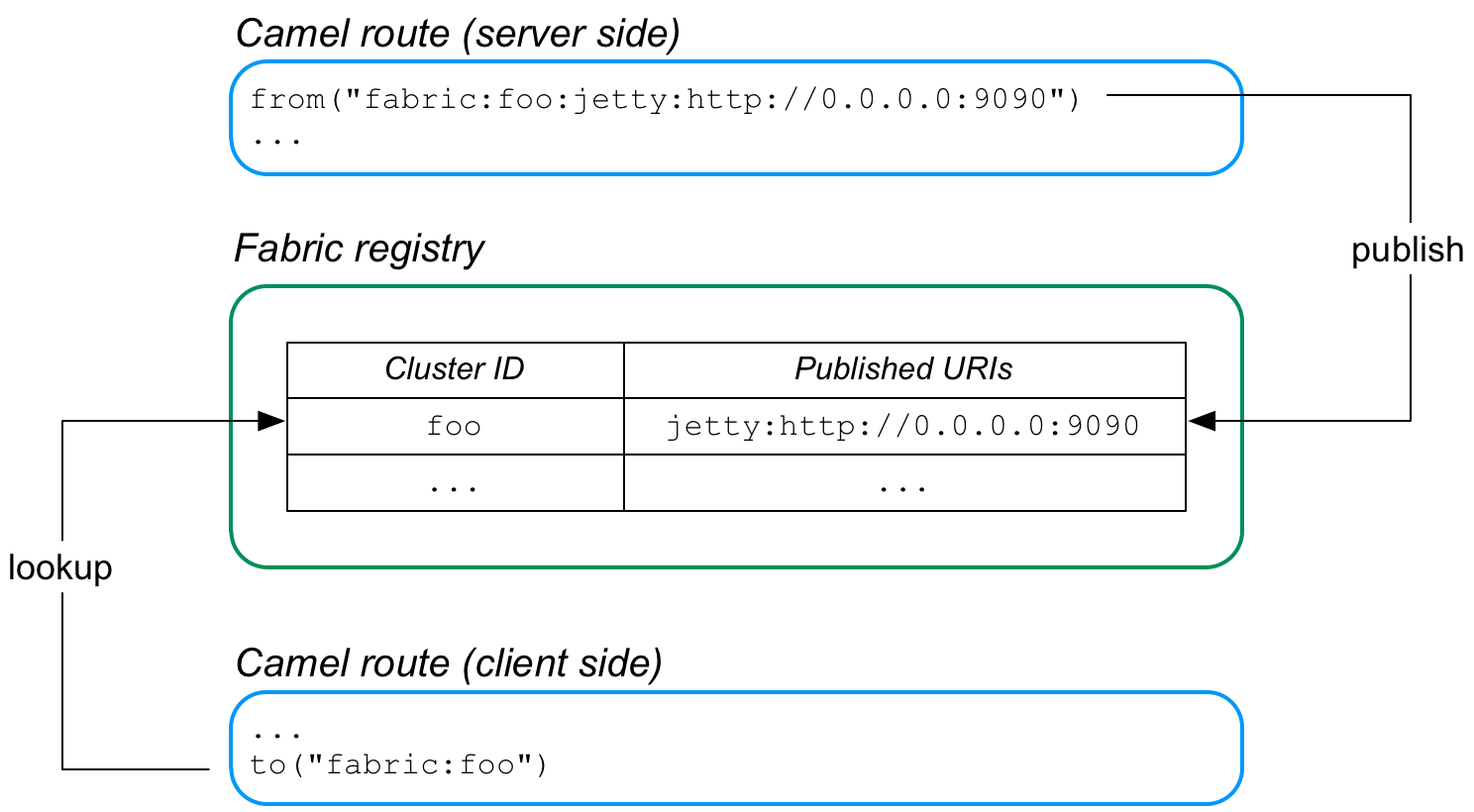
The server side of this application is defined by a route that starts with a Fabric endpoint, where the Fabric endpoint publishes the URI,
jetty:http://0.0.0.0:9090. When this route is started, it automatically registers the Jetty URI in the fabric registry, under the cluster ID, foo.
The client side of the application is defined by a route that ends with the Fabric endpoint,
fabric:foo. Now, when the client route starts, it automatically looks up the ID, foo, in the fabric registry and retrieves the associated Jetty endpoint URI. The client then creates a producer endpoint using the discovered Jetty URI and connects to the corresponding server port.
Load-balancing cluster
复制链接链接已复制到粘贴板!
Figure 34.2, “Load Balancing through Fabric” gives an overview of how Fabric endpoints enable you to create a load-balancing cluster.
Figure 34.2. Load Balancing through Fabric
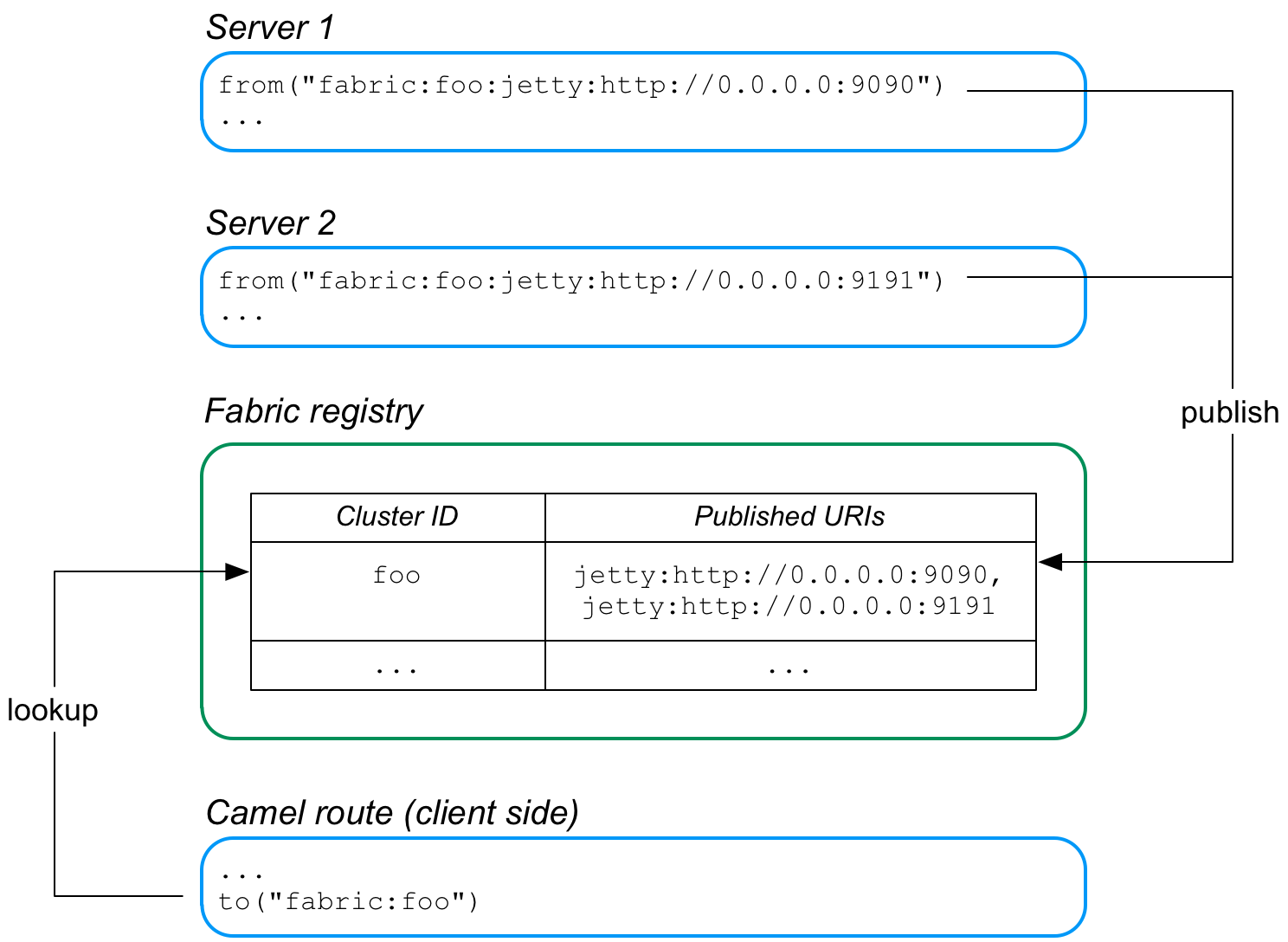
In this case, two Jetty servers are created, with the URIs,
jetty:http://0.0.0.0:9090 and jetty:http://0.0.0.0:9191. Because these published URIs are both prefixed by fabric:foo:, both of the Jetty URIs are registered under the same cluster ID, foo, in the fabric registry.
Now, when the client routes starts, it automatically looks up the ID,
foo, in the fabric registry. Because the foo ID is associated with multiple endpoint URIs, fabric implements a random load balancing algorithm to choose one of the available URIs. The client then creates a producer endpoint, using the chosen URI.
Auto-reconnect feature
复制链接链接已复制到粘贴板!
Fabric endpoints support auto-reconnection. So, if a client endpoint (producer endpoint) loses its connection to a server endpoint, it will automatically go back to the fabric registry, ask for another URI, and then connect to the new URI.
Publishing an endpoint URI
复制链接链接已复制到粘贴板!
To publish an endpoint URI,
PublishedURI, in the fabric registry, define a fabric endpoint with the publisher syntax, FabricScheme:ClusterID:PublishedURI. Note that this syntax can only be used in a consumer endpoint (that is, an endpoint that appears in a from DSL command).
Example 34.1, “Publishing a URI ” shows a route that implements a Jetty HTTP server, where the Jetty URI is published to the fabric registry under the ID,
cluster. The route is a simply HTTP server that returns the constant message, Response from Zookeeper agent, in the body of the HTTP response.
Example 34.1. Publishing a URI
Note the following points about the preceding sample:
- A reference to the
org.apache.curator.framework.CuratorFrameworkOSGi service is created using thereferenceelement. Apache Curator is a ZooKeeper client component that manages connections to the ZooKeeper server, providing a high quality of service (including automatic reconnection).NoteTheCuratorFrameworkOSGi service is provided by the fabric agent. Hence, a fabric agent must already be installed and running in the container where the route is deployed. - The Fabric component uses the
CuratorFrameworkobject to connect to the ZooKeeper server (Fabric registry). - The
fromDSL command defines the fabric URI,fabric-camel:cluster:jetty:http://0.0.0.0:9090/fabric. At run time, this causes two things to happen:- The specified
jettyURI is published to the fabric registry under the cluster ID,cluster. - The Jetty endpoint is activated and used as the consumer endpoint of the route (just as if it had been specified without the
fabric-camel:cluster:prefix).
Because the route is implemented in blueprint XML, you would normally add the file containing this code to the
src/main/resources/OSGI-INF/blueprint directory of a Maven project.
Looking up an endpoint URI
复制链接链接已复制到粘贴板!
To look up a URI in the fabric registry, simply specify the fabric endpoint URI with an ID, in the format,
FabricScheme:ClusterID. This syntax is used in a producer endpoint (for example, an endpoint that appears in a to DSL command).
Example 34.2, “Looking up a URI” shows a route that implements a HTTP client, where the HTTP endpoint is discovered dynamically at run time, by looking up the specified ID,
cluster, in the fabric registry.
Example 34.2. Looking up a URI
The client route also needs a reference to the
org.apache.curator.framework.CuratorFramework OSGi service, which the Fabric component uses to connect to the underlying fabric.
Because the route is implemented in blueprint XML, you would normally add the file containing this code to the
src/main/resources/OSGI-INF/blueprint directory of a Maven project.
Load-balancing example
复制链接链接已复制到粘贴板!
In principle, implementing load balancing is easy using fabric endpoints. All that you have to do is to publish more than one endpoint URI under the same cluster ID. Now, when a client looks up that cluster ID, it gets a random selection out of the list of available endpoint URIs.
The servers in the load-balancing cluster have almost the same configuration. Essentially, the only difference between them is that they publish an endpoint URI with a different hostname and/or IP port. Instead of creating a separate OSGi bundle for every single server in the load-balancing cluster, however, it is better to define a template that enables you to specify the host or port using a configuration variable.
Example 34.3, “Server Template for a Load-Balancing Cluster” illustrates the template approach to defining servers in a load-balancing cluster.
Example 34.3. Server Template for a Load-Balancing Cluster
First of all, you need to initialize the OSGi blueprint property placeholder. The property placeholder mechanism enables you to read property settings from the OSGi Config Admin service and substitute the properties in the blueprint configuration file. In this example, the property placeholder accesses properties from the
io.fabric8.examples.camel.loadbalancing.server persistent ID. A persistent ID in the OSGi Config Admin service identifies a collection of related property settings. After initializing the property placeholder, you can access any property values from the persistent ID using the syntax, [[PropName]].
The Fabric endpont URI exploits the property placeholder mechanism to substitute the value of the Jetty port,
[[portNumber]], at run time. At deploy time, you can specify the value of the portName property. For example, if using a custom feature, you could specify the property in the feature definition (see Add OSGi configurations to the feature). Alternatively, you can specify configuration properties when defining deployment profiles in the Fuse Management Console.
OSGi bundle plug-in configuration
复制链接链接已复制到粘贴板!
When defining an OSGi bundle that uses Fabric endpoints, the
Import-Package bundle header must be configured to import the following Java packages:
io.fabric8.zookeeper.spring io.fabric8.zookeeper
io.fabric8.zookeeper.spring
io.fabric8.zookeeper
For example, assuming that you use Maven to build your application, Example 34.4, “Maven Bundle Plug-In Configuration” shows how you can configure the Maven bundle plug-in to import the required packages.
Example 34.4. Maven Bundle Plug-In Configuration
Chapter 35. Facebook
复制链接链接已复制到粘贴板!
Facebook Component
复制链接链接已复制到粘贴板!
Available as of Camel 2.12
The Facebook component provides access to all of the Facebook APIs accessible using Facebook4J. It allows producing messages to retrieve, add, and delete posts, likes, comments, photos, albums, videos, photos, checkins, locations, links, etc. It also supports APIs that allow polling for posts, users, checkins, groups, locations, etc.
Facebook requires the use of OAuth for all client application authentication. In order to use camel-facebook with your account, you'll need to create a new application within Facebook at https://developers.facebook.com/apps and grant the application access to your account. The Facebook application's id and secret will allow access to Facebook APIs which do not require a current user. A user access token is required for APIs that require a logged in user. More information on obtaining a user access token can be found at https://developers.facebook.com/docs/facebook-login/access-tokens/.
Maven users will need to add the following dependency to their pom.xml for this component:
URI format
复制链接链接已复制到粘贴板!
facebook://[endpoint]?[options]
facebook://[endpoint]?[options]
FacebookComponent
复制链接链接已复制到粘贴板!
The facebook component can be configured with the Facebook account settings below, which are mandatory. The values can be provided to the component using the bean property configuration of type org.apache.camel.component.facebook.config.FacebookConfiguration. The oAuthAccessToken option may be ommited but that will only allow access to application APIs.
You can also configure these options directly in an endpoint URI.
| Option | Description |
|---|---|
| oAuthAppId | The application Id |
| oAuthAppSecret | The application Secret |
| oAuthAccessToken | The user access token |
In addition to the above settings, non-mandatory options below can be used to configure the underlying Facebook4J runtime through either the component's configuration property or in an endpoint URI.
| Option | Description | Default Value |
|---|---|---|
| oAuthAuthorizationURL | OAuth authorization URL | https://www.facebook.com/dialog/oauth |
| oAuthPermissions | Default OAuth permissions. Comma separeted permission names. See https://developers.facebook.com/docs/reference/login/#permissions for the detail | null |
| oAuthAccessTokenURL | OAuth access token URL | https://graph.facebook.com/oauth/access_token |
| debugEnabled | Enables deubg output. Effective only with the embedded logger | false |
| gzipEnabled | Use Facebook GZIP encoding | true |
| httpConnectionTimeout | Http connection timeout in milliseconds | 20000 |
| httpDefaultMaxPerRoute | HTTP maximum connections per route | 2 |
| httpMaxTotalConnections | HTTP maximum total connections | 20 |
| httpProxyHost | HTTP proxy server host name | null |
| httpProxyPassword | HTTP proxy server password | null |
| httpProxyPort | HTTP proxy server port | null |
| httpProxyUser | HTTP proxy server user name | null |
| httpReadTimeout | Http read timeout in milliseconds | 120000 |
| httpRetryCount | Number of HTTP retries | 0 |
| httpRetryIntervalSeconds | HTTP retry interval in seconds | 5 |
| httpStreamingReadTimeout | HTTP streaming read timeout in milliseconds | 40000 |
| jsonStoreEnabled | If set to true, raw JSON forms will be stored in DataObjectFactory | false |
| mbeanEnabled | If set to true, Facebook4J mbean will be registerd | false |
| prettyDebugEnabled | prettify JSON debug output if set to true | false |
| restBaseURL | API base URL | https://graph.facebook.com/ |
| useSSL | Use SSL | true |
| videoBaseURL | Video API base URL | https://graph-video.facebook.com/ |
| clientURL | Facebook4J API client URL | http://facebook4j.org/en/facebook4j-<ersion>xml |
| clientVersion | Facebook4J client API version | 1.1.12 |
Producer Endpoints:
复制链接链接已复制到粘贴板!
Producer endpoints can use endpoint names and options from the table below. Endpoints can also use the short name without the get or search prefix, except checkin due to ambiguity between getCheckin and searchCheckin. Endpoint options that are not mandatory are denoted by [].
Producer endpoints can also use a special option *inBody* that in turn should contain the name of the endpoint option whose value will be contained in the Camel Exchange In message. For example, the facebook endpoint in the following route retrieves activities for the user id value in the incoming message body.
from("direct:test").to("facebook://activities?inBody=userId")...
from("direct:test").to("facebook://activities?inBody=userId")...
Any of the endpoint options can be provided in either the endpoint URI, or dynamically in a message header. The message header name must be of the format CamelFacebook.option. For example, the userId option value in the previous route could alternately be provided in the message header CamelFacebook.userId. Note that the inBody option overrides message header, e.g. the endpoint option inBody=user would override a CamelFacebook.userId header.
Endpoints that return a String return an Id for the created or modified entity, e.g. addAlbumPhoto returns the new album Id. Endpoints that return a boolean, return true for success and false otherwise. In case of Facebook API errors the endpoint will throw a RuntimeCamelException with a facebook4j.FacebookException cause.
| Endpoint | Short Name | Options | Body Type |
| Accounts | |||
| getAccounts | accounts | [reading],[userId] | facebook4j.ResponseList<acebook4j.Account> |
| Activities | |||
| getActivities | activities | [reading],[userId] | facebook4j.ResponseList<acebook4j.Activity> |
| Albums | |||
| addAlbumPhoto | addAlbumPhoto | albumId,source,[message] | String |
| commentAlbum | commentAlbum | albumId,message | String |
| createAlbum | createAlbum | albumCreate,[userId] | String |
| getAlbum | album | albumId,[reading] | facebook.Album |
| getAlbumComments | albumComments | albumId,[reading] | facebook4j.ResponseList<acebook4j.Comment> |
| getAlbumCoverPhoto | albumCoverPhoto | albumId | java.net.URL |
| getAlbumLikes | albumLikes | albumId,[reading] | facebook4j.ResponseList<acebook4j.Like> |
| getAlbumPhotos | albumPhotos | albumId,[reading] | facebook4j.ResponseList<acebook4j.Photos> |
| getAlbums | albums | [reading],[userId] | facebook4j.ResponseList<acebook4j.Album> |
| likeAlbum | likeAlbum | albumId | boolean |
| unlikeAlbum | unlikeAlbum | albumId | boolean |
| Checkins | |||
| checkin | checkin | checkinCreate,[userId] | String |
| commentCheckin | commentCheckin | checkinId,message | String |
| getCheckin | checkin | checkinId,[reading] | facebook4j.Checkin |
| getCheckinComments | checkinComments | checkinId,[reading] | facebook4j.ResponseList<acebook4j.Comment> |
| getCheckinLikes | checkinLikes | checkinId,[reading] | facebook4j.ResponseList<acebook4j.Like> |
| getCheckins | checkins | [reading],[userId] | facebook4j.ResponseList<acebook4j.Checkin> |
| likeCheckin | likeCheckin | checkinId | boolean |
| unlikeCheckin | unlikeCheckin | checkinId | boolean |
| Comments | |||
| deleteComment | deleteComment | commentId | boolean |
| getComment | comment | commentId | facebook4j.Comment |
| getCommentLikes | commentLikes | commentId,[reading] | facebook4j.ResponseList<acebook4j.Like> |
| likeComment | likeComment | commentId | boolean |
| unlikeComment | unlikeComment | commentId | boolean |
| Domains | |||
| getDomain | domain | domainId | facebook4j.Domain |
| getDomainByName | domainByName | domainName | facebook4j.Domain |
| getDomainsByName | domainsByName | domainNames | java.util.List<acebook4j.Domain> |
| Events | |||
| createEvent | createEvent | eventUpdate,[userId] | String |
| deleteEvent | deleteEvent | eventId | boolean |
| deleteEventPicture | deleteEventPicture | eventId | boolean |
| editEvent | editEvent | eventId,eventUpdate | boolean |
| getEvent | event | eventId,[reading] | facebook4j.Event |
| getEventFeed | eventFeed | eventId,[reading] | facebook4j.ResponseList<acebook4j.Post> |
| getEventPhotos | eventPhotos | eventId,[reading] | facebook4j.ResponseList<acebook4j.Photo> |
| getEventPictureURL | eventPictureURL | eventId,[size] | java.net.URL |
| getEvents | events | [reading],[userId] | facebook4j.ResponseList<acebook4j.Event> |
| getEventVideos | eventVideos | eventId,[reading] | facebook4j.ResponseList<acebook4j.Video> |
| getRSVPStatusAsInvited | rSVPStatusAsInvited | eventId,[userId] | facebook4j.ResponseList<acebook4j.RSVPStatus> |
| getRSVPStatusAsNoreply | rSVPStatusAsNoreply | eventId,[userId] | facebook4j.ResponseList<acebook4j.RSVPStatus> |
| getRSVPStatusInAttending | rSVPStatusInAttending | eventId,[userId] | facebook4j.ResponseList<acebook4j.RSVPStatus> |
| getRSVPStatusInDeclined | rSVPStatusInDeclined | eventId,[userId] | facebook4j.ResponseList<acebook4j.RSVPStatus> |
| getRSVPStatusInMaybe | rSVPStatusInMaybe | eventId,[userId] | facebook4j.ResponseList<acebook4j.RSVPStatus> |
| inviteToEvent | inviteToEvent | eventId,[userId],[userIds] | boolean |
| postEventFeed | postEventFeed | eventId,postUpdate | String |
| postEventLink | postEventLink | eventId,link,[message] | String |
| postEventPhoto | postEventPhoto | eventId,source,[message] | String |
| postEventStatusMessage | postEventStatusMessage | eventId,message | String |
| postEventVideo | postEventVideo | eventId,source,[title,description] | String |
| rsvpEventAsAttending | rsvpEventAsAttending | eventId | boolean |
| rsvpEventAsDeclined | rsvpEventAsDeclined | eventId | boolean |
| rsvpEventAsMaybe | rsvpEventAsMaybe | eventId | boolean |
| uninviteFromEvent | uninviteFromEvent | eventId,userId | boolean |
| updateEventPicture | updateEventPicture | eventId,source | boolean |
| Family | |||
| getFamily | family | [reading],[userId] | facebook4j.ResponseList<acebook4j.Family> |
| Favorites | |||
| getBooks | books | [reading],[userId] | facebook4j.ResponseList<acebook4j.Book> |
| getGames | games | [reading],[userId] | facebook4j.ResponseList<acebook4j.Game> |
| getInterests | interests | [reading],[userId] | facebook4j.ResponseList<acebook4j.Interest> |
| getMovies | movies | [reading],[userId] | facebook4j.ResponseList<acebook4j.Movie> |
| getMusic | music | [reading],[userId] | facebook4j.ResponseList<acebook4j.Music> |
| getTelevision | television | [reading],[userId] | facebook4j.ResponseList<acebook4j.Television> |
| Facebook Query Language (FQL) | |||
| executeFQL | executeFQL | query,[locale] | facebook4j.internal.org.json.JSONArray |
| executeMultiFQL | executeMultiFQL | queries,[locale] | java.util.Map<tring,facebook4j.internal.org.json.JSONArray> |
| Friends | |||
| addFriendlistMember | addFriendlistMember | friendlistId,userId | boolean |
| createFriendlist | createFriendlist | friendlistName,[userId] | String |
| deleteFriendlist | deleteFriendlist | friendlistId | boolean |
| getBelongsFriend | belongsFriend | friendId,[reading],[userId] | facebook4j.ResponseList<acebook4j.Friend> |
| getFriendlist | friendlist | friendlistId,[reading] | facebook4j.FriendList |
| getFriendlistMembers | friendlistMembers | friendlistId | facebook4j.ResponseList<acebook4j.Friend> |
| getFriendlists | friendlists | [reading],[userId] | facebook4j.ResponseList<acebook4j.FriendList> |
| getFriendRequests | friendRequests | [reading],[userId] | facebook4j.ResponseList<acebook4j.FriendRequest> |
| getFriends | friends | [reading],[userId] | facebook4j.ResponseList<acebook4j.Friend> |
| getMutualFriends | mutualFriends | [friendUserId],[reading],[userId1,userId2] | facebook4j.ResponseList<acebook4j.Friend> |
| removeFriendlistMember | removeFriendlistMember | friendlistId,userId | boolean |
| Games | |||
| deleteAchievement | deleteAchievement | achievementURL,[userId] | boolean |
| deleteScore | deleteScore | [userId] | boolean |
| getAchievements | achievements | [reading],[userId] | facebook4j.ResponseList<acebook4j.Achievement> |
| getScores | scores | [reading],[userId] | facebook4j.ResponseList<acebook4j.Score> |
| postAchievement | postAchievement | achievementURL,[userId] | String |
| postScore | postScore | scoreValue,[userId] | String |
| Groups | |||
| getGroup | group | groupId,[reading] | facebook4j.Group |
| getGroupDocs | groupDocs | groupId,[reading] | facebook4j.ResponseList<acebook4j.GroupDoc> |
| getGroupFeed | groupFeed | groupId,[reading] | facebook4j.ResponseList<acebook4j.Post> |
| getGroupMembers | groupMembers | groupId,[reading] | facebook4j.ResponseList<acebook4j.GroupMember> |
| getGroupPictureURL | groupPictureURL | groupId | java.net.URL |
| getGroups | groups | [reading],[userId] | facebook4j.ResponseList<acebook4j.Group> |
| postGroupFeed | postGroupFeed | groupId,postUpdate | String |
| postGroupLink | postGroupLink | groupId,link,[message] | String |
| postGroupStatusMessage | postGroupStatusMessage | groupId,message | String |
| Insights | |||
| getInsights | insights | objectId,metric,[reading] | facebook4j.ResponseList<acebook4j.Insight> |
| Likes | |||
| getUserLikes | userLikes | [reading],[userId] | facebook4j.ResponseList<acebook4j.Like> |
| Links | |||
| commentLink | commentLink | linkId,message | String |
| getLink | link | linkId,[reading] | facebook4j.Link |
| getLinkComments | linkComments | linkId,[reading] | facebook4j.ResponseList<acebook4j.Comment> |
| getLinkLikes | linkLikes | linkId,[reading] | facebook4j.ResponseList<acebook4j.Like> |
| likeLink | likeLink | linkId | boolean |
| unlikeLink | unlikeLink | linkId | boolean |
| Locations | |||
| getLocations | locations | [reading],[userId] | facebook4j.ResponseList<acebook4j.Location> |
| Messages | |||
| getInbox | inbox | [reading],[userId] | facebook4j.InboxResponseList<acebook4j.Inbox> |
| getMessage | message | messageId,[reading] | facebook4j.Message |
| getOutbox | outbox | [reading],[userId] | facebook4j.ResponseList<acebook4j.Message> |
| getUpdates | updates | [reading],[userId] | facebook4j.ResponseList<acebook4j.Message> |
| Notes | |||
| commentNote | commentNote | noteId,message | String |
| createNote | createNote | subject,message,[userId] | String |
| getNote | note | noteId,[reading] | facebook4j.Note |
| getNoteComments | noteComments | noteId,[reading] | facebook4j.ResponseList<acebook4j.Comment> |
| getNoteLikes | noteLikes | noteId,[reading] | facebook4j.ResponseList<acebook4j.Like> |
| getNotes | notes | [reading],[userId] | facebook4j.ResponseList<acebook4j.Note> |
| likeNote | likeNote | noteId | boolean |
| unlikeNote | unlikeNote | noteId | boolean |
| Notifications | |||
| getNotifications | notifications | [includeRead],[reading],[userId] | facebook4j.ResponseList<acebook4j.Notification> |
| markNotificationAsRead | markNotificationAsRead | notificationId | boolean |
| Permissions | |||
| getPermissions | permissions | [userId] | java.util.List<acebook4j.Permission> |
| revokePermission | revokePermission | permissionName,[userId] | boolean |
| Photos | |||
| addTagToPhoto | addTagToPhoto | photoId,[toUserId],[toUserIds],[tagUpdate] | boolean |
| commentPhoto | commentPhoto | photoId,message | String |
| deletePhoto | deletePhoto | photoId | boolean |
| getPhoto | photo | photoId,[reading] | facebook4j.Photo |
| getPhotoComments | photoComments | photoId,[reading] | facebook4j.ResponseList<acebook4j.Comment> |
| getPhotoLikes | photoLikes | photoId,[reading] | facebook4j.ResponseList<acebook4j.Like> |
| getPhotos | photos | [reading],[userId] | facebook4j.ResponseList<acebook4j.Photo> |
| getPhotoURL | photoURL | photoId | java.net.URL |
| getTagsOnPhoto | tagsOnPhoto | photoId,[reading] | facebook4j.ResponseList<acebook4j.Tag> |
| likePhoto | likePhoto | photoId | boolean |
| postPhoto | postPhoto | source,[message],[place],[noStory],[userId] | String |
| unlikePhoto | unlikePhoto | photoId | boolean |
| updateTagOnPhoto | updateTagOnPhoto | photoId,[toUserId],[tagUpdate] | boolean |
| Pokes | |||
| getPokes | pokes | [reading],[userId] | facebook4j.ResponseList<acebook4j.Poke> |
| Posts | |||
| commentPost | commentPost | postId,message | String |
| deletePost | deletePost | postId | boolean |
| getFeed | feed | [reading],[userId] | facebook4j.ResponseList<acebook4j.Post> |
| getHome | home | [reading] | facebook4j.ResponseList<acebook4j.Post> |
| getLinks | links | [reading],[userId] | facebook4j.ResponseList<acebook4j.Link> |
| getPost | post | postId,[reading] | facebook4j.Post |
| getPostComments | postComments | postId,[reading] | facebook4j.ResponseList<acebook4j.Comment> |
| getPostLikes | postLikes | postId,[reading] | facebook4j.ResponseList<acebook4j.Like> |
| getPosts | posts | [reading],[userId] | facebook4j.ResponseList<acebook4j.Post> |
| getStatuses | statuses | [reading],[userId] | facebook4j.ResponseList<acebook4j.Post> |
| getTagged | tagged | [reading],[userId] | facebook4j.ResponseList<acebook4j.Post> |
| likePost | likePost | postId | boolean |
| postFeed | postFeed | postUpdate,[userId] | String |
| postLink | postLink | link,[message],[userId] | String |
| postStatusMessage | postStatusMessage | message,[userId] | String |
| unlikePost | unlikePost | postId | boolean |
| Questions | |||
| addQuestionOption | addQuestionOption | questionId,optionDescription | String |
| createQuestion | createQuestion | question,[options],[allowNewOptions],[userId] | String |
| deleteQuestion | deleteQuestion | questionId | boolean |
| getQuestion | question | questionId,[reading] | facebook4j.Question |
| getQuestionOptions | questionOptions | questionId,[reading] | facebook4j.ResponseList<acebook4j.Question.Option> |
| getQuestionOptionVotes | questionOptionVotes | questionId | facebook4j.ResponseList<acebook4j.QuestionVotes> |
| getQuestions | questions | [reading],[userId] | facebook4j.ResponseList<acebook4j.Question> |
| getSubscribedto | subscribedto | [reading],[userId] | facebook4j.ResponseList<acebook4j.Subscribedto> |
| getSubscribers | subscribers | [reading],[userId] | facebook4j.ResponseList<acebook4j.Subscriber> |
| Test Users | |||
| createTestUser | createTestUser | appId,[name],[userLocale],[permissions] | facebook4j.TestUser |
| deleteTestUser | deleteTestUser | testUserId | boolean |
| getTestUsers | testUsers | appId | java.util.List<acebook4j.TestUser> |
| makeFriendTestUser | makeFriendTestUser | testUser1,testUser2 | boolean |
| Users | |||
| getMe | me | [reading] | facebook4j.User |
| getPictureURL | pictureURL | [size],[userId] | java.net.URL |
| getUser | user | userId,[reading] | facebook4j.User |
| getUsers | users | ids | java.util.List<acebook4j.User> |
| Videos | |||
| commentVideo | commentVideo | videoId,message | String |
| getVideo | video | videoId,[reading] | facebook4j.Video |
| getVideoComments | videoComments | videoId,[reading] | facebook4j.ResponseList<acebook4j.Comment> |
| getVideoCover | videoCover | videoId | java.net.URL |
| getVideoLikes | videoLikes | videoId,[reading] | facebook4j.ResponseList<acebook4j.Like> |
| getVideos | videos | [reading],[userId] | facebook4j.ResponseList<acebook4j.Video> |
| likeVideo | likeVideo | videoId | boolean |
| postVideo | postVideo | source,[title,description],[userId] | String |
| unlikeVideo | unlikeVideo | videoId | boolean |
| Search | |||
| search | search | query,[reading] | facebook4j.ResponseList<acebook4j.internal.org.json.JSONObject> |
| searchCheckins | checkins | [reading] | facebook4j.ResponseList<acebook4j.Checkin> |
| searchEvents | events | query,[reading] | facebook4j.ResponseList<acebook4j.Event> |
| searchGroups | groups | query,[reading] | facebook4j.ResponseList<acebook4j.Group> |
| searchLocations | locations | [center,distance],[reading],[placeId] | facebook4j.ResponseList<acebook4j.Location> |
| searchPlaces | places | query,[reading],[center,distance] | facebook4j.ResponseList<acebook4j.Place> |
| searchPosts | posts | query,[reading] | facebook4j.ResponseList<acebook4j.Post> |
| searchUsers | users | query,[reading] | facebook4j.ResponseList<acebook4j.User> |
Consumer Endpoints:
复制链接链接已复制到粘贴板!
Any of the producer endpoints that take a reading#reading parameter can be used as a consumer endpoint. The polling consumer uses the since and until fields to get responses within the polling interval. In addition to other reading fields, an initial since value can be provided in the endpoint for the first poll.
Rather than the endpoints returning a List (or facebook4j.ResponseList) through a single route exchange, camel-facebook creates one route exchange per returned object. As an example, if "facebook://home" results in five posts, the route will be executed five times (once for each Post).
- URI Options #
| Name | Type | Description |
|---|---|---|
| achievementURL | java.net.URL | The unique URL of the achievement |
| albumCreate | facebook4j.AlbumCreate | The facebook Album to be created |
| albumId | String | The album ID |
| allowNewOptions | boolean | True if allows other users to add new options |
| appId | String | The ID of the Facebook Application |
| center | facebook4j.GeoLocation | Location latitude and longitude |
| checkinCreate | facebook4j.CheckinCreate | The checkin to be created. Deprecated, instead create a Post with an attached location |
| checkinId | String | The checkin ID |
| commentId | String | The comment ID |
| description | String | The description text |
| distance | int | Distance in meters |
| domainId | String | The domain ID |
| domainName | String | The domain name |
| domainNames | String[] | The domain names |
| eventId | String | The event ID |
| eventUpdate | facebook4j.EventUpdate | The event to be created or updated |
| friendId | String | The friend ID |
| friendUserId | String | The friend user ID |
| friendlistId | String | The friend list ID |
| friendlistName | String | The friend list Name |
| groupId | String | The group ID |
| ids | String[] | The ids of users |
| includeRead | boolean | Enables notifications that the user has already read in addition to unread ones |
| link | java.net.URL | Link URL |
| linkId | String | The link ID |
| locale | java.util.Locale | Desired FQL locale |
| message | String | The message text |
| messageId | String | The message ID |
| metric | String | The metric name |
| name | String | Test user name, must be of the form 'first last' |
| noStory | boolean | If set to true, optionally suppresses the feed story that is automatically generated on a user's profile when they upload a photo using your application. |
| noteId | String | The note ID |
| notificationId | String | The notification ID |
| objectId | String | The insight object ID |
| optionDescription | String | The question's answer option description |
| options | java.util.List<tring> | The question's answer options |
| permissionName | String | The permission name |
| permissions | String | Test user permissions in the format perm1,perm2,... |
| photoId | String | The photo ID |
| place | String | The Facebook ID of the place associated with the Photo |
| placeId | String | The place ID |
| postId | String | The post ID |
| postUpdate | facebook4j.PostUpdate | The post to create or update |
| queries | java.util.Map<tring> | FQL queries |
| query | String | FQL query or search terms for search* endpoints |
| question | String | The question text |
| questionId | String | The question id |
| reading | facebook4j.Reading | Optional reading parameters. See Reading Options(#reading) |
| scoreValue | int | The numeric score with value |
| size | facebook4j.PictureSize | The picture size, one of large, normal, small or square |
| source | facebook4j.Media | The media content from either a java.io.File or java.io.Inputstream |
| subject | String | The note of the subject |
| tagUpdate | facebook4j.TagUpdate | Photo tag information |
| testUser1 | facebook4j.TestUser | Test user |
| testUser2 | facebook4j.TestUser | Test user |
| testUserId | String | The ID of the test user |
| title | String | The title text |
| toUserId | String | The ID of the user to tag |
| toUserIds | java.util.List<tring> | The IDs of the users to tag |
| userId | String | The Facebook user ID |
| userId1 | String | The ID of a user |
| userId2 | String | The ID of a user |
| userIds | String[] | The IDs of users to invite to event |
| userLocale | String | The test user locale |
| videoId | String | The video ID |
Reading Options
复制链接链接已复制到粘贴板!
The reading option of type facebook4j.Reading adds support for reading parameters, which allow selecting specific fields, limits the number of results, etc. For more information see Graph API#reading - Facebook Developers.
It is also used by consumer endpoints to poll Facebook data to avoid sending duplicate messages across polls.
The reading option can be a reference or value of type facebook4j.Reading, or can be specified using the following reading options in either the endpoint URI or exchange header with CamelFacebook. prefix.
| Option | Description |
|---|---|
| reading.fields | Field names to retrieve, in the format field1,field2,... |
| reading.limit | Limit for number of items to return for list results, e.g. a limit of 10 returns items 1 through 10 |
| reading.offset | Starting offset for list results, e.g. a limit of 10, and offset of 10 returns items 11 through 20 |
| reading.until | A Unix timestamp or strtotime data value that points to the end of the range of time-based data |
| reading.since | A Unix timestamp or strtotime data value that points to the start of the range of time-based data |
| reading.locale | Retrieve localized content in a particular locale, specified as a String with the format language[,country][,variant] |
| reading.with | Retrieve information about objects that have location information attached, set it to true |
| reading.metadata | Use Facebook Graph API Introspection to retrieve object metadata, set it to true |
| reading.filter | User's stream filter key. See Facebook stream_filter |
Message header
复制链接链接已复制到粘贴板!
Any of the URI options#urioptions can be provided in a message header for producer endpoints with CamelFacebook. prefix.
Message body
复制链接链接已复制到粘贴板!
All result message bodies utilize objects provided by the Facebook4J API. Producer endpoints can specify the option name for incoming message body in the inBody endpoint parameter.
For endpoints that return an array, or facebook4j.ResponseList, or java.util.List, a consumer endpoint will map every elements in the list to distinct messages.
Use cases
复制链接链接已复制到粘贴板!
To create a post within your Facebook profile, send this producer a facebook4j.PostUpdate body.
from("direct:foo")
.to("facebook://postFeed/inBody=postUpdate);
from("direct:foo")
.to("facebook://postFeed/inBody=postUpdate);
To poll, every 5 sec., all statuses on your home feed:
from("facebook://home?delay=5")
.to("bean:blah");
from("facebook://home?delay=5")
.to("bean:blah");
Searching using a producer with dynamic options from header.
In the bar header we have the Facebook search string we want to execute in public posts, so we need to assign this value to the CamelFacebook.query header.
from("direct:foo")
.setHeader("CamelFacebook.query", header("bar"))
.to("facebook://posts");
from("direct:foo")
.setHeader("CamelFacebook.query", header("bar"))
.to("facebook://posts");
Chapter 36. File2
复制链接链接已复制到粘贴板!
File Component - Apache Camel 2.0 onwards
复制链接链接已复制到粘贴板!
The File component provides access to file systems, allowing files to be processed by any other Apache Camel Components or messages from other components to be saved to disk.
URI format
复制链接链接已复制到粘贴板!
file:directoryName[?options]
file:directoryName[?options]
or
file://directoryName[?options]
file://directoryName[?options]
Where directoryName represents the underlying file directory.
You can append query options to the URI in the following format,
?option=value&option=value&...
Note
Apache Camel only supports endpoints configured with a starting directory. So the directoryName must be a directory. If you want to consume a single file only, you can use the fileName option, e.g. by setting
fileName=thefilename. Also, the starting directory must not contain dynamic expressions with ${ } placeholders. Again use the fileName option to specify the dynamic part of the filename.
Avoid reading files currently being written by another application
Beware the JDK File IO API is a bit limited in detecting whether another application is currently writing/copying a file. And the implementation can be different depending on OS platform as well. This could lead to that Apache Camel thinks the file is not locked by another process and start consuming it. Therefore you have to do you own investigation as to what suits your environment. To help with this, Apache Camel provides different
readLock options and the doneFileOption option that you can use. See also the section the section called “Consuming files from folders where others drop files directly”.
URI Options
复制链接链接已复制到粘贴板!
| Name | Default Value | Description |
|---|---|---|
autoCreate
|
true
|
Automatically create missing directories in the file's pathname. For the file consumer, that means creating the starting directory. For the file producer, it means the directory where the files should be written. |
bufferSize
|
128kb | Write buffer sized in bytes. |
fileName
|
null
|
Use Expression such as File Language to dynamically set the filename. For consumers, it's used as a filename filter. For producers, it's used to evaluate the filename to write. If an expression is set, it take precedence over the CamelFileName header. (Note: The header itself can also be an Expression). The expression options support both String and Expression types. If the expression is a String type, it is always evaluated using the File Language. If the expression is an Expression type, the specified Expression type is used - this allows you, for instance, to use OGNL expressions. For the consumer, you can use it to filter filenames, so you can for instance consume today's file using the File Language syntax: mydata-${date:now:yyyyMMdd}.txt. From Camel 2.11 onwards the producers support the CamelOverruleFileName header which takes precedence over any existing CamelFileName header; the CamelOverruleFileName is a header that is used only once, and makes it easier as this avoids to temporary store CamelFileName and have to restore it afterwards.
|
flatten
|
false
|
Flatten is used to flatten the file name path to strip any leading paths, so it's just the file name. This allows you to consume recursively into sub-directories, but when you eg write the files to another directory they will be written in a single directory. Setting this to true on the producer enforces that any file name recived in CamelFileName header will be stripped for any leading paths.
|
charset
|
null
|
Camel 2.5: this option is used to specify the encoding of the file, and camel will set the Exchange property with Exchange.CHARSET_NAME with the value of this option. |
copyAndDeleteOnRenameFail
|
true
|
Camel 2.9: whether to fallback and do a copy and delete file, in case the file could not be renamed directly. This option is not available for the FTP component. |
Consumer only
复制链接链接已复制到粘贴板!
| Name | Default Value | Description |
|---|---|---|
initialDelay
|
1000
|
Milliseconds before polling the file/directory starts. |
delay
|
500
|
Milliseconds before the next poll of the file/directory. |
useFixedDelay
|
true
|
Set to true to use fixed delay between pools, otherwise fixed rate is used. See ScheduledExecutorService in JDK for details.
|
runLoggingLevel
|
TRACE
|
Camel 2.8: The consumer logs a start/complete log line when it polls. This option allows you to configure the logging level for that. |
recursive
|
false
|
If a directory, will look for files in all the sub-directories as well. |
delete
|
false
|
If true, the file will be deleted after it is processed
|
noop
|
false
|
If true, the file is not moved or deleted in any way. This option is good for readonly data, or for ETL type requirements. If noop=true, Apache Camel will set idempotent=true as well, to avoid consuming the same files over and over again.
|
preMove
|
null
|
Use Expression such as File Language to dynamically set the filename when moving it before processing. For example to move in-progress files into the order directory set this value to order.
|
move
|
.camel
|
Use Expression such as File Language to dynamically set the filename when moving it after processing. To move files into a .done subdirectory just enter .done.
|
moveFailed
|
null
|
Use Expression such as File Language to dynamically set the filename when moving failed files after processing. To move files into a error subdirectory just enter error. Note: When moving the files to another location it can/will handle the error when you move it to another location so Apache Camel cannot pick up the file again.
|
include
|
null
|
Is used to include files, if filename matches the regex pattern. |
exclude
|
null
|
Is used to exclude files, if filename matches the regex pattern. |
antInclude
|
null
|
Camel 2.10: Ant style filter inclusion, for example antInclude=\*{}*/*{}.txt. Multiple inclusions may be specified in comma-delimited format. See below for more details about ant path filters.
|
antExclude
|
null
|
Camel 2.10: Ant style filter exclusion. If both antInclude and antExclude are used, antExclude takes precedence over antInclude. Multiple exclusions may be specified in comma-delimited format. See below for more details about ant path filters.
|
antFilterCaseSensitive
|
true
|
Camel 2.11: Ant style filter which is case sensitive or not. |
idempotent
|
false
|
Option to use the Idempotent Consumer EIP pattern to let Apache Camel skip already processed files. Will by default use a memory based LRUCache that holds 1000 entries. If noop=true then idempotent will be enabled as well to avoid consuming the same files over and over again.
|
idempotentKey
|
Expression
|
Camel 2.11: To use a custom idempotent key. By default the absolute path of the file is used. You can use the File Language, for example to use the file name and file size, you can do: idempotentKey=$-$ . |
idempotentRepository
|
null
|
Pluggable repository as a org.apache.camel.processor.idempotent.MessageIdRepository class. Will by default use MemoryMessageIdRepository if none is specified and idempotent is true.
|
inProgressRepository
|
memory
|
Pluggable in-progress repository as a org.apache.camel.processor.idempotent.MessageIdRepository class. The in-progress repository is used to account the current in progress files being consumed. By default a memory based repository is used. |
filter
|
null
|
Pluggable filter as a org.apache.camel.component.file.GenericFileFilter class. Will skip files if filter returns false in its accept() method. Apache Camel also ships with an ANT path matcher filter in the camel-spring component. More details in section below.
|
sorter
|
null
|
Pluggable sorter as a java.util.Comparator<org.apache.camel.component.file.GenericFile> class. |
sortBy
|
null
|
Built-in sort using the File Language. Supports nested sorts, so you can have a sort by file name and as a 2nd group sort by modified date. See sorting section below for details. |
readLock
|
markerFile
|
Used by consumer, to only poll the files if it has exclusive read-lock on the file (i.e. the file is not in-progress or being written). Apache Camel will wait until the file lock is granted.
The
readLock option supports the following built-in strategies:
Warning
None of the read lock strategies are suitable for use in clustered mode. That is, you cannot have multiple consumers attempting to read the same file in the same directory. In this case, the read locks will not function reliably.
|
readLockTimeout
|
0 (for FTP, 2000)
|
Optional timeout in milliseconds for the read-lock, if supported by the read-lock. If the read-lock could not be granted and the timeout triggered, then Apache Camel will skip the file. At next poll Apache Camel, will try the file again, and this time maybe the read-lock could be granted. Currently fileLock, changed and rename support the timeout.
|
readLockCheckInterval
|
1000 (for FTP, 5000)
|
Camel 2.6: Interval in millis for the read-lock, if supported by the read lock. This interval is used for sleeping between attempts to acquire the read lock. For example when using the changed read lock, you can set a higher interval period to cater for slow writes. The default of 1 sec. may be too fast if the producer is very slow writing the file.
|
readLockMinLength
|
1
|
Camel 2.10.1: This option applied only for readLock=changed. This option allows you to configure a minimum file length. By default Camel expects the file to contain data, and thus the default value is 1. You can set this option to zero, to allow consuming zero-length files.
|
readLockLoggingLevel
|
WARN
|
Camel 2.12: Logging level used when a read lock could not be acquired. By default a WARN is logged. You can change this level, for example to OFF to not have any logging. This option is only applicable for readLock of types: changed, fileLock, rename. |
exclusiveReadLockStrategy
|
null
|
Pluggable read-lock as a org.apache.camel.component.file.GenericFileExclusiveReadLockStrategy implementation.
|
minDepth
|
0 |
Camel 2.8: The minimum depth to start processing when recursively processing a directory. Using minDepth=1 means the base directory. Using minDepth=2 means the first sub directory. This option is not supported by FTP consumer.
|
maxDepth
|
Integer.MAX_VALUE
|
Camel 2.8: The maximum depth to traverse when recursively processing a directory. This option is not supported by FTP consumer. |
doneFileName
|
null
|
Camel 2.6: If provided, Camel will only consume files if a done file exists. This option configures what file name to use. Either you can specify a fixed name. Or you can use dynamic placeholders. The done file is always expected in the same folder as the original file. See using done file and writing done file sections for examples. |
processStrategy
|
null
|
A pluggable org.apache.camel.component.file.GenericFileProcessStrategy allowing you to implement your own readLock option or similar. Can also be used when special conditions must be met before a file can be consumed, such as a special ready file exists. If this option is set then the readLock option does not apply.
|
maxMessagesPerPoll
|
0
|
An integer that defines the maximum number of messages to gather per poll. By default, no maximum is set. Can be used to set a limit of e.g. 1000 to avoid having the server read thousands of files as it starts up. Set a value of 0 or negative to disabled it. |
startingDirectoryMustExist
|
false
|
Whether the starting directory must exist. Mind that the autoCreate option is default enabled, which means the starting directory is normally auto-created if it doesn't exist. You can disable autoCreate and enable this to ensure the starting directory must exist. Will throw an exception, if the directory doesn't exist.
|
directoryMustExist
|
false
|
Similar to startingDirectoryMustExist but this applies during polling recursive sub-directories.
|
scheduler
|
null
|
Camel 2.12: To use a custom scheduler to trigger the consumer to run. See more details at Polling Consumer, for example there is a Quartz2, and Spring based scheduler that supports CRON expressions. |
backoffMultiplier
|
0
|
Camel 2.12: To let the scheduled polling consumer backoff if there has been a number of subsequent idles/errors in a row. The multiplier is then the number of polls that will be skipped before the next actual attempt is happening again. When this option is in use then backoffIdleThreshold and/or backoffErrorThreshold must also be configured. See more details at Polling Consumer.
|
backoffIdleThreshold
|
0
|
Camel 2.12: The number of subsequent idle polls that should happen before the backoffMultipler should kick-in.
|
backoffErrorThreshold
|
0
|
Camel 2.12: The number of subsequent error polls (failed due some error) that should happen before the backoffMultipler should kick-in.
|
Default behavior for file consumer
复制链接链接已复制到粘贴板!
- By default the file is locked for the duration of the processing.
- After the route has completed, files are moved into the
.camelsubdirectory, so that they appear to be deleted. - The File Consumer will always skip any file whose name starts with a dot, such as
.,.camel,.m2or.groovy. - Only files (not directories) are matched for valid filename, if options such as:
includeNamePrefix,includeNamePostfix,excludeNamePrefix,excludeNamePostfix,regexPatternare used.
Producer only
复制链接链接已复制到粘贴板!
| Name | Default Value | Description |
|---|---|---|
fileExist
|
Override
|
What to do if a file already exists with the same name. The following values can be specified: Override, Append, Fail, Ignore, Move, and TryRename (Camel 2.11.1). Override, which is the default, replaces the existing file. Append adds content to the existing file. Fail throws a GenericFileOperationException, indicating that there is already an existing file. Ignore silently ignores the problem and does not override the existing file, but assumes everything is okay. The Move option requires Camel 2.10.1 onwards, and the corresponding moveExisting option to be configured as well. The option eagerDeleteTargetFile can be used to control what to do if an moving the file, and there exists already an existing file, otherwise causing the move operation to fail. The Move option will move any existing files, before writing the target file. TryRenameCamel 2.11.1 is only applicable if tempFileName option is in use. This allows to try renaming the file from the temporary name to the actual name, without doing any exists check. This check may be faster on some file systems and especially FTP servers.
|
tempPrefix
|
null
|
This option is used to write the file using a temporary name and then, after the write is complete, rename it to the real name. Can be used to identify files being written and also avoid consumers (not using exclusive read locks) reading in progress files. Is often used by FTP when uploading big files. |
tempFileName
|
null
|
Camel 2.1: The same as tempPrefix option but offering a more fine grained control on the naming of the temporary filename as it uses the File Language.
|
keepLastModified
|
false
|
Camel 2.2: Will keep the last modified timestamp from the source file (if any). Will use the Exchange.FILE_LAST_MODIFIED header to located the timestamp. This header can contain either a java.util.Date or long with the timestamp. If the timestamp exists and the option is enabled it will set this timestamp on the written file. Note: This option only applies to the file producer. You cannot use this option with any of the ftp producers.
|
eagerDeleteTargetFile
|
true
|
Camel 2.3: Whether or not to eagerly delete any existing target file. This option only applies when you use fileExists=Override and the tempFileName option as well. You can use this to disable (set it to false) deleting the target file before the temp file is written. For example you may write big files and want the target file to exists during the temp file is being written. This ensure the target file is only deleted until the very last moment, just before the temp file is being renamed to the target filename.
|
doneFileName
|
null
|
Camel 2.6: If provided, then Camel will write a 2nd done file when the original file has been written. The done file will be empty. This option configures what file name to use. Either you can specify a fixed name. Or you can use dynamic placeholders. The done file will always be written in the same folder as the original file. See writing done file section for examples. |
allowNullBody
|
false
|
Camel 2.10.1: Used to specify if a null body is allowed during file writing. If set to true then an empty file will be created, when set to false, and attempting to send a null body to the file component, a GenericFileWriteException of 'Cannot write null body to file.' will be thrown. If the `fileExist` option is set to 'Override', then the file will be truncated, and if set to `append` the file will remain unchanged. |
forceWrites
|
true
|
Camel 2.10.5/2.11: Whether to force syncing writes to the file system. You can turn this off if you do not want this level of guarantee, for example if writing to logs / audit logs etc; this would yield better performance. |
Default behavior for file producer
复制链接链接已复制到粘贴板!
- By default it will override any existing file, if one exist with the same name. In Apache Camel 1.x the
Appendis the default for the file producer. We have changed this toOverridein Apache Camel 2.0 as this is also the default file operation usingjava.io.File. And also the default for the FTP library we use in the camel-ftp component.
Move and Delete operations
复制链接链接已复制到粘贴板!
Any move or delete operations is executed after (post command) the routing has completed; so during processing of the
Exchange the file is still located in the inbox folder.
Lets illustrate this with an example:
from("file://inbox?move=.done").to("bean:handleOrder");
from("file://inbox?move=.done").to("bean:handleOrder");
When a file is dropped in the
inbox folder, the file consumer notices this and creates a new FileExchange that is routed to the handleOrder bean. The bean then processes the File object. At this point in time the file is still located in the inbox folder. After the bean completes, and thus the route is completed, the file consumer will perform the move operation and move the file to the .done sub-folder.
The move and preMove options is considered as a directory name (though if you use an expression such as File Language, or Simple then the result of the expression evaluation is the file name to be used - eg if you set
move=../backup/copy-of-${file:name}
move=../backup/copy-of-${file:name}
then that's using the File Language which we use return the file name to be used), which can be either relative or absolute. If relative, the directory is created as a sub-folder from within the folder where the file was consumed.
By default, Apache Camel will move consumed files to the
.camel sub-folder relative to the directory where the file was consumed.
If you want to delete the file after processing, the route should be:
from("file://inobox?delete=true").to("bean:handleOrder");
from("file://inobox?delete=true").to("bean:handleOrder");
We have introduced a pre move operation to move files before they are processed. This allows you to mark which files have been scanned as they are moved to this sub folder before being processed.
from("file://inbox?preMove=inprogress").to("bean:handleOrder");
from("file://inbox?preMove=inprogress").to("bean:handleOrder");
You can combine the pre move and the regular move:
from("file://inbox?preMove=inprogress&move=.done").to("bean:handleOrder");
from("file://inbox?preMove=inprogress&move=.done").to("bean:handleOrder");
So in this situation, the file is in the
inprogress folder when being processed and after it's processed, it's moved to the .done folder.
Fine grained control over Move and PreMove option
复制链接链接已复制到粘贴板!
The move and preMove option is Expression-based, so we have the full power of the File Language to do advanced configuration of the directory and name pattern. Apache Camel will, in fact, internally convert the directory name you enter into a File Language expression. So when we enter
move=.done Apache Camel will convert this into: ${file:parent}/.done/${file:onlyname}. This is only done if Apache Camel detects that you have not provided a ${ } in the option value yourself. So when you enter an expression containing ${ }, the expression is interpreted as a File Language expression.
So if we want to move the file into a backup folder with today's date as the pattern, we can do:
move=backup/${date:now:yyyyMMdd}/${file:name}
move=backup/${date:now:yyyyMMdd}/${file:name}About moveFailed
复制链接链接已复制到粘贴板!
The
moveFailed option allows you to move files that could not be processed succesfully to another location such as a error folder of your choice. For example to move the files in an error folder with a timestamp you can use moveFailed=/error/${file:name.noext}-${date:now:yyyyMMddHHmmssSSS}.${file:name.ext}.
See more examples at File Language.
Message Headers
复制链接链接已复制到粘贴板!
The following headers are supported by this component:
File producer only
复制链接链接已复制到粘贴板!
| Header | Description |
|---|---|
CamelFileName
|
Specifies the name of the file to write (relative to the endpoint directory). The name can be a String; a String with a File Language or Simple expression; or an Expression object. If it's null then Apache Camel will auto-generate a filename based on the message unique ID.
|
CamelFileNameProduced
|
The actual absolute filepath (path + name) for the output file that was written. This header is set by Camel and its purpose is providing end-users with the name of the file that was written. |
CamelOverruleFileName
|
Camel 2.11: Is used for overruling CamelFileName header and use the value instead (but only once, as the producer will remove this header after writing the file). The value can be only be a String. Notice that if the option fileName has been configured, then this is still being evaluated.
|
File consumer only
复制链接链接已复制到粘贴板!
| Header | Description |
|---|---|
CamelFileName
|
Name of the consumed file as a relative file path with offset from the starting directory configured on the endpoint. |
CamelFileNameOnly
|
Only the file name (the name with no leading paths). |
CamelFileAbsolute
|
A boolean option specifying whether the consumed file denotes an absolute path or not. Should normally be false for relative paths. Absolute paths should normally not be used but we added to the move option to allow moving files to absolute paths. But can be used elsewhere as well.
|
CamelFileAbsolutePath
|
The absolute path to the file. For relative files this path holds the relative path instead. |
CamelFilePath
|
The file path. For relative files this is the starting directory + the relative filename. For absolute files this is the absolute path. |
CamelFileRelativePath
|
The relative path. |
CamelFileParent
|
The parent path. |
CamelFileLength
|
A long value containing the file size.
|
CamelFileLastModified
|
A Date value containing the last modified timestamp of the file.
|
Batch Consumer
复制链接链接已复制到粘贴板!
This component implements the Batch Consumer.
Exchange Properties, file consumer only
复制链接链接已复制到粘贴板!
As the file consumer is
BatchConsumer it supports batching the files it polls. By batching it means that Apache Camel will add some properties to the Exchange so you know the number of files polled the current index in that order.
| Property | Description |
|---|---|
CamelBatchSize
|
The total number of files that was polled in this batch. |
CamelBatchIndex
|
The current index of the batch. Starts from 0. |
CamelBatchComplete
|
A boolean value indicating the last Exchange in the batch. Is only true for the last entry.
|
This allows you for instance to know how many files exists in this batch and for instance let the Aggregator aggregate this number of files.
Common gotchas with folder and filenames
复制链接链接已复制到粘贴板!
When Apache Camel is producing files (writing files) there are a few gotchas affecting how to set a filename of your choice. By default, Apache Camel will use the message ID as the filename, and since the message ID is normally a unique generated ID, you will end up with filenames such as:
ID-MACHINENAME-2443-1211718892437-1-0. If such a filename is not desired, then you must provide a filename in the CamelFileName message header. The constant, Exchange.FILE_NAME, can also be used.
The sample code below produces files using the message ID as the filename:
from("direct:report").to("file:target/reports");
from("direct:report").to("file:target/reports");
To use
report.txt as the filename you have to do:
from("direct:report").setHeader(Exchange.FILE_NAME, constant("report.txt")).to( "file:target/reports");
from("direct:report").setHeader(Exchange.FILE_NAME, constant("report.txt")).to( "file:target/reports");
Or the same as above, but with
CamelFileName:
from("direct:report").setHeader("CamelFileName", constant("report.txt")).to( "file:target/reports");
from("direct:report").setHeader("CamelFileName", constant("report.txt")).to( "file:target/reports");
And a syntax where we set the filename on the endpoint with the fileName URI option.
from("direct:report").to("file:target/reports/?fileName=report.txt");
from("direct:report").to("file:target/reports/?fileName=report.txt");Filename Expression
复制链接链接已复制到粘贴板!
Filename can be set either using the expression option or as a string-based File Language expression in the
CamelFileName header. See the File Language for syntax and samples.
Beware if you consume files from a folder where other applications write files directly. Take a look at the different
readLock options to see what suits your use cases. The best approach is however to write to another folder and after the write move the file in the drop folder. However if you write files directly to the drop folder then the option changed could better detect whether a file is currently being written/copied as it uses a file changed algorithm to see whether the file size / modification changes over a period of time. The other read lock options rely on Java File API that sadly is not always very good at detecting this. You may also want to look at the doneFileName option, which uses a marker file (done) to signal when a file is done and ready to be consumed.
Using done files
复制链接链接已复制到粘贴板!
Available as of Camel 2.6
See also section writing done files below.
If you want only to consume files when a done file exists, then you can use the
doneFileName option on the endpoint.
from("file:bar?doneFileName=done");
from("file:bar?doneFileName=done");
Will only consume files from the bar folder, if a file name done exists in the same directory as the target files. Camel will automatically delete the done file when it's done consuming the files.
However its more common to have one done file per target file. This means there is a 1:1 correlation. To do this you must use dynamic placeholders in the
doneFileName option. Currently Camel supports the following two dynamic tokens: file:name and file:name.noext which must be enclosed in ${ }. The consumer only supports the static part of the done file name as either prefix or suffix (not both).
from("file:bar?doneFileName=${file:name}.done");
from("file:bar?doneFileName=${file:name}.done");
In this example only files will be polled if there exists a done file with the name file name.done. For example
hello.txt- is the file to be consumedhello.txt.done- is the associated done file
You can also use a prefix for the done file, such as:
from("file:bar?doneFileName=ready-${file:name}");
from("file:bar?doneFileName=ready-${file:name}");
hello.txt- is the file to be consumedready-hello.txt- is the associated done file
Writing done files
复制链接链接已复制到粘贴板!
Available as of Camel 2.6
After you have written af file you may want to write an additional done file as a kinda of marker, to indicate to others that the file is finished and has been written. To do that you can use the
doneFileName option on the file producer endpoint.
.to("file:bar?doneFileName=done");
.to("file:bar?doneFileName=done");
Will simply create a file named
done in the same directory as the target file.
However its more common to have one done file per target file. This means there is a 1:1 correlation. To do this you must use dynamic placeholders in the
doneFileName option. Currently Camel supports the following two dynamic tokens: file:name and file:name.noext which must be enclosed in ${ }.
.to("file:bar?doneFileName=done-${file:name}");
.to("file:bar?doneFileName=done-${file:name}");
Will for example create a file named
done-foo.txt if the target file was foo.txt in the same directory as the target file.
.to("file:bar?doneFileName=${file:name}.done");
.to("file:bar?doneFileName=${file:name}.done");
Will for example create a file named
foo.txt.done if the target file was foo.txt in the same directory as the target file.
.to("file:bar?doneFileName=${file:name.noext}.done");
.to("file:bar?doneFileName=${file:name.noext}.done");
Will for example create a file named
foo.done if the target file was foo.txt in the same directory as the target file.
Read from a directory and write to another directory
复制链接链接已复制到粘贴板!
from("file://inputdir/?delete=true").to("file://outputdir")
from("file://inputdir/?delete=true").to("file://outputdir")from("file://inputdir/?delete=true").to("file://outputdir?overruleFile=copy-of-${file:name}")
from("file://inputdir/?delete=true").to("file://outputdir?overruleFile=copy-of-${file:name}")
Listen on a directory and create a message for each file dropped there. Copy the contents to the
outputdir and delete the file in the inputdir.
from("file://inputdir/?recursive=true&delete=true").to("file://outputdir")
from("file://inputdir/?recursive=true&delete=true").to("file://outputdir")
Listen on a directory and create a message for each file dropped there. Copy the contents to the
outputdir and delete the file in the inputdir. Will scan recursively into sub-directories. Will lay out the files in the same directory structure in the outputdir as the inputdir, including any sub-directories.
inputdir/foo.txt inputdir/sub/bar.txt
inputdir/foo.txt
inputdir/sub/bar.txt
Will result in the following output layout:
outputdir/foo.txt outputdir/sub/bar.txt
outputdir/foo.txt
outputdir/sub/bar.txtUsing flatten
复制链接链接已复制到粘贴板!
If you want to store the files in the outputdir directory in the same directory, disregarding the source directory layout (e.g. to flatten out the path), you just add the
flatten=true option on the file producer side:
from("file://inputdir/?recursive=true&delete=true").to("file://outputdir?flatten=true")
from("file://inputdir/?recursive=true&delete=true").to("file://outputdir?flatten=true")
Will result in the following output layout:
outputdir/foo.txt outputdir/bar.txt
outputdir/foo.txt
outputdir/bar.txtReading from a directory and the default move operation
复制链接链接已复制到粘贴板!
Apache Camel will by default move any processed file into a
.camel subdirectory in the directory the file was consumed from.
from("file://inputdir/?recursive=true&delete=true").to("file://outputdir")
from("file://inputdir/?recursive=true&delete=true").to("file://outputdir")
Affects the layout as follows: before
inputdir/foo.txt inputdir/sub/bar.txt
inputdir/foo.txt
inputdir/sub/bar.txt
after
inputdir/.camel/foo.txt inputdir/sub/.camel/bar.txt outputdir/foo.txt outputdir/sub/bar.txt
inputdir/.camel/foo.txt
inputdir/sub/.camel/bar.txt
outputdir/foo.txt
outputdir/sub/bar.txtRead from a directory and process the message in java
复制链接链接已复制到粘贴板!
The body will be a
File object that points to the file that was just dropped into the inputdir directory.
from("file://inputdir/").convertBodyTo(String.class).to("jms:test.queue")
from("file://inputdir/").convertBodyTo(String.class).to("jms:test.queue")
By default the file endpoint sends a
FileMessage which contains a File object as the body. If you send this directly to the JMS component the JMS message will only contain the File object but not the content. By converting the File to a String, the message will contain the file contents, which is probably what you want.
The route above using Spring DSL:
<route>
<from uri="file://inputdir/"/>
<convertBodyTo type="java.lang.String"/>
<to uri="jms:test.queue"/>
</route>
<route>
<from uri="file://inputdir/"/>
<convertBodyTo type="java.lang.String"/>
<to uri="jms:test.queue"/>
</route>Writing to files
复制链接链接已复制到粘贴板!
Apache Camel is of course also able to write files, i.e. produce files. In the sample below we receive some reports on the SEDA queue that we process before they are written to a directory.
Write to subdirectory using Exchange.FILE_NAME
复制链接链接已复制到粘贴板!
Using a single route, it is possible to write a file to any number of subdirectories. If you have a route setup as such:
<route>
<from uri="bean:myBean"/>
<to uri="file:/rootDirectory"/>
</route>
<route>
<from uri="bean:myBean"/>
<to uri="file:/rootDirectory"/>
</route>
You can have
myBean set the header Exchange.FILE_NAME to values such as:
Exchange.FILE_NAME = hello.txt => /rootDirectory/hello.txt Exchange.FILE_NAME = foo/bye.txt => /rootDirectory/foo/bye.txt
Exchange.FILE_NAME = hello.txt => /rootDirectory/hello.txt
Exchange.FILE_NAME = foo/bye.txt => /rootDirectory/foo/bye.txt
This allows you to have a single route to write files to multiple destinations.
Using expression for filenames
复制链接链接已复制到粘贴板!
In this sample we want to move consumed files to a backup folder using today's date as a sub-folder name:
from("file://inbox?move=backup/${date:now:yyyyMMdd}/${file:name}").to("...");
from("file://inbox?move=backup/${date:now:yyyyMMdd}/${file:name}").to("...");
See File Language for more samples.
Apache Camel supports Idempotent Consumer directly within the component so it will skip already processed files. This feature can be enabled by setting the
idempotent=true option.
from("file://inbox?idempotent=true").to("...");
from("file://inbox?idempotent=true").to("...");
Camel uses the absolute file name as the idempotent key, to detect duplicate files. From Camel 2.11 onwards you can customize this key by using an expression in the idempotentKey option. For example to use both the name and the file size as the key
<route>
<from uri="file://inbox?idempotent=true&dempotentKey=${file:name}-${file-size}"/>
<to uri="bean:processInbox"/>
</route>
<route>
<from uri="file://inbox?idempotent=true&dempotentKey=${file:name}-${file-size}"/>
<to uri="bean:processInbox"/>
</route>
By default Apache Camel uses an in-memory based store for keeping track of consumed files, it uses a least recently used cache holding up to 1000 entries. You can plugin your own implementation of this store by using the
idempotentRepository option using the # sign in the value to indicate it's a referring to a bean in the Registry with the specified id.
Apache Camel will log at
DEBUG level if it skips a file because it has been consumed before:
DEBUG FileConsumer is idempotent and the file has been consumed before. Will skip this file: target\idempotent\report.txt
DEBUG FileConsumer is idempotent and the file has been consumed before. Will skip this file: target\idempotent\report.txtUsing a file based idempotent repository
复制链接链接已复制到粘贴板!
In this section we will use the file based idempotent repository
org.apache.camel.processor.idempotent.FileIdempotentRepository instead of the in-memory based that is used as default. This repository uses a 1st level cache to avoid reading the file repository. It will only use the file repository to store the content of the 1st level cache. Thereby the repository can survive server restarts. It will load the content of the file into the 1st level cache upon startup. The file structure is very simple as it stores the key in separate lines in the file. By default, the file store has a size limit of 1mb and when the file grows larger, Apache Camel will truncate the file store and rebuild the content by flushing the 1st level cache into a fresh empty file.
We configure our repository using Spring XML creating our file idempotent repository and define our file consumer to use our repository with the
idempotentRepository using \# sign to indicate Registry lookup:
Using a JPA based idempotent repository
复制链接链接已复制到粘贴板!
In this section we will use the JPA based idempotent repository instead of the in-memory based that is used as default.
First we need a persistence-unit in
META-INF/persistence.xml where we need to use the class org.apache.camel.processor.idempotent.jpa.MessageProcessed as model.
Then we need to setup a Spring
jpaTemplate in the spring XML file:
And finally we can create our JPA idempotent repository in the spring XML file as well:
And then we just need to reference the jpaStore bean in the file consumer endpoint, using the
idempotentRepository option and the # syntax:
<route>
<from uri="file://inbox?idempotent=true&dempotentRepository=#jpaStore"/>
<to uri="bean:processInbox"/>
</route>
<route>
<from uri="file://inbox?idempotent=true&dempotentRepository=#jpaStore"/>
<to uri="bean:processInbox"/>
</route>
Apache Camel supports pluggable filtering strategies. You can then configure the endpoint with such a filter to skip certain files being processed.
In the sample we have built our own filter that skips files starting with
skip in the filename:
And then we can configure our route using the filter attribute to reference our filter (using
# notation) that we have defined in the spring XML file:
Filtering using ANT path matcher
复制链接链接已复制到粘贴板!
The ANT path matcher is shipped out-of-the-box in the camel-spring jar. So you need to depend on camel-spring if you are using Maven. The reasons is that we leverage Spring's AntPathMatcher to do the actual matching.
The file paths is matched with the following rules:
?matches one character*matches zero or more characters**matches zero or more directories in a path
The sample below demonstrates how to use it:
Sorting using Comparator
复制链接链接已复制到粘贴板!
Apache Camel supports pluggable sorting strategies. This strategy it to use the build in
java.util.Comparator in Java. You can then configure the endpoint with such a comparator and have Apache Camel sort the files before being processed.
In the sample we have built our own comparator that just sorts by file name:
public class MyFileSorter implements Comparator<GenericFile> {
public int compare(GenericFile o1, GenericFile o2) {
return o1.getFileName().compareToIgnoreCase(o2.getFileName());
}
}
public class MyFileSorter implements Comparator<GenericFile> {
public int compare(GenericFile o1, GenericFile o2) {
return o1.getFileName().compareToIgnoreCase(o2.getFileName());
}
}
And then we can configure our route using the sorter option to reference to our sorter (
mySorter) we have defined in the spring XML file:
URI options can reference beans using the # syntax
Sorting using sortBy
复制链接链接已复制到粘贴板!
Apache Camel supports pluggable sorting strategies. This strategy it to use the File Language to configure the sorting. The
sortBy option is configured as follows:
sortBy=group 1;group 2;group 3;...
sortBy=group 1;group 2;group 3;...
Where each group is separated with semi colon. In the simple situations you just use one group, so a simple example could be:
sortBy=file:name
sortBy=file:name
This will sort by file name, you can reverse the order by prefixing
reverse: to the group, so the sorting is now Z..A:
sortBy=reverse:file:name
sortBy=reverse:file:name
As we have the full power of File Language we can use some of the other parameters, so if we want to sort by file size we do:
sortBy=file:length
sortBy=file:length
You can configure to ignore the case, using
ignoreCase: for string comparison, so if you want to use file name sorting but to ignore the case then we do:
sortBy=ignoreCase:file:name
sortBy=ignoreCase:file:name
You can combine ignore case and reverse, however reverse must be specified first:
sortBy=reverse:ignoreCase:file:name
sortBy=reverse:ignoreCase:file:name
In the sample below we want to sort by last modified file, so we do:
sortBy=file:modifed
sortBy=file:modifed
And then we want to group by name as a 2nd option so files with same modifcation is sorted by name:
sortBy=file:modifed;file:name
sortBy=file:modifed;file:name
Now there is an issue here, can you spot it? Well the modified timestamp of the file is too fine as it will be in milliseconds, but what if we want to sort by date only and then subgroup by name? Well as we have the true power of File Language we can use the its date command that supports patterns. So this can be solved as:
sortBy=date:file:yyyyMMdd;file:name
sortBy=date:file:yyyyMMdd;file:name
Yeah, that is pretty powerful, oh by the way you can also use reverse per group, so we could reverse the file names:
sortBy=date:file:yyyyMMdd;reverse:file:name
sortBy=date:file:yyyyMMdd;reverse:file:nameUsing GenericFileProcessStrategy
复制链接链接已复制到粘贴板!
The option
processStrategy can be used to use a custom GenericFileProcessStrategy that allows you to implement your own begin, commit and rollback logic. For instance lets assume a system writes a file in a folder you should consume. But you should not start consuming the file before another ready file have been written as well.
So by implementing our own
GenericFileProcessStrategy we can implement this as:
- In the
begin()method we can test whether the special ready file exists. The begin method returns abooleanto indicate if we can consume the file or not. - in the
commit()method we can move the actual file and also delete the ready file.
Important when using
consumer.bridgeErrorHandler
When using
consumer.bridgeErrorHandler, then interceptors, OnCompletions does not apply. The Exchange is processed directly by the Camel error handler, and does not allow prior actions such as interceptors, onCompletion to take action.
Debug logging
复制链接链接已复制到粘贴板!
This component has log level TRACE that can be helpful if you have problems.
See also:
Chapter 37. Flatpack
复制链接链接已复制到粘贴板!
Flatpack Component
复制链接链接已复制到粘贴板!
The Flatpack component supports fixed width and delimited file parsing using the FlatPack library. Notice: This component only supports consuming from flatpack files to Object model. You can not (yet) write from Object model to flatpack format.
Maven users will need to add the following dependency to their
pom.xml for this component:
URI format
复制链接链接已复制到粘贴板!
flatpack:[delim|fixed]:flatPackConfig.pzmap.xml[?options]
flatpack:[delim|fixed]:flatPackConfig.pzmap.xml[?options]
Or for a delimited file handler with no configuration file just use:
flatpack:someName[?options]
flatpack:someName[?options]
You can append query options to the URI in the following format,
?option=value&option=value&...
URI Options
复制链接链接已复制到粘贴板!
| Name | Default Value | Description |
|---|---|---|
delimiter
|
,
|
The default character delimiter for delimited files. |
textQualifier
|
"
|
The text qualifier for delimited files. |
ignoreFirstRecord
|
true
|
Whether the first line is ignored for delimited files (for the column headers). |
splitRows
|
true
|
As of Apache Camel 1.5, the component can either process each row one by one or the entire content at once. |
allowShortLines
|
false
|
*Camel 2.9.3:* Allows for lines to be shorter than expected and ignores the extra characters. |
ignoreExtraColumns
|
false
|
*Camel 2.9.3:* Allows for lines to be longer than expected and ignores the extra characters. |
Examples
复制链接链接已复制到粘贴板!
flatpack:fixed:foo.pzmap.xmlcreates a fixed-width endpoint using thefoo.pzmap.xmlfile configuration.flatpack:delim:bar.pzmap.xmlcreates a delimited endpoint using thebar.pzmap.xmlfile configuration.flatpack:foocreates a delimited endpoint calledfoowith no file configuration.
Message Headers
复制链接链接已复制到粘贴板!
Apache Camel will store the following headers on the IN message:
| Header | Description |
|---|---|
camelFlatpackCounter
|
The current row index. For splitRows=false the counter is the total number of rows.
|
Message Body
复制链接链接已复制到粘贴板!
The component delivers the data in the IN message as a
org.apache.camel.component.flatpack.DataSetList object that has converters for java.util.Map or java.util.List. Usually you want the Map if you process one row at a time (splitRows=true). Use List for the entire content (splitRows=false), where each element in the list is a Map. Each Map contains the key for the column name and its corresponding value.
For example to get the firstname from the sample below:
Map row = exchange.getIn().getBody(Map.class);
String firstName = row.get("FIRSTNAME");
Map row = exchange.getIn().getBody(Map.class);
String firstName = row.get("FIRSTNAME");
However, you can also always get it as a
List (even for splitRows=true). The same example:
List data = exchange.getIn().getBody(List.class);
Map row = (Map)data.get(0);
String firstName = row.get("FIRSTNAME");
List data = exchange.getIn().getBody(List.class);
Map row = (Map)data.get(0);
String firstName = row.get("FIRSTNAME");Header and Trailer records
复制链接链接已复制到粘贴板!
The header and trailer notions in Flatpack are supported. However, you must use fixed record IDs:
headerfor the header record (must be lowercase)trailerfor the trailer record (must be lowercase)
The example below illustrates this fact that we have a header and a trailer. You can omit one or both of them if not needed.
Using the endpoint
复制链接链接已复制到粘贴板!
A common use case is sending a file to this endpoint for further processing in a separate route. For example:
You can also convert the payload of each message created to a
Map for easy Bean Integration
Chapter 38. FOP
复制链接链接已复制到粘贴板!
FOP Component
复制链接链接已复制到粘贴板!
Available as of Camel 2.10
The FOP component allows you to render a message into different output formats using Apache FOP.
Maven users will need to add the following dependency to their
pom.xml for this component:
URI format
复制链接链接已复制到粘贴板!
fop://outputFormat?[options]
fop://outputFormat?[options]Output Formats
复制链接链接已复制到粘贴板!
The primary output format is PDF but other output formats are also supported:
| Name | Output Format | Description |
|---|---|---|
application/pdf
|
Portable Document Format | |
| PS |
application/postscript
|
Adobe Postscript |
| PCL |
application/x-pcl
|
Printer Control Language |
| PNG |
image/png
|
PNG images |
| JPEG |
image/jpeg
|
JPEG images |
| SVG |
image/svg+xml
|
Scalable Vector Graphics |
| XML |
application/X-fop-areatree
|
Area tree representation |
| MIF |
application/mif
|
FrameMaker's MIF |
| RTF |
application/rtf
|
Rich Text Format |
| TXT |
text/plain
|
Text |
The complete list of valid output formats can be found here
Endpoint Options
复制链接链接已复制到粘贴板!
| name | default value | description |
|---|---|---|
userConfigURL
|
none |
The location of a configuration file with the following structure. From Camel 2.12 onwards the file is loaded from the classpath by default. You can use file:, or classpath: as prefix to load the resource from file or classpath. In previous releases the file is always loaded from file system.
|
Message Operations
复制链接链接已复制到粘贴板!
| name | default value | description |
|---|---|---|
CamelFop.Output.Format
|
Overrides the output format for that message | |
CamelFop.Encrypt.userPassword
|
PDF user password | |
CamelFop.Encrypt.ownerPassword
|
PDF owner passoword | |
CamelFop.Encrypt.allowPrint
|
true
|
Allows printing the PDF |
CamelFop.Encrypt.allowCopyContent
|
true
|
Allows copying content of the PDF |
CamelFop.Encrypt.allowEditContent
|
true
|
Allows editing content of the PDF |
CamelFop.Encrypt.allowEditAnnotations
|
true
|
Allows editing annotation of the PDF |
CamelFop.Render.producer
|
Apache FOP | Metadata element for the system/software that produces the document |
CamelFop.Render.creator
|
Metadata element for the user that created the document | |
CamelFop.Render.creationDate
|
Creation Date | |
CamelFop.Render.author
|
Author of the content of the document | |
CamelFop.Render.title
|
Title of the document | |
CamelFop.Render.subject
|
Subject of the document | |
CamelFop.Render.keywords
|
Set of keywords applicable to this document |
Example
复制链接链接已复制到粘贴板!
Below is an example route that renders PDFs from XML data and XSLT template and saves the PDF files in target folder:
from("file:source/data/xml")
.to("xslt:xslt/template.xsl")
.to("fop:application/pdf")
.to("file:target/data");
from("file:source/data/xml")
.to("xslt:xslt/template.xsl")
.to("fop:application/pdf")
.to("file:target/data");Chapter 39. FreeMarker
复制链接链接已复制到粘贴板!
FreeMarker
复制链接链接已复制到粘贴板!
The freemarker: component allows you to process a message using a FreeMarker template. This can be ideal when using Templating to generate responses for requests.
Maven users will need to add the following dependency to their
pom.xml for this component:
URI format
复制链接链接已复制到粘贴板!
freemarker:templateName[?options]
freemarker:templateName[?options]
Where templateName is the classpath-local URI of the template to invoke; or the complete URL of the remote template (for example,
file://folder/myfile.ftl).
You can append query options to the URI in the following format,
?option=value&option=value&...
Options
复制链接链接已复制到粘贴板!
| Option | Default | Description |
|---|---|---|
contentCache
|
true
|
Cache for the resource content when it's loaded. Note: as of Camel 2.9 cached resource content can be cleared via JMX using the endpoint's clearContentCache operation.
|
encoding
|
null
|
Character encoding of the resource content. |
templateUpdateDelay
|
5
|
*Camel 2.9:* Number of seconds the loaded template resource will remain in the cache. |
FreeMarker Context
复制链接链接已复制到粘贴板!
Apache Camel will provide exchange information in the FreeMarker context (just a
Map). The Exchange is transferred as:
| Key | Value |
|---|---|
exchange
|
The Exchange itself.
|
exchange.properties
|
The Exchange properties.
|
headers
|
The headers of the In message. |
camelContext
|
The Camel Context. |
request
|
The In message. |
body
|
The In message body. |
response
|
The Out message (only for InOut message exchange pattern). |
Hot reloading
复制链接链接已复制到粘贴板!
The FreeMarker template resource is by default not hot reloadable for both file and classpath resources (expanded jar). If you set
contentCache=false, then Apache Camel will not cache the resource and hot reloading is thus enabled. This scenario can be used in development.
Dynamic templates
复制链接链接已复制到粘贴板!
Available as of Camel 2.1 Camel provides two headers by which you can define a different resource location for a template or the template content itself. If any of these headers is set then Camel uses this over the endpoint configured resource. This allows you to provide a dynamic template at runtime.
| Header | Type | Description | Support Version |
|---|---|---|---|
| FreemarkerConstants.FREEMARKER_RESOURCE | org.springframework.core.io.Resource | The template resource | <= 1.6.2, <= 2.1 |
| FreemarkerConstants.FREEMARKER_RESOURCE_URI | String | A URI for the template resource to use instead of the endpoint configured. | >= 2.1 |
| FreemarkerConstants.FREEMARKER_TEMPLATE | String | The template to use instead of the endpoint configured. | >= 2.1 |
Samples
复制链接链接已复制到粘贴板!
For example, you can define a route like the following:
from("activemq:My.Queue").
to("freemarker:com/acme/MyResponse.ftl");
from("activemq:My.Queue").
to("freemarker:com/acme/MyResponse.ftl");
To use a FreeMarker template to formulate a response to InOut message exchanges (where there is a
JMSReplyTo header).
If you want to process InOnly exchanges, you could use a FreeMarker template to transform the message before sending it on to another endpoint:
from("activemq:My.Queue").
to(ExchangePattern.InOut,"freemarker:com/acme/MyResponse.ftl").
to("activemq:Another.Queue");
from("activemq:My.Queue").
to(ExchangePattern.InOut,"freemarker:com/acme/MyResponse.ftl").
to("activemq:Another.Queue");
And to disable the content cache (for example, for development usage where the
.ftl template should be hot reloaded):
from("activemq:My.Queue").
to(ExchangePattern.InOut,"freemarker:com/acme/MyResponse.ftl?contentCache=false").
to("activemq:Another.Queue");
from("activemq:My.Queue").
to(ExchangePattern.InOut,"freemarker:com/acme/MyResponse.ftl?contentCache=false").
to("activemq:Another.Queue");
And for a file-based resource:
from("activemq:My.Queue").
to(ExchangePattern.InOut,"freemarker:file://myfolder/MyResponse.ftl?contentCache=false").
to("activemq:Another.Queue");
from("activemq:My.Queue").
to(ExchangePattern.InOut,"freemarker:file://myfolder/MyResponse.ftl?contentCache=false").
to("activemq:Another.Queue");
In Camel 2.1 it's possible to specify what template the component should use dynamically via a header, so for example:
from("direct:in").
setHeader(FreemarkerConstants.FREEMARKER_RESOURCE_URI).constant("path/to/my/template.ftl").
to("freemarker:dummy");
from("direct:in").
setHeader(FreemarkerConstants.FREEMARKER_RESOURCE_URI).constant("path/to/my/template.ftl").
to("freemarker:dummy");
The Email Sample
复制链接链接已复制到粘贴板!
In this sample we want to use FreeMarker templating for an order confirmation email. The email template is laid out in FreeMarker as:
And the java code:
Chapter 40. FTP2
复制链接链接已复制到粘贴板!
FTP/SFTP Component
复制链接链接已复制到粘贴板!
This component provides access to remote file systems over the FTP and SFTP protocols.
Consuming from remote FTP server
Make sure you read the section titled Default when consuming files further below for details related to consuming files.
URI format
复制链接链接已复制到粘贴板!
ftp://[username@]hostname[:port]/directoryname[?options] sftp://[username@]hostname[:port]/directoryname[?options] ftps://[username@]hostname[:port]/directoryname[?options]
ftp://[username@]hostname[:port]/directoryname[?options]
sftp://[username@]hostname[:port]/directoryname[?options]
ftps://[username@]hostname[:port]/directoryname[?options]
Where directoryname represents the underlying directory. Can contain nested folders.
If no username is provided, then
anonymous login is attempted using no password. If no port number is provided, Apache Camel will provide default values according to the protocol (ftp = 21, sftp = 22, ftps = 21).
This component uses two different libraries for the actual FTP work. FTP and FTPS use Apache Commons Net while SFTP uses JCraft JSCH.
You can append query options to the URI in the following format,
?option=value&option=value&...
URI Options
复制链接链接已复制到粘贴板!
The options below are exclusive to the FTP component:
| Name | Default Value | Description |
|---|---|---|
username
|
null
|
Specifies the username to use to log in to the remote file systen. |
password
|
null
|
Specifies the password to use to log in to the remote file system. |
binary
|
false
|
Specifies the file transfer mode, BINARY or ASCII. Default is ASCII (false).
|
disconnect
|
false
|
Camel 2.2: Whether or not to disconnect from remote FTP server right after use. Can be used for both consumer and producer. Disconnect will only disconnect the current connection to the FTP server. If you have a consumer which you want to stop, then you need to stop the consumer/route instead. |
localWorkDirectory
|
null
|
When consuming, a local work directory can be used to store the remote file content directly in local files, to avoid loading the content into memory. This is beneficial, if you consume a very big remote file and thus can conserve memory. See below for more details. |
passiveMode
|
false
|
FTP only: Specifies whether to use passive mode connections. Default is active mode {false).
|
securityProtocol
|
TLS
|
FTPS only: Sets the underlying security protocol. The following values are defined:
TLS: Transport Layer Security SSL: Secure Sockets Layer
|
disableSecureDataChannelDefaults
|
false
|
Camel 2.4: FTPS only: Whether or not to disable using default values for execPbsz and execProt when using secure data transfer. You can set this option to true if you want to be in absolute full control what the options execPbsz and execProt should be used.
|
download
|
true
|
Camel 2.11: Whether the FTP consumer should download the file. If this option is set to false, then the message body will be null, but the consumer will still trigger a Camel Exchange that has details about the file such as file name, file size, etc. It's just that the file will not be downloaded.
|
| streamDownload | false | Camel 2.11: hether the consumer should download the entire file up front, the default behavior, or if it should pass an InputStream ead from the remote resource rather than an in-memory array as the in body of the amel Exchange. his option is ignored if download s false r is localWorkDirectory is provided. his option is useful for working with large remote files. |
execProt
|
null
|
Camel 2.4: FTPS only: Will by default use option
P if secure data channel defaults hasn't been disabled. Possible values are: C: Clear S: Safe (SSL protocol only) E: Confidential (SSL protocol only) P: Private
|
execPbsz
|
null
|
Camel 2.4: FTPS only: This option specifies the buffer size of the secure data channel. If option useSecureDataChannel has been enabled and this option has not been explicit set, then value 0 is used.
|
isImplicit
|
false
|
FTPS only: Sets the security mode(implicit/explicit). Default is explicit (false).
|
knownHostsFile
|
null
|
SFTP only: Sets the known_hosts file, so that the SFTP endpoint can do host key verification.
|
knownHostsUri
|
null
|
SFTP only:Camel 2.11.1: Sets the known_hosts file (loaded from classpath by default), so that the SFTP endpoint can do host key verification.
|
keyPair
|
null
|
SFTP only:Camel 2.12.0: Sets the Java KeyPair for SSH public key authentication, it supports DSA or RSA keys. |
privateKeyFile
|
null
|
SFTP only: Set the private key file to that the SFTP endpoint can do private key verification. |
privateKeyUri
|
null
|
SFTP only:Camel 2.11.1: Set the private key file (loaded from classpath by default) to that the SFTP endpoint can do private key verification. |
privateKey
|
null
|
SFTP only:Camel 2.11.1: Set the private key as byte[] to that the SFTP endpoint can do private key verification. |
privateKeyFilePassphrase
|
null
|
SFTP only: Set the private key file passphrase to that the SFTP endpoint can do private key verification. |
privateKeyPassphrase
|
null
|
SFTP only:Camel 2.11.1: Set the private key file passphrase to that the SFTP endpoint can do private key verification. |
preferredAuthentications
|
null
|
SFTP only:Camel 2.10.7, 2.11.2,2.12.0: set the preferred authentications which SFTP endpoint will used. Some example include:password,publickey. If not specified the default list from JSCH will be used. |
ciphers
|
null
|
Camel 2.8.2, 2.9: SFTP only Set a comma separated list of ciphers that will be used in order of preference. Possible cipher names are defined by JCraft JSCH. Some examples include: aes128-ctr,aes128-cbc,3des-ctr,3des-cbc,blowfish-cbc,aes192-cbc,aes256-cbc. If not specified the default list from JSCH will be used. |
fastExistsCheck
|
false
|
Camel 2.8.2, 2.9: If set this option to be true, camel-ftp will use the list file directly to check if the file exists. Since some FTP server may not support to list the file directly, if the option is false, camel-ftp will use the old way to list the directory and check if the file exists. Note from Camel 2.10.1 onwards this option also influences readLock=changed to control whether it performs a fast check to update file information or not. This can be used to speed up the process if the FTP server has a lot of files.
|
strictHostKeyChecking
|
no
|
SFTP only:Camel 2.2: Sets whether to use strict host key checking. Possible values are: no, yes and ask. ask does not make sense to use as Camel cannot answer the question for you as its meant for human intervention. Note: The default in Camel 2.1 and below was ask.
|
maximumReconnectAttempts
|
3 | Specifies the maximum reconnect attempts Apache Camel performs when it tries to connect to the remote FTP server. Use 0 to disable this behavior. |
reconnectDelay
|
1000 | Delay in millis Apache Camel will wait before performing a reconnect attempt. |
connectTimeout
|
10000
|
Camel 2.4: Is the connect timeout in millis. This corresponds to using ftpClient.connectTimeout for the FTP/FTPS. For SFTP this option is also used when attempting to connect.
|
soTimeout
|
null
|
FTP and FTPS Only:Camel 2.4: Is the SocketOptions.SO_TIMEOUT value in millis. Note SFTP will automatic use the connectTimeout as the soTimeout.
|
timeout
|
30000
|
FTP and FTPS Only:Camel 2.4: Is the data timeout in millis. This corresponds to using ftpClient.dataTimeout for the FTP/FTPS. For SFTP there is no data timeout.
|
throwExceptionOnConnectFailed
|
false
|
Camel 2.5: Whether or not to thrown an exception if a successful connection and login could not be establish. This allows a custom pollStrategy to deal with the exception, for example to stop the consumer or the likes.
|
siteCommand
|
null
|
FTP and FTPS Only:Camel 2.5: To execute site commands after successful login. Multiple site commands can be separated using a new line character (\n). Use help site to see which site commands your FTP server supports.
|
stepwise
|
true
|
When consuming directories, specifies whether or not to use stepwise mode for traversing the directory tree. Stepwise means that it will CD one directory at a time. For more details, see the section called “Stepwise changing directories”. |
separator
|
Auto
|
Camel 2.6: Dictates what path separator char to use when uploading files. Auto means use the path provided without altering it. UNIX means use UNIX style path separators. Windows means use Windows style path separators.
|
chmod
|
null
|
*SFTP Producer Only:* Camel 2.9: Allows you to set chmod on the stored file. For example chmod=640.
|
compression
|
0 | *SFTP Only:* Camel 2.8.3/2.9: To use compression. Specify a level from 1 to 10. Important: You must manually add the needed JSCH zlib JAR to the classpath for compression support. |
ftpClient
|
null
|
FTP and FTPS Only:Camel 2.1: Allows you to use a custom org.apache.commons.net.ftp.FTPClient instance.
|
ftpClientConfig
|
null
|
FTP and FTPS Only:Camel 2.1: Allows you to use a custom org.apache.commons.net.ftp.FTPClientConfig instance.
|
serverAliveInterval
|
0
|
SFTP Only:Camel 2.8 Allows you to set the serverAliveInterval of the sftp session |
serverAliveCountMax
|
1
|
SFTP Only:Camel 2.8 Allows you to set the serverAliveCountMax of the sftp session |
ftpClient.trustStore.file
|
null
|
FTPS Only: Sets the trust store file, so that the FTPS client can look up for trusted certificates. |
ftpClient.trustStore.type
|
JKS
|
FTPS Only: Sets the trust store type. |
ftpClient.trustStore.algorithm
|
SunX509
|
FTPS Only: Sets the trust store algorithm. |
ftpClient.trustStore.password
|
null
|
FTPS Only: Sets the trust store password. |
ftpClient.keyStore.file
|
null
|
FTPS Only: Sets the key store file, so that the FTPS client can look up for the private certificate. |
ftpClient.keyStore.type
|
JKS
|
FTPS Only: Sets the key store type. |
ftpClient.keyStore.algorithm
|
SunX509
|
FTPS Only: Sets the key store algorithm. |
ftpClient.keyStore.password
|
null
|
FTPS Only: Sets the key store password. |
ftpClient.keyStore.keyPassword
|
null
|
FTPS Only: Sets the private key password. |
sslContextParameters
|
null
|
FTPS Only:Camel 2.9: Reference to a org.apache.camel.util.jsse.SSLContextParameters in the Registry. This reference overrides any configured SSL related options on ftpClient as well as the securityProtocol (SSL, TLS, etc.) set on FtpsConfiguration. See Using the JSSE Configuration Utility.
|
proxy
|
null
|
SFTP Only:Camel 2.10.7, 2.11.1: Reference to a com.jcraft.jsch.Proxy in the Registry. This proxy is used to consume/send messages from the target SFTP host.
|
useList
|
true
|
FTP/FTPS Only:Camel 2.12.1: Whether the consumer should use FTP LIST command to retrieve directory listing to see which files exists. If this option is set to false, then stepwise=false must be configured, and also fileName must be configured to a fixed name, so the consumer knows the name of the file to retrieve. When doing this only that single file can be retrieved. See further below for more details.
|
ignoreFileNotFoundOrPermissionError
|
false
|
Camel 2.12.1: Whether the consumer should ignore when a file was attempted to be retrieved but did not exist (for some reason), or failure due insufficient file permission error. |
FTPS component default trust store
When using the
ftpClient. properties related to SSL with the FTPS component, the trust store accept all certificates. If you only want trust selective certificates, you have to configure the trust store with the ftpClient.trustStore.xxx options or by configuring a custom ftpClient.
When using
sslContextParameters, the trust store is managed by the configuration of the provided SSLContextParameters instance.
More options
You can configure additional options on the
ftpClient and ftpClientConfig from the URI directly by using the ftpClient. or ftpClientConfig. prefix.
For example to set the
setDataTimeout on the FTPClient to 30 seconds you can do:
from("ftp://foo@myserver?password=secret&ftpClient.dataTimeout=30000")
.to("bean:foo");
from("ftp://foo@myserver?password=secret&ftpClient.dataTimeout=30000")
.to("bean:foo");
You can mix and match and have use both prefixes, for example to configure date format or timezones.
from("ftp://foo@myserver?password=secret&ftpClient.dataTimeout=30000&ftpClientConfig.serverLanguageCode=fr")
.to("bean:foo");
from("ftp://foo@myserver?password=secret&ftpClient.dataTimeout=30000&ftpClientConfig.serverLanguageCode=fr")
.to("bean:foo");
You can have as many of these options as you like.
See the documentation of the Apache Commons FTP FTPClientConfig for possible options and more details. And as well for Apache Commons FTP FTPClient.
If you do not like having many and long configuration in the url you can refer to the
ftpClient or ftpClientConfig to use by letting Camel lookup in the Registry for it.
For example:
And then let Camel lookup this bean when you use the # notation in the url.
from("ftp://foo@myserver?password=secret&ftpClientConfig=#myConfig").to("bean:foo");
from("ftp://foo@myserver?password=secret&ftpClientConfig=#myConfig").to("bean:foo");
More URI options
复制链接链接已复制到粘贴板!
Important
See File2 as all the options there also applies for this component.
Examples
复制链接链接已复制到粘贴板!
Here are some examples of FTP endpoint URIs:
ftp://someone@someftpserver.com/public/upload/images/holiday2008?password=secret&binary=true ftp://someoneelse@someotherftpserver.co.uk:12049/reports/2008/password=secret&binary=false ftp://publicftpserver.com/download
ftp://someone@someftpserver.com/public/upload/images/holiday2008?password=secret&binary=true
ftp://someoneelse@someotherftpserver.co.uk:12049/reports/2008/password=secret&binary=false
ftp://publicftpserver.com/downloadFTP Consumer does not support concurrency
The FTP consumer (with the same endpoint) does not support concurrency (the backing FTP client is not thread safe). You can use multiple FTP consumers to poll from different endpoints. It is only a single endpoint that does not support concurrent consumers.
The FTP producer does not have this issue, it supports concurrency.
More information
Default when consuming files
复制链接链接已复制到粘贴板!
The FTP consumer will by default leave the consumed files untouched on the remote FTP server. You have to configure it explicit if you want it to delete the files or move them to another location. For example you can use
delete=true to delete the files, or use move=.done to move the files into a hidden done sub directory.
The regular File consumer is different as it will by default move files to a
.camel sub directory. The reason Camel does not do this by default for the FTP consumer is that it may lack permissions by default to be able to move or delete files.
limitations
复制链接链接已复制到粘贴板!
The option readLock can be used to force Apache Camel not to consume files that are currently in the process of being written. However, this option is turned off by default, as it requires that the user has write access. There are other solutions to avoid consuming files that are currently being written over FTP; for instance, you can write to a temporary destination and move the file after it has been written.
The ftp producer does not support appending to existing files. Any existing files on the remote server will be deleted before the file is written.
Message Headers
复制链接链接已复制到粘贴板!
The following message headers can be used to affect the behavior of the component
| Header | Description |
|---|---|
CamelFileName
|
Specifies the output file name (relative to the endpoint directory) to be used for the output message when sending to the endpoint. If this is not present and no expression either, then a generated message ID is used as the filename instead. |
CamelFileNameProduced
|
The actual absolute filepath (path + name) for the output file that was written. This header is set by Apache Camel and its purpose is providing end-users the name of the file that was written. |
CamelFileBatchIndex
|
Current index out of total number of files being consumed in this batch. |
CamelFileBatchSize
|
Total number of files being consumed in this batch. |
CamelFileHost
|
The remote hostname. |
CamelFileLocalWorkPath
|
Path to the local work file, if local work directory is used. |
In addition the FTP/FTPS consumer and producer will enrich the Camel
Message with the following headers:
| Header | Description |
|---|---|
CamelFtpReplyCode
|
Camel 2.11.1: The FTP client reply code (the type is a integer) |
CamelFtpReplyString
|
Camel 2.11.1: The FTP client reply string |
About timeouts
复制链接链接已复制到粘贴板!
The two sets of libraries (see above) have different APIs for setting the timeout. You can use the
connectTimeout option for both of them to set a timeout in milliseconds to establish a network connection. An individual soTimeout can also be set on the FTP/FTPS, which corresponds to using ftpClient.soTimeout. Notice SFTP will automatically use connectTimeout as its soTimeout. The timeout option only applies for FTP/FTSP as the data timeout, which corresponds to the ftpClient.dataTimeout value. All timeout values are in milliseconds.
Using Local Work Directory
复制链接链接已复制到粘贴板!
Apache Camel supports consuming from remote FTP servers and downloading the files directly into a local work directory. This avoids reading the entire remote file content into memory as it is streamed directly into the local file using
FileOutputStream.
Apache Camel will store to a local file with the same name as the remote file, though with
.inprogress as extension while the file is being downloaded. Afterwards, the file is renamed to remove the .inprogress suffix. And finally, when the Exchange is complete the local file is deleted.
So if you want to download files from a remote FTP server and store it as files then you need to route to a file endpoint such as:
from("ftp://someone@someserver.com?password=secret&localWorkDirectory=/tmp").to("file://inbox");
from("ftp://someone@someserver.com?password=secret&localWorkDirectory=/tmp").to("file://inbox");Optimization by renaming work file
The route above is ultra efficient as it avoids reading the entire file content into memory. It will download the remote file directly to a local file stream. The
java.io.File handle is then used as the Exchange body. The file producer leverages this fact and can work directly on the work file java.io.File handle and perform a java.io.File.rename to the target filename. As Apache Camel knows it's a local work file, it can optimize and use a rename instead of a file copy, as the work file is meant to be deleted anyway.
Stepwise changing directories
复制链接链接已复制到粘贴板!
Camel FTP can operate in two modes in terms of traversing directories when consuming files (for example, downloading) or producing files (for example, uploading):
- stepwise
- not stepwise
You may want to pick either one depending on your situation and security issues. Some Camel end users can only download files if they use stepwise, while others can only download if they do not. At least you have the choice to pick.
Note that stepwise changing of directory will in most cases only work when the user is confined to it's home directory and when the home directory is reported as
/.
The difference between the two of them is best illustrated with an example. Suppose we have the following directory structure on the remote FTP server we need to traverse and download files:
/
/one
/one/two
/one/two/sub-a
/one/two/sub-b
/
/one
/one/two
/one/two/sub-a
/one/two/sub-b
And that we have a file in each of
sub-a (a.txt) and sub-b (b.txt) folder.
Using stepwise=true (default mode)
复制链接链接已复制到粘贴板!
The following log shows the conversation between the FTP endpoint and the remote FTP server when the FTP endpoint is operating in stepwise mode:
As you can see when stepwise is enabled, it will traverse the directory structure using CD xxx.
Using stepwise=false
复制链接链接已复制到粘贴板!
The following log shows the conversation between the FTP endpoint and the remote FTP server when the FTP endpoint is operating in non-stepwise mode:
As you can see when not using stepwise, there are no CD operation invoked at all.
Samples
复制链接链接已复制到粘贴板!
In the sample below we set up Apache Camel to download all the reports from the FTP server once every hour (60 min) as BINARY content and store it as files on the local file system.
And the route using Spring DSL:
<route>
<from uri="ftp://scott@localhost/public/reports?password=tiger&inary=true&elay=60000"/>
<to uri="file://target/test-reports"/>
</route>
<route>
<from uri="ftp://scott@localhost/public/reports?password=tiger&inary=true&elay=60000"/>
<to uri="file://target/test-reports"/>
</route>Consuming a remote FTP server triggered by a route
复制链接链接已复制到粘贴板!
The FTP consumer is built as a scheduled consumer to be used in the from route. However, if you want to start consuming from an FTP server triggered within a route, use a route like the following:
from("seda:start")
// define the file name so that only a single file is polled and deleted once retrieved
.pollEnrich("ftp://admin@localhost:21/getme?password=admin&binary=false&fileName=myFile.txt&delete=true")
.to("mock:result");
from("seda:start")
// define the file name so that only a single file is polled and deleted once retrieved
.pollEnrich("ftp://admin@localhost:21/getme?password=admin&binary=false&fileName=myFile.txt&delete=true")
.to("mock:result");from("ftps://admin@localhost:2222/public/camel?password=admin&ftpClient.trustStore.file=./src/test/resources/server.jks&ftpClient.trustStore.password=password")
.to("bean:foo");
from("ftps://admin@localhost:2222/public/camel?password=admin&ftpClient.trustStore.file=./src/test/resources/server.jks&ftpClient.trustStore.password=password")
.to("bean:foo");
Apache Camel supports pluggable filtering strategies. You define a filter strategy by implementing the
org.apache.camel.component.file.GenericFileFilter interface in Java. You can then configure the endpoint with the filter to skip certain files.
In the following sample we define a filter that only accepts files whose filename starts with
report.
And then we can configure our route using the filter attribute to reference our filter (using
# notation) that we have defined in the spring XML file:
Filtering using ANT path matcher
复制链接链接已复制到粘贴板!
The ANT path matcher is a filter that is shipped out-of-the-box in the camel-spring jar. So you need to depend on camel-spring if you are using Maven. The reason is that we leverage Spring's AntPathMatcher to do the actual matching.
The file paths are matched with the following rules:
?matches one character*matches zero or more characters**matches zero or more directories in a path
The sample below demonstrates how to use it:
Using a proxy with SFTP
复制链接链接已复制到粘贴板!
To use an HTTP proxy to connect to your remote host, you can configure your route in the following way:
You can also assign a user name and password to the proxy, if necessary. Please consult the documentation for
com.jcraft.jsch.Proxy to discover all options.
Consuming a single file using a fixed name
复制链接链接已复制到粘贴板!
When you want to download a single file and knows the file name, you can use
fileName=myFileName.txt to tell Camel the name of the file to download. By default the consumer will still do a FTP LIST command to do a directory listing and then filter these files based on the fileName option. Though in this use-case it may be desirable to turn off the directory listing by setting useList=false. For example the user account used to login to the FTP server may not have permission to do a FTP LIST command. So you can turn off this with useList=false, and then provide the fixed name of the file to download with fileName=myFileName.txt, then the FTP consumer can still download the file. If the file for some reason does not exist, then Camel will by default throw an exception, you can turn this off and ignore this by setting ignoreFileNotFoundOrPermissionError=true.
For example to have a Camel route that pickup a single file, and delete it after use you can do
from("ftp://admin@localhost:21/nolist/?password=admin&stepwise=false&useList=false&ignoreFileNotFoundOrPermissionError=true&fileName=report.txt&delete=true")
.to("activemq:queue:report");
from("ftp://admin@localhost:21/nolist/?password=admin&stepwise=false&useList=false&ignoreFileNotFoundOrPermissionError=true&fileName=report.txt&delete=true")
.to("activemq:queue:report");
Notice that we have use all the options we talked above above.
You can also use this with
ConsumerTemplate. For example to download a single file (if it exists) and grab the file content as a String type:
String data = template.retrieveBodyNoWait("ftp://admin@localhost:21/nolist/?password=admin&stepwise=false&useList=false&ignoreFileNotFoundOrPermissionError=true&fileName=report.txt&delete=true", String.class);
String data = template.retrieveBodyNoWait("ftp://admin@localhost:21/nolist/?password=admin&stepwise=false&useList=false&ignoreFileNotFoundOrPermissionError=true&fileName=report.txt&delete=true", String.class);
Debug logging
复制链接链接已复制到粘贴板!
This component has log level TRACE that can be helpful if you have problems.
Chapter 41. GAE
复制链接链接已复制到粘贴板!
41.1. Introduction to the GAE Components
复制链接链接已复制到粘贴板!
Apache Camel Components for Google App Engine
复制链接链接已复制到粘贴板!
Tutorials
- A good starting point for using Apache Camel on GAE is the Tutorial for Camel on Google App Engine
- The OAuth tutorial demonstrates how to implement OAuth in web applications.
The Apache Camel components for Google App Engine (GAE) are part of the
camel-gae project and provide connectivity to GAE's cloud computing services. They make the GAE cloud computing environment accessible to applications via Apache Camel interfaces. Following this pattern for other cloud computing environments could make it easier to port Apache Camel applications from one cloud computing provider to another. The following table lists the cloud computing services provided by Google App Engine and the supporting Apache Camel components. The documentation of each component can be found by following the link in the Camel Component column.
| GAE service | Camel component | Component description |
|---|---|---|
| URL fetch service | ghttp | Provides connectivity to the GAE URL fetch service but can also be used to receive messages from servlets. |
| Task queueing service | gtask | Supports asynchronous message processing on GAE by using the task queueing service as message queue. |
| Mail service | gmail | Supports sending of emails via the GAE mail service. Receiving mails is not supported yet but will be added later. |
| Memcache service | Not supported yet. | |
| XMPP service | Not supported yet. | |
| Images service | Not supported yet. | |
| Datastore service | Not supported yet. | |
| Accounts service | gauth glogin | These components interact with the Google Accounts API for authentication and authorization. Google Accounts is not specific to Google App Engine but is often used by GAE applications for implementing security. The gauth component is used by web applications to implement a Google-specific OAuth consumer. This component can also be used to OAuth-enable non-GAE web applications. The glogin component is used by Java clients (outside GAE) for programmatic login to GAE applications. For instructions how to protect GAE applications against unauthorized access refer to the Security for page. |
Camel context
复制链接链接已复制到粘贴板!
Setting up a
SpringCamelContext on Google App Engine differs between Camel 2.1 and higher versions. The problem is that usage of the Camel-specific Spring configuration XML schema from the http://camel.apache.org/schema/spring namespace requires JAXB and Camel 2.1 depends on a Google App Engine SDK version that doesn't support JAXB yet. This limitation has been removed since Camel 2.2.
JMX must be disabled in any case because the
javax.management package isn't on the App Engine JRE whitelist.
Apache Camel 2.1
复制链接链接已复制到粘贴板!
camel-gae 2.1 comes with the following CamelContext implementations.
org.apache.camel.component.gae.context.GaeDefaultCamelContext(extendsorg.apache.camel.impl.DefaultCamelContext)org.apache.camel.component.gae.context.GaeSpringCamelContext(extendsorg.apache.camel.spring.SpringCamelContext)
Both disable JMX before startup. The
GaeSpringCamelContext additionally provides setter methods adding route builders as shown in the next example.
appctx.xml
Alternatively, use the
routeBuilders property of the GaeSpringCamelContext for setting a list of route builders. Using this approach, a SpringCamelContext can be configured on GAE without the need for JAXB.
Apache Camel 2.2
复制链接链接已复制到粘贴板!
With Camel 2.2 or higher, applications can use the
http://camel.apache.org/schema/spring namespace for configuring a SpringCamelContext but still need to disable JMX. Here's an example.
appctx.xml
The web.xml
复制链接链接已复制到粘贴板!
Running Apache Camel on GAE requires usage of the
CamelHttpTransportServlet from camel-servlet. The following example shows how to configure this servlet together with a Spring application context XML file.
web.xml
The location of the Spring application context XML file is given by the
contextConfigLocation init parameter. The appctx.xml file must be on the classpath. The servlet mapping makes the Apache Camel application accessible under http://<appname>.appspot.com/camel/... when deployed to Google App Engine where <appname> must be replaced by a real GAE application name. The second servlet mapping is used internally by the task queueing service for background processing via web hooks. This mapping is relevant for the gtask component and is explained there in more detail.
41.2. gauth
复制链接链接已复制到粘贴板!
gauth Component
复制链接链接已复制到粘贴板!
Available in Apache Camel 2.3
The
gauth component is used by web applications to implement a Google-specific OAuth consumer. It will be later extended to support other OAuth providers as well. Although this component belongs to the Camel Components for Google App Engine (GAE), it can also be used to OAuth-enable non-GAE web applications. For a detailed description of Google's OAuth implementation refer to the Google OAuth API reference.
URI format
复制链接链接已复制到粘贴板!
gauth://name[?options]
gauth://name[?options]
The endpoint
name can be either authorize or upgrade. An authorize endpoint is used to obtain an unauthorized request token from Google and to redirect the user to the authorization page. The upgrade endpoint is used to process OAuth callbacks from Google and to upgrade an authorized request token to a long-lived access token. Refer to the usage section for an example.
Options
复制链接链接已复制到粘贴板!
| Name | Default Value | Required | Description |
|---|---|---|---|
callback
|
null
|
true (can alternatively be set via GAuthAuthorizeBinding.GAUTH_CALLBACK message header)
|
URL where to redirect the user after having granted or denied access. |
scope
|
null
|
true (can alternatively be set via GAuthAuthorizeBinding.GAUTH_SCOPE message header)
|
URL identifying the service(s) to be accessed. Scopes are defined by each Google service; see the service's documentation for the correct value. To specify more than one scope, list each one separated with a comma. Example: http://www.google.com/calendar/feeds/ .
|
consumerKey
|
null
|
true (can alternatively be set on component-level). |
Domain identifying the web application. This is the domain used when registering the application with Google. Example: camelcloud.appspot.com. For a non-registered application use anonymous.
|
consumerSecret
|
null
|
one of consumerSecret or keyLoaderRef is required (can alternatively be set on component-level).
|
Consumer secret of the web application. The consumer secret is generated when when registering the application with Google. It is needed if the HMAC-SHA1 signature method shall be used. For a non-registered application use anonymous.
|
keyLoaderRef
|
null
|
one of consumerSecret or keyLoaderRef is required (can be alternatively set on component-level)
|
Reference to a private key loader in the registry. Part of camel-gae are two key loaders: GAuthPk8Loader for loading a private key from a PKCS#8 file and GAuthJksLoader to load a private key from a Java key store. It is needed if the RSA-SHA1 signature method shall be used. These classes are defined in the org.apache.camel.component.gae.auth package.
|
authorizeBindingRef
|
Reference to GAuthAuthorizeBinding
|
false |
Reference to a OutboundBinding<GAuthEndpoint, GoogleOAuthParameters, GoogleOAuthParameters> in the registry for customizing how an Exchange is bound to GoogleOAuthParameters. This binding is used for teh authorization phase. Most applications won't change the default value.
|
upgradeBindingRef
|
Reference to GAuthAuthorizeBinding
|
false |
Reference to a OutboundBinding<GAuthEndpoint, GoogleOAuthParameters, GoogleOAuthParameters> in the registry. for customizing how an Exchange is bound to GoogleOAuthParameters. This binding is used for teh token upgrade phase. Most applications won't change the default value.
|
Message headers
复制链接链接已复制到粘贴板!
| Name | Type | Endpoint | Message | Description |
|---|---|---|---|---|
GAuthAuthorizeBinding.GAUTH_CALLBACK
|
String
|
gauth:authorize
|
in |
Overrides the callback option.
|
GAuthAuthorizeBinding.GAUTH_SCOPE
|
String
|
gauth:authorize
|
in |
Overrides the scope option.
|
GAuthUpgradeBinding.GAUTH_ACCESS_TOKEN
|
String
|
gauth:upgrade
|
out | Contains the long-lived access token. This token should be stored by the applications in context of a user. |
GAuthUpgradeBinding.GAUTH_ACCESS_TOKEN_SECRET
|
String
|
gauth:upgrade
|
out | Contains the access token secret. This token secret should be stored by the applications in context of a user. |
Message body
复制链接链接已复制到粘贴板!
The
gauth component doesn't read or write message bodies.
Component configuration
复制链接链接已复制到粘贴板!
Some endpoint options such as
consumerKey, consumerSecret or keyLoader are usually set to the same values on gauth:authorize and gauth:upgrade endpoints. The gauth component allows to configure them on component-level. These settings are then inherited by gauth endpoints and need not be set redundantly in the endpoint URIs. Here are some configuration examples.
component configuration for a registered web application using the HMAC-SHA1 signature method
component configuration for an unregistered web application using the HMAC-SHA1 signature method
component configuration for a registered web application using the RSA-SHA1 signature method
Usage
复制链接链接已复制到粘贴板!
Here's the minimum setup for adding OAuth to a (non-GAE) web application. In the following example, it is assumed that the web application is running on
gauth.example.org.
GAuthRouteBuilder.java
The OAuth sequence is triggered by sending a GET request to
http://gauth.example.org/authorize . The user is then redirected to a Google authorization page. After having granted access on this page, Google redirects the user to the web application which handles the callback and finally obtains a long-lived access token from Google.
These two routes can perfectly co-exist with any other web application framework. The framework provides the basis for web application-specific functionality whereas the OAuth service provider integration is done with Apache Camel. The OAuth integration part could even use resources from an existing servlet container by using the
servlet component instead of the jetty component.
What to do with the OAuth access token?
- Application should store the access token in context of the current user. If the user logs in next time, the access token can directly be loaded from the database, for example, without doing the OAuth dance again.
- The access token is then used to get access to Google services, such as a Google Calendar API, on behalf of the user. Java applications will most likely use the GData Java library for that. See below for an example how to use the access token with the GData Java library to read a user's calendar feed.
- The user can revoke the access token at any time from his Google Accounts page. In this case, access to the corresponding Google service will throw an authorization exception. The web application should remove the stored access token and redirect the user again to the Google authorization page for creating another one.
The above example relies on the following component configuration.
If you don't want that Google displays a warning message on the authorization page, you'll need to register your web application and change the
consumerKey and consumerSecret settings.
GAE example
复制链接链接已复制到粘贴板!
To OAuth-enable a Google App Engine application, only some small changes in the route builder are required. Assuming the GAE application hostname is
camelcloud.appspot.com a configuration might look as follows. Here, the ghttp component is used to handle HTTP(S) requests instead of the jetty component.
GAuthRouteBuilder
Access token usage
复制链接链接已复制到粘贴板!
Here's an example how to use an access token to access a user's Google Calendar data with the GData Java library. The example application writes the titles of the user's public and private calendars to
stdout.
Access token usage
41.3. ghttp
复制链接链接已复制到粘贴板!
ghttp Component
复制链接链接已复制到粘贴板!
The
ghttp component contributes to the Camel Components for Google App Engine (GAE). It provides connectivity to the GAE URL fetch service but can also be used to receive messages from servlets (the only way to receive HTTP requests on GAE). This is achieved by extending the Servlet component. As a consequence, ghttp URI formats and options sets differ on the consumer-side (from) and producer-side (to).
URI format
复制链接链接已复制到粘贴板!
| Format | Context | Comment |
|---|---|---|
ghttp:///path[?options] |
Consumer | See also Servlet component |
ghttp://hostname[:port][/path][?options] ghttps://hostname[:port][/path][?options] |
Producer | See also Http component |
Options
复制链接链接已复制到粘贴板!
| Name | Default Value | Context | Description |
|---|---|---|---|
bridgeEndpoint
|
true
|
Producer |
If set to true the Exchange.HTTP_URI header will be ignored. To override the default endpoint URI with the Exchange.HTTP_URI header set this option to false.
|
throwExceptionOnFailure
|
true
|
Producer |
Throw a org.apache.camel.component.gae.http if the response code is >= 400. To disable throwing an exception set this option to false.
|
inboundBindingRef
|
reference to GHttpBinding
|
Consumer |
Reference to an InboundBinding<GHttpEndpoint, HttpServletRequest, HttpServletResponse> in the Registry for customizing the binding of an Exchange to the Servlet API. The referenced binding is used as post-processor to org.apache.camel.component.http.HttpBinding.
|
outboundBindingRef
|
reference to GHttpBinding
|
Producer |
Reference to an OutboundBinding<GHttpEndpoint, HTTPRequest, HTTPResponse> in the Registry for customizing the binding of an Exchange to the URLFetchService.
|
On the consumer-side, all options of the Servlet component are supported.
Message headers
复制链接链接已复制到粘贴板!
On the producer side, the following headers of the Http component are supported.
| Name | Type | Description |
|---|---|---|
Exchange.CONTENT_TYPE
|
String
|
The HTTP content type. Is set on both the in and out message to provide a content type, such as text/html.
|
Exchange.CONTENT_ENCODING
|
String
|
The HTTP content encoding. Is set on both the in and out message to provide a content encoding, such as gzip.
|
Exchange.HTTP_METHOD
|
String
|
The HTTP method to execute. One of GET, POST, PUT and DELETE. If not set, POST will be used if the message body is not null, GET otherwise.
|
Exchange.HTTP_QUERY
|
String
|
Overrides the query part of the endpoint URI or the the query part of Exchange.HTTP_URI (if defined). The query string must be in decoded form.
|
Exchange.HTTP_URI
|
String
|
Overrides the default endpoint URI if the bridgeEndpoint option is set to false. The URI string must be in decoded form.
|
Exchange.RESPONSE_CODE
|
int
|
The HTTP response code from URL fetch service responses. |
On the consumer-side all headers of the Servlet component component are supported.
Message body
复制链接链接已复制到粘贴板!
On the producer side the
in message body is converted to a byte[]. The out message body is made available as InputStream. If the reponse size exceeds 1 megabyte a ResponseTooLargeException is thrown by the URL fetch service (see quotas and limits).
Receiving messages
复制链接链接已复制到粘贴板!
For receiving messages via the
ghttp component, a CamelHttpTransportServlet must be configured and mapped in the application's web.xml (see the section called “The web.xml”). For example, to handle requests targeted at http://<appname>.appspot.com/camel/* or http://localhost/camel/* (when using a local development server) the following servlet mapping must be defined:
web.xml
Endpoint URI path definitions are relative to this servlet mapping e.g. the route
from("ghttp:///greeting").transform().constant("Hello")
from("ghttp:///greeting").transform().constant("Hello")
processes requests targeted at
http://<appname>.appspot.com/camel/greeting. In this example, the request body is ignored and the response body is set to Hello. Requests targeted at http://<appname>.appspot.com/camel/greeting/* are not processed by default. This requires setting the option matchOnUriPrefix to true.
from("ghttp:///greeting?matchOnUriPrefix=true").transform().constant("Hello")
from("ghttp:///greeting?matchOnUriPrefix=true").transform().constant("Hello")Sending messages
复制链接链接已复制到粘贴板!
For sending resquests to external HTTP services the
ghttp component uses the URL fetch service. For example, the Apache Camel homepage can the retrieved with the following endpoint definition on the producer-side.
from(...)
...
.to("ghttp://camel.apache.org")
...
from(...)
...
.to("ghttp://camel.apache.org")
...
The HTTP method used depends on the
Exchange.HTTP_METHOD message header or on the presence of an in-message body (GET if null, POST otherwise). Retrieving the Camel homepage via a GAE application is as simple as
from("ghttp:///home")
.to("ghttp://camel.apache.org")
from("ghttp:///home")
.to("ghttp://camel.apache.org")
Sending a
GET request to http://<appname>.appspot.com/camel/home returns the Camel homepage. HTTPS-based communication with external services can be enabled with the ghttps scheme.
from(...)
...
.to("ghttps://svn.apache.org/repos/asf/camel/trunk/")
...
from(...)
...
.to("ghttps://svn.apache.org/repos/asf/camel/trunk/")
...Dependencies
复制链接链接已复制到粘贴板!
Maven users will need to add the following dependency to their
pom.xml.
pom.xml
<dependency>
<groupId>org.apache.camel</groupId>
<artifactId>camel-gae</artifactId>
<version>${camel-version}</version>
</dependency>
<dependency>
<groupId>org.apache.camel</groupId>
<artifactId>camel-gae</artifactId>
<version>${camel-version}</version>
</dependency>
where
${camel-version} must be replaced by the actual version of Apache Camel (2.1.0 or higher).
41.4. glogin
复制链接链接已复制到粘贴板!
glogin Component
复制链接链接已复制到粘贴板!
Available in Apache Camel 2.3 (or latest development snapshot).
The
glogin component is used by Apache Camel applications outside Google App Engine (GAE) for programmatic login to GAE applications. It is part of the Chapter 41, GAE. Security-enabled GAE applications normally redirect the user to a login page. After submitting username and password for authentication, the user is redirected back to the application. That works fine for applications where the client is a browser. For all other applications, the login process must be done programmatically. All the necessary steps for programmatic login are implemented by the glogin component. These are
- Get an authentication token from Google Accounts via the ClientLogin API.
- Get an authorization cookie from Google App Engine's login API.
The authorization cookie must then be send with subsequent HTTP requests to the GAE application. It expires after 24 hours and must then be renewed.
URI format
复制链接链接已复制到粘贴板!
glogin://hostname[:port][?options]
glogin://hostname[:port][?options]
The
hostname is either the internet hostname of a GAE application (e.g. camelcloud.appspot.com) or the name of the host where the development server is running (e.g. localhost). The port is only used when connecting to a development server (i.e. when devMode=true, see options) and defaults to 8080.
Options
复制链接链接已复制到粘贴板!
| Name | Default Value | Required | Description |
|---|---|---|---|
clientName
|
apache-camel-2.x
|
false |
A client name with recommended (but not required) format <organization>\-<appname>\-<version>.
|
userName
|
null
|
true (can alternatively be set via GLoginBinding.GLOGIN_USER_NAME message header)
|
Login username (an email address). |
password
|
null
|
true (can alternatively be set via GLoginBinding.GLOGIN_PASSWORD message header)
|
Login password. |
devMode
|
false
|
false |
If set to true a login to a development server is attempted.
|
devAdmin
|
false
|
false |
If set to true a login to a development server in admin role is attempted.
|
Message headers
复制链接链接已复制到粘贴板!
| Name | Type | Message | Description |
|---|---|---|---|
GLoginBinding.GLOGIN_HOST_NAME
|
String
|
in | Overrides the hostname defined in the endpoint URI. |
GLoginBinding.GLOGIN_USER_NAME
|
String
|
in |
Overrides the userName option.
|
GLoginBinding.GLOGIN_PASSWORD
|
String
|
in |
Overrides the password option.
|
GLoginBinding.GLOGIN_TOKEN
|
String
|
out | Contains the authentication token obtained from Google Accounts. Login to a development server does not set this header. |
GLoginBinding.GLOGIN_COOKIE
|
String
|
out | Contains the application-specific authorization cookie obtained from Google App Engine (or a development server). |
Message body
复制链接链接已复制到粘贴板!
The
glogin component doesn't read or write message bodies.
Usage
复制链接链接已复制到粘贴板!
The following JUnit test show an example how to login to a development server as well as to a deployed GAE application located at http://camelcloud.appspot.com.
GLoginTest.java
The resulting authorization cookie from login to a development server looks like
ahlogincookie=test@example.org:false:11223191102230730701;Path=/
ahlogincookie=test@example.org:false:11223191102230730701;Path=/
The resulting authorization cookie from login to a deployed GAE application looks (shortened) like
ACSID=AJKiYcE...XxhH9P_jR_V3; expires=Sun, 07-Feb-2010 15:14:51 GMT; path=/
ACSID=AJKiYcE...XxhH9P_jR_V3; expires=Sun, 07-Feb-2010 15:14:51 GMT; path=/41.5. gmail
复制链接链接已复制到粘贴板!
gmail Component
复制链接链接已复制到粘贴板!
The
gmail component contributes to the Camel Components for Google App Engine (GAE). It supports sending of emails via the GAE mail service. Receiving mails is not supported yet but will be added later. Currently, only Google accounts that are application administrators can send emails.
URI format
复制链接链接已复制到粘贴板!
gmail://user@gmail.com[?options] gmail://user@googlemail.com[?options]
gmail://user@gmail.com[?options]
gmail://user@googlemail.com[?options]Options
复制链接链接已复制到粘贴板!
| Name | Default Value | Context | Description |
|---|---|---|---|
to
|
null
|
Producer | To-receiver of the email. This can be a single receiver or a comma-separated list of receivers. |
cc
|
null
|
Producer | Cc-receiver of the email. This can be a single receiver or a comma-separated list of receivers. |
bcc
|
null
|
Producer | Bcc-receiver of the email. This can be a single receiver or a comma-separated list of receivers. |
subject
|
null
|
Producer | Subject of the email. |
outboundBindingRef
|
reference to GMailBinding
|
Producer |
Reference to an OutboundBinding<GMailEndpoint, MailService.Message, void> in the Registry for customizing the binding of an Exchange to the mail service.
|
Message headers
复制链接链接已复制到粘贴板!
| Name | Type | Context | Description |
|---|---|---|---|
GMailBinding.GMAIL_SUBJECT
|
String
|
Producer |
Subject of the email. Overrides subject endpoint option.
|
GMailBinding.GMAIL_SENDER
|
String
|
Producer | Sender of the email. Overrides sender definition in endpoint URI. |
GMailBinding.GMAIL_TO
|
String
|
Producer |
To-receiver(s) of the email. Overrides to endpoint option.
|
GMailBinding.GMAIL_CC
|
String
|
Producer |
Cc-receiver(s) of the email. Overrides cc endpoint option.
|
GMailBinding.GMAIL_BCC
|
String
|
Producer |
Bcc-receiver(s) of the email. Overrides bcc endpoint option.
|
Message body
复制链接链接已复制到粘贴板!
On the producer side the
in message body is converted to a String.
Usage
复制链接链接已复制到粘贴板!
...
.setHeader(GMailBinding.GMAIL_SUBJECT, constant("Hello"))
.setHeader(GMailBinding.GMAIL_TO, constant("account2@somewhere.com"))
.to("gmail://account1@gmail.com");
...
.setHeader(GMailBinding.GMAIL_SUBJECT, constant("Hello"))
.setHeader(GMailBinding.GMAIL_TO, constant("account2@somewhere.com"))
.to("gmail://account1@gmail.com");
Sends an email with subject
Hello from account1@gmail.com to account2@somewhere.com. The mail message body is taken from the in message body. Please note that account1@gmail.com must be an administrator account for the current GAE application.
Dependencies
复制链接链接已复制到粘贴板!
Maven users will need to add the following dependency to their
pom.xml.
pom.xml
<dependency>
<groupId>org.apache.camel</groupId>
<artifactId>camel-gae</artifactId>
<version>${camel-version}</version>
</dependency>
<dependency>
<groupId>org.apache.camel</groupId>
<artifactId>camel-gae</artifactId>
<version>${camel-version}</version>
</dependency>
where
$\{camel-version\} must be replaced by the actual version of Apache Camel (2.1.0 or higher).
41.6. gsec
复制链接链接已复制到粘贴板!
Security for Apache Camel GAE Applications
复制链接链接已复制到粘贴板!
Securing GAE applications from unauthorized access is described in the Security and Authentication section of the Google App Engine documentation. Authorization constraints are declared in the
web.xml file (see the section called “The web.xml”). This applies to Apache Camel applications as well. In the following example, the application is configured to only allow authenticated users (in any role) to access the application. Additionally, access to /worker/\* URLs masy only be done by users in the admin role. By default, web hook URLs installed by the gtask component match the /worker/\* pattern and should not be accessed by normal users. With this authorization constraint, only the task queuing service (which is always in the admin role) is allowed to access the web hooks. For implementing custom, non-declarative authorization logic, Apache Camel GAE applications should use the Google Accounts Java API.
Example 41.1. web.xml with authorization constraint
41.7. gtask
复制链接链接已复制到粘贴板!
gtask Component
复制链接链接已复制到粘贴板!
The
gtask component contributes to the Camel Components for Google App Engine (GAE). It supports asynchronous message processing on GAE by using the task queueing service as message queue. For adding messages to a queue it uses the task queue API. For receiving messages from a queue it installs an HTTP callback handler. The handler is called by an HTTP POST callback (a web hook) initiated by the task queueing service. Whenever a new task is added to a queue a callback will be sent. The gtask component abstracts from these details and supports endpoint URIs that make message queueing on GAE as easy as message queueing with JMS or SEDA.
URI format
复制链接链接已复制到粘贴板!
gtask://queue-name
gtask://queue-nameOptions
复制链接链接已复制到粘贴板!
| Name | Default Value | Context | Description |
|---|---|---|---|
workerRoot
|
worker
|
Producer |
The servlet mapping for callback handlers. By default, this component requires a callback servlet mapping of /worker/*. If another servlet mapping is used e.g. /myworker/* it must be set as option on the producer side: to("gtask:myqueue?workerRoot=myworker").
|
inboundBindingRef
|
reference to GTaskBinding
|
Consumer |
Reference to an InboundBinding<GTaskEndpoint, HttpServletRequest, HttpServletResponse> in the Registry for customizing the binding of an Exchange to the Servlet API. The referenced binding is used as post-processor to org.apache.camel.component.http.HttpBinding.
|
outboundBindingRef
|
reference to GTaskBinding
|
Producer |
Reference to an OutboundBinding<GTaskEndpoint, TaskOptions, void> in the Registry for customizing the binding of an Exchange to the task queueing service.
|
On the consumer-side, all options of the Servlet component are supported.
Message headers
复制链接链接已复制到粘贴板!
On the consumer-side all headers of the Servlet component component are supported plus the following.
| Name | Type | Context | Description |
|---|---|---|---|
GTaskBinding.GTASK_QUEUE_NAME
|
String
|
Consumer | Name of the task queue. |
GTaskBinding.GTASK_TASK_NAME
|
String
|
Consumer | Name of the task (generated value). |
GTaskBinding.GTASK_RETRY_COUNT
|
int
|
Consumer | Number of callback retries. |
Message body
复制链接链接已复制到粘贴板!
On the producer side the
in message body is converted to a byte[] and is POSTed to the callback handler as content-type application/octet-stream.
Usage
复制链接链接已复制到粘贴板!
Setting up tasks queues is an administrative task on Google App Engine. Only one queue is pre-configured and can be referenced by name out-of-the-box: the
default queue. This queue will be used in the following examples. Please note that when using task queues on the local development server, tasks must be executed manually from the developer console.
Default queue
复制链接链接已复制到粘贴板!
... .to(gtask:default) // add message to default queue from(gtask:default) // receive message from default queue (via a web hook) ...
...
.to(gtask:default) // add message to default queue
from(gtask:default) // receive message from default queue (via a web hook)
...
This example requires the following servlet mapping.
web.xml
Dependencies
复制链接链接已复制到粘贴板!
Maven users will need to add the following dependency to their
pom.xml.
pom.xml
<dependency>
<groupId>org.apache.camel</groupId>
<artifactId>camel-gae</artifactId>
<version>${camel-version}</version>
</dependency>
<dependency>
<groupId>org.apache.camel</groupId>
<artifactId>camel-gae</artifactId>
<version>${camel-version}</version>
</dependency>
where
${camel-version} must be replaced by the actual version of Apache Camel (2.1.0 or higher).
Chapter 42. Geocoder
复制链接链接已复制到粘贴板!
Geocoder Component
复制链接链接已复制到粘贴板!
Available as of Camel 2.12
The geocoder: component is used for looking up geocodes (latitude and longitude) for a given address, or reverse lookup. The component uses the Java API for Google Geocoder library.
Maven users will need to add the following dependency to their
pom.xml for this component:
URI format
复制链接链接已复制到粘贴板!
geocoder:address:name[?options] geocoder:latlng:latitude,longitude[?options]
geocoder:address:name[?options]
geocoder:latlng:latitude,longitude[?options]
Options
复制链接链接已复制到粘贴板!
| Property | Default | Description |
|---|---|---|
language
|
en
|
The language to use. |
headersOnly
|
false
|
Whether to only enrich the Exchange with headers, and leave the body as-is. |
clientId
|
To use google premium with this client id | |
clientKey
|
To use google premium with this client key |
You can append query options to the URI in the following format,
?option=value&option=value&...
Exchange data format
复制链接链接已复制到粘贴板!
Camel will deliver the body as a
com.google.code.geocoder.model.GeocodeResponse type. And if the address is "current" then the response is a String type with a JSON representation of the current location.
If the option
headersOnly is set to true then the message body is left as-is, and only headers will be added to the Exchange.
Message Headers
复制链接链接已复制到粘贴板!
| Header | Description |
|---|---|
CamelGeoCoderStatus
|
Mandatory. Status code from the geocoder library. If status is GeocoderStatus.OK then additional headers is enriched
|
CamelGeoCoderAddress
|
The formatted address |
CamelGeoCoderLat
|
The latitude of the location. |
CamelGeoCoderLng
|
The longitude of the location. |
CamelGeoCoderLatlng
|
The latitude and longitude of the location. Separated by comma. |
CamelGeoCoderCity
|
The city long name. |
CamelGeoCoderRegionCode
|
The region code. |
CamelGeoCoderRegionName
|
The region name. |
CamelGeoCoderCountryLong
|
The country long name. |
CamelGeoCoderCountryShort
|
The country short name. |
Notice not all headers may be provided depending on available data and mode in use (address vs latlng).
Samples
复制链接链接已复制到粘贴板!
In the example below we get the latitude and longitude for Paris, France
from("direct:start")
.to("geocoder:address:Paris, France")
from("direct:start")
.to("geocoder:address:Paris, France")
If you provide a header with the
CamelGeoCoderAddress then that overrides the endpoint configuration, so to get the location of Copenhagen, Denmark we can send a message with a headers as shown:
template.sendBodyAndHeader("direct:start", "Hello", GeoCoderConstants.ADDRESS, "Copenhagen, Denmark");
template.sendBodyAndHeader("direct:start", "Hello", GeoCoderConstants.ADDRESS, "Copenhagen, Denmark");
To get the address for a latitude and longitude we can do:
from("direct:start")
.to("geocoder:latlng:40.714224,-73.961452")
.log("Location ${header.CamelGeocoderAddress} is at lat/lng: ${header.CamelGeocoderLatlng} and in country ${header.CamelGeoCoderCountryShort}")
from("direct:start")
.to("geocoder:latlng:40.714224,-73.961452")
.log("Location ${header.CamelGeocoderAddress} is at lat/lng: ${header.CamelGeocoderLatlng} and in country ${header.CamelGeoCoderCountryShort}")
Which will log
Location 285 Bedford Avenue, Brooklyn, NY 11211, USA is at lat/lng: 40.71412890,-73.96140740 and in country US
Location 285 Bedford Avenue, Brooklyn, NY 11211, USA is at lat/lng: 40.71412890,-73.96140740 and in country US
To get the current location you can use "current" as the address as shown:
from("direct:start")
.to("geocoder:address:current")
from("direct:start")
.to("geocoder:address:current")
Chapter 43. Guava EventBus
复制链接链接已复制到粘贴板!
Guava EventBus Component
复制链接链接已复制到粘贴板!
Available since Camel 2.10.0
The Google Guava EventBus allows publish-subscribe-style communication between components without requiring the components to explicitly register with one another (and thus be aware of each other). The guava-eventbus: component provides integration bridge between Camel and Google Guava EventBus infrastructure. With the latter component, messages exchanged with the Guava
EventBus can be transparently forwarded to the Camel routes. EventBus component allows also to route body of Camel exchanges to the Guava EventBus.
Maven users will need to add the following dependency to their
pom.xml for this component:
URI format
复制链接链接已复制到粘贴板!
guava-eventbus:busName[?options]
guava-eventbus:busName[?options]
Where busName represents the name of the
com.google.common.eventbus.EventBus instance located in the Camel registry.
Options
复制链接链接已复制到粘贴板!
| Name | Default Value | Description |
|---|---|---|
eventClass
|
null
|
Camel 2.10: If used on the consumer side of the route, will filter events received from the EventBus to the instances of the class and superclasses of eventClass. Null value of this option is equal to setting it to the java.lang.Object i.e. the consumer will capture all messages incoming to the event bus. This option cannot be used together with listenerInterface option.
|
listenerInterface
|
null
|
Camel 2.11: The interface with method(s) marked with the @Subscribe annotation. Dynamic proxy will be created over the interface so it could be registered as the EventBus listener. Particularly useful when creating multi-event listeners and for handling DeadEvent properly. This option cannot be used together with eventClass option.
|
Usage
复制链接链接已复制到粘贴板!
Using
guava-eventbus component on the consumer side of the route will capture messages sent to the Guava EventBus and forward them to the Camel route. Guava EventBus consumer processes incoming messages asynchronously.
Using
guava-eventbus component on the producer side of the route will forward body of the Camel exchanges to the Guava EventBus instance.
DeadEvent considerations
复制链接链接已复制到粘贴板!
Keep in mind that due to the limitations caused by the design of the Guava EventBus, you cannot specify event class to be received by the listener without creating class annotated with
@Subscribe method. This limitation implies that endpoint with eventClass option specified actually listens to all possible events (java.lang.Object) and filter appropriate messages programmatically at runtime. The snipped below demonstrates an appropriate excerpt from the Camel code base.
@Subscribe
public void eventReceived(Object event) {
if (eventClass == null || eventClass.isAssignableFrom(event.getClass())) {
doEventReceived(event);
...
@Subscribe
public void eventReceived(Object event) {
if (eventClass == null || eventClass.isAssignableFrom(event.getClass())) {
doEventReceived(event);
...
This drawback of this approach is that
EventBus instance used by Camel will never generate com.google.common.eventbus.DeadEvent notifications. If you want Camel to listen only to the precisely specified event (and therefore enable DeadEvent support), use listenerInterface endpoint option. Camel will create dynamic proxy over the interface you specify with the latter option and listen only to messages specified by the interface handler methods. The example of the listener interface with single method handling only SpecificEvent instances is demonstrated below.
The listener presented above could be used in the endpoint definition as follows.
from("guava-eventbus:busName?listenerInterface=com.example.CustomListener").to("seda:queue");
from("guava-eventbus:busName?listenerInterface=com.example.CustomListener").to("seda:queue");Consuming multiple type of events
复制链接链接已复制到粘贴板!
In order to define multiple type of events to be consumed by Guava EventBus consumer use
listenerInterface endpoint option, as listener interface could provide multiple methods marked with the @Subscribe annotation.
The listener presented above could be used in the endpoint definition as follows.
from("guava-eventbus:busName?listenerInterface=com.example.MultipleEventsListener").to("seda:queue");
from("guava-eventbus:busName?listenerInterface=com.example.MultipleEventsListener").to("seda:queue");Chapter 44. HawtDB
复制链接链接已复制到粘贴板!
HawtDB
复制链接链接已复制到粘贴板!
Available as of Apache Camel 2.3
HawtDB is a very lightweight and embeddable key value database. It allows together with Apache Camel to provide persistent support for various Apache Camel features such as section "Aggregator" in "Apache Camel Development Guide".
Deprecated
The HawtDB project is being deprecated and replaced by leveldb as the lightweight and embedable key value database. To make using leveldb easy there is a leveldbjni project for that. The Apache ActiveMQ project is planning on using leveldb as their primary file based message store in the future, to replace kahadb.
There os a camel-leveldb component we recommend to use instead of this.
Current features it provides:
- HawtDBAggregationRepository
Using HawtDBAggregationRepository
复制链接链接已复制到粘贴板!
HawtDBAggregationRepository is an AggregationRepository which on the fly persists the aggregated messages. This ensures that you will not loose messages, as the default aggregator will use an in memory only AggregationRepository.
It has the following options:
| Option | Type | Description |
|---|---|---|
repositoryName
|
String |
A mandatory repository name. Allows you to use a shared HawtDBFile for multiple repositories.
|
persistentFileName
|
String | Filename for the persistent storage. If no file exists on startup a new file is created. |
bufferSize
|
int | The size of the memory segment buffer which is mapped to the file store. By default its 8mb. The value is in bytes. |
sync
|
boolean |
Whether or not the HawtDBFile should sync on write or not. Default is true. By sync on write ensures that its always waiting for all writes to be spooled to disk and thus will not loose updates. If you disable this option, then HawtDB will auto sync when it has batched up a number of writes.
|
pageSize
|
short | The size of memory pages. By default its 512 bytes. The value is in bytes. |
hawtDBFile
|
HawtDBFile |
Use an existing configured org.apache.camel.component.hawtdb.HawtDBFile instance.
|
returnOldExchange
|
boolean |
Whether the get operation should return the old existing Exchange if any existed. By default this option is false to optimize as we do not need the old exchange when aggregating.
|
useRecovery
|
boolean |
Whether or not recovery is enabled. This option is by default true. When enabled the Apache Camel section "Aggregator" in "Apache Camel Development Guide" automatic recover failed aggregated exchange and have them resubmitted.
|
recoveryInterval
|
long | If recovery is enabled then a background task is run every x'th time to scan for failed exchanges to recover and resubmit. By default this interval is 5000 millis. |
maximumRedeliveries
|
int |
Allows you to limit the maximum number of redelivery attempts for a recovered exchange. If enabled then the Exchange will be moved to the dead letter channel if all redelivery attempts failed. By default this option is disabled. If this option is used then the deadLetterUri option must also be provided.
|
deadLetterUri
|
String |
An endpoint uri for a Dead Letter Channel where exhausted recovered Exchanges will be moved. If this option is used then the maximumRedeliveries option must also be provided.
|
optimisticLocking
|
false
|
Camel 2.12: To turn on optimistic locking, which often would be needed in clustered environments where multiple Camel applications shared the same HawtDB based aggregation repository. |
The
repositoryName option must be provided. Then either the persistentFileName or the hawtDBFile must be provided.
What is preserved when persisting
复制链接链接已复制到粘贴板!
HawtDBAggregationRepository will only preserve any Serializable compatible data types. If a data type is not such a type its dropped and a WARN is logged. And it only persists the Message body and the Message headers. The Exchange properties are not persisted.
Recovery
复制链接链接已复制到粘贴板!
The
HawtDBAggregationRepository will by default recover any failed Exchange. It does this by having a background tasks that scans for failed Exchanges in the persistent store. You can use the checkInterval option to set how often this task runs. The recovery works as transactional which ensures that Apache Camel will try to recover and redeliver the failed Exchange. Any Exchange which was found to be recovered will be restored from the persistent store and resubmitted and send out again.
The following headers is set when an Exchange is being recovered/redelivered:
| Header | Type | Description |
|---|---|---|
Exchange.REDELIVERED
|
Boolean | Is set to true to indicate the Exchange is being redelivered. |
Exchange.REDELIVERY_COUNTER
|
Integer | The redelivery attempt, starting from 1. |
Only when an Exchange has been successfully processed it will be marked as complete which happens when the
confirm method is invoked on the AggregationRepository. This means if the same Exchange fails again it will be kept retried until it success.
You can use option
maximumRedeliveries to limit the maximum number of redelivery attempts for a given recovered Exchange. You must also set the deadLetterUri option so Apache Camel knows where to send the Exchange when the maximumRedeliveries was hit.
You can see some examples in the unit tests of camel-hawtdb, for example this test.
Using HawtDBAggregationRepository in Java DSL
复制链接链接已复制到粘贴板!
In this example we want to persist aggregated messages in the
target/data/hawtdb.dat file.
Using HawtDBAggregationRepository in Spring XML
复制链接链接已复制到粘贴板!
The same example but using Spring XML instead:
Dependencies
复制链接链接已复制到粘贴板!
To use HawtDB in your Apache Camel routes you need to add the a dependency on camel-hawtdb.
If you use maven you could just add the following to your pom.xml, substituting the version number for the latest & greatest release (see the download page for the latest versions).
<dependency> <groupId>org.apache.camel</groupId> <artifactId>camel-hawtdb</artifactId> <version>2.3.0</version> </dependency>
<dependency>
<groupId>org.apache.camel</groupId>
<artifactId>camel-hawtdb</artifactId>
<version>2.3.0</version>
</dependency>
See Also:
Chapter 45. Hazelcast Component
复制链接链接已复制到粘贴板!
Hazelcast Component
复制链接链接已复制到粘贴板!
Available as of Apache Camel 2.7
The hazelcast: component allows you to work with the Hazelcast distributed data grid / cache. Hazelcast is a in memory data grid, entirely written in Java (single jar). It offers a great palette of different data stores like map, multi map (same key, n values), queue, list and atomic number. The main reason to use Hazelcast is its simple cluster support. If you have enabled multicast on your network you can run a cluster with hundred nodes with no extra configuration. Hazelcast can simply configured to add additional features like n copies between nodes (default is 1), cache persistence, network configuration (if needed), near cache, enviction and so on. For more information consult the Hazelcast documentation on http://www.hazelcast.com/docs.jsp.
Maven users will need to add the following dependency to their
pom.xml for this component:
URI format
复制链接链接已复制到粘贴板!
hazelcast:[ map | multimap | queue | seda | set | atomicvalue | instance]:cachename[?options]
hazelcast:[ map | multimap | queue | seda | set | atomicvalue | instance]:cachename[?options]Warning
You have to use the second prefix to define which type of data store you want to use.
Sections
复制链接链接已复制到粘贴板!
Usage of Map
复制链接链接已复制到粘贴板!
map cache producer - to("hazelcast:map:foo")
复制链接链接已复制到粘贴板!
If you want to store a value in a map you can use the map cache producer. The map cache producer provides 5 operations (put, get, update, delete, query). For the first 4 you have to provide the operation inside the "hazelcast.operation.type" header variable. In Java DSL you can use the constants from
org.apache.camel.component.hazelcast.HazelcastConstants.
Header Variables for the request message:
| Name | Type | Description |
|---|---|---|
hazelcast.operation.type
|
String
|
valid values are: put, delete, get, update, query |
hazelcast.objectId
|
String
|
the object id to store / find your object inside the cache (not needed for the query operation) |
Warning
Header variables have changed in Apache Camel 2.8
| Name | Type | Description |
|---|---|---|
CamelHazelcastOperationType
|
String
|
valid values are: put, delete, get, update, query Version 2.8 |
CamelHazelcastObjectId
|
String
|
the object id to store / find your object inside the cache (not needed for the query operation) Version 2.8 |
You can call the samples with:
template.sendBodyAndHeader("direct:[put|get|update|delete|query]", "my-foo", HazelcastConstants.OBJECT_ID, "4711");
template.sendBodyAndHeader("direct:[put|get|update|delete|query]", "my-foo", HazelcastConstants.OBJECT_ID, "4711");Sample for put:
复制链接链接已复制到粘贴板!
Java DSL:
from("direct:put")
.setHeader(HazelcastConstants.OPERATION, constant(HazelcastConstants.PUT_OPERATION))
.toF("hazelcast:%sfoo", HazelcastConstants.MAP_PREFIX);
from("direct:put")
.setHeader(HazelcastConstants.OPERATION, constant(HazelcastConstants.PUT_OPERATION))
.toF("hazelcast:%sfoo", HazelcastConstants.MAP_PREFIX);
Spring DSL:
Sample for get:
复制链接链接已复制到粘贴板!
Java DSL:
from("direct:get")
.setHeader(HazelcastConstants.OPERATION, constant(HazelcastConstants.GET_OPERATION))
.toF("hazelcast:%sfoo", HazelcastConstants.MAP_PREFIX)
.to("seda:out");
from("direct:get")
.setHeader(HazelcastConstants.OPERATION, constant(HazelcastConstants.GET_OPERATION))
.toF("hazelcast:%sfoo", HazelcastConstants.MAP_PREFIX)
.to("seda:out");
Spring DSL:
Sample for update:
复制链接链接已复制到粘贴板!
Java DSL:
from("direct:update")
.setHeader(HazelcastConstants.OPERATION, constant(HazelcastConstants.UPDATE_OPERATION))
.toF("hazelcast:%sfoo", HazelcastConstants.MAP_PREFIX);
from("direct:update")
.setHeader(HazelcastConstants.OPERATION, constant(HazelcastConstants.UPDATE_OPERATION))
.toF("hazelcast:%sfoo", HazelcastConstants.MAP_PREFIX);
Spring DSL:
Sample for delete:
复制链接链接已复制到粘贴板!
Java DSL:
from("direct:delete")
.setHeader(HazelcastConstants.OPERATION, constant(HazelcastConstants.DELETE_OPERATION))
.toF("hazelcast:%sfoo", HazelcastConstants.MAP_PREFIX);
from("direct:delete")
.setHeader(HazelcastConstants.OPERATION, constant(HazelcastConstants.DELETE_OPERATION))
.toF("hazelcast:%sfoo", HazelcastConstants.MAP_PREFIX);
Spring DSL:
Sample for query
复制链接链接已复制到粘贴板!
Java DSL:
from("direct:query")
.setHeader(HazelcastConstants.OPERATION, constant(HazelcastConstants.QUERY_OPERATION))
.toF("hazelcast:%sfoo", HazelcastConstants.MAP_PREFIX)
.to("seda:out");
from("direct:query")
.setHeader(HazelcastConstants.OPERATION, constant(HazelcastConstants.QUERY_OPERATION))
.toF("hazelcast:%sfoo", HazelcastConstants.MAP_PREFIX)
.to("seda:out");
Spring DSL:
For the query operation Hazelcast offers a SQL like syntax to query your distributed map.
String q1 = "bar > 1000";
template.sendBodyAndHeader("direct:query", null, HazelcastConstants.QUERY, q1);
String q1 = "bar > 1000";
template.sendBodyAndHeader("direct:query", null, HazelcastConstants.QUERY, q1);map cache consumer - from("hazelcast:map:foo")
复制链接链接已复制到粘贴板!
Hazelcast provides event listeners on their data grid. If you want to be notified if a cache will be manipulated, you can use the map consumer. There're 4 events: put, update, delete and envict. The event type will be stored in the "hazelcast.listener.action" header variable. The map consumer provides some additional information inside these variables:
Header Variables inside the response message:
| Name | Type | Description |
|---|---|---|
hazelcast.listener.time
|
Long
|
time of the event in millis |
hazelcast.listener.type
|
String
|
the map consumer sets here "cachelistener" |
hazelcast.listener.action
|
String
|
type of event - here added, updated, envicted and removed |
hazelcast.objectId
|
String
|
the oid of the object |
hazelcast.cache.name
|
String
|
the name of the cache - e.g. "foo" |
hazelcast.cache.type
|
String
|
the type of the cache - here map |
Warning
Header variables have changed in Apache Camel 2.8
| Name | Type | Description |
|---|---|---|
CamelHazelcastListenerTime
|
Long
|
time of the event in millis Version 2.8 |
CamelHazelcastListenerType
|
String
|
the map consumer sets here "cachelistener" Version 2.8 |
CamelHazelcastListenerAction
|
String
|
type of event - here added, updated, envicted and removed. Version 2.8 |
CamelHazelcastObjectId
|
String
|
the oid of the object Version 2.8 |
CamelHazelcastCacheName
|
String
|
the name of the cache - e.g. "foo" Version 2.8 |
CamelHazelcastCacheType
|
String
|
the type of the cache - here map Version 2.8 |
The object value will be stored within put and update actions inside the message body.
Here's a sample:
Usage of Multi Map
复制链接链接已复制到粘贴板!
multimap cache producer - to("hazelcast:multimap:foo")
复制链接链接已复制到粘贴板!
A multimap is a cache where you can store n values to one key. The multimap producer provides 4 operations (put, get, removevalue, delete).
Header Variables for the request message:
| Name | Type | Description |
|---|---|---|
hazelcast.operation.type
|
String
|
valid values are: put, get, removevalue, delete |
hazelcast.objectId
|
String
|
the object id to store / find your object inside the cache |
Warning
Header variables have changed in Apache Camel 2.8
Header Variables for the request message in Apache Camel 2.8:
| Name | Type | Description |
|---|---|---|
CamelHazelcastOperationType
|
String
|
valid values are: put, delete, get, update, query Available as of Apache Camel 2.8 |
CamelHazelcastObjectId
|
String
|
the object id to store / find your object inside the cache (not needed for the query operation) Version 2.8 |
You can call the samples with:
template.sendBodyAndHeader("direct:[put|get|update|delete|query]", "my-foo", HazelcastConstants.OBJECT_ID, "4711");
template.sendBodyAndHeader("direct:[put|get|update|delete|query]", "my-foo", HazelcastConstants.OBJECT_ID, "4711");Sample for put:
复制链接链接已复制到粘贴板!
Java DSL:
from("direct:put")
.setHeader(HazelcastConstants.OPERATION, constant(HazelcastConstants.PUT_OPERATION))
.toF("hazelcast:%sfoo", HazelcastConstants.MAP_PREFIX);
from("direct:put")
.setHeader(HazelcastConstants.OPERATION, constant(HazelcastConstants.PUT_OPERATION))
.toF("hazelcast:%sfoo", HazelcastConstants.MAP_PREFIX);
Spring DSL:
Sample for get:
复制链接链接已复制到粘贴板!
Java DSL:
from("direct:get")
.setHeader(HazelcastConstants.OPERATION, constant(HazelcastConstants.GET_OPERATION))
.toF("hazelcast:%sfoo", HazelcastConstants.MAP_PREFIX)
.to("seda:out");
from("direct:get")
.setHeader(HazelcastConstants.OPERATION, constant(HazelcastConstants.GET_OPERATION))
.toF("hazelcast:%sfoo", HazelcastConstants.MAP_PREFIX)
.to("seda:out");
Spring DSL:
Sample for update:
复制链接链接已复制到粘贴板!
Java DSL:
from("direct:update")
.setHeader(HazelcastConstants.OPERATION, constant(HazelcastConstants.UPDATE_OPERATION))
.toF("hazelcast:%sfoo", HazelcastConstants.MAP_PREFIX);
from("direct:update")
.setHeader(HazelcastConstants.OPERATION, constant(HazelcastConstants.UPDATE_OPERATION))
.toF("hazelcast:%sfoo", HazelcastConstants.MAP_PREFIX);
Spring DSL:
Sample for delete:
复制链接链接已复制到粘贴板!
Java DSL:
from("direct:delete")
.setHeader(HazelcastConstants.OPERATION, constant(HazelcastConstants.DELETE_OPERATION))
.toF("hazelcast:%sfoo", HazelcastConstants.MAP_PREFIX);
from("direct:delete")
.setHeader(HazelcastConstants.OPERATION, constant(HazelcastConstants.DELETE_OPERATION))
.toF("hazelcast:%sfoo", HazelcastConstants.MAP_PREFIX);
Spring DSL:
Sample for query
复制链接链接已复制到粘贴板!
Java DSL:
from("direct:query")
.setHeader(HazelcastConstants.OPERATION, constant(HazelcastConstants.QUERY_OPERATION))
.toF("hazelcast:%sfoo", HazelcastConstants.MAP_PREFIX)
.to("seda:out");
from("direct:query")
.setHeader(HazelcastConstants.OPERATION, constant(HazelcastConstants.QUERY_OPERATION))
.toF("hazelcast:%sfoo", HazelcastConstants.MAP_PREFIX)
.to("seda:out");
Spring DSL:
For the query operation Hazelcast offers a SQL like syntax to query your distributed map.
String q1 = "bar > 1000";
template.sendBodyAndHeader("direct:query", null, HazelcastConstants.QUERY, q1);
String q1 = "bar > 1000";
template.sendBodyAndHeader("direct:query", null, HazelcastConstants.QUERY, q1);map cache consumer - from("hazelcast:map:foo")
复制链接链接已复制到粘贴板!
Hazelcast provides event listeners on their data grid. If you want to be notified if a cache will be manipulated, you can use the map consumer. There're 4 events: put, update, delete and envict. The event type will be stored in the "hazelcast.listener.action" header variable. The map consumer provides some additional information inside these variables:
Header Variables inside the response message:
| Name | Type | Description |
|---|---|---|
hazelcast.listener.time
|
Long
|
time of the event in millis |
hazelcast.listener.type
|
String
|
the map consumer sets here "cachelistener" |
hazelcast.listener.action
|
String
|
type of event - here added, updated, envicted and removed |
hazelcast.objectId
|
String
|
the oid of the object |
hazelcast.cache.name
|
String
|
the name of the cache - e.g. "foo" |
hazelcast.cache.type
|
String
|
the type of the cache - here map |
Warning
Header variables have changed in Apache Camel 2.8
| Name | Type | Description |
|---|---|---|
CamelHazelcastListenerTime
|
Long
|
time of the event in millis Version 2.8 |
CamelHazelcastListenerType
|
String
|
the map consumer sets here "cachelistener" Version 2.8 |
CamelHazelcastListenerAction
|
String
|
type of event - here added, updated, envicted and removed. Version 2.8 |
CamelHazelcastObjectId
|
String
|
the oid of the object Version 2.8 |
CamelHazelcastCacheName
|
String
|
the name of the cache - e.g. "foo" Version 2.8 |
CamelHazelcastCacheType
|
String
|
the type of the cache - here map Version 2.8 |
The object value will be stored within put and update actions inside the message body.
Here's a sample:
Usage of Multi Map
复制链接链接已复制到粘贴板!
multimap cache producer - to("hazelcast:multimap:foo")
复制链接链接已复制到粘贴板!
A multimap is a cache where you can store n values to one key. The multimap producer provides 4 operations (put, get, removevalue, delete).
Header Variables for the request message:
| Name | Type | Description |
|---|---|---|
hazelcast.operation.type
|
String
|
valid values are: put, get, removevalue, delete |
hazelcast.objectId
|
String
|
the object id to store / find your object inside the cache |
Warning
Header variables have changed in Apache Camel 2.8
| Name | Type | Description |
|---|---|---|
CamelHazelcastOperationType
|
String
|
valid values are: put, get, removevalue, delete Version 2.8 |
CamelHazelcastObjectId
|
String
|
the object id to store / find your object inside the cache Version 2.8 |
Sample for put:
复制链接链接已复制到粘贴板!
Java DSL:
from("direct:put")
.setHeader(HazelcastConstants.OPERATION, constant(HazelcastConstants.PUT_OPERATION))
.to(String.format("hazelcast:%sbar", HazelcastConstants.MULTIMAP_PREFIX));
from("direct:put")
.setHeader(HazelcastConstants.OPERATION, constant(HazelcastConstants.PUT_OPERATION))
.to(String.format("hazelcast:%sbar", HazelcastConstants.MULTIMAP_PREFIX));
Spring DSL:
Sample for removevalue:
复制链接链接已复制到粘贴板!
Java DSL:
from("direct:removevalue")
.setHeader(HazelcastConstants.OPERATION, constant(HazelcastConstants.REMOVEVALUE_OPERATION))
.toF("hazelcast:%sbar", HazelcastConstants.MULTIMAP_PREFIX);
from("direct:removevalue")
.setHeader(HazelcastConstants.OPERATION, constant(HazelcastConstants.REMOVEVALUE_OPERATION))
.toF("hazelcast:%sbar", HazelcastConstants.MULTIMAP_PREFIX);
Spring DSL:
To remove a value you have to provide the value you want to remove inside the message body. If you have a multimap object
Sample for get:
复制链接链接已复制到粘贴板!
Java DSL:
from("direct:get")
.setHeader(HazelcastConstants.OPERATION, constant(HazelcastConstants.GET_OPERATION))
.toF("hazelcast:%sbar", HazelcastConstants.MULTIMAP_PREFIX)
.to("seda:out");
from("direct:get")
.setHeader(HazelcastConstants.OPERATION, constant(HazelcastConstants.GET_OPERATION))
.toF("hazelcast:%sbar", HazelcastConstants.MULTIMAP_PREFIX)
.to("seda:out");
Spring DSL:
Sample for delete:
复制链接链接已复制到粘贴板!
Java DSL:
from("direct:delete")
.setHeader(HazelcastConstants.OPERATION, constant(HazelcastConstants.DELETE_OPERATION))
.toF("hazelcast:%sbar", HazelcastConstants.MULTIMAP_PREFIX);
from("direct:delete")
.setHeader(HazelcastConstants.OPERATION, constant(HazelcastConstants.DELETE_OPERATION))
.toF("hazelcast:%sbar", HazelcastConstants.MULTIMAP_PREFIX);
Spring DSL:
you can call them in your test class with:
template.sendBodyAndHeader("direct:[put|get|removevalue|delete]", "my-foo", HazelcastConstants.OBJECT_ID, "4711");
template.sendBodyAndHeader("direct:[put|get|removevalue|delete]", "my-foo", HazelcastConstants.OBJECT_ID, "4711");multimap cache consumer - from("hazelcast:multimap:foo")
复制链接链接已复制到粘贴板!
For the multimap cache this component provides the same listeners / variables as for the map cache consumer (except the update and enviction listener). The only difference is the multimap prefix inside the URI. Here is a sample:
Header Variables inside the response message:
| Name | Type | Description |
|---|---|---|
hazelcast.listener.time
|
Long
|
time of the event in millis |
hazelcast.listener.type
|
String
|
the map consumer sets here "cachelistener" |
hazelcast.listener.action
|
String
|
type of event - here added and removed (and soon envicted) |
hazelcast.objectId
|
String
|
the oid of the object |
hazelcast.cache.name
|
String
|
the name of the cache - e.g. "foo" |
hazelcast.cache.type
|
String
|
the type of the cache - here multimap |
Eviction will be added as feature, soon (this is a Hazelcast issue).
Warning
Header variables have changed in Apache Camel 2.8
| Name | Type | Description |
|---|---|---|
CamelHazelcastListenerTime
|
Long
|
time of the event in millis Version 2.8 |
CamelHazelcastListenerType
|
String
|
the map consumer sets here "cachelistener" Version 2.8 |
CamelHazelcastListenerAction
|
String
|
type of event - here added and removed (and soon envicted) Version 2.8 |
CamelHazelcastObjectId
|
String
|
the oid of the object Version 2.8 |
CamelHazelcastCacheName
|
String
|
the name of the cache - e.g. "foo" Version 2.8 |
CamelHazelcastCacheType
|
String
|
the type of the cache - here multimap Version 2.8 |
Usage of Queue
复制链接链接已复制到粘贴板!
Queue producer – to("hazelcast:queue:foo")
复制链接链接已复制到粘贴板!
The queue producer provides 6 operations (add, put, poll, peek, offer, removevalue).
Sample for add:
复制链接链接已复制到粘贴板!
from("direct:add")
.setHeader(HazelcastConstants.OPERATION, constant(HazelcastConstants.ADD_OPERATION))
.toF("hazelcast:%sbar", HazelcastConstants.QUEUE_PREFIX);
from("direct:add")
.setHeader(HazelcastConstants.OPERATION, constant(HazelcastConstants.ADD_OPERATION))
.toF("hazelcast:%sbar", HazelcastConstants.QUEUE_PREFIX);Sample for put:
复制链接链接已复制到粘贴板!
from("direct:put")
.setHeader(HazelcastConstants.OPERATION, constant(HazelcastConstants.PUT_OPERATION))
.toF("hazelcast:%sbar", HazelcastConstants.QUEUE_PREFIX);
from("direct:put")
.setHeader(HazelcastConstants.OPERATION, constant(HazelcastConstants.PUT_OPERATION))
.toF("hazelcast:%sbar", HazelcastConstants.QUEUE_PREFIX);Sample for poll:
复制链接链接已复制到粘贴板!
from("direct:poll")
.setHeader(HazelcastConstants.OPERATION, constant(HazelcastConstants.POLL_OPERATION))
.toF("hazelcast:%sbar", HazelcastConstants.QUEUE_PREFIX);
from("direct:poll")
.setHeader(HazelcastConstants.OPERATION, constant(HazelcastConstants.POLL_OPERATION))
.toF("hazelcast:%sbar", HazelcastConstants.QUEUE_PREFIX);Sample for peek:
复制链接链接已复制到粘贴板!
from("direct:peek")
.setHeader(HazelcastConstants.OPERATION, constant(HazelcastConstants.PEEK_OPERATION))
.toF("hazelcast:%sbar", HazelcastConstants.QUEUE_PREFIX);
from("direct:peek")
.setHeader(HazelcastConstants.OPERATION, constant(HazelcastConstants.PEEK_OPERATION))
.toF("hazelcast:%sbar", HazelcastConstants.QUEUE_PREFIX);Sample for offer:
复制链接链接已复制到粘贴板!
from("direct:offer")
.setHeader(HazelcastConstants.OPERATION, constant(HazelcastConstants.OFFER_OPERATION))
.toF("hazelcast:%sbar", HazelcastConstants.QUEUE_PREFIX);
from("direct:offer")
.setHeader(HazelcastConstants.OPERATION, constant(HazelcastConstants.OFFER_OPERATION))
.toF("hazelcast:%sbar", HazelcastConstants.QUEUE_PREFIX);Sample for removevalue:
复制链接链接已复制到粘贴板!
from("direct:removevalue")
.setHeader(HazelcastConstants.OPERATION, constant(HazelcastConstants.REMOVEVALUE_OPERATION))
.toF("hazelcast:%sbar", HazelcastConstants.QUEUE_PREFIX);
from("direct:removevalue")
.setHeader(HazelcastConstants.OPERATION, constant(HazelcastConstants.REMOVEVALUE_OPERATION))
.toF("hazelcast:%sbar", HazelcastConstants.QUEUE_PREFIX);Queue consumer – from("hazelcast:queue:foo")
复制链接链接已复制到粘贴板!
The queue consumer provides 2 operations (add, remove).
Usage of List
复制链接链接已复制到粘贴板!
List producer – to("hazelcast:list:foo")
复制链接链接已复制到粘贴板!
The list producer provides 4 operations (add, set, get, removevalue).
Sample for add:
复制链接链接已复制到粘贴板!
from("direct:add")
.setHeader(HazelcastConstants.OPERATION, constant(HazelcastConstants.ADD_OPERATION))
.toF("hazelcast:%sbar", HazelcastConstants.LIST_PREFIX);
from("direct:add")
.setHeader(HazelcastConstants.OPERATION, constant(HazelcastConstants.ADD_OPERATION))
.toF("hazelcast:%sbar", HazelcastConstants.LIST_PREFIX);Sample for get:
复制链接链接已复制到粘贴板!
from("direct:get")
.setHeader(HazelcastConstants.OPERATION, constant(HazelcastConstants.GET_OPERATION))
.toF("hazelcast:%sbar", HazelcastConstants.LIST_PREFIX)
.to("seda:out");
from("direct:get")
.setHeader(HazelcastConstants.OPERATION, constant(HazelcastConstants.GET_OPERATION))
.toF("hazelcast:%sbar", HazelcastConstants.LIST_PREFIX)
.to("seda:out");Sample for setvalue:
复制链接链接已复制到粘贴板!
from("direct:set")
.setHeader(HazelcastConstants.OPERATION, constant(HazelcastConstants.SETVALUE_OPERATION))
.toF("hazelcast:%sbar", HazelcastConstants.LIST_PREFIX);
from("direct:set")
.setHeader(HazelcastConstants.OPERATION, constant(HazelcastConstants.SETVALUE_OPERATION))
.toF("hazelcast:%sbar", HazelcastConstants.LIST_PREFIX);Sample for removevalue:
复制链接链接已复制到粘贴板!
from("direct:removevalue")
.setHeader(HazelcastConstants.OPERATION, constant(HazelcastConstants.REMOVEVALUE_OPERATION))
.toF("hazelcast:%sbar", HazelcastConstants.LIST_PREFIX);
from("direct:removevalue")
.setHeader(HazelcastConstants.OPERATION, constant(HazelcastConstants.REMOVEVALUE_OPERATION))
.toF("hazelcast:%sbar", HazelcastConstants.LIST_PREFIX);Warning
Please note that set,get and removevalue and not yet supported by hazelcast, will be added in the future..
List consumer – from("hazelcast:list:foo")
复制链接链接已复制到粘贴板!
The list consumer provides 2 operations (add, remove).
Usage of SEDA
复制链接链接已复制到粘贴板!
SEDA component differs from the rest components provided. It implements a work-queue in order to support asynchronous SEDA architectures, similar to the core "SEDA" component.
SEDA producer – to("hazelcast:seda:foo")
复制链接链接已复制到粘贴板!
The SEDA producer provides no operations. You only send data to the specified queue.
| Name | default value | Description |
|---|---|---|
transferExchange
|
false
|
Apache Camel 2.8.0: if set to true the whole Exchange will be transfered. If header or body contains not serializable objects, they will be skipped. |
Java DSL :
from("direct:foo")
.to("hazelcast:seda:foo");
from("direct:foo")
.to("hazelcast:seda:foo");
Spring DSL :
<route> <from uri="direct:start" /> <to uri="hazelcast:seda:foo" /> </route>
<route>
<from uri="direct:start" />
<to uri="hazelcast:seda:foo" />
</route>SEDA consumer – from("hazelcast:seda:foo")
复制链接链接已复制到粘贴板!
The SEDA consumer provides no operations. You only retrieve data from the specified queue.
| Name | default value | Description |
|---|---|---|
pollInterval
|
1000
|
How frequent to poll from the SEDA queue |
concurrentConsumers
|
1
|
To use concurrent consumers polling from the SEDA queue. |
transferExchange
|
false
|
Camel 2.8.0: if set to true the whole Exchange will be transfered. If header or body contains not serializable objects, they will be skipped. |
transacted
|
false
|
Camel 2.10.4: if set to true then the consumer runs in transaction mode, where the messages in the seda queue will only be removed if the transaction commits, which happens when the processing is complete. |
Java DSL :
from("hazelcast:seda:foo")
.to("mock:result");
from("hazelcast:seda:foo")
.to("mock:result");
Spring DSL:
<route> <from uri="hazelcast:seda:foo" /> <to uri="mock:result" /> </route>
<route>
<from uri="hazelcast:seda:foo" />
<to uri="mock:result" />
</route>Usage of Atomic Number
复制链接链接已复制到粘贴板!
Warning
There is no consumer for this endpoint\!
An atomic number is an object that simply provides a grid wide number (long). The operations for this producer are setvalue (set the number with a given value), get, increase (+1), decrease (-1) and destroy.
Header Variables for the request message:
| Name | Type | Description |
|---|---|---|
hazelcast.operation.type
|
String
|
valid values are: setvalue, get, increase, decrease, destroy |
Warning
Header variables have changed in Apache Camel 2.8
| Name | Type | Description |
|---|---|---|
CamelHazelcastOperationType
|
String
|
valid values are: setvalue, get, increase, decrease, destroy Available as of Apache Camel version 2.8 |
Sample for set:
复制链接链接已复制到粘贴板!
Java DSL:
from("direct:set")
.setHeader(HazelcastConstants.OPERATION, constant(HazelcastConstants.SETVALUE_OPERATION))
.toF("hazelcast:%sfoo", HazelcastConstants.ATOMICNUMBER_PREFIX);
from("direct:set")
.setHeader(HazelcastConstants.OPERATION, constant(HazelcastConstants.SETVALUE_OPERATION))
.toF("hazelcast:%sfoo", HazelcastConstants.ATOMICNUMBER_PREFIX);
Spring DSL:
Provide the value to set inside the message body (here the value is 10):
template.sendBody("direct:set", 10);
Sample for get:
复制链接链接已复制到粘贴板!
Java DSL:
from("direct:get")
.setHeader(HazelcastConstants.OPERATION, constant(HazelcastConstants.GET_OPERATION))
.toF("hazelcast:%sfoo", HazelcastConstants.ATOMICNUMBER_PREFIX);
from("direct:get")
.setHeader(HazelcastConstants.OPERATION, constant(HazelcastConstants.GET_OPERATION))
.toF("hazelcast:%sfoo", HazelcastConstants.ATOMICNUMBER_PREFIX);
Spring DSL:
You can get the number with
long body = template.requestBody("direct:get", null, Long.class);.
Sample for increment:
复制链接链接已复制到粘贴板!
Java DSL:
from("direct:increment")
.setHeader(HazelcastConstants.OPERATION, constant(HazelcastConstants.INCREMENT_OPERATION))
.toF("hazelcast:%sfoo", HazelcastConstants.ATOMICNUMBER_PREFIX);
from("direct:increment")
.setHeader(HazelcastConstants.OPERATION, constant(HazelcastConstants.INCREMENT_OPERATION))
.toF("hazelcast:%sfoo", HazelcastConstants.ATOMICNUMBER_PREFIX);
Spring DSL:
The actual value (after increment) will be provided inside the message body.
Sample for decrement:
复制链接链接已复制到粘贴板!
Java DSL:
from("direct:decrement")
.setHeader(HazelcastConstants.OPERATION, constant(HazelcastConstants.DECREMENT_OPERATION))
.toF("hazelcast:%sfoo", HazelcastConstants.ATOMICNUMBER_PREFIX);
from("direct:decrement")
.setHeader(HazelcastConstants.OPERATION, constant(HazelcastConstants.DECREMENT_OPERATION))
.toF("hazelcast:%sfoo", HazelcastConstants.ATOMICNUMBER_PREFIX);
Spring DSL:
The actual value (after decrement) will be provided inside the message body.
Sample for destroy
复制链接链接已复制到粘贴板!
Warning
There's a bug inside Hazelcast. So this feature may not work properly. Will be fixed in 1.9.3.
Java DSL:
from("direct:destroy")
.setHeader(HazelcastConstants.OPERATION, constant(HazelcastConstants.DESTROY_OPERATION))
.toF("hazelcast:%sfoo", HazelcastConstants.ATOMICNUMBER_PREFIX);
from("direct:destroy")
.setHeader(HazelcastConstants.OPERATION, constant(HazelcastConstants.DESTROY_OPERATION))
.toF("hazelcast:%sfoo", HazelcastConstants.ATOMICNUMBER_PREFIX);
Spring DSL:
cluster support
复制链接链接已复制到粘贴板!
Warning
This endpoint provides no producer\!
instance consumer - from("hazelcast:instance:foo")
复制链接链接已复制到粘贴板!
Hazelcast makes sense in one single "server node", but it's extremly powerful in a clustered environment. The instance consumer fires if a new cache instance will join or leave the cluster.
Here's a sample:
Each event provides the following information inside the message header:
Header Variables inside the response message:
| Name | Type | Description |
|---|---|---|
hazelcast.listener.time
|
Long
|
time of the event in millis |
hazelcast.listener.type
|
String
|
the map consumer sets here "instancelistener" |
hazelcast.listener.action
|
String
|
type of event - here added or removed |
hazelcast.instance.host
|
String
|
host name of the instance |
hazelcast.instance.port
|
Integer
|
port number of the instance |
Warning
Header variables have changed in Apache Camel 2.8
| Name | Type | Description |
|---|---|---|
CamelHazelcastListenerTime
|
Long
|
time of the event in millis Version 2.8 |
CamelHazelcastListenerType
|
String
|
the map consumer sets here "instancelistener" Version 2.8 |
CamelHazelcastListenerActionn
|
String
|
type of event - here added or removed. Version 2.8 |
CamelHazelcastInstanceHost
|
String
|
host name of the instance Version 2.8 |
CamelHazelcastInstancePort
|
Integer
|
port number of the instance Version 2.8 |
Chapter 46. hbase
复制链接链接已复制到粘贴板!
HBase Component
复制链接链接已复制到粘贴板!
Available as of Camel 2.10
This component provides an idemptotent repository, producers and consumers for Apache HBase.
Maven users will need to add the following dependency to their
pom.xml for this component:
Apache HBase Overview
复制链接链接已复制到粘贴板!
HBase is an open-source, distributed, versioned, column-oriented store modeled after Google's Bigtable: A Distributed Storage System for Structured Data. You can use HBase when you need random, realtime read/write access to your Big Data. More information at Apache HBase.
Camel and HBase
复制链接链接已复制到粘贴板!
When using a datasotre inside a camel route, there is always the chalenge of specifying how the camel message will stored to the datastore. In document based stores things are more easy as the message body can be directly mapped to a document. In relational databases an ORM solution can be used to map properties to columns etc. In column based stores things are more challenging as there is no standard way to perform that kind of mapping.
HBase adds two additional challenges:
- HBase groups columns into families, so just mapping a property to a column using a name convention is just not enough.
- HBase doesn't have the notion of type, which means that it stores everything as byte[] and doesn't know if the byte[] represents a String, a Number, a serialized Java object or just binary data.
To overcome these challenges, camel-hbase makes use of the message headers to specify the mapping of the message to HBase columns. It also provides the ability to use some camel-hbase provided classes that model HBase data and can be easily convert to and from xml/json etc. Finally it provides the ability to the user to implement and use his own mapping strategy.
Regardless of the mapping strategy camel-hbase will convert a message into an org.apache.camel.component.hbase.model.HBaseData object and use that object for its internal operations.
Configuring the component
复制链接链接已复制到粘贴板!
The HBase component can be provided a custom HBaseConfiguration object as a property or it can create an HBase configuration object on its own based on the HBase related resources that are found on classpath.
<bean id="hbase" class="org.apache.camel.component.hbase.HBaseComponent">
<property name="configuration" ref="config"/>
</bean>
<bean id="hbase" class="org.apache.camel.component.hbase.HBaseComponent">
<property name="configuration" ref="config"/>
</bean>
If no configuration object is provided to the component, the component will create one. The created configuration will search the class path for an hbase-site.xml file, from which it will draw the configuration. You can find more information about how to configure HBase clients at: HBase client configuration and dependencies
HBase Producer
复制链接链接已复制到粘贴板!
As mentioned above camel provides produers endpoints for HBase. This allows you to store, delete, retrieve or query data from HBase using your camel routes.
hbase://table[?options]
hbase://table[?options]
where table is the table name.
The supported operations are:
- Put
- Get
- Delete
- Scan
Supported URI options on producer
复制链接链接已复制到粘贴板!
| Name | Default Value | Description |
|---|---|---|
operation
|
CamelHBasePut
|
The HBase operation to perform. Supported values: CamelHBasePut, CamelHBaseGet, CamelHBaseDelete, and CamelHBaseScan.
|
maxResults
|
100
|
The maximum number of rows to scan.Supported operations: CamelHBaseScan.
|
mappingStrategyName
|
header
|
The strategy to use for mapping Camel messages to HBase columns. Supported values: header, or body.
|
mappingStrategyClassName
|
null
|
The class name of a custom mapping strategy implementation. |
filters
|
null
|
A list of filters. Supported operations: CamelHBaseScan.
|
Header mapping options:
| Name | Default Value | Description |
|---|---|---|
rowId
|
The id of the row. This has limited use as the row usually changes per Exchange. | |
rowType
|
String |
The type to covert row id to. Supported operations: CamelHBaseScan.
|
family
|
The column family. Supports a number suffix for referring to more than one columns | |
qualifier
|
The column qualifier. Supports a number suffix for referring to more than one columns | |
value
|
The value. Supports a number suffix for referring to more than one columns | |
valueType
|
String |
The value type. Supports a number suffix for referring to more than one columns. Supported operations: CamelHBaseGet, and CamelHBaseScan.
|
Put Operations.
复制链接链接已复制到粘贴板!
HBase is a column based store, which allows you to store data into a specific column of a specific row. Columns are grouped into families, so in order to specify a column you need to specify the column family and the qualifier of that column. To store data into a specific column you need to specify both the column and the row.
The simplest scenario for storing data into HBase from a camel route, would be to store part of the message body to specified HBase column.
The route above assumes that the message body contains an object that has an id and value property and will store the content of value in the HBase column myfamily:myqualifier in the row specified by id. If we needed to specify more than one column/value pairs we could just specify additional column mappings:
It is important to remember that you can use uri options, message headers or a combination of both. It is recommended to specify constants as part of the uri and dynamic values as headers. If something is defined both as header and as part of the uri, the header will be used.
Get Operations.
复制链接链接已复制到粘贴板!
A Get Operation is an operation that is used to retrieve one or more values from a specified HBase row. To specify what are the values that you want to retrieve you can just specify them as part of the uri or as message headers.
In the example above the result of the get operation will be stored as a header with name CamelHBaseValue.
Delete Operations.
复制链接链接已复制到粘贴板!
You can also you camel-hbase to perform HBase delete operation. The delete operation will remove an entire row. All that needs to be specified is one or more rows as part of the message headers.
Scan Operations.
复制链接链接已复制到粘贴板!
A scan operation is the equivalent of a query in HBase. You can use the scan operation to retrieve multiple rows. To specify what columns should be part of the result and also specify how the values will be converted to objects you can use either uri options or headers.
<route>
<from uri="direct:in"/>
<to uri="hbase:mytable?opertaion=CamelHBaseScan&amily=myfamily&ualifier=myqualifier&alueType=java.lang.Long&owType=java.lang.String"/>
<to uri="log:out"/>
</route>
<route>
<from uri="direct:in"/>
<to uri="hbase:mytable?opertaion=CamelHBaseScan&amily=myfamily&ualifier=myqualifier&alueType=java.lang.Long&owType=java.lang.String"/>
<to uri="log:out"/>
</route>
In this case its probable that you also also need to specify a list of filters for limiting the results. You can specify a list of filters as part of the uri and camel will return only the rows that satisfy ALL the filters. To have a filter that will be aware of the information that is part of the message, camel defines the ModelAwareFilter. This will allow your filter to take into consideration the model that is defined by the message and the mapping strategy. When using a ModelAwareFilter camel-hbase will apply the selected mapping strategy to the in message, will create an object that models the mapping and will pass that object to the Filter.
For example to perform scan using as criteria the message headers, you can make use of the ModelAwareColumnMatchingFilter as shown below.
The route above assumes that a pojo is with properties firstName and lastName is passed as the message body, it takes those properties and adds them as part of the message headers. The default mapping strategy will create a model object that will map the headers to HBase columns and will pass that model the the ModelAwareColumnMatchingFilter. The filter will filter out any rows, that do not contain columns that match the model. It is like query by example.
HBase Consumer
复制链接链接已复制到粘贴板!
The Camel HBase Consumer, will perform repeated scan on the specified HBase table and will return the scan results as part of the message. You can either specify header mapping (default) or body mapping. The later will just add the org.apache.camel.component.hbase.model.HBaseData as part of the message body.
hbase://table[?options]
hbase://table[?options]
You can specify the columns that you want to be return and their types as part of the uri options:
hbase:mutable?family=name&qualifer=first&valueType=java.lang.String&family=address&qualifer=number&valueType2=java.lang.Integer&rowType=java.lang.Long
hbase:mutable?family=name&qualifer=first&valueType=java.lang.String&family=address&qualifer=number&valueType2=java.lang.Integer&rowType=java.lang.Long
The example above will create a model object that is consisted of the specified fields and the scan results will populate the model object with values. Finally the mapping strategy will be used to map this model to the camel message.
Supported URI options on consumer
复制链接链接已复制到粘贴板!
| Name | Default Value | Description |
|---|---|---|
initialDelay
|
1000
|
Milliseconds before the first polling starts. |
delay
|
500
|
Milliseconds before the next poll. |
useFixedDelay
|
true
|
Controls if fixed delay or fixed rate is used. See ScheduledExecutorService in JDK for details. |
| timeUnit |
TimeUnit.MILLISECONDS
|
time unit for initialDelay and delay options.
|
runLoggingLevel
|
TRACE
|
Camel 2.8: The consumer logs a start/complete log line when it polls. This option allows you to configure the logging level for that. |
operation
|
CamelHBasePut
|
The HBase operation to perform. Supported values: CamelHBasePut, CamelHBaseGet, CamelHBaseDelete, and CamelHBaseScan.
|
maxResults
|
100
|
The maximum number of rows to scan. Supported operations:CamelHBaseScan.
|
mappingStrategyName
|
header
|
The strategy to use for mapping Camel messages to HBase columns. Supported values: header, or body.
|
mappingStrategyClassName
|
null
|
The class name of a custom mapping strategy implementation. |
filters
|
null
|
A list of filters. Supported operations: CamelHBaseScan
|
Header mapping options:
| Name | Default Value | Description |
|---|---|---|
rowId
|
The id of the row. This has limited use as the row usually changes per Exchange. | |
rowType
|
String | The type to covert row id to. Supported operations: CamelHBaseScan |
family
|
The column family. *upports a number suffix for referring to more than one columns | |
qualifier
|
The column qualifier. *Supports a number suffix for referring to more than one columns | |
value
|
The value. Supports a number suffix for referring to more than one columns | |
rowModel
|
String | An instance of org.apache.camel.component.hbase.model.HBaseRow which describes how each row should be modeled |
If the role of the rowModel is not clear, it allows you to construct the HBaseRow modle programmatically instead of "describing" it with uri options (such as family, qualifier, type etc).
HBase Idempotent repository
复制链接链接已复制到粘贴板!
The camel-hbase component also provides an idempotent repository which can be used when you want to make sure that each message is processed only once. The HBase idempotent repository is configured with a table, a column family and a column qualifier and will create to that table a row per message.
HBase Mapping
复制链接链接已复制到粘贴板!
It was mentioned above that you the default mapping strategies are header and body mapping. Below you can find some detailed examples of how each mapping strategy works.
HBase Header mapping Examples
复制链接链接已复制到粘贴板!
The header mapping is the default mapping. To put the value "myvalue" into HBase row "myrow" and column "myfamily:mycolum" the message should contain the following headers:
| Header | Value |
|---|---|
| CamelHBaseRowId | myrow |
| CamelHBaseFamily | myfamily |
| CamelHBaseQualifier | myqualifier |
| CamelHBaseValue | myvalue |
To put more values for different columns and / or different rows you can specify additional headers suffixed with the index of the headers, e.g:
| Header | Value |
|---|---|
| CamelHBaseRowId | myrow |
| CamelHBaseFamily | myfamily |
| CamelHBaseQualifier | myqualifier |
| CamelHBaseValue | myvalue |
| CamelHBaseRowId2 | myrow2 |
| CamelHBaseFamily2 | myfamily |
| CamelHBaseQualifier2 | myqualifier |
| CamelHBaseValue2 | myvalue2 |
In the case of retrieval operations such as get or scan you can also specify for each column the type that you want the data to be converted to. For exampe:
| Header | Value |
|---|---|
| CamelHBaseFamily | myfamily |
| CamelHBaseQualifier | myqualifier |
| CamelHBaseValueType | Long |
Please note that in order to avoid boilerplate headers that are considered constant for all messages, you can also specify them as part of the endpoint uri, as you will see below.
Body mapping Examples
复制链接链接已复制到粘贴板!
In order to use the body mapping strategy you will have to specify the option mappingStrategy as part of the uri, for example:
hbase:mytable?mappingStrategy=body
hbase:mytable?mappingStrategy=body
To use the body mapping strategy the body needs to contain an instance of org.apache.camel.component.hbase.model.HBaseData. You can construct t
The object above can be used for example in a put operation and will result in creating or updating the row with id myRowId and add the value myvalue to the column myfamily:myqualifier. The body mapping strategy might not seem very appealing at first. The advantage it has over the header mapping strategy is that the HBaseData object can be easily converted to or from xml/json.
See also
复制链接链接已复制到粘贴板!
Chapter 47. HDFS
复制链接链接已复制到粘贴板!
HDFS Component
复制链接链接已复制到粘贴板!
Available as of Camel 2.8
The hdfs component enables you to read and write messages from/to an HDFS file system. HDFS is the distributed file system at the heart of Hadoop.
Maven users will need to add the following dependency to their
pom.xml for this component:
URI format
复制链接链接已复制到粘贴板!
hdfs://hostname[:port][/path][?options]
hdfs://hostname[:port][/path][?options]
You can append query options to the URI in the following format,
?option=value&option=value&... The path is treated in the following way:
- as a consumer, if it's a file, it just reads the file, otherwise if it represents a directory it scans all the file under the path satisfying the configured pattern. All the files under that directory must be of the same type.
- as a producer, if at least one split strategy is defined, the path is considered a directory and under that directory the producer creates a different file per split named seg0, seg1, seg2, etc.
Options
复制链接链接已复制到粘贴板!
| Name | Default Value | Description |
|---|---|---|
overwrite
|
true
|
The file can be overwritten |
append
|
false
|
Append to existing file. Notice that not all HDFS file systems support the append option. |
bufferSize
|
4096
|
The buffer size used by HDFS |
replication
|
3
|
The HDFS replication factor |
blockSize
|
67108864
|
The size of the HDFS blocks |
fileType
|
NORMAL_FILE
|
It can be SEQUENCE_FILE, MAP_FILE, ARRAY_FILE, or BLOOMMAP_FILE, see Hadoop
|
fileSystemType
|
HDFS
|
It can be LOCAL for local filesystem |
keyType
|
NULL
|
The type for the key in case of sequence or map files. See below.
|
valueType
|
TEXT
|
The type for the key in case of sequence or map files. See below.
|
splitStrategy
|
A string describing the strategy on how to split the file based on different criteria. See below.
|
|
openedSuffix
|
opened
|
When a file is opened for reading/ writing the file is renamed with this suffix to avoid to read it during the writing phase.
|
readSuffix
|
read
|
Once the file has been read is renamed with this suffix to avoid to read it again.
|
initialDelay
|
0
|
For the consumer, how much to wait (milliseconds) before to start scanning the directory.
|
delay
|
0
|
The interval (milliseconds) between the directory scans.
|
pattern
|
*
|
The pattern used for scanning the directory
|
chunkSize
|
4096
|
When reading a normal file, this is split into chunks producing a message per chunk
|
connectOnStartup
|
true
|
Camel 2.9.3/2.10.1: Whether to connect to the HDFS file system on starting the producer/consumer. If false then the connection is created on-demand. Notice that HDFS may take up till 15 minutes to establish a connection, as it has hardcoded 45 x 20 sec redelivery. By setting this option to false allows your application to startup, and not block for up till 15 minutes.
|
KeyType and ValueType
复制链接链接已复制到粘贴板!
- NULL it means that the key or the value is absent
- BYTE for writing a byte, the java Byte class is mapped into a BYTE
- BYTES for writing a sequence of bytes. It maps the java ByteBuffer class
- INT for writing java integer
- FLOAT for writing java float
- LONG for writing java long
- DOUBLE for writing java double
- TEXT for writing java strings
BYTES is also used with everything else, for example, in Camel a file is sent around as an InputStream, int this case is written in a sequence file or a map file as a sequence of bytes.
Splitting Strategy
复制链接链接已复制到粘贴板!
In the current version of Hadoop opening a file in append mode is disabled, since it's not reliable enough. So, for the moment, it's only possible to create new files. The Camel HDFS endpoint tries to solve this problem in this way:
- If the split strategy option has been defined, the actual file name will become a directory name and a <file name>/seg0 will be initially created.
- Every time a splitting condition is met a new file is created with name <original file name>/segN where N is 1, 2, 3, etc.The splitStrategy option is defined as a string with the following syntax:splitStrategy=<ST>:<value>,<ST>:<value>,*
Where
<ST> can be:
- BYTES a new file is created, and the old is closed when the number of written bytes is more than <value>
- MESSAGES a new file is created, and the old is closed when the number of written messages is more than <value>
- IDLE a new file is created, and the old is closed when no writing happened in the last <value> milliseconds
For example:
hdfs://localhost/tmp/simple-file?splitStrategy=IDLE:1000,BYTES:5
hdfs://localhost/tmp/simple-file?splitStrategy=IDLE:1000,BYTES:5
it means: a new file is created either when it has been idle for more than 1 second or if more than 5 bytes have been written. So, running
hadoop fs ls /tmp/simplefile you'll find the following files seg0, seg1, seg2, etc.
Controlling to close file stream
复制链接链接已复制到粘贴板!
Available as of Camel 2.10.4
When using the HDFS producer without a split strategy, then the file output stream is by default closed after the write. However you may want to keep the stream open, and only explicit close the stream later. For that you can use the header
HdfsConstants.HDFS_CLOSE (value = "CamelHdfsClose") to control this. Setting this value to a boolean allows you to explicit control whether the stream should be closed or not.
Notice this does not apply if you use a split strategy, as there is varios strategy that control when the stream is closed.
Using this component in OSGi
复制链接链接已复制到粘贴板!
This component is fully functional in an OSGi environment however, it requires some actions from the user. Hadoop uses the thread context class loader in order to load resources. Usually, the thread context classloader will be the bundle class loader of the bundle that contains the routes. So, the default configuration files need to be visible from the bundle class loader. A typical way to deal with it is to keep a copy of core-default.xml in your bundle root. That file can be found in the hadoop-common.jar.
Chapter 48. HL7
复制链接链接已复制到粘贴板!
HL7 Component
复制链接链接已复制到粘贴板!
The hl7 component is used for working with the HL7 MLLP protocol and HL7 v2 messages using the HAPI library.
This component supports the following:
- HL7 MLLP codec for Mina
- Agnostic data format using either plain String objects or HAPI HL7 model objects.
- Type Converter from/to HAPI and String
- HL7 DataFormat using HAPI library
- Even more ease-of-use as it's integrated well with the Chapter 76, MINA [Deprecated] (Camel 2.11: camel-mina2 ) component.
Maven users will need to add the following dependency to their
pom.xml for this component:
HL7 MLLP protocol
复制链接链接已复制到粘贴板!
HL7 is often used with the HL7 MLLP protocol that is a text based TCP socket based protocol. This component ships with a Mina Codec that conforms to the MLLP protocol so you can easily expose a HL7 listener that accepts HL7 requests over the TCP transport.
To expose a HL7 listener service we reuse the existing mina/mina2 component where we just use the
HL7MLLPCodec as codec.
The HL7 MLLP codec has the following options:
| Name | Default Value | Description |
|---|---|---|
startByte
|
0x0b
|
The start byte spanning the HL7 payload. |
endByte1
|
0x1c
|
The first end byte spanning the HL7 payload. |
endByte2
|
0x0d
|
The 2nd end byte spanning the HL7 payload. |
charset
|
JVM Default | The encoding (is a charset name) to use for the codec. If not provided, Camel will use the JVM default Charset. |
convertLFtoCR
|
true (Camel 2.11:false)
|
Will convert \n to \r (0x0d, 13 decimal) as HL7 stipulates \r as segment terminators. The HAPI library requires the use of \r.
|
validate
|
true
|
Whether HAPI Parser should validate or not. |
parser
|
ca.uhn.hl7v2.parser.PipeParser
|
*Camel 2.11:* To use a custom parser. Must be of type ca.uhn.hl7v2.parser.Parser.
|
Exposing a HL7 listener
复制链接链接已复制到粘贴板!
In our Spring XML file, we configure an endpoint to listen for HL7 requests using TCP:
<endpoint id="hl7listener" uri="mina:tcp://localhost:8888?sync=true&odec=#hl7codec"/>
<!-- Camel 2.11: uri="mina2:tcp... -->
<endpoint id="hl7listener" uri="mina:tcp://localhost:8888?sync=true&odec=#hl7codec"/>
<!-- Camel 2.11: uri="mina2:tcp... -->
Notice that we use TCP on
localhost on port 8888. We use sync=true to indicate that this listener is synchronous and therefore will return a HL7 response to the caller. Then we setup mina to use our HL7 codec with codec=#hl7codec. Notice that hl7codec is just a Spring bean ID, so we could have named it mygreatcodecforhl7 or whatever. The codec is also set up in the Spring XML file:
<bean id="hl7codec" class="org.apache.camel.component.hl7.HL7MLLPCodec">
<property name="charset" value="iso-8859-1"/>
</bean>
<bean id="hl7codec" class="org.apache.camel.component.hl7.HL7MLLPCodec">
<property name="charset" value="iso-8859-1"/>
</bean>
Above we also configure the charset encoding to use (
iso-8859-1).
The endpoint hl7listener can then be used in a route as a consumer, as this Java DSL example illustrates:
from("hl7listener").to("patientLookupService");
from("hl7listener").to("patientLookupService");
This is a very simple route that will listen for HL7 and route it to a service named patientLookupService that is also a Spring bean ID we have configured in the Spring XML as:
<bean id="patientLookupService" class="com.mycompany.healthcare.service.PatientLookupService"/>
<bean id="patientLookupService" class="com.mycompany.healthcare.service.PatientLookupService"/>
Another powerful feature of Camel is that we can have our business logic in POJO classes that is not tied to Camel as shown here:
Notice that this class uses just imports from the HAPI library and not from Camel.
HL7 Model using java.lang.String
复制链接链接已复制到粘贴板!
The HL7MLLP codec uses plain
String as its data format. Camel uses its Type Converter to convert to/from strings to the HAPI HL7 model objects. However, you can use plain String objects if you prefer, for instance if you wish to parse the data yourself.
See samples for such an example.
HL7v2 Model using HAPI
复制链接链接已复制到粘贴板!
The HL7v2 model uses Java objects from the HAPI library. Using this library, we can encode and decode from the EDI format (ER7) that is mostly used with HL7v2. With this model you can code with Java objects instead of the EDI based HL7 format that can be hard for humans to read and understand.
The sample below is a request to lookup a patient with the patient ID
0101701234.
MSH|^~\\&|MYSENDER|MYRECEIVER|MYAPPLICATION||200612211200||QRY^A19|1234|P|2.4 QRD|200612211200|R|I|GetPatient|||1^RD|0101701234|DEM||
MSH|^~\\&|MYSENDER|MYRECEIVER|MYAPPLICATION||200612211200||QRY^A19|1234|P|2.4
QRD|200612211200|R|I|GetPatient|||1^RD|0101701234|DEM||
Using the HL7 model we can work with the data as a
ca.uhn.hl7v2.model.Message object. To retrieve the patient ID in the message above, you can do this in Java code:
Message msg = exchange.getIn().getBody(Message.class);
QRD qrd = (QRD)msg.get("QRD");
String patientId = qrd.getWhoSubjectFilter(0).getIDNumber().getValue();
Message msg = exchange.getIn().getBody(Message.class);
QRD qrd = (QRD)msg.get("QRD");
String patientId = qrd.getWhoSubjectFilter(0).getIDNumber().getValue();
If you know the message type in advance, you can be more type-safe:
QRY_A19 msg = exchange.getIn().getBody(QRY_A19.class); String patientId = msg.getQRD().getWhoSubjectFilter(0).getIDNumber().getValue();
QRY_A19 msg = exchange.getIn().getBody(QRY_A19.class);
String patientId = msg.getQRD().getWhoSubjectFilter(0).getIDNumber().getValue();
Camel has built-in type converters, so when this operation is invoked:
Message msg = exchange.getIn().getBody(Message.class);
Message msg = exchange.getIn().getBody(Message.class);
Camel will convert the received HL7 data from
String to Message. This is powerful when combined with the HL7 listener, then you as the end-user don't have to work with byte[], String or any other simple object formats. You can just use the HAPI HL7v2 model objects.
Message Headers
复制链接链接已复制到粘贴板!
The unmarshal operation adds these MSH fields as headers on the Camel message:
| Key | MSH field | Example |
|---|---|---|
CamelHL7SendingApplication
|
MSH-3
|
MYSERVER
|
CamelHL7SendingFacility
|
MSH-4
|
MYSERVERAPP
|
CamelHL7ReceivingApplication
|
MSH-5
|
MYCLIENT
|
CamelHL7ReceivingFacility
|
MSH-6
|
MYCLIENTAPP
|
CamelHL7Timestamp
|
MSH-7
|
20071231235900
|
CamelHL7Security
|
MSH-8
|
null
|
CamelHL7MessageType
|
MSH-9-1
|
ADT
|
CamelHL7TriggerEvent
|
MSH-9-2
|
A01
|
CamelHL7MessageControl
|
MSH-10
|
1234
|
CamelHL7ProcessingId
|
MSH-11
|
P
|
CamelHL7VersionId
|
MSH-12
|
2.4
|
All headers are
String types. If a header value is missing, its value is null.
Options
复制链接链接已复制到粘贴板!
The HL7 Data Format supports the following options:
| Option | Default | Description |
|---|---|---|
validate
|
true |
Whether the HAPI Parser should validate using the default validation rules. Camel 2.11: better use the parser option and initialize the parser with the desired HAPI ValidationContext
|
parser
|
ca.uhn.hl7v2.parser.GenericParser
|
*Camel 2.11:* To use a custom parser. Must be of type ca.uhn.hl7v2.parser.Parser. Note that GenericParser also allows to parse XML-encoded HL7v2 messages.
|
Dependencies
复制链接链接已复制到粘贴板!
To use HL7 in your Camel routes you'll need to add a dependency on camel-hl7 listed above, which implements this data format.
The HAPI library since Version 0.6 has been split into a base library and several structure libraries, one for each HL7v2 message version:
By default
camel-hl7 only references the HAPI base library. Applications are responsible for including structure libraries themselves. For example, if a application works with HL7v2 message versions 2.4 and 2.5 then the following dependencies must be added:
Alternatively, an OSGi bundle containing the base library, all structures libraries and required dependencies (on the bundle classpath) can be downloaded from the central Maven repository.
Terser language (Camel 2.11)
复制链接链接已复制到粘贴板!
HAPI provides a Terser class that provides access to fields using a commonly used terse location specification syntax. The Terser language allows to use this syntax to extract values from messages and to use them as expressions and predicates for filtering, content-based routing etc.
Sample:
HL7 Validation predicate (Camel 2.11)
复制链接链接已复制到粘贴板!
Often it is preferable to parse a HL7v2 message and validate it against a HAPI ValidationContext in a separate step afterwards.
Sample:
HL7 Acknowledgement expression (Camel 2.11)
复制链接链接已复制到粘贴板!
A common task in HL7v2 processing is to generate an acknowledgement message as response to an incoming HL7v2 message, e.g. based on a validation result. The
ack expression lets us accomplish this very elegantly:
More Samples
复制链接链接已复制到粘贴板!
In the following example we send a HL7 request to a HL7 listener and retrieves a response. We use plain
String types in this example:
In the next sample, we want to route HL7 requests from our HL7 listener to our business logic. We have our business logic in a plain POJO that we have registered in the registry as
hl7service = for instance using Spring and letting the bean id = hl7service.
Our business logic is a plain POJO only using the HAPI library so we have these operations defined:
Then we set up the Camel routes using the
RouteBuilder as follows:
Notice that we use the HL7 DataFormat to enrich our Camel Message with the MSH fields preconfigured on the Camel Message. This lets us much more easily define our routes using the fluent builders. If we do not use the HL7 DataFormat, then we do not gains these headers and we must resort to a different technique for computing the MSH trigger event (= what kind of HL7 message it is). This is a big advantage of the HL7 DataFormat over the plain HL7 type converters.
Sample using plain String objects
复制链接链接已复制到粘贴板!
In this sample we use plain
String objects as the data format, that we send, process and receive. As the sample is part of a unit test, there is some code for assertions, but you should be able to understand what happens. First we send the plain string, Hello World, to the HL7MLLPCodec and receive the response as a plain string, Bye World.
Here we process the incoming data as plain String and send the response also as plain String:
Chapter 49. HTTP
复制链接链接已复制到粘贴板!
HTTP Component
复制链接链接已复制到粘贴板!
The http: component provides HTTP based endpoints for consuming external HTTP resources (as a client to call external servers using HTTP).
Maven users will need to add the following dependency to their
pom.xml for this component:
URI format
复制链接链接已复制到粘贴板!
http:hostname[:port][/resourceUri][?param1=value1][¶m2=value2]
http:hostname[:port][/resourceUri][?param1=value1][¶m2=value2]
Will by default use port 80 for HTTP and 443 for HTTPS.
camel-http vs camel-jetty
You can only produce to endpoints generated by the HTTP component. Therefore it should never be used as input into your camel Routes. To bind/expose an HTTP endpoint via a HTTP server as input to a camel route, you can use the Jetty Component or the Servlet component.
Examples
复制链接链接已复制到粘贴板!
Call the url with the body using POST and return response as out message. If body is null call URL using GET and return response as out message
| Java DSL | Spring DSL |
|---|---|
from("direct:start")
.to("http://myhost/mypath");
|
<from uri="direct:start"/> <to uri="http://oldhost"/> |
You can override the HTTP endpoint URI by adding a header. Camel will call the http://newhost. This is very handy for e.g. REST urls.
| Java DSL |
|---|
from("direct:start")
.setHeader(Exchange.HTTP_URI, simple("http://myserver/orders/${header.orderId}"))
.to("http://dummyhost");
|
URI parameters can either be set directly on the endpoint URI or as a header
| Java DSL |
|---|
|
|
Set the HTTP request method to POST
| Java DSL | Spring DSL |
|---|---|
from("direct:start")
.setHeader(Exchange.HTTP_METHOD, constant("POST"))
.to("http://www.google.com");
|
|
HttpEndpoint Options
复制链接链接已复制到粘贴板!
| Name | Default Value | Description |
|---|---|---|
throwExceptionOnFailure
|
true
|
Option to disable throwing the HttpOperationFailedException in case of failed responses from the remote server. This allows you to get all responses regardless of the HTTP status code.
|
bridgeEndpoint
|
false
|
If the option is true , HttpProducer will ignore the Exchange.HTTP_URI header, and use the endpoint's URI for request. You may also set the throwExceptionOnFailure to be false to let the HttpProducer send all the fault response back. Camel 2.3: If the option is true, HttpProducer and CamelServlet will skip the gzip processing if the content-encoding is "gzip".
|
disableStreamCache
|
false
|
DefaultHttpBinding will copy the request input stream into a stream cache and put it into message body if this option is false to support read it twice, otherwise DefaultHttpBinding will set the request input stream direct into the message body. |
httpBindingRef
|
null
|
Deprecated and will be removed in Camel 3.0: Reference to a org.apache.camel.component.http.HttpBinding in the Registry. Use the httpBinding option instead.
|
httpBinding
|
null
|
Reference to a org.apache.camel.component.http.HttpBinding in the Registry.
|
httpClientConfigurerRef
|
null
|
Deprecated and will be removed in Camel 3.0: Reference to a org.apache.camel.component.http.HttpClientConfigurer in the Registry. Use the httpClientConfigurer option instead.
|
httpClientConfigurer
|
null
|
Reference to a org.apache.camel.component.http.HttpClientConfigurer in the Registry.
|
httpClient.XXX
|
null
|
Setting options on the HttpClientParams. For instance httpClient.soTimeout=5000 will set the SO_TIMEOUT to 5 seconds.
|
clientConnectionManager
|
null
|
To use a custom org.apache.http.conn.ClientConnectionManager.
|
transferException
|
false
|
Camel 2.6: If enabled and an Exchange failed processing on the consumer side, and if the caused Exception was send back serialized in the response as a application/x-java-serialized-object content type (for example using Jetty or Servlet Camel components). On the producer side the exception will be deserialized and thrown as is, instead of the HttpOperationFailedException. The caused exception is required to be serialized.
|
headerFilterStrategy
|
null
|
Camel 2.11: Reference to a instance of org.apache.camel.spi.HeaderFilterStrategy in the Registry. It will be used to apply the custom headerFilterStrategy on the new create HttpEndpoint.
|
urlRewrite
|
null
|
Camel 2.11:Producer only Refers to a custom org.apache.camel.component.http.UrlRewrite which allows you to rewrite urls when you bridge/proxy endpoints. See more details at UrlRewrite and How to use Camel as a HTTP proxy between a client and server.
|
Authentication and Proxy
复制链接链接已复制到粘贴板!
The following authentication options can also be set on the HttpEndpoint:
| Name | Default Value | Description |
|---|---|---|
authMethod
|
null
|
Authentication method, either as Basic, Digest or NTLM.
|
authMethodPriority
|
null
|
Priority of authentication methods. Is a list separated with comma. For example: Basic,Digest to exclude NTLM.
|
authUsername
|
null
|
Username for authentication |
authPassword
|
null
|
Password for authentication |
authDomain
|
null
|
Domain for NTML authentication |
authHost
|
null
|
Optional host for NTML authentication |
proxyHost
|
null
|
The proxy host name |
proxyPort
|
null
|
The proxy port number |
proxyAuthMethod
|
null
|
Authentication method for proxy, either as Basic, Digest or NTLM.
|
proxyAuthUsername
|
null
|
Username for proxy authentication |
proxyAuthPassword
|
null
|
Password for proxy authentication |
proxyAuthDomain
|
null
|
Domain for proxy NTML authentication |
proxyAuthHost
|
null
|
Optional host for proxy NTML authentication |
When using authentication you must provide the choice of method for the
authMethod or authProxyMethod options. You can configure the proxy and authentication details on either the HttpComponent or the HttpEndoint. Values provided on the HttpEndpoint will take precedence over HttpComponent. Its most likely best to configure this on the HttpComponent which allows you to do this once.
The HTTP component uses convention over configuration which means that if you have not explicit set a
authMethodPriority then it will fallback and use the select(ed) authMethod as priority as well. So if you use authMethod.Basic then the auhtMethodPriority will be Basic only.
HttpComponent Options
复制链接链接已复制到粘贴板!
| Name | Default Value | Description |
|---|---|---|
httpBinding
|
null
|
To use a custom org.apache.camel.component.http.HttpBinding.
|
httpClientConfigurer
|
null
|
To use a custom org.apache.camel.component.http.HttpClientConfigurer.
|
httpConnectionManager
|
null
|
To use a custom org.apache.commons.httpclient.HttpConnectionManager.
|
httpConfiguration
|
null
|
To use a custom org.apache.camel.component.http.HttpConfiguration
|
Message Headers
复制链接链接已复制到粘贴板!
| Name | Type | Description |
|---|---|---|
Exchange.HTTP_URI
|
String
|
URI to call. Will override existing URI set directly on the endpoint. |
Exchange.HTTP_METHOD
|
String
|
HTTP Method / Verb to use (GET/POST/PUT/DELETE/HEAD/OPTIONS/TRACE) |
Exchange.HTTP_PATH
|
String
|
Request URI's path, the header will be used to build the request URI with the HTTP_URI. Camel 2.3.0: If the path is start with "/", http producer will try to find the relative path based on the Exchange.HTTP_BASE_URI header or the exchange.getFromEndpoint().getEndpointUri(); |
Exchange.HTTP_QUERY
|
String
|
URI parameters. Will override existing URI parameters set directly on the endpoint. |
Exchange.HTTP_RESPONSE_CODE
|
int
|
The HTTP response code from the external server. Is 200 for OK. |
Exchange.HTTP_CHARACTER_ENCODING
|
String
|
Character encoding. |
Exchange.CONTENT_TYPE
|
String
|
The HTTP content type. Is set on both the IN and OUT message to provide a content type, such as text/html.
|
Exchange.CONTENT_ENCODING
|
String
|
The HTTP content encoding. Is set on both the IN and OUT message to provide a content encoding, such as gzip.
|
Exchange.HTTP_SERVLET_REQUEST
|
HttpServletRequest
|
The HttpServletRequest object.
|
Exchange.HTTP_SERVLET_RESPONSE
|
HttpServletResponse
|
The HttpServletResponse object.
|
Exchange.HTTP_PROTOCOL_VERSION
|
String
|
Camel 2.5: You can set the http protocol version with this header, eg. "HTTP/1.0". If you didn't specify the header, HttpProducer will use the default value "HTTP/1.1" |
The header name above are constants. For the spring DSL you have to use the value of the constant instead of the name.
Message Body
复制链接链接已复制到粘贴板!
Camel will store the HTTP response from the external server on the OUT body. All headers from the IN message will be copied to the OUT message, so headers are preserved during routing. Additionally Camel will add the HTTP response headers as well to the OUT message headers.
Response code
复制链接链接已复制到粘贴板!
Camel will handle according to the HTTP response code:
- Response code is in the range 100..299, Camel regards it as a success response.
- Response code is in the range 300..399, Camel regards it as a redirection response and will throw a
HttpOperationFailedExceptionwith the information. - Response code is 400+, Camel regards it as an external server failure and will throw a
HttpOperationFailedExceptionwith the information.throwExceptionOnFailureThe option,throwExceptionOnFailure, can be set tofalseto prevent theHttpOperationFailedExceptionfrom being thrown for failed response codes. This allows you to get any response from the remote server. There is a sample below demonstrating this.
HttpOperationFailedException
复制链接链接已复制到粘贴板!
This exception contains the following information:
- The HTTP status code
- The HTTP status line (text of the status code)
- Redirect location, if server returned a redirect
- Response body as a
java.lang.String, if server provided a body as response
Calling using GET or POST
复制链接链接已复制到粘贴板!
The following algorithm is used to determine if either
GET or POST HTTP method should be used: 1. Use method provided in header. 2. GET if query string is provided in header. 3. GET if endpoint is configured with a query string. 4. POST if there is data to send (body is not null). 5. GET otherwise.
You can get access to these two using the Camel type converter system using
HttpServletRequest request = exchange.getIn().getBody(HttpServletRequest.class); HttpServletRequest response = exchange.getIn().getBody(HttpServletResponse.class);
HttpServletRequest request = exchange.getIn().getBody(HttpServletRequest.class);
HttpServletRequest response = exchange.getIn().getBody(HttpServletResponse.class);
Using client timeout - SO_TIMEOUT
复制链接链接已复制到粘贴板!
See the unit test in this link
Configuring a Proxy
复制链接链接已复制到粘贴板!
| Java DSL |
|---|
from("direct:start")
.to("http://oldhost?proxyHost=www.myproxy.com&proxyPort=80");
|
There is also support for proxy authentication via the
proxyUsername and proxyPassword options.
Using proxy settings outside of URI
复制链接链接已复制到粘贴板!
| Java DSL | Spring DSL |
|---|---|
context.getProperties().put("http.proxyHost", "172.168.18.9");
context.getProperties().put("http.proxyPort" "8080");
|
|
Options on Endpoint will override options on the context.
Configuring charset
复制链接链接已复制到粘贴板!
If you are using
POST to send data you can configure the charset
setProperty(Exchange.CHARSET_NAME, "iso-8859-1");
setProperty(Exchange.CHARSET_NAME, "iso-8859-1");
Sample with scheduled poll
复制链接链接已复制到粘贴板!
The sample polls the Google homepage every 10 seconds and write the page to the file
message.html:
from("timer://foo?fixedRate=true&delay=0&period=10000")
.to("http://www.google.com")
.setHeader(FileComponent.HEADER_FILE_NAME, "message.html").to("file:target/google");
from("timer://foo?fixedRate=true&delay=0&period=10000")
.to("http://www.google.com")
.setHeader(FileComponent.HEADER_FILE_NAME, "message.html").to("file:target/google");
Getting the Response Code
复制链接链接已复制到粘贴板!
You can get the HTTP response code from the HTTP component by getting the value from the Out message header with
HttpProducer.HTTP_RESPONSE_CODE.
In the route below we want to route a message that we enrich with data returned from a remote HTTP call. As we want any response from the remote server, we set the
throwExceptionOnFailure option to false so we get any response in the AggregationStrategy. As the code is based on a unit test that simulates a HTTP status code 404, there is some assertion code etc.
Disabling Cookies
复制链接链接已复制到粘贴板!
To disable cookies you can set the HTTP Client to ignore cookies by adding this URI option:
httpClient.cookiePolicy=ignoreCookies
Advanced Usage
复制链接链接已复制到粘贴板!
If you need more control over the HTTP producer you should use the
HttpComponent where you can set various classes to give you custom behavior.
Setting MaxConnectionsPerHost
复制链接链接已复制到粘贴板!
The HTTP Component has a
org.apache.commons.httpclient.HttpConnectionManager where you can configure various global configuration for the given component. By global, we mean that any endpoint the component creates has the same shared HttpConnectionManager. So, if we want to set a different value for the max connection per host, we need to define it on the HTTP component and not on the endpoint URI that we usually use. So here comes:
First, we define the
http component in Spring XML. Yes, we use the same scheme name, http, because otherwise Camel will auto-discover and create the component with default settings. What we need is to overrule this so we can set our options. In the sample below we set the max connection to 5 instead of the default of 2.
And then we can just use it as we normally do in our routes:
Using preemptive authentication
复制链接链接已复制到粘贴板!
An end user reported that he had problem with authenticating with HTTPS. The problem was eventually resolved when he discovered the HTTPS server did not return a HTTP code 401 Authorization Required. The solution was to set the following URI option:
httpClient.authenticationPreemptive=true
Accepting self signed certificates from remote server
复制链接链接已复制到粘贴板!
See this link from a mailing list discussion with some code to outline how to do this with the Apache Commons HTTP API.
Using the JSSE Configuration Utility
复制链接链接已复制到粘贴板!
As of Camel 2.8, the HTTP4 component supports SSL/TLS configuration through the Camel JSSE Configuration Utility. This utility greatly decreases the amount of component specific code you need to write and is configurable at the endpoint and component levels. The following examples demonstrate how to use the utility with the HTTP4 component.
The version of the Apache HTTP client used in this component resolves SSL/TLS information from a global "protocol" registry. This component provides an implementation,
org.apache.camel.component.http.SSLContextParametersSecureProtocolSocketFactory, of the HTTP client's protocol socket factory in order to support the use of the Camel JSSE Configuration utility. The following example demonstrates how to configure the protocol registry and use the registered protocol information in a route.
Configuring Apache HTTP Client Directly
复制链接链接已复制到粘贴板!
Basically camel-http component is built on the top of Apache HTTP client, and you can implement a custom
org.apache.camel.component.http.HttpClientConfigurer to do some configuration on the http client if you need full control of it.
However if you just want to specify the keystore and truststore you can do this with Apache HTTP
HttpClientConfigurer, for example:
And then you need to create a class that implements
HttpClientConfigurer, and registers https protocol providing a keystore or truststore per example above. Then, from your camel route builder class you can hook it up like so:
HttpComponent httpComponent = getContext().getComponent("http", HttpComponent.class);
httpComponent.setHttpClientConfigurer(new MyHttpClientConfigurer());
HttpComponent httpComponent = getContext().getComponent("http", HttpComponent.class);
httpComponent.setHttpClientConfigurer(new MyHttpClientConfigurer());
If you are doing this using the Spring DSL, you can specify your
HttpClientConfigurer using the URI. For example:
As long as you implement the HttpClientConfigurer and configure your keystore and truststore as described above, it will work fine.
Chapter 50. HTTP4
复制链接链接已复制到粘贴板!
HTTP4 Component
复制链接链接已复制到粘贴板!
Available as of Camel 2.3
The http4: component provides HTTP based endpoints for calling external HTTP resources (as a client to call external servers using HTTP).
Maven users will need to add the following dependency to their
pom.xml for this component:
camel-http4 vs camel-http
Camel-http4 uses HttpClient 4.x while camel-http uses HttpClient 3.x.
URI format
复制链接链接已复制到粘贴板!
http4:hostname[:port][/resourceUri][?options]
http4:hostname[:port][/resourceUri][?options]
Will by default use port 80 for HTTP and 443 for HTTPS.
You can append query options to the URI in the following format,
?option=value&option=value&...
camel-http4 vs camel-jetty
You can only produce to endpoints generated by the HTTP4 component. Therefore it should never be used as input into your Camel Routes. To bind/expose an HTTP endpoint via a HTTP server as input to a Camel route, use the Jetty Component instead.
HttpComponent Options
复制链接链接已复制到粘贴板!
| Name | Default Value | Description |
|---|---|---|
maxTotalConnections
|
200
|
The maximum number of connections. |
connectionsPerRoute
|
20
|
The maximum number of connections per route. |
cookieStore
|
null
|
Camel 2.11.2/2.12.0: To use a custom org.apache.http.client.CookieStore. By default the org.apache.http.impl.client.BasicCookieStore is used which is an in-memory only cookie store. Notice if bridgeEndpoint=true then the cookie store is forced to be a noop cookie store as cookies shouldn't be stored as we are just bridging (eg acting as a proxy).
|
httpClientConfigurer
|
null
|
Reference to a org.apache.camel.component.http.HttpClientConfigurer in the Registry.
|
clientConnectionManager
|
null
|
To use a custom org.apache.http.conn.ClientConnectionManager.
|
httpBinding
|
null
|
To use a custom org.apache.camel.component.http.HttpBinding.
|
httpContext
|
null
|
Camel 2.9.2: To use a custom org.apache.http.protocol.HttpContext when executing requests.
|
sslContextParameters
|
null
|
Camel 2.8: To use a custom org.apache.camel.util.jsse.SSLContextParameters. See Using the JSSE Configuration Utility.
|
x509HostnameVerifier
|
BrowserCompatHostnameVerifier
|
Camel 2.7: You can refer to a different org.apache.http.conn.ssl.X509HostnameVerifier instance in the Registry such as org.apache.http.conn.ssl.StrictHostnameVerifier or org.apache.http.conn.ssl.AllowAllHostnameVerifier.
|
connectionTimeToLive
|
-1
|
Camel 2.11.0: The time for connection to live, the time unit is millisecond, the default value is always keep alive. |
HttpEndpoint Options
复制链接链接已复制到粘贴板!
| Name | Default Value | Description |
|---|---|---|
throwExceptionOnFailure
|
true
|
Option to disable throwing the HttpOperationFailedException in case of failed responses from the remote server. This allows you to get all responses regardless of the HTTP status code.
|
bridgeEndpoint
|
false
|
If true, HttpProducer will ignore the Exchange.HTTP_URI header, and use the endpoint's URI for request. You may also set the throwExcpetionOnFailure to be false to let the HttpProducer send all fault responses back. Also if set to true HttpProducer and CamelServlet will skip the gzip processing if the content-encoding is "gzip". |
clearExpiredCookies
|
true
|
Camel 2.11.2/2.12.0: Whether to clear expired cookies before sending the HTTP request. This ensures the cookies store does not keep growing by adding new cookies which is newer removed when they are expired. |
cookieStore
|
null
|
Camel 2.11.2/2.12.0: To use a custom org.apache.http.client.CookieStore. By default the org.apache.http.impl.client.BasicCookieStore is used which is an in-memory only cookie store. Notice if bridgeEndpoint=true then the cookie store is forced to be a noop cookie store as cookies shouldn't be stored as we are just bridging (eg acting as a proxy).
|
disableStreamCache
|
false
|
DefaultHttpBinding will copy the request input stream into a stream cache and put it into the message body if this option is false to support multiple reads, otherwise DefaultHttpBinding will set the request input stream directly in the message body. |
headerFilterStrategy
|
null
|
Camel 2.10.4: Reference to a instance of org.apache.camel.spi.HeaderFilterStrategy in the Registry. t will be used to apply the custom headerFilterStrategy on the new create HttpEndpoint.
|
httpBindingRef
|
null
|
Deprecated and will be removed in Camel 3.0: Reference to a org.apache.camel.component.http.HttpBinding in the Registry. Use the httpBinding option instead.
|
httpBinding
|
null
|
To use a custom org.apache.camel.component.http.HttpBinding.
|
httpClientConfigurerRef
|
null
|
Deprecated and will be removed in Camel 3.0: Reference to a org.apache.camel.component.http.HttpClientConfigurer in the Registry. Use the httpClientConfigurer option instead.
|
httpClientConfigurer
|
null
|
Reference to a org.apache.camel.component.http.HttpClientConfigurer in the Registry.
|
httpContextRef
|
null
|
Deprecated and will be removed in Camel 3.0:Camel 2.9.2: Reference to a custom org.apache.http.protocol.HttpContext in the Registry. Use the httpContext option instead.
|
httpContext
|
null
|
Camel 2.9.2: To use a custom org.apache.http.protocol.HttpContext when executing requests.
|
httpClient.XXX
|
null
|
Setting options on the BasicHttpParams. For instance httpClient.soTimeout=5000 will set the SO_TIMEOUT to 5 seconds. Look on the setter methods of the following parameter beans for a complete reference: AuthParamBean, ClientParamBean, ConnConnectionParamBean, ConnRouteParamBean, CookieSpecParamBean, HttpConnectionParamBean and HttpProtocolParamBean
|
clientConnectionManager
|
null
|
To use a custom org.apache.http.conn.ClientConnectionManager.
|
transferException
|
false
|
If enabled and an Exchange failed processing on the consumer side, and if the caused Exception was send back serialized in the response as a application/x-java-serialized-object content type (for example using Jetty or Servlet Camel components). On the producer side the exception will be deserialized and thrown as is, instead of the HttpOperationFailedException. The caused exception is required to be serialized.
|
sslContextParametersRef
|
null
|
Deprecated and will be removed in Camel 3.0:Camel 2.8: Reference to a org.apache.camel.util.jsse.SSLContextParameters in the Registry. Important: Only one instance of org.apache.camel.util.jsse.SSLContextParameters is supported per HttpComponent. If you need to use 2 or more different instances, you need to define a new HttpComponent per instance you need. See further below for more details. See Using the JSSE Configuration Utility. Use the sslContextParameters option instead.
|
sslContextParameters
|
null
|
Camel 2.11.1: Reference to a org.apache.camel.util.jsse.SSLContextParameters in the Registry. Important: Only one instance of org.apache.camel.util.jsse.SSLContextParameters is supported per HttpComponent. If you need to use 2 or more different instances, you need to define a new HttpComponent per instance you need. See further below for more details. See Using the JSSE Configuration Utility.
|
x509HostnameVerifier
|
BrowserCompatHostnameVerifier
|
Camel 2.7: You can refer to a different org.apache.http.conn.ssl.X509HostnameVerifier instance in the Registry such as org.apache.http.conn.ssl.StrictHostnameVerifier or org.apache.http.conn.ssl.AllowAllHostnameVerifier.
|
urlRewrite
|
null
|
Camel 2.11:Producer only Refers to a custom org.apache.camel.component.http4.UrlRewrite which allows you to rewrite urls when you bridge/proxy endpoints. See more details at UrlRewrite and How to use Camel as a HTTP proxy between a client and server.
|
The following authentication options can also be set on the HttpEndpoint:
Setting Basic Authentication and Proxy
复制链接链接已复制到粘贴板!
Before Camel 2.8.0
| Name | Default Value | Description |
|---|---|---|
username
|
null
|
Username for authentication. |
password
|
null
|
Password for authentication. |
domain
|
null
|
The domain name for authentication. |
host
|
null
|
The host name authentication. |
proxyHost
|
null
|
The proxy host name |
proxyPort
|
null
|
The proxy port number |
proxyUsername
|
null
|
Username for proxy authentication |
proxyPassword
|
null
|
Password for proxy authentication |
proxyDomain
|
null
|
The proxy domain name |
proxyNtHost
|
null
|
The proxy Nt host name |
| Name | Default Value | Description |
authUsername
|
null
|
Username for authentication |
authPassword
|
null
|
Password for authentication |
authDomain
|
null
|
The domain name for authentication |
authHost
|
null
|
The host name authentication |
proxyAuthHost
|
null
|
The proxy host name |
proxyAuthPort
|
null
|
The proxy port number |
proxyAuthScheme
|
null
|
The proxy scheme, will fallback and use the scheme from the endpoint if not configured. |
proxyAuthUsername
|
null
|
Username for proxy authentication |
proxyAuthPassword
|
null
|
Password for proxy authentication |
proxyAuthDomain
|
null
|
The proxy domain name |
proxyAuthNtHost
|
null
|
The proxy Nt host name |
Message Headers
复制链接链接已复制到粘贴板!
| Name | Type | Description |
|---|---|---|
Exchange.HTTP_URI
|
String
|
URI to call. Will override existing URI set directly on the endpoint. |
Exchange.HTTP_PATH
|
String
|
Request URI's path, the header will be used to build the request URI with the HTTP_URI. |
Exchange.HTTP_QUERY
|
String
|
URI parameters. Will override existing URI parameters set directly on the endpoint. |
Exchange.HTTP_RESPONSE_CODE
|
int
|
The HTTP response code from the external server. Is 200 for OK. |
Exchange.HTTP_CHARACTER_ENCODING
|
String
|
Character encoding. |
Exchange.CONTENT_TYPE
|
String
|
The HTTP content type. Is set on both the IN and OUT message to provide a content type, such as text/html.
|
Exchange.CONTENT_ENCODING
|
String
|
The HTTP content encoding. Is set on both the IN and OUT message to provide a content encoding, such as gzip.
|
Message Body
复制链接链接已复制到粘贴板!
Camel will store the HTTP response from the external server on the OUT body. All headers from the IN message will be copied to the OUT message, so headers are preserved during routing. Additionally Camel will add the HTTP response headers as well to the OUT message headers.
Response code
复制链接链接已复制到粘贴板!
Camel will handle according to the HTTP response code:
- Response code is in the range 100..299, Camel regards it as a success response.
- Response code is in the range 300..399, Camel regards it as a redirection response and will throw a
HttpOperationFailedExceptionwith the information. - Response code is 400+, Camel regards it as an external server failure and will throw a
HttpOperationFailedExceptionwith the information.throwExceptionOnFailureThe option,throwExceptionOnFailure, can be set tofalseto prevent theHttpOperationFailedExceptionfrom being thrown for failed response codes. This allows you to get any response from the remote server. There is a sample below demonstrating this.
HttpOperationFailedException
复制链接链接已复制到粘贴板!
This exception contains the following information:
- The HTTP status code
- The HTTP status line (text of the status code)
- Redirect location, if server returned a redirect
- Response body as a
java.lang.String, if server provided a body as response
Calling using GET or POST
复制链接链接已复制到粘贴板!
The following algorithm is used to determine whether the
GET or POST HTTP method should be used: 1. Use method provided in header. 2. GET if query string is provided in header. 3. GET if endpoint is configured with a query string. 4. POST if there is data to send (body is not null). 5. GET otherwise.
You can get access to these two using the Camel type converter system using NOTE You can get the request and response not just from the processor after the camel-jetty or camel-cxf endpoint.
HttpServletRequest request = exchange.getIn().getBody(HttpServletRequest.class); HttpServletRequest response = exchange.getIn().getBody(HttpServletResponse.class);
HttpServletRequest request = exchange.getIn().getBody(HttpServletRequest.class);
HttpServletRequest response = exchange.getIn().getBody(HttpServletResponse.class);
Configuring URI to call
复制链接链接已复制到粘贴板!
You can set the HTTP producer's URI directly form the endpoint URI. In the route below, Camel will call out to the external server,
oldhost, using HTTP.
from("direct:start")
.to("http4://oldhost");
from("direct:start")
.to("http4://oldhost");
And the equivalent Spring sample:
You can override the HTTP endpoint URI by adding a header with the key,
Exchange.HTTP_URI, on the message.
from("direct:start")
.setHeader(Exchange.HTTP_URI, constant("http://newhost"))
.to("http4://oldhost");
from("direct:start")
.setHeader(Exchange.HTTP_URI, constant("http://newhost"))
.to("http4://oldhost");
In the sample above Camel will call the http://newhost despite the endpoint is configured with http4://oldhost. Where Constants is the class,
org.apache.camel.component.http4.Constants. If the http4 endpoint is working in bridge mode, it will ignore the message header of Exchange.HTTP_URI.
Configuring URI Parameters
复制链接链接已复制到粘贴板!
The http producer supports URI parameters to be sent to the HTTP server. The URI parameters can either be set directly on the endpoint URI or as a header with the key
Exchange.HTTP_QUERY on the message.
from("direct:start")
.to("http4://oldhost?order=123&detail=short");
from("direct:start")
.to("http4://oldhost?order=123&detail=short");
Or options provided in a header:
from("direct:start")
.setHeader(Exchange.HTTP_QUERY, constant("order=123&detail=short"))
.to("http4://oldhost");
from("direct:start")
.setHeader(Exchange.HTTP_QUERY, constant("order=123&detail=short"))
.to("http4://oldhost");
The HTTP4 component provides a way to set the HTTP request method by setting the message header. Here is an example:
from("direct:start")
.setHeader(Exchange.HTTP_METHOD, constant(org.apache.camel.component.http4.HttpMethods.POST))
.to("http4://www.google.com")
.to("mock:results");
from("direct:start")
.setHeader(Exchange.HTTP_METHOD, constant(org.apache.camel.component.http4.HttpMethods.POST))
.to("http4://www.google.com")
.to("mock:results");
The method can be written a bit shorter using the string constants:
.setHeader("CamelHttpMethod", constant("POST"))
.setHeader("CamelHttpMethod", constant("POST"))
And the equivalent Spring sample:
Using client timeout - SO_TIMEOUT
复制链接链接已复制到粘贴板!
See the HttpSOTimeoutTest unit test.
Configuring a Proxy
复制链接链接已复制到粘贴板!
The HTTP4 component provides a way to configure a proxy.
from("direct:start")
.to("http4://oldhost?proxyAuthHost=www.myproxy.com&proxyAuthPort=80");
from("direct:start")
.to("http4://oldhost?proxyAuthHost=www.myproxy.com&proxyAuthPort=80");
There is also support for proxy authentication via the
proxyAuthUsername and proxyAuthPassword options.
Using proxy settings outside of URI
复制链接链接已复制到粘贴板!
To avoid System properties conflicts, you can set proxy configuration only from the CamelContext or URI. Java DSL :
context.getProperties().put("http.proxyHost", "172.168.18.9");
context.getProperties().put("http.proxyPort" "8080");
context.getProperties().put("http.proxyHost", "172.168.18.9");
context.getProperties().put("http.proxyPort" "8080");
Spring XML
Camel will first set the settings from Java System or CamelContext Properties and then the endpoint proxy options if provided. So you can override the system properties with the endpoint options.
Notice in Camel 2.8 there is also a
http.proxyScheme property you can set to explicit configure the scheme to use.
Configuring charset
复制链接链接已复制到粘贴板!
If you are using
POST to send data you can configure the charset using the Exchange property:
exchange.setProperty(Exchange.CHARSET_NAME, "ISO-8859-1");
exchange.setProperty(Exchange.CHARSET_NAME, "ISO-8859-1");
Sample with scheduled poll
复制链接链接已复制到粘贴板!
This sample polls the Google homepage every 10 seconds and write the page to the file
message.html:
from("timer://foo?fixedRate=true&delay=0&period=10000")
.to("http4://www.google.com")
.setHeader(FileComponent.HEADER_FILE_NAME, "message.html")
.to("file:target/google");
from("timer://foo?fixedRate=true&delay=0&period=10000")
.to("http4://www.google.com")
.setHeader(FileComponent.HEADER_FILE_NAME, "message.html")
.to("file:target/google");
URI Parameters from the endpoint URI
复制链接链接已复制到粘贴板!
In this sample we have the complete URI endpoint that is just what you would have typed in a web browser. Multiple URI parameters can of course be set using the
& character as separator, just as you would in the web browser. Camel does no tricks here.
// we query for Camel at the Google page
template.sendBody("http4://www.google.com/search?q=Camel", null);
// we query for Camel at the Google page
template.sendBody("http4://www.google.com/search?q=Camel", null);
URI Parameters from the Message
复制链接链接已复制到粘贴板!
Map headers = new HashMap();
headers.put(HttpProducer.QUERY, "q=Camel&lr=lang_en");
// we query for Camel and English language at Google
template.sendBody("http4://www.google.com/search", null, headers);
Map headers = new HashMap();
headers.put(HttpProducer.QUERY, "q=Camel&lr=lang_en");
// we query for Camel and English language at Google
template.sendBody("http4://www.google.com/search", null, headers);
In the header value above notice that it should not be prefixed with
? and you can separate parameters as usual with the & char.
Getting the Response Code
复制链接链接已复制到粘贴板!
You can get the HTTP response code from the HTTP4 component by getting the value from the Out message header with
HttpProducer.HTTP_RESPONSE_CODE.
Disabling Cookies
复制链接链接已复制到粘贴板!
To disable cookies you can set the HTTP Client to ignore cookies by adding this URI option:
httpClient.cookiePolicy=ignoreCookies
Advanced Usage
复制链接链接已复制到粘贴板!
If you need more control over the HTTP producer you should use the
HttpComponent where you can set various classes to give you custom behavior.
Using the JSSE Configuration Utility
复制链接链接已复制到粘贴板!
As of Camel 2.8, the HTTP4 component supports SSL/TLS configuration through the Camel JSSE Configuration Utility. This utility greatly decreases the amount of component specific code you need to write and is configurable at the endpoint and component levels. The following examples demonstrate how to use the utility with the HTTP4 component.
Programmatic configuration of the component
复制链接链接已复制到粘贴板!
Spring DSL based configuration of endpoint
复制链接链接已复制到粘贴板!
Configuring Apache HTTP Client Directly
复制链接链接已复制到粘贴板!
Basically camel-http4 component is built on the top of Apache HTTP client. Please refer to SSL/TLS customization for details or have a look into the
org.apache.camel.component.http4.HttpsServerTestSupport unit test base class. You can also implement a custom org.apache.camel.component.http4.HttpClientConfigurer to do some configuration on the http client if you need full control of it.
However if you just want to specify the keystore and truststore you can do this with Apache HTTP
HttpClientConfigurer, for example:
And then you need to create a class that implements
HttpClientConfigurer, and registers https protocol providing a keystore or truststore per example above. Then, from your camel route builder class you can hook it up like so:
HttpComponent httpComponent = getContext().getComponent("http4", HttpComponent.class);
httpComponent.setHttpClientConfigurer(new MyHttpClientConfigurer());
HttpComponent httpComponent = getContext().getComponent("http4", HttpComponent.class);
httpComponent.setHttpClientConfigurer(new MyHttpClientConfigurer());
If you are doing this using the Spring DSL, you can specify your
HttpClientConfigurer using the URI. For example:
As long as you implement the HttpClientConfigurer and configure your keystore and truststore as described above, it will work fine.
Using HTTPS to authenticate gotchas
复制链接链接已复制到粘贴板!
An end user reported that he had problem with authenticating with HTTPS. The problem was eventually resolved by providing a custom configured
org.apache.http.protocol.HttpContext:
1. Create a (Spring) factory for HttpContexts:
2. Declare an HttpContext in the Spring application context file:
<bean id="myHttpContext" factory-bean="httpContextFactory" factory-method="getObject"/>
<bean id="myHttpContext" factory-bean="httpContextFactory" factory-method="getObject"/>
3. Reference the context in the http4 URL:
<to uri="https4://myhostname.com:443/myURL?httpContext=myHttpContext"/>
<to uri="https4://myhostname.com:443/myURL?httpContext=myHttpContext"/>
Using different SSLContextParameters
复制链接链接已复制到粘贴板!
The HTTP4 component only support one instance of
org.apache.camel.util.jsse.SSLContextParameters per component. If you need to use 2 or more different instances, then you need to setup multiple HTTP4 components as shown below. Where we have 2 components, each using their own instance of sslContextParameters property.
Chapter 51. iBATIS
复制链接链接已复制到粘贴板!
iBATIS
复制链接链接已复制到粘贴板!
The ibatis: component allows you to query, poll, insert, update and delete data in a relational database using Apache iBATIS.
Prefer MyBatis
The Apache iBatis project is no longer active. The project is moved outside Apache and is now know as the MyBatis project. Therefore we encourage users to use MyBatis instead. This camel-ibatis component will be removed in Camel 3.0.
Maven users will need to add the following dependency to their
pom.xml for this component:
URI format
复制链接链接已复制到粘贴板!
ibatis:statementName[?options]
ibatis:statementName[?options]
Where statementName is the name in the iBATIS XML configuration file which maps to the query, insert, update or delete operation you wish to evaluate.
You can append query options to the URI in the following format,
?option=value&option=value&...
This component will by default load the iBatis SqlMapConfig file from the root of the classpath and expected named as
SqlMapConfig.xml. It uses Spring resource loading so you can define it using classpath, file or http as prefix to load resources with those schemes. In Camel 2.2 you can configure this on the iBatisComponent with the setSqlMapConfig(String) method.
Options
复制链接链接已复制到粘贴板!
| Option | Type | Default | Description |
|---|---|---|---|
consumer.onConsume
|
String
|
null
|
Statements to run after consuming. Can be used, for example, to update rows after they have been consumed and processed in Apache Camel. See sample later. Multiple statements can be separated with comma. |
consumer.useIterator
|
boolean
|
true
|
If true each row returned when polling will be processed individually. If false the entire List of data is set as the IN body.
|
consumer.routeEmptyResultSet
|
boolean
|
false
|
Apache Camel 2.0: Sets whether empty result set should be routed or not. By default, empty result sets are not routed. |
statementType
|
StatementType
|
null
|
Apache Camel 1.6.1/2.0: Mandatory to specify for IbatisProducer to control which iBatis SqlMapClient method to invoke. The enum values are: QueryForObject, QueryForList, Insert, Update, Delete.
|
maxMessagesPerPoll
|
int
|
0
|
Apache Camel 2.0: An integer to define a maximum messages to gather per poll. By default, no maximum is set. Can be used to set a limit of e.g. 1000 to avoid when starting up the server that there are thousands of files. Set a value of 0 or negative to disabled it. |
isolation
|
String
|
TRANSACTION_REPEATABLE_READ
|
*Camel 2.9:* A String the defines the transaction isolation level of the will be used. Allowed values are TRANSACTION_NONE, TRANSACTION_READ_UNCOMMITTED, TRANSACTION_READ_COMMITTED, TRANSACTION_REPEATABLE_READ, TRANSACTION_SERIALIZABLE |
isolation
|
String
|
TRANSACTION_REPEATABLE_READ
|
*Camel 2.9:* A String the defines the transaction isolation level of the will be used. Allowed values are TRANSACTION_NONE, TRANSACTION_READ_UNCOMMITTED, TRANSACTION_READ_COMMITTED, TRANSACTION_REPEATABLE_READ, TRANSACTION_SERIALIZABLE |
Message Headers
复制链接链接已复制到粘贴板!
Apache Camel will populate the result message, either IN or OUT with a header with the operationName used:
| Header | Type | Description |
|---|---|---|
CamelIBatisStatementName
|
String
|
Apache Camel 2.0: The statementName used (for example: insertAccount). |
CamelIBatisResult
|
Object
|
Apache Camel 1.6.2/2.0: The response returned from iBatis in any of the operations. For instance an INSERT could return the auto-generated key, or number of rows etc.
|
Message Body
复制链接链接已复制到粘贴板!
Apache Camel 1.6.2/2.0: The response from iBatis will only be set as body if it's a
SELECT statement. That means, for example, for INSERT statements Apache Camel will not replace the body. This allows you to continue routing and keep the original body. The response from iBatis is always stored in the header with the key CamelIBatisResult.
Samples
复制链接链接已复制到粘贴板!
For example if you wish to consume beans from a JMS queue and insert them into a database you could do the following:
from("activemq:queue:newAccount").
to("ibatis:insertAccount?statementType=Insert");
from("activemq:queue:newAccount").
to("ibatis:insertAccount?statementType=Insert");
Notice we have to specify the
statementType, as we need to instruct Apache Camel which SqlMapClient operation to invoke.
Where insertAccount is the iBatis ID in the SQL map file:
Using StatementType for better control of IBatis
复制链接链接已复制到粘贴板!
Available as of Apache Camel 1.6.1/2.0 When routing to an iBatis endpoint you want more fine grained control so you can control whether the SQL statement to be executed is a
SELEECT, UPDATE, DELETE or INSERT etc. This is now possible in Apache Camel 1.6.1/2.0. So for instance if we want to route to an iBatis endpoint in which the IN body contains parameters to a SELECT statement we can do:
from("direct:start")
.to("ibatis:selectAccountById?statementType=QueryForObject")
.to("mock:result");
from("direct:start")
.to("ibatis:selectAccountById?statementType=QueryForObject")
.to("mock:result");
In the code above we can invoke the iBatis statement
selectAccountById and the IN body should contain the account id we want to retrieve, such as an Integer type.
We can do the same for some of the other operations, such as
QueryForList:
from("direct:start")
.to("ibatis:selectAllAccounts?statementType=QueryForList")
.to("mock:result");
from("direct:start")
.to("ibatis:selectAllAccounts?statementType=QueryForList")
.to("mock:result");
And the same for
UPDATE, where we can send an Account object as IN body to iBatis:
from("direct:start")
.to("ibatis:updateAccount?statementType=Update")
.to("mock:result");
from("direct:start")
.to("ibatis:updateAccount?statementType=Update")
.to("mock:result");
Scheduled polling example
复制链接链接已复制到粘贴板!
Since this component does not support scheduled polling, you need to use another mechanism for triggering the scheduled polls, such as the Timer or Quartz components.
In the sample below we poll the database, every 30 seconds using the Timer component and send the data to the JMS queue:
from("timer://pollTheDatabase?delay=30000").to("ibatis:selectAllAccounts?statementType=QueryForList").to("activemq:queue:allAccounts");
from("timer://pollTheDatabase?delay=30000").to("ibatis:selectAllAccounts?statementType=QueryForList").to("activemq:queue:allAccounts");
And the iBatis SQL map file used:
<!-- Select with no parameters using the result map for Account class. -->
<select id="selectAllAccounts" resultMap="AccountResult">
select * from ACCOUNT
</select>
<!-- Select with no parameters using the result map for Account class. -->
<select id="selectAllAccounts" resultMap="AccountResult">
select * from ACCOUNT
</select>Using onConsume
复制链接链接已复制到粘贴板!
This component supports executing statements after data have been consumed and processed by Apache Camel. This allows you to do post updates in the database. Notice all statements must be
UPDATE statements. Apache Camel supports executing multiple statements whose name should be separated by comma.
The route below illustrates we execute the consumeAccount statement data is processed. This allows us to change the status of the row in the database to processed, so we avoid consuming it twice or more.
from("ibatis:selectUnprocessedAccounts?consumer.onConsume=consumeAccount").to("mock:results");
from("ibatis:selectUnprocessedAccounts?consumer.onConsume=consumeAccount").to("mock:results");
And the statements in the sqlmap file:
<select id="selectUnprocessedAccounts" resultMap="AccountResult">
select * from ACCOUNT where PROCESSED = false
</select>
<select id="selectUnprocessedAccounts" resultMap="AccountResult">
select * from ACCOUNT where PROCESSED = false
</select><update id="consumeAccount" parameterClass="Account">
update ACCOUNT set PROCESSED = true where ACC_ID = #id#
</update>
<update id="consumeAccount" parameterClass="Account">
update ACCOUNT set PROCESSED = true where ACC_ID = #id#
</update>Chapter 52. IRC
复制链接链接已复制到粘贴板!
IRC Component
复制链接链接已复制到粘贴板!
The irc component implements an IRC (Internet Relay Chat) transport.
URI format
复制链接链接已复制到粘贴板!
irc:nick@host[:port]/#room[?options]
irc:nick@host[:port]/#room[?options]
In Apache Camel 2.0, you can also use the following format:
irc:nick@host[:port]?channels=#channel1,#channel2,#channel3[?options]
irc:nick@host[:port]?channels=#channel1,#channel2,#channel3[?options]
You can append query options to the URI in the following format,
?option=value&option=value&...
Options
复制链接链接已复制到粘贴板!
| Name | Description | Example | Default Value |
|---|---|---|---|
channels
|
New in 2.0, comma separated list of IRC channels to join. |
channels=#channel1,#channel2
|
null
|
nickname
|
The nickname used in chat. |
irc:MyNick@irc.server.org#channel or irc:irc.server.org#channel?nickname=MyUser
|
null
|
username
|
The IRC server user name. |
irc:MyUser@irc.server.org#channel or irc:irc.server.org#channel?username=MyUser
|
Same as nickname. |
password
|
The IRC server password. |
password=somepass
|
None |
realname
|
The IRC user's actual name. |
realname=MyName
|
None |
colors
|
Whether or not the server supports color codes. |
true, false
|
true
|
onReply
|
Whether or not to handle general responses to commands or informational messages. |
true, false
|
false
|
onNick
|
Handle nickname change events. |
true, false
|
true
|
onQuit
|
Handle user quit events. |
true, false
|
true
|
onJoin
|
Handle user join events. |
true, false
|
true
|
onKick
|
Handle kick events. |
true, false
|
true
|
onMode
|
Handle mode change events. |
true, false
|
true
|
onPart
|
Handle user part events. |
true, false
|
true
|
onTopic
|
Handle topic change events. |
true, false
|
true
|
onPrivmsg
|
Handle message events. |
true, false
|
true
|
trustManager
|
New in 2.0, the trust manager used to verify the SSL server's certificate. |
trustManager=#referenceToTrustManagerBean
|
The default trust manager, which accepts all certificates, will be used. |
keys
|
Camel 2.2: Comma separated list of IRC channel keys. Important to be listed in same order as channels. When joining multiple channels with only some needing keys just insert an empty value for that channel. |
irc:MyNick@irc.server.org/#channel?keys=chankey
|
null
|
| sslContextParameters |
*Camel 2.9:* Reference to a org.apache.camel.util.jsse.SSLContextParameters in the Registry. This reference overrides any configured SSLContextParameters at the component level. See Using the JSSE Configuration Utility. Note that this setting overrides the trustManager option.
|
\#mySslContextParameters |
null
|
Using the JSSE Configuration Utility
复制链接链接已复制到粘贴板!
As of Camel 2.9, the IRC component supports SSL/TLS configuration through the Camel JSSE Configuration Utility. This utility greatly decreases the amount of component specific code you need to write and is configurable at the endpoint and component levels. The following examples demonstrate how to use the utility with the IRC component.
Programmatic configuration of the endpoint
复制链接链接已复制到粘贴板!
Spring DSL based configuration of endpoint
复制链接链接已复制到粘贴板!
Using the legacy basic configuration options
复制链接链接已复制到粘贴板!
You can also connect to an SSL enabled IRC server, as follows:
ircs:host[:port]/#room?username=user&password=pass
ircs:host[:port]/#room?username=user&password=pass
By default, the IRC transport uses SSLDefaultTrustManager. If you need to provide your own custom trust manager, use the
trustManager parameter as follows:
ircs:host[:port]/#room?username=user&password=pass&trustManager=#referenceToMyTrustManagerBean
ircs:host[:port]/#room?username=user&password=pass&trustManager=#referenceToMyTrustManagerBeanUsing keys
复制链接链接已复制到粘贴板!
Available as of Camel 2.2 Some irc rooms requires you to provide a key to be able to join that channel. The key is just a secret word.
For example we join 3 channels where as only channel 1 and 3 uses a key.
irc:nick@irc.server.org?channels=#chan1,#chan2,#chan3&keys=chan1Key,,chan3key
irc:nick@irc.server.org?channels=#chan1,#chan2,#chan3&keys=chan1Key,,chan3key
Chapter 53. Jasypt
复制链接链接已复制到粘贴板!
Jasypt component
复制链接链接已复制到粘贴板!
Available as of Camel 2.5
Jasypt is a simplified encryption library which makes encryption and decryption easy. Camel integrates with Jasypt to allow sensitive information in Properties files to be encrypted. By dropping
camel-jasypt on the classpath those encrypted values will automatic be decrypted on-the-fly by Camel. This ensures that human eyes can't easily spot sensitive information such as usernames and passwords.
Maven users will need to add the following dependency to their
pom.xml for this component:
Tooling
复制链接链接已复制到粘贴板!
The Jasypt component provides a little command line tooling to encrypt or decrypt values.
The console output the syntax and which options it provides:
For example to encrypt the value
tiger you run with the following parameters. In the apache camel kit, you cd into the lib folder and run the following java cmd, where <CAMEL_HOME> is where you have downloaded and extract the Camel distribution.
cd <CAMEL_HOME>/lib java -jar camel-jasypt-2.5.0.jar -c encrypt -p secret -i tiger
$ cd <CAMEL_HOME>/lib
$ java -jar camel-jasypt-2.5.0.jar -c encrypt -p secret -i tiger
Which outputs the following result
Encrypted text: qaEEacuW7BUti8LcMgyjKw==
Encrypted text: qaEEacuW7BUti8LcMgyjKw==
This means the encrypted representation
qaEEacuW7BUti8LcMgyjKw== can be decrypted back to tiger if you know the master password which was secret. If you run the tool again then the encrypted value will return a different result. But decrypting the value will always return the correct original value.
So you can test it by running the tooling using the following parameters:
cd <CAMEL_HOME>/lib java -jar camel-jasypt-2.5.0.jar -c decrypt -p secret -i qaEEacuW7BUti8LcMgyjKw==
$ cd <CAMEL_HOME>/lib
$ java -jar camel-jasypt-2.5.0.jar -c decrypt -p secret -i qaEEacuW7BUti8LcMgyjKw==
Which outputs the following result:
Decrypted text: tiger
Decrypted text: tiger
The idea is then to use those encrypted values in your Properties files. Notice how the password value is encrypted and the value has the tokens surrounding
ENC(value here)
refer to a mock endpoint name by that encrypted password
cool.result=mock:{{cool.password}}
here is a password which is encrypted
cool.password=ENC(bsW9uV37gQ0QHFu7KO03Ww==)
# refer to a mock endpoint name by that encrypted password
cool.result=mock:{{cool.password}}
# here is a password which is encrypted
cool.password=ENC(bsW9uV37gQ0QHFu7KO03Ww==)Tooling dependencies for Camel 2.5 and 2.6
复制链接链接已复制到粘贴板!
The tooling requires the following JARs in the classpath, which has been enlisted in the
MANIFEST.MF file of camel-jasypt with optional/ as prefix. Hence why the java cmd above can pickup the needed JARs from the Apache Distribution in the optional directory.
jasypt-1.6.jar commons-lang-2.4.jar commons-codec-1.4.jar icu4j-4.0.1.jar
jasypt-1.6.jar commons-lang-2.4.jar commons-codec-1.4.jar icu4j-4.0.1.jarJava 1.5 users
The
icu4j-4.0.1.jar is only needed when running on JDK 1.5.
This JAR is not distributed by Apache Camel and you have to download it manually and copy it to the
lib/optional directory of the Camel distribution. You can download it from Apache Central Maven repo.
Tooling dependencies for Camel 2.7 or better
复制链接链接已复制到粘贴板!
Jasypt 1.7 onwards is now fully standalone, so no additional JARs are needed.
URI Options
复制链接链接已复制到粘贴板!
The options below are exclusive for the Jasypt component.
| Name | Default Value | Type | Description |
|---|---|---|---|
password
|
null
|
String
|
Specifies the master password to use for decrypting. This option is mandatory. See below for more details. |
algorithm
|
null
|
String
|
Name of an optional algorithm to use. |
Protecting the master password
复制链接链接已复制到粘贴板!
The master password used by Jasypt must be provided, so its capable of decrypting the values. However having this master password out in the opening may not be an ideal solution. Therefore you could for example provided it as a JVM system property or as a OS environment setting. If you decide to do so then the
password option supports prefixes which dictates this. sysenv: means to lookup the OS system environment with the given key. sys: means to lookup a JVM system property.
For example you could provided the password before you start the application
export CAMEL_ENCRYPTION_PASSWORD=secret
$ export CAMEL_ENCRYPTION_PASSWORD=secret
Then start the application, such as running the start script.
When the application is up and running you can unset the environment
unset CAMEL_ENCRYPTION_PASSWORD
$ unset CAMEL_ENCRYPTION_PASSWORD
The
password option is then a matter of defining as follows: password=sysenv:CAMEL_ENCRYPTION_PASSWORD.
Example with Java DSL
复制链接链接已复制到粘贴板!
In Java DSL you need to configure Jasypt as a
JasyptPropertiesParser instance and set it on the Properties component as show below:
The properties file
myproperties.properties then contain the encrypted value, such as shown below. Notice how the password value is encrypted and the value has the tokens surrounding ENC(value here)
refer to a mock endpoint name by that encrypted password
cool.result=mock:{{cool.password}}
here is a password which is encrypted
cool.password=ENC(bsW9uV37gQ0QHFu7KO03Ww==)
# refer to a mock endpoint name by that encrypted password
cool.result=mock:{{cool.password}}
# here is a password which is encrypted
cool.password=ENC(bsW9uV37gQ0QHFu7KO03Ww==)Example with Spring XML
复制链接链接已复制到粘贴板!
In Spring XML you need to configure the
JasyptPropertiesParser which is shown below. Then the Camel Properties component is told to use jasypt as the properties parser, which means Jasypt have its chance to decrypt values looked up in the properties.
The Properties component can also be inlined inside the
<camelContext> tag which is shown below. Notice how we use the propertiesParserRef attribute to refer to Jasypt.
See Also
复制链接链接已复制到粘贴板!
- Encrypted passwords in ActiveMQ - ActiveMQ has a similar feature as this
camel-jasyptcomponent
Chapter 54. JavaSpace
复制链接链接已复制到粘贴板!
JavaSpace Component
复制链接链接已复制到粘贴板!
The javaspace component is a transport for working with any JavaSpace compliant implementation and this component has been tested with both the Blitz implementation and the GigaSpace implementation. This component can be used for sending and receiving any object inheriting from the Jini
net.jini.core.entry.Entry class. It is also possible to pass the bean ID of a template that can be used for reading/taking the entries from the space. This component can be used for sending/receiving any serializable object acting as a sort of generic transport. The JavaSpace component contains a special optimization for dealing with the BeanExchange. It can be used to invoke a POJO remotely, using a JavaSpace as a transport. This latter feature can provide a simple implementation of the master/worker pattern, where a POJO provides the business logic for the worker. Look at the test cases for examples of various use cases for this component.
URI format
复制链接链接已复制到粘贴板!
javaspace:jini://host[?options]
javaspace:jini://host[?options]
You can append query options to the URI in the following format,
?option=value&option=value&...
Options
复制链接链接已复制到粘贴板!
| Name | Default Value | Description |
|---|---|---|
spaceName
|
null
|
Specifies the JavaSpace name. |
verb
|
take
|
Specifies the verb for getting JavaSpace entries. The values can be: take or read.
|
transactional
|
false
|
If true, sending and receiving entries is performed within a transaction.
|
transactionalTimeout
|
Long.MAX_VALUE
|
Specifies the transaction timeout. |
concurrentConsumers
|
1
|
Specifies the number of concurrent consumers getting entries from the JavaSpace. |
templateId
|
null
|
If present, this option specifies the Spring bean ID of the template to use for reading/taking entries. |
Sending and Receiving Entries
复制链接链接已复制到粘贴板!
//Sending route
from("direct:input").to("javaspace:jini://localhost?spaceName=mySpace");
//Receiving Route
from("javaspace:jini://localhost?spaceName=mySpace&templateId=template&verb=take&concurrentConsumers=1")
//Sending route
from("direct:input").to("javaspace:jini://localhost?spaceName=mySpace");
//Receiving Route
from("javaspace:jini://localhost?spaceName=mySpace&templateId=template&verb=take&concurrentConsumers=1")
In this case the payload can be any object that inherits from the Jini
Entry type.
Sending and receiving serializable objects
复制链接链接已复制到粘贴板!
Using the preceding routes, it is also possible to send and receive any serializable object. The JavaSpace component detects that the payload is not a Jini
Entry and then it automatically wraps the payload with a Camel Jini Entry. In this way, a JavaSpace can be used as a generic transport mechanism.
Using JavaSpace as a remote invocation transport
复制链接链接已复制到粘贴板!
The JavaSpace component has been tailored to work in combination with the Camel bean component. It is therefore possible to call a remote POJO using JavaSpace as the transport:
from("direct:input").to("javaspace:jini://localhost?spaceName=mySpace"); //Client side
from("javaspace:jini://localhost?concurrentConsumers=10&spaceName=mySpace").to("pojo:pojo"); //Server side
from("direct:input").to("javaspace:jini://localhost?spaceName=mySpace"); //Client side
from("javaspace:jini://localhost?concurrentConsumers=10&spaceName=mySpace").to("pojo:pojo"); //Server side
In the code there are two test cases showing how to use a POJO to realize the master/worker pattern. The idea is to use the POJO to provide the business logic and rely on Apache Camel for sending/receiving requests/replies with the proper correlation.
Chapter 55. JBI
复制链接链接已复制到粘贴板!
55.1. JBI Component
复制链接链接已复制到粘贴板!
Overview
复制链接链接已复制到粘贴板!
The jbi component is implemented by the ServiceMix Camel module and provides integration with a JBI Normalized Message Router, such as the one provided by Apache ServiceMix.
Important
See below for information about how to use
StreamSource types from ServiceMix in Camel.
The following code:
from("jbi:endpoint:http://foo.bar.org/MyService/MyEndpoint")
from("jbi:endpoint:http://foo.bar.org/MyService/MyEndpoint")
Automatically exposes a new endpoint to the bus, where the service QName is
{http://foo.bar.org}MyService and the endpoint name is MyEndpoint (see URI-format).
When a JBI endpoint appears at the end of a route, for example:
to("jbi:endpoint:http://foo.bar.org/MyService/MyEndpoint")
to("jbi:endpoint:http://foo.bar.org/MyService/MyEndpoint")
The messages sent by this producer endpoint are sent to the already deployed JBI endpoint.
URI format
复制链接链接已复制到粘贴板!
jbi:service:serviceNamespace[sep]serviceName[?options] jbi:endpoint:serviceNamespace[sep]serviceName[sep]endpointName[?options] jbi:name:endpointName[?options]
jbi:service:serviceNamespace[sep]serviceName[?options]
jbi:endpoint:serviceNamespace[sep]serviceName[sep]endpointName[?options]
jbi:name:endpointName[?options]
The separator that should be used in the endpoint URL is:
/(forward slash), ifserviceNamespacestarts withhttp://, or:(colon), ifserviceNamespacestarts withurn:foo:bar.
For more details of valid JBI URIs see the ServiceMix URI Guide.
Using the
jbi:service: or jbi:endpoint: URI formats sets the service QName on the JBI endpoint to the one specified. Otherwise, the default Camel JBI Service QName is used, which is:
{http://activemq.apache.org/camel/schema/jbi}endpoint
{http://activemq.apache.org/camel/schema/jbi}endpoint
You can append query options to the URI in the following format,
?option=value&option=value&...
Examples
复制链接链接已复制到粘贴板!
jbi:service:http://foo.bar.org/MyService jbi:endpoint:urn:foo:bar:MyService:MyEndpoint jbi:endpoint:http://foo.bar.org/MyService/MyEndpoint jbi:name:cheese
jbi:service:http://foo.bar.org/MyService
jbi:endpoint:urn:foo:bar:MyService:MyEndpoint
jbi:endpoint:http://foo.bar.org/MyService/MyEndpoint
jbi:name:cheese
URI options
复制链接链接已复制到粘贴板!
| Name | Default value | Description |
|---|---|---|
mep
|
MEP of the Camel Exchange |
Allows users to override the MEP set on the Exchange object. Valid values for this option are in-only, in-out, robust-in-out and in-optional-out.
|
operation
|
Value of the jbi.operation header property
|
Specifies the JBI operation for the MessageExchange. If no value is supplied, the JBI binding will use the value of the jbi.operation header property.
|
serialization
|
basic
|
Default value (basic) will check if headers are serializable by looking at the type, setting this option to strict will detect objects that can not be serialized although they implement the Serializable interface. Set to nocheck to disable this check altogether, note that this should only be used for in-memory transports like SEDAFlow, otherwise you can expect to get NotSerializableException thrown at runtime.
|
convertException
|
false
|
false: send any exceptions thrown from the Camel route back unmodified true: convert all exceptions to a JBI FaultException (can be used to avoid non-serializable exceptions or to implement generic error handling
|
Examples
复制链接链接已复制到粘贴板!
jbi:service:http://foo.bar.org/MyService?mep=in-out (override the MEP, use InOut JBI MessageExchanges)
jbi:endpoint:urn:foo:bar:MyService:MyEndpoint?mep=in (override the MEP, use InOnly JBI MessageExchanges)
jbi:endpoint:urn:foo:bar:MyService:MyEndpoint?operation={http://www.mycompany.org}AddNumbers
(overide the operation for the JBI Exchange to {http://www.mycompany.org}AddNumbers)
jbi:service:http://foo.bar.org/MyService?mep=in-out (override the MEP, use InOut JBI MessageExchanges)
jbi:endpoint:urn:foo:bar:MyService:MyEndpoint?mep=in (override the MEP, use InOnly JBI MessageExchanges)
jbi:endpoint:urn:foo:bar:MyService:MyEndpoint?operation={http://www.mycompany.org}AddNumbers
(overide the operation for the JBI Exchange to {http://www.mycompany.org}AddNumbers)
Using Stream bodies
复制链接链接已复制到粘贴板!
If you are using a stream type as the message body, you should be aware that a stream is only capable of being read once. So if you enable
DEBUG logging, the body is usually logged and thus read. To deal with this, Camel has a streamCaching option that can cache the stream, enabling you to read it multiple times.
from("jbi:endpoint:http://foo.bar.org/MyService/MyEndpoint").streamCaching().to("xslt:transform.xsl", "bean:doSomething");
from("jbi:endpoint:http://foo.bar.org/MyService/MyEndpoint").streamCaching().to("xslt:transform.xsl", "bean:doSomething");
The stream caching is default enabled, so it is not necessary to set the
streamCaching() option. We store big input streams (by default, over 64K) in a temp file using CachedOutputStream. When you close the input stream, the temp file will be deleted.
Creating a JBI Service Unit
复制链接链接已复制到粘贴板!
If you have some Camel routes that you want to deploy inside JBI as a Service Unit, you can use the JBI Service Unit Archetype to create a new Maven project for the Service Unit.
If you have an existing Maven project that you need to convert into a JBI Service Unit, you may want to consult ServiceMix Maven JBI Plugins for further help. The key steps are as follows:
- Create a Spring XML file at
src/main/resources/camel-context.xmlto bootstrap your routes inside the JBI Service Unit. - Change the POM file's packaging to
jbi-service-unit.
Your
pom.xml should look something like this to enable the jbi-service-unit packaging:
55.2. JBI Service Unit Archetype
复制链接链接已复制到粘贴板!
JBI Service Unit Archetype
复制链接链接已复制到粘贴板!
If you want to spin up your own project to use Camel to perform some smart routing inside your JBI based ESB you can use the Maven archtetype to get up to speed quickly.
Just type the following into a console...
This will create a maven project which can be run immediately via the Camel Maven Plugin as follows
cd myArtifactId mvn install
cd myArtifactId
mvn install
The configuration file is in src/main/resources/camel-context.xml.
The routing rules lives at src/main/java/myGroupId/MyRouteBuilder.java
Chapter 56. jclouds
复制链接链接已复制到粘贴板!
Jclouds Component
复制链接链接已复制到粘贴板!
Available as of Camel 2.9
This component allows interaction with cloud provider key-value engines (blobstores) and compute services. The component uses jclouds which is a library that provides abstractions for blobstores and compute services.
ComputeService simplifies the task of managing machines in the cloud. For example, you can use ComputeService to start 5 machines and install your software on them. BlobStore simplifies dealing with key-value providers such as Amazon S3. For example, BlobStore can give you a simple Map view of a container.
The camel jclouds component allows you to use both abstractions, as it specifes two types of endpoint the JcloudsBlobStoreEndpoint and the JcloudsComputeEndpoint. You can have both producers and consumers on a blobstore endpoint but you can only have producers on compute endpoints.
Maven users will need to add the following dependency to their
pom.xml for this component:
Configuring the component
复制链接链接已复制到粘贴板!
The camel jclouds component will make use of multiple jclouds blobstores and compute services as long as they are passed to the component during initialization. The component accepts a list blobstores and compute services. Here is how it can be configured.
As you can see the component is capable of handling multiple blobstores and compute services. The actual implementation that will be used by each endpoint is specified by passing the provider inside the URI.
URI format
复制链接链接已复制到粘贴板!
jclouds:blobstore:[provider id][?options] jclouds:compute:[provider id][?options]
jclouds:blobstore:[provider id][?options]
jclouds:compute:[provider id][?options]
The provider id is the name of the cloud provider that provides the target service (e.g. aws-s3 or aws_ec2).
You can append query options to the URI in the following format,
?option=value&option=value&...
Blobstore URI Options
复制链接链接已复制到粘贴板!
| Name | Default Value | Description |
|---|---|---|
operation
|
PUT | *Producer Only*. Specifies the type of operation that will be performed to the blobstore. Allowed values are PUT, GET. |
container
|
null | The name of the blob container. |
blobName
|
null | The name of the blob. |
You can have as many of these options as you like.
jclouds:blobstore:aws-s3?operation=CamelJcloudsGet&container=mycontainer&blobName=someblob
jclouds:blobstore:aws-s3?operation=CamelJcloudsGet&container=mycontainer&blobName=someblob
For producer endpoint you can override all of the above URI options by passing the appropriate headers to the message.
Message Headers for blobstore
复制链接链接已复制到粘贴板!
| Header | Description |
|---|---|
CamelJcloudsOperation
|
The operation to be performed on the blob. The valid options are
|
CamelJcloudsContainer
|
The name of the blob container. |
CamelJcloudsBlobName
|
The name of the blob. |
Blobstore Usage Samples
复制链接链接已复制到粘贴板!
Example 1: Putting to the blob
复制链接链接已复制到粘贴板!
This example will show you how you can store any message inside a blob using the jclouds component.
In the above example you can override any of the URI parameters with headers on the message. Here is how the above example would look like using xml to define our route.
<route>
<from uri="direct:start"/>
<to uri="jclouds:blobstore:aws-s3?operation=PUT&container=mycontainer&blobName=myblob"/>
</route>
<route>
<from uri="direct:start"/>
<to uri="jclouds:blobstore:aws-s3?operation=PUT&container=mycontainer&blobName=myblob"/>
</route>
Example 2: Getting/Reading from a blob
复制链接链接已复制到粘贴板!
This example will show you how you can read the contnet of a blob using the jclouds component.
In the above example you can override any of the URI parameters with headers on the message. Here is how the above example would look like using xml to define our route.
<route>
<from uri="direct:start"/>
<to uri="jclouds:blobstore:aws-s3?operation=PUT&container=mycontainer&blobName=myblob"/>
</route>
<route>
<from uri="direct:start"/>
<to uri="jclouds:blobstore:aws-s3?operation=PUT&container=mycontainer&blobName=myblob"/>
</route>
Example 3: Consuming a blob
复制链接链接已复制到粘贴板!
This example will consume all blob that are under the specified container. The generated exchange will contain the payload of the blob as body.
from("jclouds:blobstore:aws-s3" +
"?container=mycontainer")
.to("direct:next");
from("jclouds:blobstore:aws-s3" +
"?container=mycontainer")
.to("direct:next");
You can achieve the same goal by using xml, as you can see below.
<route>
<from uri="jclouds:blobstore:aws-s3?operation=GET&container=mycontainer&blobName=myblob"/>
<to uri="direct:next"/>
</route>
<route>
<from uri="jclouds:blobstore:aws-s3?operation=GET&container=mycontainer&blobName=myblob"/>
<to uri="direct:next"/>
</route>
Compute Service URI Options
复制链接链接已复制到粘贴板!
| Name | Default Value | Description |
|---|---|---|
operation
|
PUT | Specifies the type of operation that will be performed to the compute service. Allowed values are CREATE_NODE, RUNS_CRIPT, DESTROY_NODE, LIST_NODES, LIST_IMAGES, LIST_HARDWARE. |
imageId
|
null | *CREATE_NODE operation only* The imageId that will be used for creating a node. Values depend on the actual cloud provider. |
locationId
|
null | *CREATE_NODE operation only* The location that will be used for creating a node. Values depend on the actual cloud provider. |
hardwareId
|
null | *CREATE_NODE operation only* The hardware that will be used for creating a node. Values depend on the actual cloud provider. |
group
|
null | *CREATE_NODE operation only* The group that will be assigned to the newly created node. Values depend on the actual cloud provider. |
nodeId
|
null | *RUN_SCRIPT & DESTROY_NODE operation only* The id of the node that will run the script or destroyed. |
user
|
null | *RUN_SCRIPT operation only* The user on the target node that will run the script. |
The combination of parameters for use with the compute service depend on the operation.
jclouds:compute:aws-ec2?operation=CREATE_NODE&imageId=AMI_XXXXX&locationId=eu-west-1&group=mygroup
jclouds:compute:aws-ec2?operation=CREATE_NODE&imageId=AMI_XXXXX&locationId=eu-west-1&group=mygroup
Compute Usage Samples
复制链接链接已复制到粘贴板!
Below are some examples that demonstrate the use of jclouds compute producer in java dsl and spring/blueprint xml.
Example 1: Listing the available images.
复制链接链接已复制到粘贴板!
from("jclouds:compute:aws-ec2" +
"&operation=LIST_IMAGES")
.to("direct:next");
from("jclouds:compute:aws-ec2" +
"&operation=LIST_IMAGES")
.to("direct:next");
This will create a message that will contain the list of images inside its body. You can also do the same using xml.
<route>
<from uri="jclouds:compute:aws-ec2?operation=LIST_IMAGES"/>
<to uri="direct:next"/>
</route>
<route>
<from uri="jclouds:compute:aws-ec2?operation=LIST_IMAGES"/>
<to uri="direct:next"/>
</route>
Example 2: Create a new node.
复制链接链接已复制到粘贴板!
This will create a new node on the cloud provider. The out message in this case will be a set of metadata that contains information about the newly created node (e.g. the ip, hostname etc). Here is the same using spring xml.
<route>
<from uri="direct:start"/>
<to uri="jclouds:compute:aws-ec2?operation=CREATE_NODE&imageId=AMI_XXXXX&locationId=XXXXX&group=myGroup"/>
</route>
<route>
<from uri="direct:start"/>
<to uri="jclouds:compute:aws-ec2?operation=CREATE_NODE&imageId=AMI_XXXXX&locationId=XXXXX&group=myGroup"/>
</route>
Example 3: Run a shell script on running node.
复制链接链接已复制到粘贴板!
The sample above will retrieve the body of the in message, which is expected to contain the shell script to be executed. Once the script is retrieved, it will be sent to the node for execution under the specified user (in order case ubuntu). The target node is specified using its nodeId. The nodeId can be retrieved either upon the creation of the node, it will be part of the resulting metadata or by a executing a LIST_NODES operation.
Note This will require that the compute service that will be passed to the component, to be initialized with the appropriate jclouds ssh capable module (e.g. jsch or sshj).
Here is the same using spring xml.
<route>
<from uri="direct:start"/>
<to uri="jclouds:compute:aws-ec2?operation=RUN_SCRIPT&?nodeId=10&user=ubuntu"/>
</route>
<route>
<from uri="direct:start"/>
<to uri="jclouds:compute:aws-ec2?operation=RUN_SCRIPT&?nodeId=10&user=ubuntu"/>
</route>
See also
复制链接链接已复制到粘贴板!
If you want to find out more about jclouds here is list of interesting resources Jclouds Blobstore wiki Jclouds Compute wiki
Chapter 57. JCR
复制链接链接已复制到粘贴板!
JCR Component
复制链接链接已复制到粘贴板!
The
jcr component allows you to add/read nodes to/from a JCR compliant content repository (for example, Apache Jackrabbit) with its producer, or register an EventListener with the consumer.
Maven users will need to add the following dependency to their
pom.xml for this component:
URI format
复制链接链接已复制到粘贴板!
jcr://user:password@repository/path/to/node
jcr://user:password@repository/path/to/node
Consumer added
From Camel 2.10 onwards you can use consumer as an EventListener in JCR or a producer to read a node by identifier.
Usage
复制链接链接已复制到粘贴板!
The
repository element of the URI is used to look up the JCR Repository object in the Camel context registry.
Producer
复制链接链接已复制到粘贴板!
| Name | Default Value | Description |
|---|---|---|
CamelJcrOperation
|
CamelJcrInsert
|
CamelJcrInsert or CamelJcrGetById operation to use |
CamelJcrNodeName
|
null
|
Used to determine the node name to use. |
When a message is sent to a JCR producer endpoint:
- If the operation is CamelJcrInsert: A new node is created in the content repository, all the message properties of the IN message are transformed to JCR
Valueinstances and added to the new node and the node's UUID is returned in the OUT message. - If the operation is CamelJcrGetById: A new node is retrieved from the repository using the message body as node identifier.
Consumer
复制链接链接已复制到粘贴板!
The consumer will connect to JCR periodically and return a List<javax.jcr.observation.Event> in the message body.
| Name | Default Value | Description |
|---|---|---|
eventTypes
|
0
|
A combination of one or more event types encoded as a bit mask value such as javax.jcr.observation.Event.NODE_ADDED, javax.jcr.observation.Event.NODE_REMOVED, etc. |
deep
|
false
|
When it is true, events whose associated parent node is at current path or within its subgraph are received. |
uuids
|
null
|
Only events whose associated parent node has one of the identifiers in the comma separated uuid list will be received. |
nodeTypeNames
|
null
|
Only events whose associated parent node has one of the node types (or a subtype of one of the node types) in this list will be received. |
noLocal
|
false
|
If noLocal is true, then events generated by the session through which the listener was registered are ignored. Otherwise, they are not ignored.
|
sessionLiveCheckInterval
|
60000
|
Interval in milliseconds to wait before each session live checking. |
sessionLiveCheckIntervalOnStart
|
3000
|
Interval in milliseconds to wait before the first session live checking. |
Example
复制链接链接已复制到粘贴板!
The snippet below creates a node named
node under the /home/test node in the content repository. One additional attribute is added to the node as well: my.contents.property which will contain the body of the message being sent.
from("direct:a").setProperty(JcrConstants.JCR_NODE_NAME, constant("node"))
.setProperty("my.contents.property", body())
.to("jcr://user:pass@repository/home/test");
from("direct:a").setProperty(JcrConstants.JCR_NODE_NAME, constant("node"))
.setProperty("my.contents.property", body())
.to("jcr://user:pass@repository/home/test");
The following code will register an EventListener under the path import-application/inbox for Event.NODE_ADDED and Event.NODE_REMOVED events (event types 1 and 2, both masked as 3) and listening deep for all the children.
<route>
<from uri="jcr://user:pass@repository/import-application/inbox?eventTypes=3&deep=true" />
<to uri="direct:execute-import-application" />
</route>
<route>
<from uri="jcr://user:pass@repository/import-application/inbox?eventTypes=3&deep=true" />
<to uri="direct:execute-import-application" />
</route>
Chapter 58. JDBC
复制链接链接已复制到粘贴板!
JDBC Component
复制链接链接已复制到粘贴板!
The jdbc component enables you to access databases through JDBC, where SQL queries and operations are sent in the message body. This component uses the standard JDBC API, unlike the SQL Component component, which uses spring-jdbc.
Warning
This component can only be used to define producer endpoints, which means that you cannot use the JDBC component in a
from() statement.
Important
This component can not be used as a Transactional Client. If you need transaction support in your route, you should use the SQL component instead.
URI format
复制链接链接已复制到粘贴板!
jdbc:dataSourceName[?options]
jdbc:dataSourceName[?options]
This component only supports producer endpoints.
You can append query options to the URI in the following format,
?option=value&option=value&...
Options
复制链接链接已复制到粘贴板!
| Name | Default Value | Description |
|---|---|---|
readSize
|
0
|
The default maximum number of rows that can be read by a polling query. |
statement.<xxx>
|
null
|
Apache Camel 2.1: Sets additional options on the java.sql.Statement that is used behind the scenes to execute the queries. For instance, statement.maxRows=10. For detailed documentation, see the java.sql.Statement javadoc documentation.
|
useJDBC4ColumnNameAndLabelSemantics
|
true
|
Sets whether to use JDBC 4/3 column label/name semantics. You can use this option to turn it false in case you have issues with your JDBC driver to select data. This only applies when using SQL SELECT using aliases (e.g. SQL SELECT id as identifier, name as given_name from persons).
|
resetAutoCommit
|
true
|
Camel 2.9: Camel will set the autoCommit on the JDBC connection to be false, commit the change after executed the statement and reset the autoCommit flag of the connection at the end, if the resetAutoCommit is true. If the JDBC connection doesn't support to reset the autoCommit flag, you can set the resetAutoCommit flag to be false, and Camel will not try to reset the autoCommit flag. |
allowNamedParameters
|
true
|
Camel 2.12: Whether to allow using named parameters in the queries. |
prepareStatementStrategy
|
Camel 2.12: Allows to plugin to use a custom org.apache.camel.component.jdbc.JdbcPrepareStatementStrategy to control preparation of the query and prepared statement.
|
|
useHeadersAsParameters
|
false
|
Camel 2.12: Set this option to true to use the prepareStatementStrategy with named parameters. This allows to define queries with named placeholders, and use headers with the dynamic values for the query placeholders.
|
outputType
|
SelectList
|
Camel 2.12.1: Make the output of the producer to SelectList as List of Map, or SelectOne as single Java object in the following way: a) If the query has only single column, then that JDBC Column object is returned. (such as SELECT COUNT( * ) FROM PROJECT will return a Long object. b) If the query has more than one column, then it will return a Map of that result. c) If the outputClass is set, then it will convert the query result into an Java bean object by calling all the setters that match the column names. It will assume your class has a default constructor to create instance with. d) If the query resulted in more than one rows, it throws an non-unique result exception.
|
outputClass
|
null
|
Camel 2.12.1: Specify the full package and class name to use as conversion when outputType=SelectOne. |
beanRowMapper
|
Camel 2.12.1: To use a custom org.apache.camel.component.jdbc.BeanRowMapper when using outputClass. The default implementation will lower case the row names and skip underscores, and dashes. For example "CUST_ID" is mapped as "custId".
|
Result
复制链接链接已复制到粘贴板!
By default, the result is returned in the OUT body as an
ArrayList<HashMap<String, Object>>. The List object contains the list of rows and the Map objects contain each row with the String key as the column name.
Note
This component fetches
ResultSetMetaData to be able to return the column name as the key in the Map.
Message Headers
复制链接链接已复制到粘贴板!
| Header | Description |
|---|---|
CamelJdbcRowCount
|
If the query is a SELECT, the row count is returned in this OUT header.
|
CamelJdbcUpdateCount
|
If the query is an UPDATE, the update count is returned in this OUT header.
|
CamelGeneratedKeysRows
|
Camel 2.10: Rows that contains the generated kets. |
CamelGeneratedKeysRowCount
|
Camel 2.10: The number of rows in the header that contains generated keys. |
CamelJdbcColumnNames
|
Camel 2.11.1: The column names from the ResultSet as a java.util.Set type.
|
CamelJdbcParametes
|
Camel 2.12: A java.util.Map which has the headers to be used if useHeadersAsParameters has been enabled.
|
Generated keys
复制链接链接已复制到粘贴板!
Available as of Camel 2.10
If you insert data using SQL INSERT, then the RDBMS may support auto generated keys. You can instruct the JDBC producer to return the generated keys in headers. To do that set the header
CamelRetrieveGeneratedKeys=true. Then the generated keys will be provided as headers with the keys listed in the table above.
You can see more details in this unit test.
Important
Using generated keys does not work with together with named parameters.
Using named parameters
复制链接链接已复制到粘贴板!
Available as of Camel 2.12
In the given route below, we want to get all the projects from the projects table. Notice the SQL query has 2 named parameters, :?lic and :?min. Camel will then lookup these parameters from the message headers. Notice in the example above we set two headers with constant value for the named parameters:
You can also store the header values in a
java.util.Map and store the map on the headers with the key CamelJdbcParameters.
Samples
复制链接链接已复制到粘贴板!
In the following example, we fetch the rows from the customer table.
First we register our datasource in the Apache Camel registry as
testdb:
JndiRegistry reg = super.createRegistry();
reg.bind("testdb", db);
return reg;
JndiRegistry reg = super.createRegistry();
reg.bind("testdb", db);
return reg;
Then we configure a route that routes to the JDBC component, so the SQL will be executed. Note how we refer to the
testdb datasource that was bound in the previous step:
// lets add simple route
public void configure() throws Exception {
from("direct:hello").to("jdbc:testdb?readSize=100");
}
// lets add simple route
public void configure() throws Exception {
from("direct:hello").to("jdbc:testdb?readSize=100");
}
Or you can create a
DataSource in Spring like this:
We create an endpoint, add the SQL query to the body of the IN message, and then send the exchange. The result of the query is returned in the OUT body:
If you want to work on the rows one by one instead of the entire ResultSet at once you need to use the Splitter EIP such as:
Sample - Polling the database every minute
复制链接链接已复制到粘贴板!
If we want to poll a database using the JDBC component, we need to combine it with a polling scheduler such as the Timer or Quartz etc. In the following example, we retrieve data from the database every 60 seconds:
from("timer://foo?period=60000").setBody(constant("select * from customer")).to("jdbc:testdb").to("activemq:queue:customers");
from("timer://foo?period=60000").setBody(constant("select * from customer")).to("jdbc:testdb").to("activemq:queue:customers");
See also:
Chapter 59. Jetty
复制链接链接已复制到粘贴板!
Jetty Component
复制链接链接已复制到粘贴板!
The jetty component provides HTTP-based endpoints for consuming and producing HTTP requests. That is, the Jetty component behaves as a simple Web server. Jetty can also be used as a http client which mean you can also use it with Camel as a producer.
Stream
Jetty is stream based, which means the input it receives is submitted to Camel as a stream. That means you will only be able to read the content of the stream once. If you find a situation where the message body appears to be empty or you need to access the data multiple times (eg: doing multicasting, or redelivery error handling) you should use Stream Caching or convert the message body to a
String which is safe to be re-read multiple times.
Maven users will need to add the following dependency to their
pom.xml for this component:
URI format
复制链接链接已复制到粘贴板!
jetty:http://hostname[:port][/resourceUri][?options]
jetty:http://hostname[:port][/resourceUri][?options]
You can append query options to the URI in the following format,
?option=value&option=value&...
Options
复制链接链接已复制到粘贴板!
| Name | Default Value | Description |
|---|---|---|
sessionSupport
|
false
|
Specifies whether to enable the session manager on the server side of Jetty. |
httpClient.XXX
|
null
|
Configuration of Jetty's HttpClient. For example, setting httpClient.idleTimeout=30000 sets the idle timeout to 30 seconds.
|
httpClient
|
null
|
To use a shared org.eclipse.jetty.client.HttpClient for all producers created by this endpoint. This option should only be used in special circumstances.
|
httpClientMinThreads
|
null
|
Camel 2.11:Producer only: To set a value for minimum number of threads in HttpClient thread pool. This setting override any setting configured on component level. Notice that both a min and max size must be configured.
|
httpClientMaxThreads
|
null
|
Camel 2.11:Producer only: To set a value for maximum number of threads in HttpClient thread pool. This setting override any setting configured on component level. Notice that both a min and max size must be configured.
|
httpBindingRef
|
null
|
Reference to an org.apache.camel.component.http.HttpBinding in the Registry. HttpBinding can be used to customize how a response should be written for the consumer.
|
jettyHttpBindingRef
|
null
|
Camel 2.6.0+: Reference to an org.apache.camel.component.jetty.JettyHttpBinding in the Registry. JettyHttpBinding can be used to customize how a response should be written for the producer.
|
matchOnUriPrefix
|
false
|
Whether or not the CamelServlet should try to find a target consumer by matching the URI prefix if no exact match is found. See here How do I let Jetty match wildcards.
|
handlers
|
null
|
Specifies a comma-delimited set of org.mortbay.jetty.Handler instances in your Registry (such as your Spring ApplicationContext). These handlers are added to the Jetty servlet context (for example, to add security).
|
chunked
|
true
|
Camel 2.2: If this option is false Jetty servlet will disable the HTTP streaming and set the content-length header on the response |
enableJmx
|
false
|
Camel 2.3: If this option is true, Jetty JMX support will be enabled for this endpoint. See Jetty JMX support for more details. |
disableStreamCache
|
false
|
Camel 2.3: Determines whether or not the raw input stream from Jetty is cached or not (Camel will read the stream into a in memory/overflow to file, Stream caching) cache. By default Camel will cache the Jetty input stream to support reading it multiple times to ensure it Camel can retrieve all data from the stream. However you can set this option to true when you for example need to access the raw stream, such as streaming it directly to a file or other persistent store. DefaultHttpBinding will copy the request input stream into a stream cache and put it into message body if this option is false to support reading the stream multiple times. If you use Jetty to bridge/proxy an endpoint then consider enabling this option to improve performance, in case you do not need to read the message payload multiple times.
|
throwExceptionOnFailure
|
true
|
Option to disable throwing the HttpOperationFailedException in case of failed responses from the remote server. This allows you to get all responses regardles of the HTTP status code.
|
transferException
|
false
|
Camel 2.6: If enabled and an Exchange failed processing on the consumer side, and if the caused Exception was send back serialized in the response as a application/x-java-serialized-object content type. On the producer side the exception will be deserialized and thrown as is, instead of the HttpOperationFailedException. The caused exception is required to be serialized.
|
bridgeEndpoint
|
false
|
>Camel 2.1: If the option is true , HttpProducer will ignore the Exchange.HTTP_URI header, and use the endpoint's URI for request. You may also set the throwExceptionOnFailure to be false to let the HttpProducer send all the fault response back. Camel 2.3: If the option is true, HttpProducer and CamelServlet will skip the gzip processing if the content-encoding is "gzip". Also consider setting disableStreamCache to true to optimize when bridging.
|
enableMultipartFilter
|
true
|
Camel 2.5: Whether Jetty org.eclipse.jetty.servlets.MultiPartFilter is enabled or not. You should set this value to false when bridging endpoints, to ensure multipart requests is proxied/bridged as well.
|
multipartFilterRef
|
null
|
Camel 2.6: Allows using a custom multipart filter. Note: setting multipartFilterRef forces the value of enableMultipartFilter to true.
|
FiltersRef
|
null
|
Camel 2.9: Allows using a custom filters which is putted into a list and can be find in the Registry |
continuationTimeout
|
null
|
Camel 2.6: Allows to set a timeout in millis when using Jetty as consumer (server). By default Jetty uses 30000. You can use a value of <= 0 to never expire. If a timeout occurs then the request will be expired and Jetty will return back a http error 503 to the client. This option is only in use when using Jetty with the Asynchronous Routing Engine.
|
useContinuation
|
true
|
Camel 2.6: Whether or not to use Jetty continuations for the Jetty Server. |
sslContextParametersRef
|
null
|
Camel 2.8: Reference to a org.apache.camel.util.jsse.SSLContextParameters in the CAMEL:Registry. This reference overrides any configured SSLContextParameters at the component level. See Using the JSSE Configuration Utility.
|
traceEnabled
|
false
|
Specifies whether to enable HTTP TRACE for this Jetty consumer. By default TRACE is turned off. |
headerFilterStrategy
|
null
|
Camel 2.11: Reference to a instance of org.apache.camel.spi.HeaderFilterStrategy in the Registry. It will be used to apply the custom headerFilterStrategy on the new create HttpJettyEndpoint.
|
urlRewrite
|
null
|
Camel 2.11:Producer only Refers to a custom org.apache.camel.component.http.UrlRewrite which allows you to rewrite urls when you bridge/proxy endpoints. See more details at UrlRewrite and How to use Camel as a HTTP proxy between a client and server.
|
responseBufferSize
|
null
|
Camel 2.12: To use a custom buffer size on the javax.servlet.ServletResponse.
|
Message Headers
复制链接链接已复制到粘贴板!
Camel uses the same message headers as the HTTP component. From Camel 2.2, it also uses (Exchange.HTTP_CHUNKED,CamelHttpChunked) header to turn on or turn off the chuched encoding on the camel-jetty consumer.
Camel also populates all request.parameter and request.headers. For example, given a client request with the URL,
http://myserver/myserver?orderid=123, the exchange will contain a header named orderid with the value 123.
Starting with Camel 2.2.0, you can get the request.parameter from the message header not only from Get Method, but also other HTTP method.
Usage
复制链接链接已复制到粘贴板!
The Jetty component supports both consumer and producer endpoints. Another option for producing to other HTTP endpoints, is to use the HTTP Component
Component Options
复制链接链接已复制到粘贴板!
The
JettyHttpComponent provides the following options:
| Name | Default Value | Description |
|---|---|---|
enableJmx
|
false
|
Camel 2.3: If this option is true, Jetty JMX support will be enabled for this endpoint. See Jetty JMX support for more details. |
sslKeyPassword
|
null
|
Consumer only: The password for the keystore when using SSL. |
sslPassword
|
null
|
Consumer only: The password when using SSL. |
sslKeystore
|
null
|
Consumer only: The path to the keystore. |
minThreads
|
null
|
Camel 2.5 Consumer only: To set a value for minimum number of threads in server thread pool. |
maxThreads
|
null
|
Camel 2.5 Consumer only: To set a value for maximum number of threads in server thread pool. |
threadPool
|
null
|
Camel 2.5 Consumer only: To use a custom thread pool for the server. |
sslSocketConnectors
|
null
|
Camel 2.3 Consumer only: A map which contains per port number specific SSL connectors. See section SSL support for more details. |
socketConnectors
|
null
|
Camel 2.5 Consumer only: A map which contains per port number specific HTTP connectors. Uses the same principle as sslSocketConnectors and therefore see section SSL support for more details.
|
sslSocketConnectorProperties
|
null
|
Camel 2.5 Consumer only. A map which contains general SSL connector properties. See section SSL support for more details. |
socketConnectorProperties
|
null
|
Camel 2.5 Consumer only. A map which contains general HTTP connector properties. Uses the same principle as sslSocketConnectorProperties and therefore see section SSL support for more details.
|
httpClient
|
null
|
Deprecated:Producer only: To use a custom HttpClient with the jetty producer. This option is removed from Camel 2.11 onwards, instead you can set the option on the endpoint instead.
|
httpClientMinThreads
|
null
|
Producer only: To set a value for minimum number of threads in HttpClient thread pool. Notice that both a min and max size must be configured.
|
httpClientMaxThreads
|
null
|
Producer only: To set a value for maximum number of threads in HttpClient thread pool. Notice that both a min and max size must be configured.
|
httpClientThreadPool
|
null
|
Deprecated:Producer only: To use a custom thread pool for the client. This option is removed from Camel 2.11 onwards. |
sslContextParameters
|
null
|
Camel 2.8: To configure a custom SSL/TLS configuration options at the component level. See Using the JSSE Configuration Utility for more details. |
requestBufferSize
|
null
|
Camel 2.11.2: Allows to configure a custom value of the request buffer size on the Jetty connectors. |
requestHeaderSize
|
null
|
Camel 2.11.2: Allows to configure a custom value of the request header size on the Jetty connectors. |
responseBufferSize
|
null
|
Camel 2.11.2: Allows to configure a custom value of the response buffer size on the Jetty connectors. |
responseHeaderSize
|
null
|
Camel 2.11.2: Allows to configure a custom value of the response header size on the Jetty connectors. |
Producer Example
复制链接链接已复制到粘贴板!
The following is a basic example of how to send an HTTP request to an existing HTTP endpoint.
in Java DSL
from("direct:start").to("jetty://http://www.google.com");
from("direct:start").to("jetty://http://www.google.com");
or in Spring XML
<route>
<from uri="direct:start"/>
<to uri="jetty://http://www.google.com"/>
<route>
<route>
<from uri="direct:start"/>
<to uri="jetty://http://www.google.com"/>
<route>
Consumer Example
复制链接链接已复制到粘贴板!
In this sample we define a route that exposes a HTTP service at
http://localhost:8080/myapp/myservice:
from("jetty:http://localhost:{{port}}/myapp/myservice").process(new MyBookService());
from("jetty:http://localhost:{{port}}/myapp/myservice").process(new MyBookService());
Usage of localhost
When you specify
localhost in a URL, Camel exposes the endpoint only on the local TCP/IP network interface, so it cannot be accessed from outside the machine it operates on.
If you need to expose a Jetty endpoint on a specific network interface, the numerical IP address of this interface should be used as the host. If you need to expose a Jetty endpoint on all network interfaces, the
0.0.0.0 address should be used.
Our business logic is implemented in the
MyBookService class, which accesses the HTTP request contents and then returns a response. Note: The assert call appears in this example, because the code is part of an unit test.
The following sample shows a content-based route that routes all requests containing the URI parameter,
one, to the endpoint, mock:one, and all others to mock:other.
So if a client sends the HTTP request,
http://serverUri?one=hello, the Jetty component will copy the HTTP request parameter, one to the exchange's in.header. We can then use the simple language to route exchanges that contain this header to a specific endpoint and all others to another. If we used a language more powerful than Simple\-\--such as- El or OGNL\--we could also test for the parameter value and do routing based on the header value as well.
Session Support
复制链接链接已复制到粘贴板!
The session support option,
sessionSupport, can be used to enable a HttpSession object and access the session object while processing the exchange. For example, the following route enables sessions:
<route>
<from uri="jetty:http://0.0.0.0/myapp/myservice/?sessionSupport=true"/>
<processRef ref="myCode"/>
<route>
<route>
<from uri="jetty:http://0.0.0.0/myapp/myservice/?sessionSupport=true"/>
<processRef ref="myCode"/>
<route>
<bean id="myCode"class="com.mycompany.MyCodeProcessor"/>
<bean id="myCode"class="com.mycompany.MyCodeProcessor"/>
Where the processor implementation can access the
HttpSession as follows:
public void process(Exchange exchange) throws Exception {
HttpSession session = exchange.getIn(HttpMessage.class).getRequest().getSession();
...
}
public void process(Exchange exchange) throws Exception {
HttpSession session = exchange.getIn(HttpMessage.class).getRequest().getSession();
...
}
Using the JSSE Configuration Utility
复制链接链接已复制到粘贴板!
As of Camel 2.8, the Jetty component supports SSL/TLS configuration through the Camel JSSE Configuration Utility. This utility greatly decreases the amount of component specific code you need to write and is configurable at the endpoint and component levels. The following examples demonstrate how to use the utility with the Jetty component.
Programmatic configuration of the component
复制链接链接已复制到粘贴板!
Spring DSL based configuration of endpoint
复制链接链接已复制到粘贴板!
Configuring Jetty Directly
复制链接链接已复制到粘贴板!
Jetty provides SSL support out of the box. To enable Jetty to run in SSL mode, simply format the URI with the
https:// prefix---for example:
<from uri="jetty:https://0.0.0.0/myapp/myservice/"/>
<from uri="jetty:https://0.0.0.0/myapp/myservice/"/>
Jetty also needs to know where to load your keystore from and what passwords to use in order to load the correct SSL certificate. Set the following JVM System Properties:
until Camel 2.2
jetty.ssl.keystorespecifies the location of the Java keystore file, which contains the Jetty server's own X.509 certificate in a key entry. A key entry stores the X.509 certificate (effectively, the public key) and also its associated private key.jetty.ssl.passwordthe store password, which is required to access the keystore file (this is the same password that is supplied to thekeystorecommand's\-storepassoption).jetty.ssl.keypasswordthe key password, which is used to access the certificate's key entry in the keystore (this is the same password that is supplied to thekeystorecommand's\-keypassoption).
from Camel 2.3 onwards
org.eclipse.jetty.ssl.keystorespecifies the location of the Java keystore file, which contains the Jetty server's own X.509 certificate in a key entry. A key entry stores the X.509 certificate (effectively, the public key) and also its associated private key.org.eclipse.jetty.ssl.passwordthe store password, which is required to access the keystore file (this is the same password that is supplied to thekeystorecommand's\-storepassoption).org.eclipse.jetty.ssl.keypasswordthe key password, which is used to access the certificate's key entry in the keystore (this is the same password that is supplied to thekeystorecommand's\-keypassoption).
For details of how to configure SSL on a Jetty endpoint, read the following documentation at the Jetty Site: http://docs.codehaus.org/display/JETTY/How+to+configure+SSL
Some SSL properties aren't exposed directly by Camel, however Camel does expose the underlying SslSocketConnector, which will allow you to set properties like needClientAuth for mutual authentication requiring a client certificate or wantClientAuth for mutual authentication where a client doesn't need a certificate but can have one. There's a slight difference between the various Camel versions:
Up to Camel 2.2
Camel 2.3, 2.4
\*From Camel 2.5 we switch to use SslSelectChannelConnector *
The value you use as keys in the above map is the port you configure Jetty to listen on.
Configuring general SSL properties
复制链接链接已复制到粘贴板!
Available as of Camel 2.5
Instead of a per port number specific SSL socket connector (as shown above) you can now configure general properties which applies for all SSL socket connectors (which is not explicit configured as above with the port number as entry).
How to obtain reference to the X509Certificate
复制链接链接已复制到粘贴板!
Jetty stores a reference to the certificate in the HttpServletRequest which you can access from code as follows:
HttpServletRequest req = exchange.getIn().getBody(HttpServletRequest.class);
X509Certificate cert = (X509Certificate) req.getAttribute("javax.servlet.request.X509Certificate")
HttpServletRequest req = exchange.getIn().getBody(HttpServletRequest.class);
X509Certificate cert = (X509Certificate) req.getAttribute("javax.servlet.request.X509Certificate")
Configuring general HTTP properties
复制链接链接已复制到粘贴板!
Available as of Camel 2.5
Instead of a per port number specific HTTP socket connector (as shown above) you can now configure general properties which applies for all HTTP socket connectors (which is not explicit configured as above with the port number as entry).
Default behavior for returning HTTP status codes
复制链接链接已复制到粘贴板!
The default behavior of HTTP status codes is defined by the
org.apache.camel.component.http.DefaultHttpBinding class, which handles how a response is written and also sets the HTTP status code.
If the exchange was processed successfully, the 200 HTTP status code is returned. If the exchange failed with an exception, the 500 HTTP status code is returned, and the stacktrace is returned in the body. If you want to specify which HTTP status code to return, set the code in the
HttpProducer.HTTP_RESPONSE_CODE header of the OUT message.
Customizing HttpBinding
复制链接链接已复制到粘贴板!
By default, Camel uses the
org.apache.camel.component.http.DefaultHttpBinding to handle how a response is written. If you like, you can customize this behavior either by implementing your own HttpBinding class or by extending DefaultHttpBinding and overriding the appropriate methods.
The following example shows how to customize the
DefaultHttpBinding in order to change how exceptions are returned:
We can then create an instance of our binding and register it in the Spring registry as follows:
<bean id="mybinding"class="com.mycompany.MyHttpBinding"/>
<bean id="mybinding"class="com.mycompany.MyHttpBinding"/>
And then we can reference this binding when we define the route:
<route><from uri="jetty:http://0.0.0.0:8080/myapp/myservice?httpBindingRef=mybinding"/><to uri="bean:doSomething"/></route>
<route><from uri="jetty:http://0.0.0.0:8080/myapp/myservice?httpBindingRef=mybinding"/><to uri="bean:doSomething"/></route>
Jetty handlers and security configuration
复制链接链接已复制到粘贴板!
You can configure a list of Jetty handlers on the endpoint, which can be useful for enabling advanced Jetty security features. These handlers are configured in Spring XML as follows:
And from Camel 2.3 onwards you can configure a list of Jetty handlers as follows:
You can then define the endpoint as:
from("jetty:http://0.0.0.0:9080/myservice?handlers=securityHandler")
from("jetty:http://0.0.0.0:9080/myservice?handlers=securityHandler")
If you need more handlers, set the
handlers option equal to a comma-separated list of bean IDs.
How to return a custom HTTP 500 reply message
复制链接链接已复制到粘贴板!
You may want to return a custom reply message when something goes wrong, instead of the default reply message Camel Jetty replies with. You could use a custom
HttpBinding to be in control of the message mapping, but often it may be easier to use Camel's Exception Clause to construct the custom reply message. For example as show here, where we return Dude something went wrong with HTTP error code 500:
Multi-part Form support
复制链接链接已复制到粘贴板!
From Camel 2.3.0, camel-jetty support to multipart form post out of box. The submitted form-data are mapped into the message header. Camel-jetty creates an attachment for each uploaded file. The file name is mapped to the name of the attachment. The content type is set as the content type of the attachment file name. You can find the example here.
Jetty JMX support
复制链接链接已复制到粘贴板!
From Camel 2.3.0, camel-jetty supports the enabling of Jetty's JMX capabilities at the component and endpoint level with the endpoint configuration taking priority. Note that JMX must be enabled within the Camel context in order to enable JMX support in this component as the component provides Jetty with a reference to the MBeanServer registered with the Camel context. Because the camel-jetty component caches and reuses Jetty resources for a given protocol/host/port pairing, this configuration option will only be evaluated during the creation of the first endpoint to use a protocol/host/port pairing. For example, given two routes created from the following XML fragments, JMX support would remain enabled for all endpoints listening on "https://0.0.0.0".
<from uri="jetty:https://0.0.0.0/myapp/myservice1/?enableJmx=true"/>
<from uri="jetty:https://0.0.0.0/myapp/myservice1/?enableJmx=true"/>
<from uri="jetty:https://0.0.0.0/myapp/myservice2/?enableJmx=false"/>
<from uri="jetty:https://0.0.0.0/myapp/myservice2/?enableJmx=false"/>
The camel-jetty component also provides for direct configuration of the Jetty MBeanContainer. Jetty creates MBean names dynamically. If you are running another instance of Jetty outside of the Camel context and sharing the same MBeanServer between the instances, you can provide both instances with a reference to the same MBeanContainer in order to avoid name collisions when registering Jetty MBeans.
Chapter 60. Jing
复制链接链接已复制到粘贴板!
Jing Component
复制链接链接已复制到粘贴板!
The Jing component uses the Jing Library to perform XML validation of the message body using either:
Note that the MSV component can also support RelaxNG XML syntax.
URI format
复制链接链接已复制到粘贴板!
rng:someLocalOrRemoteResource rnc:someLocalOrRemoteResource
rng:someLocalOrRemoteResource
rnc:someLocalOrRemoteResource
Where rng means use the RelaxNG XML Syntax whereas rnc means use RelaxNG Compact Syntax. The following examples show possible URI values
| Example | Description |
|---|---|
rng:foo/bar.rng
|
References the XML file foo/bar.rng on the classpath |
rnc:http://foo.com/bar.rnc
|
References the RelaxNG Compact Syntax file from the URL, http://foo.com/bar.rnc.
|
You can append query options to the URI in the following format,
?option=value&option=value&...
Options
复制链接链接已复制到粘贴板!
| Option | Default | Description |
|---|---|---|
useDom
|
false
|
Apache Camel 2.0: Specifies whether DOMSource/DOMResult or SaxSource/SaxResult should be used by the validator. |
Example
复制链接链接已复制到粘贴板!
The following example shows how to configure a route from the endpoint direct:start which then goes to one of two endpoints, either mock:valid or mock:invalid based on whether or not the XML matches the given RelaxNG Compact Syntax schema (which is supplied on the classpath).
Chapter 61. JMS
复制链接链接已复制到粘贴板!
JMS Component
复制链接链接已复制到粘贴板!
Using ActiveMQ
If you are using Apache ActiveMQ, you should prefer the ActiveMQ component as it has been optimized for ActiveMQ. All of the options and samples on this page are also valid for the ActiveMQ component.
Transacted and caching
See section Transactions and Cache Levels below if you are using transactions with JMS as it can impact performance.
Request/Reply over JMS
Make sure to read the section Request-reply over JMS further below on this page for important notes about request/reply, as Camel offers a number of options to configure for performance, and clustered environments.
The JMS component allows messages to be sent to (or consumed from) a JMS Queue or Topic. The implementation of the JMS Component uses Spring's JMS support for declarative transactions, using Spring's
JmsTemplate for sending and a MessageListenerContainer for consuming.
Maven users will need to add the following dependency to their
pom.xml for this component:
URI format
复制链接链接已复制到粘贴板!
jms:[queue:|topic:]destinationName[?options]
jms:[queue:|topic:]destinationName[?options]
Where
destinationName is a JMS queue or topic name. By default, the destinationName is interpreted as a queue name. For example, to connect to the queue, FOO.BAR use:
jms:FOO.BAR
jms:FOO.BAR
You can include the optional
queue: prefix, if you prefer:
jms:queue:FOO.BAR
jms:queue:FOO.BAR
To connect to a topic, you must include the
topic: prefix. For example, to connect to the topic, Stocks.Prices, use:
jms:topic:Stocks.Prices
jms:topic:Stocks.Prices
You append query options to the URI using the following format,
?option=value&option=value&...
Using ActiveMQ
复制链接链接已复制到粘贴板!
The JMS component reuses Spring 2's
JmsTemplate for sending messages. This is not ideal for use in a non-J2EE container and typically requires some caching in the JMS provider to avoid poor performance.
If you intend to use Apache ActiveMQ as your Message Broker - which is a good choice as ActiveMQ rocks :-) , then we recommend that you either:
- Use the ActiveMQ component, which is already optimized to use ActiveMQ efficiently
- Use the
PoolingConnectionFactoryin ActiveMQ.
Transactions and Cache Levels
复制链接链接已复制到粘贴板!
If you are consuming messages and using transactions (
transacted=true) then the default settings for cache level can impact performance. If you are using XA transactions then you cannot cache as it can cause the XA transaction to not work properly.
If you are not using XA, then you should consider caching as it speeds up performance, such as setting
cacheLevelName=CACHE_CONSUMER.
Through Camel 2.7.x, the default setting for
cacheLevelName is CACHE_CONSUMER. You will need to explicitly set cacheLevelName=CACHE_NONE. In Camel 2.8 onwards, the default setting for cacheLevelName is CACHE_AUTO. This default auto detects the mode and sets the cache level accordingly to:
- CACHE_CONSUMER = if transacted=false
- CACHE_NONE = if transacted=true
So you can say the default setting is conservative. Consider using
cacheLevelName=CACHE_CONSUMER if you are using non-XA transactions.
Durable Subscriptions
复制链接链接已复制到粘贴板!
If you wish to use durable topic subscriptions, you need to specify both clientId and durableSubscriptionName. The value of the
clientId must be unique and can only be used by a single JMS connection instance in your entire network. You may prefer to use Virtual Topics instead to avoid this limitation. More background on durable messaging here.
Message Header Mapping
复制链接链接已复制到粘贴板!
When using message headers, the JMS specification states that header names must be valid Java identifiers. So try to name your headers to be valid Java identifiers. One benefit of doing this is that you can then use your headers inside a JMS Selector (whose SQL92 syntax mandates Java identifier syntax for headers).
A simple strategy for mapping header names is used by default. The strategy is to replace any dots and hyphens in the header name as shown below and to reverse the replacement when the header name is restored from a JMS message sent over the wire. What does this mean? No more losing method names to invoke on a bean component, no more losing the filename header for the File Component, and so on.
The current header name strategy for accepting header names in Camel is as follows:
- Dots are replaced by
\_DOT\_and the replacement is reversed when Camel consume the message - Hyphen is replaced by
\_HYPHEN\_and the replacement is reversed when Camel consumes the message
Options
复制链接链接已复制到粘贴板!
You can configure many different properties on the JMS endpoint which map to properties on the JMSConfiguration POJO.
Mapping to Spring JMS
Many of these properties map to properties on Spring JMS, which Camel uses for sending and receiving messages. So you can get more information about these properties by consulting the relevant Spring documentation.
The options are divided into two tables, the first one with the most common options used. The latter contains the rest.
Most commonly used options
复制链接链接已复制到粘贴板!
| Option | Default Value | Description |
|---|---|---|
clientId
|
null
|
Sets the JMS client ID to use. Note that this value, if specified, must be unique and can only be used by a single JMS connection instance. It is typically only required for durable topic subscriptions. You may prefer to use Virtual Topics instead. |
concurrentConsumers
|
1
|
Specifies the default number of concurrent consumers. From Camel 2.10.3 onwards this option can also be used when doing request/reply over JMS. See also the maxMessagesPerTask option to control dynamic scaling up/down of threads.
|
disableReplyTo
|
false
|
If true, a producer will behave like a InOnly exchange with the exception that JMSReplyTo header is sent out and not be suppressed like in the case of InOnly. Like InOnly the producer will not wait for a reply. A consumer with this flag will behave like InOnly. This feature can be used to bridge InOut requests to another queue so that a route on the other queue will send it�s response directly back to the original JMSReplyTo.
|
durableSubscriptionName
|
null
|
The durable subscriber name for specifying durable topic subscriptions. The clientId option must be configured as well.
|
maxConcurrentConsumers
|
1
|
Specifies the maximum number of concurrent consumers. From Camel 2.10.3 onwards this option can also be used when doing request/reply over JMS. See also the maxMessagesPerTask option to control dynamic scaling up/down of threads.
|
maxMessagesPerTask
|
\-1
|
The number of messages per task. \-1 is unlimited. If you use a range for concurrent consumers (eg min < max), then this option can be used to set a value to eg 100 to control how fast the consumers will shrink when less work is required.
|
preserveMessageQos
|
false
|
Set to true, if you want to send message using the QoS settings specified on the message, instead of the QoS settings on the JMS endpoint. The following three headers are considered JMSPriority, JMSDeliveryMode, and JMSExpiration. You can provide all or only some of them. If not provided, Camel will fall back to use the values from the endpoint instead. So, when using this option, the headers override the values from the endpoint. The explicitQosEnabled option, by contrast, will only use options set on the endpoint, and not values from the message header.
|
replyTo
|
null
|
Provides an explicit ReplyTo destination, which overrides any incoming value of Message.getJMSReplyTo(). If you do Request Reply over JMS then make sure to read the section Request-reply over JMS further below for more details, and the replyToType option as well.
|
replyToType
|
null
|
Camel 2.9: Allows for explicitly specifying which kind of strategy to use for replyTo queues when doing request/reply over JMS. Possible values are: Temporary, Shared, or Exclusive. By default Camel will use temporary queues. However if replyTo has been configured, then Shared is used by default. This option allows you to use exclusive queues instead of shared ones. See further below for more details, and especially the notes about the implications if running in a clustered environment, and the fact that Shared reply queues has lower performance than its alternatives Temporary and Exclusive.
|
requestTimeout
|
20000
|
Producer only: The timeout for waiting for a reply when using the InOut Exchange Pattern (in milliseconds). The default is 20 seconds. See below in section About time to live for more details. See also the requestTimeoutCheckerInterval option. |
selector
|
null
|
Sets the JMS Selector, which is an SQL 92 predicate that is used to filter messages within the broker. You may have to encode special characters such as = as %3D Before Camel 2.3.0, we don't support this option in CamelConsumerTemplate |
timeToLive
|
null
|
When sending messages, specifies the time-to-live of the message (in milliseconds). See below in section About time to live for more details. |
transacted
|
false
|
Specifies whether to use transacted mode for sending/receiving messages using the InOnly Exchange Pattern. |
testConnectionOnStartup
|
false
|
Camel 2.1: Specifies whether to test the connection on startup. This ensures that when Camel starts that all the JMS consumers have a valid connection to the JMS broker. If a connection cannot be granted then Camel throws an exception on startup. This ensures that Camel is not started with failed connections. From Camel 2.8 onwards also the JMS producers is tested as well. |
All the other options
复制链接链接已复制到粘贴板!
| Option | Default Value | Description |
|---|---|---|
acceptMessagesWhileStopping
|
false
|
Specifies whether the consumer accept messages while it is stopping. You may consider enabling this option, if you start and stop JMS routes at runtime, while there are still messages enqued on the queue. If this option is false, and you stop the JMS route, then messages may be rejected, and the JMS broker would have to attempt redeliveries, which yet again may be rejected, and eventually the message may be moved at a dead letter queue on the JMS broker. To avoid this its recommended to enable this option.
|
acknowledgementModeName
|
AUTO_ACKNOWLEDGE
|
The JMS acknowledgement name, which is one of: SESSION_TRANSACTED, CLIENT_ACKNOWLEDGE, AUTO_ACKNOWLEDGE, DUPS_OK_ACKNOWLEDGE
|
acknowledgementMode
|
\-1
|
The JMS acknowledgement mode defined as an Integer. Allows you to set vendor-specific extensions to the acknowledgment mode. For the regular modes, it is preferable to use the acknowledgementModeName instead.
|
allowNullBody
|
true
|
Camel 2.9.3/2.10.1: Whether to allow sending messages with no body. If this option is false and the message body is null, then an JMSException is thrown.
|
alwaysCopyMessage
|
false
|
If true, Camel will always make a JMS message copy of the message when it is passed to the producer for sending. Copying the message is needed in some situations, such as when a replyToDestinationSelectorName is set (incidentally, Camel will set the alwaysCopyMessage option to true, if a replyToDestinationSelectorName is set)
|
asyncConsumer
|
false
|
Camel 2.9: Whether the JmsConsumer processes the Exchange asynchronously. If enabled then the JmsConsumer may pickup the next message from the JMS queue, while the previous message is being processed asynchronously (by the Asynchronous Routing Engine). This means that messages may be processed not 100% strictly in order. If disabled (as default) then the Exchange is fully processed before the JmsConsumer will pickup the next message from the JMS queue. Note if transacted has been enabled, then asyncConsumer=true does not run asynchronously, as transactions must be executed synchronously (Camel 3.0 may support async transactions).
|
asyncStartListener
|
false
|
Camel 2.10: Whether to startup the JmsConsumer message listener asynchronously, when starting a route. For example if a JmsConsumer cannot get a connection to a remote JMS broker, then it may block while retrying and/or failover. This will cause Camel to block while starting routes. By setting this option to true, you will let routes startup, while the JmsConsumer connects to the JMS broker using a dedicated thread in asynchronous mode. If this option is used, then beware that if the connection could not be established, then an exception is logged at WARN level, and the consumer will not be able to receive messages; You can then restart the route to retry.
|
asyncStopListener
|
false
|
Camel 2.10: Whether to stop the JmsConsumer message listener asynchronously, when stopping a route.
|
autoStartup
|
true
|
Specifies whether the consumer container should auto-startup. |
cacheLevelName
|
CACHE_AUTO (Camel >= 2.8.0) CACHE_CONSUMER (Camel <= 2.7.1)
|
Sets the cache level by name for the underlying JMS resources. Possible values are: CACHE_AUTO, CACHE_CONNECTION, CACHE_CONSUMER, CACHE_NONE, and CACHE_SESSION. The default setting for Camel 2.8 and newer is CACHE_AUTO. For Camel 2.7.1 and older the default is CACHE_CONSUMER. See the Spring documentation and Transactions Cache Levels for more information.
|
cacheLevel
|
Sets the cache level by ID for the underlying JMS resources. See cacheLevelName option for more details.
|
|
consumerType
|
Default
|
The consumer type to use, which can be one of: Simple, Default, or Custom. The consumer type determines which Spring JMS listener to use. Default will use org.springframework.jms.listener.DefaultMessageListenerContainer, Simple will use org.springframework.jms.listener.SimpleMessageListenerContainer. When Custom is specified, the MessageListenerContainerFactory defined by the messageListenerContainerFactoryRef option will determine what org.springframework.jms.listener.AbstractMessageListenerContainer to use (new option in Camel 2.11 and 2.10.2). This option was temporary removed in Camel 2.7 and 2.8. But has been added back from Camel 2.9 onwards.
|
connectionFactory
|
null
|
The default JMS connection factory to use for the listenerConnectionFactory and templateConnectionFactory, if neither is specified.
|
defaultTaskExecutorType
|
(see description) |
Camel 2.10.4: Specifies what default TaskExecutor type to use in the DefaultMessageListenerContainer, for both consumer endpoints and the ReplyTo consumer of producer endpoints. Possible values: SimpleAsync (uses Spring's SimpleAsyncTaskExecutor) or ThreadPool (uses Spring's ThreadPoolTaskExecutor with optimal values - cached threadpool-like). If not set, it defaults to the previous behaviour, which uses a cached thread pool for consumer endpoints and SimpleAsync for reply consumers. The use of ThreadPool is recommended to reduce "thread trash" in elastic configurations with dynamically increasing and decreasing concurrent consumers.
|
deliveryPersistent
|
true
|
Specifies whether persistent delivery is used by default. |
destination
|
null
|
Specifies the JMS Destination object to use on this endpoint. |
destinationName
|
null
|
Specifies the JMS destination name to use on this endpoint. |
destinationResolver
|
null
|
A pluggable org.springframework.jms.support.destination.DestinationResolver that allows you to use your own resolver (for example, to lookup the real destination in a JNDI registry).
|
disableTimeToLive
|
false
|
Camel 2.8: Use this option to force disabling time to live. For example when you do request/reply over JMS, then Camel will by default use the requestTimeout value as time to live on the message being sent. The problem is that the sender and receiver systems have to have their clocks synchronized, so they are in sync. This is not always so easy to archive. So you can use disableTimeToLive=true to not set a time to live value on the sent message. Then the message will not expire on the receiver system. See below in section About time to live for more details.
|
eagerLoadingOfProperties
|
false
|
Enables eager loading of JMS properties as soon as a message is received, which is generally inefficient, because the JMS properties might not be required. But this feature can sometimes catch early any issues with the underlying JMS provider and the use of JMS properties. This feature can also be used for testing purposes, to ensure JMS properties can be understood and handled correctly. |
exceptionListener
|
null
|
Specifies the JMS Exception Listener that is to be notified of any underlying JMS exceptions. |
errorHandler
|
null
|
>Camel 2.8.2, 2.9: Specifies a org.springframework.util.ErrorHandler to be invoked in case of any uncaught exceptions thrown while processing a Message. By default these exceptions will be logged at the WARN level, if no errorHandler has been configured. From Camel 2.9.1: onwards you can configure logging level and whether stack traces should be logged using the below two options. This makes it much easier to configure, than having to code a custom errorHandler.
|
errorHandlerLoggingLevel
|
WARN
|
Camel 2.9.1: Allows to configure the default errorHandler logging level for logging uncaught exceptions.
|
errorHandlerLogStackTrace
|
true
|
Camel 2.9.1: Allows to control whether stacktraces should be logged or not, by the default errorHandler.
|
explicitQosEnabled
|
false
|
Set if the deliveryMode, priority or timeToLive qualities of service should be used when sending messages. This option is based on Spring's JmsTemplate. The deliveryMode, priority and timeToLive options are applied to the current endpoint. This contrasts with the preserveMessageQos option, which operates at message granularity, reading QoS properties exclusively from the Camel In message headers.
|
exposeListenerSession
|
true
|
Specifies whether the listener session should be exposed when consuming messages. |
forceSendOriginalMessage
|
false
|
>Camel 2.7: When using mapJmsMessage=false Camel will create a new JMS message to send to a new JMS destination if you touch the headers (get or set) during the route. Set this option to true to force Camel to send the original JMS message that was received.
|
idleTaskExecutionLimit
|
1
|
Specifies the limit for idle executions of a receive task, not having received any message within its execution. If this limit is reached, the task will shut down and leave receiving to other executing tasks (in the case of dynamic scheduling; see the maxConcurrentConsumers setting).
|
idleConsumerLimit
|
1
|
Camel 2.8.2, 2.9: Specify the limit for the number of consumers that are allowed to be idle at any given time. |
includeSentJMSMessageID
|
false
|
Camel 2.10.3: Only applicable when sending to JMS destination using InOnly (eg fire and forget). Enabling this option will enrich the Camel Exchange with the actual JMSMessageID that was used by the JMS client when the message was sent to the JMS destination. |
includeAllJMSXProperties
|
false
|
Camel 2.11.2/2.12: Whether to include all JMSXxxx properties when mapping from JMS to Camel Message. Setting this to true will include properties such as JMSXAppID, and JMSXUserID etc. Note: If you are using a custom headerFilterStrategy then this option does not apply.
|
jmsMessageType
|
null
|
Allows you to force the use of a specific javax.jms.Message implementation for sending JMS messages. Possible values are: Bytes, Map, Object, Stream, Text. By default, Camel would determine which JMS message type to use from the In body type. This option allows you to specify it.
|
jmsKeyFormatStrategy
|
default
|
Pluggable strategy for encoding and decoding JMS keys so they can be compliant with the JMS specification. Camel provides two implementations out of the box: default and passthrough. The default strategy will safely marshal dots and hyphens (. and \-). The passthrough strategy leaves the key as is. Can be used for JMS brokers which do not care whether JMS header keys contain illegal characters. You can provide your own implementation of the org.apache.camel.component.jms.JmsKeyFormatStrategy and refer to it using the \# notation.
|
jmsOperations
|
null
|
Allows you to use your own implementation of the org.springframework.jms.core.JmsOperations interface. Camel uses JmsTemplate as default. Can be used for testing purpose, but not used much as stated in the spring API docs.
|
lazyCreateTransactionManager
|
true
|
If true, Camel will create a JmsTransactionManager, if there is no transactionManager injected when option transacted=true.
|
listenerConnectionFactory
|
null
|
The JMS connection factory used for consuming messages. |
mapJmsMessage
|
true
|
Specifies whether Camel should auto map the received JMS message to an appropiate payload type, such as javax.jms.TextMessage to a String etc. See section about how mapping works below for more details.
|
maximumBrowseSize
|
\-1
|
Limits the number of messages fetched at most, when browsing endpoints using Browse or JMX API. |
messageConverter
|
null
|
To use a custom Spring org.springframework.jms.support.converter.MessageConverter so you can be 100% in control how to map to/from a javax.jms.Message.
|
messageIdEnabled
|
true
|
When sending, specifies whether message IDs should be added. |
messageListenerContainerFactoryRef
|
null
|
Camel 2.10.2: Registry ID of the MessageListenerContainerFactory used to determine what org.springframework.jms.listener.AbstractMessageListenerContainer to use to consume messages. Setting this will automatically set consumerType to Custom.
|
messageTimestampEnabled
|
true
|
Specifies whether timestamps should be enabled by default on sending messages. |
password
|
null
|
The password for the connector factory. |
priority
|
4
|
Values greater than 1 specify the message priority when sending (where 0 is the lowest priority and 9 is the highest). The explicitQosEnabled option must also be enabled in order for this option to have any effect.
|
pubSubNoLocal
|
false
|
Specifies whether to inhibit the delivery of messages published by its own connection. |
receiveTimeout
|
None | The timeout for receiving messages (in milliseconds). |
recoveryInterval
|
5000
|
Specifies the interval between recovery attempts, i.e. when a connection is being refreshed, in milliseconds. The default is 5000 ms, that is, 5 seconds. |
replyToCacheLevelName
|
CACHE_CONSUMER |
Camel 2.9.1: Sets the cache level by name for the reply consumer when doing request/reply over JMS. This option only applies when using fixed reply queues (not temporary). Camel will by default use: CACHE_CONSUMER for exclusive or shared w/ replyToSelectorName. And CACHE_SESSION for shared without replyToSelectorName. Some JMS brokers such as IBM WebSphere may require to set the replyToCacheLevelName=CACHE_NONE to work.
|
replyToDestinationSelectorName
|
null
|
Sets the JMS Selector using the fixed name to be used so you can filter out your own replies from the others when using a shared queue (that is, if you are not using a temporary reply queue). |
replyToDeliveryPersistent
|
true
|
Specifies whether to use persistent delivery by default for replies. |
requestTimeoutCheckerInterval
|
1000
|
Camel 2.9.2: Configures how often Camel should check for timed out Exchanges when doing request/reply over JMS.By default Camel checks once per second. But if you must react faster when a timeout occurs, then you can lower this interval, to check more frequently. The timeout is determined by the option requestTimeout. |
subscriptionDurable
|
false
|
@deprecated: Enabled by default, if you specify a durableSubscriberName and a clientId.
|
taskExecutor
|
null
|
Allows you to specify a custom task executor for consuming messages. |
taskExecutorSpring2
|
null
|
Camel 2.6: To use when using Spring 2.x with Camel. Allows you to specify a custom task executor for consuming messages. |
templateConnectionFactory
|
null
|
The JMS connection factory used for sending messages. |
transactedInOut
|
false
|
@deprecated: Specifies whether to use transacted mode for sending messages using the InOut Exchange Pattern. Applies only to producer endpoints. See section Enabling Transacted Consumption for more details. |
transactionManager
|
null
|
The Spring transaction manager to use. |
transactionName
|
"JmsConsumer[destinationName]"
|
The name of the transaction to use. |
transactionTimeout
|
null
|
The timeout value of the transaction (in seconds), if using transacted mode. |
transferException
|
false
|
If enabled and you are using Request Reply messaging (InOut) and an Exchange failed on the consumer side, then the caused Exception will be send back in response as a javax.jms.ObjectMessage. If the client is Camel, the returned Exception is rethrown. This allows you to use Camel JMS as a bridge in your routing - for example, using persistent queues to enable robust routing. Notice that if you also have transferExchange enabled, this option takes precedence. The caught exception is required to be serializable. The original Exception on the consumer side can be wrapped in an outer exception such as org.apache.camel.RuntimeCamelException when returned to the producer.
|
transferExchange
|
false
|
You can transfer the exchange over the wire instead of just the body and headers. The following fields are transferred: In body, Out body, Fault body, In headers, Out headers, Fault headers, exchange properties, exchange exception. This requires that the objects are serializable. Camel will exclude any non-serializable objects and log it at WARN level. You must enable this option on both the producer and consumer side, so Camel knows the payloads is an Exchange and not a regular payload.
|
username
|
null
|
The username for the connector factory. |
useMessageIDAsCorrelationID
|
false
|
Specifies whether JMSMessageID should always be used as JMSCorrelationID for InOut messages.
|
useVersion102
|
false
|
@deprecated (removed from Camel 2.5 onwards): Specifies whether the old JMS API should be used. |
Message Mapping between JMS and Camel
复制链接链接已复制到粘贴板!
Camel automatically maps messages between
javax.jms.Message and org.apache.camel.Message.
When sending a JMS message, Camel converts the message body to the following JMS message types:
| Body Type | JMS Message | Comment |
|---|---|---|
String
|
javax.jms.TextMessage
|
|
org.w3c.dom.Node
|
javax.jms.TextMessage
|
The DOM will be converted to String.
|
Map
|
javax.jms.MapMessage
|
|
java.io.Serializable
|
javax.jms.ObjectMessage
|
|
byte[]
|
javax.jms.BytesMessage
|
|
java.io.File
|
javax.jms.BytesMessage
|
|
java.io.Reader
|
javax.jms.BytesMessage
|
|
java.io.InputStream
|
javax.jms.BytesMessage
|
|
java.nio.ByteBuffer
|
javax.jms.BytesMessage
|
When receiving a JMS message, Camel converts the JMS message to the following body type:
| JMS Message | Body Type |
|---|---|
javax.jms.TextMessage
|
String
|
javax.jms.BytesMessage
|
byte[]
|
javax.jms.MapMessage
|
Map<String, Object>
|
javax.jms.ObjectMessage
|
Object
|
Disabling auto-mapping of JMS messages
复制链接链接已复制到粘贴板!
You can use the
mapJmsMessage option to disable the auto-mapping above. If disabled, Camel will not try to map the received JMS message, but instead uses it directly as the payload. This allows you to avoid the overhead of mapping and let Camel just pass through the JMS message. For instance, it even allows you to route javax.jms.ObjectMessage JMS messages with classes you do not have on the classpath.
Using a custom MessageConverter
复制链接链接已复制到粘贴板!
You can use the
messageConverter option to do the mapping yourself in a Spring org.springframework.jms.support.converter.MessageConverter class.
For example, in the route below we use a custom message converter when sending a message to the JMS order queue:
from("file://inbox/order").to("jms:queue:order?messageConverter=#myMessageConverter");
from("file://inbox/order").to("jms:queue:order?messageConverter=#myMessageConverter");
You can also use a custom message converter when consuming from a JMS destination.
Controlling the mapping strategy selected
复制链接链接已复制到粘贴板!
You can use the jmsMessageType option on the endpoint URL to force a specific message type for all messages. In the route below, we poll files from a folder and send them as
javax.jms.TextMessage as we have forced the JMS producer endpoint to use text messages:
from("file://inbox/order").to("jms:queue:order?jmsMessageType=Text");
from("file://inbox/order").to("jms:queue:order?jmsMessageType=Text");
You can also specify the message type to use for each messabe by setting the header with the key
CamelJmsMessageType. For example:
from("file://inbox/order").setHeader("CamelJmsMessageType", JmsMessageType.Text).to("jms:queue:order");
from("file://inbox/order").setHeader("CamelJmsMessageType", JmsMessageType.Text).to("jms:queue:order");
The possible values are defined in the
enum class, org.apache.camel.jms.JmsMessageType.
Message format when sending
复制链接链接已复制到粘贴板!
The exchange that is sent over the JMS wire must conform to the JMS Message spec.
For the
exchange.in.header the following rules apply for the header keys:
- Keys starting with
JMSorJMSXare reserved. exchange.in.headerskeys must be literals and all be valid Java identifiers (do not use dots in the key name).- Camel replaces dots & hyphens and the reverse when when consuming JMS messages:
.is replaced by\_DOT\_and the reverse replacement when Camel consumes the message.\-is replaced by\_HYPHEN\_and the reverse replacement when Camel consumes the message. - See also the option
jmsKeyFormatStrategy, which allows use of your own custom strategy for formatting keys.
For the
exchange.in.header, the following rules apply for the header values:
- The values must be primitives or their counter objects (such as
Integer,Long,Character). The types,String,CharSequence,Date,BigDecimalandBigIntegerare all converted to theirtoString()representation. All other types are dropped.
Camel will log with category
org.apache.camel.component.jms.JmsBinding at DEBUG level if it drops a given header value. For example:
2008-07-09 06:43:04,046 [main ] DEBUG JmsBinding
- Ignoring non primitive header: order of class: org.apache.camel.component.jms.issues.DummyOrder with value: DummyOrder{orderId=333, itemId=4444, quantity=2}
2008-07-09 06:43:04,046 [main ] DEBUG JmsBinding
- Ignoring non primitive header: order of class: org.apache.camel.component.jms.issues.DummyOrder with value: DummyOrder{orderId=333, itemId=4444, quantity=2}
Message format when receiving
复制链接链接已复制到粘贴板!
Camel adds the following properties to the
Exchange when it receives a message:
| Property | Type | Description |
|---|---|---|
org.apache.camel.jms.replyDestination
|
javax.jms.Destination
|
The reply destination. |
Camel adds the following JMS properties to the In message headers when it receives a JMS message:
| Header | Type | Description |
|---|---|---|
JMSCorrelationID
|
String
|
The JMS correlation ID. |
JMSDeliveryMode
|
int
|
The JMS delivery mode. |
JMSDestination
|
javax.jms.Destination
|
The JMS destination. |
JMSExpiration
|
long
|
The JMS expiration. |
JMSMessageID
|
String
|
The JMS unique message ID. |
JMSPriority
|
int
|
The JMS priority (with 0 as the lowest priority and 9 as the highest). |
JMSRedelivered
|
boolean
|
Is the JMS message redelivered. |
JMSReplyTo
|
javax.jms.Destination
|
The JMS reply-to destination. |
JMSTimestamp
|
long
|
The JMS timestamp. |
JMSType
|
String
|
The JMS type. |
JMSXGroupID
|
String
|
The JMS group ID. |
The JMS component is complex and you have to pay close attention to how it works in some cases. So this is a short summary of some of the areas/pitfalls to look for.
When Camel sends a message using its
JMSProducer, it checks the following conditions:
- The message exchange pattern,
- Whether a
JMSReplyTowas set in the endpoint or in the message headers, - Whether any of the following options have been set on the JMS endpoint:
disableReplyTo,preserveMessageQos,explicitQosEnabled.
All this can be a tad complex to understand and configure to support your use case.
JmsProducer
复制链接链接已复制到粘贴板!
The
JmsProducer behaves as follows, depending on configuration:
| Exchange Pattern | Other options | Description |
|---|---|---|
| InOut | \- |
Camel will expect a reply, set a temporary JMSReplyTo, and after sending the message, it will start to listen for the reply message on the temporary queue.
|
| InOut |
JMSReplyTo is set
|
Camel will expect a reply and, after sending the message, it will start to listen for the reply message on the specified JMSReplyTo queue.
|
| InOnly | \- | Camel will send the message and not expect a reply. |
| InOnly |
JMSReplyTo is set
|
By default, Camel discards the JMSReplyTo destination and clears the JMSReplyTo header before sending the message. Camel then sends the message and does not expect a reply. Camel logs this in the log at WARN level (changed to DEBUG level from Camel 2.6 onwards. You can use preserveMessageQuo=true to instruct Camel to keep the JMSReplyTo. In all situations the JmsProducer does not expect any reply and thus continue after sending the message.
|
JmsConsumer
复制链接链接已复制到粘贴板!
The
JmsConsumer behaves as follows, depending on configuration:
| Exchange Pattern | Other options | Description |
|---|---|---|
| InOut | \- |
Camel will send the reply back to the JMSReplyTo queue.
|
| InOnly | \- | Camel will not send a reply back, as the pattern is InOnly. |
| \- |
disableReplyTo=true
|
This option suppresses replies. |
So pay attention to the message exchange pattern set on your exchanges.
If you send a message to a JMS destination in the middle of your route you can specify the exchange pattern to use, see more at Request Reply. This is useful if you want to send an
InOnly message to a JMS topic:
from("activemq:queue:in")
.to("bean:validateOrder")
.to(ExchangePattern.InOnly, "activemq:topic:order")
.to("bean:handleOrder");
from("activemq:queue:in")
.to("bean:validateOrder")
.to(ExchangePattern.InOnly, "activemq:topic:order")
.to("bean:handleOrder");
If you need to send messages to a lot of different JMS destinations, it makes sense to reuse a JMS endpoint and specify the real destination in a message header. This allows Camel to reuse the same endpoint, but send to different destinations. This greatly reduces the number of endpoints created and economizes on memory and thread resources.
You can specify the destination in the following headers:
| Header | Type | Description |
|---|---|---|
CamelJmsDestination
|
javax.jms.Destination
|
A destination object. |
CamelJmsDestinationName
|
String
|
The destination name. |
For example, the following route shows how you can compute a destination at run time and use it to override the destination appearing in the JMS URL:
from("file://inbox")
.to("bean:computeDestination")
.to("activemq:queue:dummy");
from("file://inbox")
.to("bean:computeDestination")
.to("activemq:queue:dummy");
The queue name,
dummy, is just a placeholder. It must be provided as part of the JMS endpoint URL, but it will be ignored in this example.
In the
computeDestination bean, specify the real destination by setting the CamelJmsDestinationName header as follows:
public void setJmsHeader(Exchange exchange) {
String id = ....
exchange.getIn().setHeader("CamelJmsDestinationName", "order:" + id");
}
public void setJmsHeader(Exchange exchange) {
String id = ....
exchange.getIn().setHeader("CamelJmsDestinationName", "order:" + id");
}
Then Camel will read this header and use it as the destination instead of the one configured on the endpoint. So, in this example Camel sends the message to
activemq:queue:order:2, assuming the id value was 2.
If both the
CamelJmsDestination and the CamelJmsDestinationName headers are set, CamelJmsDestination takes priority.
Configuring different JMS providers
复制链接链接已复制到粘贴板!
You can configure your JMS provider in Spring XML as follows:
Basically, you can configure as many JMS component instances as you wish and give them a unique name using the
id attribute. The preceding example configures an activemq component. You could do the same to configure MQSeries, TibCo, BEA, Sonic and so on.
Once you have a named JMS component, you can then refer to endpoints within that component using URIs. For example for the component name,
activemq, you can then refer to destinations using the URI format, activemq:[queue:|topic:]destinationName. You can use the same approach for all other JMS providers.
Using JNDI to find the ConnectionFactory
复制链接链接已复制到粘贴板!
If you are using a J2EE container, you might need to look up JNDI to find the JMS
ConnectionFactory rather than use the usual <bean> mechanism in Spring. You can do this using Spring's factory bean or the new Spring XML namespace. For example:
See The jee schema in the Spring reference documentation for more details about JNDI lookup.
Concurrent Consuming
复制链接链接已复制到粘贴板!
A common requirement with JMS is to consume messages concurrently in multiple threads in order to make an application more responsive. You can set the
concurrentConsumers option to specify the number of threads servicing the JMS endpoint, as follows:
from("jms:SomeQueue?concurrentConsumers=20").
bean(MyClass.class);
from("jms:SomeQueue?concurrentConsumers=20").
bean(MyClass.class);
You can configure this option in one of the following ways:
- On the
JmsComponent, - On the endpoint URI or,
- By invoking
setConcurrentConsumers()directly on theJmsEndpoint.
Request-reply over JMS
复制链接链接已复制到粘贴板!
Camel supports Request Reply over JMS. In essence the MEP of the Exchange should be
InOut when you send a message to a JMS queue.
Camel offers a number of options to configure request/reply over JMS that influence performance and clustered environments. The table below summaries the options.
| Option | Performance | Cluster | Description |
|---|---|---|---|
Temporary
|
Fast | Yes |
A temporary queue is used as reply queue, and automatic created by Camel. To use this do not specify a replyTo queue name. And you can optionally configure replyToType=Temporary to make it stand out that temporary queues are in use.
|
Shared
|
Slow | Yes |
A shared persistent queue is used as reply queue. The queue must be created beforehand, although some brokers can create them on the fly such as Apache ActiveMQ. To use this you must specify the replyTo queue name. And you can optionally configure replyToType=Shared to make it stand out that shared queues are in use. A shared queue can be used in a clustered environment with multiple nodes running this Camel application at the same time. All using the same shared reply queue. This is possible because JMS Message selectors are used to correlate expected reply messages; this impacts performance though. JMS Message selectors is slower, and therefore not as fast as Temporary or Exclusive queues. See further below how to tweak this for better performance.
|
Exclusive
|
Fast | No |
An exclusive persistent queue is used as reply queue. The queue must be created beforehand, although some brokers can create them on the fly such as Apache ActiveMQ. To use this you must specify the replyTo queue name. And you must configure replyToType=Exclusive to instruct Camel to use exclusive queues, as Shared is used by default, if a replyTo queue name was configured. When using exclusive reply queues, then JMS Message selectors are not in use, and therefore other applications must not use this queue as well. An exclusive queue cannot be used in a clustered environment with multiple nodes running this Camel application at the same time; as we do not have control if the reply queue comes back to the same node that sent the request message; that is why shared queues use JMS Message selectors to make sure of this. Though if you configure each Exclusive reply queue with an unique name per node, then you can run this in a clustered environment. As then the reply message will be sent back to that queue for the given node, that awaits the reply message.
|
concurrentConsumers
|
Fast | Yes |
Camel 2.10.3: Allows to process reply messages concurrently using concurrent message listeners in use. You can specify a range using the concurrentConsumers and maxConcurrentConsumers options. Notice: That using Shared reply queues may not work as well with concurrent listeners, so use this option with care.
|
maxConcurrentConsumers
|
Fast | Yes |
Camel 2.10.3: Allows to process reply messages concurrently using concurrent message listeners in use. You can specify a range using the concurrentConsumers and maxConcurrentConsumers options. Notice: That using Shared reply queues may not work as well with concurrent listeners, so use this option with care.
|
The
JmsProducer detects the InOut and provides a JMSReplyTo header with the reply destination to be used. By default Camel uses a temporary queue, but you can use the replyTo option on the endpoint to specify a fixed reply queue (see more below about fixed reply queue).
Camel will automatic setup a consumer which listen on the reply queue, so you should not do anything. This consumer is a Spring
DefaultMessageListenerContainer which listen for replies. However it's fixed to 1 concurrent consumer. That means replies will be processed in sequence as there are only 1 thread to process the replies. If you want to process replies faster, then we need to use concurrency. But not using the concurrentConsumer option. We should use the threads from the Camel DSL instead, as shown in the route below:
In this route we instruct Camel to route replies asynchronously using a thread pool with 5 threads.
From Camel 2.10.3 onwards you can now configure the listener to use concurrent threads using the
concurrentConsumers and maxConcurrentConsumers options. This allows you to easier configure this in Camel as shown below:
from(xxx)
.inOut().to("activemq:queue:foo?concurrentConsumers=5")
.to(yyy)
.to(zzz);
from(xxx)
.inOut().to("activemq:queue:foo?concurrentConsumers=5")
.to(yyy)
.to(zzz);
Available as of Camel 2.9
In the previous example, Camel would anticipate the fixed reply queue named "bar" was shared, and thus it uses a
JMSSelector to only consume reply messages which it expects. However there is a drawback doing this as JMS selectos is slower. Also the consumer on the reply queue is slower to update with new JMS selector ids. In fact it only updates when the receiveTimeout option times out, which by default is 1 second. So in theory the reply messages could take up till about 1 sec to be detected. On the other hand if the fixed reply queue is exclusive to the Camel reply consumer, then we can avoid using the JMS selectors, and thus be more performant. In fact as fast as using temporary queues. So in Camel 2.9 onwards we introduced the ReplyToType option which you can configure to Exclusive to tell Camel that the reply queue is exclusive as shown in the example below:
from(xxx)
.inOut().to("activemq:queue:foo?replyTo=bar&replyToType=Exclusive")
.to(yyy)
from(xxx)
.inOut().to("activemq:queue:foo?replyTo=bar&replyToType=Exclusive")
.to(yyy)
Mind that the queue must be exclusive to each and every endpoint. So if you have two routes, then they each need an unique reply queue as shown in the next example:
The same applies if you run in a clustered environment. Then each node in the cluster must use an unique reply queue name. As otherwise each node in the cluster may pickup messages which was intended as a reply on another node. For clustered environments its recommended to use shared reply queues instead.
Synchronizing clocks between senders and receivers
复制链接链接已复制到粘贴板!
When doing messaging between systems, its desirable that the systems have synchronized clocks. For example when sending a JMS message, then you can set a time to live value on the message. Then the receiver can inspect this value, and determine if the message is already expired, and thus drop the message instead of consume and process it. However this requires that both sender and receiver have synchronized clocks. If you are using ActiveMQ then you can use the timestamp plugin to synchronize clocks.
About time to live
复制链接链接已复制到粘贴板!
Read first above about synchronized clocks.
When you do request/reply (InOut) over JMS with Camel then Camel uses a timeout on the sender side, which is default 20 seconds from the
requestTimeout option. You can control this by setting a higher/lower value. However the time to live value is still set on the JMS message being send. So that requires the clocks to be synchronized between the systems. If they are not, then you may want to disable the time to live value being set. This is now possible using the disableTimeToLive option from Camel 2.8 onwards. So if you set this option to disableTimeToLive=true, then Camel does not set any time to live value when sending JMS messages. But the request timeout is still active. So for example if you do request/reply over JMS and have disabled time to live, then Camel will still use a timeout by 20 seconds (the requestTimeout option). That option can of course also be configured. So the two options requestTimeout and disableTimeToLive gives you fine grained control when doing request/reply.
When you do fire and forget (InOut) over JMS with Camel then Camel by default does not set any time to live value on the message. You can configure a value by using the
timeToLive option. For example to indicate a 5 sec., you set timeToLive=5000. The option disableTimeToLive can be used to force disabling the time to live, also for InOnly messaging. The requestTimeout option is not being used for InOnly messaging.
Enabling Transacted Consumption
复制链接链接已复制到粘贴板!
A common requirement is to consume from a queue in a transaction and then process the message using the Camel route. To do this, just ensure that you set the following properties on the component/endpoint:
transacted= truetransactionManager= a Transsaction Manager \- typically theJmsTransactionManager
See the Transactional Client EIP pattern for further details.
Transactions and [Request Reply] over JMS
When using Request Reply over JMS you cannot use a single transaction; JMS will not send any messages until a commit is performed, so the server side won't receive anything at all until the transaction commits. Therefore to use Request Reply you must commit a transaction after sending the request and then use a separate transaction for receiving the response.
To address this issue the JMS component uses different properties to specify transaction use for oneway messaging and request reply messaging:
Available as of Camel 2.10
You can leverage the DMLC transacted session API using the following properties on component/endpoint:
transacted= truelazyCreateTransactionManager= false
The benefit of doing so is that the cacheLevel setting will be honored when using local transactions without a configured TransactionManager. When a TransactionManager is configured, no caching happens at DMLC level and its necessary to rely on a pooled connection factory. For more details about this kind of setup see here and here.
Using JMSReplyTo for late replies
复制链接链接已复制到粘贴板!
When using Camel as a JMS listener, it sets an Exchange property with the value of the ReplyTo
javax.jms.Destination object, having the key ReplyTo. You can obtain this Destination as follows:
Destination replyDestination = exchange.getIn().getHeader(JmsConstants.JMS_REPLY_DESTINATION, Destination.class);
Destination replyDestination = exchange.getIn().getHeader(JmsConstants.JMS_REPLY_DESTINATION, Destination.class);
And then later use it to send a reply using regular JMS or Camel.
// we need to pass in the JMS component, and in this sample we use ActiveMQ
JmsEndpoint endpoint = JmsEndpoint.newInstance(replyDestination, activeMQComponent);
// now we have the endpoint we can use regular Camel API to send a message to it
template.sendBody(endpoint, "Here is the late reply.");
// we need to pass in the JMS component, and in this sample we use ActiveMQ
JmsEndpoint endpoint = JmsEndpoint.newInstance(replyDestination, activeMQComponent);
// now we have the endpoint we can use regular Camel API to send a message to it
template.sendBody(endpoint, "Here is the late reply.");
A different solution to sending a reply is to provide the
replyDestination object in the same Exchange property when sending. Camel will then pick up this property and use it for the real destination. The endpoint URI must include a dummy destination, however. For example:
Using a request timeout
复制链接链接已复制到粘贴板!
In the sample below we send a Request Reply style message Exchange (we use the
requestBody method = InOut) to the slow queue for further processing in Camel and we wait for a return reply:
// send a in-out with a timeout for 5 sec
Object out = template.requestBody("activemq:queue:slow?requestTimeout=5000", "Hello World");
// send a in-out with a timeout for 5 sec
Object out = template.requestBody("activemq:queue:slow?requestTimeout=5000", "Hello World");
Samples
复制链接链接已复制到粘贴板!
JMS is used in many examples for other components as well. But we provide a few samples below to get started.
Receiving from JMS
复制链接链接已复制到粘贴板!
In the following sample we configure a route that receives JMS messages and routes the message to a POJO:
from("jms:queue:foo").
to("bean:myBusinessLogic");
from("jms:queue:foo").
to("bean:myBusinessLogic");
You can of course use any of the EIP patterns so the route can be context based. For example, here's how to filter an order topic for the big spenders:
from("jms:topic:OrdersTopic").
filter().method("myBean", "isGoldCustomer").
to("jms:queue:BigSpendersQueue");
from("jms:topic:OrdersTopic").
filter().method("myBean", "isGoldCustomer").
to("jms:queue:BigSpendersQueue");
Sending to a JMS
复制链接链接已复制到粘贴板!
In the sample below we poll a file folder and send the file content to a JMS topic. As we want the content of the file as a
TextMessage instead of a BytesMessage, we need to convert the body to a String:
from("file://orders").
convertBodyTo(String.class).
to("jms:topic:OrdersTopic");
from("file://orders").
convertBodyTo(String.class).
to("jms:topic:OrdersTopic");
Using Annotations
复制链接链接已复制到粘贴板!
Camel also has annotations so you can use POJO Consuming and POJO Producing.
Spring DSL sample
复制链接链接已复制到粘贴板!
The preceding examples use the Java DSL. Camel also supports Spring XML DSL. Here is the big spender sample using Spring DSL:
Other samples
复制链接链接已复制到粘贴板!
JMS appears in many of the examples for other components and EIP patterns, as well in this Camel documentation. So feel free to browse the documentation. If you have time, check out the this tutorial that uses JMS but focuses on how well Spring Remoting and Camel works together Tutorial-JmsRemoting.
Using JMS as a Dead Letter Queue storing Exchange
复制链接链接已复制到粘贴板!
Normally, when using JMS as the transport, it only transfers the body and headers as the payload. If you want to use JMS with a Dead Letter Channel, using a JMS queue as the Dead Letter Queue, then normally the caused Exception is not stored in the JMS message. You can, however, use the transferExchange option on the JMS dead letter queue to instruct Camel to store the entire Exchange in the queue as a
javax.jms.ObjectMessage that holds a org.apache.camel.impl.DefaultExchangeHolder. This allows you to consume from the Dead Letter Queue and retrieve the caused exception from the Exchange property with the key Exchange.EXCEPTION_CAUGHT. The demo below illustrates this:
// setup error handler to use JMS as queue and store the entire Exchange
errorHandler(deadLetterChannel("jms:queue:dead?transferExchange=true"));
// setup error handler to use JMS as queue and store the entire Exchange
errorHandler(deadLetterChannel("jms:queue:dead?transferExchange=true"));
Then you can consume from the JMS queue and analyze the problem:
Using JMS as a Dead Letter Channel storing error only
复制链接链接已复制到粘贴板!
You can use JMS to store the cause error message or to store a custom body, which you can initialize yourself. The following example uses the Message Translator EIP to do a transformation on the failed exchange before it is moved to the JMS dead letter queue:
Here we only store the original cause error message in the transform. You can, however, use any Expression to send whatever you like. For example, you can invoke a method on a Bean or use a custom processor.
When sending to a JMS destination using camel-jms the producer will use the MEP to detect if its InOnly or InOut messaging. However there can be times where you want to send an InOnly message but keeping the JMSReplyTo header. To do so you have to instruct Camel to keep it, otherwise the JMSReplyTo header will be dropped.
For example to send an InOnly message to the foo queue, but with a JMSReplyTo with bar queue you can do as follows:
Notice we use
preserveMessageQos=true to instruct Camel to keep the JMSReplyTo header.
Setting JMS provider options on the destination
复制链接链接已复制到粘贴板!
Some JMS providers, like IBM's WebSphere MQ need options to be set on the JMS destination. For example, you may need to specify the targetClient option. Since targetClient is a WebSphere MQ option and not a Camel URI option, you need to set that on the JMS destination name like so:
...
.setHeader("CamelJmsDestinationName", constant("queue:///MY_QUEUE?targetClient=1"))
.to("wmq:queue:MY_QUEUE?useMessageIDAsCorrelationID=true");
...
.setHeader("CamelJmsDestinationName", constant("queue:///MY_QUEUE?targetClient=1"))
.to("wmq:queue:MY_QUEUE?useMessageIDAsCorrelationID=true");
Some versions of WMQ won't accept this option on the destination name and you will get an exception like:
com.ibm.msg.client.jms.DetailedJMSException: JMSCC0005: The specified value 'MY_QUEUE?targetClient=1' is not allowed for 'XMSC_DESTINATION_NAME'
A workaround is to use a custom DestinationResolver:
Chapter 62. JMX
复制链接链接已复制到粘贴板!
JMX Component
复制链接链接已复制到粘贴板!
The JMX component enables consumers to subscribe to an MBean's notifications. The component supports passing the
Notification object directly through the exchange or serializing it to XML according to the schema provided within this project. This is a consumer-only component. Exceptions are thrown if you attempt to create a producer for it.
URI Format
复制链接链接已复制到粘贴板!
The component can connect to the local platform MBean server with the following URI:
jmx://platform?options
jmx://platform?options
A remote MBean server URL can be specified after the
jmx: scheme prefix, as follows:
jmx:service:jmx:rmi:///jndi/rmi://localhost:1099/jmxrmi?options
jmx:service:jmx:rmi:///jndi/rmi://localhost:1099/jmxrmi?options
You can append query options to the URI in the following format,
?option=value&option=value&....
URI Options
复制链接链接已复制到粘贴板!
| Property | Required | Default | Description |
|---|---|---|---|
format
|
xml
|
Format for the message body. Either xml or raw. If xml, the notification is serialized to XML. If raw, the raw java object is set as the body.
|
|
password
|
Credentials for making a remote connection. | ||
objectDomain
|
Yes | The domain of the MBean you are connecting to. | |
objectName
|
The name key for the MBean you are connecting to. Either this property of a list of keys must be provided (but not both). For more details, see the section called “ObjectName Construction”. | ||
notificationFilter
|
Reference to a bean that implements the NotificationFilter interface. The #beanID syntax should be used to reference the bean in the registry.
|
||
handback
|
Value to hand back to the listener when a notification is received. This value will be put into the jmx.handback message header.
|
||
testConnectionOnStartup
|
true
|
*Camel 2.11* If true, the consumer will throw an exception when unable to establish the JMX connection upon startup. If false, the consumer will attempt to establish the JMX connection every 'x' seconds until the connection is made - where 'x' is the configured reconnectDelay. | |
reconnectOnConnectionFailure
|
false
|
*Camel 2.11* If true, the consumer will attempt to reconnect to the JMX server when any connection failure occurs. The consumer will attempt to re-establish the JMX connection every 'x' seconds until the connection is made-- where 'x' is the configured reconnectDelay. | |
reconnectDelay
|
10
|
*Camel 2.11* The number of seconds to wait before retrying creation of the initial connection or before reconnecting a lost connection. |
ObjectName Construction
复制链接链接已复制到粘贴板!
The URI must always have the
objectDomain property. In addition, the URI must contain either objectName or one or more properties that start with key.
Domain with Name property
复制链接链接已复制到粘贴板!
When the
objectName property is provided, the following constructor is used to build the ObjectName instance for the MBean:
ObjectName(String domain, String key, String value)
ObjectName(String domain, String key, String value)
The
key value in the preceding constructor must be name and the value is the value of the objectName property.
Domain with Hashtable
复制链接链接已复制到粘贴板!
ObjectName(String domain, Hashtable<String,String> table)
ObjectName(String domain, Hashtable<String,String> table)
The
Hashtable is constructed by extracting properties that start with key. The properties will have the key prefix stripped prior to building the Hashtable. This allows the URI to contain a variable number of properties to identify the MBean.
Example
复制链接链接已复制到粘贴板!
from("jmx:platform?objectDomain=jmxExample&key.name=simpleBean").
to("log:jmxEvent");
from("jmx:platform?objectDomain=jmxExample&key.name=simpleBean").
to("log:jmxEvent");Full example
复制链接链接已复制到粘贴板!
A complete example using the JMX component is available under the
examples/camel-example-jmx directory.
Monitor Type Consumer
复制链接链接已复制到粘贴板!
Available as of Camel 2.8 One popular use case for JMX is creating a monitor bean to monitor an attribute on a deployed bean. This requires writing a few lines of Java code to create the JMX monitor and deploy it. As shown below:
The 2.8 version introduces a new type of consumer that automatically creates and registers a monitor bean for the specified objectName and attribute. Additional endpoint attributes allow the user to specify the attribute to monitor, type of monitor to create, and any other required properties. The code snippet above is condensed into a set of endpoint properties. The consumer uses these properties to create the CounterMonitor, register it, and then subscribe to its changes. All of the JMX monitor types are supported.
Example
复制链接链接已复制到粘贴板!
from("jmx:platform?objectDomain=myDomain&objectName=simpleBean&" +
"monitorType=counter&observedAttribute=MonitorNumber&initThreshold=1&" +
"granularityPeriod=500").to("mock:sink");
from("jmx:platform?objectDomain=myDomain&objectName=simpleBean&" +
"monitorType=counter&observedAttribute=MonitorNumber&initThreshold=1&" +
"granularityPeriod=500").to("mock:sink");
The example above will cause a new Monitor Bean to be created and depoyed to the local mbean server that monitors the
MonitorNumber attribute on the simpleBean. Additional types of monitor beans and options are detailed below. The newly deployed monitor bean is automatically undeployed when the consumer is stopped.
URI Options for Monitor Type
复制链接链接已复制到粘贴板!
| property | type | applies to | description |
|---|---|---|---|
monitorType
|
enum
|
all | one of the counters, guage, string |
observedAttribute
|
string
|
all | the attribute being observed |
granularityPeriod
|
long
|
all | granularity period (in millis) for the attribute being observed. As per JMX, default is 10 seconds |
initThreshold
|
number
|
counter | initial threshold value |
offset
|
number
|
counter | offset value |
modulus
|
number
|
counter | modulus value |
differenceMode
|
boolean
|
counter, gauge | true if difference should be reported, false for actual value |
notifyHigh
|
boolean
|
gauge | high notification on/off switch |
notifyLow
|
boolean
|
gauge | low notification on/off switch |
highThreshold
|
number
|
gauge | threshold for reporting high notification |
lowThreshold
|
number
|
gauge | threshold for reporting low notificaton |
notifyDiffer
|
boolean
|
string | true to fire notification when string differs |
notifyMatch
|
boolean
|
string | true to fire notification when string matches |
stringToCompare
|
string
|
string | string to compare against the attribute value |
The monitor style consumer is only supported for the local mbean server. JMX does not currently support remote deployment of mbeans without either having the classes already remotely deployed or an adapter library on both the client and server to facilitate a proxy deployment.
Chapter 63. JPA
复制链接链接已复制到粘贴板!
JPA Component
复制链接链接已复制到粘贴板!
The jpa component enables you to store and retrieve Java objects from persistent storage using EJB 3's Java Persistence Architecture (JPA), which is a standard interface layer that wraps Object/Relational Mapping (ORM) products such as OpenJPA, Hibernate, TopLink, and so on.
Sending to the endpoint
复制链接链接已复制到粘贴板!
You can store a Java entity bean in a database by sending it to a JPA producer endpoint. The body of the In message is assumed to be an entity bean (that is, a POJO with an @Entity annotation on it) or a collection or an array of entity beans.
If the body does not contain one of the preceding types, put a Message TranslatorMessage Translator in front of the endpoint to perform the necessary conversion first.
Consuming from the endpoint
复制链接链接已复制到粘贴板!
Consuming messages from a JPA consumer endpoint removes (or updates) entity beans in the database. This allows you to use a database table as a logical queue: consumers take messages from the queue and then delete/update them to logically remove them from the queue.
If you do not wish to delete the entity bean when it has been processed (and when routing is done), you can specify
consumeDelete=false on the URI. This will result in the entity being processed each poll.
If you would rather perform some update on the entity to mark it as processed (such as to exclude it from a future query) then you can annotate a method with @Consumed which will be invoked on your entity bean when the entity bean when it has been processed (and when routing is done).
URI format
复制链接链接已复制到粘贴板!
jpa:entityClassName[?options]
jpa:entityClassName[?options]
For sending to the endpoint, the entityClassName is optional. If specified, it helps the Type Converter to ensure the body is of the correct type.
For consuming, the entityClassName is mandatory.
You can append query options to the URI in the following format,
?option=value&option=value&...
Options
复制链接链接已复制到粘贴板!
| Name | Default Value | Description |
|---|---|---|
entityType
|
entityClassName | Overrides the entityClassName from the URI. |
persistenceUnit
|
camel
|
The JPA persistence unit used by default. |
consumeDelete
|
true
|
JPA consumer only: If true, the entity is deleted after it is consumed; if false, the entity is not deleted.
|
consumeLockEntity
|
true
|
JPA consumer only: Specifies whether or not to set an exclusive lock on each entity bean while processing the results from polling. |
flushOnSend
|
true
|
JPA producer only: Flushes the EntityManager after the entity bean has been persisted. |
maximumResults
|
-1
|
JPA consumer only: Set the maximum number of results to retrieve on the Query. |
transactionManager
|
null
|
Apache Camel 1.6.1/2.0: Specifies the transaction manager to use. If none provided, Apache Camel will use a JpaTransactionManager by default. Can be used to set a JTA transaction manager (for integration with an EJB container).
|
consumer.delay
|
500
|
JPA consumer only: Delay in milliseconds between each poll. |
consumer.initialDelay
|
1000
|
JPA consumer only: Milliseconds before polling starts. |
consumer.useFixedDelay
|
false
|
JPA consumer only: Set to true to use fixed delay between polls, otherwise fixed rate is used. See ScheduledExecutorService in JDK for details.
|
maxMessagesPerPoll
|
0
|
Apache Camel 2.0:JPA consumer only: An integer value to define the maximum number of messages to gather per poll. By default, no maximum is set. Can be used to avoid polling many thousands of messages when starting up the server. Set a value of 0 or negative to disable. |
consumer.query
|
JPA consumer only: To use a custom query when consuming data. | |
consumer.namedQuery
|
JPA consumer only: To use a named query when consuming data. | |
consumer.nativeQuery
|
JPA consumer only: To use a custom native query when consuming data. | |
consumer.parameters
|
Camel 2.12: JPA consumer only: the parameters map which will be used for building the query. The parameters is an instance of Map which key is String and value is Object. | |
consumer.resultClass
|
Camel 2.7: JPA consumer only: Defines the type of the returned payload (we will call entityManager.createNativeQuery(nativeQuery, resultClass) instead of entityManager.createNativeQuery(nativeQuery)). Without this option, we will return an object array. Only has an affect when using in conjunction with native query when consuming data.
|
|
consumer.transacted
|
false
|
*Camel 2.7.5/2.8.3/2.9: JPA consumer only:* Whether to run the consumer in transacted mode, by which all messages will either commit or rollback, when the entire batch has been processed. The default behavior (false) is to commit all the previously successfully processed messages, and only rollback the last failed message. |
consumer.lockModeType
|
WRITE
|
Camel 2.11.2/2.12: To configure the lock mode on the consumer. The possible values is defined in the enum javax.persistence.LockModeType.
|
usePersist
|
false
|
Camel 2.5: JPA producer only: Indicates to use entityManager.persist(entity) instead of entityManager.merge(entity). Note: entityManager.persist(entity) doesn't work for detached entities (where the EntityManager has to execute an UPDATE instead of an INSERT query)!
|
Message Headers
复制链接链接已复制到粘贴板!
Apache Camel adds the following message headers to the exchange:
| Header | Type | Description |
|---|---|---|
CamelJpaTemplate
|
JpaTemplate
|
Apache Camel 2.0: The JpaTemplate object that is used to access the entity bean. You need this object in some situations, for instance in a type converter or when you are doing some custom processing.
|
Configuring EntityManagerFactory
复制链接链接已复制到粘贴板!
You are strongly advised to configure the JPA component to use a specific
EntityManagerFactory instance. If you do not do so, each JpaEndpoint will auto-create its own EntityManagerFactory instance.For example, you can instantiate a JPA component that references the myEMFactory entity manager factory, as follows:
<bean id="jpa" class="org.apache.camel.component.jpa.JpaComponent"> <property name="entityManagerFactory" ref="myEMFactory"/> </bean>
<bean id="jpa" class="org.apache.camel.component.jpa.JpaComponent">
<property name="entityManagerFactory" ref="myEMFactory"/>
</bean>
In Camel 2.3 the
JpaComponent will auto lookup the EntityManagerFactory from the Registry which means you do not need to configure this on the JpaComponent as shown above. You only need to do so if there is ambiguity, in which case Camel will log a WARN.
Configuring TransactionManager
复制链接链接已复制到粘贴板!
You are strongly advised to specify the
TransactionManager instance used by the JPA component. If you do not do so, each JpaEndpoint will auto-create its own instance of TransactionManager. For example, you can instantiate a JPA component that references the myTransactionManager transaction manager, as follows:
<bean id="jpa" class="org.apache.camel.component.jpa.JpaComponent"> <property name="entityManagerFactory" ref="myEMFactory"/> <property name="transactionManager" ref="myTransactionManager"/> </bean>
<bean id="jpa" class="org.apache.camel.component.jpa.JpaComponent">
<property name="entityManagerFactory" ref="myEMFactory"/>
<property name="transactionManager" ref="myTransactionManager"/>
</bean>
In Camel 2.3 the
JpaComponent will auto lookup the TransactionManager from the Registry which means you do not need to configure this on the JpaComponent as shown above. You only need to do so if there is ambiguity, in which case Camel will log a WARN.
Using a consumer with a named query
复制链接链接已复制到粘贴板!
For consuming only selected entities, you can use the
consumer.namedQuery URI query option. First, you have to define the named query in the JPA Entity class:
@Entity
@NamedQuery(name = "step1", query = "select x from MultiSteps x where x.step = 1")
public class MultiSteps {
...
}
@Entity
@NamedQuery(name = "step1", query = "select x from MultiSteps x where x.step = 1")
public class MultiSteps {
...
}
After that you can define a consumer uri like this one:
from("jpa://org.apache.camel.examples.MultiSteps?consumer.namedQuery=step1")
.to("bean:myBusinessLogic");
from("jpa://org.apache.camel.examples.MultiSteps?consumer.namedQuery=step1")
.to("bean:myBusinessLogic");Using a consumer with a query
复制链接链接已复制到粘贴板!
For consuming only selected entities, you can use the
consumer.query URI query option. You only have to define the query option:
from("jpa://org.apache.camel.examples.MultiSteps?consumer.query=select o from org.apache.camel.examples.MultiSteps o where o.step = 1")
.to("bean:myBusinessLogic");
from("jpa://org.apache.camel.examples.MultiSteps?consumer.query=select o from org.apache.camel.examples.MultiSteps o where o.step = 1")
.to("bean:myBusinessLogic");Using a consumer with a native query
复制链接链接已复制到粘贴板!
For consuming only selected entities, you can use the
consumer.nativeQuery URI query option. You only have to define the native query option:
from("jpa://org.apache.camel.examples.MultiSteps?consumer.nativeQuery=select * from MultiSteps where step = 1")
.to("bean:myBusinessLogic");
from("jpa://org.apache.camel.examples.MultiSteps?consumer.nativeQuery=select * from MultiSteps where step = 1")
.to("bean:myBusinessLogic");
If you use the native query option, you will receive an object array in the message body.
Example
复制链接链接已复制到粘贴板!
See the Tracer Example for an example using JPA to store traced messages into a database.
Using the JPA based idempotent repository
复制链接链接已复制到粘贴板!
In this section we will use the JPA based idempotent repository.
First we need to setup a
persistence-unit in the persistence.xml file:
Second we have to setup a
org.springframework.orm.jpa.JpaTemplate which is used by the org.apache.camel.processor.idempotent.jpa.JpaMessageIdRepository:
Afterwards we can configure our
org.apache.camel.processor.idempotent.jpa.JpaMessageIdRepository:
And finally we can create our JPA idempotent repository in the spring XML file as well:
Chapter 64. Jsch
复制链接链接已复制到粘贴板!
Jsch
复制链接链接已复制到粘贴板!
The camel-jsch component supports the SCP protocol using the Client API of the Jsch project. Jsch is already used in camel by the FTP component for the sftp: protocol.
Maven users will need to add the following dependency to their
pom.xml for this component:
URI format
复制链接链接已复制到粘贴板!
scp://host[:port]/destination[?options]
scp://host[:port]/destination[?options]
You can append query options to the URI in the following format,
?option=value&option=value&...
The file name can be specified either in the <path> part of the URI or as a "CamelFileName" header on the message (
Exchange.FILE_NAME if used in code).
Options
复制链接链接已复制到粘贴板!
| Name | Description | Example | Default Value |
|---|---|---|---|
username
|
Specifies the username to use to log in to the remote file system. |
null
|
|
password
|
Specifies the password to use to log in to the remote file system. |
null
|
|
knownHostsFile
|
Sets the known_hosts file, so that the scp endpoint can do host key verification.
|
null
|
|
strictHostKeyChecking
|
Sets whether to use strict host key checking. Possible values are: no, yes
|
no
|
|
chmod
|
Allows you to set chmod on the stored file. For example chmod=664.
|
null
|
Limitations
复制链接链接已复制到粘贴板!
Currently camel-jsch only supports a Producer (i.e. copy files to another host). The reason is that the scp protocol does not offer the possibility to scan (list) the content of a directory. As such a polling consumer cannot watch for changes and trigger events on changes. If continuous monitoring of a directory on a remote host and secure transfer is required, you can consider using the sftp protocol.
Chapter 65. JT400
复制链接链接已复制到粘贴板!
JT/400 Component
复制链接链接已复制到粘贴板!
The
jt400 component allows you to exchanges messages with an AS/400 system using data queues.
URI format
复制链接链接已复制到粘贴板!
jt400://user:password@system/QSYS.LIB/LIBRARY.LIB/QUEUE.DTAQ[?options]
jt400://user:password@system/QSYS.LIB/LIBRARY.LIB/QUEUE.DTAQ[?options]
To call a remote program (Camel 2.7)
jt400://user:password@system/QSYS.LIB/LIBRARY.LIB/program.PGM[?options]
jt400://user:password@system/QSYS.LIB/LIBRARY.LIB/program.PGM[?options]
You can append query options to the URI in the following format,
?option=value&option=value&...
URI options
复制链接链接已复制到粘贴板!
For the data queue message exchange:
| Name | Default value | Description |
|---|---|---|
ccsid
|
default system CCSID | Specifies the CCSID to use for the connection with the AS/400 system. |
format
|
text
|
Specifies the data format for sending messages valid options are: text (represented by String) and binary (represented by byte[])
|
consumer.delay
|
500
|
Delay in milliseconds between each poll. |
consumer.initialDelay
|
1000
|
Milliseconds before polling starts. |
consumer.userFixedDelay
|
false
|
true to use fixed delay between polls, otherwise fixed rate is used. See ScheduledExecutorService in JDK for details.
|
guiAvailable
|
false
|
Camel 2.8: Specifies whether AS/400 prompting is enabled in the environment running Camel. |
keyed
|
false
|
*Camel 2.10:* Whether to use keyed or non-keyed data queues. |
searchKey
|
null
|
*Camel 2.10:* Search key for keyed data queues. |
searchType
|
EQ
|
*Camel 2.10:* Search type which can be a value of EQ, NE, LT, LE, GT, or GE.
|
connectionPool
|
AS400ConnectionPool instance
|
*Camel 2.10:* Reference to an com.ibm.as400.access.AS400ConnectionPool instance in the Registry. This is used for obtaining connections to the AS/400 system. The look up notation ('#' character) should be used. |
For the remote program call (Camel 2.7):
| Name | Default value | Description |
|---|---|---|
outputFieldsIdx
|
Specifies which fields (program parameters) are output parameters. | |
fieldsLength
|
Specifies the fields (program parameters) length as in the AS/400 program definition. | |
format
|
text
|
*Camel 2.10:* Specifies the data format for sending messages valid options are: text (represented by String) and binary (represented by byte[])
|
guiAvailable
|
false
|
*Camel 2.8:* Specifies whether AS/400 prompting is enabled in the environment running Camel. |
connectionPool
|
AS400ConnectionPool instance
|
*Camel 2.10:* Reference to an com.ibm.as400.access.AS400ConnectionPool instance in the Registry. This is used for obtaining connections to the AS/400 system. The look up notation ('#' character) should be used. |
Usage
复制链接链接已复制到粘贴板!
When configured as a consumer endpoint, the endpoint will poll a data queue on a remote system. For every entry on the data queue, a new
Exchange is sent with the entry's data in the In message's body, formatted either as a String or a byte[], depending on the format. For a provider endpoint, the In message body contents will be put on the data queue as either raw bytes or text.
Connection pool
复制链接链接已复制到粘贴板!
Available as of Camel 2.10
Connection pooling is in use from Camel 2.10 onwards. You can explicit configure a connection pool on the Jt400Component, or as an uri option on the endpoint.
Remote program call (Camel 2.7)
复制链接链接已复制到粘贴板!
This endpoint expects the input to be either a String array or byte[] array (depending on format) and handles all the CCSID handling through the native jt400 library mechanisms. A parameter can be omitted by passing null as the value in its position (the remote program has to support it). After the program execution the endpoint returns either a
String array or byte[] array with the values as they were returned by the program (the input only parameters will contain the same data as the beginning of the invocation) This endpoint does not implement a provider endpoint!
Example
复制链接链接已复制到粘贴板!
In the snippet below, the data for an exchange sent to the
direct:george endpoint will be put in the data queue PENNYLANE in library BEATLES on a system named LIVERPOOL. Another user connects to the same data queue to receive the information from the data queue and forward it to the mock:ringo endpoint.
Remote program call example (Camel 2.7)
复制链接链接已复制到粘贴板!
In the snippet below, the data Exchange sent to the direct:work endpoint will contain three string that will be used as the arguments for the program "compute" in the library "assets". This program will write the output values in the 2nd and 3rd parameters. All the parameters will be sent to the direct:play endpoint.
Writing to keyed data queues
复制链接链接已复制到粘贴板!
from("jms:queue:input")
.to("jt400://username:password@system/lib.lib/MSGINDQ.DTAQ?keyed=true");
from("jms:queue:input")
.to("jt400://username:password@system/lib.lib/MSGINDQ.DTAQ?keyed=true");Reading from keyed data queues
复制链接链接已复制到粘贴板!
from("jt400://username:password@system/lib.lib/MSGOUTDQ.DTAQ?keyed=true&searchKey=MYKEY&searchType=GE")
.to("jms:queue:output");
from("jt400://username:password@system/lib.lib/MSGOUTDQ.DTAQ?keyed=true&searchKey=MYKEY&searchType=GE")
.to("jms:queue:output");Chapter 66. Kestrel
复制链接链接已复制到粘贴板!
Kestrel Component
复制链接链接已复制到粘贴板!
The Kestrel component allows messages to be sent to a Kestrel queue, or messages to be consumed from a Kestrel queue. This component uses the spymemcached client for memcached protocol communication with Kestrel servers.
URI format
复制链接链接已复制到粘贴板!
kestrel://[addresslist/]queuename[?options]
kestrel://[addresslist/]queuename[?options]
Where queuename is the name of the queue on Kestrel. The addresslist part of the URI may include one or more
host:port pairs. For example, to connect to the queue foo on kserver01:22133, use:
kestrel://kserver01:22133/foo
kestrel://kserver01:22133/foo
If the addresslist is omitted,
localhost:22133 is assumed, i.e.:
kestrel://foo
kestrel://foo
Likewise, if a port is omitted from a
host:port pair in addresslist, the default port 22133 is assumed, i.e.:
kestrel://kserver01/foo
kestrel://kserver01/foo
Here is an example of a Kestrel endpoint URI used for producing to a clustered queue:
kestrel://kserver01:22133,kserver02:22133,kserver03:22133/massive
kestrel://kserver01:22133,kserver02:22133,kserver03:22133/massive
Here is an example of a Kestrel endpoint URI used for consuming concurrently from a queue:
kestrel://kserver03:22133/massive?concurrentConsumers=25&waitTimeMs=500
kestrel://kserver03:22133/massive?concurrentConsumers=25&waitTimeMs=500
Options
复制链接链接已复制到粘贴板!
You can configure properties on each Kestrel endpoint individually by specifying them in the
?parameters portion of the endpoint URI. Any ?parameters that are omitted will default to what is configured on the KestrelComponent's base KestrelConfiguration. The following properties may be set on KestrelConfiguration and/or each individual endpoint:
| Option | Default Value | Description |
|---|---|---|
concurrentConsumers
|
1
|
Specifies the number of concurrent consumer threads. |
waitTimeMs
|
100
|
Specifies the /t=... wait time passed to Kestrel on GET requests.
|
NOTE: If waitTimeMs is set to zero (or negative), the
/t=... specifier does not get passed to the server on GET requests. When a queue is empty, the GET call returns immediately with no value. In order to prevent "tight looping" in the polling phase, this component will do a Thread.sleep(100) whenever nothing is returned from the GET request (only when nothing is returned). You are highly encouraged to configure a positive non-zero value for waitTimeMs.
Configuring the Kestrel component using Spring XML
复制链接链接已复制到粘贴板!
The simplest form of explicit configuration is as follows:
That will enable the Kestrel component with all default settings, i.e. it will use
localhost:22133, 100ms wait time, and a single non-concurrent consumer by default.
To use specific options in the base configuration (which supplies configuration to endpoints whose
?properties are not specified), you can set up a KestrelConfiguration POJO as follows:
Usage Examples
复制链接链接已复制到粘贴板!
Example 1: Consuming
复制链接链接已复制到粘贴板!
from("kestrel://kserver02:22133/massive?concurrentConsumers=10&waitTimeMs=500")
.bean("myConsumer", "onMessage");
from("kestrel://kserver02:22133/massive?concurrentConsumers=10&waitTimeMs=500")
.bean("myConsumer", "onMessage");
Example 2: Producing
复制链接链接已复制到粘贴板!
Example 3: Spring XML Configuration
复制链接链接已复制到粘贴板!
Dependencies
复制链接链接已复制到粘贴板!
The Kestrel component has the following dependencies:
spymemcached2.5 (or greater)
spymemcached
复制链接链接已复制到粘贴板!
You must have the
spymemcached jar on your classpath. Here is a snippet you can use in your pom.xml:
Alternatively, you can download the jar directly.
Limitations
NOTE: The spymemcached client library does not work properly with kestrel when JVM assertions are enabled. There is a known issue with spymemcached when assertions are enabled and a requested key contains the
/t=... extension (i.e. if you're using the waitTimeMs option on an endpoint URI, which is highly encouraged).
Fortunately, JVM assertions are disabled by default, unless you explicitly enable them, so this should not present a problem under normal circumstances.
Something to note is that Maven's Surefire test plugin enables assertions. If you're using this component in a Maven test environment, you may need to set
enableAssertions to false. Please refer to the surefire:test reference for details.
Chapter 67. Krati
复制链接链接已复制到粘贴板!
Krati Component
复制链接链接已复制到粘贴板!
Available as of Camel 2.9
This component allows the use krati datastores and datasets inside Camel. Krati is a simple persistent data store with very low latency and high throughput. It is designed for easy integration with read-write-intensive applications with little effort in tuning configuration, performance and JVM garbage collection.
Camel provides a producer and consumer for krati datastore_(key/value engine)_. It also provides an idempotent repository for filtering out duplicate messages.
Maven users will need to add the following dependency to their
pom.xml for this component:
URI format
复制链接链接已复制到粘贴板!
krati:[the path of the datastore][?options]
krati:[the path of the datastore][?options]
The path of the datastore is the relative path of the folder that krati will use for its datastore.
You can append query options to the URI in the following format,
?option=value&option=value&...
Krati URI Options
复制链接链接已复制到粘贴板!
| Name | Default Value | Description |
|---|---|---|
operation
|
CamelKratiPut | Producer Only. Specifies the type of operation that will be performed to the datastore. Allowed values are CamelKratiPut, CamelKratiGet, CamelKratiDelete & CamelKratiDeleteAll. |
initialCapacity
|
100 | The inital capcity of the store. |
keySerializer
|
KratiDefaultSerializer | The serializer serializer that will be used to serialize the key. |
valueSerializer
|
KratiDefaultSerializer | The serializer serializer that will be used to serialize the value. |
segmentFactory
|
ChannelSegmentFactory | The segment factory to use. Allowed instance classes: ChannelSegmentFactory,MemorySegmentFactory, MappedSegmentFactory & WriteBufferSegmentFactory. |
hashFunction
|
FnvHashFunction | The hash function to use. Allowed instance classes: FnvHashFunction,Fnv1Hash32,FnvHash64,Fnv1aHash32,Fnv1aHash64, JenkisHashFunction, MurmurHashFunctiom |
maxMessagesPerPoll
|
Camel 2.10.5/2.11.1: The maximum number of messages which can be received in one poll. This can be used to avoid reading in too much data and taking up too much memory. |
For producer endpoint you can override all of the above URI options by passing the appropriate headers to the message.
Message Headers for datastore
复制链接链接已复制到粘贴板!
| Header | Description |
|---|---|
CamelKratiOperation
|
The operation to be performed on the datastore. The valid options are
|
CamelKratiKey
|
The key. |
CamelKratiValue
|
The value. |
Usage Samples
复制链接链接已复制到粘贴板!
Example 1: Putting to the datastore.
复制链接链接已复制到粘贴板!
This example will show you how you can store any message inside a datastore.
from("direct:put").to("krati:target/test/producertest");
from("direct:put").to("krati:target/test/producertest");
In the above example you can override any of the URI parameters with headers on the message. Here is how the above example would look like using xml to define our route.
<route>
<from uri="direct:put"/>
<to uri="krati:target/test/producerspringtest"/>
</route>
<route>
<from uri="direct:put"/>
<to uri="krati:target/test/producerspringtest"/>
</route>Example 2: Getting/Reading from a datastore
复制链接链接已复制到粘贴板!
This example will show you how you can read the contnet of a datastore.
from("direct:get")
.setHeader(KratiConstants.KRATI_OPERATION, constant(KratiConstants.KRATI_OPERATION_GET))
.to("krati:target/test/producertest");
from("direct:get")
.setHeader(KratiConstants.KRATI_OPERATION, constant(KratiConstants.KRATI_OPERATION_GET))
.to("krati:target/test/producertest");
In the above example you can override any of the URI parameters with headers on the message. Here is how the above example would look like using xml to define our route.
<route>
<from uri="direct:get"/>
<to uri="krati:target/test/producerspringtest?operation=CamelKratiGet"/>
</route>
<route>
<from uri="direct:get"/>
<to uri="krati:target/test/producerspringtest?operation=CamelKratiGet"/>
</route>Example 3: Consuming from a datastore
复制链接链接已复制到粘贴板!
This example will consume all items that are under the specified datastore.
from("krati:target/test/consumertest")
.to("direct:next");
from("krati:target/test/consumertest")
.to("direct:next");
You can achieve the same goal by using xml, as you can see below.
<route>
<from uri="krati:target/test/consumerspringtest"/>
<to uri="mock:results"/>
</route>
<route>
<from uri="krati:target/test/consumerspringtest"/>
<to uri="mock:results"/>
</route>Idempotent Repository
复制链接链接已复制到粘贴板!
As already mentioned this component also offers and idemptonet repository which can be used for filtering out duplicate messages.
from("direct://in").idempotentConsumer(header("messageId"), new KratiIdempotentRepositroy("/tmp/idempotent").to("log://out");
from("direct://in").idempotentConsumer(header("messageId"), new KratiIdempotentRepositroy("/tmp/idempotent").to("log://out");See also
复制链接链接已复制到粘贴板!
Chapter 68. Language
复制链接链接已复制到粘贴板!
Language
复制链接链接已复制到粘贴板!
Available as of Camel 2.5
The language component allows you to send Exchange to an endpoint which executes a script by any of the supported Languages in Camel. By having a component to execute language scripts, it allows more dynamic routing capabilities. For example by using the Routing SlipRouting Slip or Dynamic RouterDynamic Router EIPs you can send messages to
language endpoints where the script is dynamic defined as well.
This component is provided out of the box in
camel-core and hence no additional JARs is needed. You only have to include additional Camel components if the language of choice mandates it, such as using Groovy or JavaScript languages.
And from Camel 2.11 onwards you can refer to an external resource for the script using same notation as supported by the other Languages in Camel
language://languageName:resource:scheme:location][?options]
language://languageName:resource:scheme:location][?options]
URI format
复制链接链接已复制到粘贴板!
language://languageName[:script][?options]
language://languageName[:script][?options]URI Options
复制链接链接已复制到粘贴板!
The component supports the following options.
| Name | Default Value | Type | Description |
|---|---|---|---|
languageName
|
null
|
String
|
The name of the Language to use, such as simple, groovy, javascript etc. This option is mandatory.
|
script
|
null
|
String
|
The script to execute. |
transform
|
true
|
boolean
|
Whether or not the result of the script should be used as the new message body. By setting to false the script is executed but the result of the script is discarded.
|
contentCache
|
true
|
boolean
|
Camel 2.9: Whether to cache the script if loaded from a resource. Note: from Camel 2.10.3 a cached script can be forced to reload at runtime via JMX using the clearContentCache operation.
|
Message Headers
复制链接链接已复制到粘贴板!
The following message headers can be used to affect the behavior of the component
| Header | Description |
|---|---|
CamelLanguageScript
|
The script to execute provided in the header. Takes precedence over script configured on the endpoint. |
Examples
复制链接链接已复制到粘贴板!
For example you can use the Simple language to Message TranslatorMessage Translator a message:
String script = URLEncoder.encode("Hello ${body}", "UTF-8");
from("direct:start").to("language:simple:" + script).to("mock:result");
String script = URLEncoder.encode("Hello ${body}", "UTF-8");
from("direct:start").to("language:simple:" + script).to("mock:result");
In case you want to convert the message body type you can do this as well:
String script = URLEncoder.encode("${mandatoryBodyAs(String)}", "UTF-8");
from("direct:start").to("language:simple:" + script).to("mock:result");
String script = URLEncoder.encode("${mandatoryBodyAs(String)}", "UTF-8");
from("direct:start").to("language:simple:" + script).to("mock:result");
You can also use the Groovy language, such as this example where the input message will by multiplied with 2:
from("direct:start").to("language:groovy:request.body * 2").to("mock:result");
from("direct:start").to("language:groovy:request.body * 2").to("mock:result");
You can also provide the script as a header as shown below. Here we use XPath language to extract the text from the
<foo> tag.
Object out = producer.requestBodyAndHeader("language:xpath", "<foo>Hello World</foo>", Exchange.LANGUAGE_SCRIPT, "/foo/text()");
assertEquals("Hello World", out);
Object out = producer.requestBodyAndHeader("language:xpath", "<foo>Hello World</foo>", Exchange.LANGUAGE_SCRIPT, "/foo/text()");
assertEquals("Hello World", out);Loading scripts from resources
复制链接链接已复制到粘贴板!
Available as of Camel 2.9
You can specify a resource uri for a script to load in either the endpoint uri, or in the
Exchange.LANGUAGE_SCRIPT header. The uri must start with one of the following schemes: file:, classpath:, or http:
For example to load a script from the classpath:
from("direct:start")
// load the script from the classpath
.to("language:simple:classpath:org/apache/camel/component/language/mysimplescript.txt")
.to("mock:result");
from("direct:start")
// load the script from the classpath
.to("language:simple:classpath:org/apache/camel/component/language/mysimplescript.txt")
.to("mock:result");
By default the script is loaded once and cached. However you can disable the
contentCache option and have the script loaded on each evaluation. For example if the file myscript.txt is changed on disk, then the updated script is used:
from("direct:start")
// the script will be loaded on each message, as we disabled cache
.to("language:simple:file:target/script/myscript.txt?contentCache=false")
.to("mock:result");
from("direct:start")
// the script will be loaded on each message, as we disabled cache
.to("language:simple:file:target/script/myscript.txt?contentCache=false")
.to("mock:result");
From Camel 2.11 onwards you can refer to the resource similar to the other Languages in Camel by prefixing with
"resource:" as shown below:
from("direct:start")
// load the script from the classpath
.to("language:simple:resource:classpath:org/apache/camel/component/language/mysimplescript.txt")
.to("mock:result");
from("direct:start")
// load the script from the classpath
.to("language:simple:resource:classpath:org/apache/camel/component/language/mysimplescript.txt")
.to("mock:result");- Routing SlipRouting Slip
- Dynamic RouterDynamic Router
Chapter 69. LDAP
复制链接链接已复制到粘贴板!
LDAP Component
复制链接链接已复制到粘贴板!
The ldap component allows you to perform searches in LDAP servers using filters as the message payload. This component uses standard JNDI (
javax.naming package) to access the server.
URI format
复制链接链接已复制到粘贴板!
ldap:ldapServerBean[?options]
ldap:ldapServerBean[?options]
The ldapServerBean portion of the URI refers to a DirContext bean in the registry. The LDAP component only supports producer endpoints, which means that an
ldap URI cannot appear in the from at the start of a route.
You can append query options to the URI in the following format,
?option=value&option=value&...
Options
复制链接链接已复制到粘贴板!
| Name | Default Value | Description |
|---|---|---|
base
|
ou=system
|
The base DN for searches. |
scope
|
subtree
|
Specifies how deeply to search the tree of entries, starting at the base DN. Value can be object, onelevel, or subtree.
|
pageSize
|
No paging used. |
When specified the LDAP module uses paging to retrieve all results (most LDAP Servers throw an exception when trying to retrieve more than 1000 entries in one query). To be able to use this, an LdapContext (subclass of DirContext) has to be passed in as ldapServerBean (otherwise an exception is thrown)
|
returnedAttributes
|
Depends on LDAP Server (could be all or none) . | Comma-separated list of attributes that should be set in each entry of the result |
Result
复制链接链接已复制到粘贴板!
The result is returned in the Out body as a
ArrayList<javax.naming.directory.SearchResult> object.
DirContext
复制链接链接已复制到粘贴板!
The URI,
ldap:ldapserver, references a Spring bean with the ID, ldapserver. The ldapserver bean may be defined as follows:
The preceding example declares a regular Sun based LDAP
DirContext that connects anonymously to a locally hosted LDAP server.
Note
DirContext objects are not required to support concurrency by contract. It is therefore important that the directory context is declared with the setting, scope="prototype", in the bean definition or that the context supports concurrency. In the Spring framework, prototype scoped objects are instantiated each time they are looked up.
Samples
复制链接链接已复制到粘贴板!
Following on from the Spring configuration above, the code sample below sends an LDAP request to filter search a group for a member. The Common Name is then extracted from the response.
If no specific filter is required - for example, you just need to look up a single entry - specify a wildcard filter expression. For example, if the LDAP entry has a Common Name, use a filter expression like:
(cn=*)
(cn=*)Binding using credentials
复制链接链接已复制到粘贴板!
A Camel end user donated this sample code he used to bind to the ldap server using credentials.
Chapter 70. LevelDB
复制链接链接已复制到粘贴板!
LevelDB
复制链接链接已复制到粘贴板!
Available as of Camel 2.10
Leveldb is a very lightweight and embedable key value database. It allows together with Camel to provide persistent support for various Camel features such as Aggregator.
Current features it provides:
- LevelDBAggregationRepository
Using LevelDBAggregationRepository
复制链接链接已复制到粘贴板!
LevelDBAggregationRepository is an AggregationRepository which on the fly persists the aggregated messages. This ensures that you will not loose messages, as the default aggregator will use an in memory only AggregationRepository.
It has the following options:
| Option | Type | Description |
|---|---|---|
repositoryName
|
String |
A mandatory repository name. Allows you to use a shared LevelDBFile for multiple repositories.
|
persistentFileName
|
String | Filename for the persistent storage. If no file exists on startup a new file is created. |
levelDBFile
|
LevelDBFile |
Use an existing configured org.apache.camel.component.leveldb.LevelDBFile instance.
|
sync
|
boolean | Camel 2.12: Whether or not the LevelDBFile should sync on write or not. Default is false. By sync on write ensures that its always waiting for all writes to be spooled to disk and thus will not loose updates. See LevelDB docs for more details about async vs sync writes. |
returnOldExchange
|
boolean |
Whether the get operation should return the old existing Exchange if any existed. By default this option is false to optimize as we do not need the old exchange when aggregating.
|
useRecovery
|
boolean |
Whether or not recovery is enabled. This option is by default true. When enabled the Camel Aggregator automatic recover failed aggregated exchange and have them resubmitted.
|
recoveryInterval
|
long | If recovery is enabled then a background task is run every x'th time to scan for failed exchanges to recover and resubmit. By default this interval is 5000 millis. |
maximumRedeliveries
|
int |
Allows you to limit the maximum number of redelivery attempts for a recovered exchange. If enabled then the Exchange will be moved to the dead letter channel if all redelivery attempts failed. By default this option is disabled. If this option is used then the deadLetterUri option must also be provided.
|
deadLetterUri
|
String |
An endpoint uri for a Dead Letter Channel where exhausted recovered Exchanges will be moved. If this option is used then the maximumRedeliveries option must also be provided.
|
The
repositoryName option must be provided. Then either the persistentFileName or the levelDBFile must be provided.
What is preserved when persisting
复制链接链接已复制到粘贴板!
LevelDBAggregationRepository will only preserve any Serializable compatible data types. If a data type is not such a type its dropped and a WARN is logged. And it only persists the Message body and the Message headers. The Exchange properties are not persisted.
Recovery
复制链接链接已复制到粘贴板!
The
LevelDBAggregationRepository will by default recover any failed Exchange. It does this by having a background tasks that scans for failed Exchanges in the persistent store. You can use the checkInterval option to set how often this task runs. The recovery works as transactional which ensures that Camel will try to recover and redeliver the failed Exchange. Any Exchange which was found to be recovered will be restored from the persistent store and resubmitted and send out again.
The following headers is set when an Exchange is being recovered/redelivered:
| Header | Type | Description |
|---|---|---|
Exchange.REDELIVERED
|
Boolean | Is set to true to indicate the Exchange is being redelivered. |
Exchange.REDELIVERY_COUNTER
|
Integer | The redelivery attempt, starting from 1. |
Only when an Exchange has been successfully processed it will be marked as complete which happens when the
confirm method is invoked on the AggregationRepository. This means if the same Exchange fails again it will be kept retried until it success.
You can use option
maximumRedeliveries to limit the maximum number of redelivery attempts for a given recovered Exchange. You must also set the deadLetterUri option so Camel knows where to send the Exchange when the maximumRedeliveries was hit.
You can see some examples in the unit tests of camel-leveldb, for example this test.
Using LevelDBAggregationRepository in Java DSL
复制链接链接已复制到粘贴板!
In this example we want to persist aggregated messages in the
target/data/leveldb.dat file.
Using LevelDBAggregationRepository in Spring XML
复制链接链接已复制到粘贴板!
The same example but using Spring XML instead:
Dependencies
复制链接链接已复制到粘贴板!
To use LevelDB in your camel routes you need to add the a dependency on camel-leveldb.
If you use maven you could just add the following to your pom.xml, substituting the version number for the latest & greatest release (see the download page for the latest versions).
Chapter 71. List
复制链接链接已复制到粘贴板!
List Component
复制链接链接已复制到粘贴板!
deprecated: is renamed to the Browse component in Apache Camel 2.0
The List component provides a simple BrowsableEndpoint which can be useful for testing, visualisation tools or debugging. The exchanges sent to the endpoint are all available to be browsed.
URI format
复制链接链接已复制到粘贴板!
list:someName
list:someName
Where someName can be any string to uniquely identify the endpoint.
Sample
复制链接链接已复制到粘贴板!
In the route below we have the list component to be able to browse the Exchanges that is passed through:
from("activemq:order.in").to("list:orderReceived").to("bean:processOrder");
from("activemq:order.in").to("list:orderReceived").to("bean:processOrder");
Then we will be able to inspect the received exchanges from java code:
See also:
Chapter 72. Log
复制链接链接已复制到粘贴板!
Log Component
复制链接链接已复制到粘贴板!
The log: component logs message exchanges to the underlying logging mechanism.
URI format
复制链接链接已复制到粘贴板!
log:loggingCategory[?options]
log:loggingCategory[?options]
Where loggingCategory is the name of the logging category to use. You can append query options to the URI in the following format,
?option=value&option=value&...
For example, a log endpoint typically specifies the logging level using the
level option, as follows:
log:org.apache.camel.example?level=DEBUG
log:org.apache.camel.example?level=DEBUG
The default logger logs every exchange (regular logging). But Apache Camel also ships with the
Throughput logger, which is used whenever the groupSize option is specified.
Also a log in the DSL
There is also a
log directly in the DSL, but it has a different purpose. Its meant for lightweight and human logs. See more details at LogEIP.
Options
复制链接链接已复制到粘贴板!
| Option | Default | Type | Description |
|---|---|---|---|
level
|
INFO
|
String
|
Logging level to use. Possible values: ERROR, WARN, INFO, DEBUG, TRACE, OFF
|
marker
|
null
|
String
|
Camel 2.9: An optional Marker name to use. |
groupSize
|
null
|
Integer
|
An integer that specifies a group size for throughput logging. |
groupInterval
|
null
|
Integer
|
If specified will group message stats by this time interval (in millis) |
groupDelay
|
0
|
Integer
|
Set the initial delay for stats (in millis) |
groupActiveOnly
|
true
|
boolean
|
If true, will hide stats when no new messages have been received for a time interval, if false, show stats regardless of message traffic |
Formatting
复制链接链接已复制到粘贴板!
The log formats the execution of exchanges to log lines. By default, the log uses
LogFormatter to format the log output, where LogFormatter has the following options:
| Option | Default | Description |
|---|---|---|
showAll
|
false
|
Quick option for turning all options on (multiline, maxChars has to be manually set if to be used). |
showExchangeId
|
false
|
Show the unique exchange ID. |
showExchangePattern
|
true
|
Shows the Message Exchange Pattern (or MEP for short). |
showProperties
|
false
|
Show the exchange properties. |
showHeaders
|
false
|
Show the In message headers. |
showBodyType
|
true
|
Show the In body Java type. |
showBody
|
true
|
Show the In body. |
showOut
|
false
|
If the exchange has an Out message, show the Out message. |
showException
|
false
|
Apache Camel 2.0: If the exchange has an exception, show the exception message (no stack trace). |
showCaughtException
|
false
|
Apache Camel 2.0: If the exchange has a caught exception, show the exception message (no stack trace). A caught exception is stored as a property on the exchange and for instance a doCatch can catch exceptions. See Try Catch Finally.
|
showStackTrace
|
false
|
Apache Camel 2.0: Show the stack trace, if an exchange has an exception. Only effective if one of showAll, showException or showCaughtException are enabled.
|
showFiles
|
false
|
Camel 2.9: Whether Camel should show file bodies or not (eg such as java.io.File). |
showFuture
|
false
|
Whether Camel should show java.util.concurrent.Future bodies or not. If enabled Camel could potentially wait until the Future task is done. Will by default not wait.
|
showStreams
|
false
|
Camel 2.8: Whether Camel should show stream bodies or not (eg such as java.io.InputStream). Beware if you enable this option then you may not be able later to access the message body as the stream have already been read by this logger. To remedy this you will have to use Stream Caching. |
multiline
|
false
|
If true, each piece of information is logged on a new line.
|
maxChars
|
Limits the number of characters logged per line. The default value is 10000 from Camel 2.9 onwards.
|
Logging stream bodies
For older versions of Camel that do not support the showFiles or showStreams properties above, you can set the following property instead on the CamelContext to log both stream and file bodies:
camelContext.getProperties().put(Exchange.LOG_DEBUG_BODY_STREAMS, true);
camelContext.getProperties().put(Exchange.LOG_DEBUG_BODY_STREAMS, true);
Regular logger sample
复制链接链接已复制到粘贴板!
In the route below we log the incoming orders at
DEBUG level before the order is processed:
from("activemq:orders").to("log:com.mycompany.order?level=DEBUG").to("bean:processOrder");
from("activemq:orders").to("log:com.mycompany.order?level=DEBUG").to("bean:processOrder");
Or using Spring XML to define the route:
<route>
<from uri="activemq:orders"/>
<to uri="log:com.mycompany.order?level=DEBUG"/>
<to uri="bean:processOrder"/>
</route>
<route>
<from uri="activemq:orders"/>
<to uri="log:com.mycompany.order?level=DEBUG"/>
<to uri="bean:processOrder"/>
</route>Regular logger with formatter sample
复制链接链接已复制到粘贴板!
In the route below we log the incoming orders at
INFO level before the order is processed.
from("activemq:orders").
to("log:com.mycompany.order?showAll=true&multiline=true").to("bean:processOrder");
from("activemq:orders").
to("log:com.mycompany.order?showAll=true&multiline=true").to("bean:processOrder");Throughput logger with groupSize sample
复制链接链接已复制到粘贴板!
In the route below we log the throughput of the incoming orders at
DEBUG level grouped by 10 messages.
from("activemq:orders").
to("log:com.mycompany.order?level=DEBUG&groupSize=10").to("bean:processOrder");
from("activemq:orders").
to("log:com.mycompany.order?level=DEBUG&groupSize=10").to("bean:processOrder");Throughput logger with groupInterval sample
复制链接链接已复制到粘贴板!
This route will result in message stats logged every 10s, with an initial 60s delay and stats should be displayed even if there isn't any message traffic.
from("activemq:orders")
.to("log:com.mycompany.order?level=DEBUG&groupInterval=10000&groupDelay=60000&groupActiveOnly=false")
.to("bean:processOrder");
from("activemq:orders")
.to("log:com.mycompany.order?level=DEBUG&groupInterval=10000&groupDelay=60000&groupActiveOnly=false")
.to("bean:processOrder");
The following will be logged:
"Received: 1000 new messages, with total 2000 so far. Last group took: 10000 millis which is: 100 messages per second. average: 100"
"Received: 1000 new messages, with total 2000 so far. Last group took: 10000 millis which is: 100 messages per second. average: 100"Full customization of the logging output
复制链接链接已复制到粘贴板!
Available as of Camel 2.11
With the options outlined in the Formatting section, you can control much of the output of the logger. However, log lines will always follow this structure:
Exchange[Id:ID-machine-local-50656-1234567901234-1-2, ExchangePattern:InOut,
Properties:{CamelToEndpoint=log://org.apache.camel.component.log.TEST?showAll=true,
CamelCreatedTimestamp=Thu Mar 28 00:00:00 WET 2013},
Headers:{breadcrumbId=ID-machine-local-50656-1234567901234-1-1}, BodyType:String, Body:Hello World, Out: null]
Exchange[Id:ID-machine-local-50656-1234567901234-1-2, ExchangePattern:InOut,
Properties:{CamelToEndpoint=log://org.apache.camel.component.log.TEST?showAll=true,
CamelCreatedTimestamp=Thu Mar 28 00:00:00 WET 2013},
Headers:{breadcrumbId=ID-machine-local-50656-1234567901234-1-1}, BodyType:String, Body:Hello World, Out: null]
This format is unsuitable in some cases, perhaps because you need to...
- ... filter the headers and properties that are printed, to strike a balance between insight and verbosity.
- ... adjust the log message to whatever you deem most readable.
- ... tailor log messages for digestion by log mining systems, e.g. Splunk.
- ... print specific body types differently.
- ... etc.
Whenever you require absolute customization, you can create a class that implements the
ExchangeFormatter interface. Within the format(Exchange) method you have access to the full Exchange, so you can select and extract the precise information you need, format it in a custom manner and return it. The return value will become the final log message.
You can have the Log component pick up your custom
ExchangeFormatter in either of two ways:
Explicitly instantiating the LogComponent in your Registry:
<bean name="log" class="org.apache.camel.component.log.LogComponent"> <property name="exchangeFormatter" ref="myCustomFormatter" /> </bean>
<bean name="log" class="org.apache.camel.component.log.LogComponent">
<property name="exchangeFormatter" ref="myCustomFormatter" />
</bean>
Convention over configuration:
Simply by registering a bean with the name
logFormatter; the Log Component is intelligent enough to pick it up automatically.
<bean name="logFormatter" class="com.xyz.MyCustomExchangeFormatter" />
<bean name="logFormatter" class="com.xyz.MyCustomExchangeFormatter" />
NOTE: the
ExchangeFormatter gets applied to all Log endpoints within that Camel Context. If you need different ExchangeFormatters for different endpoints, just instantiate the LogComponent as many times as needed, and use the relevant bean name as the endpoint prefix.
From Camel 2.11.2/2.12 onwards when using a custom log formatter, you can specify parameters in the log uri, which gets configured on the custom log formatter. Though when you do that you should define the "logForamtter" as prototype scoped so its not shared if you have different parameters, eg:
<bean name="logFormatter" class="com.xyz.MyCustomExchangeFormatter" scope="prototype"/>
<bean name="logFormatter" class="com.xyz.MyCustomExchangeFormatter" scope="prototype"/>
And then we can have Camel routes using the log uri with different options:
<to uri="log:foo?param1=foo&aram2=100"/> ... <to uri="log:bar?param1=bar&aram2=200"/>
<to uri="log:foo?param1=foo&aram2=100"/>
...
<to uri="log:bar?param1=bar&aram2=200"/>
Chapter 73. Lucene
复制链接链接已复制到粘贴板!
Lucene (Indexer and Search) Component
复制链接链接已复制到粘贴板!
Available as of Apache Camel 2.2
The lucene component is based on the Apache Lucene project. Apache Lucene is a powerful high-performance, full-featured text search engine library written entirely in Java. For more details about Lucene, please see the following links:
The lucene component in camel facilitates integration and utilization of Lucene endpoints in enterprise integration patterns and scenarios. The lucene component does the following
- builds a searchable index of documents when payloads are sent to the Lucene Endpoint
- facilitates performing of indexed searches in Apache Camel
This component only supports producer endpoints.
URI format
复制链接链接已复制到粘贴板!
lucene:searcherName:insert[?options] lucene:searcherName:query[?options]
lucene:searcherName:insert[?options]
lucene:searcherName:query[?options]
You can append query options to the URI in the following format,
?option=value&option=value&...
Insert Options
复制链接链接已复制到粘贴板!
| Name | Default Value | Description |
|---|---|---|
analyzer
|
StandardAnalyzer
|
An Analyzer builds TokenStreams, which analyze text. It thus represents a policy for extracting index terms from text. The value for analyzer can be any class that extends the abstract class org.apache.lucene.analysis.Analyzer. Lucene also offers a rich set of analyzers out of the box |
indexDir
|
./indexDirectory
|
A file system directory in which index files are created upon analysis of the document by the specified analyzer |
srcDir
|
null
|
An optional directory containing files to be used to be analyzed and added to the index at producer startup. |
Query Options
复制链接链接已复制到粘贴板!
| Name | Default Value | Description |
|---|---|---|
analyzer
|
StandardAnalyzer
|
An Analyzer builds TokenStreams, which analyze text. It thus represents a policy for extracting index terms from text. The value for analyzer can be any class that extends the abstract class org.apache.lucene.analysis.Analyzer. Lucene also offers a rich set of analyzers out of the box |
indexDir
|
./indexDirectory
|
A file system directory in which index files are created upon analysis of the document by the specified analyzer |
maxHits
|
10
|
An integer value that limits the result set of the search operation |
Message Headers
复制链接链接已复制到粘贴板!
| Header | Description |
|---|---|
QUERY
|
The Lucene Query to performed on the index. The query may include wildcards and phrases |
Lucene Producers
复制链接链接已复制到粘贴板!
This component supports 2 producer endpoints.
- insert - The insert producer builds a searchable index by analyzing the body in incoming exchanges and associating it with a token ("content").
- query - The query producer performs searches on a pre-created index. The query uses the searchable index to perform score & relevance based searches. Queries are sent via the incoming exchange contains a header property name called 'QUERY'. The value of the header property 'QUERY' is a Lucene Query. For more details on how to create Lucene Queries check out http://lucene.apache.org/java/3_0_0/queryparsersyntax.html
Lucene Processor
复制链接链接已复制到粘贴板!
There is a processor called LuceneQueryProcessor available to perform queries against lucene without the need to create a producer.
Example 1: Creating a Lucene index
复制链接链接已复制到粘贴板!
Example 2: Performing searches using a Query Producer
复制链接链接已复制到粘贴板!
Example 3: Performing searches using a Query Processor
复制链接链接已复制到粘贴板!
Chapter 74. Mail
复制链接链接已复制到粘贴板!
Mail Component
复制链接链接已复制到粘贴板!
The mail component provides access to Email via Spring's Mail support and the underlying JavaMail system.
Maven users will need to add the following dependency to their
pom.xml for this component:
Geronimo mail .jar
We have discovered that the geronimo mail
.jar (v1.6) has a bug when polling mails with attachments. It cannot correctly identify the Content-Type. So, if you attach a .jpeg file to a mail and you poll it, the Content-Type is resolved as text/plain and not as image/jpeg. For that reason, we have added an org.apache.camel.component.ContentTypeResolver SPI interface which enables you to provide your own implementation and fix this bug by returning the correct Mime type based on the file name. So if the file name ends with jpeg/jpg, you can return image/jpeg.
You can set your custom resolver on the
MailComponent instance or on the MailEndpoint instance.
POP3 or IMAP
POP3 has some limitations and end users are encouraged to use IMAP if possible.
Using mock-mail for testing
You can use a mock framework for unit testing, which allows you to test without the need for a real mail server. However you should remember to not include the mock-mail when you go into production or other environments where you need to send mails to a real mail server. Just the presence of the mock-javamail.jar on the classpath means that it will kick in and avoid sending the mails.
URI format
复制链接链接已复制到粘贴板!
Mail endpoints can have one of the following URI formats (for the protocols, SMTP, POP3, or IMAP, respectively):
smtp://[username@]host[:port][?options] pop3://[username@]host[:port][?options] imap://[username@]host[:port][?options]
smtp://[username@]host[:port][?options]
pop3://[username@]host[:port][?options]
imap://[username@]host[:port][?options]
The mail component also supports secure variants of these protocols (layered over SSL). You can enable the secure protocols by adding
s to the scheme:
smtps://[username@]host[:port][?options] pop3s://[username@]host[:port][?options] imaps://[username@]host[:port][?options]
smtps://[username@]host[:port][?options]
pop3s://[username@]host[:port][?options]
imaps://[username@]host[:port][?options]
You can append query options to the URI in the following format,
?option=value&option=value&...
Sample endpoints
复制链接链接已复制到粘贴板!
Typically, you specify a URI with login credentials as follows (taking SMTP as an example):
smtp://[username@]host[:port][?password=somepwd]
smtp://[username@]host[:port][?password=somepwd]
Alternatively, it is possible to specify both the user name and the password as query options:
smtp://host[:port]?password=somepwd&username=someuser
smtp://host[:port]?password=somepwd&username=someuser
For example:
smtp://mycompany.mailserver:30?password=tiger&username=scott
smtp://mycompany.mailserver:30?password=tiger&username=scott
Default ports
复制链接链接已复制到粘贴板!
Default port numbers are supported. If the port number is omitted, Camel determines the port number to use based on the protocol.
| Protocol | Default Port Number |
|---|---|
SMTP
|
25
|
SMTPS
|
465
|
POP3
|
110
|
POP3S
|
995
|
IMAP
|
143
|
IMAPS
|
993
|
Options
复制链接链接已复制到粘贴板!
| Property | Default | Description |
|---|---|---|
host
|
The host name or IP address to connect to. | |
port
|
See DefaultPorts | The TCP port number to connect on. |
username
|
The user name on the email server. | |
password
|
null
|
The password on the email server. |
ignoreUriScheme
|
false
|
If false, Camel uses the scheme to determine the transport protocol (POP, IMAP, SMTP etc.)
|
defaultEncoding
|
null
|
The default encoding to use for Mime Messages. |
contentType
|
text/plain
|
The mail message content type. Use text/html for HTML mails.
|
folderName
|
INBOX
|
The folder to poll. |
destination
|
username@host
|
@deprecated Use the to option instead. The TO recipients (receivers of the email).
|
to
|
username@host
|
The TO recipients (the receivers of the mail). Separate multiple email addresses with a comma. |
replyTo
|
alias@host
|
As of Camel 2.8.4, 2.9.1\+, the Reply-To recipients (the receivers of the response mail). Separate multiple email addresses with a comma. |
CC
|
null
|
The CC recipients (the receivers of the mail). Separate multiple email addresses with a comma. |
BCC
|
null
|
The BCC recipients (the receivers of the mail). Separate multiple email addresses with a comma. |
from
|
camel@localhost
|
The FROM email address. |
subject
|
As of Camel 2.3, the Subject of the message being sent. Note: Setting the subject in the header takes precedence over this option. | |
delete
|
false
|
Deletes the messages after they have been processed. This is done by setting the DELETED flag on the mail message. If false, the SEEN flag is set instead. As of Camel 2.10 you can override this configuration option by setting a header with the key delete to determine if the mail should be deleted or not.
|
unseen
|
true
|
It is possible to configure a consumer endpoint so that it processes only unseen messages (that is, new messages) or all messages. Note that Camel always skips deleted messages. The default option of true will filter to only unseen messages. POP3 does not support the SEEN flag, so this option is not supported in POP3; use IMAP instead. Important: This option is not in use if you also use searchTerm options. Instead if you want to disable unseen when using searchTerm's then add searchTerm.unseen=false as a term.
|
copyTo
|
null
|
Camel 2.10: Consumer only. After processing a mail message, it can be copied to a mail folder with the given name. You can override this configuration value, with a header with the key copyTo, allowing you to copy messages to folder names configured at runtime.
|
fetchSize
|
\-1
|
Sets the maximum number of messages to consume during a poll. This can be used to avoid overloading a mail server, if a mailbox folder contains a lot of messages. Default value of \-1 means no fetch size and all messages will be consumed. Setting the value to 0 is a special corner case, where Camel will not consume any messages at all.
|
alternativeBodyHeader
|
CamelMailAlternativeBody
|
Specifies the key to an IN message header that contains an alternative email body. For example, if you send emails in text/html format and want to provide an alternative mail body for non-HTML email clients, set the alternative mail body with this key as a header.
|
debugMode
|
false
|
Enable debug mode on the underlying mail framework. The SUN Mail framework logs the debug messages to System.out by default.
|
connectionTimeout
|
30000
|
The connection timeout in milliseconds. Default is 30 seconds. |
consumer.initialDelay
|
1000
|
Milliseconds before the polling starts. |
consumer.delay
|
60000
|
Camel will poll the mailbox only once a minute by default to avoid overloading the mail server. |
consumer.useFixedDelay
|
false
|
Set to true to use a fixed delay between polls, otherwise fixed rate is used. See ScheduledExecutorService in JDK for details.
|
disconnect
|
false
|
Camel 2.8.3/2.9: Whether the consumer should disconnect after polling. If enabled this forces Camel to connect on each poll. |
closeFolder
|
true
|
Camel 2.10.4: Whether the consumer should close the folder after polling. Setting this option to false and having disconnect=false as well, then the consumer keep the folder open between polls.
|
mail.XXX
|
null
|
Set any additional java mail properties. For instance if you want to set a special property when using POP3 you can now provide the option directly in the URI such as: mail.pop3.forgettopheaders=true. You can set multiple such options, for example: mail.pop3.forgettopheaders=true&mail.mime.encodefilename=true.
|
mapMailMessage
|
true
|
Camel 2.8: Specifies whether Camel should map the received mail message to Camel body/headers. If set to true, the body of the mail message is mapped to the body of the Camel IN message and the mail headers are mapped to IN headers. If this option is set to false then the IN message contains a raw javax.mail.Message. You can retrieve this raw message by calling exchange.getIn().getBody(javax.mail.Message.class).
|
maxMessagesPerPoll
|
0
|
Specifies the maximum number of messages to gather per poll. By default, no maximum is set. Can be used to set a limit of e.g. 1000 to avoid downloading thousands of files when the server starts up. Set a value of 0 or negative to disable this option. |
javaMailSender
|
null
|
Specifies a pluggable org.springframework.mail.javamail.JavaMailSender instance in order to use a custom email implementation. If none provided, Camel uses the default org.springframework.mail.javamail.JavaMailSenderImpl.
|
ignoreUnsupportedCharset
|
false
|
Option to let Camel ignore unsupported charset in the local JVM when sending mails. If the charset is unsupported then charset=XXX (where XXX represents the unsupported charset) is removed from the content-type and it relies on the platform default instead.
|
sslContextParameters
|
null
|
Camel 2.10: Reference to a org.apache.camel.util.jsse.SSLContextParameters in the Registry. This reference overrides any configured SSLContextParameters at the component level. See Using the JSSE Configuration Utility.
|
searchTerm
|
null
|
Camel 2.11: Refers to a javax.mail.search.SearchTerm which allows to filter mails based on search criteria such as subject, body, from, sent after a certain date etc. See further below for examples.
|
searchTerm.xxx
|
null
|
Camel 2.11: To configure search terms directly from the endpoint uri, which supports a limited number of terms defined by the org.apache.camel.component.mail.SimpleSearchTerm class. See further below for examples.
|
SSL support
复制链接链接已复制到粘贴板!
The underlying mail framework is responsible for providing SSL support. ou may either configure SSL/TLS support by completely specifying the necessary Java Mail API configuration options, or you may provide a configured SSLContextParameters through the component or endpoint configuration.
Using the JSSE Configuration Utility
复制链接链接已复制到粘贴板!
As of Camel 2.10, the mail component supports SSL/TLS configuration through the Camel JSSE Configuration Utility. This utility greatly decreases the amount of component specific code you need to write and is configurable at the endpoint and component levels. The following examples demonstrate how to use the utility with the mail component.
Programmatic configuration of the endpoint
复制链接链接已复制到粘贴板!
Spring DSL based configuration of endpoint
复制链接链接已复制到粘贴板!
Configuring JavaMail Directly
复制链接链接已复制到粘贴板!
Camel uses SUN JavaMail, which only trusts certificates issued by well known Certificate Authorities (the default JVM trust configuration). If you issue your own certificates, you have to import the CA certificates into the JVM's Java trust/key store files, override the default JVM trust/key store files (see
SSLNOTES.txt in JavaMail for details).
Mail Message Content
复制链接链接已复制到粘贴板!
Camel uses the message exchange's IN body as the MimeMessage text content. The body is converted to
String.class.
Camel copies all of the exchange's IN headers to the MimeMessage headers.
The subject of the MimeMessage can be configured using a header property on the IN message. The code below demonstrates this:
from("direct:a").setHeader("subject", constant(subject)).to("smtp://james2@localhost");
from("direct:a").setHeader("subject", constant(subject)).to("smtp://james2@localhost");
The same applies for other MimeMessage headers such as recipients, so you can use a header property as
To:
Since Camel 2.11 When using the MailProducer the send the mail to server, you should be able to get the message id of the MimeMessage with the key
CamelMailMessageId from the Camel message header.
Headers take precedence over pre-configured recipients
复制链接链接已复制到粘贴板!
The recipients specified in the message headers always take precedence over recipients pre-configured in the endpoint URI. The idea is that if you provide any recipients in the message headers, that is what you get. The recipients pre-configured in the endpoint URI are treated as a fallback.
In the sample code below, the email message is sent to
davsclaus@apache.org, because it takes precedence over the pre-configured recipient, info@mycompany.com. Any CC and BCC settings in the endpoint URI are also ignored and those recipients will not receive any mail. The choice between headers and pre-configured settings is all or nothing: the mail component either takes the recipients exclusively from the headers or exclusively from the pre-configured settings. It is not possible to mix and match headers and pre-configured settings.
Map<String, Object> headers = new HashMap<String, Object>();
headers.put("to", "davsclaus@apache.org");
template.sendBodyAndHeaders("smtp://admin@localhost?to=info@mycompany.com", "Hello World", headers);
Map<String, Object> headers = new HashMap<String, Object>();
headers.put("to", "davsclaus@apache.org");
template.sendBodyAndHeaders("smtp://admin@localhost?to=info@mycompany.com", "Hello World", headers);
Multiple recipients for easier configuration
复制链接链接已复制到粘贴板!
It is possible to set multiple recipients using a comma-separated or a semicolon-separated list. This applies both to header settings and to settings in an endpoint URI. For example:
Map<String, Object> headers = new HashMap<String, Object>();
headers.put("to", "davsclaus@apache.org ; jstrachan@apache.org ; ningjiang@apache.org");
Map<String, Object> headers = new HashMap<String, Object>();
headers.put("to", "davsclaus@apache.org ; jstrachan@apache.org ; ningjiang@apache.org");
The preceding example uses a semicolon,
;, as the separator character.
Setting sender name and email
复制链接链接已复制到粘贴板!
You can specify recipients in the format,
name <email>, to include both the name and the email address of the recipient.
For example, you define the following headers on the a Message:
Map headers = new HashMap();
map.put("To", "Claus Ibsen <davsclaus@apache.org>");
map.put("From", "James Strachan <jstrachan@apache.org>");
map.put("Subject", "Camel is cool");
Map headers = new HashMap();
map.put("To", "Claus Ibsen <davsclaus@apache.org>");
map.put("From", "James Strachan <jstrachan@apache.org>");
map.put("Subject", "Camel is cool");
SUN JavaMail
复制链接链接已复制到粘贴板!
SUN JavaMail is used under the hood for consuming and producing mails. We encourage end-users to consult these references when using either POP3 or IMAP protocol. Note particularly that POP3 has a much more limited set of features than IMAP.
- And generally about the MAIL Flags
Samples
复制链接链接已复制到粘贴板!
We start with a simple route that sends the messages received from a JMS queue as emails. The email account is the
admin account on mymailserver.com.
from("jms://queue:subscription").to("smtp://admin@mymailserver.com?password=secret");
from("jms://queue:subscription").to("smtp://admin@mymailserver.com?password=secret");
In the next sample, we poll a mailbox for new emails once every minute. Notice that we use the special
consumer option for setting the poll interval, consumer.delay, as 60000 milliseconds = 60 seconds.
from("imap://admin@mymailserver.com
password=secret&unseen=true&consumer.delay=60000")
.to("seda://mails");
from("imap://admin@mymailserver.com
password=secret&unseen=true&consumer.delay=60000")
.to("seda://mails");
In this sample we want to send a mail to multiple recipients:
Sending mail with attachment sample
复制链接链接已复制到粘贴板!
Attachments are not support by all Camel components
The Attachments API is based on the Java Activation Framework and is generally only used by the Mail API. Since many of the other Camel components do not support attachments, the attachments could potentially be lost as they propagate along the route. The rule of thumb, therefore, is to add attachments just before sending a message to the mail endpoint.
The mail component supports attachments. In the sample below, we send a mail message containing a plain text message with a logo file attachment.
SSL sample
复制链接链接已复制到粘贴板!
In this sample, we want to poll our Google mail inbox for mails. To download mail onto a local mail client, Google mail requires you to enable and configure SSL. This is done by logging into your Google mail account and changing your settings to allow IMAP access. Google have extensive documentation on how to do this.
from("imaps://imap.gmail.com?username=YOUR_USERNAME@gmail.com&password=YOUR_PASSWORD"
+ "&delete=false&unseen=true&consumer.delay=60000").to("log:newmail");
from("imaps://imap.gmail.com?username=YOUR_USERNAME@gmail.com&password=YOUR_PASSWORD"
+ "&delete=false&unseen=true&consumer.delay=60000").to("log:newmail");
The preceding route polls the Google mail inbox for new mails once every minute and logs the received messages to the
newmail logger category. Running the sample with DEBUG logging enabled, we can monitor the progress in the logs:
Consuming mails with attachment sample
复制链接链接已复制到粘贴板!
In this sample we poll a mailbox and store all attachments from the mails as files. First, we define a route to poll the mailbox. As this sample is based on google mail, it uses the same route as shown in the SSL sample:
from("imaps://imap.gmail.com?username=YOUR_USERNAME@gmail.com&password=YOUR_PASSWORD"
+ "&delete=false&unseen=true&consumer.delay=60000").process(new MyMailProcessor());
from("imaps://imap.gmail.com?username=YOUR_USERNAME@gmail.com&password=YOUR_PASSWORD"
+ "&delete=false&unseen=true&consumer.delay=60000").process(new MyMailProcessor());
Instead of logging the mail we use a processor where we can process the mail from java code:
As you can see the API to handle attachments is a bit clunky but it's there so you can get the
javax.activation.DataHandler so you can handle the attachments using standard API.
How to split a mail message with attachments
复制链接链接已复制到粘贴板!
In this example we consume mail messages which may have a number of attachments. What we want to do is to use the Splitter EIP per individual attachment, to process the attachments separately. For example if the mail message has 5 attachments, we want the Splitter to process five messages, each having a single attachment. To do this we need to provide a custom Expression to the Splitter where we provide a List<Message> that contains the five messages with the single attachment.
The code is provided out of the box in Camel 2.10 onwards in the
camel-mail component. The code is in the class: org.apache.camel.component.mail.SplitAttachmentsExpression, which you can find the source code here
In the Camel route you then need to use this Expression in the route as shown below:
If you use XML DSL then you need to declare a method call expression in the Splitter as shown below
<split> <method beanType="org.apache.camel.component.mail.SplitAttachmentsExpression"/> <to uri="mock:split"/> </split>
<split>
<method beanType="org.apache.camel.component.mail.SplitAttachmentsExpression"/>
<to uri="mock:split"/>
</split>Using custom SearchTerm
复制链接链接已复制到粘贴板!
Available as of Camel 2.11
You can configure a
searchTerm on the MailEndpoint which allows you to filter out unwanted mails.
For example to filter mails to contain Camel in either Subject or Text you can do as follows:
<route> <from uri="imaps://mymailseerver?username=foo&password=secret&searchTerm.subjectOrBody=Camel"/> <to uri="bean:myBean"/> </route>
<route>
<from uri="imaps://mymailseerver?username=foo&password=secret&searchTerm.subjectOrBody=Camel"/>
<to uri="bean:myBean"/>
</route>
Notice we use the
"searchTerm.subjectOrBody" as parameter key to indicate that we want to search on mail subject or body, to contain the word "Camel". The class org.apache.camel.component.mail.SimpleSearchTerm has a number of options you can configure:
Or to get the new unseen emails going 24 hours back in time you can do. Notice the "now-24h" syntax. See the table below for more details.
<route> <from uri="imaps://mymailseerver?username=foo&password=secret&searchTerm.fromSentDate=now-24h"/> <to uri="bean:myBean"/> </route>
<route>
<from uri="imaps://mymailseerver?username=foo&password=secret&searchTerm.fromSentDate=now-24h"/>
<to uri="bean:myBean"/>
</route>
You can have multiple searchTerm in the endpoint uri configuration. They would then be combined together using AND operator, eg so both conditions must match. For example to get the last unseen emails going back 24 hours which has Camel in the mail subject you can do:
<route> <from uri="imaps://mymailseerver?username=foo&password=secret&searchTerm.subject=Camel&searchTerm.fromSentDate=now-24h"/> <to uri="bean:myBean"/> </route>
<route>
<from uri="imaps://mymailseerver?username=foo&password=secret&searchTerm.subject=Camel&searchTerm.fromSentDate=now-24h"/>
<to uri="bean:myBean"/>
</route>
| Option | Default | Description |
|---|---|---|
| unseen |
true
|
Whether to limit by unseen mails only. |
| subjectOrBody |
null
|
To limit by subject or body to contain the word. |
| subject |
null
|
The subject must contain the word. |
| body |
null
|
The body must contain the word. |
| from |
null
|
The mail must be from a given email pattern. |
| to |
null
|
The mail must be to a given email pattern. |
| fromSentDate |
null
|
The mail must be sent after or equals (GE) a given date. The date pattern is yyyy-MM-dd HH:mm:SS, eg use "2012-01-01 00:00:00" to be from the year 2012 onwards. You can use "now" for current timestamp. The "now" syntax supports an optional offset, that can be specified as either + or - with a numeric value. For example for last 24 hours, you can use "now - 24h" or without spaces "now-24h". Notice that Camel supports shorthands for hours, minutes, and seconds.
|
| toSentDate |
null
|
The mail must be sent before or equals (BE) a given date. The date pattern is yyyy-MM-dd HH:mm:SS, eg use "2012-01-01 00:00:00" to be before the year 2012. You can use "now" for current timestamp. The "now" syntax supports an optional offset, that can be specified as either + or - with a numeric value. For example for last 24 hours, you can use "now - 24h" or without spaces "now-24h". Notice that Camel supports shorthands for hours, minutes, and seconds.
|
The
SimpleSearchTerm is designed to be easily configurable from a POJO, so you can also configure it using a <bean> style in XML
You can then refer to this bean, using #beanId in your Camel route as shown:
<route> <from uri="imaps://mymailseerver?username=foo&password=secret&searchTerm=#mySearchTerm"/> <to uri="bean:myBean"/> </route>
<route>
<from uri="imaps://mymailseerver?username=foo&password=secret&searchTerm=#mySearchTerm"/>
<to uri="bean:myBean"/>
</route>
In Java there is a builder class to build compound
SearchTerms using the org.apache.camel.component.mail.SearchTermBuilder class. This allows you to build complex terms such as:
Chapter 75. Master Component
复制链接链接已复制到粘贴板!
Abstract
The Master component provides a way to ensure that only a single consumer in a cluster consumes from a given endpoint; with automatic failover if that JVM dies. This feature can be useful if you need to consume from a legacy back-end that doesn't support concurrent consumption or, due to commercial or stability reasons, you can have only a single connection to the back-end at any point in time.
Dependencies
复制链接链接已复制到粘贴板!
The Master component can only be used in the context of a fabric-enabled Red Hat JBoss Fuse container. You must ensure that the
fabric-camel feature is installed.
In the context of Fabric, you install a feature by adding it to the relevant profile. For example, if you are using a profile called
my-master-profile, you would add the fabric-camel feature by entering the following console command:
karaf@root> fabric:profile-edit --features fabric-camel my-master-profile
karaf@root> fabric:profile-edit --features fabric-camel my-master-profileURI format
复制链接链接已复制到粘贴板!
A Master endpoint can only be used as a consumer endpoint. It has the following URI format:
master:ClusterID:EndpointURI[?Options]
master:ClusterID:EndpointURI[?Options]
Where the URI,
EndpointURI, is published in the fabric registry and associated with the ClusterId cluster.
URI options
复制链接链接已复制到粘贴板!
The Master component itself does not support any URI options. Any options on the URI are, therefore, applied to the specified consumer endpoint,
EndpointURI.
How to use the Master component
复制链接链接已复制到粘贴板!
The Master component is useful in cases where you need to poll messages from an endpoint, but you are only allowed to make one connection to that endpoint. In this case, you can use the Master component to define a failover cluster of consumer endpoints. Each Master endpoint in the cluster is capable of consuming messages from the given endpoint, but only one of the Master endpoints is active at any time (the master), while the other Master endpoints are waiting (the slaves).
For example, to set up a cluster of Master endpoints that can consume from the
seda:bar endpoint, you would proceed as follows:
- Define the Master endpoints with the following URI (where each endpoint in the cluster uses exactly the same URI):
master:mysedalock:seda:bar
master:mysedalock:seda:barCopy to Clipboard Copied! Toggle word wrap Toggle overflow Each of the Master endpoints in the cluster tries to get themysedalocklock (implemented as a key in the Zookeeper registry). The Master endpoint that succeeds in getting the lock becomes active (the master) and starts consuming messages from theseda:barendpoint. The other Master endpoints enter a waiting state and continue to try the lock (the slaves). - You must remember to include the
fabric-camelfeature in the profile that deploys a Master endpoint. - In the Blueprint XML file that defines a Master endpoint, you must define a reference to the Apache Curator service (the Master component uses this service to connect to the Zookeeper registry). For example, in Blueprint XML you can define the Curator reference as follows:
Copy to Clipboard Copied! Toggle word wrap Toggle overflow - In Blueprint XML, you can define a Master endpoint at the start of a Camel route, as follows:
Copy to Clipboard Copied! Toggle word wrap Toggle overflow
For example, a typical way to use the Master component is to create a cluster of exclusive consumers for consuming messages from a JMS queue. Only one of the Master endpoints consumes from the queue at any time, and if that Master endpoint goes down, one of the other Master endpoints takes over (becomes the new master). In this example, we create a cluster of two Camel routes, where each route starts with a Master endpoint that is capable of consuming from the specified queue,
FABRIC.DEMO.
To create a master-slave cluster that polls messages from an ActiveMQ broker, based on the Master component, perform the following steps:
- If you do not already have a fabric, enter the following console command to create one:
JBossFuse:karaf@root> fabric:create --new-user AdminUser --new-user-password AdminPass --zookeeper-password ZooPass --wait-for-provisioning
JBossFuse:karaf@root> fabric:create --new-user AdminUser --new-user-password AdminPass --zookeeper-password ZooPass --wait-for-provisioningCopy to Clipboard Copied! Toggle word wrap Toggle overflow The--new-userand--new-user-passwordoptions specify the credentials for a new administrator user. The Zookeeper password is used to protect sensitive data in the Fabric registry service (all of the nodes under/fabric).NoteIf you use a VPN (virtual private network) on your local machine, it is advisable to log off VPN before you create the fabric and to stay logged off while you are using the local container. A local Fabric Server is permanently associated with a fixed IP address or hostname. If VPN is enabled when you create the fabric, the underlying Java runtime is liable to detect and use the VPN hostname instead of your permanent local hostname. This can also be an issue with multi-homed machines. To be absolutely sure about the hostname, you could specify the IP address explicitly—see chapter "Creating a New Fabric" in "Fabric Guide". - For this example, you must have access to a running instance of an Apache ActiveMQ broker and you must know the IP port of the broker's OpenWire connector. For example, you might get access to an ActiveMQ broker in one of the following ways:
- You just created the fabric on a clean installation of JBoss Fuse (after a cold restart). In this case, the
rootcontainer ought to include thejboss-fuse-fullprofile by default. You can check whether this is the case by entering thefabric:container-listconsole command, as follows:JBossFuse:karaf@root> fabric:container-list [id] [version] [connected] [profiles] [provision status] root* 1.0 true fabric, fabric-ensemble-0000-1, jboss-fuse-full success
JBossFuse:karaf@root> fabric:container-list [id] [version] [connected] [profiles] [provision status] root* 1.0 true fabric, fabric-ensemble-0000-1, jboss-fuse-full successCopy to Clipboard Copied! Toggle word wrap Toggle overflow By default, thejboss-fuse-fullprofile instantiates an ActiveMQ broker that listens on port61616. You can use this broker for the current example. - If no broker is running in the root container (or any other container), you can quickly install a broker into a new fabric child container,
broker1, by entering the following fabric command at the console prompt:JBossFuse:karaf@root> fabric:container-create-child --profile mq-default root broker1
JBossFuse:karaf@root> fabric:container-create-child --profile mq-default root broker1Copy to Clipboard Copied! Toggle word wrap Toggle overflow In this case, you can use the browser-based Fuse Management Console to discover the IP port of the OpenWire connector on the broker.
- Create the
master-exampleprofile, which will be used to deploy a simple Apache Camel route that uses the Master component. Enter the following console command to create the profile:JBossFuse:karaf@root> fabric:profile-create --parents default master-example
JBossFuse:karaf@root> fabric:profile-create --parents default master-exampleCopy to Clipboard Copied! Toggle word wrap Toggle overflow - Add the requisite Karaf features to the
master-exampleprofile. Enter the following console commands:fabric:profile-edit --features fabric-camel master-example fabric:profile-edit --features activemq-camel master-example
fabric:profile-edit --features fabric-camel master-example fabric:profile-edit --features activemq-camel master-exampleCopy to Clipboard Copied! Toggle word wrap Toggle overflow - Define the simple Camel route as a resource in the
master-exampleprofile. Invoke the built-in text editor to create a newcamel.xmlresource, as follows:fabric:profile-edit --resource camel.xml master-example
fabric:profile-edit --resource camel.xml master-exampleCopy to Clipboard Copied! Toggle word wrap Toggle overflow Copy and paste the following content into the built-in text editor:Copy to Clipboard Copied! Toggle word wrap Toggle overflow Remember to customize the route configuration by replacing OpenWirePort with the port number of the OpenWire connector on the broker, and by replacing UserName and Password by any valid JAAS credentials on the container (for example, you could substitute the AdminUser and AdminPass credentials created in Step 1 of these instructions).To save and exit from the text editor, type Ctrl-S, Ctrl-X. - Configure the
master-exampleprofile to deploy thecamel.xmlresource as an OSGi bundle. Enter the following console command to create a new entry in themaster-exampleagent properties:fabric:profile-edit --bundles blueprint:profile:camel.xml master-example
fabric:profile-edit --bundles blueprint:profile:camel.xml master-exampleCopy to Clipboard Copied! Toggle word wrap Toggle overflow NoteTheblueprint:prefix tells Fabric to deploy the specified resource as a Blueprint XML file, and theprofile:prefix tells Fabric where to find the resource (that is, in the current version of the current profile). - Create two new child containers, so that you can deploy the
master-exampleprofile as a cluster (one master and one slave). Enter the following console command:fabric:container-create-child root child 2
fabric:container-create-child root child 2Copy to Clipboard Copied! Toggle word wrap Toggle overflow - Now deploy both the
master-exampleprofile and themq-clientprofile to each of the child containers, as follows:fabric:container-change-profile child1 master-example mq-client fabric:container-change-profile child2 master-example mq-client
fabric:container-change-profile child1 master-example mq-client fabric:container-change-profile child2 master-example mq-clientCopy to Clipboard Copied! Toggle word wrap Toggle overflow - If you now send some messages to the
FABRIC.DEMOqueue on the broker, the messages are consumed by one (and only one) of the deployed master endpoints. For example, you can easily create and send messages to the broker using the browser-based Fuse Management console. - If you stop the container that hosts the current master (initially, the
child1container), the slave will be promoted to be the new master (in thechild2container) and will start consuming messages from theFABRIC.DEMOqueue. For example, assuming thatchild2contains the current master, you can stop it by entering the following console command:fabric:container-stop child2
fabric:container-stop child2Copy to Clipboard Copied! Toggle word wrap Toggle overflow
OSGi bundle plug-in configuration
复制链接链接已复制到粘贴板!
When defining an OSGi bundle that uses Master endpoints, the
Import-Package bundle header must be configured to import the following Java packages:
io.fabric8.zookeeper.spring io.fabric8.zookeeper
io.fabric8.zookeeper.spring
io.fabric8.zookeeper
For example, assuming that you use Maven to build your application, Example 75.1, “Maven Bundle Plug-In Configuration” shows how you can configure the Maven bundle plug-in to import the required packages.
Example 75.1. Maven Bundle Plug-In Configuration
Chapter 76. MINA [Deprecated]
复制链接链接已复制到粘贴板!
MINA Component
复制链接链接已复制到粘贴板!
Deprecated
The MINA component is deprecated, because the Apache Mina 1.x project is end-of-life. Use Netty instead.
The mina: component is a transport for working with Apache MINA
URI format
复制链接链接已复制到粘贴板!
mina:tcp://hostname[:port][?options] mina:udp://hostname[:port][?options] mina:vm://hostname[:port][?options]
mina:tcp://hostname[:port][?options]
mina:udp://hostname[:port][?options]
mina:vm://hostname[:port][?options]
You can specify a codec in the Registry using the codec option. If you are using TCP and no codec is specified then the
textline flag is used to determine if text line based codec or object serialization should be used instead. By default the object serialization is used.
For UDP, if no codec is specified the default uses a basic
ByteBuffer based codec.
The VM protocol is used as a direct forwarding mechanism in the same JVM. See the MINA VM-Pipe API documentation for details.
A Mina producer has a default timeout value of 30 seconds, while it waits for a response from the remote server.
In normal use,
camel-mina only supports marshalling the body content—essage headers and exchange properties are not sent. However, the option, transferExchange, does allow you to transfer the exchange itself over the wire. See options below.
You can append query options to the URI in the following format,
?option=value&option=value&...
Options
复制链接链接已复制到粘贴板!
| Option | Default Value | Description |
|---|---|---|
codec
|
null
|
You can refer to a named ProtocolCodecFactory instance in your Registry such as your Spring ApplicationContext, which is then used for the marshalling.
|
codec
|
null
|
Apache Camel 2.0: You must use the # notation to look up your codec in the Registry. For example, use #myCodec to look up a bean with the id value, myCodec.
|
disconnect
|
false
|
Camel 2.3: Whether or not to disconnect(close) from Mina session right after use. Can be used for both consumer and producer. |
textline
|
false
|
Only used for TCP. If no codec is specified, you can use this flag to indicate a text line based codec; if not specified or the value is false, then Object Serialization is assumed over TCP.
|
textlineDelimiter
|
DEFAULT
|
Only used for TCP and if textline=true. Sets the text line delimiter to use. Possible values are: DEFAULT, AUTO, WINDOWS, UNIX or MAC. If none provided, Apache Camel will use DEFAULT. This delimiter is used to mark the end of text.
|
sync
|
true
|
You can configure the exchange pattern to be either InOnly (default) or InOut. Setting sync=true means a synchronous exchange (InOut), where the client can read the response from MINA (the exchange Out message). The default value has changed in Apache Camel 1.5 to true. In older releases, the default value is false.
|
lazySessionCreation
|
See description |
Sessions can be lazily created to avoid exceptions, if the remote server is not up and running when the Apache Camel producer is started. From Apache Camel 2.0 onwards, the default is true. In Apache Camel 1.x, the default is false.
|
timeout
|
30000
|
You can configure the timeout that specifies how long to wait for a response from a remote server. The timeout unit is in milliseconds, so 60000 is 60 seconds. The timeout is only used for Mina producer. |
encoding
|
JVM Default | You can configure the encoding (a charset name) to use for the TCP textline codec and the UDP protocol. If not provided, Apache Camel will use the JVM default Charset. |
transferExchange
|
false
|
Only used for TCP. You can transfer the exchange over the wire instead of just the body. The following fields are transferred: In body, Out body, fault body, In headers, Out headers, fault headers, exchange properties, exchange exception. This requires that the objects are serializable. Apache Camel will exclude any non-serializable objects and log it at WARN level.
|
minaLogger
|
false
|
You can enable the Apache MINA logging filter. Apache MINA uses slf4j logging at INFO level to log all input and output.
|
filters
|
null
|
As of 2.0, you can set a list of Mina IoFilters to register. The
filters value must be one of the following:
|
encoderMaxLineLength
|
-1
|
As of 2.1, you can set the textline protocol encoder max line length. By default the default value of Mina itself is used which are Integer.MAX_VALUE.
|
decoderMaxLineLength
|
-1
|
As of 2.1, you can set the textline protocol decoder max line length. By default the default value of Mina itself is used which are 1024. |
allowDefaultCodec
|
true
|
The mina component installs a default codec if both, codec is null and textline is false. Setting allowDefaultCodec to false prevents the mina component from installing a default codec as the first element in the filter chain. This is useful in scenarios where another filter must be the first in the filter chain, like the SSL filter.
|
disconnectOnNoReply
|
true
|
Camel 2.3: If sync is enabled then this option dictates MinaConsumer if it should disconnect where there is no reply to send back. |
noReplyLogLevel
|
WARN
|
Camel 2.3: If sync is enabled this option dictates MinaConsumer which logging level to use when logging a there is no reply to send back. Values are: FATAL, ERROR, INFO, DEBUG, OFF.
|
Using a custom codec
复制链接链接已复制到粘贴板!
See the Mina documentation how to write your own codec. To use your custom codec with
camel-mina, you should register your codec in the Registry; for example, by creating a bean in the Spring XML file. Then use the codec option to specify the bean ID of your codec. See HL7 that has a custom codec.
Sample with sync=false
复制链接链接已复制到粘贴板!
In this sample, Apache Camel exposes a service that listens for TCP connections on port 6200. We use the textline codec. In our route, we create a Mina consumer endpoint that listens on port 6200:
from("mina:tcp://localhost:6200?textline=true&sync=false").to("mock:result");
from("mina:tcp://localhost:6200?textline=true&sync=false").to("mock:result");
As the sample is part of a unit test, we test it by sending some data to it on port 6200.
Sample with sync=true
复制链接链接已复制到粘贴板!
In the next sample, we have a more common use case where we expose a TCP service on port 6201 also use the textline codec. However, this time we want to return a response, so we set the
sync option to true on the consumer.
Then we test the sample by sending some data and retrieving the response using the
template.requestBody() method. As we know the response is a String, we cast it to String and can assert that the response is, in fact, something we have dynamically set in our processor code logic.
String response = (String)template.requestBody("mina:tcp://localhost:6201?textline=true&sync=true", "World");
assertEquals("Bye World", response);
String response = (String)template.requestBody("mina:tcp://localhost:6201?textline=true&sync=true", "World");
assertEquals("Bye World", response);Sample with Spring DSL
复制链接链接已复制到粘贴板!
Spring DSL can, of course, also be used for Mina. In the sample below we expose a TCP server on port 5555:
<route>
<from uri="mina:tcp://localhost:5555?textline=true"/>
<to uri="bean:myTCPOrderHandler"/>
</route>
<route>
<from uri="mina:tcp://localhost:5555?textline=true"/>
<to uri="bean:myTCPOrderHandler"/>
</route>
In the route above, we expose a TCP server on port 5555 using the textline codec. We let the Spring bean with ID,
myTCPOrderHandler, handle the request and return a reply. For instance, the handler bean could be implemented as follows:
public String handleOrder(String payload) {
...
return "Order: OK"
}
public String handleOrder(String payload) {
...
return "Order: OK"
}Configuring Mina endpoints using Spring bean style
复制链接链接已复制到粘贴板!
Configuration of Mina endpoints is now possible using regular Spring bean style configuration in the Spring DSL.
However, in the underlying Apache Mina toolkit, it is relatively difficult to set up the acceptor and the connector, because you can not use simple setters. To resolve this difficulty, we leverage the
MinaComponent as a Spring factory bean to configure this for us. If you really need to configure this yourself, there are setters on the MinaEndpoint to set these when needed.
The sample below shows the factory approach:
And then we can refer to our endpoint directly in the route, as follows:
<route>
<!-- here we route from or mina endpoint we have defined above -->
<from ref="myMinaEndpoint"/>
<to uri="mock:result"/>
</route>
<route>
<!-- here we route from or mina endpoint we have defined above -->
<from ref="myMinaEndpoint"/>
<to uri="mock:result"/>
</route>Closing Session When Complete
复制链接链接已复制到粘贴板!
When acting as a server you sometimes want to close the session when, for example, a client conversion is finished. To instruct Apache Camel to close the session, you should add a header with the key
CamelMinaCloseSessionWhenComplete set to a boolean true value.
For instance, the example below will close the session after it has written the
bye message back to the client:
Get the IoSession for message
复制链接链接已复制到粘贴板!
Available since Apache Camel 2.1 You can get the IoSession from the message header with this key
MinaEndpoint.HEADER_MINA_IOSESSION, and also get the local host address with the key MinaEndpoint.HEADER_LOCAL_ADDRESS and remote host address with the key MinaEndpoint.HEADER_REMOTE_ADDRESS.
Configuring Mina filters
复制链接链接已复制到粘贴板!
Available since Apache Camel 2.0
Filters permit you to use some Mina Filters, such as
SslFilter. You can also implement some customized filters. Please note that codec and logger are also implemented as Mina filters of type, IoFilter. Any filters you may define are appended to the end of the filter chain; that is, after codec and logger.
Note
If using the
SslFilter you need to add the mina-filter-ssl JAR to the classpath.
For instance, the example below will send a keep-alive message after 10 seconds of inactivity:
As Apache Camel Mina may use a request-reply scheme, the endpoint as a client would like to drop some message, such as greeting when the connection is established. For example, when you connect to an FTP server, you will get a
220 message with a greeting (220 Welcome to Pure-FTPd). If you don't drop the message, your request-reply scheme will be broken.
Then, you can configure your endpoint using Spring DSL:
Chapter 77. MINA2 [Deprecated]
复制链接链接已复制到粘贴板!
MINA 2 Component
复制链接链接已复制到粘贴板!
Deprecated
The MINA2 component is deprecated. Use Netty instead.
Available as of Camel 2.10
The mina2: component is a transport for working with Apache MINA 2.x
Maven users will need to add the following dependency to their
pom.xml for this component:
URI format
复制链接链接已复制到粘贴板!
mina2:tcp://hostname[:port][?options] mina2:udp://hostname[:port][?options] mina2:vm://hostname[:port][?options]
mina2:tcp://hostname[:port][?options]
mina2:udp://hostname[:port][?options]
mina2:vm://hostname[:port][?options]
You can specify a codec in the Registry using the codec option. If you are using TCP and no codec is specified then the
textline flag is used to determine if text line based codec or object serialization should be used instead. By default the object serialization is used.
For UDP if no codec is specified the default uses a basic
ByteBuffer based codec.
The VM protocol is used as a direct forwarding mechanism in the same JVM.
A Mina producer has a default timeout value of 30 seconds, while it waits for a response from the remote server.
In normal use,
camel-mina only supports marshalling the body content—essage headers and exchange properties are not sent. However, the option, transferExchange, does allow you to transfer the exchange itself over the wire. See options below.
You can append query options to the URI in the following format,
?option=value&option=value&...
Options
复制链接链接已复制到粘贴板!
| Option | Default Value | Description |
|---|---|---|
codec
|
null
|
You can refer to a named ProtocolCodecFactory instance in your Registry such as your Spring ApplicationContext, which is then used for the marshalling.
|
disconnect
|
false
|
Whether or not to disconnect(close) from Mina session right after use. Can be used for both consumer and producer. |
textline
|
false
|
Only used for TCP. If no codec is specified, you can use this flag to indicate a text line based codec; if not specified or the value is false, then Object Serialization is assumed over TCP.
|
textlineDelimiter
|
DEFAULT
|
Only used for TCP and if textline=true. Sets the text line delimiter to use. Possible values are: DEFAULT, AUTO, WINDOWS, UNIX or MAC. If none provided, Camel will use DEFAULT. This delimiter is used to mark the end of text.
|
sync
|
true
|
Setting to set endpoint as one-way or request-response. |
lazySessionCreation
|
true
|
Sessions can be lazily created to avoid exceptions, if the remote server is not up and running when the Camel producer is started. |
timeout
|
30000
|
You can configure the timeout that specifies how long to wait for a response from a remote server. The timeout unit is in milliseconds, so 60000 is 60 seconds. The timeout is only used for Mina producer. |
encoding
|
JVM Default | You can configure the encoding (a charset name) to use for the TCP textline codec and the UDP protocol. If not provided, Camel will use the JVM default Charset. |
transferExchange
|
false
|
Only used for TCP. You can transfer the exchange over the wire instead of just the body. The following fields are transferred: In body, Out body, fault body, In headers, Out headers, fault headers, exchange properties, exchange exception. This requires that the objects are serializable. Camel will exclude any non-serializable objects and log it at WARN level.
|
minaLogger
|
false
|
You can enable the Apache MINA logging filter. Apache MINA uses slf4j logging at INFO level to log all input and output.
|
filters
|
null
|
You can set a list of Mina IoFilters to register. The filters can be specified as a comma-separate list of bean references (e.g. \#filterBean1,#filterBean2) where each bean must be of type org.apache.mina.common.IoFilter.
|
encoderMaxLineLength
|
\-1
|
Set the textline protocol encoder max line length. By default the default value of Mina itself is used which are Integer.MAX_VALUE.
|
decoderMaxLineLength
|
\-1
|
Set the textline protocol decoder max line length. By default the default value of Mina itself is used which are 1024. |
maximumPoolSize
|
16 | The TCP producer is thread safe and supports concurrency much better. This option allows you to configure the number of threads in its thread pool for concurrent producers. Note: Camel has a pooled service which ensured it was already thread safe and supported concurrency already. |
allowDefaultCodec
|
true
|
The mina component installs a default codec if both, codec is null and textline is false. Setting allowDefaultCodec to false prevents the mina component from installing a default codec as the first element in the filter chain. This is useful in scenarios where another filter must be the first in the filter chain, like the SSL filter.
|
disconnectOnNoReply
|
true
|
If sync is enabled then this option dictates MinaConsumer if it should disconnect where there is no reply to send back. |
noReplyLogLevel
|
WARN
|
If sync is enabled this option dictates MinaConsumer which logging level to use when logging a there is no reply to send back. Values are: FATAL, ERROR, INFO, DEBUG, OFF.
|
orderedThreadPoolExecutor
|
true
|
Whether to use ordered thread pool, to ensure events are processed orderly on the same channel. |
sslContextParameters
|
null
|
SSL configuration using an org.apache.camel.util.jsse.SSLContextParameters instance. See Using the JSSE Configuration Utility.
|
autoStartTls
|
true
|
Whether to auto start SSL handshake. |
Using a custom codec
复制链接链接已复制到粘贴板!
Sample with sync=false
复制链接链接已复制到粘贴板!
In this sample, Camel exposes a service that listens for TCP connections on port 6200. We use the textline codec. In our route, we create a Mina consumer endpoint that listens on port 6200:
from("mina2:tcp://localhost:" + port1 + "?textline=true&sync=false").to("mock:result");
from("mina2:tcp://localhost:" + port1 + "?textline=true&sync=false").to("mock:result");
As the sample is part of a unit test, we test it by sending some data to it on port 6200.
Sample with sync=true
复制链接链接已复制到粘贴板!
In the next sample, we have a more common use case where we expose a TCP service on port 6201 also use the textline codec. However, this time we want to return a response, so we set the
sync option to true on the consumer.
Then we test the sample by sending some data and retrieving the response using the
template.requestBody() method. As we know the response is a String, we cast it to String and can assert that the response is, in fact, something we have dynamically set in our processor code logic.
String response = (String)template.requestBody("mina2:tcp://localhost:" + port2 + "?textline=true&sync=true", "World");
assertEquals("Bye World", response);
String response = (String)template.requestBody("mina2:tcp://localhost:" + port2 + "?textline=true&sync=true", "World");
assertEquals("Bye World", response);
Sample with Spring DSL
复制链接链接已复制到粘贴板!
Spring DSL can, of course, also be used for MINA. In the sample below we expose a TCP server on port 5555:
<route>
<from uri="mina2:tcp://localhost:5555?textline=true"/>
<to uri="bean:myTCPOrderHandler"/>
</route>
<route>
<from uri="mina2:tcp://localhost:5555?textline=true"/>
<to uri="bean:myTCPOrderHandler"/>
</route>
In the route above, we expose a TCP server on port 5555 using the textline codec. We let the Spring bean with ID,
myTCPOrderHandler, handle the request and return a reply. For instance, the handler bean could be implemented as follows:
public String handleOrder(String payload) {
...
return "Order: OK"
}
public String handleOrder(String payload) {
...
return "Order: OK"
}
Closing Session When Complete
复制链接链接已复制到粘贴板!
When acting as a server you sometimes want to close the session when, for example, a client conversion is finished. To instruct Camel to close the session, you should add a header with the key
CamelMinaCloseSessionWhenComplete set to a boolean true value.
For instance, the example below will close the session after it has written the
bye message back to the client:
Get the IoSession for message
复制链接链接已复制到粘贴板!
You can get the IoSession from the message header with this key
Mina2Constants.MINA_IOSESSION, and also get the local host address with the key Mina2Constants.MINA_LOCAL_ADDRESS and remote host address with the key Mina2Constants.MINA_REMOTE_ADDRESS.
Configuring Mina filters
复制链接链接已复制到粘贴板!
Filters permit you to use some Mina Filters, such as
SslFilter. You can also implement some customized filters. Please note that codec and logger are also implemented as Mina filters of type, IoFilter. Any filters you may define are appended to the end of the filter chain; that is, after codec and logger.
- See also:
Chapter 78. Mock
复制链接链接已复制到粘贴板!
Mock Component
复制链接链接已复制到粘贴板!
The Mock component provides a powerful declarative testing mechanism, which is similar to jMock in that it allows declarative expectations to be created on any Mock endpoint before a test begins. Then the test is run, which typically fires messages to one or more endpoints, and finally the expectations can be asserted in a test case to ensure the system worked as expected.
This allows you to test various things like:
- The correct number of messages are received on each endpoint,
- The correct payloads are received, in the right order,
- Messages arrive on an endpoint in order, using some Expression to create an order testing function,
- Messages arrive match some kind of Predicate such as that specific headers have certain values, or that parts of the messages match some predicate, such as by evaluating an XPath or XQuery Expression.
Note that there is also the Test endpoint which is a Mock endpoint, but which uses a second endpoint to provide the list of expected message bodies and automatically sets up the Mock endpoint assertions. In other words, it's a Mock endpoint that automatically sets up its assertions from some sample messages in a File or database, for example.
Mock endpoints keep received Exchanges in memory indefinitely
Remember that Mock is designed for testing. When you add Mock endpoints to a route, each Exchange sent to the endpoint will be stored (to allow for later validation) in memory until explicitly reset or the JVM is restarted. If you are sending high volume and/or large messages, this may cause excessive memory use. If your goal is to test deployable routes inline, consider using NotifyBuilder or AdviceWith in your tests instead of adding Mock endpoints to routes directly.
From Camel 2.10 onwards there are two new options
retainFirst, and retainLast that can be used to limit the number of messages the Mock endpoints keep in memory.
URI format
复制链接链接已复制到粘贴板!
mock:someName[?options]
mock:someName[?options]
Where someName can be any string that uniquely identifies the endpoint.
You can append query options to the URI in the following format,
?option=value&option=value&...
Options
复制链接链接已复制到粘贴板!
| Option | Default | Description |
|---|---|---|
reportGroup
|
null
|
A size to use a throughput logger for reporting |
Simple Example
复制链接链接已复制到粘贴板!
Here's a simple example of Mock endpoint in use. First, the endpoint is resolved on the context. Then we set an expectation, and then, after the test has run, we assert that our expectations have been met.
You typically always call the assertIsSatisfied() method to test that the expectations were met after running a test.
Apache Camel will by default wait 10 seconds when the
assertIsSatisfied() is invoked. This can be configured by setting the setResultWaitTime(millis) method.
Using assertPeriod
复制链接链接已复制到粘贴板!
Available as of Camel 2.7 When the assertion is satisfied then Camel will stop waiting and continue from the
assertIsSatisfied method. That means if a new message arrives on the mock endpoint, just a bit later, that arrival will not affect the outcome of the assertion. Suppose you do want to test that no new messages arrives after a period thereafter, then you can do that by setting the setAssertPeriod method, for example:
Setting expectations
复制链接链接已复制到粘贴板!
You can see from the javadoc of MockEndpoint the various helper methods you can use to set expectations. The main methods are as follows:
| Method | Description |
|---|---|
| expectedMessageCount(int) | To define the expected message count on the endpoint. |
| expectedMinimumMessageCount(int) | To define the minimum number of expected messages on the endpoint. |
| expectedBodiesReceived(...) | To define the expected bodies that should be received (in order). |
| expectedHeaderReceived(...) | To define the expected header that should be received |
| expectsAscending(Expression) | To add an expectation that messages are received in order, using the given Expression to compare messages. |
| expectsDescending(Expression) | To add an expectation that messages are received in order, using the given Expression to compare messages. |
| expectsNoDuplicates(Expression) |
To add an expectation that no duplicate messages are received; using an Expression to calculate a unique identifier for each message. This could be something like the JMSMessageID if using JMS, or some unique reference number within the message.
|
Here's another example:
resultEndpoint.expectedBodiesReceived("firstMessageBody", "secondMessageBody", "thirdMessageBody");
resultEndpoint.expectedBodiesReceived("firstMessageBody", "secondMessageBody", "thirdMessageBody");Adding expectations to specific messages
复制链接链接已复制到粘贴板!
In addition, you can use the message(int messageIndex) method to add assertions about a specific message that is received.
For example, to add expectations of the headers or body of the first message (using zero-based indexing like
java.util.List), you can use the following code:
resultEndpoint.message(0).header("foo").isEqualTo("bar");
resultEndpoint.message(0).header("foo").isEqualTo("bar");
There are some examples of the Mock endpoint in use in the camel-core processor tests.
Mocking existing endpoints
复制链接链接已复制到粘贴板!
Available as of Camel 2.7
Camel now allows you to automatic mock existing endpoints in your Camel routes.
How it works
Important: The endpoints are still in action, what happens is that a Mock endpoint is injected and receives the message first, it then delegate the message to the target endpoint. You can view this as a kind of intercept and delegate or endpoint listener.
Suppose you have the given route below:
You can then use the
adviceWith feature in Camel to mock all the endpoints in a given route from your unit test, as shown below:
Notice that the mock endpoints is given the uri
mock:<endpoint>, for example mock:direct:foo. Camel logs at INFO level the endpoints being mocked:
INFO Adviced endpoint [direct://foo] with mock endpoint [mock:direct:foo]
INFO Adviced endpoint [direct://foo] with mock endpoint [mock:direct:foo]
Mocked endpoints are without parameters
Endpoints which are mocked will have their parameters stripped off. For example the endpoint "log:foo?showAll=true" will be mocked to the following endpoint "mock:log:foo". Notice the parameters has been removed.
Its also possible to only mock certain endpoints using a pattern. For example to mock all
log endpoints you do as shown:
The pattern supported can be a wildcard or a regular expression. See more details about this at Intercept as its the same matching function used by Camel.
Important
Mind that mocking endpoints causes the messages to be copied when they arrive on the mock. That means Camel will use more memory. This may not be suitable when you send in a lot of messages.
Instead of using the
adviceWith to instruct Camel to mock endpoints, you can easily enable this behavior when using the camel-test Test Kit. The same route can be tested as follows. Notice that we return "*" from the isMockEndpoints method, which tells Camel to mock all endpoints. If you only want to mock all log endpoints you can return "log*" instead.
Mocking existing endpoints with XML DSL
复制链接链接已复制到粘贴板!
If you do not use the
camel-test component for unit testing (as shown above) you can use a different approach when using XML files for routes. The solution is to create a new XML file used by the unit test and then include the intended XML file which has the route you want to test.
Suppose we have the route in the
camel-route.xml file:
Then we create a new XML file as follows, where we include the
camel-route.xml file and define a spring bean with the class org.apache.camel.impl.InterceptSendToMockEndpointStrategy which tells Camel to mock all endpoints:
<!-- the Camel route is defined in another XML file --> <import resource="camel-route.xml"/> <!-- bean which enables mocking all endpoints --> <bean id="mockAllEndpoints" class="org.apache.camel.impl.InterceptSendToMockEndpointStrategy"/>
<!-- the Camel route is defined in another XML file -->
<import resource="camel-route.xml"/>
<!-- bean which enables mocking all endpoints -->
<bean id="mockAllEndpoints" class="org.apache.camel.impl.InterceptSendToMockEndpointStrategy"/>
Then in your unit test you load the new XML file (
test-camel-route.xml) instead of camel-route.xml.
To only mock all log endpoints you can define the pattern in the constructor for the bean:
<bean id="mockAllEndpoints" class="org.apache.camel.impl.InterceptSendToMockEndpointStrategy">
<constructor-arg index="0" value="log*"/>
</bean>
<bean id="mockAllEndpoints" class="org.apache.camel.impl.InterceptSendToMockEndpointStrategy">
<constructor-arg index="0" value="log*"/>
</bean>Mocking endpoints and skip sending to original endpoint
复制链接链接已复制到粘贴板!
Available as of Camel 2.10
Sometimes you want to easily mock and skip sending to a certain endpoints. So the message is detoured and send to the mock endpoint only. From Camel 2.10 onwards you can now use the
mockEndpointsAndSkip method using AdviceWith or the Test Kit. The example below will skip sending to the two endpoints "direct:foo", and "direct:bar".
The same example using the Test Kit
Limiting the number of messages to keep
复制链接链接已复制到粘贴板!
Available as of Camel 2.10
The Mock endpoints will by default keep a copy of every Exchange that it received. So if you test with a lot of messages, then it will consume memory. From Camel 2.10 onwards we have introduced two options
retainFirst and retainLast that can be used to specify to only keep N'th of the first and/or last Exchanges.
For example in the code below, we only want to retain a copy of the first 5 and last 5 Exchanges the mock receives.
Using this has some limitations. The
getExchanges() and getReceivedExchanges() methods on the MockEndpoint will return only the retained copies of the Exchanges. So in the example above, the list will contain 10 Exchanges; the first five, and the last five. The retainFirst and retainLast options also have limitations on which expectation methods you can use. For example the expectedXXX methods that work on message bodies, headers, etc. will only operate on the retained messages. In the example above they can test only the expectations on the 10 retained messages.
Testing with arrival times
复制链接链接已复制到粘贴板!
Available as of Camel 2.7
Date time = exchange.getProperty(Exchange.RECEIVED_TIMESTAMP, Date.class);
Date time = exchange.getProperty(Exchange.RECEIVED_TIMESTAMP, Date.class);
You can use this information to know when the message arrived on the mock. But it also provides foundation to know the time interval between the previous and next message arrived on the mock. You can use this to set expectations using the
arrives DSL on the Mock endpoint.
For example to say that the first message should arrive between 0-2 seconds before the next you can do:
mock.message(0).arrives().noLaterThan(2).seconds().beforeNext();
mock.message(0).arrives().noLaterThan(2).seconds().beforeNext();
You can also define this as that 2nd message (0 index based) should arrive no later than 0-2 seconds after the previous:
mock.message(1).arrives().noLaterThan(2).seconds().afterPrevious();
mock.message(1).arrives().noLaterThan(2).seconds().afterPrevious();
You can also use between to set a lower bound. For example suppose that it should be between 1-4 seconds:
mock.message(1).arrives().between(1, 4).seconds().afterPrevious();
mock.message(1).arrives().between(1, 4).seconds().afterPrevious();
You can also set the expectation on all messages, for example to say that the gap between them should be at most 1 second:
mock.allMessages().arrives().noLaterThan(1).seconds().beforeNext();
mock.allMessages().arrives().noLaterThan(1).seconds().beforeNext();time units
In the example above we use
seconds as the time unit, but Camel offers milliseconds, and minutes as well.
Chapter 79. MongoDB
复制链接链接已复制到粘贴板!
Camel MongoDB component
复制链接链接已复制到粘贴板!
Available as of Camel 2.10
According to Wikipedia: "NoSQL is a movement promoting a loosely defined class of non-relational data stores that break with a long history of relational databases and ACID guarantees." NoSQL solutions have grown in popularity in the last few years, and major extremely-used sites and services such as Facebook, LinkedIn, Twitter, etc. are known to use them extensively to achieve scalability and agility.
Basically, NoSQL solutions differ from traditional RDBMS (Relational Database Management Systems) in that they don't use SQL as their query language and generally don't offer ACID-like transactional behaviour nor relational data. Instead, they are designed around the concept of flexible data structures and schemas (meaning that the traditional concept of a database table with a fixed schema is dropped), extreme scalability on commodity hardware and blazing-fast processing.
MongoDB is a very popular NoSQL solution and the camel-mongodb component integrates Camel with MongoDB allowing you to interact with MongoDB collections both as a producer (performing operations on the collection) and as a consumer (consuming documents from a MongoDB collection).
MongoDB revolves around the concepts of documents (not as is office documents, but rather hierarchical data defined in JSON/BSON) and collections. This component page will assume you are familiar with them. Otherwise, visit http://www.mongodb.org/.
Maven users will need to add the following dependency to their
pom.xml for this component:
URI format
复制链接链接已复制到粘贴板!
mongodb:connectionBean?database=databaseName&collection=collectionName&operation=operationName[&moreOptions...]
mongodb:connectionBean?database=databaseName&collection=collectionName&operation=operationName[&moreOptions...]
Endpoint options
复制链接链接已复制到粘贴板!
MongoDB endpoints support the following options, depending on whether they are acting like a Producer or as a Consumer (options vary based on the consumer type too).
| Name | Default Value | Description | Producer | Tailable Cursor Consumer |
|---|---|---|---|---|
database
|
none |
Required. The name of the database to which this endpoint will be bound. All operations will be executed against this database unless dynamicity is enabled and the CamelMongoDbDatabase header is set.
|
(/) | (/) |
collection
|
none |
Required. The name of the collection (within the specified database) to which this endpoint will be bound. ll operations will be executed against this database unless dynamicity is enabled and the CamelMongoDbDatabase header is set.
|
(/) | (/) |
collectionIndex
|
none | Camel 2.12: An optional index to create when inserting new collections. | (/) | |
operation
|
none |
Required for producers. The id of the operation this endpoint will execute. Pick from the following:
|
(/) | |
createCollection
|
true |
Determines whether the collection will be automatically created in the MongoDB database during endpoint initialisation if it doesn't exist already. If this option is false and the collection doesn't exist, an initialisation exception will be thrown.
|
(/) | |
invokeGetLastError
|
false (behaviour may be inherited from connections WriteConcern) |
Instructs the MongoDB Java driver to invoke getLastError() after every call. Default behaviour in version 2.7.2 of the MongoDB Java driver is that only network errors will cause the operation to fail, because the actual operation is executed asynchronously in the MongoDB server without holding up the client - to increase performance. The client can obtain the real result of the operation by explicitly invoking getLastError() on the WriteResult object returned or by setting the appropriate WriteConcern. If the backend operation has not finished yet, the client will block until the result is available. Setting this option to true will make the endpoint behave synchronously and return an Exception if the underlying operation failed.
|
(/) | |
writeConcern
|
none (driver's default) |
Set a WriteConcern on the operation out of MongoDB's parameterised values. See WriteConcern.valueOf(String).
|
(/) | |
writeConcernRef
|
none |
Sets a custom WriteConcern that exists in the Registry. Specify the bean name.
|
(/) | |
readPreference
|
none |
Sets a ReadPreference on the connection. Accepted values: the name of any inner subclass of ReadPreference. For example: PrimaryReadPreference, SecondaryReadPreference, TaggedReadPreference.
|
(/) | |
dynamicity
|
false |
If set to true, the endpoint will inspect the CamelMongoDbDatabase and CamelMongoDbCollection headers of the incoming message, and if any of them exists, the target collection and/or database will be overridden for that particular operation. Set to false by default to avoid triggering the lookup on every Exchange if the feature is not desired.
|
(/) | |
writeResultAsHeader
|
false |
Available as of Camel 2.10.3 and 2.11: In write operations (save, update, insert, etc.), instead of replacing the body with the WriteResult object returned by MongoDB, keep the input body untouched and place the WriteResult in the CamelMongoWriteResult header (constant MongoDbConstants.WRITERESULT).
|
(/) | |
persistentTailTracking
|
false | Enables or disables persistent tail tracking for Tailable Cursor consumers. See below for more information. | (/) | |
persistentId
|
none | Required if persistent tail tracking is enabled. The id of this persistent tail tracker, to separate its records from the rest on the tail-tracking collection. | (/) | |
tailTrackingIncreasingField
|
none | Required if persistent tail tracking is enabled. Correlation field in the incoming record which is of increasing nature and will be used to position the tailing cursor every time it is generated. The cursor will be (re)created with a query of type: tailTrackIncreasingField > lastValue (where lastValue is possibly recovered from persistent tail tracking). Can be of type Integer, Date, String, etc. NOTE: No support for dot notation at the current time, so the field should be at the top level of the document. | (/) | |
cursorRegenerationDelay
|
1000ms | Establishes how long the endpoint will wait to regenerate the cursor after it has been killed by the MongoDB server (normal behaviour). | (/) | |
tailTrackDb
|
same as endpoint's | Database on which the persistent tail tracker will store its runtime information. | (/) | |
tailTrackCollection
|
camelTailTracking | Collection on which the persistent tail tracker will store its runtime information. | (/) | |
tailTrackField
|
lastTrackingValue | Field in which the persistent tail tracker will store the last tracked value. | (/) |
MongoDB operations - producer endpoints
复制链接链接已复制到粘贴板!
Query operations
复制链接链接已复制到粘贴板!
findById
复制链接链接已复制到粘贴板!
This operation retrieves only one element from the collection whose _id field matches the content of the IN message body. The incoming object can be anything that has an equivalent to a BSON type. See http://bsonspec.org/#/specification and http://www.mongodb.org/display/DOCS/Java+Types.
from("direct:findById")
.to("mongodb:myDb?database=flights&collection=tickets&operation&operation=findById")
.to("mock:resultFindById");
from("direct:findById")
.to("mongodb:myDb?database=flights&collection=tickets&operation&operation=findById")
.to("mock:resultFindById");
Supports fields filter
This operation supports specifying a fields filter. See Specifying a fields filter.
findOneByQuery
复制链接链接已复制到粘贴板!
Use this operation to retrieve just one element from the collection that matches a MongoDB query. The query object is extracted from the IN message body, i.e. it should be of type
DBObject or convertible to DBObject. It can be a JSON String or a Hashmap. See Type conversions for more info.
Example with no query (returns any object of the collection):
from("direct:findOneByQuery")
.to("mongodb:myDb?database=flights&collection=tickets&operation&operation=findOneByQuery")
.to("mock:resultFindOneByQuery");
from("direct:findOneByQuery")
.to("mongodb:myDb?database=flights&collection=tickets&operation&operation=findOneByQuery")
.to("mock:resultFindOneByQuery");
Example with a query (returns one matching result):
from("direct:findOneByQuery")
.setBody().constant("{ \"name\": \"Raul Kripalani\" }")
.to("mongodb:myDb?database=flights&collection=tickets&operation&operation=findOneByQuery")
.to("mock:resultFindOneByQuery");
from("direct:findOneByQuery")
.setBody().constant("{ \"name\": \"Raul Kripalani\" }")
.to("mongodb:myDb?database=flights&collection=tickets&operation&operation=findOneByQuery")
.to("mock:resultFindOneByQuery");
Supports fields filter
This operation supports specifying a fields filter. See Specifying a fields filter.
findAll
复制链接链接已复制到粘贴板!
The
findAll operation returns all documents matching a query, or none at all, in which case all documents contained in the collection are returned. The query object is extracted from the IN message body, i.e. it should be of type DBObject or convertible to DBObject. It can be a JSON String or a Hashmap. See Type conversions for more info.
Example with no query (returns all object in the collection):
from("direct:findAll")
.to("mongodb:myDb?database=flights&collection=tickets&operation=findAll")
.to("mock:resultFindAll");
from("direct:findAll")
.to("mongodb:myDb?database=flights&collection=tickets&operation=findAll")
.to("mock:resultFindAll");
Example with a query (returns all matching results):
from("direct:findAll")
.setBody().constant("{ \"name\": \"Raul Kripalani\" }")
.to("mongodb:myDb?database=flights&collection=tickets&operation=findAll")
.to("mock:resultFindAll");
from("direct:findAll")
.setBody().constant("{ \"name\": \"Raul Kripalani\" }")
.to("mongodb:myDb?database=flights&collection=tickets&operation=findAll")
.to("mock:resultFindAll");
Paging and efficient retrieval is supported via the following headers:
| Header key | Quick constant | Description (extracted from MongoDB API doc) | Expected type |
|---|---|---|---|
CamelMongoDbNumToSkip
|
MongoDbConstants.NUM_TO_SKIP
|
Discards a given number of elements at the beginning of the cursor. | int/Integer |
CamelMongoDbLimit
|
MongoDbConstants.LIMIT
|
Limits the number of elements returned. | int/Integer |
CamelMongoDbBatchSize
|
MongoDbConstants.BATCH_SIZE
|
Limits the number of elements returned in one batch. A cursor typically fetches a batch of result objects and store them locally. If batchSize is positive, it represents the size of each batch of objects retrieved. It can be adjusted to optimize performance and limit data transfer. If batchSize is negative, it will limit of number objects returned, that fit within the max batch size limit (usually 4MB), and cursor will be closed. For example if batchSize is -10, then the server will return a maximum of 10 documents and as many as can fit in 4MB, then close the cursor. Note that this feature is different from limit() in that documents must fit within a maximum size, and it removes the need to send a request to close the cursor server-side. The batch size can be changed even after a cursor is iterated, in which case the setting will apply on the next batch retrieval. | int/Integer |
Additionally, you can set a sortBy criteria by putting the relevant
DBObject describing your sorting in the CamelMongoDbSortBy header, quick constant: MongoDbConstants.SORT_BY.
The
findAll operation will also return the following OUT headers to enable you to iterate through result pages if you are using paging:
| Header key | Quick constant | Description (extracted from MongoDB API doc) | Data type |
|---|---|---|---|
CamelMongoDbResultTotalSize
|
MongoDbConstants.RESULT_TOTAL_SIZE
|
Number of objects matching the query. This does not take limit/skip into consideration. | int/Integer |
CamelMongoDbResultPageSize
|
MongoDbConstants.RESULT_PAGE_SIZE
|
Number of objects matching the query. This does not take limit/skip into consideration. | int/Integer |
Supports fields filter
This operation supports specifying a fields filter. See Specifying a fields filter.
Specifying a fields filter
复制链接链接已复制到粘贴板!
Query operations will, by default, return the matching objects in their entirety (with all their fields). If your documents are large and you only require retrieving a subset of their fields, you can specify a field filter in all query operations, simply by setting the relevant
DBObject (or type convertible to DBObject, such as a JSON String, Map, etc.) on the CamelMongoDbFieldsFilter header, constant shortcut: MongoDbConstants.FIELDS_FILTER.
Here is an example that uses MongoDB's BasicDBObjectBuilder to simplify the creation of DBObjects. It retrieves all fields except
_id and boringField:
// route: from("direct:findAll").to("mongodb:myDb?database=flights&collection=tickets&operation=findAll")
DBObject fieldFilter = BasicDBObjectBuilder.start().add("_id", 0).add("boringField", 0).get();
Object result = template.requestBodyAndHeader("direct:findAll", (Object) null, MongoDbConstants.FIELDS_FILTER, fieldFilter);
// route: from("direct:findAll").to("mongodb:myDb?database=flights&collection=tickets&operation=findAll")
DBObject fieldFilter = BasicDBObjectBuilder.start().add("_id", 0).add("boringField", 0).get();
Object result = template.requestBodyAndHeader("direct:findAll", (Object) null, MongoDbConstants.FIELDS_FILTER, fieldFilter);
Create/update operations
复制链接链接已复制到粘贴板!
insert
复制链接链接已复制到粘贴板!
Inserts an new object into the MongoDB collection, taken from the IN message body. Type conversion is attempted to turn it into
DBObject or a List. Two modes are supported: single insert and multiple insert. For multiple insert, the endpoint will expect a List, Array or Collections of objects of any type, as long as they are - or can be converted to - DBObject. All objects are inserted at once. The endpoint will intelligently decide which backend operation to invoke (single or multiple insert) depending on the input.
Example:
from("direct:insert")
.to("mongodb:myDb?database=flights&collection=tickets&operation=insert");
from("direct:insert")
.to("mongodb:myDb?database=flights&collection=tickets&operation=insert");
The operation will return a WriteResult, and depending on the
WriteConcern or the value of the invokeGetLastError option, getLastError() would have been called already or not. If you want to access the ultimate result of the write operation, you need to retrieve the CommandResult by calling getLastError() or getCachedLastError() on the WriteResult. Then you can verify the result by calling CommandResult.ok(), CommandResult.getErrorMessage() and/or CommandResult.getException().
Note that the new object's
_id must be unique in the collection. If you don't specify the value, MongoDB will automatically generate one for you. But if you do specify it and it is not unique, the insert operation will fail (and for Camel to notice, you will need to enable invokeGetLastError or set a WriteConcern that waits for the write result).
This is not a limitation of the component, but it is how things work in MongoDB for higher throughput. If you are using a custom
_id, you are expected to ensure at the application level that is unique (and this is a good practice too).
save
复制链接链接已复制到粘贴板!
The save operation is equivalent to an upsert (UPdate, inSERT) operation, where the record will be updated, and if it doesn't exist, it will be inserted, all in one atomic operation. MongoDB will perform the matching based on the _id field.
Beware that in case of an update, the object is replaced entirely and the usage of MongoDB's $modifiers is not permitted. Therefore, if you want to manipulate the object if it already exists, you have two options:
- perform a query to retrieve the entire object first along with all its fields (may not be efficient), alter it inside Camel and then save it.
- use the update operation with $modifiers, which will execute the update at the server-side instead. You can enable the upsert flag, in which case if an insert is required, MongoDB will apply the $modifiers to the filter query object and insert the result.
For example:
from("direct:insert")
.to("mongodb:myDb?database=flights&collection=tickets&operation=save");
from("direct:insert")
.to("mongodb:myDb?database=flights&collection=tickets&operation=save");
update
复制链接链接已复制到粘贴板!
Update one or multiple records on the collection. Requires a List<DBObject> as the IN message body containing exactly 2 elements:
- Element 1 (index 0) => filter query => determines what objects will be affected, same as a typical query object
- Element 2 (index 1) => update rules => how matched objects will be updated. All modifier operations from MongoDB are supported.
Multiupdates
By default, MongoDB will only update 1 object even if multiple objects match the filter query. To instruct MongoDB to update all matching records, set the
CamelMongoDbMultiUpdate IN message header to true.
A header with key
CamelMongoDbRecordsAffected will be returned (MongoDbConstants.RECORDS_AFFECTED constant) with the number of records updated (copied from WriteResult.getN()).
Supports the following IN message headers:
| Header key | Quick constant | Description (extracted from MongoDB API doc) | Expected type |
|---|---|---|---|
CamelMongoDbMultiUpdate
|
MongoDbConstants.MULTIUPDATE
|
If the update should be applied to all objects matching. See http://www.mongodb.org/display/DOCS/Atomic+Operations | boolean/Boolean |
CamelMongoDbUpsert
|
MongoDbConstants.UPSERT
|
If the database should create the element if it does not exist | boolean/Boolean |
For example, the following will update all records whose filterField field equals true by setting the value of the "scientist" field to "Darwin":
// route: from("direct:update").to("mongodb:myDb?database=science&collection=notableScientists&operation=update");
DBObject filterField = new BasicDBObject("filterField", true);
DBObject updateObj = new BasicDBObject("$set", new BasicDBObject("scientist", "Darwin"));
Object result = template.requestBodyAndHeader("direct:update", new Object[] {filterField, updateObj}, MongoDbConstants.MULTIUPDATE, true);
// route: from("direct:update").to("mongodb:myDb?database=science&collection=notableScientists&operation=update");
DBObject filterField = new BasicDBObject("filterField", true);
DBObject updateObj = new BasicDBObject("$set", new BasicDBObject("scientist", "Darwin"));
Object result = template.requestBodyAndHeader("direct:update", new Object[] {filterField, updateObj}, MongoDbConstants.MULTIUPDATE, true);
Delete operations
复制链接链接已复制到粘贴板!
remove
复制链接链接已复制到粘贴板!
Remove matching records from the collection. The IN message body will act as the removal filter query, and is expected to be of type
DBObject or a type convertible to it. The following example will remove all objects whose field 'conditionField' equals true, in the science database, notableScientists collection:
// route: from("direct:remove").to("mongodb:myDb?database=science&collection=notableScientists&operation=remove");
DBObject conditionField = new BasicDBObject("conditionField", true);
Object result = template.requestBody("direct:remove", conditionField);
// route: from("direct:remove").to("mongodb:myDb?database=science&collection=notableScientists&operation=remove");
DBObject conditionField = new BasicDBObject("conditionField", true);
Object result = template.requestBody("direct:remove", conditionField);
A header with key
CamelMongoDbRecordsAffected is returned (MongoDbConstants.RECORDS_AFFECTED constant) with type int, containing the number of records deleted (copied from WriteResult.getN()).
Other operations
复制链接链接已复制到粘贴板!
count
复制链接链接已复制到粘贴板!
Returns the total number of objects in a collection, returning a Long as the OUT message body. The following example will count the number of records in the "dynamicCollectionName" collection. Notice how dynamicity is enabled, and as a result, the operation will not run against the "notableScientists" collection, but against the "dynamicCollectionName" collection.
// from("direct:count").to("mongodb:myDb?database=tickets&collection=flights&operation=count&dynamicity=true");
Long result = template.requestBodyAndHeader("direct:count", "irrelevantBody", MongoDbConstants.COLLECTION, "dynamicCollectionName");
assertTrue("Result is not of type Long", result instanceof Long);
// from("direct:count").to("mongodb:myDb?database=tickets&collection=flights&operation=count&dynamicity=true");
Long result = template.requestBodyAndHeader("direct:count", "irrelevantBody", MongoDbConstants.COLLECTION, "dynamicCollectionName");
assertTrue("Result is not of type Long", result instanceof Long);
getDbStats
复制链接链接已复制到粘贴板!
Equivalent of running the
db.stats() command in the MongoDB shell, which displays useful statistic figures about the database. For example:
Usage example:
// from("direct:getDbStats").to("mongodb:myDb?database=flights&collection=tickets&operation=getDbStats");
Object result = template.requestBody("direct:getDbStats", "irrelevantBody");
assertTrue("Result is not of type DBObject", result instanceof DBObject);
// from("direct:getDbStats").to("mongodb:myDb?database=flights&collection=tickets&operation=getDbStats");
Object result = template.requestBody("direct:getDbStats", "irrelevantBody");
assertTrue("Result is not of type DBObject", result instanceof DBObject);
The operation will return a data structure similar to the one displayed in the shell, in the form of a
DBObject in the OUT message body.
getColStats
复制链接链接已复制到粘贴板!
Equivalent of running the
db.collection.stats() command in the MongoDB shell, which displays useful statistic figures about the collection. For example:
Usage example:
// from("direct:getColStats").to("mongodb:myDb?database=flights&collection=tickets&operation=getColStats");
Object result = template.requestBody("direct:getColStats", "irrelevantBody");
assertTrue("Result is not of type DBObject", result instanceof DBObject);
// from("direct:getColStats").to("mongodb:myDb?database=flights&collection=tickets&operation=getColStats");
Object result = template.requestBody("direct:getColStats", "irrelevantBody");
assertTrue("Result is not of type DBObject", result instanceof DBObject);
The operation will return a data structure similar to the one displayed in the shell, in the form of a
DBObject in the OUT message body.
Dynamic operations
复制链接链接已复制到粘贴板!
An Exchange can override the endpoint's fixed operation by setting the
CamelMongoDbOperation header, defined by the MongoDbConstants.OPERATION_HEADER constant. The values supported are determined by the MongoDbOperation enumeration and match the accepted values for the operation parameter on the endpoint URI.
For example:
// from("direct:insert").to("mongodb:myDb?database=flights&collection=tickets&operation=insert");
Object result = template.requestBodyAndHeader("direct:insert", "irrelevantBody", MongoDbConstants.OPERATION_HEADER, "count");
assertTrue("Result is not of type Long", result instanceof Long);
// from("direct:insert").to("mongodb:myDb?database=flights&collection=tickets&operation=insert");
Object result = template.requestBodyAndHeader("direct:insert", "irrelevantBody", MongoDbConstants.OPERATION_HEADER, "count");
assertTrue("Result is not of type Long", result instanceof Long);
Tailable Cursor Consumer
复制链接链接已复制到粘贴板!
MongoDB offers a mechanism to instantaneously consume ongoing data from a collection, by keeping the cursor open just like the
tail -f command of *nix systems. This mechanism is significantly more efficient than a scheduled poll, due to the fact that the server pushes new data to the client as it becomes available, rather than making the client ping back at scheduled intervals to fetch new data. It also reduces otherwise redundant network traffic.
There is only one requisite to use tailable cursors: the collection must be a "capped collection", meaning that it will only hold N objects, and when the limit is reached, MongoDB flushes old objects in the same order they were originally inserted. For more information, please refer to: http://www.mongodb.org/display/DOCS/Tailable+Cursors.
The Camel MongoDB component implements a tailable cursor consumer, making this feature available for you to use in your Camel routes. As new objects are inserted, MongoDB will push them as DBObjects in natural order to your tailable cursor consumer, who will transform them to an Exchange and will trigger your route logic.
How the tailable cursor consumer works
复制链接链接已复制到粘贴板!
To turn a cursor into a tailable cursor, a few special flags are to be signalled to MongoDB when first generating the cursor. Once created, the cursor will then stay open and will block upon calling the
DBCursor.next() method until new data arrives. However, the MongoDB server reserves itself the right to kill your cursor if new data doesn't appear after an indeterminate period. If you are interested to continue consuming new data, you have to regenerate the cursor. And to do so, you will have to remember the position where you left off or else you will start consuming from the top again.
The Camel MongoDB tailable cursor consumer takes care of all these tasks for you. You will just need to provide the key to some field in your data of increasing nature, which will act as a marker to position your cursor every time it is regenerated, e.g. a timestamp, a sequential ID, etc. It can be of any datatype supported by MongoDB. Date, Strings and Integers are found to work well. We call this mechanism "tail tracking" in the context of this component.
The consumer will remember the last value of this field and whenever the cursor is to be regenerated, it will run the query with a filter like:
increasingField > lastValue, so that only unread data is consumed.
Setting the increasing field: Set the key of the increasing field on the endpoint URI
tailTrackingIncreasingField option. In Camel 2.10, it must be a top-level field in your data, as nested navigation for this field is not yet supported. That is, the "timestamp" field is okay, but "nested.timestamp" will not work. Please open a ticket in the Camel JIRA if you do require support for nested increasing fields.
Cursor regeneration delay: One thing to note is that if new data is not already available upon initialisation, MongoDB will kill the cursor instantly. Since we don't want to overwhelm the server in this case, a
cursorRegenerationDelay option has been introduced (with a default value of 1000ms.), which you can modify to suit your needs.
An example:
from("mongodb:myDb?database=flights&collection=cancellations&tailTrackIncreasingField=departureTime")
.id("tailableCursorConsumer1")
.autoStartup(false)
.to("mock:test");
from("mongodb:myDb?database=flights&collection=cancellations&tailTrackIncreasingField=departureTime")
.id("tailableCursorConsumer1")
.autoStartup(false)
.to("mock:test");
The above route will consume from the "flights.cancellations" capped collection, using "departureTime" as the increasing field, with a default regeneration cursor delay of 1000ms.
Persistent tail tracking
复制链接链接已复制到粘贴板!
Standard tail tracking is volatile and the last value is only kept in memory. However, in practice you will need to restart your Camel container every now and then, but your last value would then be lost and your tailable cursor consumer would start consuming from the top again, very likely sending duplicate records into your route.
To overcome this situation, you can enable the persistent tail tracking feature to keep track of the last consumed increasing value in a special collection inside your MongoDB database too. When the consumer initialises again, it will restore the last tracked value and continue as if nothing happened.
The last read value is persisted on two occasions: every time the cursor is regenerated and when the consumer shuts down. We may consider persisting at regular intervals too in the future (flush every 5 seconds) for added robustness if the demand is there. To request this feature, please open a ticket in the Camel JIRA.
Enabling persistent tail tracking
复制链接链接已复制到粘贴板!
To enable this function, set at least the following options on the endpoint URI:
persistentTailTrackingoption totruepersistentIdoption to a unique identifier for this consumer, so that the same collection can be reused across many consumers
Additionally, you can set the
tailTrackDb, tailTrackCollection and tailTrackField options to customise where the runtime information will be stored. Refer to the endpoint options table at the top of this page for descriptions of each option.
For example, the following route will consume from the "flights.cancellations" capped collection, using "departureTime" as the increasing field, with a default regeneration cursor delay of 1000ms, with persistent tail tracking turned on, and persisting under the "cancellationsTracker" id on the "flights.camelTailTracking", storing the last processed value under the "lastTrackingValue" field (
camelTailTracking and lastTrackingValue are defaults).
Below is another example identical to the one above, but where the persistent tail tracking runtime information will be stored under the "trackers.camelTrackers" collection, in the "lastProcessedDepartureTime" field:
Type conversions
复制链接链接已复制到粘贴板!
The
MongoDbBasicConverters type converter included with the camel-mongodb component provides the following conversions:
| Name | From type | To type | How? |
|---|---|---|---|
| fromMapToDBObject |
Map
|
DBObject
|
constructs a new BasicDBObject via the new BasicDBObject(Map m) constructor
|
| fromBasicDBObjectToMap |
BasicDBObject
|
Map
|
BasicDBObject already implements Map
|
| fromStringToDBObject |
String
|
DBObject
|
uses com.mongodb.util.JSON.parse(String s)
|
| fromAnyObjectToDBObject |
Object
|
DBObject
|
uses the Jackson library to convert the object to a Map, which is in turn used to initialise a new BasicDBObject
|
This type converter is auto-discovered, so you don't need to configure anything manually.
See also
复制链接链接已复制到粘贴板!
- Unit tests for more examples of usage
Chapter 80. MQTT
复制链接链接已复制到粘贴板!
MQTT Component
复制链接链接已复制到粘贴板!
Available as of Camel 2.10
The mqtt: component is used for communicating with MQTT compliant message brokers, like Apache ActiveMQ or Mosquitto
Camel will poll the feed every 60 seconds by default. Note: The component currently only supports polling (consuming) feeds.
Maven users will need to add the following dependency to their
pom.xml for this component:
URI format
复制链接链接已复制到粘贴板!
mqtt://name[?options]
mqtt://name[?options]
Where name is the name you want to assign the component.
Options
复制链接链接已复制到粘贴板!
| Property | Default | Description |
|---|---|---|
host
|
tcp://127.0.0.1:1883
|
The URI of the MQTT broker to connect too - this component also supports SSL - e.g. ssl://127.0.0.1:8883 |
localAddress
|
The local InetAddress and port to use | |
connectAttemptsMax
|
-1
|
The maximum number of attempts to establish an initial connection - -1 in infinite. |
reconnectAttemptsMax
|
-1
|
The maximum number of attempts to re-establish a connection after failure - -1 in infinite. |
reconnectDelay
|
10
|
The time in milliseconds between attempts to reestablish an initial or failed connection |
reconnectBackOffMultiplier
|
2.0
|
The multiplier to use to the delay between connection attempts for successive failed connection attempts |
reconnectDelayMax
|
30000
|
The maximum time in milliseconds between a new attempt to establish a connection. So even using the reconnectBackOffMultiplier, this property will define the maximum delay before another connection attempt to the MQTT broker |
QoS
|
AtLeastOnce
|
The MQTT Quality of Service to use for message exchanges. It can be one of AtMostOnce, AtLeastOnce or ExactlyOnce |
subscribeTopicName
|
The name of the Topic to subscribe to for messages | |
publishTopicName
|
camel/mqtt/test
|
The default Topic to publish messages on |
byDefaultRetain
|
false
|
The default retain policy to be used on messages sent to the MQTT broker |
mqttTopicPropertyName
|
_MQTTTopicPropertyName+
|
The property name to look for on an Exchange for an individual published message. If this is set - the name will be used as the Topic to publish a message to the MQTT message broker. |
mqttRetainPropertyName
|
MQTTRetain
|
The property name to look for on an Exchange for an individual published message. If this is set (expects a Boolean value) - then the retain property will be set on the message sent to the MQTT message broker. |
mqttQosPropertyName
|
MQTTQos
|
The property name to look for on an Exchange for an individual published message. If this is set (one of AtMostOnce, AtLeastOnce or ExactlyOnce ) - then that QoS will be set on the message sent to the MQTT message broker. |
connectWaitInSeconds
|
10
|
Delay in seconds the Component will wait for a connection to be established to the MQTT broker |
disconnectWaitInSeconds
|
5
|
the number of seconds the Component will wait for a valid disconnect on stop() from the MQTT broker |
sendWaitInSeconds
|
5
|
The maximum time the Component will wait for a receipt from the MQTT broker to acknowledge a published message before throwing an exception |
You can append query options to the URI in the following format,
?option=value&option=value&...
Samples
复制链接链接已复制到粘贴板!
Sending messages:
from("direct:foo").to("mqtt:cheese?publishTopicName=test.mqtt.topic");
from("direct:foo").to("mqtt:cheese?publishTopicName=test.mqtt.topic");
Consuming messages:
from("mqtt:bar?subscribeTopicName=test.mqtt.topic").transform(body().convertToString()).to("mock:result")
from("mqtt:bar?subscribeTopicName=test.mqtt.topic").transform(body().convertToString()).to("mock:result")
Chapter 81. MSV
复制链接链接已复制到粘贴板!
MSV Component
复制链接链接已复制到粘贴板!
The MSV component performs XML validation of the message body using the MSV Library and any of the supported XML schema languages, such as XML Schema or RelaxNG XML Syntax.
Note that the Jing component also supports RelaxNG Compact Syntax
URI format
复制链接链接已复制到粘贴板!
msv:someLocalOrRemoteResource[?options]
msv:someLocalOrRemoteResource[?options]
Where someLocalOrRemoteResource is some URL to a local resource on the classpath or a full URL to a remote resource or resource on the file system. For example
msv:org/foo/bar.rng msv:file:../foo/bar.rng msv:http://acme.com/cheese.rng
msv:org/foo/bar.rng
msv:file:../foo/bar.rng
msv:http://acme.com/cheese.rng
You can append query options to the URI in the following format,
?option=value&option=value&...
Options
复制链接链接已复制到粘贴板!
| Option | Default | Description |
|---|---|---|
useDom
|
true
|
Whether DOMSource/DOMResult or SaxSource/SaxResult should be used by the validator. Note: DOM must be used by the MSV component. |
Example
复制链接链接已复制到粘贴板!
The following example shows how to configure a route from endpoint direct:start which then goes to one of two endpoints, either mock:valid or mock:invalid based on whether or not the XML matches the given RelaxNG XML Schema (which is supplied on the classpath).
Chapter 82. Mustache
复制链接链接已复制到粘贴板!
Mustache
复制链接链接已复制到粘贴板!
Available as of Camel 2.12
The mustache: component allows for processing a message using a Mustache template. This can be ideal when using Templating to generate responses for requests.
Maven users will need to add the following dependency to their
pom.xml for this component:
URI format
复制链接链接已复制到粘贴板!
mustache:templateName[?options]
mustache:templateName[?options]
Where templateName is the classpath-local URI of the template to invoke; or the complete URL of the remote template (eg: file://folder/myfile.mustache).
You can append query options to the URI in the following format,
?option=value&option=value&...
Options
复制链接链接已复制到粘贴板!
| Option | Default | Description |
|---|---|---|
encoding
|
null
|
Character encoding of the resource content. |
startDelimiter
|
{{ | Characters used to mark template code beginning. |
endDelimiter
|
}} | Characters used to mark template code end. |
Mustache Context
复制链接链接已复制到粘贴板!
Camel will provide exchange information in the Mustache context (just a
Map). The Exchange is transferred as:
| key | value |
|---|---|
exchange
|
The Exchange itself.
|
exchange.properties
|
The Exchange properties.
|
headers
|
The headers of the In message. |
camelContext
|
The Camel Context. |
request
|
The In message. |
body
|
The In message body. |
response
|
The Out message (only for InOut message exchange pattern). |
Dynamic templates
复制链接链接已复制到粘贴板!
Camel provides two headers by which you can define a different resource location for a template or the template content itself. If any of these headers is set then Camel uses this over the endpoint configured resource. This allows you to provide a dynamic template at runtime.
| Header | Type | Description | Support Version |
|---|---|---|---|
| MustacheConstants.MUSTACHE_RESOURCE_URI | String | A URI for the template resource to use instead of the endpoint configured. | |
| MustacheConstants.MUSTACHE_TEMPLATE | String | The template to use instead of the endpoint configured. |
Samples
复制链接链接已复制到粘贴板!
For example you could use something like:
from("activemq:My.Queue").
to("mustache:com/acme/MyResponse.mustache");
from("activemq:My.Queue").
to("mustache:com/acme/MyResponse.mustache");
To use a Mustache template to formulate a response for a message for InOut message exchanges (where there is a
JMSReplyTo header).
If you want to use InOnly and consume the message and send it to another destination you could use:
from("activemq:My.Queue").
to("mustache:com/acme/MyResponse.mustache").
to("activemq:Another.Queue");
from("activemq:My.Queue").
to("mustache:com/acme/MyResponse.mustache").
to("activemq:Another.Queue");
It's possible to specify what template the component should use dynamically via a header, so for example:
from("direct:in").
setHeader(MustacheConstants.MUSTACHE_RESOURCE_URI).constant("path/to/my/template.mustache").
to("mustache:dummy");
from("direct:in").
setHeader(MustacheConstants.MUSTACHE_RESOURCE_URI).constant("path/to/my/template.mustache").
to("mustache:dummy");
The Email Sample
复制链接链接已复制到粘贴板!
In this sample we want to use Mustache templating for an order confirmation email. The email template is laid out in Mustache as:
Chapter 83. MVEL Component
复制链接链接已复制到粘贴板!
MVEL Component
复制链接链接已复制到粘贴板!
Available as of Camel 2.12
The mvel: component allows you to process a message using an MVEL template. This can be ideal when using Templating to generate responses for requests.
Maven users will need to add the following dependency to their
pom.xml for this component:
URI format
复制链接链接已复制到粘贴板!
mvel:templateName[?options]
mvel:templateName[?options]
Where templateName is the classpath-local URI of the template to invoke; or the complete URL of the remote template (eg: file://folder/myfile.mvel).
You can append query options to the URI in the following format,
?option=value&option=value&...
Options
复制链接链接已复制到粘贴板!
| Option | Default | Description |
|---|---|---|
contentCache
|
true
|
Cache for the resource content when it is loaded. The cached resource content can be cleared via JMX using the endpoint's clearContentCache operation.
|
encoding
|
null
|
Character encoding of the resource content. |
Message Headers
复制链接链接已复制到粘贴板!
The mvel component sets a couple headers on the message.
| Header | Description |
|---|---|
CamelMvelResourceUri
|
The templateName as a String object.
|
MVEL Context
复制链接链接已复制到粘贴板!
Camel will provide exchange information in the MVEL context (just a
Map). The Exchange is transfered as:
| key | value |
|---|---|
exchange
|
The Exchange itself.
|
exchange.properties
|
The Exchange properties.
|
headers
|
The headers of the In message. |
camelContext
|
The Camel Context intance. |
request
|
The In message. |
in
|
The In message. |
body
|
The In message body. |
out
|
The Out message (only for InOut message exchange pattern). |
response
|
The Out message (only for InOut message exchange pattern). |
Hot reloading
复制链接链接已复制到粘贴板!
The mvel template resource is, by default, hot reloadable for both file and classpath resources (expanded jar). If you set
contentCache=true, Camel will only load the resource once, and thus hot reloading is not possible. This scenario can be used in production, when the resource never changes.
Dynamic templates
复制链接链接已复制到粘贴板!
Camel provides two headers by which you can define a different resource location for a template or the template content itself. If any of these headers is set then Camel uses this over the endpoint configured resource. This allows you to provide a dynamic template at runtime.
| Header | Type | Description |
|---|---|---|
| CamelMvelResourceUri | String | A URI for the template resource to use instead of the endpoint configured. |
| CamelMvelTemplate | String | The template to use instead of the endpoint configured. |
Samples
复制链接链接已复制到粘贴板!
For example you could use something like
from("activemq:My.Queue").
to("mvel:com/acme/MyResponse.mvel");
from("activemq:My.Queue").
to("mvel:com/acme/MyResponse.mvel");
To use a MVEL template to formulate a response to a message for InOut message exchanges (where there is a
JMSReplyTo header).
To specify what template the component should use dynamically via a header, so for example:
from("direct:in").
setHeader("CamelMvelResourceUri").constant("path/to/my/template.mvel").
to("mvel:dummy");
from("direct:in").
setHeader("CamelMvelResourceUri").constant("path/to/my/template.mvel").
to("mvel:dummy");
To specify a template directly as a header the component should use dynamically via a header, so for example:
from("direct:in").
setHeader("CamelMvelTemplate").constant("@{\"The result is \" + request.body * 3}\" }").
to("velocity:dummy");
from("direct:in").
setHeader("CamelMvelTemplate").constant("@{\"The result is \" + request.body * 3}\" }").
to("velocity:dummy");
Chapter 84. MyBatis
复制链接链接已复制到粘贴板!
MyBatis
复制链接链接已复制到粘贴板!
Available as of Camel 2.7
The mybatis: component allows you to query, poll, insert, update and delete data in a relational database using MyBatis.
Maven users will need to add the following dependency to their
pom.xml for this component:
URI format
复制链接链接已复制到粘贴板!
mybatis:statementName[?options]
mybatis:statementName[?options]
Where statementName is the statement name in the MyBatis XML mapping file which maps to the query, insert, update or delete operation you wish to evaluate.
You can append query options to the URI in the following format,
?option=value&option=value&...
This component will by default load the MyBatis SqlMapConfig file from the root of the classpath with the expected name of
SqlMapConfig.xml. If the file is located in another location, you will need to configure the configurationUri option on the MyBatisComponent component.
Options
复制链接链接已复制到粘贴板!
| Option | Type | Default | Description |
|---|---|---|---|
consumer.onConsume
|
String
|
null
|
Statements to run after consuming. Can be used, for example, to update rows after they have been consumed and processed in Camel. See sample later. Multiple statements can be separated with commas. |
consumer.useIterator
|
boolean
|
true
|
If true each row returned when polling will be processed individually. If false the entire List of data is set as the IN body.
|
consumer.routeEmptyResultSet
|
boolean
|
false
|
Sets whether empty result sets should be routed. |
statementType
|
StatementType
|
null
|
Mandatory to specify for the producer to control which kind of operation to invoke. The enum values are: SelectOne, SelectList, Insert, InsertList, Update, UpdateList, Delete, and DeleteList. Notice:InsertList is available as of Camel 2.10, and UpdateList, DeleteList is available as of Camel 2.11.
|
maxMessagesPerPoll
|
int
|
0
|
An integer to define the maximum messages to gather per poll. By default, no maximum is set. Can be used to set a limit of e.g. 1000 to avoid when starting up the server that there are thousands of files. Set a value of 0 or negative to disable it. |
executorType
|
String
|
null
|
Camel 2.11: The executor type to be used while executing statements. The supported values are: simple, reuse, batch. By default, the value is not specified and is equal to what MyBatis uses, i.e. simple. simple executor does nothing special. reuse executor reuses prepared statements. batch executor reuses statements and batches updates. |
Message Headers
复制链接链接已复制到粘贴板!
Camel will populate the result message, either IN or OUT with a header with the statement used:
| Header | Type | Description |
|---|---|---|
CamelMyBatisStatementName
|
String
|
The statementName used (for example: insertAccount). |
CamelMyBatisResult
|
Object
|
The response returned from MtBatis in any of the operations. For instance an INSERT could return the auto-generated key, or number of rows etc.
|
Message Body
复制链接链接已复制到粘贴板!
The response from MyBatis will only be set as the body if it's a
SELECT statement. That means, for example, for INSERT statements Camel will not replace the body. This allows you to continue routing and keep the original body. The response from MyBatis is always stored in the header with the key CamelMyBatisResult.
Samples
复制链接链接已复制到粘贴板!
For example if you wish to consume beans from a JMS queue and insert them into a database you could do the following:
from("activemq:queue:newAccount").
to("mybatis:insertAccount?statementType=Insert");
from("activemq:queue:newAccount").
to("mybatis:insertAccount?statementType=Insert");
Notice we have to specify the
statementType, as we need to instruct Camel which kind of operation to invoke.
Where insertAccount is the MyBatis ID in the SQL mapping file:
Using StatementType for better control of MyBatis
复制链接链接已复制到粘贴板!
When routing to an MyBatis endpoint you will want more fine grained control so you can control whether the SQL statement to be executed is a
SELECT, UPDATE, DELETE or INSERT etc. So for instance if we want to route to an MyBatis endpoint in which the IN body contains parameters to a SELECT statement we can do:
from("direct:start")
.to("mybatis:selectAccountById?statementType=SelectOne")
.to("mock:result");
from("direct:start")
.to("mybatis:selectAccountById?statementType=SelectOne")
.to("mock:result");
In the code above we can invoke the MyBatis statement
selectAccountById and the IN body should contain the account id we want to retrieve, such as an Integer type.
We can do the same for some of the other operations, such as
SelectList:
from("direct:start")
.to("mybatis:selectAllAccounts?statementType=SelectList")
.to("mock:result");
from("direct:start")
.to("mybatis:selectAllAccounts?statementType=SelectList")
.to("mock:result");
And the same for
UPDATE, where we can send an Account object as the IN body to MyBatis:
from("direct:start")
.to("mybatis:updateAccount?statementType=Update")
.to("mock:result");
from("direct:start")
.to("mybatis:updateAccount?statementType=Update")
.to("mock:result");Using InsertList StatementType
复制链接链接已复制到粘贴板!
Available as of Camel 2.10
MyBatis allows you to insert multiple rows using its for-each batch driver. To use this, you need to use the <foreach> in the mapper XML file. For example as shown below:
Then you can insert multiple rows, by sending a Camel message to the
mybatis endpoint which uses the InsertList statement type, as shown below:
from("direct:start")
.to("mybatis:batchInsertAccount?statementType=InsertList")
.to("mock:result");
from("direct:start")
.to("mybatis:batchInsertAccount?statementType=InsertList")
.to("mock:result");Using UpdateList StatementType
复制链接链接已复制到粘贴板!
Available as of Camel 2.11
MyBatis allows you to update multiple rows using its for-each batch driver. To use this, you need to use the <foreach> in the mapper XML file. For example as shown below:
Then you can update multiple rows, by sending a Camel message to the mybatis endpoint which uses the UpdateList statement type, as shown below:
from("direct:start")
.to("mybatis:batchUpdateAccount?statementType=UpdateList")
.to("mock:result");
from("direct:start")
.to("mybatis:batchUpdateAccount?statementType=UpdateList")
.to("mock:result");
Using DeleteList StatementType
复制链接链接已复制到粘贴板!
Available as of Camel 2.11
MyBatis allows you to delete multiple rows using its for-each batch driver. To use this, you need to use the <foreach> in the mapper XML file. For example as shown below:
Then you can delete multiple rows, by sending a Camel message to the mybatis endpoint which uses the DeleteList statement type, as shown below:
from("direct:start")
.to("mybatis:batchDeleteAccount?statementType=DeleteList")
.to("mock:result");
from("direct:start")
.to("mybatis:batchDeleteAccount?statementType=DeleteList")
.to("mock:result");
Parameter of any type (List, Map, etc.) can be passed to mybatis and an end user is responsible for handling it as required with the help of mybatis dynamic queries capabilities.
Scheduled polling example
复制链接链接已复制到粘贴板!
Since this component does not support scheduled polling, you need to use another mechanism for triggering the scheduled polls, such as the Timer or Quartz components.
In the sample below we poll the database, every 30 seconds using the Timer component and send the data to the JMS queue:
from("timer://pollTheDatabase?delay=30000").to("mbatis:selectAllAccounts").to("activemq:queue:allAccounts");
from("timer://pollTheDatabase?delay=30000").to("mbatis:selectAllAccounts").to("activemq:queue:allAccounts");
And the MyBatis SQL mapping file used:
<!-- Select with no parameters using the result map for Account class. -->
<select id="selectAllAccounts" resultMap="AccountResult">
select * from ACCOUNT
</select>
<!-- Select with no parameters using the result map for Account class. -->
<select id="selectAllAccounts" resultMap="AccountResult">
select * from ACCOUNT
</select>Using onConsume
复制链接链接已复制到粘贴板!
This component supports executing statements after data have been consumed and processed by Camel. This allows you to do post updates in the database. Notice all statements must be
UPDATE statements. Camel supports executing multiple statements whose names should be separated by commas.
The route below illustrates we execute the consumeAccount statement data is processed. This allows us to change the status of the row in the database to processed, so we avoid consuming it twice or more.
from("mybatis:selectUnprocessedAccounts?consumer.onConsume=consumeAccount").to("mock:results");
from("mybatis:selectUnprocessedAccounts?consumer.onConsume=consumeAccount").to("mock:results");
And the statements in the sqlmap file:
<select id="selectUnprocessedAccounts" resultMap="AccountResult">
select * from ACCOUNT where PROCESSED = false
</select>
<select id="selectUnprocessedAccounts" resultMap="AccountResult">
select * from ACCOUNT where PROCESSED = false
</select><update id="consumeAccount" parameterType="Account">
update ACCOUNT set PROCESSED = true where ACC_ID = #{id}
</update>
<update id="consumeAccount" parameterType="Account">
update ACCOUNT set PROCESSED = true where ACC_ID = #{id}
</update>Participating in transactions
复制链接链接已复制到粘贴板!
Setting up a transaction manager under camel-mybatis can be a little bit fiddly, as it involves externalising the database configuration outside the standard MyBatis
SqlMapConfig.xml file.
The first part requires the setup of a
DataSource. This is typically a pool (either DBCP, or c3p0), which needs to be wrapped in a Spring proxy. This proxy enables non-Spring use of the DataSource to participate in Spring transactions (the MyBatis SqlSessionFactory does just this).
This has the additional benefit of enabling the database configuration to be externalised using property placeholders.
A transaction manager is then configured to manage the outermost
DataSource:
<bean id="txManager" class="org.springframework.jdbc.datasource.DataSourceTransactionManager">
<property name="dataSource" ref="dataSource"/>
</bean>
<bean id="txManager" class="org.springframework.jdbc.datasource.DataSourceTransactionManager">
<property name="dataSource" ref="dataSource"/>
</bean>
The camel-mybatis component is then configured with that factory:
<bean id="mybatis" class="org.apache.camel.component.mybatis.MyBatisComponent">
<property name="sqlSessionFactory" ref="sqlSessionFactory"/>
</bean>
<bean id="mybatis" class="org.apache.camel.component.mybatis.MyBatisComponent">
<property name="sqlSessionFactory" ref="sqlSessionFactory"/>
</bean>
Finally, a transaction policy is defined over the top of the transaction manager, which can then be used as usual:
Chapter 85. Nagios
复制链接链接已复制到粘贴板!
Nagios
复制链接链接已复制到粘贴板!
Available as of Apache Camel 2.3
URI format
复制链接链接已复制到粘贴板!
nagios://host[:port][?Options]
nagios://host[:port][?Options]
Apache Camel provides two abilities with the Nagios component. You can send passive check messages by sending a message to its endpoint. Apache Camel also provides a EventNotifer which allows you to send notifications to Nagios.
Options
复制链接链接已复制到粘贴板!
| Name | Default Value | Description |
|---|---|---|
host
|
none | This is the address of the Nagios host where checks should be send. |
port
|
The port number of the host. | |
password
|
Password to be authenticated when sending checks to Nagios. | |
connectionTimeout
|
5000 | Connection timeout in millis. |
timeout
|
5000 | Sending timeout in millis. |
nagiosSettings
|
To use an already configured com.googlecode.jsendnsca.core.NagiosSettings object. Then any of the other options are not in use, if using this.
|
|
sendSync
|
true
|
Whether or not to use synchronous when sending a passive check. Setting it to false will allow Apache Camel to continue routing the message and the passive check message will be send asynchronously.
|
encryptionMethod
|
No
|
*Camel 2.9:* To specify an encryption method. Possible values: No, Xor, or TripleDes.
|
Headers
复制链接链接已复制到粘贴板!
| Name | Description |
|---|---|
CamelNagiosHostName
|
This is the address of the Nagios host where checks should be send. This header will override any existing hostname configured on the endpoint. |
CamelNagiosLevel
|
This is the severity level. You can use values CRITICAL, WARNING, OK. Apache Camel will by default use OK.
|
CamelNagiosServiceName
|
The servie name. Will default use the CamelContext name. |
Sending message examples
复制链接链接已复制到粘贴板!
You can send a message to Nagios where the message payload contains the message. By default it will be
OK level and use the CamelContext name as the service name. You can overrule these values using headers as shown above.
For example we send the
Hello Nagios message to Nagios as follows:
template.sendBody("direct:start", "Hello Nagios");
from("direct:start").to("nagios:127.0.0.1:5667?password=secret").to("mock:result");
template.sendBody("direct:start", "Hello Nagios");
from("direct:start").to("nagios:127.0.0.1:5667?password=secret").to("mock:result");
To send a
CRITICAL message you can send the headers such as:
Map headers = new HashMap();
headers.put(NagiosConstants.LEVEL, "CRITICAL");
headers.put(NagiosConstants.HOST_NAME, "myHost");
headers.put(NagiosConstants.SERVICE_NAME, "myService");
template.sendBodyAndHeaders("direct:start", "Hello Nagios", headers);
Map headers = new HashMap();
headers.put(NagiosConstants.LEVEL, "CRITICAL");
headers.put(NagiosConstants.HOST_NAME, "myHost");
headers.put(NagiosConstants.SERVICE_NAME, "myService");
template.sendBodyAndHeaders("direct:start", "Hello Nagios", headers);Using NagiosEventNotifer
复制链接链接已复制到粘贴板!
The Nagios component also provides an EventNotifer which you can use to send events to Nagios. For example we can enable this from Java as follows:
In Spring XML its just a matter of defining a Spring bean with the type
EventNotifier and Apache Camel will pick it up as documented here: Advanced configuration of CamelContext using Spring.
Chapter 86. Netty
复制链接链接已复制到粘贴板!
Netty Component
复制链接链接已复制到粘贴板!
Available as of Camel 2.3
The netty component in Camel is a socket communication component, based on the Netty project. Netty is a NIO client server framework which enables quick and easy development of network applications such as protocol servers and clients. Netty greatly simplifies and streamlines network programming such as TCP and UDP socket server.
This camel component supports both producer and consumer endpoints.
The Netty component has several options and allows fine-grained control of a number of TCP/UDP communication parameters (buffer sizes, keepAlives, tcpNoDelay etc) and facilitates both In-Only and In-Out communication on a Camel route.
Maven users will need to add the following dependency to their
pom.xml for this component:
URI format
复制链接链接已复制到粘贴板!
The URI scheme for a netty component is as follows
netty:tcp://localhost:99999[?options] netty:udp://remotehost:99999/[?options]
netty:tcp://localhost:99999[?options]
netty:udp://remotehost:99999/[?options]
This component supports producer and consumer endpoints for both TCP and UDP.
You can append query options to the URI in the following format,
?option=value&option=value&...
Options
复制链接链接已复制到粘贴板!
| Name | Default Value | Description |
|---|---|---|
keepAlive
|
true
|
Setting to ensure socket is not closed due to inactivity |
tcpNoDelay
|
true
|
Setting to improve TCP protocol performance |
backlog
|
Camel 2.9.6/2.10.4/2.11: Allows to configure a backlog for netty consumer (server). Note the backlog is just a best effort depending on the OS. Setting this option to a value such as 200, 500 or 1000, tells the TCP stack how long the "accept" queue can be. If this option is not configured, then the backlog depends on OS setting.
|
|
broadcast
|
false
|
Setting to choose Multicast over UDP |
connectTimeout
|
10000
|
Time to wait for a socket connection to be available. Value is in millis. |
reuseAddress
|
true
|
Setting to facilitate socket multiplexing |
sync
|
true
|
Setting to set endpoint as one-way or request-response |
synchronous
|
false
|
Camel 2.10: Whether Asynchronous Routing Engine is not in use. false then the Asynchronous Routing Engine is used, true to force processing synchronous.
|
ssl
|
false
|
Setting to specify whether SSL encryption is applied to this endpoint |
sslClientCertHeaders
|
false
|
Camel 2.12: When enabled and in SSL mode, then the Netty consumer will enrich the Camel Message with headers having information about the client certificate such as subject name, issuer name, serial number, and the valid date range. |
sendBufferSize
|
65536 bytes
|
The TCP/UDP buffer sizes to be used during outbound communication. Size is bytes. |
receiveBufferSize
|
65536 bytes
|
The TCP/UDP buffer sizes to be used during inbound communication. Size is bytes. |
option.XXX
|
null
|
Camel 2.11/2.10.4: Allows to configure additional netty options using "option." as prefix. For example "option.child.keepAlive=false" to set the netty option "child.keepAlive=false". See the Netty documentation for possible options that can be used. |
corePoolSize
|
10
|
The number of allocated threads at component startup. Defaults to 10. Note: This option is removed from Camel 2.9.2 onwards. As we rely on Nettys default settings. |
maxPoolSize
|
100
|
The maximum number of threads that may be allocated to this endpoint. Defaults to 100. Note: This option is removed from Camel 2.9.2 onwards. As we rely on Nettys default settings. |
disconnect
|
false
|
Whether or not to disconnect(close) from Netty Channel right after use. Can be used for both consumer and producer. |
lazyChannelCreation
|
true
|
Channels can be lazily created to avoid exceptions, if the remote server is not up and running when the Camel producer is started. |
transferExchange
|
false
|
Only used for TCP. You can transfer the exchange over the wire instead of just the body. The following fields are transferred: In body, Out body, fault body, In headers, Out headers, fault headers, exchange properties, exchange exception. This requires that the objects are serializable. Camel will exclude any non-serializable objects and log it at WARN level. |
disconnectOnNoReply
|
true
|
If sync is enabled then this option dictates NettyConsumer if it should disconnect where there is no reply to send back. |
noReplyLogLevel
|
WARN
|
If sync is enabled this option dictates NettyConsumer which logging level to use when logging a there is no reply to send back. Values are: FATAL, ERROR, INFO, DEBUG, OFF.
|
serverExceptionCaughtLogLevel
|
WARN
|
Camel 2.11.1: If the server (NettyConsumer) catches an exception then its logged using this logging level. |
serverClosedChannelExceptionCaughtLogLevel
|
DEBUG
|
Camel 2.11.1: If the server (NettyConsumer) catches an java.nio.channels.ClosedChannelException then its logged using this logging level. This is used to avoid logging the closed channel exceptions, as clients can disconnect abruptly and then cause a flod of closed exceptions in the Netty server.
|
allowDefaultCodec
|
true
|
Camel 2.4: The netty component installs a default codec if both, encoder/deocder is null and textline is false. Setting allowDefaultCodec to false prevents the netty component from installing a default codec as the first element in the filter chain. |
textline
|
false
|
Camel 2.4: Only used for TCP. If no codec is specified, you can use this flag to indicate a text line based codec; if not specified or the value is false, then Object Serialization is assumed over TCP. |
delimiter
|
LINE
|
Camel 2.4: The delimiter to use for the textline codec. Possible values are LINE and NULL.
|
decoderMaxLineLength
|
1024
|
Camel 2.4: The max line length to use for the textline codec. |
autoAppendDelimiter
|
true
|
Camel 2.4: Whether or not to auto append missing end delimiter when sending using the textline codec. |
encoding
|
null
|
Camel 2.4: The encoding (a charset name) to use for the textline codec. If not provided, Camel will use the JVM default Charset. |
workerCount
|
null
|
Camel 2.9: When netty works on nio mode, it uses default workerCount parameter from Netty, which is cpu_core_threads*2. User can use this operation to override the default workerCount from Netty |
sslContextParameters
|
null
|
Camel 2.9: SSL configuration using an org.apache.camel.util.jsse.SSLContextParameters instance. See Using the JSSE Configuration Utility.
|
receiveBufferSizePredictor
|
null
|
Camel 2.9: Configures the buffer size predictor. See details at Jetty documentation and this mail thread. |
requestTimeout
|
0
|
Camel 2.11.1: Allows to use a timeout for the Netty producer when calling a remote server. By default no timeout is in use. The value is in milli seconds, so eg 30000 is 30 seconds.
|
needClientAuth
|
false
|
Camel 2.11: Configures whether the server needs client authentication when using SSL. |
orderedThreadPoolExecutor
|
true
|
Camel 2.10.2: Whether to use ordered thread pool, to ensure events are processed orderly on the same channel. See details at the netty javadoc of org.jboss.netty.handler.execution.OrderedMemoryAwareThreadPoolExecutor for more details.
|
maximumPoolSize
|
16
|
Camel 2.10.2: The core pool size for the ordered thread pool, if its in use. |
producerPoolEnabled
|
true
|
Camel 2.10.4/Camel 2.11: Producer only. Whether producer pool is enabled or not. Important: Do not turn this off, as the pooling is needed for handling concurrency and reliable request/reply. |
producerPoolMaxActive
|
-1
|
Camel 2.10.3: Producer only. Sets the cap on the number of objects that can be allocated by the pool (checked out to clients, or idle awaiting checkout) at a given time. Use a negative value for no limit. |
producerPoolMinIdle
|
0
|
Camel 2.10.3: Producer only. Sets the minimum number of instances allowed in the producer pool before the evictor thread (if active) spawns new objects. |
producerPoolMaxIdle
|
100
|
Camel 2.10.3: Producer only. Sets the cap on the number of "idle" instances in the pool. |
producerPoolMinEvictableIdle
|
30000
|
Camel 2.10.3: Producer only. Sets the minimum amount of time (value in millis) an object may sit idle in the pool before it is eligible for eviction by the idle object evictor. |
bootstrapConfiguration
|
null
|
Camel 2.12: Consumer only. Allows to configure the Netty ServerBootstrap options using a org.apache.camel.component.netty.NettyServerBootstrapConfiguration instance. This can be used to reuse the same configuration for multiple consumers, to align their configuration more easily.
|
bossPoll
|
null
|
Camel 2.12: To use a explicit org.jboss.netty.channel.socket.nio.BossPool as the boss thread pool. For example to share a thread pool with multiple consumers. By default each consumer has their own boss pool with 1 core thread.
|
workerPool
|
null
|
Camel 2.12: To use a explicit org.jboss.netty.channel.socket.nio.WorkerPool as the worker thread pool. For example to share a thread pool with multiple consumers. By default each consumer has their own worker pool with 2 x cpu count core threads.
|
networkInterface
|
null
|
Camel 2.12: Consumer only. When using UDP then this option can be used to specify a network interface by its name, such as eth0 to join a multicast group.
|
Registry based Options
复制链接链接已复制到粘贴板!
Codec Handlers and SSL Keystores can be enlisted in the Registry, such as in the Spring XML file. The values that could be passed in, are the following:
| Name | Description |
|---|---|
passphrase
|
password setting to use in order to encrypt/decrypt payloads sent using SSH |
keyStoreFormat
|
keystore format to be used for payload encryption. Defaults to "JKS" if not set |
securityProvider
|
Security provider to be used for payload encryption. Defaults to "SunX509" if not set. |
keyStoreFile
|
deprecated: Client side certificate keystore to be used for encryption |
trustStoreFile
|
deprecated: Server side certificate keystore to be used for encryption |
keyStoreResource
|
Camel 2.11.1: Client side certificate keystore to be used for encryption. Is loaded by default from classpath, but you can prefix with "classpath:", "file:", or "http:" to load the resource from different systems.
|
trustStoreResource
|
Camel 2.11.1: Server side certificate keystore to be used for encryption. Is loaded by default from classpath, but you can prefix with "classpath:", "file:", or "http:" to load the resource from different systems.
|
sslHandler
|
Reference to a class that could be used to return an SSL Handler |
encoder
|
A custom ChannelHandler class that can be used to perform special marshalling of outbound payloads. Must override org.jboss.netty.channel.ChannelDownStreamHandler.
|
encorders
|
A list of encoders to be used. You can use a String which have values separated by comma, and have the values be looked up in the Registry. Just remember to prefix the value with # so Camel knows it should lookup. |
decoder
|
A custom ChannelHandler class that can be used to perform special marshalling of inbound payloads. Must override org.jboss.netty.channel.ChannelUpStreamHandler.
|
decoders
|
A list of decoders to be used. You can use a String which have values separated by comma, and have the values be looked up in the Registry. Just remember to prefix the value with # so Camel knows it should lookup. |
Important: Read below about using non shareable encoders/decoders.
Sending Messages to/from a Netty endpoint
复制链接链接已复制到粘贴板!
Netty Producer
复制链接链接已复制到粘贴板!
In Producer mode, the component provides the ability to send payloads to a socket endpoint using either TCP or UDP protocols (with optional SSL support).
The producer mode supports both one-way and request-response based operations.
Netty Consumer
复制链接链接已复制到粘贴板!
In Consumer mode, the component provides the ability to:
- listen on a specified socket using either TCP or UDP protocols (with optional SSL support),
- receive requests on the socket using text/xml, binary and serialized object based payloads and
- send them along on a route as message exchanges.
The consumer mode supports both one-way and request-response based operations.
Using the JSSE Configuration Utility
复制链接链接已复制到粘贴板!
As of Camel 2.9, the Netty component supports SSL/TLS configuration through the Camel JSSE Configuration Utility. This utility greatly decreases the amount of component specific code you need to write and is configurable at the endpoint and component levels. The following examples demonstrate how to use the utility with the Netty component.
Programmatic configuration of the component
复制链接链接已复制到粘贴板!
Spring DSL based configuration of endpoint
复制链接链接已复制到粘贴板!
Using Basic SSL/TLS configuration on the Jetty Component
复制链接链接已复制到粘贴板!
Getting access to SSLSession and the client certificate
复制链接链接已复制到粘贴板!
Available as of Camel 2.12
You can get access to the
javax.net.ssl.SSLSession if you eg need to get details about the client certificate. When ssl=true then the Netty component will store the SSLSession as a header on the Camel Message as shown below:
SSLSession session = exchange.getIn().getHeader(NettyConstants.NETTY_SSL_SESSION, SSLSession.class); // get the first certificate which is client certificate javax.security.cert.X509Certificate cert = session.getPeerCertificateChain()[0]; Principal principal = cert.getSubjectDN();
SSLSession session = exchange.getIn().getHeader(NettyConstants.NETTY_SSL_SESSION, SSLSession.class);
// get the first certificate which is client certificate
javax.security.cert.X509Certificate cert = session.getPeerCertificateChain()[0];
Principal principal = cert.getSubjectDN();
Remember to set
needClientAuth=true to authenticate the client, otherwise SSLSession cannot access information about the client certificate, and you may get an exception javax.net.ssl.SSLPeerUnverifiedException: peer not authenticated. You may also get this exception if the client certificate is expired or not valid etc.
Tip
The option
sslClientCertHeaders can be set to true which then enriches the Camel Message with headers having details about the client certificate. For example the subject name is readily available in the header CamelNettySSLClientCertSubjectName.
Using Multiple Codecs
复制链接链接已复制到粘贴板!
In certain cases it may be necessary to add chains of encoders and decoders to the netty pipeline. To add multpile codecs to a camel netty endpoint the 'encoders' and 'decoders' uri parameters should be used. Like the 'encoder' and 'decoder' parameters they are used to supply references (to lists of ChannelUpstreamHandlers and ChannelDownstreamHandlers) that should be added to the pipeline. Note that if encoders is specified then the encoder param will be ignored, similarly for decoders and the decoder param.
Important
Read further above about using non shareable encoders/decoders.
The lists of codecs need to be added to the Camel's registry so they can be resolved when the endpoint is created.
Spring's native collections support can be used to specify the codec lists in an application context
The bean names can then be used in netty endpoint definitions either as a comma separated list or contained in a List e.g.
or via spring.
Closing Channel When Complete
复制链接链接已复制到粘贴板!
When acting as a server you sometimes want to close the channel when, for example, a client conversion is finished. You can do this by simply setting the endpoint option
disconnect=true.
However you can also instruct Camel on a per message basis as follows. To instruct Camel to close the channel, you should add a header with the key
CamelNettyCloseChannelWhenComplete set to a boolean true value. For instance, the example below will close the channel after it has written the bye message back to the client:
Available as of Camel 2.5
Custom channel pipelines provide complete control to the user over the handler/interceptor chain by inserting custom handler(s), encoder(s) & decoders without having to specify them in the Netty Endpoint URL in a very simple way.
In order to add a custom pipeline, a custom channel pipeline factory must be created and registered with the context via the context registry (JNDIRegistry,or the camel-spring ApplicationContextRegistry etc).
A custom pipeline factory must be constructed as follows
- A Producer linked channel pipeline factory must extend the abstract class
ClientPipelineFactory. - A Consumer linked channel pipeline factory must extend the abstract class
ServerPipelineFactory. - The classes should override the getPipeline() method in order to insert custom handler(s), encoder(s) and decoder(s). Not overriding the getPipeline() method creates a pipeline with no handlers, encoders or decoders wired to the pipeline.
The example below shows how ServerChannel Pipeline factory may be created
Using custom pipeline factory
The custom channel pipeline factory can then be added to the registry and instantiated/utilized on a camel route in the following way
Reusing Netty boss and worker thread pools
复制链接链接已复制到粘贴板!
Available as of Camel 2.12
Netty has two kind of thread pools: boss and worker. By default each Netty consumer and producer has their private thread pools. If you want to reuse these thread pools among multiple consumers or producers then the thread pools must be created and enlisted in the Registry.
For example using Spring XML we can create a shared worker thread pool using the
NettyWorkerPoolBuilder with 2 worker threads as shown below:
Tip
For boss thread pool there is a
org.apache.camel.component.netty.NettyServerBossPoolBuilder builder for Netty consumers, and a org.apache.camel.component.netty.NettyClientBossPoolBuilder for the Netty produces.
Then in the Camel routes we can refer to this worker pools by configuring the
workerPool option in the URI as shown below:
And if we have another route we can refer to the shared worker pool:
... and so forth.
See also
复制链接链接已复制到粘贴板!
Chapter 87. Netty HTTP
复制链接链接已复制到粘贴板!
Netty HTTP Component
复制链接链接已复制到粘贴板!
Available as of Camel 2.12
The netty-http component is an extension to Netty component to facilitiate HTTP transport with Netty.
This camel component supports both producer and consumer endpoints.
Upgrade to Netty 4.0 planned
This component is intended to be upgraded to use Netty 4.0 when
camel-netty4 component has finished being upgraded. At the time being this component is still based on Netty 3.x. The upgrade is intended to be as backwards compatible as possible.
Stream
Netty is stream based, which means the input it receives is submitted to Camel as a stream. That means you will only be able to read the content of the stream once. If you find a situation where the message body appears to be empty or you need to access the data multiple times (eg: doing multicasting, or redelivery error handling) you should use Stream Caching or convert the message body to a
String which is safe to be re-read multiple times.
Maven users will need to add the following dependency to their
pom.xml for this component:
URI format
复制链接链接已复制到粘贴板!
The URI scheme for a netty component is as follows
netty-http:http://localhost:8080[?options]
netty-http:http://localhost:8080[?options]
You can append query options to the URI in the following format,
?option=value&option=value&...
HTTP Options
复制链接链接已复制到粘贴板!
A lot more options
Important: This component inherits all the options from Netty. So make sure to look at the Netty documentation as well. Notice that some options from Netty is not applicable when using this Netty HTTP component, such as options related to UDP transport.
| Name | Default Value | Description |
|---|---|---|
chunkedMaxContentLength
|
1mb
|
Value in bytes the max content length per chunked frame received on the Netty HTTP server. |
compression
|
false
|
Allow using gzip/deflate for compression on the Netty HTTP server if the client supports it from the HTTP headers. |
headerFilterStrategy
|
To use a custom org.apache.camel.spi.HeaderFilterStrategy to filter headers.
|
|
httpMethodRestrict
|
To disable HTTP methods on the Netty HTTP consumer. You can specify multiple separated by comma. | |
mapHeaders
|
true
|
If this option is enabled, then during binding from Netty to Camel Message then the headers will be mapped as well (eg added as header to the Camel Message as well). You can turn off this option to disable this. The headers can still be accessed from the org.apache.camel.component.netty.http.NettyHttpMessage message with the method getHttpRequest() that returns the Netty HTTP request org.jboss.netty.handler.codec.http.HttpRequest instance.
|
matchOnUriPrefix
|
false
|
Whether or not Camel should try to find a target consumer by matching the URI prefix if no exact match is found. See further below for more details. |
nettyHttpBinding
|
To use a custom org.apache.camel.component.netty.http.NettyHttpBinding for binding to/from Netty and Camel Message API.
|
|
bridgeEndpoint
|
false
|
If the option is true, the producer will ignore the Exchange.HTTP_URI header, and use the endpoint's URI for request. You may also set the throwExceptionOnFailure to be false to let the producer send all the fault response back.
|
throwExceptionOnFailure
|
true
|
Option to disable throwing the HttpOperationFailedException in case of failed responses from the remote server. This allows you to get all responses regardles of the HTTP status code.
|
traceEnabled
|
false
|
Specifies whether to enable HTTP TRACE for this Netty HTTP consumer. By default TRACE is turned off. |
transferException
|
false
|
If enabled and an Exchange failed processing on the consumer side, and if the caused Exception was send back serialized in the response as a application/x-java-serialized-object content type. On the producer side the exception will be deserialized and thrown as is, instead of the HttpOperationFailedException. The caused exception is required to be serialized.
|
urlDecodeHeaders
|
true
|
If this option is enabled, then during binding from Netty to Camel Message then the header values will be URL decoded (eg %20 will be a space character. Notice this option is used by the default org.apache.camel.component.netty.http.NettyHttpBinding and therefore if you implement a custom org.apache.camel.component.netty.http.NettyHttpBinding then you would need to decode the headers accordingly to this option.
|
nettySharedHttpServer
|
null
|
To use a shared Netty HTTP server. See Netty HTTP Server Example for more details. |
disableStreamCache
|
false
|
Determines whether or not the raw input stream from Netty HttpRequest#getContent() is cached or not (Camel will read the stream into a in light-weight memory based Stream caching) cache. By default Camel will cache the Netty input stream to support reading it multiple times to ensure it Camel can retrieve all data from the stream. However you can set this option to true when you for example need to access the raw stream, such as streaming it directly to a file or other persistent store. Mind that if you enable this option, then you cannot read the Netty stream multiple times out of the box, and you would need manually to reset the reader index on the Netty raw stream.
|
securityConfiguration
|
null
|
Consumer only. Refers to a org.apache.camel.component.netty.http.NettyHttpSecurityConfiguration for configuring secure web resources.
|
send503whenSuspended
|
true
|
Consumer only. Whether to send back HTTP status code 503 when the consumer has been suspended. If the option is false then the Netty Acceptor is unbound when the consumer is suspended, so clients cannot connect anymore.
|
The
NettyHttpSecurityConfiguration has the following options:
| Name | Default Value | Description |
|---|---|---|
authenticate
|
true
|
Whether authentication is enabled. Can be used to quickly turn this off. |
constraint
|
Basic
|
The constraint supported. Currently only Basic is implemented and supported.
|
realm
|
null
|
The name of the JAAS security realm. This option is mandatory. |
securityConstraint
|
null
|
Allows to plugin a security constraint mapper where you can define ACL to web resources. |
securityAuthenticator
|
null
|
Allows to plugin a authenticator that performs the authentication. If none has been configured then the org.apache.camel.component.netty.http.JAASSecurityAuthenticator is used by default.
|
loginDeniedLoggingLevel
|
DEBUG
|
Logging level used when a login attempt failed, which allows to see more details why the login failed. |
roleClassName
|
null
|
To specify FQN class names of Principal implementations that contains user roles. If none has been specified, then the Netty HTTP component will by default assume a Principal is role based if its FQN classname has the lower-case word role in its classname. You can specify multiple class names separated by comma.
|
Message Headers
复制链接链接已复制到粘贴板!
The following headers can be used on the producer to control the HTTP request.
| Name | Type | Description |
|---|---|---|
CamelHttpMethod
|
String
|
Allow to control what HTTP method to use such as GET, POST, TRACE etc. The type can also be a org.jboss.netty.handler.codec.http.HttpMethod instance.
|
CamelHttpQuery
|
String
|
Allows to provide URI query parameters as a String value that overrides the endpoint configuration. Separate multiple parameters using the & sign. For example: foo=bar&beer=yes.
|
Content-Type
|
String
|
To set the content-type of the HTTP body. For example: text/plain; charset="UTF-8".
|
The following headers is provided as meta-data when a route starts from an Netty HTTP endpoint:
The description in the table takes offset in a route having:
from("netty-http:http:0.0.0.0:8080/myapp")...
| Name | Type | Description |
|---|---|---|
CamelHttpMethod
|
String
|
The HTTP method used, such as GET, POST, TRACE etc. |
CamelHttpUrl
|
String
|
The URL including protocol, host and port, etc: http://0.0.0.0:8080/myapp |
CamelHttpUri
|
String
|
The URI without protocol, host and port, etc: /myapp |
CamelHttpQuery
|
String
|
Any query parameters, such as foo=bar&beer=yes
|
CamelHttpPath
|
String
|
Additional context-path. This value is empty if the client called the context-path /myapp. If the client calls /myapp/mystuff, then this header value is /mystuff. In other words its the value after the context-path configured on the route endpoint.
|
CamelHttpCharacterEncoding
|
String
|
The charset from the content-type header. |
CamelHttpAuthentication
|
String
|
If the user was authenticated using HTTP Basic then this header is added with the value Basic.
|
Content-Type
|
String
|
The content type if provided. For example: text/plain; charset="UTF-8".
|
Access to Netty types
复制链接链接已复制到粘贴板!
This component uses the
org.apache.camel.component.netty.http.NettyHttpMessage as the message implementation on the Exchange. This allows end users to get access to the original Netty request/response instances if needed, as shown below:
org.jboss.netty.handler.codec.http.HttpRequest request = exchange.getIn(NettyHttpMessage.class).getHttpRequest();
org.jboss.netty.handler.codec.http.HttpRequest request = exchange.getIn(NettyHttpMessage.class).getHttpRequest();
Examples
复制链接链接已复制到粘贴板!
In the route below we use Netty HTTP as a HTTP server, which returns back a hardcoded "Bye World" message.
from("netty-http:http://0.0.0.0:8080/foo")
.transform().constant("Bye World");
from("netty-http:http://0.0.0.0:8080/foo")
.transform().constant("Bye World");
And we can call this HTTP server using Camel also, with the ProducerTemplate as shown below:
String out = template.requestBody("netty-http:http://localhost:8080/foo", "Hello World", String.class);
System.out.println(out);
String out = template.requestBody("netty-http:http://localhost:8080/foo", "Hello World", String.class);
System.out.println(out);
And we get back "Bye World" as the output.
How do I let Netty match wildcards
复制链接链接已复制到粘贴板!
By default Netty HTTP will only match on exact uri's. But you can instruct Netty to match prefixes. For example
from("netty-http:http://0.0.0.0:8123/foo").to("mock:foo");
from("netty-http:http://0.0.0.0:8123/foo").to("mock:foo");
In the route above Netty HTTP will only match if the uri is an exact match, so it will match if you enter
http://0.0.0.0:8123/foo but not match if you do http://0.0.0.0:8123/foo/bar.
So if you want to enable wildcard matching you do as follows:
from("netty-http:http://0.0.0.0:8123/foo?matchOnUriPrefix=true").to("mock:foo");
from("netty-http:http://0.0.0.0:8123/foo?matchOnUriPrefix=true").to("mock:foo");
So now Netty matches any endpoints with starts with
foo.
To match any endpoint you can do:
from("netty-http:http://0.0.0.0:8123?matchOnUriPrefix=true").to("mock:foo");
from("netty-http:http://0.0.0.0:8123?matchOnUriPrefix=true").to("mock:foo");
Using multiple routes with same port
复制链接链接已复制到粘贴板!
In the same CamelContext you can have multiple routes from Netty HTTP that shares the same port (eg a
org.jboss.netty.bootstrap.ServerBootstrap instance). Doing this requires a number of bootstrap options to be identical in the routes, as the routes will share the same org.jboss.netty.bootstrap.ServerBootstrap instance. The instance will be configured with the options from the first route created.
The options the routes must be identical configured is all the options defined in the
org.apache.camel.component.netty.NettyServerBootstrapConfiguration configuration class. If you have configured another route with different options, Camel will throw an exception on startup, indicating the options is not identical. To mitigate this ensure all options is identical.
Here is an example with two routes that share the same port.
Two routes sharing the same port
And here is an example of a mis configured 2nd route that do not have identical
org.apache.camel.component.netty.NettyServerBootstrapConfiguration option as the 1st route. This will cause Camel to fail on startup.
Two routes sharing the same port, but the 2nd route is misconfigured and will fail on starting
By configuring the common server bootstrap option in an single instance of a
org.apache.camel.component.netty.NettyServerBootstrapConfiguration type, we can use the bootstrapConfiguration option on the Netty HTTP consumers to refer and reuse the same options across all consumers.
And in the routes you refer to this option as shown below
See the Netty HTTP Server Example for more details and example how to do that.
Using HTTP Basic Authentication
复制链接链接已复制到粘贴板!
The Netty HTTP consumer supports HTTP basic authentication by specifying the security realm name to use, as shown below
<route>
<from uri="netty-http:http://0.0.0.0:{{port}}/foo?securityConfiguration.realm=karaf"/>
...
</route>
<route>
<from uri="netty-http:http://0.0.0.0:{{port}}/foo?securityConfiguration.realm=karaf"/>
...
</route>
The realm name is mandatory to enable basic authentication. By default the JAAS based authenticator is used, which will use the realm name specified (karaf in the example above) and use the JAAS realm and the JAAS
LoginModules of this realm for authentication.
End user of Apache Karaf / ServiceMix has a karaf realm out of the box, and hence why the example above would work out of the box in these containers.
Specifying ACL on web resources
复制链接链接已复制到粘贴板!
The
org.apache.camel.component.netty.http.SecurityConstraint allows to define constrains on web resources. And the org.apache.camel.component.netty.http.SecurityConstraintMapping is provided out of the box, allowing to easily define inclusions and exclusions with roles.
For example as shown below in the XML DSL, we define the constraint bean:
The constraint above is define so that
- access to /* is restricted and any roles is accepted (also if user has no roles)
- access to /admin/* requires the admin role
- access to /guest/* requires the admin or guest role
- access to /public/* is an exclusion which means no authentication is needed, and is therefore public for everyone without logging in
To use this constraint we just need to refer to the bean id as shown below:
<route>
<from uri="netty-http:http://0.0.0.0:{{port}}/foo?matchOnUriPrefix=true&ecurityConfiguration.realm=karaf&ecurityConfiguration.securityConstraint=#constraint"/>
...
</route>
<route>
<from uri="netty-http:http://0.0.0.0:{{port}}/foo?matchOnUriPrefix=true&ecurityConfiguration.realm=karaf&ecurityConfiguration.securityConstraint=#constraint"/>
...
</route>
Chapter 88. NMR
复制链接链接已复制到粘贴板!
NMR Component
复制链接链接已复制到粘贴板!
The nmr component is an adapter to the Normalized Message Router (NMR) in ServiceMix, which is intended for use by Camel applications deployed directly into the OSGi container. You can exchange objects with NMR and not only XML like this is the case with the JBI specification. The interest of this component is that you can interconnect camel routes deployed in different OSGI bundles.
By contrast, the JBI component is intended for use by Camel applications deployed into the ServiceMix JBI container.
Installing in Apache Servicemix
复制链接链接已复制到粘贴板!
The NMR component is provided with Apache ServiceMix. It is not distributed with Apache Camel. To install the NMR component in ServiceMix, enter the following command in the ServiceMix console window:
features:install nmr camel-nmr
features:install nmr camel-nmrInstalling in plain Apache Karaf
复制链接链接已复制到粘贴板!
In plain Karaf the nmr component can also be installed using the servicemix artifacts:
features:chooseurl camel <version> features:addurl mvn:org.apache.servicemix.nmr/apache-servicemix-nmr/1.5.0/xml/features features:install camel-blueprint nmr camel-nmr install -s mvn:org.apache.servicemix.camel/org.apache.servicemix.camel.component/4.4.2
features:chooseurl camel <version>
features:addurl mvn:org.apache.servicemix.nmr/apache-servicemix-nmr/1.5.0/xml/features
features:install camel-blueprint nmr camel-nmr
install -s mvn:org.apache.servicemix.camel/org.apache.servicemix.camel.component/4.4.2
Configuration
复制链接链接已复制到粘贴板!
You also need to instantiate the NMR component. You can do this by editing your Spring configuration file,
META-INF/spring/*.xml, and adding the following bean instance:
NMR consumer and producer endpoints
复制链接链接已复制到粘贴板!
The following code:
from("nmr:MyServiceEndpoint")
from("nmr:MyServiceEndpoint")
Automatically exposes a new endpoint to the bus with endpoint name
MyServiceEndpoint (see #URI-format).
When an NMR endpoint appears at the end of a route, for example:
to("nmr:MyServiceEndpoint")
to("nmr:MyServiceEndpoint")
The messages sent by this producer endpoint are sent to the already deployed NMR endpoint.
URI format
复制链接链接已复制到粘贴板!
An NMR endpoint has the following URI fomat:
nmr:endpointName
nmr:endpointNameURI Options
复制链接链接已复制到粘贴板!
An NMR endpoint supports the following options:
| Option | Default Value | Description |
|---|---|---|
synchronous
|
false
|
When this is set to true on a consumer endpoint, an incoming, synchronous NMR Exchange will be handled on the sender's thread instead of being handled on a new thread of the NMR endpoint's thread pool
|
runAsSubject
|
false
|
Apache ServiceMix 4.4: When this is set to true on a consumer endpoint, the endpoint will be invoked on behalf of the Subject that is set on the Exchange (i.e. the call to Subject.getSubject(AccessControlContext) will return the Subject instance)
|
timeout
|
0
|
Apache ServiceMix 4.4: When this is set to a value greater than 0, the producer endpoint will timeout if it doesn't receive a response from the NMR within the given timeout period (in milliseconds). Configuring a timeout value will switch to using synchronous interactions with the NMR instead of the usual asynchronous messaging. |
throwExceptionOnFailure
|
true |
Apache ServiceMix 4.5.2: When this is set to false then NMR's exceptions (like TimeoutException) will be consumed silently.
|
Examples
复制链接链接已复制到粘贴板!
Consumer:
// consume nmr exchanges asynchronously
from("nmr:MyServiceEndpoint")
// consume nmr exchanges synchronously and use the same thread as defined by NMR ThreadPool
from("nmr:MyServiceEndpoint?synchronous=true").to()
// consume nmr exchanges asynchronously
from("nmr:MyServiceEndpoint")
// consume nmr exchanges synchronously and use the same thread as defined by NMR ThreadPool
from("nmr:MyServiceEndpoint?synchronous=true").to()
Producer:
// produce nmr exchanges asynchronously
from()...to("nmr:MyServiceEndpoint")
// produce nmr exchanges synchronously and wait till 10s to receive response
from()...to("nmr:MyServiceEndpoint?timeout=10000")
// produce nmr exchanges asynchronously
from()...to("nmr:MyServiceEndpoint")
// produce nmr exchanges synchronously and wait till 10s to receive response
from()...to("nmr:MyServiceEndpoint?timeout=10000")Using Stream bodies
复制链接链接已复制到粘贴板!
If you are using a stream type as the message body, you should be aware that a stream is only capable of being read once. So if you enable
DEBUG logging, the body is usually logged and thus read. To deal with this, Camel has a streamCaching option that can cache the stream, enabling you to read it multiple times.
from("nmr:MyEndpoint").streamCaching().to("xslt:transform.xsl", "bean:doSomething");
from("nmr:MyEndpoint").streamCaching().to("xslt:transform.xsl", "bean:doSomething");
From Camel 1.5 onwards, the stream caching is default enabled, so it is not necessary to set the
streamCaching() option. In Camel 2.0 we store big input streams (by default, over 64K) in a temp file using CachedOutputStream. When you close the input stream, the temp file will be deleted.
Testing
复制链接链接已复制到粘贴板!
NMR camel routes can be tested using the Apache Camel unit test approach even if they will be deployed next in different bundles in an OSGi runtime. With this aim in view, you will extend the
ServiceMixNMR Mock class, org.apache.servicemix.camel.nmr.AbstractComponentTest, which will create an NMR bus, register the Apache Camel NMR Component and the endpoints defined into the Apache Camel routes.
Chapter 89. Pax-Logging
复制链接链接已复制到粘贴板!
PaxLogging component
复制链接链接已复制到粘贴板!
Available in Camel 2.6
The
paxlogging component can be used in an OSGi environment to receive PaxLogging events and process them.
Dependencies
复制链接链接已复制到粘贴板!
Maven users need to add the following dependency to their
pom.xml
where
$\{camel-version\} must be replaced by the actual version of Camel (2.6.0 or higher).
URI format
复制链接链接已复制到粘贴板!
paxlogging:appender
paxlogging:appender
where
appender is the name of the pax appender that need to be configured in the PaxLogging service configuration.
URI options
复制链接链接已复制到粘贴板!
| Name | Default value | Description |
|---|
Message headers
复制链接链接已复制到粘贴板!
| Name | Type | Message | Description |
|---|
Message body
复制链接链接已复制到粘贴板!
The
in message body will be set to the received PaxLoggingEvent.
Example usage
复制链接链接已复制到粘贴板!
Configuration:
log4j.rootLogger=INFO, out, osgi:VmLogAppender, osgi:camel
log4j.rootLogger=INFO, out, osgi:VmLogAppender, osgi:camel
Chapter 90. Printer
复制链接链接已复制到粘贴板!
Printer Component
复制链接链接已复制到粘贴板!
Available as of Apache Camel 2.1
The printer component provides a way to direct payloads on a route to a printer. Obviously the payload has to be a formatted piece of payload in order for the component to appropriately print it. The objective is to be able to direct specific payloads as jobs to a line printer in a Apache Camel flow.
This component only supports a producer endpoint.
The functionality allows for the payload to be printed on a default printer, named local, remote or wirelessly linked printer using the javax printing API under the covers.
Maven users will need to add the following dependency to their
pom.xml for this component:
URI format
复制链接链接已复制到粘贴板!
Since the URI scheme for a printer has not been standardized (the nearest thing to a standard being the IETF print standard) and therefore not uniformly applied by vendors, we have chosen "lpr" as the scheme.
lpr://localhost/default[?options] lpr://remotehost:port/path/to/printer[?options]
lpr://localhost/default[?options]
lpr://remotehost:port/path/to/printer[?options]
You can append query options to the URI in the following format,
?option=value&option=value&...
Options
复制链接链接已复制到粘贴板!
| Name | Default Value | Description |
|---|---|---|
mediaSize
|
MediaSizeName.NA_LETTER
|
Sets the stationary as defined by enumeration settings in the javax.print.attribute.standard.MediaSizeName API API. The default setting is to use North American Letter sized stationary |
copies
|
1
|
Sets number of copies based on the javax.print.attribute.standard.Copies API
|
sides
|
Sides.ONE_SIDED
|
Sets one sided or two sided printing based on the javax.print.attribute.standard.Sides API
|
flavor
|
DocFlavor.BYTE_ARRAY
|
Sets DocFlavor based on the javax.print.DocFlavor API
|
mimeType
|
AUTOSENSE
|
Sets mimeTypes supported by the javax.print.DocFlavor API
|
mediaTray
|
AUTOSENSE
|
Since Camel 2.11.x sets MediaTray supported by the javax.print.DocFlavor API |
printerPrefix
|
null | Since Camel 2.11.x sets the prefix name of the printer, it is useful when the printer name is not start with //hostname/printer |
sendToPrinter
|
true |
Setting this option to false prevents sending of the print data to the printer
|
Printer Producer
复制链接链接已复制到粘贴板!
Sending data to the printer is very straightforward and involves creating a producer endpoint that can be sent message exchanges on in route.
Chapter 91. Properties
复制链接链接已复制到粘贴板!
Properties Component
复制链接链接已复制到粘贴板!
Available as of Apache Camel 2.3
URI format
复制链接链接已复制到粘贴板!
properties:key[?options]
properties:key[?options]
Where key is the key for the property to lookup
Options
复制链接链接已复制到粘贴板!
| Name | Type | Default | Description |
|---|---|---|---|
cache
|
boolean
|
true
|
Whether or not to cache loaded properties. |
locations
|
String
|
null
|
A list of locations to load properties. You can use comma to separate multiple locations. This option will override any default locations and only use the locations from this option. |
ignoreMissingLocation
|
boolean
|
false
|
*Camel 2.10:* Whether to silently ignore if a location cannot be located, such as a properties file not found. |
propertyPrefix
|
String
|
null
|
*Camel 2.9* Optional prefix prepended to property names before resolution. |
propertySuffix
|
String
|
null
|
*Camel 2.9* Optional suffix appended to property names before resolution. |
fallbackToUnaugmentedProperty
|
boolean
|
true
|
*Camel 2.9* If true, first attempt resolution of property name augmented with propertyPrefix and propertySuffix before falling back the plain property name specified. If false, only the augmented property name is searched.
|
prefixToken
|
String
|
{{ | *Camel 2.9* The token to indicate the beginning of a property token. |
suffixToken
|
String
|
}} | *Camel 2.9* The token to indicate the end of a property token. |
Resolving property from Java code
You can use the method
resolvePropertyPlaceholders on the CamelContext to resolve a property from any Java code.
See also
复制链接链接已复制到粘贴板!
- Jasypt for using encrypted values (for example, passwords) in the properties
Chapter 92. Quartz
复制链接链接已复制到粘贴板!
Quartz Component
复制链接链接已复制到粘贴板!
The quartz: component provides a scheduled delivery of messages using the Quartz Scheduler 1.x. Each endpoint represents a different timer (in Quartz terms, a Trigger and JobDetail).
Note
If you are using Quartz 2.x then from Camel 2.12 onwards there is a Quartz2 component you should use
URI format
复制链接链接已复制到粘贴板!
quartz://timerName?options quartz://groupName/timerName?options quartz://groupName/timerName?cron=expression quartz://timerName?cron=expression
quartz://timerName?options
quartz://groupName/timerName?options
quartz://groupName/timerName?cron=expression
quartz://timerName?cron=expression
The component uses either a
CronTrigger or a SimpleTrigger. If no cron expression is provided, the component uses a simple trigger. If no groupName is provided, the quartz component uses the Camel group name.
You can append query options to the URI in the following format,
?option=value&option=value&...
Options
复制链接链接已复制到粘贴板!
| Parameter | Default | Description |
|---|---|---|
cron
|
None |
Specifies a cron expression (not compatible with the trigger.\* or job.\* options).
|
trigger.repeatCount
|
0
|
SimpleTrigger: How many times should the timer repeat? |
trigger.repeatInterval
|
0
|
SimpleTrigger: The amount of time in milliseconds between repeated triggers. |
job.name
|
null
|
Sets the job name. |
job.XXX
|
null
|
Sets the job option with the XXX setter name.
|
trigger.XXX
|
null
|
Sets the trigger option with the XXX setter name.
|
stateful
|
false
|
Uses a Quartz StatefulJob instead of the default job.
|
fireNow
|
false
|
New to Camel 2.2.0, if it is true will fire the trigger when the route is start when using SimpleTrigger. |
deleteJob
|
true
|
Camel 2.12: If set to true, then the trigger automatically delete when route stop. Else if set to false, it will remain in scheduler. When set to false, it will also mean user may reuse pre-configured trigger with camel Uri. Just ensure the names match. Notice you cannot have both deleteJob and pauseJob set to true. |
pauseJob
|
false
|
Camel 2.12: If set to true, then the trigger automatically pauses when route stop. Else if set to false, it will remain in scheduler. When set to false, it will also mean user may reuse pre-configured trigger with camel Uri. Just ensure the names match. Notice you cannot have both deleteJob and pauseJob set to true. |
For example, the following routing rule will fire two timer events to the
mock:results endpoint:
from("quartz://myGroup/myTimerName?trigger.repeatInterval=2&trigger.repeatCount=1").routeId("myRoute").to("mock:result");
from("quartz://myGroup/myTimerName?trigger.repeatInterval=2&trigger.repeatCount=1").routeId("myRoute").to("mock:result");
When using a StatefulJob, the JobDataMap is re-persisted after every execution of the job, thus preserving state for the next execution.
Running in OSGi and having multiple bundles with quartz routes
If you run in OSGi such as Apache ServiceMix, or Apache Karaf, and have multiple bundles with Camel routes that start from Quartz endpoints, then make sure if you assign an
id to the <camelContext> that this id is unique, as this is required by the QuartzScheduler in the OSGi container. If you do not set any id on <camelContext> then a unique id is auto assigned, and there is no problem.
Configuring quartz.properties file
复制链接链接已复制到粘贴板!
By default Quartz will look for a
quartz.properties file in the org/quartz directory of the classpath. If you are using WAR deployments this means just drop the quartz.properties in WEB-INF/classes/org/quartz.
However the Camel Quartz component also allows you to configure properties:
| Parameter | Default | Type | Description |
|---|---|---|---|
properties
|
null
|
Properties
|
Camel 2.4: You can configure a java.util.Propoperties instance.
|
propertiesFile
|
null
|
String
|
Camel 2.4: File name of the properties to load from the classpath |
To do this you can configure this in Spring XML as follows
<bean id="quartz" class="org.apache.camel.component.quartz.QuartzComponent">
<property name="propertiesFile" value="com/mycompany/myquartz.properties"/>
</bean>
<bean id="quartz" class="org.apache.camel.component.quartz.QuartzComponent">
<property name="propertiesFile" value="com/mycompany/myquartz.properties"/>
</bean>Starting the Quartz scheduler
复制链接链接已复制到粘贴板!
Available as of Camel 2.4
The Quartz component offers an option to let the Quartz scheduler be started delayed, or not auto started at all.
| Parameter | Default | Type | Description |
|---|---|---|---|
startDelayedSeconds
|
0
|
int
|
Camel 2.4: Seconds to wait before starting the quartz scheduler. |
autoStartScheduler
|
true
|
boolean
|
Camel 2.4: Whether or not the scheduler should be auto started. |
To do this you can configure this in Spring XML as follows
<bean id="quartz" class="org.apache.camel.component.quartz.QuartzComponent">
<property name="startDelayedSeconds" value="5"/>
</bean>
<bean id="quartz" class="org.apache.camel.component.quartz.QuartzComponent">
<property name="startDelayedSeconds" value="5"/>
</bean>Clustering
复制链接链接已复制到粘贴板!
Available as of Camel 2.4
If you use Quartz in clustered mode, e.g. the
JobStore is clustered. Then from Camel 2.4 onwards the Quartz component will not pause/remove triggers when a node is being stopped/shutdown. This allows the trigger to keep running on the other nodes in the cluster.
Note
When running in clustered node, no checking is done to ensure unique job name/group for endpoints.
Message Headers
复制链接链接已复制到粘贴板!
Apache Camel adds the getters from the Quartz Execution Context as header values. The following headers are added:
calendar, fireTime, jobDetail, jobInstance, jobRuntTime, mergedJobDataMap, nextFireTime, previousFireTime, refireCount, result, scheduledFireTime, scheduler, trigger, triggerName, triggerGroup.
The
fireTime header contains the java.util.Date of when the exchange was fired.
Using Cron Triggers
复制链接链接已复制到粘贴板!
Avaiable as of Apache Camel 2.0 Quartz supports Cron-like expressions for specifying timers in a handy format. You can use these expressions in the
cron URI parameter; though to preserve valid URI encoding we allow + to be used instead of spaces. Quartz provides a little tutorial on how to use cron expressions.
For example the following will fire a message every five minutes starting at 12pm (noon) to 6pm on weekdays:
from("quartz://myGroup/myTimerName?cron=0+0/5+12-18+?+*+MON-FRI").to("activemq:Totally.Rocks");
from("quartz://myGroup/myTimerName?cron=0+0/5+12-18+?+*+MON-FRI").to("activemq:Totally.Rocks");
which is equivalent to using the cron expression
0 0/5 12-18 ? * MON-FRI
0 0/5 12-18 ? * MON-FRI
The following table shows the URI character encodings we use to preserve valid URI syntax:
| URI Character | Cron character |
|---|---|
\+
|
Space |
Specifying time zone
复制链接链接已复制到粘贴板!
Available as of Camel 2.8.1 The Quartz Scheduler allows you to configure time zone per trigger. For example to use a timezone of your country, then you can do as follows:
quartz://groupName/timerName?cron=0+0/5+12-18+?+*+MON-FRI&trigger.timeZone=Europe/Stockholm
quartz://groupName/timerName?cron=0+0/5+12-18+?+*+MON-FRI&trigger.timeZone=Europe/Stockholm
The timeZone value is the values accepted by
java.util.TimeZone.
In Camel 2.8.0 or older versions you would have to provide your custom
String to java.util.TimeZone Type Converter to be able configure this from the endpoint uri. From Camel 2.8.1 onwards we have included such a Type Converter in the camel-core.
Chapter 93. Quartz2
复制链接链接已复制到粘贴板!
Quartz2 Component
复制链接链接已复制到粘贴板!
Available as of Camel 2.12.0
The quartz2: component provides a scheduled delivery of messages using the Quartz Scheduler 2.x. Each endpoint represents a different timer (in Quartz terms, a Trigger and JobDetail).
Maven users will need to add the following dependency to their
pom.xml for this component:
NOTE: Quartz 2.x API is not compatible with Quartz 1.x. If you need to remain on old Quartz 1.x, please use the old Quartz component instead.
URI format
复制链接链接已复制到粘贴板!
quartz2://timerName?options quartz2://groupName/timerName?options quartz2://groupName/timerName?cron=expression quartz2://timerName?cron=expression
quartz2://timerName?options
quartz2://groupName/timerName?options
quartz2://groupName/timerName?cron=expression
quartz2://timerName?cron=expression
The component uses either a
CronTrigger or a SimpleTrigger. If no cron expression is provided, the component uses a simple trigger. If no groupName is provided, the quartz component uses the Camel group name.
You can append query options to the URI in the following format,
?option=value&option=value&...
Options
复制链接链接已复制到粘贴板!
| Parameter | Default | Description |
|---|---|---|
cron
|
None |
Specifies a cron expression (not compatible with the trigger.\* or job.\* options).
|
trigger.repeatCount
|
0
|
SimpleTrigger: How many times should the timer repeat? |
trigger.repeatInterval
|
0
|
SimpleTrigger: The amount of time in milliseconds between repeated triggers. |
job.name
|
null
|
Sets the job name. |
job.XXX
|
null
|
Sets the job option with the XXX setter name.
|
trigger.XXX
|
null
|
Sets the trigger option with the XXX setter name.
|
stateful
|
false
|
Uses a Quartz @PersistJobDataAfterExecution and @DisallowConcurrentExecution instead of the default job.
|
fireNow
|
false
|
If it is true will fire the trigger when the route is start when using SimpleTrigger. |
deleteJob
|
true
|
If set to true, then the trigger automatically delete when route stop. Else if set to false, it will remain in scheduler. When set to false, it will also mean user may reuse pre-configured trigger with camel Uri. Just ensure the names match. Notice you cannot have both deleteJob and pauseJob set to true. |
pauseJob
|
false
|
If set to true, then the trigger automatically pauses when route stop. Else if set to false, it will remain in scheduler. When set to false, it will also mean user may reuse pre-configured trigger with camel Uri. Just ensure the names match. Notice you cannot have both deleteJob and pauseJob set to true. |
For example, the following routing rule will fire two timer events to the
mock:results endpoint:
from("quartz2://myGroup/myTimerName?trigger.repeatInterval=2&trigger.repeatCount=1").routeId("myRoute").to("mock:result");
from("quartz2://myGroup/myTimerName?trigger.repeatInterval=2&trigger.repeatCount=1").routeId("myRoute").to("mock:result");
When using
stateful=true, the JobDataMap is re-persisted after every execution of the job, thus preserving state for the next execution.
Running in OSGi and having multiple bundles with quartz routes
If you run in OSGi such as Apache ServiceMix, or Apache Karaf, and have multiple bundles with Camel routes that start from Quartz2 endpoints, then make sure if you assign an
id to the <camelContext> that this id is unique, as this is required by the QuartzScheduler in the OSGi container. If you do not set any id on <camelContext> then a unique id is auto assigned, and there is no problem.
Configuring quartz.properties file
复制链接链接已复制到粘贴板!
By default Quartz will look for a
quartz.properties file in the org/quartz directory of the classpath. If you are using WAR deployments this means just drop the quartz.properties in WEB-INF/classes/org/quartz.
However the Camel Quartz2 component also allows you to configure properties:
| Parameter | Default | Type | Description |
|---|---|---|---|
properties
|
null
|
Properties
|
You can configure a java.util.Properties instance.
|
propertiesFile
|
null
|
String
|
File name of the properties to load from the classpath |
To do this you can configure this in Spring XML as follows
<bean id="quartz" class="org.apache.camel.component.quartz2.QuartzComponent">
<property name="propertiesFile" value="com/mycompany/myquartz.properties"/>
</bean>
<bean id="quartz" class="org.apache.camel.component.quartz2.QuartzComponent">
<property name="propertiesFile" value="com/mycompany/myquartz.properties"/>
</bean>
Starting the Quartz scheduler
复制链接链接已复制到粘贴板!
The Quartz2 component offers an option to let the Quartz scheduler be started delayed, or not auto started at all.
| Parameter | Default | Type | Description |
|---|---|---|---|
startDelayedSeconds
|
0
|
int
|
Seconds to wait before starting the quartz scheduler. |
autoStartScheduler
|
true
|
boolean
|
Whether or not the scheduler should be auto started. |
To do this you can configure this in Spring XML as follows
<bean id="quartz" class="org.apache.camel.component.quartz2.QuartzComponent">
<property name="startDelayedSeconds" value="5"/>
</bean>
<bean id="quartz" class="org.apache.camel.component.quartz2.QuartzComponent">
<property name="startDelayedSeconds" value="5"/>
</bean>
Clustering
复制链接链接已复制到粘贴板!
If you use Quartz in clustered mode, e.g. the
JobStore is clustered. Then the Quartz2 component will not pause/remove triggers when a node is being stopped/shutdown. This allows the trigger to keep running on the other nodes in the cluster.
Note: When running in clustered node no checking is done to ensure unique job name/group for endpoints.
Message Headers
复制链接链接已复制到粘贴板!
Camel adds the getters from the Quartz Execution Context as header values. The following headers are added:
calendar, fireTime, jobDetail, jobInstance, jobRuntTime, mergedJobDataMap, nextFireTime, previousFireTime, refireCount, result, scheduledFireTime, scheduler, trigger, triggerName, triggerGroup.
The
fireTime header contains the java.util.Date of when the exchange was fired.
Using Cron Triggers
复制链接链接已复制到粘贴板!
Quartz supports Cron-like expressions for specifying timers in a handy format. You can use these expressions in the
cron URI parameter; though to preserve valid URI encoding we allow + to be used instead of spaces. Quartz provides a little tutorial on how to use cron expressions.
For example, the following will fire a message every five minutes starting at 12pm (noon) to 6pm on weekdays:
from("quartz2://myGroup/myTimerName?cron=0+0/5+12-18+?+*+MON-FRI").to("activemq:Totally.Rocks");
from("quartz2://myGroup/myTimerName?cron=0+0/5+12-18+?+*+MON-FRI").to("activemq:Totally.Rocks");
which is equivalent to using the cron expression
0 0/5 12-18 ? * MON-FRI
0 0/5 12-18 ? * MON-FRI
The following table shows the URI character encodings we use to preserve valid URI syntax:
| URI Character | Cron character |
|---|---|
\+
|
Space |
Specifying time zone
复制链接链接已复制到粘贴板!
The Quartz Scheduler allows you to configure time zone per trigger. For example to use a timezone of your country, then you can do as follows:
quartz2://groupName/timerName?cron=0+0/5+12-18+?+*+MON-FRI&trigger.timeZone=Europe/Stockholm
quartz2://groupName/timerName?cron=0+0/5+12-18+?+*+MON-FRI&trigger.timeZone=Europe/Stockholm
The timeZone value is the values accepted by
java.util.TimeZone.
Using QuartzScheduledPollConsumerScheduler
复制链接链接已复制到粘贴板!
The Quartz2 component provides a Polling Consumer scheduler which allows to use cron based scheduling for Polling Consumers such as the File and FTP consumers.
For example to use a cron based expression to poll for files every 2nd second, then a Camel route can be define simply as:
from("file:inbox?scheduler=quartz2&scheduler.cron=0/2+*+*+*+*+?")
.to("bean:process");
from("file:inbox?scheduler=quartz2&scheduler.cron=0/2+*+*+*+*+?")
.to("bean:process");
Notice we define the
scheduler=quartz2 to instruct Camel to use the Quartz2 based scheduler. Then we use scheduler.xxx options to configure the scheduler. The Quartz2 scheduler requires the cron option to be set.
The following options is supported:
| Parameter | Default | Type | Description |
|---|---|---|---|
quartzScheduler
|
null
|
org.quartz.Scheduler
|
To use a custom Quartz scheduler. If none configure then the shared scheduler from the Quartz2 component is used. |
cron
|
null
|
String
|
Mandatory: To define the cron expression for triggering the polls. |
triggerId
|
null
|
String
|
To specify the trigger id. If none provided then an UUID is generated and used. |
triggerGroup
|
QuartzScheduledPollConsumerScheduler
|
String
|
To specify the trigger group. |
timeZone
|
Default
|
TimeZone
|
The time zone to use for the CRON trigger. |
Important: Remember configuring these options from the endpoint URIs must be prefixed with
scheduler.. For example to configure the trigger id and group:
from("file:inbox?scheduler=quartz2&scheduler.cron=0/2+*+*+*+*+?&scheduler.triggerId=myId&scheduler.triggerGroup=myGroup")
.to("bean:process");
from("file:inbox?scheduler=quartz2&scheduler.cron=0/2+*+*+*+*+?&scheduler.triggerId=myId&scheduler.triggerGroup=myGroup")
.to("bean:process");
There is also a CRON scheduler in Spring, so you can use the following as well:
from("file:inbox?scheduler=spring&scheduler.cron=0/2+*+*+*+*+?")
.to("bean:process");
from("file:inbox?scheduler=spring&scheduler.cron=0/2+*+*+*+*+?")
.to("bean:process");
Chapter 94. Quickfix
复制链接链接已复制到粘贴板!
QuickFIX/J Component
复制链接链接已复制到粘贴板!
Available as of Camel 2.0
The quickfix component adapts the QuickFIX/J FIX engine for using in Camel . This component uses the standard Financial Interchange (FIX) protocol for message transport.
Previous Versions
The quickfix component was rewritten for Camel 2.5. For information about using the quickfix component prior to 2.5 see the documentation section below.
Maven users will need to add the following dependency to their
pom.xml for this component:
URI format
复制链接链接已复制到粘贴板!
quickfix:configFile[?sessionID=sessionID]
quickfix:configFile[?sessionID=sessionID]
The configFile is the name of the QuickFIX/J configuration to use for the FIX engine (located as a resource found in your classpath). The optional sessionID identifies a specific FIX session. The format of the sessionID is:
(BeginString):(SenderCompID)[/(SenderSubID)[/(SenderLocationID)]]->(TargetCompID)[/(TargetSubID)[/(TargetLocationID)]]
(BeginString):(SenderCompID)[/(SenderSubID)[/(SenderLocationID)]]->(TargetCompID)[/(TargetSubID)[/(TargetLocationID)]]
Example URIs:
quickfix:config.cfg quickfix:config.cfg?sessionID=FIX.4.2:MyTradingCompany->SomeExchange
quickfix:config.cfg
quickfix:config.cfg?sessionID=FIX.4.2:MyTradingCompany->SomeExchangeEndpoints
复制链接链接已复制到粘贴板!
FIX sessions are endpoints for the quickfix component. An endpoint URI may specify a single session or all sessions managed by a specific QuickFIX/J engine. Typical applications will use only one FIX engine but advanced users may create multiple FIX engines by referencing different configuration files in quickfix component endpoint URIs.
When a consumer does not include a session ID in the endpoint URI, it will receive exchanges for all sessions managed by the FIX engine associated with the configuration file specified in the URI. If a producer does not specify a session in the endpoint URI then it must include the session-related fields in the FIX message being sent. If a session is specified in the URI then the component will automatically inject the session-related fields into the FIX message.
Exchange Format
复制链接链接已复制到粘贴板!
The exchange headers include information to help with exchange filtering, routing and other processing. The following headers are available:
| Header Name | Description |
|---|---|
EventCategory
|
One of AppMessageReceived, AppMessageSent, AdminMessageReceived, AdminMessageSent, SessionCreated, SessionLogon, SessionLogoff. See the QuickfixjEventCategory enum.
|
SessionID
|
The FIX message SessionID |
MessageType
|
The FIX MsgType tag value |
DataDictionary
|
Specifies a data dictionary to used for parsing an incoming message. Can be an instance of a data dictionary or a resource path for a QuickFIX/J data dictionary file |
The DataDictionary header is useful if string messages are being received and need to be parsed in a route. QuickFIX/J requires a data dictionary to parse certain types of messages (with repeating groups, for example). By injecting a DataDictionary header in the route after receiving a message string, the FIX engine can properly parse the data.
QuickFIX/J Configuration Extensions
复制链接链接已复制到粘贴板!
When using QuickFIX/J directly, one typically writes code to create instances of logging adapters, message stores and communication connectors. The quickfix component will automatically create instances of these classes based on information in the configuration file. It also provides defaults for many of the common required settings and adds additional capabilities (like the ability to activate JMX support).
The following sections describe how the quickfix component processes the QuickFIX/J configuration. For comprehensive information about QuickFIX/J configuration, see the QFJ user manual.
Communication Connectors
复制链接链接已复制到粘贴板!
When the component detects an initiator or acceptor session setting in the QuickFIX/J configuration file it will automatically create the corresponding initiator and/or acceptor connector. These settings can be in the default or in a specific session section of the configuration file.
| Session Setting | Component Action |
|---|---|
ConnectionType=initiator
|
Create an initiator connector |
ConnectionType=acceptor
|
Create an acceptor connector |
The threading model for the QuickFIX/J session connectors can also be specified. These settings affect all sessions in the configuration file and must be placed in the settings default section.
| Default/Global Setting | Component Action |
|---|---|
ThreadModel=ThreadPerConnector
|
Use SocketInitiator or SocketAcceptor (default)
|
ThreadModel=ThreadPerSession
|
Use ThreadedSocketInitiator or ThreadedSocketAcceptor
|
Logging
复制链接链接已复制到粘贴板!
The QuickFIX/J logger implementation can be specified by including the following settings in the default section of the configuration file. The
ScreenLog is the default if none of the following settings are present in the configuration. It's an error to include settings that imply more than one log implementation.
| Default/Global Setting | Component Action |
|---|---|
ScreenLogShowEvents
|
Use a ScreenLog
|
ScreenLogShowIncoming
|
Use a ScreenLog
|
ScreenLogShowOutgoing
|
Use a ScreenLog
|
SLF4J*
|
Camel 2.6+. Use a SLF4JLog. Any of the SLF4J settings will cause this log to be used.
|
FileLogPath
|
Use a FileLog
|
JdbcDriver
|
Use a JdbcLog
|
Message Store
复制链接链接已复制到粘贴板!
The QuickFIX/J message store implementation can be specified by including the following settings in the default section of the configuration file. The
MemoryStore is the default if none of the following settings are present in the configuration. It's an error to include settings that imply more than one message store implementation.
| Default/Global Setting | Component Action |
|---|---|
JdbcDriver
|
Use a JdbcStore
|
FileStorePath
|
Use a FileStore
|
SleepycatDatabaseDir
|
Use a SleepcatStore
|
Message Factory
复制链接链接已复制到粘贴板!
A message factory is used to construct domain objects from raw FIX messages. The default message factory is
DefaultMessageFactory. However, advanced applications may require a custom message factory. This can be set on the QuickFIX/J component.
JMX
复制链接链接已复制到粘贴板!
| Default/Global Setting | Component Action |
|---|---|
UseJmx
|
if Y, then enable QuickFIX/J JMX
|
Other Defaults
复制链接链接已复制到粘贴板!
The component provides some default settings for what are normally required settings in QuickFIX/J configuration files.
SessionStartTime and SessionEndTime default to "00:00:00", meaning the session will not be automatically started and stopped. The HeartBtInt (heartbeat interval) defaults to 30 seconds.
Minimal Initiator Configuration Example
复制链接链接已复制到粘贴板!
[SESSION] ConnectionType=initiator BeginString=FIX.4.4 SenderCompID=YOUR_SENDER TargetCompID=YOUR_TARGET
[SESSION]
ConnectionType=initiator
BeginString=FIX.4.4
SenderCompID=YOUR_SENDER
TargetCompID=YOUR_TARGETUsing the InOut Message Exchange Pattern
复制链接链接已复制到粘贴板!
Camel 2.8+
Although the FIX protocol is event-driven and asynchronous, there are specific pairs of messages that represent a request-reply message exchange. To use an InOut exchange pattern, there should be a single request message and single reply message to the request. Examples include an OrderStatusRequest message and UserRequest.
Implementing InOut Exchanges for Consumers
复制链接链接已复制到粘贴板!
Add "exchangePattern=InOut" to the QuickFIX/J enpoint URI. The
MessageOrderStatusService in the example below is a bean with a synchronous service method. The method returns the response to the request (an ExecutionReport in this case) which is then sent back to the requestor session.
from("quickfix:examples/inprocess.cfg?sessionID=FIX.4.2:MARKET->TRADER&exchangePattern=InOut")
.filter(header(QuickfixjEndpoint.MESSAGE_TYPE_KEY).isEqualTo(MsgType.ORDER_STATUS_REQUEST))
.bean(new MarketOrderStatusService());
from("quickfix:examples/inprocess.cfg?sessionID=FIX.4.2:MARKET->TRADER&exchangePattern=InOut")
.filter(header(QuickfixjEndpoint.MESSAGE_TYPE_KEY).isEqualTo(MsgType.ORDER_STATUS_REQUEST))
.bean(new MarketOrderStatusService());
Implementing InOut Exchanges for Producers
复制链接链接已复制到粘贴板!
For producers, sending a message will block until a reply is received or a timeout occurs. There is no standard way to correlate reply messages in FIX. Therefore, a correlation criteria must be defined for each type of InOut exchange. The correlation criteria and timeout can be specified using
Exchange properties.
| Description | Key String | Key Constant | Default | Correlation Criteria | "CorrelationCriteria" | QuickfixjProducer.CORRELATION_CRITERIA_KEY | None | |
|---|---|---|---|---|---|---|---|---|
| Correlation Timeout in Milliseconds | "CorrelationTimeout" | QuickfixjProducer.CORRELATION_TIMEOUT_KEY | 1000 |
The correlation criteria is defined with a
MessagePredicate object. The following example will treat a FIX ExecutionReport from the specified session where the transaction type is STATUS and the Order ID matches our request. The session ID should be for the requestor, the sender and target CompID fields will be reversed when looking for the reply.
Example
复制链接链接已复制到粘贴板!
The source code contains an example called
RequestReplyExample that demonstrates the InOut exchanges for a consumer and producer. This example creates a simple HTTP server endpoint that accepts order status requests. The HTTP request is converted to a FIX OrderStatusRequestMessage, is augmented with a correlation criteria, and is then routed to a quickfix endpoint. The response is then converted to a JSON-formatted string and sent back to the HTTP server endpoint to be provided as the web response.
The Spring configuration have changed from Camel 2.9 onwards. See further below for example.
Spring Configuration
复制链接链接已复制到粘贴板!
Camel 2.6 - 2.8.x
The QuickFIX/J component includes a Spring
FactoryBean for configuring the session settings within a Spring context. A type converter for QuickFIX/J session ID strings is also included. The following example shows a simple configuration of an acceptor and initiator session with default settings for both sessions.
Camel 2.9 onwards
The QuickFIX/J component includes a
QuickfixjConfiguration class for configuring the session settings. A type converter for QuickFIX/J session ID strings is also included. The following example shows a simple configuration of an acceptor and initiator session with default settings for both sessions.
Exception handling
复制链接链接已复制到粘贴板!
QuickFIX/J behavior can be modified if certain exceptions are thrown during processing of a message. If a
RejectLogon exception is thrown while processing an incoming logon administrative message, then the logon will be rejected.
Normally, QuickFIX/J handles the logon process automatically. However, sometimes an outgoing logon message must be modified to include credentials required by a FIX counterparty. If the FIX logon message body is modified when sending a logon message (EventCategory={{AdminMessageSent}} the modified message will be sent to the counterparty. It is important that the outgoing logon message is being processed synchronously. If it is processed asynchronously (on another thread), the FIX engine will immediately send the unmodified outgoing message when it's callback method returns.
FIX Sequence Number Management
复制链接链接已复制到粘贴板!
If an application exception is thrown during synchronous exchange processing, this will cause QuickFIX/J to not increment incoming FIX message sequence numbers and will cause a resend of the counterparty message. This FIX protocol behavior is primarily intended to handle transport errors rather than application errors. There are risks associated with using this mechanism to handle application errors. The primary risk is that the message will repeatedly cause application errors each time it's re-received. A better solution is to persist the incoming message (database, JMS queue) immediately before processing it. This also allows the application to process messages asynchronously without losing messages when errors occur.
Although it's possible to send messages to a FIX session before it's logged on (the messages will be sent at logon time), it is usually a better practice to wait until the session is logged on. This eliminates the required sequence number resynchronization steps at logon. Waiting for session logon can be done by setting up a route that processes the
SessionLogon event category and signals the application to start sending messages.
See the FIX protocol specifications and the QuickFIX/J documentation for more details about FIX sequence number management.
Route Examples
复制链接链接已复制到粘贴板!
Several examples are included in the QuickFIX/J component source code (test subdirectories). One of these examples implements a trival trade excecution simulation. The example defines an application component that uses the URI scheme "trade-executor".
The following route receives messages for the trade executor session and passes application messages to the trade executor component.
from("quickfix:examples/inprocess.cfg?sessionID=FIX.4.2:MARKET->TRADER").
filter(header(QuickfixjEndpoint.EVENT_CATEGORY_KEY).isEqualTo(QuickfixjEventCategory.AppMessageReceived)).
to("trade-executor:market");
from("quickfix:examples/inprocess.cfg?sessionID=FIX.4.2:MARKET->TRADER").
filter(header(QuickfixjEndpoint.EVENT_CATEGORY_KEY).isEqualTo(QuickfixjEventCategory.AppMessageReceived)).
to("trade-executor:market");
The trade executor component generates messages that are routed back to the trade session. The session ID must be set in the FIX message itself since no session ID is specified in the endpoint URI.
from("trade-executor:market").to("quickfix:examples/inprocess.cfg");
from("trade-executor:market").to("quickfix:examples/inprocess.cfg");
The trader session consumes execution report messages from the market and processes them.
from("quickfix:examples/inprocess.cfg?sessionID=FIX.4.2:TRADER->MARKET").
filter(header(QuickfixjEndpoint.MESSAGE_TYPE_KEY).isEqualTo(MsgType.EXECUTION_REPORT)).
bean(new MyTradeExecutionProcessor());
from("quickfix:examples/inprocess.cfg?sessionID=FIX.4.2:TRADER->MARKET").
filter(header(QuickfixjEndpoint.MESSAGE_TYPE_KEY).isEqualTo(MsgType.EXECUTION_REPORT)).
bean(new MyTradeExecutionProcessor());QuickFIX/J Component Prior to Camel 2.5
复制链接链接已复制到粘贴板!
Available since Camel 2.0
The quickfix component is an implementation of the QuickFIX/J engine for Java . This engine allows to connect to a FIX server which is used to exchange financial messages according to FIX protocol standard.
Note: The component can be used to send/receives messages to a FIX server.
URI format
复制链接链接已复制到粘贴板!
quickfix-server:config file quickfix-client:config file
quickfix-server:config file
quickfix-client:config file
Where config file is the location (in your classpath) of the quickfix configuration file used to configure the engine at the startup.
Note: Information about parameters available for quickfix can be found on QuickFIX/J web site.
The quickfix-server endpoint must be used to receive from FIX server FIX messages and quickfix-client endpoint in the case that you want to send messages to a FIX gateway.
Exchange data format
复制链接链接已复制到粘贴板!
The QuickFIX/J engine is like CXF component a messaging bus using MINA as protocol layer to create the socket connection with the FIX engine gateway.
When QuickFIX/J engine receives a message, then it create a QuickFix.Message instance which is next received by the camel endpoint. This object is a 'mapping object' created from a FIX message formatted initially as a collection of key value pairs data. You can use this object or you can use the method 'toString' to retrieve the original FIX message.
Note: Alternatively, you can use camel bindy dataformat to transform the FIX message into your own java POJO
When a message must be send to QuickFix, then you must create a QuickFix.Message instance.
Samples
复制链接链接已复制到粘贴板!
Direction : to FIX gateway
<route> <from uri="activemq:queue:fix"/> <bean ref="fixService" method="createFixMessage" /> // bean method in charge to transform message into a QuickFix.Message <to uri="quickfix-client:META-INF/quickfix/client.cfg" /> // Quickfix engine who will send the FIX messages to the gateway </route>
<route>
<from uri="activemq:queue:fix"/>
<bean ref="fixService" method="createFixMessage" /> // bean method in charge to transform message into a QuickFix.Message
<to uri="quickfix-client:META-INF/quickfix/client.cfg" /> // Quickfix engine who will send the FIX messages to the gateway
</route>
Direction : from FIX gateway
<route> <from uri="quickfix-server:META-INF/quickfix/server.cfg"/> // QuickFix engine who will receive the message from FIX gateway <bean ref="fixService" method="parseFixMessage" /> // bean method parsing the QuickFix.Message <to uri="uri="activemq:queue:fix"/>" /> </route>
<route>
<from uri="quickfix-server:META-INF/quickfix/server.cfg"/> // QuickFix engine who will receive the message from FIX gateway
<bean ref="fixService" method="parseFixMessage" /> // bean method parsing the QuickFix.Message
<to uri="uri="activemq:queue:fix"/>" />
</route>Chapter 95. RabbitMQ
复制链接链接已复制到粘贴板!
RabbitMQ Component
复制链接链接已复制到粘贴板!
Available as of Camel 2.12
The rabbitmq: component allows you produce and consume messages from RabbitMQ instances. Using the RabbitMQ AMQP client, this component offers a pure RabbitMQ approach over the generic AMQP component.
Maven users will need to add the following dependency to their
pom.xml for this component:
URI format
复制链接链接已复制到粘贴板!
rabbitmq://hostname[:port]/exchangeName?[options]
rabbitmq://hostname[:port]/exchangeName?[options]
Where hostname is the hostname of the running rabbitmq instance or cluster. Port is optional and if not specified then defaults to the RabbitMQ client default (5672). The exchange name determines which exchange produced messages will sent to. In the case of consumers, the exchange name determines which exchange the queue will bind to.
Options
复制链接链接已复制到粘贴板!
| Property | Default | Description |
|---|---|---|
autoAck
|
true
|
If messages should be auto acknowledged |
autoDelete
|
true
|
If it is true, the message will be deleted when it is consumed |
durable
|
true
|
If message is durable |
queue
|
random uuid
|
The queue to receive messages from |
routingKey
|
null
|
The routing key to use when binding a consumer queue to the exchange. For producer routing keys, you set the header (see header section) |
threadPoolSize
|
10
|
The consumer uses a Thread Pool Executor with a fixed number of threads. This setting allows you to set that number of threads. |
username
|
null
|
username in case of authenticated access |
password
|
null
|
password for authenticated access |
vhost
|
/
|
the vhost for the channel |
Headers
复制链接链接已复制到粘贴板!
The following headers are set on exchanges when consuming messages.
| Property | Value |
|---|---|
rabbitmq.ROUTING_KEY
|
The routing key that was used to receive the message, or the routing key that will be used when producing a message |
rabbitmq.EXCHANGE_NAME
|
The exchange the message was received from |
rabbitmq.DELIVERY_TAG
|
The rabbitmq delivery tag of the received message |
The following headers are used by the producer. If these are set on the camel exchange then they will be set on the RabbitMQ message.
| Property | Value |
|---|---|
rabbitmq.ROUTING_KEY
|
The routing key that will be used when sending the message |
rabbitmq.EXCHANGE_NAME
|
The exchange the message was received from, or sent to |
rabbitmq.CONTENT_TYPE
|
The contentType to set on the RabbitMQ message |
rabbitmq.PRIORITY
|
The priority header to set on the RabbitMQ message |
rabbitmq.CORRELATIONID
|
The correlationId to set on the RabbitMQ message |
rabbitmq.MESSAGE_ID
|
The message id to set on the RabbitMQ message |
rabbitmq.DELIVERY_MODE
|
If the message should be persistent or not |
rabbitmq.USERID
|
The userId to set on the RabbitMQ message |
rabbitmq.CLUSTERID
|
The clusterId to set on the RabbitMQ message |
rabbitmq.REPLY_TO
|
The replyTo to set on the RabbitMQ message |
rabbitmq.CONTENT_ENCODING
|
The contentEncoding to set on the RabbitMQ message |
rabbitmq.TYPE
|
The type to set on the RabbitMQ message |
rabbitmq.EXPIRATION
|
The expiration to set on the RabbitMQ message |
rabbitmq.TIMESTAMP
|
The timestamp to set on the RabbitMQ message |
rabbitmq.APP_ID
|
The appId to set on the RabbitMQ message |
Headers are set by the consumer once the message is received. The producer will also set the headers for downstream processors once the exchange has taken place. Any headers set prior to production that the producer sets will be overriden.
Message Body
复制链接链接已复制到粘贴板!
The component will use the camel exchange in body as the rabbit mq message body. The camel exchange in object must be convertible to a byte array. Otherwise the producer will throw an exception of unsupported body type.
Samples
复制链接链接已复制到粘贴板!
To receive messages from a queue that is bound to an exchange A with the routing key B,
from("rabbitmq://localhost/A?routingKey=B")
from("rabbitmq://localhost/A?routingKey=B")
To receive messages from a queue with a single thread with auto acknowledge disabled.
from("rabbitmq://localhost/A?routingKey=B&threadPoolSize=1&autoAck=false")
from("rabbitmq://localhost/A?routingKey=B&threadPoolSize=1&autoAck=false")
To send messages to an exchange called C
...to("rabbitmq://localhost/B")
...to("rabbitmq://localhost/B")
Chapter 96. Ref
复制链接链接已复制到粘贴板!
Ref Component
复制链接链接已复制到粘贴板!
The ref: component is used for lookup of existing endpoints bound in the Registry.
URI format
复制链接链接已复制到粘贴板!
ref:someName
ref:someName
Where someName is the name of an endpoint in the Registry (usually, but not always, the Spring registry). If you are using the Spring registry,
someName would be the bean ID of an endpoint in the Spring registry.
Runtime lookup
复制链接链接已复制到粘贴板!
This component can be used when you need dynamic discovery of endpoints in the Registry where you can compute the URI at runtime. Then you can look up the endpoint using the following code:
And you could have a list of endpoints defined in the Registry such as:
<camelContext id="camel" xmlns="http://activemq.apache.org/camel/schema/spring">
<endpoint id="normalOrder" uri="activemq:order.slow"/>
<endpoint id="bigspenderOrder" uri="activemq:order.high"/>
...
</camelContext>
<camelContext id="camel" xmlns="http://activemq.apache.org/camel/schema/spring">
<endpoint id="normalOrder" uri="activemq:order.slow"/>
<endpoint id="bigspenderOrder" uri="activemq:order.high"/>
...
</camelContext>Sample
复制链接链接已复制到粘贴板!
In the sample below we use the
ref: in the URI to reference the endpoint with the spring ID, endpoint2:
You could, of course, have used the
ref attribute instead:
<to ref="endpoint2"/>
<to ref="endpoint2"/>
Which is the more common way to write it.
Chapter 97. Restlet
复制链接链接已复制到粘贴板!
Restlet Component
复制链接链接已复制到粘贴板!
URI format
复制链接链接已复制到粘贴板!
restlet:restletUrl[?options]
restlet:restletUrl[?options]
Format of restletUrl:
protocol://hostname[:port][/resourcePattern]
protocol://hostname[:port][/resourcePattern]
Restlet promotes decoupling of protocol and application concerns. The reference implementation of Restlet Engine supports a number of protocols. However, we have tested the HTTP protocol only. The default port is port 80. We do not automatically switch default port based on the protocol yet.
You can append query options to the URI in the following format,
?option=value&option=value&...
Options
复制链接链接已复制到粘贴板!
| Name | Default Value | Description |
|---|---|---|
headerFilterStrategy=#refName
|
An instance of RestletHeaderFilterStrategy
|
Use the # notation (headerFilterStrategy=#refName) to reference a header filter strategy in the Camel Registry. The strategy will be plugged into the restlet binding if it is HeaderFilterStrategyAware.
|
restletBinding=# refName
|
An instance of DefaultRestletBinding
|
The bean ID of a RestletBinding object in the Camel Registry.
|
restletMethod
|
GET
|
On a producer endpoint, specifies the request method to use. On a consumer endpoint, specifies that the endpoint consumes only restletMethod requests. The string value is converted to org.restlet.data.Method by the Method.valueOf(String) method.
|
restletMethods
|
None |
Consumer only Specify one or more methods separated by commas (e.g. restletMethods=post,put) to be serviced by a restlet consumer endpoint. If both restletMethod and restletMethods options are specified, the restletMethod setting is ignored.
|
restletRealm
|
null
|
Use the # notation (restletRealm=#refName) to specify the bean ID of the Realm Map in the Camel registry.
|
restletUriPatterns=#refName
|
None |
Consumer only Specify one ore more URI templates to be serviced by a restlet consumer endpoint, using the # notation to reference a List<String> in the Camel Registry. If a URI pattern has been defined in the endpoint URI, both the URI pattern defined in the endpoint and the restletUriPatterns option will be honored.
|
throwExceptionOnFailure (2.6 or later)
|
true
|
Producer only Throws exception on a producer failure. |
Component Options
复制链接链接已复制到粘贴板!
The Restlet component can be configured with the following options. Notice these are component options and cannot be configured on the endpoint, see further below for an example.
| Name | Default Value | Description |
|---|---|---|
controllerDaemon
|
true
|
Camel 2.10: Indicates if the controller thread should be a daemon (not blocking JVM exit). |
controllerSleepTimeMs
|
100
|
Camel 2.10: Time for the controller thread to sleep between each control. |
inboundBufferSize
|
8192
|
Camel 2.10: The size of the buffer when reading messages. |
minThreads
|
1
|
Camel 2.10: Minimum threads waiting to service requests. |
maxThreads
|
10
|
Camel 2.10: Maximum threads that will service requests. |
maxConnectionsPerHost
|
-1
|
Camel 2.10: Maximum number of concurrent connections per host (IP address). |
maxTotalConnections
|
-1
|
Camel 2.10: Maximum number of concurrent connections in total. |
outboundBufferSize
|
8192
|
Camel 2.10: The size of the buffer when writing messages. |
persistingConnections
|
true
|
Camel 2.10: Indicates if connections should be kept alive after a call. |
pipeliningConnections
|
false
|
Camel 2.10: Indicates if pipelining connections are supported. |
threadMaxIdleTimeMs
|
60000
|
Camel 2.10: Time for an idle thread to wait for an operation before being collected. |
useForwardedForHeader
|
false
|
Camel 2.10: Lookup the "X-Forwarded-For" header supported by popular proxies and caches and uses it to populate the Request.getClientAddresses() method result. This information is only safe for intermediary components within your local network. Other addresses could easily be changed by setting a fake header and should not be trusted for serious security checks. |
reuseAddress
|
true
|
Camel 2.10.5/2.11.1: Enable/disable the SO_REUSEADDR socket option. See java.io.ServerSocket#reuseAddress property for additional details. |
Message Headers
复制链接链接已复制到粘贴板!
| Name | Type | Description |
|---|---|---|
CamelContentType
|
String
|
Specifies the content type, which can be set on the OUT message by the application/processor. The value is the content-type of the response message. If this header is not set, the content-type is based on the object type of the OUT message body. In Camel 2.3 onward, if the Content-Type header is specified in the Camel IN message, the value of the header determine the content type for the Restlet request message. nbsp; Otherwise, it is defaulted to "application/x-www-form-urlencoded'. Prior to release 2.3, it is not possible to change the request content type default.
|
CamelAcceptContentType
|
String
|
Since Camel 2.9.3, 2.10.0: The HTTP Accept request header. |
CamelHttpMethod
|
String
|
The HTTP request method. This is set in the IN message header. |
CamelHttpQuery
|
String
|
The query string of the request URI. It is set on the IN message by DefaultRestletBinding when the restlet component receives a request.
|
CamelHttpResponseCode
|
String or Integer
|
The response code can be set on the OUT message by the application/processor. The value is the response code of the response message. If this header is not set, the response code is set by the restlet runtime engine. |
CamelHttpUri
|
String
|
The HTTP request URI. This is set in the IN message header. |
CamelRestletLogin
|
String
|
Login name for basic authentication. It is set on the IN message by the application and gets filtered before the restlet request header by Apache Camel. |
CamelRestletPassword
|
String
|
Password name for basic authentication. It is set on the IN message by the application and gets filtered before the restlet request header by Apache Camel. |
CamelRestletRequest
|
Request
|
Camel 2.8: The org.restlet.Request object which holds all request details.
|
CamelRestletResponse
|
Response
|
Camel 2.8: The org.restlet.Response object. You can use this to create responses using the API from Restlet. See examples below.
|
org.restlet.*
|
Attributes of a Restlet message that get propagated to Apache Camel IN headers. | |
cache-control
|
String or List<CacheDirective>
|
Camel 2.11: User can set the cache-control with the String value or the List of CacheDirective of Restlet from the camel message header. |
Message Body
复制链接链接已复制到粘贴板!
Apache Camel will store the restlet response from the external server on the OUT body. All headers from the IN message will be copied to the OUT message, so that headers are preserved during routing.
Restlet Endpoint with Authentication
复制链接链接已复制到粘贴板!
The following route starts a
restlet consumer endpoint that listens for POST requests on http://localhost:8080 . The processor creates a response that echoes the request body and the value of the id header.
The
restletRealm setting in the URI query is used to look up a Realm Map in the registry. If this option is specified, the restlet consumer uses the information to authenticate user logins. Only authenticated requests can access the resources. In this sample, we create a Spring application context that serves as a registry. The bean ID of the Realm Map should match the restletRealmRef.
<util:map id="realm"> <entry key="admin" value="foo" /> <entry key="bar" value="foo" /> </util:map>
<util:map id="realm">
<entry key="admin" value="foo" />
<entry key="bar" value="foo" />
</util:map>
The following sample starts a
direct endpoint that sends requests to the server on http://localhost:8080 (that is, our restlet consumer endpoint).
// Note: restletMethod and restletRealmRef are stripped
// from the query before a request is sent as they are
// only processed by Camel.
from("direct:start-auth").to("restlet:http://localhost:9080/securedOrders?restletMethod=post");
// Note: restletMethod and restletRealmRef are stripped
// from the query before a request is sent as they are
// only processed by Camel.
from("direct:start-auth").to("restlet:http://localhost:9080/securedOrders?restletMethod=post");
That is all we need. We are ready to send a request and try out the restlet component:
The sample client sends a request to the
direct:start-auth endpoint with the following headers:
CamelRestletLogin(used internally by Apache Camel)CamelRestletPassword(used internally by Apache Camel)id(application header)
Note
org.apache.camel.restlet.auth.login and org.apache.camel.restlet.auth.password will not be propagated as Restlet header.
The sample client gets a response like the following:
received [<order foo='1'/>] as an order id = 89531
received [<order foo='1'/>] as an order id = 89531
It is possible to create a single route to service multiple HTTP methods using the
restletMethods option. This snippet also shows how to retrieve the request method from the header:
In addition to servicing multiple methods, the next snippet shows how to create an endpoint that supports multiple URI templates using the
restletUriPatterns option. The request URI is available in the header of the IN message as well. If a URI pattern has been defined in the endpoint URI (which is not the case in this sample), both the URI pattern defined in the endpoint and the restletUriPatterns option will be honored.
The
restletUriPatterns=#uriTemplates option references the List<String> bean defined in the Spring XML configuration.
<util:list id="uriTemplates">
<value>/users/{username}</value>
<value>/atom/collection/{id}/component/{cid}</value>
</util:list>
<util:list id="uriTemplates">
<value>/users/{username}</value>
<value>/atom/collection/{id}/component/{cid}</value>
</util:list>Using Restlet API to populate response
复制链接链接已复制到粘贴板!
Available as of Camel 2.8
You may want to use the
org.restlet.Response API to populate the response. This gives you full access to the Restlet API and fine grained control of the response. See the route snippet below where we generate the response from an inlined Camel Processor:
Configuring max threads on component
复制链接链接已复制到粘贴板!
To configure the max threads options you must do this on the component, such as:
<bean id="restlet" class="org.apache.camel.component.RestletComponent"> <property name="maxThreads" value="100"/> </bean>
<bean id="restlet" class="org.apache.camel.component.RestletComponent">
<property name="maxThreads" value="100"/>
</bean>
Using the Restlet servlet within a webapp
复制链接链接已复制到粘贴板!
Available as of Camel 2.8 There are three possible ways to configure a Restlet application within a servlet container and using the subclassed SpringServerServlet enables configuration within Camel by injecting the Restlet Component.
Use of the Restlet servlet within a servlet container enables routes to be configured with relative paths in URIs (removing the restrictions of hard-coded absolute URIs) and for the hosting servlet container to handle incoming requests (rather than have to spawn a separate server process on a new port).
To configure, add the following to your camel-context.xml;
And add this to your web.xml;
You will then be able to access the deployed route at http://localhost:8080/mywebapp/rs/demo/1234 where;
localhost:8080 is the server and port of your servlet container mywebapp is the name of your deployed webapp Your browser will then show the following content;
"Request type : GET and ID : 1234"
"Request type : GET and ID : 1234"
You will need to add dependency on the Spring extension to restlet which you can do in your Maven pom.xml file:
<dependency>
<groupId>org.restlet.jee</groupId>
<artifactId>org.restlet.ext.spring</artifactId>
<version>${restlet-version}</version>
</dependency>
<dependency>
<groupId>org.restlet.jee</groupId>
<artifactId>org.restlet.ext.spring</artifactId>
<version>${restlet-version}</version>
</dependency>
And you would need to add dependency on the restlet maven repository as well:
<repository>
<id>maven-restlet</id>
<name>Public online Restlet repository</name>
<url>http://maven.restlet.org</url>
</repository>
<repository>
<id>maven-restlet</id>
<name>Public online Restlet repository</name>
<url>http://maven.restlet.org</url>
</repository>Chapter 98. RMI
复制链接链接已复制到粘贴板!
RMI Component
复制链接链接已复制到粘贴板!
The rmi: component binds Exchanges to the RMI protocol (JRMP).
Since this binding is just using RMI, normal RMI rules still apply regarding what methods can be invoked. This component supports only Exchanges that carry a method invocation from an interface that extends the Remote interface. All parameters in the method should be either Serializable or
Remote objects.
Maven users will need to add the following dependency to their
pom.xml for this component:
URI format
复制链接链接已复制到粘贴板!
rmi://rmi-regisitry-host:rmi-registry-port/registry-path[?options]
rmi://rmi-regisitry-host:rmi-registry-port/registry-path[?options]
For example:
rmi://localhost:1099/path/to/service
rmi://localhost:1099/path/to/service
You can append query options to the URI in the following format,
?option=value&option=value&...
Options
复制链接链接已复制到粘贴板!
| Name | Default Value | Description |
|---|---|---|
method
|
null
|
As of Apache Camel 1.3, you can set the name of the method to invoke. |
remoteInterfaces
|
null
|
Its now possible to use this option from Camel 2.7: in the XML DSL. It can be a list of interface names separated by comma. |
Using
复制链接链接已复制到粘贴板!
To call out to an existing RMI service registered in an RMI registry, create a route similar to the following:
from("pojo:foo").to("rmi://localhost:1099/foo");
from("pojo:foo").to("rmi://localhost:1099/foo");
To bind an existing camel processor or service in an RMI registry, define an RMI endpoint as follows:
RmiEndpoint endpoint= (RmiEndpoint) endpoint("rmi://localhost:1099/bar");
endpoint.setRemoteInterfaces(ISay.class);
from(endpoint).to("pojo:bar");
RmiEndpoint endpoint= (RmiEndpoint) endpoint("rmi://localhost:1099/bar");
endpoint.setRemoteInterfaces(ISay.class);
from(endpoint).to("pojo:bar");
Note that when binding an RMI consumer endpoint, you must specify the
Remote interfaces exposed.
In XML DSL you can do as follows from Camel 2.7 onwards:
<camel:route>
<from uri="rmi://localhost:37541/helloServiceBean?remoteInterfaces=org.apache.camel.example.osgi.HelloService"/>
<to uri="bean:helloServiceBean"/>
</camel:route>
<camel:route>
<from uri="rmi://localhost:37541/helloServiceBean?remoteInterfaces=org.apache.camel.example.osgi.HelloService"/>
<to uri="bean:helloServiceBean"/>
</camel:route>Chapter 99. Routebox
复制链接链接已复制到粘贴板!
Routebox Component
复制链接链接已复制到粘贴板!
Available as of Camel 2.6
Routebox subject to change
The routebox component enables the creation of specialized endpoints that offer encapsulation and a strategy based indirection service to a collection of camel routes hosted in an automatically created or user injected camel context.
Routebox endpoints are camel endpoints that may be invoked directly on camel routes. The routebox endpoint performs the following key functions * encapsulation - acts as a blackbox, hosting a collection of camel routes stored in an inner camel context. The inner context is fully under the control of the routebox component and is JVM bound. * strategy based indirection - direct payloads sent to the routebox endpoint along a camel route to specific inner routes based on a user defined internal routing strategy or a dispatch map. * exchange propagation - forward exchanges modified by the routebox endpoint to the next segment of the camel route.
The routebox component supports both consumer and producer endpoints.
Producer endpoints are of two flavors * Producers that send or dispatch incoming requests to a external routebox consumer endpoint * Producers that directly invoke routes in an internal embedded camel context thereby not sending requests to an external consumer.
Maven users will need to add the following dependency to their
pom.xml for this component:
The need for a Camel Routebox endpoint
复制链接链接已复制到粘贴板!
The routebox component is designed to ease integration in complex environments needing
- a large collection of routes and
- involving a wide set of endpoint technologies needing integration in different ways
In such environments, it is often necessary to craft an integration solution by creating a sense of layering among camel routes effectively organizing them into:
- Coarse grained or higher level routes - aggregated collection of inner or lower level routes exposed as Routebox endpoints that represent an integration focus area. For example:
Expand Focus Area Coarse-Grained Route Example Department Focus HR routes, Sales routes etc Supply chain & B2B Focus Shipping routes, Fulfillment routes, 3rd party services etc Technology Focus Database routes, JMS routes, Scheduled batch routes etc - Fine grained routes - routes that execute a singular and specific business and/or integration pattern.
Requests sent to Routebox endpoints on coarse grained routes can then delegate requests to inner fine grained routes to achieve a specific integration objective, collect the final inner result, and continue to progress to the next step along the coarse-grained route.
URI format
复制链接链接已复制到粘贴板!
routebox:routeboxname[?options]
routebox:routeboxname[?options]
You can append query options to the URI in the following format,
?option=value&option=value&...
Options
复制链接链接已复制到粘贴板!
| Name | Default Value | Description |
|---|---|---|
dispatchStrategy
|
null
|
A string representing a key in the Camel Registry matching an object value implementing the interface org.apache.camel.component.routebox.strategy.RouteboxDispatchStrategy |
dispatchMap
|
null
|
A string representing a key in the Camel Registry matching an object value of the type HashMap<String, String>. The HashMap key should contain strings that can be matched against the value set for the exchange header ROUTE_DISPATCH_KEY. The HashMap value should contain inner route consumer URI's to which requests should be directed. |
innerContext
|
auto created
|
A string representing a key in the Camel Registry matching an object value of the type org.apache.camel.CamelContext. If a CamelContext is not provided by the user a CamelContext is automatically created for deployment of inner routes. |
innerRegistry
|
null
|
A string representing a key in the Camel Registry matching an object value that implements the interface org.apache.camel.spi.Registry. If Registry values are utilized by inner routes to create endpoints, an innerRegistry parameter must be provided |
routeBuilders
|
empty List
|
A string representing a key in the Camel Registry matching an object value of the type List<org.apache.camel.builder.RouteBuilder>. If the user does not supply an innerContext pre-primed with inner routes, the routeBuilders option must be provided as a non-empty list of RouteBuilders containing inner routes |
innerProtocol
|
Direct
|
The Protocol used internally by the Routebox component. Can be Direct or SEDA. The Routebox component currently offers protocols that are JVM bound. |
sendToConsumer
|
true
|
Dictates whether a Producer endpoint sends a request to an external routebox consumer. If the setting is false, the Producer creates an embedded inner context and processes requests internally. |
forkContext
|
true
|
The Protocol used internally by the Routebox component. Can be Direct or SEDA. The Routebox component currently offers protocols that are JVM bound. |
threads
|
20
|
Number of threads to be used by the routebox to receive requests. Setting applicable only for innerProtocol SEDA. |
queueSize
|
unlimited
|
Create a fixed size queue to receive requests. Setting applicable only for innerProtocol SEDA. |
Sending/Receiving Messages to/from the routebox
复制链接链接已复制到粘贴板!
Before sending requests it is necessary to properly configure the routebox by loading the required URI parameters into the Registry as shown below. In the case of Spring, if the necessary beans are declared correctly, the registry is automatically populated by Camel.
Step 1: Loading inner route details into the Registry
复制链接链接已复制到粘贴板!
Using a dispatch Strategy involves implementing the interface org.apache.camel.component.routebox.strategy.RouteboxDispatchStrategy as shown in the example below.
Step 2: Launching a routebox consumer
复制链接链接已复制到粘贴板!
When creating a route consumer, note that the # entries in the routeboxUri are matched to the created inner registry, routebuilder list and dispatchStrategy/dispatchMap in the CamelContext Registry. Note that all routebuilders and associated routes are launched in the routebox created inner context
Step 3: Using a routebox producer
复制链接链接已复制到粘贴板!
When sending requests to the routebox, it is not necessary for producers do not need to know the inner route endpoint URI and they can simply invoke the Routebox URI endpoint with a dispatch strategy or dispatchMap as shown below
It is necessary to set a special exchange Header called ROUTE_DISPATCH_KEY (optional for Dispatch Strategy) with a key that matches a key in the dispatch map so that the request can be sent to the correct inner route
Chapter 100. RSS
复制链接链接已复制到粘贴板!
RSS Component
复制链接链接已复制到粘贴板!
The rss: component is used for polling RSS feeds. Apache Camel will default poll the feed every 60th seconds.
Note: The component currently only supports polling (consuming) feeds.
Note
Camel-rss internally uses a patched version of ROME hosted on ServiceMix to solve some OSGi class loading issues.
URI format
复制链接链接已复制到粘贴板!
rss:rssUri
rss:rssUri
Where
rssUri is the URI to the RSS feed to poll.
You can append query options to the URI in the following format,
?option=value&option=value&...
Options
复制链接链接已复制到粘贴板!
| Property | Default | Description |
|---|---|---|
splitEntries
|
true
|
If true, Apache Camel splits a feed into its individual entries and returns each entry, poll by poll. For example, if a feed contains seven entries, Apache Camel returns the first entry on the first poll, the second entry on the second poll, and so on. When no more entries are left in the feed, Apache Camel contacts the remote RSS URI to obtain a new feed. If false, Apache Camel obtains a fresh feed on every poll and returns all of the feed's entries.
|
filter
|
true
|
Use in combination with the splitEntries option in order to filter returned entries. By default, Apache Camel applies the UpdateDateFilter filter, which returns only new entries from the feed, ensuring that the consumer endpoint never receives an entry more than once. The filter orders the entries chronologically, with the newest returned last.
|
throttleEntries
|
true
|
Camel 2.5: Sets whether all entries identified in a single feed poll should be delivered immediately. If true, only one entry is processed per consumer.delay. Only applicable when splitEntries is set to true. |
lastUpdate
|
null
|
Use in combination with the filter option to block entries earlier than a specific date/time (uses the entry.updated timestamp). The format is: yyyy-MM-ddTHH:MM:ss. Example: 2007-12-24T17:45:59.
|
feedHeader
|
true
|
Specifies whether to add the ROME SyndFeed object as a header.
|
sortEntries
|
false
|
If splitEntries is true, this specifies whether to sort the entries by updated date.
|
consumer.delay
|
60000
|
Delay in milliseconds between each poll. |
consumer.initialDelay
|
1000
|
Milliseconds before polling starts. |
consumer.userFixedDelay
|
false
|
Set to true to use fixed delay between pools, otherwise fixed rate is used. See ScheduledExecutorService in JDK for details.
|
Exchange data types
复制链接链接已复制到粘贴板!
Apache Camel initializes the In body on the Exchange with a ROME
SyndFeed. Depending on the value of the splitEntries flag, Apache Camel returns either a SyndFeed with one SyndEntry or a java.util.List of SyndEntrys.
| Option | Value | Behavior |
|---|---|---|
splitEntries
|
true
|
A single entry from the current feed is set in the exchange. |
splitEntries
|
false
|
The entire list of entries from the current feed is set in the exchange. |
Message Headers
复制链接链接已复制到粘贴板!
| Header | Description |
|---|---|
CamelRssFeed
|
Apache Camel 2.0: The entire SyncFeed object.
|
RSS Dataformat
复制链接链接已复制到粘贴板!
The RSS component ships with an RSS dataformat that can be used to convert between String (as XML) and ROME RSS model objects.
- marshal = from ROME
SyndFeedto XMLString - unmarshal = from XML
Stringto ROMESyndFeed
A route using this would look something like this:
from("rss:file:src/test/data/rss20.xml?splitEntries=false&consumer.delay=1000").marshal().rss().to("mock:marshal");
from("rss:file:src/test/data/rss20.xml?splitEntries=false&consumer.delay=1000").marshal().rss().to("mock:marshal");
The purpose of this feature is to make it possible to use Apache Camel's lovely built-in expressions for manipulating RSS messages. As shown below, an XPath expression can be used to filter the RSS message:
// only entries with Apache Camel in the title will get through the filter
from("rss:file:src/test/data/rss20.xml?splitEntries=true&consumer.delay=100")
.marshal().rss().filter().xpath("//item/title[contains(.,'Camel')]").to("mock:result");
// only entries with Apache Camel in the title will get through the filter
from("rss:file:src/test/data/rss20.xml?splitEntries=true&consumer.delay=100")
.marshal().rss().filter().xpath("//item/title[contains(.,'Camel')]").to("mock:result");Query parameters
If the URL for the RSS feed uses query parameters, this component will understand them as well, for example if the feed uses
alt=rss, then you can for example do from("rss:http://someserver.com/feeds/posts/default?alt=rss&splitEntries=false&consumer.delay=1000").to("bean:rss");
Filtering entries
复制链接链接已复制到粘贴板!
You can filter out entries quite easily using XPath, as shown in the data format section above. You can also exploit Apache Camel's Bean Integration to implement your own conditions. For instance, a filter equivalent to the XPath example above would be:
// only entries with Camel in the title will get through the filter
from("rss:file:src/test/data/rss20.xml?splitEntries=true&consumer.delay=100").
filter().method("myFilterBean", "titleContainsCamel").to("mock:result");
// only entries with Camel in the title will get through the filter
from("rss:file:src/test/data/rss20.xml?splitEntries=true&consumer.delay=100").
filter().method("myFilterBean", "titleContainsCamel").to("mock:result");
The custom bean for this would be:
See also
复制链接链接已复制到粘贴板!
Chapter 101. Salesforce
复制链接链接已复制到粘贴板!
Salesforce component
复制链接链接已复制到粘贴板!
Available as of Camel 2.12
This component supports producer and consumer endpoints to communicate with Salesforce using Java DTOs. There is a companion maven plugin Camel Salesforce Plugin that generates these DTOs (see further below).
Maven users will need to add the following dependency to their
pom.xml for this component:
URI format
复制链接链接已复制到粘贴板!
The URI scheme for a salesforce component is as follows
salesforce:topic?options
salesforce:topic?options
You can append query options to the URI in the following format,
?option=value&option=value&...
Supported Salesforce APIs
复制链接链接已复制到粘贴板!
The component supports the following Salesforce APIs
Producer endpoints can use the following APIs. Most of the APIs process one record at a time, the Query API can retrieve multiple Records.
Rest API
复制链接链接已复制到粘贴板!
- getVersions - Gets supported Salesforce REST API versions
- getResources - Gets available Salesforce REST Resource endpoints
- getGlobalObjects - Gets metadata for all available SObject types
- getBasicInfo - Gets basic metadata for a specific SObject type
- getDescription - Gets comprehensive metadata for a specific SObject type
- getSObject - Gets an SObject using its Salesforce Id
- createSObject - Creates an SObject
- updateSObject - Updates an SObject using Id
- deleteSObject - Deletes an SObject using Id
- getSObjectWithId - Gets an SObject using an external (user defined) id field
- upsertSObject - Updates or inserts an SObject using an external id
- deleteSObjectWithId - Deletes an SObject using an external id
- query - Runs a Salesforce SOQL query
- queryMore - Retrieves more results (in case of large number of results) using result link returned from the 'query' API
- search - Runs a Salesforce SOSL query
For example, the following producer endpoint uses the upsertSObject API, with the sObjectIdName parameter specifying 'Name' as the external id field. The request message body should be an SObject DTO generated using the maven plugin. The response message will either be
null if an existing record was updated, or CreateSObjectResult with an id of the new record, or a list of errors while creating the new object.
...to("salesforce:upsertSObject?sObjectIdName=Name")...
...to("salesforce:upsertSObject?sObjectIdName=Name")...
Rest Bulk API
复制链接链接已复制到粘贴板!
Producer endpoints can use the following APIs. All Job data formats, i.e. xml, csv, zip/xml, and zip/csv are supported. The request and response have to be marshalled/unmarshalled by the route. Usually the request will be some stream source like a CSV file, and the response may also be saved to a file to be correlated with the request.
- createJob - Creates a Salesforce Bulk Job
- getJob - Gets a Job using its Salesforce Id
- closeJob - Closes a Job
- abortJob - Aborts a Job
- createBatch - Submits a Batch within a Bulk Job
- getBatch - Gets a Batch using Id
- getAllBatches - Gets all Batches for a Bulk Job Id
- getRequest - Gets Request data (XML/CSV) for a Batch
- getResults - Gets the results of the Batch when its complete
- createBatchQuery - Creates a Batch from an SOQL query
- getQueryResultIds - Gets a list of Result Ids for a Batch Query
- getQueryResult - Gets results for a Result Id
For example, the following producer endpoint uses the createBatch API to create a Job Batch. The in message must contain a body that can be converted into an
InputStream (usually UTF-8 CSV or XML content from a file, etc.) and header fields 'jobId' for the Job and 'contentType' for the Job content type, which can be XML, CSV, ZIP\_XML or ZIP\_CSV. The put message body will contain BatchInfo on success, or throw a SalesforceException on error.
...to("salesforce:createBatchJob")..
...to("salesforce:createBatchJob")..
Rest Streaming API
复制链接链接已复制到粘贴板!
Consumer endpoints can use the following sytax for streaming endpoints to receive Salesforce notifications on create/update.
To create and subscribe to a topic
from("salesforce:CamelTestTopic?notifyForFields=ALL¬ifyForOperations=ALL&sObjectName=Merchandise__c&updateTopic=true&sObjectQuery=SELECT Id, Name FROM Merchandise__c")...
from("salesforce:CamelTestTopic?notifyForFields=ALL¬ifyForOperations=ALL&sObjectName=Merchandise__c&updateTopic=true&sObjectQuery=SELECT Id, Name FROM Merchandise__c")...
To subscribe to an existing topic
from("salesforce:CamelTestTopic&sObjectName=Merchandise__c")...
from("salesforce:CamelTestTopic&sObjectName=Merchandise__c")...
Camel Salesforce Maven Plugin
复制链接链接已复制到粘贴板!
This Maven plugin generates DTOs for the Camel Salesforce.
Usage
复制链接链接已复制到粘贴板!
The plugin configuration has the following properties.
| Option | Description |
|---|---|
| clientId | Salesforce client Id for Remote API access |
| clientSecret | Salesforce client secret for Remote API access |
| userName | Salesforce account user name |
| password | Salesforce account password (including secret token) |
| version | Salesforce Rest API version, defaults to 25.0 |
| outputDirectory | Directory where to place generated DTOs, defaults to ${project.build.directory}/generated-sources/camel-salesforce |
| includes | List of SObject types to include |
| excludes | List of SObject types to exclude |
| includePattern | Java RegEx for SObject types to include |
| excludePattern | Java RegEx for SObject types to exclude |
| packageName | Java package name for generated DTOs, defaults to org.apache.camel.salesforce.dto. |
mvn camel-salesforce:generate -DclientId=<clientid> -DclientSecret=<clientsecret> -DuserName=<username> -Dpassword=<password>
mvn camel-salesforce:generate -DclientId=<clientid> -DclientSecret=<clientsecret> -DuserName=<username> -Dpassword=<password>
The generated DTOs use Jackson and XStream annotations. All Salesforce field types are supported. Date and time fields are mapped to Joda DateTime, and picklist fields are mapped to generated Java Enumerations.
Chapter 102. SAP Component
复制链接链接已复制到粘贴板!
Abstract
The SAP Component enables outbound and inbound communication to and from SAP systems using synchronous remote function calls, sRFC. The component uses the SAP Java Connector (SAP JCo) library to facilitate bidirectional communication with SAP. The component supports two types of endpoints: destination endpoints and server endpoints.
102.1. Overview
复制链接链接已复制到粘贴板!
Dependencies
复制链接链接已复制到粘贴板!
Maven users need to add the following dependency to their
pom.xml file to use this component:
<dependency>
<groupId>org.fusesource</groupId>
<artifactId>camel-sap</artifactId>
<version>x.x.x</version>
<dependency>
<dependency>
<groupId>org.fusesource</groupId>
<artifactId>camel-sap</artifactId>
<version>x.x.x</version>
<dependency>Deploying in a Fuse Fabric
复制链接链接已复制到粘贴板!
A prerequisite for using the SAP component is that the SAP Java Connector (SAP JCo) libraries must be installed into the
lib/ directory of the Java runtime (sapjco3.jar and libsapjco3.jnilib).
In the case of a Fuse Fabric deployment, this requires some special configuration. There is no point in simply installing the SAP JCo libraries in the Java
lib directory on a single machine, because Fabric containers need to be deployable anywhere in the network. The correct approach is to define a special profile that is capable of downloading and installing the SAP JCo libraries on whichever host it is running on.
You can define a profile for the SAP JCo libraries as follows:
- Deploy the JCo libraries (
sapjco3.jarandlibsapjco3.jnilib) to a network accessible location. For example, you could install the libraries in a Web server, so that the JCo libraries can be downloaded through HTTP URLs,http://mywebserver/sapjco3.jarandhttp://mywebserver/libsapjco3.jnilib. - Create a new profile,
camel-sap-profile, by entering the following console command:JBossFuse:karaf@root> profile-create camel-sap-profile
JBossFuse:karaf@root> profile-create camel-sap-profileCopy to Clipboard Copied! Toggle word wrap Toggle overflow - Edit the agent properties of the
camel-sap-profileprofile, by entering the following console command:JBossFuse:karaf@root> profile-edit camel-sap-profile
JBossFuse:karaf@root> profile-edit camel-sap-profileCopy to Clipboard Copied! Toggle word wrap Toggle overflow - The built-in profile editor starts up. Use this built-in text editor to add the following contents to the agent properties:
Copy to Clipboard Copied! Toggle word wrap Toggle overflow Customize the property settings as follows:lib.sapjco3.jar- Customize the HTTP URL to the actual location of the
sapjco3.jarfile on your Web server. lib.sapjco3.jnilib- Customize the HTTP URL to the actual location of the
libsapjco3.jnilibfile on your Web server. lib.sapidoc3.jar- Customize the HTTP URL to the actual location of the
sapidoc3.jarfile on your Web server. config.org.osgi.framework.system.packages.extra- Open the container configuration properties file,
etc/config.properties, of your JBoss Fuse installation and look for theorg.osgi.framework.system.packages.extraproperty setting. Copy the list of packages from that setting and paste them into the profile's agent properties, replacing the line:... Packages from etc/config.properties file ...\
... Packages from etc/config.properties file ...\Copy to Clipboard Copied! Toggle word wrap Toggle overflow NoteTheconfig.*prefix inconfig.org.osgi.framework.system.packages.extraindicates to Fabric that you are setting a container configuration property in the profile.NoteThe backslash,\, is the line continuation character (UNIX convention) and must be followed immediately by a newline character.
Type Ctrl-S to save the properties when you are finished. - You can now deploy the
camel-sap-profileprofile to any Fabric container where you want to run the SAP component. For example, to deploy thecamel-sap-profileprofile to thesap-instancecontainer:JBossFuse:karaf@root> container-add-profile sap-instance came-sap-profile
JBossFuse:karaf@root> container-add-profile sap-instance came-sap-profileCopy to Clipboard Copied! Toggle word wrap Toggle overflow
URI format
复制链接链接已复制到粘贴板!
The URI scheme for an SAP component is as follows:
sap:[destination:destinationName|server:serverName]rfcName?options
sap:[destination:destinationName|server:serverName]rfcName?options
The
destination: prefix designates a destination endpoint and destinationName is the name of a specific outbound connection to an SAP instance. Outbound connections are named and configured at the component level, as described in Section 102.4, “Destination Configuration”. The rfcName in a destination endpoint URI is the name of the RFC invoked by the endpoint in the connected SAP instance.
The
server: prefix designates a server endpoint and serverName is the name of a specific inbound connection from an SAP instance. Inbound connections are named and configured at the component level, as described in the Section 102.5, “Server Configuration”. The rfcName in a server endpoint URI is the name of the RFC handled by the endpoint when invoked from the connected SAP instance.
Note
Server endpoints do not currently support any options.
URI options for destination endpoints
复制链接链接已复制到粘贴板!
The following table summarizes the options supported by the URI for destination endpoints:
| Name | Default | Description |
|---|---|---|
transacted | false |
When true, the endpoint will join or initiate a SAP transaction invoking an RFC call.
|
SAP destination endpoint
复制链接链接已复制到粘贴板!
A destination endpoint supports outbound communication to SAP, which enable these endpoints to make RFC calls out to ABAP function modules in SAP. A destination endpoint is configured to make an RFC call to a specific ABAP function over a specific connection to an SAP instance. A destination is a logical designation for an outbound connection and has a unique name. A destination is specified by a set of connection parameters called destination data.
A destination endpoint will extract an RFC request from the input message of the IN-OUT exchanges it receives and dispatch that request in a function call to SAP. The response from the function call will be returned in the output message of the exchange. Since SAP destination endpoints only support outbound communication, a destination endpoint will only support the creation of producers.
SAP server endpoint
复制链接链接已复制到粘贴板!
A server endpoint supports inbound communication from SAP, which enables ABAP applications in SAP to make RFC calls into server endpoints. An ABAP application interacts with a server endpoint as if it were a remote function module. A server endpoint is configured to receive an RFC call to a specific RFC function over a specific connection from an SAP instance. A server is a logical designation for an inbound connection and has a unique name. A server is specified by a set of connection parameters called server data.
A server endpoint will handle an incoming RFC request and dispatch it as the input message of an IN-OUT exchange. The output message of the exchange will be returned as the response of the RFC call. Since SAP server endpoints only support inbound communication, a server endpoint will only support the creation of consumers.
Meta-data repositories
复制链接链接已复制到粘贴板!
A meta-data repository is used to store and provide interface descriptions of function modules. This meta-data is used by the JCo and ABAP runtimes to check RFC calls to ensure the type-safe transfer of data between communication partners before dispatching those calls. A repository is populated with repository data. Repository data is a map of named function templates. A function template contains the meta-data describing all the parameters and their typing information passed to and from a function module and has the unique name of the function module it describes.
SAP destination and server endpoints thus require access to a repository in order to send and receive RFC calls and the meta-data for all function modules invoked and handled by the endpoints must reside within a repository. The location of the repository used by a destination and server endpoint is specified in destination and server data of their respective connections.
In the case of an SAP destination endpoint, the repository it uses typically resides in an SAP system and it defaults to the SAP system it is connected to. This default requires no explicit configuration in the destination data. Furthermore, the meta-data for the remote function call that a destination endpoint makes will already exist in a repository for any existing function module that it calls. The meta-data for calls made by destination endpoints thus require no configuration in the SAP component.
On the other hand, the meta-data for function calls handled by server endpoints do not typically reside in the repository of an SAP system and must instead be provided by a repository residing in the SAP component. The SAP component maintains a map of named meta-data repositories. The name of a repository corresponds to the name of the server to which it provides meta-data.
102.2. Message Body
复制链接链接已复制到粘贴板!
Request and response objects
复制链接链接已复制到粘贴板!
An SAP endpoint expects to receive a message with a message body containing an SAP request object and will return a message with a message body containing an SAP response object. SAP requests and responses are fixed map data structures containing named fields with each field having a predefined data type.
Note that the named fields in an SAP request and response are specific to an SAP endpoint, with each endpoint defining the parameters in the SAP request and response it will accept. An SAP endpoint provides factory methods to create the request and response objects that are specific to it.
Structure objects
复制链接链接已复制到粘贴板!
Both SAP request and response objects are represented in Java as a structure object which supports the
org.fusesource.camel.component.sap.model.rfc.Structure interface. This interface extends both the java.util.Map and org.eclipse.emf.ecore.EObject interfaces.
The field values in a structure object are accessed through the field’s getter methods in the map interface. In addition, the structure interface provides a type-restricted method to retrieve field values.
Structure objects are implemented in the component runtime using the Eclipse Modeling Framework (EMF) and support that framework’s
EObject interface. Instances of a structure object have attached meta-data which define and restrict the structure and contents of the map of fields it provides. This meta-data can be accessed and introspected using the standard methods provided by EMF. Please refer to the EMF documentation for further details.
Note
Attempts to get a parameter not defined on a structure object will return null. Attempts to set a parameter not defined on a structure will throw an exception as well as attempts to set the value of a parameter with an incorrect type.
As discussed in the following sections, structure objects can contain fields that contain values of the complex field types,
STRUCTURE and TABLE. Note that it is unnecessary to create instances of these types and add them to the structure. Instances of these field values are created on demand if necessary when accessed in the enclosing structure.
Field types
复制链接链接已复制到粘贴板!
The fields that reside within the structure object of an SAP request or response may be either elementary or complex. An elementary field contains a single scalar value, whereas a complex field will contain one or more fields of either a elementary or complex type.
Elementary field types
复制链接链接已复制到粘贴板!
An elementary field may be either a character, numeric, hexadecimal or string field type. The following table summarizes the types of elementary fields that may reside in a structure object:
| Field Type | Corresponding Java Type | Byte Length | Unicode Byte Length | Number Decimals Digits | Description |
|---|---|---|---|---|---|
CHAR
|
java.lang.String
|
1 to 65535 | 1 to 65535 | - | ABAP Type ‘C’: Fixed sized character string |
DATE
|
java.util.Date
|
8 | 16 | - | ABAP Type ‘D’: Date (format: YYYYMMDD) |
BCD
|
java.math.BigDecimal
|
1 to 16 | 1 to 16 | 0 to 14 | ABAP Type ‘P’: Packed BCD number. A BCD number contains two digits per byte. |
TIME
|
java.util.Date
|
6 | 12 | - | ABAP Type ‘T’: Time (format: HHMMSS) |
BYTE
|
byte[]
|
1 to 65535 | 1 to 65535 | - | ABAP Type ‘X’:Fixed sized byte array |
NUM
|
java.lang.String
|
1 to 65535 | 1 to 65535 | - | ABAP Type ‘N’: Fixed sized numeric character string |
FLOAT
|
java.lang.Double
|
8 | 8 | 0 to 15 | ABAP Type ‘F’: Floating point number |
INT
|
java.lang.Integer
|
4 | 4 | - | ABAP Type ‘I’: 4-byte Integer |
INT2
|
java.lang.Integer
|
2 | 2 | - | ABAP Type ‘S’: 2-byte Integer |
INT1
|
java.lang.Integer
|
1 | 1 | - | ABAP Type ‘B’: 1-byte Integer |
DECF16
|
java.match.BigDecimal
|
8 | 8 | 16 | ABAP Type ‘decfloat16’: 8 -byte Decimal Floating Point Number |
DECF34
|
java.math.BigDecimal
|
16 | 16 | 34 | ABAP Type ‘decfloat34’: 16-byte Decimal Floating Point Number |
STRING
|
java.lang.String
|
8 | 8 | - | ABAP Type ‘G’: Variable length character string |
XSTRING
|
byte[]
|
8 | 8 | - | ABAP Type ‘Y’: Variable length byte array |
Character field types
复制链接链接已复制到粘贴板!
A character field contains a fixed sized character string that may use either a non-Unicode or Unicode character encoding in the underlying JCo and ABAP runtimes. Non-Unicode character strings encode one character per byte. Unicode characters strings are encoded in two bytes using UTF-16 encoding. Character field values are represented in Java as
java.lang.String objects and the underlying JCo runtime is responsible for the conversion to their ABAP representation.
A character field declares its field length in its associated
byteLength and unicodeByteLength properties, which determine the length of the field’s character string in each encoding system.
CHAR- A
CHARcharacter field is a text field containing alphanumeric characters and corresponds to the ABAP type C. NUM- A
NUMcharacter field is a numeric text field containing numeric characters only and corresponds to the ABAP type N. DATE- A
DATEcharacter field is an 8 character date field with the year, month and day formatted asYYYYMMDDand corresponds to the ABAP type D. TIME- A
TIMEcharacter field is a 6 character time field with the hours, minutes and seconds formatted asHHMMSSand corresponds to the ABAP type T.
Numeric field types
复制链接链接已复制到粘贴板!
A numeric field contains a number. The following numeric field types are supported:
INT- An
INTnumeric field is an integer field stored as a 4-byte integer value in the underlying JCo and ABAP runtimes and corresponds to the ABAP type I. AnINTfield value is represented in Java as ajava.lang.Integerobject. INT2- An
INT2numeric field is an integer field stored as a 2-byte integer value in the underlying JCo and ABAP runtimes and corresponds to the ABAP type S. AnINT2field value is represented in Java as ajava.lang.Integerobject. INT1- An
INT1field is an integer field stored as a 1-byte integer value in the underlying JCo and ABAP runtimes value and corresponds to the ABAP type B. AnINT1field value is represented in Java as ajava.lang.Integerobject. FLOAT- A
FLOATfield is a binary floating point number field stored as an 8-byte double value in the underlying JCo and ABAP runtimes and corresponds to the ABAP type F. AFLOATfield declares the number of decimal digits that the field’s value contains in its associated decimal property. In the case of aFLOATfield, this decimal property can have a value between 1 and 15 digits. AFLOATfield value is represented in Java as ajava.lang.Doubleobject. BCD- A
BCDfield is a binary coded decimal field stored as a 1 to 16 byte packed number in the underlying JCo and ABAP runtimes and corresponds to the ABAP type P. A packed number stores two decimal digits per byte. ABCDfield declares its field length in its associatedbyteLengthandunicodeByteLengthproperties. In the case of aBCDfield, these properties can have a value between 1 and 16 bytes and both properties will have the same value. ABCDfield declares the number of decimal digits that the field’s value contains in its associated decimal property. In the case of aBCDfield, this decimal property can have a value between 1 and 14 digits. ABCDfield value is represented in Java as ajava.math.BigDecimal. DECF16- A
DECF16field is a decimal floating point stored as an 8-byte IEEE 754 decimal64 floating point value in the underlying JCo and ABAP runtimes and corresponds to the ABAP typedecfloat16. The value of aDECF16field has 16 decimal digits. The value of aDECF16field is represented in Java asjava.math.BigDecimal. DECF34- A
DECF34field is a decimal floating point stored as a 16-byte IEEE 754 decimal128 floating point value in the underlying JCo and ABAP runtimes and corresponds to the ABAP typedecfloat34. The value of aDECF34field has 34 decimal digits. The value of aDECF34field is represented in Java asjava.math.BigDecimal.
Hexadecimal field types
复制链接链接已复制到粘贴板!
A hexadecimal field contains raw binary data. The following hexadecimal field types are supported:
BYTE- A
BYTEfield is a fixed sized byte string stored as a byte array in the underlying JCo and ABAP runtimes and corresponds to the ABAP type X. ABYTEfield declares its field length in its associatedbyteLengthandunicodeByteLengthproperties. In the case of aBYTEfield, these properties can have a value between 1 and 65535 bytes and both properties will have the same value. The value of aBYTEfield is represented in Java as abyte[]object.
String field types
复制链接链接已复制到粘贴板!
A string field references a variable length string value. The length of that string value is not fixed until runtime. The storage for the string value is dynamically created in the underlying JCo and ABAP runtimes. The storage for the string field itself is fixed and contains only a string header.
STRING- A
STRINGfield refers to a character string and is stored in the underlying JCo and ABAP runtimes as an 8-byte value. It corresponds to the ABAP type G. The value of theSTRINGfield is represented in Java as ajava.lang.Stringobject. XSTRING- An
XSTRINGfield refers to a byte string and is stored in the underlying JCo and ABAP runtimes as an 8-byte value. It corresponds to the ABAP type Y. The value of theSTRINGfield is represented in Java as abyte[]object.
Complex field types
复制链接链接已复制到粘贴板!
A complex field may be either a structure or table field type. The following table summarizes these complex field types.
| Field Type | Corresponding Java Type | Byte Length | Unicode Byte Length | Number Decimals Digits | Description |
|---|---|---|---|---|---|
STRUCTURE
|
org.fusesource.camel.component.sap.model.rfc.Structure
|
Total of individual field byte lengths | Total of individual field Unicode byte lengths | - | ABAP Type ‘u’ & ‘v’: Heterogeneous Structure |
TABLE
|
org.fusesource.camel.component.sap.model.rfc.Table
|
Byte length of row structure | Unicode byte length of row structure | - | ABAP Type ‘h’: Table |
Structure field types
复制链接链接已复制到粘贴板!
A
STRUCTURE field contains a structure object and is stored in the underlying JCo and ABAP runtimes as an ABAP structure record. It corresponds to either an ABAP type u or v. The value of a STRUCTURE field is represented in Java as a structure object with the interface org.fusesource.camel.component.sap.model.rfc.Structure.
Table field types
复制链接链接已复制到粘贴板!
A
TABLE field contains a table object and is stored in the underlying JCo and ABAP runtimes as an ABAP internal table. It corresponds to the ABAP type h. The value of the field is represented in Java by a table object with the interface org.fusesource.camel.component.sap.model.rfc.Table.
Table objects
复制链接链接已复制到粘贴板!
A table object is a homogeneous list data structure containing rows of structure objects with the same structure. This interface extends both the
java.util.List and org.eclipse.emf.ecore.EObject interfaces.
The list of rows in a table object are accessed and managed using the standard methods defined in the list interface. In addition the table interface provides two factory methods for creating and adding structure objects to the row list.
Table objects are implemented in the component runtime using the Eclipse Modeling Framework (EMF) and support that framework’s EObject interface. Instances of a table object have attached meta-data which define and restrict the structure and contents of the rows it provides. This meta-data can be accessed and introspected using the standard methods provided by EMF. Please refer to the EMF documentation for further details.
Note
Attempts to add or set a row structure value of the wrong type will throw an exception.
102.3. Configuration Overview
复制链接链接已复制到粘贴板!
Overview
复制链接链接已复制到粘贴板!
The SAP component maintains three maps to store destination data, server data and repository data. The component’s property,
destinationDataStore, stores destination data keyed by destination name, the property, serverDataStore, stores server data keyed by server name and the property, repositoryDataStore, stores repository data keyed by repository name. These configurations must be passed to the component during its initialization.
Example
复制链接链接已复制到粘贴板!
102.4. Destination Configuration
复制链接链接已复制到粘贴板!
Overview
复制链接链接已复制到粘贴板!
The configurations for destinations are maintained in the
destinationDataStore property of the SAP component. Each entry in this map configures a distinct outbound connection to an SAP instance. The key for each entry is the name of the outbound connection and is used in the destinationName component of a destination endpoint URI as described in the URI format section.
The value for each entry is a destination data configuration object -
org.fusesource.camel.component.sap.model.rfc.impl.DestinationDataImpl - that specifies the configuration of an outbound SAP connection. The following tables list the configuration properties that may be set on this object.
Logon and authentication options
复制链接链接已复制到粘贴板!
| Name | Default Value | Description |
|---|---|---|
client
|
SAP client, mandatory logon parameter | |
user
|
Logon user, logon parameter for password based authentication | |
aliasUser
|
Logon user alias, can be used instead of logon user | |
userId
|
User identity which is used for logon to the ABAP AS. Used by the JCo runtime, if the destination configuration uses SSO/assertion ticket, certificate, current user ,or SNC environment for authentication. The user ID is mandatory, if neither user nor user alias is set. This ID will never be sent to the SAP backend, it will be used by the JCo runtime locally. | |
passwd
|
Logon password, logon parameter for password-based authentication | |
lang
|
Logon language, if not defined, the default user language is used | |
mysapsso2
|
Use the specified SAP Cookie Version 2 as logon ticket for SSO based authentication | |
x509cert
|
Use the specified X509 certificate for certificate based authentication | |
lcheck
|
Postpone the authentication until the first call - 1 (enable). Used in special cases only . | |
useSapGui
|
Use a visible, hidden, or do not use SAP GUI | |
codePage
|
Additional logon parameter to define the codepage that will used to convert the logon parameters. Used in special cases only | |
getsso2
|
Order a SSO ticket after logon, the obtained ticket is available in the destination attributes | |
denyInitialPassword
|
If set to 1, using initial passwords will lead to an exception (default is 0).
|
Connection options
复制链接链接已复制到粘贴板!
| Name | Default Value | Description |
|---|---|---|
saprouter
|
SAP Router string for connection to systems behind a SAP Router. SAP Router string contains the chain of SAP Routers and its port numbers and has the form: (/H/<host>[/S/<port>])+
|
|
sysnr
|
System number of the SAP ABAP application server, mandatory for a direct connection | |
ashost
|
SAP ABAP application server, mandatory for a direct connection | |
mshost
|
SAP message server, mandatory property for a load balancing connection | |
msserv
|
SAP message server port, optional property for a load balancing connection. In order to resolve the service names sapmsXXX a lookup in etc/services is performed by the network layer of the operating system. If using port numbers instead of symbolic service names, no look-ups are performed and no additional entries are needed.
|
|
gwhost
|
Allows specifying a concrete gateway, which should be used for establishing the connection to an application server. If not specified the gateway on the application server is used | |
gwserv
|
Should be set, when using gwhost. Allows specifying the port used on that gateway. If not specified the port of the gateway on the application server is used. In order to resolve the service names sapgwXXX a lookup in etc/services is performed by the network layer of the operating system. If using port numbers instead of symbolic service names, no lookups are performed and no additional entries are needed. | |
r3name
|
System ID of the SAP system, mandatory property for a load balancing connection. | |
group
|
Group of SAP application servers, mandatory property for a load balancing connection |
Connection pool options
复制链接链接已复制到粘贴板!
| Name | Default Value | Description |
|---|---|---|
peakLimit
|
0
|
Maximum number of active outbound connections that can be created for a destination simultaneously. A value of 0 allows an unlimited number of active connections, otherwise if the value is less than the value of jpoolCapacity, it will be automatically increased to this value. Default setting is the value of poolCapacity, or in case of poolCapacity not being specified as well, the default is 0 (unlimited).
|
poolCapacity
|
1
|
Maximum number of idle outbound connections kept open by the destination. A value of 0 has the effect that there is no connection pooling (default is 1).
|
expirationTime
|
Time in milliseconds after which a free connection held internally by the destination can be closed | |
expirationPeriod
|
Period in milliseconds after which the destination checks the released connections for expiration. | |
maxGetTime
|
Maximum time in milliseconds to wait for a connection, if the maximum allowed number of connections has already been allocated by the application. |
Secure network connection options
复制链接链接已复制到粘贴板!
| Name | Default Value | Description |
|---|---|---|
sncMode
|
Secure network connection (SNC) mode, 0 (off) or 1 (on)
|
|
sncPartnername
|
SNC partner, for example: p:CN=R3, O=XYZ-INC, C=EN
|
|
sncQop
|
SNC level of security: 1 to 9
|
|
sncMyname
|
Own SNC name. Overrides environment settings | |
sncLibrary
|
Path to library that provides SNC service |
Repository options
复制链接链接已复制到粘贴板!
| Name | Default Value | Description |
|---|---|---|
repositoryDest
|
Specifies which destination should be used as repository. | |
repositoryUser
|
If a repository destination is not set, and this property is set, it will be used as user for repository calls. This enables you to use a different user for repository look-ups. | |
repositoryPasswd
|
The password for a repository user. Mandatory, if a repository user should be used. | |
repositorySnc
|
(Optional) If SNC is used for this destination, it is possible to turn it off for repository connections, if this property is set to 0. Default setting is the value of jco.client.snc_mode. For special cases only.
|
|
repositoryRoundtripOptimization
|
Enable the
RFC_METADATA_GET API, which provides repository data in one single round trip.
If the property is not set, the destination initially does a remote call to check whether
RFC_METADATA_GET is available. If it is available, the destination will use it.
Note: If the repository is already initialized (for example because it is used by some other destination) this property does not have any effect. Generally, this property is related to the ABAP System, and should have the same value on all destinations pointing to the same ABAP System. See note 1456826 for backend prerequisites.
|
Trace configuration options
复制链接链接已复制到粘贴板!
| Name | Default Value | Description |
|---|---|---|
trace
|
Enable/disable RFC trace (0 or 1)
|
|
cpicTrace
|
Enable/disable CPIC trace [0..3]
|
Destination data example
复制链接链接已复制到粘贴板!
102.5. Server Configuration
复制链接链接已复制到粘贴板!
Overview
复制链接链接已复制到粘贴板!
The configurations for servers are maintained in the
serverDataStore property of the SAP component. Each entry in this map configures a distinct inbound connection from an SAP instance. The key for each entry is the name of the outbound connection and is used in the serverName component of a server endpoint URI as described in the URI format section.
The value for each entry is a server data configuration object,
org.fusesource.camel.component.sap.model.rfc.impl.ServerDataImpl, that defines the configuration of an inbound SAP connection. The following tables lists the configuration properties that may be set on this object.
Required options
复制链接链接已复制到粘贴板!
The required options for the server data configuration object are, as follows:
| Name | Default Value | Description |
|---|---|---|
gwhost
|
Gateway host on which the server connection should be registered. | |
gwserv
|
Gateway service, which is the port on which a registration can be done. In order to resolve the service names sapgwXXX, a look-up in etc/services is performed by the network layer of the operating system. If using port numbers instead of symbolic service names, no look-ups are performed and no additional entries are needed.
|
|
progid
|
The program ID with which the registration is done. Serves as identifier on the gateway and in the destination in the ABAP system. | |
connectionCount
|
The number of connections that should be registered at the gateway. |
Secure network connection options
复制链接链接已复制到粘贴板!
The secure network connection options for the server data configuration object are, as follows:
| Name | Default Value | Description |
|---|---|---|
sncMode
|
Secure network connection (SNC) mode, 0 (off) or 1 (on)
|
|
sncQop
|
SNC level of security, 1 to 9
|
|
sncMyname
|
SNC name of your server. Overrides the default SNC name. Typically something like p:CN=JCoServer, O=ACompany, C=EN.
|
|
sncLib
|
Path to library which provides SNC service. If this property is not provided, the value of the jco.middleware.snc_lib property is used instead
|
Other options
复制链接链接已复制到粘贴板!
The other options for the server data configuration object are, as follows:
| Name | Default Value | Description |
|---|---|---|
saprouter
|
SAP router string to use for a system protected by a firewall, which can therefore only be reached through a SAProuter, when registering the server at the gateway of that ABAP System. A typical router string is /H/firewall.hostname/H/
|
|
maxStartupDelay
|
The maximum time (in seconds) between two start-up attempts in case of failures. The waiting time is doubled from initially 1 second after each start-up failure until either the maximum value is reached or the server could be started successfully. | |
trace
|
Enable/disable RFC trace (0 or 1)
|
|
workerThreadCount
|
The maximum number of threads used by the server connection. If not set, the value for the connectionCount is used as the workerThreadCount. The maximum number of threads can not exceed 99.
|
|
workerThreadMinCount
|
The minimum number of threads used by server connection. If not set, the value for connectionCount is used as the workerThreadMinCount.
|
Server data example
复制链接链接已复制到粘贴板!
102.6. Repository Configuration
复制链接链接已复制到粘贴板!
Overview
复制链接链接已复制到粘贴板!
The configuration for repositories are maintain in the
repositoryDataStore property of the SAP Component. Each entry in this map configures a distinct repository. The key for each entry is the name of the repository and this key also corresponds to the name of server to which this repository is attached.
The value of each entry is a repository data configuration object,
org.fusesource.camel.component.sap.model.rfc.impl.RepositoryDataImpl, that defines the contents of a meta-data repository. A repository data object is a map of function template configuration objects, org.fuesource.camel.component.sap.model.rfc.impl.FunctionTemplateImpl. Each entry in this map specifies the interface of a function module and the key for each entry is the name of the function module specified.
Repository data example
复制链接链接已复制到粘贴板!
Function template properties
复制链接链接已复制到粘贴板!
The interface of a function module consists of four parameter lists by which data is transferred back and forth to the function module in an RFC call. Each parameter list consists of one or more fields, each of which is a named parameter transferred in an RFC call. The following parameter lists and exception list are supported:
- The import parameter list contains parameter values that are sent to a function module in an RFC call;
- The export parameter list contains parameter values that are returned by a function module in an RFC call;
- The changing parameter list contains parameter values that are sent to and returned by a function module in an RFC call;
- The table parameter list contains internal table values that are sent to and returned by a function module in an RFC call.
- The interface of a function module also consists of an exception list of ABAP exceptions that may be raised when the module is invoked in an RFC call.
A function template describes the name and type of parameters in each parameter list of a function interface and the ABAP exceptions thrown by the function. A function template object maintains five property lists of meta-data objects, as described in the following table.
| Property | Description |
|---|---|
importParameterList
|
A list of list field meta-data objects, org.fusesource.camel.component.sap.model.rfc.impl.ListFieldMeataDataImpl. Specifies the parameters that are sent in an RFC call to a function module.
|
changingParameterList
|
A list of list field meta-data objects, org.fusesource.camel.component.sap.model.rfc.impl.ListFieldMeataDataImpl. Specifies the parameters that sent and returned in an RFC call to and from a function module.
|
exportParameterList
|
A list of list field meta-data objects, org.fusesource.camel.component.sap.model.rfc.impl.ListFieldMeataDataImpl. Specifies the parameters that are returned in an RFC call from a function module.
|
tableParameterList
|
A list of list field meta-data objects, org.fusesource.camel.component.sap.model.rfc.impl.ListFieldMeataDataImpl. Specifies the table parameters that are sent and returned in an RFC call to and from a function module.
|
exceptionList
|
A list of ABAP exception meta-data objects, org.fusesource.camel.component.sap.model.rfc.impl.AbapExceptionImpl. Specifies the ABAP exceptions potentially raised in an RFC call of function module.
|
Function template example
复制链接链接已复制到粘贴板!
The following example shows an outline of how to configure a function template:
List field meta-data properties
复制链接链接已复制到粘贴板!
A list field meta-data object,
org.fusesource.camel.component.sap.model.rfc.impl.ListFieldMeataDataImpl, specifies the name and type of a field in a parameter list. For an elementary parameter field (CHAR, DATE, BCD, TIME, BYTE, NUM, FLOAT, INT, INT1, INT2, DECF16, DECF34, STRING, XSTRING), the following table lists the configuration properties that may be set on a list field meta-data object:
| Name | Default Value | Description |
|---|---|---|
name
|
- | The name of the parameter field. |
type
|
- | The parameter type of the field. |
byteLength
|
- | The field length in bytes for a non-Unicode layout. This value depends on the parameter type. See Section 102.2, “Message Body”. |
unicodeByteLength
|
- | The field length in bytes for a Unicode layout. This value depends on the parameter type. See Section 102.2, “Message Body”. |
decimals
|
0
|
The number of decimals in field value; only required for parameter types BCD and FLOAT. See Section 102.2, “Message Body”. |
optional
|
false
|
If true, the field is optional and need not be set in a RFC call
|
Note that all elementary parameter fields require that the
name, type, byteLength and unicodeByteLength properties be specified in the field meta-data object. In addition, the BCD, FLOAT, DECF16 and DECF34 fields require the decimal property to be specified in the field meta-data object.
For a complex parameter field of type
TABLE or STRUCTURE, the following table lists the configuration properties that may be set on a list field meta-data object:
| Name | Default Value | Description |
|---|---|---|
name
|
- | The name of the parameter field |
type
|
- | The parameter type of the field |
recordMetaData
|
- |
The meta-data for the structure or table. A record meta-data object, org.fusesource.camel.component.sap.model.rfc.impl.RecordMetaDataImpl, is passed to specify the fields in the structure or table rows.
|
optional
|
false
|
If true, the field is optional and need not be set in a RFC call
|
Note that all complex parameter fields require that the
name, type and recordMetaData properties be specified in the field meta-data object. The value of the recordMetaData property is a record field meta-data object, org.fusesource.camel.component.sap.model.rfc.impl.RecordMetaDataImpl, which specifies the structure of a nested structure or the structure of a table row.
Elementary list field meta-data example
复制链接链接已复制到粘贴板!
The following meta-data configuration specifies an optional, 24-digit packed BCD number parameter with two decimal places named
TICKET_PRICE:
Complex list field meta-data example
复制链接链接已复制到粘贴板!
The following meta-data configuration specifies a required
TABLE parameter named CONNINFO with a row structure specified by the connectionInfo record meta-data object:
<bean class="org.fusesource.camel.component.sap.model.rfc.impl.ListFieldMetaDataImpl">
<property name="name" value="CONNINFO" />
<property name="type" value="TABLE" />
<property name="recordMetaData" ref="connectionInfo" />
</bean>
<bean class="org.fusesource.camel.component.sap.model.rfc.impl.ListFieldMetaDataImpl">
<property name="name" value="CONNINFO" />
<property name="type" value="TABLE" />
<property name="recordMetaData" ref="connectionInfo" />
</bean>Record meta-data properties
复制链接链接已复制到粘贴板!
A record meta-data object,
org.fusesource.camel.component.sap.model.rfc.impl.RecordMetaDataImpl, specifies the name and contents of a nested STRUCTURE or the row of a TABLE parameter. A record meta-data object maintains a list of record field meta data objects, org.fusesource.camel.component.sap.model.rfc.impl.FieldMetaDataImpl, which specify the parameters that reside in the nested structure or table row.
The following table lists configuration properties that may be set on a record meta-data object:
| Name | Default Value | Description |
|---|---|---|
name
|
- | The name of the record. |
recordFieldMetaData
|
- |
The list of record field meta-data objects, org.fusesource.camel.component.sap.model.rfc.impl.FieldMetaDataImpl. Specifies the fields contained within the structure.
|
Note
All properties of the record meta-data object are required.
Record meta-data example
复制链接链接已复制到粘贴板!
The following example shows how to configure a record meta-data object:
Record field meta-data properties
复制链接链接已复制到粘贴板!
A record field meta-data object,
org.fusesource.camel.component.sap.model.rfc.impl.FieldMetaDataImpl, specifies the name and type of a parameter field withing a structure.
A record field meta-data object is similar to a parameter field meta-data object, except that the offsets of the individual field locations within the nested structure or table row must be additionally specified. The non-Unicode and Unicode offsets of an individual field must be calculated and specified from the sum of non-Unicode and Unicode byte lengths of the preceding fields in the structure or row. Note that failure to properly specify the offsets of fields in nested structures and table rows will cause the field storage of parameters in the underlying JCo and ABAP runtimes to overlap and prevent the proper transfer of values in RFC calls.
For an elementary parameter field (
CHAR, DATE, BCD, TIME, BYTE, NUM, FLOAT, INT, INT1, INT2, DECF16, DECF34, STRING, XSTRING), the following table lists the configuration properties that may be set on a record field meta-data object:
| Name | Default Value | Description |
|---|---|---|
name
|
- | The name of the parameter field |
type
|
- | The parameter type of the field |
byteLength
|
- | The field length in bytes for a non-Unicode layout. This value depends on the parameter type. See Section 102.2, “Message Body”. |
unicodeByteLength
|
- | The field length in bytes for a Unicode layout. This value depends on the parameter type. See Section 102.2, “Message Body”. |
byteOffset
|
- | The field offset in bytes for non-Unicode layout. This offset is the byte location of the field within the enclosing structure. |
unicodeByteOffset
|
- | The field offset in bytes for Unicode layout. This offset is the byte location of the field within the enclosing structure. |
decimals
|
0
|
The number of decimals in field value; only required for parameter types BCD and FLOAT. See Section 102.2, “Message Body”.
|
For a complex parameter field of type
TABLE or STRUCTURE, the following table lists the configuration properties that may be set on a record field meta-data object:
| Name | Default Value | Description |
|---|---|---|
name
|
- | The name of the parameter field |
type
|
- | The parameter type of the field |
byteOffset
|
- | The field offset in bytes for non-Unicode layout. This offset is the byte location of the field within the enclosing structure. |
unicodeByteOffset
|
- | The field offset in bytes for Unicode layout. This offset is the byte location of the field within the enclosing structure. |
recordMetaData
|
- |
The meta-data for the structure or table. A record meta-data object, org.fusesource.camel.component.sap.model.rfc.impl.RecordMetaDataImpl, is passed to specify the fields in the structure or table rows.
|
Elementary record field meta-data example
复制链接链接已复制到粘贴板!
The following meta-data configuration specifies a
DATE field parameter named ARRDATE located 85 bytes into the enclosing structure in the case of a non-Unicode layout and located 170 bytes into the enclosing structure in the case of a Unicode layout:
Complex record field meta-data example
复制链接链接已复制到粘贴板!
The following meta-data configuration specifies a
STRUCTURE field parameter named FLTINFO with a structure specified by the flightInfo record meta-data object. The parameter is located at the beginning of the enclosing structure in both the case of a non-Unicode and Unicode layout.
102.7. Transaction Support
复制链接链接已复制到粘贴板!
BAPI transaction model
复制链接链接已复制到粘贴板!
The SAP Component supports the BAPI transaction model for outbound communication with SAP. A destination endpoint with a URL containing the transacted option set to
true will, if necessary, initiate a stateful session on the outbound connection of the endpoint and register a Camel Synchronization object with the exchange. This synchronization object will call the BAPI service method BAPI_TRANSACTION_COMMIT and end the stateful session when the processing of the message exchange is complete. If the processing of the message exchange fails, the synchronization object will call the BAPI server method BAPI_TRANSACTION_ROLLBACK and end the stateful session.
102.8. XML Serialization
复制链接链接已复制到粘贴板!
Overview
复制链接链接已复制到粘贴板!
SAP request and response objects support an XML serialization format which enable these objects to be serialized to and from an XML document.
XML namespace
复制链接链接已复制到粘贴板!
Each RFC in a repository defines a specific XML name space for the elements which compose the serialized forms of its Request and Response objects. The form of this namespace URL is as follows:
http://sap.fusesource.org/rfc/<Repository Name>/<RFC Name>
http://sap.fusesource.org/rfc/<Repository Name>/<RFC Name>
RFC namespace URLs have a common
http://sap.fusesource.org/rfc prefix followed by the name of the repository in which the RFC’s metadata is defined. The final component in the URL is the name of the RFC itself.
Request and response XML documents
复制链接链接已复制到粘贴板!
An SAP request object will be serialized into an XML document with the root element of that document named Request and scoped by the namespace of the request’s RFC.
<?xml version="1.0" encoding="ASCII"?>
<BOOK_FLIGHT:Request
xmlns:BOOK_FLIGHT="http://sap.fusesource.org/rfc/nplServer/BOOK_FLIGHT">
...
</BOOK_FLIGHT:Request>
<?xml version="1.0" encoding="ASCII"?>
<BOOK_FLIGHT:Request
xmlns:BOOK_FLIGHT="http://sap.fusesource.org/rfc/nplServer/BOOK_FLIGHT">
...
</BOOK_FLIGHT:Request>
An SAP response object will be serialized into an XML document with the root element of that document named Response and scoped by the namespace of the response’s RFC.
<?xml version="1.0" encoding="ASCII"?>
<BOOK_FLIGHT:Response
xmlns:BOOK_FLIGHT="http://sap.fusesource.org/rfc/nplServer/BOOK_FLIGHT">
...
</BOOK_FLIGHT:Response>
<?xml version="1.0" encoding="ASCII"?>
<BOOK_FLIGHT:Response
xmlns:BOOK_FLIGHT="http://sap.fusesource.org/rfc/nplServer/BOOK_FLIGHT">
...
</BOOK_FLIGHT:Response>Structure fields
复制链接链接已复制到粘贴板!
Structure fields in parameter lists or nested structures are serialized as elements. The element name of the serialized structure corresponds to the field name of the structure within the enclosing parameter list, structure or table row entry it resides.
<BOOK_FLIGHT:FLTINFO
xmlns:BOOK_FLIGHT="http://sap.fusesource.org/rfc/nplServer/BOOK_FLIGHT">
...
</BOOK_FLIGHT:FLTINFO>
<BOOK_FLIGHT:FLTINFO
xmlns:BOOK_FLIGHT="http://sap.fusesource.org/rfc/nplServer/BOOK_FLIGHT">
...
</BOOK_FLIGHT:FLTINFO>
Note that the type name of the structure element in the RFC namespace will correspond to the name of the record meta data object which defines the structure, as in the following example:
This distinction will be important when specifying a JAXB bean to marshal and unmarshal the structure as will be seen in Section 102.11, “Example 3: Handling Requests from SAP”.
Table fields
复制链接链接已复制到粘贴板!
Table fields in parameter lists or nested structures are serialized as elements. The element name of the serialized structure will correspond to the field name of the table within the enclosing parameter list, structure, or table row entry it resides. The table element will contain a series of row elements to hold the serialized values of the table's row entries.
Note that the type name of the table element in the RFC namespace will correspond to the name of the record meta data object which defines the row structure of the table suffixed by
_TABLE. The type name of the table row element in the RFC name corresponds to the name of the record meta data object which defines the row structure of the table, as in the following example:
This distinction will be important when specifying a JAXB bean to marshal and unmarshal the structure as will be seen in Section 102.11, “Example 3: Handling Requests from SAP”.
Elementary fields
复制链接链接已复制到粘贴板!
Elementary fields in parameter lists or nested structures are serialized as attributes on the element of the enclosing parameter list or structure. The attribute name of the serialized field corresponds to the field name of the field within the enclosing parameter list, structure, or table row entry it resides, as in the following example:
Date and time formats
复制链接链接已复制到粘贴板!
Date and Time fields are serialized into attribute values using the following format:
yyyy-MM-dd'T'HH:mm:ss.SSSZ
yyyy-MM-dd'T'HH:mm:ss.SSSZ
Date fields will be serialized with only the year, month, day and timezone components set:
DEPDATE="2014-03-19T00:00:00.000-0400"
DEPDATE="2014-03-19T00:00:00.000-0400"
Time fields will be serialized with only the hour, minute, second, millisecond and timezone components set:
DEPTIME="1970-01-01T16:00:00.000-0500"
DEPTIME="1970-01-01T16:00:00.000-0500"102.9. Example 1: Reading Data from SAP
复制链接链接已复制到粘贴板!
Overview
复制链接链接已复制到粘贴板!
This example demonstrates a route which reads
FlightCustomer business object data from SAP. The route invokes the FlightCustomer BAPI method, BAPI_FLCUST_GETLIST, using a destination endpoint to retrieve the data.
Java DSL for route
复制链接链接已复制到粘贴板!
The Java DSL for the example route is as follows:
from("direct:getFlightCustomerInfo")
.to("bean:createFlightCustomerGetListRequest")
.to("sap:destination:nplDest:BAPI_FLCUST_GETLIST")
.to("bean:returnFlightCustomerInfo");
from("direct:getFlightCustomerInfo")
.to("bean:createFlightCustomerGetListRequest")
.to("sap:destination:nplDest:BAPI_FLCUST_GETLIST")
.to("bean:returnFlightCustomerInfo");XML DSL for route
复制链接链接已复制到粘贴板!
And the Spring DSL for the same route is as follows:
createFlightCustomerGetListRequest bean
复制链接链接已复制到粘贴板!
The
createFlightCustomerGetListRequest bean is responsible for building an SAP request object in its exchange method that is used in the RFC call of the subsequent SAP endpoint . The following code snippet demonstrates the sequence of operations to build the request object:
returnFlightCustomerInfo bean
复制链接链接已复制到粘贴板!
The
returnFlightCustomerInfo bean is responsible for extracting data from the SAP response object in its exchange method that it receives from the previous SAP endpoint . The following code snippet demonstrates the sequence of operations to extract the data from the response object:
102.10. Example 2: Writing Data to SAP
复制链接链接已复制到粘贴板!
Overview
复制链接链接已复制到粘贴板!
This example demonstrates a route which creates a
FlightTrip business object instance in SAP. The route invokes the FlightTrip BAPI method, BAPI_FLTRIP_CREATE, using a destination endpoint to create the object.
Java DSL for route
复制链接链接已复制到粘贴板!
The Java DSL for the example route is as follows:
from("direct:createFlightTrip")
.to("bean:createFlightTripRequest")
.to("sap:destination:nplDest:BAPI_FLTRIP_GETLIST?transacted=true")
.to("bean:returnFlightTripResponse");
from("direct:createFlightTrip")
.to("bean:createFlightTripRequest")
.to("sap:destination:nplDest:BAPI_FLTRIP_GETLIST?transacted=true")
.to("bean:returnFlightTripResponse");XML DSL for route
复制链接链接已复制到粘贴板!
And the Spring DSL for the same route is as follows:
Transaction support
复制链接链接已复制到粘贴板!
Note that the URL for the SAP endpoint has the
transacted option set to true. As discussed in Section 102.7, “Transaction Support”, when this option is enabled the endpoint ensures that an SAP transaction session has been initiated before invoking the RFC call. Because this endpoint’s RFC creates new data in SAP, this options is necessary to make the route's changes permanent in SAP.
Populating request parameters
复制链接链接已复制到粘贴板!
The
createFlightTripRequest and returnFlightTripResponse beans are responsible for populating request parameters into the SAP request and extracting response parameters from the SAP response respectively following the same sequence of operations as demonstrated in the previous example.
102.11. Example 3: Handling Requests from SAP
复制链接链接已复制到粘贴板!
Overview
复制链接链接已复制到粘贴板!
This example demonstrates a route which handles a request from SAP to the
BOOK_FLIGHT RCF, which is implemented by the route. In addition, it demonstrates the component's XML serialization support, using JAXB to unmarshal and marshal SAP request objects and response objects to custom beans.
This route creates a
FlightTrip business object on behalf of a travel agent, FlightCustomer. The route first unmarshals the SAP request object received by the SAP server endpoint into a custom JAXB bean. This custom bean is then multicasted in the exchange to three sub-routes, which gather the travel agent, flight connection and passenger information required to create the flight trip. The final sub-route creates the flight trip object in SAP as demonstrated in the previous example. The final sub-route also creates and returns a custom JAXB bean which is marshaled into an SAP response object and returned by the server endpoint.
Java DSL for route
复制链接链接已复制到粘贴板!
The Java DSL for the example route is as follows:
XML DSL for route
复制链接链接已复制到粘贴板!
And the Spring DSL for the same route is as follows:
BookFlightRequest bean
复制链接链接已复制到粘贴板!
The following listing illustrates a JAXB bean which unmarshals from the serialized form of an SAP
BOOK_FLIGHT request object:
BookFlightResponse bean
复制链接链接已复制到粘贴板!
The following listing illustrates a JAXB bean which marshals to the serialized form of an SAP
BOOK_FLIGHT response object:
Note
The complex parameter fields of the response object are serialized as child elements of the response.
FlightInfo bean
复制链接链接已复制到粘贴板!
The following listing illustrates a JAXB bean which marshals to the serialized form of the complex structure parameter
FLTINFO:
ConnectionInfoTable bean
复制链接链接已复制到粘贴板!
The following listing illustrates a JAXB bean which marshals to the serialized form of the complex table parameter,
CONNINFO. Note that the name of the root element type of the JAXB bean corresponds to the name of the row structure type suffixed with _TABLE and the bean contains a list of row elements.
ConnectionInfo bean
复制链接链接已复制到粘贴板!
The following listing illustrates a JAXB bean, which marshals to the serialized form of the above tables row elements:
Chapter 103. SAP NetWeaver
复制链接链接已复制到粘贴板!
SAP NetWeaver Gateway component
复制链接链接已复制到粘贴板!
Available as of Camel 2.12
The sap-netweaver integrates with the SAP NetWeaver Gateway using HTTP transports.
This camel component supports only producer endpoints.
Maven users will need to add the following dependency to their
pom.xml for this component:
URI format
复制链接链接已复制到粘贴板!
The URI scheme for a sap netweaver gateway component is as follows
sap-netweaver:https://host:8080/path?username=foo&password=secret
sap-netweaver:https://host:8080/path?username=foo&password=secret
You can append query options to the URI in the following format,
?option=value&option=value&...
Prerequisites
复制链接链接已复制到粘贴板!
You would need to have an account to the SAP NetWeaver system to be able to leverage this component. SAP provides a demo setup where you can requires for an account.
This component uses the basic authentication scheme for logging into SAP NetWeaver.
Component and endpoint options
复制链接链接已复制到粘贴板!
| Name | Default Value | Description |
|---|---|---|
username
|
Username for account. This is mandatory. | |
password
|
Password for account. This is mandatory. | |
json
|
true
|
Whether to return data in JSON format. If this option is false, then XML is returned in Atom format. |
jsonAsMap
|
true
|
To transform the JSON from a String to a Map in the message body. |
flatternMap
|
true
|
If the JSON Map contains only a single entry, then flattern by storing that single entry value as the message body. |
Message Headers
复制链接链接已复制到粘贴板!
The following headers can be used by the producer.
| Name | Type | Description |
|---|---|---|
CamelNetWeaverCommand
|
String
|
Mandatory: The command to execute in MS ADO.Net Data Service format. |
Examples
复制链接链接已复制到粘贴板!
This example is using the flight demo example from SAP, which is available online over the internet here.
In the route below we request the SAP NetWeaver demo server using the following url
https://sapes1.sapdevcenter.com/sap/opu/odata/IWBEP/RMTSAMPLEFLIGHT_2/
https://sapes1.sapdevcenter.com/sap/opu/odata/IWBEP/RMTSAMPLEFLIGHT_2/
And we want to execute the following command
FlightCollection(AirLineID='AA',FlightConnectionID='0017',FlightDate=datetime'2012-08-29T00%3A00%3A00')
FlightCollection(AirLineID='AA',FlightConnectionID='0017',FlightDate=datetime'2012-08-29T00%3A00%3A00')
To get flight details for the given flight. The command syntax is in MS ADO.Net Data Service format.
We have the following Camel route
from("direct:start")
.toF("sap-netweaver:%s?username=%s&password=%s", url, username, password)
.to("log:response")
.to("velocity:flight-info.vm")
from("direct:start")
.toF("sap-netweaver:%s?username=%s&password=%s", url, username, password)
.to("log:response")
.to("velocity:flight-info.vm")
Where url, username, and password is defined as:
private String username = "P1909969254";
private String password = "TODO";
private String url = "https://sapes1.sapdevcenter.com/sap/opu/odata/IWBEP/RMTSAMPLEFLIGHT_2/";
private String command = "FlightCollection(AirLineID='AA',FlightConnectionID='0017',FlightDate=datetime'2012-08-29T00%3A00%3A00')";
private String username = "P1909969254";
private String password = "TODO";
private String url = "https://sapes1.sapdevcenter.com/sap/opu/odata/IWBEP/RMTSAMPLEFLIGHT_2/";
private String command = "FlightCollection(AirLineID='AA',FlightConnectionID='0017',FlightDate=datetime'2012-08-29T00%3A00%3A00')";
The password is invalid. You would need to create an account at SAP first to run the demo.
The velocity template is used for formatting the response to a basic HTML page
When running the application you get sampel output:
Chapter 104. SEDA
复制链接链接已复制到粘贴板!
SEDA Component
复制链接链接已复制到粘贴板!
The seda: component provides asynchronous SEDA behavior, so that messages are exchanged on a BlockingQueue and consumers are invoked in a separate thread from the producer.
Note that queues are only visible within a single CamelContext. If you want to communicate across
CamelContext instances (for example, communicating between Web applications), see the VM component.
This component does not implement any kind of persistence or recovery, if the VM terminates while messages are yet to be processed. If you need persistence, reliability or distributed SEDA, try using either JMS or ActiveMQ.
Synchronous
The Direct component provides synchronous invocation of any consumers when a producer sends a message exchange.
URI format
复制链接链接已复制到粘贴板!
seda:queueName[?options]
seda:queueName[?options]
Where
queueName can be any string that uniquely identifies the endpoint within the current CamelContext.
You can append query options to the URI in the following format,
?option=value&option=value&...
Note
When matching consumer entpoints to producer endpoints, only the
queueName is considered and any option settings are ignored. That is, the identity of a consumer endpoint depends only on the queueName. If you want to attach multiple consumers to the same queue, use the approach described in the section called “Using multipleConsumers”.
Options
复制链接链接已复制到粘贴板!
| Name | Default | Description | |
|---|---|---|---|
size
|
Unbounded | The maximum capacity of the SEDA queue (i.e., the number of messages it can hold). Notice: Mind if you use this option, then its the first endpoint being created with the queue name, that determines the size. To make sure all endpoints use same size, then configure the size option on all of them, or the first endpoint being created. From Camel 2.11 onwards, a validation is taken place to ensure if using mixed queue sizes for the same queue name, Camel would detect this and fail creating the endpoint. | |
concurrentConsumers
|
1
|
Apache Camel 1.6.1/2.0: Number of concurrent threads processing exchanges. | |
waitForTaskToComplete
|
IfReplyExpected
|
Option to specify whether the caller should wait for the async task to complete or not before continuing. The following three options are supported: Always, Never or IfReplyExpected. The first two values are self-explanatory. The last value, IfReplyExpected, will only wait if the message is Request Reply based. The default option is IfReplyExpected. See more information about Async messaging.
|
|
timeout
|
30000
|
Apache Camel 2.0: Timeout in millis a seda producer will at most waiting for an async task to complete. See waitForTaskToComplete and Async for more details. In Camel 2.2 you can now disable timeout by using 0 or a negative value.
|
|
multipleConsumers
|
false
|
Camel 2.2: Specifies whether multiple consumers are allowed or not. If enabled, you can use SEDA for a publish/subscribe style of messaging. Send a message to a SEDA queue and have multiple consumers receive a copy of the message. | |
limitConcurrentConsumers
|
true
|
Camel 2.3: Whether to limit the concurrentConsumers to maximum 500. If its configured with a higher number an exception will be thrown. You can disable this check by turning this option off. | |
blockWhenFull
|
2.9 |
false
|
Whether a thread that sends messages to a full SEDA queue will block until the queue's capacity is no longer exhausted. By default, an exception will be thrown stating that the queue is full. By enabling this option, the calling thread will instead block and wait until the message can be accepted. |
queueSize
|
2.9 |
Component only: The maximum default size (capacity of the number of messages it can hold) of the SEDA queue. This option is used if size is not in use.
|
|
pollTimeout
|
2.9.3 |
1000
|
Consumer only -- The timeout used when polling. When a timeout occurs, the consumer can check whether it is allowed to continue running. Setting a lower value allows the consumer to react more quickly upon shutdown. |
purgeWhenStopping
|
2.11.1 |
false
|
Whether to purge the task queue when stopping the consumer/route. This allows to stop faster, as any pending messages on the queue is discarded. |
queue
|
2.12.0 | null | Define the queue instance which will be used by seda endpoint |
queueFactory
|
2.12.0 | null | Define the QueueFactory which could create the queue for the seda endpoint |
failIfNoConsumers
|
2.12.0 | false | Whether the producer should fail by throwing an exception, when sending to a SEDA queue with no active consumers. |
Choosing BlockingQueue implementation
复制链接链接已复制到粘贴板!
Available as of Camel 2.12
By default, the SEDA component always intantiates LinkedBlockingQueue, but you can use different implementation, you can reference your own BlockingQueue implementation, in this case the size option is not used
Or you can reference a BlockingQueueFactory implementation, 3 implementations are provided LinkedBlockingQueueFactory, ArrayBlockingQueueFactory and PriorityBlockingQueueFactory:
Use of Request Reply
复制链接链接已复制到粘贴板!
The SEDA component supports using Request Reply, where the caller will wait for the Async route to complete. For instance:
from("mina:tcp://0.0.0.0:9876?textline=true&sync=true").to("seda:input");
from("seda:input").to("bean:processInput").to("bean:createResponse");
from("mina:tcp://0.0.0.0:9876?textline=true&sync=true").to("seda:input");
from("seda:input").to("bean:processInput").to("bean:createResponse");
In the route above, we have a TCP listener on port 9876 that accepts incoming requests. The request is routed to the
seda:input queue. As it is a Request Reply message, we wait for the response. When the consumer on the seda:input queue is complete, it copies the response to the original message response.
until 2.2: Works only with 2 endpoints
Using Request Reply over SEDA or VM only works with 2 endpoints. You cannot chain endpoints by sending to A -> B -> C etc. Only between A -> B. The reason is the implementation logic is fairly simple. To support 3+ endpoints makes the logic much more complex to handle ordering and notification between the waiting threads properly.
This has been improved in Camel 2.3 onwards, which allows you to chain as many endpoints as you like.
Concurrent consumers
复制链接链接已复制到粘贴板!
By default, the SEDA endpoint uses a single consumer thread, but you can configure it to use concurrent consumer threads. So instead of thread pools you can use:
from("seda:stageName?concurrentConsumers=5").process(...)
from("seda:stageName?concurrentConsumers=5").process(...)Difference between thread pools and concurrent consumers
复制链接链接已复制到粘贴板!
The thread pool is a pool that can increase/shrink dynamically at runtime depending on load, whereas the concurrent consumers are always fixed.
Thread pools
复制链接链接已复制到粘贴板!
Be aware that adding a thread pool to a SEDA endpoint by doing something like:
from("seda:stageName").thread(5).process(...)
from("seda:stageName").thread(5).process(...)
Can wind up with two
BlockQueues: one from the SEDA endpoint, and one from the workqueue of the thread pool, which may not be what you want. Instead, you might want to consider configuring a Direct endpoint with a thread pool, which can process messages both synchronously and asynchronously. For example:
from("direct:stageName").thread(5).process(...)
from("direct:stageName").thread(5).process(...)
You can also directly configure number of threads that process messages on a SEDA endpoint using the
concurrentConsumers option.
Sample
复制链接链接已复制到粘贴板!
In the route below we use the SEDA queue to send the request to this async queue to be able to send a fire-and-forget message for further processing in another thread, and return a constant reply in this thread to the original caller.
Here we send a Hello World message and expect the reply to be OK.
Object out = template.requestBody("direct:start", "Hello World");
assertEquals("OK", out);
Object out = template.requestBody("direct:start", "Hello World");
assertEquals("OK", out);
The "Hello World" message will be consumed from the SEDA queue from another thread for further processing. Since this is from a unit test, it will be sent to a
mock endpoint where we can do assertions in the unit test.
Using multipleConsumers
复制链接链接已复制到粘贴板!
Available as of Camel 2.2
In this example we have defined two consumers and registered them as spring beans.
Since we have specified multipleConsumers=true on the seda foo endpoint we can have those two consumers receive their own copy of the message as a kind of pub-sub style messaging.
As the beans are part of an unit test they simply send the message to a mock endpoint, but notice how we can use @Consume to consume from the seda queue.
Extracting queue information.
复制链接链接已复制到粘贴板!
If you need it, you can also get information like queue size etc without using JMX like this:
SedaEndpoint seda = context.getEndpoint("seda:xxxx");
int size = seda.getExchanges().size()
SedaEndpoint seda = context.getEndpoint("seda:xxxx");
int size = seda.getExchanges().size()Chapter 105. SERVLET
复制链接链接已复制到粘贴板!
Servlet Component
复制链接链接已复制到粘贴板!
The servlet: component provides HTTP based endpoints for consuming HTTP requests that arrive at a HTTP endpoint and this endpoint is bound to a published Servlet.
Maven users will need to add the following dependency to their
pom.xml for this component:
URI format
复制链接链接已复制到粘贴板!
servlet://relative_path[?options]
servlet://relative_path[?options]
You can append query options to the URI in the following format,
?option=value&option=value&...
Options
复制链接链接已复制到粘贴板!
| Name | Default Value | Description |
|---|---|---|
httpBindingRef
|
null
|
Reference to an org.apache.camel.component.http.HttpBinding in the Registry. A HttpBinding implementation can be used to customize how to write a response.
|
matchOnUriPrefix
|
false
|
Whether or not the CamelServlet should try to find a target consumer by matching the URI prefix, if no exact match is found.
|
servletName
|
null
|
Specifies the servlet name that the servlet endpoint will bind to. If there is no servlet name specified, the servlet endpoint will be bind to first published Servlet |
Message Headers
复制链接链接已复制到粘贴板!
Apache Camel will apply the same Message Headers as the HTTP component.
Apache Camel will also populate all
request.parameter and request.headers. For example, if a client request has the URL, http://myserver/myserver?orderid=123, the exchange will contain a header named orderid with the value 123.
Usage
复制链接链接已复制到粘贴板!
You can only consume from endpoints generated by the Servlet component. Therefore, it should only be used as input into your Apache Camel routes. To issue HTTP requests against other HTTP endpoints, use the HTTP Component
Putting Camel JARs in the app server boot classpath
复制链接链接已复制到粘贴板!
If you put the Camel JARs such as
camel-core, camel-servlet, etc. in the boot classpath of your application server (eg usually in its lib directory), then mind that the servlet mapping list is now shared between multiple deployed Camel application in the app server.
Mind that putting Camel JARs in the boot classpath of the application server is generally not best practice!
So in those situations you must define a custom and unique servlet name in each of your Camel application, eg in the
web.xml define:
And in your Camel endpoints then include the servlet name as well
<route> <from uri="servlet://foo?servletName=MyServlet"/> ... </route>
<route>
<from uri="servlet://foo?servletName=MyServlet"/>
...
</route>
From Camel 2.11 onwards Camel will detect this duplicate and fail to start the application. You can control to ignore this duplicate by setting the servlet init-parameter ignoreDuplicateServletName to true as follows:
But its strongly advised to use unique servlet-name for each Camel application to avoid this duplication clash, as well any unforeseen side-effects.
Sample
复制链接链接已复制到粘贴板!
Important
From Camel 2.7 onwards its easier to use Servlet in Spring web applications. See Servlet Tomcat Example for details.
In this sample, we define a route that exposes a HTTP service at
http://localhost:8080/camel/services/hello. First, you need to publish the CamelHttpTransportServlet through the normal Web Container, or OSGi Service. Use the Web.xml file to publish the CamelHttpTransportServlet as follows:
Then you can define your route as follows:
Specify the relative path for camel-servlet endpoint
Since we are binding the Http transport with a published servlet, and we don't know the servlet's application context path, the
camel-servlet endpoint uses the relative path to specify the endpoint's URL. A client can access the camel-servlet endpoint through the servlet publish address: ("http://localhost:8080/camel/services") + RELATIVE_PATH("/hello").
Sample when using Spring 3.x
复制链接链接已复制到粘贴板!
The standalone Apache Camel package contains a demonstration of how to deploy the Servlet component in the Tomcat Web container. The demonstration is located in the
examples/camel-example-servlet-tomcat directory. When deploying a Servlet component in the Web container, it is necessary to create a Spring application context explicitly by creating a Spring ContextLoaderListener instance in the WEB-INF/web.xml file.
For example, to create a Spring application context that loads Spring definitions (including the
camelContext and route definitions) from the camel-config.xml file, define a web.xml file as follows:
Sample when using Spring 2.x
复制链接链接已复制到粘贴板!
When using the Servlet component in a Camel/Spring application it's often required to load the Spring ApplicationContext after the Servlet component has started. This can be accomplished by using Spring's
ContextLoaderServlet instead of ContextLoaderListener. In that case you'll need to start ContextLoaderServlet after CamelHttpTransportServlet like this:
Sample when using OSGi
复制链接链接已复制到粘贴板!
From Camel 2.6.0, you can publish the CamelHttpTransportServlet as an OSGi service with help of SpringDM like this.
Then use this service in your camel route like this:
Alternatively - pre Camel 2.6 - you can use an
Activator to publish the CamelHttpTransportServlet on the OSGi platform
Chapter 106. ServletListener Component
复制链接链接已复制到粘贴板!
ServletListener Component
复制链接链接已复制到粘贴板!
Available as of Camel 2.11
This component is used for bootstrapping Camel applications in web applications. For example beforehand people would have to find their own way of bootstrapping Camel, or rely on 3rd party frameworks such as Spring to do it.
Sidebar
This component supports Servlet 2.x onwards, which mean it works also in older web containers; which is the goal of this component. Though Servlet 2.x requires to use a web.xml file as configuration.
For Servlet 3.x containers you can use annotation driven configuration to boostrap Camel using the @WebListener, and implement your own class, where you boostrap Camel. Doing this still puts the challenge how to let end users easily configure Camel, which you get for free with the old school web.xml file.
Maven users will need to add the following dependency to their
pom.xml for this component:
Using
复制链接链接已复制到粘贴板!
You would need to chose one of the following implementations of the abstract class
org.apache.camel.component.servletlistener.CamelServletContextListener.
JndiCamelServletContextListenerwhich uses theJndiRegistryto leverage JNDI for its registry.SimpleCamelServletContextListenerwhich uses theSimpleRegistryto leverage ajava.util.Mapas its registry.
To use this you need to configure the
org.apache.camel.component.servletlistener.CamelServletContextListener in the WEB-INF/web.xml file as shown below:
Options
复制链接链接已复制到粘贴板!
The
org.apache.camel.component.servletlistener.CamelServletContextListener supports the following options which can be configured as context-param in the web.xml file.
| Option | Type | Description |
|---|---|---|
| propertyPlaceholder.XXX | To configure property placeholders in Camel. You should prefix the option with "propertyPlaceholder.", for example to configure the location, use propertyPlaceholder.location as name. You can configure all the options from the Properties component. | |
| jmx.XXX |
To configure JMX. You should prefix the option with "jmx.", for example to disable JMX, use jmx.disabled as name. You can configure all the options from org.apache.camel.spi.ManagementAgent. As well the options mentioned on the JMX page.
|
|
| name |
String
|
To configure the name of the CamelContext. |
| messageHistory |
Boolean
|
Camel 2.12.2: Whether to enable or disable Message History (enabled by default). |
| streamCache |
Boolean
|
Whether to enable Stream Caching. |
| trace |
Boolean
|
Whether to enable Tracer. |
| delayer |
Long
|
To set a delay value for Delay Interceptor. |
| handleFault |
Boolean
|
Whether to enable handle fault. |
| errorHandlerRef |
String
|
Refers to a context scoped Error Handler to be used. |
| autoStartup |
Boolean
|
Whether to start all routes when starting Camel. |
| useMDCLogging |
Boolean
|
Whether to use MDC Logging. |
| useBreadcrumb |
Boolean
|
Whether to use breadcrumb. |
| managementNamePattern |
String
|
To set a custom naming pattern for JMX MBeans. |
| threadNamePattern |
String
|
To set a custom naming pattern for threads. |
| properties.XXX |
To set custom properties on CamelContext.getProperties. This is seldom in use.
|
|
| routebuilder.XXX | To configure routes to be used. See below for more details. | |
| CamelContextLifecycle |
Refers to a FQN classname of an implementation of org.apache.camel.component.servletlistener.CamelContextLifecycle. Which allows to execute custom code before and after CamelContext has been started or stopped. See below for further details.
|
|
| XXX | To set any option on CamelContext. |
Examples
复制链接链接已复制到粘贴板!
Configuring routes
复制链接链接已复制到粘贴板!
You need to configure which routes to use in the web.xml file. You can do this in a number of ways, though all the parameters must be prefixed with "routeBuilder".
Using a RouteBuilder class
复制链接链接已复制到粘贴板!
By default Camel will assume the param-value is a FQN classname for a Camel RouteBuilder class, as shown below:
<context-param>
<param-name>routeBuilder-MyRoute</param-name>
<param-value>org.apache.camel.component.servletlistener.MyRoute</param-value>
</context-param>
<context-param>
<param-name>routeBuilder-MyRoute</param-name>
<param-value>org.apache.camel.component.servletlistener.MyRoute</param-value>
</context-param>
You can specify multiple classes in the same param-value as shown below:
The name of the parameter does not have a meaning at runtime. It just need to be unique and start with "routeBuilder". In the example above we have "routeBuilder-routes". But you could just as well have named it "routeBuilder.foo".
Using package scanning
复制链接链接已复制到粘贴板!
You can also tell Camel to use package scanning, which mean it will look in the given package for all classes of RouteBuilder types and automatic adding them as Camel routes. To do that you need to prefix the value with "packagescan:" as shown below:
Using a XML file
复制链接链接已复制到粘贴板!
You can also define Camel routes using XML DSL, though as we are not using Spring or Blueprint the XML file can only contain Camel route(s). In the web.xml you refer to the XML file which can be from "classpath", "file" or a "http" url, as shown below:
<context-param>
<param-name>routeBuilder-MyRoute</param-name>
<param-value>classpath:routes/myRoutes.xml</param-value>
</context-param>
<context-param>
<param-name>routeBuilder-MyRoute</param-name>
<param-value>classpath:routes/myRoutes.xml</param-value>
</context-param>
And the XML file is:
Notice that in the XML file the root tag is <routes> which must use the namespace "http://camel.apache.org/schema/spring". This namespace is having the spring in the name, but that is because of historical reasons, as Spring was the first and only XML DSL back in the time. At runtime no Spring JARs is needed. Maybe in Camel 3.0 the namespace can be renamed to a generic name.
Configuring propert placeholders
复制链接链接已复制到粘贴板!
Here is a snippet of a web.xml configuration for setting up property placeholders to load
myproperties.properties from the classpath
Configuring JMX
复制链接链接已复制到粘贴板!
Here is a snippet of a web.xml configuration for configuring JMX, such as disabling JMX.
JNDI or Simple as Camel Registry
复制链接链接已复制到粘贴板!
This component uses either JNDI or Simple as the Registry. This allows you to lookup Beans and other services in JNDI, and as well to bind and unbind your own Beans.
This is done from Java code by implementing the
org.apache.camel.component.servletlistener.CamelContextLifecycle.
Using custom CamelContextLifecycle
复制链接链接已复制到粘贴板!
In the code below we use the callbacks
beforeStart and afterStop to enlist our custom bean in the Simple Registry, and as well to cleanup when we stop.
Then we need to register this class in the web.xml file as shown below, using the parameter name "CamelContextLifecycle". The value must be a FQN which refers to the class implementing the
org.apache.camel.component.servletlistener.CamelContextLifecycle interface.
<context-param>
<param-name>CamelContextLifecycle</param-name>
<param-value>org.apache.camel.component.servletlistener.MyLifecycle</param-value>
</context-param>
<context-param>
<param-name>CamelContextLifecycle</param-name>
<param-value>org.apache.camel.component.servletlistener.MyLifecycle</param-value>
</context-param>
As we enlisted our HelloBean Bean using the name "myBean" we can refer to this Bean in the Camel routes as shown below:
Important: If you use
org.apache.camel.component.servletlistener.JndiCamelServletContextListener then the CamelContextLifecycle must use the JndiRegistry as well. And likewise if the servlet is org.apache.camel.component.servletlistener.SimpleCamelServletContextListener then the CamelContextLifecycle must use the SimpleRegistry
See Also
复制链接链接已复制到粘贴板!
Chapter 107. Shiro Security
复制链接链接已复制到粘贴板!
Shiro Security Component
复制链接链接已复制到粘贴板!
Available as of Camel 2.5
The shiro-security component in Camel is a security focused component, based on the Apache Shiro security project.
Apache Shiro is a powerful and flexible open-source security framework that cleanly handles authentication, authorization, enterprise session management and cryptography. The objective of the Apache Shiro project is to provide the most robust and comprehensive application security framework available while also being very easy to understand and extremely simple to use.
This camel shiro-security component allows authentication and authorization support to be applied to different segments of a camel route.
Shiro security is applied on a route using a Camel Policy. A Policy in Camel utilizes a strategy pattern for applying interceptors on Camel Processors. It offering the ability to apply cross-cutting concerns (for example. security, transactions etc) on sections/segments of a camel route.
Maven users will need to add the following dependency to their
pom.xml for this component:
Shiro Security Basics
复制链接链接已复制到粘贴板!
To employ Shiro security on a camel route, a ShiroSecurityPolicy object must be instantiated with security configuration details (including users, passwords, roles etc). This object must then be applied to a camel route. This ShiroSecurityPolicy Object may also be registered in the Camel registry (JNDI or ApplicationContextRegistry) and then utilized on other routes in the Camel Context.
Configuration details are provided to the ShiroSecurityPolicy using an Ini file (properties file) or an Ini object. The Ini file is a standard Shiro configuration file containing user/role details as shown below
Instantiating a ShiroSecurityPolicy Object
复制链接链接已复制到粘贴板!
A ShiroSecurityPolicy object is instantiated as follows
ShiroSecurityPolicy Options
复制链接链接已复制到粘贴板!
| Name | Default Value | Type | Description |
|---|---|---|---|
iniResourcePath or ini
|
none
|
Resource String or Ini Object | A mandatory Resource String for the iniResourcePath or an instance of an Ini object must be passed to the security policy. Resources can be acquired from the file system, classpath, or URLs when prefixed with "file:, classpath:, or url:" respectively. For e.g "classpath:shiro.ini" |
passPhrase
|
An AES 128 based key
|
byte[] | A passPhrase to decrypt ShiroSecurityToken(s) sent along with Message Exchanges |
alwaysReauthenticate
|
true
|
boolean | Setting to ensure re-authentication on every individual request. If set to false, the user is authenticated and locked such than only requests from the same user going forward are authenticated. |
permissionsList
|
none
|
List<Permission> | A List of permissions required in order for an authenticated user to be authorized to perform further action i.e continue further on the route. If no Permissions list is provided to the ShiroSecurityPolicy object, then authorization is deemed as not required |
cipherService
|
AES
|
org.apache.shiro.crypto.CipherService | Shiro ships with AES & Blowfish based CipherServices. You may use one these or pass in your own Cipher implementation |
base64
|
false
|
boolean
|
Camel 2.12: To use base64 encoding for the security token header, which allows transferring the header over JMS etc. This option must also be set on ShiroSecurityTokenInjector as well.
|
Applying Shiro Authentication on a Camel Route
复制链接链接已复制到粘贴板!
The ShiroSecurityPolicy, tests and permits incoming message exchanges containing a encrypted SecurityToken in the Message Header to proceed further following proper authentication. The SecurityToken object contains a Username/Password details that are used to determine where the user is a valid user.
Applying Shiro Authorization on a Camel Route
复制链接链接已复制到粘贴板!
Authorization can be applied on a camel route by associating a Permissions List with the ShiroSecurityPolicy. The Permissions List specifies the permissions necessary for the user to proceed with the execution of the route segment. If the user does not have the proper permission set, the request is not authorized to continue any further.
A ShiroSecurityToken object may be created and injected into a Message Exchange using a Shiro Processor called ShiroSecurityTokenInjector. An example of injecting a ShiroSecurityToken using a ShiroSecurityTokenInjector in the client is shown below
Messages and Message Exchanges sent along the camel route where the security policy is applied need to be accompanied by a SecurityToken in the Exchange Header. The SecurityToken is an encrypted object that holds a Username and Password. The SecurityToken is encrypted using AES 128 bit security by default and can be changed to any cipher of your choice.
Given below is an example of how a request may be sent using a ProducerTemplate in Camel along with a SecurityToken
From Camel 2.12 onwards its even easier as you can provide the subject in two different ways.
Using ShiroSecurityToken
复制链接链接已复制到粘贴板!
You can send a message to a Camel route with a header of key
ShiroSecurityConstants.SHIRO_SECURITY_TOKEN of the type org.apache.camel.component.shiro.security.ShiroSecurityToken that contains the username and password. For example:
ShiroSecurityToken shiroSecurityToken = new ShiroSecurityToken("ringo", "starr");
template.sendBodyAndHeader("direct:secureEndpoint", "Beatle Mania", ShiroSecurityConstants.SHIRO_SECURITY_TOKEN, shiroSecurityToken);
ShiroSecurityToken shiroSecurityToken = new ShiroSecurityToken("ringo", "starr");
template.sendBodyAndHeader("direct:secureEndpoint", "Beatle Mania", ShiroSecurityConstants.SHIRO_SECURITY_TOKEN, shiroSecurityToken);
You can also provide the username and password in two different headers as shown below:
Map<String, Object> headers = new HashMap<String, Object>();
headers.put(ShiroSecurityConstants.SHIRO_SECURITY_USERNAME, "ringo");
headers.put(ShiroSecurityConstants.SHIRO_SECURITY_PASSWORD, "starr");
template.sendBodyAndHeaders("direct:secureEndpoint", "Beatle Mania", headers);
Map<String, Object> headers = new HashMap<String, Object>();
headers.put(ShiroSecurityConstants.SHIRO_SECURITY_USERNAME, "ringo");
headers.put(ShiroSecurityConstants.SHIRO_SECURITY_PASSWORD, "starr");
template.sendBodyAndHeaders("direct:secureEndpoint", "Beatle Mania", headers);
When you use the username and password headers, then the ShiroSecurityPolicy in the Camel route will automatic transform those into a single header with key ShiroSecurityConstants.SHIRO_SECURITY_TOKEN with the token. Then token is either a
ShiroSecurityToken instance, of a base64 representation as a String (the latter is when you have set base64=true).
Chapter 108. Sip
复制链接链接已复制到粘贴板!
SIP Component
复制链接链接已复制到粘贴板!
Available as of Camel 2.5
The sip component in Camel is a communication component, based on the Jain SIP implementation (available under the JCP license).
Session Initiation Protocol (SIP) is an IETF-defined signaling protocol, widely used for controlling multimedia communication sessions such as voice and video calls over Internet Protocol (IP).The SIP protocol is an Application Layer protocol designed to be independent of the underlying transport layer; it can run on Transmission Control Protocol (TCP), User Datagram Protocol (UDP) or Stream Control Transmission Protocol (SCTP).
The Jain SIP implementation supports TCP and UDP only.
The Camel SIP component only supports the SIP Publish and Subscribe capability as described in the RFC3903 - Session Initiation Protocol (SIP) Extension for Event
This camel component supports both producer and consumer endpoints.
Camel SIP Producers (Event Publishers) and SIP Consumers (Event Subscribers) communicate event & state information to each other using an intermediary entity called a SIP Presence Agent (a stateful brokering entity).
For SIP based communication, a SIP Stack with a listener must be instantiated on both the SIP Producer and Consumer (using separate ports if using localhost). This is necessary in order to support the handshakes & acknowledgements exchanged between the SIP Stacks during communication.
Maven users will need to add the following dependency to their
pom.xml for this component:
URI format
复制链接链接已复制到粘贴板!
The URI scheme for a sip endpoint is as follows:
sip://johndoe@localhost:99999[?options] sips://johndoe@localhost:99999/[?options]
sip://johndoe@localhost:99999[?options]
sips://johndoe@localhost:99999/[?options]
This component supports producer and consumer endpoints for both TCP and UDP.
You can append query options to the URI in the following format,
?option=value&option=value&...
Options
复制链接链接已复制到粘贴板!
The SIP Component offers an extensive set of configuration options & capability to create custom stateful headers needed to propagate state via the SIP protocol.
| Name | Default Value | Description |
|---|---|---|
stackName
|
NAME_NOT_SET
|
Name of the SIP Stack instance associated with an SIP Endpoint. |
transport
|
tcp
|
Setting for choice of transport potocol. Valid choices are "tcp" or "udp". |
fromUser
|
Username of the message originator. Mandatory setting unless a registry based custom FromHeader is specified. | |
fromHost
|
Hostname of the message originator. Mandatory setting unless a registry based FromHeader is specified | |
fromPort
|
Port of the message originator. Mandatory setting unless a registry based FromHeader is specified | |
toUser
|
Username of the message receiver. Mandatory setting unless a registry based custom ToHeader is specified. | |
toHost
|
Hostname of the message receiver. Mandatory setting unless a registry based ToHeader is specified | |
toPort
|
Portname of the message receiver. Mandatory setting unless a registry based ToHeader is specified | |
maxforwards
|
0 | the number of intermediaries that may forward the message to the message receiver. Optional setting. May alternatively be set using as registry based MaxForwardsHeader |
eventId
|
Setting for a String based event Id. Mandatory setting unless a registry based FromHeader is specified | |
eventHeaderName
|
Setting for a String based event Id. Mandatory setting unless a registry based FromHeader is specified | |
maxMessageSize
|
1048576
|
Setting for maximum allowed Message size in bytes. |
cacheConnections
|
false
|
Should connections be cached by the SipStack to reduce cost of connection creation. This is useful if the connection is used for long running conversations. |
consumer
|
false
|
This setting is used to determine whether the kind of header (FromHeader,ToHeader etc) that needs to be created for this endpoint |
automaticDialogSupport
|
off
|
Setting to specify whether every communication should be associated with a dialog. |
contentType
|
text
|
Setting for contentType can be set to any valid MimeType. |
contentSubType
|
xml
|
Setting for contentSubType can be set to any valid MimeSubType. |
receiveTimeoutMillis
|
10000
|
Setting for specifying amount of time to wait for a Response and/or Acknowledgement can be received from another SIP stack |
useRouterForAllUris
|
false
|
This setting is used when requests are sent to the Presence Agent via a proxy. |
msgExpiration
|
3600
|
The amount of time a message received at an endpoint is considered valid |
presenceAgent
|
false
|
This setting is used to distingish between a Presence Agent & a consumer. This is due to the fact that the SIP Camel component ships with a basic Presence Agent (for testing purposes only). Consumers have to set this flag to true. |
Registry based Options
复制链接链接已复制到粘贴板!
SIP requires a number of headers to be sent/received as part of a request. These SIP header can be enlisted in the Registry, such as in the Spring XML file.
The values that could be passed in, are the following:
| Name | Description |
|---|---|
fromHeader
|
a custom Header object containing message originator settings. Must implement the type javax.sip.header.FromHeader |
toHeader
|
a custom Header object containing message receiver settings. Must implement the type javax.sip.header.ToHeader |
viaHeaders
|
List of custom Header objects of the type javax.sip.header.ViaHeader. Each ViaHeader containing a proxy address for request forwarding. (Note this header is automatically updated by each proxy when the request arrives at its listener) |
contentTypeHeader
|
a custom Header object containing message content details. Must implement the type javax.sip.header.ContentTypeHeader |
callIdHeader
|
a custom Header object containing call details. Must implement the type javax.sip.header.CallIdHeader |
maxForwardsHeader
|
a custom Header object containing details on maximum proxy forwards. This header places a limit on the viaHeaders possible. Must implement the type javax.sip.header.MaxForwardsHeader |
eventHeader
|
a custom Header object containing event details. Must implement the type javax.sip.header.EventHeader |
contactHeader
|
an optional custom Header object containing verbose contact details (email, phone number etc). Must implement the type javax.sip.header.ContactHeader |
expiresHeader
|
a custom Header object containing message expiration details. Must implement the type javax.sip.header.ExpiresHeader |
extensionHeader
|
a custom Header object containing user/application specific details. Must implement the type javax.sip.header.ExtensionHeader |
Sending Messages to/from a SIP endpoint
复制链接链接已复制到粘贴板!
Creating a Camel SIP Publisher
复制链接链接已复制到粘贴板!
In the example below, a SIP Publisher is created to send SIP Event publications to a user "agent@localhost:5152". This is the address of the SIP Presence Agent which acts as a broker between the SIP Publisher and Subscriber
- using a SIP Stack named client
- using a registry based eventHeader called evtHdrName
- using a registry based eventId called evtId
- from a SIP Stack with Listener set up as user2@localhost:3534
- The Event being published is EVENT_A
- A Mandatory Header called REQUEST_METHOD is set to Request.Publish thereby setting up the endpoint as a Event publisher"
Creating a Camel SIP Subscriber
复制链接链接已复制到粘贴板!
In the example below, a SIP Subscriber is created to receive SIP Event publications sent to a user "johndoe@localhost:5154"
- using a SIP Stack named Subscriber
- registering with a Presence Agent user called agent@localhost:5152
- using a registry based eventHeader called evtHdrName. The evtHdrName contains the Event which is se to "Event_A"
- using a registry based eventId called evtId
The Camel SIP component also ships with a Presence Agent that is meant to be used for Testing and Demo purposes only. An example of instantiating a Presence Agent is given above.
Note that the Presence Agent is set up as a user agent@localhost:5152 and is capable of communicating with both Publisher as well as Subscriber. It has a separate SIP stackName distinct from Publisher as well as Subscriber. While it is set up as a Camel Consumer, it does not actually send any messages along the route to the endpoint "mock:neverland".
Chapter 109. SJMS
复制链接链接已复制到粘贴板!
SJMS Component
复制链接链接已复制到粘贴板!
Available as of Camel 2.11
The Simple JMS Component, or SJMS, is a JMS client for use with Camel that uses well known best practices when it comes to JMS client creation and configuration. SJMS contains a brand new JMS client API written explicitly for Camel eliminating third party messaging implementations keeping it light and resilient. The following features is included:
- Standard Queue and Topic Support (Durable & Non-Durable)
- InOnly & InOut MEP Support
- Asynchronous Producer and Consumer Processing
- Internal JMS Transaction Support
Additional key features include:
- Plugable Connection Resource Management
- Session, Consumer, & Producer Pooling & Caching Management
- Batch Consumers and Producers
- Transacted Batch Consumers & Producers
- Support for Customizable Transaction Commit Strategies (Local JMS Transactions only)
Why the S in SJMS
S stands for Simple and Standard and Springless. Also camel-jms was already taken. :-)
Warning
This is a rather new component in a complex world of JMS messaging. So this component is ongoing development and hardening. The classic JMS component based on Spring JMS has been hardened and battle tested extensively.
Maven users will need to add the following dependency to their
pom.xml for this component:
URI format
复制链接链接已复制到粘贴板!
sjms:[queue:|topic:]destinationName[?options]
sjms:[queue:|topic:]destinationName[?options]
Where
destinationName is a JMS queue or topic name. By default, the destinationName is interpreted as a queue name. For example, to connect to the queue, FOO.BAR use:
sjms:FOO.BAR
sjms:FOO.BAR
You can include the optional
queue: prefix, if you prefer:
sjms:queue:FOO.BAR
sjms:queue:FOO.BAR
To connect to a topic, you must include the
topic: prefix. For example, to connect to the topic, Stocks.Prices, use:
sjms:topic:Stocks.Prices
sjms:topic:Stocks.Prices
You append query options to the URI using the following format,
?option=value&option=value&...
Component Options and Configurations
复制链接链接已复制到粘贴板!
The SJMS Component supports the following configuration options:
| Option | Required | Default Value | Description |
|---|---|---|---|
connectionCount
|
1
|
The maximum number of connections available to endpoints started under this component | |
connectionFactory
|
(/) |
null
|
A ConnectionFactory is required to enable the SjmsComponent. It can be set directly or set set as part of a ConnectionResource. |
connectionResource
|
null
|
A ConnectionResource is an interface that allows for customization and container control of the ConnectionFactory. See Plugable Connection Resource Management for further details. | |
headerFilterStrategy
|
DefaultJmsKeyFormatStrategy
|
||
keyFormatStrategy
|
DefaultJmsKeyFormatStrategy
|
||
transactionCommitStrategy
|
null
|
Below is an example of how to configure the SjmsComponent with its required ConnectionFactory provider. It will create a single connection by default and store it using the components internal pooling APIs to ensure that it is able to service Session creation requests in a thread safe manner.
SjmsComponent component = new SjmsComponent();
component.setConnectionFactory(new ActiveMQConnectionFactory("tcp://localhost:61616"));
getContext().addComponent("sjms", component);
SjmsComponent component = new SjmsComponent();
component.setConnectionFactory(new ActiveMQConnectionFactory("tcp://localhost:61616"));
getContext().addComponent("sjms", component);
For a SjmsComponent that is required to support a durable subscription, you can override the default ConnectionFactoryResource instance and set the clientId property.
Producer Configuration Options
复制链接链接已复制到粘贴板!
The SjmsProducer Endpoint supports the following properties:
| Option | Default Value | Description |
|---|---|---|
acknowledgementMode
|
AUTO_ACKNOWLEDGE
|
The JMS acknowledgement name, which is one of: SESSION_TRANSACTED, AUTO_ACKNOWLEDGE or DUPS_OK_ACKNOWLEDGE. CLIENT_ACKNOWLEDGE is not supported at this time.
|
consumerCount
|
1
|
InOut only. Defines the number of MessageListener instances that for response consumers. |
exchangePattern
|
InOnly
|
Sets the Producers message exchange pattern. |
namedReplyTo
|
null
|
InOut only. Specifies a named reply to destination for responses. |
persistent
|
true
|
Whether a message should be delivered with persistence enabled. |
producerCount
|
1
|
Defines the number of MessageProducer instances. |
responseTimeOut
|
5000
|
InOut only. Specifies the amount of time an InOut Producer will wait for its response. |
synchronous
|
true
|
Sets whether the Endpoint will use synchronous or asynchronous processing. |
transacted
|
false
|
If the endpoint should use a JMS Session transaction. |
ttl
|
\-1
|
Disabled by default. Sets the Message time to live header. |
Producer Usage
复制链接链接已复制到粘贴板!
InOnly Producer - (Default)
复制链接链接已复制到粘贴板!
The InOnly Producer is the default behavior of the SJMS Producer Endpoint.
from("direct:start")
.to("sjms:queue:bar");
from("direct:start")
.to("sjms:queue:bar");
InOut Producer
复制链接链接已复制到粘贴板!
To enable InOut behavior append the
exchangePattern attribute to the URI. By default it will use a dedicated TemporaryQueue for each consumer.
from("direct:start")
.to("sjms:queue:bar?exchangePattern=InOut");
from("direct:start")
.to("sjms:queue:bar?exchangePattern=InOut");
You can specify a
namedReplyTo though which can provide a better monitor point.
from("direct:start")
.to("sjms:queue:bar?exchangePattern=InOut&namedReplyTo=my.reply.to.queue");
from("direct:start")
.to("sjms:queue:bar?exchangePattern=InOut&namedReplyTo=my.reply.to.queue");
Consumers Configuration Options
复制链接链接已复制到粘贴板!
The SjmsConsumer Endpoint supports the following properties:
| Option | Default Value | Description |
|---|---|---|
acknowledgementMode
|
AUTO_ACKNOWLEDGE
|
The JMS acknowledgement name, which is one of: TRANSACTED, AUTO_ACKNOWLEDGE or DUPS_OK_ACKNOWLEDGE. CLIENT_ACKNOWLEDGE is not supported at this time.
|
consumerCount
|
1
|
Defines the number of MessageListener instances. |
durableSubscriptionId
|
null
|
Required for a durable subscriptions. |
exchangePattern
|
InOnly
|
Sets the Consumers message exchange pattern. |
messageSelector
|
null
|
Sets the message selector. |
synchronous
|
true
|
Sets whether the Endpoint will use synchronous or asynchronous processing. |
transacted
|
false
|
If the endpoint should use a JMS Session transaction. |
transactionBatchCount
|
1
|
The number of exchanges to process before committing a local JMS transaction. The transacted property must also be set to true or this property will be ignored.
|
transactionBatchTimeout
|
5000
|
The amount of time a the transaction will stay open between messages before committing what has already been consumed. Minimum value is 1000ms. |
ttl
|
\-1
|
Disabled by default. Sets the Message time to live header. |
Consumer Usage
复制链接链接已复制到粘贴板!
InOnly Consumer - (Default)
复制链接链接已复制到粘贴板!
The InOnly Consumer is the default Exchange behavior of the SJMS Consumer Endpoint.
from("sjms:queue:bar")
.to("mock:result");
from("sjms:queue:bar")
.to("mock:result");
InOut Consumer
复制链接链接已复制到粘贴板!
To enable InOut behavior append the
exchangePattern attribute to the URI.
from("sjms:queue:in.out.test?exchangePattern=InOut")
.transform(constant("Bye Camel"));
from("sjms:queue:in.out.test?exchangePattern=InOut")
.transform(constant("Bye Camel"));
Advanced Usage Notes
复制链接链接已复制到粘贴板!
Plugable Connection Resource Management
复制链接链接已复制到粘贴板!
SJMS provides JMS Connection resource management through built-in connection pooling. This eliminates the need to depend on third party API pooling logic. However there may be times that you are required to use an external Connection resource manager such as those provided by J2EE or OSGi containers. For this SJMS provides an interface that can be used to override the internal SJMS Connection pooling capabilities. This is accomplished through the ConnectionResource interface.
The ConnectionResource provides methods for borrowing and returning Connections as needed is the contract used to provide Connection pools to the SJMS component. A user should use when it is necessary to integrate SJMS with an external connection pooling manager.
It is recommended though that for standard ConnectionFactory providers you use the ConnectionFactoryResource implementation that is provided with SJMS as-is or extend as it is optimized for this component.
Below is an example of using the pluggable ConnectionResource with the ActiveMQ PooledConnectionFactory:
Then pass in the ConnectionResource to the SjmsComponent:
To see the full example of its usage please refer to the ConnectionResourceIT.
Coming soon ...
Batch Message Support
复制链接链接已复制到粘贴板!
The SjmsProducer supports publishing a collection of messages by creating an Exchange that encapsulates a List. This SjmsProducer will take then iterate through the contents of the List and publish each message individually.
If when producing a batch of messages there is the need to set headers that are unique to each message you can use the SJMS BatchMessage class. When the SjmsProducer encounters a BatchMessage List it will iterate each BatchMessage and publish the included payload and headers.
Below is an example of using the BatchMessage class. First we create a List of BatchMessages:
Then publish the List:
template.sendBody("sjms:queue:batch.queue", messages);
template.sendBody("sjms:queue:batch.queue", messages);
SJMS provides a developer the means to create a custom and plugable transaction strategy through the use of the TransactionCommitStrategy interface. This allows a user to define a unique set of circumstances that the SessionTransactionSynchronization will use to determine when to commit the Session. An example of its use is the BatchTransactionCommitStrategy which is detailed further in the next section.
Transacted Batch Consumers & Producers
复制链接链接已复制到粘贴板!
The SjmsComponent has been designed to support the batching of local JMS transactions on both the Producer and Consumer endpoints. How they are handled on each is very different though.
The SjmsConsumer endpoint is a straitforward implementation that will process X messages before committing them with the associated Session. To enable batched transaction on the consumer first enable transactions by setting the
transacted parameter to true and then adding the transactionBatchCount and setting it to any value that is greater than 0. For example the following configuration will commit the Session every 10 messages:
sjms:queue:transacted.batch.consumer?transacted=true&transactionBatchCount=10
sjms:queue:transacted.batch.consumer?transacted=true&transactionBatchCount=10
If an exception occurs during the processing of a batch on the consumer endpoint, the Session rollback is invoked causing the messages to be redelivered to the next available consumer. The counter is also reset to 0 for the BatchTransactionCommitStrategy for the associated Session as well. It is the responsibility of the user to ensure they put hooks in their processors of batch messages to watch for messages with the JMSRedelivered header set to true. This is the indicator that messages were rolled back at some point and that a verification of a successful processing should occur.
A transacted batch consumer also carries with it an instance of an internal timer that waits a default amount of time (5000ms) between messages before committing the open transactions on the Session. The default value of 5000ms (minimum of 1000ms) should be adequate for most use-cases but if further tuning is necessary simply set the
transactionBatchTimeout parameter.
sjms:queue:transacted.batch.consumer?transacted=true&transactionBatchCount=10&transactionBatchTimeout=2000
sjms:queue:transacted.batch.consumer?transacted=true&transactionBatchCount=10&transactionBatchTimeout=2000
The minimal value that will be accepted is 1000ms as the amount of context switching may cause unnecessary performance impacts without gaining benefit.
The producer endpoint is handled much differently though. With the producer after each message is delivered to its destination the Exchange is closed and there is no longer a reference to that message. To make a available all the messages available for redelivery you simply enable transactions on a Producer Endpoint that is publishing BatchMessages. The transaction will commit at the conclusion of the exchange which includes all messages in the batch list. Nothing additional need be configured. For example:
Now publish the List with transactions enabled:
template.sendBody("sjms:queue:batch.queue?transacted=true", messages);
template.sendBody("sjms:queue:batch.queue?transacted=true", messages);
Additional Notes
复制链接链接已复制到粘贴板!
Message Header Format
复制链接链接已复制到粘贴板!
The SJMS Component uses the same header format strategy that is used in the Camel JMS Component. This plugable strategy ensures that messages sent over the wire conform to the JMS Message spec.
For the exchange.in.header the following rules apply for the header keys:
Keys starting with JMS or JMSX are reserved. exchange.in.headers keys must be literals and all be valid Java identifiers (do not use dots in the key name). Camel replaces dots & hyphens and the reverse when when consuming JMS messages:
- is replaced by DOT and the reverse replacement when Camel consumes the message.
- is replaced by HYPHEN and the reverse replacement when Camel consumes the message. See also the option jmsKeyFormatStrategy, which allows use of your own custom strategy for formatting keys.
For the exchange.in.header, the following rules apply for the header values:
Message Content
复制链接链接已复制到粘贴板!
To deliver content over the wire we must ensure that the body of the message that is being delivered adheres to the JMS Message Specification. Therefore, all that are produced must either be primitives or their counter objects (such as Integer, Long, Character). The types, String, CharSequence, Date, BigDecimal and BigInteger are all converted to their toString() representation. All other types are dropped.
Clustering
复制链接链接已复制到粘贴板!
When using InOut with SJMS in a clustered environment you must either use TemporaryQueue destinations or use a unique named reply to destination per InOut producer endpoint. Message correlation is handled by the endpoint, not with message selectors at the broker. The InOut Producer Endpoint uses Java Concurrency Exchangers cached by the Message JMSCorrelationID. This provides a nice performance increase while reducing the overhead on the broker since all the messages are consumed from the destination in the order they are produced by the interested consumer.
Currently the only correlation strategy is to use the JMSCorrelationId. The InOut Consumer uses this strategy as well ensuring that all responses messages to the included JMSReplyTo destination also have the JMSCorrelationId copied from the request as well.
Transaction Support
复制链接链接已复制到粘贴板!
SJMS currently only supports the use of internal JMS Transactions. There is no support for the Camel Transaction Processor or the Java Transaction API (JTA).
Does Springless Mean I Can't Use Spring?
复制链接链接已复制到粘贴板!
Not at all. Below is an example of the SJMS component using the Spring DSL:
Springless refers to moving away from the dependency on the Spring JMS API. A new JMS client API is being developed from the ground up to power SJMS.
Chapter 110. SMPP
复制链接链接已复制到粘贴板!
SMPP Component
复制链接链接已复制到粘贴板!
This component provides access to an SMSC (Short Message Service Center) over the SMPP protocol to send and receive SMS. The JSMPP is used.
Using Apache Camel 2.2 onwards
This component is only available for Apache Camel 2.2 or newer.
URI format
复制链接链接已复制到粘贴板!
smpp://[username@]hostname[:port][?options] smpps://[username@]hostname[:port][?options]
smpp://[username@]hostname[:port][?options]
smpps://[username@]hostname[:port][?options]
If no username is provided, then Apache Camel will provide the default value
smppclient. If no port number is provided, then Apache Camel will provide the default value 2775.Camel 2.3: If the protocol name is smpps, camel-smpp with try to use SSLSocket to init a connection to the server.
You can append query options to the URI in the following format,
?option=value&option=value&...
URI Options
复制链接链接已复制到粘贴板!
| Name | Default Value | Description |
|---|---|---|
password
|
password
|
Specifies the password to use to log in to the SMSC. |
systemType
|
cp
|
This parameter is used to categorize the type of ESME (External Short Message Entity) that is binding to the SMSC (max. 13 characters). |
dataCoding
|
0
|
Camel 2.11 Defines the data coding according the SMPP 3.4 specification, section 5.2.19. (Prior to Camel 2.9, this option is also supported.) Example data encodings are:
|
alphabet
|
0
|
Camel 2.5 Defines encoding of data according the SMPP 3.4 specification, section 5.2.19. This option is mapped to
Alphabet.java and used to create the byte[] which is send to the SMSC. Example alphabets are: 0: SMSC Default Alphabet 4: 8 bit Alphabet 8: UCS2 Alphabet
|
encoding
|
ISO-8859-1
|
only for SubmitSm, ReplaceSm and SubmitMulti Defines the encoding scheme of the short message user data. |
enquireLinkTimer
|
5000
|
Defines the interval in milliseconds between the confidence checks. The confidence check is used to test the communication path between an ESME and an SMSC. |
transactionTimer
|
10000
|
Defines the maximum period of inactivity allowed after a transaction, after which an SMPP entity may assume that the session is no longer active. This timer may be active on either communicating SMPP entity (i.e. SMSC or ESME). |
initialReconnectDelay
|
5000
|
Defines the initial delay in milliseconds after the consumer/producer tries to reconnect to the SMSC, after the connection was lost. |
reconnectDelay
|
5000
|
Defines the interval in milliseconds between the reconnect attempts, if the connection to the SMSC was lost and the previous was not succeed. |
registeredDelivery
|
1
|
only for SubmitSm, ReplaceSm, SubmitMulti and DataSm Is used to request an SMSC delivery receipt and/or SME originated acknowledgements. The following values are defined:
0: No SMSC delivery receipt requested. 1: SMSC delivery receipt requested where final delivery outcome is success or failure. 2: SMSC delivery receipt requested where the final delivery outcome is delivery failure.
|
serviceType
|
CMT
|
The service type parameter can be used to indicate the SMS Application service associated with the message. The following generic service_types are defined:
|
sourceAddr
|
1616
|
Defines the address of SME (Short Message Entity) which originated this message. |
destAddr
|
1717
|
only for SubmitSm, SubmitMulti, CancelSm and DataSm Defines the destination SME address. For mobile terminated messages, this is the directory number of the recipient MS. |
sourceAddrTon
|
0
|
Defines the type of number (TON) to be used in the SME originator address parameters. The following TON values are defined:
|
destAddrTon
|
0
|
only for SubmitSm, SubmitMulti, CancelSm and DataSm Defines the type of number (TON) to be used in the SME destination address parameters. The following TON values are defined:
|
sourceAddrNpi
|
0
|
Defines the numeric plan indicator (NPI) to be used in the SME originator address parameters. The following NPI values are defined:
|
destAddrNpi
|
0
|
only for SubmitSm, SubmitMulti, CancelSm and DataSm Defines the numeric plan indicator (NPI) to be used in the SME destination address parameters. The following NPI values are defined:
|
priorityFlag
|
1
|
only for SubmitSm and SubmitMulti Allows the originating SME to assign a priority level to the short message. Four Priority Levels are supported:
|
replaceIfPresentFlag
|
0
|
only for SubmitSm and SubmitMulti Used to request the SMSC to replace a previously submitted message, that is still pending delivery. The SMSC will replace an existing message provided that the source address, destination address and service type match the same fields in the new message. The following replace if present flag values are defined:
|
dataCoding
|
0
|
Camel 2.5 onwarts Defines encoding of data according the SMPP 3.4 specification, section 5.2.19. Example data encodings are:
0: SMSC Default Alphabet 4: 8 bit Alphabet 8: UCS2 Alphabet
|
typeOfNumber
|
0
|
Defines the type of number (TON) to be used in the SME. The following TON values are defined:
|
numberingPlanIndicator
|
0
|
Defines the numeric plan indicator (NPI) to be used in the SME. The following NPI values are defined:
|
lazySessionCreation
|
false
|
Camel 2.8 onwards Sessions can be lazily created to avoid exceptions, if the SMSC is not available when the Camel producer is started. Camel 2.11 onwards Camel will check the in message headers 'CamelSmppSystemId' and 'CamelSmppPassword' of the first exchange. If they are present, Camel will use these data to connect to the SMSC.
|
httpProxyHost
|
null
|
Camel 2.9.1: If you need to tunnel SMPP through a HTTP proxy, set this attribute to the hostname or ip address of your HTTP proxy. |
httpProxyPort
|
3128
|
Camel 2.9.1: If you need to tunnel SMPP through a HTTP proxy, set this attribute to the port of your HTTP proxy. |
httpProxyUsername
|
null
|
Camel 2.9.1: If your HTTP proxy requires basic authentication, set this attribute to the username required for your HTTP proxy. |
httpProxyPassword
|
null
|
Camel 2.9.1: If your HTTP proxy requires basic authentication, set this attribute to the password required for your HTTP proxy. |
sessionStateListener
|
null
|
Camel 2.9.3: You can refer to a org.jsmpp.session.SessionStateListener in the Registry to receive callbacks when the session state changed.
|
addressRange
|
""
|
Camel 2.11: You can specify the address range for the SmppConsumer as defined in section 5.2.7 of the SMPP 3.4 specification. The SmppConsumer will receive messages only from SMSC's which target an address (MSISDN or IP address) within this range.
|
You can have as many of these options as you like.
smpp://smppclient@localhost:2775?password=password&enquireLinkTimer=3000&transactionTimer=5000&systemType=consumer
smpp://smppclient@localhost:2775?password=password&enquireLinkTimer=3000&transactionTimer=5000&systemType=consumerProducer Message Headers
复制链接链接已复制到粘贴板!
The following message headers can be used to affect the behavior of the SMPP producer
| Header | Type | Description |
|---|---|---|
CamelSmppDestAddr
|
List/String
|
only for SubmitSm, SubmitMulti, CancelSm and DataSm Defines the destination SME address(es). For mobile terminated messages, this is the directory number of the recipient MS. Is must be a List<String> for SubmitMulti and a String otherwise.
|
CamelSmppDestAddrTon
|
Byte
|
only for SubmitSm, SubmitMulti, CancelSm and DataSm Defines the type of number (TON) to be used in the SME destination address parameters. The following TON values are defined:
|
CamelSmppDestAddrNpi
|
Byte
|
only for SubmitSm, SubmitMulti, CancelSm and DataSm Defines the numeric plan indicator (NPI) to be used in the SME destination address parameters. The following NPI values are defined:
|
CamelSmppSourceAddr
|
String
|
Defines the address of SME (Short Message Entity) which originated this message. |
CamelSmppSourceAddrTon
|
Byte
|
Defines the type of number (TON) to be used in the SME originator address parameters. The following TON values are defined:
|
CamelSmppSourceAddrNpi
|
Byte
|
Defines the numeric plan indicator (NPI) to be used in the SME originator address parameters. The following NPI values are defined:
|
CamelSmppServiceType
|
String
|
The service type parameter can be used to indicate the SMS Application service associated with the message. The following generic service_types are defined:
|
CamelSmppRegisteredDelivery
|
Byte
|
only for SubmitSm, ReplaceSm, SubmitMulti and DataSm Is used to request an SMSC delivery receipt and/or SME originated acknowledgements. The following values are defined:
|
CamelSmppPriorityFlag
|
Byte
|
only for SubmitSm and SubmitMulti Allows the originating SME to assign a priority level to the short message. Four Priority Levels are supported:
|
CamelSmppValidityPeriod
|
String/{{Date}}
|
only for SubmitSm, SubmitMulti and ReplaceSm The validity period parameter indicates the SMSC expiration time, after which the message should be discarded if not delivered to the destination. If it's provided as Date, it's interpreted as absolute time. Camel 2.9.1 onwards: It can be defined in absolute time format or relative time format if you provide it as String as specified in chapter 7.1.1 in the smpp specification v3.4.
|
CamelSmppReplaceIfPresentFlag
|
Byte
|
only for SubmitSm and SubmitMulti The replace if present flag parameter is used to request the SMSC to replace a previously submitted message, that is still pending delivery. The SMSC will replace an existing message provided that the source address, destination address and service type match the same fields in the new message. The following values are defined:
|
CamelSmppAlphabet / CamelSmppDataCoding
|
Byte
|
Camel 2.5For SubmitSm, SubmitMulti and ReplaceSm (Prior to Camel 2.9 use CamelSmppDataCoding instead of CamelSmppAlphabet.) The data coding according to the SMPP 3.4 specification, section 5.2.19. Use the URI option alphabet settings above.
|
CamelSmppOptionalParameters
|
Map<String, String>
|
Deprecated and will be removed in Camel 2.13.0/3.0.0Camel 2.10.5 and 2.11.1 onwards and only for SubmitSm, SubmitMulti and DataSm The optional parameters send back by the SMSC.
|
CamelSmppOptionalParameter
|
Map<Short, Object>
|
Camel 2.10.7 and 2.11.2 onwards and only for SubmitSm, SubmitMulti and DataSm The optional parameter which are send to the SMSC. The value is converted in the following way:
String -> org.jsmpp.bean.OptionalParameter.COctetStringbyte[] -> org.jsmpp.bean.OptionalParameter.OctetStringByte -> org.jsmpp.bean.OptionalParameter.ByteInteger -> org.jsmpp.bean.OptionalParameter.IntShort -> org.jsmpp.bean.OptionalParameter.Shortnull -> org.jsmpp.bean.OptionalParameter.Null
|
The following message headers are used by the SMPP producer to set the response from the SMSC in the message header
| Header | Type | Description |
|---|---|---|
CamelSmppId
|
List<String>/{{String}}
|
The id to identify the submitted short message(s) for later use. From Camel 2.9.0: In case of a ReplaceSm, QuerySm, CancelSm and DataSm this header vaule is a String. In case of a SubmitSm or SubmitMultiSm this header vaule is a List<String>.
|
CamelSmppSentMessageCount
|
Integer
|
From Camel 2.9 onwards only for SubmitSm and SubmitMultiSm The total number of messages which has been sent. |
CamelSmppError
|
Map<String, List<Map<String, Object>>>
|
From Camel 2.9 onwards only for SubmitMultiSm The errors which occurred by sending the short message(s) the form Map<String, List<Map<String, Object>>> (messageID : (destAddr : address, error : errorCode)).
|
CamelSmppOptionalParameters
|
Map<String, String>
|
Deprecated and will be removed in Camel 2.13.0/3.0.0From Camel 2.11.1 onwards only for DataSm The optional parameters which are returned from the SMSC by sending the message.
|
CamelSmppOptionalParameter
|
Map<Short, Object>
|
From Camel 2.10.7, 2.11.2 onwards only for DataSm The optional parameter which are returned from the SMSC by sending the message. The key is the
Short code for the optional parameter. The value is converted in the following way: org.jsmpp.bean.OptionalParameter.COctetString -> Stringorg.jsmpp.bean.OptionalParameter.OctetString -> byte[]org.jsmpp.bean.OptionalParameter.Byte -> Byteorg.jsmpp.bean.OptionalParameter.Int -> Integerorg.jsmpp.bean.OptionalParameter.Short -> Shortorg.jsmpp.bean.OptionalParameter.Null -> null
|
Consumer Message Headers
复制链接链接已复制到粘贴板!
The following message headers are used by the SMPP consumer to set the request data from the SMSC in the message header
| Header | Type | Description |
|---|---|---|
CamelSmppSequenceNumber
|
Integer
|
only for AlertNotification, DeliverSm and DataSm A sequence number allows a response PDU to be correlated with a request PDU. The associated SMPP response PDU must preserve this field. |
CamelSmppCommandId
|
Integer
|
only for AlertNotification, DeliverSm and DataSm The command id field identifies the particular SMPP PDU. For the complete list of defined values see chapter 5.1.2.1 in the smpp specification v3.4. |
CamelSmppSourceAddr
|
String
|
only for AlertNotification, DeliverSm and DataSm Defines the address of SME (Short Message Entity) which originated this message. |
CamelSmppSourceAddrNpi
|
Byte
|
only for AlertNotification and DataSm Defines the numeric plan indicator (NPI) to be used in the SME originator address parameters. The following NPI values are defined:
|
CamelSmppSourceAddrTon
|
Byte
|
only for AlertNotification and DataSm Defines the type of number (TON) to be used in the SME originator address parameters. The following TON values are defined:
|
CamelSmppEsmeAddr
|
String
|
only for AlertNotification Defines the destination ESME address. For mobile terminated messages, this is the directory number of the recipient MS. |
CamelSmppEsmeAddrNpi
|
Byte
|
only for alert notification: Defines the numeric plan indicator (NPI) to be used in the ESME originator address parameters. The following NPI values are defined:
|
CamelSmppEsmeAddrTon
|
Byte
|
only for alert notification: Defines the type of number (TON) to be used in the ESME originator address parameters. The following TON values are defined:
|
CamelSmppId
|
String
|
only for smsc DeliveryReceipt and DataSm The message ID allocated to the message by the SMSC when originally submitted. |
CamelSmppDelivered
|
Integer
|
only for smsc DeliveryReceipt Number of short messages delivered. This is only relevant where the original message was submitted to a distribution list.The value is padded with leading zeros if necessary. |
CamelSmppDoneDate
|
Date
|
only for smsc DeliveryReceipt The time and date at which the short message reached it's final state. The format is as follows: YYMMDDhhmm. |
CamelSmppFinalStatus
|
DeliveryReceiptState
|
only for smsc DeliveryReceipt: The final status of the message. The following values are defined:
DELIVRD: Message is delivered to destination EXPIRED: Message validity period has expired. DELETED: Message has been deleted. UNDELIV: Message is undeliverable ACCEPTD: Message is in accepted state (i.e. has been manually read on behalf of the subscriber by customer service) UNKNOWN: Message is in invalid state REJECTD: Message is in a rejected state
|
CamelSmppCommandStatus
|
Integer
|
only for DataSm The Command status of the message. |
CamelSmppError
|
String
|
only for smsc DeliveryReceipt Where appropriate this may hold a Network specific error code or an SMSC error code for the attempted delivery of the message. These errors are Network or SMSC specific and are not included here. |
CamelSmppSubmitDate
|
Date
|
only for smsc DeliveryReceipt The time and date at which the short message was submitted. In the case of a message which has been replaced, this is the date that the original message was replaced. The format is as follows: YYMMDDhhmm. |
CamelSmppSubmitted
|
Integer
|
only for smsc DeliveryReceipt Number of short messages originally submitted. This is only relevant when the original message was submitted to a distribution list.The value is padded with leading zeros if necessary. |
CamelSmppDestAddr
|
String
|
only for DeliverSm and DataSm: Defines the destination SME address. For mobile terminated messages, this is the directory number of the recipient MS. |
CamelSmppScheduleDeliveryTime
|
String
|
only for DeliverSm: This parameter specifies the scheduled time at which the message delivery should be first attempted. It defines either the absolute date and time or relative time from the current SMSC time at which delivery of this message will be attempted by the SMSC. It can be specified in either absolute time format or relative time format. The encoding of a time format is specified in Section 7.1.1. in the smpp specification v3.4. |
CamelSmppValidityPeriod
|
String
|
only for DeliverSm The validity period parameter indicates the SMSC expiration time, after which the message should be discarded if not delivered to the destination. It can be defined in absolute time format or relative time format. The encoding of absolute and relative time format is specified in Section 7.1.1 in the smpp specification v3.4. |
CamelSmppServiceType
|
String
|
only for DeliverSm and DataSm The service type parameter can be used to indicate the SMS Application service associated with the message. The following generic service_types are defined:
|
CamelSmppRegisteredDelivery
|
Byte
|
only for DataSm Is used to request an SMSC delivery receipt and/or SME originated acknowledgements. The following values are defined:
|
CamelSmppDestAddrNpi
|
Byte
|
only for DataSm Defines the numeric plan indicator (NPI) to be used in the SME destination address parameters. The following NPI values are defined:
|
CamelSmppDestAddrTon
|
Byte
|
only for DataSm Defines the type of number (TON) to be used in the SME destination address parameters. The following TON values are defined:
|
CamelSmppMessageType
|
String
|
Camel 2.6 onwards: Identifies the type of an incoming message:
AlertNotification: an SMSC alert notification DataSm: an SMSC data short message DeliveryReceipt: an SMSC delivery receipt DeliverSm: an SMSC deliver short message
|
CamelSmppOptionalParameters
|
Map<String, Object>
|
Deprecated and will be removed in Camel 2.13.0/3.0.0Camel 2.10.5 onwards and only for DeliverSm The optional parameters send back by the SMSC.
|
CamelSmppOptionalParameter
|
Map<Short, Object>
|
Camel 2.10.7, 2.11.2 onwards and only for DeliverSm The optional parameters send back by the SMSC. The key is the
Short code for the optional parameter. The value is converted in the following way: org.jsmpp.bean.OptionalParameter.COctetString -> Stringorg.jsmpp.bean.OptionalParameter.OctetString -> byte[]org.jsmpp.bean.OptionalParameter.Byte -> Byteorg.jsmpp.bean.OptionalParameter.Int -> Integerorg.jsmpp.bean.OptionalParameter.Short -> Shortorg.jsmpp.bean.OptionalParameter.Null -> null
|
JSMPP library
See the documentation of the JSMPP Library for more details about the underlying library.
Exception handling
复制链接链接已复制到粘贴板!
This component supports the general Camel exception handling capabilities. Camel 2.8 onwarts: When the SMPP consumer receives a
DeliverSm or DataSm short message and the processing of these messages fails, you can also throw a ProcessRequestException instead of handle the failure. In this case, this exception is forwarded to the underlying JSMPP library which will return the included error code to the SMSC. This feature is useful to e.g. instruct the SMSC to resend the short message at a later time. This could be done with the following lines of code:
Please refer to the SMPP specification for the complete list of error codes and their meanings.
Samples
复制链接链接已复制到粘贴板!
A route which sends an SMS using the Java DSL:
from("direct:start")
.to("smpp://smppclient@localhost:2775?password=password&enquireLinkTimer=3000&transactionTimer=5000&systemType=producer");
from("direct:start")
.to("smpp://smppclient@localhost:2775?password=password&enquireLinkTimer=3000&transactionTimer=5000&systemType=producer");
A route which sends an SMS using the Spring XML DSL:
<route> <from uri="direct:start"/> <to uri="smpp://smppclient@localhost:2775?password=password&nquireLinkTimer=3000&ransactionTimer=5000&ystemType=producer"/> </route>
<route>
<from uri="direct:start"/>
<to uri="smpp://smppclient@localhost:2775?password=password&nquireLinkTimer=3000&ransactionTimer=5000&ystemType=producer"/>
</route>
A route which receives an SMS using the Java DSL:
from("smpp://smppclient@localhost:2775?password=password&enquireLinkTimer=3000&transactionTimer=5000&systemType=consumer")
.to("bean:foo");
from("smpp://smppclient@localhost:2775?password=password&enquireLinkTimer=3000&transactionTimer=5000&systemType=consumer")
.to("bean:foo");
A route which receives an SMS using the Spring XML DSL:
<route>
<from uri="smpp://smppclient@localhost:2775?password=password&nquireLinkTimer=3000&ransactionTimer=5000&ystemType=consumer"/>
<to uri="bean:foo"/>
</route>
<route>
<from uri="smpp://smppclient@localhost:2775?password=password&nquireLinkTimer=3000&ransactionTimer=5000&ystemType=consumer"/>
<to uri="bean:foo"/>
</route>SMSC simulator
If you need an SMSC simulator for your test, you can use the simulator provided by Logica.
Debug logging
复制链接链接已复制到粘贴板!
This component has log level DEBUG, which can be helpful in debugging problems. If you use log4j, you can add the following line to your configuration:
log4j.logger.org.apache.camel.component.smpp=DEBUG
log4j.logger.org.apache.camel.component.smpp=DEBUGChapter 111. SNMP
复制链接链接已复制到粘贴板!
SNMP Component
复制链接链接已复制到粘贴板!
The snmp: component gives you the ability to poll SNMP capable devices or receiving traps.
URI format
复制链接链接已复制到粘贴板!
snmp://hostname[:port][?Options]
snmp://hostname[:port][?Options]
The component supports polling OID values from an SNMP enabled device and receiving traps.
You can append query options to the URI in the following format,
?option=value&option=value&...
Options
复制链接链接已复制到粘贴板!
| Name | Default Value | Description |
|---|---|---|
type
|
none |
The type of action you want to perform. Actually you can enter here POLL or TRAP. The value POLL will instruct the endpoint to poll a given host for the supplied OID keys. If you put in TRAP you will setup a listener for SNMP Trap Events.
|
address
|
none |
This is the IP address and the port of the host to poll or where to setup the Trap Receiver. Example: 127.0.0.1:162
|
protocol
|
udp
|
Here you can select which protocol to use. You can use either udp or tcp.
|
retries
|
2
|
Defines how often a retry is made before canceling the request. |
timeout
|
1500
|
Sets the timeout value for the request in millis. |
snmpVersion
|
0 (which means SNMPv1)
|
Sets the snmp version for the request. |
snmpCommunity
|
public
|
Sets the community octet string for the snmp request. |
delay
|
60 seconds
|
Defines the delay in seconds between to poll cycles. |
oids
|
none |
Defines which values you are interested in. Please have a look at the Wikipedia to get a better understanding. You may provide a single OID or a coma separated list of OIDs. Example: oids="1.3.6.1.2.1.1.3.0,1.3.6.1.2.1.25.3.2.1.5.1,1.3.6.1.2.1.25.3.5.1.1.1,1.3.6.1.2.1.43.5.1.1.11.1"
|
The result of a poll
复制链接链接已复制到粘贴板!
Given the situation, that I poll for the following OIDs:
1.3.6.1.2.1.1.3.0 1.3.6.1.2.1.25.3.2.1.5.1 1.3.6.1.2.1.25.3.5.1.1.1 1.3.6.1.2.1.43.5.1.1.11.1
1.3.6.1.2.1.1.3.0
1.3.6.1.2.1.25.3.2.1.5.1
1.3.6.1.2.1.25.3.5.1.1.1
1.3.6.1.2.1.43.5.1.1.11.1
The result will be the following:
As you maybe recognized there is one more result than requested....1.3.6.1.2.1.1.1.0. This one is filled in by the device automatically in this special case. So it may absolutely happen, that you receive more than you requested...be prepared.
Examples
复制链接链接已复制到粘贴板!
Polling a remote device:
snmp:192.168.178.23:161?protocol=udp&type=POLL&oids=1.3.6.1.2.1.1.5.0
snmp:192.168.178.23:161?protocol=udp&type=POLL&oids=1.3.6.1.2.1.1.5.0
Setting up a trap receiver (no OID info is needed here!):
snmp:127.0.0.1:162?protocol=udp&type=TRAP
snmp:127.0.0.1:162?protocol=udp&type=TRAP
From Camel 2.10.0, you can get the community of SNMP TRAP with message header 'securityName', peer address of the SNMP TRAP with message header 'peerAddress'.
Routing example in Java (converts the SNMP PDU to XML String):
from("snmp:192.168.178.23:161?protocol=udp&type=POLL&oids=1.3.6.1.2.1.1.5.0").
convertBodyTo(String.class).
to("activemq:snmp.states");
from("snmp:192.168.178.23:161?protocol=udp&type=POLL&oids=1.3.6.1.2.1.1.5.0").
convertBodyTo(String.class).
to("activemq:snmp.states");Chapter 112. Solr
复制链接链接已复制到粘贴板!
Solr Component
复制链接链接已复制到粘贴板!
Available as of Camel 2.9
The Solr component allows you to interface with an Apache Lucene Solr server (based on SolrJ 3.5.0).
Maven users will need to add the following dependency to their
pom.xml for this component:
URI format
复制链接链接已复制到粘贴板!
solr://host[:port]/solr?[options]
solr://host[:port]/solr?[options]Endpoint Options
复制链接链接已复制到粘贴板!
The following SolrServer options may be configured on the Solr endpoint.
| name | default value | description |
|---|---|---|
maxRetries
|
0
|
maximum number of retries to attempt in the event of transient errors |
soTimeout
|
1000
|
read timeout on the underlying HttpConnectionManager. This is desirable for queries, but probably not for indexing |
connectionTimeout
|
100
|
connectionTimeout on the underlying HttpConnectionManager |
defaultMaxConnectionsPerHost
|
2
|
maxConnectionsPerHost on the underlying HttpConnectionManager |
maxTotalConnections
|
20
|
maxTotalConnection on the underlying HttpConnectionManager |
followRedirects
|
false
|
indicates whether redirects are used to get to the Solr server |
allowCompression
|
false
|
server side must support gzip or deflate for this to have any effect |
requestHandler
|
/update (xml) | set the request handler to be used |
streamingThreadCount
|
2
|
Camel 2.9.2 set the number of threads for the StreamingUpdateSolrServer |
streamingQueueSize
|
10
|
Camel 2.9.2 set the queue size for the StreamingUpdateSolrServer |
Message Operations
复制链接链接已复制到粘贴板!
The following Solr operations are currently supported. Simply set an exchange header with a key of "SolrOperation" and a value set to one of the following. Some operations also require the message body to be set.
- the
INSERToperations use the CommonsHttpSolrServer
| operation | message body | description |
|---|---|---|
INSERT/INSERT_STREAMING
|
n/a | adds an index using message headers (must be prefixed with "SolrField.") |
INSERT/INSERT_STREAMING
|
File | adds an index using the given File (using ContentStreamUpdateRequest) |
INSERT/INSERT_STREAMING
|
SolrInputDocument | Camel 2.9.2 updates index based on the given SolrInputDocument |
INSERT/INSERT_STREAMING
|
String XML | Camel 2.9.2 updates index based on the given XML (must follow SolrInputDocument format) |
ADD_BEAN
|
bean instance | adds an index based on values in an annotated bean |
DELETE_BY_ID
|
index id to delete | delete a record by ID |
DELETE_BY_QUERY
|
query string | delete a record by a query |
COMMIT
|
n/a | performs a commit on any pending index changes |
ROLLBACK
|
n/a | performs a rollback on any pending index changes |
OPTIMIZE
|
n/a | performs a commit on any pending index changes and then runs the optimize command |
Example
复制链接链接已复制到粘贴板!
Below is a simple
INSERT, DELETE and COMMIT example
A client would simply need to pass a message body to the insert route or to the delete route, and then call the commit route.
template.sendBody("direct:insert", "1234");
template.sendBody("direct:commit", null);
template.sendBody("direct:delete", "1234");
template.sendBody("direct:commit", null);
template.sendBody("direct:insert", "1234");
template.sendBody("direct:commit", null);
template.sendBody("direct:delete", "1234");
template.sendBody("direct:commit", null);Querying Solr
复制链接链接已复制到粘贴板!
Currently, this component doesn't support querying data natively (may be added later). For now, you can query Solr using HTTP as follows:
For more information, see these resources...
Chapter 113. SpringBatch
复制链接链接已复制到粘贴板!
Spring Batch Component
复制链接链接已复制到粘贴板!
The spring-batch: component and support classes provide integration bridge between Camel and Spring Batch infrastructure.
Maven users will need to add the following dependency to their
pom.xml for this component:
URI format
复制链接链接已复制到粘贴板!
spring-batch:jobName[?options]
spring-batch:jobName[?options]
Where jobName represents the name of the Spring Batch job located in the Camel registry.
Warning
This component can only be used to define producer endpoints, which means that you cannot use the Spring Batch component in a
from() statement.
Options
复制链接链接已复制到粘贴板!
| Name | Default Value | Description |
|---|---|---|
jobLauncherRef
|
null
|
Deprecated and will be removed in Camel 3.0!Camel 2.10: Use jobLauncher=#theName instead. |
jobLauncher
|
null
|
Camel 2.11.1: Explicitly specifies a JobLauncher to be used from the Camel Registry.
|
Usage
复制链接链接已复制到粘贴板!
When Spring Batch component receives the message, it triggers the job execution. The job will be executed using the
org.springframework.batch.core.launch.JobLaucher instance resolved according to the following algorithm:
- if
JobLauncheris manually set on the component, then use it. - if
jobLauncherRefoption is set on the component, then search Camel Registry for theJobLauncherwith the given name. Deprecated and will be removed in Camel 3.0! - if there is
JobLauncherregistered in the Camel Registry under jobLauncher name, then use it. - if none of the steps above allow to resolve the
JobLauncherand there is exactly oneJobLauncherinstance in the Camel Registry, then use it.
All headers found in the message are passed to the
JobLauncher as job parameters. String, Long, Double and java.util.Date values are copied to the org.springframework.batch.core.JobParametersBuilder - other data types are converted to Strings.
Examples
复制链接链接已复制到粘贴板!
Triggering the Spring Batch job execution:
from("direct:startBatch").to("spring-batch:myJob");
from("direct:startBatch").to("spring-batch:myJob");
Triggering the Spring Batch job execution with the
JobLauncher set explicitly.
from("direct:startBatch").to("spring-batch:myJob?jobLauncherRef=myJobLauncher");
from("direct:startBatch").to("spring-batch:myJob?jobLauncherRef=myJobLauncher");
Starting from the Camel 2.11.1
JobExecution instance returned by the JobLauncher is forwarded by the SpringBatchProducer as the output message. You can use the JobExecution instance to perform some operations using the Spring Batch API directly.
Support classes
复制链接链接已复制到粘贴板!
Apart from the Component, Camel Spring Batch provides also support classes, which can be used to hook into Spring Batch infrastructure.
CamelItemReader
复制链接链接已复制到粘贴板!
CamelItemReader can be used to read batch data directly from the Camel infrastructure.
For example the snippet below configures Spring Batch to read data from JMS queue.
CamelItemWriter
复制链接链接已复制到粘贴板!
CamelItemWriter has similar purpose as CamelItemReader, but it is dedicated to write chunk of the processed data.
For example the snippet below configures Spring Batch to read data from JMS queue.
CamelItemProcessor
复制链接链接已复制到粘贴板!
CamelItemProcessor is the implementation of Spring Batch org.springframework.batch.item.ItemProcessor interface. The latter implementation relays on Request Reply pattern to delegate the processing of the batch item to the Camel infrastructure. The item to process is sent to the Camel endpoint as the body of the message.
For example the snippet below performs simple processing of the batch item using the Direct endpoint and the Simple expression language.
CamelJobExecutionListener
复制链接链接已复制到粘贴板!
CamelJobExecutionListener is the implementation of the org.springframework.batch.core.JobExecutionListener interface sending job execution events to the Camel endpoint.
The
org.springframework.batch.core.JobExecution instance produced by the Spring Batch is sent as a body of the message. To distinguish between before- and after-callbacks SPRING_BATCH_JOB_EVENT_TYPE header is set to the BEFORE or AFTER value.
The example snippet below sends Spring Batch job execution events to the JMS queue.
Chapter 114. SpringIntegration
复制链接链接已复制到粘贴板!
Spring Integration Component
复制链接链接已复制到粘贴板!
The spring-integration: component provides a bridge for Apache Camel components to talk to spring integration endpoints.
URI format
复制链接链接已复制到粘贴板!
spring-integration:defaultChannelName[?options]
spring-integration:defaultChannelName[?options]
Where defaultChannelName represents the default channel name which is used by the Spring Integration Spring context. It will equal to the
inputChannel name for the Spring Integration consumer and the outputChannel name for the Spring Integration provider.
You can append query options to the URI in the following format,
?option=value&option=value&...
Options
复制链接链接已复制到粘贴板!
| Name | Description | Example | Required | Default Value |
|---|---|---|---|---|
inputChannel
|
The Spring integration input channel name that this endpoint wants to consume from, where the specified channel name is defined in the Spring context. |
inputChannel=requestChannel
|
No | |
outputChannel
|
The Spring integration output channel name that is used to send messages to the Spring integration context. |
outputChannel=replyChannel
|
No | |
inOut
|
The exchange pattern that the Spring integration endpoint should use. |
inOut=true
|
No |
inOnly for the Spring integration consumer and outOnly for the Spring integration provider
|
consumer.delay
|
Delay in milliseconds between each poll. |
consumer.delay=60000
|
No |
500
|
consumer.initialDelay
|
Milliseconds before polling starts. |
consumer.initialDelay=10000
|
No |
1000
|
consumer.userFixedDelay
|
Specify true to use fixed delay between polls, otherwise fixed rate is used. See the ScheduledExecutorService class for details.
|
consumer.userFixedDelay=false
|
No |
false
|
Usage
复制链接链接已复制到粘贴板!
The Spring integration component is a bridge that connects Apache Camel endpoints with Spring integration endpoints through the Spring integration's input channels and output channels. Using this component, we can send Camel messages to Spring Integration endpoints or receive messages from Spring integration endpoints in a Camel routing context.
Using the Spring integration endpoint
复制链接链接已复制到粘贴板!
You can set up a Spring integration endpoint using a URI, as follows:
Or directly using a Spring integration channel name:
The Source and Target adapter
复制链接链接已复制到粘贴板!
Spring integration also provides the Spring integration's source and target adapters, which can route messages from a Spring integration channel to a Apache Camel endpoint or from a Apache Camel endpoint to a Spring integration channel.
This example uses the following namespaces:
You can bind your source or target to a Apache Camel endpoint as follows:
Chapter 115. Spring Event
复制链接链接已复制到粘贴板!
Spring Event Component
复制链接链接已复制到粘贴板!
The spring-event: component provides access to the Spring
ApplicationEvent objects. This allows you to publish ApplicationEvent objects to a Spring ApplicationContext or to consume them. You can then use Enterprise Integration Patterns to process them such as Message Filter.
URI format
复制链接链接已复制到粘贴板!
spring-event://default[?options]
spring-event://default[?options]
Note, at the moment there are no options for this component. That can easily change in future releases, so please check back.
Chapter 116. Spring LDAP
复制链接链接已复制到粘贴板!
Spring LDAP Component
复制链接链接已复制到粘贴板!
Available since Camel 2.11
The spring-ldap: component provides a Camel wrapper for Spring LDAP.
Maven users will need to add the following dependency to their
pom.xml for this component:
URI format
复制链接链接已复制到粘贴板!
spring-ldap:springLdapTemplate[?options]
spring-ldap:springLdapTemplate[?options]
Where springLdapTemplate is the name of the Spring LDAP Template bean. In this bean, you configure the URL and the credentials for your LDAP access.
Options
复制链接链接已复制到粘贴板!
| Name | Type | Description |
|---|---|---|
operation
|
String |
The LDAP operation to be performed. Must be one of search, bind, or unbind.
|
scope
|
String |
The scope of the search operation. Must be one of object, onelevel, or subtree, see also http://en.wikipedia.org/wiki/Lightweight_Directory_Access_Protocol#Search_and_Compare
|
Usage
复制链接链接已复制到粘贴板!
The component supports producer endpoint only. An attempt to create a consumer endpoint will result in an
UnsupportedOperationException. The body of the message must be a map (an instance of java.util.Map). This map must contain at least an entry with the key dn that specifies the root node for the LDAP operation to be performed. Other entries of the map are operation-specific (see below).
The body of the message remains unchanged for the
bind and unbind operations. For the search operation, the body is set to the result of the search, see http://static.springsource.org/spring-ldap/site/apidocs/org/springframework/ldap/core/LdapTemplate.html#search%28java.lang.String,%20java.lang.String,%20int,%20org.springframework.ldap.core.AttributesMapper%29.
Search
复制链接链接已复制到粘贴板!
The message body must have an entry with the key
filter. The value must be a String representing a valid LDAP filter, see http://en.wikipedia.org/wiki/Lightweight_Directory_Access_Protocol#Search_and_Compare.
Bind
复制链接链接已复制到粘贴板!
The message body must have an entry with the key
attributes. The value must be an instance of javax.naming.directory.Attributes This entry specifies the LDAP node to be created.
Unbind
复制链接链接已复制到粘贴板!
No further entries necessary, the node with the specified
dn is deleted.
Key definitions
In order to avoid spelling errors, the following constants are defined in
org.apache.camel.springldap.SpringLdapProducer:
- public static final String DN = "dn"
- public static final String FILTER = "filter"
- public static final String ATTRIBUTES = "attributes"
Chapter 117. Spring Redis
复制链接链接已复制到粘贴板!
Spring Redis Component
复制链接链接已复制到粘贴板!
Available as of Camel 2.11
This component allows sending and receiving messages from Redis. Redis is advanced key-value store where keys can contain strings, hashes, lists, sets and sorted sets. In addition it provides pub/sub functionality for inter-app comunications. Camel provides a producer for executing commands, consumer for subscribing to pub/sub messages an idempotent repository for filtering out duplicate messages.
Prerequisites
In order to use this component, you must have a Redis server running.
URI Format
复制链接链接已复制到粘贴板!
spring-redis://host:port[?options]
spring-redis://host:port[?options]
You can append query options to the URI in the following format,
?options=value&option2=value&...
URI Options
复制链接链接已复制到粘贴板!
| Name | Default Value | Context | Description |
|---|---|---|---|
| host |
null
|
Both | The host where Redis server is running. |
| port |
null
|
Both | Redis port number. |
| command |
SET
|
Both | Default command, which can be overriden by message header. |
| channels |
SET
|
Consumer | List of topic names or name patterns to subscibe to. |
| redisTemplate |
null
|
Producer | Reference to a pre-configured org.springframework.data.redis.core.RedisTemplate instance in the Registry. |
| connectionFactory |
null
|
Both | Reference to a org.springframework.data.redis.connection.RedisConnectionFactory instance in the Registry. |
| listenerContainer |
null
|
Consumer | Referebce to a org.springframework.data.redis.listener.RedisMessageListenerContainer instance in the Registry instance in the Registry. |
| serializer |
null
|
Consumer | Referebce to a org.springframework.data.redis.serializer.RedisSerializer instance in the Registry. |
Usage
复制链接链接已复制到粘贴板!
Message headers evaluated by the Redis producer
复制链接链接已复制到粘贴板!
The producer issues commads to the server and each command has different set of parameters with specific types. The result from the command execution is returned in the message body.
| Hash Commands | Description | Parameters | Result |
|---|---|---|---|
HSET
|
Set the string value of a hash field | CamelRedis.Key (String), CamelRedis.Field (String), CamelRedis.Value (Object) | void |
HGET
|
Get the value of a hash field | CamelRedis.Key (String), CamelRedis.Field (String) | String |
HSETNX
|
Set the value of a hash field, only if the field does not exist | CamelRedis.Key (String), CamelRedis.Field (String), CamelRedis.Value (Object) | void |
HMSET
|
Set multiple hash fields to multiple values | CamelRedis.Key (String), CamelRedis.Values(Map<String, Object>) | void |
HMGET
|
Get the values of all the given hash fields | CamelRedis.Key (String), CamelRedis.Fields (Collection<String>) | Collection<Object> |
HINCRBY
|
Increment the integer value of a hash field by the given number | CamelRedis.Key (String), CamelRedis.Field (String), CamelRedis.Value (Long) | Long |
HEXISTS
|
Determine if a hash field exists | CamelRedis.Key (String), CamelRedis.Field (String) | Boolean |
HDEL
|
Delete one or more hash fields | CamelRedis.Key (String), CamelRedis.Field (String) | void |
HLEN
|
Get the number of fields in a hash | CamelRedis.Key (String) | Long |
HKEYS
|
Get all the fields in a hash | CamelRedis.Key (String) | Set<String> |
HVALS
|
Get all the values in a hash | CamelRedis.Key (String) | Collection<Object> |
HGETALL
|
Get all the fields and values in a hash | CamelRedis.Key (String) | Map<String, Object> |
| List Commands | Description | Parameters | Result |
|---|---|---|---|
RPUSH
|
Append one or multiple values to a list | CamelRedis.Key (String), CamelRedis.Value (Object) | Long |
RPUSHX
|
Append a value to a list, only if the list exists | CamelRedis.Key (String), CamelRedis.Value (Object) | Long |
LPUSH
|
Prepend one or multiple values to a list | CamelRedis.Key (String), CamelRedis.Value (Object) | Long |
LLEN
|
Get the length of a list | CamelRedis.Key (String) | Long |
LRANGE
|
Get a range of elements from a list | CamelRedis.Key (String), CamelRedis.Start (Long), CamelRedis.End (Long) | List<Object> |
LTRIM
|
Trim a list to the specified range | CamelRedis.Key (String), CamelRedis.Start (Long), CamelRedis.End (Long) | void |
LINDEX
|
Get an element from a list by its index | CamelRedis.Key (String), CamelRedis.Index (Long) | String |
LINSERT
|
Insert an element before or after another element in a list | CamelRedis.Key (String), CamelRedis.Value (Object), CamelRedis.Pivot (String), CamelRedis.Position (String) | Long |
LSET
|
Set the value of an element in a list by its index | CamelRedis.Key (String), CamelRedis.Value (Object), CamelRedis.Index (Long) | void |
LREM
|
Remove elements from a list | CamelRedis.Key (String), CamelRedis.Value (Object), CamelRedis.Count (Long) | Long |
LPOP
|
Remove and get the first element in a list | CamelRedis.Key (String) | Object |
RPOP
|
Remove and get the last element in a list | CamelRedis.Key (String) | String |
RPOPLPUSH
|
Remove the last element in a list, append it to another list and return it | CamelRedis.Key (String), CamelRedis.Destination (String) | Object |
BRPOPLPUSH
|
Pop a value from a list, push it to another list and return it; or block until one is available | CamelRedis.Key (String), CamelRedis.Destination (String), CamelRedis.Timeout (Long) | Object |
BLPOP
|
Remove and get the first element in a list, or block until one is available | CamelRedis.Key (String), CamelRedis.Timeout (Long) | Object |
BRPOP
|
Remove and get the last element in a list, or block until one is available | CamelRedis.Key (String), CamelRedis.Timeout (Long) | String |
| Set Commands | Description | Parameters | Result |
|---|---|---|---|
SADD
|
Add one or more members to a set | CamelRedis.Key (String), CamelRedis.Value (Object) | Boolean |
SMEMBERS
|
Get all the members in a set | CamelRedis.Key (String) | Set<Object> |
SREM
|
Remove one or more members from a set | CamelRedis.Key (String), CamelRedis.Value (Object) | Boolean |
SPOP
|
Remove and return a random member from a set | CamelRedis.Key (String) | String |
SMOVE
|
Move a member from one set to another | CamelRedis.Key (String), CamelRedis.Value (Object), CamelRedis.Destination (String) | Boolean |
SCARD
|
Get the number of members in a set | CamelRedis.Key (String) | Long |
SISMEMBER
|
Determine if a given value is a member of a set | CamelRedis.Key (String), CamelRedis.Value (Object) | Boolean |
SINTER
|
Intersect multiple sets | CamelRedis.Key (String), CamelRedis.Keys (String) | Set<Object> |
SINTERSTORE
|
Intersect multiple sets and store the resulting set in a key | CamelRedis.Key (String), CamelRedis.Keys (String), CamelRedis.Destination (String) | void |
SUNION
|
Add multiple sets | CamelRedis.Key (String), CamelRedis.Keys (String) | Set<Object> |
SUNIONSTORE
|
Add multiple sets and store the resulting set in a key | CamelRedis.Key (String), CamelRedis.Keys (String), CamelRedis.Destination (String) | void |
SDIFF
|
Subtract multiple sets | CamelRedis.Key (String), CamelRedis.Keys (String) | Set<Object> |
SDIFFSTORE
|
Subtract multiple sets and store the resulting set in a key | CamelRedis.Key (String), CamelRedis.Keys (String), CamelRedis.Destination (String) | void |
SRANDMEMBER
|
Get one or multiple random members from a set | CamelRedis.Key (String) | String |
| Ordered set Commands | Description | Parameters | Result |
|---|---|---|---|
ZADD
|
Add one or more members to a sorted set, or update its score if it already exists | CamelRedis.Key (String), CamelRedis.Value (Object), CamelRedis.Score (Double) | Boolean |
ZRANGE
|
Return a range of members in a sorted set, by index | CamelRedis.Key (String), CamelRedis.Start (Long), CamelRedis.End (Long), CamelRedis.WithScore (Boolean) | Object |
ZREM
|
Remove one or more members from a sorted set | CamelRedis.Key (String), CamelRedis.Value (Object) | Boolean |
ZINCRBY
|
Increment the score of a member in a sorted set | CamelRedis.Key (String), CamelRedis.Value (Object), CamelRedis.Increment (Double) | Double |
ZRANK
|
Determine the index of a member in a sorted set | CamelRedis.Key (String), CamelRedis.Value (Object) | Long |
ZREVRANK
|
Determine the index of a member in a sorted set, with scores ordered from high to low | CamelRedis.Key (String), CamelRedis.Value (Object) | Long |
ZREVRANGE
|
Return a range of members in a sorted set, by index, with scores ordered from high to low | CamelRedis.Key (String), CamelRedis.Start (Long), CamelRedis.End (Long), CamelRedis.WithScore (Boolean) | Object |
ZCARD
|
Get the number of members in a sorted set | CamelRedis.Key (String), | Long |
ZCOUNT
|
Count the members in a sorted set with scores within the given values | CamelRedis.Key (String), CamelRedis.Min (Double), CamelRedis.Max (Double) | Long |
ZRANGEBYSCORE
|
Return a range of members in a sorted set, by score | CamelRedis.Key (String), CamelRedis.Min (Double), CamelRedis.Max (Double) | Set<Object> |
ZREVRANGEBYSCORE
|
Return a range of members in a sorted set, by score, with scores ordered from high to low | CamelRedis.Key (String), CamelRedis.Min (Double), CamelRedis.Max (Double) | Set<Object> |
ZREMRANGEBYRANK
|
Remove all members in a sorted set within the given indexes | CamelRedis.Key (String), CamelRedis.Start (Long), CamelRedis.End (Long) | void |
ZREMRANGEBYSCORE
|
Remove all members in a sorted set within the given scores | CamelRedis.Key (String), CamelRedis.Start (Long), CamelRedis.End (Long) | void |
ZUNIONSTORE
|
Add multiple sorted sets and store the resulting sorted set in a new key | CamelRedis.Key (String), CamelRedis.Keys (String), CamelRedis.Destination (String) | void |
ZINTERSTORE
|
Intersect multiple sorted sets and store the resulting sorted set in a new key | CamelRedis.Key (String), CamelRedis.Keys (String), CamelRedis.Destination (String) | void |
| String Commands | Description | Parameters | Result |
|---|---|---|---|
SET
|
Set the string value of a key | CamelRedis.Key (String), CamelRedis.Value (Object) | void |
GET
|
Get the value of a key | CamelRedis.Key (String) | Object |
STRLEN
|
Get the length of the value stored in a key | CamelRedis.Key (String) | Long |
APPEND
|
Append a value to a key | CamelRedis.Key (String), CamelRedis.Value (String) | Integer |
SETBIT
|
Sets or clears the bit at offset in the string value stored at key | CamelRedis.Key (String), CamelRedis.Offset (Long), CamelRedis.Value (Boolean) | void |
GETBIT
|
Returns the bit value at offset in the string value stored at key | CamelRedis.Key (String), CamelRedis.Offset (Long) | Boolean |
SETRANGE
|
Overwrite part of a string at key starting at the specified offset | CamelRedis.Key (String), CamelRedis.Value (Object), CamelRedis.Offset (Long) | void |
GETRANGE
|
Get a substring of the string stored at a key | CamelRedis.Key (String), CamelRedis.Start (Long), CamelRedis.End (Long) | String |
SETNX
|
Set the value of a key, only if the key does not exist | CamelRedis.Key (String), CamelRedis.Value (Object) | Boolean |
SETEX
|
Set the value and expiration of a key | CamelRedis.Key (String), CamelRedis.Value (Object), CamelRedis.Timeout (Long), SECONDS | void |
DECRBY
|
Decrement the integer value of a key by the given number | CamelRedis.Key (String), CamelRedis.Value (Long) | Long |
DECR
|
Decrement the integer value of a key by one | CamelRedis.Key (String), | Long |
INCRBY
|
Increment the integer value of a key by the given amount | CamelRedis.Key (String), CamelRedis.Value (Long) | Long |
INCR
|
Increment the integer value of a key by one | CamelRedis.Key (String) | Long |
MGET
|
Get the values of all the given keys | CamelRedis.Fields (Collection<String>) | List<Object> |
MSET
|
Set multiple keys to multiple values | CamelRedis.Values(Map<String, Object>) | void |
MSETNX
|
Set multiple keys to multiple values, only if none of the keys exist | CamelRedis.Key (String), CamelRedis.Value (Object) | void |
GETSET
|
Set the string value of a key and return its old value | CamelRedis.Key (String), CamelRedis.Value (Object) | Object |
| Key Commands | Description | Parameters | Result |
|---|---|---|---|
EXISTS
|
Determine if a key exists | CamelRedis.Key (String) | Boolea |
DEL
|
Delete a key | CamelRedis.Keys (String) | void |
TYPE
|
Determine the type stored at key | CamelRedis.Key (String) | DataType |
KEYS
|
Find all keys matching the given pattern | CamelRedis.Pattern (String) | Collection<String> |
RANDOMKEY
|
Return a random key from the keyspace | CamelRedis.Pattern (String), CamelRedis.Value (String) | String |
RENAME
|
Rename a key | CamelRedis.Key (String) | void |
RENAMENX
|
Rename a key, only if the new key does not exist | CamelRedis.Key (String), CamelRedis.Value (String) | Boolean |
EXPIRE
|
Set a key's time to live in seconds | CamelRedis.Key (String), CamelRedis.Timeout (Long) | Boolean |
SORT
|
Sort the elements in a list, set or sorted set | CamelRedis.Key (String) | List<Object> |
PERSIST
|
Remove the expiration from a key | CamelRedis.Key (String) | Boolean |
EXPIREAT
|
Set the expiration for a key as a UNIX timestamp | CamelRedis.Key (String), CamelRedis.Timestamp (Long) | Boolean |
PEXPIRE
|
Set a key's time to live in milliseconds | CamelRedis.Key (String), CamelRedis.Timeout (Long) | Boolean |
PEXPIREAT
|
Set the expiration for a key as a UNIX timestamp specified in milliseconds | CamelRedis.Key (String), CamelRedis.Timestamp (Long) | Boolean |
TTL
|
Get the time to live for a key | CamelRedis.Key (String) | Long |
MOVE
|
Move a key to another database | CamelRedis.Key (String), CamelRedis.Db (Integer) | Boolean |
| Other Command | Description | Parameters | Result |
|---|---|---|---|
MULTI
|
Mark the start of a transaction block | none | void |
DISCARD
|
Discard all commands issued after MULTI | none | void |
EXEC
|
Execute all commands issued after MULTI | none | void |
WATCH
|
Watch the given keys to determine execution of the MULTI/EXEC block | CamelRedis.Keys (String) | void |
UNWATCH
|
Forget about all watched keys | none | void |
ECHO
|
Echo the given string | CamelRedis.Value (String) | String |
PING
|
Ping the server | none | String |
QUIT
|
Close the connection | none | void |
PUBLISH
|
Post a message to a channel | CamelRedis.Channel (String), CamelRedis.Message (Object) | void |
Redis consumer
复制链接链接已复制到粘贴板!
The consumer subscribes to a channel either by channel name using
SUBSCRIBE or a string pattern using PSUBSCRIBE commands. When a message is sent to the channel using PUBLISH command, it will be consumed and the message will be available as Camel message body. The message is also serialized using configured serializer or the default JdkSerializationRedisSerializer.
Message headers set by the Consumer
| Header | Type | Description |
|---|---|---|
CamelRedis.Channel
|
String
|
The channel name, where the message was received. |
CamelRedis.Pattern
|
String
|
The pattern mathichg the channel, where the message was received. |
Dependencies
复制链接链接已复制到粘贴板!
Maven users will need to add the following dependency to their pom.xml.
pom.xml
where
${camel-version} must be replaced by the actual version of Camel (2.11 or higher).
Chapter 118. Spring Security
复制链接链接已复制到粘贴板!
Spring Security
复制链接链接已复制到粘贴板!
Available as of Camel 2.3
The camel-spring-security component provides role-based authorization for Camel routes. It leverages the authentication and user services provided by Spring Security (formerly Acegi Security) and adds a declarative, role-based policy system to control whether a route can be executed by a given principal.
If you are not familiar with the Spring Security authentication and authorization system, please review the current reference documentation on the SpringSource web site linked above.
Creating authorization policies
复制链接链接已复制到粘贴板!
Access to a route is controlled by an instance of a
SpringSecurityAuthorizationPolicy object. A policy object contains the name of the Spring Security authority (role) required to run a set of endpoints and references to Spring Security AuthenticationManager and AccessDecisionManager objects used to determine whether the current principal has been assigned that role. Policy objects may be configured as Spring beans or by using an <authorizationPolicy> element in Spring XML.
The
<authorizationPolicy> element may contain the following attributes:
| Name | Default Value | Description |
|---|---|---|
id
|
null
|
The unique Spring bean identifier which is used to reference the policy in routes (required) |
access
|
null
|
The Spring Security authority name that is passed to the access decision manager (required) |
authenticationManager
|
authenticationManager
|
The name of the Spring Security AuthenticationManager object in the context
|
accessDecisionManager
|
accessDecisionManager
|
The name of the Spring Security AccessDecisionManager object in the context
|
authenticationAdapter
|
DefaultAuthenticationAdapter |
Camel 2.4 The name of a camel-spring-securityAuthenticationAdapter object in the context that is used to convert a javax.security.auth.Subject into a Spring Security Authentication instance.
|
useThreadSecurityContext
|
true
|
If a javax.security.auth.Subject cannot be found in the In message header under Exchange.AUTHENTICATION, check the Spring Security SecurityContextHolder for an Authentication object.
|
alwaysReauthenticate
|
false
|
If set to true, the SpringSecurityAuthorizationPolicy will always call AuthenticationManager.authenticate() each time the policy is accessed.
|
Controlling access to Camel routes
复制链接链接已复制到粘贴板!
A Spring Security
AuthenticationManager and AccessDecisionManager are required to use this component. Here is an example of how to configure these objects in Spring XML using the Spring Security namespace:
Now that the underlying security objects are set up, we can use them to configure an authorization policy and use that policy to control access to a route:
In this example, the endpoint
mock:end will not be executed unless a Spring Security Authentication object that has been or can be authenticated and contains the ROLE_ADMIN authority can be located by the adminSpringSecurityAuthorizationPolicy.
Authentication
复制链接链接已复制到粘贴板!
The process of obtaining security credentials that are used for authorization is not specified by this component. You can write your own processors or components which get authentication information from the exchange depending on your needs. For example, you might create a processor that gets credentials from an HTTP request header originating in the camel-jetty component. No matter how the credentials are collected, they need to be placed in the In message or the
SecurityContextHolder so the camel-spring-security component can access them:
The
SpringSecurityAuthorizationPolicy will automatically authenticate the Authentication object if necessary.
There are two issues to be aware of when using the
SecurityContextHolder instead of or in addition to the Exchange.AUTHENTICATION header. First, the context holder uses a thread-local variable to hold the Authentication object. Any routes that cross thread boundaries, like seda or jms, will lose the Authentication object. Second, the Spring Security system appears to expect that an Authentication object in the context is already authenticated and has roles (see the Technical Overview section 5.3.1 for more details).
The default behavior of camel-spring-security is to look for a
Subject in the Exchange.AUTHENTICATION header. This Subject must contain at least one principal, which must be a subclass of org.springframework.security.core.Authentication. You can customize the mapping of Subject to Authentication object by providing an implementation of the org.apache.camel.component.spring.security.AuthenticationAdapter to your <authorizationPolicy> bean. This can be useful if you are working with components that do not use Spring Security but do provide a Subject. At this time, only the camel-cxf component populates the Exchange.AUTHENTICATION header.
Handling authentication and authorization errors
复制链接链接已复制到粘贴板!
If authentication or authorization fails in the
SpringSecurityAuthorizationPolicy, a CamelAuthorizationException will be thrown. This can be handled using Camel's standard exception handling methods, like the Exception clause. The CamelAuthorizationException will have a reference to the ID of the policy which threw the exception so you can handle errors based on the policy as well as the type of exception:
Dependencies
复制链接链接已复制到粘贴板!
Maven users will need to add the following dependency to their
pom.xml for this component:
<dependency> <groupId>org.apache.camel</groupId> <artifactId>camel-spring-security</artifactId> <version>2.4.0</version> </dependency>
<dependency>
<groupId>org.apache.camel</groupId>
<artifactId>camel-spring-security</artifactId>
<version>2.4.0</version>
</dependency>
This dependency will also pull in
org.springframework.security:spring-security-core:3.0.3.RELEASE and org.springframework.security:spring-security-config:3.0.3.RELEASE.
Chapter 119. Spring Web Services
复制链接链接已复制到粘贴板!
Spring Web Services Component
复制链接链接已复制到粘贴板!
The spring-ws: component allows you to integrate with Spring Web Services. It offers both clientside support, for accessing web services, and serverside support for creating your own contract-first web services.
Dependencies
As of Camel 2.8 this component ships with Spring-WS 2.0.x which (like the rest of Camel) requires Spring 3.0.x.
Earlier Camel versions shipped Spring-WS 1.5.9 which is compatible with Spring 2.5.x and 3.0.x. In order to run earlier versions of
camel-spring-ws on Spring 2.5.x you need to add the spring-webmvc module from Spring 2.5.x. In order to run Spring-WS 1.5.9 on Spring 3.0.x you need to exclude the OXM module from Spring 3.0.x as this module is also included in Spring-WS 1.5.9 (see this post)
URI format
复制链接链接已复制到粘贴板!
The URI scheme for this component is as follows
spring-ws:[mapping-type:]address[?options]
spring-ws:[mapping-type:]address[?options]
To expose a web service,
mapping-type needs to be set to one of the following values:
| Mapping type | Description |
|---|---|
rootqname
|
Offers the option to map web service requests based on the qualified name of the root element contained in the message. |
soapaction
|
Used to map web service requests based on the SOAP action specified in the header of the message. |
uri
|
In order to map web service requests that target a specific URI. |
xpathresult
|
Used to map web service requests based on the evaluation of an XPath expression against the incoming message. The result of the evaluation should match the XPath result specified in the endpoint URI.
|
beanname
|
Allows you to reference a org.apache.camel.component.spring.ws.bean.CamelEndpointDispatcher in order to integrate with existing (legacy) endpoint mappings like PayloadRootQNameEndpointMapping, SoapActionEndpointMapping, etc
|
As a consumer the
address should contain a value relevant to the specified mapping-type (e.g. a SOAP action, XPath expression). As a producer the address should be set to the URI of the web service you are calling upon.
You can append query options to the URI in the following format,
?option=value&option=value&....
Options
复制链接链接已复制到粘贴板!
| Name | Required? | Description |
|---|---|---|
soapAction
|
No | SOAP action to include inside a SOAP request when accessing remote web services |
wsAddressingAction
|
No |
WS-Addressing 1.0 action header to include when accessing web services. The To header is set to the address of the web service as specified in the endpoint URI (default Spring-WS behavior).
|
expression
|
Only when mapping-type is xpathresult
|
XPath expression to use in the process of mapping web service requests, should match the result specified by xpathresult
|
timeout
|
No |
Camel 2.10: Sets the socket read timeout (in milliseconds) while invoking a webservice using the producer, see URLConnection.setReadTimeout() and CommonsHttpMessageSender.setReadTimeout(). his option works when using the built-in message sender implementations: CommonsHttpMessageSender nd HttpUrlConnectionMessageSender. ne of these implementations will be used by default for HTTP based services unless you customize the Spring WS configuration options supplied to the component. f you are using a non-standard sender, it is assumed that you will handle your own timeout configuration. Camel 2.12: he built-in message sender HttpComponentsMessageSender s considered instead of CommonsHttpMessageSender hich has been deprecated, see HttpComponentsMessageSender.setReadTimeout().
|
sslContextParameters
|
No |
Camel 2.10: eference to an
org.apache.camel.util.jsse.SSLContextParameters in he Registry. ee Using the JSSE Configuration Utility. his option works when using the built-in message sender implementations: CommonsHttpMessageSender nd HttpUrlConnectionMessageSender. ne of these implementations will be used by default for HTTP based services unless you customize the Spring WS configuration options supplied to the component. f you are using a non-standard sender, it is assumed that you will handle your own TLS configuration. Camel 2.12: he built-in message sender HttpComponentsMessageSender s considered instead of CommonsHttpMessageSender hich has been deprecated.
|
Registry based options
复制链接链接已复制到粘贴板!
The following options can be specified in the registry (most likely a Spring application context) and referenced from the endpoint URI using the
#beanID notation.
| Name | Required? | Description |
|---|---|---|
webServiceTemplate
|
No | Option to provide a custom WebServiceTemplate. This allows for full control over client-side web services handling; like adding a custom interceptor or specifying a fault resolver, message sender or message factory. |
messageSender
|
No | Option to provide a custom WebServiceMessageSender. For example to perform authentication or use alternative transports |
messageFactory
|
No | Option to provide a custom WebServiceMessageFactory. For example when you want Apache Axiom to handle web service messages instead of SAAJ |
transformerFactory
|
No |
Option to override the default TransformerFactory. The provided transformer factory must be of type javax.xml.transform.TransformerFactory
|
endpointMapping
|
Only when mapping-type is rootqname, soapaction, uri or xpathresult
|
Reference to org.apache.camel.component.spring.ws.bean.CamelEndpointMapping in the Registry/ApplicationContext. Only one bean is required in the registry to serve all Camel/Spring-WS endpoints. This bean is auto-discovered by the MessageDispatcher and used to map requests to Camel endpoints based on characteristics specified on the endpoint (like root QName, SOAP action, etc)
|
messageFilter
|
No | Option to provide a custom MessageFilter since 2.10.3. For example when you want to process your headers or attachments by your own. |
Message headers
复制链接链接已复制到粘贴板!
| Name | Type | Description |
|---|---|---|
CamelSpringWebserviceEndpointUri
|
String
|
URI of the web service you are accessing as a client; overrides the address part of the endpoint URI. |
CamelSpringWebserviceSoapAction
|
String
|
Header to specify the SOAP action of the message; overrides the soapAction option, if present
|
CamelSpringWebserviceAddressingAction
|
URI
|
Use this header to specify the WS-Addressing action of the message; overrides the wsAddressingAction option, if present
|
CamelSpringWebserviceSoapHeader
|
Source | Camel 2.11.1: Use this header to specify/access the SOAP headers of the message. |
Accessing web services
复制链接链接已复制到粘贴板!
To call a web service at
http://foo.com/bar simply define a route:
from("direct:example").to("spring-ws:http://foo.com/bar")
from("direct:example").to("spring-ws:http://foo.com/bar")
And sent a message:
template.requestBody("direct:example", "<foobar xmlns=\"http://foo.com\"><msg>test message</msg></foobar>");
template.requestBody("direct:example", "<foobar xmlns=\"http://foo.com\"><msg>test message</msg></foobar>");
Remember, if it's a SOAP service you're calling you don't have to include SOAP tags. Spring-WS will perform the XML-to-SOAP marshaling.
Sending SOAP and WS-Addressing action headers
复制链接链接已复制到粘贴板!
When a remote web service requires a SOAP action or use of the WS-Addressing standard you define your route as:
from("direct:example")
.to("spring-ws:http://foo.com/bar?soapAction=http://foo.com&wsAddressingAction=http://bar.com")
from("direct:example")
.to("spring-ws:http://foo.com/bar?soapAction=http://foo.com&wsAddressingAction=http://bar.com")
Optionally you can override the endpoint options with header values:
template.requestBodyAndHeader("direct:example",
"<foobar xmlns=\"http://foo.com\"><msg>test message</msg></foobar>",
SpringWebserviceConstants.SPRING_WS_SOAP_ACTION, "http://baz.com");
template.requestBodyAndHeader("direct:example",
"<foobar xmlns=\"http://foo.com\"><msg>test message</msg></foobar>",
SpringWebserviceConstants.SPRING_WS_SOAP_ACTION, "http://baz.com");Using SOAP headers
复制链接链接已复制到粘贴板!
Available as of Camel 2.11.1
You can provide the SOAP header(s) as a Camel Message header when sending a message to a spring-ws endpoint, for example given the following SOAP header in a String
String body = ... String soapHeader = "<h:Header xmlns:h=\"http://www.webserviceX.NET/\"><h:MessageID>1234567890</h:MessageID><h:Nested><h:NestedID>1111</h:NestedID></h:Nested></h:Header>";
String body = ...
String soapHeader = "<h:Header xmlns:h=\"http://www.webserviceX.NET/\"><h:MessageID>1234567890</h:MessageID><h:Nested><h:NestedID>1111</h:NestedID></h:Nested></h:Header>";
We can set the body and header on the Camel Message as follows:
exchange.getIn().setBody(body); exchange.getIn().setHeader(SpringWebserviceConstants.SPRING_WS_SOAP_HEADER, soapHeader);
exchange.getIn().setBody(body);
exchange.getIn().setHeader(SpringWebserviceConstants.SPRING_WS_SOAP_HEADER, soapHeader);
And then send the Exchange to a
spring-ws endpoint to call the Web Service.
Likewise the spring-ws consumer will also enrich the Camel Message with the SOAP header.
For an example see this unit test.
The header and attachment propagation
复制链接链接已复制到粘贴板!
Spring WS Camel supports propagation of the headers and attachments into Spring-WS WebServiceMessage response since version 2.10.3. The endpoint will use so called "hook" the MessageFilter (default implementation is provided by BasicMessageFilter) to propagate the exchange headers and attachments into WebSdrviceMessage response. Now you can use
exchange.getOut().getHeaders().put("myCustom","myHeaderValue")
exchange.getIn().addAttachment("myAttachment", new DataHandler(...))
exchange.getOut().getHeaders().put("myCustom","myHeaderValue")
exchange.getIn().addAttachment("myAttachment", new DataHandler(...))
Note: If the exchange header in the pipeline contains text, it generates Qname(key)=value attribute in the soap header. Recommended is to create a QName class directly and put into any key into header.
How to use MTOM attachments
复制链接链接已复制到粘贴板!
The BasicMessageFilter provides all required information for Apache Axiom in order to produce MTOM message. If you want to use Apache Camel Spring WS within Apache Axiom, here is an example: 1. Simply define the messageFactory as is bellow and spring-ws will use MTOM strategy to populate your SOAP message with optimized attachments.
2. Add into your pom.xml the following dependencies
3. Add your attachment into the pipeline, for example using a Processor implementation.
private class Attachement implements Processor {
public void process(Exchange exchange) throws Exception
{ exchange.getOut().copyFrom(exchange.getIn()); File file = new File("testAttachment.txt"); exchange.getOut().addAttachment("test", new DataHandler(new FileDataSource(file))); }
}
private class Attachement implements Processor {
public void process(Exchange exchange) throws Exception
{ exchange.getOut().copyFrom(exchange.getIn()); File file = new File("testAttachment.txt"); exchange.getOut().addAttachment("test", new DataHandler(new FileDataSource(file))); }
}
4. Define endpoint (producer) as ussual, for example like this:
from("direct:send")
.process(new Attachement())
.to("spring-ws:http://localhost:8089/mySoapService?soapAction=mySoap&messageFactory=axiomMessageFactory");
from("direct:send")
.process(new Attachement())
.to("spring-ws:http://localhost:8089/mySoapService?soapAction=mySoap&messageFactory=axiomMessageFactory");
5. Now, your producer will generate MTOM message with otpmized attachments.
The custom header and attachment filtering
复制链接链接已复制到粘贴板!
If you need to provide your custome processing of either headers or attachments, extend existing BasicMessageFilter and override the approchiate methods or write a brand new implementation of the MessageFilter interface. To use your custom filter, add this into your spring context: You can specify either a global a or a local message filter as follows: a) the global custome filter that provides the global configuration for all spring-ws endpoints
<bean id="messageFilter" class="your.domain.myMessageFiler" scope="singleton" />
<bean id="messageFilter" class="your.domain.myMessageFiler" scope="singleton" />
or b) the local messageFilter directly on the endpoint as follows:
to("spring-ws:http://yourdomain.com?messageFilter=#myEndpointSpecificMessageFilter");
to("spring-ws:http://yourdomain.com?messageFilter=#myEndpointSpecificMessageFilter");
For more information see CAMEL-5724
If you want to create your own MessageFilter, consider overrideing the following methods in the default implementation of MessageFilter in class BasicMessageFilter:
protected void doProcessSoapHeader(Message inOrOut, SoapMessage soapMessage)
{your code /*no need to call super*/ }
protected void doProcessSoapAttachements(Message inOrOut, SoapMessage response)
{ your code /*no need to call super*/ }
protected void doProcessSoapHeader(Message inOrOut, SoapMessage soapMessage)
{your code /*no need to call super*/ }
protected void doProcessSoapAttachements(Message inOrOut, SoapMessage response)
{ your code /*no need to call super*/ }
Using a custom MessageSender and MessageFactory
复制链接链接已复制到粘贴板!
A custom message sender or factory in the registry can be referenced like this:
from("direct:example")
.to("spring-ws:http://foo.com/bar?messageFactory=#messageFactory&messageSender=#messageSender")
from("direct:example")
.to("spring-ws:http://foo.com/bar?messageFactory=#messageFactory&messageSender=#messageSender")
Spring configuration:
Exposing web services
复制链接链接已复制到粘贴板!
In order to expose a web service using this component you first need to set-up a MessageDispatcher to look for endpoint mappings in a Spring XML file. If you plan on running inside a servlet container you probably want to use a
MessageDispatcherServlet configured in web.xml.
By default the
MessageDispatcherServlet will look for a Spring XML named /WEB-INF/spring-ws-servlet.xml. To use Camel with Spring-WS the only mandatory bean in that XML file is CamelEndpointMapping. This bean allows the MessageDispatcher to dispatch web service requests to your routes.
web.xml
spring-ws-servlet.xml
More information on setting up Spring-WS can be found in Writing Contract-First Web Services.
Endpoint mapping in routes
复制链接链接已复制到粘贴板!
With the XML configuration in-place you can now use Camel's DSL to define what web service requests are handled by your endpoint. The following route will receive all web service requests that have a root element named
GetFoo within the http://example.com/ namespace:
from("spring-ws:rootqname:{http://example.com/}GetFoo?endpointMapping=#endpointMapping")
.convertBodyTo(String.class).to(mock:example)
from("spring-ws:rootqname:{http://example.com/}GetFoo?endpointMapping=#endpointMapping")
.convertBodyTo(String.class).to(mock:example)
The following route will receive web service requests containing the
http://example.com/GetFoo SOAP action:
from("spring-ws:soapaction:http://example.com/GetFoo?endpointMapping=#endpointMapping")
.convertBodyTo(String.class).to(mock:example)
from("spring-ws:soapaction:http://example.com/GetFoo?endpointMapping=#endpointMapping")
.convertBodyTo(String.class).to(mock:example)
The following route will receive all requests sent to
http://example.com/foobar:
from("spring-ws:uri:http://example.com/foobar?endpointMapping=#endpointMapping")
.convertBodyTo(String.class).to(mock:example)
from("spring-ws:uri:http://example.com/foobar?endpointMapping=#endpointMapping")
.convertBodyTo(String.class).to(mock:example)
The route below receives requests that contain the element
<foobar>abc</foobar> anywhere inside the message (and the default namespace).
from("spring-ws:xpathresult:abc?expression=//foobar&endpointMapping=#endpointMapping")
.convertBodyTo(String.class).to(mock:example)
from("spring-ws:xpathresult:abc?expression=//foobar&endpointMapping=#endpointMapping")
.convertBodyTo(String.class).to(mock:example)
For every endpoint with mapping-type
beanname one bean of type CamelEndpointDispatcher with a corresponding name is required in the Registry/ApplicationContext. This bean acts as a bridge between the Camel endpoint and an existing endpoint mapping like PayloadRootQNameEndpointMapping.
Note
The use of the
beanname mapping-type is primarily meant for (legacy) situations where you're already using Spring-WS and have endpoint mappings defined in a Spring XML file. The beanname mapping-type allows you to wire your Camel route into an existing endpoint mapping. When you're starting from scratch it's recommended to define your endpoint mappings as Camel URI's (as illustrated above with endpointMapping) since it requires less configuration and is more expressive. Alternatively you could use vanilla Spring-WS with the help of annotations.
An example of a route using
beanname:
POJO (un)marshalling
复制链接链接已复制到粘贴板!
Camel's pluggable data formats offer support for POJO/XML marshalling using libraries such as JAXB, XStream, JibX, Castor and XMLBeans. You can use these data formats in your route to sent and receive POJOs (Plain Old Java Objects), to and from web services.
When accessing web services you can marshal the request and unmarshal the response message:
JaxbDataFormat jaxb = new JaxbDataFormat(false);
jaxb.setContextPath("com.example.model");
from("direct:example").marshal(jaxb).to("spring-ws:http://foo.com/bar").unmarshal(jaxb);
JaxbDataFormat jaxb = new JaxbDataFormat(false);
jaxb.setContextPath("com.example.model");
from("direct:example").marshal(jaxb).to("spring-ws:http://foo.com/bar").unmarshal(jaxb);
Similarly when providing web services, you can unmarshal XML requests to POJOs and marshal the response message back to XML:
from("spring-ws:rootqname:{http://example.com/}GetFoo?endpointMapping=#endpointMapping").unmarshal(jaxb)
.to("mock:example").marshal(jaxb);
from("spring-ws:rootqname:{http://example.com/}GetFoo?endpointMapping=#endpointMapping").unmarshal(jaxb)
.to("mock:example").marshal(jaxb);Chapter 120. SQL Component
复制链接链接已复制到粘贴板!
SQL Component
复制链接链接已复制到粘贴板!
The sql: component allows you to work with databases using JDBC queries. The difference between this component and JDBC component is that in case of SQL the query is a property of the endpoint and it uses message payload as parameters passed to the query.
This component uses
spring-jdbc behind the scenes for the actual SQL handling.
The SQL component also supports:
- a JDBC based repository for the Idempotent Consumer EIP pattern. See further below.
- a JDBC based repository for the Aggregator EIP pattern. See further below.
Important
This component can be used as a Transactional Client.
URI format
复制链接链接已复制到粘贴板!
Warning
In Camel 2.10 or older the SQL component can only be used as producer. From Camel 2.11 onwards this component can also be a consumer, eg
from().
The SQL component uses the following endpoint URI notation:
sql:select * from table where id=# order by name[?options]
sql:select * from table where id=# order by name[?options]
From Camel 2.11 onwards you can use named parameters by using
\#:name style as shown:
sql:select * from table where id=:#myId order by name[?options]
sql:select * from table where id=:#myId order by name[?options]
When using named parameters, Camel will lookup the names from, in the given precedence: 1. from message body if its a
java.util.Map 2. from message headers
If a named parameter cannot be resolved, then an exception is thrown.
Notice that the standard
? symbol that denotes the parameters to an SQL query is substituted with the # symbol, because the ? symbol is used to specify options for the endpoint. The ? symbol replacement can be configured on endpoint basis.
You can append query options to the URI in the following format,
?option=value&option=value&...
Options
复制链接链接已复制到粘贴板!
| Option | Type | Default | Description |
|---|---|---|---|
batch
|
boolean
|
false
|
Camel 2.7.5, 2.8.4 and 2.9: Execute SQL batch update statements. See notes below on how the treatment of the inbound message body changes if this is set to true.
|
dataSourceRef
|
String
|
null
|
Deprecated and will be removed in Camel 3.0: Reference to a DataSource to look up in the registry. Use dataSource=#theName instead.
|
dataSource
|
String
|
null
|
Camel 2.11: Reference to a DataSource to look up in the registry.
|
placeholder
|
String
|
#
|
Camel 2.4: Specifies a character that will be replaced to ? in SQL query. Notice, that it is simple String.replaceAll() operation and no SQL parsing is involved (quoted strings will also change)
|
template.<xxx>
|
null
|
Sets additional options on the Spring JdbcTemplate that is used behind the scenes to execute the queries. For instance, template.maxRows=10. For detailed documentation, see the JdbcTemplate javadoc documentation.
|
|
allowNamedParameters
|
boolean
|
true
|
Camel 2.11: Whether to allow using named parameters in the queries. |
processingStrategy
|
Camel 2.11:SQL consumer only: Allows to plugin to use a custom org.apache.camel.component.sql.SqlProcessingStrategy to execute queries when the consumer has processed the rows/batch.
|
||
prepareStatementStrategy
|
Camel 2.11: Allows to plugin to use a custom org.apache.camel.component.sql.SqlPrepareStatementStrategy to control preparation of the query and prepared statement.
|
||
consumer.delay
|
long
|
500
|
Camel 2.11:SQL consumer only: Delay in milliseconds between each poll. |
consumer.initialDelay
|
long
|
1000
|
Camel 2.11:SQL consumer only: Milliseconds before polling starts. |
consumer.useFixedDelay
|
boolean
|
false
|
Camel 2.11:SQL consumer only: Set to true to use fixed delay between polls, otherwise fixed rate is used. See ScheduledExecutorService in JDK for details.
|
maxMessagesPerPoll
|
int
|
0
|
Camel 2.11:SQL consumer only: An integer value to define the maximum number of messages to gather per poll. By default, no maximum is set. |
consumer.useIterator
|
boolean
|
true
|
Camel 2.11:SQL consumer only: If true each row returned when polling will be processed individually. If false the entire java.util.List of data is set as the IN body.
|
consumer.routeEmptyResultSet
|
boolean
|
false
|
Camel 2.11:SQL consumer only: Whether to route a single empty Exchange if there was no data to poll. |
consumer.onConsume
|
String
|
null
|
Camel 2.11:SQL consumer only: After processing each row then this query can be executed, if the Exchange was processed successfully, for example to mark the row as processed. The query can have parameter. |
consumer.onConsumeFailed
|
String
|
null
|
Camel 2.11:SQL consumer only: After processing each row then this query can be executed, if the Exchange failed, for example to mark the row as failed. The query can have parameter. |
consumer.onConsumeBatchComplete
|
String
|
null
|
Camel 2.11:SQL consumer only: After processing the entire batch, this query can be executed to bulk update rows etc. The query cannot have parameters. |
consumer.expectedUpdateCount
|
int
|
\-1
|
Camel 2.11:SQL consumer only: If using consumer.onConsume then this option can be used to set an expected number of rows being updated. Typically you may set this to 1 to expect one row to be updated.
|
consumer.breakBatchOnConsumeFail
|
boolean
|
false
|
Camel 2.11:SQL consumer only: If using consumer.onConsume and it fails, then this option controls whether to break out of the batch or continue processing the next row from the batch.
|
alwaysPopulateStatement
|
boolean
|
false
|
Camel 2.11:SQL producer only: If enabled then the populateStatement method from org.apache.camel.component.sql.SqlPrepareStatementStrategy is always invoked, also if there is no expected parameters to be prepared. When this is false then the populateStatement is only invoked if there is 1 or more expected parameters to be set; for example this avoids reading the message body/headers for SQL queries with no parameters.
|
separator
|
char
|
,
|
Camel 2.11.1: The separator to use when parameter values is taken from message body (if the body is a String type), to be inserted at # placeholders. Notice if you use named parameters, then a Map type is used instead.
|
outputType
|
String
|
SelectList
|
Camel 2.12.0: Make the output of consumer or producer to
SelectList as List of Map, or SelectOne as single Java object in the following way: a) If the query has only single column, then that JDBC Column object is returned. (such as SELECT COUNT( * ) FROM PROJECT will return a Long object. b) If the query has more than one column, then it will return a Map of that result. c) If the outputClass is set, then it will convert the query result into an Java bean object by calling all the setters that match the column names. It will assume your class has a default constructor to create instance with. d) If the query resulted in more than one rows, it throws an non-unique result exception.
|
outputClass
|
String
|
null
|
Camel 2.12.0: Specify the full package and class name to use as conversion when outputType=SelectOne.
|
parametersCount
|
int
|
0
|
Camel 2.11.2/2.12.0 If set greater than zero, then Camel will use this count value of parameters to replace instead of querying via JDBC metadata API. This is useful if the JDBC vendor could not return correct parameters count, then user may override instead. |
noop
|
boolean
|
false | Camel 2.12.0 If set, will ignore the results of the SQL query and use the existing IN message as the OUT message for the continuation of processing |
Treatment of the message body
复制链接链接已复制到粘贴板!
The SQL component tries to convert the message body to an object of
java.util.Iterator type and then uses this iterator to fill the query parameters (where each query parameter is represented by a # symbol, or other configured placeholder, in the endpoint URI). If the message body is not an array or collection, the conversion results in an iterator that iterates over only one object, which is the body itself.
For example, if the message body is an instance of
java.util.List, the first item in the list is substituted into the first occurrence of # in the SQL query, the second item in the list is substituted into the second occurrence of #, and so on.
If
batch is set to true, then the interpretation of the inbound message body changes slightly - instead of an iterator of parameters, the component expects an iterator that contains the parameter iterators; the size of the outer iterator determines the batch size.
Result of the query
复制链接链接已复制到粘贴板!
For
select operations, the result is an instance of List<Map<String, Object>> type, as returned by the JdbcTemplate.queryForList() method. For update operations, the result is the number of updated rows, returned as an Integer.
Header values
复制链接链接已复制到粘贴板!
When performing
update operations, the SQL Component stores the update count in the following message headers:
| Header | Description |
|---|---|
CamelSqlUpdateCount
|
Apache Camel 2.0: The number of rows updated for update operations, returned as an Integer object.
|
CamelSqlRowCount
|
Apache Camel 2.0: The number of rows returned for select operations, returned as an Integer object.
|
CamelSqlQuery
|
Camel 2.8: Query to execute. This query takes precedence over the query specified in the endpoint URI. Note that query parameters in the header are represented by a ? instead of a # symbol
|
Configuration
复制链接链接已复制到粘贴板!
You can now set a reference to a
DataSource in the URI directly:
sql:select * from table where id=# order by name?dataSourceRef=myDS
sql:select * from table where id=# order by name?dataSourceRef=myDSSample
复制链接链接已复制到粘贴板!
In the sample below we execute a query and retrieve the result as a
List of rows, where each row is a Map<String, Object and the key is the column name.
First, we set up a table to use for our sample. As this is based on an unit test, we do it java code:
// this is the database we create with some initial data for our unit test
db = new EmbeddedDatabaseBuilder()
.setType(EmbeddedDatabaseType.DERBY).addScript("sql/createAndPopulateDatabase.sql").build();
// this is the database we create with some initial data for our unit test
db = new EmbeddedDatabaseBuilder()
.setType(EmbeddedDatabaseType.DERBY).addScript("sql/createAndPopulateDatabase.sql").build();
The SQL script
createAndPopulateDatabase.sql we execute looks like as described below:
create table projects (id integer primary key, project varchar(10), license varchar(5)); insert into projects values (1, 'Camel', 'ASF'); insert into projects values (2, 'AMQ', 'ASF'); insert into projects values (3, 'Linux', 'XXX');
create table projects (id integer primary key, project varchar(10), license varchar(5));
insert into projects values (1, 'Camel', 'ASF');
insert into projects values (2, 'AMQ', 'ASF');
insert into projects values (3, 'Linux', 'XXX');
Then we configure our route and our
sql component. Notice that we use a direct endpoint in front of the sql endpoint. This allows us to send an exchange to the direct endpoint with the URI, direct:simple, which is much easier for the client to use than the long sql: URI. Note that the DataSource is looked up up in the registry, so we can use standard Spring XML to configure our DataSource.
from("direct:simple")
.to("sql:select * from projects where license = # order by id?dataSourceRef=jdbc/myDataSource")
.to("mock:result");
from("direct:simple")
.to("sql:select * from projects where license = # order by id?dataSourceRef=jdbc/myDataSource")
.to("mock:result");
And then we fire the message into the
direct endpoint that will route it to our sql component that queries the database.
We could configure the
DataSource in Spring XML as follows:
<jee:jndi-lookup id="myDS" jndi-name="jdbc/myDataSource"/>
<jee:jndi-lookup id="myDS" jndi-name="jdbc/myDataSource"/>Using named parameters
复制链接链接已复制到粘贴板!
Available as of Camel 2.11
In the given route below, we want to get all the projects from the projects table. Notice the SQL query has 2 named parameters, :#lic and :#min. Camel will then lookup for these parameters from the message body or message headers. Notice in the example above we set two headers with constant value for the named parameters:
from("direct:projects")
.setHeader("lic", constant("ASF"))
.setHeader("min", constant(123))
.to("sql:select * from projects where license = :#lic and id > :#min order by id")
from("direct:projects")
.setHeader("lic", constant("ASF"))
.setHeader("min", constant(123))
.to("sql:select * from projects where license = :#lic and id > :#min order by id")
Though if the message body is a
java.util.Map then the named parameters will be taken from the body.
from("direct:projects")
.to("sql:select * from projects where license = :#lic and id > :#min order by id")
from("direct:projects")
.to("sql:select * from projects where license = :#lic and id > :#min order by id")
Using the JDBC based idempotent repository
复制链接链接已复制到粘贴板!
In this section we will use the JDBC based idempotent repository.
Abstract class
From Camel 2.9 onwards there is an abstract class
org.apache.camel.processor.idempotent.jdbc.AbstractJdbcMessageIdRepository you can extend to build custom JDBC idempotent repository.
First we have to create the database table which will be used by the idempotent repository.
In Camel 2.8, we added the
createdAt column:
CREATE TABLE CAMEL_MESSAGEPROCESSED ( processorName VARCHAR(255), messageId VARCHAR(100), createdAt TIMESTAMP )
CREATE TABLE CAMEL_MESSAGEPROCESSED (
processorName VARCHAR(255),
messageId VARCHAR(100),
createdAt TIMESTAMP
)
We recommend to have a unique constraint on the columns processorName and messageId. Because the syntax for this constraint differs for database to database, we do not show it here.
Second we need to setup a
javax.sql.DataSource in the spring XML file:
<jdbc:embedded-database id="dataSource" type="DERBY" />
<jdbc:embedded-database id="dataSource" type="DERBY" />
And finally we can create our JDBC idempotent repository in the spring XML file as well:
Customize the JdbcMessageIdRepository
复制链接链接已复制到粘贴板!
Starting with Camel 2.9.1 you have a few options to tune the
org.apache.camel.processor.idempotent.jdbc.JdbcMessageIdRepository for your needs:
| Parameter | Default Value | Description |
|---|---|---|
| createTableIfNotExists | true | Defines whether or not Camel should try to create the table if it doesn't exist. |
| tableExistsString | SELECT 1 FROM CAMEL_MESSAGEPROCESSED WHERE 1 = 0 | This query is used to figure out whether the table already exists or not. It must throw an exception to indicate the table doesn't exist. |
| createString | CREATE TABLE CAMEL_MESSAGEPROCESSED (processorName VARCHAR(255), messageId VARCHAR(100), createdAt TIMESTAMP) | The statement which is used to create the table. |
| queryString | SELECT COUNT(*) FROM CAMEL_MESSAGEPROCESSED WHERE processorName = ? AND messageId = ? |
The query which is used to figure out whether the message already exists in the repository (the result is not equals to '0'). It takes two parameters. This first one is the processor name (String) and the second one is the message id (String).
|
| insertString | INSERT INTO CAMEL_MESSAGEPROCESSED (processorName, messageId, createdAt) VALUES (?, ?, ?) |
The statement which is used to add the entry into the table. It takes three parameter. The first one is the processor name (String), the second one is the message id (String) and the third one is the timestamp (java.sql.Timestamp) when this entry was added to the repository.
|
| deleteString | DELETE FROM CAMEL_MESSAGEPROCESSED WHERE processorName = ? AND messageId = ? |
The statement which is used to delete the entry from the database. It takes two parameter. This first one is the processor name (String) and the second one is the message id (String).
|
A customized
org.apache.camel.processor.idempotent.jdbc.JdbcMessageIdRepository could look like:
Using the JDBC based aggregation repository
复制链接链接已复制到粘贴板!
Available as of Camel 2.6
Using JdbcAggregationRepository in Camel 2.6
In Camel 2.6, the JdbcAggregationRepository is provided in the
camel-jdbc-aggregator component. From Camel 2.7 onwards, the JdbcAggregationRepository is provided in the camel-sql component.
JdbcAggregationRepository is an AggregationRepository which on the fly persists the aggregated messages. This ensures that you will not loose messages, as the default aggregator will use an in memory only AggregationRepository. The JdbcAggregationRepository allows together with Camel to provide persistent support for the Aggregator.
It has the following options:
| Option | Type | Description |
|---|---|---|
dataSource
|
DataSource
|
Mandatory: The javax.sql.DataSource to use for accessing the database.
|
repositoryName
|
String
|
Mandatory: The name of the repository. |
transactionManager
|
TransactionManager
|
Mandatory: The org.springframework.transaction.PlatformTransactionManager to mange transactions for the database. The TransactionManager must be able to support databases.
|
lobHandler
|
LobHandler
|
A org.springframework.jdbc.support.lob.LobHandler to handle Lob types in the database. Use this option to use a vendor specific LobHandler, for example when using Oracle.
|
returnOldExchange
|
boolean |
Whether the get operation should return the old existing Exchange if any existed. By default this option is false to optimize as we do not need the old exchange when aggregating.
|
useRecovery
|
boolean |
Whether or not recovery is enabled. This option is by default true. When enabled the Camel Aggregator automatic recover failed aggregated exchange and have them resubmitted.
|
recoveryInterval
|
long | If recovery is enabled then a background task is run every x'th time to scan for failed exchanges to recover and resubmit. By default this interval is 5000 millis. |
maximumRedeliveries
|
int |
Allows you to limit the maximum number of redelivery attempts for a recovered exchange. If enabled then the Exchange will be moved to the dead letter channel if all redelivery attempts failed. By default this option is disabled. If this option is used then the deadLetterUri option must also be provided.
|
deadLetterUri
|
String |
An endpoint uri for a Dead Letter Channel where exhausted recovered Exchanges will be moved. If this option is used then the maximumRedeliveries option must also be provided.
|
storeBodyAsText
|
boolean |
Camel 2.11: Whether to store the message body as String which is human readable. By default this option is false storing the body in binary format.
|
headersToStoreAsText
|
List<String>
|
Camel 2.11: Allows to store headers as String which is human readable. By default this option is disabled, storing the headers in binary format. |
optimisticLocking
|
false
|
Camel 2.12: To turn on optimistic locking, which often would be needed in clustered environments where multiple Camel applications shared the same JDBC based aggregation repository. |
jdbcOptimisticLockingExceptionMapper
|
Camel 2.12: Allows to plugin a custom org.apache.camel.processor.aggregate.jdbc.JdbcOptimisticLockingExceptionMapper to map vendor specific error codes to an optimistick locking error, for Camel to perform a retry. This requires optimisticLocking to be enabled.
|
What is preserved when persisting
复制链接链接已复制到粘贴板!
JdbcAggregationRepository will only preserve any Serializable compatible data types. If a data type is not such a type its dropped and a WARN is logged. And it only persists the Message body and the Message headers. The Exchange properties are not persisted.
From Camel 2.11 onwards you can store the message body and select(ed) headers as String in separate columns.
Recovery
复制链接链接已复制到粘贴板!
The
JdbcAggregationRepository will by default recover any failed Exchange. It does this by having a background tasks that scans for failed Exchanges in the persistent store. You can use the checkInterval option to set how often this task runs. The recovery works as transactional which ensures that Camel will try to recover and redeliver the failed Exchange. Any Exchange which was found to be recovered will be restored from the persistent store and resubmitted and send out again.
The following headers is set when an Exchange is being recovered/redelivered:
| Header | Type | Description |
|---|---|---|
Exchange.REDELIVERED
|
Boolean | Is set to true to indicate the Exchange is being redelivered. |
Exchange.REDELIVERY_COUNTER
|
Integer | The redelivery attempt, starting from 1. |
Only when an Exchange has been successfully processed it will be marked as complete which happens when the
confirm method is invoked on the AggregationRepository. This means if the same Exchange fails again it will be kept retried until it success.
You can use option
maximumRedeliveries to limit the maximum number of redelivery attempts for a given recovered Exchange. You must also set the deadLetterUri option so Camel knows where to send the Exchange when the maximumRedeliveries was hit.
You can see some examples in the unit tests of camel-sql, for example this test.
Database
复制链接链接已复制到粘贴板!
To be operational, each aggregator uses two table: the aggregation and completed one. By convention the completed has the same name as the aggregation one suffixed with
"_COMPLETED". The name must be configured in the Spring bean with the RepositoryName property. In the following example aggregation will be used.
The table structure definition of both table are identical: in both case a String value is used as key (id) whereas a Blob contains the exchange serialized in byte array. However one difference should be remembered: the id field does not have the same content depending on the table. In the aggregation table id holds the correlation Id used by the component to aggregate the messages. In the completed table, id holds the id of the exchange stored in corresponding the blob field.
Here is the SQL query used to create the tables, just replace
"aggregation" with your aggregator repository name.
Storing body and headers as text
复制链接链接已复制到粘贴板!
Available as of Camel 2.11
You can configure the
JdbcAggregationRepository to store message body and select(ed) headers as String in separate columns. For example to store the body, and the following two headers companyName and accountName use the following SQL:
And then configure the repository to enable this behavior as shown below:
Codec (Serialization)
复制链接链接已复制到粘贴板!
Since they can contain any type of payload, Exchanges are not serializable by design. It is converted into a byte array to be stored in a database BLOB field. All those conversions are handled by the
JdbcCodec class. One detail of the code requires your attention: the ClassLoadingAwareObjectInputStream.
The
ClassLoadingAwareObjectInputStream has been reused from the Apache ActiveMQ project. It wraps an ObjectInputStream and use it with the ContextClassLoader rather than the currentThread one. The benefit is to be able to load classes exposed by other bundles. This allows the exchange body and headers to have custom types object references.
Transaction
复制链接链接已复制到粘贴板!
A Spring
PlatformTransactionManager is required to orchestrate transaction.
Service (Start/Stop)
复制链接链接已复制到粘贴板!
The
start method verify the connection of the database and the presence of the required tables. If anything is wrong it will fail during starting.
Aggregator configuration
复制链接链接已复制到粘贴板!
Depending on the targeted environment, the aggregator might need some configuration. As you already know, each aggregator should have its own repository (with the corresponding pair of table created in the database) and a data source. If the default lobHandler is not adapted to your database system, it can be injected with the
lobHandler property.
Here is the declaration for Oracle:
Optimistick locking
复制链接链接已复制到粘贴板!
From Camel 2.12 onwards you can turn on
optimisticLocking and use this JDBC based aggregation repository in a clustered environment where multiple Camel applications shared the same database for the aggregation repository. If there is a race condition there JDBC driver will throw a vendor specific exception which the JdbcAggregationRepository can react upon. To know which caused exceptions from the JDBC driver is regarded as an optimistick locking error we need a mapper to do this. Therefore there is a org.apache.camel.processor.aggregate.jdbc.JdbcOptimisticLockingExceptionMapper allows you to implement your custom logic if needed. There is a default implementation org.apache.camel.processor.aggregate.jdbc.DefaultJdbcOptimisticLockingExceptionMapper which works as follows:
The following check is done:
- If the caused exception is an
SQLExceptionthen the SQLState is checked if starts with 23. - If the caused exception is a
DataIntegrityViolationException - If the caused exception class name has "ConstraintViolation" in its name.
- optional checking for FQN class name matches if any class names has been configured
You can in addition add FQN classnames, and if any of the caused exception (or any nested) equals any of the FQN class names, then its an optimistick locking error.
Here is an example, where we define 2 extra FQN class names from the JDBC vendor.
See also:
Chapter 121. SSH
复制链接链接已复制到粘贴板!
SSH
复制链接链接已复制到粘贴板!
Available as of Camel 2.10
The SSH component enables access to SSH servers such that you can send an SSH command, and process the response.
Maven users will need to add the following dependency to their
pom.xml for this component:
URI format
复制链接链接已复制到粘贴板!
ssh:[username[:password]@]host[:port][?options]
ssh:[username[:password]@]host[:port][?options]Options
复制链接链接已复制到粘贴板!
| Name | Default Value | Description |
|---|---|---|
host
|
Hostname of SSH Server | |
port
|
22
|
Port of the SSH Server |
username
|
Username used for authenticating with SSH Server. | |
password
|
Password used for authenticating with SSH Server. Used if keyPairProvider is null.
|
|
keyPairProvider
|
Refers to a org.apache.sshd.common.KeyPairProvider to use for loading keys for authentication. If this option is used, then password is not used.
|
|
keyType
|
ssh-rsa
|
Refers to a key type to load from keyPairProvider. The key types can for example be "ssh-rsa" or "ssh-dss".
|
certResource
|
null
|
Camel 2.11: Path reference to a public key certificate. Prefix path with classpath:, file:, or http:.
|
certFilename
|
null
|
@deprecated: Use certResource instead. Refers to a filename to use within file based keyPairProvider.
|
timeout
|
30000
|
Milliseconds to wait beforing timing out connection to SSH Server. |
Consumer Only Options
复制链接链接已复制到粘贴板!
| Name | Default Value | Description |
|---|---|---|
initialDelay
|
1000
|
Milliseconds before polling the SSH server starts. |
delay
|
500
|
Milliseconds before the next poll of the SSH Server. |
useFixedDelay
|
true
|
Controls if fixed delay or fixed rate is used. See ScheduledExecutorService in JDK for details.
|
pollCommand
|
null
|
Command to send to SSH Server during each poll cycle. You may need to end your command with a newline, and that must be URL encoded %0A.
|
Usage as a Producer endpoint
复制链接链接已复制到粘贴板!
When the SSH Component is used as a Producer (
.to("ssh://...")), it will send the message body as the command to execute on the remote SSH server.
Here is an example of this within the XML DSL. Note that the command has an XML encoded newline (
&10;).
Authentication
复制链接链接已复制到粘贴板!
The SSH Component can authenticate against the remote SSH server using one of two mechanisms: Public Key certificate or username/password. Configuring how the SSH Component does authentication is based on how and which options are set.
- First, it will look to see if the
certResourceoption has been set, and if so, use it to locate the referenced Public Key certificate and use that for authentication. - If
certResourceis not set, it will look to see if akeyPairProviderhas been set, and if so, it will use that to for certificate based authentication. - If neither
certResourcenorkeyPairProviderare set, it will use theusernameandpasswordoptions for authentication.
The following route fragment shows an SSH polling consumer using a certificate from the classpath.
In the XML DSL,
<route>
<from uri="ssh://scott@localhost:8101?certResource=classpath:test_rsa&seFixedDelay=true&elay=5000&ollCommand=features:list%0A"/>
<log message="${body}"/>
</route>
<route>
<from uri="ssh://scott@localhost:8101?certResource=classpath:test_rsa&seFixedDelay=true&elay=5000&ollCommand=features:list%0A"/>
<log message="${body}"/>
</route>
In the Java DSL,
from("ssh://scott@localhost:8101?certResource=classpath:test_rsa&useFixedDelay=true&delay=5000&pollCommand=features:list%0A")
.log("${body}");
from("ssh://scott@localhost:8101?certResource=classpath:test_rsa&useFixedDelay=true&delay=5000&pollCommand=features:list%0A")
.log("${body}");
An example of using Public Key authentication is provided in
examples/camel-example-ssh-security.
Certificate Dependencies
复制链接链接已复制到粘贴板!
You will need to add some additional runtime dependencies if you use certificate based authentication. The dependency versions shown are as of Camel 2.11, you may need to use later versions depending what version of Camel you are using.
Example
复制链接链接已复制到粘贴板!
See the
examples/camel-example-ssh and examples/camel-example-ssh-security in the Camel distribution.
Chapter 122. StAX
复制链接链接已复制到粘贴板!
StAX Component
复制链接链接已复制到粘贴板!
Available as of Camel 2.9
The StAX component allows messages to be process through a SAX ContentHandler. Another feature of this component is to allow to iterate over JAXB records using StAX, for example using the Splitter EIP.
Maven users will need to add the following dependency to their
pom.xml for this component:
URI format
复制链接链接已复制到粘贴板!
stax:content-handler-class
stax:content-handler-class
example:
stax:org.superbiz.FooContentHandler
stax:org.superbiz.FooContentHandler
From Camel 2.11.1 onwards you can lookup a
org.xml.sax.ContentHandler bean from the Registry using the # syntax as shown:
stax:#myHandler
stax:#myHandler
Usage of a content handler as StAX parser
复制链接链接已复制到粘贴板!
The message body after the handling is the handler itself.
Here an example:
Iterate over a collection using JAXB and StAX
复制链接链接已复制到粘贴板!
First we suppose you have JAXB objects.
For instance a list of records in a wrapper object:
and
Then you get a XML file to process:
The StAX component provides an
StAXBuilder which can be used when iterating XML elements with the Camel Splitter
from("file:target/in")
.split(stax(Record.class)).streaming()
.to("mock:records");
from("file:target/in")
.split(stax(Record.class)).streaming()
.to("mock:records");
Where
stax is a static method on org.apache.camel.component.stax.StAXBuilder which you can static import in the Java code. The stax builder is by default namespace aware on the XMLReader it uses. From Camel 2.11.1 onwards you can turn this off by setting the boolean parameter to false, as shown below:
from("file:target/in")
.split(stax(Record.class, false)).streaming()
.to("mock:records");
from("file:target/in")
.split(stax(Record.class, false)).streaming()
.to("mock:records");
The previous example with XML DSL
复制链接链接已复制到粘贴板!
The example above could be implemented as follows in XML DSL
Chapter 123. Stomp
复制链接链接已复制到粘贴板!
Stomp Component
复制链接链接已复制到粘贴板!
Available as of Camel 2.12
The stomp: component is used for communicating with Stomp compliant message brokers, like Apache ActiveMQ or ActiveMQ Apollo
Maven users will need to add the following dependency to their
pom.xml for this component:
URI format
复制链接链接已复制到粘贴板!
stomp:queue:destination[?options]
stomp:queue:destination[?options]
Where destination is the name of the queue.
Options
复制链接链接已复制到粘贴板!
| Property | Default | Description |
|---|---|---|
brokerURL
|
tcp://localhost:61613
|
The URI of the Stomp broker to connect to |
login
|
The username | |
passcode
|
The password |
You can append query options to the URI in the following format,
?option=value&option=value&...
Samples
复制链接链接已复制到粘贴板!
Sending messages:
from("direct:foo").to("stomp:queue:test");
from("direct:foo").to("stomp:queue:test");
Consuming messages:
from("stomp:queue:test").transform(body().convertToString()).to("mock:result")
from("stomp:queue:test").transform(body().convertToString()).to("mock:result")
Chapter 124. Stream
复制链接链接已复制到粘贴板!
Stream Component
复制链接链接已复制到粘贴板!
The stream: component provides access to the
System.in, System.out and System.err streams as well as allowing streaming of file and URL.
URI format
复制链接链接已复制到粘贴板!
stream:in[?options] stream:out[?options] stream:err[?options] stream:header[?options]
stream:in[?options]
stream:out[?options]
stream:err[?options]
stream:header[?options]
In addition, the
file and url endpoint URIs are supported in Apache Camel 2.0:
stream:file?fileName=/foo/bar.txt stream:url[?options]
stream:file?fileName=/foo/bar.txt
stream:url[?options]
If the
stream:header URI is specified, the stream header is used to find the stream to write to. This option is available only for stream producers (that is, it cannot appear in from()).
You can append query options to the URI in the following format,
?option=value&option=value&...
Options
复制链接链接已复制到粘贴板!
| Name | Default Value | Description |
|---|---|---|
delay
|
0
|
Initial delay in milliseconds before consuming or producing the stream. |
encoding
|
JVM Default |
As of 1.4, you can configure the encoding (is a charset name) to use text-based streams (for example, message body is a String object). If not provided, Apache Camel uses the JVM default Charset.
|
promptMessage
|
null
|
Apache Camel 2.0: Message prompt to use when reading from stream:in; for example, you could set this to Enter a command:
|
promptDelay
|
0
|
Apache Camel 2.0: Optional delay in milliseconds before showing the message prompt. |
initialPromptDelay
|
2000
|
Apache Camel 2.0: Initial delay in milliseconds before showing the message prompt. This delay occurs only once. Can be used during system startup to avoid message prompts being written while other logging is done to the system out. |
fileName
|
null
|
Apache Camel 2.0: When using the stream:file URI format, this option specifies the filename to stream to/from.
|
url
|
null
|
When using the stream:url URI format, this option specifies the URL to stream to/from. The input/output stream will be opened using the JDK URLConnection facility.
|
scanStream
|
false
|
Apache Camel 2.0: To be used for continuously reading a stream such as the unix
tail command. Camel 2.4 to Camel 2.6: will retry opening the file if it is overwritten, somewhat like tail --retry
|
retry
|
false
|
Camel 2.7: will retry opening the file if it's overwritten, somewhat like tail --retry
|
scanStreamDelay
|
0
|
Apache Camel 2.0: Delay in milliseconds between read attempts when using scanStream.
|
groupLines
|
0
|
Camel 2.5: To group X number of lines in the consumer. For example to group 10 lines and therefore only spit out an Exchange with 10 lines, instead of 1 Exchange per line. |
autoCloseCount
|
0
|
Camel 2.10.0: (2.9.3 and 2.8.6) Number of messages to process before closing stream on Producer side. Never close stream by default (only when Producer is stopped). If more messages are sent, the stream is reopened for another autoCloseCount batch.
|
closeOnDone
|
false
|
Camel 2.11.0: This option is used in combination with Splitter and streaming to the same file. The idea is to keep the stream open and only close when the Splitter is done, to improve performance. Mind this requires that you only stream to the same file, and not 2 or more files. |
Message content
复制链接链接已复制到粘贴板!
The stream: component supports either
String or byte[] for writing to streams. Just add either String or byte[] content to the message.in.body. Messages sent to the stream: producer in binary mode are not followed by the newline character (as opposed to the String messages). Message with null body will not be appended to the output stream.
Samples
复制链接链接已复制到粘贴板!
In the following sample we route messages from the
direct:in endpoint to the System.out stream:
The following sample demonstrates how the header type can be used to determine which stream to use. In the sample we use our own output stream,
MyOutputStream.
The following sample demonstrates how to continuously read a file stream (analogous to the UNIX
tail command):
from("stream:file?fileName=/server/logs/server.log&scanStream=true&scanStreamDelay=1000").to("bean:logService?method=parseLogLine");
from("stream:file?fileName=/server/logs/server.log&scanStream=true&scanStreamDelay=1000").to("bean:logService?method=parseLogLine");Note
One difficulty with using the combination of
scanStream and retry is that the file will be re-opened and scanned with each iteration of scanStreamDelay. Until NIO2 is available, we cannot reliably detect when a file is deleted or recreated.
Chapter 125. StringTemplate
复制链接链接已复制到粘贴板!
String Template
复制链接链接已复制到粘贴板!
The string-template: component allows you to process a message using a String Template. This can be ideal when using Templating to generate responses for requests.
Maven users will need to add the following dependency to their
pom.xml for this component:
URI format
复制链接链接已复制到粘贴板!
string-template:templateName[?options]
string-template:templateName[?options]
Where templateName is the classpath-local URI of the template to invoke; or the complete URL of the remote template.
You can append query options to the URI in the following format,
?option=value&option=value&...
Options
复制链接链接已复制到粘贴板!
| Option | Default | Description |
|---|---|---|
contentCache
|
false
|
Cache for the resource content when its loaded. Note : as of Camel 2.9 cached resource content can be cleared via JMX using the endpoint's clearContentCache operation.
|
delimiterStart
|
null
|
Since Camel 2.11.1, configuring the variable start delimiter |
delimiterEnd
|
null
|
Since Camel 2.11.1, configuring the variable end delimiter |
Headers
复制链接链接已复制到粘贴板!
Apache Camel will store a reference to the resource in the message header with key,
org.apache.camel.stringtemplate.resource. The Resource is an org.springframework.core.io.Resource object.
Hot reloading
复制链接链接已复制到粘贴板!
The string template resource is by default hot-reloadable for both file and classpath resources (expanded jar). If you set
contentCache=true, Apache Camel loads the resource only once and hot-reloading is not possible. This scenario can be used in production when the resource never changes.
StringTemplate Attributes
复制链接链接已复制到粘贴板!
Apache Camel will provide exchange information as attributes (just a
java.util.Map) to the string template. The Exchange is transfered as:
| key | value |
|---|---|
exchange
|
The Exchange itself. |
headers
|
The headers of the In message. |
camelContext
|
The Camel Context. |
request
|
The In message. |
in
|
The In message. |
body
|
The In message body. |
out
|
The Out message (only for InOut message exchange pattern). |
response
|
The Out message (only for InOut message exchange pattern). |
Samples
复制链接链接已复制到粘贴板!
For example you could use a string template as follows in order to formulate a response to a message:
from("activemq:My.Queue").
to("string-template:com/acme/MyResponse.tm");
from("activemq:My.Queue").
to("string-template:com/acme/MyResponse.tm");The Email Sample
复制链接链接已复制到粘贴板!
In this sample we want to use a string template to send an order confirmation email. The email template is laid out in
StringTemplate as: This example works for camel 2.11.0. If your camel version is less than 2.11.0, the variables should be started and ended with $.
And the java code is as follows:
Chapter 126. Stub
复制链接链接已复制到粘贴板!
Stub Component
复制链接链接已复制到粘贴板!
Available as of Camel 2.10
The stub: component provides a simple way to stub out any physical endpoints while in development or testing, allowing you for example to run a route without needing to actually connect to a specific SMTP or HTTP endpoint. Just add stub: in front of any endpoint URI to stub out the endpoint.
Internally the Stub component creates VM endpoints. The main difference between Stub and VM is that VM will validate the URI and parameters you give it, so putting vm: in front of a typical URI with query arguments will usually fail. Stub won't though, as it basically ignores all query parameters to let you quickly stub out one or more endpoints in your route temporarily.
URI format
复制链接链接已复制到粘贴板!
stub:someUri
stub:someUri
Where
someUri can be any URI with any query parameters.
Examples
复制链接链接已复制到粘贴板!
Here are a few samples:
- stub:smtp://somehost.foo.com?user=whatnot&something=else
- stub:http://somehost.bar.com/something
Chapter 127. Test
复制链接链接已复制到粘贴板!
Test Component
复制链接链接已复制到粘贴板!
The test component extends the Mock component to support pulling messages from another endpoint on startup to set the expected message bodies on the underlying Mock endpoint. That is, you use the test endpoint in a route and messages arriving on it will be implicitly compared to some expected messages extracted from some other location.
So you can use, for example, an expected set of message bodies as files. This will then set up a properly configured Mock endpoint, which is only valid if the received messages match the number of expected messages and their message payloads are equal.
Maven users will need to add the following dependency to their
pom.xml for this component when using Camel 2.8 or older:
From Camel 2.9 onwards the Test component is provided directly in the camel-core.
URI format
复制链接链接已复制到粘贴板!
test:expectedMessagesEndpointUri
test:expectedMessagesEndpointUri
Where expectedMessagesEndpointUri refers to some other Component URI that the expected message bodies are pulled from before starting the test.
URI Options
复制链接链接已复制到粘贴板!
| Name | Default Value | Description |
|---|---|---|
timeout
|
2000
|
Camel 2.12: The timeout to use when polling for message bodies from the URI. |
Example
复制链接链接已复制到粘贴板!
For example, you could write a test case as follows:
from("seda:someEndpoint").
to("test:file://data/expectedOutput?noop=true");
from("seda:someEndpoint").
to("test:file://data/expectedOutput?noop=true");
If your test then invokes the MockEndpoint.assertIsSatisfied(camelContext) method, your test case will perform the necessary assertions.
Here is a real example test case using Mock and Spring along with its Spring XML.
To see how you can set other expectations on the test endpoint, see the Mock component.
Chapter 128. Timer
复制链接链接已复制到粘贴板!
Timer Component
复制链接链接已复制到粘贴板!
The timer: component is used to generate message exchanges when a timer fires You can only consume events from this endpoint.
URI format
复制链接链接已复制到粘贴板!
timer:name[?options]
timer:name[?options]
Where
name is the name of the Timer object, which is created and shared across endpoints. So if you use the same name for all your timer endpoints, only one Timer object and thread will be used.
You can append query options to the URI in the following format,
?option=value&option=value&...
Note: The IN body of the generated exchange is
null. So exchange.getIn().getBody() returns null.
Advanced Scheduler
See also the Quartz component that supports much more advanced scheduling.
Specify time in human friendly format
In Camel 2.3 onwards you can specify the time in human friendly syntax.
Options
复制链接链接已复制到粘贴板!
| Name | Default Value | Description |
|---|---|---|
time
|
null
|
A java.util.Date the first event should be generated. If using the URI, the pattern expected is: yyyy-MM-dd HH:mm:ss or yyyy-MM-dd'T'HH:mm:ss.
|
pattern
|
null
|
Allows you to specify a custom Date pattern to use for setting the time option using URI syntax.
|
period
|
1000
|
If greater than 0, generate periodic events every period milliseconds.
|
delay
|
1000
|
The number of milliseconds to wait before the first event is generated. Should not be used in conjunction with the time option. The default value has been changed to 1000 from Camel 2.11 onwards. In older releases the default value is 0.
|
fixedRate
|
false
|
Events take place at approximately regular intervals, separated by the specified period. |
daemon
|
true
|
Specifies whether or not the thread associated with the timer endpoint runs as a daemon. |
repeatCount
|
0
|
Camel 2.8: Specifies a maximum limit of number of fires. So if you set it to 1, the timer will only fire once. If you set it to 5, it will only fire five times. A value of zero or negative means fire forever. |
Exchange Properties
复制链接链接已复制到粘贴板!
When the timer is fired, it adds the following information as properties to the
Exchange:
| Name | Type | Description |
|---|---|---|
Exchange.TIMER_NAME
|
String
|
The value of the name option.
|
Exchange.TIMER_TIME
|
Date
|
The value of the time option.
|
Exchange.TIMER_PERIOD
|
long
|
The value of the period option.
|
Exchange.TIMER_FIRED_TIME
|
Date
|
The time when the consumer fired. |
Exchange.TIMER_COUNTER
|
Long
|
Camel 2.8: The current fire counter. Starts from 1. |
Message Headers
复制链接链接已复制到粘贴板!
When the timer is fired, it adds the following information as headers to the IN message
| Name | Type | Description |
|---|---|---|
Exchange.TIMER_FIRED_TIME
|
java.util.Date
|
The time when the consumer fired |
Sample
复制链接链接已复制到粘贴板!
To set up a route that generates an event every 60 seconds:
from("timer://foo?fixedRate=true&period=60000").to("bean:myBean?method=someMethodName");
from("timer://foo?fixedRate=true&period=60000").to("bean:myBean?method=someMethodName");Tip
Instead of 60000 you can specify the more readable,
period=60s.
The above route will generate an event and then invoke the
someMethodName method on the bean called myBean in the Registry such as JNDI or Spring.
And the route in Spring DSL:
<route>
<from uri="timer://foo?fixedRate=true&eriod=60000"/>
<to uri="bean:myBean?method=someMethodName"/>
</route>
<route>
<from uri="timer://foo?fixedRate=true&eriod=60000"/>
<to uri="bean:myBean?method=someMethodName"/>
</route>Firing only once
复制链接链接已复制到粘贴板!
Available as of Camel 2.8
You may want to fire a message in a Apache Camel route only once, such as when starting the route. To do that, you use the
repeatCount option as follows:
<route>
<from uri="timer://foo?repeatCount=1"/>
<to uri="bean:myBean?method=someMethodName"/>
</route>
<route>
<from uri="timer://foo?repeatCount=1"/>
<to uri="bean:myBean?method=someMethodName"/>
</route>
See also:
Chapter 129. Twitter
复制链接链接已复制到粘贴板!
Twitter
复制链接链接已复制到粘贴板!
Available as of Camel 2.10
The Twitter component enables the most useful features of the Twitter API by encapsulating Twitter4J. It allows direct, polling, or event-driven consumption of timelines, users, trends, and direct messages. Also, it supports producing messages as status updates or direct messages.
Twitter now requires the use of OAuth for all client application authentication. In order to use camel-twitter with your account, you'll need to create a new application within Twitter at https://dev.twitter.com/apps/new and grant the application access to your account. Finally, generate your access token and secret.
Maven users will need to add the following dependency to their pom.xml for this component:
<dependency>
<groupId>org.apache.camel</groupId>
<artifactId>camel-twitter</artifactId>
<version>${camel-version}</version>
</dependency>
<dependency>
<groupId>org.apache.camel</groupId>
<artifactId>camel-twitter</artifactId>
<version>${camel-version}</version>
</dependency>URI format
复制链接链接已复制到粘贴板!
twitter://endpoint[?options]
twitter://endpoint[?options]TwitterComponent:
复制链接链接已复制到粘贴板!
The twitter component can be configured with the Twitter account settings which is mandatory to configure before using. You can also configure these options directly in the endpoint.
| Option | Description |
|---|---|
consumerKey
|
The consumer key |
consumerSecret
|
The consumer secret |
accessToken
|
The access token |
accessTokenSecret
|
The access token secret |
Consumer Endpoints:
复制链接链接已复制到粘贴板!
Rather than the endpoints returning a
List through one single route exchange, camel-twitter creates one route exchange per returned object. As an example, if timeline/home results in five statuses, the route will be executed five times (once for each Status).
| Endpoint | Context | Body Type | Notice |
|---|---|---|---|
directmessage
|
direct, polling |
twitter4j.DirectMessage
|
|
search
|
direct, polling |
twitter4j.Tweet
|
|
streaming/filter
|
event, polling |
twitter4j.Status
|
|
streaming/sample
|
event, polling |
twitter4j.Status
|
|
timeline/home
|
direct, polling |
twitter4j.Status
|
|
timeline/mentions
|
direct, polling |
twitter4j.Status
|
|
timeline/public
|
direct, polling |
twitter4j.Status
|
@deprecated. Use timeline/home or direct/home instead. Removed from Camel 2.11 onwards. |
timeline/retweetsofme
|
direct, polling |
twitter4j.Status
|
|
timeline/user
|
direct, polling |
twitter4j.Status
|
|
| trends/daily | Camel 2.10.1: direct, polling | twitter4j.Status | @deprecated. Removed from Camel 2.11 onwards. |
| trends/weekly | Camel 2.10.1: direct, polling | twitter4j.Status | @deprecated. Removed from Camel 2.11 onwards. |
Producer Endpoints:
复制链接链接已复制到粘贴板!
| Endpoint | Body Type |
|---|---|
directmessage
|
String
|
search
|
List<twitter4j.Tweet>
|
timeline/user
|
String
|
URI Options
复制链接链接已复制到粘贴板!
| Name | Default Value | Description |
|---|---|---|
type
|
direct
|
direct, event, or polling |
| delay |
60
|
in seconds |
| consumerKey |
null
|
Consumer Key. Can also be configured on the TwitterComponent level instead.
|
| consumerSecret |
null
|
Consumer Secret. Can also be configured on the TwitterComponent level instead.
|
| accessToken |
null
|
Access Token. Can also be configured on the TwitterComponent level instead.
|
| accessTokenSecret |
null
|
Access Token Secret. Can also be configured on the TwitterComponent level instead.
|
| user |
null
|
Username, used for user timeline consumption, direct message production, etc. |
| locations |
null
|
'lat,lon;lat,lon;...' Bounding boxes, created by pairs of lat/lons. Can be used for streaming/filter |
| keywords |
null
|
'foo1,foo2,foo3...' Can be used for search and streaming/filter. See Advanced search for keywords syntax for searching with for example OR. |
| userIds |
null
|
'username,username...' Can be used for streaming/filter |
| filterOld |
true
|
Filter out old tweets, that has previously been polled. This state is stored in memory only, and based on last tweet id. Since Camel 2.11.0 The search producer supports this option |
| sinceId |
1
|
Camel 2.11.0: The last tweet id which will be used for pulling the tweets. It is useful when the camel route is restarted after a long running. |
| lang |
null
|
Camel 2.11.0: The lang string ISO_639-1 which will be used for searching |
| count |
null
|
Camel 2.11.0: Limiting number of results per page. |
| numberOfPages |
1
|
Camel 2.11.0: The number of pages result which you want camel-twitter to consume. |
Message header
复制链接链接已复制到粘贴板!
| Name | Description |
|---|---|
CamelTwitterKeywords
|
This header is used by the search producer to change the search key words dynamically. |
CamelTwitterSearchLanguage
|
Camel 2.11.0: This header can override the option of lang which set the search language for the search endpoint dynamically
|
CamelTwitterCount
|
Camel 2.11.0 This header can override the option of count which sets the max twitters that will be returned.
|
CamelTwitterNumberOfPages
|
Camel 2.11.0 This header can converrid the option of numberOfPages which sets how many pages we want to twitter returns.
|
Message body
复制链接链接已复制到粘贴板!
All message bodies utilize objects provided by the Twitter4J API.
from("direct:foo")
.to("twitter://timeline/user?consumerKey=[s]&consumerSecret=[s]&accessToken=[s]&accessTokenSecret=[s]);
from("direct:foo")
.to("twitter://timeline/user?consumerKey=[s]&consumerSecret=[s]&accessToken=[s]&accessTokenSecret=[s]);from("twitter://timeline/home?type=polling&delay=5&consumerKey=[s]&consumerSecret=[s]&accessToken=[s]&accessTokenSecret=[s]")
.to("bean:blah");
from("twitter://timeline/home?type=polling&delay=5&consumerKey=[s]&consumerSecret=[s]&accessToken=[s]&accessTokenSecret=[s]")
.to("bean:blah");To search for all statuses with the keyword 'camel':
复制链接链接已复制到粘贴板!
from("twitter://search?type=direct&keywords=camel&consumerKey=[s]&consumerSecret=[s]&accessToken=[s]&accessTokenSecret=[s]")
.to("bean:blah");
from("twitter://search?type=direct&keywords=camel&consumerKey=[s]&consumerSecret=[s]&accessToken=[s]&accessTokenSecret=[s]")
.to("bean:blah");Searching using a producer with static keywords
复制链接链接已复制到粘贴板!
from("direct:foo")
.to("twitter://search?keywords=camel&consumerKey=[s]&consumerSecret=[s]&accessToken=[s]&accessTokenSecret=[s]");
from("direct:foo")
.to("twitter://search?keywords=camel&consumerKey=[s]&consumerSecret=[s]&accessToken=[s]&accessTokenSecret=[s]");
In the bar header we have the keywords we want to search, so we can assign this value to the
CamelTwitterKeywords header.
from("direct:foo")
.setHeader("CamelTwitterKeywords", header("bar"))
.to("twitter://search?consumerKey=[s]&consumerSecret=[s]&accessToken=[s]&accessTokenSecret=[s]");
from("direct:foo")
.setHeader("CamelTwitterKeywords", header("bar"))
.to("twitter://search?consumerKey=[s]&consumerSecret=[s]&accessToken=[s]&accessTokenSecret=[s]");Example
复制链接链接已复制到粘贴板!
See also the Twitter Websocket Example.
Chapter 130. UrlRewrite
复制链接链接已复制到粘贴板!
UrlRewrite Component
复制链接链接已复制到粘贴板!
Available as of Camel 2.11
The
camel-urlrewrite component allows to plugin url rewrite functionality to HTTP, HTTP4, Jetty, or AHC components. This component integrates the UrlRewriteFilter project with Apache Camel. This allows you to use the capabilities from the url rewrite project with your Camel routes.
Options
复制链接链接已复制到粘贴板!
The
camel-urlrewrite component offers the following options
| Name | Default Value | Description |
|---|---|---|
conf
|
null
|
To use a custom org.tuckey.web.filters.urlrewrite.Conf as the configuration for the url rewrite filter.
|
configFile
|
null
|
Refers to a file name to load as the configuration file. The file should be XML file. |
modRewriteConfFile
|
null
|
Refers to a file name to load as the Apache mod_rewrite style based configuration file. This file should be a plain text file. |
modRewriteConfText
|
null
|
Is used to quickly configure a Apache mod_rewrite style based configuration without using a file. |
useQueryString
|
false
|
Whether to use query strings in the url rewrite rules. |
useContext
|
false
|
Whether to include context-path or not in the matching. Will be default remove the context-path. |
defaultMatchType
|
"regex"
|
Which match type to use. Can be either "wildcard" or "regex". |
decodeUsing
|
null
|
To use a specific encoding such as "utf-8" or "iso-8859-1". |
Usage
复制链接链接已复制到粘贴板!
The following component producers supports using together with the
camel-urlrewrite component: HTTP, HTTP4 and Jetty.
| Component | Class |
|---|---|
camel-http
|
org.apache.camel.component.urlrewrite.http.HttpUrlRewrite
|
camel-jetty
|
org.apache.camel.component.urlrewrite.http.HttpUrlRewrite
|
camel-http4
|
org.apache.camel.component.urlrewrite.http4.HttpUrlRewrite
|
You setup the url rewrite as a bean of the type
org.apache.camel.component.urlrewrite.http.HttpUrlRewrite (when using HTTP component) as shown below:
HttpUrlRewrite myRewrite = new HttpUrlRewrite();
myRewrite.setConfigFile("example/urlrewrite2.xml");
HttpUrlRewrite myRewrite = new HttpUrlRewrite();
myRewrite.setConfigFile("example/urlrewrite2.xml");
And in XML DSL you can do:
<bean id="myRewrite" class="org.apache.camel.component.urlrewrite.HttpUrlRewrite"> <property name="configFile" value="example/urlrewrite2.xml"/> </bean>
<bean id="myRewrite" class="org.apache.camel.component.urlrewrite.HttpUrlRewrite">
<property name="configFile" value="example/urlrewrite2.xml"/>
</bean>
In the bean above we configure it with the
configFile option which is a XML UrlRewriteFilter configuration file.
Tip
See more details at UrlRewriteFilter for how to configure the XML rules file.
In the Camel routes, you bridge the endpoints, and refer to the url rewrite on the producer endpoint as shown below. Notice how we refer to our url rewrite filter using the
urlRewrite option in the endpoint uri.
from("jetty:http://localhost:{{port}}/myapp?matchOnUriPrefix=true")
.to("jetty:http://localhost:{{port2}}/myapp2?bridgeEndpoint=true&throwExceptionOnFailure=false&urlRewrite=#myRewrite");
from("jetty:http://localhost:{{port}}/myapp?matchOnUriPrefix=true")
.to("jetty:http://localhost:{{port2}}/myapp2?bridgeEndpoint=true&throwExceptionOnFailure=false&urlRewrite=#myRewrite");
Using load balancing eip
复制链接链接已复制到粘贴板!
You can also use Camel's Load Balancer together with UrlRewrite, as shown below. In this code we use the failover load balancer, to failover to the 2nd endpoint (which goes to myapp3) in case of any exception thrown.
Using Apache mod_rewrite style configuration
复制链接链接已复制到粘贴板!
The UrlRewriteFilter project also supports Apache mod_rewrite style configuration.
For example to configure the bean using the modRewriteConfFile property to refer to a mod configuration file:
<bean id="myRewrite" class="org.apache.camel.component.urlrewrite.HttpUrlRewrite"> <property name="modRewriteConfFile" value="example/modrewrite.cxf"/> </bean>
<bean id="myRewrite" class="org.apache.camel.component.urlrewrite.HttpUrlRewrite">
<property name="modRewriteConfFile" value="example/modrewrite.cxf"/>
</bean>
Which then can contain mod rewrite rules and the likes:
our custom mod rewrite rule RewriteRule page/([^/\.]+)/?$ index.php?page=$1 [L]
# our custom mod rewrite rule
RewriteRule page/([^/\.]+)/?$ index.php?page=$1 [L]
You can have multiple RewriteRule rules and other configurations. See more details at UrlRewriteFilter project.
Writing custom url rewriters
复制链接链接已复制到粘贴板!
You can implement your custom url rewriters by implementing either of the following interfaces from the component of choice:
Component(s): camel-http / camel-jetty
org.apache.camel.component.http.UrlRewriteorg.apache.camel.component.http.HttpServletUrlRewrite
Component(s): camel-http4
org.apache.camel.component.http4.UrlRewriteorg.apache.camel.component.http4.HttpServletUrlRewrite
The former is a simple and generic interface, which is not dependent on the Servlet API. The later is servlet based which requires the Camel route to start from a servlet based component such as Jetty or Servlet. The servlet based is more feature rich and that's the API we use to integrate with the UrlRewriteFilter project in this
camel-urlrewrite component.
A simple url rewrite filter
复制链接链接已复制到粘贴板!
In this example we implement a custom
org.apache.camel.component.http.UrlRewrite that just replaces yahoo with google. Mind this example is based on a unit test, and only for demonstration purposes. As its java code you have full power to implement more complex logic.
The url parameter contains the full url including scheme://hostname:port/path?query. The relativeUrl parameter is the url without the endpoint configured path. Notice this option may be null if the url doesn't start with the endpoint configured path.
Chapter 131. Validation
复制链接链接已复制到粘贴板!
Validation Component
复制链接链接已复制到粘贴板!
The Validation component performs XML validation of the message body using the JAXP Validation API and based on any of the supported XML schema languages, which defaults to XML Schema
Note that the Jing component also supports the following useful schema languages:
The MSV component also supports RelaxNG XML Syntax.
URI format
复制链接链接已复制到粘贴板!
validator:someLocalOrRemoteResource
validator:someLocalOrRemoteResource
Where someLocalOrRemoteResource is some URL to a local resource on the classpath or a full URL to a remote resource or resource on the file system which contains the XSD to validate against. For example:
msv:org/foo/bar.xsdmsv:file:../foo/bar.xsdvalidator:com/mypackage/myschema.xsd
Maven users will need to add the following dependency to their
pom.xml for this component when using Camel 2.8 or older:
From Camel 2.9 onwards the Validation component is provided directly in the camel-core.
Options
复制链接链接已复制到粘贴板!
| Option | Default | Description |
|---|---|---|
resourceResolver
|
null
|
Camel 2.9: Reference to a org.w3c.dom.ls.LSResourceResolver in the Registry.
|
useDom
|
false
|
Apache Camel 2.0: Whether DOMSource/{{DOMResult}} or SaxSource/{{SaxResult}} should be used by the validator.
|
useSharedSchema
|
true
|
Camel 2.3: Whether the Schema instance should be shared or not. This option is introduced to work around a JDK 1.6.x bug. Xerces should not have this issue.
|
failOnNullBody
|
true
|
Camel 2.9.5/2.10.3: Whether to fail if no body exists. |
headerName
|
null
|
Camel 2.11: To validate against a header instead of the message body. |
failOnNullHeader
|
true
|
Camel 2.11: Whether to fail if no header exists when validating against a header. |
Example
复制链接链接已复制到粘贴板!
The following example shows how to configure a route from endpoint direct:start which then goes to one of two endpoints, either mock:valid or mock:invalid based on whether or not the XML matches the given schema (which is supplied on the classpath).
Chapter 132. Velocity
复制链接链接已复制到粘贴板!
Velocity
复制链接链接已复制到粘贴板!
The velocity: component allows you to process a message using an Apache Velocity template. This can be ideal when using Templating to generate responses for requests.
URI format
复制链接链接已复制到粘贴板!
velocity:templateName[?options]
velocity:templateName[?options]
Where templateName is the classpath-local URI of the template to invoke; or the complete URL of the remote template (for example,
file://folder/myfile.vm).
You can append query options to the URI in the following format,
?option=value&option=value&...
Options
复制链接链接已复制到粘贴板!
| Option | Default | Description |
|---|---|---|
loaderCache
|
true
|
Velocity based file loader cache. |
contentCache
|
true
|
Cache for the resource content when it is loaded. Note : as of Camel 2.9 cached resource content can be cleared via JMX using the endpoint's clearContentCache operation.
|
encoding
|
null
|
Character encoding of the resource content. |
propertiesFile
|
null
|
New option in Camel 2.1: The URI of the properties file which is used for VelocityEngine initialization. |
Velocity Context
复制链接链接已复制到粘贴板!
Apache Camel will provide exchange information in the Velocity context (just a
Map). The Exchange is transfered as:
| key | value |
|---|---|
exchange
|
The Exchange itself.
|
exchange.properties
|
The Exchange properties.
|
headers
|
The headers of the In message. |
camelContext
|
The Camel Context intance. |
request
|
The In message. |
in
|
The In message. |
body
|
The In message body. |
out
|
The Out message (only for InOut message exchange pattern). |
response
|
The Out message (only for InOut message exchange pattern). |
Hot reloading
复制链接链接已复制到粘贴板!
The Velocity template resource is, by default, hot reloadable for both file and classpath resources (expanded jar). If you set
contentCache=true, Apache Camel will only load the resource once, and thus hot reloading is not possible. This scenario can be used in production, when the resource never changes.
Dynamic templates
复制链接链接已复制到粘贴板!
Available as of Camel 2.1 Camel provides two headers by which you can define a different resource location for a template or the template content itself. If any of these headers is set then Camel uses this over the endpoint configured resource. This allows you to provide a dynamic template at runtime.
| Header | Type | Description |
|---|---|---|
| CamelVelocityResourceUri | String | Camel 2.1: A URI for the template resource to use instead of the endpoint configured. |
| CamelVelocityTemplate | String | Camel 2.1: The template to use instead of the endpoint configured. |
Samples
复制链接链接已复制到粘贴板!
For example you could use something like
from("activemq:My.Queue").
to("velocity:com/acme/MyResponse.vm");
from("activemq:My.Queue").
to("velocity:com/acme/MyResponse.vm");
To use a Velocity template to formulate a response to a message for InOut message exchanges (where there is a
JMSReplyTo header).
If you want to use InOnly and consume the message and send it to another destination, you could use the following route:
from("activemq:My.Queue").
to("velocity:com/acme/MyResponse.vm").
to("activemq:Another.Queue");
from("activemq:My.Queue").
to("velocity:com/acme/MyResponse.vm").
to("activemq:Another.Queue");
And to use the content cache, e.g. for use in production, where the
.vm template never changes:
from("activemq:My.Queue").
to("velocity:com/acme/MyResponse.vm?contentCache=true").
to("activemq:Another.Queue");
from("activemq:My.Queue").
to("velocity:com/acme/MyResponse.vm?contentCache=true").
to("activemq:Another.Queue");
And a file based resource:
from("activemq:My.Queue").
to("velocity:file://myfolder/MyResponse.vm?contentCache=true").
to("activemq:Another.Queue");
from("activemq:My.Queue").
to("velocity:file://myfolder/MyResponse.vm?contentCache=true").
to("activemq:Another.Queue");
In Camel 2.1 it's possible to specify what template the component should use dynamically via a header, so for example:
from("direct:in").
setHeader("CamelVelocityResourceUri").constant("path/to/my/template.vm").
to("velocity:dummy");
from("direct:in").
setHeader("CamelVelocityResourceUri").constant("path/to/my/template.vm").
to("velocity:dummy");
In Camel 2.1 it's possible to specify a template directly as a header the component should use dynamically via a header, so for example:
from("direct:in").
setHeader("CamelVelocityTemplate").constant("Hi this is a velocity template that can do templating ${body}").
to("velocity:dummy");
from("direct:in").
setHeader("CamelVelocityTemplate").constant("Hi this is a velocity template that can do templating ${body}").
to("velocity:dummy");
The Email Sample
复制链接链接已复制到粘贴板!
In this sample we want to use Velocity templating for an order confirmation email. The email template is laid out in Velocity as:
And the java code:
Chapter 133. Vertx
复制链接链接已复制到粘贴板!
Vertx Component
复制链接链接已复制到粘贴板!
Available as of Camel 2.12
The vertx EventBus sends and receives JSON events.
Maven users will need to add the following dependency to their
pom.xml for this component:
URI format
复制链接链接已复制到粘贴板!
vertx:channelName[?options]
vertx:channelName[?options]
At the moment, there are no options for this component. Any future release could change this, so please check back.
Chapter 134. VM
复制链接链接已复制到粘贴板!
VM Component
复制链接链接已复制到粘贴板!
The vm: component provides asynchronous SEDA behavior, exchanging messages on a BlockingQueue and invoking consumers in a separate thread pool.
This component differs from the SEDA component in that VM supports communication across CamelContext instances - so you can use this mechanism to communicate across web applications (provided that
camel-core.jar is on the system/boot classpath).
VM is an extension to the SEDA component.
URI format
复制链接链接已复制到粘贴板!
vm:queueName[?options]
vm:queueName[?options]
Where
queueName can be any string to uniquely identify the endpoint within the JVM (or at least within the classloader that loaded camel-core.jar)
You can append query options to the URI in the following format:
?option=value&option=value&...
Before Camel 2.3 - Same URI must be used for both producer and consumer
An exactly identical VM endpoint URI must be used for both the producer and the consumer endpoint. Otherwise, Camel will create a second VM endpoint despite that the
queueName portion of the URI is identical. For example:
from("direct:foo").to("vm:bar?concurrentConsumers=5");
from("vm:bar?concurrentConsumers=5").to("file://output");
from("direct:foo").to("vm:bar?concurrentConsumers=5");
from("vm:bar?concurrentConsumers=5").to("file://output");
Notice that we have to use the full URI, including options in both the producer and consumer.
In Camel 2.4 this has been fixed so that only the queue name must match. Using the queue name
bar, we could rewrite the previous exmple as follows:
from("direct:foo").to("vm:bar");
from("vm:bar?concurrentConsumers=5").to("file://output");
from("direct:foo").to("vm:bar");
from("vm:bar?concurrentConsumers=5").to("file://output");
Options
复制链接链接已复制到粘贴板!
Samples
复制链接链接已复制到粘贴板!
In the route below we send exchanges across CamelContext instances to a VM queue named
order.email:
from("direct:in").bean(MyOrderBean.class).to("vm:order.email");
from("direct:in").bean(MyOrderBean.class).to("vm:order.email");
And then we receive exchanges in some other Camel context (such as deployed in another
.war application):
from("vm:order.email").bean(MyOrderEmailSender.class);
from("vm:order.email").bean(MyOrderEmailSender.class);
Chapter 135. Weather
复制链接链接已复制到粘贴板!
Weather Component
复制链接链接已复制到粘贴板!
Available as of Camel 2.12
The weather: component is used for polling weather information from Open Weather Map - a site that provides free global weather and forecast information. The information is returned as a json String object.
Camel will poll for updates to the current weather and forecasts once per hour by default.
Maven users will need to add the following dependency to their
pom.xml for this component:
URI format
复制链接链接已复制到粘贴板!
weather://<unused name>[?options]
weather://<unused name>[?options]
Options
复制链接链接已复制到粘贴板!
| Property | Default | Description |
|---|---|---|
location
|
null
|
If null Camel will try and determine your current location using the geolocation of your ip address, else specify the city,country. For well known city names, Open Weather Map will determine the best fit, but multiple results may be returned. Hence specifying and country as well will return more accurate data. If you specify "current" as the location then the component will try to get the current latitude and longitude and use that to get the weather details. You can use lat and lon options instead of location. |
lat
|
null
|
Latitude of location. You can use lat and lon options instead of location. |
lon
|
null
|
Longitude of location. You can use lat and lon options instead of location. |
period
|
null
|
If null, the current weather will be returned, else use values of 5, 7, 14 days. Only the numeric value for the forecast period is actually parsed, so spelling, capitalisation of the time period is up to you (its ignored) |
headerName
|
null
|
To store the weather result in this header instead of the message body. This is useable if you want to keep current message body as-is. |
mode
|
JSON
|
The output format of the weather data. The possible values are HTML, JSON or XML
|
units
|
METRIC
|
The units for temperature measurement. The possible values are IMPERIAL or METRIC
|
consumer.delay
|
3600000
|
Delay in millis between each poll (default is 1 hour) |
consumer.initialDelay
|
1000
|
Millis before polling starts. |
consumer.userFixedDelay
|
false
|
If true, use fixed delay between polls, otherwise fixed rate is used. See ScheduledExecutorService in JDK for details.
|
You can append query options to the URI in the following format,
?option=value&option=value&...
Exchange data format
复制链接链接已复制到粘贴板!
Camel will deliver the body as a json formatted java.lang.String (see the
mode option above).
Message Headers
复制链接链接已复制到粘贴板!
| Header | Description |
|---|---|
CamelWeatherQuery
|
The original query URL sent to the Open Weather Map site |
CamelWeatherLocation
|
Used by the producer to override the endpoint location and use the location from this header instead. |
Samples
复制链接链接已复制到粘贴板!
In this sample we find the 7 day weather forecast for Madrid, Spain:
from("weather:foo?location=Madrid,Spain&period=7 days").to("jms:queue:weather");
from("weather:foo?location=Madrid,Spain&period=7 days").to("jms:queue:weather");
To just find the current weather for your current location you can use this:
from("weather:foo").to("jms:queue:weather");
from("weather:foo").to("jms:queue:weather");
And to find the weather using the producer we do:
from("direct:start")
.to("weather:foo?location=Madrid,Spain");
from("direct:start")
.to("weather:foo?location=Madrid,Spain");
And we can send in a message with a header to get the weather for any location as shown:
String json = template.requestBodyAndHeader("direct:start", "", "CamelWeatherLocation", "Paris,France", String.class);
String json = template.requestBodyAndHeader("direct:start", "", "CamelWeatherLocation", "Paris,France", String.class);
And to get the weather at the current location, then:
String json = template.requestBodyAndHeader("direct:start", "", "CamelWeatherLocation", "current", String.class);
String json = template.requestBodyAndHeader("direct:start", "", "CamelWeatherLocation", "current", String.class);
Chapter 136. Websocket
复制链接链接已复制到粘贴板!
Websocket Component
复制链接链接已复制到粘贴板!
Available as of Camel 2.10
The websocket component provides websocket endpoints for communicating with clients using websocket. The component uses Eclipse Jetty Server which implements the IETF specification (drafts and RFC 6455). It supports the protocols ws:// and wss://. To use wss:// protocol, the SSLContextParameters must be defined.
Version currently supported
As Camel 2.10 uses Jetty 7.5.4.v20111024, only the D00 to D13 IETF implementations are available. Camel 2.11 uses Jetty 7.6.7.
URI format
复制链接链接已复制到粘贴板!
websocket://hostname[:port][/resourceUri][?options]
websocket://hostname[:port][/resourceUri][?options]
You can append query options to the URI in the following format,
?option=value&option=value&...
Component Options
复制链接链接已复制到粘贴板!
The
WebsocketComponent can be configured prior to use, to setup host, to act as a websocket server.
| Option | Default | Description |
|---|---|---|
| host | 0.0.0.0 | The hostname. |
| port | 9292 | The port number. |
| staticResources |
null
|
Path for static resources such as index.html files etc. If this option has been configured, then a server is started on the given hostname and port, to service the static resources, eg such as an index.html file. If this option has not been configured, then no server is started. |
| sslContextParameters |
Reference to a org.apache.camel.util.jsse.SSLContextParameters in the Registry. This reference overrides any configured SSLContextParameters at the component level. See Using the JSSE Configuration Utility.
|
|
enableJmx
|
false
|
If this option is true, Jetty JMX support will be enabled for this endpoint. |
sslKeyPassword
|
null
|
Consumer only: The password for the keystore when using SSL. |
sslPassword
|
null
|
Consumer only: The password when using SSL. |
sslKeystore
|
null
|
Consumer only: The path to the keystore. |
minThreads
|
null
|
Consumer only: To set a value for minimum number of threads in server thread pool. |
maxThreads
|
null
|
Consumer only: To set a value for maximum number of threads in server thread pool. |
threadPool
|
null
|
Consumer only: To use a custom thread pool for the server. |
Endpoint Options
复制链接链接已复制到粘贴板!
The
WebsocketEndpoint can be configured prior to use
| Option | Default | Description |
|---|---|---|
| sslContextParametersRef |
Deprecated and will be removed in Camel 3.0: Reference to a org.apache.camel.util.jsse.SSLContextParameters in the Registry. This reference overrides any configured SSLContextParameters at the component level. See Using the JSSE Configuration Utility. Use the sslContextParameters option instead
|
|
| sslContextParameters |
Camel 2.11.1: Reference to a org.apache.camel.util.jsse.SSLContextParameters in the Registry. This reference overrides any configured SSLContextParameters at the component level. See Using the JSSE Configuration Utility.
|
|
| sendToAll |
null
|
Producer only: To send to all websocket subscribers. Can be used to configure on endpoint level, instead of having to use the WebsocketConstants.SEND_TO_ALL header on the message.
|
| staticResources |
null
|
The root directory for the web resources or classpath. Use the protocol file: or classpath: depending if you want that the component loads the resource from file system or classpath. |
Message Headers
复制链接链接已复制到粘贴板!
The websocket component uses 2 headers to indicate to either send messages back to a single/current client, or to all clients.
| Key | Description |
|---|---|
WebsocketConstants.SEND_TO_ALL
|
Sends the message to all clients which are currently connected. You can use the sendToAll option on the endpoint instead of using this header.
|
WebsocketConstants.CONNECTION_KEY
|
Sends the message to the client with the given connection key. |
Usage
复制链接链接已复制到粘贴板!
In this example we let Camel exposes a websocket server which clients can communicate with. The websocket server uses the default host and port, which would be
0.0.0.0:9292. The example will send back an echo of the input. To send back a message, we need to send the transformed message to the same endpoint "websocket://echo". This is needed because by default the messaging is InOnly.
This example is part of an unit test, which you can find here. As a client we use the AHC library which offers support for web socket as well.
Here is another example where webapp resources location have been defined to allow the Jetty Application Server to not only register the WebSocket servlet but also to expose web resources for the browser. Resources should be defined under the webapp directory.
from("activemq:topic:newsTopic")
.routeId("fromJMStoWebSocket")
.to("websocket://localhost:8443/newsTopic?sendToAll=true&staticResources=classpath:webapp");
from("activemq:topic:newsTopic")
.routeId("fromJMStoWebSocket")
.to("websocket://localhost:8443/newsTopic?sendToAll=true&staticResources=classpath:webapp");
Setting up SSL for WebSocket Component
复制链接链接已复制到粘贴板!
Using the JSSE Configuration Utility
复制链接链接已复制到粘贴板!
As of Camel 2.10, the WebSocket component supports SSL/TLS configuration through the Camel JSSE Configuration Utility. This utility greatly decreases the amount of component specific code you need to write and is configurable at the endpoint and component levels. The following examples demonstrate how to use the utility with the Cometd component.
Programmatic configuration of the component
复制链接链接已复制到粘贴板!
Spring DSL based configuration of endpoint
复制链接链接已复制到粘贴板!
Java DSL based configuration of endpoint
复制链接链接已复制到粘贴板!
- Twitter Websocket Example demonstrates how to poll a constant feed of twitter searches and publish results in real time using web socket to a web page.
Chapter 137. XmlRpc
复制链接链接已复制到粘贴板!
XmlRpc Component
复制链接链接已复制到粘贴板!
Available as of Camel 2.11
This component provides a dataformat for xml, which allows serialization and deserialization of request messages and response message using Apache XmlRpc's bindary dataformat. You can also invoke the XMLRPC Service through the camel-xmlrpc producer.
Maven users will need to add the following dependency to their
pom.xml for this component:
XmlRpc Overview
复制链接链接已复制到粘贴板!
It's a spec and a set of implementations that allow software running on disparate operating systems, running in different environments to make procedure calls over the Internet.
It's remote procedure calling using HTTP as the transport and XML as the encoding. XML-RPC is designed to be as simple as possible, while allowing complex data structures to be transmitted, processed and returned.
An example of a typical XML-RPC request would be:
An example of a typical XML-RPC response would be:
A typical XML-RPC fault would be:
URI format
复制链接链接已复制到粘贴板!
xmlrpc://serverUri[?options]
xmlrpc://serverUri[?options]
Options
复制链接链接已复制到粘贴板!
| Property | Default | Description |
|---|---|---|
basicEncoding
|
null
|
Sets the encoding for basic authentication, null means UTF-8 is chosen. |
basicUserName
|
null
|
The user name for basic authentication. |
basicPassword
|
null
|
The password for basic authentication. |
clientConfigurer
|
null
|
The reference id of the XmlRpcClient configurer which implement the interface of XmlRpcClientConfigurer to setup the XmlRpcClient as user wants. The value should be start with "#" such as "#myConfigurer" |
connectionTimeout
|
0
|
Set the connection timeout in milliseconds, 0 is to disable it |
contentLengthOptional
|
false
|
whether a "Content-Length" header may be omitted. The XML-RPC specification demands, that such a header be present. |
enabledForExceptions
|
false
|
whether the response should contain a "faultCause" element in case of errors. The "faultCause" is an exception, which the server has trapped and written into a byte stream as a serializable object. |
enabledForExtensions
|
false
|
whether extensions are enabled. By default, the client or server is strictly compliant to the XML-RPC specification and extensions are disabled. |
encoding
|
null
|
Sets the requests encoding, null means UTF-8 is chosen. |
gzipCompressing
|
false
|
Whether gzip compression is being used for transmitting the request. |
gzipRequesting
|
false
|
Whether gzip compression is being used for transmitting the request. |
replyTimeout
|
0
|
Set the reply timeout in milliseconds, 0 is to disable it. |
userAgent
|
null
|
The http user agent header to set when doing xmlrpc requests |
Message Headers
复制链接链接已复制到粘贴板!
Camel XmlRpc uses these headers.
| Header | Description |
|---|---|
CamelXmlRpcMethodName
|
The XmlRpc method name which will be use for invoking the XmlRpc server. |
Using the XmlRpc data format
复制链接链接已复制到粘贴板!
As the XmlRpc message could be request or response, when you use the XmlRpcDataFormat, you need to specify the dataformat is for request or not.
Invoke XmlRpc Service from Client
复制链接链接已复制到粘贴板!
To invoke the XmlRpc service, you need to specify the methodName on the message header and put the parameters into the message body like below code, then you can get the result message as you want. If the fault message is return, you should get an exception which cause if XmlRpcException.
String response = template.requestBodyAndHeader(xmlRpcServiceAddress, new Object[]{"me"}, XmlRpcConstants.METHOD_NAME, "hello", String.class);
String response = template.requestBodyAndHeader(xmlRpcServiceAddress, new Object[]{"me"}, XmlRpcConstants.METHOD_NAME, "hello", String.class);
How to configure the XmlRpcClient with Java code
复制链接链接已复制到粘贴板!
camel-xmlrpc provides a pluggable strategy for configuring the XmlRpcClient used by the component, user just to implement the XmlRpcClientConfigurer interface and can configure the XmlRpcClient as he wants. The clientConfigure instance reference can be set through the uri option clientConfigure.
Chapter 138. XML Security component
复制链接链接已复制到粘贴板!
XML Security component
复制链接链接已复制到粘贴板!
Available as of Camel 2.12.0
With this Apache Camel component, you can generate and validate XML signatures as described in the W3C standard XML Signature Syntax and Processing or as described in the successor version 1.1. For XML Encryption support, please refer to the XML Security Data Format.
You can find an introduction to XML signature here. The implementation of the component is based on JSR 105, the Java API corresponding to the W3C standard and supports the Apache Santuario and the JDK provider for JSR 105. The implementation will first try to use the Apache Santuario provider; if it does not find the Santuario provider, it will use the JDK provider. Further, the implementation is DOM based.
Maven users will need to add the following dependency to their
pom.xml for this component:
XML Signature wrapping modes
复制链接链接已复制到粘贴板!
XML Signature differs between enveloped, enveloping, and detached XML signature. In the enveloped XML signature case, the XML Signature is wrapped by the signed XML Document; which means that the XML signature element is a child element of a parent element, which belongs to the signed XML Document. In the enveloping XML signature case, the XML Signature contains the signed content. All other cases are called detached XML signatures. Detached XML signature are not supported in the current implementation.
In the enveloped XML signature case, the supported generated XML signature has the following structure (Variables are surrounded by []).
In the enveloping XML signature case, the supported generated XML signature has the structure:
URI format
复制链接链接已复制到粘贴板!
The camel component consists of two endpoints which have the following URI format.
xmlsecurity:sign:name[?options]
xmlsecurity:verify:name[?options]
xmlsecurity:sign:name[?options]
xmlsecurity:verify:name[?options]
- With the signer endpoint, you can generate a XML signature for the body of the in-message which can be either a XML document or a plain text. The enveloped or enveloping XML signature will be set to the body of the out-message.
- With the verifier endpoint, you can validate a enveloped or enveloping XML signature contained in the body of the in-message; if the validation is successful, then the original content is extracted from the XML signature and set to the body of the out-message.
- The
namepart in the URI can be chosen by the user to distinguish between different signer/verifier endpoints within one camel context.
Basic Example
复制链接链接已复制到粘贴板!
The following example shows the basic usage of the component.
from("direct:enveloping").to("xmlsecurity:sign://enveloping?keyAccessor=#accessor",
"xmlsecurity:verify://enveloping?keySelector=#selector","mock:result")
from("direct:enveloping").to("xmlsecurity:sign://enveloping?keyAccessor=#accessor",
"xmlsecurity:verify://enveloping?keySelector=#selector","mock:result")
In Spring XML:
<from uri="direct:enveloping" />
<to uri="xmlsecurity:sign://enveloping?keyAccessor=#accessor" />
<to uri="xmlsecurity:verify://enveloping?keySelector=#selector" />
<to uri="mock:result" />
<from uri="direct:enveloping" />
<to uri="xmlsecurity:sign://enveloping?keyAccessor=#accessor" />
<to uri="xmlsecurity:verify://enveloping?keySelector=#selector" />
<to uri="mock:result" />
For the signing process, a private key is necessary. You specify a key accessor bean which provides this private key. For the validation, the corresponding public key is necessary; you specify a key selector bean which provides this public key.
The key accessor bean must implement the KeyAccessor interface. The package
org.apache.camel.component.xmlsecurity.api contains the default implementation class DefaultKeyAccessor which reads the private key from a Java keystore.
The key selector bean must implement the javax.xml.crypto.KeySelector interface. The package
org.apache.camel.component.xmlsecurity.api contains the default implementation class DefaultKeySelector which reads the public key from a keystore.
In the example, the default signature algorithm
http://www.w3.org/2000/09/xmldsig#rsa-sha1 is used. You can set the signature algorithm of your choice by the option signatureAlgorithm (see below). The signer endpoint creates an enveloping XML signature. If you want to create an enveloped XML signature then you must specify the parent element of the Signature element; see option parentLocalName for more details.
Common Signing and Verifying Options
复制链接链接已复制到粘贴板!
There are options which can be used for both endpoints, signer and verifier.
| Name | Type | Default | Description |
|---|---|---|---|
| uriDereferencer | javax.xml.crypto.URIDereferencer | null | URI dereferencer. You can specify here your own URI dereferencer, if you want to restrict the dereferencing or have special requirements for dereferencing. |
| baseUri | String | null | Base URI used in the URI dereferencer. Relative URIs are concatenated with the base URI. |
| cryptoContextProperties | Map<String, ? extends Object> | null |
Crypto context properties. See javax.xml.crypto.XMLCryptoContext.setProperty(String, Object). The properties can depend on the provider. For example, the JDK provider "XMLDSig" has the property "org.jcp.xml.dsig.validateManifests" for enabling manifest validation. The following properties are set by default to the value Boolean.TRUE for the XML validation: "org.jcp.xml.dsig.validateManifests", "javax.xml.crypto.dsig.cacheReference". If you want to switch these features off you must set the property values to Boolean.FALSE.
|
| disallowDoctypeDecl | Boolean | Boolean.TRUE | Indicator whether DTD DOCTYPE declarations shall be disallowed in the incoming XML message. |
| omitXmlDeclaration | Boolean | Boolean.FALSE | Indicator whether the XML declaration header shall be omitted in the output XML message. |
| clearHeaders | Boolean | Boolean.TRUE | Indicator whether the XML signature message headers defined in XmlSignatureConstants shall be deleted at the end of the signer or verifier processing. |
Signing Options
复制链接链接已复制到粘贴板!
The signer endpoint has the following options.
| Name | Type | Default | Description |
|---|---|---|---|
| keyAccessor | KeyAccessor | null | Provides the signing key and the KeyInfo instance. There is an example implementation which uses a keystore, see DefaultKeyAccessor |
| addKeyInfoReference | Boolean | Boolean.TRUE | Indicator whether the KeyInfo element provided by the key accessor should be added to the XML signature. |
| signatureAlgorithm | String | http://www.w3.org/2000/09/xmldsig#rsa-sha1 |
signature algorithm consisting of a digest and encryption algorithm. The digest algorithm is used to calculate the digest of the SignedInfo element and the encryption algorithm is used to sign this digest. Which algorithm are supported depends on the JSR 105 provider (see option provider).
|
| digestAlgorithm | String | see description |
Digest algorithm for calculating the digest of the in-message body. If not specified then the digest algorithm of the signature algorithm is used (e.g. http://www.w3.org/2001/04/xmlenc#sha256). Which digest algorithm can be used depends on the JSR 105 provider (see option provider).
|
| parentLocalName | String | null |
Local name of the parent of the Signature element. The Signature element will be added at the end of the children of the parent. Necessary for enveloped XML signature. If this option is null, then an enveloping XML signature is created. See also option parentNamespace.
|
| parentNamespace | String | null |
Namespace of the parent of the Signature element. See option parentLocalName
|
| canonicalizationMethod | javax.xml.crypto.AlgorithmMethod | C14n | Canonicalization method used to canonicalize the SignedInfo element before the digest is calculated. You can use the helper methods XmlSignatureHelper.getCanonicalizationMethod(String algorithm) or getCanonicalizationMethod(String algorithm, List<String> inclusiveNamespacePrefixes) to create a canonicalization method. |
| transformMethods | List<javax.xml.crypto.AlgorithmMethod> | see description |
Transforms which are executed on the message body before the digest is calculated. By default, C14n is added and in the case of enveloped signature (see option parentLocalName) also http://www.w3.org/2000/09/xmldsig#enveloped-signature is added at position 0 of the list. Use methods in XmlSignatureHelper to create the transform methods.
|
| prefixForXmlSignatureNamespace | String |
ds
|
Prefix for the XML signature namespace. If null is specified or an empty string then no prefix is used for the signature namespace.
|
| contentReferenceUri | String | see description |
The URI of the reference to the signed content (in-message body). If null and we are in the enveloped XML signature case then the URI is set to "". If null and we are in the enveloping XML signature case then the URI is set to "#object_id" (where "object_id" is the value of the option contentObjectId which means that the reference points to the Object element containing the in-message body. You can use this option to reference a specific part in your in-message body if you do not want to sign the complete in-message body. This value can be overwritten by the header "CamelXmlSignatureContentReferenceUri".
|
| contentReferenceType | String | null | Value of the type attribute of the content reference. This value can be overwritten by the header "CamelXmlSignatureContentReferenceType" |
| plainText | Boolean | Boolean.FALSE |
Indicator whether the in-message body contains plain text. Normally, the signature generator treats the incoming message body as XML. If the message body is plain text, then you must set this option to true. The value can be overwritten by the header "CamelXmlSignatureMessageIsPlainText".
|
| plainTextEncoding | String | null |
Only used when the option plainText is set to true. Then you can specify the encoding of the plain text. If null then UTF-8 is used. The value can be overwritten by the header "CamelXmlSignatureMessageIsPlainTextEncoding".
|
| properties | XmlSignatureProperties | null | For adding additional References and Objects to the XML signature which contain additional properties, you can provide a bean which implements the XmlSignatureProperties interface. |
Verifying Options
复制链接链接已复制到粘贴板!
The verifier endpoint has the following options.
| Name | Type | Default | Description |
|---|---|---|---|
| keySelector | javax.xml.crypto.KeySelector | null | Provides the key for validating the XML signature. There is an example implementation which uses a keystore, see DefaultKeySelector. |
| xmlSignatureChecker | XmlSignatureChecker | null | This interface allows the application to check the XML signature before the validation is executed. This step is recommended in http://www.w3.org/TR/xmldsig-bestpractices/#check-what-is-signed |
| validationFailedHandler | ValidationFailedHandler | DefaultValidationFailedHandler |
Handles the different validation failed situations. The default implementation throws specific exceptions for the different situations (All exceptions have the package name org.apache.camel.component.xmlsecurity.api and are a sub-class of XmlSignatureInvalidException. If the signature value validation fails, a XmlSignatureInvalidValueException. If a reference validation fails, a XmlSignatureInvalidContentHashException is thrown. For more detailed information, see the JavaDoc.
|
| xmlSignature2Message | XmlSignature2Message | DefaultXmlSignature2Message |
Bean which maps the XML signature to the ouput-message after the validation. How this mapping should be done can be configured by the options outputNodeSearchType, outputNodeSearch, and removeSignatureElements. The default implementation offers three possibilities which are related to the three output node search types "Default", "ElementName", and "XPath". The default implementation determines a node which is then serialized and set to the body of the ouput message. If the search type is "ElementName" then the ouput node (which must be in this case an element) is determined by the local name and namespace defined in the search value (see option outputNodeSearch). If the search type is "XPath" then the output node is determined by the XPath specified in the search value (in this case the ouput node can be of type "Element", "TextNode" or "Document"). If the output node search type is "Default" then the following rules apply: In the enveloped XML signature case (there is a reference with URI="" and transform "http://www.w3.org/2000/09/xmldsig#enveloped-signature"), the incoming XML document without the Signature element is set to the output message body. In the non-enveloped XML signature case, the message body is determined from a referenced Object; this is explained in more detail in chapter "Output Node Determination in Enveloping XML Signature Case".
|
| outputNodeSearchType | String | "Default" |
Determines the type of the search of the output node. See option xmlSignature2Message. The default implementation DefaultXmlSignature2Message supports the three search types "Default", "ElementName", and "XPath".
|
| outputNodeSearch | Object | null |
Search value of the output node search. The type depends on the search type. For the default search implementation DefaultXmlSignature2Message the following values can be supplied. If the search type is "Default", then the search value is not used. If the search type is "ElementName", then the search value contains the namespace and local name of the output element. The namespace must be embraced in brackets. If the search type is "XPath", the search value contains an instance of javax.xml.crypto.dsig.spec.XPathFilterParameterSpec which represents an XPath. You can create such an instance via the method XmlSignatureHelper.getXpathFilter(String xpath, Map<String, String> namespaceMap). The XPath determines the output node which can be of type Element, TextNode, or Document.
|
| removeSignatureElements | Boolean | Boolean.FALSE |
Indicator for removing Signature elements in the output message in the enveloped XML signature case. Used in the XmlSignature2Message instance. The default implementation does use this indicator for the two search types "ElementName" and "XPath".
|
| secureValidation | Boolean | Boolean.TRUE | Enables secure validation. If true then secure validation is enabled - see here for more information. |
After the validation the node is extracted from the XML signature document which is finally returned to the output-message body. In the enveloping XML signature case, the default implementation DefaultXmlSignature2Message of XmlSignature2Message does this for the node search type "Default" in the following way (see option
xmlSignature2Message):
First an Object reference is determined:
- Only same document references are taken into account (URI must start with '#')
- Also indirect same document references to an object via manifest are taken into account.
- The resulting number of Object references must be 1.
Then, the Object is dereferenced and the Object must only contain one XML element. This element is returned as output node.
This does mean that the enveloping XML signature must have either the structure
or the structure
See Also
复制链接链接已复制到粘贴板!
Chapter 139. XMPP
复制链接链接已复制到粘贴板!
XMPP Component
复制链接链接已复制到粘贴板!
The xmpp: component implements an XMPP (Jabber) transport.
URI format
复制链接链接已复制到粘贴板!
xmpp://[login@]hostname[:port][/participant][?Options]
xmpp://[login@]hostname[:port][/participant][?Options]
The component supports both room based and private person-person conversations. The component supports both producer and consumer (you can get messages from XMPP or send messages to XMPP). Consumer mode supports rooms.
You can append query options to the URI in the following format,
?option=value&option=value&...
Options
复制链接链接已复制到粘贴板!
| Name | Description |
|---|---|
room
|
If this option is specified, the component will connect to MUC (Multi User Chat). Usually, the domain name for MUC is different from the login domain. For example, if you are superman@jabber.org and want to join the krypton room, then the room URL is krypton@conference.jabber.org. Note the conference part.
|
user
|
User name (without server name). If not specified, anonymous login will be attempted. |
password
|
Password. |
resource
|
XMPP resource. The default is Camel.
|
createAccount
|
If true, an attempt to create an account will be made. Default is false.
|
participant
|
JID (Jabber ID) of person to receive messages. room parameter has precedence over participant.
|
nickname
|
Use nickname when joining room. If room is specified and nickname is not, user will be used for the nickname.
|
serviceName
|
The name of the service you are connecting to. For Google Talk, this would be gmail.com.
|
testConnectionOnStartup
|
*Camel 2.11* Specifies whether to test the connection on startup. This is used to ensure that the XMPP client has a valid connection to the XMPP server when the route starts. Camel throws an exception on startup if a connection cannot be established. When this option is set to false, Camel will attempt to establish a "lazy" connection when needed by a producer, and will poll for a consumer connection until the connection is established. Default is true.
|
connectionPollDelay
|
*Camel 2.11* The amount of time in seconds between polls to verify the health of the XMPP connection, or between attempts to establish an initial consumer connection. Camel will try to re-establish a connection if it has become inactive. Default is 10 seconds.
|
Headers and setting Subject or Language
复制链接链接已复制到粘贴板!
Apache Camel sets the message IN headers as properties on the XMPP message. You can configure a
HeaderFilterStategy if you need custom filtering of headers.The Subject and Language of the XMPP message are also set if they are provided as IN headers.
Examples
复制链接链接已复制到粘贴板!
User
superman to join room krypton at jabber server with password, secret:
xmpp://superman@jabber.org/?room=krypton@conference.jabber.org&password=secret
xmpp://superman@jabber.org/?room=krypton@conference.jabber.org&password=secret
User
superman to send messages to joker:
xmpp://superman@jabber.org/joker@jabber.org?password=secret
xmpp://superman@jabber.org/joker@jabber.org?password=secret
Routing example in Java:
from("timer://kickoff?period=10000").
setBody(constant("I will win!\n Your Superman.")).
to("xmpp://superman@jabber.org/joker@jabber.org?password=secret");
from("timer://kickoff?period=10000").
setBody(constant("I will win!\n Your Superman.")).
to("xmpp://superman@jabber.org/joker@jabber.org?password=secret");
Consumer configuration, which writes all messages from
joker into the queue, evil.talk.
from("xmpp://superman@jabber.org/joker@jabber.org?password=secret").
to("activemq:evil.talk");
from("xmpp://superman@jabber.org/joker@jabber.org?password=secret").
to("activemq:evil.talk");
Consumer configuration, which listens to room messages:
from("xmpp://superman@jabber.org/?password=secret&room=krypton@conference.jabber.org").
to("activemq:krypton.talk");
from("xmpp://superman@jabber.org/?password=secret&room=krypton@conference.jabber.org").
to("activemq:krypton.talk");
Room in short notation (no domain part):
from("xmpp://superman@jabber.org/?password=secret&room=krypton").
to("activemq:krypton.talk");
from("xmpp://superman@jabber.org/?password=secret&room=krypton").
to("activemq:krypton.talk");
When connecting to the Google Chat service, you'll need to specify the
serviceName as well as your credentials:
// send a message from fromuser@gmail.com to touser@gmail.com
from("direct:start").
to("xmpp://talk.google.com:5222/touser@gmail.com?serviceName=gmail.com&user=fromuser&password=secret").
to("mock:result");
// send a message from fromuser@gmail.com to touser@gmail.com
from("direct:start").
to("xmpp://talk.google.com:5222/touser@gmail.com?serviceName=gmail.com&user=fromuser&password=secret").
to("mock:result");Chapter 140. XQuery Endpoint
复制链接链接已复制到粘贴板!
XQuery
复制链接链接已复制到粘贴板!
The xquery: component allows you to process a message using an XQuery template. This can be ideal when using Templating to generate respopnses for requests.
URI format
复制链接链接已复制到粘贴板!
xquery:templateName
xquery:templateName
Where templateName is the classpath-local URI of the template to invoke; or the complete URL of the remote template.
For example you could use something like this:
from("activemq:My.Queue").
to("xquery:com/acme/mytransform.xquery");
from("activemq:My.Queue").
to("xquery:com/acme/mytransform.xquery");
To use an XQuery template to formulate a response to a message for InOut message exchanges (where there is a
JMSReplyTo header).
If you want to use InOnly, consume the message, and send it to another destination, you could use the following route:
from("activemq:My.Queue").
to("xquery:com/acme/mytransform.xquery").
to("activemq:Another.Queue");
from("activemq:My.Queue").
to("xquery:com/acme/mytransform.xquery").
to("activemq:Another.Queue");Chapter 141. XSLT
复制链接链接已复制到粘贴板!
XSLT
复制链接链接已复制到粘贴板!
The xslt: component allows you to process a message using an XSLT template. This can be ideal when using Templating to generate respopnses for requests.
URI format
复制链接链接已复制到粘贴板!
xslt:templateName[?options]
xslt:templateName[?options]
Where templateName is the classpath-local URI of the template to invoke; or the complete URL of the remote template. Refer to the Spring Documentation for more detail of the URI syntax
You can append query options to the URI in the following format,
?option=value&option=value&...
Here are some example URIs
| URI | Description |
|---|---|
xslt:com/acme/mytransform.xsl
|
Refers to the file, com/acme/mytransform.xsl, on the classpath.
|
xslt:file:///foo/bar.xsl
|
Refers to the file, /foo/bar.xsl.
|
xslt:http://acme.com/cheese/foo.xsl
|
Refers to the remote HTTP resource. |
From Camel 2.9 onwards the XSLT component is provided directly in the camel-core.
Options
复制链接链接已复制到粘贴板!
| Name | Default Value | Description |
|---|---|---|
converter
|
null
|
Option to override default XmlConverter. Will lookup for the converter in the Registry. The provided converted must be of type org.apache.camel.converter.jaxp.XmlConverter. |
transformerFactory
|
null
|
Option to override default TransformerFactory. Will lookup for the transformerFactory in the Registry. The provided transformer factory must be of type javax.xml.transform.TransformerFactory.
|
transformerFactoryClass
|
null
|
Option to override default TransformerFactory. Will create a TransformerFactoryClass instance and set it to the converter.
|
uriResolver
|
null
|
Camel 2.3: Allows you to use a custom javax.xml.transformation.URIResolver. Camel will by default use its own implementation org.apache.camel.builder.xml.XsltUriResolver which is capable of loading from classpath.
|
resultHandlerFactory
|
null
|
Camel 2.3: Allows you to use a custom org.apache.camel.builder.xml.ResultHandlerFactory which is capable of using custom org.apache.camel.builder.xml.ResultHandler types.
|
failOnNullBody
|
true
|
Camel 2.3: Whether or not to throw an exception if the input body is null. |
deleteOutputFile
|
false
|
Camel 2.6: If you have output=file then this option dictates whether or not the output file should be deleted when the Exchange is done processing. For example suppose the output file is a temporary file, then it can be a good idea to delete it after use.
|
output
|
string
|
Camel 2.3: Option to specify which output type to use. Possible values are: string, bytes, DOM, file. The first three options are all in memory based, where as file is streamed directly to a java.io.File. For file you must specify the filename in the IN header with the key Exchange.XSLT_FILE_NAME which is also CamelXsltFileName. Also any paths leading to the filename must be created beforehand, otherwise an exception is thrown at runtime.
|
contentCache
|
true
|
Camel 2.6: Cache for the resource content (the stylesheet file) when it is loaded. If set to false Camel will reloader the stylesheet file on each message processing. This is good for development.
|
allowStAX
|
false
|
Camel 2.8.3/2.9: Whether to allow using StAX as the javax.xml.transform.Source.
|
transformerCacheSize
|
0
|
Camel 2.9.3/2.10.1: The number of javax.xml.transform.Transformer object that are cached for reuse to avoid calls to Template.newTransformer().
|
saxon
|
false
|
Camel 2.11: Whether to use Saxon as the transformerFactoryClass. If enabled then the class net.sf.saxon.TransformerFactoryImpl. You would need to add Saxon to the classpath.
|
Using XSLT endpoints
复制链接链接已复制到粘贴板!
For example you could use something like
from("activemq:My.Queue").
to("xslt:com/acme/mytransform.xsl");
from("activemq:My.Queue").
to("xslt:com/acme/mytransform.xsl");
To use an XSLT template to forumulate a response for a message for InOut message exchanges (where there is a
JMSReplyTo header).
If you want to use InOnly and consume the message and send it to another destination you could use the following route:
from("activemq:My.Queue").
to("xslt:com/acme/mytransform.xsl").
to("activemq:Another.Queue");
from("activemq:My.Queue").
to("xslt:com/acme/mytransform.xsl").
to("activemq:Another.Queue");Getting Parameters into the XSLT to work with
复制链接链接已复制到粘贴板!
By default, all headers are added as parameters which are available in the XSLT. To do this you will need to declare the parameter so it is then useable.
<setHeader headerName="myParam"><constant>42</constant></setHeader> <to uri="xslt:MyTransform.xsl"/>
<setHeader headerName="myParam"><constant>42</constant></setHeader>
<to uri="xslt:MyTransform.xsl"/>
And the XSLT just needs to declare it at the top level for it to be available:
<xsl: ...... >
<xsl:param name="myParam"/>
<xsl:template ...>
<xsl: ...... >
<xsl:param name="myParam"/>
<xsl:template ...>Spring XML versions
复制链接链接已复制到粘贴板!
To use the above examples in Spring XML you would use something like
There is a test case along with its Spring XML if you want a concrete example.
Using xsl:include
复制链接链接已复制到粘贴板!
Camel provides its own implementation of
URIResolver which allows Camel to load included files from the classpath and more intelligent than before.
For example this include:
<xsl:include href="staff_template.xsl"/>
<xsl:include href="staff_template.xsl"/>
Will now be located relative from the starting endpoint, which for example could be:
.to("xslt:org/apache/camel/component/xslt/staff_include_relative.xsl")
.to("xslt:org/apache/camel/component/xslt/staff_include_relative.xsl")
Which means Camel will locate the file in the classpath as
org/apache/camel/component/xslt/staff_template.xsl. This allows you to use xsl include and have xsl files located in the same folder such as we do in the example org/apache/camel/component/xslt.
You can use the following two prefixes
classpath: or file: to instruct Camel to look either in classpath or file system. If you omit the prefix then Camel uses the prefix from the endpoint configuration. If that neither has one, then classpath is assumed.
You can also refer back in the paths such as
<xsl:include href="../staff_other_template.xsl"/>
<xsl:include href="../staff_other_template.xsl"/>
Which then will resolve the xsl file under
org/apache/camel/component.
Using xsl:include and default prefix
复制链接链接已复制到粘贴板!
When using xsl:include such as:
<xsl:include href="staff_template.xsl"/>
<xsl:include href="staff_template.xsl"/>
Then in Camel 2.10.3 and older, then Camel will use "classpath:" as the default prefix, and load the resource from the classpath. This works for most cases, but if you configure the starting resource to load from file,
.to("xslt:file:etc/xslt/staff_include_relative.xsl")
.to("xslt:file:etc/xslt/staff_include_relative.xsl")
.. then you would have to prefix all your includes with "file:" as well.
<xsl:include href="file:staff_template.xsl"/>
<xsl:include href="file:staff_template.xsl"/>
From Camel 2.10.4 onwards we have made this easier as Camel will use the prefix from the endpoint configuration as the default prefix. So from Camel 2.10.4 onwards you can do:
<xsl:include href="staff_template.xsl"/>
<xsl:include href="staff_template.xsl"/>
Which will load the staff_template.xsl resource from the file system, as the endpoint was configured with "file:" as prefix. You can still though explicit configure a prefix, and then mix and match. And have both file and classpath loading. But that would be unusual, as most people either use file or classpath based resources.
Dynamic stylesheets
复制链接链接已复制到粘贴板!
Available as of Camel 2.9 Camel provides the
CamelXsltResourceUri header which you can use to define a stylesheet to use instead of what is configured on the endpoint URI. This allows you to provide a dynamic stylesheet at runtime.
Chapter 142. Yammer
复制链接链接已复制到粘贴板!
Yammer
复制链接链接已复制到粘贴板!
Available as of Camel 2.12
The Yammer component allows you to interact with the Yammer enterprise social network. Consuming messages, users, and user relationships is supported as well as creating new messages.
Yammer uses OAuth 2 for all client application authentication. In order to use camel-yammer with your account, you'll need to create a new application within Yammer and grant the application access to your account. Finally, generate your access token. More details are at https://developer.yammer.com/authentication/
Maven users will need to add the following dependency to their pom.xml for this component:
URI format
复制链接链接已复制到粘贴板!
yammer:[function]?[options]
yammer:[function]?[options]
YammerComponent
复制链接链接已复制到粘贴板!
The yammer component can be configured with the Yammer account settings which are mandatory to configure before using. You can also configure these options directly in the endpoint.
| Option | Description |
|---|---|
| consumerKey | The consumer key |
| consumerSecret | The consumer secret |
| accessToken | The access token |
Consuming messages
复制链接链接已复制到粘贴板!
The camel-yammer component provides several endpoints for consuming messages:
| URI | Description |
|---|---|
| yammer:messages?options | All public messages in the user's (whose access token is being used to make the API call) Yammer network. Corresponds to "All" conversations in the Yammer web interface. |
| yammer:my_feed?options | The user's feed, based on the selection they have made between "Following" and "Top" conversations. |
| yammer:algo?options | The algorithmic feed for the user that corresponds to "Top" conversations, which is what the vast majority of users will see in the Yammer web interface. |
| yammer:following?options | The "Following" feed which is conversations involving people, groups and topics that the user is following. |
| yammer:sent?options | All messages sent by the user. |
| yammer:private?options | Private messages received by the user. |
| yammer:received?options | Camel 2.12.1: All messages received by the user |
URI Options for consuming messages
复制链接链接已复制到粘贴板!
| Name | Default Value | Description |
|---|---|---|
| useJson |
false
|
Set to true if you want to use raw JSON rather than converting to POJOs. |
| delay |
5000
|
in milliseconds |
| consumerKey |
null
|
Consumer Key. Can also be configured on the YammerComponent level instead.
|
| consumerSecret |
null
|
Consumer Secret. Can also be configured on the YammerComponent level instead.
|
| accessToken |
null
|
Access Token. Can also be configured on the YammerComponent level instead.
|
| limit |
-1
|
Return only the specified number of messages. Works for threaded=true and threaded=extended. |
| threaded |
null
|
threaded=true will only return the first message in each thread. This parameter is intended for apps which display message threads collapsed. threaded=extended will return the thread starter messages in order of most recently active as well as the two most recent messages, as they are viewed in the default view on the Yammer web interface. |
| olderThan |
-1
|
Returns messages older than the message ID specified as a numeric string. This is useful for paginating messages. For example, if you're currently viewing 20 messages and the oldest is number 2912, you could append "?olderThan=2912? to your request to get the 20 messages prior to those you're seeing. |
| newerThan |
-1
|
Returns messages newer than the message ID specified as a numeric string. This should be used when polling for new messages. If you're looking at messages, and the most recent message returned is 3516, you can make a request with the parameter "?newerThan=3516? to ensure that you do not get duplicate copies of messages already on your page. |
Message format
复制链接链接已复制到粘贴板!
All messages by default are converted to a POJO model provided in the org.apache.camel.component.yammer.model package. The original message coming from yammer is in JSON. For all message consuming & producing endpoints, a Messages object is returned. Take for example a route like:
from("yammer:messages?consumerKey=aConsumerKey&consumerSecret=aConsumerSecretKey&accessToken=aAccessToken").to("mock:result");
from("yammer:messages?consumerKey=aConsumerKey&consumerSecret=aConsumerSecretKey&accessToken=aAccessToken").to("mock:result");
and lets say the yammer server returns:
Camel will marshal that into a Messages object containing 2 Message objects. As shown below there is a rich object model that makes it easy to get any information you need:
That said, marshaling this data into POJOs is not free so if you need you can switch back to using pure JSON by adding the useJson=false option to your URI.
Creating messages
复制链接链接已复制到粘贴板!
To create a new message in the account of the current user, you can use the following URI:
yammer:messages?[options]
yammer:messages?[options]
The current Camel message body is what will be used to set the text of the Yammer message. The response body will include the new message formatted the same way as when you consume messages (i.e. as a Messages object by default).
Take this route for instance:
from("direct:start").to("yammer:messages?consumerKey=aConsumerKey&consumerSecret=aConsumerSecretKey&accessToken=aAccessToken").to("mock:result");
from("direct:start").to("yammer:messages?consumerKey=aConsumerKey&consumerSecret=aConsumerSecretKey&accessToken=aAccessToken").to("mock:result");
By sending to the direct:start endpoint a "Hi from Camel!" message body:
template.sendBody("direct:start", "Hi from Camel!");
template.sendBody("direct:start", "Hi from Camel!");
a new message will be created in the current user's account on the server and also this new message will be returned to Camel and converted into a Messages object. Like when consuming messages you can interrogate the Messages object:
Retrieving user relationships
复制链接链接已复制到粘贴板!
The camel-yammer component can retrieve user relationships:
yammer:relationships?[options]
yammer:relationships?[options]
URI Options for retrieving relationships
复制链接链接已复制到粘贴板!
| Name | Default Value | Description |
|---|---|---|
| useJson |
false
|
Set to true if you want to use raw JSON rather than converting to POJOs. |
| delay |
5000
|
in milliseconds |
| consumerKey |
null
|
Consumer Key. Can also be configured on the YammerComponent level instead.
|
| consumerSecret |
null
|
Consumer Secret. Can also be configured on the YammerComponent level instead.
|
| accessToken |
null
|
Access Token. Can also be configured on the YammerComponent level instead.
|
| userId |
current user
|
To view the relationships for a user other than the current user. |
Retrieving users
复制链接链接已复制到粘贴板!
The camel-yammer component provides several endpoints for retrieving users:
URI Options for retrieving users
复制链接链接已复制到粘贴板!
| Name | Default Value | Description |
|---|---|---|
| useJson |
false
|
Set to true if you want to use raw JSON rather than converting to POJOs. |
| delay |
5000
|
in milliseconds |
| consumerKey |
null
|
Consumer Key. Can also be configured on the YammerComponent level instead.
|
| consumerSecret |
null
|
Consumer Secret. Can also be configured on the YammerComponent level instead.
|
| accessToken |
null
|
Access Token. Can also be configured on the YammerComponent level instead.
|
Using an enricher
复制链接链接已复制到粘贴板!
It is helpful sometimes (or maybe always in the case of users or relationship consumers) to use an enricher pattern rather than a route initiated with one of the polling consumers in camel-yammer. This is because the consumers will fire repeatedly, however often you set the delay for. If you just want to look up a user's data, or grab a message at a point in time, it is better to call that consumer once and then get one with your route.
Lets say you have a route that at some point needs to go out and fetch user data for the current user. Rather than polling for this user over and over again, use the pollEnrich DSL method:
from("direct:start").pollEnrich("yammer:current?consumerKey=aConsumerKey&consumerSecret=aConsumerSecretKey&accessToken=aAccessToken").to("mock:result");
from("direct:start").pollEnrich("yammer:current?consumerKey=aConsumerKey&consumerSecret=aConsumerSecretKey&accessToken=aAccessToken").to("mock:result");
This will go out and fetch the current user's User object and set it as the Camel message body.
Chapter 143. Zookeeper
复制链接链接已复制到粘贴板!
ZooKeeper
复制链接链接已复制到粘贴板!
Available as of Camel 2.9
The ZooKeeper component allows interaction with a ZooKeeper cluster and exposes the following features to Camel:
- Creation of nodes in any of the ZooKeeper create modes.
- Get and Set the data contents of arbitrary cluster nodes.
- Create and retrieve the list the child nodes attached to a particular node.
- A Distributed RoutePolicy that leverages a Leader election coordinated by ZooKeeper to determine if exchanges should get processed.
Maven users will need to add the following dependency to their
pom.xml for this component:
URI format
复制链接链接已复制到粘贴板!
zookeeper://zookeeper-server[:port][/path][?options]
zookeeper://zookeeper-server[:port][/path][?options]
The path from the uri specifies the node in the ZooKeeper server (aka znode) that will be the target of the endpoint.
Options
复制链接链接已复制到粘贴板!
| Name | Default Value | Description |
|---|---|---|
sessionId
|
null
|
The session id used to identify a connection to the cluster |
password
|
null
|
The password to use when making a connection |
listChildren
|
false
|
whether the children of the node should be listed |
repeat
|
false
|
should changes to the znode be 'watched' and repeatedly processed. |
backoff
|
5000
|
the time interval to backoff for after an error before retrying. |
timeout
|
5000
|
the time interval to wait on connection before timing out. |
create
|
false
|
should the endpoint create the node if it does not currently exist. |
createMode
|
EPHEMERAL
|
the create mode that should be used for the newly created node (see below). |
sendEmptyMessageOnDelete
|
true
|
Camel 2.10: upon the delete of a znode, should an empty message be send to the consumer |
Use cases
复制链接链接已复制到粘贴板!
Reading from a znode.
复制链接链接已复制到粘贴板!
The following snippet will read the data from the znode '/somepath/somenode/' provided that it already exists. The data retrieved will be placed into an exchange and passed onto the rest of the route.
from("zookeeper://localhost:39913/somepath/somenode").to("mock:result");
from("zookeeper://localhost:39913/somepath/somenode").to("mock:result");
if the node does not yet exist then a flag can be supplied to have the endpoint await its creation
from("zookeeper://localhost:39913/somepath/somenode?awaitCreation=true").to("mock:result");
from("zookeeper://localhost:39913/somepath/somenode?awaitCreation=true").to("mock:result");
Reading from a znode - (additional Camel 2.10 onwards)
复制链接链接已复制到粘贴板!
When data is read due to a WatchedEvent received from the ZooKeeper ensemble, the CamelZookeeperEventType header holds ZooKeeper's EventType value from that WatchedEvent. If the data is read initially (not triggered by a WatchedEvent) the CamelZookeeperEventType header will not be set.
Writing to a znode.
复制链接链接已复制到粘贴板!
The following snippet will write the payload of the exchange into the znode at '/somepath/somenode/' provided that it already exists
from("direct:write-to-znode").to("zookeeper://localhost:39913/somepath/somenode");
from("direct:write-to-znode").to("zookeeper://localhost:39913/somepath/somenode");
For flexibility, the endpoint allows the target znode to be specified dynamically as a message header. If a header keyed by the string 'CamelZooKeeperNode' is present then the value of the header will be used as the path to the znode on the server. For instance using the same route definition above, the following code snippet will write the data not to '/somepath/somenode' but to the path from the header '/somepath/someothernode'
Exchange e = createExchangeWithBody(testPayload);
template.sendBodyAndHeader("direct:write-to-znode", e, "CamelZooKeeperNode", "/somepath/someothernode");
Exchange e = createExchangeWithBody(testPayload);
template.sendBodyAndHeader("direct:write-to-znode", e, "CamelZooKeeperNode", "/somepath/someothernode");
To also create the node if it does not exist the 'create' option should be used.
from("direct:create-and-write-to-znode").to("zookeeper://localhost:39913/somepath/somenode?create=true");
from("direct:create-and-write-to-znode").to("zookeeper://localhost:39913/somepath/somenode?create=true");
Starting version 2.11 it is also possible to delete a node using the header 'CamelZookeeperOperation' by setting it to 'DELETE'.
from("direct:delete-znode").setHeader(ZooKeeperMessage.ZOOKEEPER_OPERATION, constant("DELETE")).to("zookeeper://localhost:39913/somepath/somenode");
from("direct:delete-znode").setHeader(ZooKeeperMessage.ZOOKEEPER_OPERATION, constant("DELETE")).to("zookeeper://localhost:39913/somepath/somenode");
or equivalently
ZooKeeper nodes can have different types; they can be 'Ephemeral' or 'Persistent' and 'Sequenced' or 'Unsequenced'. For further information of each type you can check here. By default endpoints will create unsequenced, ephemeral nodes, but the type can be easily manipulated via a uri config parameter or via a special message header. The values expected for the create mode are simply the names from the CreateMode enumeration
PERSISTENTPERSISTENT_SEQUENTIALEPHEMERALEPHEMERAL_SEQUENTIAL
For example to create a persistent znode via the URI config
from("direct:create-and-write-to-persistent-znode").to("zookeeper://localhost:39913/somepath/somenode?create=true&createMode=PERSISTENT");
from("direct:create-and-write-to-persistent-znode").to("zookeeper://localhost:39913/somepath/somenode?create=true&createMode=PERSISTENT");
or using the header 'CamelZookeeperCreateMode'
Exchange e = createExchangeWithBody(testPayload);
template.sendBodyAndHeader("direct:create-and-write-to-persistent-znode", e, "CamelZooKeeperCreateMode", "PERSISTENT");
Exchange e = createExchangeWithBody(testPayload);
template.sendBodyAndHeader("direct:create-and-write-to-persistent-znode", e, "CamelZooKeeperCreateMode", "PERSISTENT");ZooKeeper enabled Route policy.
复制链接链接已复制到粘贴板!
ZooKeeper allows for very simple and effective leader election out of the box; This component exploits this election capability in a RoutePolicy to control when and how routes are enabled. This policy would typically be used in fail-over scenarios, to control identical instances of a route across a cluster of Camel based servers. A very common scenario is a simple 'Master-Slave' setup where there are multiple instances of a route distributed across a cluster but only one of them, that of the master, should be running at a time. If the master fails, a new master should be elected from the available slaves and the route in this new master should be started.
The policy uses a common znode path across all instances of the RoutePolicy that will be involved in the election. Each policy writes its id into this node and zookeeper will order the writes in the order it received them. The policy then reads the listing of the node to see what postion of its id; this postion is used to determine if the route should be started or not. The policy is configured at startup with the number of route instances that should be started across the cluster and if its position in the list is less than this value then its route will be started. For a Master-slave scenario, the route is configured with 1 route instance and only the first entry in the listing will start its route. All policies watch for updates to the listing and if the listing changes they recalculate if their route should be started. For more info on Zookeeper's Leader election capability see this page.
The following example uses the node '/someapplication/somepolicy' for the election and is set up to start only the top '1' entries in the node listing i.e. elect a master
ZooKeeperRoutePolicy policy = new ZooKeeperRoutePolicy("zookeeper:localhost:39913/someapp/somepolicy", 1);
from("direct:policy-controlled").routePolicy(policy).to("mock:controlled");
ZooKeeperRoutePolicy policy = new ZooKeeperRoutePolicy("zookeeper:localhost:39913/someapp/somepolicy", 1);
from("direct:policy-controlled").routePolicy(policy).to("mock:controlled");Legal Notice
复制链接链接已复制到粘贴板!
Trademark Disclaimer
The text of and illustrations in this document are licensed by Red Hat under a Creative Commons Attribution–Share Alike 3.0 Unported license ("CC-BY-SA"). An explanation of CC-BY-SA is available at http://creativecommons.org/licenses/by-sa/3.0/. In accordance with CC-BY-SA, if you distribute this document or an adaptation of it, you must provide the URL for the original version.
Red Hat, as the licensor of this document, waives the right to enforce, and agrees not to assert, Section 4d of CC-BY-SA to the fullest extent permitted by applicable law.
Red Hat, Red Hat Enterprise Linux, the Shadowman logo, JBoss, MetaMatrix, Fedora, the Infinity Logo, and RHCE are trademarks of Red Hat, Inc., registered in the United States and other countries.
Apache, ServiceMix, Camel, CXF, and ActiveMQ are trademarks of Apache Software Foundation. Any other names contained herein may be trademarks of their respective owners.
Legal Notice
复制链接链接已复制到粘贴板!
Third Party Acknowledgements
One or more products in the Red Hat JBoss Fuse release includes third party components covered by licenses that require that the following documentation notices be provided:
- JLine (http://jline.sourceforge.net) jline:jline:jar:1.0License: BSD (LICENSE.txt) - Copyright (c) 2002-2006, Marc Prud'hommeaux
mwp1@cornell.eduAll rights reserved.Redistribution and use in source and binary forms, with or without modification, are permitted provided that the following conditions are met:- Redistributions of source code must retain the above copyright notice, this list of conditions and the following disclaimer.
- Redistributions in binary form must reproduce the above copyright notice, this list of conditions and the following disclaimer in the documentation and/or other materials provided with the distribution.
- Neither the name of JLine nor the names of its contributors may be used to endorse or promote products derived from this software without specific prior written permission.
THIS SOFTWARE IS PROVIDED BY THE COPYRIGHT HOLDERS AND CONTRIBUTORS "AS IS" AND ANY EXPRESS OR IMPLIED WARRANTIES, INCLUDING, BUT NOT LIMITED TO, THE IMPLIED WARRANTIES OF MERCHANTABILITY AND FITNESS FOR A PARTICULAR PURPOSE ARE DISCLAIMED. IN NO EVENT SHALL THE COPYRIGHT OWNER OR CONTRIBUTORS BE LIABLE FOR ANY DIRECT, INDIRECT, INCIDENTAL, SPECIAL, EXEMPLARY, OR CONSEQUENTIAL DAMAGES (INCLUDING, BUT NOT LIMITED TO, PROCUREMENT OF SUBSTITUTE GOODS OR SERVICES; LOSS OF USE, DATA, OR PROFITS; OR BUSINESS INTERRUPTION) HOWEVER CAUSED AND ON ANY THEORY OF LIABILITY, WHETHER IN CONTRACT, STRICT LIABILITY, OR TORT (INCLUDING NEGLIGENCE OR OTHERWISE) ARISING IN ANY WAY OUT OF THE USE OF THIS SOFTWARE, EVEN IF ADVISED OF THE POSSIBILITY OF SUCH DAMAGE. - Stax2 API (http://woodstox.codehaus.org/StAX2) org.codehaus.woodstox:stax2-api:jar:3.1.1License: The BSD License (http://www.opensource.org/licenses/bsd-license.php)Copyright (c) <YEAR>, <OWNER> All rights reserved.Redistribution and use in source and binary forms, with or without modification, are permitted provided that the following conditions are met:
- Redistributions of source code must retain the above copyright notice, this list of conditions and the following disclaimer.
- Redistributions in binary form must reproduce the above copyright notice, this list of conditions and the following disclaimer in the documentation and/or other materials provided with the distribution.
THIS SOFTWARE IS PROVIDED BY THE COPYRIGHT HOLDERS AND CONTRIBUTORS "AS IS" AND ANY EXPRESS OR IMPLIED WARRANTIES, INCLUDING, BUT NOT LIMITED TO, THE IMPLIED WARRANTIES OF MERCHANTABILITY AND FITNESS FOR A PARTICULAR PURPOSE ARE DISCLAIMED. IN NO EVENT SHALL THE COPYRIGHT HOLDER OR CONTRIBUTORS BE LIABLE FOR ANY DIRECT, INDIRECT, INCIDENTAL, SPECIAL, EXEMPLARY, OR CONSEQUENTIAL DAMAGES (INCLUDING, BUT NOT LIMITED TO, PROCUREMENT OF SUBSTITUTE GOODS OR SERVICES; LOSS OF USE, DATA, OR PROFITS; OR BUSINESS INTERRUPTION) HOWEVER CAUSED AND ON ANY THEORY OF LIABILITY, WHETHER IN CONTRACT, STRICT LIABILITY, OR TORT (INCLUDING NEGLIGENCE OR OTHERWISE) ARISING IN ANY WAY OUT OF THE USE OF THIS SOFTWARE, EVEN IF ADVISED OF THE POSSIBILITY OF SUCH DAMAGE. - jibx-run - JiBX runtime (http://www.jibx.org/main-reactor/jibx-run) org.jibx:jibx-run:bundle:1.2.3License: BSD (http://jibx.sourceforge.net/jibx-license.html) Copyright (c) 2003-2010, Dennis M. Sosnoski.All rights reserved.Redistribution and use in source and binary forms, with or without modification, are permitted provided that the following conditions are met:
- Redistributions of source code must retain the above copyright notice, this list of conditions and the following disclaimer.
- Redistributions in binary form must reproduce the above copyright notice, this list of conditions and the following disclaimer in the documentation and/or other materials provided with the distribution.
- Neither the name of JiBX nor the names of its contributors may be used to endorse or promote products derived from this software without specific prior written permission.
THIS SOFTWARE IS PROVIDED BY THE COPYRIGHT HOLDERS AND CONTRIBUTORS "AS IS" AND ANY EXPRESS OR IMPLIED WARRANTIES, INCLUDING, BUT NOT LIMITED TO, THE IMPLIED WARRANTIES OF MERCHANTABILITY AND FITNESS FOR A PARTICULAR PURPOSE ARE DISCLAIMED. IN NO EVENT SHALL THE COPYRIGHT OWNER OR CONTRIBUTORS BE LIABLE FOR ANY DIRECT, INDIRECT, INCIDENTAL, SPECIAL, EXEMPLARY, OR CONSEQUENTIAL DAMAGES (INCLUDING, BUT NOT LIMITED TO, PROCUREMENT OF SUBSTITUTE GOODS OR SERVICES; LOSS OF USE, DATA, OR PROFITS; OR BUSINESS INTERRUPTION) HOWEVER CAUSED AND ON ANY THEORY OF LIABILITY, WHETHER IN CONTRACT, STRICT LIABILITY, OR TORT (INCLUDING NEGLIGENCE OR OTHERWISE) ARISING IN ANY WAY OUT OF THE USE OF THIS SOFTWARE, EVEN IF ADVISED OF THE POSSIBILITY OF SUCH DAMAGE. - JavaAssist (http://www.jboss.org/javassist) org.jboss.javassist:com.springsource.javassist:jar:3.9.0.GA:compileLicense: MPL (http://www.mozilla.org/MPL/MPL-1.1.html)
- HAPI-OSGI-Base Module (http://hl7api.sourceforge.net/hapi-osgi-base/) ca.uhn.hapi:hapi-osgi-base:bundle:1.2License: Mozilla Public License 1.1 (http://www.mozilla.org/MPL/MPL-1.1.txt)

'%20d='M201.5%20305.5c-13.8%200-24.9-11.1-24.9-24.6%200-13.8%2011.1-24.9%2024.9-24.9%2013.6%200%2024.6%2011.1%2024.6%2024.9%200%2013.6-11.1%2024.6-24.6%2024.6zM504%20256c0%20137-111%20248-248%20248S8%20393%208%20256%20119%208%20256%208s248%20111%20248%20248zm-132.3-41.2c-9.4%200-17.7%203.9-23.8%2010-22.4-15.5-52.6-25.5-86.1-26.6l17.4-78.3%2055.4%2012.5c0%2013.6%2011.1%2024.6%2024.6%2024.6%2013.8%200%2024.9-11.3%2024.9-24.9s-11.1-24.9-24.9-24.9c-9.7%200-18%205.8-22.1%2013.8l-61.2-13.6c-3-.8-6.1%201.4-6.9%204.4l-19.1%2086.4c-33.2%201.4-63.1%2011.3-85.5%2026.8-6.1-6.4-14.7-10.2-24.1-10.2-34.9%200-46.3%2046.9-14.4%2062.8-1.1%205-1.7%2010.2-1.7%2015.5%200%2052.6%2059.2%2095.2%20132%2095.2%2073.1%200%20132.3-42.6%20132.3-95.2%200-5.3-.6-10.8-1.9-15.8%2031.3-16%2019.8-62.5-14.9-62.5zM302.8%20331c-18.2%2018.2-76.1%2017.9-93.6%200-2.2-2.2-6.1-2.2-8.3%200-2.5%202.5-2.5%206.4%200%208.6%2022.8%2022.8%2087.3%2022.8%20110.2%200%202.5-2.2%202.5-6.1%200-8.6-2.2-2.2-6.1-2.2-8.3%200zm7.7-75c-13.6%200-24.6%2011.1-24.6%2024.9%200%2013.6%2011.1%2024.6%2024.6%2024.6%2013.8%200%2024.9-11.1%2024.9-24.6%200-13.8-11-24.9-24.9-24.9z'/%3e%3c/svg%3e)