 红帽全球峰会
此内容没有您所选择的语言版本。
7.2. Creating a repository
There are three ways to create a repository: using the Administration perspective of Business Central, the
kie-config-cli tool or the REST API calls.
Creating a Repository in Business Central
Important
Note that only users with the
admin role can create repositories.
Procedure 7.2. Using Business Central to Create a Repository
- In Business Central, go to
. - On the perspective menu, click
. - The New Repository pop-up window is displayed.
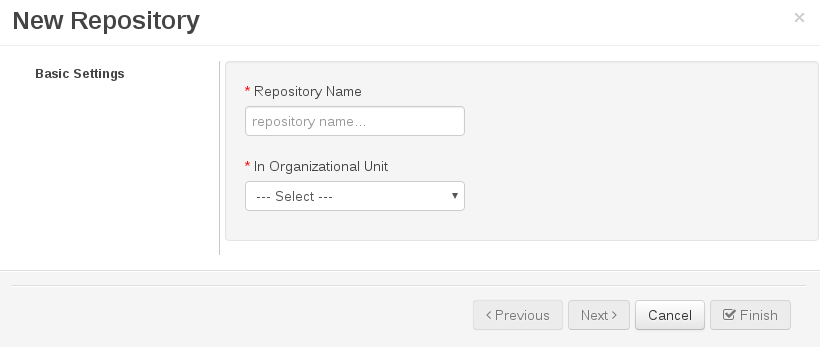
Figure 7.2. New Repository Dialog Window
- Specify the two mandatory parameters:
- repository name
Note
Make sure that the repository name is a valid file name. Avoid using a space or any special character that might lead to an invalid name. - organizational unit: specifies the location of the newly created repository.
- Click .
The new repository can be viewed either in the File Explorer or Project Explorer views.
Creating a Repository Using the kie-config-cli Tool
To create a new Git repository using the
kie-config-cli tool, run the create-repo command. The tool then guides you through the entire process of creating a repository by asking for other required parameters. Type help for a list of all commands.
For more information about the
kie-config-cli tool, see Chapter 4, Command line configuration.
Creating a Repository Using the REST API
To create a repository in the Knowledge Store, issue the
POST REST API call. Details of the repository are defined by the JSON entity. Make sure you established an authenticated HTTP session before executing this call.
Input parameter is a
RepositoryRequest instance. Returns a CreateOrCloneRepositoryRequest instance.
Example 7.2. Creating a Repository Using the Curl Utility
Example JSON entity containing details of a repository to be created:
{
	"name"                   : "newRepository",
	"description"            : "Repository for the Hello World project.",
	"userName"               :  null,
	"password"               :  null,
	"gitURL"                 :  null,
	"requestType"            : "new",
	"organizationalUnitName" : "helloWorldUnit"
}
Execute the following command:
curl -X POST 'localhost:8080/business-central/rest/repositories/' -u USERNAME:PASSWORD -H 'Accept: application/json' -H 'Content-Type: application/json' -d '{"name":"newRepository","description":"Repository for the Hello World project.","username":null,"password":null,"requestType":"new","gitURL":null,"organizationalUnitName":"helloWorldUnit"}'
For further information, refer to the Red Hat JBoss BPM Suite Development Guide, section Repository Calls.

'%20d='M201.5%20305.5c-13.8%200-24.9-11.1-24.9-24.6%200-13.8%2011.1-24.9%2024.9-24.9%2013.6%200%2024.6%2011.1%2024.6%2024.9%200%2013.6-11.1%2024.6-24.6%2024.6zM504%20256c0%20137-111%20248-248%20248S8%20393%208%20256%20119%208%20256%208s248%20111%20248%20248zm-132.3-41.2c-9.4%200-17.7%203.9-23.8%2010-22.4-15.5-52.6-25.5-86.1-26.6l17.4-78.3%2055.4%2012.5c0%2013.6%2011.1%2024.6%2024.6%2024.6%2013.8%200%2024.9-11.3%2024.9-24.9s-11.1-24.9-24.9-24.9c-9.7%200-18%205.8-22.1%2013.8l-61.2-13.6c-3-.8-6.1%201.4-6.9%204.4l-19.1%2086.4c-33.2%201.4-63.1%2011.3-85.5%2026.8-6.1-6.4-14.7-10.2-24.1-10.2-34.9%200-46.3%2046.9-14.4%2062.8-1.1%205-1.7%2010.2-1.7%2015.5%200%2052.6%2059.2%2095.2%20132%2095.2%2073.1%200%20132.3-42.6%20132.3-95.2%200-5.3-.6-10.8-1.9-15.8%2031.3-16%2019.8-62.5-14.9-62.5zM302.8%20331c-18.2%2018.2-76.1%2017.9-93.6%200-2.2-2.2-6.1-2.2-8.3%200-2.5%202.5-2.5%206.4%200%208.6%2022.8%2022.8%2087.3%2022.8%20110.2%200%202.5-2.2%202.5-6.1%200-8.6-2.2-2.2-6.1-2.2-8.3%200zm7.7-75c-13.6%200-24.6%2011.1-24.6%2024.9%200%2013.6%2011.1%2024.6%2024.6%2024.6%2013.8%200%2024.9-11.1%2024.9-24.6%200-13.8-11-24.9-24.9-24.9z'/%3e%3c/svg%3e)