 红帽全球峰会
此内容没有您所选择的语言版本。
Chapter 4. Resolved issues and known issues
4.1. Resolved issues
See Resolved Issues for JBoss EAP XP 2.0.0 to view the list of issues that have been resolved for this release.
4.2. Known issues
See Known Issues for JBoss EAP XP 2.0.0 to view the list of known issues for this release.
The server installation directory on a bare-metal Windows platform
After you exit a bootable JAR that is running on a bare-metal Windows platform, the %userprofile%\AppData\Local\Temp\wildfly-bootable-server_XXX_ server installation directory, where XXX is the unique identifier of your bootable JAR server, is not automatically deleted, so you must delete the directory manually. If you set an installation directory with the --install-dir=<install dir> argument, you must delete the specified <install dir> installation directory instead of the TEMP directory.
Hot deploy and OpenShift server adapter
Hot deploy does not currently work with OpenShift server adapter. Red Hat is working on a fix.
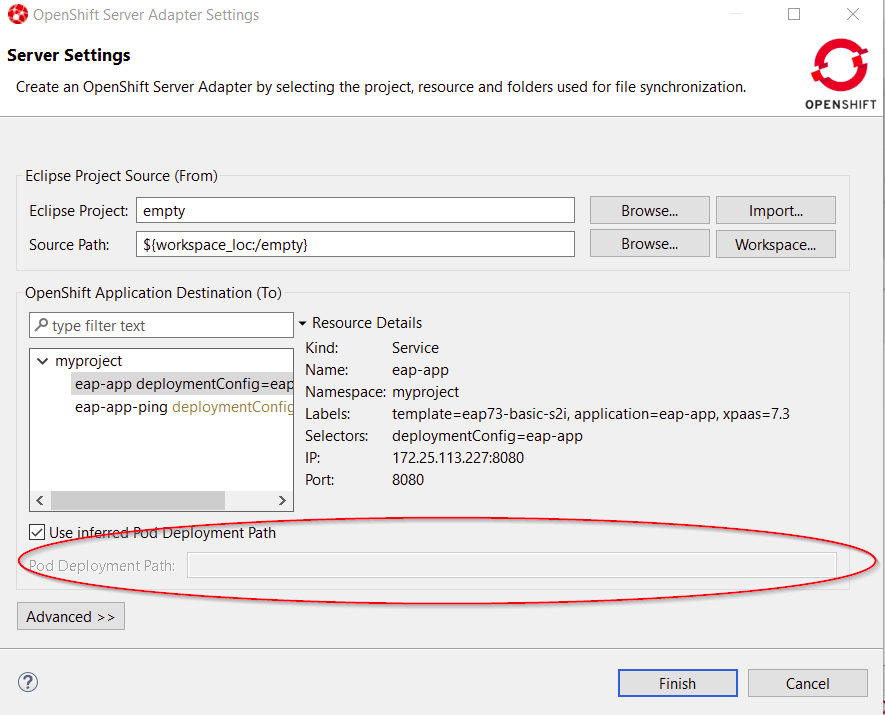
To work around this issue, in the OpenShift Server Adapter Settings Server Settings window, clear Use inferred Pod Deployment Path and set the Pod Deployment Path field to /opt/eap/standalone/deployments/, as illustrated in the accompanying image.
Figure 4.1. Pod deployment fields
For further information, see https://issues.redhat.com/browse/JBIDE-27591.

'%20d='M201.5%20305.5c-13.8%200-24.9-11.1-24.9-24.6%200-13.8%2011.1-24.9%2024.9-24.9%2013.6%200%2024.6%2011.1%2024.6%2024.9%200%2013.6-11.1%2024.6-24.6%2024.6zM504%20256c0%20137-111%20248-248%20248S8%20393%208%20256%20119%208%20256%208s248%20111%20248%20248zm-132.3-41.2c-9.4%200-17.7%203.9-23.8%2010-22.4-15.5-52.6-25.5-86.1-26.6l17.4-78.3%2055.4%2012.5c0%2013.6%2011.1%2024.6%2024.6%2024.6%2013.8%200%2024.9-11.3%2024.9-24.9s-11.1-24.9-24.9-24.9c-9.7%200-18%205.8-22.1%2013.8l-61.2-13.6c-3-.8-6.1%201.4-6.9%204.4l-19.1%2086.4c-33.2%201.4-63.1%2011.3-85.5%2026.8-6.1-6.4-14.7-10.2-24.1-10.2-34.9%200-46.3%2046.9-14.4%2062.8-1.1%205-1.7%2010.2-1.7%2015.5%200%2052.6%2059.2%2095.2%20132%2095.2%2073.1%200%20132.3-42.6%20132.3-95.2%200-5.3-.6-10.8-1.9-15.8%2031.3-16%2019.8-62.5-14.9-62.5zM302.8%20331c-18.2%2018.2-76.1%2017.9-93.6%200-2.2-2.2-6.1-2.2-8.3%200-2.5%202.5-2.5%206.4%200%208.6%2022.8%2022.8%2087.3%2022.8%20110.2%200%202.5-2.2%202.5-6.1%200-8.6-2.2-2.2-6.1-2.2-8.3%200zm7.7-75c-13.6%200-24.6%2011.1-24.6%2024.9%200%2013.6%2011.1%2024.6%2024.6%2024.6%2013.8%200%2024.9-11.1%2024.9-24.6%200-13.8-11-24.9-24.9-24.9z'/%3e%3c/svg%3e)