 红帽全球峰会
此内容没有您所选择的语言版本。
Chapter 17. Pax CDI and OSGi Services
17.1. Pax CDI Architecture
17.1.1. Overview
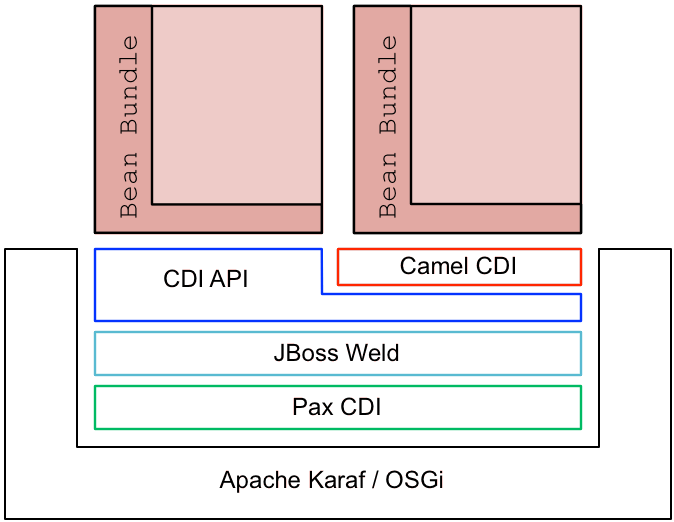
Figure 17.1, “Pax CDI Architecture” gives an overview of the technology stack underlying Pax CDI.
Figure 17.1. Pax CDI Architecture
17.2. Pax CDI
Pax CDI is the integration layer that makes it possible to deploy a CDI container within the Apache Karaf OSGi container.
JBoss Weld
JBoss Weld provides the CDI implementation for the Pax CDI integration. JBoss Weld is the reference implementation for CDI and comes with its own extensive documentation, CDI Reference Implementation.
Bean bundle
A bean bundle is an OSGi bundle that has been enabled to use Pax CDI. A bundle cannot use CDI by default, it must be explicitly enabled to do so (see the section called “Requirements and capabilities”).
CDI container
A CDI container effectively defines the scope for a collection of managed beans under CDI, which are capable of being published and injected within this scope. In the context of OSGi, a CDI container maps to a single bundle. That is, each bean bundle gets its own CDI container.
Camel CDI and other customizations
JBoss Fuse provides additional features that define CDI customizations (that is, non-standard CDI annotations) targeted at different aspects of middleware development. For example:
camel-cdi- Provides custom annotations for defining and injecting Camel contexts and routes. See Chapter 14, Camel CDI.
switchyard-cdiProvides custom annotations for use with SwitchYard. For example, see the quickstart example under the following directory of your JBoss Fuse installation:
quickstarts/switchyard/camel-bus-cdiFor more information, see olink:SYDev/chap-Service_Implementations.
cxf-jaxrs-cdi- Provides support for CDI in JAX-RS, as defined in the JAX-RS 2.0 Specification (see section 10.2.3).
deltaspike- Apache Deltaspike is a general-purpose collection of CDI customizations.
17.3. Enabling Pax CDI
Overview
Pax CDI is not enabled by default in the Karaf container in JBoss Fuse, so you must enable it explicitly. There are two aspects of enabling Pax CDI in the Karaf container: first, installing the requisite Karaf features in the container; second, enabling CDI for a particular bundle, by adding the Require-Capability header to the bundle’s manifest (turning the bundle into a bean bundle).
Pax CDI features
To make Pax CDI functionality available in the Karaf container, install the requisite Karaf features into your container. JBoss Fuse provides the following Karaf features for Pax CDI:
pax-cdi-
Deploys the core components of Pax CDI. This feature must be combined with the
pax-cdi-weldCDI implementation. pax-cdi-weld- Deploys the JBoss Weld CDI implementation (which is the only CDI implementation supported on JBoss Fuse)
pax-cdi-web-
Adds support for deploying a CDI application as a Web application (that is, deploying the CDI application into the Pax Web Undertow container). This enables support for the CDI features associated with servlet deployment, such as session-scoped beans, request-scoped beans, injection into servlets, and so on. This feature must be combined with the
pax-cdi-web-weldfeature (CDI implementation). pax-cdi-web-weld- Deploys the JBoss Weld CDI implementation for Web applications.
Requirements and capabilities
CDI requires you to organize your Java code in a very specific way, so it cannot be enabled arbitrarily for any bundle. It only makes sense to enable CDI for each bundle that needs it, not for the entire container. Hence, it is necessary to use an OSGi extension mechanism that switches on the CDI capability on a bundle-by-bundle basis. The relevant OSGi mechanism is known as the requirements and capabilities mechanism.
The CDI capability is provided by the relevant Pax CDI packages (installed as Karaf features); and the CDI requirement is specified for each bundle by adding a Require-Capability bundle header to the bundle’s manifest file. For example, to enable the base Pax CDI functionality, you would add the following Require-Capability header to the bundle’s manifest file:
Require-Capability : osgi.extender; filter:="(osgi.extender=pax.cdi)"
A bundle that includes the preceding Require-Capability bundle header effectively becomes a bean bundle (a CDI enabled bundle).
How to enable Pax CDI in Apache Karaf
To enable Pax CDI in Apache Karaf, perform the following steps:
Add the required
pax-cdiandpax-cdi-weldfeatures to the Karaf container, as follows:JBossFuse:karaf@root> features:install pax-cdi pax-cdi-weldWhen the Pax CDI features are installed in the Karaf container, this is not sufficient to enable CDI. You must also explicitly enable Pax CDI in each bundle that uses CDI (so that it becomes a bean bundle). To enable Pax CDI in a bundle, open the
pom.xmlfile in your bundle’s Maven project and add the followingRequire-Capabilityelement to the configuration of the Maven bundle plug-in:<project ...> ... <build> <plugins> ... <plugin> <groupId>org.apache.felix</groupId> <artifactId>maven-bundle-plugin</artifactId> <extensions>true</extensions> <configuration> <instructions> <Bundle-SymbolicName>${project.groupId}.${project.artifactId}</Bundle-SymbolicName> <Import-Package>*</Import-Package> <Require-Capability> osgi.extender; filter:="(osgi.extender=pax.cdi)" </Require-Capability> </instructions> </configuration> </plugin> ... </plugins> </build> ... </project>To access the CDI annotations in Java, you must add a dependency on the CDI API package. Edit your bundle’s POM file,
pom.xml, to add the CDI API package as a Maven dependency:<project ...> ... <dependencies> ... <!-- CDI API --> <dependency> <groupId>javax.enterprise</groupId> <artifactId>cdi-api</artifactId> <version>${cdi-api-1.2-version}</version> <scope>provided</scope> </dependency> ... </dependencies> ... </project>Rebuild your bundle in the usual way for your Maven project. For example, using the command:
mvn clean install-
Deploy the bundle to the Karaf container in the usual way (for example, using the
osgi:installconsole command).
17.4. OSGi Services Extension
Overview
Pax CDI also provides an integration with OSGi services, enabling you to reference an OSGi service or to publish an OSGi service using CDI annotations. This capability is provided by the Pax CDI OSGi Services Extension, which is not enabled by default.
Enabling the OSGi Services Extension
To enable the Pax CDI OSGi Services Extension, you must include the following bundle header in the manifest file:
Require-Capability : org.ops4j.pax.cdi.extension; filter:="(extension=pax-cdi-extension)"
In a Maven project, you would normally add a Require-Capability element to the configuration of the Maven bundle plug-in. For example, to add both the Pax CDI Extender and the Pax CDI OSGi Services Extension to the bundle, configure your project’s POM file, pom.xml, as follows:
<project ...>
  ...
  <build>
    <plugins>
      ...
      <plugin>
        <groupId>org.apache.felix</groupId>
        <artifactId>maven-bundle-plugin</artifactId>
        <extensions>true</extensions>
        <configuration>
          <instructions>
            <Bundle-SymbolicName>${project.groupId}.${project.artifactId}</Bundle-SymbolicName>
            <Import-Package>*</Import-Package>
            <Require-Capability>
              osgi.extender; filter:="(osgi.extender=pax.cdi)",
              org.ops4j.pax.cdi.extension; filter:="(extension=pax-cdi-extension)"
            </Require-Capability>
          </instructions>
        </configuration>
      </plugin>
      ...
    </plugins>
  </build>
  ...
</project>
Maven dependency for the OSGi Services extensions API
To access the OSGi Services annotations in your Java code, you need to add a dependency on the pax-cdi-api package. Edit your bundle’s POM file, pom.xml, to add the Pax CDI API package as a Maven dependency:
<project ...>
  ...
  <dependencies>
    ...
    <!-- CDI API -->
    <dependency>
        <groupId>org.ops4j.pax.cdi</groupId>
        <artifactId>pax-cdi-api</artifactId>
        <version>1.0.0.RC1</version>
    </dependency>
    ...
  </dependencies>
  ...
</project>
Injecting an OSGi Service
You can inject an OSGi service into a field using the following annotation:
@Inject @OsgiService
private IceCreamService iceCream;
Pax CDI finds the OSGi service to inject by matching the type of the OSGi service to the type of the field.
Disambiguating OSGi Services
If more than one OSGi service of a particular type exists, you can disambiguate the match by filtering on the OSGi service properties—for example:
@Inject @OsgiService(filter = "(&(flavour=chocolate)(lactose=false))")
private IceCreamService iceCream;
As usual for OSGi services, the properties filter is defined using LDAP filter syntax (see Matching service properties with a filter for more details). For an example of how to set properties on an OSGi service, see the section called “Setting OSGi Service properties”.
Selecting OSGi Services at run time
You can reference an OSGi service dynamically by injecting it as follows:
@Inject
@OsgiService(dynamic = true)
private Instance<IceCreamService> iceCreamServices;
Calling iceCreamServices.get() will return an instance of the IceCreamService service at run time. With this approach, it is possible to reference an OSGi service that is created after your bean is created.
Publishing a bean as OSGi Service with singleton scope
You can publish an OSGi service with OSGi singleton scope (which is the default), as follows:
@OsgiServiceProvider
public class ChocolateService implements IceCreamService {
    ...
}
OSGi singleton scope means that the bean manager creates a single instance of the bean and returns that instance every time a bean instance is requested.
Publishing a bean as OSGi Service with prototype scope
You can publish an OSGi service with OSGi prototype scope, as follows:
@OsgiServiceProvider
@PrototypeScoped
public class ChocolateService implements IceCreamService {
    ...
}
OSGi prototype scope means that the bean manager creates a new bean instance every time a bean instance is requested.
Publishing a bean as OSGi Service with bundle scope
You can publish an OSGi service with bundle scope, as follows:
@OsgiServiceProvider
@BundleScoped
public class ChocolateService implements IceCreamService {
    ...
}
Bundle scope means that the bean manger creates a new bean instance for every client bundle. That is, the @BundleScoped beans are registered with an org.osgi.framework.ServiceFactory.
Setting OSGi Service properties
You can set properties on an OSGi service by annotating the service bean as follows:
@OsgiServiceProvider
@Properties({
    @Property(name = "flavour", value = "chocolate"),
    @Property(name = "lactose", value = "false")
})
public class ChocolateService implements IceCreamService {
    ...
}
Publishing an OSGi Service with explicit interfaces
You can explicitly specify the Java interfaces supported by an OSGi Service bean, as follows:
@OsgiServiceProvider(classes = {ChocolateService.class, IceCreamService.class})
public class ChocolateService implements IceCreamService {
    ...
}
'%20d='M201.5%20305.5c-13.8%200-24.9-11.1-24.9-24.6%200-13.8%2011.1-24.9%2024.9-24.9%2013.6%200%2024.6%2011.1%2024.6%2024.9%200%2013.6-11.1%2024.6-24.6%2024.6zM504%20256c0%20137-111%20248-248%20248S8%20393%208%20256%20119%208%20256%208s248%20111%20248%20248zm-132.3-41.2c-9.4%200-17.7%203.9-23.8%2010-22.4-15.5-52.6-25.5-86.1-26.6l17.4-78.3%2055.4%2012.5c0%2013.6%2011.1%2024.6%2024.6%2024.6%2013.8%200%2024.9-11.3%2024.9-24.9s-11.1-24.9-24.9-24.9c-9.7%200-18%205.8-22.1%2013.8l-61.2-13.6c-3-.8-6.1%201.4-6.9%204.4l-19.1%2086.4c-33.2%201.4-63.1%2011.3-85.5%2026.8-6.1-6.4-14.7-10.2-24.1-10.2-34.9%200-46.3%2046.9-14.4%2062.8-1.1%205-1.7%2010.2-1.7%2015.5%200%2052.6%2059.2%2095.2%20132%2095.2%2073.1%200%20132.3-42.6%20132.3-95.2%200-5.3-.6-10.8-1.9-15.8%2031.3-16%2019.8-62.5-14.9-62.5zM302.8%20331c-18.2%2018.2-76.1%2017.9-93.6%200-2.2-2.2-6.1-2.2-8.3%200-2.5%202.5-2.5%206.4%200%208.6%2022.8%2022.8%2087.3%2022.8%20110.2%200%202.5-2.2%202.5-6.1%200-8.6-2.2-2.2-6.1-2.2-8.3%200zm7.7-75c-13.6%200-24.6%2011.1-24.6%2024.9%200%2013.6%2011.1%2024.6%2024.6%2024.6%2013.8%200%2024.9-11.1%2024.9-24.6%200-13.8-11-24.9-24.9-24.9z'/%3e%3c/svg%3e)