 红帽全球峰会
此内容没有您所选择的语言版本。
2.3. Manually Importing a JVM Resource
As Section 2.1, “Required JVM Configuration for Discovery” describes, there are only two connection configurations that can be used for a Java process for it to be discovered automatically by the agent. Specifically, those two connection settings both use a Sun management API, for remoting or for attach.
Any Java process can be imported into the inventory manually, even if it does not use the expected configuration for autodiscovery, as long as it enables JMX remoting in a supported form, meaning Sun or IBM remoting.
Note
The JVM instance has to be running for the resource to be discovered and imported.
- Click the Inventory tab in the top menu.
- Select the platform resource.
- Click the Inventory tab of the platform.
- Click the Import button in the bottom of the Inventory tab, and select the JMX server resource type.
- Select the type of JVM, and set all of the connection properties correctly, depending on the type of JVM selected.

- Fill in the connection information for the JVM. This varies depending on the JVM type, but it includes options like a URL and port, directory paths for client libraries, directory paths for classes, and login credentials.
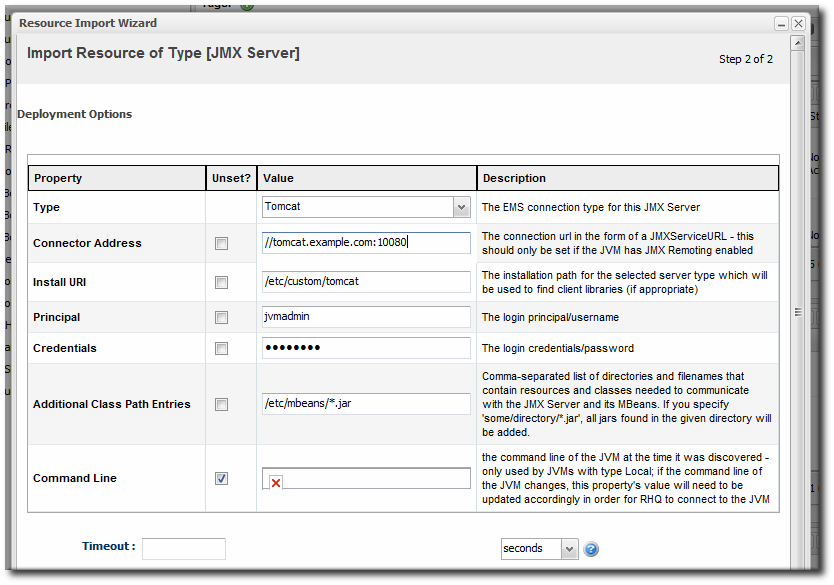
- Click the to import the instance.

'%20d='M201.5%20305.5c-13.8%200-24.9-11.1-24.9-24.6%200-13.8%2011.1-24.9%2024.9-24.9%2013.6%200%2024.6%2011.1%2024.6%2024.9%200%2013.6-11.1%2024.6-24.6%2024.6zM504%20256c0%20137-111%20248-248%20248S8%20393%208%20256%20119%208%20256%208s248%20111%20248%20248zm-132.3-41.2c-9.4%200-17.7%203.9-23.8%2010-22.4-15.5-52.6-25.5-86.1-26.6l17.4-78.3%2055.4%2012.5c0%2013.6%2011.1%2024.6%2024.6%2024.6%2013.8%200%2024.9-11.3%2024.9-24.9s-11.1-24.9-24.9-24.9c-9.7%200-18%205.8-22.1%2013.8l-61.2-13.6c-3-.8-6.1%201.4-6.9%204.4l-19.1%2086.4c-33.2%201.4-63.1%2011.3-85.5%2026.8-6.1-6.4-14.7-10.2-24.1-10.2-34.9%200-46.3%2046.9-14.4%2062.8-1.1%205-1.7%2010.2-1.7%2015.5%200%2052.6%2059.2%2095.2%20132%2095.2%2073.1%200%20132.3-42.6%20132.3-95.2%200-5.3-.6-10.8-1.9-15.8%2031.3-16%2019.8-62.5-14.9-62.5zM302.8%20331c-18.2%2018.2-76.1%2017.9-93.6%200-2.2-2.2-6.1-2.2-8.3%200-2.5%202.5-2.5%206.4%200%208.6%2022.8%2022.8%2087.3%2022.8%20110.2%200%202.5-2.2%202.5-6.1%200-8.6-2.2-2.2-6.1-2.2-8.3%200zm7.7-75c-13.6%200-24.6%2011.1-24.6%2024.9%200%2013.6%2011.1%2024.6%2024.6%2024.6%2013.8%200%2024.9-11.1%2024.9-24.6%200-13.8-11-24.9-24.9-24.9z'/%3e%3c/svg%3e)