 红帽全球峰会
此内容没有您所选择的语言版本。
Writing Custom Plug-ins
guidelines for writing custom server and agent resource plug-ins
Abstract
1. An Overview of JBoss ON Plug-ins
1.1. Extending JBoss ON: Plug-ins Defined
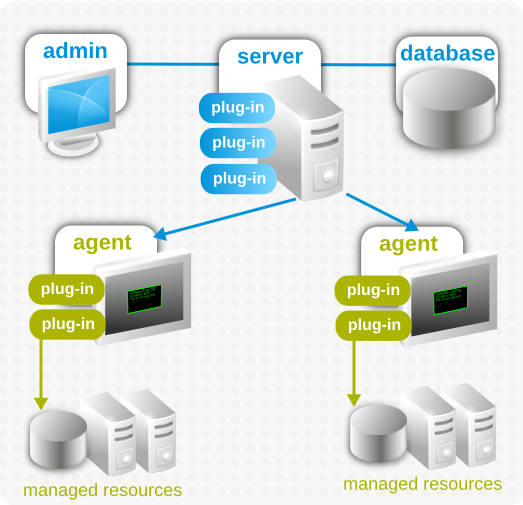
Figure 1. JBoss ON Architecture
- Every plug-in is packaged as a JAR file.
- Every plug-in has a required XML file, the plug-in descriptor, which defines all of the plug-in capabilities.
- Every plug-in contains compiled Java files which contain the code necessary to perform all of the actions defined in the descriptor.
- Plug-ins run inside a plug-in container, which is the entity that directly interacts with the plug-ins and starts and stops all plug-ins.
- All custom plug-ins are deployed to the JBoss ON server. Server-side plug-ins are propagated across the high availability cloud to all of the other servers, while agent plug-ins are made available through the server for the agents to download.
1.2. Basic Components of Plug-ins in JBoss ON
1.2.1. Plug-in Containers
1.2.2. Plug-in Descriptor
META-INF/ directory in the JAR file of the plug-in. For server-side plug-ins, this file must be named rhq-serverplugin.xml, and for agent plug-ins, rhq-plugin.xml.
1.2.3. Plug-in Schema Definitions
rhq-configuration.xsd. Server-side plug-ins extend that schema with an additional schema definition file, rhq-serverplugin.xsd, and then custom schema definitions for each server-side plug-in type.
1.2.4. Java Files
- Agent plug-ins can define both parent and children elements (platforms, servers, and services) in the same plug-in, and each resource type uses its own plug-in code.
- Agent plug-ins have two and sometimes three discrete functions. Almost every agent plug-in must have a discovery component (discovery Java file) that dictates how to identify and inventory whatever resource type is defined by the plug-in. Additionally, agent plug-ins may enable event collection for resources, which requires a separate component (event poller Java file) to track the resource logs. Last, there has to be a component (Java file) which actually implements the plug-in functionality.
- Agent plug-ins allow dependencies. Parent plug-ins can share classes with their children. An agent plug-in can set a dependency on any other agent plug-in that allows it to load that plug-ins classes. To make plug-ins perform better and to make it easier to access the relevant plug-in code, agent plug-ins are frequently broken into smaller Java files to allow the plug-in code to be reused.
1.2.5. External Libraries
lib/ directory within the JAR file.
1.3. Downloading the Plug-in Files
git clone http://git.fedorahosted.org/git/rhq/rhq.git
git clone http://git.fedorahosted.org/git/rhq/rhq.git/etc/samples/ directory. These include both fully-developed examples and plug-in templates that can be used for writing new plug-ins. Rather than checking out the entire source code, you can manually download the sample files at this URL:
http://git.fedorahosted.org/git/?p=rhq/rhq.git;a=tree;f=etc/samples;hb=master
http://git.fedorahosted.org/git/?p=rhq/rhq.git;a=tree;f=etc/samples;hb=master2. Writing Server-Side Plug-ins: Background
2.1. An Intro to Server-Side Plug-ins
- Alert sender plug-ins for methods to send alert notifications for resources
- Bundle plug-ins for deploying files and application
- Drift plug-ins for monitoring resource or filesystem configuration and files
- Content plug-ins for managing resource configurations
- Generic plug-ins for everything else
Important
- Once the server-side plug-in is built and deployed, the plug-in is a JAR file with a
META-INF/directory which contains therhq-serverplugin.xmlplug-in descriptor. - Each plug-in is independent of every other plug-in. Unlike agent plug-ins, server-side plug-ins do not interact with each other. There are no plug-in dependencies for server-side plug-ins.
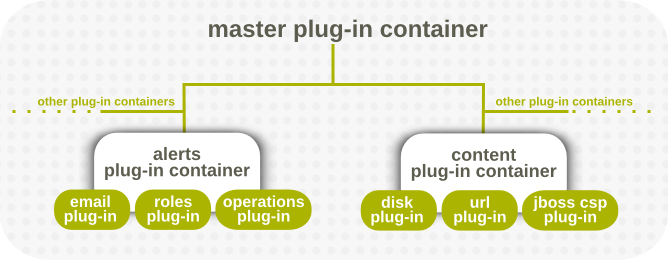
Figure 2. Server-Side Plug-in Containers
Note
| Plug-in Type | Description | Container Name |
|---|---|---|
| Generic | Catch-all type for any custom plug-ins. This type of plug-in only interacts with the plug-in container for the container to start and stop the plug-in and to initialize and shutdown the plug-in libraries. | Generic Plugin |
| Alert methods | Defines an alert notification method, or the way that an alert is sent. | AlertHandler |
| Bundle | Defines and processes a type of bundle. This type of plug-in performs tasks that the core server needs to process and manage bundles of specific bundle types, such as Ant recipes or file-based bundles. Each bundle server plug-in knows about and can process a single bundle type. | Bundle Plugin |
| Drift | Processes drift operations and configuration. This stores and retrieves content (files) being managed for drift detection and remediation. | Drift JPA Plugin |
| Content | Contains metadata for a a repository or a group of repositories. | PackageSource |
| Repository (also Package) | Defines a content repository. Plug-ins can define a single repository,which is then used for provisioning, entitlements, and updates for JBoss ON-managed resources. | ChannelSource |
Note
2.2. The Breakdown of Server-Side Plug-in Configuration
.jar files.The directory structure, libraries, and classes used by those .jar files is completely up to the discretion and requirements of the plug-in writer, with only one requirement: All plug-in .jar files must have a plug-in descriptor file, META-INF/rhq-serverplugin.xml.
Note
org.rhq.enterprise.server.plugin.pc.ServerPluginComponent class. This controls the lifecycle of the plug-in within the container.
- An XML file which functions as the plug-in's descriptor
- Java files which pull in the descriptor information and implement the classes for the plug-in.
- Optional library dependencies. Any third-party libraries must be stored in the plug-in JAR file's
lib/directory.
2.2.1. Descriptor and Configuration
Note
rhq-serverplugin.xml file in the META-INF/ directory in the plug-in's JAR file. (Default server-side plug-ins follow this same configuration.) This file is required.
MANIFEST.MF file.
- Scheduling actions periodically or using cron schedules
- Setting global parameters for all instances of a specific plug-in type
- Allowing local or instance-specific configuration for a plug-in type
2.2.1.1. Definitions and Classes
Example 1. Plug-in Descriptor: Definition
org.rhq.enterprise.server.plugin.pc.ServerPluginComponent class, which provides simple lifecycle management for the plug-in. This component provides the hook for the container to initialize, start, stop, and shut down the plug-in. When a plug-in is initialized, it is given a server plug-in context that provides information about the runtime environment of the plug-in.
- Using the
<plugin-component>tag to specify the class (this is available to every type of plug-in) - Using a user-defined tag to identify the class (this is available to some types of server-side plug-ins, depending on the available schema for the plug-in container)
Example 2. Plug-in Descriptor: Class Info
<serverplugin:plugin-component class="MyLifecycleListener" />
<serverplugin:plugin-component class="MyLifecycleListener" />
<plugin-class> for the email alert server-side plug-in) can be created for the plug-in. Creating a class introduces the option to provide configuration options or other information with the component.
<plugin-class>RolesSender</plugin-class>
<plugin-class>RolesSender</plugin-class>
Note
<plugin-class> element for any alert sender plug-in to hook into the alert mechanism in JBoss ON.
2.2.1.2. Control Operations
ServerPluginComponent class can optionally implement the ControlFacet interface. These control operations can then be invoked directly in the JBoss ON web interface, in the plug-in configuration area.
<control> element, which is a child to the <plugin-component> element. Controls are optional, so you don't have to specify any, or you can specify multiple controls. Each control can also have optional parameters for the user to pass to the control operation, as well as (optional) result properties.
Example 3. Control Operation Configuration
2.2.1.3. Scheduling Jobs
ScheduledJobInvocationContext component.
- A job class can be stateless (meaning each job class is instantiated for each job invocation) or it can be stateful by invoking the plug-in component instance.
Note
Any server-side plug-in can define a plug-in component to act as the lifecycle listener for the plug-in. Using a plug-in component is extremely useful; in fact, it is the only mechanism for a Generic server-side plug-in to connect with the core server. - A job can be concurrent, meaning more than one invocation can be performed at any one time on any number of servers (including on the same server). If a job is not concurrent, that means one and only one job invocation can be performed at any time. (If a job is not concurrent and is not clustered, then only one job invocation can be performed anywhere in the JBoss ON server cloud).
- A job can be clustered, meaning the job can be run from any server in the JBoss ON server cloud. If a job is not clustered, the job always runs on the machine where the job was scheduled. This works in conjunction with the concurrent setting.
- The schedule can be either periodic (such as running every hour) or recurring on a pattern (such as every Monday at 5pm).
- There can be multiple jobs scheduled for the same plug-in, each in its own
<map-property>under the plug-in's<scheduled-jobs>entry.
Example 4. Plug-in Descriptor: Scheduled Jobs
<scheduled-jobs> container entry. Each individual job is within this container, in mapping (<map-property>) entries.
2.2.1.3.1. States for Jobs
Example 5. Stateless Job Configuration
<c:map-property name="statelessJob1" description="invokes a stateless job class but given a job context">
      <c:simple-property name="class" type="string" required="true" readOnly="true" default="MyScheduledJob" summary="true" />
      <c:simple-property name="methodName" type="string" required="true" readOnly="true" default="executeWithContext" summary="true" />
</c:map-property>
<c:map-property name="statelessJob1" description="invokes a stateless job class but given a job context">
      <c:simple-property name="class" type="string" required="true" readOnly="true" default="MyScheduledJob" summary="true" />
      <c:simple-property name="methodName" type="string" required="true" readOnly="true" default="executeWithContext" summary="true" />
</c:map-property>- A method name for the job to invoke. For stateful jobs, the target method is in the plug-in component; for stateless jobs, it is in the class specified with the class property. Either way, the method name tells the server what to call. A default method is already defined in the plug-in component, and stateful jobs can call on that without having a specific method name property.
<c:simple-property name="methodName" type="string" required="true" readOnly="true" default="executeWithContext" summary="true" />
<c:simple-property name="methodName" type="string" required="true" readOnly="true" default="executeWithContext" summary="true" />Copy to Clipboard Copied! Toggle word wrap Toggle overflow Any method must either have no arguments or have a single argument of the typeScheduledJobInvocationContext. - A setting showing whether the job is enabled.
<simple-property name="enabled" type="boolean" ... />
<simple-property name="enabled" type="boolean" ... />Copy to Clipboard Copied! Toggle word wrap Toggle overflow - A schedule type showing whether it's a periodic or cron job. The type of job is identified in the option which is set to true. For example:
Copy to Clipboard Copied! Toggle word wrap Toggle overflow - The actual schedule for when to run the job (the "trigger"), which can be a time period or a cron schedule. For a periodic job, this gives a time interval, in milliseconds:
<simple-property name="scheduleTrigger" type="string" required="true" default="60000" ... />
<simple-property name="scheduleTrigger" type="string" required="true" default="60000" ... />Copy to Clipboard Copied! Toggle word wrap Toggle overflow For a cron job, the default argument contains the full cron expression:<simple-property name="scheduleTrigger" type="string" required="true" default="0 0/5 * * * ?" ... />
<simple-property name="scheduleTrigger" type="string" required="true" default="0 0/5 * * * ?" ... />Copy to Clipboard Copied! Toggle word wrap Toggle overflow (A full description of the cron schedule format is at http://quartz.sourceforge.net/javadoc/org/quartz/CronTrigger.html.) - A setting on whether the job is concurrent (meaning, whether this job can be running multiple times on more than one server or at the same time). If this is false, so that only one instance of the job can be running at a time, then even if multiple servers are scheduled to run the job, it will only run on one of them.
<simple-property name="concurrent" type="boolean" ... />
<simple-property name="concurrent" type="boolean" ... />Copy to Clipboard Copied! Toggle word wrap Toggle overflow - A job can allow a setting on whether it runs anywhere in the JBoss ON server cloud or if it must be run on the same machine where the job was scheduled. Setting the cluster value to true allows the job to be called from any server in the JBoss ON cloud, so the job is clustered. This value should be false if the job must be run on all machines on schedule. Since all plug-ins are registered on all servers automatically, a non-clustered job will run on each server, independently.
<simple-property name="clustered" type="boolean" default="true" ... />
<simple-property name="clustered" type="boolean" default="true" ... />Copy to Clipboard Copied! Toggle word wrap Toggle overflow - A job can optionally contain custom strings which accept callback data.
<simple-property name="custom1" type="boolean" required="true" default="true" summary="true" description="A custom boolean for callback data"/>
<simple-property name="custom1" type="boolean" required="true" default="true" summary="true" description="A custom boolean for callback data"/>Copy to Clipboard Copied! Toggle word wrap Toggle overflow Callback data can be of any type — boolean, string, long, or whatever else is appropriate for the job being performed. - Stateless jobs have a property that passes the method name of the class. The method name can identify the class that is called in the plug-in component or, alternatively, it can call a class to instantiate when the job is invoked. Both the method and the class keys are shown in Example 5, “Stateless Job Configuration”. Whatever class is used as the target, it must have the method defined in the method name simple property.Typically, the class isn't specified because the job will target the stateful plug-in component. The class property allows the option of writing a stateless job, however.
2.2.1.3.2. Concurrent and Clustered Jobs
scheduleTrigger setting). Where and how a job is run is determined by two settings: concurrent and clustered.
Note
| Concurrent | Clustered | When the schedule is triggered... |
|---|---|---|
| true | true | ... the job will always be invoked. It may be invoked on any server in the JBoss ON server cloud. |
| true | false | ... the job will always be invoked and will run on the server where the job is scheduled. |
| false | true |
... the JBoss ON server checks to see if this job is running anywhere else in the JBoss ON server cloud. If it is, the new job must wait until that old job has finished before being invoked.
Only one instance of this job can ever be running anywhere in the JBoss ON server cloud.
|
| false | false | ... the scheduler checks to see if the job is already running locally before invoking the job. Only one job invocation may be running on the server at any time, but multiple servers in the cloud may be running the job at the same time. |
Note
2.2.1.4. Plug-in Configuration (Both Global and Local)
<plugin-configuration> entry (defined in the standard JBoss ON schema) and then each parameter is identified with a <simple-property> item. Global settings are useful for any plug-in which accesses a single identity, such as alerts which use the same email or SNMP account.
Example 6. Plug-in Descriptor: Global Configuration
<serverplugin:plugin-configuration>
         <c:simple-property name="user" type="string" required="false"/>
         <c:simple-property name="password" type="password" required="false"/>
</serverplugin:plugin-configuration>
<serverplugin:plugin-configuration>
         <c:simple-property name="user" type="string" required="false"/>
         <c:simple-property name="password" type="password" required="false"/>
</serverplugin:plugin-configuration>
<alert-configuration> and <simple-property> item).
Example 7. Plug-in Descriptor: Instance-Specific Configuration (Alerts)
Example 8. Plug-in Descriptor: Instance-Specific Configuration (Perspectives)
/modules/enterprise/server/xml-schemas/src/main/resources directory to see what elements are available for the specific type of plug-in. Not all plug-in types accept local configuration settings; generic plug-ins, for example, only accept global plug-in configuration.
Note
git clone http://git.fedorahosted.org/git/rhq/rhq.git
git clone http://git.fedorahosted.org/git/rhq/rhq.git/etc/samples/custom-serverplugin/ directory which can be used as a template for writing new plug-ins. Rather than checking out the entire source code, you can manually download the custom-serverplugin files at this URL:
http://git.fedorahosted.org/git/?p=rhq/rhq.git;a=tree;f=etc/samples/custom-serverplugin;hb=master
http://git.fedorahosted.org/git/?p=rhq/rhq.git;a=tree;f=etc/samples/custom-serverplugin;hb=master2.2.2. Schema Files
rhq-configuration.xsd file. This file defines the basic configuration options available to any plug-in.
rhq-configuration.xsd file is extended by rhq-serverplugin.xsd. This file provides additional XML elements that are specific to the functions of server-side plug-ins. This file is referenced by every server-side plug-in.
/modules/enterprise/server/xml-schemas/src/main/resources directory.
<xs:annotation> items) in the XSD files themselves. For more information on XSD files and XML schema, check out a reference guide for XML and XSD, like http://www.w3.org/TR/xmlschema-0/.
Note
2.2.2.1. Parsing the Plug-in Container Schema Files
- Elements
- Attributes
Note
<xs:element name="alert-plugin">
<xs:element name="alert-plugin">
<alert-plugin>
Stuff
</alert-plugin>
<alert-plugin>
Stuff
</alert-plugin>
<xs:attribute name="name">
<xs:attribute name="name">
<alert-plugin name="myAlertPlugin">
Stuff
</alert-plugin>
<alert-plugin name="myAlertPlugin">
Stuff
</alert-plugin>
/modules/enterprise/server/xml-schemas/src/main/resources directory and search for <xs:element name=""> and <xs:attribute name=""> entries.
Note
git clone http://git.fedorahosted.org/git/rhq/rhq.git
git clone http://git.fedorahosted.org/git/rhq/rhq.git2.2.2.2. The rhq-configuration.xsd File
rhq-configuration.xsd file provides schema which is available for all JBoss ON plug-ins. This is used by both agent and server-side plug-ins.
rhq-configuration.xsd file is in source/modules/core/client-api/src/main/resources.
Note
git clone http://git.fedorahosted.org/git/rhq/rhq.git
git clone http://git.fedorahosted.org/git/rhq/rhq.git/etc/samples/custom-serverplugin/ directory which can be used as a template for writing new plug-ins. Rather than checking out the entire source code, you can manually download the custom-serverplugin files at this URL:
http://git.fedorahosted.org/git/?p=rhq/rhq.git;a=tree;f=etc/samples/custom-serverplugin;hb=master
http://git.fedorahosted.org/git/?p=rhq/rhq.git;a=tree;f=etc/samples/custom-serverplugin;hb=masterrhq-configuration schema relate to setting configuration values for a plug-in, like <simple-property> and <map-property>.
| Element | Description |
|---|---|
| configuration-property | For adding a configuration attribute to a plug-in for user-defined settings. |
| simple-property | For setting a default configuration value. |
| option | For setting whether a property's values come from an enumerated list (false) or can be anything defined by the user (true). |
rhq-configuration.xsd file also defines the most common flags that can be used for the plug-in descriptor, including the required name and optional displayName attributes.
| Attribute | Description |
|---|---|
| name | Required. Gives a unique name for the plug-in. |
| displayName | Gives the name to use for the plug-in in the GUI. If this isn't given, then the name value is used. |
| description | Gives a short description of the plug-in. |
rhq-configuration.xsd file. Each one is described by the text in the <xs:annotation> tags for the item.
2.2.2.3. The rhq-serverplugin.xsd File
rhq-serverplugin.xsd is the central server-side plug-in schema file.
rhq-serverplugin.xsd file provides schema elements that are important for every server-side plug-in. Possibly the two most important elements are <server-plugin> (for the plug-in's root element) and <scheduled-jobs> (for running jobs on a resource or server).
rhq-serverplugin.xsd file is in source/modules/enterprise/server/xml-schemas/src/main/resources.
rhq-serverplugin.xsd file are listed in Table 5, “rhq-serverplugin.xsd Schema Elements”.
| Element | Description |
|---|---|
| server-plugin | Contains the root element for the plug-in descriptor. |
| help | Contains additional usage information or other tips that can help users integrate the plug-in with other applications. |
| plugin-component | Identifies a class that will be notified when the plug-in stops or starts. This is a stateful object and is the target of any scheduled stateful jobs. |
| scheduled-jobs | Defines a schedule for the plug-in to execute any specified task |
rhq-serverplugin.xsd contain flags that are used within the root element of the plug-in descriptor. These add additional management attributes for controlling the release and updates of server-side plug-ins.
| Attribute | Description |
|---|---|
| package | For setting the plug-in package name. |
| version | For setting the version of the plug-in. If the version isn't set in the descriptor, the plug-ins JAR file, META-INF/MANIFEST.MF, must define the version number in the Implementation-Version setting. |
| apiVersion | For setting the version of the API used to write the plug-in. |
rhq-serverplugin.xsd file. Each one is described by the text in the <xs:annotation> tags for the item.
2.2.3. Java Class Files
ServerPluginComponent or ControlFacet must be available in the JAR file for the plug-ins.
2.3. Anatomy of Alert Sender Server-Side Plug-ins
2.3.1. Default Alert Senders
| Alert Method | Description | Plug-in Name |
|---|---|---|
| Sends emails with the alert information to a user or list of users. | alert-email | |
| Roles | Sends an internal message to a JBoss ON user role. | alert-roles |
| SNMP | Sends a notification to an SNMP trap. | alert-snmp |
| Operations | Initiated a JBoss ON-supported task on a target resource. | alert-operations |
| Subject | Sends a notification to a user in JBoss ON. | alert-subject |
2.3.2. Breakdown of a Real Alert Sender Plug-in
- An XML plug-in descriptor that conforms to a given XML schema file (XSD)
- Java files
2.3.2.1. Descriptor
rhq-serverplugin.xml in the src/main/resources/META-INF/ file for that plug-in.
Note
displayName flag contains the name to give for the plug-in in the list of installed server-side plug-ins.
<serverplugin:help>
     Used to send notifications to direct email addresses.
</serverplugin:help>
<serverplugin:help>
     Used to send notifications to direct email addresses.
</serverplugin:help>
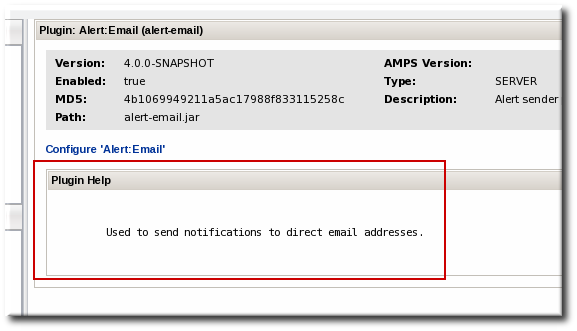
Figure 3. Alert Help Text
<!-- startup & tear down listener, + scheduled jobs
<serverplugin:plugin-component />
-->
<!-- startup & tear down listener, + scheduled jobs
<serverplugin:plugin-component />
-->
<scheduled-jobs> element or implement a Java class in a <plugin-component> element. There's no reason to schedule any jobs with an alert sender since the plug-ins don't perform tasks; they provide methods of sending message from the server when an event is detected.
<short-name> element is required for every alert sender plug-in. This gives the name that is used for the alert sender type in the notification area of the alert definition.
<!-- How does this sender show up in drop downs etc -->

<short-name>Email</short-name>
<!-- How does this sender show up in drop downs etc -->

<short-name>Email</short-name>
<short-name> value is used in drop-down menus and other user-oriented areas, this value is much more human-friendly than the displayName value.
org.rhq.enterprise.server.plugins.pluginName, taken from the package element in the <plugin> element of the descriptor. For the alert-email plug-in, the full package name is org.rhq.enterprise.server.plugins.alertEmail, pointing to the EmailSender.java class.
 <!-- Class that does the actual sending -->

<plugin-class>EmailSender</plugin-class>
 <!-- Class that does the actual sending -->

<plugin-class>EmailSender</plugin-class>
<alert-configuration> entry provides information that is configured individually, for every notification instance which uses that alert sender type. For alert-email, this is a field which allows a list of email addresses that will receive the emailed notifications.
2.3.2.2. Java Resource
2.3.2.3. Schema Elements
rhq-configuration.xsd, which is used by all JBoss ON plug-insrhq-serverplugin.xsd, which is used by all server-side plug-insrhq-serverplugin-alert.xsd, which is used by alert plug-ins
rhq-serverplugin-alert.xsd file is required for any alert sender plug-in. While additional schema files can be added to contain other elements, the alert schema already contains several very useful schema elements for the alert sender plug-ins.
| Schema Element | Description | Parent Tag |
|---|---|---|
| alert-plugin | The root element for a single alert plug-in definition. | None. |
| short-name | The display name for the plug-in, which is used in the UI. | alert-plugin |
| plugin-class | The class which implements the plug-in's functionality. | alert-plugin |
| alert-configuration | A (default) configuration element to display in the UI when the alert instance is configured. This includes general data like a username, password, URL, server name, or port. | alert-plugin |
3. Writing Server-Side Plug-ins: Procedures
3.1. Tip: Checking XSD Annotations
rhq-configuration.xsd, rhq-serverplugin.xsd, and type-specific files like rhq-serverplugin-alert.xsd.
<control> element:
3.2. Writing Server-Side Plug-ins
- The example plug-ins are the sourceRoot
/etc/samples/custom-serverplugin/directory which can be used as a template for writing new plug-ins. Manually download the custom-serverplugin files to use as a template:http://git.fedorahosted.org/git/?p=rhq/rhq.git;a=tree;f=etc/samples/custom-serverplugin;hb=master
http://git.fedorahosted.org/git/?p=rhq/rhq.git;a=tree;f=etc/samples/custom-serverplugin;hb=masterCopy to Clipboard Copied! Toggle word wrap Toggle overflow - Identify the type of plug-in. Each server-side plug-in is managed by a higher level plug-in container, which correlates to the type or function of the plug-in.
- Optional. Write custom schema for the plug-in configuration.
- Create the directory for the custom plugin in the sourceRoot
/modules/enterprise/server/pluginsdirectory. For example:mkdir myPlugin cd myPlugin/ mkdir -p src/main/java/org/rhq/enterprise/server/plugins/myPlugin mkdir -p src/main/resources/META-INF
mkdir myPlugin cd myPlugin/ mkdir -p src/main/java/org/rhq/enterprise/server/plugins/myPlugin mkdir -p src/main/resources/META-INFCopy to Clipboard Copied! Toggle word wrap Toggle overflow - Copy the
pom.xmlfile from a similar existing plug-in to use for the Maven builds to package your new plug-in. For example:cp ../alert-email/pom.xml .
cp ../alert-email/pom.xml .Copy to Clipboard Copied! Toggle word wrap Toggle overflow - Edit the
pom.xmlfile so that its properties reflect the new plug-in.Note
Be sure to include the location of the parent repositories used by server-side plug-ins, which are inhttps://repository.jboss.org/nexus/content/groups/public/org/rhq/rhq-enterprise-server-plugins-parent/. For example:Copy to Clipboard Copied! Toggle word wrap Toggle overflow - Write the plug-in descriptor that defines that specific plug-in instance. The plug-in descriptor is the heart of the plug-in since it defines everything from the plug-in classes to scheduled jobs. Plug-in descriptor elements are covered in Section 2.2.1.4, “Plug-in Configuration (Both Global and Local)”.
- Implement the Java classes for the plug-in.
- Build the plug-in. During the Maven build process, the plug-in files can be validated.
mvn install
mvn installCopy to Clipboard Copied! Toggle word wrap Toggle overflow - Deploy the plug-in, as in Section 3.4, “Deploying Server-Side Plug-ins”. When a server-side plug-in is deployed on one server, it is automatically propagated to all of the other JBoss ON servers in the cloud.
3.3. Validating Server-Side Plug-ins
- The XML is well-formed and validates with the configured server plug-in XML schema
- If a plug-in component is specified, its class is found in the plug-in JAR and can be instantiated
- All scheduled jobs are configured properly
- The plug-in has a valid version
- The plug-in configuration is declared correctly
Note
pom.xml configuration file.
- Open the
pom.xmlfile in the sourceRoot/modules/enterprise/server/plugins/validate-all-serverplugins/directory. - Add a
<pathelement>line to the file which points to the custom server-side plug-in JAR file. For example:<pathelement location="../myPlugin/target/myPlugin.jar" />
<pathelement location="../myPlugin/target/myPlugin.jar" />Copy to Clipboard Copied! Toggle word wrap Toggle overflow - Build the plug-in.
mvn install
mvn installCopy to Clipboard Copied! Toggle word wrap Toggle overflow
Note
org.rhq.enterprise.server.plugin.pc.ServerPluginValidatorUtil class.
3.4. Deploying Server-Side Plug-ins
- Copying the plug-in JAR file into the sourceRoot
/plugins/folder in the server root directory (locally). - Uploading the plug-in JAR file through the web interface (remotely).
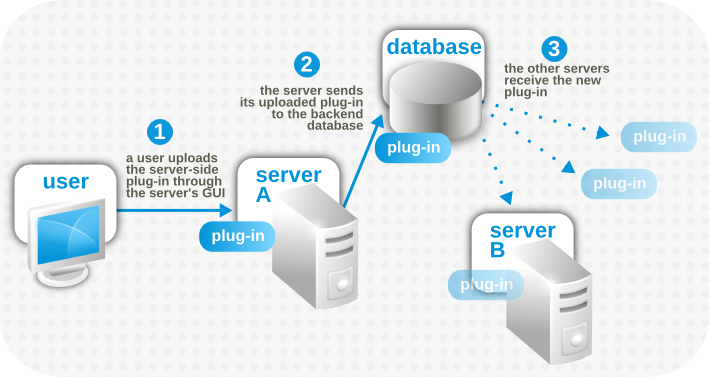
Figure 4. Server-Side Plug-in Propagation
- Deployed and enabled
- Deployed and disabled
- Undeployed
3.4.1. Remotely Deploying Plug-ins
- In the top menu, click the Administration tab.
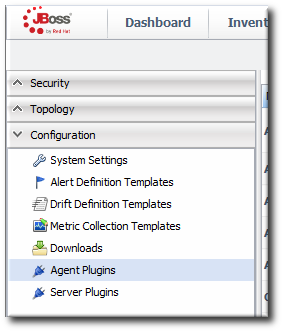
- In the Configuration box on the left navigation bar, click the Server Plugins link.
- Scroll to the Upload Plugin section at the bottom of the page.
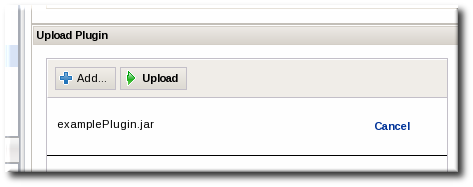
- Click the Add button, and browse to the plug-in JAR file's location. If there are multiple plug-ins to deploy, just hit Add again and add in each one.
- When all of the plug-ins to be deployed are listed in the box, click the Upload button.

3.4.2. Locally Deploying Plug-ins
/plugins/ directory and the server will deploy it.
3.5. Updating Server-Side Plug-ins
Implementation-Version setting found in the META-INF/MANIFEST.MF file in the JAR file) to identify later version of the plug-in and to update the plug-ins on the JBoss ON servers in the cloud.
3.6. Disabling Server-Side Plug-ins
- In the top menu, click the Administration tab.
- In the Configuration box on the left navigation bar, click the Server Plugins link.
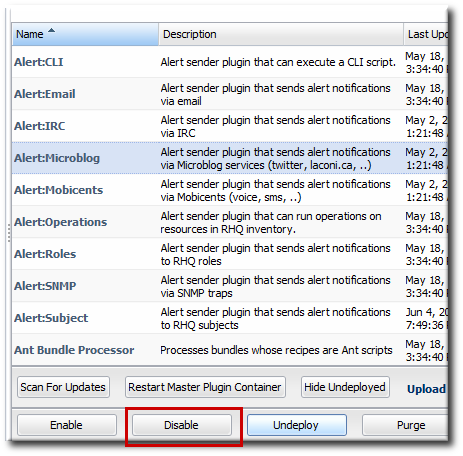
- Select the server-side plug-in which should be disabled.
- Click the DISABLE button.
3.7. Removing and Re-deploying Server-Side Plug-ins
- Deployed and enabled
- Disabled
- Undeployed
3.7.1. Undeploying a Plug-in
- In the top menu, click the Administration tab.
- In the Configuration box on the left navigation bar, click the Plugins link.
- Click the Server Plugins tab.
- Select the plug-ins to undeploy.
- Click the Undeploy button.


3.7.2. Re-deploying a Plug-in
- In the top menu, click the Administration tab.
- In the Configuration box on the left navigation bar, click the Plugins link.
- Click the Server Plugins tab.
- Click the SHOW UNDEPLOYED button at the bottom of the plug-ins list.
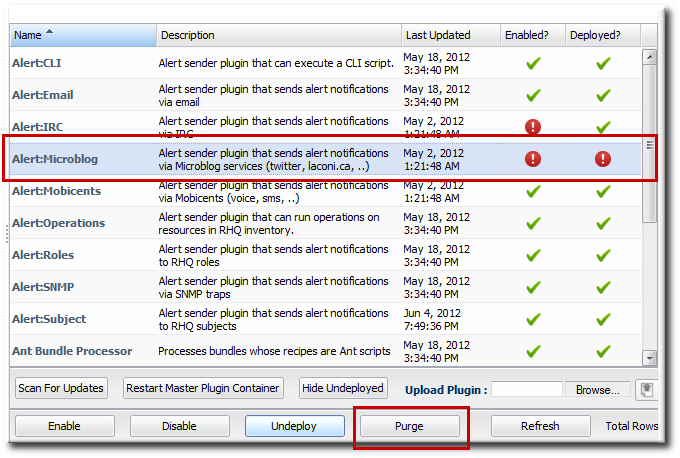
- Select the plug-in to re-deploy, and then click the PURGE button. This removes the entry in the JBoss ON database that tells the servers to ignore that plug-in and any updates to it.Undeployed plug-ins have only black text, with no active link to the plug-in configuration. They also have two red marks, indicating they are both disabled and undeployed.
- Add and upload the plug-in like it is being deployed as new. This is described in Section 3.4, “Deploying Server-Side Plug-ins”.

3.8. Restarting Plug-in Containers
Note
- In the top menu, click the Administration tab.
- In the Configuration box on the left navigation bar, click the Plugins link.
- Click the Server Plugins tab.
- Scroll to the bottom of the table, and click the RESTART MASTER PLUGIN CONTAINER button.
- When the restart process is done (and assuming no problems were encountered), then there will be a success message in the upper left corner.

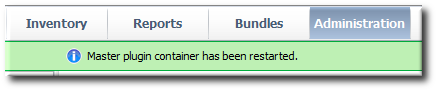
3.9. Setting Plug-in Configuration Properties
rhq-plugin.xml file, and the values are then supplied in the JBoss ON UI.
- In the top menu, click the Administration tab.
- In the Configuration box on the left navigation bar, click the Server Plugins link.
- Click the name of the server-side plug-in in the table.
- In the middle of the plug-in details page, expand the Plugin Configuration section.
- Make any changes.If necessary, unselect the Unset checkbox to activate a field to be edited.
- Click the button at the top of the configuration section.

4. Writing Agent Plug-ins: Background
- The agent's plug-in container. The plug-in contain runs inside the JBoss ON agent and it provides a manager for all of the deployed resource plug-ins.The plug-in container is what actually manages the lifecycle of the resource plug-ins. The agent starts the plug-in container, and the plug-in container starts the resource plug-ins. The plug-in container also handles all the classloading, threading, and running for resource plug-ins.Plug-in developers never need to interact with the plug-in container. As long as a plug-in is written with the appropriate components and with a valid plug-in descriptor, the agent will be able to manage the resource.
- Domain objects. This defines the individual objects for plug-ins, specifically resources, resource types, and configuration. All of the other elements in AMPS use the domain objects to define resource elements.One of the largest API sets within the domain object is configuration. The configuration API is used anywhere that a set of configuration properties is required, from plug-in configuration settings to connect to a resource to operation arguments.
- The plug-in components. These components define the actual component interfaces that are used by agent plug-ins, well as the facets that plug-ins can support.The plug-in components are the public API.This element within AMPS is the part that plug-in writers use. This contains the interfaces that plug-in writers implement in the resource plug-in.
- Native System. A lot of information require to monitor or manage a resource is available from the operating system information. The native system provides JNI or native access to that operating system information and can pull information from the process table, run external programs, or gather system metrics.
- Resource plug-ins.. JBoss ON has a set of resource plug-ins already defined. Each individual resource plug-in manages a particular product (applications and servers, services, or platforms). These plug-ins are loaded into the agent's plug-in container and implement the plug-in components defined in the API.
Note
4.2. The Breakdown of Agent Plug-in Configuration
rhq-plugin.xml inside the META-INF/ directory).
- A plug-in component file that contains all of the code for the plug-in functionality
- A
*Discovery.javafile that configures the discovery process for the resources defined in the plug-in - A
*EventPoller.javathat defines the events that can be collected by the resource
rhq-plugin.xml plug-in descriptor.
Note
4.2.1. Schema Files
rhq-configuration.xsd file to define the basic configuration options available.
rhq-plugin.xsd file, which extends the rhq-configuration.xsd schema and adds additional elements specifically for resource-related plug-ins.
Note
<xs:annotation> items) in the XSD files themselves.
rhq-configuration.xsd file provides schema which is available for all JBoss ON plug-ins. The rhq-configuration.xsd file is in source/modules/core/client-api/src/main/resources.
rhq-configuration schema relate to setting configuration values for a plug-in, like <simple-property> and <map-property>.
| Element | Description |
|---|---|
| configuration-property | For adding a configuration attribute to a plug-in for user-defined settings. |
| simple-property | For setting a default configuration value. |
| option | For setting whether a property's values come from an enumerated list (false) or can be anything defined by the user (true). |
rhq-configuration.xsd file also defines the most common flags that can be used for the plug-in descriptor, including the required name and optional displayName attributes.
| Attribute | Description |
|---|---|
| name | Required. Gives a unique name for the plug-in. |
| displayName | Gives the name to use for the plug-in in the GUI. If this isn't given, then the name value is used. |
| description | Gives a short description of the plug-in. |
rhq-plugin.xsd provides all of the schema elements specifically for agent plug-ins. The rhq-plugin.xsd file is in the source/modules/core/client-api/src/main/resources directory.
rhq-plugin.xsd file are listed in Table 11, “rhq-plugin.xsd Schema Elements”.
| Element | Description |
|---|---|
| plugin | Contains the root element for the plug-in descriptor. |
| depends | Identifies any other plug-ins which this plug-in requires or extends. |
| platforms, servers, services | Identifies the type for a resource defined within the agent plug-in. <platforms> are top-level elements, but <servers> and <services> are added as children of platforms or other server and service resources. |
| metric | An element within a platform, server, or service which defines metrics which can be collected for that resource type.
Child elements and attributes for this resource element are listed in the
rhq-plugin.xsd file.
Values that form part of a larger data structure, such as an array of values, need to be deconstructed into individual values before they can be monitored.
|
| event | An element within a platform, server, or service which defines whether that resource supports events. There are no other configuration properties with events; the events themselves are culled from the resource's log files. |
| bundle-target | Configures whether and how bundles can be deployed to a resource.
Child elements and attributes for this resource element are listed in the
rhq-plugin.xsd file.
|
| drift-definition | Configures whether and how drift monitoring can be performed for a resource.
Child elements and attributes for this resource element are listed in the
rhq-plugin.xsd file.
|
| resource-configuration | Defines a configuration property for a resource type.
Child elements and attributes for this resource element are listed in the
rhq-plugin.xsd file.
|
| operation | Defines an operation that can be performed on that resource type.
Child elements and attributes for this resource element are listed in the
rhq-plugin.xsd file.
|
| content | Configures what types of packages can be uploaded or deployed on a resource type.
Child elements and attributes for this resource element are listed in the
rhq-plugin.xsd file.
|
rhq-plugin.xsd contain flags that are used within the root element of the plug-in descriptor. These add additional management attributes for controlling the release and updates of agent plug-ins.
| Attribute | Description |
|---|---|
| package | For setting the plug-in package name. |
| version | For setting the version of the plug-in. This must be in an OSGi-compatible format. |
| ampsVersion | For the agent plug-in system version that this plug-in requires. This must be in an OSGi-compatible format. |
| pluginLifecycleListener | For the listener which initializes and shuts down the plug-in. |
| discovery | Sets whether a resource type is detected by discovery scans. This flag may not be necessary for child resources that will be discovered by the parent resource. |
rhq-plugin.xsd file. Each one is described by the text in the <xs:annotation> tags for the item.
4.2.2. Descriptor and Configuration
- The names of the resource types (servers and services) supported by the plug-in
- Any configuration settings that the agent's plug-in components use to connect to the resource
- Any metrics (measurement definitions) to use to monitor the resource; this depends on the type of data issued by the resource itself.
- A set of operations that can be invoked on the resource. This is commonly start and stop operations, but it can include application-specific operations or other actions, like running a script.
- Resource configuration values that can be edited in the actual configuration of the resource.The plug-in configuration tells the components how to connect to the resource. The resource configuration, on the other hand, are settings in the resource itself that can be edited externally.
- Any child resources that are part of the resource hierarchy. For example, a JBoss server has data source services running within them, so the data source services are defined in the JBoss server resource plug-in, as a child resource of the JBoss server.
<plugin> element.
nameanddisplayNamegive the internal and GUI name of the plug-in.ampsVersiongives the version number of the plug-in itself.packagegives the name of the classes used by the components in the plug-in.
<platform>, <server>, or <service>.
<service> resource definitions inside <server> (or other <service>) resource definitions.
   <server name="JMX Server" discovery="JMXDiscoveryComponent" class="JMXServerComponent"
           description="Generic JMX Server"
	   supportsManualAdd="true" createDeletePolicy="neither">
   <server name="JMX Server" discovery="JMXDiscoveryComponent" class="JMXServerComponent"
           description="Generic JMX Server"
supportsManualAdd="true" createDeletePolicy="neither">Important
discoveryidentifies the discovery component used to identify the resource type.classidentifies the plug-in component which contains the actual code of the plug-in.
supportsManualAddallows resources to be added to the inventory by administrators.createDeletePolicysets whether children can be added or removed manually from inventory.
<simple-property>, which defines a one key-value pair<map-property>, which defines multiple key-value pairs related to a single entity, following thejava.util.Mapconcept<list-property>, which contains a list of properties
<map-property> and <list-property> define groups of <simple-property> element. Additionally, these properties can be formally grouped together under <group> element. Using a <group> element creates a collapsible configuration ares in the UI.
         <c:template name="JDK 5" description="Connect to JDK 5">
            <c:simple-property name="type" default="org.mc4j.ems.connection.support.metadata.J2SE5ConnectionTypeDescriptor"/>
            <c:simple-property name="connectorAddress" default="service:jmx:rmi:///jndi/rmi://localhost:8999/jmxrmi"/>
         </c:template>
         <c:template name="JDK 5" description="Connect to JDK 5">
            <c:simple-property name="type" default="org.mc4j.ems.connection.support.metadata.J2SE5ConnectionTypeDescriptor"/>
            <c:simple-property name="connectorAddress" default="service:jmx:rmi:///jndi/rmi://localhost:8999/jmxrmi"/>
</c:template>4.2.2.2. Discovery and Process Scans
<plugin> element has a discovery attribute which identifies the discovery Java file for the resource plug-in. (If there are multiple resources defined in the plug-in, then there will be multiple discovery components.)
<process-scan> element and then implemented in the discovery component.
<process-scan> child element. The <process-scan> element itself is empty, but has two required attributes: name and query. name identifies the specific scan method. query is the attribute that does something. The query is a string written in Process Info Query Language (PIQL). This value is used to search for the process.
process|attribute|match=value,arg|attribute|match=value
process|attribute|match=value,arg|attribute|match=valueps information contains both of those attributes.
basename query attribute, with a matching argument, defined in the arg query attribute.
process|attribute|match=value
process|attribute|match=valueprocess|pidfile|match=/etc/product/lock.pid
process|pidfile|match=/etc/product/lock.pidrhq-plugin.xml descriptor file, then the discovery component must be written to implement the scan and process results.
Example 9. Process Scan Method in the Discovery Component
<metric> elements in the plug-in descriptor.
propertyidentifies the resource monitoring property.measurementTypesets the data type being collected.unitssets the units of the thing being monitored.
MeasurementFacet.
public class testComponent implements ResourceComponent
, MeasurementFacet
, OperationFacet
public class testComponent implements ResourceComponent
, MeasurementFacet
, OperationFacetMeasurementReport, with a MeasurementScheduleRequest entity for each type of monitoring data.
Important
<operation> element, implemented in the plug-in Java component through an OperationFacet, and then invoked in a OperationResult method.
4.2.2.3. Events
<event> element, no children, that identifies the logging area by name.
<event name="errorLogEntry" description="an entry in the error log file"/>
<event name="errorLogEntry" description="an entry in the error log file"/>EventPoller component. This can be in the larger plug-in Java component, but it is usually broken into a separate *EventPoller.java component. The way to implement event polling depends on the resource and the nature of its logging. One of the simplest ways is to call the EventPoller(), then define the event type and set how the event is polled.
4.2.2.4. Resource Configuration
<resource-configuration> elements. These configuration elements follow the same conventions as the <plugin-configuration> elements. The properties are defined as <simple-property> elements and can be listed (for options), mapped, or organized into groups that are collapsible sections in the UI.
4.2.3. Lifecycle Listeners
org.rhq.core.pluginapi.plugin.PluginLifecycleListener class allocates global resources needed by plug-in components and cleans up those resources.
pluginLifecycleListener attribute in the top-level <plugin> element.
- Required dependencies are set using the
<depends>element. Just using<depends>means that the required plug-in must be loaded or the other plug-in will fail to load. Adding theuseClassesattribute makes the classes and JAR files for the parent plug-in available to the child plug-in. - An injection plug-in dependency means that a root-level resource runs inside another resource type, and that parent resource is defined as a parent plug-in. This essentially adds a new child to an existing resource type.
- An embedded plug-in dependency means that a new parent resource type is added for an existing child. This can allow the child to be extended to share the new parent's classloader (depending on both plug-ins' configuration) or simply expand discovery.
Important
4.2.4.1. Required Plug-in Dependencies
<depends> element directly under the <plug-in> element defines a parent plug-in that the plug-in depends on and required to be loaded. The <depends> element is what specifies a required dependency. The plug-in will not deploy successfully, unless all <depends> plug-ins are also successfully deployed.
<depends> element can pull in JARs from the parent plug-in by specifying the useClasses attribute. The useClasses option can be set for only one required dependency in a single plug-in descriptor. If no <depends> element has a useClasses attribute, the last <depends> element specified in the plug-in descriptor, by default, has its useClasses attribute to true.
<depends> element is used if the plug-in needs access to another plug-in's classes or if the plug-in should only be deployed when another plug-in is also deployed.
Note
<depends> element, as well as the other configuration.
4.2.4.2. Embedded Plug-in Dependencies
sourcePlugin and sourceType attributes on the resource elements. When a plug-in source is specified, the server or service is copied from the source resource type, which means it has the same metadata as the source, with the exception that the embedded server or service can override the discovery and resource classes and, potentially, have a different name.
4.2.4.3. Injection Plug-in Dependencies
<runs-inside> element. Each parent is an optional dependency.
<runs-inside>
   <parent-resource-type name="JMX Server" plugin="JMX" />
   <parent-resource-type name="JBoss Server" plugin="JBoss AS" />
</runs-inside>
<runs-inside>
   <parent-resource-type name="JMX Server" plugin="JMX" />
   <parent-resource-type name="JBoss Server" plugin="JBoss AS" />
</runs-inside>4.2.5. Class Sharing Between Plug-ins
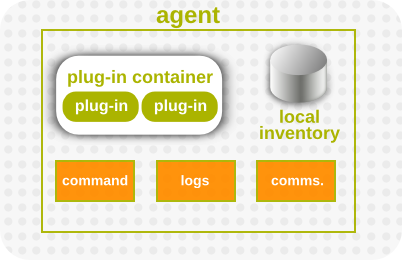
Figure 5. Agent Components, Together
<depends useClasses=""> attribute is set to true. If a plug-in is a direct dependent of another plug-in, and that dependency is defined with <depends useClasses="true">, then that parent plug-in's JAR classes (and all of its parent JARs) are available to the dependent plug-in's classloader.
classLoader="instance" on the resource type and make sure the resource type's discovery component implements the ClassLoaderFacet so it tells the plug-in container where any additional connection classes can be found for the specific version of the specific resource being managed.
classLoader option set to shared. This means that Z1.server resources share their classloaders with their parent resources, and that classloader may be a resource classloader or a plug-in classloader. Every Z1.server resource uses the same classloader.
Example 10. classLoader for Plug-in Z
classLoader option to instance means that each resource uses its own resource plug-in. However, for Z2.server, the Z2.server plug-in is extended by embedding the values for Plug-in D, so Z2.server resources share their classloaders with their parent plug-in.
classLoader option is set to instance and it has no injected or embedded dependencies. When the classLoader option is set to instance, the ResourceDiscoveryComponent implementation can optionally define a ClassLoaderFacet with a method (getAdditionalClasspathUrls) that returns a List<URL> pointing to additional JARs that should be placed in the resource's classloader. When the plug-in container needs to create a classloader for a resource, it checks if the resource's discovery component implements this facet, and, if so, it gets the additional classpath URLs and adds them to the resource classloader when it creates it.
classLoader attribute value and its parent's classLoader attribute value.
| Resource ClassLoader | Parent ClassLoader | ClassLoader Description |
|---|---|---|
| shared | shared | The useClasses value must be set to true so that the resource can access both its classes and the parent classes. |
| instance | shared | The resource primarily needs its own classes, but it may be beneficial for useclasses to be set to true to so that the child can use parent classes. |
| shared | instance | The resource uses only its own classloader. |
| instance | instance | The resource uses only its own classloader. |
4.3. Extended Example: Content Types for Resources
<content> elements. The required properties are set as flags on the main <content> element; any configurable properties, which are set by the user when new packages are uploaded to the resource, are given in <c:simple-property> child elements. For example, this content element in the Platform Resource Plug-in identifies deployable (category) package types for Windows platforms:
| Attribute | Description | Optional or Required |
|---|---|---|
| Name | The programmatic name of the package type. | Required |
| Display Name | A user interface friendly name of the package type. | Optional |
| Description | Describes the type of content found in packages of this type. | Optional |
| Category | One of four enumerated options:
| Required |
| Discovery Interval | Defines the time between package discovery scans for this type; different package types can be configured with intervals to represent the likelihood of the package inventory changing. | Optional |
| Creation Type Flag | If set to true, a package of this type is used when creating resources of the enclosing resource type. An example of this situation is a Java EAR file. There is an EAR resource type that represents the enterprise application in JBoss ON. Under that resource type, there is a package type defined to represent the EAR file itself. This package type is flagged as a creation type; when creating a new EAR resource, the EAR file must be created at the same time. The default for this attribute is false, as packages will typically not represent the creation of a new resource. | Optional |
| Configuration | The configuration element allows the plug-in to define an open-ended set of attributes about the package type. These values will be populated during package discovery, and if not marked as read only, can be specified by the user at artifact creation time. An example of a property in this configuration element is a Boolean that describes if an EAR file is deployed as exploded or zipped. When EAR files are discovered, this flag will be populated and carry package type specified information. Additionally, when deploying a new EAR file through JBoss ON, this flag can be set to indicate how the package should be deployed on the AS instance. | Optional |
4.4. Extended Example: HTTP Metrics
- Issue a GET or HEAD request to the base URL for the given server.
- Collect both the HTTP return code and the response time as a resource trait.
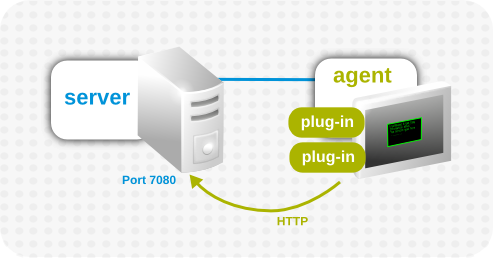
Figure 6. Basic Agent Plug-in Scenario
Note
rhq-plugin.xml file as the plug-in descriptor, which is required for JBoss ON to recognize the plug-in configuration. The plug-in is built as a maven project, so it has a pom.xml file, although that is not a requirement, since any properly configured JAR file can be deployed as an agent plug-in.
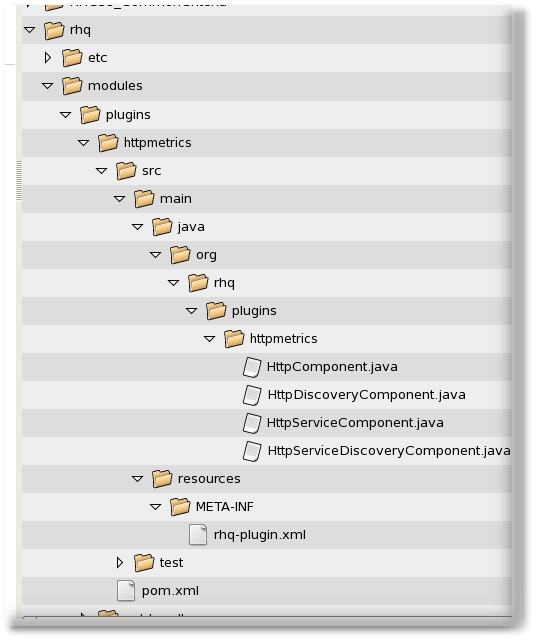
Figure 7. Directory Layout of an Agent Plug-in Project
Example 11. Basic Plug-in Information
package attribute identifies the Java package for Java class names that are referenced in the plug-in configuration in the descriptor.
Example 12. Server Definition
<server name="HttpCheck"
   description="Httpserver pinging"
   discovery="HttpDiscoveryComponent"
   class="HttpComponent">
<server name="HttpCheck"
   description="Httpserver pinging"
   discovery="HttpDiscoveryComponent"
class="HttpComponent">.java files and classes. The supportsManualAdd option sells JBoss ON that the HTTP services can be added manually through the UI, which is important for administration.
Example 13. Service Definition
<service name="HttpServiceCheck"
         discovery="HttpServiceDiscoveryComponent"
         class="HttpServiceComponent"
         description="One remote Http Server"
         supportsManualAdd="true"
<service name="HttpServiceCheck"
         discovery="HttpServiceDiscoveryComponent"
         class="HttpServiceComponent"
         description="One remote Http Server"
supportsManualAdd="true"<service> element defines the plug-in properties that are configured through the UI. This can be simple (setting a simple string for the URL).
Example 14. Simple Configuration Properties
<plugin-configuration>
   <c:simple-property name="url"
     type="string"
     required="true" />
</plugin-configuration>
<plugin-configuration>
   <c:simple-property name="url"
     type="string"
     required="true" />
</plugin-configuration>Example 15. Complex Configuration Properties
<service> element contains the metrics that are configured for the HTTP Metrics plug-in. The first metric, for the response time, collects a numeric data type. The status metric collects a trait data type. (JBoss ON is intelligent enough to only store changed traits to conserve space.)
Example 16. Defined Metrics
| Attribute | Description |
|---|---|
| property | Gives the unique name of this metric. The name can also be obtained in the code using the getName() call. |
| description | Gives a human readable description of the metric. |
| displayName | Gives the name that gets displayed in the JBoss ON UI. |
| data type | Sets the type of metric, such as numeric or trait. |
| units | The measurement units to use for numerical data type. |
| displayType | If the value is set to summary, the metric is displayed in the indicator charts and collected by default. |
| defaultOn | Sets whether the metric collected by default. |
| measurementType | Sets what characteristics the numerical values have. The options are trends up, trends down, or dynamic. For both trends metrics, the system automatically creates additional per minute metrics.
Values that form part of a larger data structure, such as an array of values, need to be deconstructed into individual values before they can be monitored.
|
HttpDiscoveryComponent.java, discovers the HTTP metrics server. The discovery component is called by the InventoryManager in the agent to discover resources. This can be done by a process table scan, querying the MBeanServer, or other means. Whatever the method, the most important thing is that the discovery component returns the same unique key each time for the same resource. The DiscoveryComponent needs to implement org.rhq.core.pluginapi.inventory.ResourceDiscoveryComponent and you need to implement discoverResources().
Example 17. HttpDiscoveryComponent.java
HttpServiceDiscoveryComponent.java) relies on information passed through the GUI to configure its resources, rather than a discovery scan. The initial definition in the Java file is similar to the one for the server discovery, but this definition has an additional List<Configuration> childConfigs which processes the information that is passed through the UI. This pulls the information for the required url information supplied by the user.
Example 18. Service Discovery
Example 19. Listing HTTP URL Resources
HttpComponent.java), the plug-in is pretty simple. The component only implements placeholder methods from the ResourceComponent interface to set the server availability. Setting the availability to UP automatically allows the resource component to start.
Example 20. Server Availability After Discovery
    public AvailabilityType getAvailability() {
        return AvailabilityType.UP;
    }
    public AvailabilityType getAvailability() {
        return AvailabilityType.UP;
}HttpServiceComponent.java) is more complex because it must carry out the operations defined in the plug-in descriptor.
<metric> element in the descriptor to the MeasurementFacet.
MeasurementFacet implements the following method:
getValues(MeasurementReport report, Set metrics)
getValues(MeasurementReport report, Set metrics)MeasurementReport passed in is where the monitoring results are added. The metrics value is a list of metrics for which data should be gathered. All of this information can be defined in the <metrics> element or in the UI configuration.
getValues() method from the MeasurementFacet must be implemented, but that's not the first step to take. A resource cannot be discovered if the resource is down, so the first step is to set a start value to start the service from ResourceContext and give it an availability of UP.
Example 21. Service Resource Availability
getValues() can be implemented. This actually collects the monitoring data from the given URLs.
Example 22. Implementing getValues()
getData() method in the MeasurementFacet loops the incoming request to see which metric is wanted and then to supply the collected value. Depending on the type of data, the data may be to be wrapped into the correct MeasurementData* class.
Example 23. Implementing getData()
4.5.1. Simple Dependency: JBoss AS and JMX Plug-ins
<depends> tag. This means that the required plug-in has to be deployed successfully before the plug-in which requires it can be deployed. A simple example of this is JBoss AS, which has a JMX server running inside it. The JBoss AS plug-in for JBoss ON, then, sets a dependency on the JMX plug-in.
Example 24. JMX Plug-in Descriptor
<plugin name="JMX">
   <server name="JMX Server" discovery="JMXDiscoveryComponent" class="JMXServerComponent">
   ...
   </server>
</plugin>
<plugin name="JMX">
   <server name="JMX Server" discovery="JMXDiscoveryComponent" class="JMXServerComponent">
   ...
   </server>
</plugin>useClasses argument is set to true), but the JBoss AS plug-in descriptor does not actually define or use any source types related to or referencing the JMX plug-in.
Example 25. JBoss AS Plug-in Descriptor
Important
useClasses=true.
Note
4.5.2. Embedded Dependency: JVM MBeanServer and JBoss AS
Example 26. JMX Plug-in Descriptor
<server> definition pulls in the sourcePlugin and sourceType attributes. The reason for this is to run a second JMX discovery scan, this one using the org.rhq.plugins.jmx.EmbeddedJMXServerDiscoveryComponent class to run a special discovery scan looking for a JVM embedded in a JBoss AS instance. The sourcePlugin and sourceType attributes, then, copy the resource type and give it a unique name so that any embedded JVMs are treated as different resource types than standalone JVMs.
Example 27. JBoss AS Plug-in Descriptor
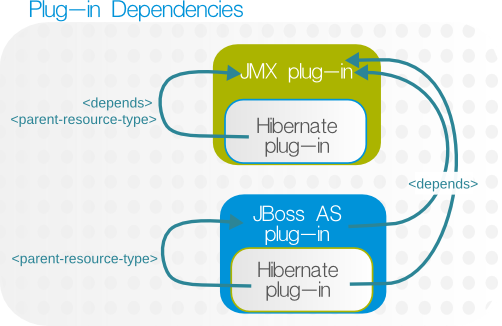
Figure 8. Hibernate, JMX, and JBoss AS Dependencies
Example 28. JMX Plug-in Descriptor
<plugin name="JMX">
   <server name="JMX Server" discovery="JMXDiscoveryComponent" class="JMXServerComponent">
   ...
   </server>
</plugin>
<plugin name="JMX">
   <server name="JMX Server" discovery="JMXDiscoveryComponent" class="JMXServerComponent">
   ...
   </server>
</plugin>Example 29. JBoss AS Plug-in Descriptor
<depends> element. The Hibernate plug-in then defines what resource types could operate as its parents by running a discovery scan (specifically for the Hibernate Statistics resource) against potential parent types. The list of parent resource types is contained in the <runs-inside> element, and each potential parent is identified by name and plug-in type in <parent-resource-type> elements.
Example 30. Hibernate Plug-in Descriptor
4.6. Extended Example: Drift Monitoring
- fileSystem, which is any directory on the machine local to the resource
- pluginConfiguration, which is defined property in the resource plug-in, like a home directory
- resourceConfiguration, a resource configuration property
- measurementTrait, a trait that is gathered about the resource
/etc/, the elements in the drift definition are:
Value name: fileSystem
Value context: /etc
Value name: fileSystem
Value context: /etcExample 31. Base Directory Only
Example 32. Included Paths and Patterns
Note
- fileSystem, which is any directory on the machine local to the resource
- pluginConfiguration, which is defined property in the resource plug-in, like a home directory
- resourceConfiguration, a resource configuration property
- measurementTrait, a trait that is gathered about the resource
Example 33. A Single Bundle Base Directory
<destination-base-dir>, are presented to users as options when they are provisioning a bundle. Users can deploy a bundle to any, user-defined directory beneath that base directory, but they cannot deploy to a location outside that directory. If users will reasonably want to provision content to multiple directories, then each directory needs to be added to the <bundle-target> definition.
Example 34. Multiple Bundle Base Directories
Note
4.8. Extended Example: Asynchronous Availability Checks
Note
getAvailability().
AvailabilityCollectorRunnable class.
Example 35. Part 1: The Collector
public class YourResourceComponent implements ResourceComponent {

    // your component needs this data member - it is your availability collector
    private AvailabilityCollectorRunnable availCollector;
public class YourResourceComponent implements ResourceComponent {

    // your component needs this data member - it is your availability collector
private AvailabilityCollectorRunnable availCollector;Example 36. Part 2: Start the Availability Collector
getAvailability() method. When the async availability collector is created, then the getAvailability() method needs to return the last known results stored in the collector rather than attempting to run a new availability scan.
getAvailability() method.
Example 37. Part 2: Return the Last Known Availability
5. Writing Agent Plug-ins: Procedures
5.1. Tip: Checking XSD Annotations
rhq-configuration.xsd and rhq-plugin.xsd.
subCategory attribute:
5.2. Validating Agent Plug-ins
mvn org.rhq:rhq-plugin-validator:rhq-plugin-validate
mvn org.rhq:rhq-plugin-validator:rhq-plugin-validate
<build> element to point to the validator and a pointer to the <pluginRepositories> element to point to the Maven repository.
5.3. Notes on Editing Agent Plug-ins
rhq-plugin.xml file and rebuilding the plug-in.
Important
5.4. Deploying Agent Plug-ins
/rhq-agent/plugins/ directory. Agent plug-ins are deployed, however, by uploading them to the JBoss ON server, and then the JBoss ON servers distribute them to the agents. As with server-side plug-ins, agent plug-ins can be deployed to a local JBoss ON server or through the JBoss ON UI.
5.4.1. Remotely Deploying Agent Plug-ins
- In the top menu, click the Administration tab.
- In the Configuration box on the left navigation bar, click the Plugins link.
- In the Agent Plugins tab, scroll to the Upload Plugin section at the bottom of the page.
- Click the Add button, and browse to the plug-in JAR file's location. If there are multiple plug-ins to deploy, just hit Add again and add in each one.
- When all of the plug-ins to be deployed are listed in the box, click the Upload button.
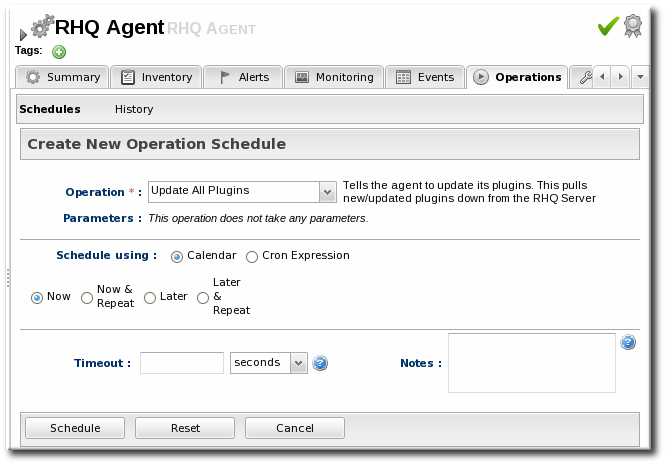
- Tell the agent to upload the new plug-in.
- Search for the agent, and then select it from the search results.
- Open the agent resource page.
- In the Operations tab, select the Update Plugins operation and schedule it to run immediately.
Agent plug-ins can also be updated by restarting the agent or by running the plugins update command in the agent command line.
5.4.2. Locally Deploying Agent Plug-ins
- If the agent plug-in is built or accessible on the same machine as a JBoss ON server, then the agent plug-in can be dropped into a deployment folder:
serverRoot/jon-server-3.1.0.GA1/jbossas/server/default/deploy/rhq.ear/rhq-downloads/rhq-plugins
serverRoot/jon-server-3.1.0.GA1/jbossas/server/default/deploy/rhq.ear/rhq-downloads/rhq-pluginsCopy to Clipboard Copied! Toggle word wrap Toggle overflow The JBoss ON server detects the new or updated plug-in and makes it available to the agents with other agent updates. - Have the agent load the new plug-ins. Either restart the agent or pass a command through the agent command line to upload the new plug-in.
> plugins update
> plugins updateCopy to Clipboard Copied! Toggle word wrap Toggle overflow
5.5. Removing and Re-deploying Agent Plug-ins
- Deployed and active
- Deleted (disabled)
- Purged
5.5.1. Deleting a Plug-in
- In the top menu, click the Administration tab.
- In the Configuration box on the left navigation bar, click the Agent Plugins link.
- Select the plug-ins to delete.
- Click the Delete button.

5.5.2. Purging and Re-deploying an Agent Plug-in
- In the top menu, click the Administration tab.
- In the Configuration box on the left navigation bar, click the Agent Plugins link.
- Click the SHOW DELETED button at the bottom of the plug-ins list.
- Select the checkbox by the plug-in to re-deploy, and then click the PURGE button. This removes the entry in the JBoss ON database that tells the servers to ignore that plug-in and any updates to it.
- Add and upload the plug-in like it is being deployed as new. This is described in Section 5.4, “Deploying Agent Plug-ins”.

6.1. Domain Objects
6.1.1. Resource and ResourceType
6.2. Plug-in Facets
6.2.1. AvailabilityFacet
6.2.2. ConfigurationFacet
6.2.3. ContentFacet
6.2.4. ManualAddFacet
6.2.5. MeasurementFacet
6.2.6. OperationFacet
6.2.7. ResourceFactoryFacet
6.2.8. SupportFacet
6.3. Plug-in Components
6.3.1. ResourceDiscoveryComponent
ResourceDiscoveryContext object to the discovery component. This context contains all the information the component needs to perform its duties of finding and creating new resources. The discovery context is also used to inject resources into the discovery component, in the case where the plug-in container was able to discover new resources on behalf of the discovery component. A plug-in container can only auto-discover resources if the appropriate metadata is supplied to it via the plug-in's descriptor.
6.3.2. ResourceComponent
6.4. Native System Information Access
6.4.1. SystemInfoFactory and SystemInfo
ResourceDiscoveryContext or ResourceContext), it can make calls to that object which will call down into the native libraries to obtain the requested data from the operating system. If there are no native libraries available, the SystemInfo will be backed with a pure Java implementation of some, but not all, of the methods defined in the SystemInfo interface (see the JavaSystemInfo implementation of that interface). The methods that are not supported by the pure Java implementation will throw an UnsupportedOperationException.
6.4.2. ProcessInfoQuery
Note
7. Document Information
7.1. Document History
| Revision History | |||
|---|---|---|---|
| Revision 3.1.1-4 | June 23, 2014 | ||
| |||
| Revision 3.1.1-2 | October 3, 2012 | ||
| |||
| Revision 3.1-0 | June 12, 2012 | ||
| |||

'%20d='M201.5%20305.5c-13.8%200-24.9-11.1-24.9-24.6%200-13.8%2011.1-24.9%2024.9-24.9%2013.6%200%2024.6%2011.1%2024.6%2024.9%200%2013.6-11.1%2024.6-24.6%2024.6zM504%20256c0%20137-111%20248-248%20248S8%20393%208%20256%20119%208%20256%208s248%20111%20248%20248zm-132.3-41.2c-9.4%200-17.7%203.9-23.8%2010-22.4-15.5-52.6-25.5-86.1-26.6l17.4-78.3%2055.4%2012.5c0%2013.6%2011.1%2024.6%2024.6%2024.6%2013.8%200%2024.9-11.3%2024.9-24.9s-11.1-24.9-24.9-24.9c-9.7%200-18%205.8-22.1%2013.8l-61.2-13.6c-3-.8-6.1%201.4-6.9%204.4l-19.1%2086.4c-33.2%201.4-63.1%2011.3-85.5%2026.8-6.1-6.4-14.7-10.2-24.1-10.2-34.9%200-46.3%2046.9-14.4%2062.8-1.1%205-1.7%2010.2-1.7%2015.5%200%2052.6%2059.2%2095.2%20132%2095.2%2073.1%200%20132.3-42.6%20132.3-95.2%200-5.3-.6-10.8-1.9-15.8%2031.3-16%2019.8-62.5-14.9-62.5zM302.8%20331c-18.2%2018.2-76.1%2017.9-93.6%200-2.2-2.2-6.1-2.2-8.3%200-2.5%202.5-2.5%206.4%200%208.6%2022.8%2022.8%2087.3%2022.8%20110.2%200%202.5-2.2%202.5-6.1%200-8.6-2.2-2.2-6.1-2.2-8.3%200zm7.7-75c-13.6%200-24.6%2011.1-24.6%2024.9%200%2013.6%2011.1%2024.6%2024.6%2024.6%2013.8%200%2024.9-11.1%2024.9-24.6%200-13.8-11-24.9-24.9-24.9z'/%3e%3c/svg%3e)