 红帽全球峰会
配置和管理红帽更新基础架构
使开源包含更多
红帽致力于替换我们的代码、文档和 Web 属性中存在问题的语言。我们从这四个术语开始:master、slave、黑名单和白名单。由于此项工作十分艰巨,这些更改将在即将推出的几个发行版本中逐步实施。有关更多详情,请参阅我们的首席技术官 Chris Wright 提供的消息。
第 1 章 关于红帽更新基础架构 4
Red Hat Update Infrastructure 4(Red Hat Update Infrastructure 4)是一个高度可扩展的、高度冗余的框架,可让您管理存储库和内容。它还可让云供应商为 Red Hat Enterprise Linux(RHEL)实例提供内容和更新。根据上游 Pulp 项目,RHUI 允许云提供商在本地镜像红帽托管的存储库内容,创建具有自身内容的自定义软件仓库,并通过负载平衡的内容将这些存储库提供给大型最终用户。
作为系统管理员,您可以通过安装和配置红帽更新设备 (RHUA)、内容交付服务器(CDS)、存储库、共享存储和负载平衡,准备您的基础架构以参与红帽认证云和服务提供商计划。
配置 RHUI 由以下任务组成:
- 创建并同步红帽软件仓库
- 创建客户端授权证书和密钥配置 RPM
- 为 RHUI 服务器创建客户端配置集
经验丰富的 RHEL 系统管理员是目标读者。具有有限 RHEL 技能的系统管理员应考虑与红帽咨询合作以提供红帽认证云提供商架构服务。
使用以下主题配置、管理和更新 RHUI:
- RHUI 组件
- 内容供应商类型
- 用于管理组件的命令行接口(CLI)
- 工具命令
- 证书管理
- 内容管理
1.1. 安装选项
下表介绍了各种红帽更新基础架构 4 组件。
| 组件 | ancronym | 功能 | 替代方案 |
|---|---|---|---|
| Red Hat Update Appliance | RHUA | 从红帽内容交付网络下载内容并将其存储在共享存储中 | 无 |
| 内容交付服务器 | CDS |
提供客户端连接的 | 无 |
| HAProxy | 无 | 在 CDS 节点间提供负载均衡 | 现有负载均衡解决方案 |
| 共享存储 | 无 | 提供共享存储 | 现有存储解决方案 |
下表描述了如何执行安装任务。
| 安装任务 | 执行 |
|---|---|
| 安装 RHEL 8 | RHUA、CDS 和 HAProxy |
| 使用 RHUI 消费者类型注册系统 | RHUA |
| 使用默认消费者类型注册系统 | CDS 和 HAProxy |
| 应用更新 | RHUA、CDS 和 HAProxy |
|
安装 | RHUA |
|
运行 | RHUA |
1.1.1. 选项 1:完整安装
- 具有共享存储的 RHUA
- 使用这个共享存储的两个或者多个 CDS 节点
- 一个或多个 HAProxy 负载均衡器
1.1.2. 选项 2:使用现有存储解决方案安装
- 具有现有存储解决方案的 RHUA
- 具有此现有存储解决方案的两个或更多 CDS 节点
- 一个或多个 HAProxy 负载均衡器
1.1.3. 选项 3:使用现有负载均衡器解决方案安装
- 具有共享存储的 RHUA
- 使用这个共享存储的两个或者多个 CDS 节点
- 现有的负载均衡器
1.1.4. 选项 4:使用现有存储和负载平衡器解决方案安装
- 具有现有存储解决方案的 RHUA
- 具有此现有共享存储的两个或者多个 CDS 节点
- 现有的负载均衡器
Red Hat Update Infrastructure 必须与至少两个 CDS 节点和负载均衡器节点一起使用。在没有负载均衡器节点和单一 CDS 节点的情况下安装不被支持。
下图显示了各种 Red Hat Update Infrastructure 4 组件如何交互的高级视图。
图 1.1. Red Hat Update Infrastructure 4 概述
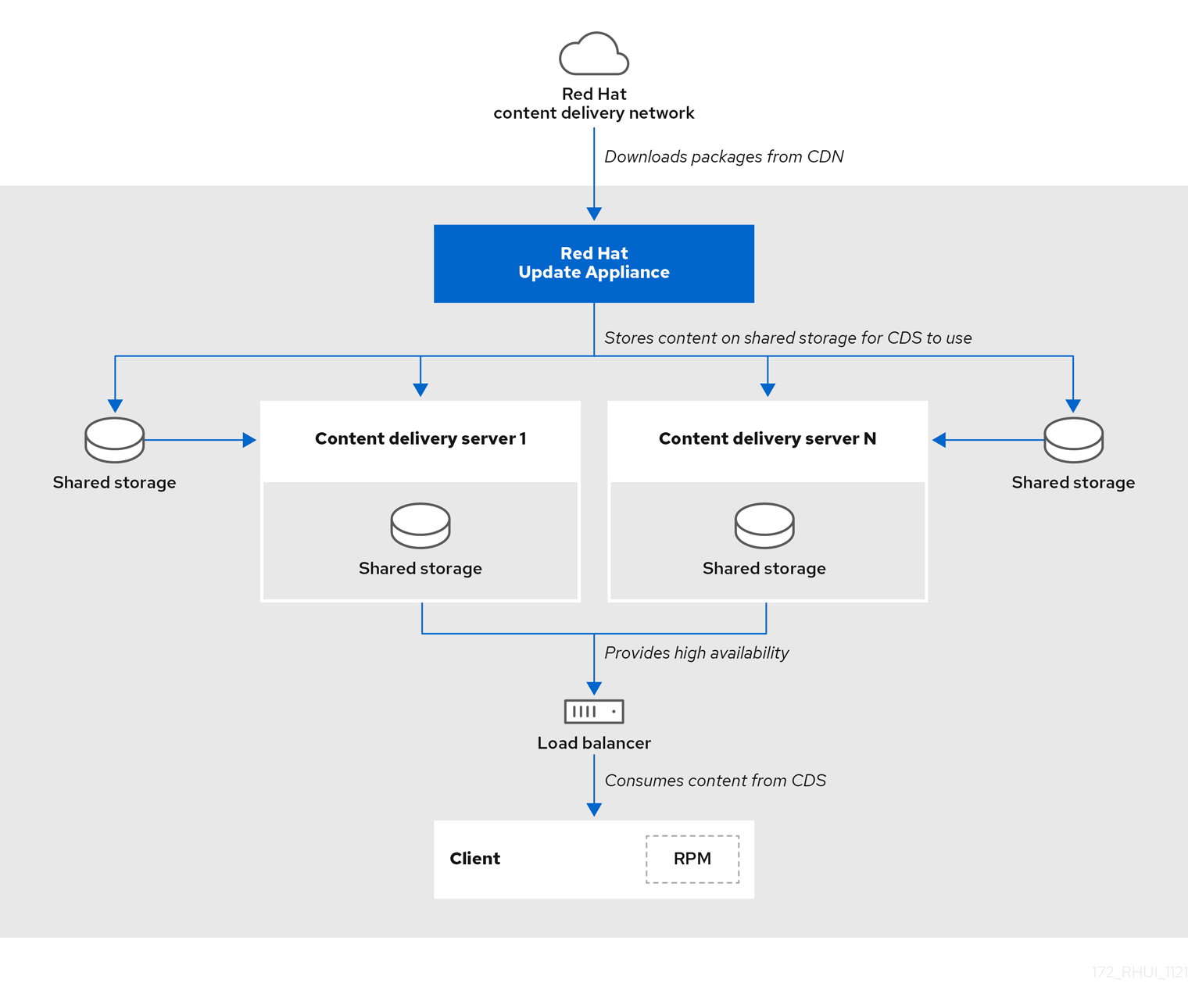
在单独的 x86_64 服务器(裸机或虚拟机)上安装 RHUA 和 CDS 节点。确保连接到 RHUI 的所有服务器和网络都可以访问 Red Hat Subscription Management 服务。
1.2. RHUI 4 组件
了解每个 RHUI 组件如何与其他组件交互,使您的作业成为系统管理员稍微简单。
1.2.1. 红帽更新设备
每个 RHUI 安装都有一个 RHUA,但在许多云环境中,每个区域或数据中心都会有一个 RHUI 安装,例如,Amazon 的 EC2 云包含多个区域。在每个区域中,都使用其自身的 RHUA 节点设置一个单独的 RHUI。
RHUA 允许您执行以下任务:
- 从红帽内容交付网络(CDN)下载新软件包。
- 将新软件包复制到共享网络存储中。
- 验证 RHUI 安装的健康状况,并将结果写入位于 RHUA 的文件中。监控解决方案使用此文件来确定 RHUI 安装的健康状况。
- 通过 CLI 工具提供 RHUI 安装健康的人类可读视图。
RHUI 使用两个主要配置文件: /etc/rhui/rhui-tools.conf 和 /etc/rhui/rhui-subscription-sync.conf。
/etc/rhui/rhui-tools.conf 配置文件包含 RHUA 使用的常规选项,如证书的默认文件位置,以及红帽 CDN 同步的默认配置参数。此文件通常不需要编辑。
/etc/rhui/rhui-subscription-sync.conf 配置文件包含 Pulp 数据库的凭据。在登录 rhui-manager 接口时,必须使用这些凭据。
RHUA 采用多种服务同步、组织和分发内容以方便交付。
RHUA 服务
- Pulp
- 管理存储库的服务。
- PostgreSQL
- Pulp 用来跟踪当前同步存储库、软件包和其他关键元数据的数据库。
1.2.2. 内容交付服务器
CDS 节点提供客户端为更新的内容连接的存储库。可能有一些 CDS。因为 RHUI 提供了带有故障切换功能的负载均衡器,我们建议您使用多个 CDS 节点。
CDS 节点在最终用户 RHEL 系统中托管内容。虽然不需要数量的系统,但 CDS 以轮循式负载平衡方式(A、B、C、A、B、C、C、C、C、C)为最终用户系统提供内容。CDS 使用 HTTP 通过 yum 存储库将内容托管给最终用户系统。
在配置过程中,您可以指定同步软件包的 CDS 目录。与 RHUA 类似,唯一的要求是将目录挂载到 CDS 上。云提供商由云提供商决定在分配所需设备时的最佳操作方案。Red Hat Update Infrastructure Management Tool 配置 RPM 将 package 目录与 NGINX 配置相关联,以提供它。
目前,RHUI 支持以下共享存储解决方案:
- NFS
如果使用 NFS,
rhui-installer可以在 RHUA 上配置 NFS 共享,以存储内容以及 CDS 节点上的目录以挂载 NFS 共享。以下rhui-installer选项控制这些设置:-
--remote-fs-mountpoint是应该挂载远程文件系统共享的文件系统位置(默认为/var/lib/rhui/remote_share) -
--remote-fs-server是要使用的共享文件系统的远程挂载点,例如nfs.example.com:/path/to/share(无默认值)
-
- CephFS
如果使用 CephFS,您必须单独配置 CephFS,然后将它与 RHUI 搭配使用作为挂载点。以下
rhui-installer选项控制这些设置:-
--remote-fs-server是要使用的共享文件系统的远程挂载点,例如ceph.example.com:/path/to/share(无默认值)
-
本文档没有提供设置或配置 Ceph 共享文件存储的说明。有关任何 Ceph 相关任务,请咨询系统管理员或查看 Ceph 文档。
预期的用法是在 RHUA 和所有 CDS 节点上使用一个共享网络文件系统,例如 NFS。云提供商可能使用某种形式的共享存储,RHUA 将软件包写入,并且每个 CDS 从中读取。
存储解决方案必须提供 NFS 或 CephFS 端点,以便在 RHUA 和 CDS 节点上挂载。不要在任何 RHUI 节点上设置共享文件系统存储。您必须使用独立的存储服务器。
在每个 CDS 上进行的唯一非标准逻辑是权利证书检查。此检查可确保在 yum 存储库上发出请求的客户端由云供应商授权,以访问这些存储库。检查可确保以下条件:
- 授权证书由云供应商的证书颁发机构(CA)证书签名。CA 证书安装在 CDS 上,作为其配置的一部分,以便于此验证。
- 请求的 URI 与客户端授权证书中找到的授权匹配。
如果 CA 验证失败,客户端会看到 SSL 错误。如需更多信息,请参阅 /var/log/nginx/ 下的 CDS 节点的 NGINX 日志。
[root@cds01 ~]# ls -1 /var/log/nginx/
access.log
error.log
gunicorn-auth.log
gunicorn-content_manager.log
gunicorn-mirror.log
ssl-access.log----
NGINX 配置通过 /etc/nginx/conf.d/ssl.conf 文件处理,该文件是在 CDS 安装过程中创建的。
1.2.3. HAProxy 负载均衡器
必须有负载平衡解决方案,以便在所有 CDS 服务器之间分散客户端 HTTPS 请求。RHUI 默认使用 HAProxy,但最好选择在安装过程中要使用的负载平衡解决方案(例如,云供应商中的一个)。如果使用 HAProxy,您还必须决定要引入的节点数量。
客户端没有配置为直接进入 CDS;其存储库文件配置为指向 HAProxy,RHUI 负载平衡器。HAProxy 是一个 TCP/HTTP 反向代理,特别适用于高可用性环境。
如果您使用现有的负载均衡器,请确保在负载均衡器中配置端口 443,且集群中的所有 CDS 都位于负载均衡器池中。
确切的配置取决于您使用的特定负载均衡器软件。请参阅从典型的 HAProxy 设置中获取的以下配置,以了解您应该如何配置负载均衡器:
[root@rhui4proxy ~]# cat /etc/haproxy/haproxy.cfg
global
  chroot  /var/lib/haproxy
  daemon
  group  haproxy
  log  10.10.153.149 local0
  maxconn  4000
  pidfile  /run/haproxy.pid
  stats  socket /var/lib/haproxy/stats
  user  haproxy

defaults
  log  global
  maxconn  8000
  option  redispatch
  retries  3
  stats  enable
  timeout  http-request 10s
  timeout  queue 1m
  timeout  connect 10s
  timeout  client 1m
  timeout  server 1m
  timeout  check 10s

listen https00
  bind 10.10.153.149:443
  balance roundrobin
  option tcplog
  option tcp-check
    server cds01.example.com cds01.example.com:443 check
    server cds02.example.com cds02.example.com:443 check
请记住,当客户端无法连接时,务必要查看 /var/log/ 下的 CDS 上的 nginx 日志,以确保到达 CDS 的任何请求。如果请求没有到达 CDS,则问题(如 DNS 或常规网络连接)可能出现问题。
nginx /
1.2.4. 仓库和内容
存储库是软件包(RPMs)的存储位置。RHEL 使用 yum 命令搜索存储库、下载、安装和更新 RPM。RPM 包含运行应用程序所需的所有依赖项。
与 RHUI 相关的内容是您从红帽 CDN 下载的软件(如 RPM),用于在 RHUA 和 CDS 节点上使用。RPM 提供了运行特定应用程序和工具所需的文件。客户端被授予 rpm 软件包提供的一组 SSL 内容证书和密钥的访问权限,它还提供一组生成的 yum 存储库文件。
1.3. 内容供应商类型
有三种类型的云计算环境:
- 公有云
- 私有云
- 混合云
本指南侧重于公共和私有云。假设受众了解使用公共云、私有和混合云的影响。
1.4. 组件通信
所有 RHUI 组件都使用通过端口 443 的 HTTPS 通信协议。
| Source | 目的地 | 协议 | 用途 |
|---|---|---|---|
| 红帽更新设备 | Red Hat Content Delivery Network | HTTPS | 下载来自红帽的软件包 |
| load-Balancer | Content Delivery Server | HTTPS | 转发客户端对存储库元数据和软件包的请求 |
| 客户端 | load-Balancer | HTTPS | 在客户端上 yum 下载内容 |
| Content Delivery Server | 红帽更新设备 | HTTPS | 可能会从 Pulp API 请求有关内容的信息 |
RHUI 节点需要以下网络访问权限才能相互通信。
确保开放了网络端口,并且网络访问仅限于计划使用的节点。
| 节点 | port | 权限 |
|---|---|---|
| RHUA | 443 | RHUA, CDS01, CDS02, … CDSn |
| HAProxy | 443 | 客户端 |
1.5. 更改管理员密码
rhui-installer 设置初始 RHUI 登录密码。它还使用 /etc/rhui/rhui-subscription-sync.conf 文件编写。您可以使用-- rhui-manager-password 选项覆盖 初始密码。
如果要稍后更改初始密码,您可以通过 rhui-manager 工具或通过 rhui-installer 进行修改。运行 rhui-installer -- help 命令查看 rhui-installer 选项的完整列表。
流程
导航到 Red Hat Update Infrastructure Management Tool 主页:
[root@rhua ~]# rhui-manager-
按
u选择 管理 RHUI 用户。 在" 用户管理器 "屏幕中,按
p键选择更改管理员密码(通过注销操作):-= User Manager =- p change admin's password (followed by logout) rhui (users) => p Warning: After password change you will be logged out. Use ctrl-c to cancel password change. New Password:输入新密码;重新输入该密码以确认更改。
New Password:
Re-enter Password:

[localhost] env PULP_SETTINGS=/etc/pulp/settings.py /usr/bin/pulpcore-manager reset-admin-password -p ********
验证
更改 admin 密码后会显示以下信息:
Password successfully updated. For security reasons you have been logged out.
第 2 章 管理存储库
2.1. 可用的软件仓库
认证云和服务供应商(CCSP)合作伙伴控制通过服务交付哪些存储库和软件包。有关不同操作系统版本可用的存储库但尚未在 RHUI 中添加哪些存储库的最新信息,请在 RHUA 上运行以下命令:
# rhui-manager --noninteractive repo unused --by_repo_id2.2. 添加新红帽内容存储库
您的 CCSP 帐户可让您访问所选的红帽存储库,并使其在 Red Hat Update Infrastructure 环境中可用。
流程
导航到 Red Hat Update Infrastructure Management Tool 主页:
[root@rhua ~]# rhui-manager-
按
r选择 管理存储库。 -
在 Repository Management 屏幕中
,按 a 键选择添加新红帽内容存储库。 等待 Red Hat Update Infrastructure Management Tool 确定授权的存储库。这可能需要几分钟时间:
rhui (repo) => a

Loading latest entitled products from Red Hat...
... listings loaded
Determining undeployed products...
... product list calculated
Red Hat Update Infrastructure Management Tool 提示输入一个选择的方法:
Import Repositories: 1 - All in Certificate 2 - By Product 3 - By Repository Enter value (1-3) or 'b' to abort:-
要添加将多个存储库捆绑在一起,通常将其作为产品的所有次要版本添加到一个步骤
2中,以选择 By Product 方法。或者,您可以使用 By Repository 方法添加特定的存储库。 通过在提示符处键入存储库数,选择要添加哪些存储库。您还可以通过输入
1-5来选择仓库的范围,例如:Enter value (1-620) to toggle selection, 'c' to confirm selections, or '?' for more commands:- 继续,直到检查您要添加的所有存储库。
选择完存储库后,按
c键。Red Hat Update Infrastructure Management Tool 显示用于部署的软件仓库,并提示确认:The following products will be deployed: Red Hat Enterprise Linux 8 for ARM 64 - BaseOS (Debug RPMs) from RHUI Red Hat Enterprise Linux 8 for ARM 64 - BaseOS (RPMs) from RHUI Proceed? (y/n)按
y继续。消息显示每个成功部署:Importing Red Hat Enterprise Linux 8 for ARM 64 - BaseOS (Debug RPMs) from RHUI... Importing product repository Red Hat Enterprise Linux 8 for ARM 64 - BaseOS (Debug RPMs) from RHUI (8.4)... Importing product repository Red Hat Enterprise Linux 8 for ARM 64 - BaseOS (Debug RPMs) from RHUI (8.3)... Importing product repository Red Hat Enterprise Linux 8 for ARM 64 - BaseOS (Debug RPMs) from RHUI (8.2)... Importing product repository Red Hat Enterprise Linux 8 for ARM 64 - BaseOS (Debug RPMs) from RHUI (8.1)... Importing product repository Red Hat Enterprise Linux 8 for ARM 64 - BaseOS (Debug RPMs) from RHUI (8.0)... Importing product repository Red Hat Enterprise Linux 8 for ARM 64 - BaseOS (Debug RPMs) from RHUI (8)... Importing Red Hat Enterprise Linux 8 for ARM 64 - BaseOS (RPMs) from RHUI... Importing product repository Red Hat Enterprise Linux 8 for ARM 64 - BaseOS (RPMs) from RHUI (8.4)... Importing product repository Red Hat Enterprise Linux 8 for ARM 64 - BaseOS (RPMs) from RHUI (8.3)... Importing product repository Red Hat Enterprise Linux 8 for ARM 64 - BaseOS (RPMs) from RHUI (8.2)... Importing product repository Red Hat Enterprise Linux 8 for ARM 64 - BaseOS (RPMs) from RHUI (8.1)... Importing product repository Red Hat Enterprise Linux 8 for ARM 64 - BaseOS (RPMs) from RHUI (8.0)... Importing product repository Red Hat Enterprise Linux 8 for ARM 64 - BaseOS (RPMs) from RHUI (8)... Content will not be downloaded to the newly imported repositories until the next sync is run.
验证
-
在 Repository Management 屏幕中,按
l检查是否安装了正确的存储库。
2.3. 列出当前由 RHUI 4 管理的存储库
软件仓库包含 Linux 发行版的可下载软件。您可以使用 yum 从存储库搜索、安装或仅下载 RPM。
流程
导航到 Red Hat Update Infrastructure Management Tool 主页:
[root@rhua ~]# rhui-manager-
按
r选择 管理存储库。 在 Repository Management 屏幕中,按
l键选择当前由 RHUI 管理的存储库 :... Red Hat Enterprise Linux 8 for ARM 64 - AppStream (RPMs) from RHUI (8) Red Hat Enterprise Linux 8 for ARM 64 - AppStream (RPMs) from RHUI (8.0) Red Hat Enterprise Linux 8 for ARM 64 - AppStream (RPMs) from RHUI (8.1) Red Hat Enterprise Linux 8 for ARM 64 - AppStream (RPMs) from RHUI (8.2) Red Hat Enterprise Linux 8 for ARM 64 - AppStream (RPMs) from RHUI (8.3) Red Hat Enterprise Linux 8 for ARM 64 - AppStream (RPMs) from RHUI (8.4) Red Hat Enterprise Linux 8 for ARM 64 - AppStream (Source RPMs) from RHUI (8) Red Hat Enterprise Linux 8 for ARM 64 - AppStream (Source RPMs) from RHUI (8.0) Red Hat Enterprise Linux 8 for ARM 64 - AppStream (Source RPMs) from RHUI (8.1) Red Hat Enterprise Linux 8 for ARM 64 - AppStream (Source RPMs) from RHUI (8.2) Red Hat Enterprise Linux 8 for ARM 64 - AppStream (Source RPMs) from RHUI (8.3) Red Hat Enterprise Linux 8 for ARM 64 - AppStream (Source RPMs) from RHUI (8.4) Red Hat Enterprise Linux 8 for ARM 64 - BaseOS (Debug RPMs) from RHUI (8) Red Hat Enterprise Linux 8 for ARM 64 - BaseOS (Debug RPMs) from RHUI (8.0) Red Hat Enterprise Linux 8 for ARM 64 - BaseOS (Debug RPMs) from RHUI (8.1) Red Hat Enterprise Linux 8 for ARM 64 - BaseOS (Debug RPMs) from RHUI (8.2) Red Hat Enterprise Linux 8 for ARM 64 - BaseOS (Debug RPMs) from RHUI (8.3) Red Hat Enterprise Linux 8 for ARM 64 - BaseOS (Debug RPMs) from RHUI (8.4) ...
2.4. 显示仓库的详细信息
您可以使用 Repository Management 屏幕显示特定存储库的信息。
流程
导航到 Red Hat Update Infrastructure Management Tool 主页:
[root@rhua ~]# rhui-manager-
按
r选择 管理存储库。 在 Repository Management 屏幕中,按
i:Enter value (1-1631) to toggle selection, 'c' to confirm selections, or '?' for more commands:- 通过输入仓库名称旁边的值来选择仓库。在确认您的产品选择前,一次输入一个存储库选择。
按
c确认:Name: Red Hat Enterprise Linux 8 for ARM 64 - AppStream (Debug RPMs) from RHUI (8.4) ID: rhel-8-for-aarch64-appstream-debug-rhui-rpms-8.4 Type: Red Hat Version: 0 Relative Path: content/dist/rhel8/rhui/8.4/aarch64/appstream/debug GPG Check: Yes Custom GPG Keys: (None) Red Hat GPG Key: Yes Content Unit Count: Last Sync: 2021-11-15 15:56:06 Next Sync: 2021-11-15 22:00:00 Name: Red Hat Enterprise Linux 8 for ARM 64 - AppStream (RPMs) from RHUI (8.4) ID: rhel-8-for-aarch64-appstream-rhui-rpms-8.4 Type: Red Hat Version: 0 Relative Path: content/dist/rhel8/rhui/8.4/aarch64/appstream/os GPG Check: Yes Custom GPG Keys: (None) Red Hat GPG Key: Yes Content Unit Count: Last Sync: 2021-11-15 19:50:20 Next Sync: 2021-11-16 01:55:00 Name: Red Hat Enterprise Linux 8 for ARM 64 - AppStream (Source RPMs) from RHUI (8.4) ID: rhel-8-for-aarch64-appstream-source-rhui-rpms-8.4 Type: Red Hat Version: 0 Relative Path: content/dist/rhel8/rhui/8.4/aarch64/appstream/source/SRPMS GPG Check: Yes Custom GPG Keys: (None) Red Hat GPG Key: Yes Content Unit Count: Last Sync: 2021-11-15 15:56:51 Next Sync: 2021-11-15 22:00:00
验证
- 为您的选择会显示类似的输出。
2.5. 生成存储库状态文件
您可以生成一个机器可读的 JSON 文件,该文件显示所有 RHUI 存储库的状态并提供一些其他信息。例如,如果要被动监控存储库的状态,这非常有用。
2.5.1. 为 RHUI 存储库生成状态文件
您可以使用 rhui-manager 命令,以机器可读格式获取每个存储库的状态。
流程
在 RHUA 节点上,运行以下命令:
rhui-manager --non-interactive status --repo_json <output file>生成一个 JSON 文件,其中包含所有自定义和红帽存储库的字典列表。有关可用字典的列表,请参阅 第 2.5.2 节 “存储库状态 JSON 文件中的字典键列表”。
2.5.2. 存储库状态 JSON 文件中的字典键列表
运行 命令时会创建一个机器可读的 JSON 文件,以获取每个 RHUI 存储库的状态。JSON 文件包含字典列表,每个存储库有一个字典。
自定义存储库的字典键列表
| 键 | 描述 |
|---|---|
| base_path | 存储库的路径。 |
| description | 存储库的名称。 |
| group |
存储库所属的组。它始终设置为字符串 |
| id | 存储库 ID。 |
| name | 存储库的名称。它与存储库 ID 相同。 |
Red Hat 软件仓库的字典键列表
| 键 | 描述 |
|---|---|
| base_path | 存储库的路径。 |
| description | 存储库的名称。 |
| group |
存储库所属的组。它始终设置为字符串 |
| id | 存储库 ID。 |
| last_sync_date |
存储库最后一次同步的日期和时间。如果存储库永不同步,则该值为 |
| last_sync_exception |
如果存储库无法同步,则引发异常。如果正确同步了存储库,则该值为 |
| last_sync_result | 同步任务的结果。 数值是:
|
| last_sync_traceback |
如果存储库无法同步,日志记录的回溯信息。如果存储库正确同步或者永远不会同步,则该值为 |
| metadata_available | 一个布尔值,代表元数据可用于存储库。 |
| name | 存储库的名称。它与存储库 ID 相同。 |
| next_sync_date |
存储库下次调度的同步的日期和时间。如果同步任务当前正在运行,则值 |
| repo_published | 一个布尔值,代表这个软件仓库是否已在 RHUI 中发布。请注意,默认情况下,RHUI 配置为自动发布存储库。 |
2.6. 设置按需同步软件仓库
RHUI 允许您通过将某些存储库设置为 on_demand 同步模式来最大程度减少之前下载的内容量。这样,RHUI 仅在客户端机器请求时下载和存储内容,从而降低存储使用量并降低成本。但是,这种方法的缺点是 RHUI 的性能取决于红帽 CDN 网络的连接速度。
仓库内容类型
存储库内容有三种类型:
- 二进制 RPM 软件仓库
- 源 RPM 软件仓库
- 调试 RPM 软件仓库
同步策略
您可以将每个存储库类型设置为两个同步策略之一:
- immediate
- on_demand
默认情况下,所有策略都设置为 immediate。
设置同步策略
默认情况下,RHUA 节点上的 /etc/rhui/rhui-tools.conf 文件在 [rhui] 部分中包含以下行:
# Sync policy can be immediate or on_demand
default_sync_policy: immediate
default_sync_policy 选项适用于所有三种类型的内容存储库。
虽然您可以通过编辑此文件来更改策略,但请注意,出于某种原因,您的更改将会丢失。因此,在自定义配置文件中配置同步策略。自定义配置文件位于 /root/.rhui/rhui-tools-custom.conf,但默认情况下不存在。要使用此文件,请创建该文件并将 [rhui] 部分放在其中。然后,您可以在本节中添加特定的覆盖以自定义特定内容类型的行为。可用的选项有:
-
rpm_sync_policy -
source_sync_policy -
debug_sync_policy
例子
on_demand 策略的最常见用法是立即将 Binary RPM 设置为 sync,同时将 Source 和 Debug 存储库设置为 on_demand,因为客户端的一般填充通常不需要这些内容类型。您可以通过几种方法配置它:
[rhui]
default_sync_policy: on_demand
rpm_sync_policy: immediate
或者
[rhui]
default_sync_policy: immediate
source_sync_policy: on_demand
debug_sync_policy: on_demand
或者
[rhui]
default_sync_policy: immediate
rpm_sync_policy: immediate
source_sync_policy: on_demand
debug_sync_policy: on_demand
所有这三个配置都有效;它只是首选。
应用策略
更新配置文件后,下一个存储库同步将应用新策略。
如果您从 on_demand 切换到 immediate,则下一次同步将开始下载指定类型的所有内容。
如果您从 immediate 切换到 on_demand,则下一次同步将仅下载存储库元数据。然后,RHUI将根据客户端机器的要求下载内容。
提示和技巧
- 在安装 RHUI 后,将所有存储库设置为 on_demand 可能会导致更快地部署速度,从而更快地交付最终用户,因为最初需要同步元数据。
-
如果您有新安装且不需要支持旧版本的 RHEL 客户端,使用 "martyr client" 策略会很有用。通过使用镜像最终用户配置并运行
dnf update的客户端,您可以预下载内容到 RHUI 的存储。
2.7. 使用输入文件添加新红帽内容存储库
在 Red Hat Update Infrastructure 4.2 及更高版本中,您可以使用配置的 YAML 输入文件添加自定义存储库。您可以在 /usr/share/rhui-tools/examples/repo_add_by_file.yaml 目录中找到 RHUA 节点上的 YAML 文件示例模板。
这个功能只在命令行界面(CLI)中可用。
先决条件
- 确保您有访问 RHUA 节点的 root 访问权限。
流程
在 RHUA 节点上,创建一个以下格式的 YAML 输入文件:
# cat /root/example.yaml
name: Example_YAML_File
repo_ids:
    - rhel-8-for-x86_64-baseos-eus-rhui-rpms-8.1
    - rhel-8-for-x86_64-baseos-eus-rhui-rpms-8.2
    - rhel-8-for-x86_64-baseos-eus-rhui-rpms-8.4
    - rhel-8-for-x86_64-baseos-eus-rhui-rpms-8.6
使用
rhui-manager工具添加输入文件中列出的存储库:# rhui-manager repo add_by_file --file /root/example.yaml --sync_now The name of the repos being added: Example_YAML_File Loading latest entitled products from Red Hat... ... listings loaded Successfully added Red Hat Enterprise Linux 8 for x86_64 - BaseOS - Extended Update Support from RHUI (RPMs) (8.1) (Yum) Successfully added Red Hat Enterprise Linux 8 for x86_64 - BaseOS - Extended Update Support from RHUI (RPMs) (8.2) (Yum) Successfully added Red Hat Enterprise Linux 8 for x86_64 - BaseOS - Extended Update Support from RHUI (RPMs) (8.4) (Yum) Successfully added Red Hat Enterprise Linux 8 for x86_64 - BaseOS - Extended Update Support from RHUI (RPMs) (8.6) (Yum) ... successfully scheduled for the next available timeslot. ... successfully scheduled for the next available timeslot. ... successfully scheduled for the next available timeslot. ... successfully scheduled for the next available timeslot.
验证
在 CLI 中,使用以下命令列出所有已安装的软件仓库,并检查是否已安装了正确的软件仓库:
# rhui-manager repo list-
在 RHUI Management Tool 中,在 Repository Management 屏幕中,按
l列出所有已安装的存储库,并检查是否已安装了正确的存储库。
2.8. 创建新的自定义存储库(仅限 RPM 内容)
您可以创建自定义软件仓库,用于将更新的客户端配置软件包或其他非红帽软件分发到 RHUI 客户端。适用于 64 位 RHUI 服务器的受保护的软件仓库(如 client-rhui-x86_64)将是向 RHUI 客户端发布新的非红帽软件包的首选载体。
与红帽内容存储库一样,所有在处理器架构(i386 与 AMD64)中有所不同的受保护的自定义软件仓库都被整合到授权证书中的单个权利中,使用 $basearch yum 变量。
如果出现证书问题,则 RHUI 服务器的未保护存储库可用作回退方法,用于将更新的 RPM 分发到 RHUI 客户端。
流程
导航到 Red Hat Update Infrastructure Management Tool 主页:
[root@rhua ~]# rhui-manager-
按
r选择 管理存储库。 -
在 Repository Management 屏幕中,按
c键 创建新的自定义存储库(仅限 RPM 内容)。 输入存储库的唯一 ID。只允许字母数字字符、_(underscore)和 -(hyphen)。您不能在唯一 ID 中使用空格。例如,
repo1、repo_1和repo-1是有效的条目。Unique ID for the custom repository (alphanumerics, _, and - only):输入存储库的显示名称。此名称可以包含空格和其他无法在 ID 中使用的字符。名称默认为 ID。
Display name for the custom repository [repo_1]:指定托管存储库的路径。该路径必须在 RHUI 托管的所有存储库中都唯一。例如,如果您将此步骤中的路径指定为
internal/rhel/9/repo_1,则存储库将位于:https://<yourLB>/pulp/content/protected/internal/rhel/9/repo_1。Unique path at which the repository will be served [repo_1]:选择是否保护新存储库。如果您回答这个问题,则任何客户端都可以访问该存储库。如果您回答 yes,则只有具有适当授权证书的客户端才能访问该存储库。
警告如名称所示,未保护的存储库中的内容可用于请求它的任何系统,而无需客户端授权证书。在使用未保护的存储库分发任何内容时,请小心,特别是更新的客户端配置 RPM 等内容,然后提供对受保护的存储库的访问。
在出现以下问题时,回答 yes 或 no :
Should the repository require clients to perform a GPG check and verify packages are signed by a GPG key? (y/n) Will the repository be used to host any Red Hat GPG signed content? (y/n) Will the repository be used to host any custom GPG signed content? (y/n) Enter the absolute path to the public key of the GPG key pair: Would you like to enter another public key? (y/n) Enter the absolute path to the public key of the GPG key pair: Would you like to enter another public key? (y/n)-
此时会显示新存储库的详情。在提示符处按
y确认信息并创建存储库。
验证
-
在 Repository Management 屏幕中,按
l检查是否安装了正确的存储库。
2.9. 从 RHUI 4 删除存储库
当 Red Hat Update Infrastructure Management Tool 删除红帽软件仓库时,它会从 RHUA 和所有适用的 CDS 节点中删除存储库。
流程
导航到 Red Hat Update Infrastructure Management Tool 主页:
[root@rhua ~]# rhui-manager-
按
r选择 管理存储库。 -
在 Repository Management 屏幕中,在提示符处按
d键删除红帽存储库。这时将显示目前由 RHUI 管理的所有存储库的列表。 -
通过在提示符处键入存储库数,选择要删除哪些存储库。键入存储库的数量会将该存储库名称旁边的复选标记放在该存储库的名称旁边。您还可以通过输入
1-5来选择仓库的范围,例如: - 继续,直到选中您要删除的所有存储库。
在提示符处按
c确认。注意删除存储库后,
yum无法使用引用已删除存储库的客户端配置 RPM。
2.10. 将内容上传到自定义存储库(仅限 RPM 内容)
您可以上传多个软件包,并一次上传到多个存储库。软件包将立即上传到 RHUA,但 CDS 节点上不可用,直到下次同步 CDS 节点为止。
流程
导航到 Red Hat Update Infrastructure Management Tool 主页:
[root@rhua ~]# rhui-manager-
按
r选择 管理存储库。 在 Repository Management 屏幕中,按
u键:Select the repositories to upload the package into: - 1: test- 输入值(1-1)以切换选择。
-
按
c确认您的选择。 输入要上传的软件包位置。如果位置是 RPM,则会上传该文件。如果位置是一个目录,则该目录中的所有 RPM 都会被上传:
/root/bear-4.1-1.noarch.rpm

The following RPMs will be uploaded:
  bear-4.1-1.noarch.rpm
按
y继续操作,或n取消:Copying RPMs to a temporary directory: /tmp/rhui.rpmupload.jsqdub22.tmp .. 1 RPMs copied. Creating repository metadata for 1 packages ... .. repository metadata created for 1 packages. The packages upload task for repo: client-config-rhel-8-x86_64 has been queued: /pulp/api/v3/tasks/01937826-8654-77c1-84f7-e9e07c7a7aeb/ You can inspect its progress via (S)ync screen/(RR) menu option in rhui-manager TUI.
2.11. 从远程网站上传内容(仅限 RPM 内容)
您可以上传存储在远程服务器中的软件包,而无需首先手动下载它们。软件包必须可以被 HTTP、HTTPS 或者 FTP 访问。
流程
导航到 Red Hat Update Infrastructure Management Tool 主页:
[root@rhua ~]# rhui-manager-
按
r选择 管理存储库。 在 Repository Management 屏幕中,按
ur键:Select the repositories to upload the package into: - 1: test- 输入值(1-1)以切换选择。
按
c确认您的选择:### WARNING ### WARNING ### WARNING ### WARNING ### WARNING ### WARNING ### # # # Content retrieved from non-Red Hat arbitrary places can contain # # unsupported or malicious software. Proceed at your own risk. # # # ###########################################################################输入要上传的软件包的远程 URL。如果位置是 RPM,则会上传该文件。如果位置是网页,则链接到该页面的所有 RPM 都将被上传:
https://repos.fedorapeople.org/pulp/pulp/demo_repos/zoo/bear-4.1-1.noarch.rpm
Retrieving https://repos.fedorapeople.org/pulp/pulp/demo_repos/zoo/bear-4.1-1.noarch.rpm

The following RPMs will be uploaded:
  bear-4.1-1.noarch.rpm
按
y继续操作,或n取消:Copying RPMs to a temporary directory: /tmp/rhui.rpmupload.dwux8rq7.tmp .. 1 RPMs copied. Creating repository metadata for 1 packages ... .. repository metadata created for 1 packages. The packages upload task for repo: test has been queued: /pulp/api/v3/tasks/0193770c-6523-7363-ae5e-8c6429728b4f/ You can inspect its progress via (S)ync screen/(RR) menu option in rhui-manager TUI.
2.12. 将软件包组元数据导入到自定义存储库中
要允许 RHUI 用户从自定义存储库查看并安装软件包组或语言包,您可以将 comps.xml 或 comps.xml.gz 文件导入到自定义存储库。
红帽仓库包含红帽提供的这些文件。您不能覆盖它们。您只能将这些文件上传到自定义软件仓库中。
此功能仅在命令行界面中可用。
先决条件
-
确定您有与自定义软件仓库相关的有效
comps.xml或comps.xml.gz文件。 - 确保具有 RHUA 节点的 root 访问权限。
流程
在 RHUA 节点上,使用
rhui-manager工具将数据从comps文件导入到您的自定义存储库中:# rhui-manager repo add_comps --repo_id Example_Custom_Repo --comps /root/Example-Comps.xml
验证
在使用自定义软件仓库的客户端系统中:
刷新存储库数据:
# yum clean metadata列出存储库数据,并验证
comps文件是否已更新:# yum grouplist
2.13. 从自定义存储库中删除内容(仅限自定义 RPM 内容)
您可以使用 RHUI 的文本用户界面(TUI)从自定义存储库中删除软件包。
有关命令行界面(CLI)命令,请参阅 第 10.1 节 “使用 RHUI 4 CLI 选项”。
流程
导航到 Red Hat Update Infrastructure Management Tool 主页:
[root@rhua ~]# rhui-manager-
输入
r来选择 管理存储库。 在 Repository Management 屏幕中,输入
r以选择要从存储库中删除的软件包(仅限自定义 RPM 内容) :-= Repository Management =- l list repositories currently managed by the RHUI i display detailed information on a repository a add a new Red Hat content repository ac add a new Red Hat container c create a new custom repository (RPM content only) d delete a repository from the RHUI u upload content to a custom repository (RPM content only) ur upload content from a remote web site (RPM content only) p list packages in a repository (RPM content only) r select packages to remove from a repository (Custom RPM content only)输入值以选择存储库:
Choose a repository to delete packages from:
    1 - Test-RPM-1
    2 - Test-RPM-2
输入值以选择要删除的软件包。
Select the packages to remove:
  -    1: example-package-1.noarch.rpm
  -    2: example-package-2.noarch.rpm
输入
c确认选择。The following packages will be removed: example-package-1.noarch.rpm输入
y继续或n取消:Removed example-package-1.noarch.rpm
2.14. 列出存储库中的软件包(仅限 RPM 内容)
当列出 Red Hat Update Infrastructure Management Tool 中的存储库时,只有包含 100 个软件包的存储库才会显示其内容。超过 100 个软件包的结果只显示一个软件包数。
流程
导航到 Red Hat Update Infrastructure Management Tool 主页:
[root@rhua ~]# rhui-manager-
按
r选择 管理存储库。 -
从存储库 管理屏幕中,按
p。 选择您要查看的存储库数量。Red Hat Update Infrastructure Management Tool 会询问您是否要过滤结果。将行留空以查看没有过滤器的结果。
Enter value (1-1631) or 'b' to abort: 1

Enter the first few characters (case insensitive) of an RPM to filter the results
(blank line for no filter):

Only filtered results that contain less than 100 packages will have their
contents displayed. Results with more than 100 packages will display
a package count only.

Packages:
  bear-4.1-1.noarch.rpm
验证
显示三种类型的信息之一:
Packages:
  bear-4.1-1.noarch.rpm
Package Count: 8001No packages in the repository.
2.15. 限制仓库版本的数量
在 Pulp 3 中,红帽更新基础架构 4 中使用的仓库已进行了版本化。在红帽 CDN 中更新存储库并在 Red Hat Update Infrastructure 中同步时,Pulp 会创建一个新版本。
默认情况下,使用 Red Hat Update Infrastructure 版本 4.6 及更早版本添加的存储库配置为保留所有仓库版本。这会导致数据无限期地累积到数据库中,占用磁盘空间,在最糟糕的情况下,无法删除存储库。在版本 4.7 及更新的版本中,添加了版本限制 5 的仓库。这意味着,所有时候只会保留最新的五个版本,任何旧版本都会被自动删除。但是,您可能希望为之前添加的现有存储库设置版本限制,并删除了任何旧版本。您可以一次对所有存储库执行此操作,或者一次处理一个存储库。
要执行此操作的命令如下:
[root@rhua ~]# rhui-manager repo set_retain_versions [--repo_id <ID> or --all] --versions <NUMBER>例如,要将所有存储库的版本数量限制为 5,将运行一个:
[root@rhua ~]# rhui-manager repo set_retain_versions --all --versions 5
根据存储库和现有存储库版本的数量,要调度所有必要的任务可能需要一小时以上,并且最多需要删除超过限制的版本的几天时间。您可以在运行任务下的同步屏幕上观察 rhui-manager 文本用户界面中的进度。
2.16. 删除孤立的工件
RPM 软件包、repodata 文件和其他相关文件保留在磁盘上,即使它们不再是存储库的一部分;例如,在仓库被删除后,文件不属于另一个存储库,或者在更新可用并且同步一组新的 repodata 文件时。
要删除此过时的内容,可以运行以下命令:
[root@rhua ~]# rhui-manager repo orphan_cleanup
根据文件数量,完成此任务最多可能需要几天时间。您可以在运行任务下的同步屏幕上观察 rhui-manager 文本用户界面中的进度。
第 3 章 创建授权证书和客户端配置 RPM
RHUI 使用授权证书来确保在存储库上发出请求的客户端由云供应商访问这些存储库。授权证书必须由云供应商的证书颁发机构(CA)证书签名。CA 证书安装在 CDS 中,作为其配置的一部分。
3.1. 使用 Red Hat Update Infrastructure 管理工具创建客户端授权证书
当红帽发布原始授权证书时,它会授予您所请求的存储库的访问权限。当您创建客户端授权证书时,您决定如何分配客户端并为每一证书创建一个单独的证书。然后,每个证书都可用于创建单个 RPM。
先决条件
- 授权证书必须由云供应商的 CA 证书签名。
流程
进入 Red Hat Update Infrastructure Management Tool 主页:
[root@rhua ~]# rhui-manager-
按
e键选择 创建授权证书和客户端配置 RPM。 -
按
e键选择 生成授权证书。 通过在提示符下键入存储库数量,选择在授权证书中包含哪些软件仓库。键入存储库的数量将 x 放置到该存储库的名称旁边。继续操作,直到检查您要添加的所有软件仓库。
重要在一个权利中只包括单个 RHEL 版本的软件仓库。为多个 RHEL 版本添加软件仓库会导致
yum配置文件不可用。-
在提示符下按
c进行确认。 输入证书的名称。此名称有助于识别 Red Hat Update Infrastructure Management Tool 中的证书,并生成证书和密钥文件的名称。
Name of the certificate. This will be used as the name of the certificate file (name.crt) and its associated private key (name.key). Choose something that will help identify the products contained with it.- 输入保存证书的路径。将字段留空以将其保存到当前工作目录中。
输入证书应有效的天数。将 365 天字段留空。证书显示中要包含的软件仓库的详情。
Repositories to be included in the entitlement certificate: Red Hat Repositories Red Hat Enterprise Linux 8 for ARM 64 - AppStream (Debug RPMs) from RHUI Red Hat Enterprise Linux 8 for ARM 64 - AppStream (RPMs) from RHUI Red Hat Enterprise Linux 8 for ARM 64 - AppStream (Source RPMs) from RHUI Proceed? (y/n)-
在提示符处按
y确认信息并创建授权证书。
验证
如果创建了授权证书,您会看到类似的消息:
..........................+++++
....+++++
Entitlement certificate created at ./rhel8-for-rhui4.crt

------------------------------------------------------------------------------
3.2. 使用 CLI 创建客户端授权证书
当红帽发布原始授权证书时,它会授予您所请求的存储库的访问权限。当您创建客户端授权证书时,您决定如何分配客户端并为每一证书创建一个单独的证书。然后,每个证书都可用于创建单个 RPM。
先决条件
- 授权证书必须由云供应商的 CA 证书签名。
流程
使用以下命令从 RHUI CLI 创建授权证书:
# rhui-manager client cert --repo_label rhel-8-for-x86_64-appstream-eus-rhui-source-rpms --name rhuiclientexample --days 365 --dir /root/clientcert .............................................+++++ ...............................................................................+++++ Entitlement certificate created at /root/clientcert/rhuiclientexample.crt注意使用红帽存储库标签,而不是 ID。要获取所有标签的列表,请运行
rhui-manager 客户端标签命令。如果您在证书中包含受保护的自定义存储库,请使用存储库的 ID。
验证
如果您成功创建并授权证书,则会显示类似的信息:
Entitlement certificate created at /root/clientcert/rhuiclientexample.crt
3.3. 验证客户端授权证书是否与 FUTURE 加密策略兼容
您可以通过检查客户端授权证书来验证您的 RHUI 实例是否合规:
-
由 RHUI 版本 3.1 到 4.0 生成的证书与
FIPS和DEFAULT加密策略兼容。 -
由 RHUI 版本 4.1 及更新版本生成的证书与
FIPS、DEFAULT和FUTURE加密策略兼容。
先决条件
确保您知道客户端授权证书的位置。
默认位置为
/etc/pki/rhui/product/content.crt。
流程
在客户端 RPM 中,或者安装 RPM 的机器上,运行以下命令指定存储了客户端授权证书的路径:
# openssl x509 -noout -text -in /etc/pki/rhui/product/content.crt | grep bit检查 RSA 密钥长度:
-
如果长度为 2048 位,则客户端授权证书与
FUTURE策略不兼容。 -
如果长度为 4096 位,则客户端授权证书与
FUTURE策略兼容。
-
如果长度为 2048 位,则客户端授权证书与
3.4. 使用 CLI 更改客户端配置 RPM 中的存储库 ID 前缀
在创建 RPM 时,您可以设置自定义存储库 ID 前缀或完全删除它。默认情况下,前缀为 rhui-。
流程
在 RHUA 节点上,使用 RHUI 安装程序命令设置或删除前缀:
设置自定义前缀:
rhui-installer --rerun --client-repo-prefix CUSTOM_PREFIX使用两个引号而不是前缀来完全删除前缀。
rhui-installer --rerun --client-repo-prefix ""
3.5. 使用 Red Hat Update Infrastructure 管理工具创建客户端配置 RPM
当红帽发布原始授权证书时,它会授予您所请求的存储库的访问权限。当您创建客户端授权证书时,您需要决定如何划分客户端并为每一证书创建一个单独的证书。然后,您可以使用每个证书在相应的客户机镜像上创建单独的 RPM 进行安装。
使用这个流程使用 RHUI 管理工具创建 RPM。
流程
进入 Red Hat Update Infrastructure Management Tool 主页:
[root@rhua ~]# rhui-manager-
按
e键选择 创建授权证书和客户端配置 RPM。 -
在 Client Entitlement Management 屏幕中,按
c从授权证书中选择客户端配置 RPM。 输入本地目录的完整路径来保存配置文件:
Full path to local directory in which the client configuration files generated by this tool should be stored (if this directory does not exist, it will be created):- 输入 RPM 的名称。
- 输入配置 RPM 的版本。默认版本为 2.0。
- 输入配置 RPM 的发行。默认发行版本为 1。
- 输入授权客户端访问特定存储库的权利证书的完整路径。
- 输入到授权证书的私钥的完整路径。
- 选择任何未受保护的自定义存储库,以包含在客户端配置中。
-
按
c键确认选择 或?是否有更多命令。
验证
如果成功创建了 RPM,则会显示类似的信息:
Successfully created client configuration RPM.
Location: /tmp/clientrpmtest-2.0/build/RPMS/noarch/clientrpmtest-2.0-1.noarch.rpm
3.6. 使用 CLI 创建客户端配置 RPM
当红帽发布原始授权证书时,它会授予您所请求的存储库的访问权限。当您创建客户端授权证书时,您需要决定如何划分客户端并为每一证书创建一个单独的证书。然后,您可以使用每个证书在相应的客户机镜像上创建单独的 RPM 进行安装。
使用这个流程通过 CLI 创建 RPM。
流程
使用以下命令创建带有 RHUI CLI 的 RPM:
# rhui-manager client rpm --entitlement_cert /root/clientcert/rhuiclientexample.crt --private_key /root/clientcert/rhuiclientexample.key --rpm_name clientrpmtest --dir /tmp --unprotected_repos unprotected_repo1 Successfully created client configuration RPM. Location: /tmp/clientrpmtest-2.0/build/RPMS/noarch/clientrpmtest-2.0-1.noarch.rpm注意使用 CLI 时,您还可以指定用于 RHUI 存储库的代理服务器的 URL,或使用
_none_(包括下划线)来覆盖客户端机器上的任何全局yum设置。要指定代理,请使用--proxy参数。
验证
如果您成功创建了客户端配置 RPM,会显示类似的信息:
Successfully created client configuration RPM.
Location: /tmp/clientrpmtest-2.0/build/RPMS/noarch/clientrpmtest-2.0-1.noarch.rpm
3.7. 典型的客户端 RPM 工作流
作为 CCSP,您可以提供各种版本的 Red Hat Enterprise Linux 以及其之上提供的各种层次产品。除了提供此内容的红帽存储库外,还需要自定义软件仓库来为这些 Red Hat Enterprise Linux 版本和层次产品提供客户端配置 RPM 的更新。您必须为每个 Red Hat Enterprise Linux 版本创建自定义软件仓库,以及每个层次产品单独销售。例如,您需要单独的自定义软件仓库用于基本 Red Hat Enterprise Linux 8 产品和 Red Hat Enterprise Linux 上的 SAP。这些自定义存储库将存储对应的客户端配置 RPM。每当您更新这些 RPM 时,要添加新存储库或更新过期证书-您要将新版本上传到相应的自定义存储库。
最好使用 GPG 密钥为所有 RPM 签名,确保用户从未修改过的官方软件包中进行安装。但是,签名软件包不在 RHUI 范围内,因此您需要使用公司中提供的工具为您的客户端配置 RPM 签名。要创建自定义存储库,您只需要 RHUA 上的公共 GPG 密钥来配置它以用于自定义存储库。请注意,rhui-manager 将自动在客户端配置 RPM 中包含该密钥,并在 dnf 配置中将其用于自定义存储库。
流程
在以下示例中,您将在 x86_64 架构中为客户端配置 RPM 为 Red Hat Enterprise Linux 8 创建自定义软件仓库:
# rhui-manager repo create_custom --protected --repo_id client-config-rhel-8-x86_64 --display_name "RHUI Client Configuration for RHEL 8 on x86_64" --gpg_public_keys /root/RPM-GPG-KEY-my-cloud如果需要,您可以使用不同的存储库 ID 并显示名称,并确保您指定实际的 GPG 密钥文件。
添加相关的红帽软件仓库。以下 YAML 文件包含 x86_64 架构上用于基本 Red Hat Enterprise Linux 8 的典型存储库集合,使用未指定版本的软件仓库:
# cat rhel-8-x86_64.yaml
name: Red Hat Enterprise Linux 8 on x86_64
repo_ids:
  - codeready-builder-for-rhel-8-x86_64-rhui-debug-rpms-8
  - codeready-builder-for-rhel-8-x86_64-rhui-rpms-8
  - codeready-builder-for-rhel-8-x86_64-rhui-source-rpms-8
  - rhel-8-for-x86_64-appstream-rhui-debug-rpms-8
  - rhel-8-for-x86_64-appstream-rhui-rpms-8
  - rhel-8-for-x86_64-appstream-rhui-source-rpms-8
  - rhel-8-for-x86_64-baseos-rhui-debug-rpms-8
  - rhel-8-for-x86_64-baseos-rhui-rpms-8
  - rhel-8-for-x86_64-baseos-rhui-source-rpms-8
  - rhel-8-for-x86_64-supplementary-rhui-debug-rpms-8
  - rhel-8-for-x86_64-supplementary-rhui-rpms-8
  - rhel-8-for-x86_64-supplementary-rhui-source-rpms-8
要使用上述 YAML 文件添加并同步所有这些软件仓库,请运行以下命令:
# rhui-manager repo add_by_file --file rhel-8-x86_64.yaml --sync_now创建权利证书。您需要证书允许的存储库标签列表。存储库标签通常与存储库 ID 相同,但当存储库 ID 包含特定的 Red Hat Enterprise Linux 次版本时,在这种情况下,标签不包含次版本,而只是主版本。对于基本 Red Hat Enterprise Linux 软件仓库,ID 是相同的,因此您可以使用以下 Python 代码从上述 YAML 文件中提取它们:
import yaml
with open("rhel-8-x86_64.yaml") as repoyaml:
    repodata = yaml.safe_load(repoyaml)
    print(",".join(repodata["repo_ids"]))
将输出复制到剪贴板中,并将它保存为环境变量;例如,$labels:
# labels=<paste the contents of the clipboard here>除了 Red Hat Enterprise Linux 存储库标签外,您还需要在创建授权证书时将自定义存储库添加到以逗号分隔的标签列表中。运行以下命令来创建授权证书,允许访问 Red Hat Enterprise Linux 软件仓库和自定义软件仓库:
# rhui-manager client cert --name rhel-8-x86_64 --dir /root --days 3650 --repo_label $labels,client-config-rhel-8-x86_64如果您的公司的策略只允许证书有效期为一年、两年等,请相应地更改-
天参数的值。这个命令创建文件
/root/rhel-8-x86_64.crt和/root/rhel-8-x86_64.key。下一步您将需要它们。创建客户端配置 RPM:
# rhui-manager client rpm --dir /tmp --rpm_name rhui-client-rhel-8-x86_64 --rpm_version 1.0 --entitlement_cert /root/rhel-8-x86_64.crt --private_key /root/rhel-8-x86_64.key使用您选择的 RPM 名称或版本。使用以上值时,命令会创建 RPM 并显示其位置,即:
/tmp/rhui-client-rhel-8-x86_64-1.0/build/RPMS/noarch/rhui-client-rhel-8-x86_64-1.0-1.noarch.rpm将这个 RPM 从 RHUA 传送到您的系统,并使用与您在创建自定义存储库时用作--
gpg_public_keys参数的公钥对应的相应 GPG 密钥进行签名。例如,您可以在云环境中的 Red Hat Enterprise Linux 8 x86_64 镜像上预安装了签名的 RPM。您还需要将签名的 RPM 传送到 RHUA,并将其上传到 x86_64 上 Red Hat Enterprise Linux 8 的自定义软件仓库:# rhui-manager packages upload --repo_id client-config-rhel-8-x86_64 --packages /root/signed/rhui-client-rhel-8-x86_64-1.0-1.noarch.rpm
验证
检查自定义存储库的内容:
# rhui-manager packages list --repo_id client-config-rhel-8-x86_64此命令应该打印您上传的 RPM 文件。
配置了 CDS 和 HAProxy 节点(在本指南中稍后描述)后,您还可以在测试虚拟机上安装客户端配置 RPM,并在测试虚拟机上运行以下命令来验证访问所有相关存储库:
# yum -v repolist此命令应该打印配置的 Red Hat Enterprise Linux 8 软件仓库和用于客户端配置 RPM 的自定义存储库。
更新客户端配置 RPM
当重建客户端配置 RPM 需要时,请增加版本号。
如果您在之前的调用中使用了
1.0,请立即使用如2.0,并保留其余参数:# rhui-manager client rpm --dir /tmp --rpm_name rhui-client-rhel-8-x86_64 --rpm_version 2.0 ...然后,为较新的 RPM 签名,将其传送到 RHUA,并将其上传到自定义存储库中:
# rhui-manager packages upload --repo_id client-config-rhel-8-x86_64 --packages /root/signed/rhui-client-rhel-8-x86_64-2.0-1.noarch.rpm- 安装之前版本的 RPM 的客户端虚拟机现在可以更新到更新的版本。请注意,可能需要清理客户端虚拟机上 dnf 缓存,使 dnf 重新加载 repodata,这是在上传较新的 RPM 时进行更新。
不要在一个权利证书中组合 x86_64 和 ARM64 存储库。由使用此类证书的 rhui-manager 创建的客户端配置 RPM 将提供对目标客户端虚拟机上这两个架构的访问,这可能会导致冲突。您必须修改 rh-cloud.repo 文件,并在 rhui-manager 之外重建 RPM。请注意,只要您在创建客户端配置 RPM 时使用了使用-dir /tmp,工件现在就存储在 /tmp/rhui-client-rhel-8-x86_64-1.0/build/ 中。有关重建 RPM 的详情,请参考 Red Hat Enterprise Linux 文档中的 打包和分发软件。
目前无法使 rhui-manager 创建带有特定 repository 的 rh-cloud.repo 文件,如 default -debug 和 -source repository-disabled。您必须修改 rh-cloud.repo 文件,并在 rhui-manager 之外重建 RPM。这个问题在 BZ#1772156 中被跟踪。
第 4 章 管理 Red Hat 权利证书
4.1. 红帽更新设备证书
RHUI 中的 RHUA 使用以下证书和密钥:
- 内容证书和私钥
- 授权证书和私钥
- SSL 证书和私钥
- 云供应商的 CA 证书
RHUA 使用内容证书和授权证书进行配置。RHUA 使用内容证书连接到红帽 CDN。它还使用红帽 CA 证书来验证与 Red Hat CDN 的连接。因为 RHUA 是连接到 Red Hat CDN 的唯一组件,它是部署此证书的 RHUI 组件。请注意,多个 RHUI 安装可以使用相同的内容证书。例如,Amazon EC2 云运行多个 RHUI 安装(每个区域一个),但每个 RHUI 安装都会使用相同的内容证书。
客户端使用授权证书允许访问 RHUI 中的软件包。要执行环境健康检查,RHUA 会尝试对每个 CDS 尝试 yum 请求。要成功,yum 请求必须指定有效的授权证书。
4.2. 内容交付服务器证书
RHUI 中的每个 CD 节点都使用以下证书和密钥:
- SSL 证书和私钥
- 云供应商的 CA 证书
CDS 的唯一证书是 SSL 证书,允许客户端与 CDS 间的 HTTPS 通信。SSL 证书限定于特定主机名,因此每个 CD 节点都需要一个唯一的 SSL 证书。如果连接到 CDS 时发生 SSL 错误,请验证证书的通用名称是否已设置为安装它的 CDS 的完全限定域名(FQDN)。
CA 证书用于验证客户端作为 yum 请求发送的授权证书是否已由云供应商签名。这可以防止恶意实例生成自己的授权证书,以便在 RHUI 中使用。
4.3. 客户端证书
RHUI 中的每个客户端都使用权利证书和密钥以及云供应商的 CA 证书。
授权证书及其私钥启用了从 CDS 返回到客户端的信息加密。连接到 CDS 时,每个客户端都使用授权证书来证明其有下载其软件包的权限。所有客户端都使用单个授权证书。
云供应商的 CA 证书用于在连接到 CDS 时验证 CDS 的 SSL 证书。这可确保恶意实例不会模拟 CDS,并将潜在的恶意软件包引入到客户端中。
CA 证书验证 SSL 证书,而不是授权证书。CDS 节点的反向情况是 true。SSL 证书和私钥用于加密从客户端到 CDS 的数据。CDS 中存在的 CA 证书验证 CDS 节点是否应该信任客户端发送的权利证书。
4.3.1. 列出证书的授权产品
Entitlements Manager 屏幕用于列出当前红帽内容证书中的授权产品并上传新证书。
流程
进入 Red Hat Update Infrastructure Management Tool 主页:
[root@rhua ~]# rhui-manager-
按
n键选择管理红帽授权证书。 在 Entitlements Manager 屏幕中,按
l列出有关当前内容证书的数据:rhui (entitlements) => l Red Hat Enterprise Linux 8 for ARM 64 - AppStream (Debug RPMs) from RHUI Expiration: 02-27-2022 Certificate: c885597492374720bb5d398c3f65d1ed.pem Red Hat Enterprise Linux 8 for ARM 64 - AppStream (RPMs) from RHUI Expiration: 02-27-2022 Certificate: c885597492374720bb5d398c3f65d1ed.pem Red Hat Enterprise Linux 8 for ARM 64 - AppStream (Source RPMs) from RHUI Expiration: 02-27-2022 Certificate: c885597492374720bb5d398c3f65d1ed.pem Red Hat Enterprise Linux 8 for ARM 64 - BaseOS (Debug RPMs) from RHUI Expiration: 02-27-2022 Certificate: c885597492374720bb5d398c3f65d1ed.pem Red Hat Enterprise Linux 8 for ARM 64 - BaseOS (RPMs) from RHUI Expiration: 02-27-2022 Certificate: c885597492374720bb5d398c3f65d1ed.pem Red Hat Enterprise Linux 8 for ARM 64 - BaseOS (Source RPMs) from RHUI Expiration: 02-27-2022 Certificate: c885597492374720bb5d398c3f65d1ed.pem
验证
- 您将看到当前红帽内容证书中的授权产品列表。
4.3.2. 列出自定义存储库权限
您可以使用 Entitlements Manager 屏幕列出自定义存储库权利。
流程
进入 Red Hat Update Infrastructure Management Tool 主页:
[root@rhua ~]# rhui-manager-
按
n键选择管理红帽授权证书。 在 Entitlements Manager 屏幕中,按
c列出自定义存储库权利的数据:rhui (entitlements) => c Custom Repository Entitlements For each entitlement URL listed, the corresponding repositories that are configured with that entitlement are listed. /protected/$basearch/os Name: Repo 1 URL: protected/i386/os Name: Repo 2 URL: protected/x86_64/os
第 5 章 检查同步状态和调度
存储库是软件包(RPMs)的存储位置。RHEL 使用 yum 命令搜索存储库、下载、安装和更新 RPM。RPM 包含运行应用程序所需的所有依赖项。
红帽内容初始同步的长度可能会有所不同。如果您选择尽快同步存储库,您可以在 CLI 中运行 rhui-manager repo sync_all 来同步 Red Hat Update Infrastructure 4 中的所有软件仓库。
5.1. 显示存储库同步概述
您可以使用 Synchronization Status 屏幕来显示特定存储库的信息。
流程
进入 Red Hat Update Infrastructure Management Tool 主页:
[root@rhua ~]# rhui-manager-
按
s键,以选择 同步状态和调度。 在 Synchronization Status 屏幕中,按
dr:-= Repository Summary Synchronization Status =- Last Refreshed: 02:01:22 (updated every 5 seconds, ctrl+c to exit) Last Sync Last Result ------------------------------------------------- Red Hat Enterprise Linux 8 for ARM 64 - BaseOS (Debug RPMs) from RHUI (8) Never None .... .... Red Hat Enterprise Linux 8 for x86_64 - AppStream from RHUI (Debug RPMs) (8.2) 2021-07-29 17:45:41 Running Associating Content: 11001 (97%) Downloading Artifacts: 7376
5.2. 显示正在运行的同步
您可以使用 Synchronization Status 屏幕检查正在运行的同步任务的状态。
流程
进入 Red Hat Update Infrastructure Management Tool 主页:
[root@rhua ~]# rhui-manager-
按
s键,以选择 同步状态和调度。 在 Synchronization Status 屏幕中,按
rr:Last Refreshed: 02:06:46 (updated every 5 seconds, ctrl+c to exit) Current Sync Result ------------------------------------------------- Red Hat Enterprise Linux 8 for x86_64 - AppStream from RHUI (Debug RPMs) (8.2) 2021-07-29 17:45:41 Running Associating Content: 11001 (97%) Downloading Artifacts: 7376
5.3. 查看最后一次存储库同步的详情
您可以使用 Synchronization Status 屏幕查看最后一个存储库同步的详情。
流程
进入 Red Hat Update Infrastructure Management Tool 主页:
[root@rhua ~]# rhui-manager-
按
s键,以选择 同步状态和调度。 -
在 Synchronization Status 屏幕中按
vr。 输入您要查看详情的仓库号:
Enter value (1-66) or 'b' to abort:
验证
如果所选存储库没有同步,则会显示类似的信息:
Repo: Red Hat Enterprise Linux 8 for x86_64 - AppStream from RHUI (Debug RPMs) (8.2)
No syncs have been completed for this repository.
5.4. 立即同步单个存储库
初始同步内容可能需要一段时间,通常为 10 到 20 分钟。如果您选择尽快同步存储库,您可以在 CLI 中运行 rhui-manager repo sync_all 来同步 Red Hat Update Infrastructure 4 中的所有软件仓库。
流程
进入 Red Hat Update Infrastructure Management Tool 主页:
[root@rhua ~]# rhui-manager-
按
s键,以选择 同步状态和调度。 在 Synchronization Status 屏幕中按
sr:Select one or more repositories to schedule to be synchronized before its scheduled time. The sync will happen as soon as possible depending on other tasks that may be executing in the RHUI. Sync requests for repositories with tasks in running or pending state will be ignored. Last Result Next Sync Repository -------------------------------------------------通过在存储库名称旁边输入值来选择存储库。在确认您的产品选择前,每次输入一个仓库选择:
x 714: Error 2021-11-17 20:30:00 Red Hat Enterprise Linux 8 for ARM 64 - AppStream (RPMs) from RHUI (8.4)按
c键确认:The following repositories will be scheduled for synchronization: Red Hat Enterprise Linux 8 for ARM 64 - AppStream (RPMs) from RHUI (8.4) Proceed? (y/n) y按
y继续:Scheduling sync for Red Hat Enterprise Linux 8 for ARM 64 - AppStream (RPMs) from RHUI (8.4)... ... successfully scheduled for the next available timeslot.注意如果所选存储库的任务正在运行,这个消息会显示。
忽略 Red Hat Enterprise Linux 8 for x86_64 的同步请求 - AppStream from RHUI(Debug RPMs)(8.2),因为正在运行的任务当前保留了存储库。
5.5. 取消活跃同步任务
大多数环境会按照计划的基础同步存储库。您可能会遇到需要取消活跃同步任务的情况。
先决条件
- 存在现有的软件仓库。
- 有活跃的同步任务。
流程
进入 Red Hat Update Infrastructure Management Tool 主页:
[root@rhua ~]# rhui-manager-
按
s键,以选择 同步状态和调度。 -
在 Synchronization Status 屏幕中,按
ca键选择 cancel active sync tasks。 为要取消的任务或任务输入值:
Select one or more repositories for which you want to cancel their active tasks. - 1: Red Hat Enterprise Linux 8 for x86_64 - AppStream from RHUI (Debug RPMs) (8.2) Enter value (1-1) to toggle selection, 'c' to confirm selections, or '?' for more commands:-
按
c键确认您的选择。 按
y取消同步任务或任务:The active tasks will be canceled for the following repositories: Red Hat Enterprise Linux 8 for x86_64 - AppStream from RHUI (Debug RPMs) (8.2) Proceed? (y/n)
验证
如果您取消活跃同步任务,则会显示类似的消息:
Canceling active task for repo Red Hat Enterprise Linux 8 for x86_64 - AppStream from RHUI (Debug RPMs) (8.2) ...
... done
5.6. 取消等待同步任务
大多数环境会按照计划的基础同步存储库。您可能会遇到需要取消待处理的同步任务的情况。
先决条件
- 存在现有的软件仓库。
- 有调度的同步任务。
流程
进入 Red Hat Update Infrastructure Management Tool 主页:
[root@rhua ~]# rhui-manager-
按
s键,以选择 同步状态和调度。 -
在 Synchronization Status 屏幕中,按
cw键以选择 取消等待同步任务。 为要取消的任务或任务输入值:
Select one or more repositories for which you want to cancel their pending tasks.
  -    1: Single Sign-On 7.4 for RHEL 8 x86_64 (Source RPMs) from RHUI
Enter value (1-1) to toggle selection, 'c' to confirm selections, or '?' for more commands: 1
按
c键确认您的选择:Select one or more repositories for which you want to cancel their pending tasks. x 1: Single Sign-On 7.4 for RHEL 8 x86_64 (Source RPMs) from RHUI Enter value (1-1) to toggle selection, 'c' to confirm selections, or '?' for more commands: c按
y继续:The pending tasks will be canceled for the following repositories: Single Sign-On 7.4 for RHEL 8 x86_64 (Source RPMs) from RHUI Proceed? (y/n) y
验证
如果取消成功,则会显示类似的信息:
Canceling pending task for repo Single Sign-On 7.4 for RHEL 8 x86_64 (Source RPMs) from RHUI ...
... done
如果没有待处理的同步任务,则会显示以下消息:
There are no repositories with pending sync related tasks.
5.7. 查看和更改存储库自动发布状态
您可以使用 Synchronization Status 屏幕来查看和修改存储库的自动发布状态。
流程
进入 Red Hat Update Infrastructure Management Tool 主页:
[root@rhua ~]# rhui-manager-
按
s键,以选择 同步状态和调度。 在 Synchronization Status 屏幕中按
ap:rhui (sync) => ap Select one or more repositories to toggle the auto-publish status. The operation will be executed as soon as possible depending on other tasks that may be executing in the RHUI. Status | Repository -------------------------------------------------------------------------- Select one or more repositories: Custom Repositories Red Hat Repositories: yum - 713: AUTO Red Hat Enterprise Linux 8 for ARM 64 - AppStream (RPMs) from RHUI (8.3) - 714: AUTO Red Hat Enterprise Linux 8 for ARM 64 - AppStream (RPMs) from RHUI (8.4) - 719: AUTO Red Hat Enterprise Linux 8 for ARM 64 - AppStream (Source RPMs) from RHUI (8.3) - 720: AUTO Red Hat Enterprise Linux 8 for ARM 64 - AppStream (Source RPMs) from RHUI (8.4)输入一个值(
1-1631),切换选择,c确认选择或?有关更多命令:The following repositories will have their auto-publish status changed: Red Hat Repositories yum Red Hat Enterprise Linux 8 for ARM 64 - AppStream (RPMs) from RHUI (8)-
按
c键确认您的选择。 -
按
y键继续。
验证
在制作并确认一个选择时会显示类似的信息:
Scheduling a task to turn off auto-publish status of repository Red Hat Enterprise Linux 8 for ARM 64 - AppStream (RPMs) from RHUI (8)
5.8. 查看和发布存储库工作流
您可以使用 Synchronization Status 屏幕来查看并更改存储库的工作流。
流程
进入 Red Hat Update Infrastructure Management Tool 主页:
[root@rhua ~]# rhui-manager-
按
s键,以选择 同步状态和调度。 -
在 Synchronization Status 屏幕中,按
wf。 输入一个值(
1-1631),切换选择,c确认选择或?有关更多命令:The following repositories will be scheduled for workflow push: Red Hat Repositories yum Red Hat Enterprise Linux 8 for ARM 64 - AppStream (RPMs) from RHUI (8.4)-
按
y继续:
验证
如果调度成功,则会显示类似的信息:
Scheduling a task for generating metadata version 0 for repo Red Hat Enterprise Linux 8 for ARM 64 - AppStream (RPMs) from RHUI (8.4) ...
  ... task scheduled.
5.9. 将存储库导出到文件系统
在更新其内容的最新同步后,存储库会自动导出。
您可以使用 Synchronization Status 屏幕随时将存储库导出到文件系统。
流程
进入 Red Hat Update Infrastructure Management Tool 主页:
[root@rhua ~]# rhui-manager-
按
s键,以选择 同步状态和调度。 -
在 Synchronization Status 屏幕中按
ex。 - 输入一个值来切换选择。
按
c键确认选择:The following repositories will be exported: Red Hat Repositories yum Red Hat Enterprise Linux 8 for ARM 64 - AppStream (Source RPMs) from RHUI (8)-
按
y键继续。
验证
如果存储库导出到文件系统,则会显示类似的信息:
[1/1] Exporting version 1 of the repo Red Hat Enterprise Linux 8 for ARM 64 - AppStream (Source RPMs) from RHUI (8).
第 6 章 管理内容交付服务器
CDS 节点向 RHUI 客户端提供内容。
您可以使用 Content Delivery Server(CDS)Management 屏幕列出、添加、删除和重新安装 CDS 节点。
6.1. 注册新的 CDS
Red Hat Update Infrastructure Management Tool 提供了几个选项,用于在 RHUI 中配置 CDS。
先决条件
-
确保
sshd在 CDS 节点上运行,且端口 443已被打开。
对以下问题的回答是(y): 重新安装后更新实例?(y/n) 将导致 dnf 更新 在实例注册后在实例上运行。这可能需要重启实例。对此问题的回答(n)将导致 dnf 更新 没有运行。
流程
进入 Red Hat Update Infrastructure Management Tool 主页:
[root@rhua ~]# rhui-manager-
按
c键选择 管理内容交付服务器(CDS)。 -
在 Content Delivery Server(CDS)Management 屏幕中,按
a来添加新的 CDS 实例。 输入要添加的 CDS 主机名:
Hostname of the CDS instance to register:
cds1.example.com
输入对 CDS 具有 SSH 访问权限的用户名,并具有 sudo 权限。
Username with SSH access to <cds1.example.com> and sudo privileges:
<cloud-user>
输入到 SSH 私钥的绝对路径,以登录到 CDS 并按
Enter键。Absolute path to an SSH private key to log into <cds1.example.com> as <cloud-user>: /home/<cloud-user>/.ssh/id_rsa_rhua使用最新版本的可用软件包更新实例
Update instance after registering? (y/n): y可选: 如果要使用自定义 SSL 证书,请输入自定义 SSL 证书、SSL 密钥和 SSL crt 文件的绝对路径。
注意如果没有提供 SSL 证书,它将自动生成。
Optional absolute path to user supplied SSL key file: /home/<cloud-user>/custom_ssl.key Optional absolute path to user supplied SSL crt file: /home/<cloud-user>/custom_ssl.crt ......................................................................... The following CDS has been successfully added: Hostname: <cds1.example.com> SSH Username: <cloud-user> SSH Private Key: /home/<cloud-user>/.ssh/id_rsa_rhua The CDS will now be configured: .................................................................... The CDS was successfully configured.- 如果添加内容交付服务器失败,请检查防火墙规则是否在 RHUA 和 CDS 之间允许访问。
运行
mount命令,查看共享存储是否挂载为读写。[root@rhua ~]# mount | grep rhui nfs.example.com:/export on /var/lib/rhui/remote_share type nfs4 (rw,relatime,vers=4.2,rsize=1048576,wsize=1048576,namlen=255,hard,proto=tcp,timeo=600,retrans=2,sec=sys,clientaddr=10.8.41.163,local_lock=none,addr=10.8.41.163)- 成功配置后,对所有剩余的 CDS 节点重复这些步骤。
6.2. 列出由 RHUI 4 管理的所有已知 CDS 实例
您可以使用 Content Delivery Server(CDS)Management 屏幕列出由 Red Hat Update Infrastructure 4 管理的所有 CDS 节点。
流程
进入 Red Hat Update Infrastructure Management Tool 主页:
[root@rhua ~]# rhui-manager-
按
c键选择 管理内容交付服务器(CDS) : 在 Content Delivery Server(CDS)Management 屏幕中,按
l列出 Red Hat Update Infrastructure 4 管理的所有已知的 CDS 节点:Hostname: <cds1.example.com> SSH Username: <cloud-user> SSH Private Key: /<cloud-user>/.ssh/id_rsa_rhua
6.3. 重新安装并重新应用配置到 CDS
您可能会遇到需要重新安装并重新应用 CDS 配置的情况。红帽更新基础架构管理工具提供了一种简单的方式来完成此任务。
先决条件
- 至少一个安装的 CDS
对以下问题的回答是(y): 重新安装?(y/n)后更新实例(y/n) 将导致在重新安装后在实例上运行 dnf update。这可能需要重启实例。对此问题的回答(n)将导致 dnf 更新 没有运行。
流程
进入 Red Hat Update Infrastructure Management Tool 主页:
[root@rhua ~]# rhui-manager-
按
c键选择 管理内容交付服务器(CDS)。 -
在 Content Delivery Server(CDS)Management 屏幕中,按
r键选择重新安装并重新应用配置到现有的 CDS 实例。Red Hat Update Infrastructure Management Tool 会自动执行所有重新安装和重新配置任务。 选择要重新安装的 CDS:
1 - Hostname: <cds1.example.com> SSH Username: <cloud-user> SSH Private Key: /<cloud-user>/.ssh/id_rsa_rhua-
输入值或
b以中止:1: 1 重新安装?(y/n)后更新实例:y/n): y
Checking that the RHUA services are reachable from the instance...
Done.


Installing and configuring the CDS...

PLAY [Registering a CDS instance] **********************************************

...

TASK [Update CDS instance] *****************************************************
ok: [cds1.example.com]

PLAY RECAP *********************************************************************
cloud-user@cds1.example.com : ok=24   changed=10   unreachable=0    failed=0    skipped=2    rescued=0    ignored=0

Done.
验证
通过查看代码输出,检查是否成功重新安装并重新配置了 CDS:
Ensuring that instance ports are reachable ...
Done.
6.4. 配置 CDS 以接受旧的 CA
默认情况下,内容交付服务器(CDS)节点只接受由您的 RHUI 系统上当前配置的证书颁发机构(CA)签名的权利证书。但是,您可能希望接受之前创建的 CA,以便在更改主 CA 或 CA 证书过期时,客户端可以继续工作。
此流程通过在 CDS 节点上安装 CA 证书,在 RHUI 上支持旧的 CA 的说明。
先决条件
请确定您正在运行 RHUI 的最新版本。
注意如果您已安装旧版本的 RHUI,则必须在
rhui-manager中重新安装您的 CDS 节点。
流程
在 CDS 节点上,创建
/etc/pki/rhui/legacy目录(如果它尚不存在):# mkdir /etc/pki/rhui/legacy- 将旧的 CA 证书保存到 目录中。
验证
- 将 CA 证书存储在 目录中后,CDS 节点就会立即开始接受旧的 CA。
6.5. 配置 CDS 以停止接受旧的 CA
要限制您的内容交付服务器(CDS)节点接受传统的证书颁发机构(CA),请删除对应的 CA 证书。
先决条件
- 客户端不再使用 CA。
流程
在 CDS 节点上,导航到
/etc/pki/rhui/legacy/目录:# cd /etc/pki/rhui/legacy/- 可选: 备份现有的 CA 证书:
删除与您要限制的 CA 证书对应的 CA 证书:
# rm example-legacy.crt
验证
- 删除 CA 证书后,CDS 节点会立即停止接受旧的 CA。
6.6. 取消注册一个 CDS
您可以取消注册(删除)不使用的 CDS 实例。
流程
进入 Red Hat Update Infrastructure Management Tool 主页:
[root@rhua ~]# rhui-manager-
按
c键选择 管理内容交付服务器(CDS)。 -
在 Content Delivery Server(CDS)Management 屏幕中,按
d键删除 CDS 实例。 输入要删除的 CDS 的主机名:
Hostname of the CDS instance to unregister:
cds1.example.com
第 7 章 管理 HAProxy 负载均衡器实例
必须有负载平衡解决方案,以便在所有 CDS 服务器之间分散客户端 HTTPS 请求。Red Hat Update Infrastructure 4 默认使用 HAProxy,但最好选择在安装过程中使用什么负载平衡解决方案(例如,云供应商中的一个)。如果使用 HAProxy,还必须决定要进行多少个节点。
7.1. 注册新的 HAProxy 负载均衡器
Red Hat Update Infrastructure 4 使用 DNS 访问 CDN。在大多数情况下,您的实例应预先配置为与作为云基础架构一部分托管的正确 DNS 服务器进行通信。如果您运行自己的 DNS 服务器或更新客户端 DNS 配置,您很可能会看到与 yum Could 没有联系任何 CDS 负载均衡器的 错误。在这些情况下,请检查您的 DNS 服务器是否为请求转发到云的 DNS 服务器,或者您的 DNS 客户端被配置为回退到云 DNS 服务器以进行名称解析。
当 rhui-installer 运行时,当 rhui-installer 运行时,使用多个 HAProxy 节点需要一个循环 DNS 条目,用作 --cds-lb-hostname 参数的值,当 rhui-installer 运行时(cds.example.com )解析为所有 HAProxy 节点的 IP 地址。如何配置 DNS Round Robin 展示了配置循环 DNS 的方法。在 Red Hat Update Infrastructure 4 中,这些将是 HAProxy 节点的 IP 地址,它们映射到在调用 rhui-installer 时,被映射到指定为 --cds-lb-hostname 的主机名。
对以下问题的回答是(y): 重新安装后更新实例?(y/n) 将导致 dnf 更新 在实例注册后在实例上运行。这可能需要重启实例。对此问题的回答(n)将导致 dnf 更新 没有运行。
先决条件
-
确保
sshd在 HAProxy 负载均衡器节点上运行,并打开了端口 443。
流程
进入 Red Hat Update Infrastructure Management Tool 主页:
[root@rhua ~]# rhui-manager-
按
l选择 管理 HAProxy 负载均衡器实例。 -
在 Load-balancer(HAProxy)管理 屏幕中,按
a来添加新的负载均衡器实例。 输入新负载均衡器的主机名:
Hostname of the HAProxy Load-balancer instance to register:
<haproxy1.example.com>
输入有对负载均衡器的 SSH 访问的用户名,并具有 sudo 权限:
Username with SSH access to cds.example.com and sudo privileges:
<cloud-user>
输入到负载均衡器实例的 SSH 私钥的绝对路径,然后按
Enter:Absolute path to an SSH private key to log into cds.example.com as <cloud-user>: /<cloud-user>/.ssh/id_rsa_rhua使用最新版本的可用软件包更新实例
Update instance after registering? (y/n): y可选: 输入用户提供的 HAProxy 配置文件的可选绝对路径,然后按
Enter键。如果您没有指定自定义配置文件的路径,则使用默认的文件
/usr/share/rhui-tools/templates/haproxy.cfg。Optional absolute path to user supplied HAProxy config file: ......................................................................... The following load-balancer has been successfully added: Hostname: <haproxy1.example.com> SSH Username: <cloud-user> SSH Private Key: /<cloud-user>/.ssh/id_rsa_rhua The load-balancer will now be configured:- 如果负载均衡器无法添加,请检查防火墙规则是否允许 RHUA 和负载均衡器间的访问。
- 成功配置后,对所有剩余的负载均衡器实例重复这些步骤。
验证
这时将显示以下信息:
The HAProxy Load-balancer was successfully configured.
7.2. 列出由 RHUI 4 管理的所有已知 HAProxy 负载均衡器实例
您可以使用 Load-balancer(HAProxy) 管理屏幕显示 RHUI 4 管理的所有已知的 HAProxy 负载均衡器实例。
流程
进入 Red Hat Update Infrastructure Management Tool 主页:
[root@rhua ~]# rhui-manager-
按
l选择 管理 HAProxy 负载均衡器实例。 在 Load-balancer(HAProxy)管理 屏幕中,按
l列出 RHUI 管理的负载均衡器实例:Hostname: <haproxy1.example.com> SSH Username: <cloud-user> SSH Private Key: /<cloud-user>/.ssh/id_rsa_rhua
7.3. 重新安装并重新将配置重新应用到 HAProxy 负载均衡器中
您可能会遇到一个需要重新安装并重新应用 HAProxy 负载均衡器的配置的情况。红帽更新基础架构管理工具提供了一种简单的方式来完成此任务。
先决条件
-
确保
sshd在 HAProxy 负载均衡器节点上运行,并打开了端口 443。
关键在于恢复中包含的文件保留其当前属性。
对以下问题的回答是(y): 重新安装?(y/n)后更新实例(y/n) 将导致在重新安装后在实例上运行 dnf update。这可能需要重启实例。对此问题的回答(n)将导致 dnf 更新 没有运行。
流程
进入 Red Hat Update Infrastructure Management Tool 主页:
[root@rhua ~]# rhui-manager-
按
l选择 管理 HAProxy 负载均衡器实例。 在 Load-balancer(HAProxy)管理 屏幕中,按
r来重新安装配置并重新应用配置到负载平衡器实例。Red Hat Update Infrastructure Management Tool 会自动执行所有重新安装和重新配置任务。
选择要重新安装的负载均衡器:
1 - Hostname: <haproxy1.example.com> SSH Username: <cloud-user> SSH Private Key: /<cloud-user>/.ssh/id_rsa_rhua-
输入值或
b以中止:1: 1 重新安装?(y/n)后更新实例:y/n): y
Installing and configuring the HAProxy Load-balancer...

PLAY [Registering a load balancer instance] ************************************

...

TASK [Update load balancer instance] *******************************************
ok: [haproxy1.example.com]

PLAY RECAP *********************************************************************
cloud-user@haproxy1.example.com : ok=8    changed=3    unreachable=0    failed=0    skipped=0    rescued=0    ignored=0

Done.
验证
通过查看代码输出,检查是否成功重新安装并重新配置了负载均衡器:
Ensuring that HAProxy is available...
Done.
7.4. 取消注册 HAProxy 负载均衡器
您可以取消注册(删除)不会用到的 HAProxy 负载均衡器实例。
先决条件
-
确保
sshd在 HAProxy 负载均衡器节点上运行,并打开了端口 443。
流程
进入 Red Hat Update Infrastructure Management Tool 主页:
[root@rhua ~]# rhui-manager-
按
l选择 管理 HAProxy 负载均衡器实例。 -
在 Load-balancer(HAProxy)管理 屏幕中,按
d键删除负载均衡器的实例。 输入要删除的负载均衡器的主机名:
Hostname of the load-balancer instance to unregister:
<haproxy1.example.com>
第 8 章 管理容器
您可以使用 RHUI 在 Linux 容器中自动部署应用程序。使用容器具有以下优点:
- 需要比虚拟机少存储和内存空间:因为容器只保存运行应用程序所需的内容,因此与容器相比,与包括整个操作系统的虚拟机相比,节省和共享效率更高。
- 提高性能: 因为您没有运行一个完全独立的操作系统,因此容器通常比执行新虚拟机开销的应用程序要快。
- 安全:由于容器通常具有自己的网络接口、文件系统和内存,因此在该容器中运行的应用可以与主机计算机上的其他活动隔离和保护。
- 灵活:由于应用在容器中包含应用程序的运行时要求,容器可以在多个环境中运行。
8.1. 了解 Red Hat Update Infrastructure 中的容器
容器是一个应用程序沙盒。每个容器基于包含所需配置数据的镜像。从镜像启动容器时,该镜像之上添加一个可写层。每次提交容器时,都会添加一个新镜像层来存储您的更改。
镜像是永远不会修改的只读层。所有更改都在顶层进行,更改只能通过创建新镜像来保存更改。每个镜像依赖于一个或多个父镜像。
平台镜像是没有父平台的镜像。平台镜像定义运行容器化应用程序所需的运行时环境、软件包和实用程序。平台镜像是只读的,因此任何更改都会反映在在其上堆栈的复制镜像中。
8.2. 在 Red Hat Update Infrastructure 中添加容器
您可以使用 rhui-manager 工具使用 Repository Management 部分添加容器。
流程
如果您在安装 RHUI 时没有启用容器支持,请在 RHUA 上运行以下命令:
# rhui-installer --rerun --container-support-enabled True
# rhui-manager --noninteractive cds reinstall --all
可选: 编辑
/etc/rhui/rhui-tools.conf文件,并通过删除 [container] 部分中的以下行来设置容器 registry 凭证。如果您有一个 RHUI 4.1.1 或更高版本的清洁安装,则最后几行包含包含特定于 podman 的选项和手写的 [container] 部分。如果您从早期版本的 RHUI 更新,则该部分位于
etc/rhui/rhui-tools.conf.rpmnew文件的末尾,您可以将其复制到rhui-tools.conf文件。[container] … registry_username: your_RH_login registry_password: your_RH_password注意如果您通常与 registry.
redhat.io 不同的 registry同步,还要相应地更改 registry_url 和 registry_auth 选项的值。在 RHUA 节点上,运行
rhui-manager:# rhui-manager按
r访问 Repository Management 屏幕。-= Red Hat Update Infrastructure Management Tool =- -= Repository Management =- l list repositories currently managed by the RHUI i display detailed information on a repository a add a new Red Hat content repository ac add a new Red Hat container c create a new custom repository (RPM content only) d delete a repository from the RHUI u upload content to a custom repository (RPM content only) ur upload content from a remote web site (RPM content only) p list packages in a repository (RPM content only) Connected: rhua.example.com按
ac来添加新的红帽容器。rhui (repo) => ac Specify URL of registry [https://registry.redhat.io]:-
如果要添加的容器存在于非默认 registry 中,请输入 registry URL。按
Enter键而不输入任何操作来使用默认的 registry。 在 registry 中输入容器的名称:
jboss-eap-6/eap64-openshift为容器输入唯一 ID。
RHUI-manager将容器的名称从 registry 转换为 Pulp 中可用的格式,方法是将斜杠和点替换为下划线。您可以通过按 Enter 或输入您选择的名称来使用这样的转换名称。输入容器的显示名称。
jboss-eap-6_eap64-openshift- 可选: 收到提示,在 RHUI 配置中设置您的登录和密码。
验证显示的摘要。
The following container will be added:
  Registry URL: http://registry.redhat.io
  Container Id: jboss-eap-6_eap64-openshift
  Display Name: jboss-eap-6_eap64-openshift
  Upstream Container Name: jboss-eap-6/eap64-openshift
Proceed? (y/n)
按
y继续并添加容器。y Successfully added container jboss-eap-6_eap64-openshift
8.3. 同步容器存储库
将容器添加到红帽更新基础架构后,您可以使用 rhui-manager 工具同步容器。
流程
在 RHUA 节点上,运行
rhui-manager:# rhui-manager-
按
s来访问同步状态和调度屏幕。 -
按
sr立即同步单个存储库。 - 输入您要同步的存储库数量。
-
按
c确认选择。 验证存储库,然后按
y来同步或n取消。The following repositories will be scheduled for synchronization: jboss-eap-6_eap64-openshift Proceed? (y/n) y Scheduling sync for jboss-eap-6_eap64-openshift... ... successfully scheduled for the next available timeslot.
8.4. 生成容器客户端配置
RHUI 客户端可以使用客户端配置从 RHUI 中拉取容器。RPM 包含负载均衡器的证书,您可以使用它来将负载均衡器添加到容器 registry 中,并修改容器配置。
流程
在 RHUA 节点上,运行
rhui-manager:# rhui-manager-
按
e访问授权证书和客户端配置 RPM屏幕。 -
按
d创建容器客户端配置 RPM。 输入要保存配置文件的本地目录的完整路径。
/root/输入 RPM 的名称。
containertest-
输入配置 RPM 的版本号。默认值为
2.0。 -
输入配置 RPM 的发行号。默认值为
1。 输入证书应有效的天数。默认值为
365。Successfully created client configuration RPM. Location: /root/containertest-2.0/build/RPMS/noarch/containertest-2.0-1.noarch.rpm
8.5. 在客户端上安装容器配置 RPM
生成容器配置 RPM 后,您可以通过将其导入到本地机器来在客户端上安装它。
流程
从 RHUA 节点检索 RPM 到您的本地机器:
# scp root@rhua.example.com:/root/containertest-2.0/build/RPMS/noarch/containertest-2.0-1.noarch.rpm .将 RPM 从本地计算机传输到客户端。
# scp containertest-2.0-1.noarch.rpm root@cli01.example.com:.切换到客户端并安装 RPM:
[root@cli01 ~]# yum install containertest-2.0-1.noarch.rpm
8.6. 在客户端上测试 podman pull 命令
您可以使用 podman pull 命令验证容器中的内容。
流程
运行
podman pull命令。[root@cli01 ~]# podman pull jboss-eap-6_eap64-openshift Resolving "jboss-eap-6_eap64-openshift" using unqualified-search registries (/etc/containers/registries.conf) Trying to pull cds.example.com/jboss-eap-6_eap64-openshift:latest... Getting image source signatures Copying blob b0e0b761a531 done Copying blob aa23ac04e287 done Copying blob 0d30ea1353f9 done Copying config 3d0728c907 done Writing manifest to image destination Storing signatures 3d0728c907d55d9faedc4d19de003f21e2a1ebdf3533b3d670a4e2f77c6b35d2如果
podman pull命令失败,请检查rhui-manager状态。同步可能尚未执行,您必须等待同步。Resolving "jboss-eap-6_eap64-openshift" using unqualified-search registries (/etc/containers/registries.conf) Trying to pull cds.example.com/jboss-eap-6_eap64-openshift:latest... Error: initializing source docker://cds.example.com/jboss-eap-6_eap64-openshift:latest: reading manifest latest in cds.example.com/jboss-eap-6_eap64-openshift: manifest unknown: Manifest not found.
第 9 章 配置文件、退出代码和日志文件
以下配置文件 RHUI 管理器退出代码和日志文件在 Red Hat Update Infrastructure 4 中使用。
配置文件
| 组件 | 文件或目录 | 使用 |
|---|---|---|
| Red Hat Update Appliance |
| Pulp 配置文件 |
|
| RHUI-manager 配置文件 | |
|
| Red Hat Update Infrastructure 的证书 | |
|
| 用于设置 RHUA | |
|
| 配置订阅同步脚本 | |
| 内容交付服务器 |
| CDS 的证书 |
| HAProxy |
| HAProxy 配置文件 |
RHUI Manager Exit Codes
RHUI Manager 使用以下代码来指示运行 rhui-manager status 命令并运行 rhui-manager CLI 命令的结果。
| 状态代码 | 描述 |
|---|---|
| 0 | 成功 |
| 1 | 常规错误或存储库同步错误 |
| 2 | CDS 上的 SSL 证书错误 |
| 32 | 权利 CA 或 SSL 证书过期警告 |
| 64 | 权利 CA 或 SSL 证书过期错误 |
| 128 | 一个或多个 RHUI 服务不在 RHUA、CDS 或 HAProxy 节点上运行 |
| 239 | 无法删除存储库,因为它不存在。 |
| 240 | 所需资源存在问题。例如,无法构建客户端配置 RPM,因为没有找到有效的存储库。 |
| 241 | 无法调度同步任务,因为指定了未知存储库。 故障排除 * 检查 spelling * Add the repository first * Check logs for Pulp 问题 |
| 242 | 由于 Pulp 问题,无法创建自定义存储库。检查消息和日志以了解详细信息。 |
| 243 | 无法添加红帽软件仓库,因为它们已在 RHUI 中存在,并且其中某些软件仓库在权利中没有。 |
| 244 | 无法创建自定义存储库,因为它已存在于 RHUI 中。 |
| 245 | 无法添加红帽软件仓库,因为它已存在于 RHUI 中。 |
| 246 |
无法添加红帽软件仓库,因为它在权利中没有。使用 |
| 247 | 由于 Pulp 问题,无法添加红帽存储库。检查消息和日志以了解详细信息。 |
| 248 |
从 RHUI 3 迁移到 RHUI 4 已停止,因为 RHUI 4 中已存在一个或多个红帽存储库。您必须删除软件仓库或使用 |
| 249 |
RHUI 配置 |
| 250 | 授权证书不可写入。 |
| 251 | 授权证书已过期。 |
| 252 | 授权证书无效,因为它不包含 RHUI 软件仓库。 |
| 253 | 授权证书文件不是有效的证书。 |
| 254 | 命令行错误:RHUI CLI 无法因为网络问题而运行。 |
| 255 | 参数错误:未提供所需的参数。 |
日志文件
| 组件 | 文件或目录 | 使用 |
|---|---|---|
| Red Hat Update Appliance |
| Red Hat Update Infrastructure Management Tool 日志 |
|
| Pulp 日志;例如,存储库同步 | |
|
| nginx 日志 | |
|
| CDS 和 HAproxy 管理日志、服务状态日志 | |
|
| 订阅同步日志 | |
|
| 仓库导出日志 | |
|
| 临时目录清理日志 | |
|
| 仓库版本映射日志 | |
| 内容交付服务器 |
| nginx 日志 |
|
| 客户端对内容的请求 | |
|
| CDS 授权器插件日志;默认情况下,没有授权证书的请求 | |
|
| CDS 内容管理器插件日志;例如,按需软件包下载 | |
|
| CDS 镜像插件日志;默认情况下,仅从启动和停止插件的日志 | |
| 客户端 |
RHEL 7 和更早版本的 | yum 命令日志 |
| 客户端 |
RHEL 8 及更新的版本的 | dnf 命令日志 |
|
| 客户端 syslog |
另请参阅保存数字或时间戳作为扩展名的旧日志,可能通过 gzip 压缩。
第 10 章 使用 RHUI 4 命令
Red Hat Update Infrastructure 提供了一个强大的脚本界面,用于管理 RHUI 节点、存储库和客户端配置。
10.1. 使用 RHUI 4 CLI 选项
Red Hat Update Infrastructure 4 的大多数管理任务都是其安装中。安装后,它会自行运行,定期从红帽 CDN 获取更新的软件包,并自动将那些软件包提供给客户端。
名为 Red Hat Update Infrastructure Management Tool 的命令行界面(使用 rhui-manager运行 )有助于安装。此工具提供了每个 RHUI 组件所需的配置元素的交互式提示:RHUA、CDS 和 load-balancer。该工具还提供了用来获取红帽提供的内容证书,以便在连接到 Red Hat CDN 时使用并生成内部云相关证书,以供客户端用于连接到 RHUI。Red Hat Update Infrastructure Management Tool 允许云供应商生成客户端配置捆绑包,以便在客户端 RHEL 实例中安装。此捆绑包允许客户端从 RHUI 安装中获取更新。
Red Hat Update Infrastructure Management Tool 使用互动 shell ; 一些功能也可以在 shell 提示符中运行。Red Hat Update Infrastructure Management Tool 使用七大命令。对于每个命令的 子命令,如果 子命令需要一个或多个选项 -h 和 --help,则提供一个选项列表。
查看所有选项和命令。
# rhui-manager --help
Usage: rhui-manager [options]

  OPTIONS
    -h/--help  show this help message and exit
    --debug    enables debug logging
    --noninteractive prevents console input, used for scripting
    --config   absolute path to the configuration file; defaults to /etc/rhui/rhui-tools.conf
    --server   location of the RHUA server (overrides the config file)
    --username if specified, previously saved authentication credentials are ignored and this username is used to login
    --password used in conjunction with --username
    --logout   logout from the active session

  COMMANDS
    cert      : Red Hat content certificate management
    packages  : package manipulation on repositories
    repo      : repository listing and manipulation
    cds       : CDS listing and manipulation
    migrate : Migrate from {RHUI3}
    haproxy   : Load balancer listing and manipulation
    status    : RHUI status and health information
    client    : Red Hat client management
10.1.1. cert
Red Hat content certificate management
    upload    : uploads a new content certificate
    info      : display information about the current content certificate
# rhui-manager cert upload
upload: uploads a new content certificate
--cert - full path to the new content certificate (required)
--key - full path to the new content certificate's key10.1.2. 软件包
package manipulation on repositories
    list      : lists all packages in a repository
    remove    : removes a package from a custom repository
    upload    : uploads a package or directory of packages to a custom repository
    remote    : uploads RPM content from a remote URL to a custom repository
list: lists all packages in a repository
--repo_id - id of the repository to list packages for (required)remove: removes a package from a custom repository
--repo_id - id of the custom repository to remove a package from (required)
--package - name of the package to be removed (required)
--vr - if specified, only the supplied version-release of the package will be removed
--force - don't ask for confirmationupload: uploads a package or directory of packages to a custom repository
--repo_id - id of the custom repository where the packages will be uploaded (required)
--packages - path to an .rpm file or directory of RPMs that will be uploaded (required)remote: uploads RPM content from a remote URL to a custom repository
--repo_id - id of the custom repository where the packages will be uploaded (required)
--url - remote URL of the package or a web page that will be scraped for RPM content (required)10.1.3. repo
repository listing and manipulation
    list      : lists all repositories in the RHUI
    info      : displays information on an individual repo
    add       : add a Red Hat repository to the RHUA
    add_by_repo: add Red Hat repositories to the RHUA via repo ID
    add_by_file: add Red Hat repositories to the RHUA using an input file
    add_errata: associate errata metadata with a repository
    add_comps : associate comps metadata (group/category/environment/langpacks) with a repository
    delete    : delete a repository
    sync      : sync a repository
    set_retain_versions: limits the number of older repository versions kept in database
    orphan_cleanup: submits a background task to remove orphaned artifacts from storage
    export	  : export a repository to the filesystem
    enable_sync: enable scheduled synchronization of a repository
    disable_sync: disable scheduled synchronization of a repository
    sync_all  : sync all repositories
    metadata : ensure metadata is generated for the latest version of repositories
    enable_autopublish: enable automatic publishing of a new repository version
    disable_autopublish: disable automatic publishing of a new repository version
    create_custom: create a custom repository
    unused    : list of products available but not synced to the RHUA
info: displays information on an individual repo
--repo_id - identifies the repository to display (required)add: add a Red Hat repository to the RHUA
--product_name - product to add the RHUA (required)add_by_repo: add Red Hat repositories to the RHUA via repo ID
--repo_ids - repo IDs to add, comma-separated (required)
--sync-now - Use to sync any repos that are added (optional)add_by_file: add Red Hat repositories to the RHUA using an input file
--file - file containing repo IDs to add, one per line (required)
--sync_now - Use to sync any repos that are added (optional)add_errata: associate errata metadata with a repository
--repo_id - repo ID to associate the metadata with (required)
--updateinfo - updateinfo file to be applied (required)add_comps: associate comps metadata (group/category/environment/langpacks) with a repository
--repo_id - repo ID to associate the metadata with (required)
--comps - comps file to be applied (required)delete: delete a repository
--repo_id - identifies the repository to delete (required)sync: sync a repository
--repo_id - identifies the repository to sync (required)set_retain_versions: limits the number of older repository versions kept in database
--repo_id - identifies the repository to operate on
--all - operate on all repositories (either --repo_id or --all must be provided, but not both)
--versions - number of versions to keep (required)
--dry_run - display what will be executed without actually executingorphan_cleanup: submits a background task to remove orphaned artifacts from storageexport: export a repository to the filesystem
--repo_id - identifies the repository to export (required)metadata : ensure metadata is generated for the latest version of repositories
--repo_id - explicit repo ID to generate metadata forenable_sync: enable scheduled synchronization of a repository
--repo_id - identifies the repository to enable scheduled synchronization for (required)
--verbose - if present, info on last/next synchronization tasks will be displayeddisable_sync: disable scheduled synchronization of a repository
--repo_id - identifies the repository to disable scheduled synchronization for (required)
--verbose - if present, info on last/next synchronization tasks will be displayedenable_autopublish: enable automatic publishing of a new repository version
--repo_id - identifies the repository to enable automatic publishing for (required)disable_autopublish: disable automatic publishing of a new repository version
--repo_id - identifies the repository to disable automatic publishing for (required)create_custom: create a custom repository
--repo_id - identifies the repository to add (required)
--path - path to the content being served by CDS; defaults to repo_id
--display_name - display name for the custom repository
--redhat_content - repository will host Red Hat GPG signed content
--protected - make the content protected by entitlement certificate
--gpg_public_keys - comma separated list of public keys used to sign the served content; the filenames must not contain commaunused: list all unused Red Hat repositories
Loading latest entitled products from Red Hat...
... listings loaded
Available Repositories
--------------------10.1.4. cds
CDS listing and manipulation
    list      : lists all cds instances in the RHUI
    add       : register a cds instance to the RHUI
    reinstall : reinstalls an already registered cds instance
    delete    : unregisters cds instances from the RHUI
add: register a cds instance to the RHUI
--hostname - The hostname of the instance to add. (required)
--ssh_user - Username with SSH access to the instance and sudo privileges. (required)
--keyfile_path - Absolute path to an SSH private key to use with the given user. (required)
--hostfile - Absolute path to a known_hosts file to use to determine the identity of the instance; if this is not provided and the instance hostkey is not in the system-wide known_hosts file, this command will fail.
--user_supplied_ssl_key - Optional absolute path to the user supplied SSL key file.
--user_supplied_ssl_crt - Optional absolute path to the user supplied SSL crt file.
--force - Add the system even if the hostname is already registered.
--unsafe - Proceed even if the instance host key is not in the known_hosts file. This is not secure!
--no_update - Use this flag to prevent the final dnf update; it must be specified every time this functionality is desired.reinstall: reinstalls an already registered cds instance
--hostname - The hostname of the instance to reinstall on; this instance must be registered already.
--all - Reinstall all the registered instances.
--no_update - Use this flag to prevent the final dnf update; it must be specified every time this functionality is desired.delete: unregisters cds instances from the RHUI
--force - Delete the system, even if it is the last of its kind.
--hostnames - Comma-separated list of hostnames to delete (unregister) from RHUI. (required)10.1.5. migrate
Migrate from RHUI3
    --force - Migrate repos even when some repos are detected locally
    --hostname - The remote RHUIv3, migration source, hostname (required)
    --password - The remote RHUIv3, migration source, rhui-manager password. (required)
    --keyfile_path - The path to an SSH private key to use with the given user. default=/root/.ssh/id_rsa_rhua
    --local_system_user - The local RHUIv4, migration destination, system username. default=<cloud-user>
    --remote_system_user - The remote RHUIv3, migration source, system username. default=<cloud-user>
    --remote_server_crt - The remote RHUIv3, migration source, server crt path. default=/etc/pki/rhui/certs/entitlement-ca.crt
    --remote_server_key - The remote RHUIv3, migration source, server key path. default=/etc/pki/rhui/private/entitlement-ca.key
    --username - The remote RHUIv3, migration source, rhui-manager username. default=admin
10.1.6. hapoxy
Load balancer listing and manipulation
    list      : lists all haproxy instances in the RHUI
    add       : register a haproxy instance to the RHUI
    reinstall : reinstalls an already registered haproxy instance
    delete    : unregisters haproxy instances from the RHUI
add: register a haproxy instance to the RHUI
--hostname - The hostname of the instance to add. (required)
--ssh_user - Username with SSH access to the instance and sudo privileges. (required)
--keyfile_path - Absolute path to an SSH private key to use with the given user. (required)
--hostfile - Absolute path to a known_hosts file to use to determine the identity of the instance; if this is not provided and the instance hostkey is not in the system-wide known_hosts file, this command will fail.
--config - Optional absolute path to a user supplied HAProxy config file.
--force - Add the system even if the hostname is already registered.
--unsafe - Proceed even if the instance host key is not in the known_hosts file. This is not secure!
--no_update - Use this flag to prevent the final dnf update; it must be specified every time this functionality is desired.reinstall: reinstalls an already registered haproxy instance
--hostname - The hostname of the instance to reinstall on; this instance must be registered already.
--all - Reinstall all the registered instances.
--no_update - Use this flag to prevent the final dnf update; it must be specified every time this functionality is desired.delete: unregisters haproxy instances from the RHUI
--force - Delete the system, even if it is the last of its kind.
--hostnames - Comma-separated list of hostnames to delete (unregister) from RHUI. (required)10.1.7. status
status: RHUI status and health information
    --code - if specified, only a numeric code for the result will be displayed
    --repo_json - Name of the JSON file for a repo status
10.1.8. 客户端
Red Hat client management
    labels    : list the labels required for client certificate creation
    cert      : create a content certificate for a rhui client
    rpm       : create a client config rpm
    content_source: create an alternate source config rpm
    acs_config: output a JSON representation of the alternate source config
cert: create a content certificate for a rhui client
--repo_label - identifies the repositories to add. Comma delimited string of repo labels (required)
--name - identifies the certificate name (required)
--days - number of days cert will be valid (required)
--dir - directory where the certificate will be stored (required)rpm: create a client config rpm
--private_key - entitlement private key
--entitlement_cert - entitlement certificate
--rpm_version - version number of the client config rpm
--rpm_release - release of rpm package. Default is 1
--rpm_name - name of the client config rpm (required)
--dir - directory where the rpm will be created (required)
--unprotected_repos - comma-separated list of unprotected repos to include
--cert - generate certificate also before building client config rpm if given
--ca_cert - full path to the certificate authority of CDS servers
--repo_label - identifies the repositories to add. Comma delimited string of repo labels
--name - identifies the certificate name if it is different from rpm name
--days - number of days cert will be valid
--proxy - url/string in case proxy option is necessary in yum repo filecontent_source: create an alternate source config rpm
--private_key - entitlement private key
--entitlement_cert - entitlement certificate
--rpm_version - version number of the client config rpm
--rpm_name - name of the client config rpm (required)
--dir - directory where the rpm will be created (required)
--unprotected_repos - comma-separated list of unprotected repos to include
--cert - generate certificate also before building client config rpm if given
--ca_cert - full path to the certificate authority of CDS servers
--repo_label - identifies the repositories to add. Comma delimited string of repo labels
--name - identifies the certificate name if it is different from rpm name
--days - number of days cert will be validacs_config: output a JSON representation of the alternate source config
--dir - directory where the JSON representation will be stored (required)
--private_key - entitlement private key
--entitlement_cert - entitlement certificate
--cert - generate certificate based on the the repos supplied via --repo_label
--ssl_ca_cert - full path to the certificate authority of CDS servers (defaults to ssl_ca_crt specified in rhui-tools.conf)
--repo_label - identifies the repositories to add. Comma delimited string of repo labels
--days - number of days cert will be valid if new cert is generated第 11 章 认证云和服务提供商认证工作流
认证云供应商协议要求红帽认证用于创建租户实例的镜像(templates)以确保最终客户完全支持的配置。
可以通过两种方法为 Red Hat Enterprise Linux 认证镜像。首选方法是使用认证云和服务提供商(CCSP)镜像认证工作流。
在经过红帽审核后,将安排通过/失败并向 红帽生态系统目录 发布通过认证认证网站。
第 12 章 备份和恢复红帽更新基础架构
安装和配置 Red Hat Update Infrastructure (RHUI)服务器后,您可能需要备份它们。如果您遇到任何问题或没有正确配置 RHUI,则备份 RHUI 非常有用。在这种情况下,您可以通过恢复 RHUI 来返回到以前的工作配置。
要成功备份 RHUI,您必须备份所有 RHUA、CDS 和 HAProxy 节点。
12.1. 备份红帽更新设备
要备份红帽更新设备,您必须备份所有相关文件和存储。
要备份 RHUA,您必须停止相关的服务。但是,停止服务不会禁用任何客户端实例来更新或安装软件包,因为客户端仅连接到内容交付网络(CDS)。因此,如果您有一个自动监控解决方案,您的监控在备份过程中可能会失败。
流程
停止
pulp-server服务:# systemctl stop pulpcore-api pulpcore-content pulpcore-worker\*验证服务是否已停止:
# systemctl status pulpcore-api pulpcore-content pulpcore-worker\*备份以下文件:
# cp -a <source_files_path> <destination_files_path>重要确保文件在备份时保留其当前属性。
文件列表:
- /etc/pki/rhui/*
- /etc/pulp/*
- /etc/rhui/*
- /etc/rhui/rhui-tools.conf
- /etc/nginx/*
- /root/.rhui/*
- /var/log/rhui/*
- /var/log/rhui-subscription-sync.log*
可选: /var/lib/rhui.0/24
注意备份此目录备份所有下载的内容,该内容可能是大量数据。
- 备份任何生成的客户端授权证书和客户端配置 RPM。
重启 RHUI 服务
# rhui-services-restart
12.2. 备份红帽更新设备数据库
流程
进入
postgres用户:# su - postgres转储 PostgreSQL 数据库:
# pg_dump -j 4 -F d -f <pg_dump_directory> pulp
与 pg_dump 命令一起使用的参数如下:-j 4: Instructs pg_dump 使用 4 个并行线程运行。-F d: Instructs pg_dump to select a directory-format archive 作为输出格式。
<pg_dump_directory > : 将编写 pg_dump 输出的目录路径。pulp:
postgres 用户必须能够创建和写入 pg_dump_directory,且必须有足够的磁盘空间。为便于参考,配置了大约 600 个存储库的大型数据库的转储大约需要 25 GB。
此操作可能需要大量时间。为便于参考,我们具有 600 个仓库的数据库示例最多需要 5 小时。
12.3. 恢复红帽更新设备
要恢复 RHUA,您必须创建新的 RHUA 节点,并将关联的文件替换为备份的版本。
流程
- 创建新的 RHUA 节点。如需更多信息,请参阅设置 RHUA 节点。
停止
pulp-server服务:# systemctl stop pulpcore-api pulpcore-content pulpcore-worker\*验证服务是否已停止:
# systemctl status pulpcore-api pulpcore-content pulpcore-worker\*恢复以下文件:
# cp -a <source_files_path> <destination_files_path>重要确保文件在恢复时保留其当前属性。
文件列表:
- /etc/pki/rhui/*
- /etc/pulp/*
- /etc/rhui/*
- /etc/rhui/rhui-tools.conf
- /etc/nginx/*
- /root/.rhui/*
- /var/log/rhui/*
- /var/log/rhui-subscription-sync.log*
可选: /var/lib/rhui.0/24
注意恢复此目录恢复所有下载的内容,该内容可能是大量数据。
- 恢复任何生成的客户端授权证书和客户端配置 RPM。
重启 RHUI 服务
# rhui-services-restart
12.4. 恢复红帽更新设备数据库
流程
进入
postgres用户:# su - postgres恢复 PostgreSQL 数据库:
# pg_restore -j 4 -F d -d pulp <pg_dump_directory>
与 pg_restore 命令一起使用的参数如下:-j 4: Instructs pg_restore 使用 4 个并行线程运行。-F d: Instructs pg_restore 用于选择目录归档作为输入的格式。-d pulp pulp : Instructs pg_restore 使用数据库名称 pulp.
<pg_dump_directory> :
postgres 用户必须能够读取 pg_dump_directory。
此操作可能需要大量时间。为便于参考,我们具有 600 个仓库的数据库示例最多需要 5 小时。
12.5. 备份内容交付服务器
要备份 CDS,您必须备份所有相关文件和存储。
为了避免服务完全丢失,请一次备份单个 CDS 节点。客户端将自动切换到其他正在运行的 CDS 节点。
流程
停止
nginx服务:# systemctl stop nginx验证
nginx服务是否已停止:# systemctl status nginx备份以下文件:
# cp -a <source_files_path> <destination_files_path>重要确保文件在备份时保留其当前属性。
文件列表:
- /etc/nginx/*
- /var/log/nginx/*
- /etc/pki/rhui/*
重启 RHUI 服务。
# rhui-services-restart
12.6. 恢复内容交付服务器
要恢复内容交付服务器,您必须创建新的 CDS 节点,并将关联的文件替换为备份的版本。
流程
- 创建新的 CDS 节点。如需更多信息,请参阅设置 CDS 节点。
停止
nginx服务:# systemctl stop nginx验证
nginx服务是否已停止:# systemctl status nginx恢复以下文件:
# cp -a <source_files_path> <destination_files_path>重要确保文件在恢复时保留其当前属性。
文件列表:
- /etc/nginx/*
- /var/log/nginx/*
- /etc/pki/rhui/*
重启 RHUI 服务。
# rhui-services-restart
12.7. 备份 HAProxy 服务器
要备份 HAProxy 服务器,您必须备份所有关联的文件和存储。
流程
备份
/etc/haproxy/haproxy.cfg文件。# cp -a <source_files_path> <destination_files_path>重要确保文件在备份时保留其当前属性。
12.8. 恢复 HAProxy 服务器
要恢复 HAProxy 服务器,您必须创建新的 HAProxy 节点,并将关联的文件替换为备份的版本。
流程
- 创建新的 HAProxy 节点。如需更多信息,请参阅设置 HAProxy 节点。
恢复
/etc/haproxy/haproxy.cfg文件。# cp -a <source_files_path> <destination_files_path>重要确保文件在恢复时保留其当前属性。
第 13 章 更改代理设置
RHUI 可以使用代理服务器来同步红帽内容。如果在安装 RHUI 时没有指定代理服务器,则不使用任何代理服务器。否则,此代理服务器会与您添加的所有 RHUI 软件仓库一起使用。本章论述了如何更改代理服务器配置。
13.1. 配置新的代理服务器或取消配置现有代理服务器
如果要:
- 在没有代理服务器配置的 RHUI 环境中开始使用代理服务器
- 编辑当前的代理服务器配置,例如,如果服务器主机名已更改
- 停止使用安装 RHUI 环境的代理服务器
流程
可通过两种方式配置(或未配置)代理服务器设置。
第一个选项:重新运行安装程序以更新全局 RHUI 工具配置和回答文件:
rhui-installer --rerun --proxy-protocol <PROTOCOL> \
                       --proxy-hostname <HOSTNAME> \
                       --proxy-port <PORT> \
                       --proxy-username <USERNAME> \
                       --proxy-password <PASSWORD>
第二个选项:创建(或编辑)本地覆盖文件
/root/.rhui/rhui-tools-custom.conf,使其包含:[proxy] proxy_protocol: <PROTOCOL> proxy_host: <HOSTNAME> proxy_port: <PORT> proxy_user: <USERNAME> proxy_pass: <PASSWORD>注意这个选项是在 RHUI 4.11 中引入的。
在这两种情况下,参数如下:
如果配置代理服务器,
PROTOCOL是http或https;如果未配置它:-
如果重新运行安装程序,请不要使用
--proxy-protocol参数 - 如果使用本地文件,请将该值留空
-
如果重新运行安装程序,请不要使用
HOSTNAME是新的代理服务器主机名;如果清除配置:-
如果重新运行安装程序,请在双引号中使用空字符串(
"") - 如果使用本地文件,请将该值留空
-
如果重新运行安装程序,请在双引号中使用空字符串(
PORT是代理服务器正在侦听的 TCP 端口,通常为3128;如果清除配置:-
如果重新运行安装程序,请不要使用
-proxy-port参数 - 如果使用本地文件,请将该值留空
-
如果重新运行安装程序,请不要使用
USERNAME是一个可选参数。仅在代理服务器需要凭证时才使用它。如果没有或者您要清除配置:-
如果重新运行安装程序,请使用
"" -
如果使用本地文件,请将值留空,或者根本不使用
proxy_user:选项
-
如果重新运行安装程序,请使用
PASSWORDditto.示例:
开始使用代理服务器,此服务器不需要凭证。
使用安装程序:
rhui-installer --rerun --proxy-protocol http --proxy-hostname squid.example.com --proxy-port 3128使用本地文件:
[proxy]
proxy_host: squid.example.com
proxy_protocol: http
proxy_port: 3128
更改代理服务器主机名,其他所有主机名都保持不变。
使用安装程序:
rhui-installer --rerun --proxy-hostname newsquid.example.com使用本地文件:
[proxy]
proxy_host: newsquid.example.com
停止使用代理服务器。
使用安装程序:
rhui-installer --rerun --proxy-hostname ""使用本地文件:
[proxy] proxy_protocol: proxy_host: proxy_port:重要这个新配置只会影响在配置更新后添加的红帽软件仓库。要将这个新配置应用到现有存储库,需要删除、添加和重新同步存储库。
这将导致在您删除时持续出现停机,直到您重新同步它们。但是,已经同步的软件包不必从 Red Hat CDN 重新下载。RHUI 主要需要解析所有 repodata 文件,并确定哪个软件包属于什么位置。这可能需要长达几个小时。
虽然
rhui-manager之外存在技术意味着,可以对现有存储库修改代理字段,而是针对使用此类 方法的所谓的远程方式进行修改。
请确定您有一个仓库的列表(或列表),以便您可以再次添加它们。如果没有这样的列表,您可以使用
rhui-manager生成包含所有当前添加的红帽存储库的文件。要生成红帽软件仓库列表,首先每行创建一个 ID 的原始列表:
rhui-manager --noninteractive repo list --redhat_only --ids_only > /root/rawlist然后,使用存储库创建 YAML 文件。首先创建一个存根:
echo -e "name: all Red Hat repositories\nrepo_ids:" > /root/repo_list.yml接下来,将原始列表中的存储库作为 YAML 列表项附加:
sed "s/^/ - /" /root/rawlist >> /root/repo_list.yml从您的 RHUI 中删除所有红帽软件仓库:
使用文本用户界面,或者通过命令行删除它们。对于后者,您可以使用之前创建的原始列表:
while read repo; do rhui-manager --noninteractive repo delete --repo_id $repo; done < /root/rawlist注意在异步后台任务中删除存储库:排队并执行可用的 Pulp worker。可能需要十分钟或小时时间来实际删除所有存储库。请耐心等待。
删除存储库后,重新添加它们。这一次将使用新的代理设置(或使用代理 URL)添加它们。还必须重新同步存储库。您可以在命令行中在一个步骤中添加和重新同步它们:
rhui-manager --noninteractive repo add_by_file --file /root/repo_list.yml --sync_now或者,使用您自己的方法同步存储库,例如按照特定顺序进行同步。最后,您还可以等待同步自动启动:在 6 小时内或在
/etc/rhui/rhui-tools.conf中定义为repo_sync_frequency的其他时间。重要在任何情况下,存储库不会同时可用。
验证
rhui-manager 工具不会显示与存储库一起使用的代理服务器的信息。但是,您可以使用 pulpcore-manager 工具,如下所示:
env PULP_SETTINGS=/etc/pulp/settings.py /usr/bin/pulpcore-manager shell << EOM
from pulpcore.app.models import Remote
rem = Remote.objects.get(name="rhel-8-for-x86_64-baseos-rhui-rpms-8")
print(rem.proxy_url)
EOM
输出应该类似于对于配置的代理服务器:
http://squid.example.com:3128
如果没有使用指定存储库配置代理服务器,则为 None。
第 14 章 解决 RHUI 4 中的常见问题
下表列出了 Red Hat Update Infrastructure 中已知的问题。如果您遇到任何问题,请通过 Bugzilla 报告问题。
| 事件 | 已知问题的描述 | 建议 |
|---|---|---|
| 安装和配置 | 您体验 RHUA 和 CDS 之间的通信问题。 | 验证为 RHUA 和 CDS 设置完全限定域名(FQDN),并可解析。 正确配置 HTTP 代理。 |
| 同步 | 您无法将软件仓库与红帽同步。 | 验证 RHUI SKUs 存在于您的帐户中。 验证正确的内容证书已加载到 RHUA。 查找临时 CDN 问题。 在您的环境中查找任何 HTTP 代理。 |
| Red Hat Update Appliance/Content Delivery Network Communication | Red Hat Update Appliance 没有与内容交付网络通信。 |
使用
|
第 15 章 Cron 作业
在 Red Hat Update Infrastructure 中自动调度并运行几个重复性任务,特别是 RHUA 节点。
| 作业文件 | 用途 | Frequency | 日志文件 |
|---|---|---|---|
|
| 导出同步内容 | 每 5 分钟 |
|
|
| 清理临时目录以上传到自定义存储库 | 每 5 分钟 |
|
|
| 同步存储库(如果是由于它们) | 每 5 分钟 |
|
|
| 更新有关可用次版本的信息 | 每小时的 HH:34 |
|
|
| 检查授权证书的更改,并根据需要导入一个新证书 | 每小时,地址为 HH:01 |
|
如果邮件传输代理(如 Postfix)已安装并在 RHUA 上运行,则输出会通过电子邮件发送到 root 用户,而不是 /var/log/cron 文件。如需更多信息,请参阅 部署和配置 Postfix SMTP 服务器。
第 16 章 升级 RHUI
红帽建议您保持 RHUI 最新。仅支持最新的版本。请参阅 Red Hat Update Infrastructure 产品页 中发布的公告列表。
有关如何保持 RHUI 保持最新的信息,请参阅升级红帽更新基础架构。
16.1. 在 RHUI 升级后保留自定义配置
如果在 RHUI 安装后修改 rhui-tools.conf 文件,则这些更改将在更新 RHUI 时重置为默认值。
要确保在升级后保留您的更改,请创建 /root/.rhui/rhui-tools-custom.conf 文件。此文件中指定的任何部分将覆盖默认配置。
示例:自定义同步策略
以下示例演示了如何在 /root/.rhui/rhui-tools-custom.conf 中定义自定义同步策略:
[rhui]
# The sync policy can be either "immediate" or "on_demand"
default_sync_policy: on_demand
'%20d='M201.5%20305.5c-13.8%200-24.9-11.1-24.9-24.6%200-13.8%2011.1-24.9%2024.9-24.9%2013.6%200%2024.6%2011.1%2024.6%2024.9%200%2013.6-11.1%2024.6-24.6%2024.6zM504%20256c0%20137-111%20248-248%20248S8%20393%208%20256%20119%208%20256%208s248%20111%20248%20248zm-132.3-41.2c-9.4%200-17.7%203.9-23.8%2010-22.4-15.5-52.6-25.5-86.1-26.6l17.4-78.3%2055.4%2012.5c0%2013.6%2011.1%2024.6%2024.6%2024.6%2013.8%200%2024.9-11.3%2024.9-24.9s-11.1-24.9-24.9-24.9c-9.7%200-18%205.8-22.1%2013.8l-61.2-13.6c-3-.8-6.1%201.4-6.9%204.4l-19.1%2086.4c-33.2%201.4-63.1%2011.3-85.5%2026.8-6.1-6.4-14.7-10.2-24.1-10.2-34.9%200-46.3%2046.9-14.4%2062.8-1.1%205-1.7%2010.2-1.7%2015.5%200%2052.6%2059.2%2095.2%20132%2095.2%2073.1%200%20132.3-42.6%20132.3-95.2%200-5.3-.6-10.8-1.9-15.8%2031.3-16%2019.8-62.5-14.9-62.5zM302.8%20331c-18.2%2018.2-76.1%2017.9-93.6%200-2.2-2.2-6.1-2.2-8.3%200-2.5%202.5-2.5%206.4%200%208.6%2022.8%2022.8%2087.3%2022.8%20110.2%200%202.5-2.2%202.5-6.1%200-8.6-2.2-2.2-6.1-2.2-8.3%200zm7.7-75c-13.6%200-24.6%2011.1-24.6%2024.9%200%2013.6%2011.1%2024.6%2024.6%2024.6%2013.8%200%2024.9-11.1%2024.9-24.6%200-13.8-11-24.9-24.9-24.9z'/%3e%3c/svg%3e)