 Red Hat Summit
Dieser Inhalt ist in der von Ihnen ausgewählten Sprache nicht verfügbar.
6.4. Removing a Server from the Topology
IdM does not allow removing a server from the topology if one of the following applies:
- the server being removed is the only server connecting other servers with the rest of the topology; this would cause the other servers to become isolated, which is not allowed
- the server being removed is your last CA or DNS server
In these situations, the attempt fails with an error. For example, on the command line:
$ ipa server-del
Server name: server1.example.com
Removing server1.example.com from replication topology, please wait...
ipa: ERROR: Server removal aborted:

Removal of 'server1.example.com' leads to disconnected topology in suffix 'domain':
Topology does not allow server server2.example.com to replicate with servers:
  server3.example.com
  server4.example.com
...
6.4.1. Web UI: Removing a Server from the Topology
Link kopierenLink in die Zwischenablage kopiert!
To remove a server from the topology without uninstalling the server components from the machine:
- Select
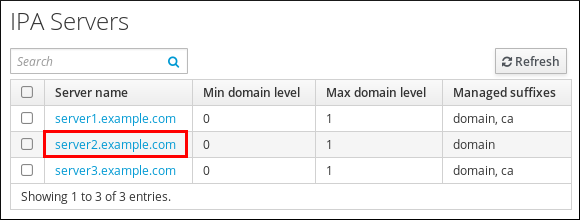
. - Click on the name of the server you want to delete.
Figure 6.13. Selecting a Server
- Click .
6.4.2. Command Line: Removing a Server from the Topology
Link kopierenLink in die Zwischenablage kopiert!
Important
Removing a server is an irreversible action. If you remove a server, the only way to introduce it back into the topology is to install a new replica on the machine.
To remove
server1.example.com:
- On another server, run the ipa server-del command to remove
server1.example.com. The command removes all topology segments pointing to the server:[user@server2 ~]$ ipa server-del Server name: server1.example.com Removing server1.example.com from replication topology, please wait... ---------------------------------------------------------- Deleted IPA server "server1.example.com" ---------------------------------------------------------- - On
server1.example.com, run the ipa server-install --uninstall command to uninstall the server components from the machine.[root@server1 ~]# ipa-server-install --uninstall

'%20d='M201.5%20305.5c-13.8%200-24.9-11.1-24.9-24.6%200-13.8%2011.1-24.9%2024.9-24.9%2013.6%200%2024.6%2011.1%2024.6%2024.9%200%2013.6-11.1%2024.6-24.6%2024.6zM504%20256c0%20137-111%20248-248%20248S8%20393%208%20256%20119%208%20256%208s248%20111%20248%20248zm-132.3-41.2c-9.4%200-17.7%203.9-23.8%2010-22.4-15.5-52.6-25.5-86.1-26.6l17.4-78.3%2055.4%2012.5c0%2013.6%2011.1%2024.6%2024.6%2024.6%2013.8%200%2024.9-11.3%2024.9-24.9s-11.1-24.9-24.9-24.9c-9.7%200-18%205.8-22.1%2013.8l-61.2-13.6c-3-.8-6.1%201.4-6.9%204.4l-19.1%2086.4c-33.2%201.4-63.1%2011.3-85.5%2026.8-6.1-6.4-14.7-10.2-24.1-10.2-34.9%200-46.3%2046.9-14.4%2062.8-1.1%205-1.7%2010.2-1.7%2015.5%200%2052.6%2059.2%2095.2%20132%2095.2%2073.1%200%20132.3-42.6%20132.3-95.2%200-5.3-.6-10.8-1.9-15.8%2031.3-16%2019.8-62.5-14.9-62.5zM302.8%20331c-18.2%2018.2-76.1%2017.9-93.6%200-2.2-2.2-6.1-2.2-8.3%200-2.5%202.5-2.5%206.4%200%208.6%2022.8%2022.8%2087.3%2022.8%20110.2%200%202.5-2.2%202.5-6.1%200-8.6-2.2-2.2-6.1-2.2-8.3%200zm7.7-75c-13.6%200-24.6%2011.1-24.6%2024.9%200%2013.6%2011.1%2024.6%2024.6%2024.6%2013.8%200%2024.9-11.1%2024.9-24.6%200-13.8-11-24.9-24.9-24.9z'/%3e%3c/svg%3e)