 Red Hat Summit
Dieser Inhalt ist in der von Ihnen ausgewählten Sprache nicht verfügbar.
23.6. Authenticating to the Identity Management Web UI with a Smart Card
As an Identity Management user with multiple role accounts in the Identity Management server, you can authenticate with your smart card to the Identity Management web UI as a selected role. This enables you to use the web UI as the selected role.
Note
Only Identity Management users can log in to the web UI with a smart card. Active Directory users can log in with their user name and password. For details, see Section 5.4.2.4, “Authenticating to the IdM Web UI as an AD User”.
For information on configuring the environment to enable the authentication, see:
For information on how to authenticate, see:
23.6.1. Preparing the Identity Management Server for Smart-card Authentication in the Web UI
Link kopierenLink in die Zwischenablage kopiert!
As the Identity Management administrator:
- On an Identity Management server, create a shell script to configure the server.
- Use the ipa-advise config-server-for-smart-card-auth command, and save its output to a file:
# ipa-advise config-server-for-smart-card-auth > server_smart_card_script.sh - Open the script file, and review its contents.
- Add execute permissions to the file using the
chmodutility:# chmod +x server_smart_card_script.sh
- Run the script on all servers in the Identity Management domain.
- Make sure the sssd-dbus package is installed.
Additionally, if an external certificate authority (CA) signed the certificate on the smart card:
- On an Identity Management server, add the CA certificate to the NSS database used by the HTTP server:
# ipa-cacert-manage -n "SmartCard CA" -t CT,C,C install ca.pem # ipa-certupdateRepeatipa-certupdateon all replicas and clients. - Restart the HTTP server and the Kerberos server:
# systemctl restart httpd
# systemctl restart krb5kdc
Repeat the commands on all replicas.
23.6.2. Preparing the Browser for Smart-card Authentication
Link kopierenLink in die Zwischenablage kopiert!
To configure the browser for smart-card authentication, perform these steps on the client from which the user launches the web browser to access the web UI. The system on which the browser is running does not have to be part of the Identity Management domain. In this procedure, we are using the Firefox browser.
- Launch Firefox.
- Configure Firefox to read the certificate from the smart card.
- Select
Figure 23.16. Configuring security devices in Firefox

- Click . In the Load PKCS#11 Device window, fill out the following information:
- Module Name:
OpenSC - Module filename:
/usr/lib64/opensc-pkcs11.so
Figure 23.17. Device Manager in Firefox
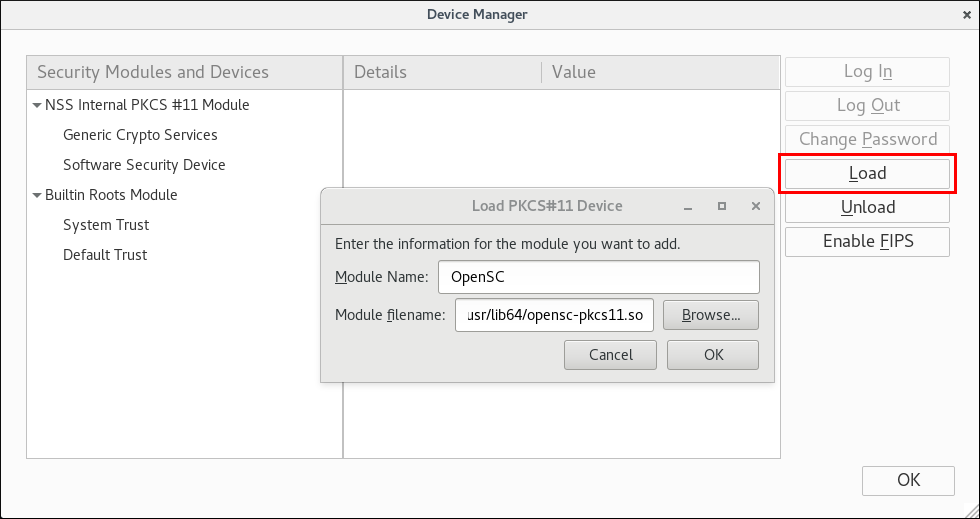
- Click to confirm. Then click to close the Device Manager.
Firefox can now use smart card certificates for authentication.
23.6.3. Authenticating to the Identity Management Web UI with a Smart Card as an Identity Management User
Link kopierenLink in die Zwischenablage kopiert!
To authenticate:
- Insert the smart card into the smart card reader.
- In the browser, navigate to the Identity Management web UI at
https://ipaserver.example.com/ipa/ui. - If the smart card certificate is linked to a single user account, do not fill out the Username field.If the smart card certificate is linked to multiple user accounts, fill out the Username field to specify the required account.
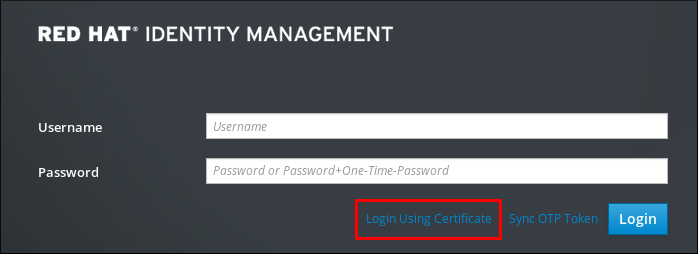
- Click .
Figure 23.18. in the Identity Management web UI
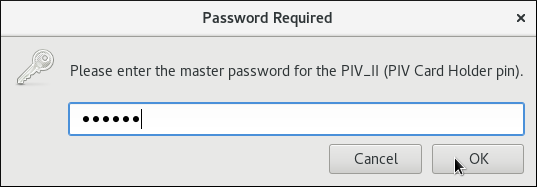
- Enter the smart card PIN when prompted.
Figure 23.19. Entering the smart card PIN
- A new window opens, proposing the certificate to use. Select the smart card certificate.
Figure 23.20. Selecting the smart card certificate
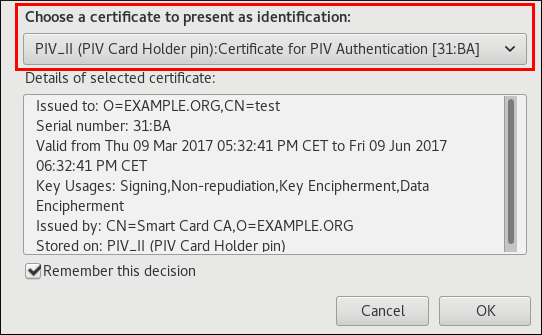
You are now authenticated as the user who corresponds to the smart card certificate.
Note
If an administrator reset the password of a user, the IdM web UI denies access until the user set a new password, for example, using the kinit utility.
Additional Resources
- If the authentication fails, see Section A.4, “Investigating Smart Card Authentication Failures”.
23.6.4. Additional Resources
Link kopierenLink in die Zwischenablage kopiert!
- For details on the Identity Management web UI, see Section 5.4, “The IdM Web UI”.

'%20d='M201.5%20305.5c-13.8%200-24.9-11.1-24.9-24.6%200-13.8%2011.1-24.9%2024.9-24.9%2013.6%200%2024.6%2011.1%2024.6%2024.9%200%2013.6-11.1%2024.6-24.6%2024.6zM504%20256c0%20137-111%20248-248%20248S8%20393%208%20256%20119%208%20256%208s248%20111%20248%20248zm-132.3-41.2c-9.4%200-17.7%203.9-23.8%2010-22.4-15.5-52.6-25.5-86.1-26.6l17.4-78.3%2055.4%2012.5c0%2013.6%2011.1%2024.6%2024.6%2024.6%2013.8%200%2024.9-11.3%2024.9-24.9s-11.1-24.9-24.9-24.9c-9.7%200-18%205.8-22.1%2013.8l-61.2-13.6c-3-.8-6.1%201.4-6.9%204.4l-19.1%2086.4c-33.2%201.4-63.1%2011.3-85.5%2026.8-6.1-6.4-14.7-10.2-24.1-10.2-34.9%200-46.3%2046.9-14.4%2062.8-1.1%205-1.7%2010.2-1.7%2015.5%200%2052.6%2059.2%2095.2%20132%2095.2%2073.1%200%20132.3-42.6%20132.3-95.2%200-5.3-.6-10.8-1.9-15.8%2031.3-16%2019.8-62.5-14.9-62.5zM302.8%20331c-18.2%2018.2-76.1%2017.9-93.6%200-2.2-2.2-6.1-2.2-8.3%200-2.5%202.5-2.5%206.4%200%208.6%2022.8%2022.8%2087.3%2022.8%20110.2%200%202.5-2.2%202.5-6.1%200-8.6-2.2-2.2-6.1-2.2-8.3%200zm7.7-75c-13.6%200-24.6%2011.1-24.6%2024.9%200%2013.6%2011.1%2024.6%2024.6%2024.6%2013.8%200%2024.9-11.1%2024.9-24.6%200-13.8-11-24.9-24.9-24.9z'/%3e%3c/svg%3e)