 Red Hat Summit
Dieser Inhalt ist in der von Ihnen ausgewählten Sprache nicht verfügbar.
20.3. Defining a New Event
Events are only recognized by the monitoring service if events logging is properly enabled for the specific service being logged. This requires creating a log event for the log or system service, specifying a log path on the resource, and setting a date format which matches the format for the log.
- Click the Inventory tab in the top menu.
- Select the resource type in the Resources menu table on the left, and then browse or search for the resource.

- Click the Inventory tab on the resource entry.
- Select the Connection Settings subtab.
- Click the plus icon under the Events Log section to add a log instance to monitor.

- Enable event log collection.
- Set the parameters for the event log collection.Depending on the resource being configured, there are slightly different options for the event log configuration. All of the resources all allow different filters to identify which log messages to include:
- A minimum severity of any error message.
- A regular expression or pattern to use on log message strings.
Additionally, the application servers and Linux allow different log locations to be specified. (The Windows resource uses its System Event Log.) Along with accommodating custom log locations, it also allows for other logging services to be used. For Linux, this allows both platform and program logs to be monitored; for application services, this allows logs within a messaging service to be checked.As discussed in Section 20.2, “Event Date Formatting”, there are different potential date formats that can be used in logging; if anything other than log4j is used, the pattern can be specified so that the agent can read the log entries.Figure 20.1. EAP Event Log Configuration
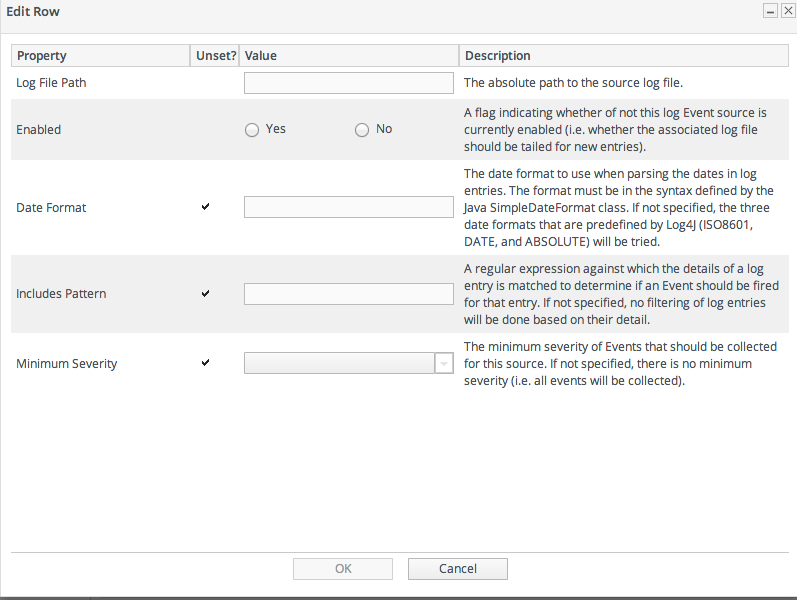 Unlike either the application servers or Windows, Linux systems can log events in a system file or in a listener. If an rsyslog server or local syslog listener is configured, then it is possible to select a listener (rather than a local file) and to add the listener port and bind address for a remote server.
Figure 20.2. Linux Event Log Configuration


'%20d='M201.5%20305.5c-13.8%200-24.9-11.1-24.9-24.6%200-13.8%2011.1-24.9%2024.9-24.9%2013.6%200%2024.6%2011.1%2024.6%2024.9%200%2013.6-11.1%2024.6-24.6%2024.6zM504%20256c0%20137-111%20248-248%20248S8%20393%208%20256%20119%208%20256%208s248%20111%20248%20248zm-132.3-41.2c-9.4%200-17.7%203.9-23.8%2010-22.4-15.5-52.6-25.5-86.1-26.6l17.4-78.3%2055.4%2012.5c0%2013.6%2011.1%2024.6%2024.6%2024.6%2013.8%200%2024.9-11.3%2024.9-24.9s-11.1-24.9-24.9-24.9c-9.7%200-18%205.8-22.1%2013.8l-61.2-13.6c-3-.8-6.1%201.4-6.9%204.4l-19.1%2086.4c-33.2%201.4-63.1%2011.3-85.5%2026.8-6.1-6.4-14.7-10.2-24.1-10.2-34.9%200-46.3%2046.9-14.4%2062.8-1.1%205-1.7%2010.2-1.7%2015.5%200%2052.6%2059.2%2095.2%20132%2095.2%2073.1%200%20132.3-42.6%20132.3-95.2%200-5.3-.6-10.8-1.9-15.8%2031.3-16%2019.8-62.5-14.9-62.5zM302.8%20331c-18.2%2018.2-76.1%2017.9-93.6%200-2.2-2.2-6.1-2.2-8.3%200-2.5%202.5-2.5%206.4%200%208.6%2022.8%2022.8%2087.3%2022.8%20110.2%200%202.5-2.2%202.5-6.1%200-8.6-2.2-2.2-6.1-2.2-8.3%200zm7.7-75c-13.6%200-24.6%2011.1-24.6%2024.9%200%2013.6%2011.1%2024.6%2024.6%2024.6%2013.8%200%2024.9-11.1%2024.9-24.6%200-13.8-11-24.9-24.9-24.9z'/%3e%3c/svg%3e)