Data obfuscation
Red Hat Lightspeed provides optional controls to obfuscate IP addresses, MAC addresses, and hostnames in the data archive and the user interface. These controls mask sensitive information before it reaches Red Hat.
Data obfuscation considerations and limitations
Obfuscation capabilities depend on your connection type and client tool configuration. Consider feature level requirements and data privacy when configuring obfuscation.
Several client tools and products from Red Hat work together to provide a full range of functionalities. Depending on your setup, different tools can collect information from your systems at the same time. Some of the tools have built-in features for configuring obfuscation or redaction. To achieve the required state of data privacy, you must take many aspects into consideration, such as the feature-level requirements and how the system consumes the content.
Directly connected systems. You cannot achieve true obfuscation or redaction of system information. The subscription-manager must remain enabled on the system and continues to report data.
This applies regardless of how insights-client or rhc are configured.
You cannot prevent the collection of certain key system information such as the hostname, or IP and MAC addresses. For directly connected systems, even configuring data obfuscation in the insights-client does not achieve the expected results.
Systems connected to a Red Hat Satellite or Capsule. You cannot fully prevent collection of key system information such as hostname, IP, and MAC addresses. However, you can adjust the feature level and configure Satellite so that data is never sent to Red Hat.
Data obfuscation on the system
Full data obfuscation requires systems that are registered to Red Hat Satellite with client tools and server settings configured to enable obfuscation.
You can enable the insights-client obfuscation feature to replace the hostname, IP address, or MAC address with preset values in the Red Hat Lightspeed archive. A Python data cleaning process generates the replacement values. The processed archive file is then sent to Red Hat Lightspeed. Obfuscation is disabled by default.
- The Python data cleaning process automatically generates the masked values. You cannot choose the values for obfuscation.
- The Red Hat Lightspeed compliance service uses OpenSCAP tools to generate compliance reports based on information from the host system. The compliance service uses OpenSCAP, which prevents complete obfuscation or redaction of hostname and IP address data. Host information is also sent to Red Hat Lightspeed when a compliance data collection job runs on the host system.
Obfuscate IPv4 IP addresses
If your hosts use IPv4 IP addresses, enable obfuscation in the insights-client configuration file to mask sensitive data in the archive file before it is sent to Red Hat Lightspeed.
Before you begin
- If you are using Red Hat Satellite to manage clients and register them on the Red Hat Hybrid Cloud Console, you must also configure the Red Hat Cloud settings before you can enable obfuscation in Red Hat Lightspeed:
- In the Satellite web UI, navigate to and enable the required obfuscation settings that apply to your environment.
About this task
When you enable obfuscation, the original IP address of the host is replaced with a generated value in the archive file. This obfuscated value is used in the Red Hat Hybrid Cloud Console UI, logs, and any archive data files that Red Hat collects. However, you still see the original IP address in the command-line output of some insights-client commands.
Procedure
Results
When obfuscation is enabled, the original IPv4 address is masked in the console UI, logs, and archive data files that Red Hat collects.
insights-client commands.- Original host system IP address:
192.168.0.24 - Obfuscated host IP address:
10.230.230.1 - Obfuscated IPv4 IP address in the Red Hat Hybrid Cloud Console UI:
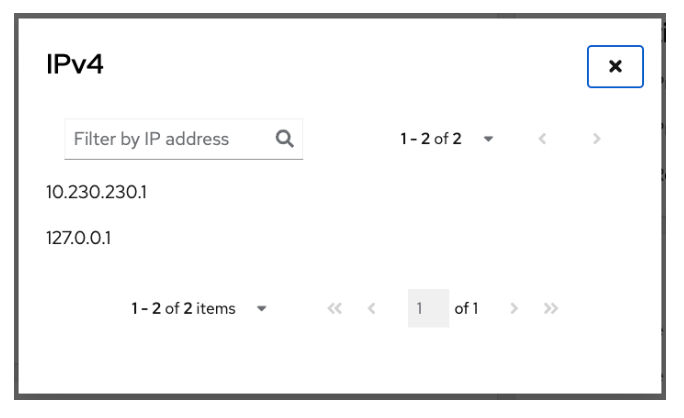
When you enable obfuscation on several systems, the same obfuscated IP address gets generated. Therefore, in the example scenario provided, when you search or filter by IP address in the Red Hat Lightspeed UI on the Hybrid Cloud Console you might see several instances of 10.230.230.1.
This is because the Python data cleaning process that the Red Hat Lightspeed obfuscation feature uses, can generate the same obfuscated IP address in the archive file.
Obfuscate IPv6 IP addresses
If your hosts use IPv6 IP addresses, enable obfuscation in the insights-client configuration file to mask sensitive data in the archive file before it is sent to Red Hat Lightspeed.
Before you begin
- If you are using Red Hat Satellite to manage clients and register them on the Red Hat Hybrid Cloud Console, you must also configure the Red Hat Cloud settings before you can enable obfuscation in Red Hat Lightspeed:
- In the Satellite web UI, navigate to and enable the required obfuscation settings that apply to your environment.
About this task
When you enable obfuscation, the original IP address of the host is replaced with a generated value in the archive file. This obfuscated value is used in the Red Hat Hybrid Cloud Console UI, logs, and any archive data files that Red Hat collects. However, you still see the original IP address in the command-line output of some insights-client commands.
Procedure
Results
When obfuscation is enabled, the original IPv6 address is masked in the console UI, logs, and archive data files that Red Hat collects.
insights-client commands.- Original host system IPv6 addresses:
ff00:f800:f801:f802::f806 ff00:f800:f801:f802:f00:f803:f804:f805 ff01::f00:f803:f804:f805 - Obfuscated host IPv6 addresses:
fc47:d0f1:5ae7:e4e9::0477, fc47:d0f1:5ae7:e4e9:fee:3939:5b4a:2c55, 70f1::fee:3939:5b4a:2c55, - Obfuscated IPv6 IP addresses in the Red Hat Hybrid Cloud Console UI:
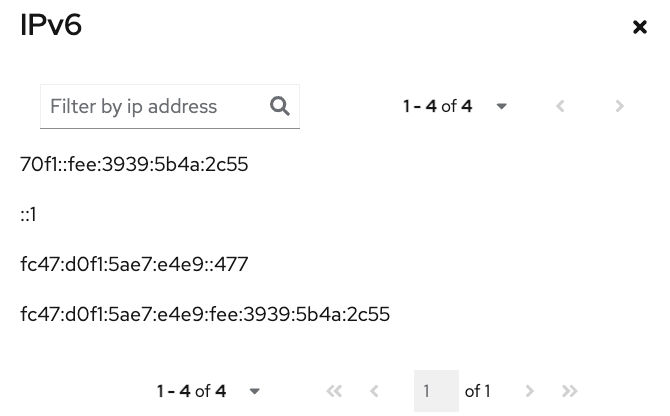
When you enable obfuscation on several systems, the same obfuscated IP address gets generated. Therefore, in the scenario provided, when you search or filter by IP address in the Red Hat Lightspeed UI on the Hybrid Cloud Console, you might see several instances of 70f1::fee:3939:5b4a:2c55.
This is because the Python data cleaning process that the Red Hat Lightspeed obfuscation feature uses can generate the same obfuscated IP address in the archive file.
Obfuscate MAC addresses
You can mask the Media Access Control (MAC) addresses of your hosts in the archive file before it is sent to Red Hat Lightspeed by enabling obfuscation.
Before you begin
- If you are using Red Hat Satellite to manage clients and register them on the Red Hat Hybrid Cloud Console, you must also configure the Red Hat Cloud settings before you can enable obfuscation in Red Hat Lightspeed:
- In the Satellite web UI, navigate to and enable the required obfuscation settings that apply to your environment.
About this task
Procedure
Results
When obfuscation is enabled, the original MAC address is masked in the console UI, logs, and archive data files that Red Hat collects.
insights-client commands.- Original host system MAC address:
08:00:27:7c:fc:0f - Obfuscated host MAC address:
1e:fb:bc:2e:4a:6d - Obfuscated MAC address in the Red Hat Hybrid Cloud Console:
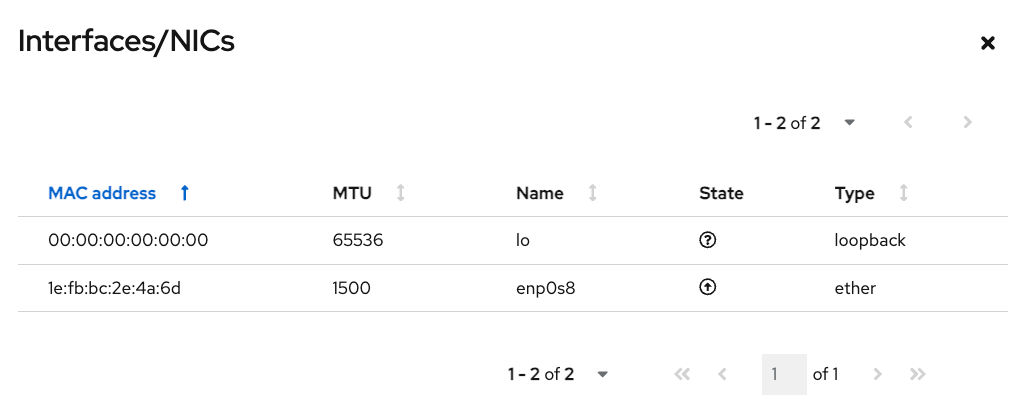
When you enable obfuscation on several systems, the same obfuscated MAC address gets generated. Therefore, in the example scenario provided, when you search or filter by MAC address in the Red Hat Lightspeed UI on the Hybrid Cloud Console, you might see several instances of 1e:fb:bc:2e:4a:6d.
This is because the Python data cleaning process that the Red Hat Lightspeed obfuscation feature uses can generate the same obfuscated MAC address in the archive file.
Obfuscate hostnames
Configure insights-client to obfuscate hostnames by replacing the value in /etc/hostname with an automatically generated UUID before sending data to Red Hat.
Before you begin
- If you are using Red Hat Satellite to manage clients and register them on the Red Hat Hybrid Cloud Console, you must also configure the Red Hat Cloud settings before you can enable obfuscation in Red Hat Lightspeed:
- In the Satellite web UI, navigate to and enable the required obfuscation settings that apply to your environment.
About this task
During data obfuscation, a Python process generates a 12-character UUID to mask the hostname in the data archive file and Hybrid Cloud Console. The masked data is then sent to Red Hat.
/etc/hostname gets obfuscated.Procedure
Results
- When obfuscation is successfully enabled, the hostname gets masked in the Red Hat Lightspeed console UI, logs, and any archive data files that Red Hat collects.
- If you configure hostname obfuscation on more than one system, you might see multiple systems with the same hostname in the Red Hat Lightspeed GUI as a result of obfuscation.
- After you enable obfuscation, there might be instances where the original hostname displays in the command-line output of some
insights-clientcommands. - The original hostname of the system in
/etc/hostname:RTP.data.center.01 - Obfuscated
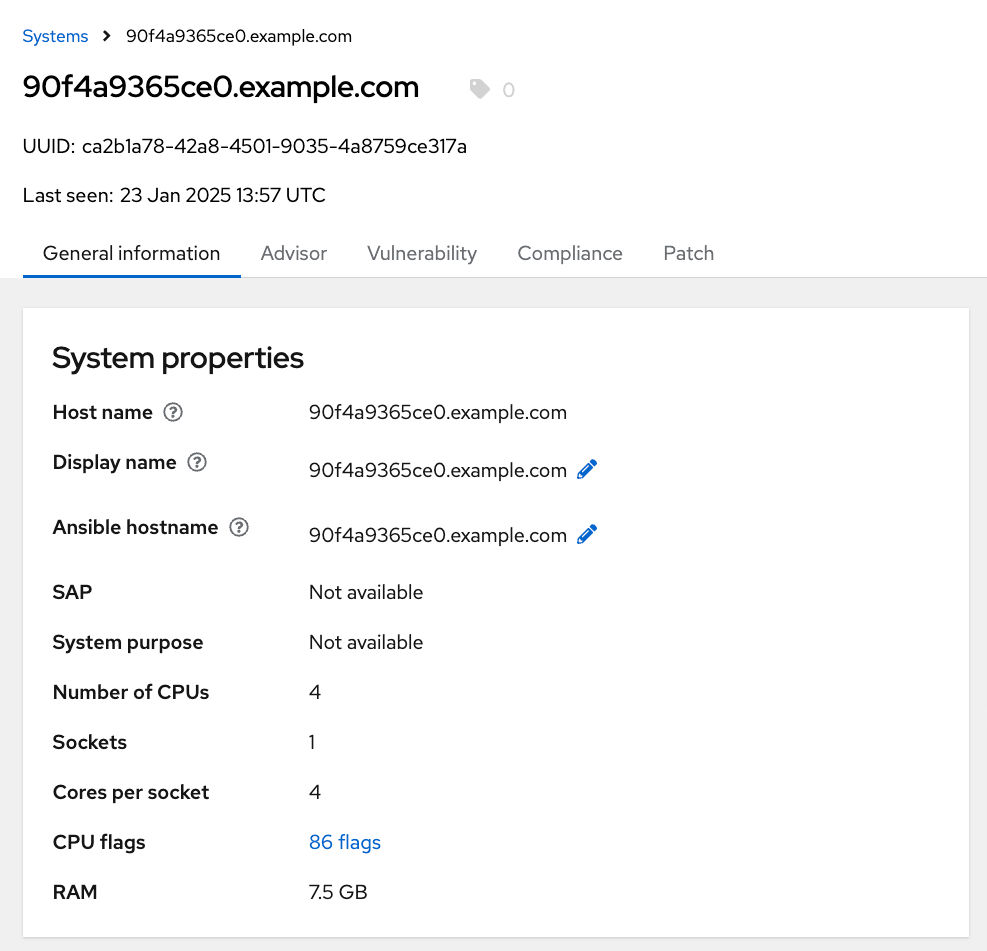
/etc/hostnameas displayed in Red Hat Lightspeed:90f4a9365ce0.example.com - Obfuscated hostname and IP address in the Red Hat Hybrid Cloud Console:
Obfuscation in Red Hat Satellite
For Red Hat Satellite-managed systems, obfuscation must be enabled in the Satellite web interface before configuring clients to prevent double-obfuscation.

