 Red Hat Summit
Chapter 4. Configuring the overcloud
Now that you have configured the undercloud, you can configure the remaining overcloud leaf networks. You accomplish this with a series of configuration files. Afterwards, you deploy the overcloud and the resulting deployment has multiple sets of networks with routing available.
4.1. Creating a network data file
To define the leaf networks, you create a network data file, which contain a YAML formatted list of each composable network and its attributes. The default network data is located on the undercloud at /usr/share/openstack-tripleo-heat-templates/network_data.yaml.
Procedure
Create a new
network_data_spine_leaf.yamlfile in yourstackuser’s local directory. Use the defaultnetwork_datafile as a basis:$ cp /usr/share/openstack-tripleo-heat-templates/network_data.yaml /home/stack/network_data_spine_leaf.yamlIn the
network_data_spine_leaf.yamlfile, create a YAML list to define each network and leaf network as a composable network item. For example, the Internal API network and its leaf networks are defined using the following syntax:# Internal API - name: InternalApi name_lower: internal_api vip: true ip_subnet: '172.18.0.0/24' allocation_pools: [{'start': '172.18.0.4', 'end': '172.18.0.250'}] - name: InternalApi1 name_lower: internal_api1 vip: false ip_subnet: '172.18.1.0/24' allocation_pools: [{'start': '172.18.1.4', 'end': '172.18.1.250'}] - name: InternalApi2 name_lower: internal_api2 vip: false ip_subnet: '172.18.2.0/24' allocation_pools: [{'start': '172.18.2.4', 'end': '172.18.2.250'}]
You do not define the Control Plane networks in the network data file since the undercloud has already created these networks. However, you need to manually set the parameters so that the overcloud can configure its NICs accordingly.
Define vip: true for the networks that contain the Controller-based services. In this example, InternalApi contains these services.
See Appendix A, Example network_data file for a full example with all composable networks.
4.2. Creating a roles data file
This section demonstrates how to define each composable role for each leaf and attach the composable networks to each respective role.
Procedure
Create a custom
rolesdirector in yourstackuser’s local directory:$ mkdir ~/rolesCopy the default Controller, Compute, and Ceph Storage roles from the director’s core template collection to the
~/rolesdirectory. Rename the files for Leaf 1:$ cp /usr/share/openstack-tripleo-heat-templates/roles/Controller.yaml ~/roles/Controller.yaml $ cp /usr/share/openstack-tripleo-heat-templates/roles/Compute.yaml ~/roles/Compute1.yaml $ cp /usr/share/openstack-tripleo-heat-templates/roles/CephStorage.yaml ~/roles/CephStorage1.yamlEdit the
Compute1.yamlfile:$ vi ~/roles/Compute1.yamlEdit the
name,networks, andHostnameFormatDefaultparameters in this file so that they align with the Leaf 1 specific parameters. For example:- name: Compute1 ... networks: - InternalApi1 - Tenant1 - Storage1 HostnameFormatDefault: '%stackname%-compute1-%index%'Save this file.
Edit the
CephStorage1.yamlfile:$ vi ~/roles/CephStorage1.yamlEdit the
nameandnetworksparameters in this file so that they align with the Leaf 1 specific parameters. In addition, add theHostnameFormatDefaultparameter and define the Leaf 1 hostname for our Ceph Storage nodes. For example:- name: CephStorage1 ... networks: - Storage1 - StorageMgmt1 HostnameFormatDefault: '%stackname%-cephstorage1-%index%'Save this file.
Copy the Leaf 1 Compute and Ceph Storage files as a basis for your Leaf 2 and Leaf 3 files:
$ cp ~/roles/Compute1.yaml ~/roles/Compute2.yaml
$ cp ~/roles/Compute1.yaml ~/roles/Compute3.yaml
$ cp ~/roles/CephStorage1.yaml ~/roles/CephStorage2.yaml
$ cp ~/roles/CephStorage1.yaml ~/roles/CephStorage3.yaml
Edit the
name,networks, andHostnameFormatDefaultparameters in the Leaf 2 and Leaf 3 files so that they align with the respective Leaf network parameters. For example, the parameters in the Leaf 2 Compute file have the following values:- name: Compute2 ... networks: - InternalApi2 - Tenant2 - Storage2 HostnameFormatDefault: '%stackname%-compute2-%index%'The Leaf 2 Ceph Storage parameters have the following values:
- name: CephStorage2
  ...
  networks:
    - Storage2
    - StorageMgmt2
  HostnameFormatDefault: '%stackname%-cephstorage2-%index%'
When your roles are ready, generate the full roles data file using the following command:
$ openstack overcloud roles generate --roles-path ~/roles -o roles_data_spine_leaf.yaml Controller Compute1 Compute2 Compute3 CephStorage1 CephStorage2 CephStorage3This creates a full
roles_data_spine_leaf.yamlfile that includes all the custom roles for each respective leaf network.
See Appendix C, Example roles_data file for a full example of this file.
Each role has its own NIC configuration. Before configuring the spine-leaf configuration, you need to create a base set of NIC templates to suit your current NIC configuration.
4.3. Creating a custom NIC Configuration
Each role requires its own NIC configuration. Create a copy of the base set of NIC templates and modify them to suit your current NIC configuration.
Procedure
Change to the core Heat template directory:
$ cd /usr/share/openstack-tripleo-heat-templatesRender the Jinja2 templates using the
tools/process-templates.pyscript, your customnetwork_datafile, and customroles_datafile:$ tools/process-templates.py -n /home/stack/network_data_spine_leaf.yaml \ -r /home/stack/roles_data_spine_leaf.yaml \ -o /home/stack/openstack-tripleo-heat-templates-spine-leafChange to the home directory:
$ cd /home/stackCopy the content from one of the default NIC templates to use as a basis for your spine-leaf templates. For example, copy the
single-nic-vlans:$ cp -r openstack-tripleo-heat-templates-spine-leaf/network/config/single-nic-vlans/* \ /home/stack/templates/spine-leaf-nics/.Remove the rendered template directory:
$ rm -rf openstack-tripleo-heat-templates-spine-leaf
Resources
- See "Custom Network Interface Templates" in the Advanced Overcloud Customization guide for more information on customizing your NIC templates.
4.4. Editing custom Controller NIC configuration
The rendered template contains most of the content that is necessary to suit the spine-leaf configuration. However, some additional configuration changes are required. Follow this procedure to modify the YAML structure for Controller nodes on Leaf0.
Procedure
Change to your custom NIC directory:
$ cd ~/templates/spine-leaf-nics/-
Edit the template for
controller0.yaml. Scroll to the
ControlPlaneSubnetCidrandControlPlaneDefaultRouteparameters in theparameterssection. These parameters resemble the following snippet:ControlPlaneSubnetCidr: # Override this via parameter_defaults default: '24' description: The subnet CIDR of the control plane network. type: string ControlPlaneDefaultRoute: # Override this via parameter_defaults description: The default route of the control plane network. type: stringModify these parameters to suit Leaf0:
  ControlPlane0SubnetCidr: # Override this via parameter_defaults
    default: '24'
    description: The subnet CIDR of the control plane network.
    type: string
  ControlPlane0DefaultRoute: # Override this via parameter_defaults
    description: The default route of the control plane network.
    type: string
Scroll to the
EC2MetadataIpparameter in theparameterssection. This parameter resembles the following snippet:EC2MetadataIp: # Override this via parameter_defaults description: The IP address of the EC2 metadata server. type: stringModify this parameter to suit Leaf0:
  Leaf0EC2MetadataIp: # Override this via parameter_defaults
    description: The IP address of the EC2 metadata server.
    type: string
Scroll to the network configuration section. This section looks like the following example:
resources:
  OsNetConfigImpl:
    type: OS::Heat::SoftwareConfig
    properties:
      group: script
      config:
        str_replace:
          template:
            get_file: ../../scripts/run-os-net-config.sh
          params:
            $network_config:
              network_config:
Change the location of the script to the absolute path:
resources:
  OsNetConfigImpl:
    type: OS::Heat::SoftwareConfig
    properties:
      group: script
      config:
        str_replace:
          template:
            get_file: /usr/share/openstack-tripleo-heat-templates/network/scripts/run-os-net-config.sh
          params:
            $network_config:
              network_config:
In the
network_configsection, define the control plane / provisioning interface. For example:network_config: - type: ovs_bridge name: bridge_name use_dhcp: false dns_servers: get_param: DnsServers addresses: - ip_netmask: list_join: - / - - get_param: ControlPlaneIp - get_param: ControlPlane0SubnetCidr routes: - ip_netmask: 169.254.169.254/32 next_hop: get_param: Leaf0EC2MetadataIp - ip_netmask: 192.168.10.0/24 next_hop: get_param: ControlPlane0DefaultRouteNote that the parameters used in this case are specific to Leaf0:
ControlPlane0SubnetCidr,Leaf0EC2MetadataIp, andControlPlane0DefaultRoute. Also note the use of the CIDR for Leaf0 on the provisioning network (192.168.10.0/24), which is used as a route.Each VLAN in the
memberssection contains the relevant Leaf0 parameters. For example, the Storage network VLAN information should appear similar to the following snippet:- type: vlan vlan_id: get_param: Storage0NetworkVlanID addresses: - ip_netmask: get_param: Storage0IpSubnetAdd a section to define parameters for routing. This includes the supernet route (
StorageSupernetin this case) and the leaf default route (Storage0InterfaceDefaultRoutein this case):- type: vlan vlan_id: get_param: Storage0NetworkVlanID addresses: - ip_netmask: get_param: Storage0IpSubnet routes: - ip_netmask: get_param: StorageSupernet next_hop: get_param: Storage0InterfaceDefaultRouteAdd the routes for the VLAN structure for the following Controller networks:
Storage,StorageMgmt,InternalApi, andTenant.- Save this file.
4.5. Creating custom Compute NIC configurations
This procedure creates a YAML structure for Compute nodes on Leaf0, Leaf1, and Leaf2.
Procedure
Change to your custom NIC directory:
$ cd ~/templates/spine-leaf-nics/-
Edit the template for
compute0.yaml. Scroll to the
ControlPlaneSubnetCidrandControlPlaneDefaultRouteparameters in theparameterssection. These parameters resemble the following snippet:ControlPlaneSubnetCidr: # Override this via parameter_defaults default: '24' description: The subnet CIDR of the control plane network. type: string ControlPlaneDefaultRoute: # Override this via parameter_defaults description: The default route of the control plane network. type: stringModify these parameters to suit Leaf0:
ControlPlane0SubnetCidr: # Override this via parameter_defaults default: '24' description: The subnet CIDR of the control plane network. type: string ControlPlane0DefaultRoute: # Override this via parameter_defaults description: The default route of the control plane network. type: stringScroll to the
EC2MetadataIpparameter in theparameterssection. This parameter resembles the following snippet:EC2MetadataIp: # Override this via parameter_defaults description: The IP address of the EC2 metadata server. type: stringModify this parameter to suit Leaf0:
Leaf0EC2MetadataIp: # Override this via parameter_defaults description: The IP address of the EC2 metadata server. type: stringScroll to the network configuration section. This section resembles the following snippet:
resources: OsNetConfigImpl: type: OS::Heat::SoftwareConfig properties: group: script config: str_replace: template: get_file: ../../scripts/run-os-net-config.sh params: $network_config: network_config:Change the location of the script to the absolute path:
resources: OsNetConfigImpl: type: OS::Heat::SoftwareConfig properties: group: script config: str_replace: template: get_file: /usr/share/openstack-tripleo-heat-templates/network/scripts/run-os-net-config.sh params: $network_config: network_config:In the
network_configsection, define the control plane / provisioning interface. For examplenetwork_config: - type: interface name: nic1 use_dhcp: false dns_servers: get_param: DnsServers addresses: - ip_netmask: list_join: - / - - get_param: ControlPlaneIp - get_param: ControlPlane0SubnetCidr routes: - ip_netmask: 169.254.169.254/32 next_hop: get_param: Leaf0EC2MetadataIp - ip_netmask: 192.168.10.0/24 next_hop: get_param: ControlPlane0DefaultRouteNote that the parameters used in this case are specific to Leaf0:
ControlPlane0SubnetCidr,Leaf0EC2MetadataIp, andControlPlane0DefaultRoute. Also note the use of the CIDR for Leaf0 on the provisioning network (192.168.10.0/24), which is used as a route.Each VLAN in the
memberssection should contain the relevant Leaf0 parameters. For example, the Storage network VLAN information should appear similar to the following snippet:- type: vlan vlan_id: get_param: Storage0NetworkVlanID addresses: - ip_netmask: get_param: Storage0IpSubnetAdd a section to define parameters for routing. This includes the supernet route (
StorageSupernetin this case) and the leaf default route (Storage0InterfaceDefaultRoutein this case):- type: vlan vlan_id: get_param: Storage0NetworkVlanID addresses: - ip_netmask: get_param: Storage0IpSubnet routes: - ip_netmask: get_param: StorageSupernet next_hop: get_param: Storage0InterfaceDefaultRouteAdd a VLAN structure for the following Controller networks:
Storage,InternalApi, andTenant.- Save this file.
Edit
compute1.yamland perform the same steps. The following is the list of changes:-
Change
ControlPlaneSubnetCidrtoControlPlane1SubnetCidr. -
Change
ControlPlaneDefaultRoutetoControlPlane1DefaultRoute. -
Change
EC2MetadataIptoLeaf1EC2MetadataIp. -
Change the network configuration script from
../../scripts/run-os-net-config.shto/usr/share/openstack-tripleo-heat-templates/network/scripts/run-os-net-config.sh. - Modifying the control plane / provisioning interface to use the Leaf1 parameters.
- Modifying each VLAN to include the Leaf1 routes.
Save this file when complete.
-
Change
Edit
compute2.yamland perform the same steps. The following is the list of changes:-
Change
ControlPlaneSubnetCidrtoControlPlane2SubnetCidr. -
Change
ControlPlaneDefaultRoutetoControlPlane2DefaultRoute. -
Change
EC2MetadataIptoLeaf2EC2MetadataIp. -
Change the network configuration script from
../../scripts/run-os-net-config.shto/usr/share/openstack-tripleo-heat-templates/network/scripts/run-os-net-config.sh. - Modify the control plane / provisioning interface to use the Leaf2 parameters.
- Modifying each VLAN to include the Leaf2 routes.
Save this file when complete.
-
Change
4.6. Creating custom Ceph Storage NIC configurations
This procedure creates a YAML structure for Ceph Storage nodes on Leaf0, Leaf1, and Leaf2.
Procedure
Change to your custom NIC directory:
$ cd ~/templates/spine-leaf-nics/Scroll to the
ControlPlaneSubnetCidrandControlPlaneDefaultRouteparameters in theparameterssection. These parameters resemble the following snippet:ControlPlaneSubnetCidr: # Override this via parameter_defaults default: '24' description: The subnet CIDR of the control plane network. type: string ControlPlaneDefaultRoute: # Override this via parameter_defaults description: The default route of the control plane network. type: stringModify these parameters to suit Leaf0:
ControlPlane0SubnetCidr: # Override this via parameter_defaults default: '24' description: The subnet CIDR of the control plane network. type: string ControlPlane0DefaultRoute: # Override this via parameter_defaults description: The default route of the control plane network. type: stringScroll to the
EC2MetadataIpparameter in theparameterssection. This parameter resembles the following snippet:EC2MetadataIp: # Override this via parameter_defaults description: The IP address of the EC2 metadata server. type: stringModify this parameter to suit Leaf0:
Leaf0EC2MetadataIp: # Override this via parameter_defaults description: The IP address of the EC2 metadata server. type: stringScroll to the network configuration section. This section resembles the following snippet:
resources: OsNetConfigImpl: type: OS::Heat::SoftwareConfig properties: group: script config: str_replace: template: get_file: ../../scripts/run-os-net-config.sh params: $network_config: network_config:Change the location of the script to the absolute path:
resources: OsNetConfigImpl: type: OS::Heat::SoftwareConfig properties: group: script config: str_replace: template: get_file: /usr/share/openstack-tripleo-heat-templates/network/scripts/run-os-net-config.sh params: $network_config: network_config:In the
network_configsection, define the control plane / provisioning interface. For examplenetwork_config: - type: interface name: nic1 use_dhcp: false dns_servers: get_param: DnsServers addresses: - ip_netmask: list_join: - / - - get_param: ControlPlaneIp - get_param: ControlPlane0SubnetCidr routes: - ip_netmask: 169.254.169.254/32 next_hop: get_param: Leaf0EC2MetadataIp - ip_netmask: 192.168.10.0/24 next_hop: get_param: ControlPlane0DefaultRouteNote that the parameters used in this case are specific to Leaf0:
ControlPlane0SubnetCidr,Leaf0EC2MetadataIp, andControlPlane0DefaultRoute. Also note the use of the CIDR for Leaf0 on the provisioning network (192.168.10.0/24), which is used as a route.Each VLAN in the
memberssection contains the relevant Leaf0 parameters.For example, the Storage network VLAN information should appear similar to the following snippet:- type: vlan vlan_id: get_param: Storage0NetworkVlanID addresses: - ip_netmask: get_param: Storage0IpSubnetAdd a section to define parameters for routing. This includes the supernet route (
StorageSupernetin this case) and the leaf default route (Storage0InterfaceDefaultRoutein this case):- type: vlan vlan_id: get_param: Storage0NetworkVlanID addresses: - ip_netmask: get_param: Storage0IpSubnet routes: - ip_netmask: get_param: StorageSupernet next_hop: get_param: Storage0InterfaceDefaultRouteAdd a VLAN structure for the following Controller networks:
Storage,StorageMgmt.- Save this file.
Edit
ceph-storage1.yamland perform the same steps. The following is the list of changes:-
Change
ControlPlaneSubnetCidrtoControlPlane1SubnetCidr. -
Change
ControlPlaneDefaultRoutetoControlPlane1DefaultRoute. -
Change
EC2MetadataIptoLeaf1EC2MetadataIp. -
Change the network configuration script from
../../scripts/run-os-net-config.shto/usr/share/openstack-tripleo-heat-templates/network/scripts/run-os-net-config.sh. - Modify the control plane / provisioning interface to use the Leaf1 parameters.
- Modify each VLAN to include the Leaf1 routes.
Save this file when complete.
-
Change
Edit
ceph-storage2.yamland perform the same steps. The following is the list of changes:-
Change
ControlPlaneSubnetCidrtoControlPlane2SubnetCidr. -
Change
ControlPlaneDefaultRoutetoControlPlane2DefaultRoute. -
Change
EC2MetadataIptoLeaf2EC2MetadataIp. -
Change the network configuration script from
../../scripts/run-os-net-config.shto/usr/share/openstack-tripleo-heat-templates/network/scripts/run-os-net-config.sh. - Modify the control plane / provisioning interface to use the Leaf2 parameters.
- Modify each VLAN to include the Leaf2 routes.
Save this file when complete.
-
Change
4.7. Creating a network environment file
This procedure creates a basic network environment file for use later.
Procedure
-
Create a
network-environment.yamlfile in your stack user’stemplatesdirectory. Add the following sections to the environment file:
resource_registry: parameter_defaults:Note the following:
-
The
resource_registrywill map networking resources to their respective NIC templates. -
The
parameter_defaultswill define additional networking parameters relevant to your configuration.
-
The
The next couple of sections add details to your network environment file to configure certain aspects of the spine leaf architecture. Once complete, you include this file with your openstack overcloud deploy command.
4.8. Mapping network resources to NIC templates
This procedure maps the relevant resources for network configurations to their respective NIC templates.
Procedure
-
Edit your
network-environment.yamlfile. Add the resource mappings to your
resource_registry. The resource names take the following format:OS::TripleO::[ROLE]::Net::SoftwareConfig: [NIC TEMPLATE]For this guide’s scenario, the
resource_registryincludes the following resource mappings:resource_registry: OS::TripleO::Controller0::Net::SoftwareConfig: ./spine-leaf-nics/controller0.yaml OS::TripleO::Compute0::Net::SoftwareConfig: ./spine-leaf-nics/compute0.yaml OS::TripleO::Compute1::Net::SoftwareConfig: ./spine-leaf-nics/compute1.yaml OS::TripleO::Compute2::Net::SoftwareConfig: ./spine-leaf-nics/compute2.yaml OS::TripleO::CephStorage0::Net::SoftwareConfig: ./spine-leaf-nics/cephstorage0.yaml OS::TripleO::CephStorage1::Net::SoftwareConfig: ./spine-leaf-nics/cephstorage1.yaml OS::TripleO::CephStorage2::Net::SoftwareConfig: ./spine-leaf-nics/cephstorage2.yaml-
Save the
network-environment.yamlfile.
4.9. Spine leaf routing
Each role requires routes on each isolated network, pointing to the other subnets used for the same function. So when a Compute1 node contacts a controller on the InternalApi VIP, the traffic should target the InternalApi1 interface through the InternalApi1 gateway. As a result, the return traffic from the controller to the InternalApi1 network should go through the InternalApi network gateway.
The supernet routes apply to all isolated networks on each role to avoid sending traffic through the default gateway, which by default is the Control Plane network on non-controllers, and the External network on the controllers.
You need to configure these routes on the isolated networks because Red Hat Enterprise Linux by default implements strict reverse path filtering on inbound traffic. If an API is listening on the Internal API interface and a request comes in to that API, it only accepts the request if the return path route is on the Internal API interface. If the server is listening on the Internal API network but the return path to the client is through the Control Plane, then the server drops the requests due to the reverse path filter.
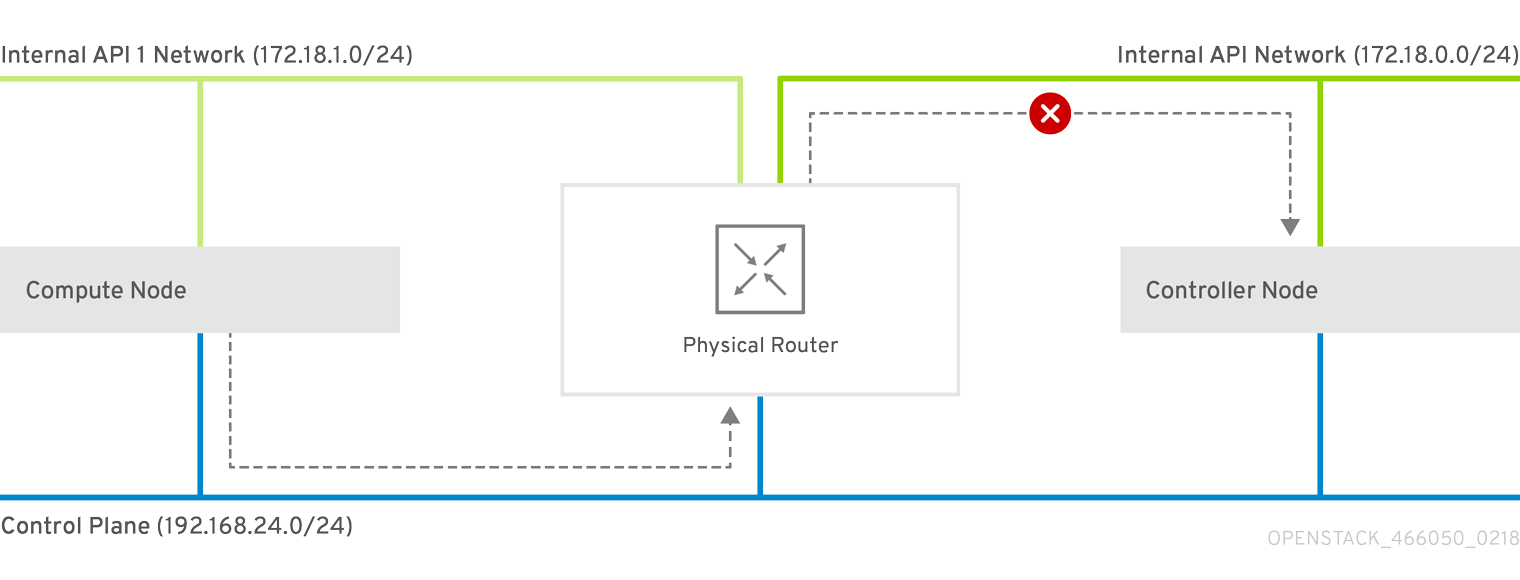
This following diagram shows an attempt to route traffic through the control plane, which will not succeed. The return route from the router to the controller node does not match the interface where the VIP is listening, so the packet is dropped. 192.168.24.0/24 is directly connected to the controller, so it is considered local to the Control Plane network.
Figure 4.1. Routed traffic through Control Plane
For comparison, this diagram shows routing running through the Internal API networks:
Figure 4.2. Routed traffic through Internal API

4.10. Assigning routes for composable networks
This procedure defines the routing for the leaf networks.
Procedure
-
Edit your
network-environment.yamlfile. Add the supernet route parameters to the
parameter_defaultssection. Each isolated network should have a supernet route applied. For example:parameter_defaults: StorageSupernet: 172.16.0.0/16 StorageMgmtSupernet: 172.17.0.0/16 InternalApiSupernet: 172.18.0.0/16 TenantSupernet: 172.19.0.0/16NoteThe network interface templates should contain the supernet parameters for each network. For example:
- type: vlan vlan_id: get_param: Storage0NetworkVlanID addresses: - ip_netmask: get_param: Storage0IpSubnet routes: - ip_netmask: get_param: StorageSupernet next_hop: get_param: Storage0InterfaceDefaultRouteAdd
ServiceNetMap HostnameResolveNetworkparameters to theparameter_defaultssection to provide each node in a leaf with a list of hostnames to use to resolve other leaf nodes. For example:parameter_defaults: ... ServiceNetMap: Compute1HostnameResolveNetwork: internal_api1 Compute2HostnameResolveNetwork: internal_api2 Compute3HostnameResolveNetwork: internal_api3 CephStorage1HostnameResolveNetwork: storage1 CephStorage2HostnameResolveNetwork: storage2 CephStorage3HostnameResolveNetwork: storage3The Compute nodes use the leaf’s Internal API network and the Ceph Storage nodes use the leaf’s Storage network.
Add the following
ExtraConfigsettings to theparameter_defaultssection to address routing for specific components on Compute and Ceph Storage nodes:Expand Table 4.1. Compute ExtraConfig parameters Parameter Set to this value nova::compute::libvirt::vncserver_listenIP address that the VNC servers listen to.
nova::compute::vncserver_proxyclient_addressIP address of the server running the VNC proxy client.
neutron::agents::ml2::ovs::local_ipIP address for OpenStack Networking (neutron) tunnel endpoints.
cold_migration_ssh_inbound_addrLocal IP address for cold migration SSH connections.
live_migration_ssh_inbound_addrLocal IP address for live migration SSH connections.
nova::migration::libvirt::live_migration_inbound_addrIP address used for live migration traffic.
NoteIf using SSL/TLS, prepend the network name with "fqdn_" to ensure the certificate is checked against the FQDN.
nova::my_ipIP address of the Compute (nova) service on the host.
tripleo::profile::base::database::mysql::client::mysql_client_bind_addressIP address of the database client. In this case, it is the
mysqlclient on the Compute nodes.Expand Table 4.2. CephAnsibleExtraConfig parameters Parameter Set to this value public_networkComma-separated list of all the storage networks that contain Ceph nodes (one per leaf), for example, 172.16.0.0/24,172.16.1.0/24,172.16.2.0/24
cluster_networkComma-separated list of the storage management networks that contain Ceph nodes (one per leaf), for example, 172.17.0.0/24,172.17.1.0/24,172.17.2.0/24
For example:
parameter_defaults:
  ...
  Compute1ExtraConfig:
    nova::compute::libvirt::vncserver_listen: "%{hiera('internal_api1')}"
    nova::compute::vncserver_proxyclient_address: "%{hiera('internal_api1')}"
    neutron::agents::ml2::ovs::local_ip: "%{hiera('tenant1')}"
    cold_migration_ssh_inbound_addr: "%{hiera('internal_api1')}"
    live_migration_ssh_inbound_addr: "%{hiera('internal_api1')}"
    nova::migration::libvirt::live_migration_inbound_addr: "%{hiera('internal_api1')}"
    nova::my_ip: "%{hiera('internal_api1')}"
    tripleo::profile::base::database::mysql::client::mysql_client_bind_address: "%{hiera('internal_api1')}"

  Compute2ExtraConfig:
    nova::compute::libvirt::vncserver_listen: "%{hiera('internal_api2')}"
    nova::compute::vncserver_proxyclient_address: "%{hiera('internal_api2')}"
    neutron::agents::ml2::ovs::local_ip: "%{hiera('tenant2')}"
    cold_migration_ssh_inbound_addr: "%{hiera('internal_api2')}"
    live_migration_ssh_inbound_addr: "%{hiera('internal_api2')}"
    nova::migration::libvirt::live_migration_inbound_addr: "%{hiera('internal_api2')}"
    nova::my_ip: "%{hiera('internal_api2')}"
    tripleo::profile::base::database::mysql::client::mysql_client_bind_address: "%{hiera('internal_api2')}"

  Compute3ExtraConfig:
    nova::compute::libvirt::vncserver_listen: "%{hiera('internal_api3')}"
    nova::compute::vncserver_proxyclient_address: "%{hiera('internal_api3')}"
    neutron::agents::ml2::ovs::local_ip: "%{hiera('tenant3')}"
    cold_migration_ssh_inbound_addr: "%{hiera('internal_api3')}"
    live_migration_ssh_inbound_addr: "%{hiera('internal_api3')}"
    nova::migration::libvirt::live_migration_inbound_addr: "%{hiera('internal_api3')}"
    nova::my_ip: "%{hiera('internal_api3')}"
    tripleo::profile::base::database::mysql::client::mysql_client_bind_address: "%{hiera('internal_api3')}"

  CephAnsibleExtraConfig:
    public_network: '172.16.0.0/24,172.16.1.0/24,172.16.2.0/24'
    cluster_network: '172.17.0.0/24,172.17.1.0/24,172.17.2.0/24'
4.11. Setting control plane parameters
You usually define networking details for isolated spine-leaf networks using a network_data file. The exception is the control plane network, which the undercloud created. However, the overcloud requires access to the control plane for each leaf. This requires some additional parameters, which you define in your network-environment.yaml file. For example, the following snippet is from an example NIC template for the Controller role on Leaf0
- type: interface
  name: nic1
  use_dhcp: false
  dns_servers:
    get_param: DnsServers
  addresses:
  - ip_netmask:
      list_join:
      - /
      - - get_param: ControlPlaneIp
        - get_param: ControlPlane0SubnetCidr
  routes:
  - ip_netmask: 169.254.169.254/32
    next_hop:
      get_param: Leaf0EC2MetadataIp
  - ip_netmask: 192.168.10.0/24
    next_hop:
      get_param: ControlPlane0DefaultRoute
In this instance, we need to define the IP, subnet, metadata IP, and default route for the respective Control Plane network on Leaf 0.
Procedure
-
Edit your
network-environment.yamlfile. In the
parameter_defaultssection:Add the mapping to the main control plane subnet:
parameter_defaults:
  ...
  ControlPlaneSubnet: leaf0
Add the control plane subnet mapping for each spine-leaf network:
parameter_defaults:
  ...
  Controller0ControlPlaneSubnet: leaf0
  Compute0ControlPlaneSubnet: leaf0
  Compute1ControlPlaneSubnet: leaf1
  Compute2ControlPlaneSubnet: leaf2
  CephStorage0ControlPlaneSubnet: leaf0
  CephStorage1ControlPlaneSubnet: leaf1
  CephStorage2ControlPlaneSubnet: leaf2
Add the control plane routes for each leaf:
parameter_defaults:
  ...
  ControlPlane0DefaultRoute: 192.168.10.1
  ControlPlane0SubnetCidr: '24'
  ControlPlane1DefaultRoute: 192.168.11.1
  ControlPlane1SubnetCidr: '24'
  ControlPlane2DefaultRoute: 192.168.12.1
  ControlPlane2SubnetCidr: '24'
The default route parameters are typically the IP address set for the
gatewayof each provisioning subnet. Refer to yourundercloud.conffile for this information.Add the parameters for the EC2 metadata IPs:
parameter_defaults:
  ...
  Leaf0EC2MetadataIp: 192.168.10.1
  Leaf1EC2MetadataIp: 192.168.11.1
  Leaf2EC2MetadataIp: 192.168.12.1
These act as routes through the control plane for the EC2 metadata service (169.254.169.254/32) and you should typically set these to the respective
gatewayfor each leaf on the provisioning network.
-
Save the
network-environment.yamlfile.
4.12. Deploying a spine-leaf enabled overcloud
All our files are now ready for our deployment. This section provides a review of each file and the deployment command:
Procedure
Review the
/home/stack/template/network_data_spine_leaf.yamlfile and ensure it contains each network for each leaf.NoteThere is currently no validation performed for the network subnet and
allocation_poolsvalues. Be certain you have defined these consistently and there is no conflict with existing networks.-
Review the NIC templates contained in
~/templates/spine-leaf-nics/and ensure the interfaces for each role on each leaf are correctly defined. -
Review the
network-environment.yamlenvironment file and ensure it contains all custom parameters that fall outside control of the network data file. This includes routes, control plane parameters, and aresource_registrysection that references the custom NIC templates for each role. -
Review the
/home/stack/templates/roles_data_spine_leaf.yamlvalues and ensure you have defined a role for each leaf. - Check the `/home/stack/templates/nodes_data.yaml file and ensure all roles have an assigned flavor and a node count. Check also that all nodes for each leaf are correctly tagged.
Run the
openstack overcloud deploycommand to apply the spine leaf configuration. For example:openstack overcloud deploy --templates \ -n /home/stack/template/network_data_spine_leaf.yaml \ -r /home/stack/templates/roles_data_spine_leaf.yaml \ -e /usr/share/openstack-tripleo-heat-templates/environments/network-isolation.yaml \ -e /home/stack/templates/network-environment.yaml \ -e /home/stack/templates/nodes_data.yaml \ -e [OTHER ENVIRONMENT FILES]-
The
network-isolation.yamlis the rendered name of the Jinja2 file in the same location (network-isolation.j2.yaml). Include this file to ensure the director isolates each networks to its correct leaf. This ensures the networks are created dynamically during the overcloud creation process. -
Include the
network-environment.yamlfile after thenetwork-isolation.yamland other network-based environment files. This ensures any parameters and resources defined withinnetwork-environment.yamloverride the same parameters and resources previously defined in other environment files. - Add any additional environment files. For example, an environment file with your container image locations or Ceph cluster configuration.
-
The
- Wait until the spine-leaf enabled overcloud deploys.

'%20d='M201.5%20305.5c-13.8%200-24.9-11.1-24.9-24.6%200-13.8%2011.1-24.9%2024.9-24.9%2013.6%200%2024.6%2011.1%2024.6%2024.9%200%2013.6-11.1%2024.6-24.6%2024.6zM504%20256c0%20137-111%20248-248%20248S8%20393%208%20256%20119%208%20256%208s248%20111%20248%20248zm-132.3-41.2c-9.4%200-17.7%203.9-23.8%2010-22.4-15.5-52.6-25.5-86.1-26.6l17.4-78.3%2055.4%2012.5c0%2013.6%2011.1%2024.6%2024.6%2024.6%2013.8%200%2024.9-11.3%2024.9-24.9s-11.1-24.9-24.9-24.9c-9.7%200-18%205.8-22.1%2013.8l-61.2-13.6c-3-.8-6.1%201.4-6.9%204.4l-19.1%2086.4c-33.2%201.4-63.1%2011.3-85.5%2026.8-6.1-6.4-14.7-10.2-24.1-10.2-34.9%200-46.3%2046.9-14.4%2062.8-1.1%205-1.7%2010.2-1.7%2015.5%200%2052.6%2059.2%2095.2%20132%2095.2%2073.1%200%20132.3-42.6%20132.3-95.2%200-5.3-.6-10.8-1.9-15.8%2031.3-16%2019.8-62.5-14.9-62.5zM302.8%20331c-18.2%2018.2-76.1%2017.9-93.6%200-2.2-2.2-6.1-2.2-8.3%200-2.5%202.5-2.5%206.4%200%208.6%2022.8%2022.8%2087.3%2022.8%20110.2%200%202.5-2.2%202.5-6.1%200-8.6-2.2-2.2-6.1-2.2-8.3%200zm7.7-75c-13.6%200-24.6%2011.1-24.6%2024.9%200%2013.6%2011.1%2024.6%2024.6%2024.6%2013.8%200%2024.9-11.1%2024.9-24.6%200-13.8-11-24.9-24.9-24.9z'/%3e%3c/svg%3e)